auto-permission-system 3.8.0 → 3.9.1
This diff represents the content of publicly available package versions that have been released to one of the supported registries. The information contained in this diff is provided for informational purposes only and reflects changes between package versions as they appear in their respective public registries.
- package/README.md +333 -221
- package/assets/demo.gif +0 -0
- package/assets/demo.mp4 +0 -0
- package/assets/logo.png +0 -0
- package/banner.png +0 -0
- package/extensions/guard.ts +7 -7
- package/extensions/permission-mode.ts +4 -4
- package/extensions/sandbox.ts +1 -1
- package/package.json +12 -12
- package/skills/auto-permission-system/SKILL.md +9 -9
- package/src/core/trust.ts +1 -1
- package/src/l1-sandbox/bash-ops.ts +7 -7
- package/src/l1-sandbox/network-ask.ts +6 -6
- package/src/l2-guard/exposure.ts +5 -15
- package/src/l2-guard/program-grants.ts +5 -5
- package/src/l2-guard/program-id.ts +3 -3
- package/src/l2-guard/prompts.ts +4 -4
- package/src/ui/ask-flow.ts +10 -8
- package/src/ui/ask-selector.ts +1 -1
- package/src/ui/ask.ts +2 -2
- /package/{sandbox.cloud.json → sandbox.claude.json} +0 -0
package/README.md
CHANGED
|
@@ -1,346 +1,458 @@
|
|
|
1
|
-
|
|
1
|
+
<p align="center">
|
|
2
|
+
<a href="https://pi.dev/packages">
|
|
3
|
+
<img src="https://raw.githubusercontent.com/Navin009/auto-permission-system/main/assets/logo.png" alt="Auto Permission System Logo" width="160" />
|
|
4
|
+
</a>
|
|
5
|
+
</p>
|
|
6
|
+
|
|
7
|
+
# Auto Permission System: Secure Auto Mode & Security for Pi Coding Agent
|
|
2
8
|
|
|
3
9
|
[](https://www.npmjs.com/package/auto-permission-system)
|
|
4
10
|
[](https://www.npmjs.com/package/auto-permission-system)
|
|
5
11
|
[](./LICENSE)
|
|
6
12
|
[](https://pi.dev/packages)
|
|
7
13
|
[](https://github.com/Navin009/auto-permission-system/actions/workflows/ci.yml)
|
|
8
|
-
[![
|
|
9
|
-
[](#security-for-pi
|
|
10
|
-
[](#permission-system
|
|
14
|
+
[](#secure-auto-mode--claude-auto-mode)
|
|
15
|
+
[](#security-for-pi-how-it-works)
|
|
16
|
+
[](#permission-system--modes)
|
|
17
|
+
|
|
18
|
+
**Auto Permission System** is a zero-trust permission architecture and **Secure Auto Mode / Claude Auto Mode for the [Pi coding agent](https://pi.dev)**. It brings the confidence of **Claude's auto mode** to Pi—enabling autonomous agent workflows while actively scanning files, shell commands, and tool content to **prevent data breaches and credential exfiltration**.
|
|
11
19
|
|
|
12
|
-
|
|
20
|
+
Whether running interactively with keyboard-driven ask prompts or running headlessly in CI/CD pipelines, this package enforces multi-layer boundaries across filesystem access, network egress, shell commands, and MCP tools.
|
|
21
|
+
|
|
22
|
+
---
|
|
13
23
|
|
|
14
|
-
|
|
24
|
+
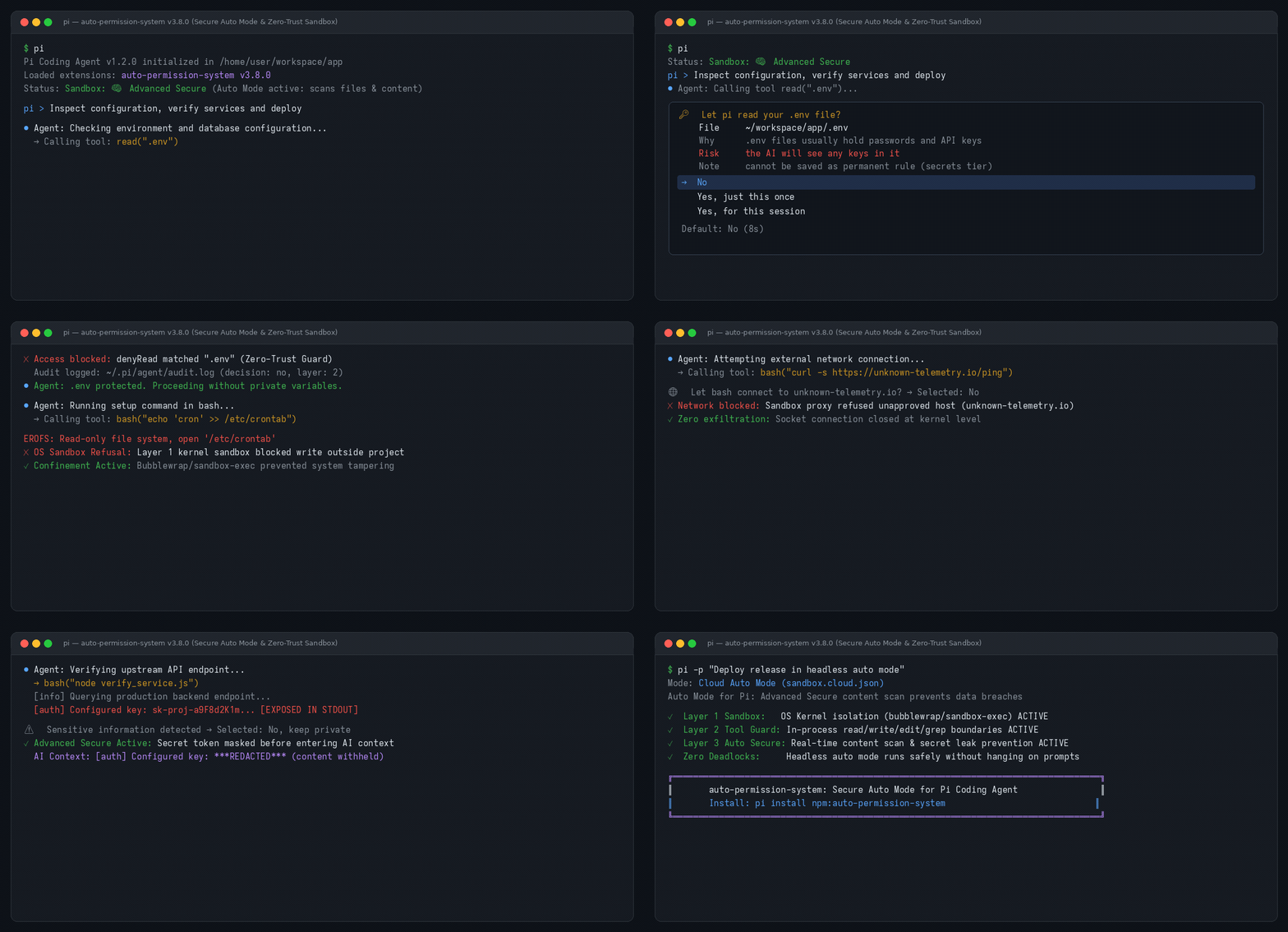
## Demo: Zero-Trust Security in Action
|
|
15
25
|
|
|
16
|
-
|
|
17
|
-
- **Layer 2** — In-process tool guard applying the same policy to the tools the OS sandbox can't reach: `read`, `grep`, `find`, `ls`, `write`, `edit`, `fetch_content`, `web_search`, `get_search_content`. `grep` output lines from denied files beneath an allowed search root are removed before the model sees them.
|
|
18
|
-
- **Layer 3** — Subagent posture: optionally drop or restrict network access when running headless (`-p`, JSON mode, subagents).
|
|
26
|
+
|
|
19
27
|
|
|
20
|
-
|
|
28
|
+
### Demonstrated Moments in the Recording:
|
|
29
|
+
1. **Interactive `.env` Read Guard:** Intercepts `read(".env")` before the AI can see secrets. Displays a 10s countdown prompt defaulting to `No` (Block).
|
|
30
|
+
2. **Kernel OS Sandbox Confinement:** Prevents bash commands from writing to system paths outside allowed roots (`EROFS: Read-only file system`).
|
|
31
|
+
3. **Governed Network Egress:** Catches unknown outbound connections (`curl`) with an interactive domain ask prompt and a 15s countdown timer.
|
|
32
|
+
4. **Real-Time API Key & Secret Redaction:** Automatically detects exposed API tokens (`sk-proj-...`, `ghp_...`) in command output and replaces them with `***REDACTED***` before reaching the LLM context.
|
|
33
|
+
5. **Autonomous Claude Auto Mode:** Demonstrates headless, fail-closed CI execution (`pi -p`) with zero deadlocks and zero hangs.
|
|
34
|
+
|
|
35
|
+
---
|
|
21
36
|
|
|
22
37
|
## Contents
|
|
23
38
|
|
|
24
|
-
- [
|
|
39
|
+
- [Quickstart & Installation](#quickstart--installation)
|
|
25
40
|
- [Requirements](#requirements)
|
|
26
|
-
- [
|
|
27
|
-
- [
|
|
28
|
-
- [
|
|
29
|
-
- [
|
|
30
|
-
- [
|
|
31
|
-
- [
|
|
32
|
-
- [
|
|
33
|
-
- [
|
|
34
|
-
- [
|
|
35
|
-
- [
|
|
41
|
+
- [Key Features at a Glance](#key-features-at-a-glance)
|
|
42
|
+
- [Security for Pi: How It Works](#security-for-pi-how-it-works)
|
|
43
|
+
- [Interactive Ask Prompts](#interactive-ask-prompts)
|
|
44
|
+
- [Secure Auto Mode & Claude Auto Mode](#secure-auto-mode--claude-auto-mode)
|
|
45
|
+
- [Real-Time Secret Detection & Content Scanning](#real-time-secret-detection--content-scanning)
|
|
46
|
+
- [Permission System & Modes](#permission-system--modes)
|
|
47
|
+
- [Configuration Reference](#configuration-reference)
|
|
48
|
+
- [Commands & Mid-Session Controls](#commands--mid-session-controls)
|
|
49
|
+
- [Escape Hatches](#escape-hatches)
|
|
50
|
+
- [Audit Logging](#audit-logging)
|
|
51
|
+
- [FAQ & Scenarios](#faq--scenarios)
|
|
52
|
+
- [Development & Testing](#development--testing)
|
|
36
53
|
- [Releasing](#releasing)
|
|
37
54
|
- [License](#license)
|
|
38
55
|
|
|
39
|
-
|
|
56
|
+
---
|
|
57
|
+
|
|
58
|
+
## Quickstart & Installation
|
|
40
59
|
|
|
41
|
-
`auto-permission-system`
|
|
60
|
+
Install `auto-permission-system` directly through the [Pi package manager](https://pi.dev/packages):
|
|
42
61
|
|
|
43
62
|
```bash
|
|
44
|
-
#
|
|
63
|
+
# 1. Install from npm (recommended)
|
|
45
64
|
pi install npm:auto-permission-system
|
|
46
65
|
|
|
47
|
-
#
|
|
66
|
+
# 2. Or install directly from GitHub
|
|
48
67
|
pi install git:github.com/Navin009/auto-permission-system
|
|
49
68
|
|
|
50
|
-
#
|
|
69
|
+
# 3. Or try it for a single session without permanent installation
|
|
51
70
|
pi -e npm:auto-permission-system
|
|
52
71
|
```
|
|
53
72
|
|
|
54
|
-
|
|
55
|
-
|
|
56
|
-
## Requirements
|
|
57
|
-
|
|
58
|
-
- macOS or Linux
|
|
59
|
-
- macOS: `sandbox-exec` is built in
|
|
60
|
-
- Linux: `bubblewrap`, `socat`
|
|
73
|
+
Once installed, the extension automatically loads whenever you launch `pi`. Check your active security status in the terminal footer or by typing `/security`.
|
|
61
74
|
|
|
62
|
-
|
|
75
|
+
---
|
|
63
76
|
|
|
64
|
-
|
|
77
|
+
## Requirements
|
|
65
78
|
|
|
66
|
-
|
|
67
|
-
|
|
68
|
-
|
|
69
|
-
|
|
70
|
-
| `<cwd>/.pi/sandbox.json` | Project-local (auto-written by ask-tier prompts) |
|
|
79
|
+
- **Linux:** Requires `bubblewrap` and `socat` for Layer 1 OS-level isolation:
|
|
80
|
+
```bash
|
|
81
|
+
# Ubuntu / Debian
|
|
82
|
+
sudo apt-get install -y bubblewrap socat
|
|
71
83
|
|
|
72
|
-
|
|
84
|
+
# Fedora / RHEL
|
|
85
|
+
sudo dnf install -y bubblewrap socat
|
|
73
86
|
|
|
74
|
-
|
|
87
|
+
# Arch Linux
|
|
88
|
+
sudo pacman -S bubblewrap socat
|
|
89
|
+
```
|
|
90
|
+
- **macOS:** Built-in `sandbox-exec` is utilized automatically (no extra packages required).
|
|
91
|
+
- **Node.js:** v18.0.0 or later.
|
|
92
|
+
- **Pi Coding Agent:** `@earendil-works/pi-coding-agent` ([pi.dev](https://pi.dev)).
|
|
75
93
|
|
|
76
|
-
|
|
77
|
-
{
|
|
78
|
-
"enabled": true, // set false to disable Layer 2 without --yolo
|
|
79
|
-
"mode": "default", // "default" (rules) | "advanced-secure" (secret detection, ADR-018)
|
|
80
|
-
"network": {
|
|
81
|
-
"allowedDomains": [ // domains the URL tools and bash may reach
|
|
82
|
-
"github.com", "*.github.com",
|
|
83
|
-
"registry.npmjs.org"
|
|
84
|
-
],
|
|
85
|
-
"deniedDomains": [], // hard deny, checked first, never ask-able
|
|
86
|
-
"strictAllowlist": false // true = deny unknown hosts instead of asking
|
|
87
|
-
},
|
|
88
|
-
"filesystem": {
|
|
89
|
-
"denyRead": ["~/.ssh", "~/.aws", "~/.pi/agent"], // Layer 1 + Layer 2: no read at all
|
|
90
|
-
"askRead": [".env", ".env.*"], // Layer 1 + Layer 2: ask before reading, not hard-denied (ADR-019)
|
|
91
|
-
"modelDenyRead": ["~/.netrc"], // Layer 2 only: model's read tool blocked; subprocesses ok
|
|
92
|
-
"allowWrite": [".", "/tmp"], // Layer 2: writes only inside these roots
|
|
93
|
-
"denyWrite": [".env", "*.pem"] // Layer 1 + Layer 2: write always blocked
|
|
94
|
-
},
|
|
95
|
-
"subagent": {
|
|
96
|
-
"network": "allow" // "allow" | "deny" | "research-only"
|
|
97
|
-
},
|
|
98
|
-
"mcp": { // Advanced Secure MCP gate tuning (ADR-032)
|
|
99
|
-
"allowTools": ["mcp__diffusion_studio__context"], // exact names that never ask
|
|
100
|
-
"allowPrefixes": ["mcp__ticktick__get_"], // name prefixes that never ask
|
|
101
|
-
"askTools": [], // exact names that always ask
|
|
102
|
-
"trustAnnotations": false, // true = a server's readOnlyHint allows without asking
|
|
103
|
-
"allowSimpleUpdates": true, // narrow field updates skip the ask
|
|
104
|
-
"askThreshold": 30 // risk score at which a call asks (lower = stricter)
|
|
105
|
-
},
|
|
106
|
-
"commands": {
|
|
107
|
-
"ask": ["printenv", "env", "/proc/*/environ"] // bash: ask before these (they can print env tokens)
|
|
108
|
-
}
|
|
109
|
-
}
|
|
110
|
-
```
|
|
94
|
+
---
|
|
111
95
|
|
|
112
|
-
|
|
96
|
+
## Key Features at a Glance
|
|
113
97
|
|
|
114
|
-
|
|
98
|
+
| Feature | Description | Protection Level |
|
|
99
|
+
|---|---|---|
|
|
100
|
+
| 🛡️ **3-Layer Defense** | OS Kernel sandbox (`bubblewrap`/`sandbox-exec`) + in-process tool guard + real-time content redactor. | Zero-Trust |
|
|
101
|
+
| ⚡ **Secure Auto Mode** | Autonomous execution inspired by Claude's auto mode; scans files and output to prevent data breaches. | Autonomous / Claude |
|
|
102
|
+
| 🔑 **Interactive Ask Prompts** | Real-time terminal prompts with 10s countdowns (`Once`, `Session`, `Project`, `Global`). | Interactive Human-in-the-Loop |
|
|
103
|
+
| 🔍 **AST & Regex Secret Scanner** | Scans tool stdout/stderr for API keys, private keys, and tokens, redacting them before model context. | Data Breach Prevention |
|
|
104
|
+
| 🌐 **Network Egress Gate** | Intercepts unapproved network connections and prompts for confirmation with wildcards. | Data Leak Prevention |
|
|
105
|
+
| 🔒 **Absolute-Deny Tier** | Strict two-step confirmation required for high-risk keys (`~/.ssh`, `~/.aws`, `auth.json`). | Maximum Protection |
|
|
106
|
+
| 📋 **Full JSONL Audit Trail** | Every allow, deny, ask, and redaction event is recorded to `~/.pi/agent/audit.log`. | Compliance & Auditing |
|
|
115
107
|
|
|
116
|
-
|
|
117
|
-
- **Changes that make your security weaker do not apply** until you trust the file. Examples: turn off auto-permission-system, let bash write to `/`, allow more websites.
|
|
118
|
-
- auto-permission-system shows a warning that lists these changes in plain words.
|
|
119
|
-
- **Did you write the file?** Type `/security trust`. auto-permission-system shows the changes and asks you. If you say "No", it does not warn again until the file changes.
|
|
120
|
-
- Trust is for the file as it is now. If the file changes, auto-permission-system asks again.
|
|
121
|
-
- Most folders have no `.pi/sandbox.json`, so you see nothing. Your own "always for CURRENT project" answers keep the file trusted.
|
|
122
|
-
- `/security untrust` removes the trust. `/security` shows the status.
|
|
108
|
+
---
|
|
123
109
|
|
|
124
|
-
|
|
110
|
+
## Security for Pi: How It Works
|
|
125
111
|
|
|
126
|
-
|
|
112
|
+
`auto-permission-system` employs a defense-in-depth model across three coordinated layers:
|
|
127
113
|
|
|
128
|
-
```
|
|
129
|
-
|
|
130
|
-
|
|
131
|
-
|
|
132
|
-
|
|
133
|
-
|
|
134
|
-
|
|
114
|
+
```
|
|
115
|
+
┌────────────────────────────────────────────────────────────────────────┐
|
|
116
|
+
│ AI Coding Agent Execution │
|
|
117
|
+
└───────────────────────────────────┬────────────────────────────────────┘
|
|
118
|
+
│
|
|
119
|
+
┌────────────────────────┴────────────────────────┐
|
|
120
|
+
▼ ▼
|
|
121
|
+
┌─────────────────────────────────────┐ ┌─────────────────────────────────────┐
|
|
122
|
+
│ Layer 2: In-Process Tool Guard │ │ Layer 1: OS Kernel Sandbox │
|
|
123
|
+
│ - Intercepts read, grep, find, ls │ │ - Bubblewrap (Linux) / sandbox-exec│
|
|
124
|
+
│ - Intercepts write, edit, fetch │ │ - Read-only root filesystem (EROFS)│
|
|
125
|
+
│ - Filters secrets from searches │ │ - Enforces allowWrite roots │
|
|
126
|
+
│ - Gates MCP tool calls & risk verbs│ │ - Intercepts unlisted network egress
|
|
127
|
+
└──────────────────┬──────────────────┘ └──────────────────┬──────────────────┘
|
|
128
|
+
│ │
|
|
129
|
+
└────────────────────┬────────────────────┘
|
|
130
|
+
▼
|
|
131
|
+
┌────────────────────────────────────────────────────────────────────────┐
|
|
132
|
+
│ Layer 3 / Auto Secure: Real-Time Content Redactor │
|
|
133
|
+
│ - Scans stdout/stderr & tool results for API keys, AWS & GitHub tokens│
|
|
134
|
+
│ - Replaces exposed secrets with ***REDACTED*** before model context │
|
|
135
|
+
└────────────────────────────────────────────────────────────────────────┘
|
|
135
136
|
```
|
|
136
137
|
|
|
137
|
-
|
|
138
|
-
|
|
139
|
-
|
|
140
|
-
|
|
141
|
-
|
|
142
|
-
|
|
143
|
-
Every prompt waits **10 seconds** by default. For file reads and writes, no answer resolves to the safe default: **block / deny**. For a network ask, no answer resolves to **allow once** (ADR-024); Esc still denies.
|
|
144
|
-
|
|
145
|
-
### File-name patterns
|
|
138
|
+
1. **Layer 1 (OS Kernel Sandbox):**
|
|
139
|
+
Wraps all `bash` commands in an unprivileged kernel container. Writes outside designated folders (`.` and `/tmp`) are refused by the kernel with `EROFS: Read-only file system`. Sensitive directories (`~/.ssh`, `~/.aws`, `~/.gnupg`) are masked. Network egress to unlisted domains is intercepted via a local proxy.
|
|
140
|
+
2. **Layer 2 (In-Process Tool Guard):**
|
|
141
|
+
Applies consistent policy rules to tools that run in-process within Pi (`read`, `grep`, `find`, `ls`, `write`, `edit`, `fetch_content`, `web_search`). Denied files are hidden from search listings before the LLM can observe them.
|
|
142
|
+
3. **Layer 3 / Auto Secure (Sensitive Content Redactor):**
|
|
143
|
+
Operates before any tool output reaches the model's context window. Analyzes content using AST and regex pattern matchers for known tokens (OpenAI, Anthropic, GitHub, AWS, Stripe). If sensitive data is detected, the user can withhold it or have it redacted automatically.
|
|
146
144
|
|
|
147
|
-
|
|
145
|
+
---
|
|
148
146
|
|
|
149
|
-
|
|
147
|
+
## Interactive Ask Prompts
|
|
150
148
|
|
|
151
|
-
`
|
|
149
|
+
When an unlisted domain, `.env` file, or directory write is requested during an interactive terminal session, `auto-permission-system` renders a clean, keyboard-driven prompt:
|
|
152
150
|
|
|
153
|
-
|
|
154
|
-
|
|
155
|
-
|
|
156
|
-
- **MCP calls:** `mcp__<server>__<tool>` calls are classified; a risky call asks before it runs. The gate ignores the server namespace, reads the operation from the head verb of the tool name (or the first verb of the description), and asks for destructive names, mutating names (`update_*`, `create_*`, `run_*`, `evaluate_*`), and destructive arguments (SQL `DELETE`, `rm -rf`, `*` targets, HTTP `DELETE`, production targets). A documented tool with an unclassified name (`context`, `capture`, `logs`) does not ask; a tool with no description counts as opaque and does. Tune it under `mcp` in `sandbox.json` — `allowTools` / `allowPrefixes` skip asks, `askTools` forces them, `trustAnnotations` trusts a server's `readOnlyHint`, `askThreshold` moves the score line (ADR-032).
|
|
157
|
-
- **Tool/command/file output:** before any output reaches the model, a secret-like hit shows `⚠ Sensitive information detected`, the file, and each detected line as `lineNo: text`, and the question **Should the AI be allowed to see it?** with two choices — **No, keep private** or **Yes, allow**. A bare `key` counts only when the value looks machine-generated: `key=<random>` asks, while `key=value`, `key=subagent.network`, and code such as `const key = x` stay clean. No, keep private withholds the output and tells the model plainly that the output was withheld because it may contain sensitive information, so the model does not mistake it for a failure or an empty result. Esc or timeout keeps it private.
|
|
151
|
+
### 1. Sensitive `.env` Read Prompt
|
|
152
|
+
```
|
|
153
|
+
🔑 Let pi read your .env file?
|
|
158
154
|
|
|
159
|
-
|
|
155
|
+
File ~/workspace/app/.env
|
|
156
|
+
Command grep -r TOKEN .env
|
|
157
|
+
Why .env files usually hold passwords and API keys
|
|
158
|
+
Risk the AI will see any keys in it
|
|
159
|
+
Note can't be saved as a permanent rule (secrets tier)
|
|
160
160
|
|
|
161
|
-
|
|
161
|
+
> No
|
|
162
|
+
Yes, just this once
|
|
163
|
+
Yes, for this conversation
|
|
162
164
|
|
|
163
|
-
|
|
165
|
+
Default: No (10s)
|
|
166
|
+
```
|
|
167
|
+
- **Preselected Default:** `No` is preselected. Pressing Enter immediately blocks the read.
|
|
168
|
+
- **Expiry:** If unattended for 10 seconds, the prompt resolves safely to **No** (Block).
|
|
164
169
|
|
|
165
|
-
###
|
|
170
|
+
### 2. Governed Network Egress Prompt
|
|
171
|
+
```
|
|
172
|
+
🌐 Let bash connect to unknown-telemetry.io?
|
|
166
173
|
|
|
167
|
-
|
|
174
|
+
Site unknown-telemetry.io
|
|
175
|
+
Command curl -s https://unknown-telemetry.io/ping
|
|
176
|
+
Why this site isn't on your allowed list yet
|
|
168
177
|
|
|
169
|
-
|
|
178
|
+
> No
|
|
179
|
+
Yes, just this once
|
|
180
|
+
Yes, all in group for this conversation
|
|
181
|
+
Yes, always…
|
|
170
182
|
|
|
171
|
-
|
|
183
|
+
Default: Yes, just this once (15s)
|
|
184
|
+
```
|
|
185
|
+
- **Network Expiry Rule:** Domain prompts feature a 15-second countdown defaulting to `Allow once` for smooth browsing. Pressing `↑` or `↓` immediately stops the countdown, returning complete control to Enter/Esc.
|
|
172
186
|
|
|
173
|
-
###
|
|
187
|
+
### 3. Real-Time Token Leak Redaction Prompt
|
|
188
|
+
```
|
|
189
|
+
⚠ Sensitive information detected: API Secret Key
|
|
174
190
|
|
|
175
|
-
|
|
191
|
+
Tool bash (node verify_service.js)
|
|
192
|
+
Finding 23: sk-(?!ant-)[A-Za-z0-9_-]
|
|
193
|
+
Question Should the AI be allowed to see it?
|
|
176
194
|
|
|
177
|
-
|
|
195
|
+
> No, keep private (recommended)
|
|
196
|
+
Yes, allow
|
|
197
|
+
```
|
|
198
|
+
- `Finding` prints the **complete** detected line and its line number — one `Finding` row per match when several secrets appear, with no truncation.
|
|
199
|
+
- Choosing **No, keep private** replaces the token with `***REDACTED***` in the model's context window, preventing credentials from leaking to LLM providers.
|
|
178
200
|
|
|
179
|
-
|
|
201
|
+
---
|
|
180
202
|
|
|
181
|
-
##
|
|
203
|
+
## Secure Auto Mode & Claude Auto Mode
|
|
182
204
|
|
|
183
|
-
|
|
205
|
+
In modern AI coding tools like Claude Code, developers love **auto mode** because the agent can execute tasks autonomously without constantly prompting for confirmation on trivial, harmless steps.
|
|
184
206
|
|
|
185
|
-
|
|
207
|
+
However, unconstrained auto mode is a significant data breach risk. If an autonomous agent reads credentials, runs unvetted scripts, or sends code to third-party endpoints, the entire developer environment can be compromised.
|
|
186
208
|
|
|
187
|
-
|
|
188
|
-
- **
|
|
189
|
-
- **
|
|
209
|
+
**Claude Auto Mode for Pi** delivers **Claude-style auto mode with zero-trust security**:
|
|
210
|
+
- **Autonomous Execution with Real-Time Guardrails:** The agent operates autonomously within approved boundaries, allowing rapid development while guarding sensitive resources.
|
|
211
|
+
- **Advanced Secure Scanning:** Uses `advanced-secure` mode to scan files, commands, and content to stop data breaches before they can occur.
|
|
212
|
+
- **Fail-Closed in Headless CI/CD:** When running unattended (`pi -p`, GitHub Actions, Docker, remote devboxes), unapproved operations fail closed immediately with a structured reason instead of hanging or deadlocking the pipeline.
|
|
190
213
|
|
|
191
|
-
### Activating
|
|
214
|
+
### Activating Claude Auto Mode in CI/CD:
|
|
192
215
|
|
|
193
216
|
```bash
|
|
194
|
-
# 1. Copy the shipped
|
|
195
|
-
|
|
217
|
+
# 1. Copy the shipped Claude Auto Mode template to your repository:
|
|
218
|
+
mkdir -p .pi
|
|
219
|
+
cp node_modules/auto-permission-system/sandbox.claude.json .pi/sandbox.json
|
|
196
220
|
|
|
197
221
|
# 2. Run Pi headlessly with complete automated protection:
|
|
198
|
-
pi -p "Review pull request changes and execute test suite"
|
|
222
|
+
pi -p "Review pull request changes, verify dependencies, and execute test suite"
|
|
199
223
|
```
|
|
200
224
|
|
|
201
|
-
|
|
202
|
-
|
|
203
|
-
|
|
225
|
+
#### GitHub Actions Workflow Example:
|
|
226
|
+
```yaml
|
|
227
|
+
name: CI Security & Agent Review
|
|
228
|
+
on: [pull_request]
|
|
229
|
+
|
|
230
|
+
jobs:
|
|
231
|
+
agent-review:
|
|
232
|
+
runs-on: ubuntu-latest
|
|
233
|
+
steps:
|
|
234
|
+
- uses: actions/checkout@v4
|
|
235
|
+
- uses: actions/setup-node@v4
|
|
236
|
+
with:
|
|
237
|
+
node-version: 20
|
|
238
|
+
- name: Install Pi and Auto Permission System
|
|
239
|
+
run: |
|
|
240
|
+
npm install -g @earendil-works/pi-coding-agent
|
|
241
|
+
pi install npm:auto-permission-system
|
|
242
|
+
- name: Activate Claude Auto Mode Preset
|
|
243
|
+
run: |
|
|
244
|
+
mkdir -p .pi
|
|
245
|
+
cp node_modules/auto-permission-system/sandbox.claude.json .pi/sandbox.json
|
|
246
|
+
- name: Run Autonomous Review in Auto Mode
|
|
247
|
+
run: |
|
|
248
|
+
pi -p "Verify changes, run npm test, and flag security issues"
|
|
249
|
+
```
|
|
204
250
|
|
|
205
|
-
|
|
251
|
+
---
|
|
206
252
|
|
|
207
|
-
|
|
253
|
+
## Real-Time Secret Detection & Content Scanning
|
|
208
254
|
|
|
209
|
-
|
|
210
|
-
2. **In-Process Tool Guard (Layer 2):** Guards the agent's internal tools (`read`, `write`, `edit`, `grep`, `find`, `ls`, `fetch_content`, `web_search`). Denied files are filtered out of directory listings and search outputs before the LLM can observe them.
|
|
211
|
-
3. **Secret Detection & Output Redactor (Auto Secure):** Analyzes tool outputs and bash output streams in real time. Credentials, private keys, API tokens, and environment secrets are masked before reaching the model context window.
|
|
255
|
+
When running in **Advanced Secure Mode** (`advanced-secure`), `auto-permission-system` continuously inspects tool payloads and command stdout/stderr:
|
|
212
256
|
|
|
213
|
-
|
|
214
|
-
- **
|
|
215
|
-
- **
|
|
216
|
-
- **Step 3:** For CI/CD and cloud runs, adopt `sandbox.cloud.json` to enforce strict domain and path boundaries.
|
|
257
|
+
- **High-Confidence Credential Recognition:** Recognizes OpenAI API keys, Anthropic keys, AWS credentials (`AKIA...`), GitHub personal access tokens (`ghp_...`, `github_pat_...`), database URIs (`postgres://`, `mongodb://`), and RSA/OpenSSH private keys.
|
|
258
|
+
- **Context Protection:** If a build command or tool outputs a secret, the system intercepts the stream and prompts the user or redacts the credential to `***REDACTED***`.
|
|
259
|
+
- **Zero-Loss Model Feedback:** The language model is informed that sensitive information was masked, allowing the AI to continue its task without ever seeing or transmitting the actual secret.
|
|
217
260
|
|
|
218
261
|
---
|
|
219
262
|
|
|
220
|
-
## Permission System
|
|
263
|
+
## Permission System & Modes
|
|
221
264
|
|
|
222
|
-
|
|
265
|
+
`auto-permission-system` provides three selectable permission modes:
|
|
223
266
|
|
|
224
|
-
|
|
|
267
|
+
| Mode | Inspection Level | Use Case |
|
|
225
268
|
|---|---|---|
|
|
226
|
-
|
|
|
227
|
-
|
|
|
228
|
-
|
|
|
229
|
-
| **Cloud Auto Mode** | In headless runs (`-p`), unapproved operations fail closed without blocking execution. | Headless subagents, Docker containers, GitHub Actions |
|
|
269
|
+
| **`advanced-secure`** *(Recommended)* | Full rule engine + real-time AST/regex secret detection + MCP risk scoring. | Daily development, autonomous auto mode, untrusted codebases. |
|
|
270
|
+
| **`default`** *(Shipped)* | Rule-based filesystem and network sandbox without inspecting payload content. | Standard development where secret detection is not required. |
|
|
271
|
+
| **`yolo`** *(Emergency)* | Temporarily disables all sandboxing and tool guards. | Emergency troubleshooting only. |
|
|
230
272
|
|
|
231
|
-
|
|
232
|
-
-
|
|
233
|
-
-
|
|
234
|
-
-
|
|
273
|
+
Switch modes anytime mid-session using `/permission-mode`. Your choice is saved to global settings (`~/.pi/agent/extensions/sandbox.json`) and reflected in the status chip:
|
|
274
|
+
- `Sandbox: 🧠 N domains, M paths` for `advanced-secure`
|
|
275
|
+
- `Sandbox: 🔒 N domains, M paths` for `default`
|
|
276
|
+
- `⚠️ YOLO — all security layers disabled` for `yolo`
|
|
235
277
|
|
|
236
278
|
---
|
|
237
279
|
|
|
238
|
-
##
|
|
280
|
+
## Configuration Reference
|
|
239
281
|
|
|
240
|
-
|
|
282
|
+
Policy files are merged hierarchically:
|
|
241
283
|
|
|
242
|
-
|
|
243
|
-
|
|
244
|
-
|
|
245
|
-
|
|
284
|
+
| Priority | Scope | Location | Purpose |
|
|
285
|
+
|---|---|---|---|
|
|
286
|
+
| 1 (Base) | Package Default | `sandbox.default.json` | Baseline policy shipped with the extension. |
|
|
287
|
+
| 2 (Global) | User Global | `~/.pi/agent/extensions/sandbox.json` | Global overrides across all repositories. |
|
|
288
|
+
| 3 (Project) | Project Local | `<cwd>/.pi/sandbox.json` | Repository-specific rules (auto-written by prompts). |
|
|
246
289
|
|
|
247
|
-
|
|
290
|
+
### Annotated `sandbox.json`:
|
|
248
291
|
|
|
249
|
-
|
|
250
|
-
|
|
251
|
-
|
|
252
|
-
|
|
253
|
-
|
|
254
|
-
|
|
292
|
+
```jsonc
|
|
293
|
+
{
|
|
294
|
+
"enabled": true, // Set false to disable Layer 2
|
|
295
|
+
"mode": "advanced-secure", // "advanced-secure" (recommended) | "default" | "yolo"
|
|
296
|
+
"network": {
|
|
297
|
+
"allowedDomains": [ // Allowed domains for bash and fetch_content
|
|
298
|
+
"github.com", "*.github.com",
|
|
299
|
+
"registry.npmjs.org"
|
|
300
|
+
],
|
|
301
|
+
"deniedDomains": [], // Hard-denied domains (never asked, always blocked)
|
|
302
|
+
"strictAllowlist": false // true = fail closed on unknown domains without asking
|
|
303
|
+
},
|
|
304
|
+
"filesystem": {
|
|
305
|
+
"denyRead": [ // Absolute denied reads (Layer 1 + Layer 2)
|
|
306
|
+
"~/.ssh", "~/.aws", "~/.pi/agent"
|
|
307
|
+
],
|
|
308
|
+
"askRead": [ // Sensitive files that prompt instead of hard-blocking
|
|
309
|
+
".env", ".env.*"
|
|
310
|
+
],
|
|
311
|
+
"modelDenyRead": ["~/.netrc"], // Hidden from LLM read tool; subprocesses can read
|
|
312
|
+
"allowWrite": [".", "/tmp"], // Writable roots for bash and edit/write tools
|
|
313
|
+
"denyWrite": [".env", "*.pem"] // Writes always blocked
|
|
314
|
+
},
|
|
315
|
+
"subagent": {
|
|
316
|
+
"network": "allow" // "allow" | "deny" | "research-only"
|
|
317
|
+
},
|
|
318
|
+
"mcp": {
|
|
319
|
+
"allowTools": [], // MCP tool names that never prompt
|
|
320
|
+
"askThreshold": 30 // Risk score threshold to prompt (lower = stricter)
|
|
321
|
+
},
|
|
322
|
+
"commands": {
|
|
323
|
+
"ask": ["printenv", "env", "/proc/*/environ"] // Bash commands that prompt before running
|
|
324
|
+
}
|
|
325
|
+
}
|
|
326
|
+
```
|
|
327
|
+
|
|
328
|
+
### Project Policy Files & Trust (ADR-013)
|
|
329
|
+
When cloning a repository with a `.pi/sandbox.json`:
|
|
330
|
+
- **Hardening rules** (additional deny paths) apply immediately.
|
|
331
|
+
- **Relaxing rules** (allowing `/`, disabling layers, adding external domains) require explicit trust.
|
|
332
|
+
- Run `/security trust` to inspect and approve changes, or `/security untrust` to revoke.
|
|
333
|
+
|
|
334
|
+
---
|
|
335
|
+
|
|
336
|
+
## Commands & Mid-Session Controls
|
|
337
|
+
|
|
338
|
+
| Command | Action |
|
|
339
|
+
|---|---|
|
|
340
|
+
| `/security` | View active Layer 2 policy, project trust status, and the last 10 audit events. |
|
|
341
|
+
| `/sandbox` | View active Layer 1 (OS sandbox) status and configuration. |
|
|
342
|
+
| `/sandbox reload` | Hot-reload policy rules after manual edits to `sandbox.json`. |
|
|
343
|
+
| `/permission-mode` | Switch between **Default**, **Advanced Secure**, and **YOLO** mid-session. |
|
|
344
|
+
| `/security trust` | Inspect and trust project-local policy widening in `.pi/sandbox.json`. |
|
|
345
|
+
| `/security untrust` | Revoke trust for the current project's policy file. |
|
|
346
|
+
|
|
347
|
+
---
|
|
348
|
+
|
|
349
|
+
## Escape Hatches
|
|
255
350
|
|
|
256
|
-
|
|
351
|
+
For emergencies or troubleshooting, disable security temporarily:
|
|
257
352
|
|
|
258
353
|
```bash
|
|
259
|
-
|
|
260
|
-
pi --
|
|
354
|
+
# Disable all security layers for a single invocation
|
|
355
|
+
pi --yolo
|
|
356
|
+
|
|
357
|
+
# Alias for --yolo
|
|
358
|
+
pi --no-sandbox
|
|
261
359
|
```
|
|
262
360
|
|
|
263
|
-
Mid-session, `/permission-mode`
|
|
361
|
+
Mid-session, type `/permission-mode` and pick **YOLO** to disable layers in place without restarting.
|
|
362
|
+
|
|
363
|
+
---
|
|
264
364
|
|
|
265
|
-
## Audit
|
|
365
|
+
## Audit Logging
|
|
266
366
|
|
|
267
|
-
Every
|
|
367
|
+
Every decision (allow, block, ask, redaction) is appended as a structured JSON Line to `~/.pi/agent/audit.log`:
|
|
268
368
|
|
|
269
|
-
```
|
|
369
|
+
```json
|
|
270
370
|
{
|
|
271
|
-
"ts": "2026-
|
|
272
|
-
"layer":
|
|
273
|
-
"tool": "
|
|
274
|
-
"subject": "/
|
|
275
|
-
"reason": "denyWrite matched
|
|
371
|
+
"ts": "2026-10-13T19:22:15.000Z",
|
|
372
|
+
"layer": 1,
|
|
373
|
+
"tool": "bash",
|
|
374
|
+
"subject": "/etc/crontab",
|
|
375
|
+
"reason": "denyWrite matched /etc/crontab",
|
|
276
376
|
"decision": "no",
|
|
277
|
-
"cwd": "/
|
|
377
|
+
"cwd": "/home/user/workspace/app"
|
|
278
378
|
}
|
|
279
379
|
```
|
|
280
380
|
|
|
281
|
-
|
|
381
|
+
### Querying the Audit Log:
|
|
382
|
+
```bash
|
|
383
|
+
# View recent blocked actions
|
|
384
|
+
grep '"decision":"no"' ~/.pi/agent/audit.log | tail -n 10
|
|
282
385
|
|
|
283
|
-
|
|
284
|
-
|
|
386
|
+
# View secret redaction events
|
|
387
|
+
grep '"finding"' ~/.pi/agent/audit.log | tail -n 10
|
|
388
|
+
```
|
|
285
389
|
|
|
286
|
-
|
|
287
|
-
Auto Permission System includes native pattern recognizers for PyPI API tokens (`pypi-*`), hard-blocks model access to `~/.pypirc`, and gates `pip install` network requests to trusted hosts (`pypi.org`, `*.pypi.org`), preventing AI agents from leaking deployment secrets or pulling unvetted dependencies.
|
|
390
|
+
---
|
|
288
391
|
|
|
289
|
-
|
|
290
|
-
Add it to `network.allowedDomains` in a policy file (global `~/.pi/agent/extensions/sandbox.json` or project `<cwd>/.pi/sandbox.json`), or just run the tool (or a bash `curl`) once and pick an **always** option in the ask prompt — that writes the domain to the project file for you.
|
|
392
|
+
## FAQ & Scenarios
|
|
291
393
|
|
|
292
|
-
|
|
293
|
-
Add the folder to `filesystem.allowWrite`. Relative paths (`.`, `/tmp`) resolve from the project root.
|
|
394
|
+
A selection of common questions is below. For the complete, detailed guide, read **[docs/FAQ.md](docs/FAQ.md)**.
|
|
294
395
|
|
|
295
|
-
###
|
|
296
|
-
|
|
396
|
+
### How does Claude Auto Mode secure unattended runs?
|
|
397
|
+
In headless mode (`pi -p` or subagent executions), interactive ask prompts cannot be presented to a human. Auto Permission System operates in a fail-closed posture: any tool call or bash command targeting an unlisted domain, credential file, or outside-project path is automatically blocked, and the refusal reason is provided to the agent and recorded in the audit log.
|
|
297
398
|
|
|
298
|
-
###
|
|
299
|
-
|
|
399
|
+
### What is the relationship between Claude Auto Mode and Claude's auto mode?
|
|
400
|
+
Claude Code popularized autonomous "auto mode", allowing developers to let AI code without stopping for confirmation on harmless steps. Claude Auto Mode brings this exact convenience to the Pi coding agent, but adds essential zero-trust boundaries: using Advanced Secure Mode to scan files, shell commands, and content to guarantee that autonomous execution never leads to data breaches or leaked API tokens.
|
|
300
401
|
|
|
301
|
-
###
|
|
302
|
-
|
|
402
|
+
### How do I allow the agent to reach a new domain?
|
|
403
|
+
Add it to `network.allowedDomains` in `<cwd>/.pi/sandbox.json` or `~/.pi/agent/extensions/sandbox.json`, or run a curl command once and select **Yes, always… → All in group in this project**.
|
|
303
404
|
|
|
304
|
-
###
|
|
305
|
-
|
|
405
|
+
### Why was my tool call or command blocked?
|
|
406
|
+
Run `/security` to inspect active policy rules and the last 10 audit events. Check `~/.pi/agent/audit.log` to view the exact matching rule (`reason`).
|
|
306
407
|
|
|
307
408
|
### Does it work on Windows?
|
|
308
|
-
|
|
409
|
+
Layer 2 (In-Process Tool Guard) and Layer 3 (Output Redactor) are platform-independent. Layer 1 (OS Sandbox) requires `sandbox-exec` (macOS, built-in) or `bubblewrap` + `socat` (Linux).
|
|
309
410
|
|
|
310
|
-
|
|
311
|
-
Project answers go to `<cwd>/.pi/sandbox.json`; global answers go to `~/.pi/agent/extensions/sandbox.json`. Session-only grants live in memory and are never written to disk.
|
|
411
|
+
---
|
|
312
412
|
|
|
313
|
-
## Development
|
|
413
|
+
## Development & Testing
|
|
314
414
|
|
|
415
|
+
### Running Tests:
|
|
315
416
|
```bash
|
|
417
|
+
# Clone repository
|
|
316
418
|
git clone https://github.com/Navin009/auto-permission-system
|
|
317
419
|
cd auto-permission-system
|
|
318
|
-
|
|
319
|
-
|
|
320
|
-
|
|
420
|
+
|
|
421
|
+
# Install development dependencies
|
|
422
|
+
npm install
|
|
423
|
+
|
|
424
|
+
# Typecheck TypeScript against Pi's bundled types
|
|
425
|
+
npm run typecheck
|
|
426
|
+
|
|
427
|
+
# Run unit and contract test suites (27 test suites)
|
|
428
|
+
npm test
|
|
429
|
+
|
|
430
|
+
# Run manual Layer 1 sandbox end-to-end test (requires bubblewrap)
|
|
431
|
+
APS_E2E=1 node --import ./security/tests/ts-loader.mjs security/tests/e2e/sandbox-fs.mjs
|
|
321
432
|
```
|
|
322
433
|
|
|
323
|
-
|
|
434
|
+
### Running the Demo Suite:
|
|
435
|
+
```bash
|
|
436
|
+
# Run interactive terminal simulation
|
|
437
|
+
./demo/run-demo.sh
|
|
324
438
|
|
|
325
|
-
|
|
439
|
+
# Regenerate MP4 and GIF recording assets
|
|
440
|
+
python3 demo/generate-recording.py
|
|
441
|
+
```
|
|
326
442
|
|
|
327
|
-
|
|
328
|
-
- `feat: ...` → minor release
|
|
329
|
-
- `feat!: ...` or a `BREAKING CHANGE:` footer → major release
|
|
330
|
-
- `chore:`, `docs:`, `refactor:`, `test:`, `ci:` etc. → no release by themselves
|
|
443
|
+
---
|
|
331
444
|
|
|
332
|
-
|
|
445
|
+
## Releasing
|
|
333
446
|
|
|
334
|
-
|
|
335
|
-
|
|
336
|
-
|
|
337
|
-
|
|
338
|
-
5. Publishes to npm (`npm publish --provenance`) — **only when the repository variable `NPM_PUBLISH` is `true`**.
|
|
447
|
+
Releases are fully automated with [semantic-release](https://semantic-release.gitbook.io/), driven by [Conventional Commits](https://www.conventionalcommits.org/) on `main`:
|
|
448
|
+
- `fix: ...` → Patch release
|
|
449
|
+
- `feat: ...` → Minor release
|
|
450
|
+
- `feat!: ...` or `BREAKING CHANGE:` → Major release
|
|
339
451
|
|
|
340
|
-
|
|
452
|
+
Pull requests are verified via `commitlint`. Publishing to npm is triggered automatically when `NPM_PUBLISH` is `true`. See **[PUBLISHING.md](PUBLISHING.md)** for details.
|
|
341
453
|
|
|
342
|
-
|
|
454
|
+
---
|
|
343
455
|
|
|
344
456
|
## License
|
|
345
457
|
|
|
346
|
-
MIT
|
|
458
|
+
MIT © [Navin Kumar](https://github.com/Navin009)
|