argentui 0.3.0
This diff represents the content of publicly available package versions that have been released to one of the supported registries. The information contained in this diff is provided for informational purposes only and reflects changes between package versions as they appear in their respective public registries.
- package/LICENSE +21 -0
- package/README.md +160 -0
- package/dist/index.cjs +838 -0
- package/dist/index.cjs.map +1 -0
- package/dist/index.d.cts +306 -0
- package/dist/index.d.ts +306 -0
- package/dist/index.js +794 -0
- package/dist/index.js.map +1 -0
- package/dist/styles.css +289 -0
- package/package.json +63 -0
package/LICENSE
ADDED
|
@@ -0,0 +1,21 @@
|
|
|
1
|
+
MIT License
|
|
2
|
+
|
|
3
|
+
Copyright (c) 2026 Sean Geng
|
|
4
|
+
|
|
5
|
+
Permission is hereby granted, free of charge, to any person obtaining a copy
|
|
6
|
+
of this software and associated documentation files (the "Software"), to deal
|
|
7
|
+
in the Software without restriction, including without limitation the rights
|
|
8
|
+
to use, copy, modify, merge, publish, distribute, sublicense, and/or sell
|
|
9
|
+
copies of the Software, and to permit persons to whom the Software is
|
|
10
|
+
furnished to do so, subject to the following conditions:
|
|
11
|
+
|
|
12
|
+
The above copyright notice and this permission notice shall be included in all
|
|
13
|
+
copies or substantial portions of the Software.
|
|
14
|
+
|
|
15
|
+
THE SOFTWARE IS PROVIDED "AS IS", WITHOUT WARRANTY OF ANY KIND, EXPRESS OR
|
|
16
|
+
IMPLIED, INCLUDING BUT NOT LIMITED TO THE WARRANTIES OF MERCHANTABILITY,
|
|
17
|
+
FITNESS FOR A PARTICULAR PURPOSE AND NONINFRINGEMENT. IN NO EVENT SHALL THE
|
|
18
|
+
AUTHORS OR COPYRIGHT HOLDERS BE LIABLE FOR ANY CLAIM, DAMAGES OR OTHER
|
|
19
|
+
LIABILITY, WHETHER IN AN ACTION OF CONTRACT, TORT OR OTHERWISE, ARISING FROM,
|
|
20
|
+
OUT OF OR IN CONNECTION WITH THE SOFTWARE OR THE USE OR OTHER DEALINGS IN THE
|
|
21
|
+
SOFTWARE.
|
package/README.md
ADDED
|
@@ -0,0 +1,160 @@
|
|
|
1
|
+
# Argent
|
|
2
|
+
|
|
3
|
+
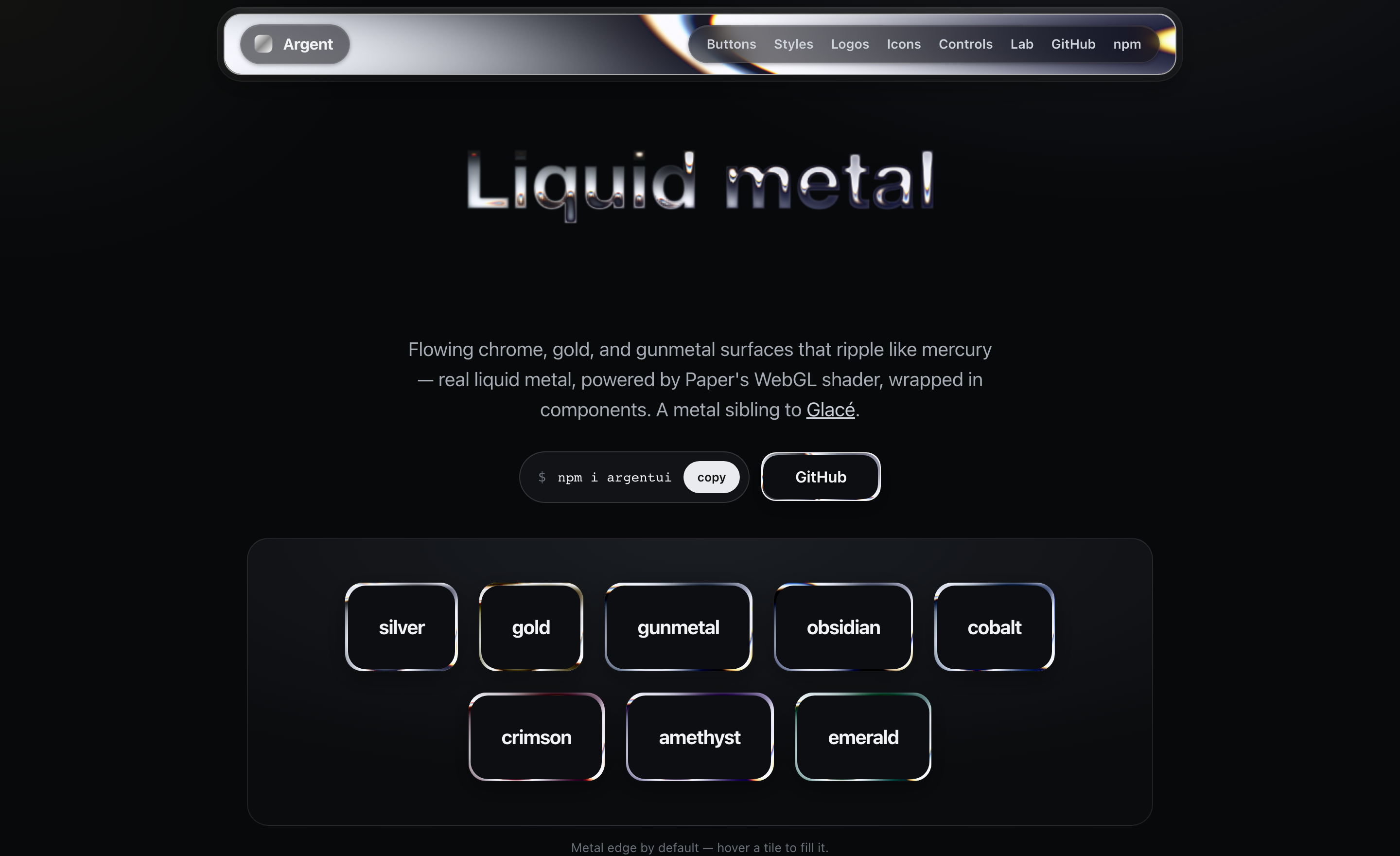
**Liquid-metal UI for React.** Flowing chrome, gold, and gunmetal surfaces that ripple like mercury — real liquid metal, powered by [Paper's `LiquidMetal` WebGL shader](https://shaders.paper.design/liquid-metal), wrapped in components. A metal sibling to [Glacé](https://glaceui.com).
|
|
4
|
+
|
|
5
|
+
[**argentui.com**](https://argentui.com) · [npm](https://www.npmjs.com/package/argentui)
|
|
6
|
+
|
|
7
|
+
|
|
8
|
+
|
|
9
|
+
```bash
|
|
10
|
+
npm i argentui @paper-design/shaders-react
|
|
11
|
+
```
|
|
12
|
+
|
|
13
|
+
> `@paper-design/shaders-react` is a **peer dependency** — install it alongside `argentui`. It's the WebGL shader engine, by [Paper](https://paper.design), licensed under PolyForm Shield.
|
|
14
|
+
|
|
15
|
+
```tsx
|
|
16
|
+
import { MetalButton, MetalCard, Metal } from "argentui";
|
|
17
|
+
import "argentui/styles.css";
|
|
18
|
+
|
|
19
|
+
<MetalButton tone="silver">Get started</MetalButton>
|
|
20
|
+
<MetalCard tone="gunmetal" sheen>Forged in the browser</MetalCard>
|
|
21
|
+
```
|
|
22
|
+
|
|
23
|
+
## How it works
|
|
24
|
+
|
|
25
|
+
Each surface renders Paper's `LiquidMetal` shader with `shape="none"` so the metal fills the whole element instead of painting a blob. The shader canvas sits behind your content, clipped to the surface's radius. A tone is just a tuned set of shader params (`colorBack`, `colorTint`, `repetition`, `distortion`, `shiftRed/Blue`, …). Until the canvas mounts on the client, a static CSS gradient stands in (SSR-safe).
|
|
26
|
+
|
|
27
|
+
Each surface is its own WebGL canvas, and browsers cap concurrent WebGL contexts (~16). Argent handles this for you: the shader only mounts while a surface is on/near screen (IntersectionObserver) and releases its context when it scrolls away, so a long page stays well under the cap. The static gradient shows in the meantime.
|
|
28
|
+
|
|
29
|
+
By default the metal is just the **edge** (`variant="border"`) with a calm interior, which keeps content readable; pass `variant="fill"` for a full molten surface, or `revealOnHover` to fill in on interaction.
|
|
30
|
+
|
|
31
|
+
## Components
|
|
32
|
+
|
|
33
|
+
### `<MetalButton>`
|
|
34
|
+
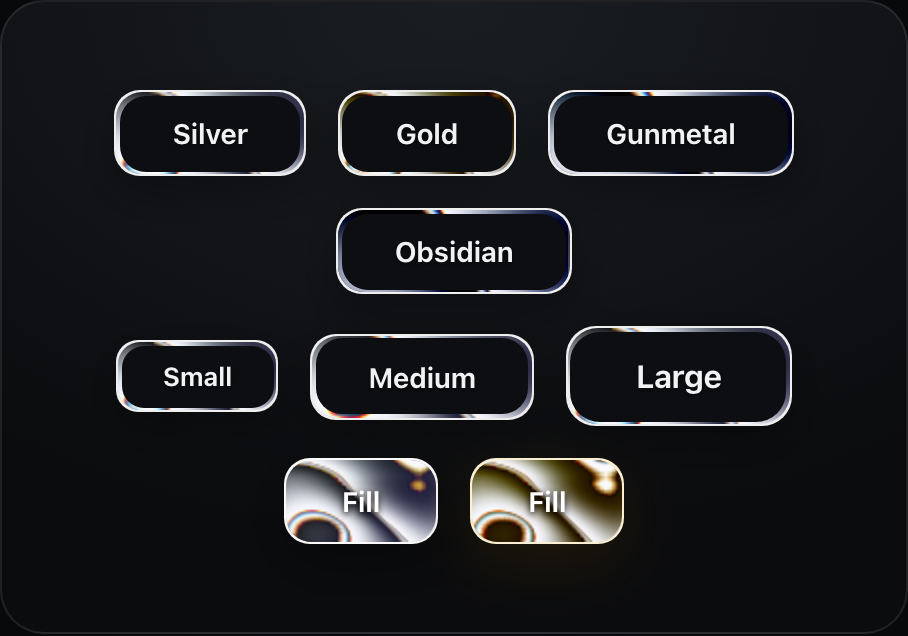
A stamped-metal button: readable at rest with a liquid-metal rim, molten on hover, with a real press (and haptics on supporting devices).
|
|
35
|
+
|
|
36
|
+
|
|
37
|
+
|
|
38
|
+
```tsx
|
|
39
|
+
<MetalButton tone="gold" size="lg">Buy</MetalButton>
|
|
40
|
+
```
|
|
41
|
+
|
|
42
|
+
| prop | type | default |
|
|
43
|
+
|------|------|---------|
|
|
44
|
+
| `tone` | `"silver" \| "gold" \| "gunmetal" \| "obsidian"` | `"silver"` |
|
|
45
|
+
| `size` | `"sm" \| "md" \| "lg"` | `"md"` |
|
|
46
|
+
| `speed` | `number` | `1` |
|
|
47
|
+
|
|
48
|
+
### `<MetalCard>`
|
|
49
|
+
A padded liquid-metal panel.
|
|
50
|
+
|
|
51
|
+
```tsx
|
|
52
|
+
<MetalCard tone="gunmetal" sheen>
|
|
53
|
+
<h3>Title</h3>
|
|
54
|
+
<p>Any content — the metal flows behind it.</p>
|
|
55
|
+
</MetalCard>
|
|
56
|
+
```
|
|
57
|
+
|
|
58
|
+
### `<MetalText>`
|
|
59
|
+
Metal type. By default a chrome gradient clipped to the glyphs (pure CSS, free at any scale). Pass `shader` and the liquid metal pours into the letterforms — flowing bands, liquid edges, chromatic fringe. Or set `variant="outline"` to run the metal around the edges of each glyph over a dark or gradient interior — the border treatment, for type.
|
|
60
|
+
|
|
61
|
+

|
|
62
|
+
|
|
63
|
+
```tsx
|
|
64
|
+
<MetalText shader tone="silver" fontSize={64}>Quicksilver</MetalText>
|
|
65
|
+
|
|
66
|
+
// metal edges, dark gradient interior
|
|
67
|
+
<MetalText shader variant="outline" fillGradient={["#23262c", "#0a0b0d"]} fontSize={64}>
|
|
68
|
+
Quicksilver
|
|
69
|
+
</MetalText>
|
|
70
|
+
|
|
71
|
+
<MetalText tone="gold" style={{ fontSize: 64 }}>Solid gold</MetalText> // CSS mode
|
|
72
|
+
```
|
|
73
|
+
|
|
74
|
+
> Shader mode renders the glyphs into an SVG silhouette, which sees system fonts only by default. To use a webfont (e.g. Google Fonts), pass `fontCss` with an `@font-face` whose `src` is a **data: URI** — it gets embedded in the silhouette and renders correctly (the [argentui.com](https://argentui.com) text lab does exactly this). The CSS gradient stands in until the shader loads, and wherever WebGL is unavailable.
|
|
75
|
+
|
|
76
|
+
### `<MetalLogo>`
|
|
77
|
+
Pour the metal into any mark — pass an image with a transparent background and it flows inside the silhouette.
|
|
78
|
+
|
|
79
|
+

|
|
80
|
+
|
|
81
|
+
```tsx
|
|
82
|
+
<MetalLogo src="/logo.svg" tone="silver" size={170} />
|
|
83
|
+
```
|
|
84
|
+
|
|
85
|
+
### `<MetalToggle>` / `<MetalProgress>` / `<MetalBadge>`
|
|
86
|
+
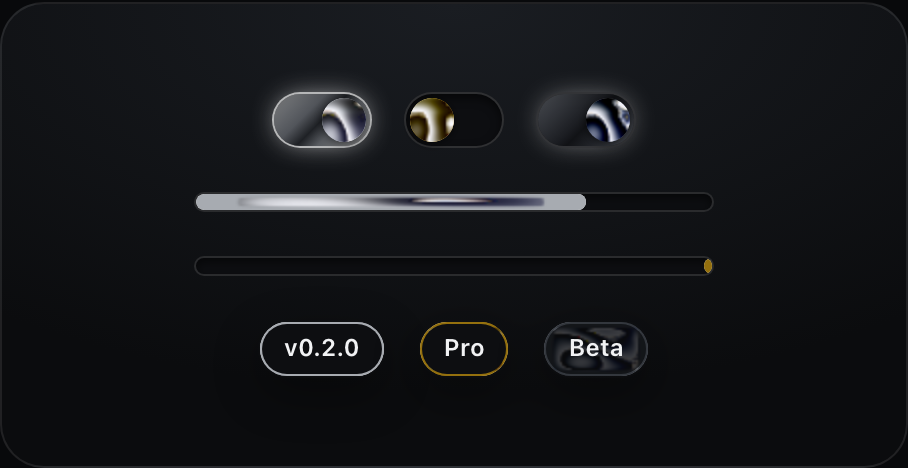
A mercury switch (the thumb squishes as you press it), a molten progress bar, and metal-rimmed badges.
|
|
87
|
+
|
|
88
|
+
|
|
89
|
+
|
|
90
|
+
```tsx
|
|
91
|
+
<MetalToggle tone="silver" defaultChecked onCheckedChange={setOn} />
|
|
92
|
+
<MetalProgress tone="silver" value={64} />
|
|
93
|
+
<MetalProgress tone="gold" /> {/* indeterminate */}
|
|
94
|
+
<MetalBadge tone="gold">Pro</MetalBadge>
|
|
95
|
+
```
|
|
96
|
+
|
|
97
|
+
### `<Metal>`
|
|
98
|
+
The base primitive every component is built on. Render any element via `as`.
|
|
99
|
+
|
|
100
|
+
```tsx
|
|
101
|
+
<Metal as="nav" tone="silver" radius={16} speed={0.5} sheen>…</Metal>
|
|
102
|
+
```
|
|
103
|
+
|
|
104
|
+
| prop | type | default | notes |
|
|
105
|
+
|------|------|---------|-------|
|
|
106
|
+
| `as` | `ElementType` | `"div"` | element/component to render |
|
|
107
|
+
| `tone` | `MetalTone` | `"silver"` | finish (silver/gold/gunmetal/obsidian) |
|
|
108
|
+
| `variant` | `"border" \| "fill"` | `"border"` | metal edge only, or full surface |
|
|
109
|
+
| `frame` | `"single" \| "double"` | `"single"` | double adds an inner hairline frame |
|
|
110
|
+
| `tint` | `boolean` | `false` | let the metal show faintly through the interior |
|
|
111
|
+
| `revealOnHover` | `boolean` | `false` | fill with metal on hover (border variant) |
|
|
112
|
+
| `borderWidth` | `number` | `1.5` | rim thickness (border variant) |
|
|
113
|
+
| `radius` | `number` | `14` | corner radius (px) |
|
|
114
|
+
| `speed` | `number` | `1` | shader speed (`0` pauses) |
|
|
115
|
+
| `finish` | `"surface" \| "button" \| "bar" \| "orb" \| "rim"` | per component | shape-tuned shader preset (see below) |
|
|
116
|
+
| `effect` | `"flow" \| "molten" \| "ripple" \| "chrome" \| "wave"` | `"flow"` | the liquid's motion character — from mirror-still chrome to a heavy molten churn |
|
|
117
|
+
| `halo` | `boolean \| number` | `false` | frosted standoff ring outside the metal — a few px of backdrop blur finished with a ~5% hairline (`true` = 8px; theme the line with `--argent-halo-line`) |
|
|
118
|
+
| `angle` | `number` | per tone/finish | band direction in degrees |
|
|
119
|
+
| `metalScale` | `number` | per finish | pattern scale — higher spreads the bands |
|
|
120
|
+
| `sheen` | `boolean` | `false` | specular streak on hover |
|
|
121
|
+
|
|
122
|
+
Theme the border interior with the `--argent-panel` CSS variable.
|
|
123
|
+
|
|
124
|
+
## Finishes
|
|
125
|
+
|
|
126
|
+
One shader tuning can't serve every shape — broad bands that look right on a card read as a smear on a 10px progress bar and a sticker on a 22px toggle thumb. Each component defaults to a **finish** preset tuned for its geometry, and you can override it anywhere:
|
|
127
|
+
|
|
128
|
+
| finish | tuned for | character |
|
|
129
|
+
|--------|-----------|-----------|
|
|
130
|
+
| `surface` | cards, nav, panels | broad flowing reflection bands |
|
|
131
|
+
| `button` | buttons | spread + calmer warp, label stays readable |
|
|
132
|
+
| `bar` | thin strips (progress) | near-vertical stripes crossing the bar |
|
|
133
|
+
| `orb` | small round things (toggle thumbs) | one soft highlight, like a polished sphere — with per-instance angle variation so rows don't look cloned |
|
|
134
|
+
| `rim` | hairline edges (badges) | dense bands so any visible slice catches light |
|
|
135
|
+
|
|
136
|
+
```tsx
|
|
137
|
+
<Metal tone="silver" finish="rim" angle={120}>…</Metal>
|
|
138
|
+
```
|
|
139
|
+
|
|
140
|
+
Tune any tone with `TONE_PARAMS`, or drop down to `<MetalFill>` / Paper's `<LiquidMetal>` directly for full control.
|
|
141
|
+
|
|
142
|
+
## The native engine
|
|
143
|
+
|
|
144
|
+
Argent also ships its own clean-room WebGL2 shader — pass `engine="native"` to any surface to use it instead of Paper's. Same recipe (reflection banding, noise flow, chromatic dispersion), zero extra dependencies, MIT all the way down. It currently powers the rim/border look best; the Paper engine remains the default.
|
|
145
|
+
|
|
146
|
+
```tsx
|
|
147
|
+
<Metal tone="silver" engine="native">…</Metal>
|
|
148
|
+
```
|
|
149
|
+
|
|
150
|
+
## Accessibility
|
|
151
|
+
|
|
152
|
+
The shader pauses under `prefers-reduced-motion`; toggles are real `role="switch"` buttons; progress bars carry `role="progressbar"` with values; labels keep WCAG-ish contrast on every variant. Haptics (`navigator.vibrate`) fire on press where supported — disable globally with `setHaptics(false)`.
|
|
153
|
+
|
|
154
|
+
## Credits
|
|
155
|
+
|
|
156
|
+
Liquid-metal shader by [Paper](https://shaders.paper.design/liquid-metal) (`@paper-design/shaders`). Argent is the component layer, motion, and theming on top.
|
|
157
|
+
|
|
158
|
+
## License
|
|
159
|
+
|
|
160
|
+
MIT © [Sean Geng](https://seangeng.com). The bundled shader engine (`@paper-design/shaders-react`, a peer dependency) is licensed separately under PolyForm Shield by Paper.
|