appstore-api-mcp 1.1.0 → 1.1.2
This diff represents the content of publicly available package versions that have been released to one of the supported registries. The information contained in this diff is provided for informational purposes only and reflects changes between package versions as they appear in their respective public registries.
- package/CHANGELOG.md +16 -0
- package/README.md +4 -1
- package/docs/ANALYTICS.md +102 -0
- package/docs/SETUP.md +6 -1
- package/docs/TOOLS.md +1 -0
- package/package.json +1 -1
- package/src/client.js +3 -0
- package/src/index.js +5 -1
package/CHANGELOG.md
CHANGED
|
@@ -4,6 +4,22 @@ All notable changes to this project are documented here. The format follows
|
|
|
4
4
|
[Keep a Changelog](https://keepachangelog.com/) and the project uses
|
|
5
5
|
[Semantic Versioning](https://semver.org/).
|
|
6
6
|
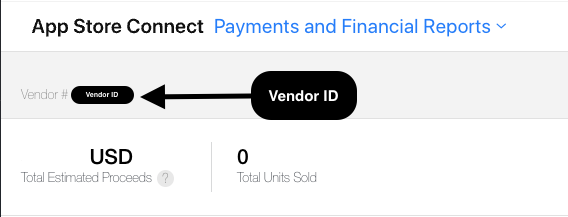
|
|
7
|
+
## [1.1.2] - 2026-06-02
|
|
8
|
+
|
|
9
|
+
### Fixed
|
|
10
|
+
- Report tools now treat a `404` ("no data for this report/date") as a clean
|
|
11
|
+
empty result with an explanatory `note`, instead of surfacing it as an error.
|
|
12
|
+
Validated end-to-end with an Admin key: sales, subscriptions, finance, and the
|
|
13
|
+
Analytics Reports API all return real data.
|
|
14
|
+
|
|
15
|
+
## [1.1.1] - 2026-06-02
|
|
16
|
+
|
|
17
|
+
### Changed
|
|
18
|
+
- Documented the analytics/reporting requirements clearly: a dedicated
|
|
19
|
+
[docs/ANALYTICS.md](docs/ANALYTICS.md) (role table — App Manager returns 403,
|
|
20
|
+
Vendor Number, two-key setup, examples, troubleshooting), plus notes in the
|
|
21
|
+
README config section, SETUP, and the tools reference.
|
|
22
|
+
|
|
7
23
|
## [1.1.0] - 2026-06-02
|
|
8
24
|
|
|
9
25
|
### Added
|
package/README.md
CHANGED
|
@@ -49,6 +49,7 @@ and reach the entire API, from whatever AI agent you already use.
|
|
|
49
49
|
- [Getting your API key](#getting-your-api-key) → full guide in [docs/SETUP.md](docs/SETUP.md)
|
|
50
50
|
- [Configuration](#configuration)
|
|
51
51
|
- [Tools](#tools) → full reference in [docs/TOOLS.md](docs/TOOLS.md)
|
|
52
|
+
- [Analytics & reports setup](docs/ANALYTICS.md) — roles, Vendor Number, examples
|
|
52
53
|
- [Common workflows](#common-workflows)
|
|
53
54
|
- [Security](#security) → details in [docs/SECURITY.md](docs/SECURITY.md)
|
|
54
55
|
- [Troubleshooting](#troubleshooting)
|
|
@@ -214,7 +215,9 @@ See [.env.example](.env.example) for a copy-paste template.
|
|
|
214
215
|
> **Reports need a higher-privilege key.** The sales/subscription/finance/analytics
|
|
215
216
|
> tools require an API key with the **Admin, Finance, or Sales** role — an **App
|
|
216
217
|
> Manager** key (fine for metadata/keywords/screenshots) returns `403` for reports.
|
|
217
|
-
>
|
|
218
|
+
> Sales/finance also need your **Vendor Number** (App Store Connect → Payments and
|
|
219
|
+
> Financial Reports) via `ASC_VENDOR_NUMBER` or the `vendorNumber` argument.
|
|
220
|
+
> Full walkthrough: **[docs/ANALYTICS.md](docs/ANALYTICS.md)**.
|
|
218
221
|
|
|
219
222
|
---
|
|
220
223
|
|
|
@@ -0,0 +1,102 @@
|
|
|
1
|
+
# Analytics, sales & finance — setup
|
|
2
|
+
|
|
3
|
+
The reporting tools (`get_sales_report`, `get_subscription_report`,
|
|
4
|
+
`get_finance_report`, and the `*_analytics_report*` tools) pull **downloads,
|
|
5
|
+
proceeds, subscriptions, retention, and engagement** from App Store Connect.
|
|
6
|
+
|
|
7
|
+
They have **two requirements** that the metadata tools don't:
|
|
8
|
+
|
|
9
|
+
## 1. A key with the right role (App Manager is NOT enough)
|
|
10
|
+
|
|
11
|
+
Apple gates report APIs behind specific roles. An **App Manager** key — perfect
|
|
12
|
+
for keywords/descriptions/screenshots — returns **`403 FORBIDDEN`** for reports.
|
|
13
|
+
The tools detect this and append a hint telling you exactly what's wrong.
|
|
14
|
+
|
|
15
|
+
| Report | Role the API key needs |
|
|
16
|
+
| --- | --- |
|
|
17
|
+
| Sales & subscriptions (`get_sales_report`, `get_subscription_report`) | **Admin**, **Finance**, or **Sales** |
|
|
18
|
+
| Finance (`get_finance_report`) | **Admin** or **Finance** |
|
|
19
|
+
| Analytics Reports API (`request_analytics_report`, …) | **Admin** |
|
|
20
|
+
|
|
21
|
+
**What to do:** generate a *separate* API key with the needed role in
|
|
22
|
+
**App Store Connect → Users and Access → Integrations → App Store Connect API**
|
|
23
|
+
(click **+**, pick e.g. **Sales** or **Admin**). You can keep your App Manager
|
|
24
|
+
key for metadata and use the report key only for analytics — see
|
|
25
|
+
[Using two keys](#using-two-keys) below.
|
|
26
|
+
|
|
27
|
+
## 2. Your Vendor Number (for sales & finance)
|
|
28
|
+
|
|
29
|
+
Sales and finance reports are scoped to a **Vendor Number** — an 8–9 digit ID,
|
|
30
|
+
**not** the same as your Key ID or Issuer ID.
|
|
31
|
+
|
|
32
|
+
- Find it in **App Store Connect → Payments and Financial Reports** (or **Sales
|
|
33
|
+
and Trends**) — it's the **Vendor #** shown at the top:
|
|
34
|
+
|
|
35
|
+
|
|
36
|
+
|
|
37
|
+
- Provide it either way:
|
|
38
|
+
- **Per call:** pass `vendorNumber` in the tool arguments, or
|
|
39
|
+
- **Globally:** set the `ASC_VENDOR_NUMBER` environment variable in your MCP config.
|
|
40
|
+
|
|
41
|
+
(The Analytics Reports API — downloads/sessions/engagement — does **not** need a
|
|
42
|
+
Vendor Number, only the Admin role.)
|
|
43
|
+
|
|
44
|
+
## Using two keys
|
|
45
|
+
|
|
46
|
+
Keep your metadata key and add a report-capable one as a second MCP server:
|
|
47
|
+
|
|
48
|
+
```bash
|
|
49
|
+
# metadata (App Manager) — your existing one
|
|
50
|
+
claude mcp add appstore-api --scope user \
|
|
51
|
+
--env ASC_KEY_ID=METADATA_KEY_ID \
|
|
52
|
+
--env ASC_ISSUER_ID=YOUR_ISSUER_ID \
|
|
53
|
+
--env ASC_PRIVATE_KEY_PATH=/path/to/metadata.p8 \
|
|
54
|
+
-- npx -y appstore-api-mcp
|
|
55
|
+
|
|
56
|
+
# reports (Admin/Finance/Sales) + vendor number
|
|
57
|
+
claude mcp add appstore-reports --scope user \
|
|
58
|
+
--env ASC_KEY_ID=REPORT_KEY_ID \
|
|
59
|
+
--env ASC_ISSUER_ID=YOUR_ISSUER_ID \
|
|
60
|
+
--env ASC_PRIVATE_KEY_PATH=/path/to/report.p8 \
|
|
61
|
+
--env ASC_VENDOR_NUMBER=12345678 \
|
|
62
|
+
-- npx -y appstore-api-mcp
|
|
63
|
+
```
|
|
64
|
+
|
|
65
|
+
(For other clients, add a second entry in the `mcpServers` block with its own env.)
|
|
66
|
+
|
|
67
|
+
## Examples
|
|
68
|
+
|
|
69
|
+
```jsonc
|
|
70
|
+
// Yesterday's units & proceeds
|
|
71
|
+
{ "name": "get_sales_report",
|
|
72
|
+
"arguments": { "frequency": "DAILY", "reportType": "SALES", "reportDate": "2026-06-01" } }
|
|
73
|
+
|
|
74
|
+
// Active subscribers snapshot
|
|
75
|
+
{ "name": "get_subscription_report",
|
|
76
|
+
"arguments": { "kind": "ACTIVE", "reportDate": "2026-06-01" } }
|
|
77
|
+
|
|
78
|
+
// Subscription events (subscribe/cancel/renew) for retention analysis
|
|
79
|
+
{ "name": "get_subscription_report",
|
|
80
|
+
"arguments": { "kind": "EVENTS", "reportDate": "2026-06-01" } }
|
|
81
|
+
|
|
82
|
+
// Monthly proceeds, consolidated across regions
|
|
83
|
+
{ "name": "get_finance_report",
|
|
84
|
+
"arguments": { "regionCode": "ZZ", "reportDate": "2026-05" } }
|
|
85
|
+
```
|
|
86
|
+
|
|
87
|
+
For downloads/sessions/engagement (Analytics Reports API), the flow is async:
|
|
88
|
+
|
|
89
|
+
1. `request_analytics_report` with your `appId` → returns a request id
|
|
90
|
+
2. wait (minutes–hours while Apple generates it)
|
|
91
|
+
3. `list_analytics_reports` (filter by `category`) → pick a report id
|
|
92
|
+
4. `list_analytics_report_instances` → pick an instance id
|
|
93
|
+
5. `get_analytics_report_data` → parsed rows
|
|
94
|
+
|
|
95
|
+
## Troubleshooting
|
|
96
|
+
|
|
97
|
+
| Error | Meaning / fix |
|
|
98
|
+
| --- | --- |
|
|
99
|
+
| `403 ... does not allow this request` | Key role too low — use an Admin/Finance/Sales key (see table above). |
|
|
100
|
+
| `vendorNumber is required` | Pass `vendorNumber` or set `ASC_VENDOR_NUMBER`. |
|
|
101
|
+
| Report errors / empty | The date may have no data yet (reports lag ~1 day), or the `frequency`/`reportDate` format don't match (DAILY=`YYYY-MM-DD`, MONTHLY=`YYYY-MM`). |
|
|
102
|
+
| Analytics instance has no segments | Still processing — try `get_analytics_report_data` again later. |
|
package/docs/SETUP.md
CHANGED
|
@@ -20,9 +20,14 @@ Step-by-step from zero to a working server.
|
|
|
20
20
|
4. Click the **+** button to create a new key.
|
|
21
21
|
- **Name:** something like `mcp-metadata`.
|
|
22
22
|
- **Access (role):** choose the **least privilege** that covers your use:
|
|
23
|
-
- **App Manager** — edit metadata, keywords, screenshots, versions, TestFlight. ✅ Recommended.
|
|
23
|
+
- **App Manager** — edit metadata, keywords, screenshots, versions, TestFlight. ✅ Recommended for the listing tools.
|
|
24
24
|
- **Developer** — narrower; may not allow all edits.
|
|
25
25
|
- **Admin** — full control. Only if you genuinely need it.
|
|
26
|
+
- ⚠️ **Analytics/sales/finance reports need more.** An App Manager key returns
|
|
27
|
+
`403` for the report tools. To read downloads, proceeds, subscriptions, etc.,
|
|
28
|
+
use a key with the **Admin, Finance, or Sales** role (and your **Vendor
|
|
29
|
+
Number**). See [ANALYTICS.md](ANALYTICS.md). You can run two keys — one for
|
|
30
|
+
metadata, one for reports.
|
|
26
31
|
5. Click **Generate**. You'll now see the key listed with a **Key ID** — that's your `ASC_KEY_ID`.
|
|
27
32
|
6. Click **Download API Key** to get the `AuthKey_XXXXXXXXXX.p8` file.
|
|
28
33
|
> ⚠️ You can only download this **once**. Save it somewhere safe and backed up.
|
package/docs/TOOLS.md
CHANGED
|
@@ -206,6 +206,7 @@ length warnings are attached to the response under `_warnings`.
|
|
|
206
206
|
> Sales** role. An **App Manager** key returns `403`. Sales/finance also need a
|
|
207
207
|
> **Vendor Number** (App Store Connect → Payments and Financial Reports; 8–9
|
|
208
208
|
> digits) — pass `vendorNumber` or set the `ASC_VENDOR_NUMBER` env var.
|
|
209
|
+
> Full setup walkthrough: **[ANALYTICS.md](ANALYTICS.md)**.
|
|
209
210
|
|
|
210
211
|
All report tools return `{ reportType, columns, rowCount, returned, truncated, rows }`
|
|
211
212
|
with `rows` capped at `limit` (default 200).
|
package/package.json
CHANGED
|
@@ -1,6 +1,6 @@
|
|
|
1
1
|
{
|
|
2
2
|
"name": "appstore-api-mcp",
|
|
3
|
-
"version": "1.1.
|
|
3
|
+
"version": "1.1.2",
|
|
4
4
|
"description": "MCP server for Apple App Store Connect — manage apps, keywords, descriptions, titles, screenshots, versions and the full API from any MCP client (Claude, Codex, Cursor, Cline, Windsurf, VS Code, Zed, Continue, Gemini CLI, Google Antigravity, Amazon Q, Goose, and custom agents). Includes a fleet-wide ASO audit and dry-run previews.",
|
|
5
5
|
"type": "module",
|
|
6
6
|
"bin": {
|
package/src/client.js
CHANGED
|
@@ -157,6 +157,9 @@ export class AppStoreConnectClient {
|
|
|
157
157
|
headers: { Authorization: `Bearer ${token}`, Accept: "application/a-gzip" },
|
|
158
158
|
});
|
|
159
159
|
const buf = Buffer.from(await res.arrayBuffer());
|
|
160
|
+
// 404 from a report endpoint means "no data for this report/date" — not a
|
|
161
|
+
// failure. Return empty so callers get an empty result, not an error.
|
|
162
|
+
if (res.status === 404) return "";
|
|
160
163
|
if (!res.ok) {
|
|
161
164
|
let detail = buf.toString("utf8");
|
|
162
165
|
try {
|
package/src/index.js
CHANGED
|
@@ -134,7 +134,7 @@ const DEFAULT_VENDOR = process.env.ASC_VENDOR_NUMBER;
|
|
|
134
134
|
/** Cap parsed report rows so large reports don't flood the response. */
|
|
135
135
|
function reportResult(reportType, parsed, limit = 200) {
|
|
136
136
|
const rows = parsed.rows;
|
|
137
|
-
|
|
137
|
+
const out = {
|
|
138
138
|
reportType,
|
|
139
139
|
columns: parsed.columns,
|
|
140
140
|
rowCount: rows.length,
|
|
@@ -142,6 +142,10 @@ function reportResult(reportType, parsed, limit = 200) {
|
|
|
142
142
|
truncated: rows.length > limit,
|
|
143
143
|
rows: rows.slice(0, limit),
|
|
144
144
|
};
|
|
145
|
+
if (rows.length === 0)
|
|
146
|
+
out.note =
|
|
147
|
+
"No data found for the requested report/date. The period may have no activity, or the data isn't available yet (reports lag ~1 day). Check the date and frequency format.";
|
|
148
|
+
return out;
|
|
145
149
|
}
|
|
146
150
|
|
|
147
151
|
function requireVendor(v) {
|