appstore-api-mcp 1.0.4 → 1.1.1
This diff represents the content of publicly available package versions that have been released to one of the supported registries. The information contained in this diff is provided for informational purposes only and reflects changes between package versions as they appear in their respective public registries.
- package/.env.example +6 -0
- package/CHANGELOG.md +24 -0
- package/README.md +57 -16
- package/docs/ANALYTICS.md +99 -0
- package/docs/SETUP.md +8 -1
- package/docs/TOOLS.md +59 -0
- package/package.json +1 -1
- package/src/client.js +74 -2
- package/src/index.js +285 -0
package/.env.example
CHANGED
|
@@ -18,3 +18,9 @@ ASC_PRIVATE_KEY_PATH=/absolute/path/to/AuthKey_XXXXXXXXXX.p8
|
|
|
18
18
|
|
|
19
19
|
# 3) ...or base64 of the .p8 file (no newline headaches): base64 -i AuthKey_XXXX.p8
|
|
20
20
|
# ASC_PRIVATE_KEY_BASE64=
|
|
21
|
+
|
|
22
|
+
# Optional: default Vendor Number for sales/finance reports (8–9 digits).
|
|
23
|
+
# Found in App Store Connect → Payments and Financial Reports (or Sales and Trends).
|
|
24
|
+
# Sales/finance/analytics reports also require a key with the Admin, Finance, or
|
|
25
|
+
# Sales role — an App Manager key cannot read them.
|
|
26
|
+
# ASC_VENDOR_NUMBER=
|
package/CHANGELOG.md
CHANGED
|
@@ -4,6 +4,30 @@ All notable changes to this project are documented here. The format follows
|
|
|
4
4
|
[Keep a Changelog](https://keepachangelog.com/) and the project uses
|
|
5
5
|
[Semantic Versioning](https://semver.org/).
|
|
6
6
|
|
|
7
|
+
## [1.1.1] - 2026-06-02
|
|
8
|
+
|
|
9
|
+
### Changed
|
|
10
|
+
- Documented the analytics/reporting requirements clearly: a dedicated
|
|
11
|
+
[docs/ANALYTICS.md](docs/ANALYTICS.md) (role table — App Manager returns 403,
|
|
12
|
+
Vendor Number, two-key setup, examples, troubleshooting), plus notes in the
|
|
13
|
+
README config section, SETUP, and the tools reference.
|
|
14
|
+
|
|
15
|
+
## [1.1.0] - 2026-06-02
|
|
16
|
+
|
|
17
|
+
### Added
|
|
18
|
+
- **Analytics, sales, subscriptions & finance reporting:**
|
|
19
|
+
- `get_sales_report` — units/downloads, proceeds, and subscription data (Sales & Trends).
|
|
20
|
+
- `get_subscription_report` — active subscribers, events, and per-subscriber detail.
|
|
21
|
+
- `get_finance_report` — proceeds/earnings by region.
|
|
22
|
+
- `request_analytics_report` + `list_analytics_reports` +
|
|
23
|
+
`list_analytics_report_instances` + `get_analytics_report_data` — the async
|
|
24
|
+
Analytics Reports API (downloads, sessions, active devices, engagement).
|
|
25
|
+
- Gzip/TSV/CSV handling in the client so report files are decompressed and
|
|
26
|
+
returned as parsed rows.
|
|
27
|
+
- Optional `ASC_VENDOR_NUMBER` env var as a default for sales/finance reports.
|
|
28
|
+
- Friendly 403 hint: report APIs need a key with the Admin, Finance, or Sales
|
|
29
|
+
role (App Manager is not sufficient).
|
|
30
|
+
|
|
7
31
|
## [1.0.4] - 2026-06-02
|
|
8
32
|
|
|
9
33
|
### Changed
|
package/README.md
CHANGED
|
@@ -1,22 +1,44 @@
|
|
|
1
|
+
<p align="center">
|
|
2
|
+
<img src="https://raw.githubusercontent.com/fil-technology/appstore-api-mcp/main/assets/banner.png" alt="appstore-api-mcp — manage App Store Connect from any AI agent" width="100%">
|
|
3
|
+
</p>
|
|
4
|
+
|
|
5
|
+
<p align="center">
|
|
6
|
+
<a href="https://www.npmjs.com/package/appstore-api-mcp"><img src="https://img.shields.io/npm/v/appstore-api-mcp?color=0a84ff&label=npm" alt="npm version"></a>
|
|
7
|
+
<a href="https://www.npmjs.com/package/appstore-api-mcp"><img src="https://img.shields.io/npm/dm/appstore-api-mcp?color=22d3ee" alt="npm downloads"></a>
|
|
8
|
+
<img src="https://img.shields.io/npm/l/appstore-api-mcp?color=blue" alt="license">
|
|
9
|
+
<img src="https://img.shields.io/node/v/appstore-api-mcp" alt="node version">
|
|
10
|
+
</p>
|
|
11
|
+
|
|
1
12
|
# App Store Connect MCP
|
|
2
13
|
|
|
3
|
-
|
|
4
|
-
|
|
5
|
-
|
|
6
|
-
|
|
7
|
-
|
|
14
|
+
**Run App Store Connect by talking to your AI.** An
|
|
15
|
+
[MCP](https://modelcontextprotocol.io) server that turns Apple's
|
|
16
|
+
[App Store Connect API](https://developer.apple.com/documentation/appstoreconnectapi)
|
|
17
|
+
into plain-language actions — edit your listings, audit your whole portfolio,
|
|
18
|
+
and reach the entire API, from whatever AI agent you already use.
|
|
19
|
+
|
|
20
|
+
### ✨ What makes it stand out
|
|
21
|
+
|
|
22
|
+
> **🚀 Audit your whole portfolio in one shot.** *"Audit all my apps for ASO gaps"* → a ranked report across **every** app: empty keyword fields, missing subtitles, under-used 100‑char keyword space, single‑locale listings, missing screenshots. Built for indies shipping dozens of apps — not one at a time.
|
|
23
|
+
|
|
24
|
+
> **🛡️ See every change before it ships.** Dry-run mode returns the exact diff (old → new) with Apple's character limits pre-checked, so nothing hits your **live** listing by surprise.
|
|
25
|
+
|
|
26
|
+
> **📊 Track performance, not just listings.** Pull downloads, proceeds, **subscriptions & retention**, and engagement straight from the Sales, Finance, and Analytics report APIs — parsed into rows, gzip handled for you.
|
|
8
27
|
|
|
9
|
-
>
|
|
10
|
-
> *"show the English description for MyApp"*, or
|
|
11
|
-
> *"upload these screenshots to the 6.7-inch set"* — the agent calls the right tools.
|
|
28
|
+
> **🌐 The whole API, not a curated slice.** First-class tools for the daily work (keywords, descriptions, titles, subtitles, screenshots, versions) **plus** a `raw_request` escape hatch for everything else — TestFlight, pricing, in-app purchases, customer reviews (read & reply), and more.
|
|
12
29
|
|
|
13
|
-
|
|
14
|
-
|
|
15
|
-
|
|
16
|
-
|
|
17
|
-
|
|
18
|
-
|
|
19
|
-
|
|
30
|
+
### 💬 Just ask
|
|
31
|
+
|
|
32
|
+
> *“Set the keywords for my budgeting app to budget, expenses, money tracker.”*
|
|
33
|
+
> *“Which of my apps are missing a subtitle or screenshots?”*
|
|
34
|
+
> *“Dry-run a shorter description for MyApp, then upload these 6.7″ screenshots.”*
|
|
35
|
+
|
|
36
|
+
### ⚙️ Built right
|
|
37
|
+
|
|
38
|
+
- 🤖 **Any MCP client** — Claude, Codex, Cursor, Windsurf, Antigravity, Gemini CLI, Amazon Q, Goose, Zed, VS Code… → [docs/CLIENTS.md](docs/CLIENTS.md)
|
|
39
|
+
- ⚡ **One-line install** (`npx`, no build) — or paste a prompt and let your agent set it up for you
|
|
40
|
+
- 🔒 **Keys never leave your machine** — calls go straight to Apple, nothing proxied
|
|
41
|
+
- 📦 **MIT · published with provenance · actively maintained**
|
|
20
42
|
|
|
21
43
|
---
|
|
22
44
|
|
|
@@ -27,6 +49,7 @@ versions — plus a raw-request tool that reaches the **entire**
|
|
|
27
49
|
- [Getting your API key](#getting-your-api-key) → full guide in [docs/SETUP.md](docs/SETUP.md)
|
|
28
50
|
- [Configuration](#configuration)
|
|
29
51
|
- [Tools](#tools) → full reference in [docs/TOOLS.md](docs/TOOLS.md)
|
|
52
|
+
- [Analytics & reports setup](docs/ANALYTICS.md) — roles, Vendor Number, examples
|
|
30
53
|
- [Common workflows](#common-workflows)
|
|
31
54
|
- [Security](#security) → details in [docs/SECURITY.md](docs/SECURITY.md)
|
|
32
55
|
- [Troubleshooting](#troubleshooting)
|
|
@@ -162,6 +185,14 @@ Copy-paste config snippets for each are in **[docs/CLIENTS.md](docs/CLIENTS.md)*
|
|
|
162
185
|
3. Note the **Issuer ID** (top of the page) and the **Key ID** (next to the key).
|
|
163
186
|
4. **Download the `.p8` file** — you can only download it once. Store it somewhere safe.
|
|
164
187
|
|
|
188
|
+
<p align="center">
|
|
189
|
+
<img src="https://raw.githubusercontent.com/fil-technology/appstore-api-mcp/main/assets/where-to-find-credentials.png" alt="Where to find the Issuer ID and Key ID in App Store Connect → Users and Access → Integrations → App Store Connect API" width="100%">
|
|
190
|
+
</p>
|
|
191
|
+
|
|
192
|
+
> The **Issuer ID** is at the top of the page; each key's **Key ID** is in its
|
|
193
|
+
> row. The `.p8` is downloaded from the **+** / key actions. These map to
|
|
194
|
+
> `ASC_ISSUER_ID`, `ASC_KEY_ID`, and `ASC_PRIVATE_KEY_PATH`.
|
|
195
|
+
|
|
165
196
|
Full walkthrough with screenshots-worth of detail: **[docs/SETUP.md](docs/SETUP.md)**.
|
|
166
197
|
|
|
167
198
|
---
|
|
@@ -177,9 +208,17 @@ All configuration is via environment variables.
|
|
|
177
208
|
| `ASC_PRIVATE_KEY_PATH` | one of these three | Absolute path to the `.p8` file |
|
|
178
209
|
| `ASC_PRIVATE_KEY` | one of these three | The raw PEM contents of the key |
|
|
179
210
|
| `ASC_PRIVATE_KEY_BASE64` | one of these three | Base64 of the `.p8` (`base64 -i AuthKey.p8`) — easiest for env vars |
|
|
211
|
+
| `ASC_VENDOR_NUMBER` | optional | Default Vendor Number for sales/finance reports (8–9 digits; App Store Connect → Payments and Financial Reports) |
|
|
180
212
|
|
|
181
213
|
See [.env.example](.env.example) for a copy-paste template.
|
|
182
214
|
|
|
215
|
+
> **Reports need a higher-privilege key.** The sales/subscription/finance/analytics
|
|
216
|
+
> tools require an API key with the **Admin, Finance, or Sales** role — an **App
|
|
217
|
+
> Manager** key (fine for metadata/keywords/screenshots) returns `403` for reports.
|
|
218
|
+
> Sales/finance also need your **Vendor Number** (App Store Connect → Payments and
|
|
219
|
+
> Financial Reports) via `ASC_VENDOR_NUMBER` or the `vendorNumber` argument.
|
|
220
|
+
> Full walkthrough: **[docs/ANALYTICS.md](docs/ANALYTICS.md)**.
|
|
221
|
+
|
|
183
222
|
---
|
|
184
223
|
|
|
185
224
|
## Tools
|
|
@@ -203,7 +242,9 @@ Full parameter reference: **[docs/TOOLS.md](docs/TOOLS.md)**.
|
|
|
203
242
|
| `list_screenshot_sets` / `create_screenshot_set` | Manage per-device screenshot sets |
|
|
204
243
|
| `list_screenshots` / `upload_screenshot` / `delete_screenshot` | Manage screenshots (upload handles the full reserve→upload→commit flow) |
|
|
205
244
|
| 🚀 `audit_apps` | **Fleet health check** — scan all (or selected) apps for missing subtitle/keywords/description, under-used keyword field, single-locale listings, missing screenshots, and more. Read-only. |
|
|
206
|
-
| `
|
|
245
|
+
| 📊 `get_sales_report` / `get_subscription_report` / `get_finance_report` | Units/downloads, proceeds, **subscriptions & retention**, earnings by region (parsed rows). Needs a Vendor Number + a key with Admin/Finance/Sales role. |
|
|
246
|
+
| 📈 `request_analytics_report` → `list_analytics_reports` → `list_analytics_report_instances` → `get_analytics_report_data` | The async Analytics Reports API — downloads, sessions, active devices, App Store engagement. |
|
|
247
|
+
| `raw_request` | Any method/path against the API — previews, pricing, TestFlight, IAP, reviews, … |
|
|
207
248
|
|
|
208
249
|
> 🛡️ **Dry-run:** the `update_*` tools accept `dryRun: true` — they return a field-by-field
|
|
209
250
|
> diff (old → new) with length/limit checks and **write nothing**. Drop the flag to apply.
|
|
@@ -0,0 +1,99 @@
|
|
|
1
|
+
# Analytics, sales & finance — setup
|
|
2
|
+
|
|
3
|
+
The reporting tools (`get_sales_report`, `get_subscription_report`,
|
|
4
|
+
`get_finance_report`, and the `*_analytics_report*` tools) pull **downloads,
|
|
5
|
+
proceeds, subscriptions, retention, and engagement** from App Store Connect.
|
|
6
|
+
|
|
7
|
+
They have **two requirements** that the metadata tools don't:
|
|
8
|
+
|
|
9
|
+
## 1. A key with the right role (App Manager is NOT enough)
|
|
10
|
+
|
|
11
|
+
Apple gates report APIs behind specific roles. An **App Manager** key — perfect
|
|
12
|
+
for keywords/descriptions/screenshots — returns **`403 FORBIDDEN`** for reports.
|
|
13
|
+
The tools detect this and append a hint telling you exactly what's wrong.
|
|
14
|
+
|
|
15
|
+
| Report | Role the API key needs |
|
|
16
|
+
| --- | --- |
|
|
17
|
+
| Sales & subscriptions (`get_sales_report`, `get_subscription_report`) | **Admin**, **Finance**, or **Sales** |
|
|
18
|
+
| Finance (`get_finance_report`) | **Admin** or **Finance** |
|
|
19
|
+
| Analytics Reports API (`request_analytics_report`, …) | **Admin** |
|
|
20
|
+
|
|
21
|
+
**What to do:** generate a *separate* API key with the needed role in
|
|
22
|
+
**App Store Connect → Users and Access → Integrations → App Store Connect API**
|
|
23
|
+
(click **+**, pick e.g. **Sales** or **Admin**). You can keep your App Manager
|
|
24
|
+
key for metadata and use the report key only for analytics — see
|
|
25
|
+
[Using two keys](#using-two-keys) below.
|
|
26
|
+
|
|
27
|
+
## 2. Your Vendor Number (for sales & finance)
|
|
28
|
+
|
|
29
|
+
Sales and finance reports are scoped to a **Vendor Number** — an 8–9 digit ID,
|
|
30
|
+
**not** the same as your Key ID or Issuer ID.
|
|
31
|
+
|
|
32
|
+
- Find it in **App Store Connect → Payments and Financial Reports** (or **Sales
|
|
33
|
+
and Trends**) — it's shown near your legal entity / at the top of the reports.
|
|
34
|
+
- Provide it either way:
|
|
35
|
+
- **Per call:** pass `vendorNumber` in the tool arguments, or
|
|
36
|
+
- **Globally:** set the `ASC_VENDOR_NUMBER` environment variable in your MCP config.
|
|
37
|
+
|
|
38
|
+
(The Analytics Reports API — downloads/sessions/engagement — does **not** need a
|
|
39
|
+
Vendor Number, only the Admin role.)
|
|
40
|
+
|
|
41
|
+
## Using two keys
|
|
42
|
+
|
|
43
|
+
Keep your metadata key and add a report-capable one as a second MCP server:
|
|
44
|
+
|
|
45
|
+
```bash
|
|
46
|
+
# metadata (App Manager) — your existing one
|
|
47
|
+
claude mcp add appstore-api --scope user \
|
|
48
|
+
--env ASC_KEY_ID=METADATA_KEY_ID \
|
|
49
|
+
--env ASC_ISSUER_ID=YOUR_ISSUER_ID \
|
|
50
|
+
--env ASC_PRIVATE_KEY_PATH=/path/to/metadata.p8 \
|
|
51
|
+
-- npx -y appstore-api-mcp
|
|
52
|
+
|
|
53
|
+
# reports (Admin/Finance/Sales) + vendor number
|
|
54
|
+
claude mcp add appstore-reports --scope user \
|
|
55
|
+
--env ASC_KEY_ID=REPORT_KEY_ID \
|
|
56
|
+
--env ASC_ISSUER_ID=YOUR_ISSUER_ID \
|
|
57
|
+
--env ASC_PRIVATE_KEY_PATH=/path/to/report.p8 \
|
|
58
|
+
--env ASC_VENDOR_NUMBER=12345678 \
|
|
59
|
+
-- npx -y appstore-api-mcp
|
|
60
|
+
```
|
|
61
|
+
|
|
62
|
+
(For other clients, add a second entry in the `mcpServers` block with its own env.)
|
|
63
|
+
|
|
64
|
+
## Examples
|
|
65
|
+
|
|
66
|
+
```jsonc
|
|
67
|
+
// Yesterday's units & proceeds
|
|
68
|
+
{ "name": "get_sales_report",
|
|
69
|
+
"arguments": { "frequency": "DAILY", "reportType": "SALES", "reportDate": "2026-06-01" } }
|
|
70
|
+
|
|
71
|
+
// Active subscribers snapshot
|
|
72
|
+
{ "name": "get_subscription_report",
|
|
73
|
+
"arguments": { "kind": "ACTIVE", "reportDate": "2026-06-01" } }
|
|
74
|
+
|
|
75
|
+
// Subscription events (subscribe/cancel/renew) for retention analysis
|
|
76
|
+
{ "name": "get_subscription_report",
|
|
77
|
+
"arguments": { "kind": "EVENTS", "reportDate": "2026-06-01" } }
|
|
78
|
+
|
|
79
|
+
// Monthly proceeds, consolidated across regions
|
|
80
|
+
{ "name": "get_finance_report",
|
|
81
|
+
"arguments": { "regionCode": "ZZ", "reportDate": "2026-05" } }
|
|
82
|
+
```
|
|
83
|
+
|
|
84
|
+
For downloads/sessions/engagement (Analytics Reports API), the flow is async:
|
|
85
|
+
|
|
86
|
+
1. `request_analytics_report` with your `appId` → returns a request id
|
|
87
|
+
2. wait (minutes–hours while Apple generates it)
|
|
88
|
+
3. `list_analytics_reports` (filter by `category`) → pick a report id
|
|
89
|
+
4. `list_analytics_report_instances` → pick an instance id
|
|
90
|
+
5. `get_analytics_report_data` → parsed rows
|
|
91
|
+
|
|
92
|
+
## Troubleshooting
|
|
93
|
+
|
|
94
|
+
| Error | Meaning / fix |
|
|
95
|
+
| --- | --- |
|
|
96
|
+
| `403 ... does not allow this request` | Key role too low — use an Admin/Finance/Sales key (see table above). |
|
|
97
|
+
| `vendorNumber is required` | Pass `vendorNumber` or set `ASC_VENDOR_NUMBER`. |
|
|
98
|
+
| Report errors / empty | The date may have no data yet (reports lag ~1 day), or the `frequency`/`reportDate` format don't match (DAILY=`YYYY-MM-DD`, MONTHLY=`YYYY-MM`). |
|
|
99
|
+
| Analytics instance has no segments | Still processing — try `get_analytics_report_data` again later. |
|
package/docs/SETUP.md
CHANGED
|
@@ -11,6 +11,8 @@ Step-by-step from zero to a working server.
|
|
|
11
11
|
|
|
12
12
|
## 2. Create an App Store Connect API key
|
|
13
13
|
|
|
14
|
+
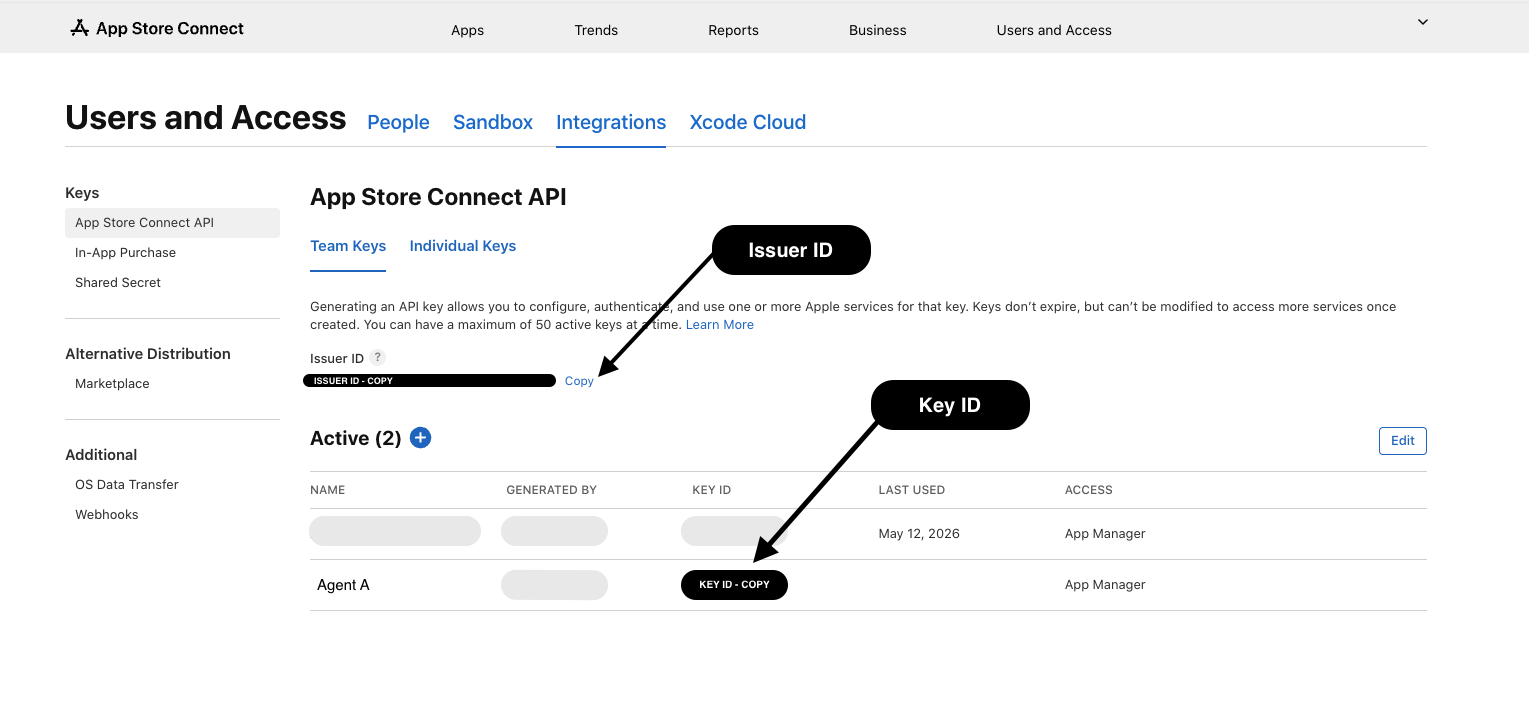
|
|
15
|
+
|
|
14
16
|
1. Sign in to [App Store Connect](https://appstoreconnect.apple.com).
|
|
15
17
|
2. Go to **Users and Access** → **Integrations** tab → **App Store Connect API**.
|
|
16
18
|
3. Copy the **Issuer ID** shown near the top — this is your `ASC_ISSUER_ID`
|
|
@@ -18,9 +20,14 @@ Step-by-step from zero to a working server.
|
|
|
18
20
|
4. Click the **+** button to create a new key.
|
|
19
21
|
- **Name:** something like `mcp-metadata`.
|
|
20
22
|
- **Access (role):** choose the **least privilege** that covers your use:
|
|
21
|
-
- **App Manager** — edit metadata, keywords, screenshots, versions, TestFlight. ✅ Recommended.
|
|
23
|
+
- **App Manager** — edit metadata, keywords, screenshots, versions, TestFlight. ✅ Recommended for the listing tools.
|
|
22
24
|
- **Developer** — narrower; may not allow all edits.
|
|
23
25
|
- **Admin** — full control. Only if you genuinely need it.
|
|
26
|
+
- ⚠️ **Analytics/sales/finance reports need more.** An App Manager key returns
|
|
27
|
+
`403` for the report tools. To read downloads, proceeds, subscriptions, etc.,
|
|
28
|
+
use a key with the **Admin, Finance, or Sales** role (and your **Vendor
|
|
29
|
+
Number**). See [ANALYTICS.md](ANALYTICS.md). You can run two keys — one for
|
|
30
|
+
metadata, one for reports.
|
|
24
31
|
5. Click **Generate**. You'll now see the key listed with a **Key ID** — that's your `ASC_KEY_ID`.
|
|
25
32
|
6. Click **Download API Key** to get the `AuthKey_XXXXXXXXXX.p8` file.
|
|
26
33
|
> ⚠️ You can only download this **once**. Save it somewhere safe and backed up.
|
package/docs/TOOLS.md
CHANGED
|
@@ -200,6 +200,65 @@ length warnings are attached to the response under `_warnings`.
|
|
|
200
200
|
|
|
201
201
|
---
|
|
202
202
|
|
|
203
|
+
## Analytics, sales, subscriptions & finance
|
|
204
|
+
|
|
205
|
+
> **Permissions:** these tools require an API key with the **Admin, Finance, or
|
|
206
|
+
> Sales** role. An **App Manager** key returns `403`. Sales/finance also need a
|
|
207
|
+
> **Vendor Number** (App Store Connect → Payments and Financial Reports; 8–9
|
|
208
|
+
> digits) — pass `vendorNumber` or set the `ASC_VENDOR_NUMBER` env var.
|
|
209
|
+
> Full setup walkthrough: **[ANALYTICS.md](ANALYTICS.md)**.
|
|
210
|
+
|
|
211
|
+
All report tools return `{ reportType, columns, rowCount, returned, truncated, rows }`
|
|
212
|
+
with `rows` capped at `limit` (default 200).
|
|
213
|
+
|
|
214
|
+
### get_sales_report
|
|
215
|
+
Units/downloads, proceeds, and subscription data from Sales & Trends.
|
|
216
|
+
- `reportDate` **(required)** — `YYYY-MM-DD` (daily/weekly), `YYYY-MM` (monthly), `YYYY` (yearly)
|
|
217
|
+
- `vendorNumber` — or `ASC_VENDOR_NUMBER`
|
|
218
|
+
- `frequency` — `DAILY` (default), `WEEKLY`, `MONTHLY`, `YEARLY`
|
|
219
|
+
- `reportType` — `SALES` (default), `SUBSCRIPTION`, `SUBSCRIBER`, `SUBSCRIPTION_EVENT`, `INSTALLS`, …
|
|
220
|
+
- `reportSubType` — `SUMMARY` (default) or `DETAILED`
|
|
221
|
+
- `version` — report-version override (e.g. `1_1` for SALES, `1_4` for subscriptions)
|
|
222
|
+
- `limit` — max rows (default 200)
|
|
223
|
+
|
|
224
|
+
### get_subscription_report
|
|
225
|
+
Convenience wrapper for subscription analytics (DAILY only).
|
|
226
|
+
- `reportDate` **(required)** — `YYYY-MM-DD`
|
|
227
|
+
- `kind` — `ACTIVE` (default, active-subscriber snapshot), `EVENTS` (subscribe/cancel/renew/retention), `SUBSCRIBERS` (per-subscriber detail)
|
|
228
|
+
- `vendorNumber`, `limit`
|
|
229
|
+
|
|
230
|
+
### get_finance_report
|
|
231
|
+
Proceeds/earnings by region.
|
|
232
|
+
- `reportDate` **(required)** — fiscal month `YYYY-MM`
|
|
233
|
+
- `regionCode` — `ZZ` (default, consolidated), `US`, `EU`, `JP`, …
|
|
234
|
+
- `vendorNumber`, `limit`
|
|
235
|
+
|
|
236
|
+
### request_analytics_report
|
|
237
|
+
Start an Analytics report request for an app (downloads, sessions, active
|
|
238
|
+
devices, App Store engagement). **Async** — generation can take minutes to hours.
|
|
239
|
+
- `appId` **(required)**
|
|
240
|
+
- `accessType` — `ONE_TIME_SNAPSHOT` (default) or `ONGOING`
|
|
241
|
+
|
|
242
|
+
### list_analytics_reports
|
|
243
|
+
- `requestId` **(required)** — from `request_analytics_report`
|
|
244
|
+
- `category` — `APP_USAGE`, `APP_STORE_ENGAGEMENT`, `COMMERCE`, `FRAMEWORK_USAGE`, `PERFORMANCE`
|
|
245
|
+
|
|
246
|
+
### list_analytics_report_instances
|
|
247
|
+
- `reportId` **(required)**
|
|
248
|
+
- `granularity` — `DAILY`, `WEEKLY`, `MONTHLY`
|
|
249
|
+
- `processingDate` — `YYYY-MM-DD`
|
|
250
|
+
|
|
251
|
+
### get_analytics_report_data
|
|
252
|
+
Download + decompress + parse an instance's segments into rows.
|
|
253
|
+
- `instanceId` **(required)**
|
|
254
|
+
- `limit` — max rows (default 200)
|
|
255
|
+
|
|
256
|
+
**Typical analytics flow:** `request_analytics_report` → (wait) →
|
|
257
|
+
`list_analytics_reports` → `list_analytics_report_instances` →
|
|
258
|
+
`get_analytics_report_data`.
|
|
259
|
+
|
|
260
|
+
---
|
|
261
|
+
|
|
203
262
|
## Raw API access
|
|
204
263
|
|
|
205
264
|
### `raw_request`
|
package/package.json
CHANGED
|
@@ -1,6 +1,6 @@
|
|
|
1
1
|
{
|
|
2
2
|
"name": "appstore-api-mcp",
|
|
3
|
-
"version": "1.
|
|
3
|
+
"version": "1.1.1",
|
|
4
4
|
"description": "MCP server for Apple App Store Connect — manage apps, keywords, descriptions, titles, screenshots, versions and the full API from any MCP client (Claude, Codex, Cursor, Cline, Windsurf, VS Code, Zed, Continue, Gemini CLI, Google Antigravity, Amazon Q, Goose, and custom agents). Includes a fleet-wide ASO audit and dry-run previews.",
|
|
5
5
|
"type": "module",
|
|
6
6
|
"bin": {
|
package/src/client.js
CHANGED
|
@@ -1,5 +1,6 @@
|
|
|
1
1
|
import { readFileSync } from "node:fs";
|
|
2
2
|
import { createHash } from "node:crypto";
|
|
3
|
+
import { gunzipSync } from "node:zlib";
|
|
3
4
|
import { importPKCS8, SignJWT } from "jose";
|
|
4
5
|
|
|
5
6
|
const BASE_URL = "https://api.appstoreconnect.apple.com";
|
|
@@ -54,8 +55,7 @@ export class AppStoreConnectClient {
|
|
|
54
55
|
* Core request. `path` may be a full URL (e.g. a paging `next` link) or a
|
|
55
56
|
* path relative to the API root, with or without the leading /v1.
|
|
56
57
|
*/
|
|
57
|
-
|
|
58
|
-
const token = await this._getToken();
|
|
58
|
+
_buildUrl(path, query) {
|
|
59
59
|
let url;
|
|
60
60
|
if (/^https?:\/\//.test(path)) {
|
|
61
61
|
url = new URL(path);
|
|
@@ -72,6 +72,12 @@ export class AppStoreConnectClient {
|
|
|
72
72
|
url.searchParams.set(k, Array.isArray(v) ? v.join(",") : String(v));
|
|
73
73
|
}
|
|
74
74
|
}
|
|
75
|
+
return url;
|
|
76
|
+
}
|
|
77
|
+
|
|
78
|
+
async request(method, path, { query, body } = {}) {
|
|
79
|
+
const token = await this._getToken();
|
|
80
|
+
const url = this._buildUrl(path, query);
|
|
75
81
|
const headers = { Authorization: `Bearer ${token}` };
|
|
76
82
|
let payload;
|
|
77
83
|
if (body !== undefined) {
|
|
@@ -133,6 +139,72 @@ export class AppStoreConnectClient {
|
|
|
133
139
|
return all;
|
|
134
140
|
}
|
|
135
141
|
|
|
142
|
+
/** True if the buffer starts with the gzip magic bytes. */
|
|
143
|
+
static _isGzip(buf) {
|
|
144
|
+
return buf.length > 2 && buf[0] === 0x1f && buf[1] === 0x8b;
|
|
145
|
+
}
|
|
146
|
+
|
|
147
|
+
/**
|
|
148
|
+
* GET a report endpoint (salesReports / financeReports) that returns a
|
|
149
|
+
* gzip-compressed TSV. Returns the decompressed text. On error, the API
|
|
150
|
+
* sends JSON instead of gzip — surfaced as a readable Error.
|
|
151
|
+
*/
|
|
152
|
+
async getReport(path, query) {
|
|
153
|
+
const token = await this._getToken();
|
|
154
|
+
const url = this._buildUrl(path, query);
|
|
155
|
+
const res = await fetch(url, {
|
|
156
|
+
method: "GET",
|
|
157
|
+
headers: { Authorization: `Bearer ${token}`, Accept: "application/a-gzip" },
|
|
158
|
+
});
|
|
159
|
+
const buf = Buffer.from(await res.arrayBuffer());
|
|
160
|
+
if (!res.ok) {
|
|
161
|
+
let detail = buf.toString("utf8");
|
|
162
|
+
try {
|
|
163
|
+
const j = JSON.parse(detail);
|
|
164
|
+
if (j.errors)
|
|
165
|
+
detail = j.errors
|
|
166
|
+
.map((e) => `${e.status} ${e.code}: ${e.title} — ${e.detail}`)
|
|
167
|
+
.join("; ");
|
|
168
|
+
} catch {
|
|
169
|
+
/* leave detail as text */
|
|
170
|
+
}
|
|
171
|
+
const err = new Error(
|
|
172
|
+
`App Store Connect report ${url.pathname} failed: ${res.status} ${res.statusText} — ${detail}`,
|
|
173
|
+
);
|
|
174
|
+
err.status = res.status;
|
|
175
|
+
throw err;
|
|
176
|
+
}
|
|
177
|
+
return AppStoreConnectClient._isGzip(buf)
|
|
178
|
+
? gunzipSync(buf).toString("utf8")
|
|
179
|
+
: buf.toString("utf8");
|
|
180
|
+
}
|
|
181
|
+
|
|
182
|
+
/** Download a (possibly gzipped) report/segment file from a pre-signed URL. */
|
|
183
|
+
async downloadUrl(url) {
|
|
184
|
+
const res = await fetch(url);
|
|
185
|
+
const buf = Buffer.from(await res.arrayBuffer());
|
|
186
|
+
if (!res.ok)
|
|
187
|
+
throw new Error(`Download failed (${res.status}) for ${url}`);
|
|
188
|
+
return AppStoreConnectClient._isGzip(buf)
|
|
189
|
+
? gunzipSync(buf).toString("utf8")
|
|
190
|
+
: buf.toString("utf8");
|
|
191
|
+
}
|
|
192
|
+
|
|
193
|
+
/** Parse TSV/CSV text into an array of row objects. Auto-detects delimiter. */
|
|
194
|
+
static parseDelimited(text, delimiter) {
|
|
195
|
+
const lines = text.split(/\r?\n/).filter((l) => l.length > 0);
|
|
196
|
+
if (lines.length === 0) return { columns: [], rows: [] };
|
|
197
|
+
const d = delimiter || (lines[0].includes("\t") ? "\t" : ",");
|
|
198
|
+
const columns = lines[0].split(d);
|
|
199
|
+
const rows = lines.slice(1).map((line) => {
|
|
200
|
+
const cells = line.split(d);
|
|
201
|
+
const row = {};
|
|
202
|
+
columns.forEach((c, i) => (row[c] = cells[i]));
|
|
203
|
+
return row;
|
|
204
|
+
});
|
|
205
|
+
return { columns, rows };
|
|
206
|
+
}
|
|
207
|
+
|
|
136
208
|
/**
|
|
137
209
|
* Upload an image to a freshly-reserved upload-asset (screenshot or preview).
|
|
138
210
|
* `uploadOperations` come from the reservation's attributes.
|
package/src/index.js
CHANGED
|
@@ -128,6 +128,45 @@ const EDITABLE_VERSION_STATES = new Set([
|
|
|
128
128
|
"INVALID_BINARY",
|
|
129
129
|
]);
|
|
130
130
|
|
|
131
|
+
// Optional default Vendor Number for sales/finance reports.
|
|
132
|
+
const DEFAULT_VENDOR = process.env.ASC_VENDOR_NUMBER;
|
|
133
|
+
|
|
134
|
+
/** Cap parsed report rows so large reports don't flood the response. */
|
|
135
|
+
function reportResult(reportType, parsed, limit = 200) {
|
|
136
|
+
const rows = parsed.rows;
|
|
137
|
+
return {
|
|
138
|
+
reportType,
|
|
139
|
+
columns: parsed.columns,
|
|
140
|
+
rowCount: rows.length,
|
|
141
|
+
returned: Math.min(rows.length, limit),
|
|
142
|
+
truncated: rows.length > limit,
|
|
143
|
+
rows: rows.slice(0, limit),
|
|
144
|
+
};
|
|
145
|
+
}
|
|
146
|
+
|
|
147
|
+
function requireVendor(v) {
|
|
148
|
+
const vendor = v || DEFAULT_VENDOR;
|
|
149
|
+
if (!vendor)
|
|
150
|
+
throw new Error(
|
|
151
|
+
"vendorNumber is required (or set the ASC_VENDOR_NUMBER env var). Find it in App Store Connect → Payments and Financial Reports (or Sales and Trends) — an 8–9 digit number.",
|
|
152
|
+
);
|
|
153
|
+
return vendor;
|
|
154
|
+
}
|
|
155
|
+
|
|
156
|
+
// Tools that hit role-gated report/analytics endpoints. On a 403 the dispatcher
|
|
157
|
+
// appends a hint that these need a higher-privilege key than App Manager.
|
|
158
|
+
const REPORT_TOOLS = new Set([
|
|
159
|
+
"get_sales_report",
|
|
160
|
+
"get_subscription_report",
|
|
161
|
+
"get_finance_report",
|
|
162
|
+
"request_analytics_report",
|
|
163
|
+
"list_analytics_reports",
|
|
164
|
+
"list_analytics_report_instances",
|
|
165
|
+
"get_analytics_report_data",
|
|
166
|
+
]);
|
|
167
|
+
const ROLE_HINT =
|
|
168
|
+
" — NOTE: report/analytics APIs require an API key with the Admin, Finance, or Sales role. An App Manager key is not sufficient; generate a key with the needed role in App Store Connect → Users and Access → Integrations.";
|
|
169
|
+
|
|
131
170
|
// ---- Tool definitions -------------------------------------------------------
|
|
132
171
|
|
|
133
172
|
const tools = [
|
|
@@ -751,6 +790,250 @@ const tools = [
|
|
|
751
790
|
},
|
|
752
791
|
},
|
|
753
792
|
|
|
793
|
+
// ---- Analytics, sales, subscriptions & finance ----
|
|
794
|
+
{
|
|
795
|
+
name: "get_sales_report",
|
|
796
|
+
description:
|
|
797
|
+
"Download a Sales & Trends report (units/downloads, proceeds, and subscription data) and return parsed rows. Requires your Vendor Number (App Store Connect → Payments and Financial Reports / Sales and Trends; 8–9 digits) via vendorNumber or the ASC_VENDOR_NUMBER env var. reportType: SALES (units & proceeds, default), SUBSCRIPTION (active subs snapshot), SUBSCRIBER (per-subscriber detail), SUBSCRIPTION_EVENT (subscribe/cancel/renew), INSTALLS, FIRST_ANNUAL. reportDate format by frequency: DAILY/WEEKLY = YYYY-MM-DD, MONTHLY = YYYY-MM, YEARLY = YYYY.",
|
|
798
|
+
inputSchema: {
|
|
799
|
+
type: "object",
|
|
800
|
+
properties: {
|
|
801
|
+
vendorNumber: { type: "string" },
|
|
802
|
+
reportDate: {
|
|
803
|
+
type: "string",
|
|
804
|
+
description: "e.g. 2024-01-15 (daily) or 2024-01 (monthly)",
|
|
805
|
+
},
|
|
806
|
+
frequency: {
|
|
807
|
+
type: "string",
|
|
808
|
+
description: "DAILY (default), WEEKLY, MONTHLY, YEARLY",
|
|
809
|
+
},
|
|
810
|
+
reportType: {
|
|
811
|
+
type: "string",
|
|
812
|
+
description: "SALES (default), SUBSCRIPTION, SUBSCRIBER, SUBSCRIPTION_EVENT, INSTALLS, …",
|
|
813
|
+
},
|
|
814
|
+
reportSubType: {
|
|
815
|
+
type: "string",
|
|
816
|
+
description: "SUMMARY (default) or DETAILED",
|
|
817
|
+
},
|
|
818
|
+
version: {
|
|
819
|
+
type: "string",
|
|
820
|
+
description: "Report version override (e.g. 1_1 for SALES, 1_4 for subscriptions)",
|
|
821
|
+
},
|
|
822
|
+
limit: { type: "number", description: "Max rows to return (default 200)" },
|
|
823
|
+
},
|
|
824
|
+
required: ["reportDate"],
|
|
825
|
+
},
|
|
826
|
+
run: async (a) => {
|
|
827
|
+
const vendor = requireVendor(a.vendorNumber);
|
|
828
|
+
const reportType = a.reportType || "SALES";
|
|
829
|
+
const subType =
|
|
830
|
+
a.reportSubType || (reportType === "SUBSCRIBER" ? "DETAILED" : "SUMMARY");
|
|
831
|
+
const version =
|
|
832
|
+
a.version ||
|
|
833
|
+
(reportType === "SALES"
|
|
834
|
+
? "1_1"
|
|
835
|
+
: reportType.startsWith("SUBSC")
|
|
836
|
+
? "1_4"
|
|
837
|
+
: "1_0");
|
|
838
|
+
const text = await client.getReport("/salesReports", {
|
|
839
|
+
"filter[vendorNumber]": vendor,
|
|
840
|
+
"filter[frequency]": a.frequency || "DAILY",
|
|
841
|
+
"filter[reportType]": reportType,
|
|
842
|
+
"filter[reportSubType]": subType,
|
|
843
|
+
"filter[reportDate]": a.reportDate,
|
|
844
|
+
"filter[version]": version,
|
|
845
|
+
});
|
|
846
|
+
return reportResult(
|
|
847
|
+
reportType,
|
|
848
|
+
AppStoreConnectClient.parseDelimited(text, "\t"),
|
|
849
|
+
a.limit ?? 200,
|
|
850
|
+
);
|
|
851
|
+
},
|
|
852
|
+
},
|
|
853
|
+
{
|
|
854
|
+
name: "get_subscription_report",
|
|
855
|
+
description:
|
|
856
|
+
"Subscription analytics via Sales & Trends (convenience wrapper). kind: ACTIVE = current active-subscriber snapshot, EVENTS = subscribe/cancel/renew/retention events, SUBSCRIBERS = per-subscriber detail. Requires the Vendor Number. These reports are DAILY only.",
|
|
857
|
+
inputSchema: {
|
|
858
|
+
type: "object",
|
|
859
|
+
properties: {
|
|
860
|
+
vendorNumber: { type: "string" },
|
|
861
|
+
kind: {
|
|
862
|
+
type: "string",
|
|
863
|
+
description: "ACTIVE (default), EVENTS, SUBSCRIBERS",
|
|
864
|
+
},
|
|
865
|
+
reportDate: { type: "string", description: "YYYY-MM-DD" },
|
|
866
|
+
limit: { type: "number", description: "Max rows (default 200)" },
|
|
867
|
+
},
|
|
868
|
+
required: ["reportDate"],
|
|
869
|
+
},
|
|
870
|
+
run: async (a) => {
|
|
871
|
+
const vendor = requireVendor(a.vendorNumber);
|
|
872
|
+
const map = {
|
|
873
|
+
ACTIVE: ["SUBSCRIPTION", "SUMMARY"],
|
|
874
|
+
EVENTS: ["SUBSCRIPTION_EVENT", "SUMMARY"],
|
|
875
|
+
SUBSCRIBERS: ["SUBSCRIBER", "DETAILED"],
|
|
876
|
+
};
|
|
877
|
+
const [reportType, subType] = map[a.kind || "ACTIVE"] || map.ACTIVE;
|
|
878
|
+
const text = await client.getReport("/salesReports", {
|
|
879
|
+
"filter[vendorNumber]": vendor,
|
|
880
|
+
"filter[frequency]": "DAILY",
|
|
881
|
+
"filter[reportType]": reportType,
|
|
882
|
+
"filter[reportSubType]": subType,
|
|
883
|
+
"filter[reportDate]": a.reportDate,
|
|
884
|
+
"filter[version]": "1_4",
|
|
885
|
+
});
|
|
886
|
+
return reportResult(
|
|
887
|
+
reportType,
|
|
888
|
+
AppStoreConnectClient.parseDelimited(text, "\t"),
|
|
889
|
+
a.limit ?? 200,
|
|
890
|
+
);
|
|
891
|
+
},
|
|
892
|
+
},
|
|
893
|
+
{
|
|
894
|
+
name: "get_finance_report",
|
|
895
|
+
description:
|
|
896
|
+
"Download a Finance report (proceeds/earnings by region) and return parsed rows. Requires the Vendor Number, a regionCode (e.g. 'ZZ' for the consolidated/all-regions report, or 'US', 'EU', 'JP', …) and reportDate as YYYY-MM (a fiscal month).",
|
|
897
|
+
inputSchema: {
|
|
898
|
+
type: "object",
|
|
899
|
+
properties: {
|
|
900
|
+
vendorNumber: { type: "string" },
|
|
901
|
+
regionCode: { type: "string", description: "e.g. ZZ (default), US, EU, JP" },
|
|
902
|
+
reportDate: { type: "string", description: "Fiscal month, YYYY-MM" },
|
|
903
|
+
limit: { type: "number", description: "Max rows (default 200)" },
|
|
904
|
+
},
|
|
905
|
+
required: ["reportDate"],
|
|
906
|
+
},
|
|
907
|
+
run: async (a) => {
|
|
908
|
+
const vendor = requireVendor(a.vendorNumber);
|
|
909
|
+
const text = await client.getReport("/financeReports", {
|
|
910
|
+
"filter[vendorNumber]": vendor,
|
|
911
|
+
"filter[regionCode]": a.regionCode || "ZZ",
|
|
912
|
+
"filter[reportDate]": a.reportDate,
|
|
913
|
+
"filter[reportType]": "FINANCIAL",
|
|
914
|
+
});
|
|
915
|
+
return reportResult(
|
|
916
|
+
"FINANCIAL",
|
|
917
|
+
AppStoreConnectClient.parseDelimited(text, "\t"),
|
|
918
|
+
a.limit ?? 200,
|
|
919
|
+
);
|
|
920
|
+
},
|
|
921
|
+
},
|
|
922
|
+
{
|
|
923
|
+
name: "request_analytics_report",
|
|
924
|
+
description:
|
|
925
|
+
"Start an Analytics report request for an app — covers downloads, installs, sessions, active devices, App Store engagement (impressions, product page views, conversion), and more. accessType: ONE_TIME_SNAPSHOT (historical, default) or ONGOING (kept up to date daily). Generation is ASYNC and can take minutes to hours. Afterwards: list_analytics_reports → list_analytics_report_instances → get_analytics_report_data.",
|
|
926
|
+
inputSchema: {
|
|
927
|
+
type: "object",
|
|
928
|
+
properties: {
|
|
929
|
+
appId: { type: "string" },
|
|
930
|
+
accessType: {
|
|
931
|
+
type: "string",
|
|
932
|
+
description: "ONE_TIME_SNAPSHOT (default) or ONGOING",
|
|
933
|
+
},
|
|
934
|
+
},
|
|
935
|
+
required: ["appId"],
|
|
936
|
+
},
|
|
937
|
+
run: async (a) =>
|
|
938
|
+
client.post("/analyticsReportRequests", {
|
|
939
|
+
data: {
|
|
940
|
+
type: "analyticsReportRequests",
|
|
941
|
+
attributes: { accessType: a.accessType || "ONE_TIME_SNAPSHOT" },
|
|
942
|
+
relationships: { app: { data: { type: "apps", id: a.appId } } },
|
|
943
|
+
},
|
|
944
|
+
}),
|
|
945
|
+
},
|
|
946
|
+
{
|
|
947
|
+
name: "list_analytics_reports",
|
|
948
|
+
description:
|
|
949
|
+
"List the reports available under an analytics report request (from request_analytics_report). category filter: APP_USAGE, APP_STORE_ENGAGEMENT, COMMERCE, FRAMEWORK_USAGE, PERFORMANCE.",
|
|
950
|
+
inputSchema: {
|
|
951
|
+
type: "object",
|
|
952
|
+
properties: {
|
|
953
|
+
requestId: { type: "string" },
|
|
954
|
+
category: { type: "string" },
|
|
955
|
+
},
|
|
956
|
+
required: ["requestId"],
|
|
957
|
+
},
|
|
958
|
+
run: async (a) => {
|
|
959
|
+
const q = {};
|
|
960
|
+
if (a.category) q["filter[category]"] = a.category;
|
|
961
|
+
const data = await client.getAll(
|
|
962
|
+
`/analyticsReportRequests/${a.requestId}/reports`,
|
|
963
|
+
q,
|
|
964
|
+
);
|
|
965
|
+
return data.map((x) => ({ id: x.id, ...x.attributes }));
|
|
966
|
+
},
|
|
967
|
+
},
|
|
968
|
+
{
|
|
969
|
+
name: "list_analytics_report_instances",
|
|
970
|
+
description:
|
|
971
|
+
"List instances of an analytics report (one per processing date). granularity: DAILY, WEEKLY, MONTHLY. Use the instance id with get_analytics_report_data.",
|
|
972
|
+
inputSchema: {
|
|
973
|
+
type: "object",
|
|
974
|
+
properties: {
|
|
975
|
+
reportId: { type: "string" },
|
|
976
|
+
granularity: { type: "string", description: "DAILY, WEEKLY, MONTHLY" },
|
|
977
|
+
processingDate: { type: "string", description: "YYYY-MM-DD" },
|
|
978
|
+
},
|
|
979
|
+
required: ["reportId"],
|
|
980
|
+
},
|
|
981
|
+
run: async (a) => {
|
|
982
|
+
const q = {};
|
|
983
|
+
if (a.granularity) q["filter[granularity]"] = a.granularity;
|
|
984
|
+
if (a.processingDate) q["filter[processingDate]"] = a.processingDate;
|
|
985
|
+
const data = await client.getAll(
|
|
986
|
+
`/analyticsReports/${a.reportId}/instances`,
|
|
987
|
+
q,
|
|
988
|
+
);
|
|
989
|
+
return data.map((x) => ({ id: x.id, ...x.attributes }));
|
|
990
|
+
},
|
|
991
|
+
},
|
|
992
|
+
{
|
|
993
|
+
name: "get_analytics_report_data",
|
|
994
|
+
description:
|
|
995
|
+
"Download and parse the data for an analytics report instance. Fetches its segments (gzipped CSV), decompresses, and returns parsed rows.",
|
|
996
|
+
inputSchema: {
|
|
997
|
+
type: "object",
|
|
998
|
+
properties: {
|
|
999
|
+
instanceId: { type: "string" },
|
|
1000
|
+
limit: { type: "number", description: "Max rows (default 200)" },
|
|
1001
|
+
},
|
|
1002
|
+
required: ["instanceId"],
|
|
1003
|
+
},
|
|
1004
|
+
run: async (a) => {
|
|
1005
|
+
const segs = await client.getAll(
|
|
1006
|
+
`/analyticsReportInstances/${a.instanceId}/segments`,
|
|
1007
|
+
);
|
|
1008
|
+
if (!segs.length)
|
|
1009
|
+
return {
|
|
1010
|
+
rowCount: 0,
|
|
1011
|
+
rows: [],
|
|
1012
|
+
note: "No segments yet — the instance may still be processing. Try again later.",
|
|
1013
|
+
};
|
|
1014
|
+
let columns = [];
|
|
1015
|
+
const allRows = [];
|
|
1016
|
+
for (const s of segs) {
|
|
1017
|
+
const url = s.attributes && s.attributes.url;
|
|
1018
|
+
if (!url) continue;
|
|
1019
|
+
const parsed = AppStoreConnectClient.parseDelimited(
|
|
1020
|
+
await client.downloadUrl(url),
|
|
1021
|
+
);
|
|
1022
|
+
if (!columns.length) columns = parsed.columns;
|
|
1023
|
+
allRows.push(...parsed.rows);
|
|
1024
|
+
}
|
|
1025
|
+
const limit = a.limit ?? 200;
|
|
1026
|
+
return {
|
|
1027
|
+
columns,
|
|
1028
|
+
segments: segs.length,
|
|
1029
|
+
rowCount: allRows.length,
|
|
1030
|
+
returned: Math.min(allRows.length, limit),
|
|
1031
|
+
truncated: allRows.length > limit,
|
|
1032
|
+
rows: allRows.slice(0, limit),
|
|
1033
|
+
};
|
|
1034
|
+
},
|
|
1035
|
+
},
|
|
1036
|
+
|
|
754
1037
|
// ---- Generic escape hatch ----
|
|
755
1038
|
{
|
|
756
1039
|
name: "raw_request",
|
|
@@ -806,6 +1089,8 @@ server.setRequestHandler(CallToolRequestSchema, async (req) => {
|
|
|
806
1089
|
const result = await tool.run(req.params.arguments || {});
|
|
807
1090
|
return ok(result);
|
|
808
1091
|
} catch (e) {
|
|
1092
|
+
if (e && e.status === 403 && REPORT_TOOLS.has(req.params.name))
|
|
1093
|
+
e.message += ROLE_HINT;
|
|
809
1094
|
return fail(e);
|
|
810
1095
|
}
|
|
811
1096
|
});
|