anim-3d-obj 2.0.0 → 2.0.1
This diff represents the content of publicly available package versions that have been released to one of the supported registries. The information contained in this diff is provided for informational purposes only and reflects changes between package versions as they appear in their respective public registries.
- package/README.md +188 -3
- package/package.json +1 -1
package/README.md
CHANGED
|
@@ -1,11 +1,196 @@
|
|
|
1
1
|
# anim-3d-obj
|
|
2
2
|
|
|
3
|
-
A
|
|
3
|
+
A lightweight React component for rendering and animating 3D-like objects using only HTML & CSS.
|
|
4
|
+
No WebGL or heavy 3D libraries required.
|
|
4
5
|
|
|
5
|
-
|
|
6
|
+
---
|
|
7
|
+
|
|
8
|
+
# React Typescript Cuboid Builder
|
|
9
|
+
|
|
10
|
+
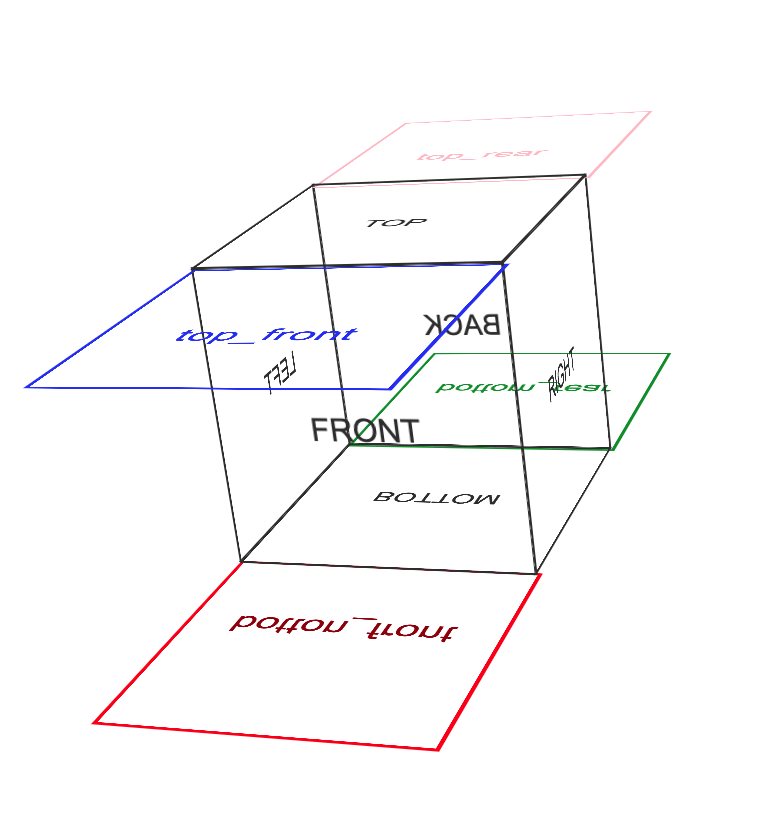
This project allows a user to create Cuboids of any size simply by entering a set of parameters.
|
|
11
|
+
The program does the leg work with regard to calculating translationZ depth and config on the fly.
|
|
12
|
+
|
|
13
|
+
## Examples
|
|
14
|
+
|
|
15
|
+
- [6 sided Cuboid - animate X360 Y360](https://codesandbox.io/s/anim-3d-obj-all-sides-simple-bf67yg-tzr2v6)
|
|
16
|
+
- [3 sided Object - animate y-axis](https://codesandbox.io/s/anim-3d-obj-3-sides-wobble-y-axis-wglkms)
|
|
17
|
+
- [Double box spin](https://codesandbox.io/s/react-anim-3d-double-box-spin-vbdhg2)
|
|
18
|
+
- [Floating Ribbon](https://codesandbox.io/s/cocky-butterfly-ygwkps)
|
|
19
|
+
- [Parallel divs animated x and y axis in tandem](https://codesandbox.io/s/anim-3d-obj-2-sides-simple-4057y7)
|
|
20
|
+
- [Obj Skeleton](https://codesandbox.io/s/anim-3d-obj-skeleton-5dlk70)
|
|
21
|
+
|
|
22
|
+
`** ANIMATIONS`
|
|
23
|
+
|
|
24
|
+
- `fadeInkf`: fade object in from 0 to 1 Opacity: [demo](https://codesandbox.io/s/anim-3d-obj-fadeinkf-1fozww)
|
|
25
|
+
- `floatX`: float object so is not stationary: [demo](https://codesandbox.io/s/anim-3d-obj-floatx-hzeo42)
|
|
26
|
+
- `floatShadow`: float object + add shadow: [demo](https://codesandbox.io/s/anim-3d-obj-floatshadow-8pp5k0)
|
|
27
|
+
- `pulseSM`: pulse object Small: [demo](https://codesandbox.io/s/anim-3d-obj-pulsesm-k2rjb6)
|
|
28
|
+
- `pulseMD`: pulse object Medium: [demo](https://codesandbox.io/s/anim-3d-obj-pulsemd-sqk2of)
|
|
29
|
+
- `pulseLG`: pulse object Large: [demo](https://codesandbox.io/s/anim-3d-obj-pulselg-qz7x0m)
|
|
30
|
+
- `swing`: Swing component: [demo](https://codesandbox.io/s/anim-3d-obj-swing-snj8li)
|
|
31
|
+
- `swingDecay`: Swing component with decay: [demo](https://codesandbox.io/s/anim-3d-obj-swingdecay-cku0e1)
|
|
32
|
+
- `noAnim`: no animation place holder
|
|
33
|
+
|
|
34
|
+
`X-AXIS Animations`
|
|
35
|
+
|
|
36
|
+
- `X360`: rotate 360 degrees on the x-axis: [demo](https://codesandbox.io/s/anim-3d-obj-x360-7kiuhw)
|
|
37
|
+
- `wobX`: wobble on x-axis (degreesHi <-> degreesLow): [demo](https://codesandbox.io/s/anim-3d-obj-wobx-ldwek7)
|
|
38
|
+
- `fwdx018`: spin object on x-axis from 0 degrees to 180 degrees: [demo](https://codesandbox.io/s/anim-3d-obj-fwd180-v90xyu)
|
|
39
|
+
- `fwdx1836`: spin object on x-axis from 180 degrees to 360 degrees: [demo](https://codesandbox.io/s/anim-3d-obj-fwd1836-mtwuv9)
|
|
40
|
+
- `fwdx09`: spin object on x-axis from 0 degrees to 90 degrees: [demo](https://codesandbox.io/s/anim-3d-obj-fwd09-84vocn)
|
|
41
|
+
- `fwdx918`: spin object on x-axis from 90 degrees to 180 degrees: [demo](https://codesandbox.io/s/anim-3d-obj-fwd918-6039fj)
|
|
42
|
+
- `fwdx1827`: spin object on x-axis from 180 degrees to 270 degrees: [demo](https://codesandbox.io/s/anim-3d-obj-fwdx1827-qpqhtq)
|
|
43
|
+
- `fwdx2736`: spin object on x-axis from 270 degrees to 360 degrees: [demo](https://codesandbox.io/s/anim-3d-obj-fwdx2736-e6c6wg)
|
|
44
|
+
|
|
45
|
+
`Y-AXIS Animations`
|
|
46
|
+
|
|
47
|
+
- `Y360`: rotate 360 degrees on the y-axis: [demo](https://codesandbox.io/s/anim-3d-obj-y360-16lzeb)
|
|
48
|
+
- `wobY`: wobble on y-axis (degreesHi <-> degreesLow): [demo](https://codesandbox.io/s/anim-3d-obj-woby-tkoxms)
|
|
49
|
+
- `fwdy018`: spin object on y-axis from 0 degrees to 180 degrees: [demo](https://codesandbox.io/s/anim-3d-obj-fwdy180-qpqhtq)
|
|
50
|
+
- `fwdy1836`: spin object on y-axis from 180 degrees to 360 degrees: [demo](https://codesandbox.io/s/anim-3d-obj-fwdy1836-qpqhtq)
|
|
51
|
+
- `fwdy09`: spin object on y-axis from 0 degrees to 90 degrees: [demo](https://codesandbox.io/s/anim-3d-obj-fwdy09-elklgr)
|
|
52
|
+
- `fwdy918`: spin object on y-axis from 90 degrees to 180 degrees: [demo](https://codesandbox.io/s/anim-3d-obj-fwdy918-gnym88)
|
|
53
|
+
- `fwdy1827`: spin object on y-axis from 180 degrees to 270 degrees: [demo](https://codesandbox.io/s/anim-3d-obj-fwdy1827-osskgx)
|
|
54
|
+
- `fwdy2736`: spin object on y-axis from 270 degrees to 360 degrees: [demo](https://codesandbox.io/s/anim-3d-obj-fwdy2736-rnbs2q)
|
|
55
|
+
|
|
56
|
+
## Config
|
|
57
|
+
|
|
58
|
+
### Animations:
|
|
59
|
+
|
|
60
|
+
Animations are optional. Either or both of `anim1` or `anim2` can be applied to the component. Animations are applied to 2 wrapping divs respectively.
|
|
61
|
+
|
|
62
|
+
```typescript
|
|
63
|
+
const anim1 = {
|
|
64
|
+
border: "", // while testing reveal the animation wrapper
|
|
65
|
+
degreesHi: -45, // degrees if spin
|
|
66
|
+
degreesLow: 45, // degrees if spin
|
|
67
|
+
delay: 0, // start delay in seconds
|
|
68
|
+
direction: "normal", //normal alternating reverse
|
|
69
|
+
duration: 8, // seconds
|
|
70
|
+
fillMode: "forwards", // none forwards backwards both
|
|
71
|
+
iterationCount: "infinite", // number or infinte
|
|
72
|
+
name: "Y360", // ** ANIMATIONS (above)
|
|
73
|
+
timing: "ease-in-out", // linear ease ease-in-out
|
|
74
|
+
};
|
|
75
|
+
```
|
|
76
|
+
|
|
77
|
+
### Faces:
|
|
78
|
+
|
|
79
|
+
This is an array of objects containing the face used for a given component
|
|
80
|
+
|
|
81
|
+
```javascript
|
|
82
|
+
export interface FaceType {
|
|
83
|
+
name?: string; // front,back,left,right,top,top_rear,top_front,bottom,bottom_rear,bottom_front
|
|
84
|
+
css?: string | undefined;
|
|
85
|
+
body?: any; // can be JSX Component | string | number
|
|
86
|
+
}
|
|
87
|
+
|
|
88
|
+
const faces: FaceType[] = [
|
|
89
|
+
{
|
|
90
|
+
name: "back",
|
|
91
|
+
body: "BACK",
|
|
92
|
+
css: `background:rgba(22,22,22,.5)`,
|
|
93
|
+
},
|
|
94
|
+
{
|
|
95
|
+
name: "right",
|
|
96
|
+
body: "RIGHT",
|
|
97
|
+
css: `background:rgba(220,220,220,.5);
|
|
98
|
+
border:1px solid #ddd`,
|
|
99
|
+
},
|
|
100
|
+
];
|
|
101
|
+
```
|
|
102
|
+
|
|
103
|
+
### Global (face):
|
|
104
|
+
|
|
105
|
+
If the name parameter in the faces array is indicated (ie: "front") but `css` and / or `body` are not. The `global default`(below) will satisfy those parameters.
|
|
106
|
+
|
|
107
|
+
```javascript
|
|
108
|
+
interface GlobalType {
|
|
109
|
+
css?: string;
|
|
110
|
+
body?: string;
|
|
111
|
+
}
|
|
112
|
+
const global: GlobalType = {
|
|
113
|
+
body: "BODY FOR FACE WHICH DOES NOT CONTAIN BODY",
|
|
114
|
+
css: "color:red",
|
|
115
|
+
};
|
|
116
|
+
```
|
|
117
|
+
|
|
118
|
+
|
|
119
|
+
|
|
120
|
+
- https://www.npmjs.com/package/anim-3d-obj
|
|
121
|
+
|
|
122
|
+
---
|
|
123
|
+
|
|
124
|
+
## Features
|
|
125
|
+
|
|
126
|
+
- 🎨 Pure CSS-based 3D object rendering
|
|
127
|
+
- ⚡ Zero dependencies (other than React)
|
|
128
|
+
- 🛠 Fully customizable width, height, depth, and colors
|
|
129
|
+
- 🌀 Built-in animation support
|
|
130
|
+
- 🌍 SSR-safe (works with Next.js, Remix, etc.)
|
|
131
|
+
|
|
132
|
+
---
|
|
133
|
+
|
|
134
|
+
## Peer requirements
|
|
135
|
+
|
|
136
|
+
React 18+. Works in Vite, CRA, Next.js (SSR-safe), Remix, etc.
|
|
137
|
+
|
|
138
|
+
---
|
|
139
|
+
|
|
140
|
+
## Installation
|
|
6
141
|
|
|
7
142
|
```bash
|
|
8
|
-
npm
|
|
143
|
+
npm install anim-3d-obj
|
|
9
144
|
# or
|
|
10
145
|
yarn add anim-3d-obj
|
|
146
|
+
# or
|
|
147
|
+
pnpm add anim-3d-obj
|
|
148
|
+
|
|
149
|
+
import React from "react";
|
|
150
|
+
import { Obj } from "anim-3d-obj";
|
|
11
151
|
```
|
|
152
|
+
|
|
153
|
+
## Full Example
|
|
154
|
+
|
|
155
|
+
```bash
|
|
156
|
+
function App() {
|
|
157
|
+
const global = {
|
|
158
|
+
css: "border: 1px solid #00f; color:#00f; backface-visibility: visible; text-align:center; line-height: 120px; font-size: 14px;",
|
|
159
|
+
body: "height: 120px; width: 120px;",
|
|
160
|
+
};
|
|
161
|
+
|
|
162
|
+
return (
|
|
163
|
+
<Obj
|
|
164
|
+
depth="120px"
|
|
165
|
+
height="120px"
|
|
166
|
+
width="120px"
|
|
167
|
+
perspective="800px"
|
|
168
|
+
rotation="x 1s linear infinite"
|
|
169
|
+
global={global}
|
|
170
|
+
>
|
|
171
|
+
Hello 3D
|
|
172
|
+
</Obj>
|
|
173
|
+
);
|
|
174
|
+
}
|
|
175
|
+
|
|
176
|
+
export default App;
|
|
177
|
+
```
|
|
178
|
+
|
|
179
|
+
# Props
|
|
180
|
+
|
|
181
|
+
The `<Obj />` component accepts the following props:
|
|
182
|
+
|
|
183
|
+
| Prop | Type | Default | Description |
|
|
184
|
+
| ----------- | ------ | --------- | ------------------------------------------------------------------------------ |
|
|
185
|
+
| width | string | "100px" | Width of the object. |
|
|
186
|
+
| height | string | "100px" | Height of the object. |
|
|
187
|
+
| depth | string | "100px" | Depth of the object (3rd dimension). |
|
|
188
|
+
| perspective | string | "600px" | Perspective distance for 3D rendering. |
|
|
189
|
+
| rotation | string | undefined | CSS animation shorthand for rotating the object (e.g. "x 1s linear infinite"). |
|
|
190
|
+
| global | object | {} | Global styles for all faces (css for shared CSS, body for dimensions). |
|
|
191
|
+
|
|
192
|
+
## Tips
|
|
193
|
+
|
|
194
|
+
- You can pass any React children inside `<Obj> ... </Obj>` to render content on the front face.
|
|
195
|
+
- Combine with CSS variables or Tailwind utilities for theming.
|
|
196
|
+
- Works with server-side rendering (SSR) — no window dependency.
|