angular-slickgrid 9.0.0 → 9.0.2
This diff represents the content of publicly available package versions that have been released to one of the supported registries. The information contained in this diff is provided for informational purposes only and reflects changes between package versions as they appear in their respective public registries.
- package/LICENSE +1 -1
- package/{dist/fesm2022 → fesm2022}/angular-slickgrid.mjs +16 -16
- package/package.json +27 -14
- package/.gitbook.yaml +0 -5
- package/CHANGELOG.md +0 -1691
- package/CONTRIBUTING.md +0 -17
- package/angular.json +0 -133
- package/coverage/base.css +0 -224
- package/coverage/block-navigation.js +0 -87
- package/coverage/clover.xml +0 -1620
- package/coverage/coverage-final.json +0 -9
- package/coverage/favicon.png +0 -0
- package/coverage/index.html +0 -176
- package/coverage/library/components/angular-slickgrid.component.ts.html +0 -5074
- package/coverage/library/components/index.html +0 -116
- package/coverage/library/constants.ts.html +0 -397
- package/coverage/library/extensions/index.html +0 -116
- package/coverage/library/extensions/slickRowDetailView.ts.html +0 -1261
- package/coverage/library/index.html +0 -116
- package/coverage/library/modules/angular-slickgrid.module.ts.html +0 -166
- package/coverage/library/modules/index.html +0 -116
- package/coverage/library/services/angularUtil.service.ts.html +0 -445
- package/coverage/library/services/container.service.ts.html +0 -163
- package/coverage/library/services/index.html +0 -161
- package/coverage/library/services/translater.service.ts.html +0 -199
- package/coverage/library/services/utilities.ts.html +0 -142
- package/coverage/prettify.css +0 -1
- package/coverage/prettify.js +0 -2
- package/coverage/sort-arrow-sprite.png +0 -0
- package/coverage/sorter.js +0 -196
- package/dist/LICENSE +0 -21
- package/dist/README.md +0 -142
- package/docs/README.md +0 -5
- package/docs/TOC.md +0 -105
- package/docs/backend-services/Custom-Backend-Service.md +0 -50
- package/docs/backend-services/GraphQL.md +0 -276
- package/docs/backend-services/OData.md +0 -245
- package/docs/backend-services/graphql/GraphQL-Filtering.md +0 -156
- package/docs/backend-services/graphql/GraphQL-JSON-Result.md +0 -85
- package/docs/backend-services/graphql/GraphQL-Pagination.md +0 -77
- package/docs/backend-services/graphql/GraphQL-Sorting.md +0 -78
- package/docs/column-functionalities/cell-menu.md +0 -212
- package/docs/column-functionalities/editors/autocomplete-editor.md +0 -466
- package/docs/column-functionalities/editors/date-editor-flatpickr.md +0 -71
- package/docs/column-functionalities/editors/date-editor-vanilla-calendar.md +0 -91
- package/docs/column-functionalities/editors/longtext-editor-textarea.md +0 -80
- package/docs/column-functionalities/editors/select-dropdown-editor.md +0 -227
- package/docs/column-functionalities/editors.md +0 -604
- package/docs/column-functionalities/filters/autocomplete-filter.md +0 -183
- package/docs/column-functionalities/filters/compound-filters.md +0 -234
- package/docs/column-functionalities/filters/custom-filter.md +0 -117
- package/docs/column-functionalities/filters/filter-intro.md +0 -81
- package/docs/column-functionalities/filters/input-filter.md +0 -260
- package/docs/column-functionalities/filters/range-filters.md +0 -188
- package/docs/column-functionalities/filters/select-filter.md +0 -695
- package/docs/column-functionalities/filters/single-search-filter.md +0 -77
- package/docs/column-functionalities/filters/styling-filled-filters.md +0 -45
- package/docs/column-functionalities/formatters.md +0 -325
- package/docs/column-functionalities/sorting.md +0 -200
- package/docs/developer-guides/csp-compliance.md +0 -64
- package/docs/events/Available-Events.md +0 -223
- package/docs/events/Grid-&-DataView-Events.md +0 -211
- package/docs/getting-started/quick-start.md +0 -230
- package/docs/getting-started/troubleshooting.md +0 -80
- package/docs/grid-functionalities/Column-Picker.md +0 -22
- package/docs/grid-functionalities/Composite-Editor-Modal.md +0 -627
- package/docs/grid-functionalities/Context-Menu.md +0 -226
- package/docs/grid-functionalities/Custom-Footer.md +0 -80
- package/docs/grid-functionalities/Custom-Tooltip-(plugin).md +0 -258
- package/docs/grid-functionalities/Export-to-Excel.md +0 -457
- package/docs/grid-functionalities/Export-to-Text-File.md +0 -165
- package/docs/grid-functionalities/FAQ.md +0 -53
- package/docs/grid-functionalities/Global-Options.md +0 -29
- package/docs/grid-functionalities/Grid-Auto-Resize.md +0 -218
- package/docs/grid-functionalities/Grid-Menu.md +0 -134
- package/docs/grid-functionalities/Grid-State-&-Preset.md +0 -245
- package/docs/grid-functionalities/Header-Menu-&-Header-Buttons.md +0 -125
- package/docs/grid-functionalities/Resize-by-Cell-Content.md +0 -138
- package/docs/grid-functionalities/Row-Selection.md +0 -247
- package/docs/grid-functionalities/Row-based-edit.md +0 -71
- package/docs/grid-functionalities/add-update-highlight.md +0 -258
- package/docs/grid-functionalities/column-row-spanning.md +0 -74
- package/docs/grid-functionalities/dynamic-item-metadata.md +0 -124
- package/docs/grid-functionalities/excel-copy-buffer.md +0 -145
- package/docs/grid-functionalities/frozen-columns-rows.md +0 -164
- package/docs/grid-functionalities/grouping-and-aggregators.md +0 -269
- package/docs/grid-functionalities/header-footer-slots.md +0 -22
- package/docs/grid-functionalities/infinite-scroll.md +0 -150
- package/docs/grid-functionalities/providing-grid-data.md +0 -61
- package/docs/grid-functionalities/row-detail.md +0 -530
- package/docs/grid-functionalities/tree-data-grid.md +0 -391
- package/docs/localization/Localization---Component-Sample.md +0 -87
- package/docs/localization/Localization-with-Custom-Locales.md +0 -66
- package/docs/localization/Localization-with-ngx-translate.md +0 -148
- package/docs/migrations/migration-to-2.x.md +0 -304
- package/docs/migrations/migration-to-3.x.md +0 -295
- package/docs/migrations/migration-to-4.x.md +0 -83
- package/docs/migrations/migration-to-5.x.md +0 -160
- package/docs/migrations/migration-to-6.x.md +0 -128
- package/docs/migrations/migration-to-7.x.md +0 -294
- package/docs/migrations/migration-to-8.x.md +0 -316
- package/docs/migrations/migration-to-9.x.md +0 -219
- package/docs/slick-grid-dataview-objects/slickgrid-dataview-objects.md +0 -79
- package/docs/styling/dark-mode.md +0 -100
- package/docs/styling/styling.md +0 -250
- package/docs/testing/testing-patterns.md +0 -73
- package/eslint.config.mjs +0 -60
- package/ng-package.json +0 -10
- package/src/assets/angular-logo.png +0 -0
- package/src/assets/angular-logo2.png +0 -0
- package/src/assets/data/collection_100_numbers.json +0 -12
- package/src/assets/data/collection_500_numbers.json +0 -52
- package/src/assets/data/countries.json +0 -245
- package/src/assets/data/country_names.json +0 -245
- package/src/assets/data/customers_100.json +0 -102
- package/src/assets/data/users.csv +0 -5
- package/src/assets/i18n/en.json +0 -102
- package/src/assets/i18n/fr.json +0 -103
- package/src/demos/app-routing.module.ts +0 -108
- package/src/demos/app.component.html +0 -187
- package/src/demos/app.component.scss +0 -79
- package/src/demos/app.component.ts +0 -11
- package/src/demos/app.module.ts +0 -196
- package/src/demos/environments/environment.dev.ts +0 -3
- package/src/demos/environments/environment.prod.ts +0 -3
- package/src/demos/environments/environment.ts +0 -8
- package/src/demos/examples/custom-angularComponentEditor.ts +0 -187
- package/src/demos/examples/custom-angularComponentFilter.ts +0 -123
- package/src/demos/examples/custom-buttonFormatter.component.ts +0 -13
- package/src/demos/examples/custom-inputEditor.ts +0 -132
- package/src/demos/examples/custom-inputFilter.ts +0 -134
- package/src/demos/examples/custom-titleFormatter.component.ts +0 -9
- package/src/demos/examples/data/collection_100_numbers.json +0 -12
- package/src/demos/examples/data/collection_500_numbers.json +0 -52
- package/src/demos/examples/data/countries.json +0 -245
- package/src/demos/examples/data/country_names.json +0 -245
- package/src/demos/examples/data/customers_100.json +0 -102
- package/src/demos/examples/data/users.csv +0 -5
- package/src/demos/examples/editor-ng-select.component.ts +0 -38
- package/src/demos/examples/example01.component.html +0 -48
- package/src/demos/examples/example01.component.ts +0 -109
- package/src/demos/examples/example02.component.html +0 -45
- package/src/demos/examples/example02.component.ts +0 -218
- package/src/demos/examples/example03.component.html +0 -118
- package/src/demos/examples/example03.component.ts +0 -694
- package/src/demos/examples/example04.component.html +0 -87
- package/src/demos/examples/example04.component.ts +0 -326
- package/src/demos/examples/example05.component.html +0 -151
- package/src/demos/examples/example05.component.ts +0 -474
- package/src/demos/examples/example06.component.html +0 -163
- package/src/demos/examples/example06.component.ts +0 -446
- package/src/demos/examples/example07.component.html +0 -56
- package/src/demos/examples/example07.component.scss +0 -10
- package/src/demos/examples/example07.component.ts +0 -216
- package/src/demos/examples/example08.component.html +0 -51
- package/src/demos/examples/example08.component.scss +0 -23
- package/src/demos/examples/example08.component.ts +0 -195
- package/src/demos/examples/example09.component.html +0 -55
- package/src/demos/examples/example09.component.scss +0 -22
- package/src/demos/examples/example09.component.ts +0 -302
- package/src/demos/examples/example10.component.html +0 -103
- package/src/demos/examples/example10.component.ts +0 -309
- package/src/demos/examples/example11.component.html +0 -91
- package/src/demos/examples/example11.component.ts +0 -276
- package/src/demos/examples/example12.component.html +0 -98
- package/src/demos/examples/example12.component.ts +0 -317
- package/src/demos/examples/example13.component.html +0 -96
- package/src/demos/examples/example13.component.ts +0 -370
- package/src/demos/examples/example14.component.html +0 -50
- package/src/demos/examples/example14.component.scss +0 -11
- package/src/demos/examples/example14.component.ts +0 -156
- package/src/demos/examples/example15.component.html +0 -56
- package/src/demos/examples/example15.component.ts +0 -304
- package/src/demos/examples/example16.component.html +0 -77
- package/src/demos/examples/example16.component.ts +0 -277
- package/src/demos/examples/example17.component.html +0 -50
- package/src/demos/examples/example17.component.ts +0 -109
- package/src/demos/examples/example18.component.html +0 -132
- package/src/demos/examples/example18.component.ts +0 -445
- package/src/demos/examples/example19-rowdetail.component.html +0 -40
- package/src/demos/examples/example19-rowdetail.component.ts +0 -54
- package/src/demos/examples/example19.component.html +0 -79
- package/src/demos/examples/example19.component.ts +0 -316
- package/src/demos/examples/example20.component.html +0 -76
- package/src/demos/examples/example20.component.scss +0 -11
- package/src/demos/examples/example20.component.ts +0 -341
- package/src/demos/examples/example21.component.html +0 -86
- package/src/demos/examples/example21.component.scss +0 -16
- package/src/demos/examples/example21.component.ts +0 -140
- package/src/demos/examples/example22.component.html +0 -41
- package/src/demos/examples/example22.component.ts +0 -117
- package/src/demos/examples/example23.component.html +0 -111
- package/src/demos/examples/example23.component.ts +0 -323
- package/src/demos/examples/example24.component.html +0 -120
- package/src/demos/examples/example24.component.scss +0 -62
- package/src/demos/examples/example24.component.ts +0 -641
- package/src/demos/examples/example25.component.html +0 -60
- package/src/demos/examples/example25.component.scss +0 -8
- package/src/demos/examples/example25.component.ts +0 -255
- package/src/demos/examples/example26.component.html +0 -98
- package/src/demos/examples/example26.component.scss +0 -42
- package/src/demos/examples/example26.component.ts +0 -383
- package/src/demos/examples/example27.component.html +0 -138
- package/src/demos/examples/example27.component.scss +0 -10
- package/src/demos/examples/example27.component.ts +0 -369
- package/src/demos/examples/example28.component.html +0 -143
- package/src/demos/examples/example28.component.scss +0 -54
- package/src/demos/examples/example28.component.ts +0 -453
- package/src/demos/examples/example29.component.html +0 -30
- package/src/demos/examples/example29.component.ts +0 -70
- package/src/demos/examples/example30.component.html +0 -116
- package/src/demos/examples/example30.component.scss +0 -20
- package/src/demos/examples/example30.component.ts +0 -1070
- package/src/demos/examples/example32.component.html +0 -77
- package/src/demos/examples/example32.component.scss +0 -8
- package/src/demos/examples/example32.component.ts +0 -905
- package/src/demos/examples/example33.component.html +0 -50
- package/src/demos/examples/example33.component.scss +0 -46
- package/src/demos/examples/example33.component.ts +0 -571
- package/src/demos/examples/example34.component.html +0 -82
- package/src/demos/examples/example34.component.scss +0 -77
- package/src/demos/examples/example34.component.ts +0 -434
- package/src/demos/examples/example35.component.html +0 -77
- package/src/demos/examples/example35.component.scss +0 -18
- package/src/demos/examples/example35.component.ts +0 -264
- package/src/demos/examples/example36.component.html +0 -56
- package/src/demos/examples/example36.component.scss +0 -26
- package/src/demos/examples/example36.component.ts +0 -504
- package/src/demos/examples/example37.component.html +0 -30
- package/src/demos/examples/example37.component.ts +0 -123
- package/src/demos/examples/example38.component.html +0 -104
- package/src/demos/examples/example38.component.scss +0 -8
- package/src/demos/examples/example38.component.ts +0 -420
- package/src/demos/examples/example39.component.html +0 -112
- package/src/demos/examples/example39.component.scss +0 -8
- package/src/demos/examples/example39.component.ts +0 -371
- package/src/demos/examples/example40.component.html +0 -76
- package/src/demos/examples/example40.component.ts +0 -226
- package/src/demos/examples/example41.component.html +0 -50
- package/src/demos/examples/example41.component.scss +0 -42
- package/src/demos/examples/example41.component.ts +0 -229
- package/src/demos/examples/example42.component.html +0 -47
- package/src/demos/examples/example42.component.ts +0 -203
- package/src/demos/examples/example43.component.html +0 -94
- package/src/demos/examples/example43.component.scss +0 -30
- package/src/demos/examples/example43.component.ts +0 -449
- package/src/demos/examples/example44.component.html +0 -78
- package/src/demos/examples/example44.component.scss +0 -50
- package/src/demos/examples/example44.component.ts +0 -375
- package/src/demos/examples/example45-detail.component.html +0 -15
- package/src/demos/examples/example45-detail.component.ts +0 -97
- package/src/demos/examples/example45.component.html +0 -110
- package/src/demos/examples/example45.component.scss +0 -50
- package/src/demos/examples/example45.component.ts +0 -243
- package/src/demos/examples/filter-ng-select.component.ts +0 -33
- package/src/demos/examples/grid-custom-pager.component.html +0 -60
- package/src/demos/examples/grid-custom-pager.component.scss +0 -57
- package/src/demos/examples/grid-custom-pager.component.ts +0 -107
- package/src/demos/examples/grid-remote.component.html +0 -44
- package/src/demos/examples/grid-remote.component.ts +0 -164
- package/src/demos/examples/home.component.html +0 -39
- package/src/demos/examples/home.component.ts +0 -10
- package/src/demos/examples/jsonp.ts +0 -89
- package/src/demos/examples/rowdetail-preload.component.ts +0 -10
- package/src/demos/examples/swt-common-grid-pagination.component.ts +0 -160
- package/src/demos/examples/swt-common-grid-test.component.html +0 -37
- package/src/demos/examples/swt-common-grid-test.component.ts +0 -214
- package/src/demos/examples/swt-common-grid.component.ts +0 -436
- package/src/demos/examples/swt-logger.service.ts +0 -173
- package/src/demos/examples/utilities.ts +0 -9
- package/src/favicon.ico +0 -0
- package/src/index.html +0 -17
- package/src/library/components/__tests__/angular-slickgrid.component.spec.ts +0 -2638
- package/src/library/components/angular-slickgrid.component.html +0 -5
- package/src/library/components/angular-slickgrid.component.ts +0 -1662
- package/src/library/constants.ts +0 -105
- package/src/library/extensions/__tests__/slickRowDetailView.spec.ts +0 -751
- package/src/library/extensions/index.ts +0 -1
- package/src/library/extensions/slickRowDetailView.ts +0 -395
- package/src/library/global-grid-options.ts +0 -273
- package/src/library/index.ts +0 -11
- package/src/library/models/angularComponentOutput.interface.ts +0 -6
- package/src/library/models/angularGridInstance.interface.ts +0 -76
- package/src/library/models/externalTestingDependencies.interface.ts +0 -37
- package/src/library/models/gridOption.interface.ts +0 -15
- package/src/library/models/index.ts +0 -5
- package/src/library/models/rowDetailView.interface.ts +0 -16
- package/src/library/modules/angular-slickgrid.module.spec.ts +0 -25
- package/src/library/modules/angular-slickgrid.module.ts +0 -27
- package/src/library/services/__tests__/angularUtilService.spec.ts +0 -156
- package/src/library/services/__tests__/container.service.spec.ts +0 -25
- package/src/library/services/__tests__/translater.service.spec.ts +0 -43
- package/src/library/services/__tests__/utilities.spec.ts +0 -22
- package/src/library/services/angularUtil.service.ts +0 -120
- package/src/library/services/container.service.ts +0 -26
- package/src/library/services/index.ts +0 -4
- package/src/library/services/translater.service.ts +0 -38
- package/src/library/services/utilities.ts +0 -19
- package/src/library/slickgrid-config.ts +0 -10
- package/src/main.ts +0 -13
- package/src/public_api.ts +0 -1
- package/src/styles.scss +0 -178
- package/test/cypress/e2e/example01.cy.ts +0 -367
- package/test/cypress/e2e/example02.cy.ts +0 -60
- package/test/cypress/e2e/example03.cy.ts +0 -268
- package/test/cypress/e2e/example04.cy.ts +0 -254
- package/test/cypress/e2e/example05.cy.ts +0 -804
- package/test/cypress/e2e/example06.cy.ts +0 -890
- package/test/cypress/e2e/example07.cy.ts +0 -384
- package/test/cypress/e2e/example08.cy.ts +0 -190
- package/test/cypress/e2e/example09.cy.ts +0 -392
- package/test/cypress/e2e/example10.cy.ts +0 -650
- package/test/cypress/e2e/example11.cy.ts +0 -86
- package/test/cypress/e2e/example12.cy.ts +0 -269
- package/test/cypress/e2e/example13.cy.ts +0 -246
- package/test/cypress/e2e/example14.cy.ts +0 -122
- package/test/cypress/e2e/example15.cy.ts +0 -598
- package/test/cypress/e2e/example16.cy.ts +0 -427
- package/test/cypress/e2e/example17.cy.ts +0 -83
- package/test/cypress/e2e/example18.cy.ts +0 -431
- package/test/cypress/e2e/example19.cy.ts +0 -263
- package/test/cypress/e2e/example20.cy.ts +0 -264
- package/test/cypress/e2e/example21.cy.ts +0 -77
- package/test/cypress/e2e/example22.cy.ts +0 -94
- package/test/cypress/e2e/example23.cy.ts +0 -259
- package/test/cypress/e2e/example24.cy.ts +0 -707
- package/test/cypress/e2e/example25.cy.ts +0 -193
- package/test/cypress/e2e/example26.cy.ts +0 -111
- package/test/cypress/e2e/example27.cy.ts +0 -261
- package/test/cypress/e2e/example28.cy.ts +0 -740
- package/test/cypress/e2e/example29.cy.ts +0 -30
- package/test/cypress/e2e/example30.cy.ts +0 -757
- package/test/cypress/e2e/example31.cy.ts +0 -69
- package/test/cypress/e2e/example32.cy.ts +0 -272
- package/test/cypress/e2e/example33.cy.ts +0 -278
- package/test/cypress/e2e/example34.cy.ts +0 -84
- package/test/cypress/e2e/example35.cy.ts +0 -178
- package/test/cypress/e2e/example36.cy.ts +0 -219
- package/test/cypress/e2e/example37.cy.ts +0 -52
- package/test/cypress/e2e/example38.cy.ts +0 -160
- package/test/cypress/e2e/example39.cy.ts +0 -150
- package/test/cypress/e2e/example40.cy.ts +0 -126
- package/test/cypress/e2e/example41.cy.ts +0 -90
- package/test/cypress/e2e/example42.cy.ts +0 -82
- package/test/cypress/e2e/example43.cy.ts +0 -482
- package/test/cypress/e2e/example44.cy.ts +0 -458
- package/test/cypress/e2e/example45.cy.ts +0 -455
- package/test/cypress/e2e/home.cy.ts +0 -7
- package/test/cypress/fixtures/example.json +0 -5
- package/test/cypress/plugins/index.ts +0 -17
- package/test/cypress/plugins/utilities.ts +0 -28
- package/test/cypress/support/commands.ts +0 -88
- package/test/cypress/support/common.ts +0 -47
- package/test/cypress/support/drag.ts +0 -101
- package/test/cypress/support/index.ts +0 -20
- package/test/cypress/tsconfig.json +0 -9
- package/test/cypress.config.ts +0 -34
- package/test/mockSlickEvent.ts +0 -77
- package/test/rxjsResourceStub.ts +0 -69
- package/test/test-setup.ts +0 -6
- package/test/translateServiceStub.ts +0 -230
- package/test/translaterServiceStub.ts +0 -239
- package/test/tsconfig.json +0 -17
- package/test/vitest-global-mocks.ts +0 -41
- package/test/vitest-global-setup.ts +0 -3
- package/test/vitest-pretest.ts +0 -5
- package/tsconfig.app.json +0 -14
- package/tsconfig.json +0 -31
- package/tsconfig.spec.json +0 -11
- package/types/sortablejs.d.ts +0 -4
- package/vite.config.mts +0 -51
- /package/{dist/fesm2022 → fesm2022}/angular-slickgrid.mjs.map +0 -0
- /package/{dist/i18n → i18n}/en.json +0 -0
- /package/{dist/i18n → i18n}/fr.json +0 -0
- /package/{dist/index.d.ts → index.d.ts} +0 -0
- /package/{dist/library → library}/components/angular-slickgrid.component.d.ts +0 -0
- /package/{dist/library → library}/constants.d.ts +0 -0
- /package/{dist/library → library}/extensions/index.d.ts +0 -0
- /package/{dist/library → library}/extensions/slickRowDetailView.d.ts +0 -0
- /package/{dist/library → library}/global-grid-options.d.ts +0 -0
- /package/{dist/library → library}/index.d.ts +0 -0
- /package/{dist/library → library}/models/angularComponentOutput.interface.d.ts +0 -0
- /package/{dist/library → library}/models/angularGridInstance.interface.d.ts +0 -0
- /package/{dist/library → library}/models/externalTestingDependencies.interface.d.ts +0 -0
- /package/{dist/library → library}/models/gridOption.interface.d.ts +0 -0
- /package/{dist/library → library}/models/index.d.ts +0 -0
- /package/{dist/library → library}/models/rowDetailView.interface.d.ts +0 -0
- /package/{dist/library → library}/modules/angular-slickgrid.module.d.ts +0 -0
- /package/{dist/library → library}/services/angularUtil.service.d.ts +0 -0
- /package/{dist/library → library}/services/container.service.d.ts +0 -0
- /package/{dist/library → library}/services/index.d.ts +0 -0
- /package/{dist/library → library}/services/translater.service.d.ts +0 -0
- /package/{dist/library → library}/services/utilities.d.ts +0 -0
- /package/{dist/library → library}/slickgrid-config.d.ts +0 -0
- /package/{dist/public_api.d.ts → public_api.d.ts} +0 -0
|
@@ -1,457 +0,0 @@
|
|
|
1
|
-
#### index
|
|
2
|
-
- [Grid Options](#grid-options)
|
|
3
|
-
- [Column Definition & Options](#column-definition-and-options)
|
|
4
|
-
- [Custom Column Width](#custom-column-width)
|
|
5
|
-
- [Custom Cell Styling](#custom-cell-styling)
|
|
6
|
-
- [Cell Value Parser](#cell-value-parser)
|
|
7
|
-
- [Cell Format Auto-Detect Disable](#cell-format-auto-detect-disable)
|
|
8
|
-
- [Styling the Header Titles](#styling-the-header-titles)
|
|
9
|
-
- [Provide Custom Header Title](#provide-a-custom-header-title)
|
|
10
|
-
- [Export from Button Click](#export-from-a-button-click-event)
|
|
11
|
-
- [Show Loading Process Spinner](#show-loading-process-spinner)
|
|
12
|
-
- [UI Sample](#ui-sample)
|
|
13
|
-
|
|
14
|
-
### Description
|
|
15
|
-
You can Export to Excel, it will create an Excel file with the `.xlsx` default extension (you can also change it to be `.xls`). If you wish to export to CSV or other delimiter like Tab Delimited, you can refer to the other [Wiki - Export to File](Export-to-Text-File.md).
|
|
16
|
-
|
|
17
|
-
**NOTE:** this is an opt-in Service, you must download the necessary Service from `@slickgrid-universal/excel-export` and instantiate it in your grid options via `registerExternalResources`, see multiple examples below.
|
|
18
|
-
|
|
19
|
-
### Demo
|
|
20
|
-
[Demo Page](https://ghiscoding.github.io/Angular-Slickgrid/#/localization) / [Demo Component](https://github.com/ghiscoding/slickgrid-universal/blob/master/frameworks/angular-slickgrid/src/demos/examples/grid-localization.component.ts)
|
|
21
|
-
|
|
22
|
-
### CSP (Content Security Policy)
|
|
23
|
-
Since we use the library `Excel-Builder-Vanilla`, which itself uses `fflate` as a dependency, that library uses Web Worker when it can which might throw a CSP error.
|
|
24
|
-
|
|
25
|
-
The easiest way to fix this problem is to modify your CSP header by adding the rule `worker-src 'self' blob:;`
|
|
26
|
-
|
|
27
|
-
```html
|
|
28
|
-
<meta http-equiv="Content-Security-Policy"
|
|
29
|
-
content="default-src 'self'; ...other rules... worker-src 'self' blob:;" />
|
|
30
|
-
```
|
|
31
|
-
|
|
32
|
-
### Grid Menu (hamburger menu)
|
|
33
|
-
The Grid Menu already has the "Export to Excel" enabled by default, so you will see it automatically in your Grid Menu. You still have the options to show/hide from the Grid Menu if you wish
|
|
34
|
-
- `hideExportExcelCommand` false by default, so it's optional
|
|
35
|
-
|
|
36
|
-
### Grid Options
|
|
37
|
-
You can set certain options for the entire grid, for example if you set `exportWithFormatter` it will evaluate the Formatter (when exist) output to export each cell. The Grid Menu also has the "Export to Excel" enabled by default.
|
|
38
|
-
```ts
|
|
39
|
-
import { ExcelExportService } from '@slickgrid-universal/excel-export';
|
|
40
|
-
|
|
41
|
-
defineGrid() {
|
|
42
|
-
this.gridOptions = {
|
|
43
|
-
enableExcelExport: true,
|
|
44
|
-
// set at the grid option level, meaning all column will evaluate the Formatter (when it has a Formatter defined)
|
|
45
|
-
excelExportOptions: {
|
|
46
|
-
exportWithFormatter: true
|
|
47
|
-
},
|
|
48
|
-
externalResources: [new ExcelExportService()],
|
|
49
|
-
gridMenu: {
|
|
50
|
-
hideExportExcelCommand: false, // false by default, so it's optional
|
|
51
|
-
}
|
|
52
|
-
};
|
|
53
|
-
```
|
|
54
|
-
|
|
55
|
-
### Column Definition and Options
|
|
56
|
-
#### Column Definition
|
|
57
|
-
- `excludeFromExport` flag, which as it's name suggest will skip that column from the export
|
|
58
|
-
- `exportWithFormatter` flag (same as Grid Options but this flag defined in the Column Definition has higher priority).
|
|
59
|
-
- So basically, if `exportWithFormatter` is set to True in the `excelExportOptions` of the Grid Options, but is set to False in the Column Definition, then the result will be False and will not evaluate it's Formatter.
|
|
60
|
-
- `exportCustomFormatter` will let you choose a different Formatter when exporting
|
|
61
|
-
- For example, you might have `formatter: Formatters.checkmark` but you want to see a boolean translated value, in this case you would define an extra property of `customFormatter: Formatters.translateBoolean`.
|
|
62
|
-
- set `sanitizeDataExport` to remove any HTML/Script code from being export. For example if your value is `<span class="mdi mdi-check">True</span>` will export `True` without any HTML (data is sanitized).
|
|
63
|
-
- this flag can be used in the Grid Options (all columns) or in a Column Definition (per column).
|
|
64
|
-
|
|
65
|
-
#### Grid Options
|
|
66
|
-
Inside the column definition there are couple of flags you can set in `excelExportOptions` in your Grid Options. You can also see the [excelExportOption.interface](https://github.com/ghiscoding/slickgrid-universal/blob/master/packages/common/src/interfaces/excelExportOption.interface.ts) in case the following list is not up to date.
|
|
67
|
-
- `addGroupIndentation` flag, enabled by default will add indentation and collapsed/expanded symbols when using grouping feature
|
|
68
|
-
- `groupCollapsedSymbol` will let you choose a different group collapsed symbol, it must be a unicode string (for example "\u25B9" or "\u25B7")
|
|
69
|
-
- `groupExpandedSymbol` will let you choose a different group collapsed symbol, it must be a unicode string (for example "\u25BF" or "\u25BD")
|
|
70
|
-
- `exportWithFormatter` flag (same as Grid Options but this flag defined in the Column Definition has higher priority).
|
|
71
|
-
- So basically, if `exportWithFormatter` is set to True in the `excelExportOptions` of the Grid Options, but is set to False in the Column Definition, then the result will be False and will not evaluate it's Formatter.
|
|
72
|
-
- `filename` name of the Excel file export (without extension)
|
|
73
|
-
- `format` file extension format `.xls`/`.xlsx`
|
|
74
|
-
- `sheetName` allows you to change the Excel Sheet Name (defaults to "Sheet1")
|
|
75
|
-
- `groupingColumnHeaderTitle` The column header title (at A0 in Excel) of the Group by. If nothing is provided it will use "Group By"
|
|
76
|
-
- `groupingAggregatorRowText` The default text to display in 1st column of the File Export, which will identify that the current row is a Grouping Aggregator
|
|
77
|
-
- set `sanitizeDataExport` to remove any HTML/Script code from being export. For example if your value is `<span class="mdi mdi-check">True</span>` will export `True` without any HTML (data is sanitized).
|
|
78
|
-
- this flag can be used in the Grid Options (all columns) or in a Column Definition (per column).
|
|
79
|
-
- `customExcelHeader` is a callback method that can be used to provide a custom Header Title to your Excel File
|
|
80
|
-
|
|
81
|
-
#### Behaviors
|
|
82
|
-
- If you have a `headerKey` defined (for Translate (i18n)), it will use the translated value as the Header Title
|
|
83
|
-
|
|
84
|
-
```ts
|
|
85
|
-
import { ExcelExportService } from '@slickgrid-universal/excel-export';
|
|
86
|
-
|
|
87
|
-
defineGrid() {
|
|
88
|
-
this.columnDefinitions = [
|
|
89
|
-
{ id: 'id', name: 'ID', field: 'id',
|
|
90
|
-
excludeFromExport: true // skip the "id" column from the export
|
|
91
|
-
},
|
|
92
|
-
{ id: 'title', name: 'Title', field: 'id', headerKey: 'TITLE',
|
|
93
|
-
formatter: myCustomTitleFormatter,
|
|
94
|
-
exportWithFormatter: false // this Formatter will not be evaluated
|
|
95
|
-
},
|
|
96
|
-
{ id: 'start', name: 'Start', field: 'start',
|
|
97
|
-
headerKey: 'START',
|
|
98
|
-
formatter: Formatters.dateIso // this formatter will be used for the export
|
|
99
|
-
},
|
|
100
|
-
{ id: 'finish', name: 'Finish', field: 'start',
|
|
101
|
-
headerKey: 'FINISH',
|
|
102
|
-
formatter: Formatters.dateIso // this formatter will be used for the export
|
|
103
|
-
},
|
|
104
|
-
{ id: 'completed', name: 'Completed', field: 'completed', headerKey: 'COMPLETED',
|
|
105
|
-
formatter: Formatters.checkmarkMaterial, // will display a checkmark icon in the UI
|
|
106
|
-
customFormatter: Formatters.translateBoolean, // will export a translated value, e.g. in French, True would show as 'Vrai'
|
|
107
|
-
}
|
|
108
|
-
];
|
|
109
|
-
|
|
110
|
-
this.gridOptions = {
|
|
111
|
-
// set at the grid option level, meaning all column will evaluate the Formatter (when it has a Formatter defined)
|
|
112
|
-
excelExportOptions: {
|
|
113
|
-
exportWithFormatter: true
|
|
114
|
-
},
|
|
115
|
-
externalResources: [new ExcelExportService()],
|
|
116
|
-
};
|
|
117
|
-
```
|
|
118
|
-
|
|
119
|
-
What we can see from the example, is that it will use all Formatters (when exist) on this grid, except for the last column "Completed" since that column has explicitly defined `exportWithFormatter: false`
|
|
120
|
-
|
|
121
|
-
### Custom Column Width
|
|
122
|
-
|
|
123
|
-
**NOTE** now deprecated, please use [Custom Cell Styling](#custom-cell-styling) instead
|
|
124
|
-
|
|
125
|
-
You can define a custom Excel column width (the width Excel's own width which is not in pixel). You can define a custom width per column (in your column definitions) and/or for the entire grid (in your grid options).
|
|
126
|
-
|
|
127
|
-
#### Per Column
|
|
128
|
-
You could set a custom width per column
|
|
129
|
-
```ts
|
|
130
|
-
this.columnDefinitions = [
|
|
131
|
-
{ id: 'firstName', name: 'FirstName', exportColumnWidth: 10, },
|
|
132
|
-
// ...
|
|
133
|
-
];
|
|
134
|
-
```
|
|
135
|
-
|
|
136
|
-
#### For the entire Grid
|
|
137
|
-
You could also set a custom width for the entire grid export via the `excelExportOptions`
|
|
138
|
-
```ts
|
|
139
|
-
this.gridOptions = {
|
|
140
|
-
// set at the grid option level, meaning all column will evaluate the Formatter (when it has a Formatter defined)
|
|
141
|
-
excelExportOptions: {
|
|
142
|
-
customColumnWidth: 15,
|
|
143
|
-
},
|
|
144
|
-
externalResources: [new ExcelExportService()],
|
|
145
|
-
};
|
|
146
|
-
```
|
|
147
|
-
|
|
148
|
-
### Styling the Header Titles
|
|
149
|
-
By default the header titles (first row) will be styled as Bold text, however you can choose to style them differently with custom styles as shown below. To find out what styling you can use, you can take a look at Excel Builder-Vanilla [Documentation](https://ghiscoding.gitbook.io/excel-builder-vanilla/cookbook/fonts-and-colors) website. The code shown below is used in [Example 26](https://ghiscoding.github.io/Angular-Slickgrid/#/context) if you wish to see the result.
|
|
150
|
-
|
|
151
|
-
```ts
|
|
152
|
-
this.gridOptions = {
|
|
153
|
-
// set at the grid option level, meaning all column will evaluate the Formatter (when it has a Formatter defined)
|
|
154
|
-
excelExportOptions: {
|
|
155
|
-
// you can customize how the header titles will be styled (defaults to Bold)
|
|
156
|
-
columnHeaderStyle: { font: { bold: true, italic: true } }
|
|
157
|
-
},
|
|
158
|
-
externalResources: [new ExcelExportService()],
|
|
159
|
-
};
|
|
160
|
-
```
|
|
161
|
-
|
|
162
|
-
### Provide a Custom Header Title
|
|
163
|
-
You can optionally add a custom header title, you can see the UI Sample below, (that will be shown on the first row of the Excel file) through the `customExcelHeader` callback method. We use the library `Excel-Builder-Vanilla` to create the export. Visit their [Documentation](https://ghiscoding.gitbook.io/excel-builder-vanilla/) website for more info.
|
|
164
|
-
|
|
165
|
-
The example below shows a title which uses a merged cell from "B1" to "D1" with a red bold color (pay attention to the color code, you need to add an extra "FF" in front of an html color code).
|
|
166
|
-
#### ViewModel
|
|
167
|
-
```ts
|
|
168
|
-
export class MyExample {
|
|
169
|
-
prepareGrid() {
|
|
170
|
-
this.columnDefinitions = [];
|
|
171
|
-
|
|
172
|
-
this.gridOptions = {
|
|
173
|
-
externalResources: [new ExcelExportService()],
|
|
174
|
-
excelExportOptions: {
|
|
175
|
-
// optionally pass a custom header to the Excel Sheet
|
|
176
|
-
// a lot of the info can be found on Excel-Builder-Vanilla
|
|
177
|
-
// https://ghiscoding.gitbook.io/excel-builder-vanilla/cookbook/fonts-and-colors
|
|
178
|
-
customExcelHeader: (workbook, sheet) => {
|
|
179
|
-
const customTitle = this.translate.currentLang === 'fr' ? 'Titre qui est suffisament long pour être coupé' : 'My header that is long enough to wrap';
|
|
180
|
-
const stylesheet = workbook.getStyleSheet();
|
|
181
|
-
const aFormatDefn = {
|
|
182
|
-
'font': { 'size': 12, 'fontName': 'Calibri', 'bold': true, color: 'FF0000FF' }, // every color starts with FF, then regular HTML color
|
|
183
|
-
'alignment': { 'wrapText': true }
|
|
184
|
-
};
|
|
185
|
-
const formatterId = stylesheet.createFormat(aFormatDefn);
|
|
186
|
-
sheet.setRowInstructions(0, { height: 30 }); // change height of row 0
|
|
187
|
-
|
|
188
|
-
// excel cells start with A1 which is upper left corner
|
|
189
|
-
sheet.mergeCells('B1', 'D1');
|
|
190
|
-
const cols = [];
|
|
191
|
-
// push empty data on A1
|
|
192
|
-
cols.push({ value: '' });
|
|
193
|
-
// push data in B1 cell with metadata formatter
|
|
194
|
-
cols.push({ value: customTitle, metadata: { style: formatterId.id } });
|
|
195
|
-
sheet.data.push(cols);
|
|
196
|
-
}
|
|
197
|
-
},
|
|
198
|
-
}
|
|
199
|
-
}
|
|
200
|
-
```
|
|
201
|
-
|
|
202
|
-
### Export from a Button Click Event
|
|
203
|
-
You can use the export from the Grid Menu and/or you can simply create your own buttons to export.
|
|
204
|
-
#### View
|
|
205
|
-
```html
|
|
206
|
-
<button class="btn btn-default btn-sm" (click)="exportToExcel()">
|
|
207
|
-
Download to Excel
|
|
208
|
-
</button>
|
|
209
|
-
```
|
|
210
|
-
|
|
211
|
-
##### ViewModel
|
|
212
|
-
The code below is just an example and it can be configured in many ways, see the `excelExportOptions`.
|
|
213
|
-
```ts
|
|
214
|
-
import { ExcelExportService } from '@slickgrid-universal/excel-export';
|
|
215
|
-
|
|
216
|
-
export class MySample {
|
|
217
|
-
excelExportService = new ExcelExportService();
|
|
218
|
-
|
|
219
|
-
defineGrid() {
|
|
220
|
-
this.gridOptions = {
|
|
221
|
-
enableExcelExport: true,
|
|
222
|
-
externalResources: [this.excelExportService],
|
|
223
|
-
};
|
|
224
|
-
}
|
|
225
|
-
|
|
226
|
-
exportToFile() {
|
|
227
|
-
this.excelExportService.exportToExcel({
|
|
228
|
-
filename: 'myExport',
|
|
229
|
-
format: 'xlsx'
|
|
230
|
-
});
|
|
231
|
-
}
|
|
232
|
-
}
|
|
233
|
-
```
|
|
234
|
-
|
|
235
|
-
### Show Loading Process Spinner
|
|
236
|
-
If you have lots of data, you might want to show a spinner telling the user that something is happening. You can use the Event Emitters `(onBeforeExportToExcel)` to start your spinner and then `(onAfterExportToExcel)` to stop the spinner once the process is done. You can see a this [Grouping Example](https://ghiscoding.github.io/Angular-Slickgrid/#/grouping) demo which has this feature enabled.
|
|
237
|
-
|
|
238
|
-
#### View
|
|
239
|
-
```html
|
|
240
|
-
<span [hidden]="!processing">
|
|
241
|
-
<i class="mdi mdi-sync mdi-spin-1s"></i>
|
|
242
|
-
</span>
|
|
243
|
-
|
|
244
|
-
<angular-slickgrid gridId="grid2"
|
|
245
|
-
[dataset]="dataset"
|
|
246
|
-
[columns]="columnDefinitions"
|
|
247
|
-
[options]="gridOptions"
|
|
248
|
-
(onBeforeExportToExcel)="processing = true"
|
|
249
|
-
(onAfterExportToExcel)="processing = false"
|
|
250
|
-
(onAngularGridCreated)="angularGridReady($event.detail)">
|
|
251
|
-
</angular-slickgrid>
|
|
252
|
-
```
|
|
253
|
-
|
|
254
|
-
##### Component
|
|
255
|
-
```ts
|
|
256
|
-
export class MyComponent() implements OnInit {
|
|
257
|
-
processing = false;
|
|
258
|
-
}
|
|
259
|
-
```
|
|
260
|
-
|
|
261
|
-
### UI Sample
|
|
262
|
-
The Export to Excel handles all characters quite well, from Latin, to Unicode and even Unicorn emoji, it all works on all browsers (`Chrome`, `Firefox`, even `IE11`, I don't have access to older versions). Here's a demo
|
|
263
|
-
|
|
264
|
-

|
|
265
|
-
|
|
266
|
-
### Custom Cell Styling
|
|
267
|
-
You can customize the cell styling via `excelExportOptions` and `groupTotalsExcelExportOptions`
|
|
268
|
-
|
|
269
|
-
Please note the following
|
|
270
|
-
- custom stylings & formats are applied on the entire column (not by cell).
|
|
271
|
-
- custom stylings will override any format that might have been detected by the system
|
|
272
|
-
- adding more custom stylings can impact file download time (especially on large dataset)
|
|
273
|
-
- in other words, it is recommended to only customize styling/format on the most important columns
|
|
274
|
-
- see all custom stylings & formats available in [excelExportOption.interface.ts](https://github.com/ghiscoding/slickgrid-universal/blob/master/packages/common/src/interfaces/excelExportOption.interface.ts)
|
|
275
|
-
|
|
276
|
-
#### How does it work?
|
|
277
|
-
Internally, the lib will detect the correct Excel cell format for each column, it will do this only once per column and keep a reference of the Excel format it found for each column field. For every other rows afterward, it will reapply the previously saved format reference.
|
|
278
|
-
|
|
279
|
-
##### ViewModel
|
|
280
|
-
```ts
|
|
281
|
-
this.columnDefinitions = [
|
|
282
|
-
{
|
|
283
|
-
id: 'cost', name: 'Cost', field: 'cost', width: 80,
|
|
284
|
-
type: 'number',
|
|
285
|
-
formatter: Formatters.currency,
|
|
286
|
-
groupTotalsFormatter: GroupTotalFormatters.sumTotalsCurrency,
|
|
287
|
-
params: { displayNegativeNumberWithParentheses: true, currencyPrefix: '€', groupFormatterCurrencyPrefix: '€', minDecimal: 2, maxDecimal: 4, groupFormatterPrefix: '<b>Total</b>: ' },
|
|
288
|
-
excelExportOptions: {
|
|
289
|
-
style: {
|
|
290
|
-
font: { outline: true, italic: true },
|
|
291
|
-
format: '€0.00##;[Red](€0.00##)',
|
|
292
|
-
},
|
|
293
|
-
width: 18
|
|
294
|
-
},
|
|
295
|
-
groupTotalsExcelExportOptions: {
|
|
296
|
-
style: {
|
|
297
|
-
alignment: { horizontal: 'center' },
|
|
298
|
-
font: { bold: true, color: 'FF005289', underline: 'single', fontName: 'Consolas', size: 10 },
|
|
299
|
-
fill: { type: 'pattern', patternType: 'solid', fgColor: 'FFE6F2F6' },
|
|
300
|
-
border: {
|
|
301
|
-
top: { color: 'FFa500ff', style: 'thick', },
|
|
302
|
-
left: { color: 'FFa500ff', style: 'medium', },
|
|
303
|
-
right: { color: 'FFa500ff', style: 'dotted', },
|
|
304
|
-
bottom: { color: 'FFa500ff', style: 'double', },
|
|
305
|
-
},
|
|
306
|
-
format: '"Total: "€0.00##;[Red]"Total: "(€0.00##)'
|
|
307
|
-
},
|
|
308
|
-
},
|
|
309
|
-
}
|
|
310
|
-
];
|
|
311
|
-
|
|
312
|
-
this.gridOptions = {
|
|
313
|
-
enableGrouping: true,
|
|
314
|
-
enableExcelExport: true,
|
|
315
|
-
excelExportOptions: {
|
|
316
|
-
filename: 'my-export',
|
|
317
|
-
sanitizeDataExport: true,
|
|
318
|
-
exportWithExcelFormat: true,
|
|
319
|
-
columnHeaderStyle: {
|
|
320
|
-
font: { color: 'FFFFFFFF' },
|
|
321
|
-
fill: { type: 'pattern', patternType: 'solid', fgColor: 'FF4a6c91' }
|
|
322
|
-
}
|
|
323
|
-
},
|
|
324
|
-
externalResources: [new ExcelExportService()],
|
|
325
|
-
};
|
|
326
|
-
```
|
|
327
|
-
|
|
328
|
-
##### Export Preview
|
|
329
|
-
Below is a preview of the previous customizations shown above
|
|
330
|
-
|
|
331
|
-
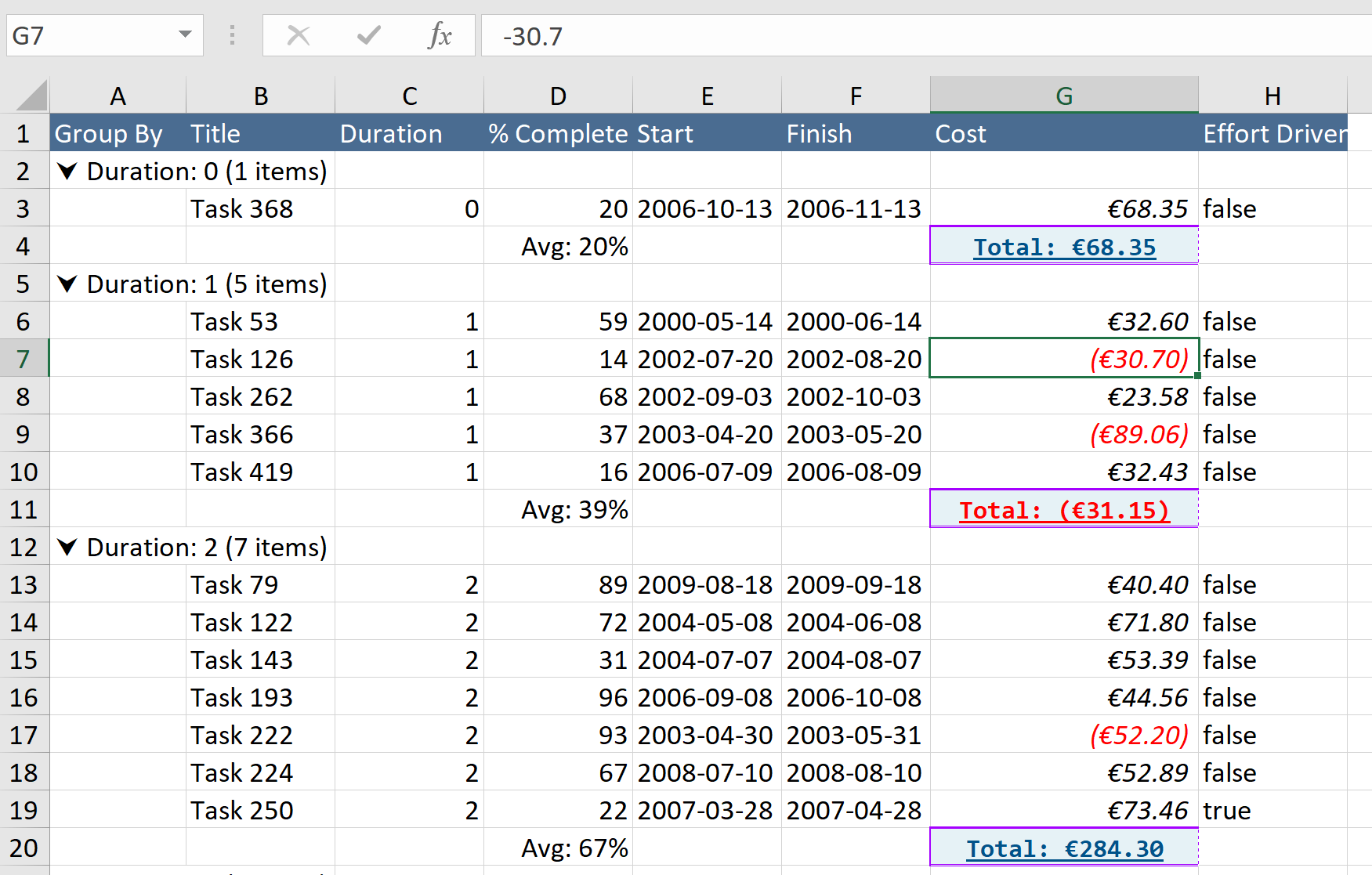
|
|
332
|
-
|
|
333
|
-
### Cell Format Auto-Detect Disable
|
|
334
|
-
##### requires `v6.2.0` or higher
|
|
335
|
-
The system will auto-detect the Excel format to use for Date and Number field types, if for some reason you wish to disable it then you provide the excel export options below
|
|
336
|
-
|
|
337
|
-
```ts
|
|
338
|
-
// via column
|
|
339
|
-
this.columnDefinitions = [
|
|
340
|
-
{
|
|
341
|
-
id: 'cost', name: 'Cost', field: 'cost', type: 'number'
|
|
342
|
-
excelExportOptions: { autoDetectCellFormat: false }
|
|
343
|
-
}
|
|
344
|
-
];
|
|
345
|
-
|
|
346
|
-
// OR via grid options (column option always win)
|
|
347
|
-
this.gridOptions = {
|
|
348
|
-
// ...
|
|
349
|
-
excelExportOptions: { autoDetectCellFormat: false }
|
|
350
|
-
};
|
|
351
|
-
```
|
|
352
|
-
|
|
353
|
-
### Cell Value Parser
|
|
354
|
-
This is not recommended but if you have no other ways, you can also provide a `valueParserCallback` callback function to override what the system detected. This callback function is available for both `excelExportOptions` (regular cells) and `groupTotalsExcelExportOptions` (grouping total cells)
|
|
355
|
-
|
|
356
|
-
> **Note** the original implementation of both `valueParserCallback` had separate arguments but that expanded into way too many arguments than original planned and so I decided to merge them into a single `args` which includes base arguments (`columnDef`, `gridOptions`, `excelFormatId`, `stylesheet`, `dataRowIdx`, and depending on the type you will also have `dataContext` for regular cell OR `groupType` for grouping cell)
|
|
357
|
-
|
|
358
|
-
```ts
|
|
359
|
-
this.columnDefinitions = [
|
|
360
|
-
{
|
|
361
|
-
id: 'cost', name: 'Cost', field: 'cost', width: 80,
|
|
362
|
-
type: 'number',
|
|
363
|
-
formatter: Formatters.currency,
|
|
364
|
-
groupTotalsFormatter: GroupTotalFormatters.sumTotalsCurrency,
|
|
365
|
-
params: { displayNegativeNumberWithParentheses: true, currencyPrefix: '€', groupFormatterCurrencyPrefix: '€', minDecimal: 2, maxDecimal: 4, groupFormatterPrefix: '<b>Total</b>: ' },
|
|
366
|
-
excelExportOptions: {
|
|
367
|
-
// for version <=8.1
|
|
368
|
-
// valueParserCallback: (data, col, excelFormatId, excelStylesheet) => {
|
|
369
|
-
|
|
370
|
-
// new args signature requires version >=8.1
|
|
371
|
-
valueParserCallback: (data, { columnDef, excelFormatId, stylesheet }) => {
|
|
372
|
-
// when returned as string, it will skip Excel style format
|
|
373
|
-
return `Total: ${data}`;
|
|
374
|
-
|
|
375
|
-
// to keep Excel style format, you can use detected "excelFormatId" OR use "excelStylesheet.createFormat()"
|
|
376
|
-
return {
|
|
377
|
-
value: isNaN(data as number) ? data : +data,
|
|
378
|
-
metadata: { style: excelFormatId } // the excelFormatId was created internally from the custom format
|
|
379
|
-
};
|
|
380
|
-
}
|
|
381
|
-
},
|
|
382
|
-
groupTotalsExcelExportOptions: {
|
|
383
|
-
// for version <=8.1
|
|
384
|
-
// valueParserCallback: (totals, columnDef) => {
|
|
385
|
-
|
|
386
|
-
// new args signature requires version >=8.1
|
|
387
|
-
valueParserCallback: (totals, { columnDef, groupType }) => {
|
|
388
|
-
const fieldName = columnDef.field;
|
|
389
|
-
return totals[groupType][fieldName];
|
|
390
|
-
},
|
|
391
|
-
}
|
|
392
|
-
}
|
|
393
|
-
];
|
|
394
|
-
```
|
|
395
|
-
|
|
396
|
-
By using `valueParserCallback`, there a lot of extra customizations that you can do with it. You could even use Excel Formula to do calculation even based on other fields on your item data context, the code below is calculating Sub-Total and Total. It's a lot of code but it shows the real power customization that exist. If you want to go with even more customization, the new [Example 36](https://ghiscoding.github.io/Angular-Slickgrid/#/excel-formula) even shows you how to summarize Groups with Excel Formulas (but be warned, it does take a fair amount of code and logic to implement by yourself)
|
|
397
|
-
|
|
398
|
-
```ts
|
|
399
|
-
this.columnDefinitions = [
|
|
400
|
-
{
|
|
401
|
-
id: 'cost', name: 'Cost', field: 'cost', width: 80,
|
|
402
|
-
type: 'number',
|
|
403
|
-
|
|
404
|
-
// use Formatters in the UI
|
|
405
|
-
formatter: Formatters.dollar,
|
|
406
|
-
groupTotalsFormatter: GroupTotalFormatters.sumTotalsDollar,
|
|
407
|
-
|
|
408
|
-
// but use the parser callback to customize our Excel export by using Excel Formulas
|
|
409
|
-
excelExportOptions: {
|
|
410
|
-
// you can also style the Excel cells (note again that HTML color "#" is escaped as "FF" prefix)
|
|
411
|
-
style: {
|
|
412
|
-
font: { bold: true, color: 'FF215073' },
|
|
413
|
-
format: '$0.00', // currency dollar format
|
|
414
|
-
},
|
|
415
|
-
width: 12,
|
|
416
|
-
valueParserCallback: (_data, { columnDef, excelFormatId, dataRowIdx, dataContext }) => {
|
|
417
|
-
// assuming that we want to calculate: (Price * Qty) => Sub-Total
|
|
418
|
-
const colOffset = !this.isDataGrouped ? 1 : 0; // col offset of 1x because we skipped 1st column OR 0 offset if we use a Group because the Group column replaces the skip
|
|
419
|
-
const rowOffset = 3; // row offset of 3x because: 1x Title, 1x Headers and Excel row starts at 1 => 3
|
|
420
|
-
const priceIdx = this.sgb.slickGrid?.getColumnIndex('price') || 0;
|
|
421
|
-
const qtyIdx = this.sgb.slickGrid?.getColumnIndex('qty') || 0;
|
|
422
|
-
const taxesIdx = this.sgb.slickGrid?.getColumnIndex('taxes') || 0;
|
|
423
|
-
|
|
424
|
-
// the code below calculates Excel column position dynamically, technically Price is at "B" and Qty is "C"
|
|
425
|
-
// Note: if you know the Excel column (A, B, C, ...) then portion of the code below could be skipped (the code below is fully dynamic)
|
|
426
|
-
const excelPriceCol = `${String.fromCharCode('A'.charCodeAt(0) + priceIdx - colOffset)}${dataRowIdx + rowOffset}`;
|
|
427
|
-
const excelQtyCol = `${String.fromCharCode('A'.charCodeAt(0) + qtyIdx - colOffset)}${dataRowIdx + rowOffset}`;
|
|
428
|
-
const excelTaxesCol = `${String.fromCharCode('A'.charCodeAt(0) + taxesIdx - colOffset)}${dataRowIdx + rowOffset}`;
|
|
429
|
-
|
|
430
|
-
// `value` is our Excel cells to calculat (e.g.: "B4*C4")
|
|
431
|
-
// metadata `type` has to be set to "formula" and the `style` is what we defined in `excelExportOptions.style` which is `excelFormatId` in the callback arg
|
|
432
|
-
|
|
433
|
-
let excelVal = '';
|
|
434
|
-
switch (columnDef.id) {
|
|
435
|
-
case 'subTotal':
|
|
436
|
-
excelVal = `${excelPriceCol}*${excelQtyCol}`; // like "C4*D4"
|
|
437
|
-
break;
|
|
438
|
-
case 'taxes':
|
|
439
|
-
excelVal = (dataContext.taxable)
|
|
440
|
-
? `${excelPriceCol}*${excelQtyCol}*${this.taxRate / 100}`
|
|
441
|
-
: '';
|
|
442
|
-
break;
|
|
443
|
-
case 'total':
|
|
444
|
-
excelVal = `(${excelPriceCol}*${excelQtyCol})+${excelTaxesCol}`;
|
|
445
|
-
break;
|
|
446
|
-
}
|
|
447
|
-
|
|
448
|
-
// use "formula" as "metadata", the "style" is a formatter id that comes from any custom "style" defined outside of our callback
|
|
449
|
-
return { value: excelVal, metadata: { type: 'formula', style: excelFormatId } };
|
|
450
|
-
}
|
|
451
|
-
},
|
|
452
|
-
}
|
|
453
|
-
];
|
|
454
|
-
```
|
|
455
|
-
|
|
456
|
-
#### use Excel Formulas to calculate Totals by using other dataContext props
|
|
457
|
-

|
|
@@ -1,165 +0,0 @@
|
|
|
1
|
-
#### index
|
|
2
|
-
- [Grid Options](#grid-options)
|
|
3
|
-
- [Column Definition & Options](#column-definition-and-options)
|
|
4
|
-
- [Export from Button Click](#export-from-a-button-click-event)
|
|
5
|
-
- [Event Aggregators](#event-aggregators)
|
|
6
|
-
- [Show Loading Process Spinner](#show-loading-process-spinner)
|
|
7
|
-
- [UI Sample](#ui-sample)
|
|
8
|
-
|
|
9
|
-
### Description
|
|
10
|
-
You can Export to File in 2 formats (csv/txt), the following formats are currently supported
|
|
11
|
-
- Export to CSV format (`.csv`)
|
|
12
|
-
- Export to Text file (`.txt`) with a delimiter of your choice (Tab delimited is a good one to use)
|
|
13
|
-
|
|
14
|
-
**NOTE:** this is an opt-in Service, you must download the necessary Service from `@slickgrid-universal/text-export` and instantiate it in your grid options via `registerExternalResources`, see multiple examples below.
|
|
15
|
-
|
|
16
|
-
### Demo
|
|
17
|
-
[Demo Page](https://ghiscoding.github.io/Angular-Slickgrid/#/localization) / [Demo Component](https://github.com/ghiscoding/slickgrid-universal/blob/master/frameworks/angular-slickgrid/src/demos/examples/grid-localization.component.ts)
|
|
18
|
-
|
|
19
|
-
### Grid Menu (hamburger menu)
|
|
20
|
-
The Grid Menu already has the "Export to CSV" enabled by default, so you will see it automatically in your Grid Menu. You still have the options to show or hide the 2 types of export
|
|
21
|
-
- `showExportCsvCommand` true by default, so it's optional
|
|
22
|
-
- `showExportTextDelimitedCommand` false by default, so if you want it, you will need to enable it
|
|
23
|
-
|
|
24
|
-
### Grid Options
|
|
25
|
-
You can set certain options for the entire grid, for example if you set `exportWithFormatter` it will evaluate the Formatter (when exist) output to export. The Grid Menu also has the "Export to CSV" enabled by default.
|
|
26
|
-
```ts
|
|
27
|
-
import { TextExportService } from '@slickgrid-universal/text-export';
|
|
28
|
-
|
|
29
|
-
export class MyGrid {
|
|
30
|
-
defineGrid() {
|
|
31
|
-
this.gridOptions = {
|
|
32
|
-
// set at the grid option level, meaning all column will evaluate the Formatter (when it has a Formatter defined)
|
|
33
|
-
textExportOptions: {
|
|
34
|
-
exportWithFormatter: true
|
|
35
|
-
},
|
|
36
|
-
externalResources: [new TextExportService()],
|
|
37
|
-
gridMenu: {
|
|
38
|
-
showExportCsvCommand: true, // true by default, so it's optional
|
|
39
|
-
showExportTextDelimitedCommand: true // false by default, so if you want it, you will need to enable it
|
|
40
|
-
}
|
|
41
|
-
};
|
|
42
|
-
}
|
|
43
|
-
}
|
|
44
|
-
```
|
|
45
|
-
|
|
46
|
-
### Column Definition and Options
|
|
47
|
-
#### Options
|
|
48
|
-
Inside the column definition there are couple of flags you can set and also some behavior that should be aware of:
|
|
49
|
-
- `excludeFromExport` flag, which as it's name suggest will skip that column from the export
|
|
50
|
-
- `exportWithFormatter` flag (same as Grid Options but this flag defined in the Column Definition has higher priority).
|
|
51
|
-
- So basically, if `exportWithFormatter` is set to True in the `textExportOptions` of the Grid Options, but is set to False in the Column Definition, then the result will be False and will not evaluate it's Formatter.
|
|
52
|
-
- `exportCustomFormatter` will let you choose a different Formatter when exporting
|
|
53
|
-
- For example, you might have `formatter: Formatters.checkmark` but you want to see a boolean translated value, in this case you would define an extra property of `exportCustomFormatter: Formatters.translateBoolean`.
|
|
54
|
-
- you can set `exportCsvForceToKeepAsString` flag, this one will wrap the cell value into double quotes and add an equal sign in the front, this is especially useful on a column that could be turned into an exponential number by Excel. For example, we could have "1E06" and without this flag will become (1.0E06) in Excel, unless we enable the flag which will become `="1E06"` which will keep it as a string, also note that it will be shown as "1E06" but if you click on the cell value, you will see `="1E06"`
|
|
55
|
-
- set `sanitizeDataExport` to remove any HTML/Script code from being export. For example if your value is `<span class="mdi mdi-check">True</span>` will export `True` without any HTML (data is sanitized).
|
|
56
|
-
- this flag can be used in the Grid Options (all columns) or in a Column Definition (per column).
|
|
57
|
-
|
|
58
|
-
#### Behaviors
|
|
59
|
-
- If you have a `headerKey` defined (for Translate (i18n)), it will use the translated value as the Header Title
|
|
60
|
-
- The file will automatically have the UTF-8 BOM encoding so that it works with Latin and even Unicode characters (see [UI Sample](#ui-sample).
|
|
61
|
-
> The UTF-8 BOM is a sequence of bytes (EF BB BF) that allows the reader to identify a file as being encoded in UTF-8.
|
|
62
|
-
|
|
63
|
-
```ts
|
|
64
|
-
import { TextExportService } from '@slickgrid-universal/text-export';
|
|
65
|
-
|
|
66
|
-
defineGrid() {
|
|
67
|
-
this.columnDefinitions = [
|
|
68
|
-
{ id: 'id', name: 'ID', field: 'id',
|
|
69
|
-
excludeFromExport: true // skip the "id" column from the export
|
|
70
|
-
},
|
|
71
|
-
{ id: 'title', name: 'Title', field: 'id', headerKey: 'TITLE',
|
|
72
|
-
formatter: myCustomTitleFormatter,
|
|
73
|
-
exportWithFormatter: false // this Formatter will not be evaluated
|
|
74
|
-
},
|
|
75
|
-
{ id: 'start', name: 'Start', field: 'start',
|
|
76
|
-
headerKey: 'START',
|
|
77
|
-
formatter: Formatters.dateIso // this formatter will be used for the export
|
|
78
|
-
},
|
|
79
|
-
{ id: 'finish', name: 'Finish', field: 'start',
|
|
80
|
-
headerKey: 'FINISH',
|
|
81
|
-
formatter: Formatters.dateIso // this formatter will be used for the export
|
|
82
|
-
},
|
|
83
|
-
{ id: 'completed', name: 'Completed', field: 'completed', headerKey: 'COMPLETED',
|
|
84
|
-
formatter: Formatters.checkmarkMaterial, // will display a checkmark icon in the UI
|
|
85
|
-
customFormatter: Formatters.translateBoolean, // will export a translated value, e.g. in French, True would show as 'Vrai'
|
|
86
|
-
}
|
|
87
|
-
];
|
|
88
|
-
|
|
89
|
-
this.gridOptions = {
|
|
90
|
-
// set at the grid option level, meaning all column will evaluate the Formatter (when it has a Formatter defined)
|
|
91
|
-
textExportOptions: {
|
|
92
|
-
exportWithFormatter: true
|
|
93
|
-
},
|
|
94
|
-
externalResources: [new TextExportService()],
|
|
95
|
-
};
|
|
96
|
-
```
|
|
97
|
-
|
|
98
|
-
What we can see from the example, is that it will use all Formatters (when exist) on this grid, except for the last column "Completed" since that column has explicitly defined `exportWithFormatter: false`
|
|
99
|
-
|
|
100
|
-
### Export from a Button Click Event
|
|
101
|
-
You can use the export from the Grid Menu and/or you can simply create your own buttons to export.
|
|
102
|
-
#### View
|
|
103
|
-
```html
|
|
104
|
-
<button class="btn btn-default btn-sm" (click)="exportToFile('csv')">
|
|
105
|
-
Download to CSV
|
|
106
|
-
</button>
|
|
107
|
-
<button class="btn btn-default btn-sm" (click)="exportToFile('txt')">
|
|
108
|
-
Download to Text
|
|
109
|
-
</button>
|
|
110
|
-
```
|
|
111
|
-
|
|
112
|
-
##### ViewModel
|
|
113
|
-
The code below is just an example and it can be configured in many ways, the delimiter used can also be anything you want.
|
|
114
|
-
```ts
|
|
115
|
-
import { TextExportService } from '@slickgrid-universal/text-export';
|
|
116
|
-
|
|
117
|
-
export class MySample {
|
|
118
|
-
textExportService = new TextExportService();
|
|
119
|
-
|
|
120
|
-
defineGrid() {
|
|
121
|
-
this.gridOptions = {
|
|
122
|
-
enableTextExport: true,
|
|
123
|
-
externalResources: [this.textExportService],
|
|
124
|
-
};
|
|
125
|
-
}
|
|
126
|
-
|
|
127
|
-
exportToFile(type = 'csv') {
|
|
128
|
-
this.textExportService.exportToFile({
|
|
129
|
-
delimiter: (type === 'csv') ? DelimiterType.comma : DelimiterType.tab,
|
|
130
|
-
filename: 'myExport',
|
|
131
|
-
format: (type === 'csv') ? 'csv' : 'txt'
|
|
132
|
-
});
|
|
133
|
-
}
|
|
134
|
-
}
|
|
135
|
-
```
|
|
136
|
-
|
|
137
|
-
### Show Loading Process Spinner
|
|
138
|
-
If you have lots of data, you might want to show a spinner telling the user that something is happening. You can use the Event Emitters `(onBeforeExportToTextFile)` to start your spinner and then `(onAfterExportToTextFile)` to stop the spinner once the process is done. You can see a this [Grouping Example](https://ghiscoding.github.io/Angular-Slickgrid/#/grouping) demo which has this feature enabled.
|
|
139
|
-
|
|
140
|
-
#### View
|
|
141
|
-
```html
|
|
142
|
-
<span [hidden]="!processing">
|
|
143
|
-
<i class="mdi mdi-sync mdi-spin-1s"></i>
|
|
144
|
-
</span>
|
|
145
|
-
|
|
146
|
-
<angular-slickgrid gridId="grid2"
|
|
147
|
-
[dataset]="dataset"
|
|
148
|
-
[columns]="columnDefinitions"
|
|
149
|
-
[options]="gridOptions"
|
|
150
|
-
(onBeforeExportToTextFile)="processing = true"
|
|
151
|
-
(onAfterExportToTextFile)="processing = false"
|
|
152
|
-
(onAngularGridCreated)="angularGridReady($event.detail)">
|
|
153
|
-
</angular-slickgrid>
|
|
154
|
-
```
|
|
155
|
-
|
|
156
|
-
##### Component
|
|
157
|
-
```ts
|
|
158
|
-
export class MyComponent() implements OnInit {
|
|
159
|
-
processing = false;
|
|
160
|
-
}
|
|
161
|
-
```
|
|
162
|
-
|
|
163
|
-
### UI Sample
|
|
164
|
-
The Export to Text File handles all characters quite well, from Latin, to Unicode and even Unicorn emoji, it all works on all browsers (`Chrome`, `Firefox`, even `IE11`, I don't have access to older versions). Here's a demo
|
|
165
|
-

|
|
@@ -1,53 +0,0 @@
|
|
|
1
|
-
#### index
|
|
2
|
-
- Frequently asked questions
|
|
3
|
-
- [Merging grid options with applied defaults](#merging-grid-options-with-applied-defaults)
|
|
4
|
-
|
|
5
|
-
### Description
|
|
6
|
-
When working with the grid, you might want to Add / Update or Hightlight an item row from the Datagrid.
|
|
7
|
-
|
|
8
|
-
**Note:** This is strictly a client side event, you still have to implement any backend change yourself.
|
|
9
|
-
|
|
10
|
-
### Demo
|
|
11
|
-
[Demo Page](https://ghiscoding.github.io/Angular-Slickgrid/#/additem) / [Demo Component](https://github.com/ghiscoding/slickgrid-universal/blob/master/frameworks/angular-slickgrid/src/demos/examples/grid-additem.component.ts)
|
|
12
|
-
|
|
13
|
-
## Frequently asked questions
|
|
14
|
-
### Merging grid options with applied defaults
|
|
15
|
-
When you pass gridOptions to the `angular-slickgrid` component, keep in mind that they get overloaded with the [Default Grid Options](https://github.com/ghiscoding/slickgrid-universal/blob/master/frameworks/angular-slickgrid/src/app/angular-slickgrid/global-grid-options.ts). In contrast to what might be expected, this change won't overwrite your provided object.
|
|
16
|
-
|
|
17
|
-
In cases, where depending on your data you might want to update the options (e.g. make columns readonly based on permissions) make sure to update your reference in the onAngularGridCreated event handler as shown below:
|
|
18
|
-
|
|
19
|
-
#### View
|
|
20
|
-
```html
|
|
21
|
-
<angular-slickgrid
|
|
22
|
-
gridId="grid1"
|
|
23
|
-
[columns]="columnDefinitions"
|
|
24
|
-
[options]="gridOptions"
|
|
25
|
-
[dataset]="dataset"
|
|
26
|
-
(onAngularGridCreated)="angularGridReady($event.detail)">
|
|
27
|
-
</angular-slickgrid>
|
|
28
|
-
```
|
|
29
|
-
|
|
30
|
-
#### Component
|
|
31
|
-
```typescript
|
|
32
|
-
import { Component, OnInit} from '@angular/core';
|
|
33
|
-
import { AngularGridInstance } from 'angular-slickgrid';
|
|
34
|
-
|
|
35
|
-
export class GridBasicComponent implements OnInit {
|
|
36
|
-
columnDefinitions: Column[];
|
|
37
|
-
gridOptions: GridOption = {
|
|
38
|
-
// your initial settings
|
|
39
|
-
};
|
|
40
|
-
dataset: any[];
|
|
41
|
-
|
|
42
|
-
ngOnInit(): void {
|
|
43
|
-
this.columnDefinitions = [];
|
|
44
|
-
}
|
|
45
|
-
|
|
46
|
-
angularGridReady(angularGrid: AngularGridInstance) {
|
|
47
|
-
this.angularGrid = angularGrid;
|
|
48
|
-
|
|
49
|
-
// update your reference to make use of applied defaults
|
|
50
|
-
this.gridOptions = this.angularGrid.slickGrid.getOptions() as GridOption;
|
|
51
|
-
}
|
|
52
|
-
}
|
|
53
|
-
```
|