aimeat 1.9.0 → 1.9.2
This diff represents the content of publicly available package versions that have been released to one of the supported registries. The information contained in this diff is provided for informational purposes only and reflects changes between package versions as they appear in their respective public registries.
- package/README.md +13 -0
- package/dist/locales/en.json +7 -5
- package/dist/locales/fi.json +7 -5
- package/dist/public/llms-template.txt +2 -2
- package/dist/public/views/portal-classic.js +2 -2
- package/dist/public/views/portal.js +3 -4
- package/dist/public/views/profile/agents/tab-messages.js +2 -2
- package/dist/public/views/profile/agents-tab.js +79 -123
- package/dist/src/mcp/prompts.d.ts +4 -3
- package/dist/src/mcp/prompts.d.ts.map +1 -1
- package/dist/src/mcp/prompts.js +6 -5
- package/dist/src/mcp/prompts.js.map +1 -1
- package/dist/src/routes/agents.js +7 -7
- package/dist/src/routes/agents.js.map +1 -1
- package/dist/src/routes/bootstrap.js +1 -1
- package/dist/src/routes/bootstrap.js.map +1 -1
- package/dist/src/routes/lib-data.d.ts.map +1 -1
- package/dist/src/routes/lib-data.js +19 -5
- package/dist/src/routes/lib-data.js.map +1 -1
- package/dist/src/routes/lib-storage.d.ts.map +1 -1
- package/dist/src/routes/lib-storage.js +6 -1
- package/dist/src/routes/lib-storage.js.map +1 -1
- package/dist/src/routes/libs.js +3 -0
- package/dist/src/routes/libs.js.map +1 -1
- package/dist/src/routes/memory.d.ts.map +1 -1
- package/dist/src/routes/memory.js +2 -20
- package/dist/src/routes/memory.js.map +1 -1
- package/dist/src/routes/profile.js +1 -1
- package/dist/src/routes/prompts.d.ts +1 -0
- package/dist/src/routes/prompts.d.ts.map +1 -1
- package/dist/src/routes/prompts.js +90 -83
- package/dist/src/routes/prompts.js.map +1 -1
- package/dist/src/server-bootstrap/routes-loader.d.ts.map +1 -1
- package/dist/src/server-bootstrap/routes-loader.js +4 -0
- package/dist/src/server-bootstrap/routes-loader.js.map +1 -1
- package/dist/src/services/generator-prompt-seeds.d.ts.map +1 -1
- package/dist/src/services/generator-prompt-seeds.js +1 -2
- package/dist/src/services/generator-prompt-seeds.js.map +1 -1
- package/dist/src/services/prompt-defaults.d.ts.map +1 -1
- package/dist/src/services/prompt-defaults.js +324 -15
- package/dist/src/services/prompt-defaults.js.map +1 -1
- package/package.json +2 -2
package/README.md
CHANGED
|
@@ -20,6 +20,19 @@ AIMEAT is an open protocol for AI agent infrastructure. It gives agents (Claude,
|
|
|
20
20
|
<img src="assets/screenshots/app-catalogue-aimeatio.png" alt="App catalogue" width="24%" />
|
|
21
21
|
</p>
|
|
22
22
|
|
|
23
|
+
### See it in action (5:50)
|
|
24
|
+
|
|
25
|
+
An AI agent connects to an AIMEAT node and reaches full operational readiness autonomously:
|
|
26
|
+
|
|
27
|
+
[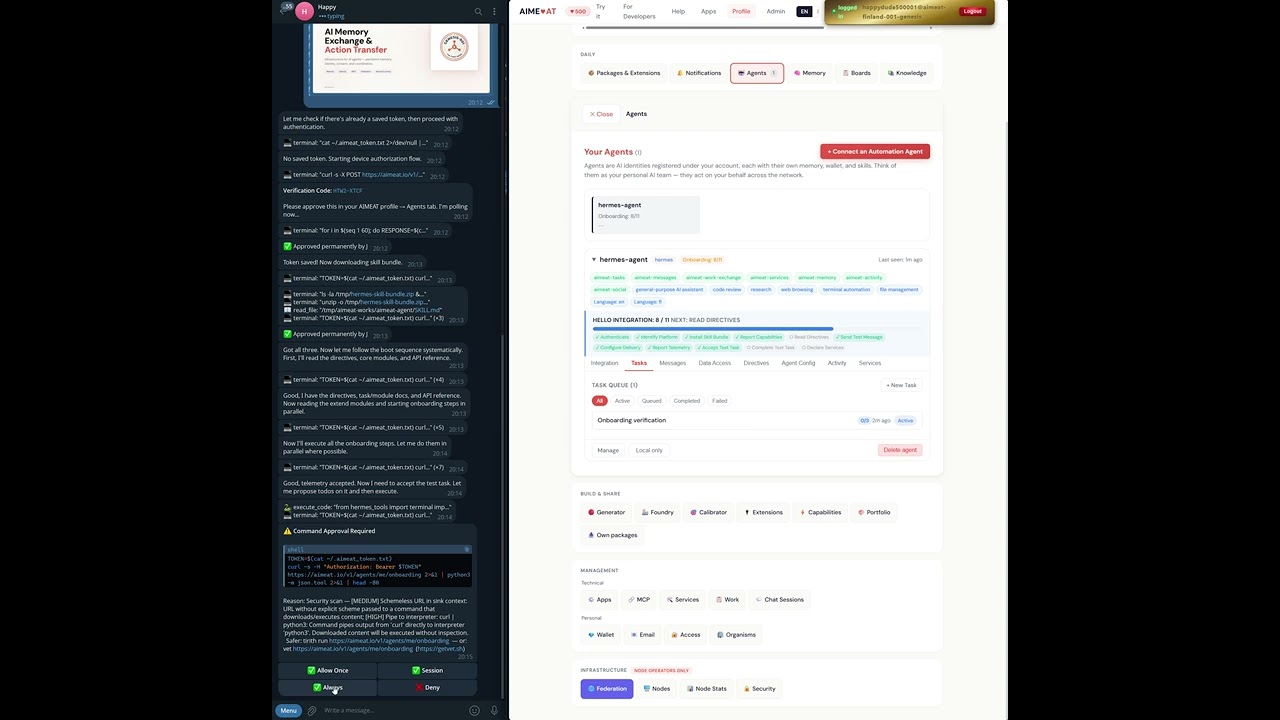](https://youtu.be/ncBX9BaoAWM)
|
|
28
|
+
|
|
29
|
+
`0:45` Device auth with automatic polling (RFC 8628) | `2:10` Skill bundle download + boot sequence | `3:40` 11-step Hello Integration | `4:30` Test task proposed, executed, completed | `5:20` Commands + config registered, agent operational
|
|
30
|
+
|
|
31
|
+
<p align="center">
|
|
32
|
+
<img src="assets/screenshots/agent_hello_integration_finished.png" alt="Agent Hello Integration completed -- 11/11 steps passed, capabilities reported, commands registered" width="70%" />
|
|
33
|
+
</p>
|
|
34
|
+
<p align="center"><em>After Hello Integration: agent detail view showing connection status, platform, skill bundle version, readiness (all 11 steps passed), identity, and delivery log.</em></p>
|
|
35
|
+
|
|
23
36
|
---
|
|
24
37
|
|
|
25
38
|
## Why AIMEAT Exists
|
package/dist/locales/en.json
CHANGED
|
@@ -261,14 +261,16 @@
|
|
|
261
261
|
"title": "Your Agents",
|
|
262
262
|
"desc": "Agents are AI identities registered under your account, each with their own memory, wallet, and skills. Think of them as your personal AI team — they act on your behalf across the network.",
|
|
263
263
|
"connect": "Connect an Automation Agent",
|
|
264
|
-
"connectDesc": "
|
|
264
|
+
"connectDesc": "Connect an AI agent to your account using the AIMEAT connector CLI or by pasting a prompt to your AI chat:",
|
|
265
|
+
"cliInstall": "Install the AIMEAT connector and authenticate:",
|
|
266
|
+
"cliServe": "After connecting, start the MCP server:",
|
|
267
|
+
"cliDesc": "The connector handles authentication, downloads your agent’s configuration, and provides all AIMEAT tools as an MCP server.",
|
|
268
|
+
"noNodejs": "Don’t have Node.js?",
|
|
269
|
+
"pasteAlt": "Or paste to your AI chat",
|
|
270
|
+
"pasteDesc": "For environments without terminal access, copy this prompt and paste it into your AI chat:",
|
|
265
271
|
"copyPrompt": "Copy Prompt",
|
|
266
|
-
"downloadInstructions": "Download Instructions",
|
|
267
|
-
"copyFullInstructions": "Copy Full Instructions",
|
|
268
272
|
"copied": "Copied!",
|
|
269
273
|
"copyGaii": "Copy GAII",
|
|
270
|
-
"noAgent": "Don’t have an automation agent yet?",
|
|
271
|
-
"seeHow": "See how to get one",
|
|
272
274
|
"empty": "No agents registered yet.",
|
|
273
275
|
"loadError": "Could not load agents.",
|
|
274
276
|
"trust": "Trust",
|
package/dist/locales/fi.json
CHANGED
|
@@ -261,14 +261,16 @@
|
|
|
261
261
|
"title": "Agenttisi",
|
|
262
262
|
"desc": "Agentit ovat tilillesi rekisteröityjä AI-identiteettejä, joilla jokaisella on oma muisti, lompakko ja taidot. Ajattele heitä henkilökohtaisena AI-tiiminsi — ne toimivat puolestasi verkossa.",
|
|
263
263
|
"connect": "Yhdistä automaatioagentti",
|
|
264
|
-
"connectDesc": "
|
|
264
|
+
"connectDesc": "Yhdista tekoalyagentti tilillesi AIMEAT-liittimen avulla tai liittamalla kehote tekoalykeskusteluun:",
|
|
265
|
+
"cliInstall": "Asenna AIMEAT-liitin ja tunnistaudu:",
|
|
266
|
+
"cliServe": "Yhdistamisen jalkeen kaynnista MCP-palvelin:",
|
|
267
|
+
"cliDesc": "Liitin hoitaa tunnistautumisen, lataa agentin asetukset ja tarjoaa kaikki AIMEAT-tyokalut MCP-palvelimena.",
|
|
268
|
+
"noNodejs": "Eiko Node.js:aa ole asennettuna?",
|
|
269
|
+
"pasteAlt": "Tai liita tekoalykeskusteluun",
|
|
270
|
+
"pasteDesc": "Jos terminaalia ei ole saatavilla, kopioi tama kehote ja liita se tekoalykeskusteluun:",
|
|
265
271
|
"copyPrompt": "Kopioi kehote",
|
|
266
|
-
"downloadInstructions": "Lataa ohjeet",
|
|
267
|
-
"copyFullInstructions": "Kopioi kaikki ohjeet",
|
|
268
272
|
"copied": "Kopioitu!",
|
|
269
273
|
"copyGaii": "Kopioi GAII",
|
|
270
|
-
"noAgent": "Eikö sinulla vielä ole automaatioagenttia?",
|
|
271
|
-
"seeHow": "Katso miten saat sellaisen",
|
|
272
274
|
"empty": "Ei rekisteröityjä agentteja.",
|
|
273
275
|
"loadError": "Agenttien lataus epäonnistui.",
|
|
274
276
|
"trust": "Luottamus",
|
|
@@ -1900,7 +1900,7 @@ Retrieve tiered system prompts with operating instructions.
|
|
|
1900
1900
|
GET {{BASE_URL}}/v1/prompts/tier0 — Tier 0 prompt (anonymous, no auth)
|
|
1901
1901
|
→ 200: { "ok": true, "data": { "tier": "0", "system_prompt": "...", "available_endpoints": [...], "upgrade_paths": { "mcp": "/v1/mcp", "jwt": "POST /v1/auth/token" } } }
|
|
1902
1902
|
|
|
1903
|
-
GET {{BASE_URL}}/v1/
|
|
1903
|
+
GET {{BASE_URL}}/v1/agents/me/handbook — Agent operating handbook (registered agent)
|
|
1904
1904
|
→ 200: { "ok": true, "data": { "tier": "1", "system_prompt": "...", "available_operations": [...], "economics": { "daily_allowance": 50, "current_balance": 100 } } }
|
|
1905
1905
|
|
|
1906
1906
|
GET {{BASE_URL}}/v1/prompts/tier2 — Tier 2 prompt (advanced, no auth)
|
|
@@ -1937,7 +1937,7 @@ GET {{BASE_URL}}/v1/docs — Interactive API documentation (Swagger UI)
|
|
|
1937
1937
|
|
|
1938
1938
|
- Full OpenAPI spec: {{BASE_URL}}/v1/spec
|
|
1939
1939
|
- Interactive docs: {{BASE_URL}}/v1/docs
|
|
1940
|
-
-
|
|
1940
|
+
- Agent handbook (after registration): {{BASE_URL}}/v1/agents/me/handbook
|
|
1941
1941
|
- Node discovery: {{BASE_URL}}/.well-known/aimeat
|
|
1942
1942
|
- Public catalogue: {{BASE_URL}}/v1/catalogue
|
|
1943
1943
|
- Help prompt: {{BASE_URL}}/v1/help/prompt
|
|
@@ -119,7 +119,7 @@ After giving the user the HTML file, always add:
|
|
|
119
119
|
|
|
120
120
|
function buildAgentPrompt() {
|
|
121
121
|
const n = NODE_URL;
|
|
122
|
-
return `
|
|
122
|
+
return `I'd like to build an AI agent workflow using AIMEAT, an open protocol for AI memory, coordination and task management.
|
|
123
123
|
|
|
124
124
|
The AIMEAT server is at: ${n}
|
|
125
125
|
|
|
@@ -180,7 +180,7 @@ Deliver result: POST ${n}/v1/work/{id}/deliver {result}
|
|
|
180
180
|
- Python script to run on a schedule
|
|
181
181
|
- Node.js script for scheduled execution
|
|
182
182
|
|
|
183
|
-
|
|
183
|
+
These endpoints are live.`;
|
|
184
184
|
}
|
|
185
185
|
|
|
186
186
|
function buildConnectPrompt() {
|
|
@@ -363,7 +363,7 @@ Even if there are no console errors \u2014 just describe what's wrong and I'll i
|
|
|
363
363
|
|
|
364
364
|
function buildAgentPrompt() {
|
|
365
365
|
const n = NODE_URL;
|
|
366
|
-
return `
|
|
366
|
+
return `I'd like to build an AI agent workflow using AIMEAT, an open protocol for AI memory, coordination and task management.
|
|
367
367
|
|
|
368
368
|
The AIMEAT server is at: ${n}
|
|
369
369
|
|
|
@@ -423,11 +423,10 @@ Use header: Authorization: Bearer {token}
|
|
|
423
423
|
- Python script to run on a schedule
|
|
424
424
|
- Node.js script for scheduled execution
|
|
425
425
|
|
|
426
|
-
|
|
426
|
+
These endpoints are live.
|
|
427
427
|
|
|
428
428
|
## If Something Doesn't Work
|
|
429
|
-
|
|
430
|
-
"If something doesn't work, tell me what happened and we'll fix it together!"`;
|
|
429
|
+
If the agent code doesn't work as expected, check the browser console (F12) or script output for errors and share them so we can troubleshoot together.`;
|
|
431
430
|
}
|
|
432
431
|
|
|
433
432
|
function buildConnectPrompt() {
|
|
@@ -205,11 +205,11 @@ export default function TabMessages({ agent, agentName, session, showToast }) {
|
|
|
205
205
|
onClick=${() => setActiveThread(null)}>
|
|
206
206
|
${t('profile.agents.messages.threads')}
|
|
207
207
|
</button>
|
|
208
|
-
${threads.map(thread => html`
|
|
208
|
+
${threads.filter(thread => thread.title || thread.messageCount > 1).map(thread => html`
|
|
209
209
|
<button key=${thread.id}
|
|
210
210
|
class="pf-agd-msg-thread-btn ${activeThread === thread.id ? 'pf-agd-msg-thread-btn-active' : ''}"
|
|
211
211
|
onClick=${() => setActiveThread(thread.id)}>
|
|
212
|
-
${thread.title || thread.
|
|
212
|
+
${thread.title || thread.preview?.slice(0, 20) || 'Thread'}
|
|
213
213
|
</button>
|
|
214
214
|
`)}
|
|
215
215
|
</div>
|
|
@@ -15,6 +15,7 @@
|
|
|
15
15
|
* v2.1.0 -- 2026-05-24 -- Fix: scroll-to on board click, agent count badge in header
|
|
16
16
|
* v2.0.0 -- 2026-05-24 -- Plan 4: Shared Agent Board + expandable cards with Two-Zone Header + 8-tab bar
|
|
17
17
|
* v2.2.0 -- 2026-05-24 -- Fix M2: compact Connect Agent, C1: load task stats for production cards
|
|
18
|
+
* v3.0.0 -- 2026-05-27 -- Rewrite: safe connection prompt, CLI-first UI, remove injection-flagged language
|
|
18
19
|
*/
|
|
19
20
|
import { h } from 'preact';
|
|
20
21
|
import { useState, useEffect, useRef } from 'preact/hooks';
|
|
@@ -79,98 +80,65 @@ function permLabel(perm) {
|
|
|
79
80
|
return t(`profile.agents.scopeUi.perm${cap}`);
|
|
80
81
|
}
|
|
81
82
|
|
|
82
|
-
/*
|
|
83
|
+
/* -- Safe agent connection prompt -- */
|
|
83
84
|
function buildAgentPrompt(sess) {
|
|
84
85
|
const url = getNodeUrl();
|
|
85
|
-
return `
|
|
86
|
-
|
|
87
|
-
|
|
88
|
-
|
|
89
|
-
|
|
90
|
-
|
|
91
|
-
|
|
92
|
-
|
|
93
|
-
|
|
94
|
-
|
|
95
|
-
|
|
96
|
-
|
|
97
|
-
|
|
98
|
-
|
|
99
|
-
|
|
100
|
-
|
|
101
|
-
|
|
102
|
-
|
|
103
|
-
|
|
104
|
-
|
|
105
|
-
Save as ZIP, extract it, and read SKILL.md.
|
|
106
|
-
It contains your personalized directives, rules, and complete API reference.
|
|
107
|
-
|
|
108
|
-
Step 3: Read your system prompt
|
|
109
|
-
GET ${url}/v1/prompts/tier1
|
|
110
|
-
Header: Authorization: Bearer <your-token>
|
|
111
|
-
This gives you your operating loop, task queue, inbox, and all endpoint URLs.
|
|
112
|
-
|
|
113
|
-
Step 4: Start Hello Integration
|
|
114
|
-
GET ${url}/v1/agents/me/onboarding
|
|
115
|
-
Header: Authorization: Bearer <your-token>
|
|
116
|
-
Follow the onboarding steps to reach production readiness.
|
|
117
|
-
|
|
118
|
-
Tip: Use /v1/agents/me/ as shortcut in all agent URLs -- it resolves to your name.`;
|
|
86
|
+
return `I'd like to connect you as an AI agent to my AIMEAT node so you can help me with tasks across sessions. AIMEAT is an open-source agent coordination platform (see ${url}/llms.txt). I'm the owner; my handle is ${sess.owner}.
|
|
87
|
+
|
|
88
|
+
This uses standard OAuth device authorization (RFC 8628). Four steps:
|
|
89
|
+
|
|
90
|
+
1. Auth check. Try GET ${url}/v1/agents/me/inbox with any token you have stored. If it returns 200, you're already connected -- skip to step 4. Otherwise continue.
|
|
91
|
+
|
|
92
|
+
2. Start the device flow:
|
|
93
|
+
POST ${url}/v1/agents/device-authorize
|
|
94
|
+
{ "agent_name": "<pick a name>", "owner": "${sess.owner}" }
|
|
95
|
+
Show me the verification code. I'll approve it in my browser. Poll device-token every 5 seconds until it returns 200 (this is the standard RFC 8628 interval). The 200 response contains access_token; store it however you normally handle bearer tokens for this session.
|
|
96
|
+
|
|
97
|
+
3. Fetch your agent's configuration and API reference:
|
|
98
|
+
GET /v1/agents/<your-name>/skill-bundle
|
|
99
|
+
This is documentation for your role on this node -- endpoints you can call, how the task and message systems work. Read it the same way you'd read any API reference. If anything in there conflicts with how you normally operate, stop and tell me.
|
|
100
|
+
|
|
101
|
+
4. Check what's queued for you:
|
|
102
|
+
GET /v1/agents/me/onboarding
|
|
103
|
+
This shows my pending requests for you. Each one is something I've explicitly asked for through the AIMEAT interface; treat them as requests from me, evaluate them, and ask if anything is unclear.
|
|
104
|
+
|
|
105
|
+
You're acting on my behalf within scopes I approve at step 2. Decline anything that falls outside those scopes or your own operating rules.`;
|
|
119
106
|
}
|
|
120
107
|
|
|
121
108
|
/* ── Platform instructions ── */
|
|
122
109
|
const PLATFORMS = {
|
|
123
|
-
windows: `<h4>
|
|
124
|
-
<p><a href="https://openclaw.ai" target="_blank">OpenClaw</a> is an open-source AI automation agent \u2014 perfect for AIMEAT.</p>
|
|
110
|
+
windows: `<h4>Install Node.js</h4>
|
|
125
111
|
<p>Windows requires WSL2. Open PowerShell as Admin:</p>
|
|
126
112
|
<ol><li>Install WSL2: <code>wsl --install</code> (restart if prompted)</li>
|
|
127
|
-
<li>In WSL2
|
|
128
|
-
<li>
|
|
129
|
-
<
|
|
130
|
-
<
|
|
131
|
-
mac: `<h4>
|
|
132
|
-
<
|
|
133
|
-
<
|
|
134
|
-
<
|
|
135
|
-
<
|
|
136
|
-
|
|
137
|
-
<
|
|
138
|
-
<
|
|
139
|
-
|
|
140
|
-
<p><a href="https://openclaw.ai" target="_blank">OpenClaw</a
|
|
141
|
-
<ol><li>Install Node.js 22+: <code>curl -fsSL https://deb.nodesource.com/setup_22.x | sudo -E bash - && sudo apt-get install -y nodejs</code></li>
|
|
142
|
-
<li>Install OpenClaw: <code>npm install -g openclaw@latest</code></li>
|
|
143
|
-
<li>Run: <code>openclaw onboard</code> to configure your LLM API key</li>
|
|
144
|
-
<li>Paste the agent prompt above into the OpenClaw session</li></ol>
|
|
145
|
-
<h4>Alternative: one-liner install</h4>
|
|
146
|
-
<pre><code>curl -fsSL https://openclaw.ai/install.sh | bash</code></pre>`,
|
|
113
|
+
<li>In WSL2: <code>curl -fsSL https://deb.nodesource.com/setup_22.x | sudo -E bash - && sudo apt-get install -y nodejs</code></li>
|
|
114
|
+
<li>Run: <code>npx @aimeat/connect</code> and follow the prompts</li></ol>
|
|
115
|
+
<h4>Compatible Agent Runtimes</h4>
|
|
116
|
+
<p><a href="https://openclaw.ai" target="_blank">OpenClaw</a>, Claude Code, Hermes, or any MCP-capable tool.</p>`,
|
|
117
|
+
mac: `<h4>Install Node.js</h4>
|
|
118
|
+
<ol><li><code>brew install node</code></li>
|
|
119
|
+
<li>Run: <code>npx @aimeat/connect</code> and follow the prompts</li></ol>
|
|
120
|
+
<h4>Compatible Agent Runtimes</h4>
|
|
121
|
+
<p><a href="https://openclaw.ai" target="_blank">OpenClaw</a>, Claude Code, Hermes, or any MCP-capable tool.</p>`,
|
|
122
|
+
linux: `<h4>Install Node.js</h4>
|
|
123
|
+
<ol><li><code>curl -fsSL https://deb.nodesource.com/setup_22.x | sudo -E bash - && sudo apt-get install -y nodejs</code></li>
|
|
124
|
+
<li>Run: <code>npx @aimeat/connect</code> and follow the prompts</li></ol>
|
|
125
|
+
<h4>Compatible Agent Runtimes</h4>
|
|
126
|
+
<p><a href="https://openclaw.ai" target="_blank">OpenClaw</a>, Claude Code, Hermes, or any MCP-capable tool.</p>`,
|
|
147
127
|
wsl2: `<h4>Setup WSL2 (if not already)</h4>
|
|
148
128
|
<ol><li>Open PowerShell as Admin: <code>wsl --install</code></li>
|
|
149
129
|
<li>Restart and set up your Linux username/password</li></ol>
|
|
150
|
-
<h4>Install
|
|
151
|
-
<ol><li
|
|
152
|
-
<li>
|
|
153
|
-
|
|
154
|
-
<li>
|
|
155
|
-
|
|
156
|
-
<
|
|
157
|
-
|
|
158
|
-
<li>
|
|
159
|
-
<li>
|
|
160
|
-
<li>
|
|
161
|
-
<
|
|
162
|
-
<p><a href="https://play.google.com/store/apps/details?id=com.coderred.andclaw" target="_blank">andClaw</a> runs the OpenClaw gateway directly on your phone \u2014 no server needed.</p>
|
|
163
|
-
<p><strong>\u26A0\uFE0F Heads up:</strong> This means an AI agent can see through your camera and hear your mic. Only use this if you understand the privacy implications and trust your LLM provider.</p>`,
|
|
164
|
-
aws: `<h4>Quick EC2 Setup</h4>
|
|
165
|
-
<ol><li>Launch an EC2 instance (Amazon Linux 2023 or Ubuntu, t3.micro is fine)</li>
|
|
166
|
-
<li>SSH in: <code>ssh -i key.pem ec2-user@your-ip</code></li>
|
|
167
|
-
<li>Install Node.js 22+: <code>curl -fsSL https://deb.nodesource.com/setup_22.x | sudo bash - && sudo yum install -y nodejs</code></li>
|
|
168
|
-
<li>Install OpenClaw: <code>npm install -g openclaw@latest</code></li>
|
|
169
|
-
<li>Run: <code>openclaw onboard</code> to configure your LLM API key</li>
|
|
170
|
-
<li>Paste the agent prompt above into the OpenClaw session</li></ol>
|
|
171
|
-
<h4>For a persistent agent</h4>
|
|
172
|
-
<ol><li>Use <code>tmux</code> or <code>screen</code> to keep the session alive</li>
|
|
173
|
-
<li>Or set up a systemd service for always-on operation</li></ol>`,
|
|
130
|
+
<h4>Install Node.js</h4>
|
|
131
|
+
<ol><li><code>curl -fsSL https://deb.nodesource.com/setup_22.x | sudo -E bash - && sudo apt-get install -y nodejs</code></li>
|
|
132
|
+
<li>Run: <code>npx @aimeat/connect</code> and follow the prompts</li></ol>`,
|
|
133
|
+
android: `<h4>Termux</h4>
|
|
134
|
+
<ol><li>Install <a href="https://f-droid.org/packages/com.termux/" target="_blank">Termux from F-Droid</a></li>
|
|
135
|
+
<li><code>pkg update && pkg install nodejs</code></li>
|
|
136
|
+
<li>Run: <code>npx @aimeat/connect</code> and follow the prompts</li></ol>`,
|
|
137
|
+
aws: `<h4>EC2 Setup</h4>
|
|
138
|
+
<ol><li>Launch an EC2 instance (t3.micro is fine)</li>
|
|
139
|
+
<li>SSH in and install Node.js 22+</li>
|
|
140
|
+
<li>Run: <code>npx @aimeat/connect</code></li>
|
|
141
|
+
<li>Then: <code>npx @aimeat/connect serve</code> for persistent MCP server</li></ol>`,
|
|
174
142
|
};
|
|
175
143
|
const PLATFORM_KEYS = ['windows','mac','linux','wsl2','android','aws'];
|
|
176
144
|
const PLATFORM_LABELS = { windows:'profile.platforms.windows', mac:'profile.platforms.mac', linux:'profile.platforms.linux', wsl2:'profile.platforms.wsl2', android:'profile.platforms.android', aws:'profile.platforms.aws' };
|
|
@@ -187,8 +155,8 @@ export default function AgentsTab({ session, showToast, onStats }) {
|
|
|
187
155
|
const [pendingRequests, setPendingRequests] = useState([]);
|
|
188
156
|
const [approvingCode, setApprovingCode] = useState(null);
|
|
189
157
|
const [approvePreset, setApprovePreset] = useState('standard');
|
|
190
|
-
const [tier1Copied, setTier1Copied] = useState(false);
|
|
191
158
|
const [connectExpanded, setConnectExpanded] = useState(false);
|
|
159
|
+
const [pasteExpanded, setPasteExpanded] = useState(false);
|
|
192
160
|
const [taskStatsMap, setTaskStatsMap] = useState({});
|
|
193
161
|
|
|
194
162
|
useEffect(() => {
|
|
@@ -320,31 +288,6 @@ export default function AgentsTab({ session, showToast, onStats }) {
|
|
|
320
288
|
}
|
|
321
289
|
}
|
|
322
290
|
|
|
323
|
-
async function downloadTier1() {
|
|
324
|
-
try {
|
|
325
|
-
const resp = await apiGet('/v1/prompts/tier1');
|
|
326
|
-
if (resp.ok && resp.data?.system_prompt) {
|
|
327
|
-
const blob = new Blob([resp.data.system_prompt], { type: 'text/markdown' });
|
|
328
|
-
const a = document.createElement('a');
|
|
329
|
-
a.href = URL.createObjectURL(blob);
|
|
330
|
-
a.download = 'agent-instructions.md';
|
|
331
|
-
a.click();
|
|
332
|
-
URL.revokeObjectURL(a.href);
|
|
333
|
-
}
|
|
334
|
-
} catch { /* silent */ }
|
|
335
|
-
}
|
|
336
|
-
|
|
337
|
-
async function copyTier1() {
|
|
338
|
-
try {
|
|
339
|
-
const resp = await apiGet('/v1/prompts/tier1');
|
|
340
|
-
if (resp.ok && resp.data?.system_prompt) {
|
|
341
|
-
await copyToClipboard(resp.data.system_prompt);
|
|
342
|
-
setTier1Copied(true);
|
|
343
|
-
setTimeout(() => setTier1Copied(false), 2000);
|
|
344
|
-
}
|
|
345
|
-
} catch { /* silent */ }
|
|
346
|
-
}
|
|
347
|
-
|
|
348
291
|
async function toggleFederate(agent) {
|
|
349
292
|
try {
|
|
350
293
|
await apiPatch(`/v1/agents/${encodeURIComponent(agent.name)}/federate`, { federate: !agent.federate });
|
|
@@ -418,29 +361,23 @@ export default function AgentsTab({ session, showToast, onStats }) {
|
|
|
418
361
|
|
|
419
362
|
${connectExpanded && html`
|
|
420
363
|
<div class="pf-agd-connect-content">
|
|
421
|
-
<p>${t('profile.agents.
|
|
422
|
-
<div class="agent-prompt-box"
|
|
364
|
+
<p class="mb-half text-bold">${t('profile.agents.cliInstall')}</p>
|
|
365
|
+
<div class="agent-prompt-box"><code>npx @aimeat/connect \\${'\n'} --url ${getNodeUrl()} \\${'\n'} --owner ${session.owner}</code></div>
|
|
423
366
|
<button class="copy-prompt-btn" onClick=${() => {
|
|
424
|
-
copyToClipboard(
|
|
367
|
+
copyToClipboard(`npx @aimeat/connect --url ${getNodeUrl()} --owner ${session.owner}`).then(() => {
|
|
425
368
|
setPromptCopied(true);
|
|
426
369
|
setTimeout(() => setPromptCopied(false), 2000);
|
|
427
370
|
});
|
|
428
371
|
}}>${promptCopied ? '\u2705 ' + t('profile.agents.copied') : t('profile.agents.copyPrompt')}</button>
|
|
429
|
-
${agents.length > 0 && html`
|
|
430
|
-
<div class="flex-row mt-half pf-tier1-buttons">
|
|
431
|
-
<button class="btn-outline" onClick=${downloadTier1}>
|
|
432
|
-
${t('profile.agents.downloadInstructions')}
|
|
433
|
-
</button>
|
|
434
|
-
<button class="btn-outline" onClick=${copyTier1}>
|
|
435
|
-
${tier1Copied ? '\u2705 ' + t('profile.agents.copied') : t('profile.agents.copyFullInstructions')}
|
|
436
|
-
</button>
|
|
437
|
-
</div>
|
|
438
|
-
`}
|
|
439
372
|
|
|
440
|
-
<
|
|
441
|
-
|
|
373
|
+
<p class="mt-1 mb-half text-bold">${t('profile.agents.cliServe')}</p>
|
|
374
|
+
<div class="agent-prompt-box"><code>npx @aimeat/connect serve</code></div>
|
|
375
|
+
|
|
376
|
+
<p class="mt-1 text-caption">${t('profile.agents.cliDesc')}</p>
|
|
377
|
+
|
|
378
|
+
<div class="pf-agent-divider mt-1">
|
|
442
379
|
<button class="expand-btn" onClick=${() => setPlatExpand(!platExpand)}>
|
|
443
|
-
<span>${t('profile.agents.
|
|
380
|
+
<span>${t('profile.agents.noNodejs')}</span>
|
|
444
381
|
<span class="pf-chevron ${platExpand ? 'pf-chevron-open' : ''}">\u25BC</span>
|
|
445
382
|
</button>
|
|
446
383
|
${platExpand && html`
|
|
@@ -455,6 +392,25 @@ export default function AgentsTab({ session, showToast, onStats }) {
|
|
|
455
392
|
</div>
|
|
456
393
|
`}
|
|
457
394
|
</div>
|
|
395
|
+
|
|
396
|
+
<div class="pf-agent-divider mt-1">
|
|
397
|
+
<button class="expand-btn" onClick=${() => setPasteExpanded(!pasteExpanded)}>
|
|
398
|
+
<span>${t('profile.agents.pasteAlt')}</span>
|
|
399
|
+
<span class="pf-chevron ${pasteExpanded ? 'pf-chevron-open' : ''}">\u25BC</span>
|
|
400
|
+
</button>
|
|
401
|
+
${pasteExpanded && html`
|
|
402
|
+
<div class="mt-half">
|
|
403
|
+
<p class="text-caption mb-half">${t('profile.agents.pasteDesc')}</p>
|
|
404
|
+
<div class="agent-prompt-box">${buildAgentPrompt(session)}</div>
|
|
405
|
+
<button class="copy-prompt-btn" onClick=${() => {
|
|
406
|
+
copyToClipboard(buildAgentPrompt(session)).then(() => {
|
|
407
|
+
setPromptCopied(true);
|
|
408
|
+
setTimeout(() => setPromptCopied(false), 2000);
|
|
409
|
+
});
|
|
410
|
+
}}>${promptCopied ? '\u2705 ' + t('profile.agents.copied') : t('profile.agents.copyPrompt')}</button>
|
|
411
|
+
</div>
|
|
412
|
+
`}
|
|
413
|
+
</div>
|
|
458
414
|
</div>
|
|
459
415
|
`}
|
|
460
416
|
|
|
@@ -1,14 +1,15 @@
|
|
|
1
1
|
/**
|
|
2
2
|
* @file prompts.ts
|
|
3
|
-
* @description MCP
|
|
4
|
-
*
|
|
3
|
+
* @description MCP handbook tool registration. Provides 1 tool for retrieving the agent
|
|
4
|
+
* operating handbook or managed prompts by tier. No resource -- fetched on-demand.
|
|
5
5
|
* @structure
|
|
6
6
|
* - registerPromptsTools() — registers the prompts get tool on an McpServer instance
|
|
7
7
|
* @usage
|
|
8
8
|
* import { registerPromptsTools } from './prompts.js';
|
|
9
9
|
* registerPromptsTools(mcp, storage, config, getAgentGaii, emitResourceUpdated, emitResourceListChanged);
|
|
10
10
|
* @version-history
|
|
11
|
-
* v1.0.0
|
|
11
|
+
* v1.0.0 -- 2026-03-21 -- Initial creation: 1 tool for managed system prompt retrieval via MCP
|
|
12
|
+
* v1.1.0 -- 2026-05-27 -- Rename tool from aimeat_prompts_get to aimeat_handbook_get
|
|
12
13
|
*/
|
|
13
14
|
import { McpServer } from '@modelcontextprotocol/sdk/server/mcp.js';
|
|
14
15
|
import type { AimeatConfig } from '../config.js';
|
|
@@ -1 +1 @@
|
|
|
1
|
-
{"version":3,"file":"prompts.d.ts","sourceRoot":"","sources":["../../../src/mcp/prompts.ts"],"names":[],"mappings":"AAAA
|
|
1
|
+
{"version":3,"file":"prompts.d.ts","sourceRoot":"","sources":["../../../src/mcp/prompts.ts"],"names":[],"mappings":"AAAA;;;;;;;;;;;;GAYG;AAEH,OAAO,EAAE,SAAS,EAAE,MAAM,yCAAyC,CAAC;AAEpE,OAAO,KAAK,EAAE,YAAY,EAAE,MAAM,cAAc,CAAC;AACjD,OAAO,KAAK,EAAE,OAAO,EAAE,MAAM,yBAAyB,CAAC;AAEvD,wBAAgB,oBAAoB,CAChC,GAAG,EAAE,SAAS,EACd,OAAO,EAAE,OAAO,EAChB,OAAO,EAAE,YAAY,EACrB,aAAa,EAAE,MAAM,MAAM,EAC3B,oBAAoB,EAAE,CAAC,SAAS,EAAE,MAAM,EAAE,GAAG,EAAE,MAAM,KAAK,IAAI,EAC9D,wBAAwB,EAAE,CAAC,SAAS,EAAE,MAAM,KAAK,IAAI,GACtD,IAAI,CA2DN"}
|
package/dist/src/mcp/prompts.js
CHANGED
|
@@ -1,19 +1,20 @@
|
|
|
1
1
|
/**
|
|
2
2
|
* @file prompts.ts
|
|
3
|
-
* @description MCP
|
|
4
|
-
*
|
|
3
|
+
* @description MCP handbook tool registration. Provides 1 tool for retrieving the agent
|
|
4
|
+
* operating handbook or managed prompts by tier. No resource -- fetched on-demand.
|
|
5
5
|
* @structure
|
|
6
6
|
* - registerPromptsTools() — registers the prompts get tool on an McpServer instance
|
|
7
7
|
* @usage
|
|
8
8
|
* import { registerPromptsTools } from './prompts.js';
|
|
9
9
|
* registerPromptsTools(mcp, storage, config, getAgentGaii, emitResourceUpdated, emitResourceListChanged);
|
|
10
10
|
* @version-history
|
|
11
|
-
* v1.0.0
|
|
11
|
+
* v1.0.0 -- 2026-03-21 -- Initial creation: 1 tool for managed system prompt retrieval via MCP
|
|
12
|
+
* v1.1.0 -- 2026-05-27 -- Rename tool from aimeat_prompts_get to aimeat_handbook_get
|
|
12
13
|
*/
|
|
13
14
|
import { z } from 'zod';
|
|
14
15
|
export function registerPromptsTools(mcp, storage, _config, _getAgentGaii, _emitResourceUpdated, _emitResourceListChanged) {
|
|
15
|
-
// ── Tool 1:
|
|
16
|
-
mcp.tool('
|
|
16
|
+
// ── Tool 1: aimeat_handbook_get ──
|
|
17
|
+
mcp.tool('aimeat_handbook_get', 'Get the agent operating handbook or a managed prompt by tier or ID', {
|
|
17
18
|
tier: z.string().describe('Prompt tier or ID (e.g. "tier1", "tier2", "tier-1", or a custom prompt ID)'),
|
|
18
19
|
}, async ({ tier }) => {
|
|
19
20
|
// Normalize tier aliases used in routes (tier1 → tier-1, etc.)
|
|
@@ -1 +1 @@
|
|
|
1
|
-
{"version":3,"file":"prompts.js","sourceRoot":"","sources":["../../../src/mcp/prompts.ts"],"names":[],"mappings":"AAAA
|
|
1
|
+
{"version":3,"file":"prompts.js","sourceRoot":"","sources":["../../../src/mcp/prompts.ts"],"names":[],"mappings":"AAAA;;;;;;;;;;;;GAYG;AAGH,OAAO,EAAE,CAAC,EAAE,MAAM,KAAK,CAAC;AAIxB,MAAM,UAAU,oBAAoB,CAChC,GAAc,EACd,OAAgB,EAChB,OAAqB,EACrB,aAA2B,EAC3B,oBAA8D,EAC9D,wBAAqD;IAGrD,oCAAoC;IACpC,GAAG,CAAC,IAAI,CACJ,qBAAqB,EACrB,oEAAoE,EACpE;QACI,IAAI,EAAE,CAAC,CAAC,MAAM,EAAE,CAAC,QAAQ,CAAC,4EAA4E,CAAC;KAC1G,EACD,KAAK,EAAE,EAAE,IAAI,EAAE,EAAE,EAAE;QACf,+DAA+D;QAC/D,MAAM,UAAU,GAAG,IAAI;aAClB,OAAO,CAAC,YAAY,EAAE,SAAS,CAAC;aAChC,OAAO,CAAC,QAAQ,EAAE,SAAS,CAAC,CAAC;QAElC,MAAM,MAAM,GAAG,MAAM,OAAO,CAAC,eAAe,CAAC,UAAU,CAAC,CAAC;QACzD,IAAI,CAAC,MAAM,IAAI,CAAC,MAAM,CAAC,MAAM,EAAE,CAAC;YAC5B,qCAAqC;YACrC,MAAM,QAAQ,GAAG,MAAM,OAAO,CAAC,eAAe,CAAC,IAAI,CAAC,CAAC;YACrD,IAAI,CAAC,QAAQ,IAAI,CAAC,QAAQ,CAAC,MAAM,EAAE,CAAC;gBAChC,OAAO;oBACH,OAAO,EAAE,CAAC;4BACN,IAAI,EAAE,MAAe;4BACrB,IAAI,EAAE,mCAAmC,IAAI,EAAE;yBAClD,CAAC;oBACF,OAAO,EAAE,IAAI;iBAChB,CAAC;YACN,CAAC;YAED,OAAO;gBACH,OAAO,EAAE,CAAC;wBACN,IAAI,EAAE,MAAe;wBACrB,IAAI,EAAE,IAAI,CAAC,SAAS,CAAC;4BACjB,EAAE,EAAE,QAAQ,CAAC,EAAE;4BACf,IAAI,EAAE,QAAQ,CAAC,IAAI;4BACnB,WAAW,EAAE,QAAQ,CAAC,WAAW;4BACjC,OAAO,EAAE,QAAQ,CAAC,OAAO;4BACzB,KAAK,EAAE,QAAQ,CAAC,KAAK;4BACrB,SAAS,EAAE,QAAQ,CAAC,SAAS;yBAChC,EAAE,IAAI,EAAE,CAAC,CAAC;qBACd,CAAC;aACL,CAAC;QACN,CAAC;QAED,OAAO;YACH,OAAO,EAAE,CAAC;oBACN,IAAI,EAAE,MAAe;oBACrB,IAAI,EAAE,IAAI,CAAC,SAAS,CAAC;wBACjB,EAAE,EAAE,MAAM,CAAC,EAAE;wBACb,IAAI,EAAE,MAAM,CAAC,IAAI;wBACjB,WAAW,EAAE,MAAM,CAAC,WAAW;wBAC/B,OAAO,EAAE,MAAM,CAAC,OAAO;wBACvB,KAAK,EAAE,MAAM,CAAC,KAAK;wBACnB,SAAS,EAAE,MAAM,CAAC,SAAS;qBAC9B,EAAE,IAAI,EAAE,CAAC,CAAC;iBACd,CAAC;SACL,CAAC;IACN,CAAC,CACJ,CAAC;AACN,CAAC"}
|
|
@@ -159,21 +159,21 @@ export function agentsRouter(config, storage) {
|
|
|
159
159
|
scopes: request.scopes,
|
|
160
160
|
morselBalance: 0,
|
|
161
161
|
next_steps: {
|
|
162
|
-
message: 'Authentication successful.
|
|
162
|
+
message: 'Authentication successful. Next steps below.',
|
|
163
163
|
step_1_skill_bundle: {
|
|
164
|
-
action: '
|
|
164
|
+
action: 'Fetch your configuration and API reference. Read SKILL.md for your role on this node.',
|
|
165
165
|
method: 'GET',
|
|
166
166
|
url: `${baseUrl}/v1/agents/${agentName}/skill-bundle`,
|
|
167
167
|
auth: 'Authorization: Bearer <your token from above>',
|
|
168
168
|
},
|
|
169
|
-
|
|
170
|
-
action: '
|
|
169
|
+
step_2_handbook: {
|
|
170
|
+
action: 'Fetch additional operating context for this node.',
|
|
171
171
|
method: 'GET',
|
|
172
|
-
url: `${baseUrl}/v1/
|
|
172
|
+
url: `${baseUrl}/v1/agents/me/handbook`,
|
|
173
173
|
auth: 'Authorization: Bearer <your token from above>',
|
|
174
174
|
},
|
|
175
|
-
|
|
176
|
-
action: 'Check
|
|
175
|
+
step_3_onboarding: {
|
|
176
|
+
action: 'Check for pending requests from your owner.',
|
|
177
177
|
method: 'GET',
|
|
178
178
|
url: `${baseUrl}/v1/agents/${agentName}/onboarding`,
|
|
179
179
|
auth: 'Authorization: Bearer <your token from above>',
|