aicommit2 2.4.26 → 2.4.28
This diff represents the content of publicly available package versions that have been released to one of the supported registries. The information contained in this diff is provided for informational purposes only and reflects changes between package versions as they appear in their respective public registries.
- package/README.md +193 -344
- package/dist/cli.mjs +88 -84
- package/package.json +1 -1
package/README.md
CHANGED
|
@@ -21,6 +21,29 @@
|
|
|
21
21
|
|
|
22
22
|
______________________________________________________________________
|
|
23
23
|
|
|
24
|
+
## Table of Contents
|
|
25
|
+
|
|
26
|
+
- [Quick start](#quick-start)
|
|
27
|
+
- [Introduction](#introduction)
|
|
28
|
+
- [Key features](#key-features)
|
|
29
|
+
- [Supported providers](#supported-providers)
|
|
30
|
+
- [Setup](#setup)
|
|
31
|
+
- [How it works](#how-it-works)
|
|
32
|
+
- [Version Control Systems](#version-control-systems)
|
|
33
|
+
- [Usage](#usage)
|
|
34
|
+
- [Integrations](#integrations)
|
|
35
|
+
- [LazyGit](#lazygit)
|
|
36
|
+
- [Git Hooks](#git-hooks)
|
|
37
|
+
- [Configuration](#configuration)
|
|
38
|
+
- [General Settings](#general-settings)
|
|
39
|
+
- [Logging](#logging)
|
|
40
|
+
- [Custom Prompt Template](#custom-prompt-template)
|
|
41
|
+
- [Watch Commit Mode](#watch-commit-mode)
|
|
42
|
+
- [Upgrading](#upgrading)
|
|
43
|
+
- [Contributing](#contributing)
|
|
44
|
+
|
|
45
|
+
______________________________________________________________________
|
|
46
|
+
|
|
24
47
|
## Quick start
|
|
25
48
|
|
|
26
49
|
```bash
|
|
@@ -44,7 +67,7 @@ aicommit2
|
|
|
44
67
|
|
|
45
68
|
## Introduction
|
|
46
69
|
|
|
47
|
-
|
|
70
|
+
_aicommit2_ automatically generates commit messages using AI. It supports [Git](https://git-scm.com/), [YADM](https://yadm.io/) (Yet Another Dotfiles Manager), and [Jujutsu](https://github.com/jj-vcs/jj) (jj) repositories with automatic detection. [AICommits](https://github.com/Nutlope/aicommits) inspired the core functionalities and architecture of this project.
|
|
48
71
|
|
|
49
72
|
## Key features
|
|
50
73
|
|
|
@@ -52,7 +75,7 @@ AICommit2 automatically generates commit messages using AI. It supports [Git](ht
|
|
|
52
75
|
- **[Multi-AI Support](#cloud-ai-services)**: Integrates with OpenAI, Anthropic Claude, Google Gemini, Mistral AI, Cohere, Groq, Ollama and more
|
|
53
76
|
- **[OpenAI API Compatibility](docs/providers/compatible.md)**: Support for any service that implements the OpenAI API specification
|
|
54
77
|
- **[Reactive CLI](#usage)**: Enables simultaneous requests to multiple AIs and selection of the best commit message
|
|
55
|
-
- **[Git Hook Integration](#git-
|
|
78
|
+
- **[Git Hook Integration](#git-hooks)**: Can be used as a prepare-commit-msg hook
|
|
56
79
|
- **[Custom Prompt](#custom-prompt-template)**: Supports user-defined system prompt templates
|
|
57
80
|
|
|
58
81
|
## Supported providers
|
|
@@ -80,12 +103,12 @@ AICommit2 automatically generates commit messages using AI. It supports [Git](ht
|
|
|
80
103
|
1. Install _aicommit2_:
|
|
81
104
|
|
|
82
105
|
**Via Homebrew (recommended for macOS/Linux):**
|
|
83
|
-
```
|
|
106
|
+
```bash
|
|
84
107
|
brew install aicommit2
|
|
85
108
|
```
|
|
86
109
|
|
|
87
110
|
**Via npm:**
|
|
88
|
-
```
|
|
111
|
+
```bash
|
|
89
112
|
npm install -g aicommit2
|
|
90
113
|
```
|
|
91
114
|
|
|
@@ -93,7 +116,7 @@ npm install -g aicommit2
|
|
|
93
116
|
|
|
94
117
|
2. Set up API keys (**at least ONE key must be set**):
|
|
95
118
|
|
|
96
|
-
```
|
|
119
|
+
```bash
|
|
97
120
|
aicommit2 config set OPENAI.key=<your key>
|
|
98
121
|
aicommit2 config set ANTHROPIC.key=<your key>
|
|
99
122
|
# ... (similar commands for other providers)
|
|
@@ -101,7 +124,7 @@ aicommit2 config set ANTHROPIC.key=<your key>
|
|
|
101
124
|
|
|
102
125
|
3. Run _aicommit2_ in your Git or Jujutsu repository:
|
|
103
126
|
|
|
104
|
-
```
|
|
127
|
+
```bash
|
|
105
128
|
# For Git repositories
|
|
106
129
|
git add <files...>
|
|
107
130
|
aicommit2
|
|
@@ -118,7 +141,7 @@ aicommit2
|
|
|
118
141
|
|
|
119
142
|
If you use the Nix package manager, aicommit2 can be installed directly using the provided flake:
|
|
120
143
|
|
|
121
|
-
```
|
|
144
|
+
```bash
|
|
122
145
|
# Install temporarily in your current shell
|
|
123
146
|
nix run github:tak-bro/aicommit2
|
|
124
147
|
|
|
@@ -157,7 +180,7 @@ Add aicommit2 to your flake inputs:
|
|
|
157
180
|
|
|
158
181
|
To enter a development shell with all dependencies:
|
|
159
182
|
|
|
160
|
-
```
|
|
183
|
+
```bash
|
|
161
184
|
nix develop github:tak-bro/aicommit2
|
|
162
185
|
```
|
|
163
186
|
|
|
@@ -165,7 +188,7 @@ After setting up with Nix, you'll still need to configure API keys as described
|
|
|
165
188
|
|
|
166
189
|
#### From Source
|
|
167
190
|
|
|
168
|
-
```
|
|
191
|
+
```bash
|
|
169
192
|
git clone https://github.com/tak-bro/aicommit2.git
|
|
170
193
|
cd aicommit2
|
|
171
194
|
npm run build
|
|
@@ -205,7 +228,7 @@ aicommit2
|
|
|
205
228
|
|
|
206
229
|
### YADM Support
|
|
207
230
|
|
|
208
|
-
|
|
231
|
+
_aicommit2_ supports [YADM (Yet Another Dotfiles Manager)](https://yadm.io/) for managing dotfiles:
|
|
209
232
|
|
|
210
233
|
```bash
|
|
211
234
|
# Standard YADM workflow
|
|
@@ -240,7 +263,7 @@ yadm clone <url>
|
|
|
240
263
|
|
|
241
264
|
### Jujutsu Support
|
|
242
265
|
|
|
243
|
-
|
|
266
|
+
_aicommit2_ also supports [Jujutsu (jj)](https://github.com/jj-vcs/jj) repositories:
|
|
244
267
|
|
|
245
268
|
```bash
|
|
246
269
|
# Automatic jj detection (no staging needed)
|
|
@@ -261,7 +284,7 @@ aicommit2 config set forceGit=true
|
|
|
261
284
|
|
|
262
285
|
**jj new Behavior:**
|
|
263
286
|
|
|
264
|
-
By default,
|
|
287
|
+
By default, _aicommit2_ only runs `jj describe` to set the commit message, without creating a new changeset. This matches the workflow of many Jujutsu users who prefer to manually control when to run `jj new`.
|
|
265
288
|
|
|
266
289
|
To automatically run `jj new` after describing (mimics `jj commit` behavior):
|
|
267
290
|
|
|
@@ -324,16 +347,16 @@ aicommit2 --jj
|
|
|
324
347
|
|
|
325
348
|
You can call `aicommit2` directly to generate a commit message for your staged changes:
|
|
326
349
|
|
|
327
|
-
```
|
|
350
|
+
```bash
|
|
328
351
|
git add <files...>
|
|
329
352
|
aicommit2
|
|
330
353
|
```
|
|
331
354
|
|
|
332
355
|
`aicommit2` passes down unknown flags to `git commit`, so you can pass in [`commit` flags](https://git-scm.com/docs/git-commit).
|
|
333
356
|
|
|
334
|
-
For example, you can stage all changes in tracked files
|
|
357
|
+
For example, you can stage all changes in tracked files as you commit:
|
|
335
358
|
|
|
336
|
-
```
|
|
359
|
+
```bash
|
|
337
360
|
aicommit2 --all # or -a
|
|
338
361
|
```
|
|
339
362
|
|
|
@@ -368,7 +391,7 @@ aicommit2 --all # or -a
|
|
|
368
391
|
- Useful when working with custom commit conventions that require specific casing
|
|
369
392
|
- `--hook-mode`: Run as a Git hook, typically used with [`prepare-commit-msg` hook](https://git-scm.com/book/en/v2/Customizing-Git-Git-Hooks#_committing_workflow_hooks) hook (default: **false**)
|
|
370
393
|
- This mode is automatically enabled when running through the Git hook system
|
|
371
|
-
- See [Git
|
|
394
|
+
- See [Git Hooks](#git-hooks) section for more details
|
|
372
395
|
- `--pre-commit`: Run in [pre-commit](https://pre-commit.com/) framework mode (default: **false**)
|
|
373
396
|
- This option is specifically for use with the pre-commit framework
|
|
374
397
|
- See [Integration with pre-commit framework](#integration-with-pre-commit-framework) section for setup instructions
|
|
@@ -376,10 +399,15 @@ aicommit2 --all # or -a
|
|
|
376
399
|
- When enabled, shows detailed log messages including readline errors and other diagnostic information
|
|
377
400
|
- Useful for troubleshooting issues or understanding the tool's internal operations
|
|
378
401
|
- Can also be set via config: `aicommit2 config set logLevel=verbose`
|
|
402
|
+
- `--output` or `-o`: Output format for non-interactive mode (default: **none**)
|
|
403
|
+
- Use `--output json` for JSON Lines format (one JSON object per line)
|
|
404
|
+
- Outputs `{"subject":"...","body":"..."}` for each generated message
|
|
405
|
+
- Designed for integration with tools like [LazyGit](#lazygit)
|
|
406
|
+
- Skips TUI and exits after outputting messages
|
|
379
407
|
|
|
380
408
|
Examples:
|
|
381
409
|
|
|
382
|
-
```
|
|
410
|
+
```bash
|
|
383
411
|
# Generate multiple commit messages with clipboard and file exclusions
|
|
384
412
|
aicommit2 --locale "jp" --all --type "conventional" --generate 3 --clipboard --exclude "*.json" --exclude "*.ts"
|
|
385
413
|
|
|
@@ -396,23 +424,92 @@ aicommit2 -d -c
|
|
|
396
424
|
aicommit2 --verbose # or -v
|
|
397
425
|
```
|
|
398
426
|
|
|
399
|
-
|
|
427
|
+
## Integrations
|
|
428
|
+
|
|
429
|
+
### LazyGit
|
|
430
|
+
|
|
431
|
+
_aicommit2_ supports non-interactive JSON output mode for seamless integration with [LazyGit](https://github.com/jesseduffield/lazygit).
|
|
432
|
+
|
|
433
|
+
#### Setup
|
|
434
|
+
|
|
435
|
+
Use the `--output json` flag to get AI-generated commit messages in JSON Lines format:
|
|
436
|
+
|
|
437
|
+
```bash
|
|
438
|
+
aicommit2 --output json
|
|
439
|
+
# Output: {"subject":"feat: add user authentication","body":""}
|
|
440
|
+
# Output: {"subject":"fix: resolve login bug","body":"Fixes issue with session handling"}
|
|
441
|
+
```
|
|
442
|
+
|
|
443
|
+
Each line is a separate JSON object with `subject` and `body` fields, compatible with LazyGit's `menuFromCommand` prompt type.
|
|
400
444
|
|
|
401
|
-
|
|
445
|
+
#### LazyGit Configuration
|
|
446
|
+
|
|
447
|
+
Add the following to your LazyGit config file (`~/.config/lazygit/config.yml` or `~/Library/Application Support/lazygit/config.yml` on macOS):
|
|
448
|
+
|
|
449
|
+
```yaml
|
|
450
|
+
customCommands:
|
|
451
|
+
# AI commit with body (Shift+C in files panel)
|
|
452
|
+
- key: "C"
|
|
453
|
+
context: "files"
|
|
454
|
+
description: "AI commit with aicommit2"
|
|
455
|
+
prompts:
|
|
456
|
+
- type: "menuFromCommand"
|
|
457
|
+
title: "Select commit message"
|
|
458
|
+
key: "Commit"
|
|
459
|
+
command: "aicommit2 --output json --include-body"
|
|
460
|
+
filter: '"subject":"(?P<subject>[^"]+)","body":"(?P<body>[^"]*)"'
|
|
461
|
+
valueFormat: '{{ .subject }}<SEP>{{ .body }}'
|
|
462
|
+
labelFormat: '{{ .subject }}'
|
|
463
|
+
command: bash -c 'MSG="{{ .Form.Commit }}" && SUBJ="${MSG%%<SEP>*}" && BODY="${MSG#*<SEP>}" && git commit -m "$SUBJ" ${BODY:+-m "$BODY"}'
|
|
464
|
+
|
|
465
|
+
# AI commit with editable subject and body (Shift+A in files panel)
|
|
466
|
+
- key: "A"
|
|
467
|
+
context: "files"
|
|
468
|
+
description: "AI commit (editable)"
|
|
469
|
+
prompts:
|
|
470
|
+
- type: "menuFromCommand"
|
|
471
|
+
title: "Select commit message"
|
|
472
|
+
key: "Subject"
|
|
473
|
+
command: "aicommit2 --output json"
|
|
474
|
+
filter: '"subject":"(?P<subject>[^"]+)"'
|
|
475
|
+
valueFormat: '{{ .subject }}'
|
|
476
|
+
labelFormat: '{{ .subject }}'
|
|
477
|
+
- type: "input"
|
|
478
|
+
title: "Edit subject"
|
|
479
|
+
key: "FinalSubject"
|
|
480
|
+
initialValue: '{{ .Form.Subject }}'
|
|
481
|
+
- type: "input"
|
|
482
|
+
title: "Add body (optional)"
|
|
483
|
+
key: "Body"
|
|
484
|
+
initialValue: ''
|
|
485
|
+
command: bash -c 'git commit -m "{{ .Form.FinalSubject }}" {{ if .Form.Body }}-m "{{ .Form.Body }}"{{ end }}'
|
|
486
|
+
```
|
|
487
|
+
|
|
488
|
+
#### Usage in LazyGit
|
|
489
|
+
|
|
490
|
+
1. Stage your changes in LazyGit
|
|
491
|
+
2. Press `Shift+C` to generate AI commit messages and select one
|
|
492
|
+
3. Or press `Shift+A` to generate messages with the ability to edit before committing
|
|
493
|
+
|
|
494
|
+
> **Note:** The editable mode (`Shift+A`) currently supports editing the subject only. The AI-generated body is not carried over to the edit prompt.
|
|
495
|
+
|
|
496
|
+
### Git Hooks
|
|
497
|
+
|
|
498
|
+
You can integrate _aicommit2_ with Git via the [`prepare-commit-msg`](https://git-scm.com/docs/githooks#_prepare_commit_msg) hook. This lets you use Git like you normally would, and edit the commit message before committing.
|
|
402
499
|
|
|
403
500
|
#### Automatic Installation
|
|
404
501
|
|
|
405
502
|
In the Git repository you want to install the hook in:
|
|
406
503
|
|
|
407
|
-
```
|
|
504
|
+
```bash
|
|
408
505
|
aicommit2 hook install
|
|
409
506
|
```
|
|
410
507
|
|
|
411
508
|
#### Manual Installation
|
|
412
509
|
|
|
413
|
-
|
|
510
|
+
If you prefer to set up the hook manually, create or edit the `.git/hooks/prepare-commit-msg` file:
|
|
414
511
|
|
|
415
|
-
```
|
|
512
|
+
```bash
|
|
416
513
|
#!/bin/sh
|
|
417
514
|
# your-other-hook "$@"
|
|
418
515
|
aicommit2 --hook-mode "$@"
|
|
@@ -420,13 +517,13 @@ aicommit2 --hook-mode "$@"
|
|
|
420
517
|
|
|
421
518
|
Make the hook executable:
|
|
422
519
|
|
|
423
|
-
```
|
|
520
|
+
```bash
|
|
424
521
|
chmod +x .git/hooks/prepare-commit-msg
|
|
425
522
|
```
|
|
426
523
|
|
|
427
524
|
##### Use with a custom `core.hooksPath`
|
|
428
525
|
|
|
429
|
-
If you are using [`husky`](https://typicode.github.io/husky/)
|
|
526
|
+
If you are using [`husky`](https://typicode.github.io/husky/) or have configured a custom [`core.hooksPath`](https://git-scm.com/docs/git-config#Documentation/git-config.txt-corehooksPath), update the corresponding hooks file instead. For Husky users, this file is `.husky/prepare-commit-message`.
|
|
430
527
|
|
|
431
528
|
#### Integration with pre-commit Framework
|
|
432
529
|
|
|
@@ -450,19 +547,19 @@ Make sure you have:
|
|
|
450
547
|
2. Installed aicommit2 globally: `npm install -g aicommit2`
|
|
451
548
|
3. Run `pre-commit install --hook-type prepare-commit-msg` to set up the hook
|
|
452
549
|
|
|
453
|
-
> **Note
|
|
550
|
+
> **Note:** The `--pre-commit` flag is specifically designed for use with the pre-commit framework and ensures proper integration with other pre-commit hooks.
|
|
454
551
|
|
|
455
552
|
#### Uninstall
|
|
456
553
|
|
|
457
554
|
In the Git repository you want to uninstall the hook from:
|
|
458
555
|
|
|
459
|
-
```
|
|
556
|
+
```bash
|
|
460
557
|
aicommit2 hook uninstall
|
|
461
558
|
```
|
|
462
559
|
|
|
463
560
|
Or manually delete the `.git/hooks/prepare-commit-msg` file.
|
|
464
561
|
|
|
465
|
-
|
|
562
|
+
## Configuration
|
|
466
563
|
|
|
467
564
|
aicommit2 supports configuration via command-line arguments, environment variables, and a configuration file. Settings are resolved in the following order of precedence:
|
|
468
565
|
|
|
@@ -471,7 +568,7 @@ aicommit2 supports configuration via command-line arguments, environment variabl
|
|
|
471
568
|
3. Configuration file
|
|
472
569
|
4. Default values
|
|
473
570
|
|
|
474
|
-
|
|
571
|
+
### Configuration File Location
|
|
475
572
|
|
|
476
573
|
aicommit2 follows the [XDG Base Directory Specification](https://specifications.freedesktop.org/basedir-spec/latest/index.html) for its configuration file. The configuration file is named `config.ini` and is in INI format. It is resolved in the following order of precedence:
|
|
477
574
|
|
|
@@ -483,11 +580,11 @@ The first existing file found in this order will be used. If no configuration fi
|
|
|
483
580
|
|
|
484
581
|
You can find the path of the currently loaded configuration file using the `config path` command:
|
|
485
582
|
|
|
486
|
-
```
|
|
583
|
+
```bash
|
|
487
584
|
aicommit2 config path
|
|
488
585
|
```
|
|
489
586
|
|
|
490
|
-
|
|
587
|
+
### Environment Variable Expansion in Config File
|
|
491
588
|
|
|
492
589
|
You can use environment variables in your configuration file values. Both `$VAR` and `${VAR}` syntax are supported.
|
|
493
590
|
|
|
@@ -499,7 +596,7 @@ key=$OPENAI_API_KEY
|
|
|
499
596
|
url=${CUSTOM_API_URL}/v1
|
|
500
597
|
```
|
|
501
598
|
|
|
502
|
-
|
|
599
|
+
### Reading and Setting Configuration
|
|
503
600
|
|
|
504
601
|
- READ: `aicommit2 config get [<key> [<key> ...]]`
|
|
505
602
|
- SET: `aicommit2 config set <key>=<value>`
|
|
@@ -507,7 +604,7 @@ url=${CUSTOM_API_URL}/v1
|
|
|
507
604
|
|
|
508
605
|
Example:
|
|
509
606
|
|
|
510
|
-
```
|
|
607
|
+
```bash
|
|
511
608
|
# Get all configurations
|
|
512
609
|
aicommit2 config get
|
|
513
610
|
|
|
@@ -524,7 +621,7 @@ aicommit2 config del GEMINI
|
|
|
524
621
|
aicommit2 config del timeout
|
|
525
622
|
```
|
|
526
623
|
|
|
527
|
-
|
|
624
|
+
### Environment Variables
|
|
528
625
|
|
|
529
626
|
You can configure API keys using environment variables. This is particularly useful for CI/CD environments or when you don't want to store keys in the configuration file.
|
|
530
627
|
|
|
@@ -549,20 +646,20 @@ DEEPSEEK_API_KEY="your-deepseek-key"
|
|
|
549
646
|
|
|
550
647
|
Usage Example:
|
|
551
648
|
|
|
552
|
-
```
|
|
649
|
+
```bash
|
|
553
650
|
OPENAI_API_KEY="your-openai-key" ANTHROPIC_API_KEY="your-anthropic-key" aicommit2
|
|
554
651
|
```
|
|
555
652
|
|
|
556
653
|
> **Note**: Environment variables take precedence over configuration file settings.
|
|
557
654
|
|
|
558
|
-
|
|
655
|
+
### How to Configure in detail
|
|
559
656
|
|
|
560
657
|
_aicommit2_ offers flexible configuration options for all AI services, including support for specifying multiple models. You can configure settings via command-line arguments, environment variables, or a configuration file.
|
|
561
658
|
|
|
562
659
|
1. **Command-line arguments**: Use the format `--[Model].[Key]=value`.
|
|
563
660
|
To specify multiple models, use the `--[Model].model=model1,model2` format.
|
|
564
661
|
|
|
565
|
-
```
|
|
662
|
+
```bash
|
|
566
663
|
aicommit2 --OPENAI.locale="jp" --GEMINI.temperature="0.5" --OPENAI.model="gpt-4o-mini,gpt-3.5-turbo"
|
|
567
664
|
```
|
|
568
665
|
|
|
@@ -597,282 +694,61 @@ _aicommit2_ offers flexible configuration options for all AI services, including
|
|
|
597
694
|
|
|
598
695
|
> The priority of settings is: **Command-line Arguments > Environment Variables > Model-Specific Settings > General Settings > Default Values**.
|
|
599
696
|
|
|
697
|
+
### Configuration Examples
|
|
698
|
+
|
|
699
|
+
```bash
|
|
700
|
+
aicommit2 config set \
|
|
701
|
+
generate=2 \
|
|
702
|
+
topP=0.8 \
|
|
703
|
+
maxTokens=1024 \
|
|
704
|
+
temperature=0.7 \
|
|
705
|
+
OPENAI.key="sk-..." OPENAI.model="gpt-4o-mini" OPENAI.temperature=0.5 \
|
|
706
|
+
ANTHROPIC.key="sk-..." ANTHROPIC.model="claude-3-5-haiku-20241022" ANTHROPIC.maxTokens=2000 \
|
|
707
|
+
MISTRAL.key="your-key" MISTRAL.model="mistral-small-latest" \
|
|
708
|
+
OLLAMA.model="llama3.2" OLLAMA.numCtx=4096 OLLAMA.watchMode=true
|
|
709
|
+
```
|
|
710
|
+
|
|
711
|
+
> 🔍 **Detailed Support Info**: Check each provider's documentation for specific limits and behaviors:
|
|
712
|
+
>
|
|
713
|
+
> - [OpenAI](docs/providers/openai.md)
|
|
714
|
+
> - [Anthropic Claude](docs/providers/anthropic.md)
|
|
715
|
+
> - [Gemini](docs/providers/gemini.md)
|
|
716
|
+
> - [Mistral & Codestral](docs/providers/mistral.md)
|
|
717
|
+
> - [Cohere](docs/providers/cohere.md)
|
|
718
|
+
> - [Groq](docs/providers/groq.md)
|
|
719
|
+
> - [Perplexity](docs/providers/perplexity.md)
|
|
720
|
+
> - [DeepSeek](docs/providers/deepseek.md)
|
|
721
|
+
> - [GitHub Models](docs/providers/github-models.md)
|
|
722
|
+
> - [OpenAI API Compatibility](docs/providers/compatible.md)
|
|
723
|
+
> - [Ollama](docs/providers/ollama.md)
|
|
724
|
+
|
|
600
725
|
## General Settings
|
|
601
726
|
|
|
602
|
-
|
|
603
|
-
Please check the documentation for each specific model to confirm which settings are supported.
|
|
727
|
+
For detailed information about all available settings, see the [General Settings documentation](docs/settings.md).
|
|
604
728
|
|
|
605
729
|
| Setting | Description | Default |
|
|
606
730
|
| ---------------------- | ------------------------------------------------------------------- | ------------ |
|
|
607
|
-
| `envKey` | Custom environment variable name for the API key | - |
|
|
608
|
-
| `systemPrompt` | System Prompt text | - |
|
|
609
|
-
| `systemPromptPath` | Path to system prompt file | - |
|
|
610
|
-
| `exclude` | Files to exclude from AI analysis | - |
|
|
611
|
-
| `type` | Type of commit message to generate | conventional |
|
|
612
731
|
| `locale` | Locale for the generated commit messages | en |
|
|
613
732
|
| `generate` | Number of commit messages to generate | 1 |
|
|
614
|
-
| `
|
|
615
|
-
| `
|
|
616
|
-
| `maxLength` | Maximum character length of the Subject of generated commit message | 50 |
|
|
617
|
-
| `disableLowerCase` | Disable automatic lowercase conversion of commit messages | false |
|
|
733
|
+
| `type` | Type of commit message (`conventional` / `gitmoji`) | conventional |
|
|
734
|
+
| `maxLength` | Maximum character length of the commit subject | 50 |
|
|
618
735
|
| `timeout` | Request timeout (milliseconds) | 10000 |
|
|
619
736
|
| `temperature` | Model's creativity (0.0 - 2.0) | 0.7 |
|
|
620
737
|
| `maxTokens` | Maximum number of tokens to generate | 1024 |
|
|
621
|
-
| `
|
|
622
|
-
| `codeReview` |
|
|
623
|
-
| `
|
|
624
|
-
| `disabled` | Whether a specific model is enabled or disabled | false |
|
|
625
|
-
|
|
626
|
-
> 👉 **Tip:** To set the General Settings for each model, use the following command.
|
|
627
|
-
>
|
|
628
|
-
> ```shell
|
|
629
|
-
> aicommit2 config set OPENAI.locale="jp"
|
|
630
|
-
> aicommit2 config set CODESTRAL.type="gitmoji"
|
|
631
|
-
> aicommit2 config set GEMINI.includeBody=true
|
|
632
|
-
> ```
|
|
633
|
-
|
|
634
|
-
##### envKey
|
|
635
|
-
|
|
636
|
-
- Allows users to specify a custom environment variable name for their API key.
|
|
637
|
-
- If `envKey` is not explicitly set, the system defaults to using an environment variable named after the service, followed by `_API_KEY` (e.g., `OPENAI_API_KEY` for OpenAI, `GEMINI_API_KEY` for Gemini).
|
|
638
|
-
- This setting provides flexibility for managing API keys, especially when multiple services are used or when specific naming conventions are required.
|
|
639
|
-
|
|
640
|
-
```sh
|
|
641
|
-
aicommit2 config set OPENAI.envKey="MY_CUSTOM_OPENAI_KEY"
|
|
642
|
-
```
|
|
643
|
-
|
|
644
|
-
> `envKey` is used to retrieve the API key from your system's environment variables. Ensure the specified environment variable is set with your API key.
|
|
645
|
-
|
|
646
|
-
##### systemPrompt
|
|
647
|
-
|
|
648
|
-
- Allow users to specify a custom system prompt
|
|
649
|
-
|
|
650
|
-
```sh
|
|
651
|
-
aicommit2 config set systemPrompt="Generate git commit message."
|
|
652
|
-
```
|
|
653
|
-
|
|
654
|
-
> `systemPrompt` takes precedence over `systemPromptPath` and does not apply at the same time.
|
|
655
|
-
|
|
656
|
-
##### systemPromptPath
|
|
657
|
-
|
|
658
|
-
- Allow users to specify a custom file path for their own system prompt template
|
|
659
|
-
- Please see [Custom Prompt Template](#custom-prompt-template)
|
|
660
|
-
- **Note**: Paths can be absolute or relative to the configuration file location.
|
|
661
|
-
|
|
662
|
-
```sh
|
|
663
|
-
aicommit2 config set systemPromptPath="/path/to/user/prompt.txt"
|
|
664
|
-
```
|
|
665
|
-
|
|
666
|
-
##### exclude
|
|
667
|
-
|
|
668
|
-
- Files to exclude from AI analysis
|
|
669
|
-
- It is applied with the `--exclude` option of the CLI option. All files excluded through `--exclude` in CLI and `exclude` general setting.
|
|
670
|
-
|
|
671
|
-
```sh
|
|
672
|
-
aicommit2 config set exclude="*.ts"
|
|
673
|
-
aicommit2 config set exclude="*.ts,*.json"
|
|
674
|
-
```
|
|
675
|
-
|
|
676
|
-
> NOTE: `exclude` option does not support per model. It is **only** supported by General Settings.
|
|
677
|
-
|
|
678
|
-
##### forceGit
|
|
679
|
-
|
|
680
|
-
Default: `false`
|
|
681
|
-
|
|
682
|
-
Force Git detection even in Jujutsu repositories (useful when you have both `.jj` and `.git` directories):
|
|
683
|
-
|
|
684
|
-
```sh
|
|
685
|
-
aicommit2 config set forceGit=true
|
|
686
|
-
```
|
|
687
|
-
|
|
688
|
-
This is equivalent to using the `FORCE_GIT=true` environment variable, but persistent across sessions.
|
|
689
|
-
|
|
690
|
-
##### type
|
|
691
|
-
|
|
692
|
-
Default: `conventional`
|
|
693
|
-
|
|
694
|
-
Supported: `conventional`, `gitmoji`
|
|
695
|
-
|
|
696
|
-
The type of commit message to generate:
|
|
697
|
-
|
|
698
|
-
**Conventional Commits**: Follow the [Conventional Commits](https://conventionalcommits.org/) specification:
|
|
699
|
-
|
|
700
|
-
```sh
|
|
701
|
-
aicommit2 config set type="conventional"
|
|
702
|
-
```
|
|
703
|
-
|
|
704
|
-
**Gitmoji**: Use [Gitmoji](https://gitmoji.dev/) emojis in commit messages:
|
|
705
|
-
|
|
706
|
-
```sh
|
|
707
|
-
aicommit2 config set type="gitmoji"
|
|
708
|
-
```
|
|
709
|
-
|
|
710
|
-
##### locale
|
|
711
|
-
|
|
712
|
-
Default: `en`
|
|
713
|
-
|
|
714
|
-
The locale to use for the generated commit messages. Consult the list of codes in: https://wikipedia.org/wiki/List_of_ISO_639_language_codes.
|
|
715
|
-
|
|
716
|
-
```sh
|
|
717
|
-
aicommit2 config set locale="jp"
|
|
718
|
-
```
|
|
719
|
-
|
|
720
|
-
##### generate
|
|
721
|
-
|
|
722
|
-
Default: `1`
|
|
723
|
-
|
|
724
|
-
The number of commit messages to generate to pick from.
|
|
725
|
-
|
|
726
|
-
Note, this will use more tokens as it generates more results.
|
|
727
|
-
|
|
728
|
-
```sh
|
|
729
|
-
aicommit2 config set generate=2
|
|
730
|
-
```
|
|
731
|
-
|
|
732
|
-
##### logging
|
|
733
|
-
|
|
734
|
-
Default: `true`
|
|
735
|
-
|
|
736
|
-
This boolean option controls whether the application generates log files. When enabled, both the general application logs and the AI request/response logs are written to their respective paths. For a detailed explanation of all logging settings, including how to enable/disable logging and manage log files, please refer to the main [Logging](#main-logging-section) section.
|
|
737
|
-
|
|
738
|
-
- **Log File Example**:
|
|
739
|
-
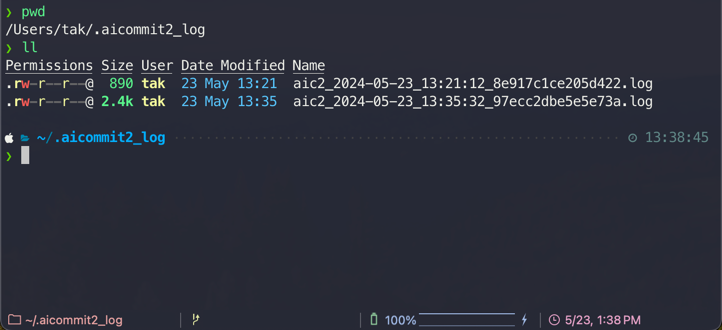
|
|
740
|
-
|
|
741
|
-
##### includeBody
|
|
742
|
-
|
|
743
|
-
Default: `false`
|
|
744
|
-
|
|
745
|
-
This option determines whether the commit message includes body. If you want to include body in message, you can set it to `true`.
|
|
746
|
-
|
|
747
|
-
```sh
|
|
748
|
-
aicommit2 config set includeBody="true"
|
|
749
|
-
```
|
|
750
|
-
|
|
751
|
-

|
|
752
|
-
|
|
753
|
-
```sh
|
|
754
|
-
aicommit2 config set includeBody="false"
|
|
755
|
-
```
|
|
756
|
-
|
|
757
|
-
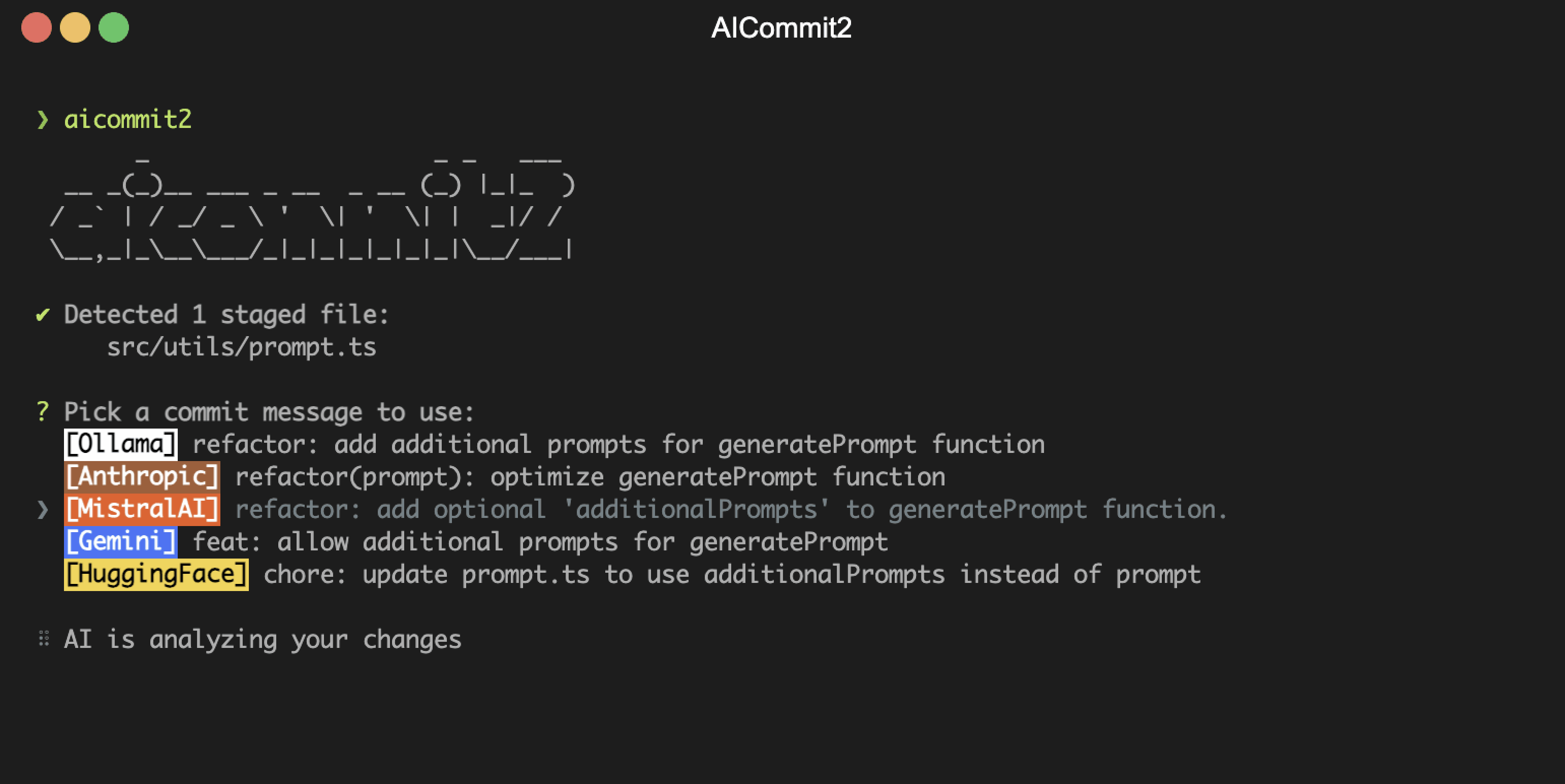
|
|
758
|
-
|
|
759
|
-
##### maxLength
|
|
760
|
-
|
|
761
|
-
The maximum character length of the Subject of generated commit message
|
|
762
|
-
|
|
763
|
-
Default: `50`
|
|
764
|
-
|
|
765
|
-
```sh
|
|
766
|
-
aicommit2 config set maxLength=100
|
|
767
|
-
```
|
|
768
|
-
|
|
769
|
-
##### disableLowerCase
|
|
770
|
-
|
|
771
|
-
Disable automatic lowercase conversion of commit messages
|
|
772
|
-
|
|
773
|
-
Default: `false`
|
|
774
|
-
|
|
775
|
-
By default, AICommit2 converts the first character of commit types and descriptions to lowercase to follow conventional commit standards. Set this to `true` to preserve the original casing.
|
|
776
|
-
|
|
777
|
-
```sh
|
|
778
|
-
aicommit2 config set disableLowerCase=true
|
|
779
|
-
```
|
|
780
|
-
|
|
781
|
-
You can also use the CLI flag:
|
|
782
|
-
|
|
783
|
-
```sh
|
|
784
|
-
aicommit2 --disable-lowercase
|
|
785
|
-
```
|
|
786
|
-
|
|
787
|
-
##### timeout
|
|
788
|
-
|
|
789
|
-
The timeout for network requests in milliseconds.
|
|
790
|
-
|
|
791
|
-
Default: `10_000` (10 seconds)
|
|
792
|
-
|
|
793
|
-
```sh
|
|
794
|
-
aicommit2 config set timeout=20000 # 20s
|
|
795
|
-
```
|
|
796
|
-
|
|
797
|
-
> **Note**: Each AI provider has its own default timeout value, and if the configured timeout is less than the provider's default, the setting will be ignored.
|
|
798
|
-
|
|
799
|
-
##### temperature
|
|
800
|
-
|
|
801
|
-
The temperature (0.0-2.0) is used to control the randomness of the output
|
|
802
|
-
|
|
803
|
-
Default: `0.7`
|
|
804
|
-
|
|
805
|
-
```sh
|
|
806
|
-
aicommit2 config set temperature=0.3
|
|
807
|
-
```
|
|
808
|
-
|
|
809
|
-
##### maxTokens
|
|
810
|
-
|
|
811
|
-
The maximum number of tokens that the AI models can generate.
|
|
812
|
-
|
|
813
|
-
Default: `1024`
|
|
814
|
-
|
|
815
|
-
```sh
|
|
816
|
-
aicommit2 config set maxTokens=3000
|
|
817
|
-
```
|
|
818
|
-
|
|
819
|
-
##### topP
|
|
820
|
-
|
|
821
|
-
Default: `0.9`
|
|
822
|
-
|
|
823
|
-
Nucleus sampling, where the model considers the results of the tokens with top_p probability mass.
|
|
824
|
-
|
|
825
|
-
> **Note**: Claude 4.x models do not support using `temperature` and `top_p` simultaneously. For these models, `top_p` is automatically excluded.
|
|
826
|
-
|
|
827
|
-
```sh
|
|
828
|
-
aicommit2 config set topP=0.2
|
|
829
|
-
```
|
|
830
|
-
|
|
831
|
-
##### disabled
|
|
832
|
-
|
|
833
|
-
Default: `false`
|
|
834
|
-
|
|
835
|
-
This option determines whether a specific model is enabled or disabled. If you want to disable a particular model, you can set this option to `true`.
|
|
836
|
-
|
|
837
|
-
To disable a model, use the following commands:
|
|
838
|
-
|
|
839
|
-
```sh
|
|
840
|
-
aicommit2 config set GEMINI.disabled="true"
|
|
841
|
-
aicommit2 config set GROQ.disabled="true"
|
|
842
|
-
```
|
|
843
|
-
|
|
844
|
-
##### codeReview
|
|
845
|
-
|
|
846
|
-
Default: `false`
|
|
847
|
-
|
|
848
|
-
The `codeReview` parameter determines whether to include an automated code review in the process.
|
|
738
|
+
| `includeBody` | Whether the commit message includes body | false |
|
|
739
|
+
| `codeReview` | Enable automated code review | false |
|
|
740
|
+
| `systemPromptPath` | Path to custom system prompt file | - |
|
|
849
741
|
|
|
850
|
-
```
|
|
851
|
-
|
|
742
|
+
```bash
|
|
743
|
+
# Example: Set settings for a specific model
|
|
744
|
+
aicommit2 config set OPENAI.locale="jp"
|
|
745
|
+
aicommit2 config set GEMINI.temperature=0.5
|
|
746
|
+
aicommit2 config set ANTHROPIC.includeBody=true
|
|
852
747
|
```
|
|
853
748
|
|
|
854
|
-
>
|
|
855
|
-
|
|
856
|
-
<img src="https://github.com/tak-bro/aicommit2/blob/main/img/code_review.gif?raw=true" alt="CODE_REVIEW" />
|
|
857
|
-
|
|
858
|
-
⚠️ **CAUTION**
|
|
859
|
-
|
|
860
|
-
- The `codeReview` feature is currently experimental.
|
|
861
|
-
- This feature performs a code review before generating commit messages.
|
|
862
|
-
- Using this feature will significantly increase the overall processing time.
|
|
863
|
-
- It may significantly impact performance and cost.
|
|
864
|
-
- **The code review process consumes a large number of tokens.**
|
|
865
|
-
|
|
866
|
-
##### codeReviewPromptPath
|
|
867
|
-
|
|
868
|
-
- Allow users to specify a custom file path for code review
|
|
869
|
-
- **Note**: Paths can be absolute or relative to the configuration file location.
|
|
870
|
-
|
|
871
|
-
```sh
|
|
872
|
-
aicommit2 config set codeReviewPromptPath="/path/to/user/prompt.txt"
|
|
873
|
-
```
|
|
749
|
+
> 👉 For all settings and detailed explanations, see [docs/settings.md](docs/settings.md)
|
|
874
750
|
|
|
875
|
-
|
|
751
|
+
### Available Settings by Model
|
|
876
752
|
|
|
877
753
|
| | timeout | temperature | maxTokens | topP |
|
|
878
754
|
| :-----------------------: | :-----: | :---------: | :-------: | :--: |
|
|
@@ -889,39 +765,7 @@ aicommit2 config set codeReviewPromptPath="/path/to/user/prompt.txt"
|
|
|
889
765
|
| **Ollama** | ✓ | ✓ | | ✓ |
|
|
890
766
|
| **OpenAI API-Compatible** | ✓ | ✓ | ✓ | ✓ |
|
|
891
767
|
|
|
892
|
-
|
|
893
|
-
>
|
|
894
|
-
> - systemPrompt, systemPromptPath, codeReview, codeReviewPromptPath, exclude, type, locale, generate, logging, includeBody, maxLength, disableLowerCase
|
|
895
|
-
|
|
896
|
-
## Configuration Examples
|
|
897
|
-
|
|
898
|
-
```
|
|
899
|
-
aicommit2 config set \
|
|
900
|
-
generate=2 \
|
|
901
|
-
topP=0.8 \
|
|
902
|
-
maxTokens=1024 \
|
|
903
|
-
temperature=0.7 \
|
|
904
|
-
OPENAI.key="sk-..." OPENAI.model="gpt-4o-mini" OPENAI.temperature=0.5 \
|
|
905
|
-
ANTHROPIC.key="sk-..." ANTHROPIC.model="claude-3-5-haiku-20241022" ANTHROPIC.maxTokens=2000 \
|
|
906
|
-
MISTRAL.key="your-key" MISTRAL.model="mistral-small-latest" \
|
|
907
|
-
OLLAMA.model="llama3.2" OLLAMA.numCtx=4096 OLLAMA.watchMode=true
|
|
908
|
-
```
|
|
909
|
-
|
|
910
|
-
> 🔍 **Detailed Support Info**: Check each provider's documentation for specific limits and behaviors:
|
|
911
|
-
>
|
|
912
|
-
> - [OpenAI](docs/providers/openai.md)
|
|
913
|
-
> - [Anthropic Claude](docs/providers/anthropic.md)
|
|
914
|
-
> - [Gemini](docs/providers/gemini.md)
|
|
915
|
-
> - [Mistral & Codestral](docs/providers/mistral.md)
|
|
916
|
-
> - [Cohere](docs/providers/cohere.md)
|
|
917
|
-
> - [Groq](docs/providers/groq.md)
|
|
918
|
-
> - [Perplexity](docs/providers/perplexity.md)
|
|
919
|
-
> - [DeepSeek](docs/providers/deepseek.md)
|
|
920
|
-
> - [GitHub Models](docs/providers/github-models.md)
|
|
921
|
-
> - [OpenAI API Compatibility](docs/providers/compatible.md)
|
|
922
|
-
> - [Ollama](docs/providers/ollama.md)
|
|
923
|
-
|
|
924
|
-
## <a id="main-logging-section"></a>Logging
|
|
768
|
+
## Logging
|
|
925
769
|
|
|
926
770
|
The application utilizes two distinct logging systems to provide comprehensive insights into its operations:
|
|
927
771
|
|
|
@@ -965,7 +809,7 @@ _aicommit2_ generates detailed logs for debugging and tracking AI requests. You
|
|
|
965
809
|
|
|
966
810
|
#### View Log Files
|
|
967
811
|
|
|
968
|
-
```
|
|
812
|
+
```bash
|
|
969
813
|
# List all log files with details
|
|
970
814
|
aicommit2 log list
|
|
971
815
|
|
|
@@ -975,14 +819,14 @@ aicommit2 log path
|
|
|
975
819
|
|
|
976
820
|
#### Open Log Directory
|
|
977
821
|
|
|
978
|
-
```
|
|
822
|
+
```bash
|
|
979
823
|
# Open logs directory in your file manager
|
|
980
824
|
aicommit2 log open
|
|
981
825
|
```
|
|
982
826
|
|
|
983
827
|
#### Clean Up Logs
|
|
984
828
|
|
|
985
|
-
```
|
|
829
|
+
```bash
|
|
986
830
|
# Remove all log files
|
|
987
831
|
aicommit2 log removeAll
|
|
988
832
|
```
|
|
@@ -1002,7 +846,7 @@ _aicommit2_ supports custom prompt templates through the `systemPromptPath` opti
|
|
|
1002
846
|
|
|
1003
847
|
To use a custom prompt template, specify the path to your template file when running the tool:
|
|
1004
848
|
|
|
1005
|
-
```
|
|
849
|
+
```bash
|
|
1006
850
|
aicommit2 config set systemPromptPath="/path/to/user/prompt.txt"
|
|
1007
851
|
aicommit2 config set OPENAI.systemPromptPath="/path/to/another-prompt.txt"
|
|
1008
852
|
```
|
|
@@ -1016,10 +860,10 @@ For the above command, OpenAI uses the prompt in the `another-prompt.txt` file,
|
|
|
1016
860
|
Your custom template can include placeholders for various commit options.
|
|
1017
861
|
Use curly braces `{}` to denote these placeholders for options. The following placeholders are supported:
|
|
1018
862
|
|
|
1019
|
-
-
|
|
1020
|
-
-
|
|
1021
|
-
-
|
|
1022
|
-
-
|
|
863
|
+
- `{locale}`: The language for the commit message (default: **en**)
|
|
864
|
+
- `{maxLength}`: The maximum length for the commit message (default: **50**)
|
|
865
|
+
- `{type}`: The type of the commit message (**conventional** or **gitmoji**)
|
|
866
|
+
- `{generate}`: The number of commit messages to generate (default: **1**)
|
|
1023
867
|
|
|
1024
868
|
#### Example Template
|
|
1025
869
|
|
|
@@ -1066,7 +910,7 @@ This ensures that the output is consistently formatted as a JSON array, regardle
|
|
|
1066
910
|
|
|
1067
911
|
Watch Commit mode allows you to monitor Git commits in real-time and automatically perform AI code reviews using the `--watch-commit` flag.
|
|
1068
912
|
|
|
1069
|
-
```
|
|
913
|
+
```bash
|
|
1070
914
|
aicommit2 --watch-commit
|
|
1071
915
|
```
|
|
1072
916
|
|
|
@@ -1076,7 +920,7 @@ This feature only works within Git repository directories and automatically trig
|
|
|
1076
920
|
2. Performs AI code review
|
|
1077
921
|
3. Displays results in real-time
|
|
1078
922
|
|
|
1079
|
-
> For detailed configuration of the code review feature, please refer to the [codeReview](#codereview) section. The settings in that section are shared with this feature.
|
|
923
|
+
> For detailed configuration of the code review feature, please refer to the [codeReview](docs/settings.md#codereview) section. The settings in that section are shared with this feature.
|
|
1080
924
|
|
|
1081
925
|
⚠️ **CAUTION**
|
|
1082
926
|
|
|
@@ -1086,7 +930,7 @@ This feature only works within Git repository directories and automatically trig
|
|
|
1086
930
|
- It is recommended to **carefully monitor your token usage** when using this feature
|
|
1087
931
|
- To use this feature, you must enable watch mode for at least one AI model:
|
|
1088
932
|
|
|
1089
|
-
```
|
|
933
|
+
```bash
|
|
1090
934
|
aicommit2 config set [MODEL].watchMode="true"
|
|
1091
935
|
```
|
|
1092
936
|
|
|
@@ -1094,13 +938,17 @@ aicommit2 config set [MODEL].watchMode="true"
|
|
|
1094
938
|
|
|
1095
939
|
Check the installed version with:
|
|
1096
940
|
|
|
1097
|
-
```
|
|
941
|
+
```bash
|
|
1098
942
|
aicommit2 --version
|
|
1099
943
|
```
|
|
1100
944
|
|
|
1101
945
|
If it's not the [latest version](https://github.com/tak-bro/aicommit2/releases/latest), run:
|
|
1102
946
|
|
|
1103
|
-
```
|
|
947
|
+
```bash
|
|
948
|
+
# Via Homebrew
|
|
949
|
+
brew upgrade aicommit2
|
|
950
|
+
|
|
951
|
+
# Via npm
|
|
1104
952
|
npm update -g aicommit2
|
|
1105
953
|
```
|
|
1106
954
|
|
|
@@ -1143,6 +991,7 @@ Thanks goes to these wonderful people ([emoji key](https://allcontributors.org/d
|
|
|
1143
991
|
</tr>
|
|
1144
992
|
<tr>
|
|
1145
993
|
<td align="center"><a href="https://github.com/jaytaylor"><img src="https://avatars.githubusercontent.com/jaytaylor" width="100px;" alt=""/><br /><sub><b>@jaytaylor</b></sub></a><br /><a href="https://github.com/tak-bro/aicommit2/commits?author=jaytaylor" title="Code">💻</a></td>
|
|
994
|
+
<td align="center"><a href="https://github.com/denniswebb"><img src="https://avatars.githubusercontent.com/denniswebb" width="100px;" alt=""/><br /><sub><b>@denniswebb</b></sub></a><br /><a href="https://github.com/tak-bro/aicommit2/commits?author=denniswebb" title="Code">💻</a></td>
|
|
1146
995
|
</tr>
|
|
1147
996
|
</table>
|
|
1148
997
|
<!-- markdownlint-restore -->
|