aicommit2 2.2.16 → 2.2.17
This diff represents the content of publicly available package versions that have been released to one of the supported registries. The information contained in this diff is provided for informational purposes only and reflects changes between package versions as they appear in their respective public registries.
- package/README.md +120 -35
- package/dist/cli.mjs +87 -89
- package/package.json +18 -15
package/README.md
CHANGED
|
@@ -272,6 +272,29 @@ Or manually delete the `.git/hooks/prepare-commit-msg` file.
|
|
|
272
272
|
|
|
273
273
|
### Configuration
|
|
274
274
|
|
|
275
|
+
aicommit2 supports configuration via command-line arguments, environment variables, and a configuration file. Settings are resolved in the following order of precedence:
|
|
276
|
+
|
|
277
|
+
1. Command-line arguments
|
|
278
|
+
2. Environment variables
|
|
279
|
+
3. Configuration file
|
|
280
|
+
4. Default values
|
|
281
|
+
|
|
282
|
+
#### Configuration File Location
|
|
283
|
+
|
|
284
|
+
aicommit2 follows the [XDG Base Directory Specification](https://specifications.freedesktop.org/basedir-spec/latest/index.html) for its configuration file. The configuration file is named `config.ini` and is in INI format. It is resolved in the following order of precedence:
|
|
285
|
+
|
|
286
|
+
1. **`AICOMMIT_CONFIG_PATH` environment variable**: If this environment variable is set, its value is used as the direct path to the configuration file.
|
|
287
|
+
2. **`$XDG_CONFIG_HOME/aicommit2/config.ini`**: This is the primary XDG-compliant location. If `$XDG_CONFIG_HOME` is not set, it defaults to `~/.config/aicommit2/config.ini`.
|
|
288
|
+
3. **`~/.aicommit2`**: This is a legacy location maintained for backward compatibility.
|
|
289
|
+
|
|
290
|
+
The first existing file found in this order will be used. If no configuration file is found, aicommit2 will default to creating a new `config.ini` file in the `$XDG_CONFIG_HOME/aicommit2/` directory.
|
|
291
|
+
|
|
292
|
+
You can find the path of the currently loaded configuration file using the `config path` command:
|
|
293
|
+
|
|
294
|
+
```sh
|
|
295
|
+
aicommit2 config path
|
|
296
|
+
```
|
|
297
|
+
|
|
275
298
|
#### Reading and Setting Configuration
|
|
276
299
|
|
|
277
300
|
- READ: `aicommit2 config get [<key> [<key> ...]]`
|
|
@@ -318,6 +341,8 @@ PERPLEXITY_API_KEY="your-perplexity-key"
|
|
|
318
341
|
DEEPSEEK_API_KEY="your-deepseek-key"
|
|
319
342
|
```
|
|
320
343
|
|
|
344
|
+
> **Note**: You can customize the environment variable name used for the API key with the `envKey` configuration property for each service.
|
|
345
|
+
|
|
321
346
|
Usage Example:
|
|
322
347
|
|
|
323
348
|
```sh
|
|
@@ -328,38 +353,43 @@ OPENAI_API_KEY="your-openai-key" ANTHROPIC_API_KEY="your-anthropic-key" aicommit
|
|
|
328
353
|
|
|
329
354
|
#### How to Configure in detail
|
|
330
355
|
|
|
331
|
-
|
|
356
|
+
_aicommit2_ offers flexible configuration options for all AI services, including support for specifying multiple models. You can configure settings via command-line arguments, environment variables, or a configuration file.
|
|
332
357
|
|
|
333
|
-
|
|
334
|
-
|
|
335
|
-
```
|
|
358
|
+
1. **Command-line arguments**: Use the format `--[Model].[Key]=value`.
|
|
359
|
+
To specify multiple models, use the `--[Model].model=model1,model2` format.
|
|
336
360
|
|
|
337
|
-
|
|
338
|
-
|
|
361
|
+
```sh
|
|
362
|
+
aicommit2 --OPENAI.locale="jp" --GEMINI.temperature="0.5" --OPENAI.model="gpt-4o,gpt-3.5-turbo"
|
|
363
|
+
```
|
|
339
364
|
|
|
340
|
-
|
|
341
|
-
|
|
342
|
-
logging=true
|
|
343
|
-
generate=2
|
|
344
|
-
temperature=1.0
|
|
365
|
+
2. **Configuration file**: Refer to [Configuration File Location](#configuration-file-location) or use the `set` command.
|
|
366
|
+
For array-like values like `model`, you can use either the `model=model1,model2` comma-separated syntax or the `model[]=` syntax for multiple entries. This applies to all AI services.
|
|
345
367
|
|
|
346
|
-
|
|
347
|
-
|
|
348
|
-
|
|
349
|
-
|
|
350
|
-
|
|
351
|
-
systemPromptPath="<your-prompt-path>"
|
|
368
|
+
```ini
|
|
369
|
+
# General Settings
|
|
370
|
+
logging=true
|
|
371
|
+
generate=2
|
|
372
|
+
temperature=1.0
|
|
352
373
|
|
|
353
|
-
|
|
354
|
-
|
|
355
|
-
|
|
356
|
-
|
|
374
|
+
# Model-Specific Settings
|
|
375
|
+
[OPENAI]
|
|
376
|
+
key="<your-api-key>"
|
|
377
|
+
temperature=0.8
|
|
378
|
+
generate=1
|
|
379
|
+
model="gpt-4o,gpt-3.5-turbo"
|
|
380
|
+
systemPromptPath="<your-prompt-path>"
|
|
357
381
|
|
|
358
|
-
[
|
|
359
|
-
|
|
360
|
-
|
|
361
|
-
|
|
362
|
-
|
|
382
|
+
[GEMINI]
|
|
383
|
+
key="<your-api-key>"
|
|
384
|
+
generate=5
|
|
385
|
+
includeBody=true
|
|
386
|
+
model="gemini-pro,gemini-flash"
|
|
387
|
+
|
|
388
|
+
[OLLAMA]
|
|
389
|
+
temperature=0.7
|
|
390
|
+
model[]=llama3.2
|
|
391
|
+
model[]=codestral
|
|
392
|
+
```
|
|
363
393
|
|
|
364
394
|
> The priority of settings is: **Command-line Arguments > Environment Variables > Model-Specific Settings > General Settings > Default Values**.
|
|
365
395
|
|
|
@@ -370,6 +400,7 @@ Please check the documentation for each specific model to confirm which settings
|
|
|
370
400
|
|
|
371
401
|
| Setting | Description | Default |
|
|
372
402
|
| ---------------------- | ------------------------------------------------------------------- | ------------ |
|
|
403
|
+
| `envKey` | Custom environment variable name for the API key | - |
|
|
373
404
|
| `systemPrompt` | System Prompt text | - |
|
|
374
405
|
| `systemPromptPath` | Path to system prompt file | - |
|
|
375
406
|
| `exclude` | Files to exclude from AI analysis | - |
|
|
@@ -395,6 +426,18 @@ Please check the documentation for each specific model to confirm which settings
|
|
|
395
426
|
> aicommit2 config set GEMINI.includeBody=true
|
|
396
427
|
> ```
|
|
397
428
|
|
|
429
|
+
##### envKey
|
|
430
|
+
|
|
431
|
+
- Allows users to specify a custom environment variable name for their API key.
|
|
432
|
+
- If `envKey` is not explicitly set, the system defaults to using an environment variable named after the service, followed by `_API_KEY` (e.g., `OPENAI_API_KEY` for OpenAI, `GEMINI_API_KEY` for Gemini).
|
|
433
|
+
- This setting provides flexibility for managing API keys, especially when multiple services are used or when specific naming conventions are required.
|
|
434
|
+
|
|
435
|
+
```sh
|
|
436
|
+
aicommit2 config set OPENAI.envKey="MY_CUSTOM_OPENAI_KEY"
|
|
437
|
+
```
|
|
438
|
+
|
|
439
|
+
> `envKey` is used to retrieve the API key from your system's environment variables. Ensure the specified environment variable is set with your API key.
|
|
440
|
+
|
|
398
441
|
##### systemPrompt
|
|
399
442
|
|
|
400
443
|
- Allow users to specify a custom system prompt
|
|
@@ -409,6 +452,7 @@ aicommit2 config set systemPrompt="Generate git commit message."
|
|
|
409
452
|
|
|
410
453
|
- Allow users to specify a custom file path for their own system prompt template
|
|
411
454
|
- Please see [Custom Prompt Template](#custom-prompt-template)
|
|
455
|
+
- **Note**: Paths can be absolute or relative to the configuration file location.
|
|
412
456
|
|
|
413
457
|
```sh
|
|
414
458
|
aicommit2 config set systemPromptPath="/path/to/user/prompt.txt"
|
|
@@ -464,16 +508,10 @@ aicommit2 config set generate=2
|
|
|
464
508
|
|
|
465
509
|
Default: `true`
|
|
466
510
|
|
|
467
|
-
|
|
468
|
-
The log files will be stored in the `~/.aicommit2_log` directory(user's home).
|
|
511
|
+
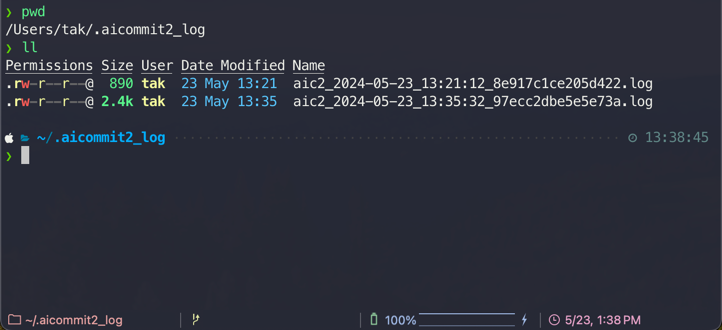
This boolean option controls whether the application generates log files. When enabled, both the general application logs and the AI request/response logs are written to their respective paths. For a detailed explanation of all logging settings, including how to enable/disable logging and manage log files, please refer to the main [Logging](#main-logging-section) section.
|
|
469
512
|
|
|
470
|
-
|
|
471
|
-
|
|
472
|
-
- You can remove all logs below command.
|
|
473
|
-
|
|
474
|
-
```sh
|
|
475
|
-
aicommit2 log removeAll
|
|
476
|
-
```
|
|
513
|
+
- **Log File Example**:
|
|
514
|
+
|
|
477
515
|
|
|
478
516
|
##### includeBody
|
|
479
517
|
|
|
@@ -583,6 +621,7 @@ aicommit2 config set codeReview=true
|
|
|
583
621
|
##### codeReviewPromptPath
|
|
584
622
|
|
|
585
623
|
- Allow users to specify a custom file path for code review
|
|
624
|
+
- **Note**: Paths can be absolute or relative to the configuration file location.
|
|
586
625
|
|
|
587
626
|
```sh
|
|
588
627
|
aicommit2 config set codeReviewPromptPath="/path/to/user/prompt.txt"
|
|
@@ -635,6 +674,52 @@ aicommit2 config set \
|
|
|
635
674
|
> - [OpenAI API Compatibility](docs/providers/compatible.md)
|
|
636
675
|
> - [Ollama](docs/providers/ollama.md)
|
|
637
676
|
|
|
677
|
+
## <a id="main-logging-section"></a>Logging
|
|
678
|
+
|
|
679
|
+
The application utilizes two distinct logging systems to provide comprehensive insights into its operations:
|
|
680
|
+
|
|
681
|
+
### 1. Application Logging (Winston)
|
|
682
|
+
|
|
683
|
+
This system handles general application logs and exceptions. Its behavior can be configured through the following settings in your `config.ini` file:
|
|
684
|
+
|
|
685
|
+
- **`logLevel`**:
|
|
686
|
+
|
|
687
|
+
- **Description**: Specifies the minimum level for logs to be recorded. Messages with a level equal to or higher than the configured `logLevel` will be captured.
|
|
688
|
+
- **Default**: `info`
|
|
689
|
+
- **Supported Levels**: `error`, `warn`, `info`, `http`, `verbose`, `debug`, `silly`
|
|
690
|
+
|
|
691
|
+
- **`logFilePath`**:
|
|
692
|
+
|
|
693
|
+
- **Description**: Defines the path to the main application log file. This setting supports date patterns (e.g., `%DATE%`) to automatically rotate log files daily.
|
|
694
|
+
- **Default**: `logs/aicommit2-%DATE%.log` (relative to the application's state directory, typically `~/.local/state/aicommit2/logs` on Linux or `~/Library/Application Support/aicommit2/logs` on macOS).
|
|
695
|
+
|
|
696
|
+
- **`exceptionLogFilePath`**:
|
|
697
|
+
|
|
698
|
+
- **Description**: Specifies the path to a dedicated log file for recording exceptions. Similar to `logFilePath`, it supports date patterns for daily rotation.
|
|
699
|
+
- **Default**: `logs/exceptions-%DATE%.log` (relative to the application's state directory, typically `~/.local/state/aicommit2/logs` on Linux or `~/Library/Application Support/aicommit2/logs` on macOS).
|
|
700
|
+
|
|
701
|
+
### 2. AI Request/Response Logging
|
|
702
|
+
|
|
703
|
+
This system is specifically designed to log the prompts and responses exchanged with AI models for review and commit generation. These logs are stored in the application's dedicated logs directory.
|
|
704
|
+
|
|
705
|
+
- **Log Location**: These logs are stored in the same base directory as the application logs, which is determined by the system's state directory (e.g., `~/.local/state/aicommit2/logs` on Linux or `~/Library/Application Support/aicommit2/logs` on macOS).
|
|
706
|
+
- **File Naming**: Each AI log file is uniquely named using a combination of the date (`YYYY-MM-DD_HH-MM-SS`) and a hash of the git diff content, ensuring easy identification and chronological order.
|
|
707
|
+
|
|
708
|
+
### Enable/Disable Logging
|
|
709
|
+
|
|
710
|
+
The `logging` setting controls whether log files are generated. It can be configured both globally and for individual AI services:
|
|
711
|
+
|
|
712
|
+
- **Global `logging` setting**: When set in the general configuration, it controls the overall application logging (handled by Winston) and acts as a default for AI request/response logging.
|
|
713
|
+
- **Service-specific `logging` setting**: You can override the global `logging` setting for a particular AI service. If `logging` is set to `false` for a specific service, AI request/response logs will not be generated for that service, regardless of the global setting.
|
|
714
|
+
|
|
715
|
+
### Removing All Logs
|
|
716
|
+
|
|
717
|
+
You can remove all generated log files (both application and AI logs) using the following command:
|
|
718
|
+
|
|
719
|
+
```sh
|
|
720
|
+
aicommit2 log removeAll
|
|
721
|
+
```
|
|
722
|
+
|
|
638
723
|
## Custom Prompt Template
|
|
639
724
|
|
|
640
725
|
_aicommit2_ supports custom prompt templates through the `systemPromptPath` option. This feature allows you to define your own prompt structure, giving you more control over the commit message generation process.
|