aicommit2 2.2.15 → 2.2.17
This diff represents the content of publicly available package versions that have been released to one of the supported registries. The information contained in this diff is provided for informational purposes only and reflects changes between package versions as they appear in their respective public registries.
- package/README.md +234 -74
- package/dist/cli.mjs +78 -80
- package/package.json +18 -15
package/README.md
CHANGED
|
@@ -14,10 +14,11 @@
|
|
|
14
14
|
[](https://github.com/tak-bro/aicommit2/blob/main/LICENSE)
|
|
15
15
|
[](https://www.npmjs.com/package/aicommit2)
|
|
16
16
|
[](https://www.npmjs.com/package/aicommit2)
|
|
17
|
+
[](#nix-installation)
|
|
17
18
|
|
|
18
19
|
</div>
|
|
19
20
|
|
|
20
|
-
|
|
21
|
+
______________________________________________________________________
|
|
21
22
|
|
|
22
23
|
## 🚀 Quick Start
|
|
23
24
|
|
|
@@ -59,7 +60,7 @@ _aicommit2_ is a reactive CLI tool that automatically generates Git commit messa
|
|
|
59
60
|
|
|
60
61
|
### Local AI Services
|
|
61
62
|
|
|
62
|
-
- [Ollama](docs/providers/ollama.md)
|
|
63
|
+
- [Ollama](docs/providers/ollama.md)
|
|
63
64
|
|
|
64
65
|
## Setup
|
|
65
66
|
|
|
@@ -80,6 +81,7 @@ aicommit2 config set ANTHROPIC.key=<your key>
|
|
|
80
81
|
```
|
|
81
82
|
|
|
82
83
|
3. Run _aicommit2_ with your staged files in git repository:
|
|
84
|
+
|
|
83
85
|
```shell
|
|
84
86
|
git add <files...>
|
|
85
87
|
aicommit2
|
|
@@ -89,6 +91,54 @@ aicommit2
|
|
|
89
91
|
|
|
90
92
|
### Alternative Installation Methods
|
|
91
93
|
|
|
94
|
+
#### Nix Installation
|
|
95
|
+
|
|
96
|
+
If you use the Nix package manager, aicommit2 can be installed directly using the provided flake:
|
|
97
|
+
|
|
98
|
+
```sh
|
|
99
|
+
# Install temporarily in your current shell
|
|
100
|
+
nix run github:tak-bro/aicommit2
|
|
101
|
+
|
|
102
|
+
# Install permanently to your profile
|
|
103
|
+
nix profile install github:tak-bro/aicommit2
|
|
104
|
+
|
|
105
|
+
# Use the shorter alias
|
|
106
|
+
nix run github:tak-bro/aic2 -- --help
|
|
107
|
+
```
|
|
108
|
+
|
|
109
|
+
##### Using in a Flake-based Project
|
|
110
|
+
|
|
111
|
+
Add aicommit2 to your flake inputs:
|
|
112
|
+
|
|
113
|
+
```nix
|
|
114
|
+
{
|
|
115
|
+
# flake.nix configuration file
|
|
116
|
+
inputs = {
|
|
117
|
+
nixpkgs.url = "github:NixOS/nixpkgs/nixos-unstable";
|
|
118
|
+
aicommit2.url = "github:tak-bro/aicommit2";
|
|
119
|
+
};
|
|
120
|
+
# Rest of your flake.nix file
|
|
121
|
+
}
|
|
122
|
+
|
|
123
|
+
# Somewhere where you define your packages
|
|
124
|
+
{pkgs, inputs, ...}:{
|
|
125
|
+
|
|
126
|
+
environment.systemPackages = [inputs.aicommit2.packages.x86_64-linux.default];
|
|
127
|
+
# Or home packages
|
|
128
|
+
home.packages = [inputs.aicommit2.packages.x86_64-linux.default];
|
|
129
|
+
}
|
|
130
|
+
```
|
|
131
|
+
|
|
132
|
+
##### Development Environment
|
|
133
|
+
|
|
134
|
+
To enter a development shell with all dependencies:
|
|
135
|
+
|
|
136
|
+
```sh
|
|
137
|
+
nix develop github:tak-bro/aicommit2
|
|
138
|
+
```
|
|
139
|
+
|
|
140
|
+
After setting up with Nix, you'll still need to configure API keys as described in the [Setup](#setup) section.
|
|
141
|
+
|
|
92
142
|
#### From Source
|
|
93
143
|
|
|
94
144
|
```sh
|
|
@@ -151,8 +201,9 @@ aicommit2 --all # or -a
|
|
|
151
201
|
- `--pre-commit`: Run in [pre-commit](https://pre-commit.com/) framework mode (default: **false**)
|
|
152
202
|
- This option is specifically for use with the pre-commit framework
|
|
153
203
|
- See [Integration with pre-commit framework](#integration-with-pre-commit-framework) section for setup instructions
|
|
154
|
-
|
|
204
|
+
|
|
155
205
|
Example:
|
|
206
|
+
|
|
156
207
|
```sh
|
|
157
208
|
aicommit2 --locale "jp" --all --type "conventional" --generate 3 --clipboard --exclude "*.json" --exclude "*.ts"
|
|
158
209
|
```
|
|
@@ -177,7 +228,7 @@ if you prefer to set up the hook manually, create or edit the `.git/hooks/prepar
|
|
|
177
228
|
#!/bin/sh
|
|
178
229
|
# your-other-hook "$@"
|
|
179
230
|
aicommit2 --hook-mode "$@"
|
|
180
|
-
|
|
231
|
+
```
|
|
181
232
|
|
|
182
233
|
Make the hook executable:
|
|
183
234
|
|
|
@@ -191,14 +242,14 @@ If you're using the [pre-commit](https://pre-commit.com/) framework, you can add
|
|
|
191
242
|
|
|
192
243
|
```yaml
|
|
193
244
|
repos:
|
|
194
|
-
|
|
195
|
-
|
|
196
|
-
|
|
197
|
-
|
|
198
|
-
|
|
199
|
-
|
|
200
|
-
|
|
201
|
-
|
|
245
|
+
- repo: local
|
|
246
|
+
hooks:
|
|
247
|
+
- id: aicommit2
|
|
248
|
+
name: AI Commit Message Generator
|
|
249
|
+
entry: aicommit2 --pre-commit
|
|
250
|
+
language: node
|
|
251
|
+
stages: [prepare-commit-msg]
|
|
252
|
+
always_run: true
|
|
202
253
|
```
|
|
203
254
|
|
|
204
255
|
Make sure you have:
|
|
@@ -209,7 +260,6 @@ Make sure you have:
|
|
|
209
260
|
|
|
210
261
|
> **Note** : The `--pre-commit` flag is specifically designed for use with the pre-commit framework and ensures proper integration with other pre-commit hooks.
|
|
211
262
|
|
|
212
|
-
|
|
213
263
|
#### Uninstall
|
|
214
264
|
|
|
215
265
|
In the Git repository you want to uninstall the hook from:
|
|
@@ -222,16 +272,52 @@ Or manually delete the `.git/hooks/prepare-commit-msg` file.
|
|
|
222
272
|
|
|
223
273
|
### Configuration
|
|
224
274
|
|
|
275
|
+
aicommit2 supports configuration via command-line arguments, environment variables, and a configuration file. Settings are resolved in the following order of precedence:
|
|
276
|
+
|
|
277
|
+
1. Command-line arguments
|
|
278
|
+
2. Environment variables
|
|
279
|
+
3. Configuration file
|
|
280
|
+
4. Default values
|
|
281
|
+
|
|
282
|
+
#### Configuration File Location
|
|
283
|
+
|
|
284
|
+
aicommit2 follows the [XDG Base Directory Specification](https://specifications.freedesktop.org/basedir-spec/latest/index.html) for its configuration file. The configuration file is named `config.ini` and is in INI format. It is resolved in the following order of precedence:
|
|
285
|
+
|
|
286
|
+
1. **`AICOMMIT_CONFIG_PATH` environment variable**: If this environment variable is set, its value is used as the direct path to the configuration file.
|
|
287
|
+
2. **`$XDG_CONFIG_HOME/aicommit2/config.ini`**: This is the primary XDG-compliant location. If `$XDG_CONFIG_HOME` is not set, it defaults to `~/.config/aicommit2/config.ini`.
|
|
288
|
+
3. **`~/.aicommit2`**: This is a legacy location maintained for backward compatibility.
|
|
289
|
+
|
|
290
|
+
The first existing file found in this order will be used. If no configuration file is found, aicommit2 will default to creating a new `config.ini` file in the `$XDG_CONFIG_HOME/aicommit2/` directory.
|
|
291
|
+
|
|
292
|
+
You can find the path of the currently loaded configuration file using the `config path` command:
|
|
293
|
+
|
|
294
|
+
```sh
|
|
295
|
+
aicommit2 config path
|
|
296
|
+
```
|
|
297
|
+
|
|
225
298
|
#### Reading and Setting Configuration
|
|
226
299
|
|
|
227
|
-
- READ: `aicommit2 config get <key
|
|
300
|
+
- READ: `aicommit2 config get [<key> [<key> ...]]`
|
|
228
301
|
- SET: `aicommit2 config set <key>=<value>`
|
|
302
|
+
- DELETE: `aicommit2 config del <config-name>`
|
|
229
303
|
|
|
230
304
|
Example:
|
|
305
|
+
|
|
231
306
|
```sh
|
|
307
|
+
# Get all configurations
|
|
308
|
+
aicommit2 config get
|
|
309
|
+
|
|
310
|
+
# Get specific configuration
|
|
232
311
|
aicommit2 config get OPENAI
|
|
233
312
|
aicommit2 config get GEMINI.key
|
|
313
|
+
|
|
314
|
+
# Set configurations
|
|
234
315
|
aicommit2 config set OPENAI.generate=3 GEMINI.temperature=0.5
|
|
316
|
+
|
|
317
|
+
# Delete a configuration setting or section
|
|
318
|
+
aicommit2 config del OPENAI.key
|
|
319
|
+
aicommit2 config del GEMINI
|
|
320
|
+
aicommit2 config del timeout
|
|
235
321
|
```
|
|
236
322
|
|
|
237
323
|
#### Environment Variables
|
|
@@ -255,46 +341,55 @@ PERPLEXITY_API_KEY="your-perplexity-key"
|
|
|
255
341
|
DEEPSEEK_API_KEY="your-deepseek-key"
|
|
256
342
|
```
|
|
257
343
|
|
|
344
|
+
> **Note**: You can customize the environment variable name used for the API key with the `envKey` configuration property for each service.
|
|
345
|
+
|
|
258
346
|
Usage Example:
|
|
259
347
|
|
|
260
348
|
```sh
|
|
261
349
|
OPENAI_API_KEY="your-openai-key" ANTHROPIC_API_KEY="your-anthropic-key" aicommit2
|
|
262
350
|
```
|
|
263
351
|
|
|
264
|
-
> **Note**: Environment variables take precedence over configuration file settings.
|
|
352
|
+
> **Note**: Environment variables take precedence over configuration file settings.
|
|
265
353
|
|
|
266
354
|
#### How to Configure in detail
|
|
267
355
|
|
|
268
|
-
|
|
269
|
-
```sh
|
|
270
|
-
aicommit2 --OPENAI.locale="jp" --GEMINI.temperatue="0.5"
|
|
271
|
-
```
|
|
356
|
+
_aicommit2_ offers flexible configuration options for all AI services, including support for specifying multiple models. You can configure settings via command-line arguments, environment variables, or a configuration file.
|
|
272
357
|
|
|
273
|
-
|
|
274
|
-
|
|
275
|
-
```ini
|
|
276
|
-
# General Settings
|
|
277
|
-
logging=true
|
|
278
|
-
generate=2
|
|
279
|
-
temperature=1.0
|
|
358
|
+
1. **Command-line arguments**: Use the format `--[Model].[Key]=value`.
|
|
359
|
+
To specify multiple models, use the `--[Model].model=model1,model2` format.
|
|
280
360
|
|
|
281
|
-
|
|
282
|
-
|
|
283
|
-
|
|
284
|
-
temperature=0.8
|
|
285
|
-
generate=1
|
|
286
|
-
systemPromptPath="<your-prompt-path>"
|
|
361
|
+
```sh
|
|
362
|
+
aicommit2 --OPENAI.locale="jp" --GEMINI.temperature="0.5" --OPENAI.model="gpt-4o,gpt-3.5-turbo"
|
|
363
|
+
```
|
|
287
364
|
|
|
288
|
-
[
|
|
289
|
-
|
|
290
|
-
generate=5
|
|
291
|
-
includeBody=true
|
|
365
|
+
2. **Configuration file**: Refer to [Configuration File Location](#configuration-file-location) or use the `set` command.
|
|
366
|
+
For array-like values like `model`, you can use either the `model=model1,model2` comma-separated syntax or the `model[]=` syntax for multiple entries. This applies to all AI services.
|
|
292
367
|
|
|
293
|
-
|
|
294
|
-
|
|
295
|
-
|
|
296
|
-
|
|
297
|
-
|
|
368
|
+
```ini
|
|
369
|
+
# General Settings
|
|
370
|
+
logging=true
|
|
371
|
+
generate=2
|
|
372
|
+
temperature=1.0
|
|
373
|
+
|
|
374
|
+
# Model-Specific Settings
|
|
375
|
+
[OPENAI]
|
|
376
|
+
key="<your-api-key>"
|
|
377
|
+
temperature=0.8
|
|
378
|
+
generate=1
|
|
379
|
+
model="gpt-4o,gpt-3.5-turbo"
|
|
380
|
+
systemPromptPath="<your-prompt-path>"
|
|
381
|
+
|
|
382
|
+
[GEMINI]
|
|
383
|
+
key="<your-api-key>"
|
|
384
|
+
generate=5
|
|
385
|
+
includeBody=true
|
|
386
|
+
model="gemini-pro,gemini-flash"
|
|
387
|
+
|
|
388
|
+
[OLLAMA]
|
|
389
|
+
temperature=0.7
|
|
390
|
+
model[]=llama3.2
|
|
391
|
+
model[]=codestral
|
|
392
|
+
```
|
|
298
393
|
|
|
299
394
|
> The priority of settings is: **Command-line Arguments > Environment Variables > Model-Specific Settings > General Settings > Default Values**.
|
|
300
395
|
|
|
@@ -304,7 +399,8 @@ The following settings can be applied to most models, but support may vary.
|
|
|
304
399
|
Please check the documentation for each specific model to confirm which settings are supported.
|
|
305
400
|
|
|
306
401
|
| Setting | Description | Default |
|
|
307
|
-
|
|
402
|
+
| ---------------------- | ------------------------------------------------------------------- | ------------ |
|
|
403
|
+
| `envKey` | Custom environment variable name for the API key | - |
|
|
308
404
|
| `systemPrompt` | System Prompt text | - |
|
|
309
405
|
| `systemPromptPath` | Path to system prompt file | - |
|
|
310
406
|
| `exclude` | Files to exclude from AI analysis | - |
|
|
@@ -322,14 +418,28 @@ Please check the documentation for each specific model to confirm which settings
|
|
|
322
418
|
| `codeReviewPromptPath` | Path to code review prompt file | - |
|
|
323
419
|
| `disabled` | Whether a specific model is enabled or disabled | false |
|
|
324
420
|
|
|
325
|
-
> 👉
|
|
421
|
+
> 👉 **Tip:** To set the General Settings for each model, use the following command.
|
|
422
|
+
>
|
|
326
423
|
> ```shell
|
|
327
424
|
> aicommit2 config set OPENAI.locale="jp"
|
|
328
425
|
> aicommit2 config set CODESTRAL.type="gitmoji"
|
|
329
426
|
> aicommit2 config set GEMINI.includeBody=true
|
|
330
427
|
> ```
|
|
331
428
|
|
|
429
|
+
##### envKey
|
|
430
|
+
|
|
431
|
+
- Allows users to specify a custom environment variable name for their API key.
|
|
432
|
+
- If `envKey` is not explicitly set, the system defaults to using an environment variable named after the service, followed by `_API_KEY` (e.g., `OPENAI_API_KEY` for OpenAI, `GEMINI_API_KEY` for Gemini).
|
|
433
|
+
- This setting provides flexibility for managing API keys, especially when multiple services are used or when specific naming conventions are required.
|
|
434
|
+
|
|
435
|
+
```sh
|
|
436
|
+
aicommit2 config set OPENAI.envKey="MY_CUSTOM_OPENAI_KEY"
|
|
437
|
+
```
|
|
438
|
+
|
|
439
|
+
> `envKey` is used to retrieve the API key from your system's environment variables. Ensure the specified environment variable is set with your API key.
|
|
440
|
+
|
|
332
441
|
##### systemPrompt
|
|
442
|
+
|
|
333
443
|
- Allow users to specify a custom system prompt
|
|
334
444
|
|
|
335
445
|
```sh
|
|
@@ -339,8 +449,10 @@ aicommit2 config set systemPrompt="Generate git commit message."
|
|
|
339
449
|
> `systemPrompt` takes precedence over `systemPromptPath` and does not apply at the same time.
|
|
340
450
|
|
|
341
451
|
##### systemPromptPath
|
|
452
|
+
|
|
342
453
|
- Allow users to specify a custom file path for their own system prompt template
|
|
343
454
|
- Please see [Custom Prompt Template](#custom-prompt-template)
|
|
455
|
+
- **Note**: Paths can be absolute or relative to the configuration file location.
|
|
344
456
|
|
|
345
457
|
```sh
|
|
346
458
|
aicommit2 config set systemPromptPath="/path/to/user/prompt.txt"
|
|
@@ -396,16 +508,10 @@ aicommit2 config set generate=2
|
|
|
396
508
|
|
|
397
509
|
Default: `true`
|
|
398
510
|
|
|
399
|
-
|
|
400
|
-
The log files will be stored in the `~/.aicommit2_log` directory(user's home).
|
|
401
|
-
|
|
402
|
-
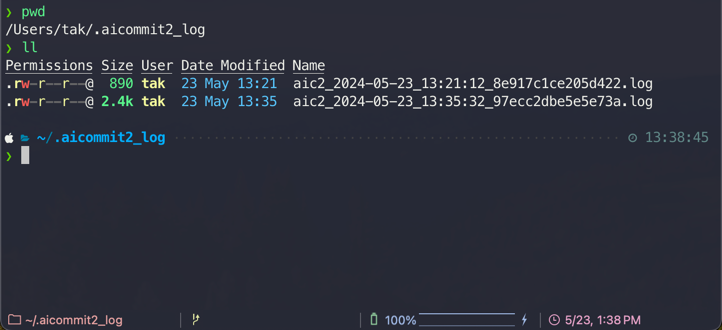
|
|
403
|
-
|
|
404
|
-
- You can remove all logs below comamnd.
|
|
511
|
+
This boolean option controls whether the application generates log files. When enabled, both the general application logs and the AI request/response logs are written to their respective paths. For a detailed explanation of all logging settings, including how to enable/disable logging and manage log files, please refer to the main [Logging](#main-logging-section) section.
|
|
405
512
|
|
|
406
|
-
|
|
407
|
-
aicommit2
|
|
408
|
-
```
|
|
513
|
+
- **Log File Example**:
|
|
514
|
+

|
|
409
515
|
|
|
410
516
|
##### includeBody
|
|
411
517
|
|
|
@@ -419,7 +525,6 @@ aicommit2 config set includeBody="true"
|
|
|
419
525
|
|
|
420
526
|

|
|
421
527
|
|
|
422
|
-
|
|
423
528
|
```sh
|
|
424
529
|
aicommit2 config set includeBody="false"
|
|
425
530
|
```
|
|
@@ -514,31 +619,34 @@ aicommit2 config set codeReview=true
|
|
|
514
619
|
- **The code review process consumes a large number of tokens.**
|
|
515
620
|
|
|
516
621
|
##### codeReviewPromptPath
|
|
622
|
+
|
|
517
623
|
- Allow users to specify a custom file path for code review
|
|
624
|
+
- **Note**: Paths can be absolute or relative to the configuration file location.
|
|
518
625
|
|
|
519
626
|
```sh
|
|
520
627
|
aicommit2 config set codeReviewPromptPath="/path/to/user/prompt.txt"
|
|
521
628
|
```
|
|
522
629
|
|
|
523
630
|
## Available General Settings by Model
|
|
524
|
-
|
|
525
|
-
|
|
526
|
-
|
|
|
527
|
-
|
|
|
528
|
-
|
|
|
529
|
-
|
|
|
530
|
-
|
|
|
531
|
-
|
|
|
532
|
-
|
|
|
533
|
-
|
|
|
534
|
-
|
|
|
535
|
-
|
|
|
536
|
-
|
|
|
631
|
+
|
|
632
|
+
| | timeout | temperature | maxTokens | topP |
|
|
633
|
+
| :-----------------------: | :-----: | :---------: | :-------: | :--: |
|
|
634
|
+
| **OpenAI** | ✓ | ✓ | ✓ | ✓ |
|
|
635
|
+
| **Anthropic Claude** | ✓ | ✓ | ✓ | ✓ |
|
|
636
|
+
| **Gemini** | | ✓ | ✓ | ✓ |
|
|
637
|
+
| **Mistral AI** | ✓ | ✓ | ✓ | ✓ |
|
|
638
|
+
| **Codestral** | ✓ | ✓ | ✓ | ✓ |
|
|
639
|
+
| **Cohere** | ✓ | ✓ | ✓ | ✓ |
|
|
640
|
+
| **Groq** | ✓ | ✓ | ✓ | ✓ |
|
|
641
|
+
| **Perplexity** | ✓ | ✓ | ✓ | ✓ |
|
|
642
|
+
| **DeepSeek** | ✓ | ✓ | ✓ | ✓ |
|
|
643
|
+
| **Ollama** | ✓ | ✓ | | ✓ |
|
|
644
|
+
| **OpenAI API-Compatible** | ✓ | ✓ | ✓ | ✓ |
|
|
537
645
|
|
|
538
646
|
> All AI support the following options in General Settings.
|
|
647
|
+
>
|
|
539
648
|
> - systemPrompt, systemPromptPath, codeReview, codeReviewPromptPath, exclude, type, locale, generate, logging, includeBody, maxLength
|
|
540
649
|
|
|
541
|
-
|
|
542
650
|
## Configuration Examples
|
|
543
651
|
|
|
544
652
|
```
|
|
@@ -554,6 +662,7 @@ aicommit2 config set \
|
|
|
554
662
|
```
|
|
555
663
|
|
|
556
664
|
> 🔍 **Detailed Support Info**: Check each provider's documentation for specific limits and behaviors:
|
|
665
|
+
>
|
|
557
666
|
> - [OpenAI](docs/providers/openai.md)
|
|
558
667
|
> - [Anthropic Claude](docs/providers/anthropic.md)
|
|
559
668
|
> - [Gemini](docs/providers/gemini.md)
|
|
@@ -563,13 +672,60 @@ aicommit2 config set \
|
|
|
563
672
|
> - [Perplexity](docs/providers/perplexity.md)
|
|
564
673
|
> - [DeepSeek](docs/providers/deepseek.md)
|
|
565
674
|
> - [OpenAI API Compatibility](docs/providers/compatible.md)
|
|
566
|
-
> - [Ollama](docs/providers/ollama.md)
|
|
567
|
-
|
|
675
|
+
> - [Ollama](docs/providers/ollama.md)
|
|
676
|
+
|
|
677
|
+
## <a id="main-logging-section"></a>Logging
|
|
678
|
+
|
|
679
|
+
The application utilizes two distinct logging systems to provide comprehensive insights into its operations:
|
|
680
|
+
|
|
681
|
+
### 1. Application Logging (Winston)
|
|
682
|
+
|
|
683
|
+
This system handles general application logs and exceptions. Its behavior can be configured through the following settings in your `config.ini` file:
|
|
684
|
+
|
|
685
|
+
- **`logLevel`**:
|
|
686
|
+
|
|
687
|
+
- **Description**: Specifies the minimum level for logs to be recorded. Messages with a level equal to or higher than the configured `logLevel` will be captured.
|
|
688
|
+
- **Default**: `info`
|
|
689
|
+
- **Supported Levels**: `error`, `warn`, `info`, `http`, `verbose`, `debug`, `silly`
|
|
690
|
+
|
|
691
|
+
- **`logFilePath`**:
|
|
692
|
+
|
|
693
|
+
- **Description**: Defines the path to the main application log file. This setting supports date patterns (e.g., `%DATE%`) to automatically rotate log files daily.
|
|
694
|
+
- **Default**: `logs/aicommit2-%DATE%.log` (relative to the application's state directory, typically `~/.local/state/aicommit2/logs` on Linux or `~/Library/Application Support/aicommit2/logs` on macOS).
|
|
695
|
+
|
|
696
|
+
- **`exceptionLogFilePath`**:
|
|
697
|
+
|
|
698
|
+
- **Description**: Specifies the path to a dedicated log file for recording exceptions. Similar to `logFilePath`, it supports date patterns for daily rotation.
|
|
699
|
+
- **Default**: `logs/exceptions-%DATE%.log` (relative to the application's state directory, typically `~/.local/state/aicommit2/logs` on Linux or `~/Library/Application Support/aicommit2/logs` on macOS).
|
|
700
|
+
|
|
701
|
+
### 2. AI Request/Response Logging
|
|
702
|
+
|
|
703
|
+
This system is specifically designed to log the prompts and responses exchanged with AI models for review and commit generation. These logs are stored in the application's dedicated logs directory.
|
|
704
|
+
|
|
705
|
+
- **Log Location**: These logs are stored in the same base directory as the application logs, which is determined by the system's state directory (e.g., `~/.local/state/aicommit2/logs` on Linux or `~/Library/Application Support/aicommit2/logs` on macOS).
|
|
706
|
+
- **File Naming**: Each AI log file is uniquely named using a combination of the date (`YYYY-MM-DD_HH-MM-SS`) and a hash of the git diff content, ensuring easy identification and chronological order.
|
|
707
|
+
|
|
708
|
+
### Enable/Disable Logging
|
|
709
|
+
|
|
710
|
+
The `logging` setting controls whether log files are generated. It can be configured both globally and for individual AI services:
|
|
711
|
+
|
|
712
|
+
- **Global `logging` setting**: When set in the general configuration, it controls the overall application logging (handled by Winston) and acts as a default for AI request/response logging.
|
|
713
|
+
- **Service-specific `logging` setting**: You can override the global `logging` setting for a particular AI service. If `logging` is set to `false` for a specific service, AI request/response logs will not be generated for that service, regardless of the global setting.
|
|
714
|
+
|
|
715
|
+
### Removing All Logs
|
|
716
|
+
|
|
717
|
+
You can remove all generated log files (both application and AI logs) using the following command:
|
|
718
|
+
|
|
719
|
+
```sh
|
|
720
|
+
aicommit2 log removeAll
|
|
721
|
+
```
|
|
722
|
+
|
|
568
723
|
## Custom Prompt Template
|
|
569
724
|
|
|
570
725
|
_aicommit2_ supports custom prompt templates through the `systemPromptPath` option. This feature allows you to define your own prompt structure, giving you more control over the commit message generation process.
|
|
571
726
|
|
|
572
727
|
### Using the systemPromptPath Option
|
|
728
|
+
|
|
573
729
|
To use a custom prompt template, specify the path to your template file when running the tool:
|
|
574
730
|
|
|
575
731
|
```
|
|
@@ -630,7 +786,6 @@ The response should be valid JSON that can be parsed without errors.
|
|
|
630
786
|
|
|
631
787
|
This ensures that the output is consistently formatted as a JSON array, regardless of the custom template used.
|
|
632
788
|
|
|
633
|
-
|
|
634
789
|
## Watch Commit Mode
|
|
635
790
|
|
|
636
791
|

|
|
@@ -642,6 +797,7 @@ aicommit2 --watch-commit
|
|
|
642
797
|
```
|
|
643
798
|
|
|
644
799
|
This feature only works within Git repository directories and automatically triggers whenever a commit event occurs. When a new commit is detected, it automatically:
|
|
800
|
+
|
|
645
801
|
1. Analyzes commit changes
|
|
646
802
|
2. Performs AI code review
|
|
647
803
|
3. Displays results in real-time
|
|
@@ -655,9 +811,10 @@ This feature only works within Git repository directories and automatically trig
|
|
|
655
811
|
- API costs can increase substantially if there are many commits
|
|
656
812
|
- It is recommended to **carefully monitor your token usage** when using this feature
|
|
657
813
|
- To use this feature, you must enable watch mode for at least one AI model:
|
|
658
|
-
|
|
659
|
-
|
|
660
|
-
|
|
814
|
+
|
|
815
|
+
```sh
|
|
816
|
+
aicommit2 config set [MODEL].watchMode="true"
|
|
817
|
+
```
|
|
661
818
|
|
|
662
819
|
## Upgrading
|
|
663
820
|
|
|
@@ -686,8 +843,11 @@ For bug fixes or feature implementations, please check the [Contribution Guide](
|
|
|
686
843
|
Thanks goes to these wonderful people ([emoji key](https://allcontributors.org/docs/en/emoji-key)):
|
|
687
844
|
|
|
688
845
|
<!-- ALL-CONTRIBUTORS-LIST:START - Do not remove or modify this section -->
|
|
846
|
+
|
|
689
847
|
<!-- prettier-ignore-start -->
|
|
848
|
+
|
|
690
849
|
<!-- markdownlint-disable -->
|
|
850
|
+
|
|
691
851
|
<table>
|
|
692
852
|
<tr>
|
|
693
853
|
<td align="center"><a href="https://github.com/eltociear"><img src="https://avatars.githubusercontent.com/eltociear" width="100px;" alt=""/><br /><sub><b>@eltociear</b></sub></a><br /><a href="https://github.com/tak-bro/aicommit2/commits?author=eltociear" title="Documentation">📖</a></td>
|
|
@@ -708,7 +868,7 @@ Thanks goes to these wonderful people ([emoji key](https://allcontributors.org/d
|
|
|
708
868
|
<!-- prettier-ignore-end -->
|
|
709
869
|
<!-- ALL-CONTRIBUTORS-LIST:END -->
|
|
710
870
|
|
|
711
|
-
|
|
871
|
+
______________________________________________________________________
|
|
712
872
|
|
|
713
873
|
If this project has been helpful, please consider giving it a Star ⭐️!
|
|
714
874
|
|