ai-profile-switch 2.2.0 → 2.2.2
This diff represents the content of publicly available package versions that have been released to one of the supported registries. The information contained in this diff is provided for informational purposes only and reflects changes between package versions as they appear in their respective public registries.
- package/README.ko.md +54 -119
- package/README.md +50 -115
- package/package.json +6 -1
- package/src/commands/add.mjs +19 -6
- package/src/commands/init.mjs +44 -45
- package/src/commands/install-shell.mjs +4 -3
- package/src/commands/language.mjs +38 -0
- package/src/commands/list.mjs +13 -6
- package/src/commands/login.mjs +43 -0
- package/src/commands/manage.mjs +108 -51
- package/src/commands/mcp/index.mjs +7 -6
- package/src/commands/migrate.mjs +19 -18
- package/src/commands/remove.mjs +7 -6
- package/src/commands/rename.mjs +15 -10
- package/src/commands/share.mjs +16 -14
- package/src/commands/shell.mjs +78 -15
- package/src/commands/update.mjs +15 -12
- package/src/commands/use.mjs +5 -3
- package/src/index.mjs +14 -36
- package/src/lib/account.mjs +122 -0
- package/src/lib/config.mjs +8 -1
- package/src/lib/constants.mjs +4 -0
- package/src/lib/i18n.mjs +65 -0
- package/src/lib/profile.mjs +62 -19
- package/src/lib/prompt.mjs +105 -38
- package/src/lib/shared.mjs +5 -4
- package/src/lib/ui.mjs +54 -29
- package/src/locales/en.mjs +269 -0
- package/src/locales/ko.mjs +269 -0
package/README.ko.md
CHANGED
|
@@ -1,162 +1,97 @@
|
|
|
1
1
|
# ai-profile-switch
|
|
2
2
|
|
|
3
3
|
[](https://www.npmjs.com/package/ai-profile-switch)
|
|
4
|
-
[](./LICENSE)
|
|
5
5
|
|
|
6
|
-
|
|
6
|
+
회사·개인처럼 여러 Claude Code 계정을 한 컴퓨터에 두고, `claude` 를 실행할 때마다 골라 씁니다. 프로필마다 로그인·기록·설정이 따로 있고, 같이 쓸 것만 골라서 나눕니다. 실행에 필요한 외부 패키지는 없습니다.
|
|
7
7
|
|
|
8
8
|
[English](./README.md) · [전체 가이드](https://ftery0.github.io/ai-profile-switch/ko/guide/)
|
|
9
9
|
|
|
10
|
-
|
|
10
|
+
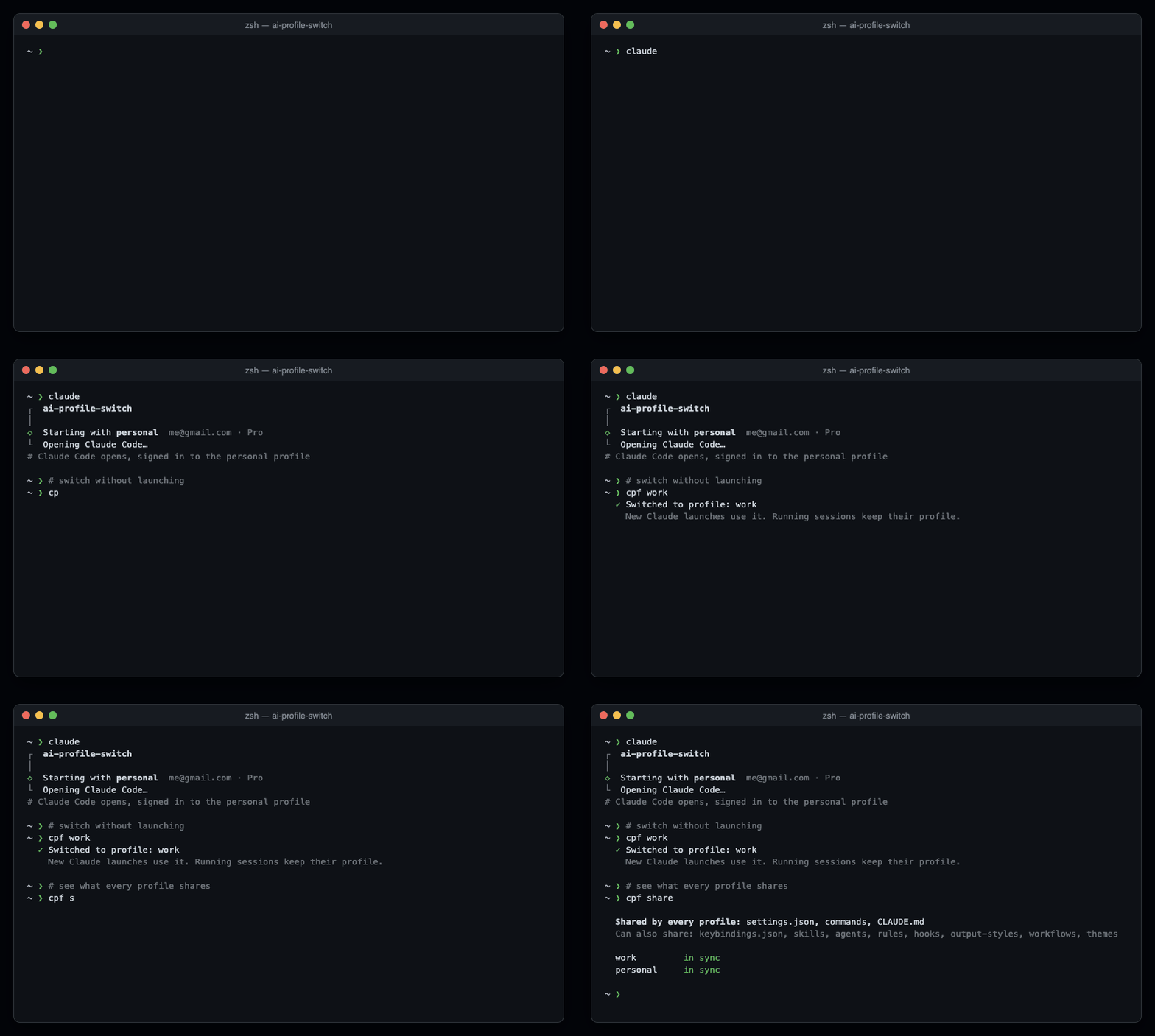
|
|
11
11
|
|
|
12
|
-
|
|
12
|
+
예전 이름은 `claude-account-switch` 입니다. [기존 사용자](#기존-사용자)를 참고하세요.
|
|
13
13
|
|
|
14
|
-
|
|
14
|
+
## 설치
|
|
15
|
+
|
|
16
|
+
Node.js 18.19+ 또는 20.10+ 와 [Claude Code](https://code.claude.com/docs/en/setup) 가 필요합니다.
|
|
15
17
|
|
|
16
18
|
```bash
|
|
17
19
|
npx ai-profile-switch@latest init
|
|
18
20
|
```
|
|
19
21
|
|
|
20
|
-
|
|
21
|
-
|
|
22
|
-
## 평소에는 두 명령만
|
|
22
|
+
`work, personal` 처럼 프로필 이름을 쉼표로 적고, 새 터미널을 엽니다.
|
|
23
23
|
|
|
24
|
-
|
|
24
|
+
## 평소에 쓰는 명령
|
|
25
25
|
|
|
26
|
-
|
|
27
|
-
2. ↑/↓와 Enter로 선택합니다. 작업을 마치면 Exit를 선택해 Claude 실행 없이 터미널로 돌아옵니다.
|
|
28
|
-
3. 터미널에서 `claude`를 실행하고 프로필을 고릅니다. Claude가 요청하면 로그인합니다.
|
|
29
|
-
|
|
30
|
-
바로 실행하고 싶을 때는 다음 명령을 사용합니다.
|
|
26
|
+
터미널 프롬프트에서 실행합니다. Claude 채팅 안이라면 먼저 `/exit` 로 나옵니다.
|
|
31
27
|
|
|
32
28
|
| 명령 | 하는 일 |
|
|
33
29
|
| --- | --- |
|
|
34
|
-
| `
|
|
35
|
-
| `cpf
|
|
36
|
-
| `cpf
|
|
37
|
-
| `cpf
|
|
38
|
-
| `cpf
|
|
39
|
-
| `cpf
|
|
40
|
-
|
|
41
|
-
|
|
42
|
-
|
|
43
|
-
|
|
44
|
-
|
|
45
|
-
|
|
46
|
-
|
|
47
|
-
|
|
48
|
-
|
|
49
|
-
|
|
50
|
-
|
|
51
|
-
|
|
52
|
-
|
|
53
|
-
|
|
54
|
-
|
|
55
|
-
```bash
|
|
56
|
-
claude
|
|
57
|
-
```
|
|
58
|
-
|
|
59
|
-
3. 선택기에서 `work2`를 고르고, Claude가 요청하면 사용할 계정으로 로그인합니다.
|
|
60
|
-
|
|
61
|
-
프로필을 만드는 것만으로 전환되거나 로그인되지는 않습니다. 명령을 외우지 않고 `cpf` 메뉴에서 추가해도 됩니다.
|
|
62
|
-
|
|
63
|
-
## 원래 쓰던 기본 계정 가져오기
|
|
64
|
-
|
|
65
|
-
프로필로 가져오지 않고 원래 Claude CLI를 실행하려면 Bash/zsh 터미널에서 `command claude`로 실행 함수를 우회할 수 있습니다. Claude의 기본 설정을 사용하되, `CLAUDE_CONFIG_DIR`을 따로 설정했다면 해당 경로를 사용합니다.
|
|
66
|
-
|
|
67
|
-
프로필을 만드는 것만으로 기본 `~/.claude` 설정이 자동 이관되거나 로그인되지는 않습니다. 처음 `init`을 실행할 때 해당 원본과 대상 프로필을 고를 수 있습니다. 이미 프로필이 있으면 `init`은 요약만 보여주므로 별도로 이관합니다.
|
|
68
|
-
|
|
69
|
-
1. 원본 또는 대상 프로필을 사용하는 Claude 세션마다 `/exit`를 입력해 종료하고 터미널로 돌아옵니다.
|
|
70
|
-
2. `cpf --list`로 대상 프로필을 고릅니다. 새로 필요하면 `cpf add work`로 만듭니다.
|
|
71
|
-
3. 터미널의 이 저장소 루트에서 아래 명령을 실행하고 복사를 확인합니다.
|
|
72
|
-
|
|
73
|
-
```bash
|
|
74
|
-
node bin/cli.mjs migrate work --from ~/.claude
|
|
75
|
-
```
|
|
76
|
-
|
|
77
|
-
4. 터미널에서 `claude`를 실행하고 `work`를 선택합니다. 요청하면 로그인합니다. 예시의 `work`는 고른 프로필 이름으로 바꿉니다.
|
|
78
|
-
|
|
79
|
-
원본 `~/.claude`와 `~/.claude.json`은 그대로 보존합니다. 기존 대상 데이터를 교체한 경우에도 이전 데이터는 성공 후 표시되는 백업 경로에 남깁니다. 대상 데이터 충돌이나 복사 중 대상 변경을 감지하면 이관을 중단합니다. macOS Keychain 인증은 복사하지 않으므로 설정을 가져와도 다시 로그인해야 할 수 있습니다. [자세한 이관 안내](https://ftery0.github.io/ai-profile-switch/ko/guide/commands#기존-설정-가져오기)를 참고하세요.
|
|
80
|
-
|
|
81
|
-
## 프로필 이름 잘못 썼을 때
|
|
82
|
-
|
|
83
|
-
이름을 바꿀 프로필을 사용하는 Claude 세션을 모두 종료한 뒤 실행합니다. 예를 들어 `wrok2` 오타를 고치려면:
|
|
30
|
+
| `claude` | 계정을 골라 그 계정으로 Claude Code 실행 |
|
|
31
|
+
| `cpf` | 메뉴에서 프로필 바꾸기·추가. **프로필 관리하기**에서 프로필마다 로그인 계정·사용량을 보고 이름 바꾸기·다시 로그인·지우기 |
|
|
32
|
+
| `cpf work` | Claude 를 켜지 않고 `work` 로 전환 |
|
|
33
|
+
| `cpf --list` | 프로필 목록과 지금 쓰는 프로필 |
|
|
34
|
+
| `cpf add work2` | 프로필 만들기. 그다음 `claude` 에서 골라 로그인 |
|
|
35
|
+
| `cpf rename wrok2 work2` | 이름 바꾸기. 그 프로필의 Claude 세션을 먼저 닫음 |
|
|
36
|
+
| `cpf remove work2` | 확인 후 프로필 삭제 |
|
|
37
|
+
| `cpf login work2` | `work2` 만 다른 Claude 계정으로 다시 로그인. 다른 프로필은 그대로 |
|
|
38
|
+
| `cpf language ko` | 화면을 한국어로. `en` 은 영어, `auto` 는 시스템 설정을 따름 |
|
|
39
|
+
|
|
40
|
+
- `claude` 선택 화면에는 프로필마다 이메일·요금제와, Claude Code 가 마지막으로 저장한 5시간·주간 사용량이 나옵니다. 숫자 키로 바로 고르고 Esc 로 취소합니다.
|
|
41
|
+
- 화면 언어는 터미널 언어(`LANG`)나 시스템 언어를 따라 한국어·영어 중에서 정해집니다.
|
|
42
|
+
- 전환은 다음 실행부터 적용됩니다. 이미 켜진 세션은 원래 계정을 그대로 씁니다.
|
|
43
|
+
- 스크립트에서는 `claude` 가 묻지 않고 지금 프로필로 실행합니다.
|
|
44
|
+
- Bash·zsh 프롬프트에서 `command claude` 를 치면 프로필 없이 원래 Claude 가 실행됩니다.
|
|
45
|
+
- IDE 확장(VS Code, JetBrains)과 데스크톱 앱은 셸을 거치지 않아 기본 `~/.claude` 를 계속 씁니다.
|
|
46
|
+
|
|
47
|
+
## 프로필끼리 설정 나누기
|
|
48
|
+
|
|
49
|
+
처음에는 `settings.json` 과 `commands` 만 같이 씁니다.
|
|
84
50
|
|
|
85
51
|
```bash
|
|
86
|
-
cpf
|
|
52
|
+
cpf share # 무엇을 나누는지, 프로필마다 맞춰져 있는지
|
|
53
|
+
cpf share add CLAUDE.md # CLAUDE.md 하나를 모든 프로필에서
|
|
54
|
+
cpf share add skills # 개인 스킬 나누기
|
|
55
|
+
cpf share remove skills # 나누기 그만. 프로필마다 복사본이 남음
|
|
87
56
|
```
|
|
88
57
|
|
|
89
|
-
|
|
58
|
+
- 나눌 수 있는 것: `CLAUDE.md` `keybindings.json` `skills` `agents` `rules` `hooks` `output-styles` `workflows` `themes`
|
|
59
|
+
- 항상 프로필마다 따로: 로그인, `.claude.json`(MCP 서버·프로젝트 신뢰), 기록, `projects`, 플러그인
|
|
60
|
+
- 내용이 다른 프로필 파일은 덮어쓰지 않고 경고만 합니다.
|
|
90
61
|
|
|
91
|
-
##
|
|
62
|
+
## 원래 쓰던 계정 가져오기
|
|
92
63
|
|
|
93
|
-
|
|
64
|
+
처음 `init` 할 때 지금 쓰는 `~/.claude` 를 프로필로 복사할 수 있습니다. 나중에 하려면 Claude 세션을 닫고 실행합니다.
|
|
94
65
|
|
|
95
66
|
```bash
|
|
96
|
-
|
|
97
|
-
cpf share add CLAUDE.md # 지금 프로필의 CLAUDE.md를 모든 프로필이 같이 씀
|
|
98
|
-
cpf share add skills # 개인 스킬을 하나씩 같이 씀
|
|
99
|
-
cpf share remove skills # 그만 같이 씀 — 각 프로필에 복사본이 남음
|
|
100
|
-
cpf share sync # _shared에 새로 넣은 항목을 지금 바로 연결
|
|
67
|
+
npx ai-profile-switch@latest migrate work --from ~/.claude
|
|
101
68
|
```
|
|
102
69
|
|
|
103
|
-
|
|
104
|
-
| --- | --- |
|
|
105
|
-
| `CLAUDE.md` `keybindings.json` `skills` `agents` `rules` `hooks` `output-styles` `workflows` `themes` | 로그인·`.claude.json`(MCP 서버·프로젝트 신뢰), 대화 기록, `projects`, 플러그인, `skills/synced`(계정에서 내려온 스킬) |
|
|
70
|
+
원래 폴더는 그대로 남습니다. macOS 키체인의 로그인 정보는 복사되지 않아서, 처음 한 번 다시 로그인하라고 할 수 있습니다.
|
|
106
71
|
|
|
107
|
-
|
|
108
|
-
- 처음 추가할 때 `_shared`에 없으면 지금 프로필의 내용을 복사해 옵니다.
|
|
109
|
-
- `claude`로 실행할 때와 새 프로필을 만들 때 링크를 다시 맞춥니다. 내용이 다른 파일이 이미 있으면 지우지 않고 경고만 합니다. 옮기거나 지운 뒤 `cpf share sync`를 실행하세요.
|
|
110
|
-
- `skillOverrides`·`enabledMcpjsonServers` 같은 설정은 공유 `settings.json`에 넣으면 모든 프로필에 적용됩니다. MCP 서버 등록과 로그인은 프로필마다 `claude mcp add`·`/mcp`로 합니다.
|
|
72
|
+
## 업데이트
|
|
111
73
|
|
|
112
|
-
|
|
113
|
-
|
|
114
|
-
이 저장소의 변경을 사용하려면 **저장소 루트에서** 다음 명령을 실행하고 새 터미널을 엽니다.
|
|
74
|
+
셸이 하루에 한 번 업데이트를 확인하고, 다음 실행부터 새 버전을 씁니다. 켜져 있는 세션에는 영향이 없습니다.
|
|
115
75
|
|
|
116
76
|
```bash
|
|
117
|
-
|
|
77
|
+
npx ai-profile-switch@latest update # 바로 업데이트. --check 는 확인만
|
|
78
|
+
npx ai-profile-switch@latest install-shell # 셸 명령 고치기·새로 깔기
|
|
118
79
|
```
|
|
119
80
|
|
|
120
|
-
|
|
121
|
-
|
|
122
|
-
```bash
|
|
123
|
-
npx ai-profile-switch@latest install-shell
|
|
124
|
-
```
|
|
81
|
+
자동 업데이트를 끄려면 `CLAUDE_SWITCH_DISABLE_AUTO_UPDATE=1` 을 설정합니다.
|
|
125
82
|
|
|
126
|
-
|
|
127
|
-
|
|
128
|
-
셸은 `~/.claude-profiles/_runtime`을 사용하므로 일상적인 사용에 글로벌 설치나 임시 npx 캐시가 필요하지 않습니다. Node.js·npm·Claude Code는 계속 설치되어 있어야 합니다.
|
|
83
|
+
## 기존 사용자
|
|
129
84
|
|
|
130
|
-
|
|
85
|
+
`claude-account-switch` 나 1.x 를 쓰셨다면 `npx ai-profile-switch@latest install-shell` 을 한 번 실행하고 새 터미널을 엽니다. 프로필과 로그인은 그대로이고, `claude-account-switch` 명령도 별칭으로 남습니다.
|
|
131
86
|
|
|
132
|
-
|
|
87
|
+
## 더 보기
|
|
133
88
|
|
|
134
|
-
|
|
89
|
+
- [명령어 전체와 가져오기 자세히](https://ftery0.github.io/ai-profile-switch/ko/guide/commands)
|
|
90
|
+
- 플랫폼별 안내: [macOS](docs/setup-macos.ko.md) · [Linux](docs/setup-linux.ko.md) · [Windows](docs/setup-windows.ko.md)
|
|
91
|
+
- 이 소스를 직접 쓰려면 레포 폴더에서 `node bin/cli.mjs install-shell` 을 실행합니다.
|
|
135
92
|
|
|
136
|
-
|
|
93
|
+
## 기여하기
|
|
137
94
|
|
|
138
|
-
|
|
139
|
-
| --- | --- |
|
|
140
|
-
| `node bin/cli.mjs manage` | `cpf`와 같은 관리 메뉴 열기 |
|
|
141
|
-
| `node bin/cli.mjs manage --list` | 관리 명령으로 프로필 조회 |
|
|
142
|
-
| `node bin/cli.mjs init` | 첫 설정 또는 기존 설정 요약 |
|
|
143
|
-
| `node bin/cli.mjs add work2` | 프로필 추가 |
|
|
144
|
-
| `node bin/cli.mjs rename wrok2 work2` | 프로필 이름 변경 |
|
|
145
|
-
| `node bin/cli.mjs remove work2` | 확인 후 프로필 삭제 |
|
|
146
|
-
| `node bin/cli.mjs list` | 프로필과 활성 상태 조회 |
|
|
147
|
-
| `node bin/cli.mjs use work` | 활성 프로필 변경 |
|
|
148
|
-
| `node bin/cli.mjs migrate work --from ~/.claude` | 기존 설정을 안전하게 복사 |
|
|
149
|
-
| `node bin/cli.mjs install-shell` | 셸 명령어·로컬 실행 파일 설치·복구·갱신 |
|
|
150
|
-
| `node bin/cli.mjs update --check` | 배포된 새 버전을 설치 없이 확인 |
|
|
151
|
-
| `node bin/cli.mjs update` | 로컬 실행 파일 갱신 |
|
|
152
|
-
| `node bin/cli.mjs share add skills` | 개인 스킬을 모든 프로필이 같이 씀 |
|
|
153
|
-
| `node bin/cli.mjs mcp list` | 과거 MCP 이름과 전환 안내 조회 |
|
|
154
|
-
| `node bin/cli.mjs rename --help` | 파일 변경 없이 해당 명령의 도움말 확인 |
|
|
155
|
-
|
|
156
|
-
이관은 원본을 보존하며 데이터가 충돌하면 멈춥니다. 스킬·에이전트·규칙·훅·`CLAUDE.md`는 선택한 프로필에 보존됩니다. macOS Keychain 인증은 복사하지 않아 새 프로필에서 로그인할 수 있습니다. [이관·호환 안내](https://ftery0.github.io/ai-profile-switch/ko/guide/commands)를 참고하세요.
|
|
157
|
-
|
|
158
|
-
2 버전부터 별도 MCP 편집기와 Claude 설치 관리를 없앴습니다. 공식 `claude mcp`와 Claude의 [업데이트 방식](https://code.claude.com/docs/en/setup#update-manually)을 사용합니다. 과거 MCP 파일은 그대로 보존하며 자동 업데이트는 이 도구만 대상으로 하며 Claude Code는 갱신하지 않습니다.
|
|
159
|
-
|
|
160
|
-
플랫폼 가이드: [macOS](docs/setup-macos.ko.md) · [Linux](docs/setup-linux.ko.md) · [Windows](docs/setup-windows.ko.md)
|
|
95
|
+
버그 신고, 수정, 문서, 다른 AI 코딩 CLI 지원 모두 환영합니다. [CONTRIBUTING.md](CONTRIBUTING.md)(영어)를 먼저 읽고, [good first issue](https://github.com/ftery0/ai-profile-switch/labels/good%20first%20issue) 나 [new tool](https://github.com/ftery0/ai-profile-switch/labels/new%20tool) 라벨이 붙은 이슈에서 골라 주세요. 이슈와 PR 은 영어로 씁니다. 보안 문제는 공개 이슈 대신 [SECURITY.md](SECURITY.md) 에 적힌 대로 알려 주세요.
|
|
161
96
|
|
|
162
97
|
[MIT](./LICENSE)
|
package/README.md
CHANGED
|
@@ -1,162 +1,97 @@
|
|
|
1
1
|
# ai-profile-switch
|
|
2
2
|
|
|
3
3
|
[](https://www.npmjs.com/package/ai-profile-switch)
|
|
4
|
-
[](./LICENSE)
|
|
5
5
|
|
|
6
|
-
|
|
6
|
+
Keep several Claude Code accounts on one machine, such as work and personal, and pick one each time you run `claude`. Each profile has its own sign-in, history, and settings. You share only what you choose. No runtime dependencies.
|
|
7
7
|
|
|
8
8
|
[한국어](./README.ko.md) · [Full guide](https://ftery0.github.io/ai-profile-switch/guide/)
|
|
9
9
|
|
|
10
|
-
|
|
10
|
+

|
|
11
11
|
|
|
12
|
-
|
|
12
|
+
Formerly `claude-account-switch`. See [existing users](#existing-users).
|
|
13
13
|
|
|
14
|
-
|
|
14
|
+
## Install
|
|
15
|
+
|
|
16
|
+
You need Node.js 18.19+ or 20.10+ and [Claude Code](https://code.claude.com/docs/en/setup).
|
|
15
17
|
|
|
16
18
|
```bash
|
|
17
19
|
npx ai-profile-switch@latest init
|
|
18
20
|
```
|
|
19
21
|
|
|
20
|
-
|
|
21
|
-
|
|
22
|
-
## Two commands for everyday use
|
|
22
|
+
Type profile names such as `work, personal`, then open a new terminal.
|
|
23
23
|
|
|
24
|
-
|
|
24
|
+
## Everyday use
|
|
25
25
|
|
|
26
|
-
|
|
27
|
-
2. Choose with ↑/↓ and Enter. When finished, select Exit to return to the terminal without launching Claude.
|
|
28
|
-
3. At the terminal, run `claude`, choose a profile, and sign in if Claude asks.
|
|
29
|
-
|
|
30
|
-
For a direct action, use:
|
|
26
|
+
Run these at the terminal prompt. If you are in the Claude chat, enter `/exit` first.
|
|
31
27
|
|
|
32
28
|
| Command | What it does |
|
|
33
29
|
| --- | --- |
|
|
34
|
-
| `
|
|
30
|
+
| `claude` | Pick an account and start Claude Code with it |
|
|
31
|
+
| `cpf` | Open a menu to switch or add profiles. **Manage profiles** shows each one's sign-in and usage, and renames, re-signs, or deletes it |
|
|
32
|
+
| `cpf work` | Make `work` active without starting Claude |
|
|
35
33
|
| `cpf --list` | Show profiles and the active one |
|
|
36
|
-
| `cpf add work2` | Create a profile
|
|
37
|
-
| `cpf rename wrok2 work2` | Rename
|
|
38
|
-
| `cpf remove work2` | Delete
|
|
39
|
-
| `cpf
|
|
40
|
-
|
|
41
|
-
Replace the example names with yours. A single name always selects that profile, even `cpf add`, `cpf rename`, `cpf remove`, or `cpf list`; use `cpf --list` to list profiles.
|
|
42
|
-
|
|
43
|
-
With multiple profiles, interactive `claude` launches show a picker, starting on the active profile. In scripts, `claude` uses the active profile without a picker. Claude arguments, including `--help` and `--version`, pass through. Switching affects future launches; already running Claude sessions keep their profile and account.
|
|
44
|
-
|
|
45
|
-
## Add another account
|
|
46
|
-
|
|
47
|
-
1. At the terminal, create the profile:
|
|
48
|
-
|
|
49
|
-
```bash
|
|
50
|
-
cpf add work2
|
|
51
|
-
```
|
|
52
|
-
|
|
53
|
-
2. Start Claude from the terminal:
|
|
54
|
-
|
|
55
|
-
```bash
|
|
56
|
-
claude
|
|
57
|
-
```
|
|
58
|
-
|
|
59
|
-
3. Select `work2` in the picker, then sign in to the intended account when Claude asks.
|
|
60
|
-
|
|
61
|
-
Creating a profile does not switch to it or sign in for you. The `cpf` menu can also add a profile without memorizing the command.
|
|
62
|
-
|
|
63
|
-
## Bring in your existing default account
|
|
64
|
-
|
|
65
|
-
To run the original Claude CLI without importing a profile, use `command claude` at a Bash/zsh terminal prompt to bypass the wrapper. It uses Claude's normal configuration; if you have set `CLAUDE_CONFIG_DIR` separately, that path applies.
|
|
34
|
+
| `cpf add work2` | Create a profile. Then run `claude`, pick it, and sign in |
|
|
35
|
+
| `cpf rename wrok2 work2` | Rename a profile. Close its Claude sessions first |
|
|
36
|
+
| `cpf remove work2` | Delete a profile after confirmation |
|
|
37
|
+
| `cpf login work2` | Sign `work2` in to another Claude account. Other profiles keep theirs |
|
|
38
|
+
| `cpf language ko` | Show screens in Korean. `en` for English, `auto` to follow the system |
|
|
66
39
|
|
|
67
|
-
|
|
40
|
+
- The `claude` picker shows each profile's email, plan, and the 5-hour and weekly usage Claude Code last saved. Press a number to pick at once, or Esc to cancel.
|
|
41
|
+
- Screens appear in Korean or English, following your terminal language (`LANG`) or system language.
|
|
42
|
+
- Switching applies to the next launch. Running sessions keep their account.
|
|
43
|
+
- In scripts, `claude` uses the active profile without asking.
|
|
44
|
+
- At a Bash or zsh prompt, `command claude` runs the original Claude without a profile.
|
|
45
|
+
- IDE extensions (VS Code, JetBrains) and the desktop app don't go through the shell, so they keep using the default `~/.claude`.
|
|
68
46
|
|
|
69
|
-
|
|
70
|
-
2. Choose a destination with `cpf --list`. If you need a new profile, create it with `cpf add work`.
|
|
71
|
-
3. From this repository's root in the terminal, copy into that profile and confirm the prompt:
|
|
47
|
+
## Share settings across profiles
|
|
72
48
|
|
|
73
|
-
|
|
74
|
-
node bin/cli.mjs migrate work --from ~/.claude
|
|
75
|
-
```
|
|
76
|
-
|
|
77
|
-
4. At the terminal, run `claude`, select `work`, and sign in if requested. Replace `work` with your chosen profile name.
|
|
78
|
-
|
|
79
|
-
The original `~/.claude` and `~/.claude.json` are preserved. If existing destination data is replaced, its previous copy is also retained at the backup path printed after success. Conflicting data or detected destination changes stop migration. macOS Keychain credentials are not copied, so importing configuration does not guarantee an authenticated session. See [migration details](https://ftery0.github.io/ai-profile-switch/guide/commands#import-an-existing-configuration).
|
|
80
|
-
|
|
81
|
-
## Fix a profile name
|
|
82
|
-
|
|
83
|
-
Close every Claude session using the profile before renaming it. For example, to correct `wrok2`:
|
|
49
|
+
Only `settings.json` and `commands` are shared at first.
|
|
84
50
|
|
|
85
51
|
```bash
|
|
86
|
-
cpf
|
|
52
|
+
cpf share # What is shared, and whether each profile is in sync
|
|
53
|
+
cpf share add CLAUDE.md # Use one CLAUDE.md in every profile
|
|
54
|
+
cpf share add skills # Share personal skills
|
|
55
|
+
cpf share remove skills # Stop sharing. Each profile keeps a copy
|
|
87
56
|
```
|
|
88
57
|
|
|
89
|
-
|
|
58
|
+
- Shareable: `CLAUDE.md` `keybindings.json` `skills` `agents` `rules` `hooks` `output-styles` `workflows` `themes`
|
|
59
|
+
- Always per profile: sign-in, `.claude.json` (MCP servers, project trust), history, `projects`, plugins
|
|
60
|
+
- A profile file with different content is never overwritten. You get a warning instead.
|
|
90
61
|
|
|
91
|
-
##
|
|
62
|
+
## Bring in your existing account
|
|
92
63
|
|
|
93
|
-
|
|
64
|
+
On first setup, `init` can copy your current `~/.claude` into a profile. To do it later, close your Claude sessions and run:
|
|
94
65
|
|
|
95
66
|
```bash
|
|
96
|
-
|
|
97
|
-
cpf share add CLAUDE.md # Share the active profile's CLAUDE.md with every profile
|
|
98
|
-
cpf share add skills # Share personal skills, linked one by one
|
|
99
|
-
cpf share remove skills # Stop sharing; each profile keeps a copy
|
|
100
|
-
cpf share sync # Link items you just added to _shared
|
|
67
|
+
npx ai-profile-switch@latest migrate work --from ~/.claude
|
|
101
68
|
```
|
|
102
69
|
|
|
103
|
-
|
|
104
|
-
| --- | --- |
|
|
105
|
-
| `CLAUDE.md` `keybindings.json` `skills` `agents` `rules` `hooks` `output-styles` `workflows` `themes` | Sign-in and `.claude.json` (MCP servers, project trust), history, `projects`, plugins, `skills/synced` (skills from the account) |
|
|
106
|
-
|
|
107
|
-
- The shared copy lives in `~/.claude-profiles/_shared/<entry>` and each profile gets a link. `_shared/CLAUDE.md` may itself link to another file.
|
|
108
|
-
- The first `add` copies the active profile's content when `_shared` has none.
|
|
109
|
-
- Links are refreshed when `claude` launches a profile and when a profile is created. A profile file with different content is never replaced; you get a warning. Move or delete it, then run `cpf share sync`.
|
|
110
|
-
- Settings such as `skillOverrides` and `enabledMcpjsonServers` apply to every profile when placed in the shared `settings.json`. Register MCP servers and sign in per profile with `claude mcp add` and `/mcp`.
|
|
70
|
+
The original folder stays as it is. macOS Keychain sign-ins are not copied, so Claude may ask you to sign in once.
|
|
111
71
|
|
|
112
|
-
##
|
|
72
|
+
## Updates
|
|
113
73
|
|
|
114
|
-
|
|
74
|
+
The shell checks for updates once a day and uses the new version from the next launch. Running sessions are not affected.
|
|
115
75
|
|
|
116
76
|
```bash
|
|
117
|
-
|
|
77
|
+
npx ai-profile-switch@latest update # Update now. Add --check to only check
|
|
78
|
+
npx ai-profile-switch@latest install-shell # Repair or refresh the shell commands
|
|
118
79
|
```
|
|
119
80
|
|
|
120
|
-
|
|
81
|
+
Set `CLAUDE_SWITCH_DISABLE_AUTO_UPDATE=1` to turn automatic updates off.
|
|
121
82
|
|
|
122
|
-
|
|
123
|
-
npx ai-profile-switch@latest install-shell
|
|
124
|
-
```
|
|
125
|
-
|
|
126
|
-
`install-shell` does not add profiles or sign in. Existing shells need the refresh before their `cpf` function can use the new management commands. Users of 1.x also run `install-shell` once to enable the local runtime. The older `claude-pick` command remains available for selecting an active profile without launching Claude.
|
|
127
|
-
|
|
128
|
-
The shell uses `~/.claude-profiles/_runtime`, so a global installation and the temporary npx cache are not needed for daily use. Node.js, npm, and Claude Code must remain available.
|
|
83
|
+
## Existing users
|
|
129
84
|
|
|
130
|
-
|
|
85
|
+
Coming from `claude-account-switch` or 1.x? Run `npx ai-profile-switch@latest install-shell` once, then open a new terminal. Your profiles and sign-ins stay, and `claude-account-switch` remains an alias.
|
|
131
86
|
|
|
132
|
-
|
|
87
|
+
## More
|
|
133
88
|
|
|
134
|
-
|
|
89
|
+
- [Command reference and migration details](https://ftery0.github.io/ai-profile-switch/guide/commands)
|
|
90
|
+
- Platform guides: [macOS](docs/setup-macos.md) · [Linux](docs/setup-linux.md) · [Windows](docs/setup-windows.md)
|
|
91
|
+
- To use this source checkout, run `node bin/cli.mjs install-shell` from the repository root.
|
|
135
92
|
|
|
136
|
-
|
|
93
|
+
## Contributing
|
|
137
94
|
|
|
138
|
-
|
|
139
|
-
| --- | --- |
|
|
140
|
-
| `node bin/cli.mjs manage` | Open the same menu as `cpf` |
|
|
141
|
-
| `node bin/cli.mjs manage --list` | List profiles through the management interface |
|
|
142
|
-
| `node bin/cli.mjs init` | First setup or existing setup summary |
|
|
143
|
-
| `node bin/cli.mjs add work2` | Create a profile |
|
|
144
|
-
| `node bin/cli.mjs rename wrok2 work2` | Rename a profile |
|
|
145
|
-
| `node bin/cli.mjs remove work2` | Delete a profile after confirmation |
|
|
146
|
-
| `node bin/cli.mjs list` | Show profiles and active selection |
|
|
147
|
-
| `node bin/cli.mjs use work` | Change the active profile |
|
|
148
|
-
| `node bin/cli.mjs migrate work --from ~/.claude` | Copy existing configuration safely |
|
|
149
|
-
| `node bin/cli.mjs install-shell` | Install, repair, or refresh the local runtime and shell commands |
|
|
150
|
-
| `node bin/cli.mjs update --check` | Check for a published update without installing |
|
|
151
|
-
| `node bin/cli.mjs update` | Update the local runtime |
|
|
152
|
-
| `node bin/cli.mjs share add skills` | Share personal skills with every profile |
|
|
153
|
-
| `node bin/cli.mjs mcp list` | Read legacy MCP names and migration guidance |
|
|
154
|
-
| `node bin/cli.mjs rename --help` | Show help for a command without changing files |
|
|
155
|
-
|
|
156
|
-
Migration preserves the source and stops on conflicting data. Skills, agents, rules, hooks, and `CLAUDE.md` stay with the selected profile. macOS Keychain credentials are not copied; Claude may require login in the new profile. See [migration and compatibility](https://ftery0.github.io/ai-profile-switch/guide/commands).
|
|
157
|
-
|
|
158
|
-
Version 2 removes the separate MCP editor and Claude installer. Use official `claude mcp` and Claude's [update mechanism](https://code.claude.com/docs/en/setup#update-manually). Existing legacy MCP files remain unchanged. Automatic updates affect only this tool, never Claude Code.
|
|
159
|
-
|
|
160
|
-
Platform guides: [macOS](docs/setup-macos.md) · [Linux](docs/setup-linux.md) · [Windows](docs/setup-windows.md)
|
|
95
|
+
Bug reports, fixes, docs, and support for more AI coding CLIs are all welcome. Start with [CONTRIBUTING.md](CONTRIBUTING.md), then pick an issue labeled [good first issue](https://github.com/ftery0/ai-profile-switch/labels/good%20first%20issue) or [new tool](https://github.com/ftery0/ai-profile-switch/labels/new%20tool). Please report security problems privately, as described in [SECURITY.md](SECURITY.md).
|
|
161
96
|
|
|
162
97
|
[MIT](./LICENSE)
|
package/package.json
CHANGED
|
@@ -1,6 +1,6 @@
|
|
|
1
1
|
{
|
|
2
2
|
"name": "ai-profile-switch",
|
|
3
|
-
"version": "2.2.
|
|
3
|
+
"version": "2.2.2",
|
|
4
4
|
"description": "Profile switching for AI coding CLIs, starting with Claude Code (formerly claude-account-switch)",
|
|
5
5
|
"type": "module",
|
|
6
6
|
"bin": {
|
|
@@ -16,6 +16,7 @@
|
|
|
16
16
|
},
|
|
17
17
|
"scripts": {
|
|
18
18
|
"test": "node --test",
|
|
19
|
+
"test:e2e": "bash test/e2e/single-user/run.sh",
|
|
19
20
|
"docs:dev": "vitepress dev website",
|
|
20
21
|
"docs:build": "vitepress build website",
|
|
21
22
|
"docs:preview": "vitepress preview website"
|
|
@@ -34,6 +35,10 @@
|
|
|
34
35
|
"type": "git",
|
|
35
36
|
"url": "git+https://github.com/ftery0/ai-profile-switch.git"
|
|
36
37
|
},
|
|
38
|
+
"bugs": {
|
|
39
|
+
"url": "https://github.com/ftery0/ai-profile-switch/issues"
|
|
40
|
+
},
|
|
41
|
+
"homepage": "https://ftery0.github.io/ai-profile-switch/",
|
|
37
42
|
"devDependencies": {
|
|
38
43
|
"vitepress": "^1.6.4"
|
|
39
44
|
},
|
package/src/commands/add.mjs
CHANGED
|
@@ -1,19 +1,32 @@
|
|
|
1
|
-
import { color, success } from '../lib/ui.mjs';
|
|
1
|
+
import { color, success, userError } from '../lib/ui.mjs';
|
|
2
2
|
import { createProfile, validateProfileName, profileExists } from '../lib/profile.mjs';
|
|
3
3
|
import { readMeta } from '../lib/config.mjs';
|
|
4
4
|
import { syncShared } from '../lib/shared.mjs';
|
|
5
|
+
import { t } from '../lib/i18n.mjs';
|
|
5
6
|
import { reportConflicts } from './share.mjs';
|
|
6
7
|
|
|
8
|
+
// "My Work" → "my-work", offered when a typed name is not allowed.
|
|
9
|
+
function suggestName(name) {
|
|
10
|
+
return name.toLowerCase().replace(/[^a-z0-9]+/g, '-').replace(/^-+|-+$/g, '');
|
|
11
|
+
}
|
|
12
|
+
|
|
7
13
|
export async function add(name) {
|
|
8
14
|
const err = validateProfileName(name);
|
|
9
|
-
if (err)
|
|
15
|
+
if (err) {
|
|
16
|
+
const suggestion = name ? suggestName(name) : '';
|
|
17
|
+
throw userError(err, suggestion && suggestion !== name && !validateProfileName(suggestion)
|
|
18
|
+
? [{ label: t('hint.try'), command: `cpf add ${suggestion}` }] : []);
|
|
19
|
+
}
|
|
10
20
|
const meta = readMeta();
|
|
11
21
|
if (profileExists(name) || meta.profiles.includes(name)) {
|
|
12
|
-
throw new Error(
|
|
22
|
+
throw new Error(t('profile.exists', { name }));
|
|
13
23
|
}
|
|
14
24
|
createProfile(name, meta.shareSettings !== false);
|
|
15
25
|
reportConflicts(syncShared([name]));
|
|
16
|
-
success(
|
|
17
|
-
console.log(
|
|
18
|
-
console.log(`
|
|
26
|
+
success(t('add.created', { name }));
|
|
27
|
+
console.log();
|
|
28
|
+
console.log(` ${color.dim(t('add.next'))}`);
|
|
29
|
+
console.log(` 1. ${t('add.step1', { command: color.cyan('claude') })}`);
|
|
30
|
+
console.log(` 2. ${t('add.step2', { name: color.bold(name) })}`);
|
|
31
|
+
console.log(` 3. ${t('add.step3')}`);
|
|
19
32
|
}
|