ai-notify 0.4.9 → 0.5.1
This diff represents the content of publicly available package versions that have been released to one of the supported registries. The information contained in this diff is provided for informational purposes only and reflects changes between package versions as they appear in their respective public registries.
- package/README.ja.md +24 -0
- package/README.md +24 -0
- package/menubar/AiNotifyMenuBar.swift +192 -1
- package/menubar/dist/ai-notify.app/Contents/MacOS/ai-notify-menubar +0 -0
- package/package.json +1 -1
- package/src/cli.mjs +54 -0
- package/src/notify.mjs +3 -1
- package/src/state.mjs +61 -2
package/README.ja.md
CHANGED
|
@@ -112,6 +112,30 @@ ai-notify menubar install # ネイティブのメニューバーアプリ・
|
|
|
112
112
|
|
|
113
113
|
> 切替は実行中でも効きます:次にエージェントが発火した時にフラグを読むので、トグルした瞬間に全稼働エージェントへ反映されます。
|
|
114
114
|
|
|
115
|
+
## 🪧 「応答待ち」ポップアップ
|
|
116
|
+
|
|
117
|
+
エージェントが止まってあなたの入力を待っている状態は、ターミナルが多いと見落としがち。とくに IDE(WebStorm・VS Code)のターミナルは画像やリッチ通知を出せません。**常に最前面のキャラポップアップ**をオンにすると、応答待ちのペイン名を表示し、応答した瞬間に消えます:
|
|
118
|
+
|
|
119
|
+
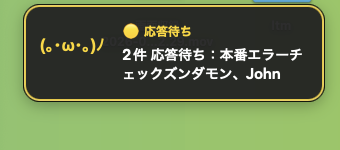
|
|
120
|
+
|
|
121
|
+
```sh
|
|
122
|
+
ai-notify popup on # 有効化(メニューバーの「応答待ちポップアップ」でも切替)
|
|
123
|
+
ai-notify popup image ~/zundamon.png # 好きなキャラ画像(PNG/JPG)。既定は顔文字
|
|
124
|
+
ai-notify popup off
|
|
125
|
+
```
|
|
126
|
+
|
|
127
|
+
全アプリ・全スペースの上に浮かび、`<ペイン名> は応答待ち!` を表示。複数同時もまとめて表示します。クリックで消えます。macOS 専用(メニューバーアプリの導入が必要)。
|
|
128
|
+
|
|
129
|
+
**出す条件を設定できます。** すべての「待ち」で割り込まれたくない人向け。サブエージェントの一瞬の待ちは黙ってほしいが、本当の「入力待ち」は気づきたい——を出し分けられます:
|
|
130
|
+
|
|
131
|
+
```sh
|
|
132
|
+
ai-notify popup delay 15 # 15秒以上待っている時だけ出す(一瞬の待ちは無視)
|
|
133
|
+
ai-notify popup ignore subagent,task # 待ち理由テキストにこの語を含む時は出さない
|
|
134
|
+
ai-notify popup ignore clear # フィルタ解除
|
|
135
|
+
```
|
|
136
|
+
|
|
137
|
+
フィルタは Claude Code の通知理由(例「waiting for your input」やサブエージェント系メッセージ)に対して効くので、入力/許可待ちは残しつつ、それ以外を黙らせられます。
|
|
138
|
+
|
|
115
139
|
## 🎙️ VOICEVOX キャラクターボイス
|
|
116
140
|
|
|
117
141
|
通知を [VOICEVOX](https://voicevox.hiroshiba.jp/) のキャラ声(例:ずんだもん)で読み上げられます(無料・ローカル・オフライン)。
|
package/README.md
CHANGED
|
@@ -113,6 +113,30 @@ No third-party app needed. Prefer something else? There are drop-in recipes for
|
|
|
113
113
|
|
|
114
114
|
> Toggling works mid-run: the flag is read the next time an agent fires, so flipping it instantly affects every running agent.
|
|
115
115
|
|
|
116
|
+
## 🪧 "Waiting for input" popup
|
|
117
|
+
|
|
118
|
+
A stopped agent waiting on you is easy to miss across many terminals — especially in IDE terminals (WebStorm, VS Code) that can't show images or rich notifications. Turn on an **always-on-top character popup** that names the waiting pane and vanishes the moment you respond:
|
|
119
|
+
|
|
120
|
+

|
|
121
|
+
|
|
122
|
+
```sh
|
|
123
|
+
ai-notify popup on # enable (also a menu bar toggle: 応答待ちポップアップ)
|
|
124
|
+
ai-notify popup image ~/zundamon.png # your own character (PNG/JPG); default is a kaomoji
|
|
125
|
+
ai-notify popup off
|
|
126
|
+
```
|
|
127
|
+
|
|
128
|
+
It floats over every app and Space, shows `<pane name> は応答待ち!`, and lists multiple waiting panes at once. Click it to dismiss. macOS-only (needs the menu bar app installed).
|
|
129
|
+
|
|
130
|
+
**Control when it pops up.** Not every wait deserves your attention — a quick sub-agent turnaround isn't worth interrupting you, but a real "needs your input" is. Two knobs:
|
|
131
|
+
|
|
132
|
+
```sh
|
|
133
|
+
ai-notify popup delay 15 # only pop up after waiting ≥ 15s (skip transient waits)
|
|
134
|
+
ai-notify popup ignore subagent,task # skip waits whose reason text matches these words
|
|
135
|
+
ai-notify popup ignore clear # remove the filter
|
|
136
|
+
```
|
|
137
|
+
|
|
138
|
+
The filter matches Claude Code's notification reason (e.g. "waiting for your input" vs a sub-agent message), so you can keep input/permission prompts and silence the rest.
|
|
139
|
+
|
|
116
140
|
## 🎙️ VOICEVOX character voices
|
|
117
141
|
|
|
118
142
|
Optionally speak your notifications in [VOICEVOX](https://voicevox.hiroshiba.jp/) character voices (e.g. ずんだもん) — free, local, offline.
|
|
@@ -75,6 +75,57 @@ enum State {
|
|
|
75
75
|
try? String(format: "%.2f", v).write(toFile: file("volume"), atomically: true, encoding: .utf8)
|
|
76
76
|
}
|
|
77
77
|
|
|
78
|
+
// The "waiting" character popup: a flag file toggles it, an optional file
|
|
79
|
+
// holds a custom character image path. Same plain-file pattern as the others.
|
|
80
|
+
static var popupEnabled: Bool { FileManager.default.fileExists(atPath: file("popup")) }
|
|
81
|
+
static var popupImage: String? {
|
|
82
|
+
guard let s = try? String(contentsOfFile: file("popup-image"), encoding: .utf8) else { return nil }
|
|
83
|
+
let t = s.trimmingCharacters(in: .whitespacesAndNewlines)
|
|
84
|
+
return t.isEmpty ? nil : t
|
|
85
|
+
}
|
|
86
|
+
|
|
87
|
+
// Numbers/strings for the popup threshold + reason filtering.
|
|
88
|
+
static var popupDelayMs: Double {
|
|
89
|
+
guard let s = try? String(contentsOfFile: file("popup-delay"), encoding: .utf8),
|
|
90
|
+
let v = Double(s.trimmingCharacters(in: .whitespacesAndNewlines)) else { return 0 }
|
|
91
|
+
return max(0, v) * 1000
|
|
92
|
+
}
|
|
93
|
+
static var popupIgnoreWords: [String] {
|
|
94
|
+
guard let s = try? String(contentsOfFile: file("popup-ignore"), encoding: .utf8) else { return [] }
|
|
95
|
+
return s.lowercased().split(whereSeparator: { $0 == "," || $0 == "\n" })
|
|
96
|
+
.map { $0.trimmingCharacters(in: .whitespaces) }.filter { !$0.isEmpty }
|
|
97
|
+
}
|
|
98
|
+
|
|
99
|
+
// Panes currently waiting for input (most-recent first), each with a display
|
|
100
|
+
// name, the wait-start time, and the reason message. Name = spoken name,
|
|
101
|
+
// else recorded label, else tty. Handles both the old (number) and new
|
|
102
|
+
// ({ts,msg}) waiting.json value shapes.
|
|
103
|
+
static func waitingPanes() -> [(tty: String, name: String, ts: Double, msg: String)] {
|
|
104
|
+
func obj(_ name: String) -> [String: Any] {
|
|
105
|
+
(try? Data(contentsOf: URL(fileURLWithPath: file(name))))
|
|
106
|
+
.flatMap { try? JSONSerialization.jsonObject(with: $0) as? [String: Any] } ?? [:]
|
|
107
|
+
}
|
|
108
|
+
let waiting = obj("waiting.json")
|
|
109
|
+
if waiting.isEmpty { return [] }
|
|
110
|
+
let voices = obj("pane-voices.json")
|
|
111
|
+
let panes = obj("panes.json")
|
|
112
|
+
func tsmsg(_ v: Any) -> (Double, String) {
|
|
113
|
+
if let n = v as? NSNumber { return (n.doubleValue, "") }
|
|
114
|
+
if let d = v as? [String: Any] { return (((d["ts"] as? NSNumber)?.doubleValue) ?? 0, (d["msg"] as? String) ?? "") }
|
|
115
|
+
return (0, "")
|
|
116
|
+
}
|
|
117
|
+
return waiting
|
|
118
|
+
.map { (tty: $0.key, tm: tsmsg($0.value)) }
|
|
119
|
+
.sorted { $0.tm.0 > $1.tm.0 }
|
|
120
|
+
.map { item in
|
|
121
|
+
let short = item.tty.replacingOccurrences(of: "/dev/", with: "")
|
|
122
|
+
let name = ((voices[item.tty] as? [String: Any])?["speakName"] as? String)
|
|
123
|
+
?? ((panes[item.tty] as? [String: Any])?["label"] as? String)
|
|
124
|
+
?? short
|
|
125
|
+
return (item.tty, name.isEmpty ? short : name, item.tm.0, item.tm.1)
|
|
126
|
+
}
|
|
127
|
+
}
|
|
128
|
+
|
|
78
129
|
// Tsundere baseline level 0.0 (デレ) – 1.0 (ツン). Same file the CLI reads.
|
|
79
130
|
static func setTsundereLevel(_ v: Double) {
|
|
80
131
|
try? FileManager.default.createDirectory(atPath: dir(), withIntermediateDirectories: true)
|
|
@@ -104,6 +155,13 @@ final class AppDelegate: NSObject, NSApplicationDelegate {
|
|
|
104
155
|
private var statusItem: NSStatusItem!
|
|
105
156
|
private var timer: Timer?
|
|
106
157
|
|
|
158
|
+
// The "waiting for input" character popup.
|
|
159
|
+
private var waitingWindow: NSWindow?
|
|
160
|
+
private var waitingImageView: NSImageView?
|
|
161
|
+
private var waitingLabel: NSTextField?
|
|
162
|
+
private var waitingSig = "" // current panes signature, to avoid needless redraws
|
|
163
|
+
private var waitingDismissedSig = "" // a signature the user clicked away; don't reshow it
|
|
164
|
+
|
|
107
165
|
func applicationDidFinishLaunching(_ notification: Notification) {
|
|
108
166
|
statusItem = NSStatusBar.system.statusItem(withLength: NSStatusItem.variableLength)
|
|
109
167
|
if let b = statusItem.button {
|
|
@@ -112,7 +170,10 @@ final class AppDelegate: NSObject, NSApplicationDelegate {
|
|
|
112
170
|
b.sendAction(on: [.leftMouseUp, .rightMouseUp])
|
|
113
171
|
}
|
|
114
172
|
render()
|
|
115
|
-
timer = Timer.scheduledTimer(withTimeInterval: 1.0, repeats: true) { [weak self] _ in
|
|
173
|
+
timer = Timer.scheduledTimer(withTimeInterval: 1.0, repeats: true) { [weak self] _ in
|
|
174
|
+
self?.render()
|
|
175
|
+
self?.updateWaitingPopup()
|
|
176
|
+
}
|
|
116
177
|
|
|
117
178
|
var shotPath = ProcessInfo.processInfo.environment["AI_NOTIFY_SHOT"]
|
|
118
179
|
let args = CommandLine.arguments
|
|
@@ -168,6 +229,127 @@ final class AppDelegate: NSObject, NSApplicationDelegate {
|
|
|
168
229
|
if e.type == .rightMouseUp { toggle() } else { showMenu() }
|
|
169
230
|
}
|
|
170
231
|
|
|
232
|
+
// --- "Waiting for input" character popup ------------------------------
|
|
233
|
+
// Driven off the 1s timer: when popup is enabled and a pane is waiting, show
|
|
234
|
+
// an always-on-top window with a character + "<name> は応答待ち!". It hides
|
|
235
|
+
// itself the moment nothing is waiting (or the user clicks it away).
|
|
236
|
+
private func updateWaitingPopup() {
|
|
237
|
+
var panes: [(tty: String, name: String, ts: Double, msg: String)] = []
|
|
238
|
+
if State.popupEnabled {
|
|
239
|
+
let now = Date().timeIntervalSince1970 * 1000
|
|
240
|
+
let delayMs = State.popupDelayMs
|
|
241
|
+
let ignore = State.popupIgnoreWords
|
|
242
|
+
panes = State.waitingPanes().filter { p in
|
|
243
|
+
if now - p.ts < delayMs { return false } // hasn't waited long enough yet
|
|
244
|
+
if !ignore.isEmpty {
|
|
245
|
+
let m = p.msg.lowercased()
|
|
246
|
+
if ignore.contains(where: { m.contains($0) }) { return false } // a skipped reason
|
|
247
|
+
}
|
|
248
|
+
return true
|
|
249
|
+
}
|
|
250
|
+
}
|
|
251
|
+
if panes.isEmpty {
|
|
252
|
+
waitingDismissedSig = "" // reset; the next wait shows again
|
|
253
|
+
hideWaitingPopup()
|
|
254
|
+
return
|
|
255
|
+
}
|
|
256
|
+
let names = panes.map { $0.name }
|
|
257
|
+
let sig = names.joined(separator: "\u{1}")
|
|
258
|
+
if sig == waitingDismissedSig { return } // user dismissed exactly this set
|
|
259
|
+
if sig != waitingSig { waitingSig = sig; refreshWaitingPopup(names: names) }
|
|
260
|
+
waitingWindow?.orderFront(nil)
|
|
261
|
+
}
|
|
262
|
+
|
|
263
|
+
private func refreshWaitingPopup(names: [String]) {
|
|
264
|
+
if waitingWindow == nil { buildWaitingWindow() }
|
|
265
|
+
guard let win = waitingWindow else { return }
|
|
266
|
+
let line = names.count == 1
|
|
267
|
+
? "\(names[0]) は応答待ち!"
|
|
268
|
+
: "\(names.count)件 応答待ち:\(names.joined(separator: "、"))"
|
|
269
|
+
waitingLabel?.stringValue = line
|
|
270
|
+
|
|
271
|
+
// Custom character image, or a friendly default kaomoji.
|
|
272
|
+
if let p = State.popupImage, let img = NSImage(contentsOfFile: p) {
|
|
273
|
+
waitingImageView?.image = img
|
|
274
|
+
waitingImageView?.isHidden = false
|
|
275
|
+
} else {
|
|
276
|
+
waitingImageView?.isHidden = true
|
|
277
|
+
}
|
|
278
|
+
|
|
279
|
+
if let scr = NSScreen.main {
|
|
280
|
+
let m: CGFloat = 24
|
|
281
|
+
let f = win.frame
|
|
282
|
+
win.setFrameOrigin(NSPoint(x: scr.visibleFrame.maxX - f.width - m,
|
|
283
|
+
y: scr.visibleFrame.minY + m))
|
|
284
|
+
}
|
|
285
|
+
}
|
|
286
|
+
|
|
287
|
+
private func hideWaitingPopup() {
|
|
288
|
+
guard let w = waitingWindow else { return }
|
|
289
|
+
w.orderOut(nil)
|
|
290
|
+
waitingSig = ""
|
|
291
|
+
}
|
|
292
|
+
|
|
293
|
+
@objc private func waitingClicked() {
|
|
294
|
+
waitingDismissedSig = waitingSig // don't reshow this exact set
|
|
295
|
+
hideWaitingPopup()
|
|
296
|
+
}
|
|
297
|
+
|
|
298
|
+
private func buildWaitingWindow() {
|
|
299
|
+
let w = NSWindow(contentRect: NSRect(x: 0, y: 0, width: 300, height: 96),
|
|
300
|
+
styleMask: [.borderless], backing: .buffered, defer: false)
|
|
301
|
+
w.isOpaque = false
|
|
302
|
+
w.backgroundColor = .clear
|
|
303
|
+
w.level = .floating
|
|
304
|
+
w.hasShadow = true
|
|
305
|
+
w.collectionBehavior = [.canJoinAllSpaces, .fullScreenAuxiliary, .stationary]
|
|
306
|
+
w.ignoresMouseEvents = false
|
|
307
|
+
|
|
308
|
+
let card = NSView(frame: NSRect(x: 0, y: 0, width: 300, height: 96))
|
|
309
|
+
card.wantsLayer = true
|
|
310
|
+
card.layer?.cornerRadius = 16
|
|
311
|
+
card.layer?.backgroundColor = NSColor(calibratedWhite: 0.10, alpha: 0.95).cgColor
|
|
312
|
+
card.layer?.borderWidth = 2
|
|
313
|
+
card.layer?.borderColor = NSColor.systemYellow.withAlphaComponent(0.9).cgColor
|
|
314
|
+
|
|
315
|
+
let iv = NSImageView(frame: NSRect(x: 12, y: 12, width: 72, height: 72))
|
|
316
|
+
iv.imageScaling = .scaleProportionallyUpOrDown
|
|
317
|
+
iv.isHidden = true
|
|
318
|
+
card.addSubview(iv)
|
|
319
|
+
waitingImageView = iv
|
|
320
|
+
|
|
321
|
+
// A friendly default "character" — a kaomoji — sits behind the image slot
|
|
322
|
+
// so there's always a face even without a custom image.
|
|
323
|
+
let face = NSTextField(labelWithString: "(。・ω・。)ノ")
|
|
324
|
+
face.frame = NSRect(x: 8, y: 30, width: 80, height: 36)
|
|
325
|
+
face.alignment = .center
|
|
326
|
+
face.font = .systemFont(ofSize: 17, weight: .semibold)
|
|
327
|
+
face.textColor = .systemYellow
|
|
328
|
+
card.addSubview(face, positioned: .below, relativeTo: iv)
|
|
329
|
+
|
|
330
|
+
let badge = NSTextField(labelWithString: "🟡 応答待ち")
|
|
331
|
+
badge.frame = NSRect(x: 96, y: 56, width: 196, height: 22)
|
|
332
|
+
badge.font = .systemFont(ofSize: 13, weight: .bold)
|
|
333
|
+
badge.textColor = .systemYellow
|
|
334
|
+
badge.backgroundColor = .clear
|
|
335
|
+
badge.isBordered = false
|
|
336
|
+
card.addSubview(badge)
|
|
337
|
+
|
|
338
|
+
let label = NSTextField(wrappingLabelWithString: "")
|
|
339
|
+
label.frame = NSRect(x: 96, y: 12, width: 196, height: 44)
|
|
340
|
+
label.font = .systemFont(ofSize: 15, weight: .semibold)
|
|
341
|
+
label.textColor = .white
|
|
342
|
+
label.maximumNumberOfLines = 2
|
|
343
|
+
label.backgroundColor = .clear
|
|
344
|
+
label.isBordered = false
|
|
345
|
+
card.addSubview(label)
|
|
346
|
+
waitingLabel = label
|
|
347
|
+
|
|
348
|
+
card.addGestureRecognizer(NSClickGestureRecognizer(target: self, action: #selector(waitingClicked)))
|
|
349
|
+
w.contentView = card
|
|
350
|
+
waitingWindow = w
|
|
351
|
+
}
|
|
352
|
+
|
|
171
353
|
private func toggle() { State.setMuted(!State.isMuted); render() }
|
|
172
354
|
@objc private func quit() { NSApp.terminate(nil) }
|
|
173
355
|
|
|
@@ -405,6 +587,15 @@ final class AppDelegate: NSObject, NSApplicationDelegate {
|
|
|
405
587
|
}
|
|
406
588
|
}
|
|
407
589
|
|
|
590
|
+
menu.addItem(.separator())
|
|
591
|
+
// Waiting-for-input character popup: on/off (set the character image with
|
|
592
|
+
// `ai-notify popup image <path>`).
|
|
593
|
+
let popupItem = NSMenuItem(title: "応答待ちポップアップ", action: #selector(runItem(_:)), keyEquivalent: "")
|
|
594
|
+
popupItem.target = self
|
|
595
|
+
popupItem.representedObject = ["popup", "toggle"]
|
|
596
|
+
popupItem.state = State.popupEnabled ? .on : .off
|
|
597
|
+
menu.addItem(popupItem)
|
|
598
|
+
|
|
408
599
|
menu.addItem(.separator())
|
|
409
600
|
let quitItem = NSMenuItem(title: "ai-notify を終了", action: #selector(quit), keyEquivalent: "q")
|
|
410
601
|
quitItem.target = self
|
|
Binary file
|
package/package.json
CHANGED
|
@@ -1,6 +1,6 @@
|
|
|
1
1
|
{
|
|
2
2
|
"name": "ai-notify",
|
|
3
|
-
"version": "0.
|
|
3
|
+
"version": "0.5.1",
|
|
4
4
|
"description": "Desktop, sound, and spoken notifications for terminal AI coding agents (Claude Code, Codex, Gemini, ...) — with one mute switch that covers all of them, across every terminal.",
|
|
5
5
|
"type": "module",
|
|
6
6
|
"bin": {
|
package/src/cli.mjs
CHANGED
|
@@ -33,7 +33,16 @@ import {
|
|
|
33
33
|
readPaneSetting,
|
|
34
34
|
updatePaneSetting,
|
|
35
35
|
firstRunNudge,
|
|
36
|
+
isPopupEnabled,
|
|
37
|
+
setPopupEnabled,
|
|
38
|
+
getPopupImage,
|
|
39
|
+
setPopupImage,
|
|
40
|
+
getPopupDelay,
|
|
41
|
+
setPopupDelay,
|
|
42
|
+
getPopupIgnore,
|
|
43
|
+
setPopupIgnore,
|
|
36
44
|
} from './state.mjs';
|
|
45
|
+
import { resolve as resolvePath } from 'node:path';
|
|
37
46
|
|
|
38
47
|
// Single source of truth: read the version from package.json so `--version`
|
|
39
48
|
// (and the Homebrew formula test that checks it) always matches the release.
|
|
@@ -589,6 +598,50 @@ const cmds = {
|
|
|
589
598
|
log(`✓ ${bits.join(' · ')}`);
|
|
590
599
|
},
|
|
591
600
|
|
|
601
|
+
// The "waiting" character popup (menu bar app): an always-on-top window that
|
|
602
|
+
// shows a character saying which pane is waiting for input. macOS-only effect.
|
|
603
|
+
// popup [on|off|toggle|image <path>|delay <sec>|ignore <kw,kw>|status]
|
|
604
|
+
popup() {
|
|
605
|
+
const sub = positionals[0] || 'status';
|
|
606
|
+
if (sub === 'on' || sub === 'off' || sub === 'toggle') {
|
|
607
|
+
const on = sub === 'toggle' ? !isPopupEnabled() : sub === 'on';
|
|
608
|
+
setPopupEnabled(on);
|
|
609
|
+
return log(on ? '🪧 waiting popup ON' : 'waiting popup OFF');
|
|
610
|
+
}
|
|
611
|
+
if (sub === 'image') {
|
|
612
|
+
const p = positionals[1];
|
|
613
|
+
if (!p || p === 'clear' || p === 'default') {
|
|
614
|
+
setPopupImage('');
|
|
615
|
+
return log('popup image cleared (using the default character).');
|
|
616
|
+
}
|
|
617
|
+
const abs = resolvePath(p);
|
|
618
|
+
setPopupImage(abs);
|
|
619
|
+
return log(`popup image → ${abs}`);
|
|
620
|
+
}
|
|
621
|
+
// Threshold: only pop up after a pane has been waiting this many seconds.
|
|
622
|
+
if (sub === 'delay') {
|
|
623
|
+
const v = parseFloat(positionals[1]);
|
|
624
|
+
if (!Number.isFinite(v)) return log(`popup delay: ${getPopupDelay()}s`);
|
|
625
|
+
setPopupDelay(Math.max(0, v));
|
|
626
|
+
return log(v > 0 ? `popup delay → ${Math.max(0, v)}s (waits shorter than this are ignored)` : 'popup delay → 0s (immediate)');
|
|
627
|
+
}
|
|
628
|
+
// Suppress the popup when the waiting reason contains any of these keywords.
|
|
629
|
+
if (sub === 'ignore') {
|
|
630
|
+
const kw = positionals.slice(1).join(' ').trim();
|
|
631
|
+
if (!kw || kw === 'clear') {
|
|
632
|
+
setPopupIgnore('');
|
|
633
|
+
return log('popup ignore cleared (no message filtering).');
|
|
634
|
+
}
|
|
635
|
+
setPopupIgnore(kw);
|
|
636
|
+
return log(`popup ignore → ${kw}`);
|
|
637
|
+
}
|
|
638
|
+
log(`waiting popup: ${isPopupEnabled() ? '🪧 ON' : 'OFF'}`);
|
|
639
|
+
log(`character image: ${getPopupImage() || '(default)'}`);
|
|
640
|
+
log(`delay: ${getPopupDelay()}s${getPopupDelay() > 0 ? ' (ignore shorter waits)' : ' (immediate)'}`);
|
|
641
|
+
log(`ignore words: ${getPopupIgnore() || '(none)'}`);
|
|
642
|
+
log('\nEnable: ai-notify popup on | Threshold: ai-notify popup delay 15 | Skip reasons: ai-notify popup ignore subagent,task');
|
|
643
|
+
},
|
|
644
|
+
|
|
592
645
|
// Get/set the VOICEVOX base prosody (the normal-tone scales the menu bar
|
|
593
646
|
// sliders drive). With no args, prints the current values as JSON.
|
|
594
647
|
// voice-prosody [speed|pitch|intonation <value> | reset]
|
|
@@ -801,6 +854,7 @@ Usage:
|
|
|
801
854
|
ai-notify tsundere [on|off|level <0-1>|test|status] tsundere persona (ツン⇄デレ by urgency)
|
|
802
855
|
ai-notify voice-prosody [speed|pitch|intonation <v>|reset] VOICEVOX read-out tuning
|
|
803
856
|
ai-notify menubar [install|uninstall|status] native menu bar bell (macOS)
|
|
857
|
+
ai-notify popup [on|off|image <p>|delay <s>|ignore <kw>] "waiting for input" popup + when it shows (macOS)
|
|
804
858
|
ai-notify translate [on <lang>|off|test] speak agent text in your language
|
|
805
859
|
ai-notify doctor check deps & wiring
|
|
806
860
|
ai-notify config [init] print (or write) config
|
package/src/notify.mjs
CHANGED
|
@@ -181,7 +181,9 @@ export const emit = ({ provider = 'default', event = 'done', label = '', message
|
|
|
181
181
|
// pane's assigned name. Also remember the pane so the menu bar can list it.
|
|
182
182
|
const tty = controllingTty();
|
|
183
183
|
recordPane(tty, label);
|
|
184
|
-
|
|
184
|
+
// waiting -> yellow menu bar status (+ the popup); done clears it. Pass the
|
|
185
|
+
// reason text so the popup can filter by it (e.g. ignore sub-agent waits).
|
|
186
|
+
setPaneWaiting(tty, event === 'waiting', event === 'waiting' ? message || fromTemplate : '');
|
|
185
187
|
const pane = readPaneSetting(tty);
|
|
186
188
|
|
|
187
189
|
// Name this pane in the read-out, most-reliable identity first:
|
package/src/state.mjs
CHANGED
|
@@ -198,14 +198,73 @@ const waitingPath = () => join(stateDir(), 'waiting.json');
|
|
|
198
198
|
|
|
199
199
|
// Track which panes are waiting for input, so the menu bar icon can show a
|
|
200
200
|
// status color (yellow) when any agent needs you.
|
|
201
|
-
export const setPaneWaiting = (tty, waiting) => {
|
|
201
|
+
export const setPaneWaiting = (tty, waiting, message = '') => {
|
|
202
202
|
if (!tty) return;
|
|
203
203
|
const all = readJson(waitingPath(), {});
|
|
204
|
-
|
|
204
|
+
// Store the reason text alongside the start time so the popup can filter by
|
|
205
|
+
// wait duration and by message (e.g. ignore sub-agent waits, keep input waits).
|
|
206
|
+
if (waiting) all[tty] = { ts: Date.now(), msg: String(message || '') };
|
|
205
207
|
else delete all[tty];
|
|
206
208
|
writeJson(waitingPath(), all);
|
|
207
209
|
};
|
|
208
210
|
export const anyWaiting = () => Object.keys(readJson(waitingPath(), {})).length > 0;
|
|
211
|
+
export const readWaiting = () => readJson(waitingPath(), {});
|
|
212
|
+
|
|
213
|
+
// "Waiting" popup (the menu bar app shows a character that says a pane is waiting
|
|
214
|
+
// for input). Toggle + optional custom character image, kept as small files the
|
|
215
|
+
// Swift app reads directly — same pattern as the mute flag.
|
|
216
|
+
const popupFlagPath = () => join(stateDir(), 'popup');
|
|
217
|
+
const popupImagePath = () => join(stateDir(), 'popup-image');
|
|
218
|
+
export const isPopupEnabled = () => existsSync(popupFlagPath());
|
|
219
|
+
export const setPopupEnabled = (on) => {
|
|
220
|
+
ensureDir(stateDir());
|
|
221
|
+
if (on) writeFileSync(popupFlagPath(), '');
|
|
222
|
+
else rmSync(popupFlagPath(), { force: true });
|
|
223
|
+
};
|
|
224
|
+
export const getPopupImage = () => {
|
|
225
|
+
try {
|
|
226
|
+
return readFileSync(popupImagePath(), 'utf8').trim();
|
|
227
|
+
} catch {
|
|
228
|
+
return '';
|
|
229
|
+
}
|
|
230
|
+
};
|
|
231
|
+
export const setPopupImage = (p) => {
|
|
232
|
+
ensureDir(stateDir());
|
|
233
|
+
if (p) writeFileSync(popupImagePath(), p);
|
|
234
|
+
else rmSync(popupImagePath(), { force: true });
|
|
235
|
+
};
|
|
236
|
+
|
|
237
|
+
// Popup notify threshold: only show the popup once a pane has been waiting this
|
|
238
|
+
// many seconds (0 = immediately) — so transient / sub-agent waits don't nag.
|
|
239
|
+
const popupDelayPath = () => join(stateDir(), 'popup-delay');
|
|
240
|
+
export const getPopupDelay = () => {
|
|
241
|
+
try {
|
|
242
|
+
return Math.max(0, parseFloat(readFileSync(popupDelayPath(), 'utf8')) || 0);
|
|
243
|
+
} catch {
|
|
244
|
+
return 0;
|
|
245
|
+
}
|
|
246
|
+
};
|
|
247
|
+
export const setPopupDelay = (sec) => {
|
|
248
|
+
ensureDir(stateDir());
|
|
249
|
+
if (sec > 0) writeFileSync(popupDelayPath(), String(sec));
|
|
250
|
+
else rmSync(popupDelayPath(), { force: true });
|
|
251
|
+
};
|
|
252
|
+
|
|
253
|
+
// Comma-separated keywords: if a waiting reason message contains any of them,
|
|
254
|
+
// the popup is suppressed for that pane (e.g. "subagent,sub-agent,task").
|
|
255
|
+
const popupIgnorePath = () => join(stateDir(), 'popup-ignore');
|
|
256
|
+
export const getPopupIgnore = () => {
|
|
257
|
+
try {
|
|
258
|
+
return readFileSync(popupIgnorePath(), 'utf8').trim();
|
|
259
|
+
} catch {
|
|
260
|
+
return '';
|
|
261
|
+
}
|
|
262
|
+
};
|
|
263
|
+
export const setPopupIgnore = (s) => {
|
|
264
|
+
ensureDir(stateDir());
|
|
265
|
+
if (s) writeFileSync(popupIgnorePath(), s);
|
|
266
|
+
else rmSync(popupIgnorePath(), { force: true });
|
|
267
|
+
};
|
|
209
268
|
|
|
210
269
|
// Record this pane as active (keyed by tty). Keeps the 16 most-recent.
|
|
211
270
|
export const recordPane = (tty, label) => {
|