ai-debug-pins 0.0.0-stage → 0.5.0
This diff represents the content of publicly available package versions that have been released to one of the supported registries. The information contained in this diff is provided for informational purposes only and reflects changes between package versions as they appear in their respective public registries.
- package/LICENSE +16 -0
- package/README.md +160 -2
- package/bin.js +14 -0
- package/client.js +293 -0
- package/notes.js +51 -0
- package/package.json +57 -4
- package/server.js +80 -0
- package/vite.d.ts +4 -0
- package/vite.js +16 -0
package/LICENSE
ADDED
|
@@ -0,0 +1,16 @@
|
|
|
1
|
+
MIT License
|
|
2
|
+
|
|
3
|
+
Copyright (c) 2026 Tiago Jerónimo Silva
|
|
4
|
+
|
|
5
|
+
Permission is hereby granted, free of charge, to any person obtaining a copy of this software and associated
|
|
6
|
+
documentation files (the "Software"), to deal in the Software without restriction, including without limitation the
|
|
7
|
+
rights to use, copy, modify, merge, publish, distribute, sublicense, and/or sell copies of the Software, and to permit
|
|
8
|
+
persons to whom the Software is furnished to do so, subject to the following conditions:
|
|
9
|
+
|
|
10
|
+
The above copyright notice and this permission notice shall be included in all copies or substantial portions of the
|
|
11
|
+
Software.
|
|
12
|
+
|
|
13
|
+
THE SOFTWARE IS PROVIDED "AS IS", WITHOUT WARRANTY OF ANY KIND, EXPRESS OR IMPLIED, INCLUDING BUT NOT LIMITED TO THE
|
|
14
|
+
WARRANTIES OF MERCHANTABILITY, FITNESS FOR A PARTICULAR PURPOSE AND NONINFRINGEMENT. IN NO EVENT SHALL THE AUTHORS OR
|
|
15
|
+
COPYRIGHT HOLDERS BE LIABLE FOR ANY CLAIM, DAMAGES OR OTHER LIABILITY, WHETHER IN AN ACTION OF CONTRACT, TORT OR
|
|
16
|
+
OTHERWISE, ARISING FROM, OUT OF OR IN CONNECTION WITH THE SOFTWARE OR THE USE OR OTHER DEALINGS IN THE SOFTWARE.
|
package/README.md
CHANGED
|
@@ -1,3 +1,161 @@
|
|
|
1
|
-
#
|
|
1
|
+
# ai-debug-pins
|
|
2
2
|
|
|
3
|
-
|
|
3
|
+
Click a spot on your dev page, type a line, press Enter. Claude gets a picture of the page with a ring where you
|
|
4
|
+
clicked, your words, and where they point in the code. No more screenshot, paste, explain.
|
|
5
|
+
|
|
6
|
+
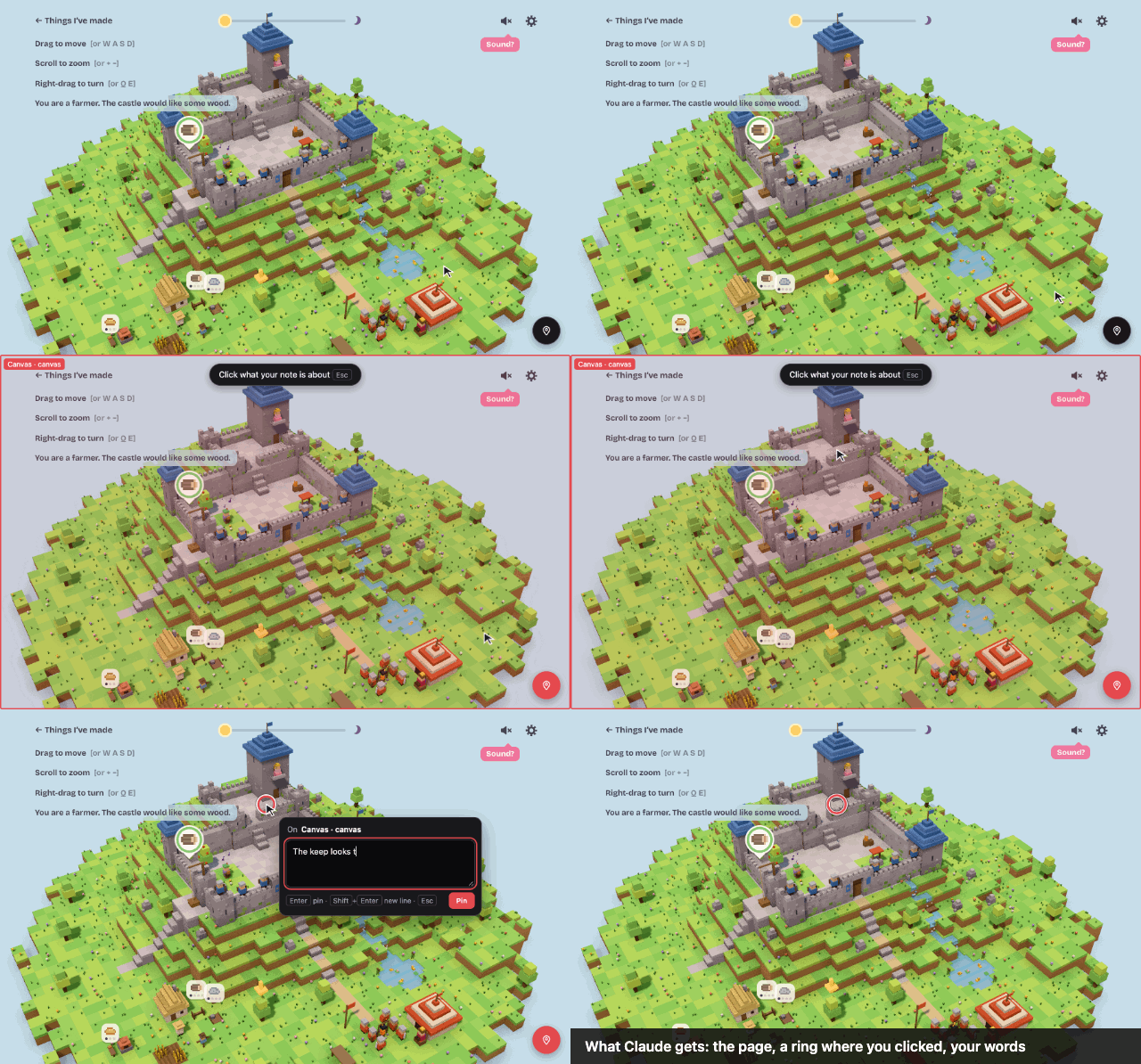
|
|
7
|
+
|
|
8
|
+
Made for [Claude Code](https://claude.com/claude-code): new notes go along with your next message by themselves. Works
|
|
9
|
+
with any framework (React, Vue, Svelte, Next.js, plain HTML), on WebGL games as well as plain pages. The notes are plain
|
|
10
|
+
files, so **other AI tools can read them too** (see the end).
|
|
11
|
+
|
|
12
|
+
- No browser extension, no screen-recording permission: the page draws its own picture.
|
|
13
|
+
- Development only: nothing reaches a production build.
|
|
14
|
+
- Notes stay in your project, in `.notes/`, which git ignores. Nothing is sent anywhere else.
|
|
15
|
+
|
|
16
|
+
Needs Node 20.6 or newer.
|
|
17
|
+
|
|
18
|
+
## Set it up with Claude
|
|
19
|
+
|
|
20
|
+
Paste this into Claude Code, in your project:
|
|
21
|
+
|
|
22
|
+
> Set up ai-debug-pins here (https://github.com/TiagoJeronimo/ai-debug-pins): install its Claude Code plugin, then
|
|
23
|
+
> add it to my dev server as its README says, for development only.
|
|
24
|
+
|
|
25
|
+
Then restart the dev server and Claude Code.
|
|
26
|
+
|
|
27
|
+
## Use
|
|
28
|
+
|
|
29
|
+
1. On any page in development, click the pin at the bottom right.
|
|
30
|
+
2. Click the thing you mean (it lights up as you hover), type what you want, press Enter. Pin as many as you like.
|
|
31
|
+
3. Back in Claude Code, write your next message as usual, say "fix these". You don't have to mention the notes or
|
|
32
|
+
paste anything: the plugin adds them to whatever you send next. The chat shows
|
|
33
|
+
"📍 2 notes sent with this message", and Claude says what it got, opens each picture, finds the code and does what
|
|
34
|
+
each note asks.
|
|
35
|
+
|
|
36
|
+
Or say "read my notes" at any time, for every note not yet done.
|
|
37
|
+
|
|
38
|
+
A handled note stays in the file, marked done, with its picture beside it: a record of what you asked for. Say
|
|
39
|
+
"clear my notes" to delete the done ones and their pictures.
|
|
40
|
+
|
|
41
|
+
Notes live in `.notes/notes.md`, pictures beside them; `.notes/` ignores itself in git. A note looks like this:
|
|
42
|
+
|
|
43
|
+
```md
|
|
44
|
+
## 2026-11-25T14-36-16-914Z · new
|
|
45
|
+
|
|
46
|
+
> The keep looks too grey. Warmer stone?
|
|
47
|
+
|
|
48
|
+

|
|
49
|
+
- page: http://localhost:5173/games/castle/
|
|
50
|
+
- viewport: 1240x895 @2x
|
|
51
|
+
- point: 420, 150 (the ring, in CSS pixels)
|
|
52
|
+
- element: `#root > main.castle > div:nth-of-type(1) > div > canvas`
|
|
53
|
+
- component: Canvas ← Picture ← CastlePage (src/games/Picture.tsx)
|
|
54
|
+
```
|
|
55
|
+
|
|
56
|
+
On React pages it finds the nearest components and the file they are in.
|
|
57
|
+
|
|
58
|
+
## Set it up by hand
|
|
59
|
+
|
|
60
|
+
**1. The Claude Code plugin:**
|
|
61
|
+
|
|
62
|
+
```bash
|
|
63
|
+
claude plugin marketplace add TiagoJeronimo/ai-debug-pins
|
|
64
|
+
```
|
|
65
|
+
|
|
66
|
+
```bash
|
|
67
|
+
claude plugin install ai-debug-pins@ai-debug-pins
|
|
68
|
+
```
|
|
69
|
+
|
|
70
|
+
**2a. A Vite project** (Vite, React with Vite, Vue, SvelteKit, Nuxt, Astro, React Router...):
|
|
71
|
+
|
|
72
|
+
```bash
|
|
73
|
+
npm i -D ai-debug-pins
|
|
74
|
+
```
|
|
75
|
+
|
|
76
|
+
```js
|
|
77
|
+
// vite.config.js
|
|
78
|
+
import debugPins from 'ai-debug-pins'
|
|
79
|
+
|
|
80
|
+
export default { plugins: [debugPins()] }
|
|
81
|
+
```
|
|
82
|
+
|
|
83
|
+
Only on `vite serve`: nothing reaches a build.
|
|
84
|
+
|
|
85
|
+
**2b. Anything else** (Next.js, Angular, webpack, Rails, Django, plain HTML...): run the notes server in your project
|
|
86
|
+
folder, beside your dev server,
|
|
87
|
+
|
|
88
|
+
```bash
|
|
89
|
+
npx ai-debug-pins
|
|
90
|
+
```
|
|
91
|
+
|
|
92
|
+
and add one line to your page, in development only:
|
|
93
|
+
|
|
94
|
+
```html
|
|
95
|
+
<script type="module" src="http://localhost:7777/client.js"></script>
|
|
96
|
+
```
|
|
97
|
+
|
|
98
|
+
In Next.js, for example, in `app/layout.tsx`:
|
|
99
|
+
|
|
100
|
+
```jsx
|
|
101
|
+
{process.env.NODE_ENV === 'development' && <script type="module" src="http://localhost:7777/client.js" />}
|
|
102
|
+
```
|
|
103
|
+
|
|
104
|
+
It takes notes only from pages on your own machine. Another port: `npx ai-debug-pins 7778`.
|
|
105
|
+
|
|
106
|
+
To stop notes going along with your messages, set `AI_DEBUG_PINS_HOOK=0`; "read my notes" still works.
|
|
107
|
+
|
|
108
|
+
## The picture
|
|
109
|
+
|
|
110
|
+
No permission and no extension: the page draws its own picture
|
|
111
|
+
([modern-screenshot](https://github.com/qq15725/modern-screenshot)), right after it has drawn a frame, so WebGL comes out
|
|
112
|
+
too. Being redrawn, not a screenshot, it can differ in small ways (a stray character from an unusual CSS `content`, a
|
|
113
|
+
lighter shadow). Each note says so, and Claude is told to act on your words and the element they point at, never on how
|
|
114
|
+
the picture looks.
|
|
115
|
+
|
|
116
|
+
## Safety
|
|
117
|
+
|
|
118
|
+
A note goes to an AI agent that is told to act on it, so the server takes notes only from your own machine: the
|
|
119
|
+
request has to come from this computer (not the network, even if your dev server listens there) and from a page on
|
|
120
|
+
`localhost`, `127.0.0.1`, `[::1]` or `*.localhost`. Any other site open in your browser, including one that points its
|
|
121
|
+
DNS at your machine, is turned away. Notes are capped in size and pictures must be PNGs.
|
|
122
|
+
|
|
123
|
+
Pinning from your phone over the network is therefore not possible. That is on purpose.
|
|
124
|
+
|
|
125
|
+
## Other AI tools
|
|
126
|
+
|
|
127
|
+
The notes are Markdown and PNGs, so any agent that reads files and images can use them (Codex, Cursor, Copilot,
|
|
128
|
+
Gemini CLI, ...). Add this to your `AGENTS.md`, then say "read my notes":
|
|
129
|
+
|
|
130
|
+
```md
|
|
131
|
+
## Notes pinned on the page
|
|
132
|
+
|
|
133
|
+
When I say "read my notes", read `.notes/notes.md`. Each `## <id> · <status>` section is a note (`new`, `read` or
|
|
134
|
+
`done`); handle every one that is not `done`, oldest first. Open its picture (`.notes/<id>.png`): the red ring is
|
|
135
|
+
where I clicked. The `>` quote is what I want; `element`, `text` and `component` point to the code. The picture is
|
|
136
|
+
redrawn by the page and can differ slightly from the screen: act on my words, never on how the picture looks. When a
|
|
137
|
+
note is handled, change its heading to `· done`.
|
|
138
|
+
```
|
|
139
|
+
|
|
140
|
+
What only Claude Code gets: notes going along with your messages by themselves, and the "📍 note sent" line.
|
|
141
|
+
|
|
142
|
+
## Remove it
|
|
143
|
+
|
|
144
|
+
Take `debugPins()` out of your Vite config (or the script tag out of your page), then:
|
|
145
|
+
|
|
146
|
+
```bash
|
|
147
|
+
npm rm ai-debug-pins
|
|
148
|
+
```
|
|
149
|
+
|
|
150
|
+
```bash
|
|
151
|
+
claude plugin uninstall ai-debug-pins@ai-debug-pins
|
|
152
|
+
```
|
|
153
|
+
|
|
154
|
+
## Working on it
|
|
155
|
+
|
|
156
|
+
```bash
|
|
157
|
+
npm run demo # a page with a WebGL canvas
|
|
158
|
+
npm test
|
|
159
|
+
```
|
|
160
|
+
|
|
161
|
+
MIT licence.
|
package/bin.js
ADDED
|
@@ -0,0 +1,14 @@
|
|
|
1
|
+
#!/usr/bin/env node
|
|
2
|
+
// For pages not built by Vite (Next.js, Angular, Rails, plain HTML...): a small server for the button and the notes.
|
|
3
|
+
// npx ai-debug-pins [port] then, in development only:
|
|
4
|
+
// <script type="module" src="http://localhost:7777/client.js"></script>
|
|
5
|
+
import { createServer } from 'node:http'
|
|
6
|
+
import { resolve } from 'node:path'
|
|
7
|
+
import { handler } from './server.js'
|
|
8
|
+
|
|
9
|
+
const port = Number(process.argv[2] || process.env.PORT || 7777)
|
|
10
|
+
createServer(handler()).listen(port, '127.0.0.1', () => {
|
|
11
|
+
console.log(`ai-debug-pins: notes go to ${resolve('.notes')}`)
|
|
12
|
+
console.log(`Add to your page, in development only:`)
|
|
13
|
+
console.log(` <script type="module" src="http://localhost:${port}/client.js"></script>`)
|
|
14
|
+
})
|
package/client.js
ADDED
|
@@ -0,0 +1,293 @@
|
|
|
1
|
+
// The note button. Plain DOM, no framework, so it works on any page. Its UI lives in a shadow root, left out of the
|
|
2
|
+
// picture.
|
|
3
|
+
// Notes go back to whichever server this file came from: the Vite plugin, or the standalone server on another port.
|
|
4
|
+
const POST = (path, body) =>
|
|
5
|
+
fetch(new URL(path, import.meta.url), { method: 'POST', headers: { 'content-type': 'application/json' }, body: JSON.stringify(body) })
|
|
6
|
+
|
|
7
|
+
const RED = '#e5484d'
|
|
8
|
+
const PIN = `<svg viewBox="0 0 24 24" width="18" height="18" fill="none" stroke="currentColor" stroke-width="2"
|
|
9
|
+
stroke-linecap="round" stroke-linejoin="round" aria-hidden="true"><path d="M12 21s-6.5-5.8-6.5-11.2a6.5 6.5 0 0 1 13 0C18.5 15.2 12 21 12 21z"/><circle cx="12" cy="9.8" r="2.3"/></svg>`
|
|
10
|
+
|
|
11
|
+
const host = document.createElement('ai-debug-pins-ui')
|
|
12
|
+
const ui = host.attachShadow({ mode: 'open' })
|
|
13
|
+
// Dark and small, so it reads on any page and is not mistaken for part of it.
|
|
14
|
+
ui.innerHTML = `<style>
|
|
15
|
+
:host { all: initial; font: 13px/1.45 ui-sans-serif, system-ui, -apple-system, sans-serif; color: #fafafa;
|
|
16
|
+
--bg: #18181b; --line: #3f3f46; --dim: #a1a1aa; }
|
|
17
|
+
* { box-sizing: border-box; }
|
|
18
|
+
[hidden] { display: none !important; }
|
|
19
|
+
.top { z-index: 2147483647; position: fixed; }
|
|
20
|
+
.fab { right: 16px; bottom: 16px; width: 44px; height: 44px; display: grid; place-items: center; border-radius: 50%;
|
|
21
|
+
border: 1px solid var(--line); background: var(--bg); color: #fafafa; cursor: pointer;
|
|
22
|
+
box-shadow: 0 4px 14px #0005; transition: transform .12s, background .12s; }
|
|
23
|
+
.fab:hover { transform: scale(1.06); }
|
|
24
|
+
.fab:focus-visible, button:focus-visible, textarea:focus-visible { outline: 2px solid ${RED}; outline-offset: 2px; }
|
|
25
|
+
.fab[aria-pressed='true'] { background: ${RED}; border-color: ${RED}; }
|
|
26
|
+
.layer { position: fixed; inset: 0; z-index: 2147483646; cursor: crosshair; }
|
|
27
|
+
.layer.open { cursor: default; }
|
|
28
|
+
.card.shake { animation: shake .3s; }
|
|
29
|
+
@keyframes shake { 25% { translate: -6px; } 50% { translate: 5px; } 75% { translate: -3px; } }
|
|
30
|
+
.hint { top: 14px; left: 50%; transform: translateX(-50%); padding: 7px 14px; border-radius: 999px;
|
|
31
|
+
background: var(--bg); border: 1px solid var(--line); box-shadow: 0 4px 14px #0005; pointer-events: none;
|
|
32
|
+
white-space: nowrap; }
|
|
33
|
+
kbd { font: inherit; font-size: 11px; padding: 1px 5px; border: 1px solid var(--line); border-radius: 4px; color: var(--dim); }
|
|
34
|
+
.hl { border: 2px solid ${RED}; background: #e5484d1a; border-radius: 3px; pointer-events: none; z-index: 2147483646; }
|
|
35
|
+
.tag { position: absolute; left: -2px; bottom: 100%; margin-bottom: 4px; padding: 1px 6px; border-radius: 4px;
|
|
36
|
+
background: ${RED}; color: #fff; font-size: 11px; white-space: nowrap; }
|
|
37
|
+
/* No room above (a full-screen canvas): the tag goes inside the outline. */
|
|
38
|
+
.hl.low .tag { bottom: auto; top: 4px; left: 4px; margin: 0; }
|
|
39
|
+
.dot { width: 28px; height: 28px; margin: -14px; border-radius: 50%; border: 3.5px solid ${RED};
|
|
40
|
+
box-shadow: 0 0 0 2px #fff, 0 0 0 3px #0006; pointer-events: none; }
|
|
41
|
+
.card { width: 320px; padding: 10px; border-radius: 12px; background: var(--bg); border: 1px solid var(--line);
|
|
42
|
+
box-shadow: 0 10px 30px #0006; animation: in .12s ease-out; }
|
|
43
|
+
@keyframes in { from { opacity: 0; transform: translateY(4px); } }
|
|
44
|
+
.about { display: flex; gap: 6px; align-items: center; color: var(--dim); font-size: 12px; margin: 0 2px 8px;
|
|
45
|
+
overflow: hidden; white-space: nowrap; text-overflow: ellipsis; }
|
|
46
|
+
.about b { color: #fafafa; font-weight: 600; overflow: hidden; text-overflow: ellipsis; }
|
|
47
|
+
textarea { display: block; width: 100%; min-height: 64px; max-height: 200px; resize: vertical; padding: 8px 10px;
|
|
48
|
+
border-radius: 8px; border: 1px solid var(--line); background: #09090b; color: #fafafa; font: inherit; }
|
|
49
|
+
textarea::placeholder { color: #71717a; }
|
|
50
|
+
.foot { display: flex; align-items: center; justify-content: space-between; margin-top: 8px; color: var(--dim);
|
|
51
|
+
font-size: 11px; }
|
|
52
|
+
.send { padding: 5px 12px; border-radius: 7px; border: 0; background: ${RED}; color: #fff; font: inherit;
|
|
53
|
+
font-weight: 600; cursor: pointer; }
|
|
54
|
+
.send:disabled { opacity: .4; cursor: default; }
|
|
55
|
+
.toast { right: 70px; bottom: 22px; max-width: 420px; padding: 7px 12px; border-radius: 8px; background: var(--bg);
|
|
56
|
+
border: 1px solid var(--line); box-shadow: 0 4px 14px #0005; animation: in .12s ease-out; }
|
|
57
|
+
.toast.bad { border-color: ${RED}; }
|
|
58
|
+
@media (prefers-reduced-motion: reduce) { * { animation: none !important; transition: none !important; } }
|
|
59
|
+
</style>
|
|
60
|
+
<button class="fab top" title="Pin a note" aria-label="Pin a note" aria-pressed="false">${PIN}</button>
|
|
61
|
+
<div class="layer" hidden></div>
|
|
62
|
+
<div class="hint top" hidden>Click what your note is about <kbd>Esc</kbd></div>
|
|
63
|
+
<div class="hl top" hidden><span class="tag"></span></div>
|
|
64
|
+
<div class="dot top" hidden></div>
|
|
65
|
+
<form class="card top" hidden>
|
|
66
|
+
<div class="about">On <b></b></div>
|
|
67
|
+
<textarea placeholder="What should change?" aria-label="Note" rows="3"></textarea>
|
|
68
|
+
<div class="foot"><span><kbd>Enter</kbd> pin · <kbd>Shift</kbd>+<kbd>Enter</kbd> new line · <kbd>Esc</kbd></span>
|
|
69
|
+
<button class="send" type="submit" disabled>Pin</button></div>
|
|
70
|
+
</form>
|
|
71
|
+
<div class="toast top" role="status" hidden></div>`
|
|
72
|
+
document.documentElement.append(host)
|
|
73
|
+
// Keys typed into the note stay in the note: a game listening on the window would otherwise move its camera on WASD.
|
|
74
|
+
// Stopped on the host, which they pass on their way out of the shadow root, before any listener on the page sees them.
|
|
75
|
+
for (const type of ['keydown', 'keyup', 'keypress']) host.addEventListener(type, (e) => e.stopPropagation())
|
|
76
|
+
|
|
77
|
+
const $ = (s) => ui.querySelector(s)
|
|
78
|
+
const [fab, layer, hint, hl, dot, card, input, toast] =
|
|
79
|
+
['.fab', '.layer', '.hint', '.hl', '.dot', '.card', 'textarea', '.toast'].map($)
|
|
80
|
+
const send = $('.send')
|
|
81
|
+
let pick = null // the click: the point and the element under it
|
|
82
|
+
|
|
83
|
+
const reset = () => {
|
|
84
|
+
pick = null
|
|
85
|
+
for (const el of [layer, hint, hl, dot, card]) el.hidden = true
|
|
86
|
+
layer.classList.remove('open')
|
|
87
|
+
input.value = ''
|
|
88
|
+
send.disabled = true
|
|
89
|
+
fab.setAttribute('aria-pressed', 'false')
|
|
90
|
+
}
|
|
91
|
+
// Shown for a few seconds; ms 0 keeps it up until the next message replaces it.
|
|
92
|
+
const say = (text, bad = false, ms = bad ? 9000 : 5000) => {
|
|
93
|
+
toast.textContent = text
|
|
94
|
+
toast.classList.toggle('bad', bad)
|
|
95
|
+
toast.hidden = false
|
|
96
|
+
clearTimeout(say.t)
|
|
97
|
+
if (ms) say.t = setTimeout(() => (toast.hidden = true), ms)
|
|
98
|
+
}
|
|
99
|
+
|
|
100
|
+
fab.onclick = () => {
|
|
101
|
+
if (fab.getAttribute('aria-pressed') === 'true') return reset()
|
|
102
|
+
layer.hidden = hint.hidden = false
|
|
103
|
+
fab.setAttribute('aria-pressed', 'true')
|
|
104
|
+
}
|
|
105
|
+
addEventListener('keydown', (e) => e.key === 'Escape' && !layer.hidden && reset(), true)
|
|
106
|
+
input.oninput = () => (send.disabled = !input.value.trim())
|
|
107
|
+
input.onkeydown = (e) => {
|
|
108
|
+
if (e.key === 'Escape') reset()
|
|
109
|
+
// Enter pins, Shift+Enter is a new line; not while composing a character with an input method.
|
|
110
|
+
if (e.key === 'Enter' && !e.shiftKey && !e.isComposing) e.preventDefault(), card.requestSubmit()
|
|
111
|
+
}
|
|
112
|
+
|
|
113
|
+
// The page's element under a point, looking through the note's own UI.
|
|
114
|
+
const under = (x, y) => document.elementsFromPoint(x, y).find((el) => el !== host) ?? null
|
|
115
|
+
const name = (el) => {
|
|
116
|
+
const c = react(el)
|
|
117
|
+
const tag = el.localName + (el.id ? '#' + el.id : el.classList[0] ? '.' + el.classList[0] : '')
|
|
118
|
+
return c ? `${c.names[0]} · ${tag}` : tag
|
|
119
|
+
}
|
|
120
|
+
|
|
121
|
+
// While picking, the element under the pointer lights up with its name, so it is clear what the note will be about.
|
|
122
|
+
let frame = 0
|
|
123
|
+
layer.onpointermove = (e) => {
|
|
124
|
+
if (pick) return
|
|
125
|
+
cancelAnimationFrame(frame)
|
|
126
|
+
frame = requestAnimationFrame(() => {
|
|
127
|
+
const el = under(e.clientX, e.clientY)
|
|
128
|
+
if (!el || el === document.documentElement || el === document.body) return (hl.hidden = true)
|
|
129
|
+
const r = el.getBoundingClientRect()
|
|
130
|
+
Object.assign(hl.style, { left: r.left + 'px', top: r.top + 'px', width: r.width + 'px', height: r.height + 'px' })
|
|
131
|
+
hl.classList.toggle('low', r.top < 24)
|
|
132
|
+
hl.firstChild.textContent = name(el)
|
|
133
|
+
hl.hidden = false
|
|
134
|
+
})
|
|
135
|
+
}
|
|
136
|
+
layer.onpointerleave = () => (hl.hidden = true)
|
|
137
|
+
|
|
138
|
+
layer.onclick = (e) => {
|
|
139
|
+
// A click beside an open note never reaches the page. With nothing typed it closes the note; with words typed it
|
|
140
|
+
// keeps them (a stray click should not lose a sentence) and nudges the card instead.
|
|
141
|
+
if (pick) {
|
|
142
|
+
if (!input.value.trim()) return reset()
|
|
143
|
+
card.classList.remove('shake')
|
|
144
|
+
void card.offsetWidth // restarts the animation on a second stray click
|
|
145
|
+
card.classList.add('shake')
|
|
146
|
+
return input.focus()
|
|
147
|
+
}
|
|
148
|
+
cancelAnimationFrame(frame)
|
|
149
|
+
const el = under(e.clientX, e.clientY)
|
|
150
|
+
pick = { x: e.clientX, y: e.clientY, el }
|
|
151
|
+
layer.classList.add('open')
|
|
152
|
+
hint.hidden = hl.hidden = true
|
|
153
|
+
$('.about b').textContent = el ? name(el) : 'the page'
|
|
154
|
+
Object.assign(dot.style, { left: e.clientX + 'px', top: e.clientY + 'px' })
|
|
155
|
+
// Beside the ring, on whichever side has room.
|
|
156
|
+
const w = 320, h = 150
|
|
157
|
+
Object.assign(card.style, {
|
|
158
|
+
left: Math.max(8, e.clientX + 20 + w < innerWidth ? e.clientX + 20 : e.clientX - 20 - w) + 'px',
|
|
159
|
+
top: Math.max(8, e.clientY + 20 + h < innerHeight ? e.clientY + 20 : e.clientY - 20 - h) + 'px',
|
|
160
|
+
})
|
|
161
|
+
dot.hidden = card.hidden = false
|
|
162
|
+
input.focus()
|
|
163
|
+
}
|
|
164
|
+
|
|
165
|
+
card.onsubmit = async (e) => {
|
|
166
|
+
e.preventDefault()
|
|
167
|
+
const p = pick
|
|
168
|
+
if (!p || !input.value.trim()) return
|
|
169
|
+
const note = {
|
|
170
|
+
note: input.value,
|
|
171
|
+
url: location.href,
|
|
172
|
+
viewport: `${innerWidth}x${innerHeight}`,
|
|
173
|
+
dpr: devicePixelRatio,
|
|
174
|
+
point: `${Math.round(p.x)}, ${Math.round(p.y)}`,
|
|
175
|
+
path: cssPath(p.el),
|
|
176
|
+
text: (p.el?.innerText || p.el?.getAttribute?.('aria-label') || p.el?.alt || '').trim().slice(0, 200),
|
|
177
|
+
component: react(p.el),
|
|
178
|
+
}
|
|
179
|
+
reset()
|
|
180
|
+
say('Pinning…', false, 0)
|
|
181
|
+
try {
|
|
182
|
+
note.png = await withDot(await picture(), p.x, p.y)
|
|
183
|
+
} catch (err) {
|
|
184
|
+
note.noPicture = String(err?.message ?? err)
|
|
185
|
+
}
|
|
186
|
+
const saved = await POST('note', note).catch(() => null)
|
|
187
|
+
if (!saved || saved.status === 404) return copy(note)
|
|
188
|
+
if (!saved.ok) return say('Not pinned: ' + (await saved.json().catch(() => ({}))).error, true)
|
|
189
|
+
say(note.png ? '📍 Pinned. It goes with your next message to Claude.' : 'Pinned, without a picture: ' + note.noPicture, !note.png)
|
|
190
|
+
}
|
|
191
|
+
|
|
192
|
+
// The page draws its own picture: no permission, no extension. Taken inside a frame, right after the page has drawn,
|
|
193
|
+
// when a WebGL canvas still holds its picture (no preserveDrawingBuffer needed). The note's UI is left out.
|
|
194
|
+
async function picture() {
|
|
195
|
+
const { domToCanvas } = await import('./modern-screenshot.js')
|
|
196
|
+
// A tab in the background gets no frames: after a moment it is drawn anyway (a WebGL canvas may come out blank).
|
|
197
|
+
const page = await new Promise((ok, no) => {
|
|
198
|
+
let done = false
|
|
199
|
+
const draw = () => {
|
|
200
|
+
if (done) return
|
|
201
|
+
done = true
|
|
202
|
+
domToCanvas(document.documentElement, {
|
|
203
|
+
scale: devicePixelRatio,
|
|
204
|
+
// At least the screen: a page whose content is all fixed (a game) measures zero high.
|
|
205
|
+
width: Math.max(document.documentElement.scrollWidth, innerWidth),
|
|
206
|
+
height: Math.max(document.documentElement.scrollHeight, innerHeight),
|
|
207
|
+
filter: (n) => n !== host,
|
|
208
|
+
}).then(ok, no)
|
|
209
|
+
}
|
|
210
|
+
requestAnimationFrame(draw)
|
|
211
|
+
setTimeout(draw, 500)
|
|
212
|
+
})
|
|
213
|
+
// The whole page is drawn; keep the part that was on screen.
|
|
214
|
+
const k = devicePixelRatio
|
|
215
|
+
const c = document.createElement('canvas')
|
|
216
|
+
c.width = innerWidth * k
|
|
217
|
+
c.height = innerHeight * k
|
|
218
|
+
c.getContext('2d').drawImage(page, -scrollX * k, -scrollY * k)
|
|
219
|
+
return c
|
|
220
|
+
}
|
|
221
|
+
|
|
222
|
+
async function withDot(c, x, y) {
|
|
223
|
+
const k = devicePixelRatio
|
|
224
|
+
const g = c.getContext('2d')
|
|
225
|
+
// A ring, not a filled dot, so what was clicked stays readable inside it.
|
|
226
|
+
for (const [width, colour] of [[8, '#0009'], [6, '#fff'], [3.5, RED]]) {
|
|
227
|
+
g.beginPath()
|
|
228
|
+
g.arc(x * k, y * k, 14 * k, 0, Math.PI * 2)
|
|
229
|
+
g.lineWidth = width * k
|
|
230
|
+
g.strokeStyle = colour
|
|
231
|
+
g.stroke()
|
|
232
|
+
}
|
|
233
|
+
return c.toDataURL('image/png').split(',')[1]
|
|
234
|
+
}
|
|
235
|
+
|
|
236
|
+
// Without the plugin (the client put on a page by hand) there is nowhere to save: the words go to the clipboard
|
|
237
|
+
// and the picture to the downloads.
|
|
238
|
+
async function copy(note) {
|
|
239
|
+
const { png, component: c, ...rest } = note
|
|
240
|
+
if (png) Object.assign(document.createElement('a'), { href: 'data:image/png;base64,' + png, download: 'note.png' }).click()
|
|
241
|
+
const text = Object.entries({ ...rest, component: c && c.names.join(' ← ') + (c.file ? ` (${c.file})` : '') })
|
|
242
|
+
.filter(([, v]) => v)
|
|
243
|
+
.map(([k, v]) => `${k}: ${v}`)
|
|
244
|
+
.join('\n')
|
|
245
|
+
// The clipboard can refuse (the page lost focus while the picture was drawn): the picture is still downloaded.
|
|
246
|
+
if (!(await navigator.clipboard.writeText(text).then(() => true, () => false))) return say('Nowhere to save the note, and the clipboard refused it.')
|
|
247
|
+
say('No ai-debug-pins plugin on this server: the note is on the clipboard' + (png ? ', the picture in your downloads.' : '.'))
|
|
248
|
+
}
|
|
249
|
+
|
|
250
|
+
function cssPath(el) {
|
|
251
|
+
const parts = []
|
|
252
|
+
for (let n = el; n?.nodeType === 1 && parts.length < 5; n = n.parentElement) {
|
|
253
|
+
if (n.id) {
|
|
254
|
+
parts.unshift('#' + CSS.escape(n.id))
|
|
255
|
+
break
|
|
256
|
+
}
|
|
257
|
+
let s = n.localName + [...n.classList].slice(0, 2).map((c) => '.' + CSS.escape(c)).join('')
|
|
258
|
+
const same = n.parentElement ? [...n.parentElement.children].filter((x) => x.localName === n.localName) : []
|
|
259
|
+
if (same.length > 1) s += `:nth-of-type(${same.indexOf(n) + 1})`
|
|
260
|
+
parts.unshift(s)
|
|
261
|
+
}
|
|
262
|
+
return parts.join(' > ')
|
|
263
|
+
}
|
|
264
|
+
|
|
265
|
+
// React in development keeps its fiber on the DOM node. The nearest components, and the file the element was
|
|
266
|
+
// written in (React 19: the stack of where it was created; React 18 and older: _debugSource).
|
|
267
|
+
function react(el) {
|
|
268
|
+
for (let n = el; n; n = n.parentElement) {
|
|
269
|
+
const key = Object.keys(n).find((k) => k.startsWith('__reactFiber$'))
|
|
270
|
+
if (!key) continue
|
|
271
|
+
const names = []
|
|
272
|
+
let file = null
|
|
273
|
+
for (let f = n[key]; f && names.length < 3; f = f.return) {
|
|
274
|
+
const at = source(f)
|
|
275
|
+
file ??= at
|
|
276
|
+
// Only components used in the project's own code: a library's insides (CanvasImpl, minified names) say nothing.
|
|
277
|
+
if (!at) continue
|
|
278
|
+
if (typeof f.type === 'function') names.push(f.type.displayName || f.type.name || 'Anonymous')
|
|
279
|
+
else if (f.type?.render) names.push(f.type.displayName || f.type.render.name || 'ForwardRef')
|
|
280
|
+
}
|
|
281
|
+
return names.length ? { names, file } : null
|
|
282
|
+
}
|
|
283
|
+
return null
|
|
284
|
+
}
|
|
285
|
+
|
|
286
|
+
function source(f) {
|
|
287
|
+
if (f._debugSource) return `${f._debugSource.fileName}:${f._debugSource.lineNumber}`
|
|
288
|
+
for (const m of String(f._debugStack?.stack ?? '').matchAll(/(https?:\/\/[^\s()]+?):\d+:\d+/g)) {
|
|
289
|
+
const path = new URL(m[1]).pathname
|
|
290
|
+
if (!path.includes('/node_modules/') && !path.startsWith('/@')) return path.slice(1)
|
|
291
|
+
}
|
|
292
|
+
return null
|
|
293
|
+
}
|
package/notes.js
ADDED
|
@@ -0,0 +1,51 @@
|
|
|
1
|
+
// Writing and reading .notes/notes.md. Shared by the Vite plugin (writes) and the Claude Code hook (reads).
|
|
2
|
+
import { mkdir, writeFile, appendFile, readFile, rm } from 'node:fs/promises'
|
|
3
|
+
import { join } from 'node:path'
|
|
4
|
+
|
|
5
|
+
const line = (s) => String(s ?? '').replace(/\s+/g, ' ').trim()
|
|
6
|
+
|
|
7
|
+
/** Saves one note (and its picture, if there is one). Returns the note's id. */
|
|
8
|
+
export async function saveNote(dir, note, png) {
|
|
9
|
+
await mkdir(dir, { recursive: true })
|
|
10
|
+
await writeFile(join(dir, '.gitignore'), '*\n')
|
|
11
|
+
const id = (note.time instanceof Date ? note.time : new Date()).toISOString().replace(/[:.]/g, '-')
|
|
12
|
+
if (png) await writeFile(join(dir, id + '.png'), png)
|
|
13
|
+
const quote = String(note.note ?? '').trim().split('\n').map((l) => '> ' + l).join('\n')
|
|
14
|
+
const c = note.component
|
|
15
|
+
const fields = [
|
|
16
|
+
png
|
|
17
|
+
? `\n_The picture is redrawn by the page from its DOM: small differences from the screen are not bugs._`
|
|
18
|
+
: `_No picture: ${line(note.noPicture) || 'none taken'}._`,
|
|
19
|
+
'',
|
|
20
|
+
`- page: ${line(note.url)}`,
|
|
21
|
+
`- viewport: ${line(note.viewport)} @${line(note.dpr)}x`,
|
|
22
|
+
`- point: ${line(note.point)} (the ring, in CSS pixels)`,
|
|
23
|
+
`- element: \`${line(note.path)}\``,
|
|
24
|
+
note.text && `- text: "${line(note.text)}"`,
|
|
25
|
+
c?.names?.length && `- component: ${c.names.map(line).join(' ← ')}${c.file ? ` (${line(c.file)})` : ''}`,
|
|
26
|
+
].filter((f) => f !== undefined && f !== false && f !== '')
|
|
27
|
+
await appendFile(join(dir, 'notes.md'), `\n## ${id} · new\n\n${quote}\n\n${fields.join('\n')}\n`)
|
|
28
|
+
return id
|
|
29
|
+
}
|
|
30
|
+
|
|
31
|
+
/** Returns the notes still marked new and marks them read. */
|
|
32
|
+
export async function takeNew(dir) {
|
|
33
|
+
const file = join(dir, 'notes.md')
|
|
34
|
+
const md = await readFile(file, 'utf8').catch(() => '')
|
|
35
|
+
const fresh = md.split(/(?=^## )/m).filter((s) => /^## .* · new$/m.test(s.split('\n')[0]))
|
|
36
|
+
if (fresh.length) await writeFile(file, md.replace(/^(## .*) · new$/gm, '$1 · read'))
|
|
37
|
+
return fresh.map((s) => s.trim())
|
|
38
|
+
}
|
|
39
|
+
|
|
40
|
+
/** Deletes the notes marked done, and their pictures. Returns how many went. */
|
|
41
|
+
export async function clearDone(dir) {
|
|
42
|
+
const file = join(dir, 'notes.md')
|
|
43
|
+
const md = await readFile(file, 'utf8').catch(() => '')
|
|
44
|
+
const done = (s) => /^## .* · done$/m.test(s.split('\n')[0])
|
|
45
|
+
const parts = md.split(/(?=^## )/m)
|
|
46
|
+
const gone = parts.filter(done)
|
|
47
|
+
if (!gone.length) return 0
|
|
48
|
+
await writeFile(file, parts.filter((s) => !done(s)).join(''))
|
|
49
|
+
for (const s of gone) await rm(join(dir, s.match(/^## (\S+)/)[1] + '.png'), { force: true })
|
|
50
|
+
return gone.length
|
|
51
|
+
}
|
package/package.json
CHANGED
|
@@ -1,6 +1,59 @@
|
|
|
1
1
|
{
|
|
2
2
|
"name": "ai-debug-pins",
|
|
3
|
-
"version": "0.
|
|
4
|
-
"
|
|
5
|
-
"
|
|
6
|
-
|
|
3
|
+
"version": "0.5.0",
|
|
4
|
+
"description": "Click a spot on your dev page and type a note: Claude Code gets a picture with a ring where you clicked, your words and the code they point at.",
|
|
5
|
+
"type": "module",
|
|
6
|
+
"license": "MIT",
|
|
7
|
+
"repository": {
|
|
8
|
+
"type": "git",
|
|
9
|
+
"url": "git+https://github.com/TiagoJeronimo/ai-debug-pins.git"
|
|
10
|
+
},
|
|
11
|
+
"homepage": "https://github.com/TiagoJeronimo/ai-debug-pins#readme",
|
|
12
|
+
"keywords": [
|
|
13
|
+
"vite-plugin",
|
|
14
|
+
"claude-code-plugin",
|
|
15
|
+
"visual-feedback",
|
|
16
|
+
"debugging",
|
|
17
|
+
"claude-code",
|
|
18
|
+
"screenshot",
|
|
19
|
+
"notes",
|
|
20
|
+
"ai"
|
|
21
|
+
],
|
|
22
|
+
"exports": {
|
|
23
|
+
".": "./vite.js"
|
|
24
|
+
},
|
|
25
|
+
"bin": {
|
|
26
|
+
"ai-debug-pins": "bin.js"
|
|
27
|
+
},
|
|
28
|
+
"files": [
|
|
29
|
+
"vite.js",
|
|
30
|
+
"server.js",
|
|
31
|
+
"bin.js",
|
|
32
|
+
"client.js",
|
|
33
|
+
"notes.js",
|
|
34
|
+
"vite.d.ts",
|
|
35
|
+
"LICENSE"
|
|
36
|
+
],
|
|
37
|
+
"types": "./vite.d.ts",
|
|
38
|
+
"scripts": {
|
|
39
|
+
"test": "node --test",
|
|
40
|
+
"demo": "vite demo"
|
|
41
|
+
},
|
|
42
|
+
"engines": {
|
|
43
|
+
"node": ">=20.6"
|
|
44
|
+
},
|
|
45
|
+
"peerDependencies": {
|
|
46
|
+
"vite": ">=5"
|
|
47
|
+
},
|
|
48
|
+
"peerDependenciesMeta": {
|
|
49
|
+
"vite": {
|
|
50
|
+
"optional": true
|
|
51
|
+
}
|
|
52
|
+
},
|
|
53
|
+
"devDependencies": {
|
|
54
|
+
"vite": "^8.3.8"
|
|
55
|
+
},
|
|
56
|
+
"dependencies": {
|
|
57
|
+
"modern-screenshot": "^4.7.0"
|
|
58
|
+
}
|
|
59
|
+
}
|
package/server.js
ADDED
|
@@ -0,0 +1,80 @@
|
|
|
1
|
+
// The notes endpoint and the client's files, as one request handler: used by the Vite plugin (under /@ai-debug-pins/)
|
|
2
|
+
// and by the standalone server (bin.js, at the root) for pages that are not built by Vite.
|
|
3
|
+
import { readFile } from 'node:fs/promises'
|
|
4
|
+
import { resolve } from 'node:path'
|
|
5
|
+
import { saveNote } from './notes.js'
|
|
6
|
+
|
|
7
|
+
const FILES = {
|
|
8
|
+
'client.js': new URL('./client.js', import.meta.url),
|
|
9
|
+
'modern-screenshot.js': new URL(import.meta.resolve('modern-screenshot')),
|
|
10
|
+
}
|
|
11
|
+
|
|
12
|
+
// A note ends up in front of an AI agent that is told to act on it, so it is taken only from a page on this machine:
|
|
13
|
+
// the request must come from this machine (not the network, even when the dev server listens there) and from a local
|
|
14
|
+
// page (not another site open in the same browser, nor one rebinding its DNS to 127.0.0.1).
|
|
15
|
+
const local = (origin) => {
|
|
16
|
+
try {
|
|
17
|
+
const { hostname } = new URL(origin)
|
|
18
|
+
return ['localhost', '127.0.0.1', '[::1]'].includes(hostname) || hostname.endsWith('.localhost')
|
|
19
|
+
} catch {
|
|
20
|
+
return false
|
|
21
|
+
}
|
|
22
|
+
}
|
|
23
|
+
const loopback = (ip = '') => ip === '::1' || /^(::ffff:)?127\./.test(ip)
|
|
24
|
+
const PNG = Buffer.from([0x89, 0x50, 0x4e, 0x47, 0x0d, 0x0a, 0x1a, 0x0a])
|
|
25
|
+
const MAX = 32 * 1024 * 1024 // a picture of a 4K screen at 2x is about 10 MB as base64
|
|
26
|
+
|
|
27
|
+
export function handler({ dir = '.notes', prefix = '/', log = console.log } = {}) {
|
|
28
|
+
const out = resolve(process.cwd(), dir)
|
|
29
|
+
return async (req, res, next = () => send(res, 404, { error: 'not found' })) => {
|
|
30
|
+
const path = req.url?.split('?')[0] ?? ''
|
|
31
|
+
if (!path.startsWith(prefix)) return next()
|
|
32
|
+
const name = path.slice(prefix.length)
|
|
33
|
+
const origin = req.headers.origin
|
|
34
|
+
const allowed = local(origin) && loopback(req.socket.remoteAddress)
|
|
35
|
+
if (allowed) {
|
|
36
|
+
res.setHeader('access-control-allow-origin', origin)
|
|
37
|
+
res.setHeader('access-control-allow-headers', 'content-type')
|
|
38
|
+
res.setHeader('vary', 'origin')
|
|
39
|
+
}
|
|
40
|
+
if (req.method === 'GET' && FILES[name]) {
|
|
41
|
+
res.setHeader('content-type', 'text/javascript')
|
|
42
|
+
return res.end(await readFile(FILES[name]))
|
|
43
|
+
}
|
|
44
|
+
if (name !== 'note') return next()
|
|
45
|
+
if (!allowed) return send(res, 403, { error: 'notes are taken only from pages on this machine' })
|
|
46
|
+
if (req.method === 'OPTIONS') return res.writeHead(204).end()
|
|
47
|
+
if (req.method !== 'POST') return next()
|
|
48
|
+
if (!/^application\/json\b/.test(req.headers['content-type'] ?? '')) return send(res, 415, { error: 'JSON only' })
|
|
49
|
+
try {
|
|
50
|
+
const body = JSON.parse(await text(req))
|
|
51
|
+
if (typeof body?.note !== 'string') return send(res, 400, { error: 'no note' })
|
|
52
|
+
const png = typeof body.png === 'string' ? Buffer.from(body.png, 'base64') : null
|
|
53
|
+
if (png && !png.subarray(0, 8).equals(PNG)) return send(res, 400, { error: 'the picture is not a PNG' })
|
|
54
|
+
const id = await saveNote(out, { ...body, time: undefined }, png)
|
|
55
|
+
log(`ai-debug-pins: ${dir}/notes.md ← ${id}`)
|
|
56
|
+
send(res, 200, { id, dir })
|
|
57
|
+
} catch (e) {
|
|
58
|
+
send(res, e.status ?? 500, { error: e.message })
|
|
59
|
+
}
|
|
60
|
+
}
|
|
61
|
+
}
|
|
62
|
+
|
|
63
|
+
function text(req) {
|
|
64
|
+
return new Promise((ok, no) => {
|
|
65
|
+
let s = ''
|
|
66
|
+
req.setEncoding('utf8')
|
|
67
|
+
req.on('data', (d) => {
|
|
68
|
+
s += d
|
|
69
|
+
if (s.length > MAX) no(Object.assign(new Error('too large'), { status: 413 })), req.destroy()
|
|
70
|
+
})
|
|
71
|
+
req.on('end', () => ok(s))
|
|
72
|
+
req.on('error', no)
|
|
73
|
+
})
|
|
74
|
+
}
|
|
75
|
+
|
|
76
|
+
function send(res, status, json) {
|
|
77
|
+
res.statusCode = status
|
|
78
|
+
res.setHeader('content-type', 'application/json')
|
|
79
|
+
res.end(JSON.stringify(json))
|
|
80
|
+
}
|
package/vite.d.ts
ADDED
package/vite.js
ADDED
|
@@ -0,0 +1,16 @@
|
|
|
1
|
+
// The Vite plugin: puts the note button on every page of the dev server and saves what it sends.
|
|
2
|
+
// apply: 'serve', so nothing of it reaches a production build.
|
|
3
|
+
import { handler } from './server.js'
|
|
4
|
+
|
|
5
|
+
export default function debugPins({ dir = '.notes' } = {}) {
|
|
6
|
+
return {
|
|
7
|
+
name: 'ai-debug-pins',
|
|
8
|
+
apply: 'serve',
|
|
9
|
+
transformIndexHtml: () => [
|
|
10
|
+
{ tag: 'script', attrs: { type: 'module', src: '/@ai-debug-pins/client.js' }, injectTo: 'body' },
|
|
11
|
+
],
|
|
12
|
+
configureServer(server) {
|
|
13
|
+
server.middlewares.use(handler({ dir, prefix: '/@ai-debug-pins/', log: (m) => server.config.logger.info(m) }))
|
|
14
|
+
},
|
|
15
|
+
}
|
|
16
|
+
}
|