agy-powerline 1.3.0 → 1.4.0
This diff represents the content of publicly available package versions that have been released to one of the supported registries. The information contained in this diff is provided for informational purposes only and reflects changes between package versions as they appear in their respective public registries.
- package/CHANGELOG.md +39 -1
- package/README.fr.md +81 -28
- package/README.ja.md +81 -28
- package/README.md +81 -28
- package/README.zh-CN.md +81 -28
- package/package.json +3 -1
- package/src/cli/configure.js +62 -28
- package/src/index.js +2 -1
- package/src/lib/colors.js +17 -14
- package/src/lib/config.js +69 -20
- package/src/lib/git.js +14 -5
- package/src/lib/layouts/lines.js +39 -11
- package/src/lib/layouts/pills.js +72 -22
- package/src/lib/shared.js +2 -1
- package/src/lib/widget-style.js +12 -6
package/CHANGELOG.md
CHANGED
|
@@ -5,7 +5,45 @@ All notable changes to this project will be documented in this file.
|
|
|
5
5
|
The format is based on [Keep a Changelog](https://keepachangelog.com/en/1.0.0/),
|
|
6
6
|
and this project adheres to [Semantic Versioning](https://semver.org/spec/v2.0.0.html).
|
|
7
7
|
|
|
8
|
-
## [
|
|
8
|
+
## [1.4.0] - 2026-10-20
|
|
9
|
+
|
|
10
|
+
### Added
|
|
11
|
+
|
|
12
|
+
- `rings` meter style (`●●●○○○`) and `ramp` meter style (`███░░░`, each filled cell shaded from the theme's ok color through caution to danger); pick them with `"meterStyle"` or per widget in `configure`
|
|
13
|
+
- `classic` layout: plain colored text with `|` dividers and block meters (`███░│░░░░░`); `npx agy-powerline layout classic` or `l` in `configure`
|
|
14
|
+
- CodeQL static code analysis workflow (`.github/workflows/codeql.yml`)
|
|
15
|
+
- README badges for the live web configurator, GitHub stars, CodeQL, and OS platform logos
|
|
16
|
+
- Star History chart in READMEs
|
|
17
|
+
- `git` preset (project, branch, worktree, stash; changed files and lines, commit) and `tokens` preset (session tokens, cache hit, tokens today and over 7 days)
|
|
18
|
+
- Each GitHub release has plugin archives attached (`agy-powerline-plugin-<version>.zip` and `.tar.gz`), for `agy plugin install` where npm or cloning from GitHub is blocked; `docs/install.md` → Install without npm (#123)
|
|
19
|
+
|
|
20
|
+
### Changed
|
|
21
|
+
|
|
22
|
+
- Space between rows (`"rowGap"`, `v` in `configure`) works in every layout, not only Pills
|
|
23
|
+
- Pills draw meters as small dots (`pips`), with a larger dot as the pace marker, instead of solid colored blocks; `"meterStyle": "cells"` keeps the blocks, and ASCII mode keeps them too
|
|
24
|
+
- The setup and customize skills run commands from the plugin's own copy when npx can't reach npm (#123)
|
|
25
|
+
- `configure` → Themes shows a theme's palette in two columns with space between the pills
|
|
26
|
+
- Presets are named after what they show: Default, Compact, Agent activity, Git focus, Token usage, Quota watch and Everything
|
|
27
|
+
- The `workspace` preset is now `agent` (agent state, subagents, title, mode and sandbox; model, context %, artifacts, tightest quota), and `limits` is now `quotas`, in three rows: plan and model, then the 5h and 7d quotas side by side, then third-party and Argon
|
|
28
|
+
|
|
29
|
+
### Removed
|
|
30
|
+
|
|
31
|
+
- The preset names `workspace` and `limits`: use `agent` and `quotas`. `preset workspace`, `preset limits` and `init --preset` with either name stop with an error that lists the presets; saved configs keep working
|
|
32
|
+
|
|
33
|
+
### Fixed
|
|
34
|
+
|
|
35
|
+
- In the Pills layout, two neighboring widgets of the same color (a quota meter and its reset) are divided by a thin line instead of a solid black arrow or half-circle
|
|
36
|
+
- Pill caps and separators are no longer drawn in bold, which some fonts draw wider or shifted
|
|
37
|
+
- The flat style (no end caps) no longer paints the space after a pill in that pill's color
|
|
38
|
+
- With joins off, a row's pills sit one space apart and only Flex Separators spread them, instead of every gap stretching
|
|
39
|
+
- Without color, pills no longer show solid caps and joins as blocks of text color
|
|
40
|
+
- ASCII joins (`>`) are drawn in the text color, readable on any pill
|
|
41
|
+
- In 256-color mode, colors map to the nearest terminal color (near-black text was navy blue), and widgets whose colors land on the same code get a visible divider
|
|
42
|
+
|
|
43
|
+
### Security
|
|
44
|
+
|
|
45
|
+
- Each GitHub release has the npm tarball attached with its signed build attestation; check it with `gh attestation verify` (see `SECURITY.md`) (#117)
|
|
46
|
+
- The plugin archives on each release have the same signed build attestation as the tarball (#123)
|
|
9
47
|
|
|
10
48
|
## [1.3.0] - 2026-10-18
|
|
11
49
|
|
package/README.fr.md
CHANGED
|
@@ -3,13 +3,19 @@
|
|
|
3
3
|
[English](README.md) | [简体中文](README.zh-CN.md) | [日本語](README.ja.md) | **Français**
|
|
4
4
|
|
|
5
5
|
[](https://github.com/wassim-azi/agy-powerline/actions/workflows/ci.yml)
|
|
6
|
+
[](https://github.com/wassim-azi/agy-powerline/actions/workflows/codeql.yml)
|
|
6
7
|
[](https://www.npmjs.com/package/agy-powerline)
|
|
7
|
-
[](https://www.npmjs.com/package/agy-powerline)
|
|
9
|
+
[](https://github.com/wassim-azi/agy-powerline/stargazers)
|
|
10
|
+
[](https://agy-powerline.com/configure/)
|
|
8
11
|
[](https://nodejs.org/)
|
|
9
|
-
[](docs/install.md)
|
|
13
|
+
[](docs/install.md)
|
|
14
|
+
[](docs/install.md)
|
|
10
15
|
[](https://opensource.org/licenses/MIT)
|
|
11
16
|
[](#confidentialité-et-sécurité)
|
|
12
17
|
[](https://scorecard.dev/viewer/?uri=github.com/wassim-azi/agy-powerline)
|
|
18
|
+
[](https://www.bestpractices.dev/projects/15655)
|
|
13
19
|
[](https://github.com/Piebald-AI/awesome-gemini-cli)
|
|
14
20
|
|
|
15
21
|
> > **Remarque :** cette traduction peut ne pas être à jour. En cas de divergence, la [version anglaise](README.md) fait foi. La documentation détaillée ([`docs/`](docs/)) n’existe qu’en anglais.
|
|
@@ -19,7 +25,7 @@
|
|
|
19
25
|
Consultez d’un coup d’œil le modèle utilisé, les quotas Gemini sur 5h/7d, ceux de Claude/GPT et d’Argon, la fenêtre de contexte, la branche Git et bien plus encore. Choisissez les widgets, les thèmes et la disposition dans un éditeur interactif. Une seule commande suffit pour l’installation, sans aucune dépendance.
|
|
20
26
|
|
|
21
27
|
<p align="center">
|
|
22
|
-
<img src="assets/
|
|
28
|
+
<img src="assets/demo.gif" alt="configure d’agy-powerline : ajout du quota hebdomadaire d’Argon en tapant argon, puis parcours des préréglages, des thèmes et des dispositions avec un aperçu en direct de la barre, et ouverture de l’onglet Powerline" width="850">
|
|
23
29
|
</p>
|
|
24
30
|
|
|
25
31
|
## Installation
|
|
@@ -34,6 +40,15 @@ agy # start Antigravity
|
|
|
34
40
|
|
|
35
41
|
Avant de remplacer quoi que ce soit, `init` demande confirmation et sauvegarde le fichier `settings.json` d’Antigravity. Redémarrez `agy` une fois après l’exécution de `init`. Pour en savoir plus, consultez [le fonctionnement de `init`](docs/install.md).
|
|
36
42
|
|
|
43
|
+
<details>
|
|
44
|
+
<summary>Capture : la barre dans une vraie session agy (Windows Terminal)</summary>
|
|
45
|
+
|
|
46
|
+
<p align="center">
|
|
47
|
+
<img src="assets/screenshots/windows.png" alt="agy-powerline sous la zone de saisie d’agy dans Windows Terminal : une courte conversation au-dessus, la barre Pills sur trois lignes en dessous" width="850">
|
|
48
|
+
</p>
|
|
49
|
+
|
|
50
|
+
</details>
|
|
51
|
+
|
|
37
52
|
Vous pouvez aussi laisser agy effectuer l’installation : collez cette instruction dans une session `agy`.
|
|
38
53
|
|
|
39
54
|
```text
|
|
@@ -54,13 +69,15 @@ Les modifications s’appliquent à une session `agy` en cours lors de l’actua
|
|
|
54
69
|
|
|
55
70
|
Choisissez un préréglage comme point de départ, puis personnalisez-le :
|
|
56
71
|
|
|
57
|
-
| Préréglage
|
|
58
|
-
|
|
|
59
|
-
| `default`
|
|
60
|
-
| `compact`
|
|
61
|
-
| `
|
|
62
|
-
| `
|
|
63
|
-
| `
|
|
72
|
+
| Préréglage | Informations affichées |
|
|
73
|
+
| ---------- | --------------------------------------------------------------------------------------------------------------------- |
|
|
74
|
+
| `default` | Modèle, contexte et Git ; quotas sur 5h et 7d avec leurs réinitialisations sur une deuxième ligne |
|
|
75
|
+
| `compact` | Une seule ligne : nom abrégé du modèle, quota le plus proche de sa limite, pourcentage du contexte et Git |
|
|
76
|
+
| `agent` | État de l’agent, sous-agents, titre, mode, sandbox ; modèle, contexte %, artefacts, quota le plus proche de sa limite |
|
|
77
|
+
| `git` | Projet, branche, worktree, stash ; nombre de fichiers, lignes modifiées, commit |
|
|
78
|
+
| `tokens` | Tokens du contexte, tokens de la session en entrée et en sortie, cache ; tokens du jour et des 7 derniers jours |
|
|
79
|
+
| `quotas` | Forfait et modèle ; quotas sur 5h et 7d côte à côte ; modèles tiers et Argon sur une troisième ligne |
|
|
80
|
+
| `full` | Toutes les informations : session, projet et Git ; contexte, tokens et cache ; les deux quotas |
|
|
64
81
|
|
|
65
82
|
### Thèmes
|
|
66
83
|
|
|
@@ -78,16 +95,48 @@ Prévisualisez tous les thèmes avec `npx agy-powerline theme --gallery`.
|
|
|
78
95
|
**Pills** (par défaut) : capsules de style powerline. Choisissez des formes arrondies, anguleuses, inclinées ou plates, et ajoutez éventuellement une ligne vide entre les lignes de la barre.
|
|
79
96
|
|
|
80
97
|
<p align="center">
|
|
81
|
-
<img src="assets/screenshots/pills-
|
|
98
|
+
<img src="assets/screenshots/pills-dark.png" alt="Disposition Pills d’agy-powerline avec le thème dark-aurora : modèle, contexte, projet et Git ; quotas Gemini sur 5h et 7d avec marqueurs de rythme et réinitialisations ; quotas hebdomadaires Claude/GPT et Argon" width="850">
|
|
82
99
|
</p>
|
|
83
100
|
|
|
101
|
+
<details>
|
|
102
|
+
<summary>Sur un terminal clair</summary>
|
|
103
|
+
|
|
104
|
+
<p align="center">
|
|
105
|
+
<img src="assets/screenshots/pills-light.png" alt="Disposition Pills d’agy-powerline avec le thème light-paper sur un terminal clair" width="850">
|
|
106
|
+
</p>
|
|
107
|
+
|
|
108
|
+
</details>
|
|
109
|
+
|
|
84
110
|
**Lines** : les mêmes informations sous forme de texte coloré classique.
|
|
85
111
|
|
|
86
112
|
<p align="center">
|
|
87
|
-
<img src="assets/screenshots/lines-dark.png" alt="Disposition Lines d’agy-powerline avec le thème dark-
|
|
88
|
-
|
|
113
|
+
<img src="assets/screenshots/lines-dark.png" alt="Disposition Lines d’agy-powerline avec le thème dark-aurora sur un terminal sombre" width="850">
|
|
114
|
+
</p>
|
|
115
|
+
|
|
116
|
+
<details>
|
|
117
|
+
<summary>Sur un terminal clair</summary>
|
|
118
|
+
|
|
119
|
+
<p align="center">
|
|
120
|
+
<img src="assets/screenshots/lines-light.png" alt="Disposition Lines d’agy-powerline avec le thème light-paper sur un terminal clair" width="850">
|
|
89
121
|
</p>
|
|
90
122
|
|
|
123
|
+
</details>
|
|
124
|
+
|
|
125
|
+
**Classic** : du texte coloré séparé par des `|`, avec des jauges en blocs, comme `███░│░░░░░`.
|
|
126
|
+
|
|
127
|
+
<p align="center">
|
|
128
|
+
<img src="assets/screenshots/classic-dark.png" alt="Disposition Classic d’agy-powerline avec le thème dark-aurora sur un terminal sombre, avec des jauges en blocs" width="850">
|
|
129
|
+
</p>
|
|
130
|
+
|
|
131
|
+
<details>
|
|
132
|
+
<summary>Sur un terminal clair</summary>
|
|
133
|
+
|
|
134
|
+
<p align="center">
|
|
135
|
+
<img src="assets/screenshots/classic-light.png" alt="Disposition Classic d’agy-powerline avec le thème light-paper sur un terminal clair" width="850">
|
|
136
|
+
</p>
|
|
137
|
+
|
|
138
|
+
</details>
|
|
139
|
+
|
|
91
140
|
## Widgets
|
|
92
141
|
|
|
93
142
|
| Widget | Informations affichées |
|
|
@@ -116,21 +165,21 @@ Un widget qui n’a rien à afficher se masque automatiquement. Vous pouvez pers
|
|
|
116
165
|
|
|
117
166
|
## Commandes
|
|
118
167
|
|
|
119
|
-
| Commande
|
|
120
|
-
|
|
|
121
|
-
| `npx agy-powerline init [--yes]`
|
|
122
|
-
| `npx agy-powerline configure`
|
|
123
|
-
| `npx agy-powerline preset <name>`
|
|
124
|
-
| `npx agy-powerline theme <name>`
|
|
125
|
-
| `npx agy-powerline gradient <name>`
|
|
126
|
-
| `npx agy-powerline layout <pills\|lines>` | Changer de disposition |
|
|
127
|
-
| `npx agy-powerline caps <style>`
|
|
128
|
-
| `npx agy-powerline export [file]`
|
|
129
|
-
| `npx agy-powerline import <file>`
|
|
130
|
-
| `npx agy-powerline doctor`
|
|
131
|
-
| `npx agy-powerline report`
|
|
132
|
-
| `npx agy-powerline uninstall [--delete]`
|
|
133
|
-
| `npx agy-powerline render --demo`
|
|
168
|
+
| Commande | Fonction |
|
|
169
|
+
| -------------------------------------------------- | ---------------------------------------------------------------------- |
|
|
170
|
+
| `npx agy-powerline init [--yes]` | Installer ou mettre à jour la barre d’état |
|
|
171
|
+
| `npx agy-powerline configure` | Ouvrir l’éditeur (alias `config`) |
|
|
172
|
+
| `npx agy-powerline preset <name>` | Appliquer un préréglage (`--list` pour afficher la liste) |
|
|
173
|
+
| `npx agy-powerline theme <name>` | Changer de thème (`--list`, `--gallery`) |
|
|
174
|
+
| `npx agy-powerline gradient <name>` | Color each row with a gradient (`--list`, `off`) |
|
|
175
|
+
| `npx agy-powerline layout <pills\|lines\|classic>` | Changer de disposition |
|
|
176
|
+
| `npx agy-powerline caps <style>` | Changer la forme des capsules : `round`, `angled`, `slanted`, `flat` |
|
|
177
|
+
| `npx agy-powerline export [file]` | Save your config to a file, to back it up or share it |
|
|
178
|
+
| `npx agy-powerline import <file>` | Load a config, after showing what changes (`--merge`) |
|
|
179
|
+
| `npx agy-powerline doctor` | Vérifier l’installation et expliquer les éventuels problèmes |
|
|
180
|
+
| `npx agy-powerline report` | Générer un rapport de bogue respectueux de la vie privée |
|
|
181
|
+
| `npx agy-powerline uninstall [--delete]` | Retirer la barre d’état d’agy (`--delete` supprime aussi ses fichiers) |
|
|
182
|
+
| `npx agy-powerline render --demo` | Afficher la barre avec des données d’exemple |
|
|
134
183
|
|
|
135
184
|
Utilisez l’option `--help` avec n’importe quelle commande pour afficher les options disponibles.
|
|
136
185
|
|
|
@@ -185,6 +234,10 @@ Merci à toutes les personnes ayant contribué au projet :
|
|
|
185
234
|
|
|
186
235
|
Si agy-powerline vous est utile, une ⭐ permet à d’autres utilisateurs d’agy de le découvrir.
|
|
187
236
|
|
|
237
|
+
## Star History
|
|
238
|
+
|
|
239
|
+
[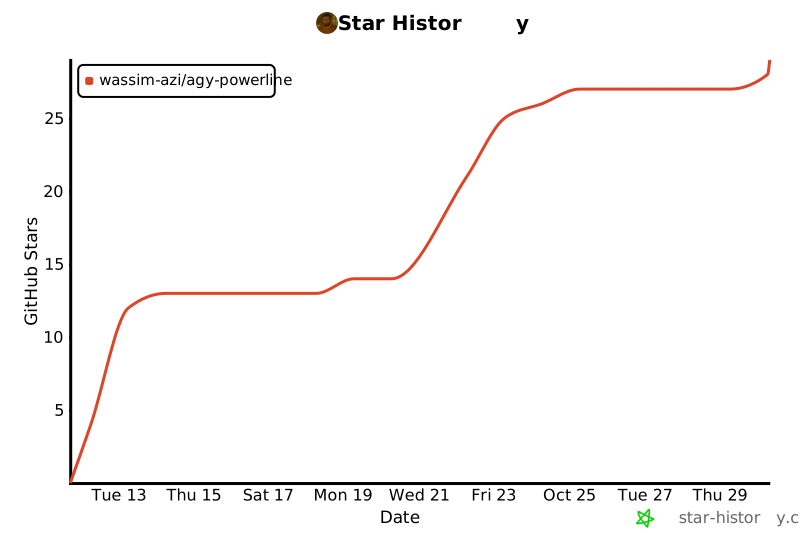](https://star-history.com/#wassim-azi/agy-powerline&Date)
|
|
240
|
+
|
|
188
241
|
## Licence
|
|
189
242
|
|
|
190
243
|
[MIT](LICENSE) © Wassim AZI
|
package/README.ja.md
CHANGED
|
@@ -3,13 +3,19 @@
|
|
|
3
3
|
[English](README.md) | [简体中文](README.zh-CN.md) | **日本語** | [Français](README.fr.md)
|
|
4
4
|
|
|
5
5
|
[](https://github.com/wassim-azi/agy-powerline/actions/workflows/ci.yml)
|
|
6
|
+
[](https://github.com/wassim-azi/agy-powerline/actions/workflows/codeql.yml)
|
|
6
7
|
[](https://www.npmjs.com/package/agy-powerline)
|
|
7
|
-
[](https://www.npmjs.com/package/agy-powerline)
|
|
9
|
+
[](https://github.com/wassim-azi/agy-powerline/stargazers)
|
|
10
|
+
[](https://agy-powerline.com/configure/)
|
|
8
11
|
[](https://nodejs.org/)
|
|
9
|
-
[](docs/install.md)
|
|
13
|
+
[](docs/install.md)
|
|
14
|
+
[](docs/install.md)
|
|
10
15
|
[](https://opensource.org/licenses/MIT)
|
|
11
16
|
[](#プライバシーとセキュリティ)
|
|
12
17
|
[](https://scorecard.dev/viewer/?uri=github.com/wassim-azi/agy-powerline)
|
|
18
|
+
[](https://www.bestpractices.dev/projects/15655)
|
|
13
19
|
[](https://github.com/Piebald-AI/awesome-gemini-cli)
|
|
14
20
|
|
|
15
21
|
> この文書は英語版 [README](README.md) の翻訳で、最新の内容に追いついていない場合があります。内容が異なる場合は英語版が優先されます。詳しいドキュメント([`docs/`](docs/))は英語版のみです。
|
|
@@ -19,7 +25,7 @@
|
|
|
19
25
|
使用中のモデル、Gemini の 5h/7d・Claude/GPT・Argon のクォータ、コンテキストウィンドウ、git ブランチなどがひと目でわかります。ウィジェット、テーマ、レイアウトは対話式のエディターで選べます。インストールはコマンドひとつ、依存パッケージはありません。
|
|
20
26
|
|
|
21
27
|
<p align="center">
|
|
22
|
-
<img src="assets/
|
|
28
|
+
<img src="assets/demo.gif" alt="agy-powerline の configure:argon と入力して Argon の週間クォータを追加し、プリセット、テーマ、レイアウトをバーのライブプレビューで見て回り、最後に Powerline タブを開く" width="850">
|
|
23
29
|
</p>
|
|
24
30
|
|
|
25
31
|
## インストール
|
|
@@ -34,6 +40,15 @@ agy # Antigravity を起動
|
|
|
34
40
|
|
|
35
41
|
`init` は何かを置き換える前に確認し、先に Antigravity の `settings.json` をバックアップします。`init` の後に `agy` を一度再起動してください。詳細:[`init` が行うこと](docs/install.md)。
|
|
36
42
|
|
|
43
|
+
<details>
|
|
44
|
+
<summary>スクリーンショット:実際の agy セッションでのバー(Windows Terminal)</summary>
|
|
45
|
+
|
|
46
|
+
<p align="center">
|
|
47
|
+
<img src="assets/screenshots/windows.png" alt="Windows Terminal で agy の入力欄の下に表示された agy-powerline:上に短い会話、下に 3 行の Pills バー" width="850">
|
|
48
|
+
</p>
|
|
49
|
+
|
|
50
|
+
</details>
|
|
51
|
+
|
|
37
52
|
agy にインストールしてもらうこともできます。次の文を `agy` のセッションに貼り付けてください。
|
|
38
53
|
|
|
39
54
|
```text
|
|
@@ -54,13 +69,15 @@ Nerd Font のないターミナルでは、ASCII モードをオンにしてく
|
|
|
54
69
|
|
|
55
70
|
プリセットから始めて、好みに合わせて調整します:
|
|
56
71
|
|
|
57
|
-
| プリセット
|
|
58
|
-
|
|
|
59
|
-
| `default`
|
|
60
|
-
| `compact`
|
|
61
|
-
| `
|
|
62
|
-
| `
|
|
63
|
-
| `
|
|
72
|
+
| プリセット | 表示内容 |
|
|
73
|
+
| ---------- | ------------------------------------------------------------------------------------------------------------------------------------------ |
|
|
74
|
+
| `default` | モデル、コンテキスト、git;2 行目に 5h と 7d のクォータとリセットまでの時間 |
|
|
75
|
+
| `compact` | 1 行:短いモデル名、最も残りの少ないクォータ、コンテキスト %、git |
|
|
76
|
+
| `agent` | エージェントの状態、サブエージェント、タイトル、モード、サンドボックス;モデル、コンテキスト %、アーティファクト、最も残りの少ないクォータ |
|
|
77
|
+
| `git` | プロジェクト、ブランチ、worktree、stash;ファイル数、変更行数、コミット |
|
|
78
|
+
| `tokens` | コンテキストのトークン、セッションの入出力トークン、キャッシュ;今日と 7 日間のトークン |
|
|
79
|
+
| `quotas` | プランとモデル;5h と 7d のクォータを横並びに、サードパーティと Argon を 3 行目に |
|
|
80
|
+
| `full` | すべて:セッション、プロジェクト、git;コンテキスト、トークン、キャッシュ;両方のクォータ |
|
|
64
81
|
|
|
65
82
|
### テーマ
|
|
66
83
|
|
|
@@ -78,16 +95,48 @@ Nerd Font のないターミナルでは、ASCII モードをオンにしてく
|
|
|
78
95
|
**Pills**(デフォルト):powerline 風のカプセル。形は丸型、山型、斜め、フラットから選べ、行の間に空行を入れることもできます。
|
|
79
96
|
|
|
80
97
|
<p align="center">
|
|
81
|
-
<img src="assets/screenshots/pills-
|
|
98
|
+
<img src="assets/screenshots/pills-dark.png" alt="dark-aurora テーマの agy-powerline Pills レイアウト:モデル、コンテキスト、プロジェクト、git;ペースマーカーとリセットまでの時間付きの Gemini 5h と 7d のクォータ;Claude/GPT と Argon の週間クォータ" width="850">
|
|
82
99
|
</p>
|
|
83
100
|
|
|
101
|
+
<details>
|
|
102
|
+
<summary>明るいターミナルの場合</summary>
|
|
103
|
+
|
|
104
|
+
<p align="center">
|
|
105
|
+
<img src="assets/screenshots/pills-light.png" alt="明るいターミナルでの light-paper テーマの agy-powerline Pills レイアウト" width="850">
|
|
106
|
+
</p>
|
|
107
|
+
|
|
108
|
+
</details>
|
|
109
|
+
|
|
84
110
|
**Lines**:同じ情報を色付きのプレーンテキストで表示します。
|
|
85
111
|
|
|
86
112
|
<p align="center">
|
|
87
|
-
<img src="assets/screenshots/lines-dark.png" alt="暗いターミナルでの dark-
|
|
88
|
-
|
|
113
|
+
<img src="assets/screenshots/lines-dark.png" alt="暗いターミナルでの dark-aurora テーマの agy-powerline Lines レイアウト" width="850">
|
|
114
|
+
</p>
|
|
115
|
+
|
|
116
|
+
<details>
|
|
117
|
+
<summary>明るいターミナルの場合</summary>
|
|
118
|
+
|
|
119
|
+
<p align="center">
|
|
120
|
+
<img src="assets/screenshots/lines-light.png" alt="明るいターミナルでの light-paper テーマの agy-powerline Lines レイアウト" width="850">
|
|
89
121
|
</p>
|
|
90
122
|
|
|
123
|
+
</details>
|
|
124
|
+
|
|
125
|
+
**Classic**:`|` で区切ったプレーンな色付きテキストと、ブロックメーター(例:`███░│░░░░░`)。
|
|
126
|
+
|
|
127
|
+
<p align="center">
|
|
128
|
+
<img src="assets/screenshots/classic-dark.png" alt="暗いターミナルでの dark-aurora テーマの agy-powerline Classic レイアウト、ブロックメーター付き" width="850">
|
|
129
|
+
</p>
|
|
130
|
+
|
|
131
|
+
<details>
|
|
132
|
+
<summary>明るいターミナルの場合</summary>
|
|
133
|
+
|
|
134
|
+
<p align="center">
|
|
135
|
+
<img src="assets/screenshots/classic-light.png" alt="明るいターミナルでの light-paper テーマの agy-powerline Classic レイアウト" width="850">
|
|
136
|
+
</p>
|
|
137
|
+
|
|
138
|
+
</details>
|
|
139
|
+
|
|
91
140
|
## ウィジェット
|
|
92
141
|
|
|
93
142
|
| ウィジェット | 表示内容 |
|
|
@@ -116,21 +165,21 @@ Nerd Font のないターミナルでは、ASCII モードをオンにしてく
|
|
|
116
165
|
|
|
117
166
|
## コマンド
|
|
118
167
|
|
|
119
|
-
| コマンド
|
|
120
|
-
|
|
|
121
|
-
| `npx agy-powerline init [--yes]`
|
|
122
|
-
| `npx agy-powerline configure`
|
|
123
|
-
| `npx agy-powerline preset <name>`
|
|
124
|
-
| `npx agy-powerline theme <name>`
|
|
125
|
-
| `npx agy-powerline gradient <name>`
|
|
126
|
-
| `npx agy-powerline layout <pills\|lines>` | レイアウトを切り替え |
|
|
127
|
-
| `npx agy-powerline caps <style>`
|
|
128
|
-
| `npx agy-powerline export [file]`
|
|
129
|
-
| `npx agy-powerline import <file>`
|
|
130
|
-
| `npx agy-powerline doctor`
|
|
131
|
-
| `npx agy-powerline report`
|
|
132
|
-
| `npx agy-powerline uninstall [--delete]`
|
|
133
|
-
| `npx agy-powerline render --demo`
|
|
168
|
+
| コマンド | 内容 |
|
|
169
|
+
| -------------------------------------------------- | ------------------------------------------------------------ |
|
|
170
|
+
| `npx agy-powerline init [--yes]` | ステータスラインをインストールまたは更新 |
|
|
171
|
+
| `npx agy-powerline configure` | エディターを開く(別名 `config`) |
|
|
172
|
+
| `npx agy-powerline preset <name>` | プリセットを適用(一覧は `--list`) |
|
|
173
|
+
| `npx agy-powerline theme <name>` | テーマを切り替え(`--list`、`--gallery`) |
|
|
174
|
+
| `npx agy-powerline gradient <name>` | Color each row with a gradient (`--list`, `off`) |
|
|
175
|
+
| `npx agy-powerline layout <pills\|lines\|classic>` | レイアウトを切り替え |
|
|
176
|
+
| `npx agy-powerline caps <style>` | カプセルの形を切り替え:`round`、`angled`、`slanted`、`flat` |
|
|
177
|
+
| `npx agy-powerline export [file]` | Save your config to a file, to back it up or share it |
|
|
178
|
+
| `npx agy-powerline import <file>` | Load a config, after showing what changes (`--merge`) |
|
|
179
|
+
| `npx agy-powerline doctor` | インストールを確認し、問題を説明 |
|
|
180
|
+
| `npx agy-powerline report` | プライバシーに配慮したバグレポートを作成 |
|
|
181
|
+
| `npx agy-powerline uninstall [--delete]` | agy から削除(`--delete` でファイルも削除) |
|
|
182
|
+
| `npx agy-powerline render --demo` | サンプルデータでバーを表示 |
|
|
134
183
|
|
|
135
184
|
各コマンドのオプションは `--help` で確認できます。
|
|
136
185
|
|
|
@@ -185,6 +234,10 @@ npx agy-powerline doctor # すべてが最新か確認
|
|
|
185
234
|
|
|
186
235
|
agy-powerline が役に立ったら、⭐ を付けていただけると他の agy ユーザーにも見つけてもらいやすくなります。
|
|
187
236
|
|
|
237
|
+
## Star History
|
|
238
|
+
|
|
239
|
+
[](https://star-history.com/#wassim-azi/agy-powerline&Date)
|
|
240
|
+
|
|
188
241
|
## ライセンス
|
|
189
242
|
|
|
190
243
|
[MIT](LICENSE) © Wassim AZI
|
package/README.md
CHANGED
|
@@ -3,13 +3,19 @@
|
|
|
3
3
|
**English** | [简体中文](README.zh-CN.md) | [日本語](README.ja.md) | [Français](README.fr.md)
|
|
4
4
|
|
|
5
5
|
[](https://github.com/wassim-azi/agy-powerline/actions/workflows/ci.yml)
|
|
6
|
+
[](https://github.com/wassim-azi/agy-powerline/actions/workflows/codeql.yml)
|
|
6
7
|
[](https://www.npmjs.com/package/agy-powerline)
|
|
7
|
-
[](https://www.npmjs.com/package/agy-powerline)
|
|
9
|
+
[](https://github.com/wassim-azi/agy-powerline/stargazers)
|
|
10
|
+
[](https://agy-powerline.com/configure/)
|
|
8
11
|
[](https://nodejs.org/)
|
|
9
|
-
[](docs/install.md)
|
|
13
|
+
[](docs/install.md)
|
|
14
|
+
[](docs/install.md)
|
|
10
15
|
[](https://opensource.org/licenses/MIT)
|
|
11
16
|
[](#privacy-and-security)
|
|
12
17
|
[](https://scorecard.dev/viewer/?uri=github.com/wassim-azi/agy-powerline)
|
|
18
|
+
[](https://www.bestpractices.dev/projects/15655)
|
|
13
19
|
[](https://github.com/Piebald-AI/awesome-gemini-cli)
|
|
14
20
|
|
|
15
21
|
**A fast, configurable statusline for Google Antigravity's CLI (`agy`).**
|
|
@@ -17,7 +23,7 @@
|
|
|
17
23
|
See your model, Gemini 5h/7d, Claude/GPT and Argon quotas, context window, git branch and more at a glance. Pick widgets, themes and layout from an interactive editor. One command to install, no dependencies.
|
|
18
24
|
|
|
19
25
|
<p align="center">
|
|
20
|
-
<img src="assets/
|
|
26
|
+
<img src="assets/demo.gif" alt="agy-powerline configure: add Argon's weekly quota by typing argon, then browse the presets, themes and layouts with a live preview of the bar, and open the Powerline tab" width="850">
|
|
21
27
|
</p>
|
|
22
28
|
|
|
23
29
|
## Install
|
|
@@ -32,6 +38,15 @@ agy # start Antigravity
|
|
|
32
38
|
|
|
33
39
|
On a first install `init` asks for a preset, a layout and a theme, with a preview of each; add `--yes` to skip the questions. It asks before replacing anything and backs up Antigravity's `settings.json` first. Restart `agy` once after `init`. Details: [what `init` does](docs/install.md).
|
|
34
40
|
|
|
41
|
+
<details>
|
|
42
|
+
<summary>Screenshot: the bar in a real agy session (Windows Terminal)</summary>
|
|
43
|
+
|
|
44
|
+
<p align="center">
|
|
45
|
+
<img src="assets/screenshots/windows.png" alt="agy-powerline under agy's input box in Windows Terminal: a short conversation above, the three-row Pills bar below" width="850">
|
|
46
|
+
</p>
|
|
47
|
+
|
|
48
|
+
</details>
|
|
49
|
+
|
|
35
50
|
### Install from inside agy
|
|
36
51
|
|
|
37
52
|
agy-powerline is also an agy plugin. Add it, then run its setup skill in an `agy` session; it runs `init` and `doctor` for you:
|
|
@@ -65,13 +80,15 @@ Changes apply to a running `agy` on its next refresh.
|
|
|
65
80
|
|
|
66
81
|
Start from a preset, then adjust:
|
|
67
82
|
|
|
68
|
-
| Preset
|
|
69
|
-
|
|
|
70
|
-
| `default`
|
|
71
|
-
| `compact`
|
|
72
|
-
| `
|
|
73
|
-
| `
|
|
74
|
-
| `
|
|
83
|
+
| Preset | Shows |
|
|
84
|
+
| --------- | ----------------------------------------------------------------------------------------- |
|
|
85
|
+
| `default` | Model, context, git; 5h and 7d quotas with resets on a second row |
|
|
86
|
+
| `compact` | One line: short model, tightest quota, context %, git |
|
|
87
|
+
| `agent` | Agent state, subagents, title, mode, sandbox; model, context %, artifacts, tightest quota |
|
|
88
|
+
| `git` | Project, branch, worktree, stash; file counts, line changes, commit |
|
|
89
|
+
| `tokens` | Context tokens, session tokens in/out, cache hit; tokens today and over 7 days |
|
|
90
|
+
| `quotas` | Plan and model; 5h and 7d quotas side by side; third-party and Argon on a third row |
|
|
91
|
+
| `full` | Everything: session, project and git; context, tokens and cache; both quotas |
|
|
75
92
|
|
|
76
93
|
### Themes
|
|
77
94
|
|
|
@@ -89,16 +106,48 @@ Preview them all in the [theme gallery](https://agy-powerline.com/) or with `npx
|
|
|
89
106
|
**Pills** (default): powerline-style capsules. Choose round, angled, slanted or flat shapes, and optionally a blank line between rows.
|
|
90
107
|
|
|
91
108
|
<p align="center">
|
|
92
|
-
<img src="assets/screenshots/pills-
|
|
109
|
+
<img src="assets/screenshots/pills-dark.png" alt="agy-powerline Pills layout with the dark-aurora theme: model, context, project and git; Gemini 5h and 7d quotas with pace markers and resets; Claude/GPT and Argon weekly quotas" width="850">
|
|
93
110
|
</p>
|
|
94
111
|
|
|
112
|
+
<details>
|
|
113
|
+
<summary>On a light terminal</summary>
|
|
114
|
+
|
|
115
|
+
<p align="center">
|
|
116
|
+
<img src="assets/screenshots/pills-light.png" alt="agy-powerline Pills layout with the light-paper theme on a light terminal" width="850">
|
|
117
|
+
</p>
|
|
118
|
+
|
|
119
|
+
</details>
|
|
120
|
+
|
|
95
121
|
**Lines**: the same information as plain colored text.
|
|
96
122
|
|
|
97
123
|
<p align="center">
|
|
98
|
-
<img src="assets/screenshots/lines-dark.png" alt="agy-powerline Lines layout with the dark-
|
|
99
|
-
|
|
124
|
+
<img src="assets/screenshots/lines-dark.png" alt="agy-powerline Lines layout with the dark-aurora theme on a dark terminal" width="850">
|
|
125
|
+
</p>
|
|
126
|
+
|
|
127
|
+
<details>
|
|
128
|
+
<summary>On a light terminal</summary>
|
|
129
|
+
|
|
130
|
+
<p align="center">
|
|
131
|
+
<img src="assets/screenshots/lines-light.png" alt="agy-powerline Lines layout with the light-paper theme on a light terminal" width="850">
|
|
100
132
|
</p>
|
|
101
133
|
|
|
134
|
+
</details>
|
|
135
|
+
|
|
136
|
+
**Classic**: plain colored text with `|` dividers and block meters, like `███░│░░░░░`.
|
|
137
|
+
|
|
138
|
+
<p align="center">
|
|
139
|
+
<img src="assets/screenshots/classic-dark.png" alt="agy-powerline Classic layout with the dark-aurora theme on a dark terminal, with block meters" width="850">
|
|
140
|
+
</p>
|
|
141
|
+
|
|
142
|
+
<details>
|
|
143
|
+
<summary>On a light terminal</summary>
|
|
144
|
+
|
|
145
|
+
<p align="center">
|
|
146
|
+
<img src="assets/screenshots/classic-light.png" alt="agy-powerline Classic layout with the light-paper theme on a light terminal" width="850">
|
|
147
|
+
</p>
|
|
148
|
+
|
|
149
|
+
</details>
|
|
150
|
+
|
|
102
151
|
## Widgets
|
|
103
152
|
|
|
104
153
|
| Widget | Shows |
|
|
@@ -127,21 +176,21 @@ A widget with nothing to show hides itself. Widgets can be recolored, made label
|
|
|
127
176
|
|
|
128
177
|
## Commands
|
|
129
178
|
|
|
130
|
-
| Command
|
|
131
|
-
|
|
|
132
|
-
| `npx agy-powerline init [--yes]`
|
|
133
|
-
| `npx agy-powerline configure`
|
|
134
|
-
| `npx agy-powerline preset <name>`
|
|
135
|
-
| `npx agy-powerline theme <name>`
|
|
136
|
-
| `npx agy-powerline gradient <name>`
|
|
137
|
-
| `npx agy-powerline layout <pills\|lines>` | Switch layout |
|
|
138
|
-
| `npx agy-powerline caps <style>`
|
|
139
|
-
| `npx agy-powerline export [file]`
|
|
140
|
-
| `npx agy-powerline import <file>`
|
|
141
|
-
| `npx agy-powerline doctor`
|
|
142
|
-
| `npx agy-powerline report`
|
|
143
|
-
| `npx agy-powerline uninstall [--delete]`
|
|
144
|
-
| `npx agy-powerline render --demo`
|
|
179
|
+
| Command | What it does |
|
|
180
|
+
| -------------------------------------------------- | ----------------------------------------------------------- |
|
|
181
|
+
| `npx agy-powerline init [--yes]` | Install or update the statusline |
|
|
182
|
+
| `npx agy-powerline configure` | Open the editor (alias `config`) |
|
|
183
|
+
| `npx agy-powerline preset <name>` | Apply a preset (`--list` to see them) |
|
|
184
|
+
| `npx agy-powerline theme <name>` | Switch theme (`--list`, `--gallery`) |
|
|
185
|
+
| `npx agy-powerline gradient <name>` | Color each row with a gradient (`--list`, `off`) |
|
|
186
|
+
| `npx agy-powerline layout <pills\|lines\|classic>` | Switch layout |
|
|
187
|
+
| `npx agy-powerline caps <style>` | Switch the pill shape: `round`, `angled`, `slanted`, `flat` |
|
|
188
|
+
| `npx agy-powerline export [file]` | Save your config to a file, to back it up or share it |
|
|
189
|
+
| `npx agy-powerline import <file>` | Load a config, after showing what changes (`--merge`) |
|
|
190
|
+
| `npx agy-powerline doctor` | Check the install and explain what's wrong |
|
|
191
|
+
| `npx agy-powerline report` | Write a privacy-safe bug report |
|
|
192
|
+
| `npx agy-powerline uninstall [--delete]` | Remove it from agy (`--delete` also removes its files) |
|
|
193
|
+
| `npx agy-powerline render --demo` | Print the bar with sample data |
|
|
145
194
|
|
|
146
195
|
Run any command with `--help` for its options.
|
|
147
196
|
|
|
@@ -196,6 +245,10 @@ Thanks to everyone who has contributed:
|
|
|
196
245
|
|
|
197
246
|
If agy-powerline is useful to you, a ⭐ helps other agy users find it.
|
|
198
247
|
|
|
248
|
+
## Star History
|
|
249
|
+
|
|
250
|
+
[](https://star-history.com/#wassim-azi/agy-powerline&Date)
|
|
251
|
+
|
|
199
252
|
## License
|
|
200
253
|
|
|
201
254
|
[MIT](LICENSE) © Wassim AZI
|