agentvibes 5.5.0 → 5.6.0
This diff represents the content of publicly available package versions that have been released to one of the supported registries. The information contained in this diff is provided for informational purposes only and reflects changes between package versions as they appear in their respective public registries.
package/.agentvibes/config.json
CHANGED
|
@@ -28,5 +28,13 @@
|
|
|
28
28
|
"voice": "en_US-ljspeech-high",
|
|
29
29
|
"pretext": "Agent Vibes Here",
|
|
30
30
|
"setupCompleted": true,
|
|
31
|
-
"ttsEngine": "piper"
|
|
31
|
+
"ttsEngine": "piper",
|
|
32
|
+
"thumbsUp": [
|
|
33
|
+
"en_US-libritts-high::Adam",
|
|
34
|
+
"en_US-libritts_r-medium::Adam-2"
|
|
35
|
+
],
|
|
36
|
+
"favorites": [
|
|
37
|
+
"en_US-libritts-high::Adam",
|
|
38
|
+
"en_US-libritts_r-medium::Adam-2"
|
|
39
|
+
]
|
|
32
40
|
}
|
|
@@ -55,7 +55,7 @@ default|reverb 20 50 50|agentvibes_soft_flamenco_loop.mp3|0.30
|
|
|
55
55
|
# Format: llm:<name>|REVERB_PRESET|BACKGROUND_FILE|BACKGROUND_VOLUME|VOICE|PRETEXT|ENGINE|||
|
|
56
56
|
|||
|
|
57
57
|
# Claude Code (claude-code CLI via CLAUDECODE=1 env or AGENTVIBES_LLM=claude-code)|||
|
|
58
|
-
llm:claude-code
|
|
58
|
+
llm:claude-code|||0.15||Agent Vibes Here|piper
|
|
59
59
|
|||
|
|
60
60
|
# GitHub Copilot Chat (VS Code MCP or AGENTVIBES_LLM=copilot)|||
|
|
61
61
|
llm:copilot|off||||Agent Vibes Here|piper
|
|
@@ -24,4 +24,4 @@ agent_vibes_arabic_v2_loop.mp3:.00000000000000000006132724
|
|
|
24
24
|
agent_vibes_chillwave_v2_loop.mp3:14.628390
|
|
25
25
|
agent_vibes_bachata_v1_loop.mp3:.00000000000000000005344000
|
|
26
26
|
agent_vibes_goa_trance_v2_loop.mp3:.00000000000000000002499918
|
|
27
|
-
agentvibes_soft_flamenco_loop.mp3:
|
|
27
|
+
agentvibes_soft_flamenco_loop.mp3:9.432018
|
|
@@ -1 +1 @@
|
|
|
1
|
-
|
|
1
|
+
20260428
|
package/README.md
CHANGED
|
@@ -11,7 +11,7 @@
|
|
|
11
11
|
[](https://github.com/paulpreibisch/AgentVibes/actions/workflows/publish.yml)
|
|
12
12
|
[](https://opensource.org/licenses/Apache-2.0)
|
|
13
13
|
|
|
14
|
-
**Author**: Paul Preibisch ([@997Fire](https://x.com/997Fire)) | **Version**: v5.
|
|
14
|
+
**Author**: Paul Preibisch ([@997Fire](https://x.com/997Fire)) | **Version**: v5.6
|
|
15
15
|
|
|
16
16
|
---
|
|
17
17
|
|
|
@@ -46,7 +46,7 @@ Give **each LLM its own voice, pretext, and music** — Claude Code, Copilot, an
|
|
|
46
46
|
|
|
47
47
|
- Add `llm:<name>|...|voice|pretext|engine` rows to `audio-effects.cfg`
|
|
48
48
|
- MCP server auto-detects which LLM is calling and passes `--llm <key>`
|
|
49
|
-
- Configure via **Setup
|
|
49
|
+
- Configure via **Setup tab → Configure** in the TUI
|
|
50
50
|
|
|
51
51
|
Also fixed: Windows installer crash (`spinner.info is not a function`) on **reinstall** with an older global AgentVibes install.
|
|
52
52
|
|
|
@@ -54,34 +54,20 @@ Also fixed: Windows installer crash (`spinner.info is not a function`) on **rein
|
|
|
54
54
|
|
|
55
55
|
## v5.4 — TUI Installer, Spinner Fix & Dependency Cleanup
|
|
56
56
|
|
|
57
|
-
### 🎤
|
|
57
|
+
### 🎤 Voice Browser — Browse, Sample & Install 914 Voices
|
|
58
58
|
|
|
59
|
-
|
|
59
|
+
**Built right into the TUI — accessible via Setup → Configure → Voice**
|
|
60
60
|
|
|
61
|
-
|
|
62
|
-
|
|
63
|
-
|
|
64
|
-
|
|
65
|
-
|
|
66
|
-
|
|
67
|
-
- 🎧 **Hear Before You Choose** - Real-time audio sampling with one keypress
|
|
68
|
-
- ⭐ **Mark Your Favorites** - Build your personal voice collection
|
|
69
|
-
- 🔍 **Smart Search** - Filter by name, personality, accent, or gender
|
|
70
|
-
- 📦 **One-Click Install** - Press 'I' to instantly switch to any voice
|
|
71
|
-
- 🎨 **Beautiful Interface** - Stunning terminal UI powered by blessed.js
|
|
61
|
+
- 🎧 **Hear Before You Choose** - Press Space to preview any voice instantly
|
|
62
|
+
- ⭐ **Mark Your Favorites** - Thumbs up/down with `+` / `-`
|
|
63
|
+
- 🔍 **Alpha Jump** - Press any letter to jump to names starting with it
|
|
64
|
+
- 📦 **One-Click Select** - Press Enter to set as your voice
|
|
65
|
+
- 🎨 **Beautiful Interface** - Stunning terminal UI built into AgentVibes
|
|
72
66
|
|
|
73
67
|
**914 Total Voices:**
|
|
74
68
|
- 904 High-Quality Piper TTS Speakers (libritts-high model)
|
|
75
69
|
- 10 Hand-Curated Personality Voices
|
|
76
70
|
|
|
77
|
-
**Perfect for:**
|
|
78
|
-
- Finding your ideal AI voice
|
|
79
|
-
- Exploring voice characteristics
|
|
80
|
-
- Quick voice switching
|
|
81
|
-
- Building favorite collections
|
|
82
|
-
|
|
83
|
-
Launch now: `npx agentvibes-voice-browser`
|
|
84
|
-
|
|
85
71
|
---
|
|
86
72
|
|
|
87
73
|
### 💬 Intro Text (Pretext) - Your Personal AI Branding
|
|
@@ -132,9 +118,11 @@ Configure now: `npx agentvibes config intro-text`
|
|
|
132
118
|
**Upload your own background music with battle-tested security!**
|
|
133
119
|
|
|
134
120
|
```bash
|
|
135
|
-
npx agentvibes
|
|
121
|
+
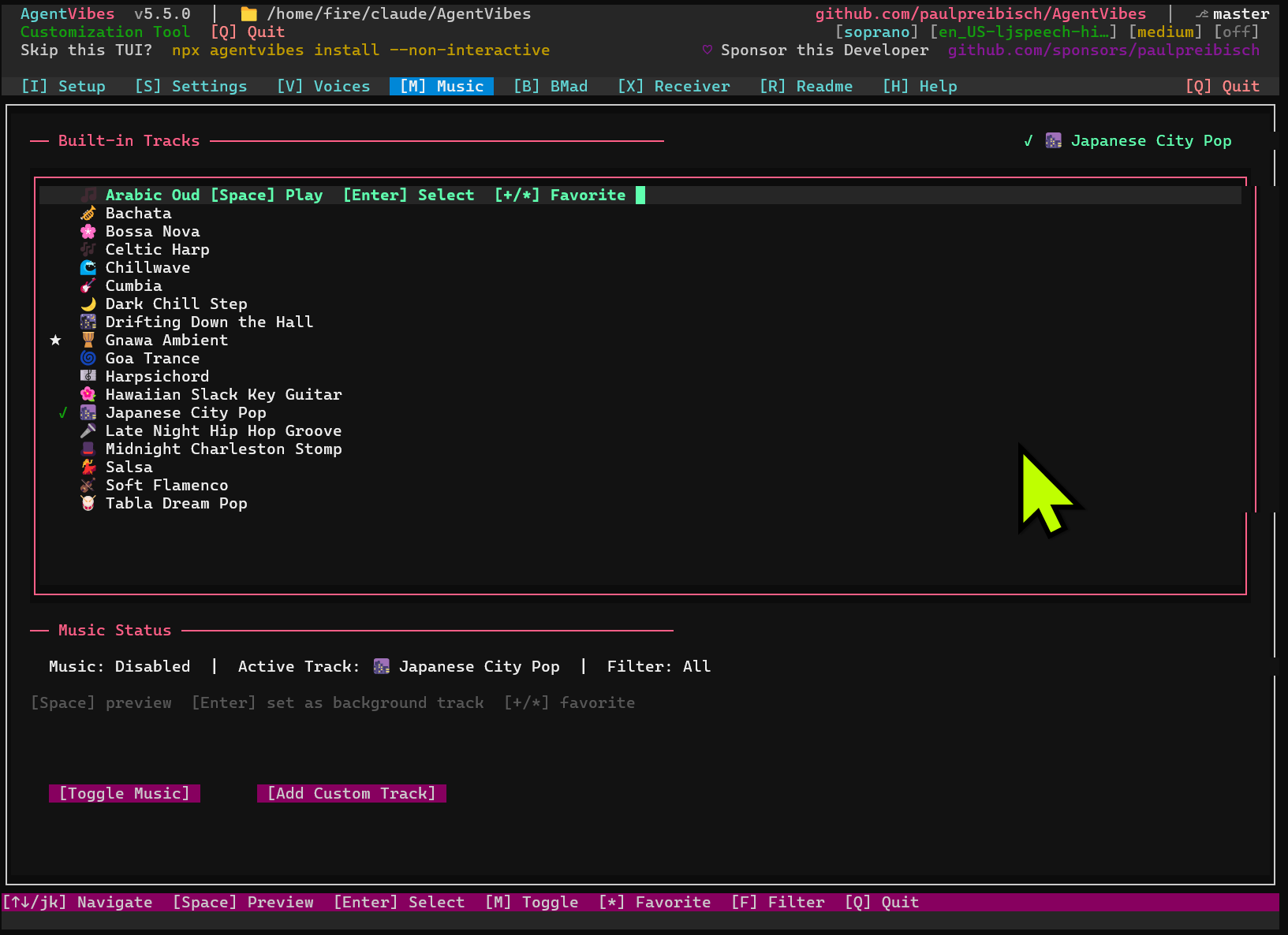
npx agentvibes # press M for Music tab
|
|
136
122
|
```
|
|
137
123
|
|
|
124
|
+
|
|
125
|
+
|
|
138
126
|
Replace the default background tracks with your own audio files for complete sonic branding.
|
|
139
127
|
|
|
140
128
|
**Supported Formats:**
|
|
@@ -252,10 +240,10 @@ All 50+ Piper voices AgentVibes provides are sourced from Hugging Face's open-so
|
|
|
252
240
|
- [📋 Prerequisites](#-prerequisites) - What you actually need (Node.js + optional tools)
|
|
253
241
|
- [✨ What is AgentVibes?](#-what-is-agentvibes) - Overview & key features
|
|
254
242
|
- [🌟 NEW FEATURE HIGHLIGHTS](#-new-feature-highlights) - **START HERE!**
|
|
255
|
-
- [🎤
|
|
243
|
+
- [🎤 Voices Tab](#-voices-tab) - Browse & sample 914 voices in the TUI
|
|
256
244
|
- [💬 Intro Text](#-intro-text-pretext---your-personal-ai-branding) - Custom TTS prefixes
|
|
257
245
|
- [🎵 Custom Background Music](#-custom-background-music---complete-audio-control) - Upload your own tracks
|
|
258
|
-
- [📰 Latest Release](#-latest-release) -
|
|
246
|
+
- [📰 Latest Release](#-latest-release) - v5.5.0 with Per-LLM Audio Routing, Windows Installer Resilience
|
|
259
247
|
- [🪟 Windows Setup Guide for Claude Desktop](mcp-server/WINDOWS_SETUP.md) - Complete Windows installation with WSL & Python
|
|
260
248
|
|
|
261
249
|
### AgentVibes MCP (Natural Language Control)
|
|
@@ -265,7 +253,7 @@ All 50+ Piper voices AgentVibes provides are sourced from Hugging Face's open-so
|
|
|
265
253
|
- [For Claude Code](docs/mcp-setup.md#for-claude-code) - Project-specific setup
|
|
266
254
|
|
|
267
255
|
### Core Features
|
|
268
|
-
- [🎤
|
|
256
|
+
- [🎤 Voices Tab](#-voices-tab) - **Browse and sample 914 voices in the TUI**
|
|
269
257
|
- [🎤 Commands Reference](#-commands-reference) - All available commands
|
|
270
258
|
- [🎙️ Verbosity Control](#%EF%B8%8F-verbosity-control) - Control how much Claude speaks (low/medium/high)
|
|
271
259
|
- [🎭 Personalities vs Sentiments](#-personalities-vs-sentiments) - Two systems explained
|
|
@@ -303,20 +291,17 @@ All 50+ Piper voices AgentVibes provides are sourced from Hugging Face's open-so
|
|
|
303
291
|
|
|
304
292
|
**[v3.6.0 - "Voice Explorer" Release](https://github.com/paulpreibisch/AgentVibes/releases/tag/v3.6.0)** 🎉
|
|
305
293
|
|
|
306
|
-
### 🎤
|
|
294
|
+
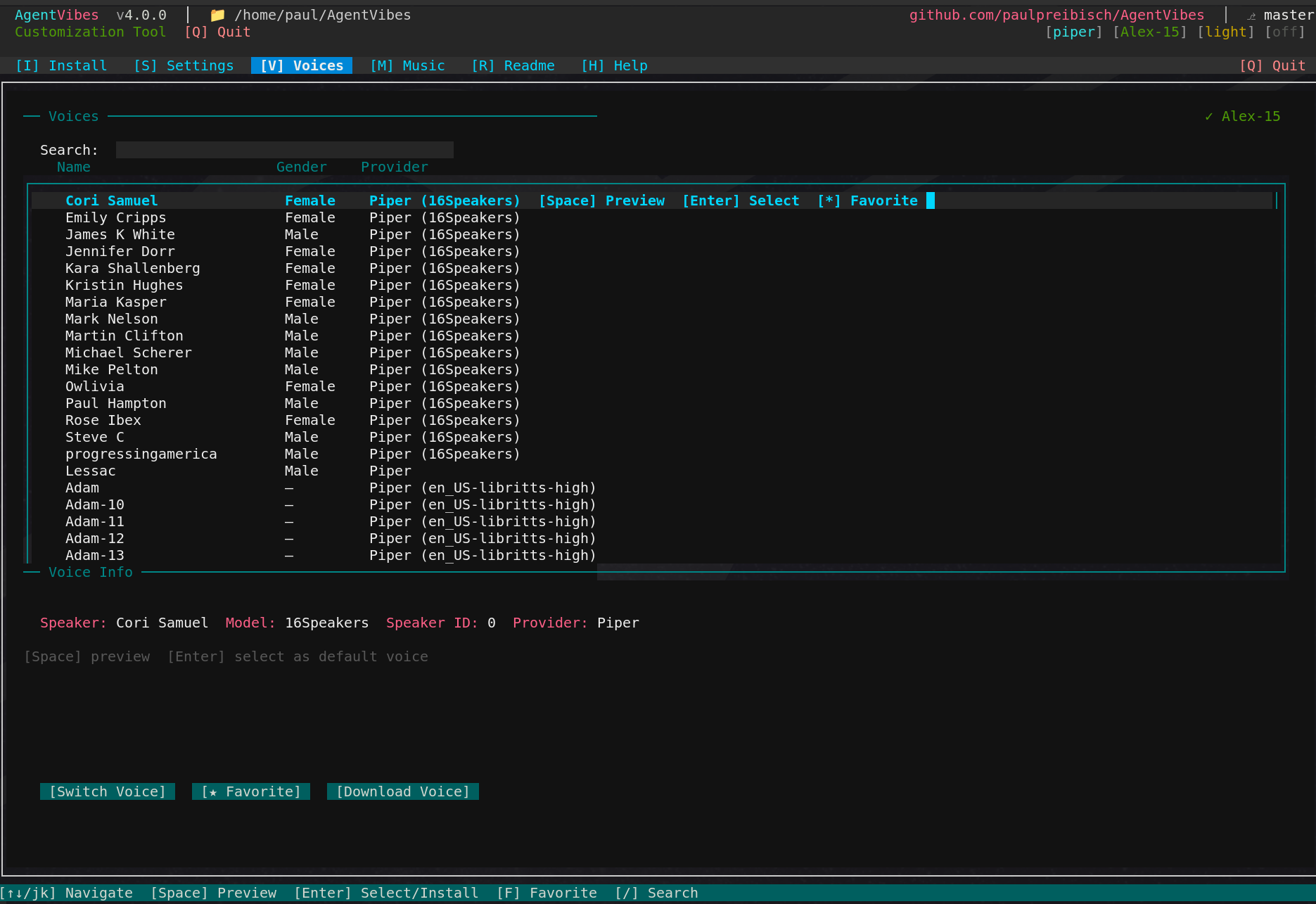
### 🎤 Voices Tab — Browse & Sample 914 Voices
|
|
307
295
|
|
|
308
|
-
**
|
|
296
|
+
**Built into the TUI — launch with `npx agentvibes` then press V**
|
|
309
297
|
|
|
310
|
-
|
|
311
|
-
npx agentvibes-voice-browser
|
|
312
|
-
```
|
|
298
|
+
|
|
313
299
|
|
|
314
|
-
|
|
315
|
-
- 🎧 Real-time voice sampling - hear before you choose
|
|
300
|
+
- 🎧 Real-time voice sampling - press Space to hear before you choose
|
|
316
301
|
- ⭐ Favorite system - mark your top voices
|
|
317
302
|
- 🔍 Search & filter - find voices by personality, accent, gender
|
|
318
|
-
- 📦 One-click
|
|
319
|
-
- 🎨 Beautiful UI -
|
|
303
|
+
- 📦 One-click select - press Enter to install directly
|
|
304
|
+
- 🎨 Beautiful UI - built into the AgentVibes TUI
|
|
320
305
|
|
|
321
306
|
**914 Total Voices:**
|
|
322
307
|
- 904 Piper speaker variations (libritts-high)
|
|
@@ -379,8 +364,8 @@ npx agentvibes config music
|
|
|
379
364
|
# Install AgentVibes
|
|
380
365
|
npx agentvibes install
|
|
381
366
|
|
|
382
|
-
#
|
|
383
|
-
npx agentvibes
|
|
367
|
+
# Browse voices in the TUI
|
|
368
|
+
npx agentvibes # press V for Voices tab
|
|
384
369
|
```
|
|
385
370
|
|
|
386
371
|
**🐞 Bug Fixes in v3.6.0:**
|
|
@@ -432,6 +417,12 @@ Just say "Switch to Aria voice" or "Speak in Spanish" instead of typing commands
|
|
|
432
417
|
npx agentvibes install
|
|
433
418
|
```
|
|
434
419
|
|
|
420
|
+
|
|
421
|
+
|
|
422
|
+
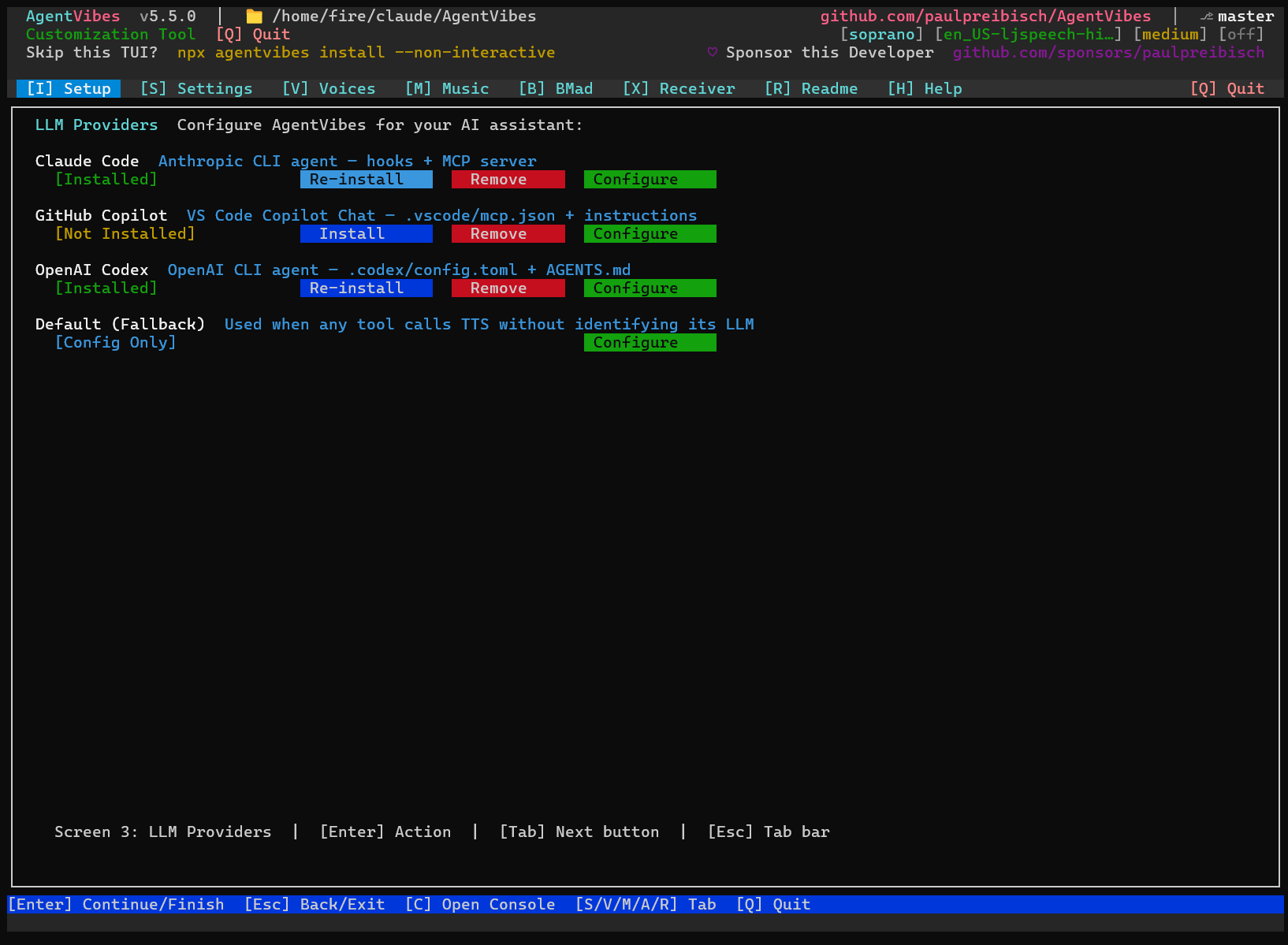
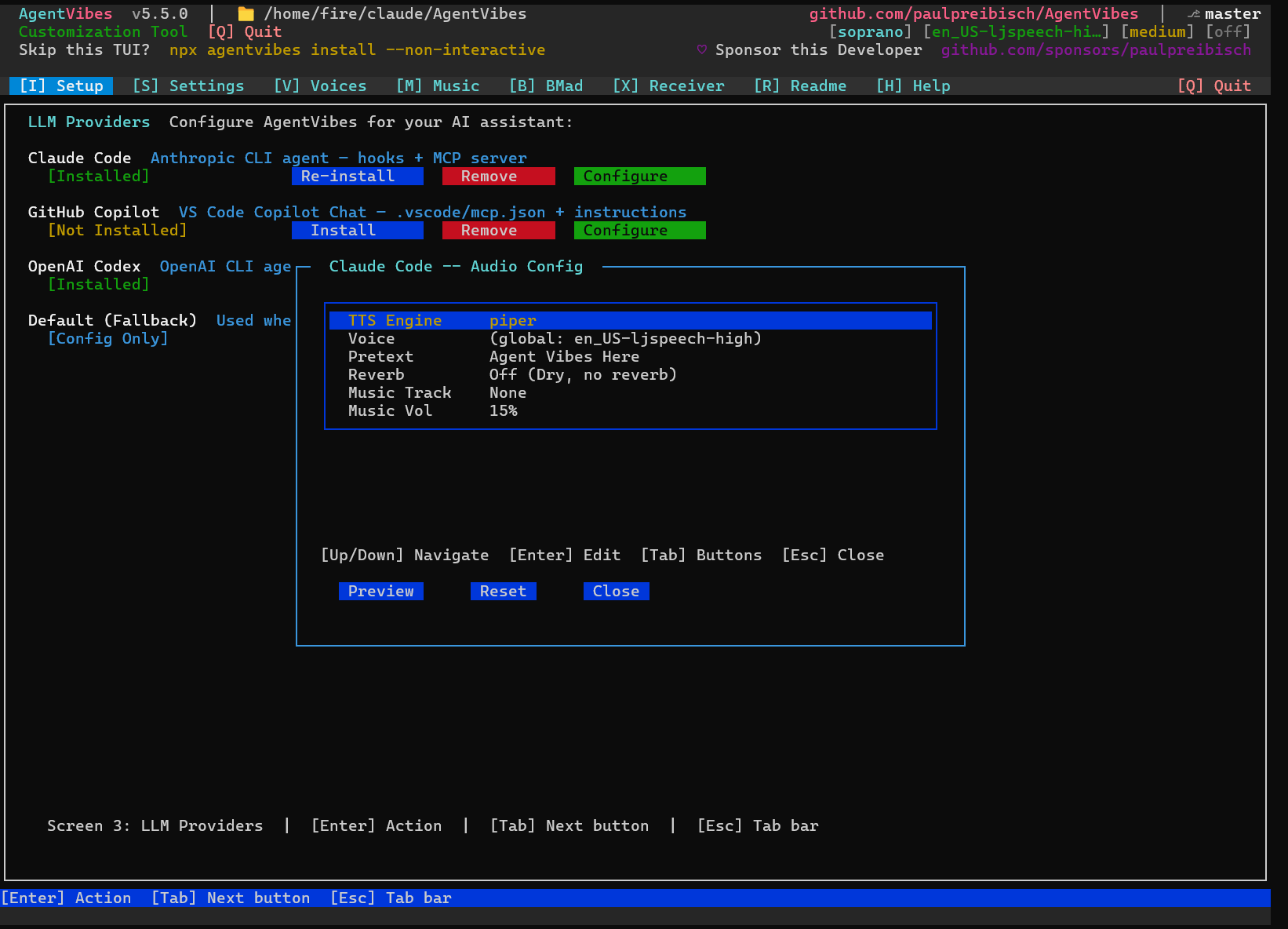
Click **Configure** on any LLM to set its voice, pretext, reverb, and music:
|
|
423
|
+
|
|
424
|
+
|
|
425
|
+
|
|
435
426
|
### 2️⃣ Choose Provider (Auto-Detected)
|
|
436
427
|
- **macOS**: Native `say` provider (100+ voices) ✨
|
|
437
428
|
- **Linux/WSL**: Piper TTS (50+ free voices) 🎙️
|
|
@@ -457,39 +448,37 @@ macOS ships with bash 3.2 (from 2007). After this, everything works perfectly!
|
|
|
457
448
|
|
|
458
449
|
---
|
|
459
450
|
|
|
460
|
-
## 🎤
|
|
461
|
-
|
|
462
|
-
**The easiest way to find your perfect voice!**
|
|
451
|
+
## 🎤 Voice Browser
|
|
463
452
|
|
|
464
|
-
|
|
453
|
+
**914 voices — browse, preview, and select right inside the TUI.**
|
|
465
454
|
|
|
466
455
|
```bash
|
|
467
|
-
npx agentvibes
|
|
456
|
+
npx agentvibes # Setup tab → Configure → Voice (or press V for global voice)
|
|
468
457
|
```
|
|
469
458
|
|
|
459
|
+
|
|
460
|
+
|
|
470
461
|
### Features
|
|
471
462
|
|
|
472
463
|
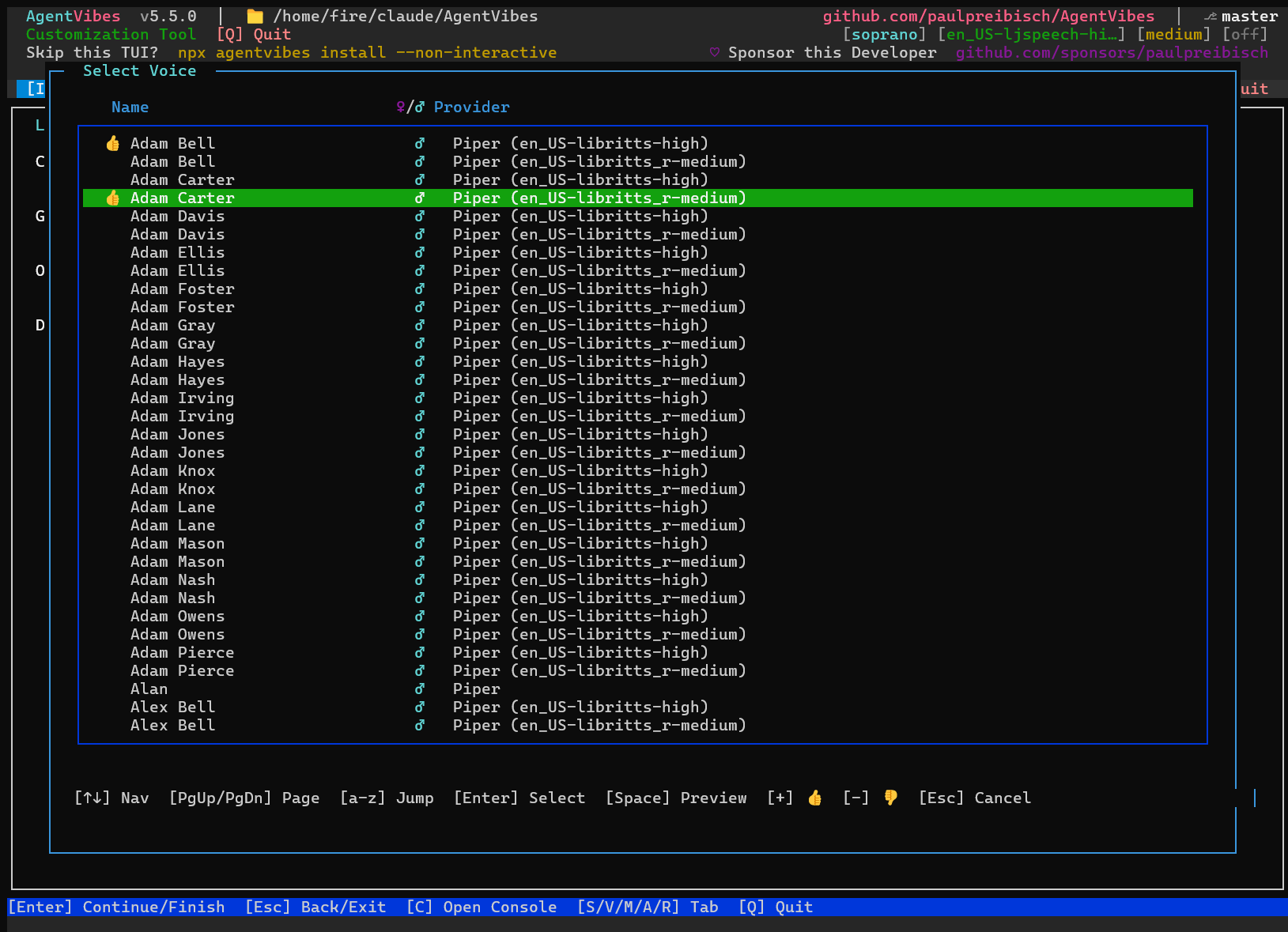
- **914 Voices** - Browse 904 Piper speakers + 10 curated voices
|
|
473
|
-
- **Real-Time Sampling** - Press
|
|
474
|
-
- **Favorite System** -
|
|
475
|
-
- **
|
|
476
|
-
- **One-Click
|
|
477
|
-
- **Beautiful UI** - Stunning console interface
|
|
464
|
+
- **Real-Time Sampling** - Press Space to hear any voice instantly
|
|
465
|
+
- **Favorite System** - Thumbs up `+` / thumbs down `-` for quick filtering
|
|
466
|
+
- **Alpha Jump** - Press any letter key to jump to that part of the list
|
|
467
|
+
- **One-Click Select** - Press Enter to install and switch to a voice
|
|
468
|
+
- **Beautiful UI** - Stunning console interface built into AgentVibes
|
|
478
469
|
|
|
479
470
|
### Keyboard Shortcuts
|
|
480
471
|
|
|
481
472
|
| Key | Action |
|
|
482
473
|
|-----|--------|
|
|
483
|
-
| **
|
|
484
|
-
| **
|
|
485
|
-
|
|
|
486
|
-
|
|
|
487
|
-
| **
|
|
474
|
+
| **Space** | Preview voice sample |
|
|
475
|
+
| **Enter** | Select/Install voice |
|
|
476
|
+
| **+** | Thumbs up (favorite) |
|
|
477
|
+
| **-** | Thumbs down |
|
|
478
|
+
| **PgUp / PgDn** | Page through list |
|
|
488
479
|
| **↑/↓** | Navigate list |
|
|
489
|
-
| **
|
|
490
|
-
| **
|
|
491
|
-
| **H** | Show help |
|
|
492
|
-
| **Q** | Quit |
|
|
480
|
+
| **a-z** | Jump to names starting with letter |
|
|
481
|
+
| **Esc** | Cancel / close |
|
|
493
482
|
|
|
494
483
|
### Voice Categories
|
|
495
484
|
|
|
@@ -505,13 +494,13 @@ npx agentvibes-voice-browser
|
|
|
505
494
|
|
|
506
495
|
### Finding Your Perfect Voice
|
|
507
496
|
|
|
508
|
-
1. **
|
|
509
|
-
2. **
|
|
510
|
-
3. **Sample voices:** Navigate with arrows, press
|
|
511
|
-
4. **Mark favorites:** Press
|
|
512
|
-
5. **
|
|
497
|
+
1. **Open voice browser:** Setup tab → Configure → navigate to Voice → Enter
|
|
498
|
+
2. **Jump alphabetically:** Press a letter key to jump to that name
|
|
499
|
+
3. **Sample voices:** Navigate with arrows, press Space to hear
|
|
500
|
+
4. **Mark favorites:** Press `+` on voices you like
|
|
501
|
+
5. **Select:** Press Enter to set as your voice
|
|
513
502
|
|
|
514
|
-
**Pro Tip:** Use
|
|
503
|
+
**Pro Tip:** Use PgUp/PgDn to page quickly through 900+ voices!
|
|
515
504
|
|
|
516
505
|
[↑ Back to top](#-table-of-contents)
|
|
517
506
|
|
|
@@ -860,18 +849,13 @@ AgentVibes provides **50+ slash commands** and **natural language MCP equivalent
|
|
|
860
849
|
|
|
861
850
|
**[→ View Complete Command Reference](docs/commands.md)** - All voice, system, personality, sentiment, language, and BMAD commands with MCP equivalents
|
|
862
851
|
|
|
863
|
-
###
|
|
852
|
+
### Voices Tab Commands
|
|
864
853
|
|
|
865
854
|
```bash
|
|
866
|
-
# Launch
|
|
867
|
-
npx agentvibes
|
|
868
|
-
|
|
869
|
-
# Or use global command (if installed globally)
|
|
870
|
-
agentvibes-voice-browser
|
|
855
|
+
# Launch the TUI and open Voices tab
|
|
856
|
+
npx agentvibes # then press V
|
|
871
857
|
```
|
|
872
858
|
|
|
873
|
-
**MCP Equivalent:** Currently CLI-only (no MCP command)
|
|
874
|
-
|
|
875
859
|
### Intro Text Commands
|
|
876
860
|
|
|
877
861
|
```bash
|
|
@@ -1010,7 +994,7 @@ Every task acknowledgment plays **twice** - first in English, then in your targe
|
|
|
1010
994
|
|
|
1011
995
|
## 🗣️ Voice Library
|
|
1012
996
|
|
|
1013
|
-
**
|
|
997
|
+
**Browse voices in the TUI:** Run `npx agentvibes` and press **V** to open the **[Voices Tab](#-voices-tab)** — browse, sample, and install from 914 voices without leaving your terminal.
|
|
1014
998
|
|
|
1015
999
|
### Friendly Voice Names
|
|
1016
1000
|
|
|
@@ -1052,13 +1036,11 @@ The BMAD plugin detects when you activate a BMAD agent (e.g., `/BMad:agents:pm`)
|
|
|
1052
1036
|
|
|
1053
1037
|
**Version Support**: AgentVibes supports both BMAD v4 and v6-alpha installations. Version detection is automatic - just install BMAD and AgentVibes will detect and configure itself correctly!
|
|
1054
1038
|
|
|
1055
|
-
### 🎭
|
|
1056
|
-
|
|
1057
|
-
Open the **BMad** tab in the AgentVibes TUI (`npx agentvibes`) to configure which voice each agent uses:
|
|
1039
|
+
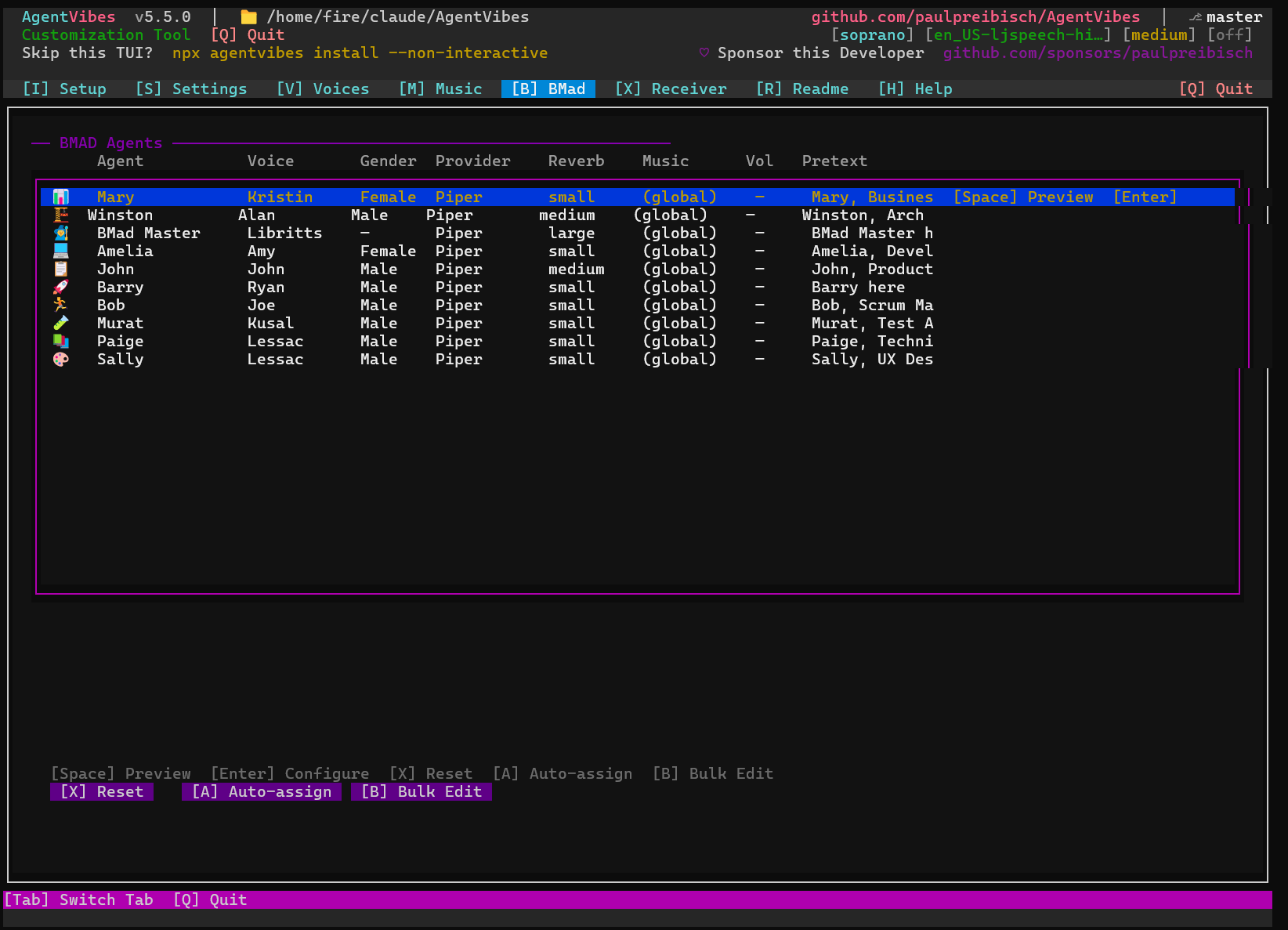
### 🎭 BMad Tab — Assign a Voice to Every Agent
|
|
1058
1040
|
|
|
1059
|
-
|
|
1041
|
+
Open the **BMad** tab in the AgentVibes TUI (`npx agentvibes` → press **B**) to configure which voice, reverb, and pretext each BMAD agent uses:
|
|
1060
1042
|
|
|
1061
|
-
|
|
1043
|
+
|
|
1062
1044
|
|
|
1063
1045
|
### 🔊 TTS Injection: How It Works
|
|
1064
1046
|
|
|
@@ -1882,10 +1864,10 @@ Both do the exact same thing - MCP is more convenient, slash commands are more t
|
|
|
1882
1864
|
- **Optional**: sox (audio effects), ffmpeg (background music, padding)
|
|
1883
1865
|
- All TTS generation works without optional dependencies - they just enhance the experience
|
|
1884
1866
|
|
|
1885
|
-
###
|
|
1867
|
+
### Voices Tab & New Features
|
|
1886
1868
|
|
|
1887
|
-
**Q: How do I
|
|
1888
|
-
**A:**
|
|
1869
|
+
**Q: How do I browse and select voices?**
|
|
1870
|
+
**A:** Run `npx agentvibes` and press **V** to open the Voices tab. Use arrow keys to navigate, Space to preview voices, Enter to select/install, F to favorite, and / to search.
|
|
1889
1871
|
|
|
1890
1872
|
**Q: What are friendly voice names?**
|
|
1891
1873
|
**A:** Instead of technical IDs like `en_US-ryan-high`, you can now use simple names like "Ryan" when switching voices. All 904+ voices have friendly names matched to their characteristics.
|
|
@@ -1903,7 +1885,7 @@ Both do the exact same thing - MCP is more convenient, slash commands are more t
|
|
|
1903
1885
|
**A:** No! You can type "ryan", "Ryan", or "RYAN" - they all work. The voice resolution is case-insensitive.
|
|
1904
1886
|
|
|
1905
1887
|
**Q: Can I favorite voices without installing them?**
|
|
1906
|
-
**A:** Yes! In the
|
|
1888
|
+
**A:** Yes! In the Voices tab, press 'F' to mark any voice as a favorite. Favorites are saved and you can filter to show only favorites later.
|
|
1907
1889
|
|
|
1908
1890
|
**Q: Does custom music work with all TTS providers?**
|
|
1909
1891
|
**A:** Yes! Custom background music works with Piper TTS, Soprano, macOS Say, and Windows SAPI.
|
package/RELEASE_NOTES.md
CHANGED
|
@@ -1,5 +1,28 @@
|
|
|
1
1
|
# AgentVibes Release Notes
|
|
2
2
|
|
|
3
|
+
## 📸 v5.6.0 — TUI Screenshots & Documentation Cleanup
|
|
4
|
+
|
|
5
|
+
**Released:** 2026-04-28
|
|
6
|
+
|
|
7
|
+
### 📸 TUI Screenshots Added
|
|
8
|
+
|
|
9
|
+
Added real screenshots of every major TUI tab to the README:
|
|
10
|
+
|
|
11
|
+
- **Setup tab** — LLM Providers screen (Claude Code, Copilot, Codex, Default)
|
|
12
|
+
- **Configure dialog** — Per-LLM audio config (voice, pretext, reverb, music)
|
|
13
|
+
- **Voice Browser** — Select Voice dialog with alpha-jump, thumbs up/down, 914 voices
|
|
14
|
+
- **Music tab** — Built-in tracks list with preview and toggle
|
|
15
|
+
- **BMad tab** — Agent voice assignment (voice, reverb, music, pretext per agent)
|
|
16
|
+
|
|
17
|
+
### 🧹 Documentation Cleanup
|
|
18
|
+
|
|
19
|
+
- Removed all `npx agentvibes-voice-browser` references (tool retired, replaced by TUI)
|
|
20
|
+
- Renamed "Voice Browser" section to reflect TUI-native access via Setup → Configure → Voice
|
|
21
|
+
- All image paths now use absolute GitHub raw URLs (renders correctly on npmjs.com)
|
|
22
|
+
- Fixed BMad section placeholder screenshot replaced with real screenshot
|
|
23
|
+
|
|
24
|
+
---
|
|
25
|
+
|
|
3
26
|
## 🎵 v5.5.0 — Per-LLM Audio Routing & Windows Installer Resilience
|
|
4
27
|
|
|
5
28
|
**Released:** 2026-04-27
|
package/package.json
CHANGED
|
@@ -1,7 +1,7 @@
|
|
|
1
1
|
{
|
|
2
2
|
"$schema": "https://json.schemastore.org/package.json",
|
|
3
3
|
"name": "agentvibes",
|
|
4
|
-
"version": "5.
|
|
4
|
+
"version": "5.6.0",
|
|
5
5
|
"description": "Now your AI Agents can finally talk back! Professional TTS voice for Claude Code, Claude Desktop (via MCP), and Clawdbot with multi-provider support.",
|
|
6
6
|
"homepage": "https://agentvibes.org",
|
|
7
7
|
"keywords": [
|