agentvibes 5.4.0 → 5.6.0
This diff represents the content of publicly available package versions that have been released to one of the supported registries. The information contained in this diff is provided for informational purposes only and reflects changes between package versions as they appear in their respective public registries.
- package/.agentvibes/config.json +9 -1
- package/.claude/config/audio-effects.cfg +12 -0
- package/.claude/config/background-music-enabled.txt +1 -0
- package/.claude/config/background-music-position.txt +1 -1
- package/.claude/github-star-reminder.txt +1 -1
- package/.claude/hooks/bmad-party-speak.sh +0 -0
- package/.claude/hooks/bmad-speak.sh +6 -2
- package/.claude/hooks/play-tts-piper.sh +2 -2
- package/.claude/hooks/play-tts.sh +22 -1
- package/.claude/hooks-windows/play-tts-windows-piper.ps1 +178 -164
- package/.claude/hooks-windows/play-tts.ps1 +208 -41
- package/README.md +72 -85
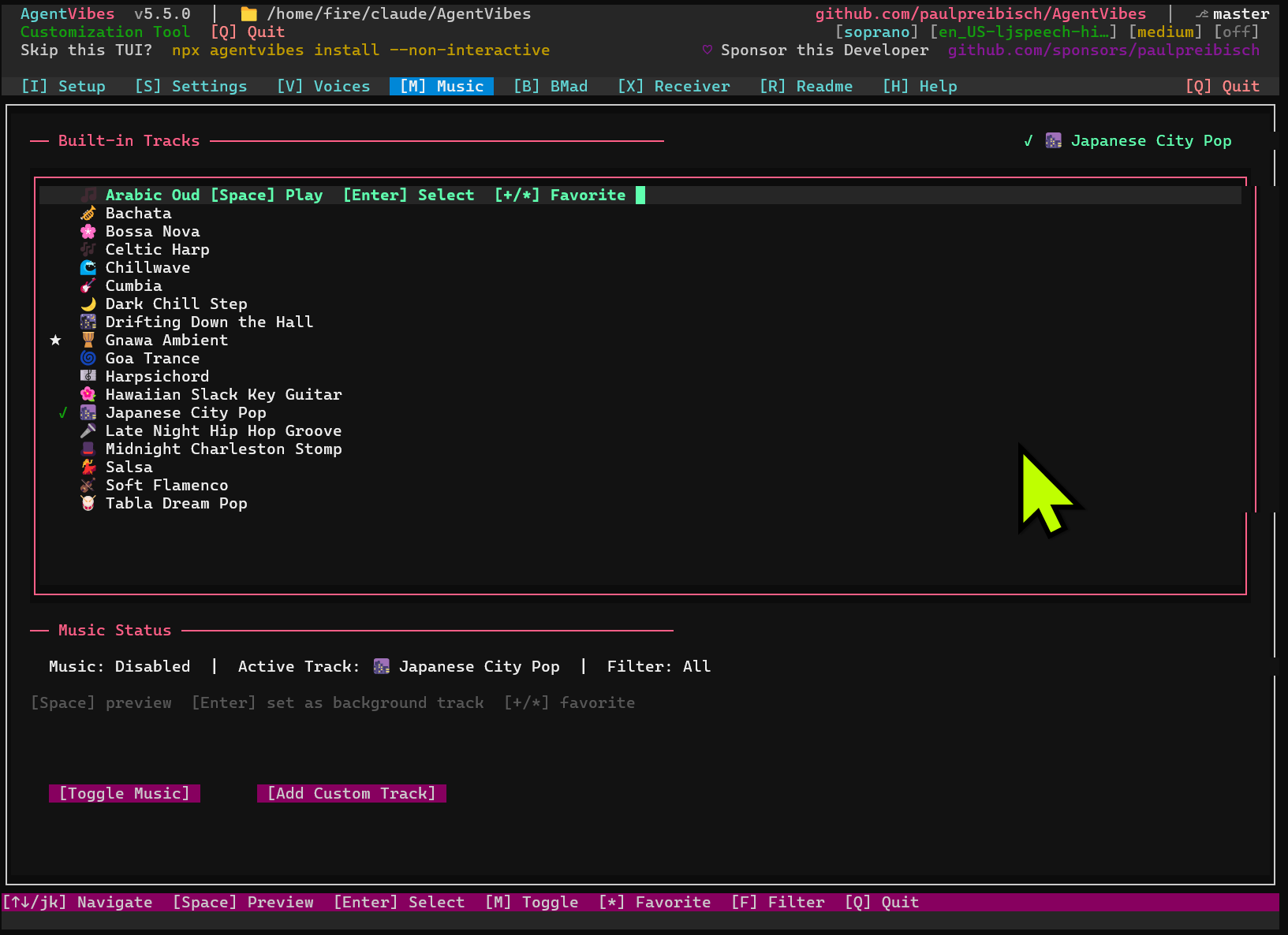
- package/RELEASE_NOTES.md +63 -0
- package/bin/agentvibes.js +28 -0
- package/mcp-server/server.py +17 -1
- package/package.json +1 -1
- package/src/console/tabs/music-tab.js +5 -2
- package/src/console/tabs/voices-tab.js +71 -37
- package/src/installer.js +10 -0
- package/src/services/llm-provider-service.js +1 -1
|
@@ -10,7 +10,13 @@ param(
|
|
|
10
10
|
[string]$Text,
|
|
11
11
|
|
|
12
12
|
[Parameter(Mandatory = $false, Position = 1)]
|
|
13
|
-
[string]$VoiceOverride
|
|
13
|
+
[string]$VoiceOverride,
|
|
14
|
+
|
|
15
|
+
# LLM identity for per-LLM audio routing (e.g. "claude-code", "copilot", "codex").
|
|
16
|
+
# When provided, the router looks up an `llm:<name>` row in audio-effects.cfg
|
|
17
|
+
# to apply LLM-specific voice, pretext, reverb, and engine settings.
|
|
18
|
+
[Parameter(Mandatory = $false)]
|
|
19
|
+
[string]$llm = ""
|
|
14
20
|
)
|
|
15
21
|
|
|
16
22
|
# Configuration paths
|
|
@@ -97,6 +103,201 @@ if ($BgEnabled -or $HasReverb) {
|
|
|
97
103
|
} catch {}
|
|
98
104
|
}
|
|
99
105
|
|
|
106
|
+
# ===========================================================================
|
|
107
|
+
# Per-LLM Audio Routing
|
|
108
|
+
# ===========================================================================
|
|
109
|
+
# When mcp-server/server.py invokes play-tts.ps1 on Windows it passes the
|
|
110
|
+
# -llm flag with the active LLM identity (e.g. "claude-code", "copilot",
|
|
111
|
+
# "codex"). The router reads audio-effects.cfg and looks up the row whose
|
|
112
|
+
# key is `llm:<name>`, allowing each LLM to have its own voice, pretext,
|
|
113
|
+
# reverb, and engine without requiring global settings to be reconfigured.
|
|
114
|
+
#
|
|
115
|
+
# Expected audio-effects.cfg row format (pipe-delimited):
|
|
116
|
+
# llm:<name>|REVERB_PRESET|BACKGROUND_FILE|BACKGROUND_VOLUME|VOICE|PRETEXT|ENGINE
|
|
117
|
+
#
|
|
118
|
+
# Column descriptions:
|
|
119
|
+
# 1. Key - Must start with "llm:" followed by the LLM name
|
|
120
|
+
# 2. REVERB_PRESET - One of: off, light, medium, heavy, cathedral (or blank)
|
|
121
|
+
# 3. BACKGROUND_FILE - Filename relative to .claude/audio/tracks/ (or blank)
|
|
122
|
+
# 4. BACKGROUND_VOLUME - Float 0.0-1.0 (or blank for default 0.25)
|
|
123
|
+
# 5. VOICE - Provider voice name to use (or blank for global default)
|
|
124
|
+
# 6. PRETEXT - Text prepended to all TTS utterances (or blank)
|
|
125
|
+
# 7. ENGINE - Windows engine: windows-sapi, windows-piper, soprano (or blank)
|
|
126
|
+
#
|
|
127
|
+
# Example rows:
|
|
128
|
+
# llm:claude-code|off|||en_US-amy-medium|Agent Vibes Here|windows-piper
|
|
129
|
+
# llm:copilot|light|||en_US-ryan-low||windows-sapi
|
|
130
|
+
# llm:codex|off||||Code complete|windows-piper
|
|
131
|
+
# llm:default|off|||||
|
|
132
|
+
#
|
|
133
|
+
# The "default" key is always looked up when no explicit -llm flag is
|
|
134
|
+
# provided. Configure it via Setup → Default → Configure in the TUI to
|
|
135
|
+
# apply consistent audio settings across all LLM sessions.
|
|
136
|
+
#
|
|
137
|
+
# Security: The -llm value is validated against an allowlist regex so that
|
|
138
|
+
# injected values like "-rf" or path-traversal strings are rejected before
|
|
139
|
+
# they can appear in lookup keys, environment variables, or file paths.
|
|
140
|
+
|
|
141
|
+
# --- Validate -llm parameter format ------------------------------------------
|
|
142
|
+
if ($llm -and $llm -notmatch '^[a-zA-Z0-9][a-zA-Z0-9_-]*$') {
|
|
143
|
+
Write-Host "[WARNING] play-tts.ps1: Invalid -llm value '$llm' ignored" `
|
|
144
|
+
"(must match ^[a-zA-Z0-9][a-zA-Z0-9_-]*`$)" -ForegroundColor Yellow
|
|
145
|
+
$llm = ""
|
|
146
|
+
}
|
|
147
|
+
|
|
148
|
+
# --- Default fallback --------------------------------------------------------
|
|
149
|
+
# An empty $llm routes through the "default" pseudo-LLM. Users who configure
|
|
150
|
+
# an `llm:default` row in audio-effects.cfg get consistent audio settings for
|
|
151
|
+
# every LLM that doesn't pass its own -llm flag — a convenient global override
|
|
152
|
+
# that doesn't require per-LLM configuration.
|
|
153
|
+
if (-not $llm) {
|
|
154
|
+
$llm = "default"
|
|
155
|
+
}
|
|
156
|
+
|
|
157
|
+
# --- Export LLM key for child scripts ----------------------------------------
|
|
158
|
+
# Provider scripts (play-tts-windows-*.ps1) and any other downstream tooling
|
|
159
|
+
# can inspect AGENTVIBES_LLM_KEY to identify which LLM is currently speaking.
|
|
160
|
+
# This mirrors the `export AGENTVIBES_LLM_KEY="llm:${LLM_PROVIDER}"` line in
|
|
161
|
+
# the POSIX play-tts.sh so the cross-platform contract is symmetric.
|
|
162
|
+
$env:AGENTVIBES_LLM_KEY = "llm:$llm"
|
|
163
|
+
|
|
164
|
+
# --- Lookup per-LLM config in audio-effects.cfg ------------------------------
|
|
165
|
+
# Scan project config first, then user-profile config. Stop at first match.
|
|
166
|
+
# Variables are intentionally prefixed with _ to distinguish LLM-local state
|
|
167
|
+
# from the global session state set earlier in this script.
|
|
168
|
+
$_LlmVoice = ""
|
|
169
|
+
$_LlmPretext = ""
|
|
170
|
+
$_LlmReverb = ""
|
|
171
|
+
$_LlmEngine = ""
|
|
172
|
+
$_LlmBgFile = ""
|
|
173
|
+
$_LlmBgVol = ""
|
|
174
|
+
$_LlmKey = "llm:$llm"
|
|
175
|
+
|
|
176
|
+
$_AudioEffectsCfgPaths = @(
|
|
177
|
+
(Join-Path $ClaudeDir "config\audio-effects.cfg"),
|
|
178
|
+
(Join-Path $env:USERPROFILE ".claude\config\audio-effects.cfg")
|
|
179
|
+
)
|
|
180
|
+
|
|
181
|
+
:llmCfgSearch foreach ($_cfgFile in $_AudioEffectsCfgPaths) {
|
|
182
|
+
if ((-not $_LlmVoice) -and (-not $_LlmPretext) -and (Test-Path $_cfgFile)) {
|
|
183
|
+
$cfgContent = Get-Content $_cfgFile -ErrorAction SilentlyContinue
|
|
184
|
+
if ($null -ne $cfgContent) {
|
|
185
|
+
foreach ($_cfgLine in $cfgContent) {
|
|
186
|
+
# Skip blank lines and comment / separator lines
|
|
187
|
+
$stripped = $_cfgLine.Trim()
|
|
188
|
+
if ($stripped.Length -eq 0 -or $stripped.StartsWith('#')) { continue }
|
|
189
|
+
|
|
190
|
+
# Split on pipe; expect at least the key column
|
|
191
|
+
$_cols = $_cfgLine -split '\|'
|
|
192
|
+
if ($_cols.Count -ge 1 -and $_cols[0].Trim() -eq $_LlmKey) {
|
|
193
|
+
# Unpack columns defensively — missing columns stay empty
|
|
194
|
+
if ($_cols.Count -ge 2) { $_LlmReverb = $_cols[1].Trim() }
|
|
195
|
+
if ($_cols.Count -ge 3) { $_LlmBgFile = $_cols[2].Trim() }
|
|
196
|
+
if ($_cols.Count -ge 4) { $_LlmBgVol = $_cols[3].Trim() }
|
|
197
|
+
if ($_cols.Count -ge 5) { $_LlmVoice = $_cols[4].Trim() }
|
|
198
|
+
if ($_cols.Count -ge 6) { $_LlmPretext = $_cols[5].Trim() }
|
|
199
|
+
if ($_cols.Count -ge 7) { $_LlmEngine = $_cols[6].Trim() }
|
|
200
|
+
break llmCfgSearch
|
|
201
|
+
}
|
|
202
|
+
}
|
|
203
|
+
}
|
|
204
|
+
}
|
|
205
|
+
}
|
|
206
|
+
|
|
207
|
+
# --- Voice priority order (highest wins) -------------------------------------
|
|
208
|
+
# 1. Explicit -VoiceOverride parameter (caller always wins)
|
|
209
|
+
# 2. LLM-specific voice from audio-effects.cfg llm:<key> row
|
|
210
|
+
# 3. BMAD agent voice from bmad-voice-map.json (resolved in provider scripts)
|
|
211
|
+
# 4. Global active voice from tts-provider.txt / active-voice.txt
|
|
212
|
+
|
|
213
|
+
# Apply LLM-specific voice only when no explicit -VoiceOverride was passed
|
|
214
|
+
if ($_LlmVoice -and -not $VoiceOverride) {
|
|
215
|
+
$VoiceOverride = $_LlmVoice
|
|
216
|
+
}
|
|
217
|
+
|
|
218
|
+
# --- Apply LLM-specific pretext ----------------------------------------------
|
|
219
|
+
# Prepend the configured pretext (e.g. "Agent Vibes Here") to the speech
|
|
220
|
+
# text. Guard against double-prefixing on re-entrant or looped calls by
|
|
221
|
+
# checking whether the text already starts with the pretext string.
|
|
222
|
+
if ($_LlmPretext -and -not $Text.StartsWith($_LlmPretext)) {
|
|
223
|
+
$Text = "$_LlmPretext, $Text"
|
|
224
|
+
}
|
|
225
|
+
|
|
226
|
+
# --- Reverb override from per-LLM config -------------------------------------
|
|
227
|
+
# If the llm:<key> row specifies a reverb preset, override the file-based
|
|
228
|
+
# $ReverbLevel that was set from reverb-level.txt earlier. The allowlist
|
|
229
|
+
# check is repeated here so a malformed config row can't inject arbitrary
|
|
230
|
+
# strings into the ffmpeg filter chain.
|
|
231
|
+
if ($_LlmReverb) {
|
|
232
|
+
$validReverbLevels = @("off", "light", "medium", "heavy", "cathedral")
|
|
233
|
+
if ($validReverbLevels -contains $_LlmReverb) {
|
|
234
|
+
$ReverbLevel = $_LlmReverb
|
|
235
|
+
$HasReverb = $ReverbLevel -ne "off"
|
|
236
|
+
# If the LLM config enables reverb and ffmpeg wasn't found yet, retry
|
|
237
|
+
if ($HasReverb -and -not $HasFfmpeg) {
|
|
238
|
+
try { $null = Get-Command ffmpeg -ErrorAction Stop; $HasFfmpeg = $true } catch {}
|
|
239
|
+
}
|
|
240
|
+
}
|
|
241
|
+
}
|
|
242
|
+
|
|
243
|
+
# --- Apply LLM-specific engine override --------------------------------------
|
|
244
|
+
# Allowed local Windows engines: windows-sapi, windows-piper, soprano.
|
|
245
|
+
# Transport providers (ssh-remote etc.) are not listed because they forward
|
|
246
|
+
# TTS to a remote host — overriding with a local engine would synthesize on
|
|
247
|
+
# the wrong machine.
|
|
248
|
+
if ($_LlmEngine) {
|
|
249
|
+
$allowedLocalEngines = @("windows-sapi", "windows-piper", "soprano")
|
|
250
|
+
if ($allowedLocalEngines -contains $_LlmEngine) {
|
|
251
|
+
switch ($_LlmEngine) {
|
|
252
|
+
"windows-sapi" { $ProviderScript = "$HooksDir\play-tts-windows-sapi.ps1" }
|
|
253
|
+
"windows-piper" { $ProviderScript = "$HooksDir\play-tts-windows-piper.ps1" }
|
|
254
|
+
"soprano" { $ProviderScript = "$HooksDir\play-tts-soprano.ps1" }
|
|
255
|
+
}
|
|
256
|
+
} else {
|
|
257
|
+
Write-Host "[INFO] play-tts.ps1: Unrecognised engine '$_LlmEngine' in audio-effects.cfg — keeping default provider" -ForegroundColor DarkGray
|
|
258
|
+
}
|
|
259
|
+
}
|
|
260
|
+
|
|
261
|
+
# --- BMAD Party Mode note ----------------------------------------------------
|
|
262
|
+
# When BMAD party mode is active, multiple agents speak in rapid succession.
|
|
263
|
+
# Each agent's voice is resolved from bmad-voice-map.json inside the provider
|
|
264
|
+
# scripts — that BMAD-level routing is independent of this per-LLM system.
|
|
265
|
+
# The -llm flag is still used to set AGENTVIBES_LLM_KEY and can supply a
|
|
266
|
+
# background music track and reverb preset that stays consistent throughout
|
|
267
|
+
# the entire party mode session regardless of which agent is speaking.
|
|
268
|
+
|
|
269
|
+
# --- Diagnostic output -------------------------------------------------------
|
|
270
|
+
# Set AGENTVIBES_VERBOSE=1 in the shell environment to print routing state.
|
|
271
|
+
if ($env:AGENTVIBES_VERBOSE -eq "1") {
|
|
272
|
+
Write-Host "[DEBUG] play-tts.ps1 LLM routing: llm=$llm | voice=$VoiceOverride | engine=$_LlmEngine | pretext=$_LlmPretext" -ForegroundColor DarkCyan
|
|
273
|
+
Write-Host "[DEBUG] play-tts.ps1 LLM routing: reverb=$ReverbLevel | HasFfmpeg=$HasFfmpeg | BgEnabled=$BgEnabled | script=$ProviderScript" -ForegroundColor DarkCyan
|
|
274
|
+
}
|
|
275
|
+
|
|
276
|
+
# ===========================================================================
|
|
277
|
+
# End of Per-LLM Audio Routing
|
|
278
|
+
# ===========================================================================
|
|
279
|
+
|
|
280
|
+
# Helper: play a WAV file preferring ffplay over SoundPlayer.
|
|
281
|
+
# SoundPlayer uses WinMM's low-quality resampler (22050 Hz → 48000 Hz is choppy);
|
|
282
|
+
# ffplay uses libswresample with sinc resampling — no artefacts.
|
|
283
|
+
function Invoke-AudioPlay {
|
|
284
|
+
param([string]$FilePath)
|
|
285
|
+
$fp = (Get-Command ffplay -ErrorAction SilentlyContinue)?.Source
|
|
286
|
+
if (-not $fp) {
|
|
287
|
+
# Watcher sessions may inherit a minimal PATH — refresh from registry
|
|
288
|
+
$env:Path = [System.Environment]::GetEnvironmentVariable("Path","Machine") + ";" +
|
|
289
|
+
[System.Environment]::GetEnvironmentVariable("Path","User")
|
|
290
|
+
$fp = (Get-Command ffplay -ErrorAction SilentlyContinue)?.Source
|
|
291
|
+
}
|
|
292
|
+
if ($fp) {
|
|
293
|
+
& $fp -autoexit -nodisp -loglevel quiet $FilePath 2>$null
|
|
294
|
+
} else {
|
|
295
|
+
$p = $null
|
|
296
|
+
try { $p = New-Object System.Media.SoundPlayer $FilePath; $p.PlaySync() }
|
|
297
|
+
finally { if ($p) { $p.Dispose() } }
|
|
298
|
+
}
|
|
299
|
+
}
|
|
300
|
+
|
|
100
301
|
# If background music or reverb enabled and ffmpeg available, tell provider to skip playback
|
|
101
302
|
if (($BgEnabled -or $HasReverb) -and $HasFfmpeg) {
|
|
102
303
|
$env:AGENTVIBES_NO_PLAY = "1"
|
|
@@ -204,61 +405,27 @@ if (($BgEnabled -or $HasReverb) -and $HasFfmpeg) {
|
|
|
204
405
|
|
|
205
406
|
if ($proc.ExitCode -eq 0 -and (Test-Path $MixedFile) -and (Get-Item $MixedFile).Length -gt 0) {
|
|
206
407
|
# Play the mixed audio
|
|
207
|
-
$player = $null
|
|
208
408
|
try {
|
|
209
|
-
|
|
210
|
-
$player.PlaySync()
|
|
409
|
+
Invoke-AudioPlay $MixedFile
|
|
211
410
|
} catch {
|
|
212
411
|
Write-Host "[WARNING] Mixed playback failed, playing voice only" -ForegroundColor Yellow
|
|
213
|
-
|
|
214
|
-
try {
|
|
215
|
-
$player2 = New-Object System.Media.SoundPlayer $voicePath
|
|
216
|
-
$player2.PlaySync()
|
|
217
|
-
} finally {
|
|
218
|
-
if ($player2) { $player2.Dispose() }
|
|
219
|
-
}
|
|
220
|
-
} finally {
|
|
221
|
-
if ($player) { $player.Dispose() }
|
|
412
|
+
Invoke-AudioPlay $voicePath
|
|
222
413
|
}
|
|
223
414
|
} else {
|
|
224
415
|
# Mixing failed, play voice only
|
|
225
|
-
|
|
226
|
-
try {
|
|
227
|
-
$player = New-Object System.Media.SoundPlayer $voicePath
|
|
228
|
-
$player.PlaySync()
|
|
229
|
-
} finally {
|
|
230
|
-
if ($player) { $player.Dispose() }
|
|
231
|
-
}
|
|
416
|
+
Invoke-AudioPlay $voicePath
|
|
232
417
|
}
|
|
233
418
|
} catch {
|
|
234
419
|
# ffmpeg failed, play voice only
|
|
235
|
-
|
|
236
|
-
try {
|
|
237
|
-
$player = New-Object System.Media.SoundPlayer $voicePath
|
|
238
|
-
$player.PlaySync()
|
|
239
|
-
} finally {
|
|
240
|
-
if ($player) { $player.Dispose() }
|
|
241
|
-
}
|
|
420
|
+
Invoke-AudioPlay $voicePath
|
|
242
421
|
}
|
|
243
422
|
} else {
|
|
244
423
|
# No background track found, play voice only
|
|
245
|
-
|
|
246
|
-
try {
|
|
247
|
-
$player = New-Object System.Media.SoundPlayer $voicePath
|
|
248
|
-
$player.PlaySync()
|
|
249
|
-
} finally {
|
|
250
|
-
if ($player) { $player.Dispose() }
|
|
251
|
-
}
|
|
424
|
+
Invoke-AudioPlay $voicePath
|
|
252
425
|
}
|
|
253
426
|
} else {
|
|
254
427
|
# No background music, play the (possibly reverbed) voice
|
|
255
|
-
|
|
256
|
-
try {
|
|
257
|
-
$player = New-Object System.Media.SoundPlayer $voicePath
|
|
258
|
-
$player.PlaySync()
|
|
259
|
-
} finally {
|
|
260
|
-
if ($player) { $player.Dispose() }
|
|
261
|
-
}
|
|
428
|
+
Invoke-AudioPlay $voicePath
|
|
262
429
|
}
|
|
263
430
|
}
|
|
264
431
|
} else {
|
package/README.md
CHANGED
|
@@ -11,7 +11,7 @@
|
|
|
11
11
|
[](https://github.com/paulpreibisch/AgentVibes/actions/workflows/publish.yml)
|
|
12
12
|
[](https://opensource.org/licenses/Apache-2.0)
|
|
13
13
|
|
|
14
|
-
**Author**: Paul Preibisch ([@997Fire](https://x.com/997Fire)) | **Version**: v5.
|
|
14
|
+
**Author**: Paul Preibisch ([@997Fire](https://x.com/997Fire)) | **Version**: v5.6
|
|
15
15
|
|
|
16
16
|
---
|
|
17
17
|
|
|
@@ -40,38 +40,34 @@ Whether you're coding in Claude Code, chatting in Claude Desktop, using Warp Ter
|
|
|
40
40
|
|
|
41
41
|
---
|
|
42
42
|
|
|
43
|
-
## 🌟 NEW
|
|
43
|
+
## 🌟 NEW IN v5.5 — Per-LLM Audio Routing
|
|
44
44
|
|
|
45
|
-
|
|
45
|
+
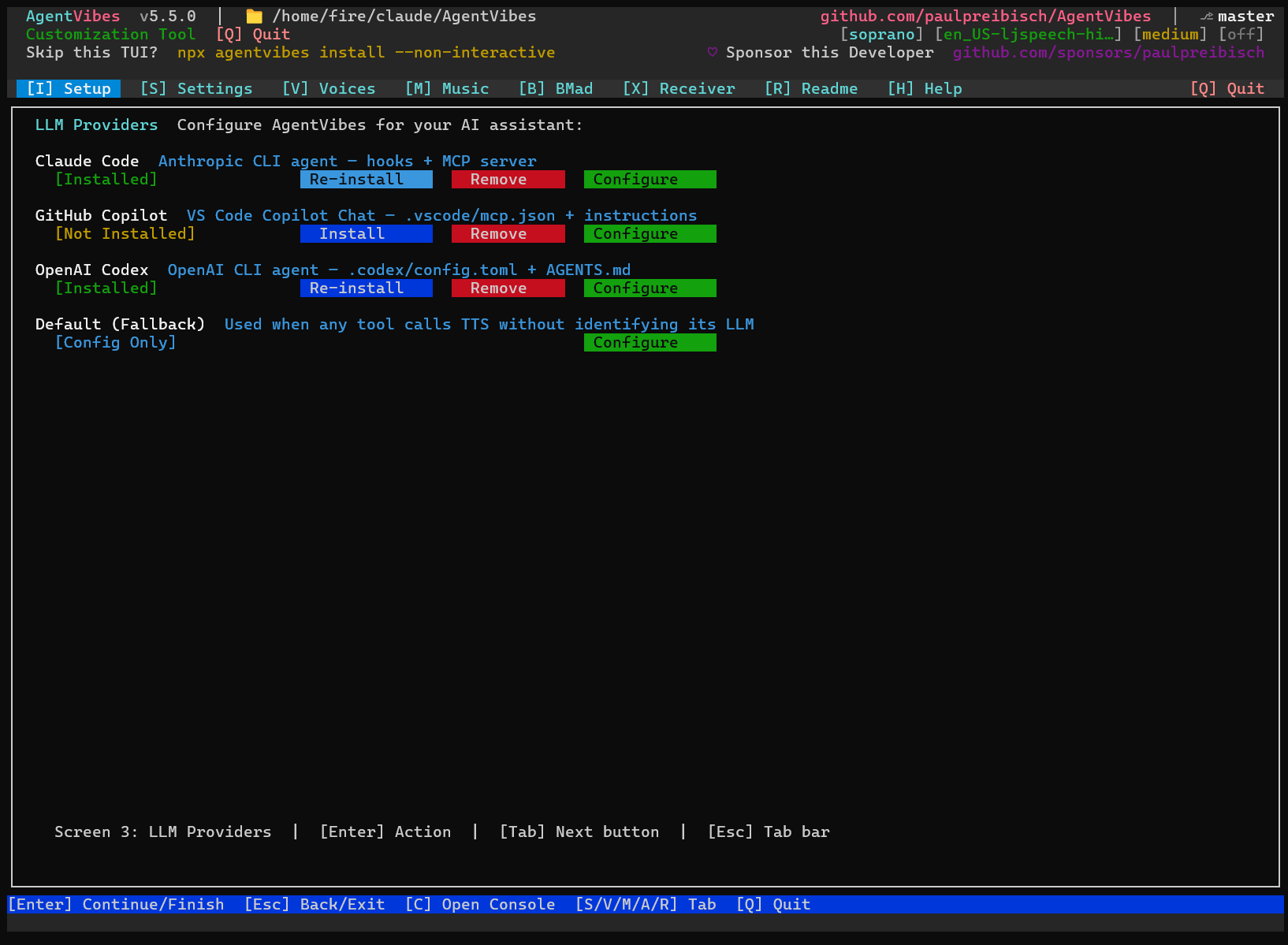
Give **each LLM its own voice, pretext, and music** — Claude Code, Copilot, and Codex can all sound different without touching global settings.
|
|
46
46
|
|
|
47
|
-
|
|
47
|
+
- Add `llm:<name>|...|voice|pretext|engine` rows to `audio-effects.cfg`
|
|
48
|
+
- MCP server auto-detects which LLM is calling and passes `--llm <key>`
|
|
49
|
+
- Configure via **Setup tab → Configure** in the TUI
|
|
48
50
|
|
|
49
|
-
|
|
51
|
+
Also fixed: Windows installer crash (`spinner.info is not a function`) on **reinstall** with an older global AgentVibes install.
|
|
50
52
|
|
|
51
|
-
|
|
52
|
-
npx agentvibes-voice-browser
|
|
53
|
-
```
|
|
53
|
+
---
|
|
54
54
|
|
|
55
|
-
|
|
55
|
+
## v5.4 — TUI Installer, Spinner Fix & Dependency Cleanup
|
|
56
56
|
|
|
57
|
-
|
|
58
|
-
|
|
59
|
-
|
|
60
|
-
|
|
61
|
-
-
|
|
57
|
+
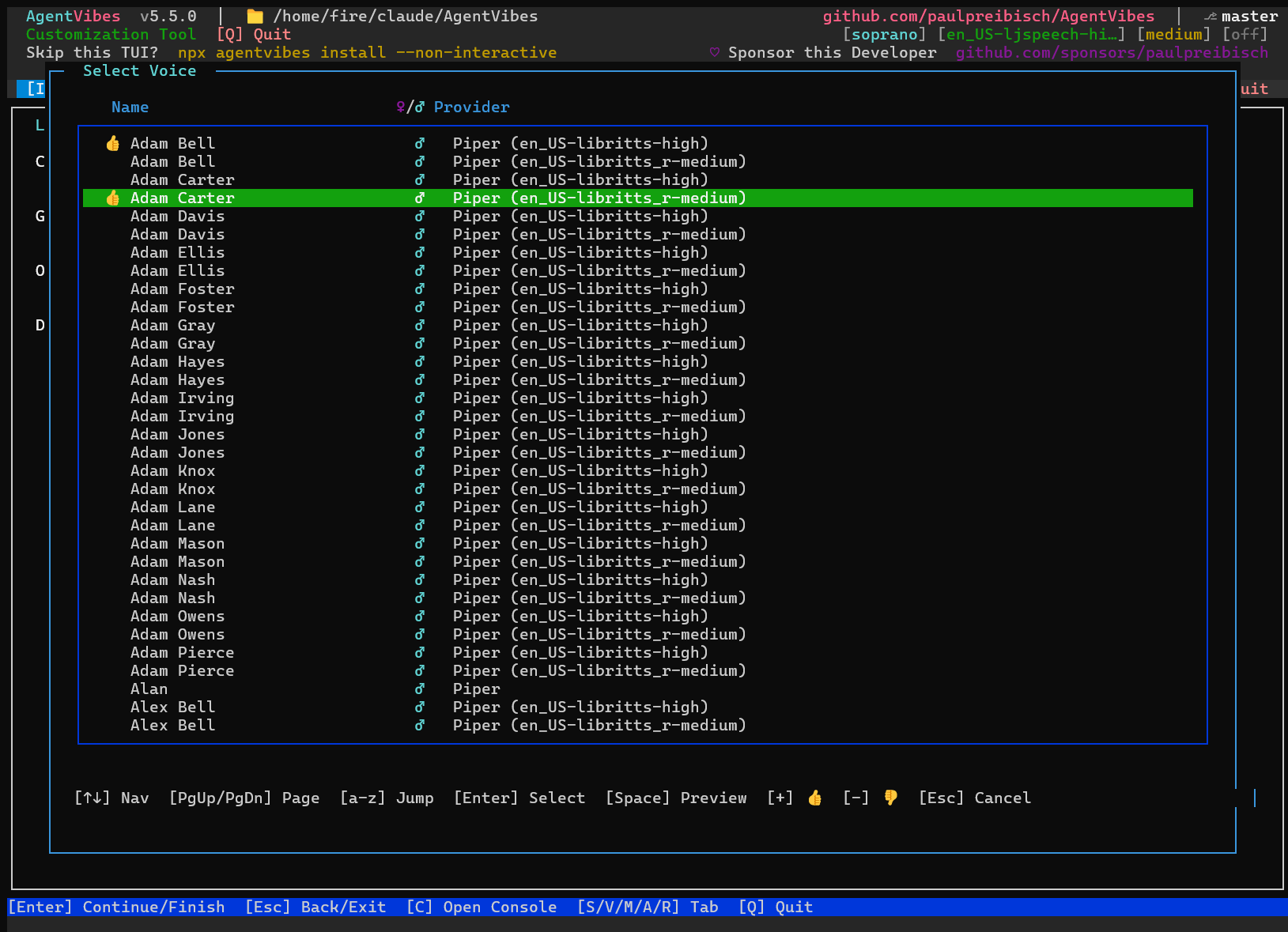
### 🎤 Voice Browser — Browse, Sample & Install 914 Voices
|
|
58
|
+
|
|
59
|
+
**Built right into the TUI — accessible via Setup → Configure → Voice**
|
|
60
|
+
|
|
61
|
+
- 🎧 **Hear Before You Choose** - Press Space to preview any voice instantly
|
|
62
|
+
- ⭐ **Mark Your Favorites** - Thumbs up/down with `+` / `-`
|
|
63
|
+
- 🔍 **Alpha Jump** - Press any letter to jump to names starting with it
|
|
64
|
+
- 📦 **One-Click Select** - Press Enter to set as your voice
|
|
65
|
+
- 🎨 **Beautiful Interface** - Stunning terminal UI built into AgentVibes
|
|
62
66
|
|
|
63
67
|
**914 Total Voices:**
|
|
64
68
|
- 904 High-Quality Piper TTS Speakers (libritts-high model)
|
|
65
69
|
- 10 Hand-Curated Personality Voices
|
|
66
70
|
|
|
67
|
-
**Perfect for:**
|
|
68
|
-
- Finding your ideal AI voice
|
|
69
|
-
- Exploring voice characteristics
|
|
70
|
-
- Quick voice switching
|
|
71
|
-
- Building favorite collections
|
|
72
|
-
|
|
73
|
-
Launch now: `npx agentvibes-voice-browser`
|
|
74
|
-
|
|
75
71
|
---
|
|
76
72
|
|
|
77
73
|
### 💬 Intro Text (Pretext) - Your Personal AI Branding
|
|
@@ -122,9 +118,11 @@ Configure now: `npx agentvibes config intro-text`
|
|
|
122
118
|
**Upload your own background music with battle-tested security!**
|
|
123
119
|
|
|
124
120
|
```bash
|
|
125
|
-
npx agentvibes
|
|
121
|
+
npx agentvibes # press M for Music tab
|
|
126
122
|
```
|
|
127
123
|
|
|
124
|
+
|
|
125
|
+
|
|
128
126
|
Replace the default background tracks with your own audio files for complete sonic branding.
|
|
129
127
|
|
|
130
128
|
**Supported Formats:**
|
|
@@ -242,10 +240,10 @@ All 50+ Piper voices AgentVibes provides are sourced from Hugging Face's open-so
|
|
|
242
240
|
- [📋 Prerequisites](#-prerequisites) - What you actually need (Node.js + optional tools)
|
|
243
241
|
- [✨ What is AgentVibes?](#-what-is-agentvibes) - Overview & key features
|
|
244
242
|
- [🌟 NEW FEATURE HIGHLIGHTS](#-new-feature-highlights) - **START HERE!**
|
|
245
|
-
- [🎤
|
|
243
|
+
- [🎤 Voices Tab](#-voices-tab) - Browse & sample 914 voices in the TUI
|
|
246
244
|
- [💬 Intro Text](#-intro-text-pretext---your-personal-ai-branding) - Custom TTS prefixes
|
|
247
245
|
- [🎵 Custom Background Music](#-custom-background-music---complete-audio-control) - Upload your own tracks
|
|
248
|
-
- [📰 Latest Release](#-latest-release) -
|
|
246
|
+
- [📰 Latest Release](#-latest-release) - v5.5.0 with Per-LLM Audio Routing, Windows Installer Resilience
|
|
249
247
|
- [🪟 Windows Setup Guide for Claude Desktop](mcp-server/WINDOWS_SETUP.md) - Complete Windows installation with WSL & Python
|
|
250
248
|
|
|
251
249
|
### AgentVibes MCP (Natural Language Control)
|
|
@@ -255,7 +253,7 @@ All 50+ Piper voices AgentVibes provides are sourced from Hugging Face's open-so
|
|
|
255
253
|
- [For Claude Code](docs/mcp-setup.md#for-claude-code) - Project-specific setup
|
|
256
254
|
|
|
257
255
|
### Core Features
|
|
258
|
-
- [🎤
|
|
256
|
+
- [🎤 Voices Tab](#-voices-tab) - **Browse and sample 914 voices in the TUI**
|
|
259
257
|
- [🎤 Commands Reference](#-commands-reference) - All available commands
|
|
260
258
|
- [🎙️ Verbosity Control](#%EF%B8%8F-verbosity-control) - Control how much Claude speaks (low/medium/high)
|
|
261
259
|
- [🎭 Personalities vs Sentiments](#-personalities-vs-sentiments) - Two systems explained
|
|
@@ -293,22 +291,17 @@ All 50+ Piper voices AgentVibes provides are sourced from Hugging Face's open-so
|
|
|
293
291
|
|
|
294
292
|
**[v3.6.0 - "Voice Explorer" Release](https://github.com/paulpreibisch/AgentVibes/releases/tag/v3.6.0)** 🎉
|
|
295
293
|
|
|
296
|
-
### 🎤
|
|
297
|
-
|
|
298
|
-
**Browse and sample 914 voices in real-time!**
|
|
294
|
+
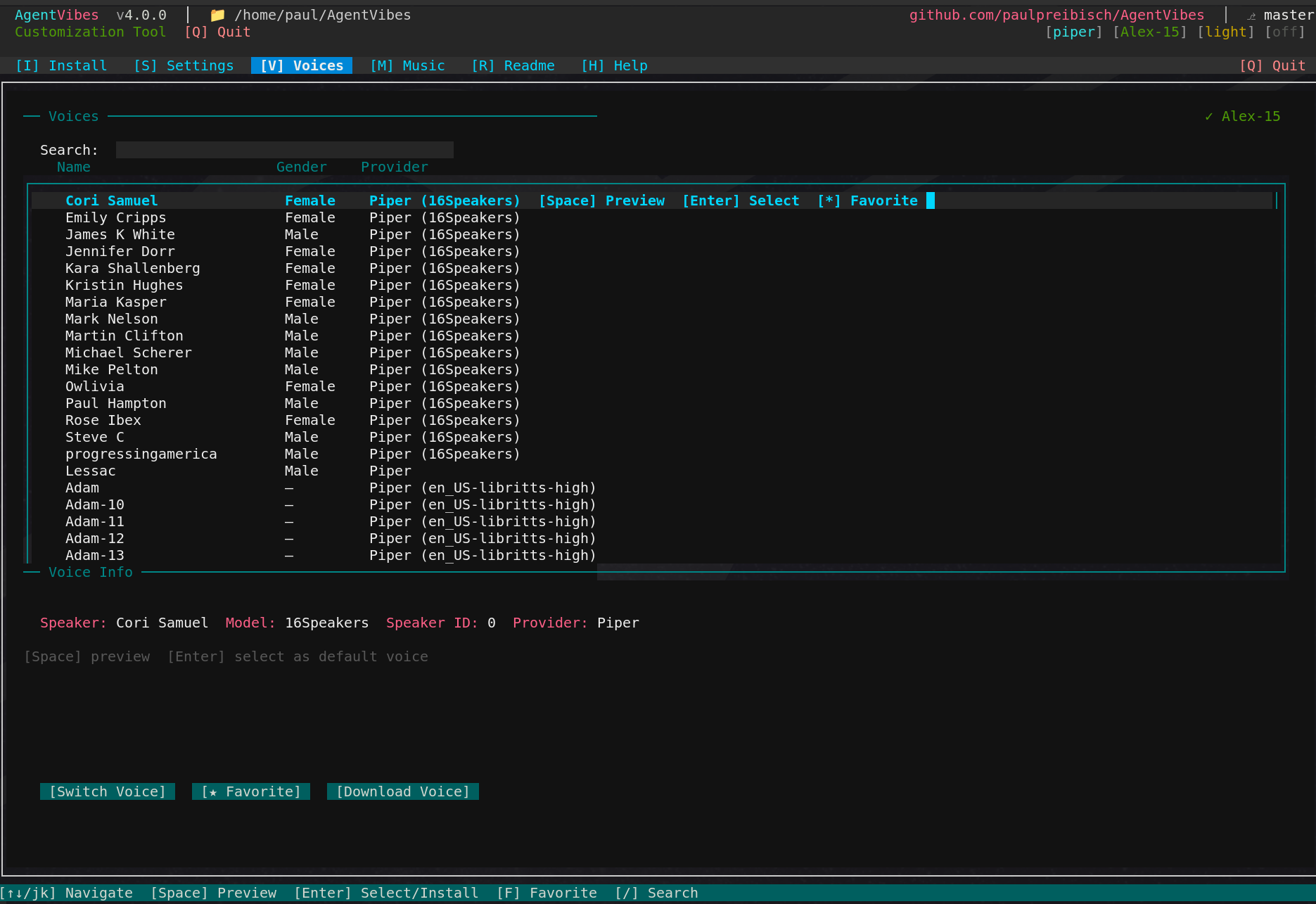
### 🎤 Voices Tab — Browse & Sample 914 Voices
|
|
299
295
|
|
|
300
|
-
|
|
296
|
+
**Built into the TUI — launch with `npx agentvibes` then press V**
|
|
301
297
|
|
|
302
|
-
|
|
303
|
-
npx agentvibes-voice-browser
|
|
304
|
-
```
|
|
298
|
+
|
|
305
299
|
|
|
306
|
-
|
|
307
|
-
- 🎧 Real-time voice sampling - hear before you choose
|
|
300
|
+
- 🎧 Real-time voice sampling - press Space to hear before you choose
|
|
308
301
|
- ⭐ Favorite system - mark your top voices
|
|
309
302
|
- 🔍 Search & filter - find voices by personality, accent, gender
|
|
310
|
-
- 📦 One-click
|
|
311
|
-
- 🎨 Beautiful UI -
|
|
303
|
+
- 📦 One-click select - press Enter to install directly
|
|
304
|
+
- 🎨 Beautiful UI - built into the AgentVibes TUI
|
|
312
305
|
|
|
313
306
|
**914 Total Voices:**
|
|
314
307
|
- 904 Piper speaker variations (libritts-high)
|
|
@@ -371,8 +364,8 @@ npx agentvibes config music
|
|
|
371
364
|
# Install AgentVibes
|
|
372
365
|
npx agentvibes install
|
|
373
366
|
|
|
374
|
-
#
|
|
375
|
-
npx agentvibes
|
|
367
|
+
# Browse voices in the TUI
|
|
368
|
+
npx agentvibes # press V for Voices tab
|
|
376
369
|
```
|
|
377
370
|
|
|
378
371
|
**🐞 Bug Fixes in v3.6.0:**
|
|
@@ -424,6 +417,12 @@ Just say "Switch to Aria voice" or "Speak in Spanish" instead of typing commands
|
|
|
424
417
|
npx agentvibes install
|
|
425
418
|
```
|
|
426
419
|
|
|
420
|
+
|
|
421
|
+
|
|
422
|
+
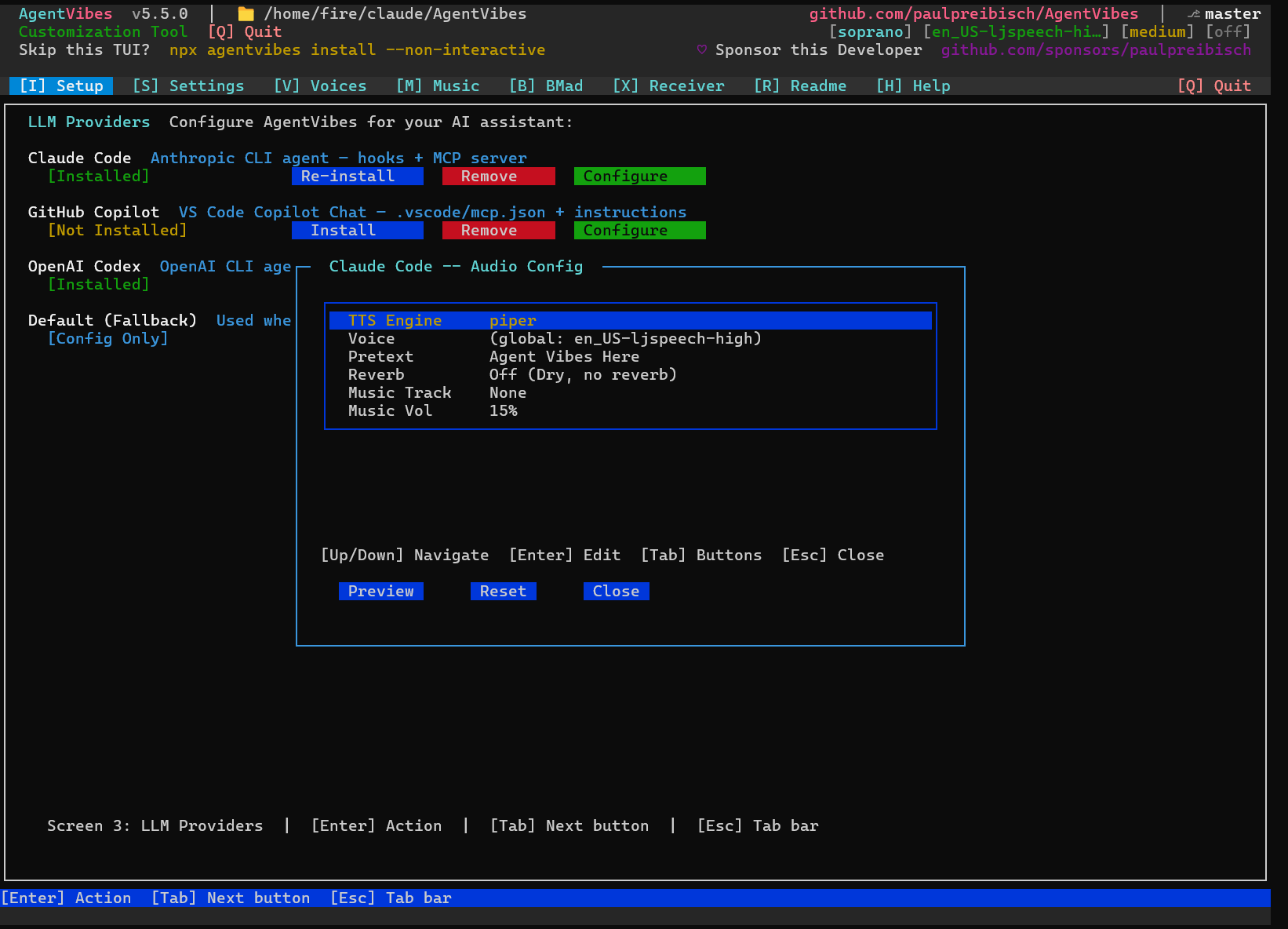
Click **Configure** on any LLM to set its voice, pretext, reverb, and music:
|
|
423
|
+
|
|
424
|
+
|
|
425
|
+
|
|
427
426
|
### 2️⃣ Choose Provider (Auto-Detected)
|
|
428
427
|
- **macOS**: Native `say` provider (100+ voices) ✨
|
|
429
428
|
- **Linux/WSL**: Piper TTS (50+ free voices) 🎙️
|
|
@@ -449,42 +448,37 @@ macOS ships with bash 3.2 (from 2007). After this, everything works perfectly!
|
|
|
449
448
|
|
|
450
449
|
---
|
|
451
450
|
|
|
452
|
-
## 🎤
|
|
453
|
-
|
|
454
|
-
**The easiest way to find your perfect voice!**
|
|
451
|
+
## 🎤 Voice Browser
|
|
455
452
|
|
|
456
|
-
|
|
457
|
-
*Browse, sample, and install from 914 voices with real-time audio preview*
|
|
458
|
-
|
|
459
|
-
### Launch the Browser
|
|
453
|
+
**914 voices — browse, preview, and select right inside the TUI.**
|
|
460
454
|
|
|
461
455
|
```bash
|
|
462
|
-
npx agentvibes
|
|
456
|
+
npx agentvibes # Setup tab → Configure → Voice (or press V for global voice)
|
|
463
457
|
```
|
|
464
458
|
|
|
459
|
+
|
|
460
|
+
|
|
465
461
|
### Features
|
|
466
462
|
|
|
467
463
|
- **914 Voices** - Browse 904 Piper speakers + 10 curated voices
|
|
468
|
-
- **Real-Time Sampling** - Press
|
|
469
|
-
- **Favorite System** -
|
|
470
|
-
- **
|
|
471
|
-
- **One-Click
|
|
472
|
-
- **Beautiful UI** - Stunning console interface
|
|
464
|
+
- **Real-Time Sampling** - Press Space to hear any voice instantly
|
|
465
|
+
- **Favorite System** - Thumbs up `+` / thumbs down `-` for quick filtering
|
|
466
|
+
- **Alpha Jump** - Press any letter key to jump to that part of the list
|
|
467
|
+
- **One-Click Select** - Press Enter to install and switch to a voice
|
|
468
|
+
- **Beautiful UI** - Stunning console interface built into AgentVibes
|
|
473
469
|
|
|
474
470
|
### Keyboard Shortcuts
|
|
475
471
|
|
|
476
472
|
| Key | Action |
|
|
477
473
|
|-----|--------|
|
|
478
|
-
| **
|
|
479
|
-
| **
|
|
480
|
-
|
|
|
481
|
-
|
|
|
482
|
-
| **
|
|
474
|
+
| **Space** | Preview voice sample |
|
|
475
|
+
| **Enter** | Select/Install voice |
|
|
476
|
+
| **+** | Thumbs up (favorite) |
|
|
477
|
+
| **-** | Thumbs down |
|
|
478
|
+
| **PgUp / PgDn** | Page through list |
|
|
483
479
|
| **↑/↓** | Navigate list |
|
|
484
|
-
| **
|
|
485
|
-
| **
|
|
486
|
-
| **H** | Show help |
|
|
487
|
-
| **Q** | Quit |
|
|
480
|
+
| **a-z** | Jump to names starting with letter |
|
|
481
|
+
| **Esc** | Cancel / close |
|
|
488
482
|
|
|
489
483
|
### Voice Categories
|
|
490
484
|
|
|
@@ -500,13 +494,13 @@ npx agentvibes-voice-browser
|
|
|
500
494
|
|
|
501
495
|
### Finding Your Perfect Voice
|
|
502
496
|
|
|
503
|
-
1. **
|
|
504
|
-
2. **
|
|
505
|
-
3. **Sample voices:** Navigate with arrows, press
|
|
506
|
-
4. **Mark favorites:** Press
|
|
507
|
-
5. **
|
|
497
|
+
1. **Open voice browser:** Setup tab → Configure → navigate to Voice → Enter
|
|
498
|
+
2. **Jump alphabetically:** Press a letter key to jump to that name
|
|
499
|
+
3. **Sample voices:** Navigate with arrows, press Space to hear
|
|
500
|
+
4. **Mark favorites:** Press `+` on voices you like
|
|
501
|
+
5. **Select:** Press Enter to set as your voice
|
|
508
502
|
|
|
509
|
-
**Pro Tip:** Use
|
|
503
|
+
**Pro Tip:** Use PgUp/PgDn to page quickly through 900+ voices!
|
|
510
504
|
|
|
511
505
|
[↑ Back to top](#-table-of-contents)
|
|
512
506
|
|
|
@@ -855,18 +849,13 @@ AgentVibes provides **50+ slash commands** and **natural language MCP equivalent
|
|
|
855
849
|
|
|
856
850
|
**[→ View Complete Command Reference](docs/commands.md)** - All voice, system, personality, sentiment, language, and BMAD commands with MCP equivalents
|
|
857
851
|
|
|
858
|
-
###
|
|
852
|
+
### Voices Tab Commands
|
|
859
853
|
|
|
860
854
|
```bash
|
|
861
|
-
# Launch
|
|
862
|
-
npx agentvibes
|
|
863
|
-
|
|
864
|
-
# Or use global command (if installed globally)
|
|
865
|
-
agentvibes-voice-browser
|
|
855
|
+
# Launch the TUI and open Voices tab
|
|
856
|
+
npx agentvibes # then press V
|
|
866
857
|
```
|
|
867
858
|
|
|
868
|
-
**MCP Equivalent:** Currently CLI-only (no MCP command)
|
|
869
|
-
|
|
870
859
|
### Intro Text Commands
|
|
871
860
|
|
|
872
861
|
```bash
|
|
@@ -1005,7 +994,7 @@ Every task acknowledgment plays **twice** - first in English, then in your targe
|
|
|
1005
994
|
|
|
1006
995
|
## 🗣️ Voice Library
|
|
1007
996
|
|
|
1008
|
-
**
|
|
997
|
+
**Browse voices in the TUI:** Run `npx agentvibes` and press **V** to open the **[Voices Tab](#-voices-tab)** — browse, sample, and install from 914 voices without leaving your terminal.
|
|
1009
998
|
|
|
1010
999
|
### Friendly Voice Names
|
|
1011
1000
|
|
|
@@ -1047,13 +1036,11 @@ The BMAD plugin detects when you activate a BMAD agent (e.g., `/BMad:agents:pm`)
|
|
|
1047
1036
|
|
|
1048
1037
|
**Version Support**: AgentVibes supports both BMAD v4 and v6-alpha installations. Version detection is automatic - just install BMAD and AgentVibes will detect and configure itself correctly!
|
|
1049
1038
|
|
|
1050
|
-
### 🎭
|
|
1051
|
-
|
|
1052
|
-
Open the **BMad** tab in the AgentVibes TUI (`npx agentvibes`) to configure which voice each agent uses:
|
|
1039
|
+
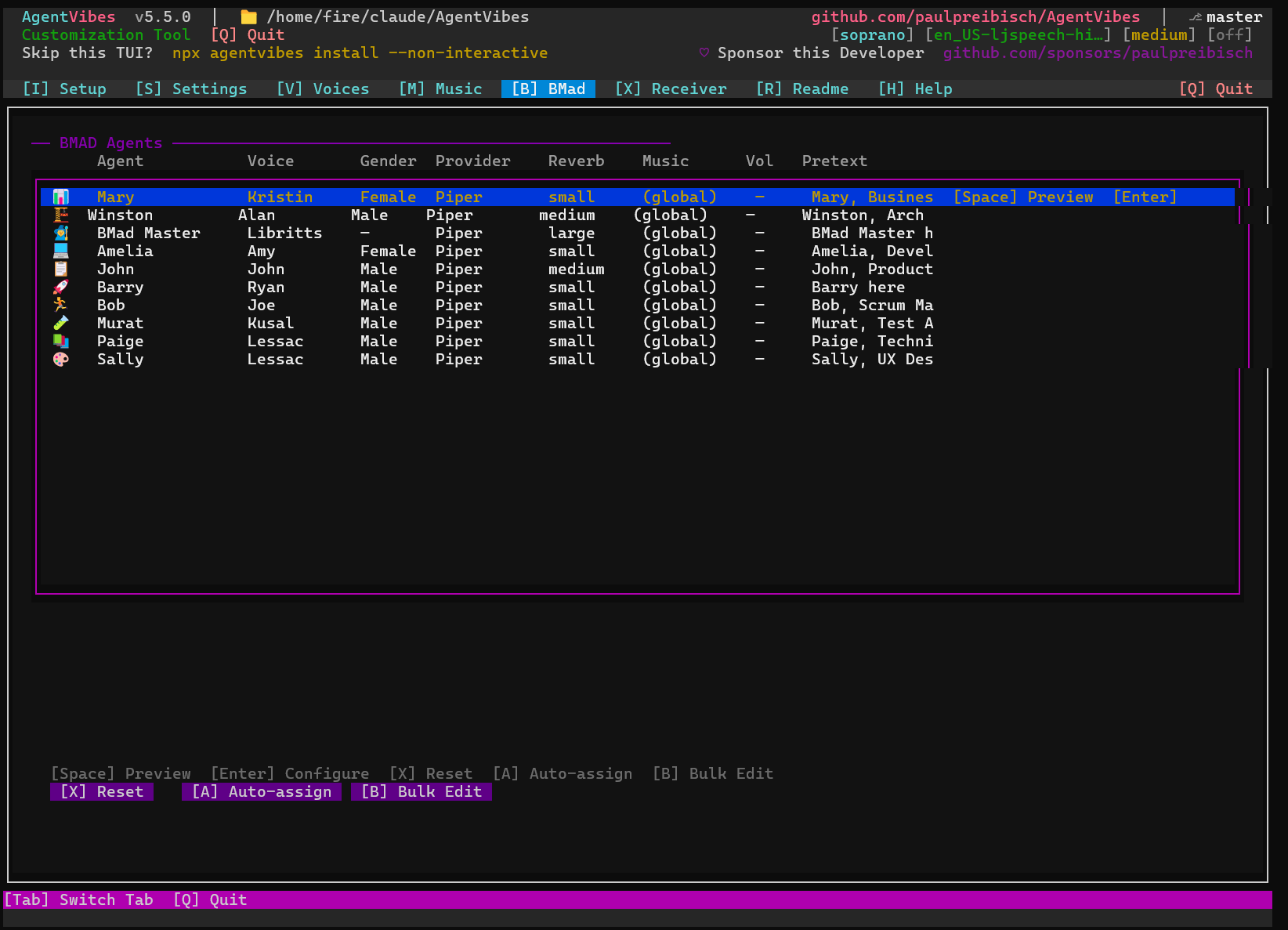
### 🎭 BMad Tab — Assign a Voice to Every Agent
|
|
1053
1040
|
|
|
1054
|
-
|
|
1041
|
+
Open the **BMad** tab in the AgentVibes TUI (`npx agentvibes` → press **B**) to configure which voice, reverb, and pretext each BMAD agent uses:
|
|
1055
1042
|
|
|
1056
|
-
|
|
1043
|
+
|
|
1057
1044
|
|
|
1058
1045
|
### 🔊 TTS Injection: How It Works
|
|
1059
1046
|
|
|
@@ -1877,10 +1864,10 @@ Both do the exact same thing - MCP is more convenient, slash commands are more t
|
|
|
1877
1864
|
- **Optional**: sox (audio effects), ffmpeg (background music, padding)
|
|
1878
1865
|
- All TTS generation works without optional dependencies - they just enhance the experience
|
|
1879
1866
|
|
|
1880
|
-
###
|
|
1867
|
+
### Voices Tab & New Features
|
|
1881
1868
|
|
|
1882
|
-
**Q: How do I
|
|
1883
|
-
**A:**
|
|
1869
|
+
**Q: How do I browse and select voices?**
|
|
1870
|
+
**A:** Run `npx agentvibes` and press **V** to open the Voices tab. Use arrow keys to navigate, Space to preview voices, Enter to select/install, F to favorite, and / to search.
|
|
1884
1871
|
|
|
1885
1872
|
**Q: What are friendly voice names?**
|
|
1886
1873
|
**A:** Instead of technical IDs like `en_US-ryan-high`, you can now use simple names like "Ryan" when switching voices. All 904+ voices have friendly names matched to their characteristics.
|
|
@@ -1898,7 +1885,7 @@ Both do the exact same thing - MCP is more convenient, slash commands are more t
|
|
|
1898
1885
|
**A:** No! You can type "ryan", "Ryan", or "RYAN" - they all work. The voice resolution is case-insensitive.
|
|
1899
1886
|
|
|
1900
1887
|
**Q: Can I favorite voices without installing them?**
|
|
1901
|
-
**A:** Yes! In the
|
|
1888
|
+
**A:** Yes! In the Voices tab, press 'F' to mark any voice as a favorite. Favorites are saved and you can filter to show only favorites later.
|
|
1902
1889
|
|
|
1903
1890
|
**Q: Does custom music work with all TTS providers?**
|
|
1904
1891
|
**A:** Yes! Custom background music works with Piper TTS, Soprano, macOS Say, and Windows SAPI.
|
package/RELEASE_NOTES.md
CHANGED
|
@@ -1,5 +1,68 @@
|
|
|
1
1
|
# AgentVibes Release Notes
|
|
2
2
|
|
|
3
|
+
## 📸 v5.6.0 — TUI Screenshots & Documentation Cleanup
|
|
4
|
+
|
|
5
|
+
**Released:** 2026-04-28
|
|
6
|
+
|
|
7
|
+
### 📸 TUI Screenshots Added
|
|
8
|
+
|
|
9
|
+
Added real screenshots of every major TUI tab to the README:
|
|
10
|
+
|
|
11
|
+
- **Setup tab** — LLM Providers screen (Claude Code, Copilot, Codex, Default)
|
|
12
|
+
- **Configure dialog** — Per-LLM audio config (voice, pretext, reverb, music)
|
|
13
|
+
- **Voice Browser** — Select Voice dialog with alpha-jump, thumbs up/down, 914 voices
|
|
14
|
+
- **Music tab** — Built-in tracks list with preview and toggle
|
|
15
|
+
- **BMad tab** — Agent voice assignment (voice, reverb, music, pretext per agent)
|
|
16
|
+
|
|
17
|
+
### 🧹 Documentation Cleanup
|
|
18
|
+
|
|
19
|
+
- Removed all `npx agentvibes-voice-browser` references (tool retired, replaced by TUI)
|
|
20
|
+
- Renamed "Voice Browser" section to reflect TUI-native access via Setup → Configure → Voice
|
|
21
|
+
- All image paths now use absolute GitHub raw URLs (renders correctly on npmjs.com)
|
|
22
|
+
- Fixed BMad section placeholder screenshot replaced with real screenshot
|
|
23
|
+
|
|
24
|
+
---
|
|
25
|
+
|
|
26
|
+
## 🎵 v5.5.0 — Per-LLM Audio Routing & Windows Installer Resilience
|
|
27
|
+
|
|
28
|
+
**Released:** 2026-04-27
|
|
29
|
+
|
|
30
|
+
### 🆕 Per-LLM Audio Routing
|
|
31
|
+
Each LLM (Claude Code, Copilot, Codex) can now have its own voice, pretext, reverb, and
|
|
32
|
+
background-music settings. The MCP server passes `--llm <key>` to both `play-tts.sh`
|
|
33
|
+
(Linux/macOS) and `play-tts.ps1` (Windows), and the scripts look up `llm:<key>` rows in
|
|
34
|
+
`audio-effects.cfg`. Default rows for `claude-code`, `copilot`, and `codex` ship out of the
|
|
35
|
+
box; configure them via **Setup → Default → Configure** in the TUI.
|
|
36
|
+
|
|
37
|
+
### 🐛 Windows Installer Crash Fix
|
|
38
|
+
Fixed `spinner.info is not a function` error that crashed AgentVibes **reinstalls** on Windows
|
|
39
|
+
when users had an older global install. All 10 file-copy functions in the installer now wrap
|
|
40
|
+
their spinner with `createRobustSpinner()` so stale callers can never cause a crash regardless
|
|
41
|
+
of which methods they expose.
|
|
42
|
+
|
|
43
|
+
### 🎶 Windows Background Music Parity
|
|
44
|
+
Windows TTS playback now prefers `ffplay` (sinc resampling, no artefacts) over the low-quality
|
|
45
|
+
WinMM `SoundPlayer` resampler. The new `Invoke-AudioPlay` helper handles the fallback
|
|
46
|
+
transparently — if `ffplay` is unavailable, `SoundPlayer` is used as before.
|
|
47
|
+
|
|
48
|
+
### 🎉 Party Mode Cross-Platform Entry Point
|
|
49
|
+
BMAD party mode step files and the Copilot skill now consistently reference
|
|
50
|
+
`node bin/bmad-speak.js` — the single cross-platform entry point that delegates to
|
|
51
|
+
`bmad-speak.ps1` on Windows and `bmad-speak.sh` elsewhere.
|
|
52
|
+
|
|
53
|
+
### 🔧 Other Fixes
|
|
54
|
+
- `play-tts.sh` now accepts a named `--llm <key>` flag in addition to the `LLM_PROVIDER` env var
|
|
55
|
+
- `mcp-server/server.py` routes `AGENTVIBES_LLM` → `CLAUDECODE=1` → `AGENTVIBES_MCP_FALLBACK`
|
|
56
|
+
priority chain and forwards the resolved key as `-llm`/`--llm` to TTS scripts
|
|
57
|
+
- Added `audio-effects.cfg` rows for `llm:claude-code`, `llm:copilot`, `llm:codex`
|
|
58
|
+
- Added `command-routing.test.js` and `ConfigService` unit tests
|
|
59
|
+
- npm pack content guard now catches untracked publishable files
|
|
60
|
+
|
|
61
|
+
### 📊 Technical
|
|
62
|
+
- 231 tests passing (0 failures)
|
|
63
|
+
|
|
64
|
+
---
|
|
65
|
+
|
|
3
66
|
## 🎛️ v5.4.0 — TUI Installer, Spinner Fix & Dependency Cleanup
|
|
4
67
|
|
|
5
68
|
**Released:** 2026-04-22
|