agentvibes 5.11.0 → 5.11.2-beta.0
This diff represents the content of publicly available package versions that have been released to one of the supported registries. The information contained in this diff is provided for informational purposes only and reflects changes between package versions as they appear in their respective public registries.
- package/README.md +127 -2042
- package/RELEASE_NOTES.md +13 -0
- package/package.json +1 -1
- package/src/console/tabs/setup-tab.js +36 -3
package/README.md
CHANGED
|
@@ -1,2151 +1,236 @@
|
|
|
1
|
-
|
|
1
|
+
<div align="center">
|
|
2
2
|
|
|
3
|
-
|
|
4
|
-
>
|
|
5
|
-
> 🌐 **[agentvibes.org](https://agentvibes.org)**
|
|
6
|
-
>
|
|
7
|
-
> Professional text-to-speech for **Claude Code**, **Claude Desktop**, **Warp Terminal**, and **OpenClaw** - **Soprano** (Neural), **Piper TTS** (Free!), **macOS Say** (Built-in!), or **Windows SAPI** (Zero Setup!)
|
|
3
|
+
# 🎙️ AgentVibes
|
|
8
4
|
|
|
9
|
-
|
|
10
|
-
[](https://github.com/paulpreibisch/AgentVibes/actions/workflows/test.yml)
|
|
11
|
-
[](https://github.com/paulpreibisch/AgentVibes/actions/workflows/publish.yml)
|
|
12
|
-
[](https://opensource.org/licenses/Apache-2.0)
|
|
13
|
-
|
|
14
|
-
**Author**: Paul Preibisch ([@997Fire](https://x.com/997Fire)) | **Version**: v5.11.0
|
|
15
|
-
|
|
16
|
-
---
|
|
17
|
-
|
|
18
|
-
## 🚀 Quick Links
|
|
19
|
-
|
|
20
|
-
| I want to... | Go here |
|
|
21
|
-
|--------------|---------|
|
|
22
|
-
| **Install AgentVibes** (just `npx`, no git!) | [Quick Start Guide](docs/quick-start.md) |
|
|
23
|
-
| **Run Claude Code on Android** | [Android/Termux Setup](#-android--termux) |
|
|
24
|
-
| **Secure OpenClaw on Remote Server** | [Security Hardening Guide](docs/security-hardening-guide.md) ⚠️ |
|
|
25
|
-
| **Understand what I need** | [Prerequisites](#-prerequisites) |
|
|
26
|
-
| **Set up on Windows (Native)** | [Windows Native Setup](WINDOWS-SETUP.md) |
|
|
27
|
-
| **Set up on Windows (Claude Desktop/WSL)** | [Windows WSL Guide](mcp-server/WINDOWS_SETUP.md) |
|
|
28
|
-
| **Use with OpenClaw** | [OpenClaw Integration](#-openclaw-integration) |
|
|
29
|
-
| **Use natural language** | [MCP Setup](docs/mcp-setup.md) |
|
|
30
|
-
| **Switch voices** | [Voice Library](docs/voice-library.md) |
|
|
31
|
-
| **Fix issues** (git-lfs? MCP tokens? Read this!) | [Troubleshooting](docs/troubleshooting.md) & [FAQ](#-frequently-asked-questions-faq) |
|
|
32
|
-
|
|
33
|
-
---
|
|
34
|
-
|
|
35
|
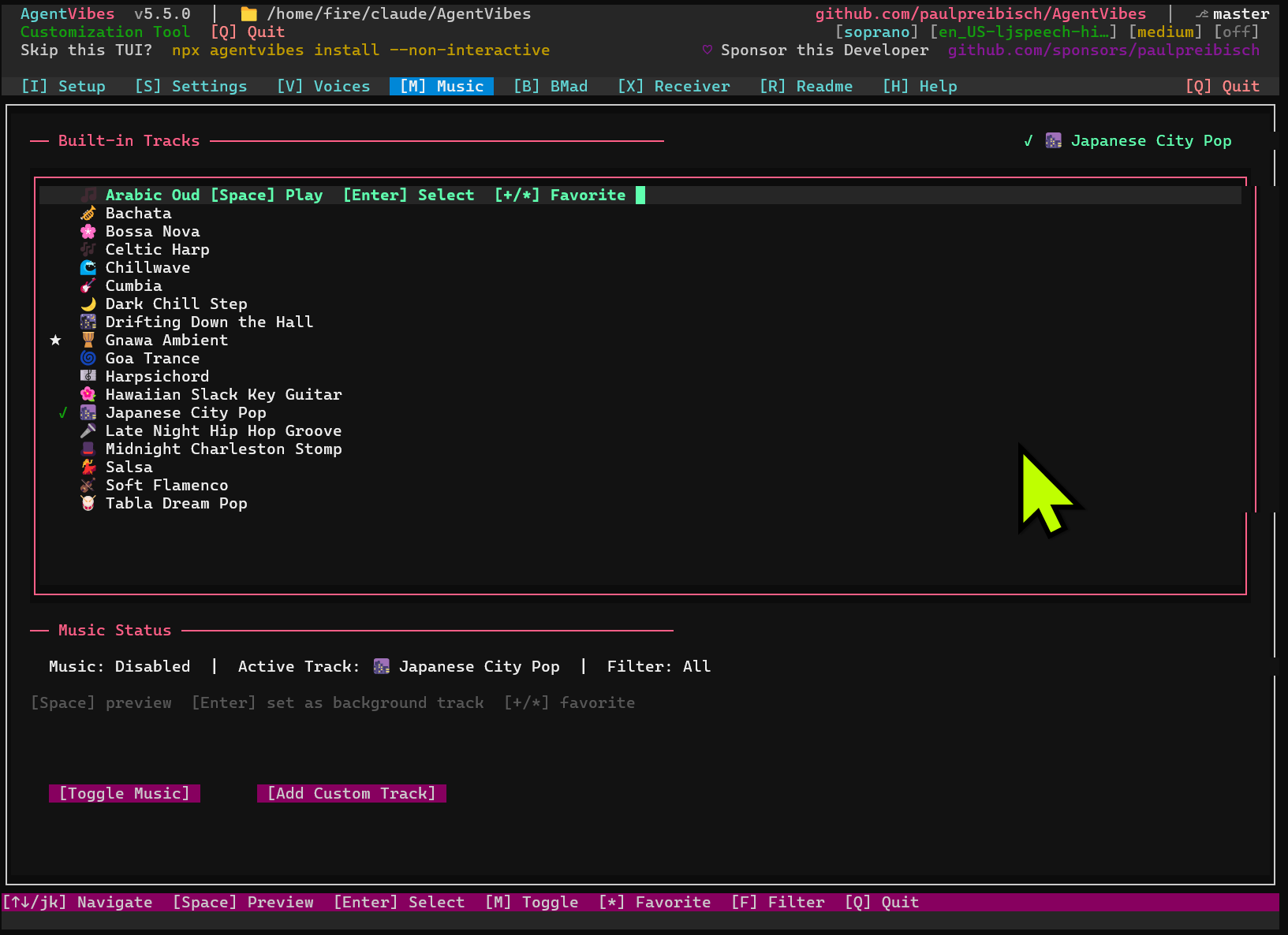
-
## ✨ What is AgentVibes?
|
|
36
|
-
|
|
37
|
-
**AgentVibes adds lively voice narration to your AI coding sessions!**
|
|
38
|
-
|
|
39
|
-
Whether you're coding in Claude Code, chatting in Claude Desktop, using Warp Terminal, or running OpenClaw - AgentVibes brings AI to life with professional voices and personalities.
|
|
40
|
-
|
|
41
|
-
---
|
|
42
|
-
|
|
43
|
-
## 🌟 NEW IN v5.9.0 — SSH Remote + Windows Home Directory Fixes
|
|
44
|
-
|
|
45
|
-
**SSH remote no longer hangs:** The SSH transport now applies a 10-second connection
|
|
46
|
-
timeout, so a stuck or unreachable remote host surfaces an error quickly instead of
|
|
47
|
-
blocking forever.
|
|
48
|
-
|
|
49
|
-
**Windows home directory detection fixed:** `detectRemoteLlm()` now uses null-coalescing
|
|
50
|
-
(`??`) to fall back to `os.homedir()` only when `HOME` is genuinely unset — safer than
|
|
51
|
-
the previous `||` which could misfire on an empty string.
|
|
52
|
-
|
|
53
|
-
## v5.8.0 — Soprano Now Works + Voice Picker Fixed for All Engines
|
|
54
|
-
|
|
55
|
-
**Soprano TTS actually works now:** Soprano (our neural TTS engine) was silently broken
|
|
56
|
-
on Windows since launch — wrong binary name, stripped PATH, wav path sent to the wrong
|
|
57
|
-
output stream, and no auto-start for the WebUI server. All fixed. Install with
|
|
58
|
-
`pip install soprano-tts`, select Soprano in the setup tab, and AgentVibes handles
|
|
59
|
-
the rest.
|
|
60
|
-
|
|
61
|
-
**Voice picker now works for Windows SAPI and macOS Say:** Previously the picker showed
|
|
62
|
-
the entire Piper voice catalog even when SAPI or macOS Say was selected, and Space-bar
|
|
63
|
-
preview played through the wrong engine. The picker now shows exactly one item for each
|
|
64
|
-
native engine and previews through the correct binary.
|
|
65
|
-
|
|
66
|
-
**Auto-save no longer breaks your engine setting:** Saving an LLM config no longer silently
|
|
67
|
-
overwrites your chosen engine back to Piper.
|
|
68
|
-
|
|
69
|
-
## v5.7.7 — Party Mode Voice Restore + Polish
|
|
70
|
-
|
|
71
|
-
**Party mode agents now speak again:** BMAD `/party-mode` now reliably invokes the correct AgentVibes skill, and each agent's response is spoken aloud in their unique voice with per-agent music, pretext, and reverb — loaded automatically from `~/.agentvibes/bmad-voice-map.json`.
|
|
72
|
-
|
|
73
|
-
**New bundled track:** 🌌 CelestialVelvet added to the built-in music catalog.
|
|
74
|
-
|
|
75
|
-
**TUI contrast fix:** Selected rows in Voices and Agents tabs no longer render unreadable gray text.
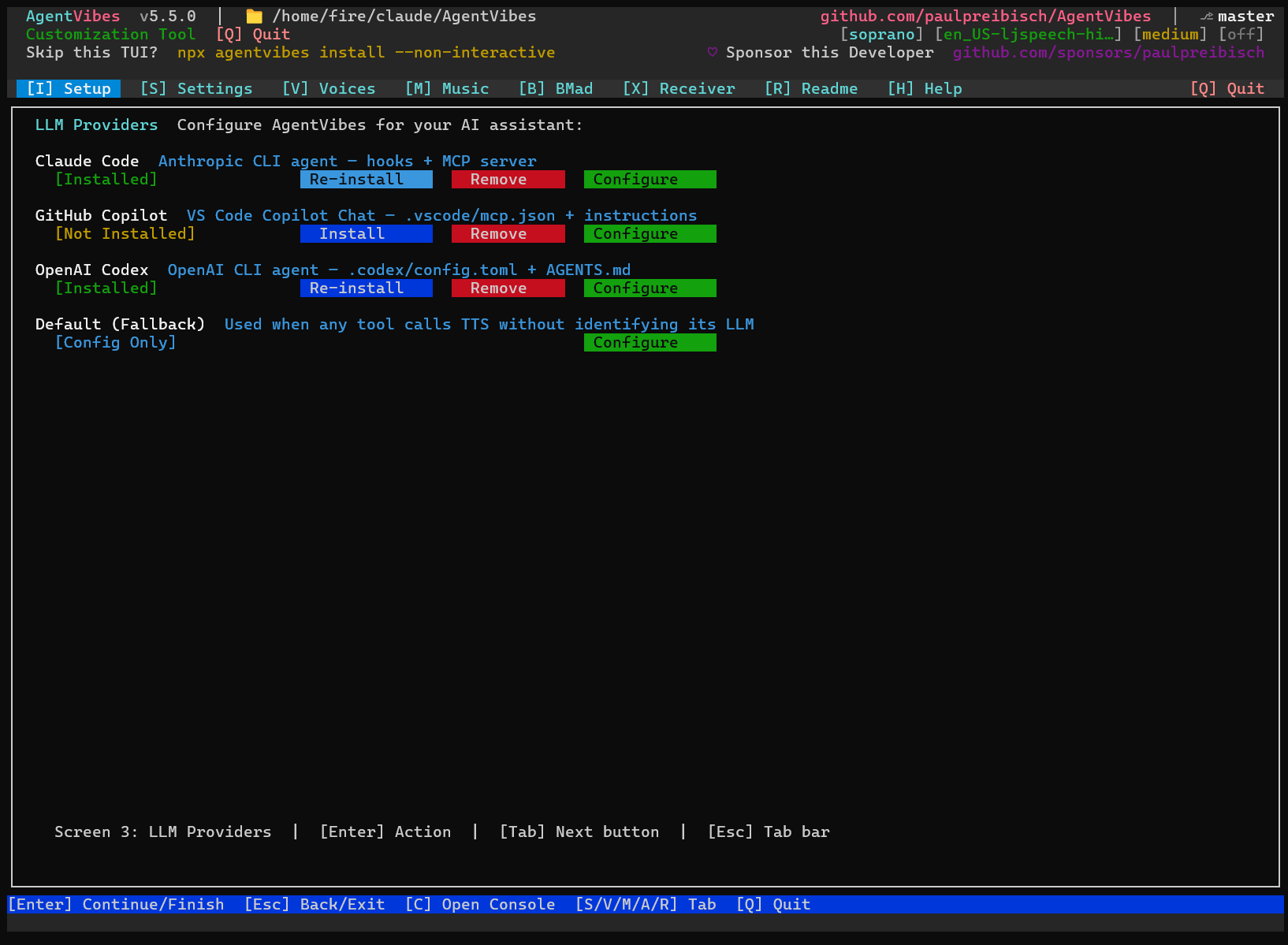
|
|
76
|
-
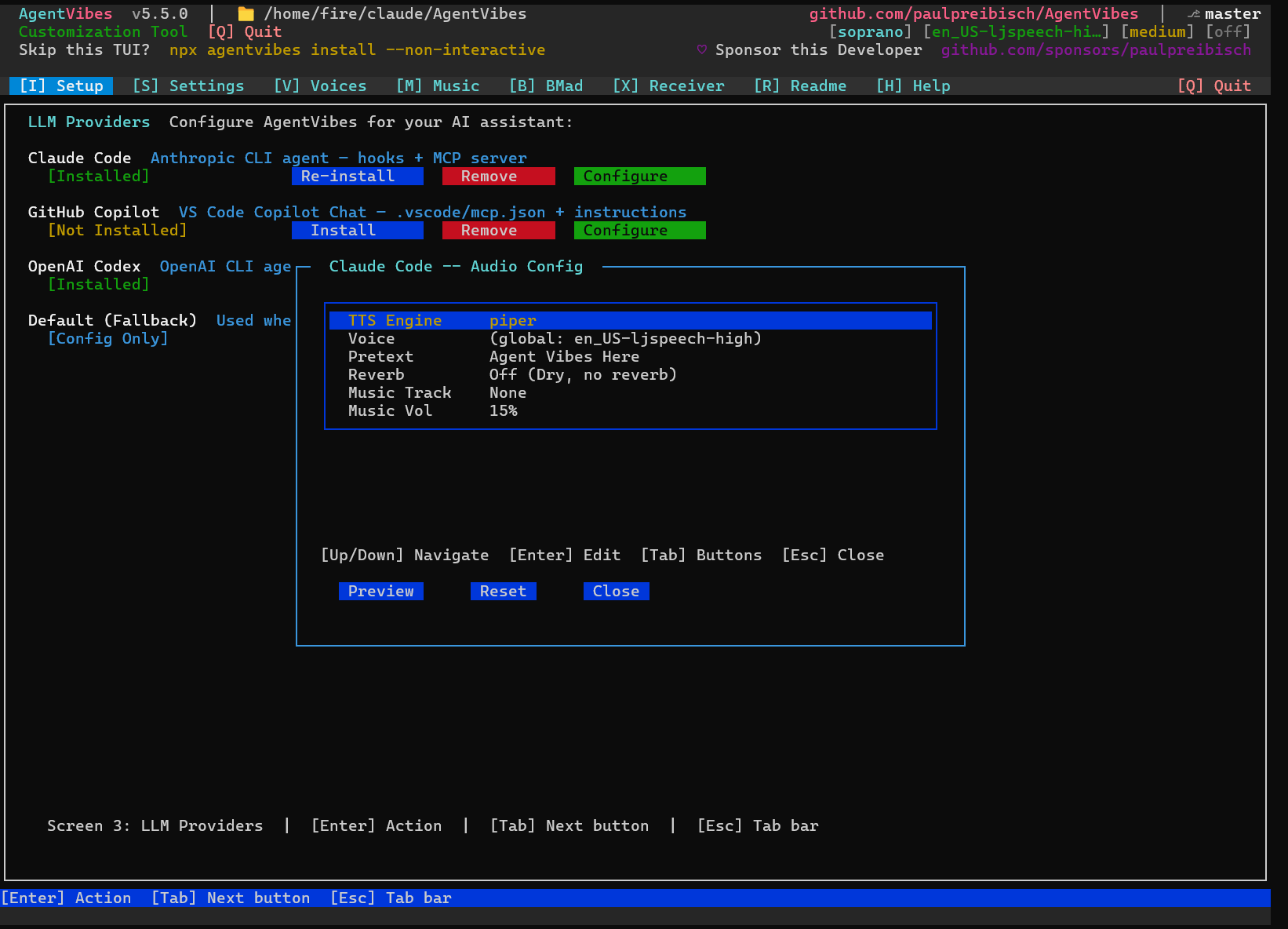
|
|
77
|
-
**SSH remote:** Fixed "wait: pid is not a child of this shell" error in `play-tts-ssh-remote.sh`.
|
|
78
|
-
|
|
79
|
-
## v5.7.6 — SSH Remote Payload Integrity + Receiver Rewrite
|
|
80
|
-
|
|
81
|
-
**SSH remote music/voice fix:** The correct project music track and voice now reach the remote receiver — previously the global config was used instead of the active project's settings.
|
|
82
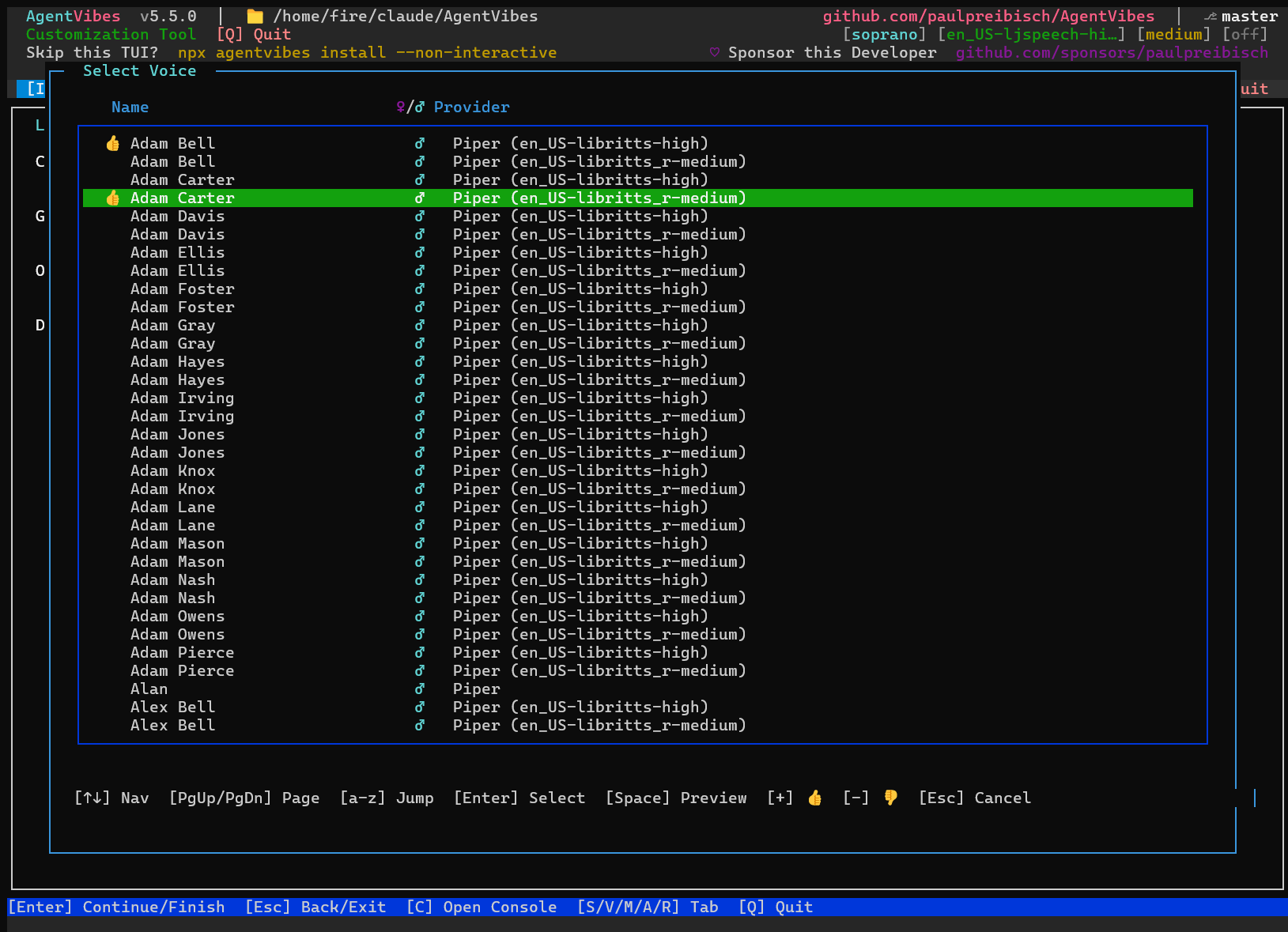
|
-
|
|
83
|
-
**Bash receiver rewrite:** The Linux/Termux `agentvibes-receiver.sh` has been fully rewritten to decode the current base64 JSON payload format. The old positional-arg format from pre-v5.5 is gone.
|
|
84
|
-
|
|
85
|
-
**No more double intro:** The personality pretext (e.g., "Bcs latin dance here") is no longer spoken twice over SSH remote. `play-tts.sh` prepends it to the text; the receiver no longer gets a separate pretext field to prepend again.
|
|
86
|
-
|
|
87
|
-
**SSH host visible in TUI:** The Settings and Voices tabs now display your configured SSH remote host alias.
|
|
88
|
-
|
|
89
|
-
**Security fixes** and 24 new BATS tests covering the full sender → receiver round-trip.
|
|
90
|
-
|
|
91
|
-
## v5.7.5 — TUI Button Contrast + BMAD Routing Fixes
|
|
92
|
-
|
|
93
|
-
**BMAD v6.6.0:** AgentVibes now detects the new `.claude/skills/*/agents/` agent structure, correctly handles globally-installed BMAD at `~/_bmad`, and gracefully skips v6.6+ plain-Markdown agents during TTS injection instead of erroring. The BMAD tab now shows detection correctly for global installs.
|
|
94
|
-
|
|
95
|
-
**Windows watcher:** `tts-watcher.ps1` is now a standalone file at `~/.agentvibes/tts-watcher.ps1`. Running `npx agentvibes update` now copies the latest watcher **and** restarts it automatically — both the file and the process are updated in one step, no manual restart needed.
|
|
96
|
-
|
|
97
|
-
**Windows provider:** `play-tts.ps1` now respects the `ProviderOverride` from the Linux server config when receiving remote audio.
|
|
98
|
-
|
|
99
|
-
## v5.6.9 — Reverb & Background Music Silent in NPX Installs
|
|
100
|
-
|
|
101
|
-
**WSL users:** AgentVibes was playing `en_US-lessac-medium` regardless of your configured voice. Fixed — Piper is now found in non-interactive shells by explicitly prepending `~/.local/bin` to `PATH` before the binary check.
|
|
102
|
-
|
|
103
|
-
**Per-project routing:** The session-start hook now bakes `--project-dir` into every injected TTS command, so your configured voice and music play correctly in Bash tool calls even when `CLAUDE_PROJECT_DIR` isn't in the environment.
|
|
104
|
-
|
|
105
|
-
`play-tts-piper.sh` and `play-tts-piper.ps1` are now included in `agentvibes install`'s critical hooks deployment — updated versions propagate automatically.
|
|
106
|
-
|
|
107
|
-
## v5.6.7 — Windows Preview Fixed
|
|
108
|
-
|
|
109
|
-
The Preview button in LLM audio configuration now works correctly on Windows.
|
|
110
|
-
|
|
111
|
-
## v5.6.6 — Preview Button Works in WSL + Comprehensive Windows Test Suite
|
|
112
|
-
|
|
113
|
-
**The Preview button in LLM audio configuration now works correctly in WSL.** When configuring a voice, reverb, and background track for each LLM, clicking Preview now plays your full audio setup — voice, music, and effects — exactly as it will sound during a real session. Previously, background music was silently dropped in `npm link` and global-install setups.
|
|
114
|
-
|
|
115
|
-
A **comprehensive Windows test suite** has been added to CI, running alongside the existing Linux BATS suite. Windows-specific audio paths are now verified on every push — regressions can't slip through silently.
|
|
116
|
-
|
|
117
|
-
## v5.6.4 — Critical Uninstall Safety Fix
|
|
118
|
-
|
|
119
|
-
`uninstall --global` was removing your entire `~/.claude/` directory — settings, CLAUDE.md, skills, MCP configs, everything. Fixed: AgentVibes now performs a surgical removal, only touching files it created. A regression test in CI enforces this going forward — if it ever regresses, the build breaks before it ships.
|
|
120
|
-
|
|
121
|
-
## v5.6.3 — Hermes + Easier Remote Setup
|
|
122
|
-
|
|
123
|
-
**AgentVibes now works with [Hermes](https://github.com/NousResearch/hermes-agent)** — one of the most popular open-source AI agents on GitHub (21,000+ stars). When Hermes finishes a response, AgentVibes speaks it aloud through your speakers automatically.
|
|
124
|
-
|
|
125
|
-
When you configure any LLM in AgentVibes (Claude Code, Copilot, Codex, or Hermes), you can set a **unique voice, reverb style, background music, and intro prefix** for each one — so every AI sounds distinct. New in this version: you can also set the **audio destination** per LLM. Choose **Local** to play through the computer you're on, or **Remote** to send audio to a different machine (your laptop, for example) while you work on a remote server.
|
|
126
|
-
|
|
127
|
-
Setting up remote audio used to require typing an SSH path by hand. Now there's a **dropdown menu right in the AgentVibes TUI** that reads your existing SSH aliases — just pick the one that points to your speakers and you're done. Develop on a remote server or run Hermes in the cloud, and the voice comes out of your laptop speakers without any manual configuration.
|
|
128
|
-
|
|
129
|
-
## v5.6.2 — Per-Message Audio Control
|
|
130
|
-
|
|
131
|
-
Remote senders (Hermes, SSH remote provider) can now control **voice, music, reverb, and volume per message** — no persistent config changes needed. Pass any field in the JSON payload and the Windows receiver applies it for that message only.
|
|
132
|
-
|
|
133
|
-
## v5.6.1 — Hermes Agent Integration
|
|
134
|
-
|
|
135
|
-
AgentVibes now speaks for **[Hermes Agent](https://github.com/NousResearch/hermes-agent)** — the self-hosted, self-improving AI assistant. Two production-ready skills ship in `docs/hermes/skills/`:
|
|
136
|
-
|
|
137
|
-
- **`hermes-agentvibes-hook`** — Auto-speaks every Hermes response via AgentVibes TTS. Fires on `agent:end`, strips markdown, rate-limits, and ships with full SSH MITM protection
|
|
138
|
-
- **`agentvibes-target`** — Teaches Hermes to send any text to your speakers on demand, supporting laptop and Android targets
|
|
139
|
-
|
|
140
|
-
Also in this release: Windows PS5.1 compatibility fixes for `play-tts.ps1`, modal/hotkey repairs, and BMAD tab now shows all agents.
|
|
141
|
-
|
|
142
|
-
## v5.5 — Per-LLM Audio Routing
|
|
143
|
-
|
|
144
|
-
Give **each LLM its own voice, pretext, and music** — Claude Code, Copilot, and Codex can all sound different without touching global settings.
|
|
145
|
-
|
|
146
|
-
- Add `llm:<name>|...|voice|pretext|engine` rows to `audio-effects.cfg`
|
|
147
|
-
- MCP server auto-detects which LLM is calling and passes `--llm <key>`
|
|
148
|
-
- Configure via **Setup tab → Configure** in the TUI
|
|
149
|
-
|
|
150
|
-
Also fixed: Windows installer crash (`spinner.info is not a function`) on **reinstall** with an older global AgentVibes install.
|
|
151
|
-
|
|
152
|
-
---
|
|
153
|
-
|
|
154
|
-
## v5.4 — TUI Installer, Spinner Fix & Dependency Cleanup
|
|
155
|
-
|
|
156
|
-
### 🎤 Voice Browser — Browse, Sample & Install 914 Voices
|
|
157
|
-
|
|
158
|
-
**Built right into the TUI — accessible via Setup → Configure → Voice**
|
|
159
|
-
|
|
160
|
-
- 🎧 **Hear Before You Choose** - Press Space to preview any voice instantly
|
|
161
|
-
- ⭐ **Mark Your Favorites** - Thumbs up/down with `+` / `-`
|
|
162
|
-
- 🔍 **Alpha Jump** - Press any letter to jump to names starting with it
|
|
163
|
-
- 📦 **One-Click Select** - Press Enter to set as your voice
|
|
164
|
-
- 🎨 **Beautiful Interface** - Stunning terminal UI built into AgentVibes
|
|
165
|
-
|
|
166
|
-
**914 Total Voices:**
|
|
167
|
-
- 904 High-Quality Piper TTS Speakers (libritts-high model)
|
|
168
|
-
- 10 Hand-Curated Personality Voices
|
|
169
|
-
|
|
170
|
-
---
|
|
171
|
-
|
|
172
|
-
### 💬 Intro Text (Pretext) - Your Personal AI Branding
|
|
173
|
-
|
|
174
|
-
**Add custom prefixes to every TTS announcement!**
|
|
175
|
-
|
|
176
|
-
```bash
|
|
177
|
-
npx agentvibes config intro-text
|
|
178
|
-
```
|
|
179
|
-
|
|
180
|
-
Transform generic AI responses into your personal brand:
|
|
181
|
-
|
|
182
|
-
**Before:**
|
|
183
|
-
```
|
|
184
|
-
"Starting analysis of the codebase..."
|
|
185
|
-
```
|
|
186
|
-
|
|
187
|
-
**After (with "FireBot: " intro text):**
|
|
188
|
-
```
|
|
189
|
-
"FireBot: Starting analysis of the codebase..."
|
|
190
|
-
```
|
|
191
|
-
|
|
192
|
-
**Perfect for:**
|
|
193
|
-
- 🤖 **Personal AI Branding** - Make Claude sound like your custom assistant
|
|
194
|
-
- 🏢 **Team Identity** - Company bots with branded voices
|
|
195
|
-
- 🎮 **Character Roleplay** - Gaming assistants with character names
|
|
196
|
-
- 🎓 **Teaching Contexts** - Professor Bot, Tutor AI, etc.
|
|
197
|
-
|
|
198
|
-
**Features:**
|
|
199
|
-
- Up to 50 characters
|
|
200
|
-
- UTF-8 and emoji support 🎉
|
|
201
|
-
- Set during installation or anytime after
|
|
202
|
-
- Works with all TTS providers
|
|
203
|
-
- Applies to every single announcement
|
|
204
|
-
|
|
205
|
-
**Examples:**
|
|
206
|
-
- `"JARVIS: "` - Iron Man style
|
|
207
|
-
- `"🤖 Assistant: "` - With emoji
|
|
208
|
-
- `"CodeBot: "` - Development assistant
|
|
209
|
-
- `"Chef AI: "` - Cooking helper
|
|
210
|
-
|
|
211
|
-
Configure now: `npx agentvibes config intro-text`
|
|
212
|
-
|
|
213
|
-
---
|
|
214
|
-
|
|
215
|
-
### 🎵 Custom Background Music - Complete Audio Control
|
|
216
|
-
|
|
217
|
-
**Upload your own background music with battle-tested security!**
|
|
218
|
-
|
|
219
|
-
```bash
|
|
220
|
-
npx agentvibes # press M for Music tab
|
|
221
|
-
```
|
|
222
|
-
|
|
223
|
-
|
|
224
|
-
|
|
225
|
-
Replace the default background tracks with your own audio files for complete sonic branding.
|
|
226
|
-
|
|
227
|
-
**Supported Formats:**
|
|
228
|
-
- 🎵 MP3 (.mp3)
|
|
229
|
-
- 🎵 WAV (.wav)
|
|
230
|
-
- 🎵 OGG (.ogg)
|
|
231
|
-
- 🎵 M4A (.m4a)
|
|
232
|
-
|
|
233
|
-
**Security First:**
|
|
234
|
-
- ✅ **180+ attack variations tested** - Path traversal, symlinks, Unicode tricks
|
|
235
|
-
- ✅ **100% attack rejection rate** - Every malicious attempt blocked
|
|
236
|
-
- ✅ **OWASP CWE-22 compliant** - Industry-standard security
|
|
237
|
-
- ✅ **7 validation layers** - Defense-in-depth architecture
|
|
238
|
-
- ✅ **File ownership verification** - Only your files accepted
|
|
239
|
-
- ✅ **Magic number validation** - Real audio files only
|
|
240
|
-
- ✅ **Secure storage** - 600 permissions, restricted directory
|
|
241
|
-
|
|
242
|
-
**Smart Validation:**
|
|
243
|
-
- Recommended duration: 30-90 seconds (optimal looping)
|
|
244
|
-
- Maximum: 300 seconds (5 minutes)
|
|
245
|
-
- Maximum size: 50MB
|
|
246
|
-
- Automatic format detection
|
|
247
|
-
- Duration warnings for non-optimal lengths
|
|
248
|
-
|
|
249
|
-
**Custom Track Naming Rules:**
|
|
250
|
-
- Use `snake_case` filenames only — e.g. `my_focus_music.mp3` ✅
|
|
251
|
-
- No spaces or uppercase letters in filenames — e.g. `My Focus Music.mp3` ❌
|
|
252
|
-
- Misnamed files will not appear in the music picker and will be skipped by the audio engine
|
|
253
|
-
|
|
254
|
-
**Perfect for:**
|
|
255
|
-
- 🎸 **Team Audio Branding** - Company theme music
|
|
256
|
-
- 🎮 **Gaming Sessions** - Epic background tracks
|
|
257
|
-
- 🎼 **Personal Playlists** - Your favorite instrumental
|
|
258
|
-
- 🎹 **Focus Music** - Lo-fi, classical, ambient
|
|
259
|
-
|
|
260
|
-
**Features:**
|
|
261
|
-
- Preview before setting
|
|
262
|
-
- One-command upload
|
|
263
|
-
- Works with all TTS providers
|
|
264
|
-
- Loops seamlessly under voice
|
|
265
|
-
- Easy restore to defaults
|
|
266
|
-
|
|
267
|
-
**Menu Options:**
|
|
268
|
-
1. Change music - Upload new audio file
|
|
269
|
-
2. Remove music - Clear custom music
|
|
270
|
-
3. Reset to default - Restore built-in tracks (16 genres)
|
|
271
|
-
4. Enable/Disable - Toggle background music
|
|
272
|
-
5. Preview current - Sample your music
|
|
273
|
-
|
|
274
|
-
Configure now: `npx agentvibes config music`
|
|
275
|
-
|
|
276
|
-
**Security Certified:** See full audit report at `docs/security/SECURITY-AUDIT.md`
|
|
277
|
-
|
|
278
|
-
---
|
|
279
|
-
|
|
280
|
-
### 🎯 Key Features
|
|
281
|
-
|
|
282
|
-
**🎛️ NEW IN v5.4.0 — TUI Installer & Fixes:**
|
|
283
|
-
- 🖥️ **TUI Installer** - Interactive terminal UI: browse voices, configure providers, enable BMAD party mode
|
|
284
|
-
- 🔧 **Spinner Fix** - Resolved `spinner.info is not a function` crash on WSL/Linux
|
|
285
|
-
- 🐛 **Circular Dependency Fix** - Removed self-referential `agentvibes@^3.5.9` dep that silently broke installs
|
|
286
|
-
- 🎵 **Background Music Volume Fix** - Restored `bg_volume="0.20"` fallback in `audio-processor.sh`
|
|
287
|
-
- 📂 **PROJECT_ROOT Fix** - `play-tts.sh` now correctly resolves project root for per-project config
|
|
288
|
-
|
|
289
|
-
**🪟 v3.5.5 — Native Windows Support:**
|
|
290
|
-
- 🖥️ **Windows Native TTS** - Soprano, Piper, and Windows SAPI providers. No WSL required!
|
|
291
|
-
- 🎵 **Background Music** - 16 genre tracks mixed under voice
|
|
292
|
-
- 🎛️ **Reverb & Audio Effects** - 5 reverb levels via ffmpeg
|
|
293
|
-
- 🔊 **Verbosity Control** - High, Medium, or Low settings
|
|
294
|
-
- 🎨 **Beautiful Installer** - `npx agentvibes install` or `.\setup-windows.ps1`
|
|
295
|
-
|
|
296
|
-
**⚡ v3.4.0 Highlights:**
|
|
297
|
-
- 🎤 **Soprano TTS Provider** - Ultra-fast neural TTS with 20x CPU, 2000x GPU acceleration (thanks [@nathanchase](https://github.com/nathanchase)!)
|
|
298
|
-
- 🛡️ **Security Hardening** - 9.5/10 score with comprehensive validation and timeouts
|
|
299
|
-
- 🌐 **Environment Intelligence** - PulseAudio tunnel auto-detection for SSH scenarios
|
|
300
|
-
|
|
301
|
-
**⚡ Core Features:**
|
|
302
|
-
- ⚡ **One-Command Install** - Get started in 30 seconds (`npx agentvibes install` or `.\setup-windows.ps1` without Node.js)
|
|
303
|
-
- 🎭 **Multi-Provider Support** - Soprano (neural), Piper TTS (50+ free voices), macOS Say (100+ built-in), or Windows SAPI
|
|
304
|
-
- 🎙️ **27+ Professional AI Voices** - Character voices, accents, and unique personalities
|
|
305
|
-
- 🎙️ **Verbosity Control** - Choose how much Claude speaks (LOW, MEDIUM, HIGH)
|
|
306
|
-
- 🎙️ **AgentVibes MCP** - Natural language control ("Switch to Aria voice") for Claude Code, Desktop & Warp
|
|
307
|
-
- 🔊 **SSH Audio Optimization** - Auto-detects remote sessions and eliminates static (VS Code Remote SSH, cloud dev)
|
|
308
|
-
|
|
309
|
-
**🎭 Personalization:**
|
|
310
|
-
- 🎭 **19 Built-in Personalities** - From sarcastic to flirty, pirate to dry humor
|
|
311
|
-
- 💬 **Advanced Sentiment System** - Apply personality styles to ANY voice without changing it
|
|
312
|
-
- 🎵 **Voice Preview & Replay** - Listen before you choose, replay last 10 TTS messages
|
|
313
|
-
|
|
314
|
-
**🚀 Integrations & Power Features:**
|
|
315
|
-
- 🔌 **Enhanced BMAD Plugin** - Auto voice switching for BMAD agents with multilingual support
|
|
316
|
-
- 🔊 **Live Audio Feedback** - Hear task acknowledgments and completions in any language
|
|
317
|
-
- 🌍 **30+ Languages** - Multilingual support with native voice quality
|
|
318
|
-
- 🆓 **Free & Open** - Use Piper TTS with no API key required
|
|
319
|
-
|
|
320
|
-
### 🤗 Hugging Face AI Voice Models
|
|
321
|
-
|
|
322
|
-
**AgentVibes' Piper TTS uses 100% Hugging Face-trained AI voice models** from [rhasspy/piper-voices](https://huggingface.co/rhasspy/piper-voices).
|
|
323
|
-
|
|
324
|
-
**What are Hugging Face voice models?**
|
|
325
|
-
|
|
326
|
-
Hugging Face voice models are pre-trained artificial intelligence models hosted on the Hugging Face Model Hub platform, designed to convert text into human-like speech (Text-to-Speech or TTS) or perform other speech tasks like voice cloning and speech-to-speech translation. They're accessible via their Transformers library for easy use in applications like voice assistants, audio generation, and more.
|
|
327
|
-
|
|
328
|
-
**Key Benefits:**
|
|
329
|
-
- 🎯 **Human-like Speech** - VITS-based neural models for natural pronunciation and intonation
|
|
330
|
-
- 🌍 **35+ Languages** - Multilingual support with native accents
|
|
331
|
-
- 🆓 **100% Open Source** - All Piper voices are free HF models (Tacotron2, FastSpeech2, VITS)
|
|
332
|
-
- 🔧 **Developer-Friendly** - Fine-tune, customize, or deploy for various audio projects
|
|
333
|
-
- ⚡ **Offline & Fast** - No API keys, no internet needed once installed
|
|
334
|
-
|
|
335
|
-
All 50+ Piper voices AgentVibes provides are sourced from Hugging Face's open-source AI voice models, ensuring high-quality, natural-sounding speech synthesis across all supported platforms.
|
|
336
|
-
|
|
337
|
-
---
|
|
338
|
-
|
|
339
|
-
## 📑 Table of Contents
|
|
340
|
-
|
|
341
|
-
### Getting Started
|
|
342
|
-
- [🚀 Quick Start](#-quick-start) - Get voice in 30 seconds (3 simple steps)
|
|
343
|
-
- [📱 Android/Termux](#-quick-setup-android--termux-claude-code-on-your-phone) - Run Claude Code on your phone
|
|
344
|
-
- [📋 Prerequisites](#-prerequisites) - What you actually need (Node.js + optional tools)
|
|
345
|
-
- [✨ What is AgentVibes?](#-what-is-agentvibes) - Overview & key features
|
|
346
|
-
- [🌟 NEW FEATURE HIGHLIGHTS](#-new-feature-highlights) - **START HERE!**
|
|
347
|
-
- [🎤 Voices Tab](#-voices-tab) - Browse & sample 914 voices in the TUI
|
|
348
|
-
- [💬 Intro Text](#-intro-text-pretext---your-personal-ai-branding) - Custom TTS prefixes
|
|
349
|
-
- [🎵 Custom Background Music](#-custom-background-music---complete-audio-control) - Upload your own tracks
|
|
350
|
-
- [📰 Latest Release](#-latest-release) - v5.11.0 with Kokoro & ElevenLabs Providers, Audio Effects
|
|
351
|
-
- [🪟 Windows Setup Guide for Claude Desktop](mcp-server/WINDOWS_SETUP.md) - Complete Windows installation with WSL & Python
|
|
352
|
-
|
|
353
|
-
### AgentVibes MCP (Natural Language Control)
|
|
354
|
-
- [🎙️ AgentVibes MCP Overview](#%EF%B8%8F-agentvibes-mcp) - **Easiest way** - Natural language commands
|
|
355
|
-
- [For Claude Desktop](docs/mcp-setup.md#for-claude-desktop) - Windows/WSL setup, Python requirements
|
|
356
|
-
|
|
357
|
-
- [For Claude Code](docs/mcp-setup.md#for-claude-code) - Project-specific setup
|
|
358
|
-
|
|
359
|
-
### Core Features
|
|
360
|
-
- [🎤 Voices Tab](#-voices-tab) - **Browse and sample 914 voices in the TUI**
|
|
361
|
-
- [🎤 Commands Reference](#-commands-reference) - All available commands
|
|
362
|
-
- [🎙️ Verbosity Control](#%EF%B8%8F-verbosity-control) - Control how much Claude speaks (low/medium/high)
|
|
363
|
-
- [🎭 Personalities vs Sentiments](#-personalities-vs-sentiments) - Two systems explained
|
|
364
|
-
- [🗣️ Voice Library](#%EF%B8%8F-voice-library) - 914 voices with friendly names
|
|
365
|
-
- [🔌 BMAD Plugin](#-bmad-plugin) - Auto voice switching for BMAD agents
|
|
366
|
-
- [🎙️ AgentVibes Receiver - NEW!](#%EF%B8%8F-agentvibes-receiver-remote-audio-streaming-from-voiceless-servers) - Remote audio streaming from voiceless servers
|
|
367
|
-
|
|
368
|
-
### Integrations & Platforms
|
|
369
|
-
- [🤖 OpenClaw Integration](#-openclaw-integration) - Use AgentVibes with OpenClaw messaging platform
|
|
370
|
-
- [🎙️ AgentVibes Skill for OpenClaw](#-agentvibes-skill-for-openclaw---what-you-get) - 50+ voices, effects, personalities for OpenClaw
|
|
371
|
-
- [📱 AgentVibes Receiver](#-agentvibes-receiver-local-phone-) - Remote audio on phones/local machines
|
|
372
|
-
|
|
373
|
-
### Advanced Topics
|
|
374
|
-
- [📦 Installation Structure](#-installation-structure) - What gets installed
|
|
375
|
-
- [💡 Common Workflows](#-common-workflows) - Quick examples
|
|
376
|
-
- [🔧 Advanced Features](#-advanced-features) - Custom voices & personalities
|
|
377
|
-
- [🔊 Remote Audio Setup](#-remote-audio-setup) - Play TTS from remote servers
|
|
378
|
-
- [🖥️ Windows SSH Receiver & TTS Watcher](#️-windows-ssh-receiver--tts-watcher) - Stream audio to Windows PC from Linux/macOS
|
|
379
|
-
- [🚨 Security Hardening Guide](docs/security-hardening-guide.md) - **REQUIRED if running OpenClaw on remote server**: SSH hardening, Fail2Ban, Tailscale, UFW, AIDE
|
|
380
|
-
- [🔬 Technical Deep Dive](docs/technical-deep-dive.md) - How AgentVibes works under the hood
|
|
381
|
-
- [❓ Troubleshooting](#-troubleshooting) - Common issues & fixes
|
|
382
|
-
|
|
383
|
-
### Additional Resources
|
|
384
|
-
- [🔗 Useful Links](#-useful-links) - Voice typing & AI tools
|
|
385
|
-
- [🔄 Updating](#-updating) - Keep AgentVibes current
|
|
386
|
-
- [🗑️ Uninstalling](#️-uninstalling) - Remove AgentVibes cleanly
|
|
387
|
-
- [❓ FAQ](#-frequently-asked-questions-faq) - **NEW!** Common questions answered (git-lfs, MCP tokens, installation)
|
|
388
|
-
- [🍎 macOS Testing](docs/macos-testing.md) - Automated testing on macOS with GitHub Actions
|
|
389
|
-
- [🤗 Hugging Face Voice Models](docs/hugging-face-models.md) - Technical details on AI voice models
|
|
390
|
-
- [🙏 Credits](#-credits) - Acknowledgments
|
|
391
|
-
- [🤝 Contributing](#-contributing) - Show support
|
|
392
|
-
|
|
393
|
-
---
|
|
394
|
-
|
|
395
|
-
## 📰 Latest Release
|
|
396
|
-
|
|
397
|
-
**[v5.11.0 — Kokoro & ElevenLabs Providers + Audio Effects](https://github.com/paulpreibisch/AgentVibes/releases/tag/v5.11.0)** 🎉
|
|
398
|
-
|
|
399
|
-
AgentVibes 5.11.0 adds two new TTS engines, combinable audio effects, a streamlined voices tab, and a deterministically green test suite.
|
|
400
|
-
|
|
401
|
-
### ✨ Highlights
|
|
402
|
-
|
|
403
|
-
- **🆕 Kokoro provider** — high-quality **local neural** voices (CPU, no GPU needed), including Chinese / Japanese / Korean, with in-TUI dependency install.
|
|
404
|
-
- **🆕 ElevenLabs provider** — premium **cloud** voices via an in-app API-key dialog.
|
|
405
|
-
- **🎚️ Combinable audio effects** — stack **Reverb** (Room / Hall / Cathedral), **Echo** (short / cave), and **Chorus**; preview live with Space.
|
|
406
|
-
- **🪟 Windows SAPI** routing fixed, and a **🎨 unified selector chrome** across every picker.
|
|
407
|
-
- **🎤 Streamlined voices tab** — keystroke-only (Enter selects, `f` favorites ★); **BMAD auto-assign** now follows the active provider.
|
|
408
|
-
- **🧪 Rock-solid CI** — eliminated the flaky failures; the test suite is deterministically green.
|
|
409
|
-
|
|
410
|
-
📖 Full details: [RELEASE_NOTES.md](RELEASE_NOTES.md) | [→ All Releases](https://github.com/paulpreibisch/AgentVibes/releases)
|
|
411
|
-
|
|
412
|
-
[↑ Back to top](#-table-of-contents)
|
|
413
|
-
|
|
414
|
-
---
|
|
415
|
-
|
|
416
|
-
## 🎙️ AgentVibes MCP
|
|
417
|
-
|
|
418
|
-
Agent Vibes was originally created to give the Claude Code assistant a voice! Simply install it with an npx command in your terminal, and Claude Code can talk back to you.
|
|
419
|
-
|
|
420
|
-
We've now enhanced this capability by adding an MCP (Model Context Protocol) server. This integration exposes Agent Vibes' functionality directly to your AI assistant, allowing you to configure and control Agent Vibes using natural language instead of typing "/" slash commands.
|
|
421
|
-
|
|
422
|
-
Setting it up is straightforward: just add the MCP server to your Claude Code configuration files.
|
|
423
|
-
|
|
424
|
-
But the convenience doesn't stop there. With the MCP server in place, Claude Desktop can now use Agent Vibes too!
|
|
425
|
-
|
|
426
|
-
We're thrilled about this expansion because it means Claude Desktop can finally talk back as well!
|
|
427
|
-
|
|
428
|
-
If you decide to use the MCP server on Claude Desktop, after configuration, give Claude Desktop this command: "every time i give you a command, speak the acknowledgement using agentvibes and the confirmation about what you completed, when done"—and watch the magic happen!
|
|
429
|
-
|
|
430
|
-
**🎯 Control AgentVibes with natural language - no slash commands to remember!**
|
|
431
|
-
|
|
432
|
-
Just say "Switch to Aria voice" or "Speak in Spanish" instead of typing commands.
|
|
433
|
-
|
|
434
|
-
**Works in:** Claude Desktop, Claude Code
|
|
435
|
-
|
|
436
|
-
**[→ View Complete MCP Setup Guide](docs/mcp-setup.md)** - Full setup for all platforms, configuration examples, available tools, and MCP vs slash commands comparison
|
|
437
|
-
|
|
438
|
-
[↑ Back to top](#-table-of-contents)
|
|
439
|
-
|
|
440
|
-
---
|
|
441
|
-
|
|
442
|
-
## 🚀 Quick Start - Get Voice in 30 Seconds
|
|
443
|
-
|
|
444
|
-
**3 Simple Steps:**
|
|
445
|
-
|
|
446
|
-
### 1️⃣ Install
|
|
447
|
-
```bash
|
|
448
|
-
npx agentvibes install
|
|
449
|
-
```
|
|
450
|
-
|
|
451
|
-
|
|
452
|
-
|
|
453
|
-
Click **Configure** on any LLM to set its voice, pretext, reverb, and music:
|
|
454
|
-
|
|
455
|
-
|
|
456
|
-
|
|
457
|
-
### 2️⃣ Choose Provider (Auto-Detected)
|
|
458
|
-
- **macOS**: Native `say` provider (100+ voices) ✨
|
|
459
|
-
- **Linux/WSL**: Piper TTS (50+ free voices) 🎙️
|
|
460
|
-
- **Windows Native**: Soprano, Piper, or SAPI 🪟
|
|
461
|
-
- **Android**: Termux with auto-setup 📱
|
|
462
|
-
|
|
463
|
-
### 3️⃣ Use in Claude Code
|
|
464
|
-
Just code normally - AgentVibes automatically speaks task acknowledgments and completions! 🔊
|
|
465
|
-
|
|
466
|
-
---
|
|
467
|
-
|
|
468
|
-
**🍎 macOS Users (One-Time Setup):**
|
|
469
|
-
```bash
|
|
470
|
-
brew install bash # Required for bash 5.x features
|
|
471
|
-
```
|
|
472
|
-
macOS ships with bash 3.2 (from 2007). After this, everything works perfectly!
|
|
473
|
-
|
|
474
|
-
---
|
|
475
|
-
|
|
476
|
-
**[→ Full Setup Guide](docs/quick-start.md)** - Advanced options, provider switching, and detailed setup
|
|
477
|
-
|
|
478
|
-
[↑ Back to top](#-table-of-contents)
|
|
479
|
-
|
|
480
|
-
---
|
|
481
|
-
|
|
482
|
-
## 🎤 Voice Browser
|
|
483
|
-
|
|
484
|
-
**914 voices — browse, preview, and select right inside the TUI.**
|
|
485
|
-
|
|
486
|
-
```bash
|
|
487
|
-
npx agentvibes # Setup tab → Configure → Voice (or press V for global voice)
|
|
488
|
-
```
|
|
489
|
-
|
|
490
|
-
|
|
491
|
-
|
|
492
|
-
### Features
|
|
493
|
-
|
|
494
|
-
- **914 Voices** - Browse 904 Piper speakers + 10 curated voices
|
|
495
|
-
- **Real-Time Sampling** - Press Space to hear any voice instantly
|
|
496
|
-
- **Favorite System** - Thumbs up `+` / thumbs down `-` for quick filtering
|
|
497
|
-
- **Alpha Jump** - Press any letter key to jump to that part of the list
|
|
498
|
-
- **One-Click Select** - Press Enter to install and switch to a voice
|
|
499
|
-
- **Beautiful UI** - Stunning console interface built into AgentVibes
|
|
500
|
-
|
|
501
|
-
### Keyboard Shortcuts
|
|
502
|
-
|
|
503
|
-
| Key | Action |
|
|
504
|
-
|-----|--------|
|
|
505
|
-
| **Space** | Preview voice sample |
|
|
506
|
-
| **Enter** | Select/Install voice |
|
|
507
|
-
| **+** | Thumbs up (favorite) |
|
|
508
|
-
| **-** | Thumbs down |
|
|
509
|
-
| **PgUp / PgDn** | Page through list |
|
|
510
|
-
| **↑/↓** | Navigate list |
|
|
511
|
-
| **a-z** | Jump to names starting with letter |
|
|
512
|
-
| **Esc** | Cancel / close |
|
|
513
|
-
|
|
514
|
-
### Voice Categories
|
|
515
|
-
|
|
516
|
-
**Curated Voices** (10 hand-picked personalities):
|
|
517
|
-
- Professional, Friendly, Authoritative, Warm, Energetic
|
|
518
|
-
- Technical, Calm, Narrator, Conversational, Enthusiastic
|
|
519
|
-
|
|
520
|
-
**Speaker Variations** (904 from libritts-high):
|
|
521
|
-
- Male and female speakers
|
|
522
|
-
- Various accents and tones
|
|
523
|
-
- High-quality neural voices
|
|
524
|
-
- Unique characteristics
|
|
525
|
-
|
|
526
|
-
### Finding Your Perfect Voice
|
|
527
|
-
|
|
528
|
-
1. **Open voice browser:** Setup tab → Configure → navigate to Voice → Enter
|
|
529
|
-
2. **Jump alphabetically:** Press a letter key to jump to that name
|
|
530
|
-
3. **Sample voices:** Navigate with arrows, press Space to hear
|
|
531
|
-
4. **Mark favorites:** Press `+` on voices you like
|
|
532
|
-
5. **Select:** Press Enter to set as your voice
|
|
533
|
-
|
|
534
|
-
**Pro Tip:** Use PgUp/PgDn to page quickly through 900+ voices!
|
|
535
|
-
|
|
536
|
-
[↑ Back to top](#-table-of-contents)
|
|
537
|
-
|
|
538
|
-
---
|
|
539
|
-
|
|
540
|
-
## 📋 Prerequisites - What You Actually Need
|
|
541
|
-
|
|
542
|
-
### Minimum (Core Features)
|
|
543
|
-
**✅ REQUIRED:**
|
|
544
|
-
- **Node.js** ≥16.0 - Check with: `node --version`
|
|
545
|
-
|
|
546
|
-
### Required for Full Features
|
|
547
|
-
**✅ STRONGLY RECOMMENDED:**
|
|
548
|
-
- **Python** 3.10+ - Needed for Piper TTS voice engine
|
|
549
|
-
- **bash** 5.0+ - macOS only (macOS ships with 3.2 from 2007)
|
|
550
|
-
|
|
551
|
-
### Optional but Recommended
|
|
552
|
-
**⭕ OPTIONAL (TTS still works without them):**
|
|
553
|
-
- **sox** - Audio effects (reverb, EQ, pitch shifting)
|
|
554
|
-
- **ffmpeg** - Background music, audio padding, RDP compression
|
|
555
|
-
|
|
556
|
-
### NOT Required (Despite What You've Heard)
|
|
557
|
-
**❌ DEFINITELY NOT NEEDED:**
|
|
558
|
-
- ❌ Git or git-lfs (npm handles everything)
|
|
559
|
-
- ❌ Repository cloning (unless you're contributing code)
|
|
560
|
-
- ❌ Build tools or C++ compilers (pre-built package ready to use)
|
|
561
|
-
|
|
562
|
-
### Installation Methods
|
|
563
|
-
|
|
564
|
-
| Method | Command | Use Case |
|
|
565
|
-
|--------|---------|----------|
|
|
566
|
-
| **✅ RECOMMENDED: NPX (via npm)** | `npx agentvibes install` | **All platforms** - Just want to use AgentVibes |
|
|
567
|
-
| **🪟 Windows PowerShell** | `.\setup-windows.ps1` | **Windows** - Standalone installer (no Node.js needed) |
|
|
568
|
-
| **⚠️ Git Clone** | `git clone ...` | **Developers Only** - Contributing code |
|
|
569
|
-
|
|
570
|
-
**Why npx?** Zero git operations, no build steps, just 30 seconds to voice!
|
|
571
|
-
|
|
572
|
-
### For Developers (Contributing Code)
|
|
573
|
-
|
|
574
|
-
If you want to contribute to AgentVibes:
|
|
575
|
-
```bash
|
|
576
|
-
git clone https://github.com/paulpreibisch/AgentVibes.git
|
|
577
|
-
cd AgentVibes
|
|
578
|
-
npm install
|
|
579
|
-
npm link
|
|
580
|
-
```
|
|
581
|
-
|
|
582
|
-
Requires: Node.js 16+, Git (no git-lfs), and `npm link` familiarity.
|
|
583
|
-
|
|
584
|
-
[↑ Back to top](#-table-of-contents)
|
|
585
|
-
|
|
586
|
-
---
|
|
587
|
-
|
|
588
|
-
---
|
|
589
|
-
|
|
590
|
-
## 📱 Quick Setup: Android & Termux (Claude Code on Your Phone!)
|
|
591
|
-
|
|
592
|
-
**Want to run Claude Code on your Android phone with professional voices?**
|
|
593
|
-
|
|
594
|
-
Simply install Termux from F-Droid (NOT Google Play) and run:
|
|
595
|
-
```bash
|
|
596
|
-
pkg update && pkg upgrade
|
|
597
|
-
pkg install nodejs-lts
|
|
598
|
-
npx agentvibes install
|
|
599
|
-
```
|
|
600
|
-
|
|
601
|
-
Termux auto-detects and installs everything needed (proot-distro for compatibility, Piper TTS, audio playback).
|
|
602
|
-
|
|
603
|
-
**[→ Full Android/Termux Setup Guide](#-android--termux)** - Detailed troubleshooting and verification steps
|
|
604
|
-
|
|
605
|
-
[↑ Back to top](#-table-of-contents)
|
|
606
|
-
|
|
607
|
-
---
|
|
608
|
-
|
|
609
|
-
## 📋 System Requirements
|
|
610
|
-
|
|
611
|
-
AgentVibes requires certain system dependencies for optimal audio processing and playback. Requirements vary by operating system and TTS provider.
|
|
612
|
-
|
|
613
|
-
### Core Requirements (All Platforms)
|
|
614
|
-
|
|
615
|
-
| Tool | Required For | Why It's Needed |
|
|
616
|
-
|------|-------------|-----------------|
|
|
617
|
-
| **Node.js** ≥16.0 | All platforms | Runtime for AgentVibes installer and MCP server |
|
|
618
|
-
| **Bash** ≥5.0 | macOS | Modern bash features (macOS ships with 3.2 from 2007) |
|
|
619
|
-
| **Python** 3.10+ | Piper TTS, MCP server | Runs Piper voice engine and MCP server |
|
|
620
|
-
|
|
621
|
-
### Audio Processing Tools (Recommended)
|
|
622
|
-
|
|
623
|
-
| Tool | Status | Purpose | Impact if Missing |
|
|
624
|
-
|------|--------|---------|------------------|
|
|
625
|
-
| **sox** | Recommended | Audio effects (reverb, EQ, pitch, compression) | No audio effects, still works |
|
|
626
|
-
| **ffmpeg** | Recommended | Background music mixing, audio padding, RDP compression | No background music or RDP optimization |
|
|
627
|
-
|
|
628
|
-
### Platform-Specific Requirements
|
|
629
|
-
|
|
630
|
-
#### 🐧 Linux / WSL
|
|
631
|
-
|
|
632
|
-
```bash
|
|
633
|
-
# Ubuntu/Debian
|
|
634
|
-
sudo apt-get update
|
|
635
|
-
sudo apt-get install -y sox ffmpeg python3-pip pipx
|
|
636
|
-
|
|
637
|
-
# Fedora/RHEL
|
|
638
|
-
sudo dnf install -y sox ffmpeg python3-pip pipx
|
|
639
|
-
|
|
640
|
-
# Arch Linux
|
|
641
|
-
sudo pacman -S sox ffmpeg python-pip python-pipx
|
|
642
|
-
```
|
|
643
|
-
|
|
644
|
-
**Audio Playback** (one of the following):
|
|
645
|
-
- `paplay` (PulseAudio - usually pre-installed)
|
|
646
|
-
- `aplay` (ALSA - fallback)
|
|
647
|
-
- `mpg123` (fallback)
|
|
648
|
-
- `mpv` (fallback)
|
|
649
|
-
|
|
650
|
-
**Why these tools?**
|
|
651
|
-
- **sox**: Applies audio effects defined in `.claude/config/audio-effects.cfg` (reverb, pitch shifting, EQ, compression)
|
|
652
|
-
- **ffmpeg**: Mixes background music tracks, adds silence padding to prevent audio cutoff, compresses audio for RDP/SSH sessions
|
|
653
|
-
- **paplay/aplay**: Plays generated TTS audio files
|
|
654
|
-
- **pipx**: Isolated Python environment manager for Piper TTS installation
|
|
655
|
-
|
|
656
|
-
#### 🍎 macOS
|
|
657
|
-
|
|
658
|
-
```bash
|
|
659
|
-
# Install Homebrew if not already installed
|
|
660
|
-
/bin/bash -c "$(curl -fsSL https://raw.githubusercontent.com/Homebrew/install/HEAD/install.sh)"
|
|
661
|
-
|
|
662
|
-
# Required: Modern bash
|
|
663
|
-
brew install bash
|
|
664
|
-
|
|
665
|
-
# Recommended: Audio processing tools
|
|
666
|
-
brew install sox ffmpeg pipx
|
|
667
|
-
```
|
|
668
|
-
|
|
669
|
-
**Audio Playback**:
|
|
670
|
-
- `afplay` (built-in - always available)
|
|
671
|
-
- `say` (built-in - for macOS TTS provider)
|
|
672
|
-
|
|
673
|
-
**Why these tools?**
|
|
674
|
-
- **bash 5.x**: macOS ships with bash 3.2 which lacks associative arrays and other modern features AgentVibes uses
|
|
675
|
-
- **sox**: Same audio effects processing as Linux
|
|
676
|
-
- **ffmpeg**: Same background music and padding as Linux
|
|
677
|
-
- **afplay**: Built-in macOS audio player
|
|
678
|
-
- **say**: Built-in macOS text-to-speech (alternative to Piper)
|
|
679
|
-
|
|
680
|
-
#### 🪟 Windows
|
|
681
|
-
|
|
682
|
-
**Option A: Native Windows (Recommended)**
|
|
683
|
-
|
|
684
|
-
AgentVibes now supports native Windows with three TTS providers. No WSL required!
|
|
685
|
-
|
|
686
|
-
```powershell
|
|
687
|
-
# Interactive Node.js installer (recommended)
|
|
688
|
-
npx agentvibes install
|
|
689
|
-
|
|
690
|
-
# Or use the standalone PowerShell installer
|
|
691
|
-
.\setup-windows.ps1
|
|
692
|
-
```
|
|
693
|
-
|
|
694
|
-
**Providers available natively:**
|
|
695
|
-
- **Soprano** - Ultra-fast neural TTS (best quality, requires `pip install soprano-tts`)
|
|
696
|
-
- **Windows Piper** - High quality offline neural voices (auto-downloaded)
|
|
697
|
-
- **Windows SAPI** - Built-in Windows voices (zero setup)
|
|
698
|
-
|
|
699
|
-
**Requirements:** Node.js 16+, PowerShell 5.1+, ffmpeg (optional, for background music & reverb)
|
|
700
|
-
|
|
701
|
-
See [Windows Native Setup Guide](WINDOWS-SETUP.md) for full instructions.
|
|
702
|
-
|
|
703
|
-
**Option B: WSL (Legacy)**
|
|
704
|
-
|
|
705
|
-
For Claude Desktop or WSL-based workflows, follow the [Windows WSL Guide](mcp-server/WINDOWS_SETUP.md).
|
|
706
|
-
|
|
707
|
-
```powershell
|
|
708
|
-
# Install WSL from PowerShell (Administrator)
|
|
709
|
-
wsl --install -d Ubuntu
|
|
710
|
-
```
|
|
711
|
-
|
|
712
|
-
Then follow Linux requirements above inside WSL.
|
|
713
|
-
|
|
714
|
-
#### 🤖 Android / Termux
|
|
715
|
-
|
|
716
|
-
**Running Claude Code on Your Android Using Termux**
|
|
717
|
-
|
|
718
|
-
AgentVibes fully supports Android devices through the [Termux app](https://termux.dev/). This enables you to run Claude Code with professional TTS voices directly on your Android phone or tablet!
|
|
719
|
-
|
|
720
|
-
**Quick Setup:**
|
|
721
|
-
|
|
722
|
-
```bash
|
|
723
|
-
# 1. Install Termux from F-Droid (NOT Google Play - it's outdated)
|
|
724
|
-
# Download: https://f-droid.org/en/packages/com.termux/
|
|
725
|
-
|
|
726
|
-
# 2. Install Node.js in Termux
|
|
727
|
-
pkg update && pkg upgrade
|
|
728
|
-
pkg install nodejs-lts
|
|
729
|
-
|
|
730
|
-
# 3. Install AgentVibes (auto-detects Android and runs Termux installer)
|
|
731
|
-
npx agentvibes install
|
|
732
|
-
```
|
|
733
|
-
|
|
734
|
-
**What Gets Installed?**
|
|
735
|
-
|
|
736
|
-
The Termux installer automatically sets up:
|
|
737
|
-
- **proot-distro** with Debian (for glibc compatibility)
|
|
738
|
-
- **Piper TTS** via proot wrapper (Android uses bionic libc, not glibc)
|
|
739
|
-
- **termux-media-player** for audio playback (`paplay` doesn't work on Android)
|
|
740
|
-
- **Audio dependencies**: ffmpeg, sox, bc for processing
|
|
741
|
-
- **termux-api** for Android-specific audio routing
|
|
742
|
-
|
|
743
|
-
**Why Termux Instead of Standard Installation?**
|
|
744
|
-
|
|
745
|
-
Android's architecture requires special handling:
|
|
746
|
-
- ❌ Standard pip/pipx fails (missing wheels for bionic libc)
|
|
747
|
-
- ❌ Linux binaries require glibc (Android uses bionic)
|
|
748
|
-
- ❌ `/tmp` directory is not accessible on Android
|
|
749
|
-
- ❌ Standard audio tools like `paplay` don't exist
|
|
750
|
-
|
|
751
|
-
✅ Termux installer solves all these issues with proot-distro and Android-native audio playback!
|
|
752
|
-
|
|
753
|
-
**Requirements:**
|
|
754
|
-
- [Termux app](https://f-droid.org/en/packages/com.termux/) (from F-Droid, NOT Google Play)
|
|
755
|
-
- [Termux:API](https://f-droid.org/en/packages/com.termux.api/) (for audio playback)
|
|
756
|
-
- Android 7.0+ (recommended: Android 10+)
|
|
757
|
-
- ~500MB free storage (for Piper TTS + voice models)
|
|
758
|
-
|
|
759
|
-
**Audio Playback:**
|
|
760
|
-
- Uses `termux-media-player` instead of `paplay`
|
|
761
|
-
- Audio automatically routes through Android's media system
|
|
762
|
-
- Supports all Piper TTS voices (50+ languages)
|
|
763
|
-
|
|
764
|
-
**Verifying Your Setup:**
|
|
765
|
-
|
|
766
|
-
```bash
|
|
767
|
-
# Check Termux environment
|
|
768
|
-
echo $PREFIX # Should show /data/data/com.termux/files/usr
|
|
769
|
-
|
|
770
|
-
# Check Node.js
|
|
771
|
-
node --version # Should be ≥16.0
|
|
772
|
-
|
|
773
|
-
# Check if Piper is installed
|
|
774
|
-
which piper # Should return /data/data/com.termux/files/usr/bin/piper
|
|
775
|
-
|
|
776
|
-
# Test audio playback
|
|
777
|
-
termux-media-player play /path/to/audio.wav
|
|
778
|
-
```
|
|
779
|
-
|
|
780
|
-
**Troubleshooting:**
|
|
781
|
-
|
|
782
|
-
| Issue | Solution |
|
|
783
|
-
|-------|----------|
|
|
784
|
-
| "piper: not found" | Run `npx agentvibes install` - auto-detects Termux |
|
|
785
|
-
| No audio playback | Install Termux:API from F-Droid |
|
|
786
|
-
| Permission denied | Run `termux-setup-storage` to grant storage access |
|
|
787
|
-
| Slow installation | Use WiFi, not mobile data (~300MB download) |
|
|
788
|
-
|
|
789
|
-
**Why F-Droid and Not Google Play?**
|
|
790
|
-
|
|
791
|
-
Google Play's Termux version is outdated and unsupported. Always use the [F-Droid version](https://f-droid.org/en/packages/com.termux/) for the latest security updates and compatibility.
|
|
792
|
-
|
|
793
|
-
### TTS Provider Requirements
|
|
794
|
-
|
|
795
|
-
#### Piper TTS (Free, Offline)
|
|
796
|
-
- **Python** 3.10+
|
|
797
|
-
- **pipx** (for isolated installation)
|
|
798
|
-
- **Disk Space**: ~50MB per voice model
|
|
799
|
-
- **Internet**: Only for initial voice downloads
|
|
800
|
-
|
|
801
|
-
```bash
|
|
802
|
-
# Installed automatically by AgentVibes
|
|
803
|
-
pipx install piper-tts
|
|
804
|
-
```
|
|
805
|
-
|
|
806
|
-
#### macOS Say (Built-in, macOS Only)
|
|
807
|
-
- No additional requirements
|
|
808
|
-
- 100+ voices pre-installed on macOS
|
|
809
|
-
- Use: `/agent-vibes:provider switch macos`
|
|
810
|
-
|
|
811
|
-
### Verifying Your Setup
|
|
812
|
-
|
|
813
|
-
```bash
|
|
814
|
-
# Check all dependencies
|
|
815
|
-
node --version # Should be ≥16.0
|
|
816
|
-
python3 --version # Should be ≥3.10
|
|
817
|
-
bash --version # Should be ≥5.0 (macOS users!)
|
|
818
|
-
sox --version # Optional but recommended
|
|
819
|
-
ffmpeg -version # Optional but recommended
|
|
820
|
-
pipx --version # Required for Piper TTS
|
|
821
|
-
|
|
822
|
-
# Check audio playback (Linux/WSL)
|
|
823
|
-
paplay --version || aplay --version
|
|
824
|
-
|
|
825
|
-
# Check audio playback (macOS)
|
|
826
|
-
which afplay # Should return /usr/bin/afplay
|
|
827
|
-
```
|
|
828
|
-
|
|
829
|
-
### What Happens Without Optional Dependencies?
|
|
830
|
-
|
|
831
|
-
| Missing Tool | Impact | Workaround |
|
|
832
|
-
|-------------|--------|------------|
|
|
833
|
-
| sox | No audio effects (reverb, EQ, pitch) | TTS still works, just no effects |
|
|
834
|
-
| ffmpeg | No background music, no audio padding | TTS still works, audio may cut off slightly early |
|
|
835
|
-
| paplay/aplay | No audio playback on Linux | Install at least one audio player |
|
|
836
|
-
|
|
837
|
-
**All TTS generation still works** - optional tools only enhance the experience!
|
|
838
|
-
|
|
839
|
-
[↑ Back to top](#-table-of-contents)
|
|
840
|
-
|
|
841
|
-
---
|
|
842
|
-
|
|
843
|
-
## 🎭 Choose Your Voice Provider
|
|
844
|
-
|
|
845
|
-
**Piper TTS** (free, works offline on Linux/WSL) or **macOS Say** (free, built-in on Mac) - pick one and switch anytime.
|
|
846
|
-
|
|
847
|
-
| Provider | Platform | Cost | Quality | Setup |
|
|
848
|
-
|----------|----------|------|---------|-------|
|
|
849
|
-
| **macOS Say** | macOS only | Free (built-in) | ⭐⭐⭐⭐ | Zero config |
|
|
850
|
-
| **Piper** | Linux/WSL/Windows | Free | ⭐⭐⭐⭐ | Auto-downloads |
|
|
851
|
-
| **Soprano** | Linux/WSL/Windows | Free | ⭐⭐⭐⭐⭐ | `pip install soprano-tts` |
|
|
852
|
-
| **Windows SAPI** | Windows | Free (built-in) | ⭐⭐⭐ | Zero config |
|
|
853
|
-
|
|
854
|
-
On macOS, the native `say` provider is automatically detected and recommended!
|
|
855
|
-
|
|
856
|
-
**[→ Provider Comparison Guide](docs/providers.md)**
|
|
857
|
-
|
|
858
|
-
[↑ Back to top](#-table-of-contents)
|
|
859
|
-
|
|
860
|
-
---
|
|
861
|
-
|
|
862
|
-
## 🎤 Commands Reference
|
|
863
|
-
|
|
864
|
-
AgentVibes provides **50+ slash commands** and **natural language MCP equivalents**.
|
|
865
|
-
|
|
866
|
-
**Quick Examples:**
|
|
867
|
-
```bash
|
|
868
|
-
# Voice control
|
|
869
|
-
/agent-vibes:switch Aria # Or: "Switch to Aria voice"
|
|
870
|
-
/agent-vibes:list # Or: "List all voices"
|
|
871
|
-
|
|
872
|
-
# Personality & sentiment
|
|
873
|
-
/agent-vibes:personality pirate # Or: "Set personality to pirate"
|
|
874
|
-
/agent-vibes:sentiment sarcastic # Or: "Apply sarcastic sentiment"
|
|
875
|
-
|
|
876
|
-
# Language & learning
|
|
877
|
-
/agent-vibes:set-language spanish # Or: "Speak in Spanish"
|
|
878
|
-
/agent-vibes:learn # Or: "Enable learning mode"
|
|
879
|
-
```
|
|
880
|
-
|
|
881
|
-
**[→ View Complete Command Reference](docs/commands.md)** - All voice, system, personality, sentiment, language, and BMAD commands with MCP equivalents
|
|
882
|
-
|
|
883
|
-
### Voices Tab Commands
|
|
884
|
-
|
|
885
|
-
```bash
|
|
886
|
-
# Launch the TUI and open Voices tab
|
|
887
|
-
npx agentvibes # then press V
|
|
888
|
-
```
|
|
889
|
-
|
|
890
|
-
### Intro Text Commands
|
|
891
|
-
|
|
892
|
-
```bash
|
|
893
|
-
# Configure intro text
|
|
894
|
-
/agent-vibes:config intro-text
|
|
895
|
-
npx agentvibes config intro-text
|
|
896
|
-
|
|
897
|
-
# View current intro text
|
|
898
|
-
cat ~/.claude/config/intro-text.txt
|
|
899
|
-
```
|
|
900
|
-
|
|
901
|
-
**MCP Equivalent:**
|
|
902
|
-
```
|
|
903
|
-
"Set my intro text to 'FireBot: '"
|
|
904
|
-
"What's my current intro text?"
|
|
905
|
-
"Clear my intro text"
|
|
906
|
-
```
|
|
907
|
-
|
|
908
|
-
### Custom Music Commands
|
|
909
|
-
|
|
910
|
-
```bash
|
|
911
|
-
# Configure background music
|
|
912
|
-
/agent-vibes:config music
|
|
913
|
-
npx agentvibes config music
|
|
914
|
-
|
|
915
|
-
# Menu options:
|
|
916
|
-
# 1. Change music - Upload new audio file
|
|
917
|
-
# 2. Remove music - Clear custom music
|
|
918
|
-
# 3. Reset to default - Restore built-in tracks
|
|
919
|
-
# 4. Enable/Disable - Toggle background music
|
|
920
|
-
# 5. Preview current - Sample current music
|
|
921
|
-
```
|
|
922
|
-
|
|
923
|
-
**MCP Equivalent:**
|
|
924
|
-
```
|
|
925
|
-
"Configure my background music"
|
|
926
|
-
"Add custom background music"
|
|
927
|
-
"Remove custom music"
|
|
928
|
-
"Preview my background music"
|
|
929
|
-
```
|
|
930
|
-
|
|
931
|
-
### Friendly Voice Name Commands
|
|
932
|
-
|
|
933
|
-
```bash
|
|
934
|
-
# Switch using friendly name
|
|
935
|
-
/agent-vibes:switch Ryan
|
|
936
|
-
/agent-vibes:switch Sarah
|
|
937
|
-
|
|
938
|
-
# List all voices with friendly names
|
|
939
|
-
/agent-vibes:list
|
|
940
|
-
|
|
941
|
-
# Get current voice (shows friendly name if available)
|
|
942
|
-
/agent-vibes:whoami
|
|
943
|
-
```
|
|
944
|
-
|
|
945
|
-
**MCP Equivalent:**
|
|
946
|
-
```
|
|
947
|
-
"Switch to Ryan voice"
|
|
948
|
-
"Use the Sarah voice"
|
|
949
|
-
"List all available voices"
|
|
950
|
-
```
|
|
951
|
-
|
|
952
|
-
[↑ Back to top](#-table-of-contents)
|
|
953
|
-
|
|
954
|
-
---
|
|
955
|
-
|
|
956
|
-
## 🎙️ Verbosity Control
|
|
957
|
-
|
|
958
|
-
**Control how much Claude speaks while working!** 🔊
|
|
959
|
-
|
|
960
|
-
Choose from three verbosity levels:
|
|
961
|
-
|
|
962
|
-
### LOW (Minimal) 🔇
|
|
963
|
-
- Acknowledgments only (start of task)
|
|
964
|
-
- Completions only (end of task)
|
|
965
|
-
- Perfect for quiet work sessions
|
|
966
|
-
|
|
967
|
-
### MEDIUM (Balanced) 🤔
|
|
968
|
-
- Acknowledgments + completions
|
|
969
|
-
- Major decisions ("I'll use grep to search")
|
|
970
|
-
- Key findings ("Found 12 instances")
|
|
971
|
-
- Perfect for understanding decisions without full narration
|
|
972
|
-
|
|
973
|
-
### HIGH (Maximum Transparency) 💭
|
|
974
|
-
- All reasoning ("Let me search for all instances")
|
|
975
|
-
- All decisions ("I'll use grep for this")
|
|
976
|
-
- All findings ("Found it at line 1323")
|
|
977
|
-
- Perfect for learning mode, debugging complex tasks
|
|
978
|
-
|
|
979
|
-
**Quick Commands:**
|
|
980
|
-
```bash
|
|
981
|
-
/agent-vibes:verbosity # Show current level
|
|
982
|
-
/agent-vibes:verbosity high # Maximum transparency
|
|
983
|
-
/agent-vibes:verbosity medium # Balanced
|
|
984
|
-
/agent-vibes:verbosity low # Minimal (default)
|
|
985
|
-
```
|
|
986
|
-
|
|
987
|
-
**MCP Equivalent:**
|
|
988
|
-
```
|
|
989
|
-
"Set verbosity to high"
|
|
990
|
-
"What's my current verbosity level?"
|
|
991
|
-
```
|
|
992
|
-
|
|
993
|
-
💡 **How it works:** Claude uses emoji markers (💭 🤔 ✓) in its text, and AgentVibes automatically detects and speaks them based on your verbosity level. No manual TTS calls needed!
|
|
994
|
-
|
|
995
|
-
⚠️ **Note:** Changes take effect on next Claude Code session restart.
|
|
996
|
-
|
|
997
|
-
[↑ Back to top](#-table-of-contents)
|
|
998
|
-
|
|
999
|
-
---
|
|
1000
|
-
|
|
1001
|
-
## 📚 Language Learning Mode
|
|
1002
|
-
|
|
1003
|
-
**🎯 Learn Spanish (or 30+ languages) while you program!** 🌍
|
|
1004
|
-
|
|
1005
|
-
Every task acknowledgment plays **twice** - first in English, then in your target language. Context-based learning while you code!
|
|
1006
|
-
|
|
1007
|
-
**[→ View Complete Learning Mode Guide](docs/language-learning-mode.md)** - Full tutorial, quick start, commands, speech rate control, supported languages, and pro tips
|
|
1008
|
-
|
|
1009
|
-
[↑ Back to top](#-table-of-contents)
|
|
1010
|
-
|
|
1011
|
-
---
|
|
1012
|
-
|
|
1013
|
-
## 🎭 Personalities vs Sentiments
|
|
1014
|
-
|
|
1015
|
-
**Two ways to add personality:**
|
|
1016
|
-
|
|
1017
|
-
- **🎪 Personalities** - Changes BOTH voice AND speaking style (e.g., `pirate` personality = Pirate Marshal voice + pirate speak)
|
|
1018
|
-
- **💭 Sentiments** - Keeps your current voice, only changes speaking style (e.g., Aria voice + sarcastic sentiment)
|
|
1019
|
-
|
|
1020
|
-
**[→ Complete Personalities Guide](docs/personalities.md)** - All 19 personalities, create custom ones
|
|
1021
|
-
|
|
1022
|
-
[↑ Back to top](#-table-of-contents)
|
|
1023
|
-
|
|
1024
|
-
---
|
|
1025
|
-
|
|
1026
|
-
## 🗣️ Voice Library
|
|
1027
|
-
|
|
1028
|
-
**Browse voices in the TUI:** Run `npx agentvibes` and press **V** to open the **[Voices Tab](#-voices-tab)** — browse, sample, and install from 914 voices without leaving your terminal.
|
|
1029
|
-
|
|
1030
|
-
### Friendly Voice Names
|
|
1031
|
-
|
|
1032
|
-
All voices now have memorable names! Instead of technical IDs like `en_US-libritts_r-medium-speaker-123`, just use friendly names like **Ryan**, **Joe**, or **Sarah**.
|
|
1033
|
-
|
|
1034
|
-
**Voice Metadata Includes:**
|
|
1035
|
-
- Display name and technical ID
|
|
1036
|
-
- Gender, accent, and region
|
|
1037
|
-
- Personality traits (professional, warm, friendly, etc.)
|
|
1038
|
-
- Recommended use cases
|
|
1039
|
-
- Quality rating and sample rate
|
|
1040
|
-
|
|
1041
|
-
### Voice Categories
|
|
1042
|
-
|
|
1043
|
-
**Curated Voices** (10 personalities):
|
|
1044
|
-
These hand-picked voices cover common use cases with clear characteristics.
|
|
1045
|
-
|
|
1046
|
-
**Speaker Variations** (904 voices):
|
|
1047
|
-
High-quality Piper TTS voices from the libritts-high model. Each speaker has unique vocal characteristics, accents, and tones.
|
|
1048
|
-
|
|
1049
|
-
### Popular Voices
|
|
1050
|
-
|
|
1051
|
-
AgentVibes includes professional AI voices from Piper TTS and macOS Say with multilingual support.
|
|
1052
|
-
|
|
1053
|
-
🎧 **Try in Claude Code:** `/agent-vibes:preview` to hear all voices
|
|
1054
|
-
🌍 **Multilingual:** Use Antoni, Rachel, Domi, or Bella for automatic language detection
|
|
1055
|
-
|
|
1056
|
-
**[→ View Complete Voice Library](docs/voice-library.md)** - All voices with clickable samples, descriptions, and best use cases
|
|
1057
|
-
|
|
1058
|
-
[↑ Back to top](#-table-of-contents)
|
|
1059
|
-
|
|
1060
|
-
---
|
|
1061
|
-
|
|
1062
|
-
## 🔌 BMAD Plugin
|
|
1063
|
-
|
|
1064
|
-
**Automatically switch voices when using BMAD agents!**
|
|
1065
|
-
|
|
1066
|
-
The BMAD plugin detects when you activate a BMAD agent (e.g., `/BMad:agents:pm`) and automatically uses the assigned voice for that role.
|
|
1067
|
-
|
|
1068
|
-
**Version Support**: AgentVibes supports both BMAD v4 and v6-alpha installations. Version detection is automatic - just install BMAD and AgentVibes will detect and configure itself correctly!
|
|
1069
|
-
|
|
1070
|
-
### 🎭 BMad Tab — Assign a Voice to Every Agent
|
|
1071
|
-
|
|
1072
|
-
Open the **BMad** tab in the AgentVibes TUI (`npx agentvibes` → press **B**) to configure which voice, reverb, and pretext each BMAD agent uses:
|
|
1073
|
-
|
|
1074
|
-
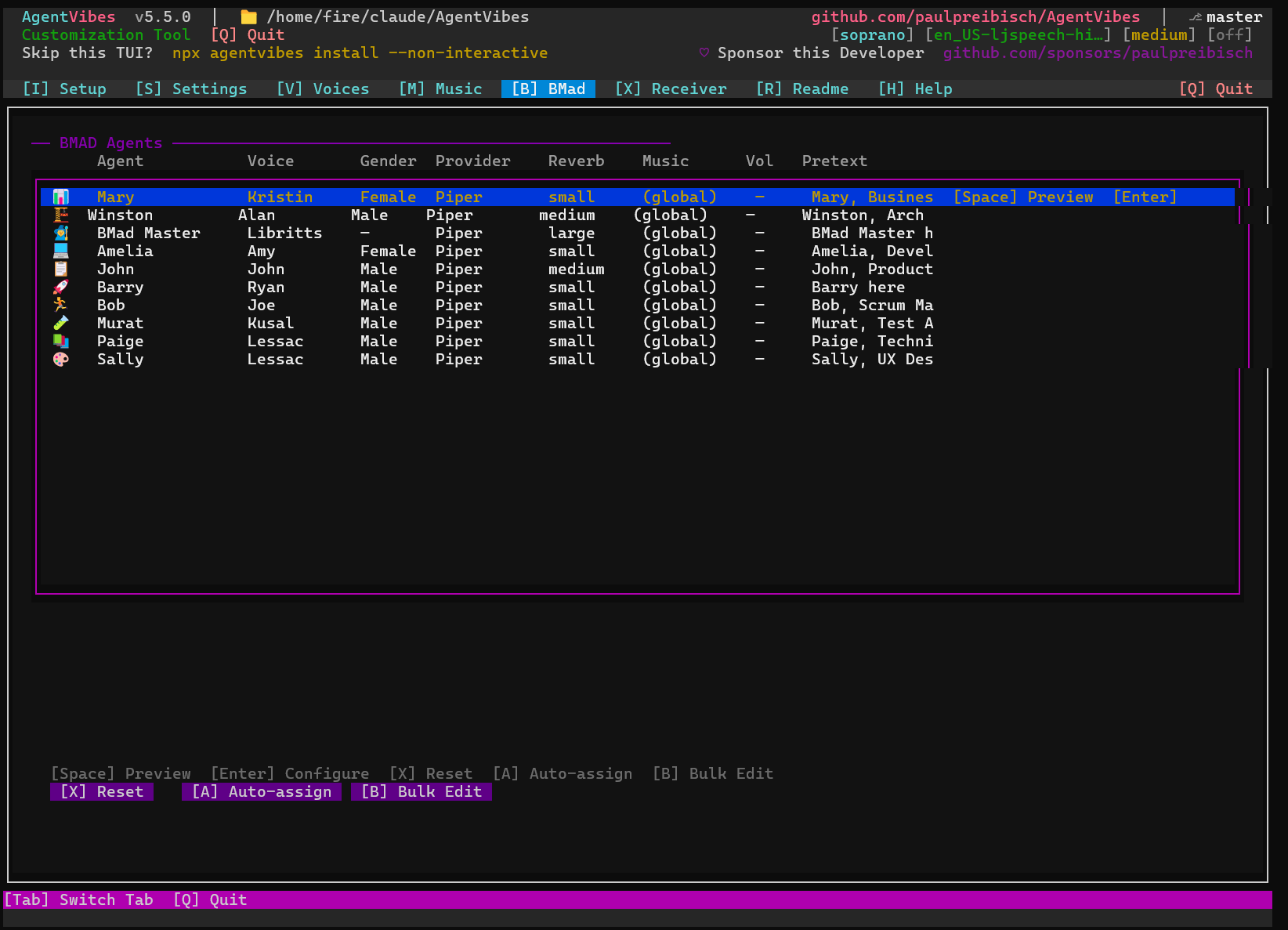
|
|
1075
|
-
|
|
1076
|
-
### 🔊 TTS Injection: How It Works
|
|
1077
|
-
|
|
1078
|
-
BMAD uses a **loosely-coupled injection system** for voice integration. BMAD source files contain placeholder markers that AgentVibes replaces with speaking instructions during installation:
|
|
1079
|
-
|
|
1080
|
-
**Before Installation (BMAD Source):**
|
|
1081
|
-
```xml
|
|
1082
|
-
<rules>
|
|
1083
|
-
<r>ALWAYS communicate in {communication_language}...</r>
|
|
1084
|
-
<!-- TTS_INJECTION:agent-tts -->
|
|
1085
|
-
<r>Stay in character until exit selected</r>
|
|
1086
|
-
</rules>
|
|
1087
|
-
```
|
|
1088
|
-
|
|
1089
|
-
**After Installation (with AgentVibes enabled):**
|
|
1090
|
-
```xml
|
|
1091
|
-
<rules>
|
|
1092
|
-
<r>ALWAYS communicate in {communication_language}...</r>
|
|
1093
|
-
- When responding to user messages, speak your responses using TTS:
|
|
1094
|
-
Call: `.claude/hooks/bmad-speak.sh '{agent-id}' '{response-text}'`
|
|
1095
|
-
Where {agent-id} is your agent type (pm, architect, dev, etc.)
|
|
1096
|
-
|
|
1097
|
-
- Auto Voice Switching: AgentVibes automatically switches to the voice
|
|
1098
|
-
assigned for your agent role when activated
|
|
1099
|
-
<r>Stay in character until exit selected</r>
|
|
1100
|
-
</rules>
|
|
1101
|
-
```
|
|
1102
|
-
|
|
1103
|
-
**After Installation (with TTS disabled):**
|
|
1104
|
-
```xml
|
|
1105
|
-
<rules>
|
|
1106
|
-
<r>ALWAYS communicate in {communication_language}...</r>
|
|
1107
|
-
<r>Stay in character until exit selected</r>
|
|
1108
|
-
</rules>
|
|
1109
|
-
```
|
|
1110
|
-
|
|
1111
|
-
This design means **any TTS provider** can integrate with BMAD by replacing these markers with their own instructions!
|
|
1112
|
-
|
|
1113
|
-
**[→ View Complete BMAD Documentation](docs/bmad-plugin.md)** - All agent mappings, language support, TTS injection details, plugin management, and customization
|
|
1114
|
-
|
|
1115
|
-
[↑ Back to top](#-table-of-contents)
|
|
1116
|
-
|
|
1117
|
-
---
|
|
1118
|
-
|
|
1119
|
-
## 🤖 OpenClaw Integration
|
|
1120
|
-
|
|
1121
|
-
**Use AgentVibes TTS with OpenClaw - the revolutionary AI assistant you can access via any instant messenger!**
|
|
1122
|
-
|
|
1123
|
-
**What is OpenClaw?** [OpenClaw](https://openclaw.ai/) is a revolutionary AI assistant that brings Claude AI to your favorite messaging platforms - WhatsApp, Telegram, Discord, and more. No apps to install, no websites to visit - just message your AI assistant like you would a friend.
|
|
1124
|
-
|
|
1125
|
-
🌐 **Website**: https://openclaw.ai/
|
|
1126
|
-
|
|
1127
|
-
AgentVibes seamlessly integrates with OpenClaw, providing professional text-to-speech for AI assistants running on messaging platforms and remote servers.
|
|
1128
|
-
|
|
1129
|
-
### 🚨 CRITICAL: Security Before Running OpenClaw on Any Remote Server
|
|
1130
|
-
|
|
1131
|
-
⚠️ **SECURITY IS NOT OPTIONAL** - Running OpenClaw on a remote server exposes your infrastructure to attack vectors including SSH compromise, credential theft, and lateral movement.
|
|
1132
|
-
|
|
1133
|
-
**👉 READ THIS FIRST:** [Security Hardening Guide](docs/security-hardening-guide.md) - **Required reading** covering:
|
|
1134
|
-
- ✅ SSH hardening (key-only auth, port 2222, fail2ban)
|
|
1135
|
-
- ✅ Firewall configuration (UFW/iptables)
|
|
1136
|
-
- ✅ Intrusion detection (AIDE, Wazuh)
|
|
1137
|
-
- ✅ VPN tunneling (Tailscale alternative to direct SSH)
|
|
1138
|
-
|
|
1139
|
-
**Do not expose your OpenClaw server to the internet without reading this guide.**
|
|
1140
|
-
|
|
1141
|
-
### 🎯 Key Benefits
|
|
1142
|
-
|
|
1143
|
-
- **Free & Offline**: No API costs, works without internet
|
|
1144
|
-
- **Remote SSH Audio**: Audio tunnels from server to local machine via PulseAudio
|
|
1145
|
-
- **50+ Voices**: Professional AI voices in 30+ languages
|
|
1146
|
-
- **Zero Config**: Automatic when AgentVibes is installed
|
|
1147
|
-
|
|
1148
|
-
### 🚀 Installation
|
|
1149
|
-
|
|
1150
|
-
AgentVibes includes a ready-to-use OpenClaw skill that enables TTS on messaging platforms. The setup involves two components:
|
|
1151
|
-
|
|
1152
|
-
#### Component 1: OpenClaw Server (Remote)
|
|
1153
|
-
|
|
1154
|
-
Install AgentVibes on your OpenClaw server:
|
|
1155
|
-
|
|
1156
|
-
```bash
|
|
1157
|
-
# On your remote server where OpenClaw is running
|
|
1158
|
-
npx agentvibes install
|
|
1159
|
-
```
|
|
1160
|
-
|
|
1161
|
-
The OpenClaw skill is **automatically included** in the AgentVibes npm package at `.clawdbot/skill/SKILL.md`.
|
|
5
|
+
### Finally — your AI agents can talk back.
|
|
1162
6
|
|
|
1163
|
-
**
|
|
7
|
+
**AgentVibes gives your AI coding agents a real spoken voice.** When an agent starts a task, you hear it. When it finishes, you hear that too — out loud, in a genuinely human voice, while you keep working on something else.
|
|
1164
8
|
|
|
1165
|
-
|
|
1166
|
-
|
|
1167
|
-
|
|
1168
|
-
|
|
9
|
+
[](https://www.npmjs.com/package/agentvibes)
|
|
10
|
+
[](https://github.com/paulpreibisch/AgentVibes/actions/workflows/test.yml)
|
|
11
|
+
[](https://github.com/paulpreibisch/AgentVibes/actions/workflows/publish.yml)
|
|
12
|
+
[](https://opensource.org/licenses/Apache-2.0)
|
|
1169
13
|
|
|
1170
|
-
|
|
1171
|
-
```bash
|
|
1172
|
-
# Example - adjust path based on your OpenClaw installation
|
|
1173
|
-
ln -s $(npm root -g)/agentvibes/.clawdbot/skill/SKILL.md ~/.openclaw/skills/agentvibes.md
|
|
1174
|
-
```
|
|
14
|
+
[**Website**](https://agentvibes.org) · [**Quick Start**](docs/quick-start.md) · [**Voice Library**](docs/voice-library.md) · [**Commands**](docs/commands.md) · [**Providers**](docs/providers.md)
|
|
1175
15
|
|
|
1176
|
-
|
|
1177
|
-
```
|
|
1178
|
-
✓ AgentVibes skill detected and loaded
|
|
1179
|
-
```
|
|
16
|
+
</div>
|
|
1180
17
|
|
|
1181
18
|
---
|
|
1182
19
|
|
|
1183
|
-
|
|
1184
|
-
|
|
1185
|
-
Manage your text-to-speech voices across multiple providers with the AgentVibes Voice Management Skill:
|
|
1186
|
-
|
|
1187
|
-
**Voice Management Features:**
|
|
1188
|
-
- 🎤 **50+ Professional Voices** - Across Piper TTS, Piper (free offline), and macOS Say providers
|
|
1189
|
-
- 🔀 **Multi-Provider Support** - Switch between Piper TTS (premium), Piper (free), and macOS Say
|
|
1190
|
-
- 👂 **Voice Preview** - Listen to voices before selecting them
|
|
1191
|
-
- 🎚️ **Voice Customization** - Add custom voices, set pretext, control speech rate
|
|
1192
|
-
- 📋 **Voice Management** - List, switch, replay, and manage your voice library
|
|
1193
|
-
- 🔇 **Mute Control** - Mute/unmute TTS output with persistent settings
|
|
1194
|
-
- 🌍 **Multilingual Support** - Voices in 30+ languages across all providers
|
|
1195
|
-
|
|
1196
|
-
**Installation Confirmation:**
|
|
1197
|
-
✅ The skill is **automatically included** in the AgentVibes npm package at:
|
|
1198
|
-
```
|
|
1199
|
-
node_modules/agentvibes/.clawdbot/skill/SKILL.md
|
|
1200
|
-
```
|
|
1201
|
-
|
|
1202
|
-
No extra setup needed - when you run `npx agentvibes install` on your OpenClaw server, the skill is ready to use!
|
|
1203
|
-
|
|
1204
|
-
**Full Skill Documentation:**
|
|
1205
|
-
**[→ View Complete AgentVibes Skill Guide](.clawdbot/skill/SKILL.md)** - 430+ lines covering:
|
|
1206
|
-
- Quick start with 50+ voice options
|
|
1207
|
-
- Background music & effects management
|
|
1208
|
-
- Personality system (19+ styles)
|
|
1209
|
-
- Voice effects (reverb, reverb, EQ)
|
|
1210
|
-
- Speed & verbosity control
|
|
1211
|
-
- Remote SSH audio setup
|
|
1212
|
-
- Troubleshooting & complete reference
|
|
1213
|
-
|
|
1214
|
-
**Popular Voice Examples:**
|
|
1215
|
-
```bash
|
|
1216
|
-
# Female voices
|
|
1217
|
-
npx agentvibes speak "Hello" --voice en_US-amy-medium
|
|
1218
|
-
npx agentvibes speak "Bonjour" --voice fr_FR-siwis-medium
|
|
1219
|
-
|
|
1220
|
-
# Male voices
|
|
1221
|
-
npx agentvibes speak "Hello" --voice en_US-lessac-medium
|
|
1222
|
-
npx agentvibes speak "Good day" --voice en_GB-alan-medium
|
|
20
|
+
## 🎯 The pitch
|
|
1223
21
|
|
|
1224
|
-
|
|
1225
|
-
bash ~/.claude/hooks/personality-manager.sh set sarcastic
|
|
1226
|
-
bash ~/.claude/hooks/play-tts.sh "Oh wonderful, another request"
|
|
1227
|
-
```
|
|
22
|
+
> **Your AI agents get a voice — they actually speak.** Even when you're developing on a remote server, the **receiver** pipes that voice straight to your **local** speakers. With the latest neural voices — **Kokoro** and **ElevenLabs** — your agent team becomes a hands-free partner for your flow: perfect when you're running **multiple agents** and don't want to be glued to one screen. If you're a multitasker, this is your tool. And it's always under your control — **mute it, or toggle it on and off, whenever you want.**
|
|
1228
23
|
|
|
1229
24
|
---
|
|
1230
25
|
|
|
1231
|
-
|
|
1232
|
-
|
|
1233
|
-
**CRITICAL: You MUST install AgentVibes on your phone (or local machine) to receive and play audio!**
|
|
1234
|
-
|
|
1235
|
-
Without this, audio cannot be heard - the server generates TTS but needs a receiver to play it.
|
|
1236
|
-
|
|
1237
|
-
**Install on Android Phone (Termux):**
|
|
1238
|
-
|
|
1239
|
-
1. **Install Termux from F-Droid** (NOT Google Play):
|
|
1240
|
-
- Download: https://f-droid.org/en/packages/com.termux/
|
|
1241
|
-
|
|
1242
|
-
2. **Install Node.js in Termux:**
|
|
1243
|
-
```bash
|
|
1244
|
-
pkg update && pkg upgrade
|
|
1245
|
-
pkg install nodejs-lts
|
|
1246
|
-
```
|
|
1247
|
-
|
|
1248
|
-
3. **Install AgentVibes in Termux:**
|
|
1249
|
-
```bash
|
|
1250
|
-
npx agentvibes install
|
|
1251
|
-
```
|
|
1252
|
-
|
|
1253
|
-
4. **Install Termux:API** (for audio playback):
|
|
1254
|
-
- Download: https://f-droid.org/en/packages/com.termux.api/
|
|
1255
|
-
- Then in Termux: `pkg install termux-api`
|
|
1256
|
-
|
|
1257
|
-
**Install on Local Mac/Linux:**
|
|
1258
|
-
|
|
1259
|
-
```bash
|
|
1260
|
-
npx agentvibes install
|
|
1261
|
-
```
|
|
1262
|
-
|
|
1263
|
-
**Why is this needed?**
|
|
1264
|
-
- The **server generates TTS** but has no speakers (headless)
|
|
1265
|
-
- AgentVibes on your **phone acts as the audio receiver** via SSH tunnel
|
|
1266
|
-
- Audio tunnels from server → SSH → phone → speakers 🔊
|
|
1267
|
-
|
|
1268
|
-
Without AgentVibes installed on the receiving device, you'll generate audio but hear nothing!
|
|
1269
|
-
|
|
1270
|
-
#### How It Works: Server → SSH Tunnel → Local Playback
|
|
1271
|
-
|
|
1272
|
-
```
|
|
1273
|
-
┌─────────────────────────────────────────────────────────┐
|
|
1274
|
-
│ 1. User messages OpenClaw via Telegram/WhatsApp │
|
|
1275
|
-
│ "Tell me about the weather" │
|
|
1276
|
-
└─────────────────────────────────────────────────────────┘
|
|
1277
|
-
↓
|
|
1278
|
-
┌─────────────────────────────────────────────────────────┐
|
|
1279
|
-
│ 2. OpenClaw (Server) processes request with Claude │
|
|
1280
|
-
│ AgentVibes skill generates TTS audio │
|
|
1281
|
-
└─────────────────────────────────────────────────────────┘
|
|
1282
|
-
↓
|
|
1283
|
-
┌─────────────────────────────────────────────────────────┐
|
|
1284
|
-
│ 3. Audio tunnels through SSH → PulseAudio (port 14713)│
|
|
1285
|
-
│ Server: PULSE_SERVER=tcp:localhost:14713 │
|
|
1286
|
-
└─────────────────────────────────────────────────────────┘
|
|
1287
|
-
↓
|
|
1288
|
-
┌─────────────────────────────────────────────────────────┐
|
|
1289
|
-
│ 4. Local AgentVibes receives and plays audio │
|
|
1290
|
-
│ Phone speakers, laptop speakers, etc. │
|
|
1291
|
-
│ 🔊 "The weather is sunny and 72 degrees" │
|
|
1292
|
-
└─────────────────────────────────────────────────────────┘
|
|
1293
|
-
```
|
|
1294
|
-
|
|
1295
|
-
**Architecture:**
|
|
1296
|
-
- **Server (OpenClaw)**: Generates TTS, sends via PulseAudio
|
|
1297
|
-
- **SSH Tunnel**: RemoteForward port 14713 (encrypted transport)
|
|
1298
|
-
- **Local (Termux/Desktop)**: AgentVibes receives audio, plays on speakers
|
|
1299
|
-
|
|
1300
|
-
This creates a **Siri-like experience** - message from anywhere, hear responses on your phone! 📱🎤
|
|
1301
|
-
|
|
1302
|
-
### 📝 Usage
|
|
1303
|
-
|
|
1304
|
-
#### Basic TTS Commands
|
|
1305
|
-
|
|
1306
|
-
```bash
|
|
1307
|
-
# Basic TTS
|
|
1308
|
-
npx agentvibes speak "Hello from OpenClaw"
|
|
1309
|
-
|
|
1310
|
-
# With different voices
|
|
1311
|
-
npx agentvibes speak "Hello" --voice en_US-amy-medium
|
|
1312
|
-
npx agentvibes speak "Bonjour" --voice fr_FR-siwis-medium
|
|
1313
|
-
|
|
1314
|
-
# List available voices
|
|
1315
|
-
npx agentvibes voices
|
|
1316
|
-
```
|
|
1317
|
-
|
|
1318
|
-
#### Advanced: Direct Hook Usage with Voice Override
|
|
1319
|
-
|
|
1320
|
-
For programmatic control, use the TTS hook directly:
|
|
1321
|
-
|
|
1322
|
-
```bash
|
|
1323
|
-
# Basic: Use default voice
|
|
1324
|
-
bash ~/.claude/hooks/play-tts.sh "Hello from OpenClaw"
|
|
1325
|
-
|
|
1326
|
-
# Advanced: Override voice per message
|
|
1327
|
-
bash ~/.claude/hooks/play-tts.sh "Welcome message" "en_US-amy-medium"
|
|
1328
|
-
bash ~/.claude/hooks/play-tts.sh "Bonjour!" "fr_FR-siwis-medium"
|
|
1329
|
-
bash ~/.claude/hooks/play-tts.sh "British greeting" "en_GB-alan-medium"
|
|
1330
|
-
```
|
|
1331
|
-
|
|
1332
|
-
**Parameters:**
|
|
1333
|
-
- `$1` - **TEXT** (required): Message to speak
|
|
1334
|
-
- `$2` - **VOICE** (optional): Voice name to override default
|
|
1335
|
-
|
|
1336
|
-
#### Audio Effects Configuration for OpenClaw
|
|
1337
|
-
|
|
1338
|
-
**File**: `.claude/config/audio-effects.cfg`
|
|
1339
|
-
|
|
1340
|
-
Customize audio effects, background music, and voice processing per agent or use default settings:
|
|
1341
|
-
|
|
1342
|
-
**Format:**
|
|
1343
|
-
```
|
|
1344
|
-
AGENT_NAME|SOX_EFFECTS|BACKGROUND_FILE|BACKGROUND_VOLUME
|
|
1345
|
-
```
|
|
1346
|
-
|
|
1347
|
-
**Example Configuration:**
|
|
1348
|
-
|
|
1349
|
-
```bash
|
|
1350
|
-
# Default - subtle background music
|
|
1351
|
-
default||agentvibes_soft_flamenco_loop.mp3|0.30
|
|
1352
|
-
|
|
1353
|
-
# Custom agent with reverb + background
|
|
1354
|
-
MyAgent|reverb 40 50 90 gain -2|agentvibes_soft_flamenco_loop.mp3|0.20
|
|
1355
|
-
|
|
1356
|
-
# Agent with pitch shift and EQ
|
|
1357
|
-
Assistant|pitch -100 equalizer 3000 1q +2|agentvibes_dark_chill_step_loop.mp3|0.15
|
|
1358
|
-
```
|
|
1359
|
-
|
|
1360
|
-
**Available SOX Effects:**
|
|
1361
|
-
|
|
1362
|
-
| Effect | Syntax | Example | Description |
|
|
1363
|
-
|--------|--------|---------|-------------|
|
|
1364
|
-
| **Reverb** | `reverb <reverberance> <HF-damping> <room-scale>` | `reverb 40 50 90` | Adds room ambiance (light: 30 40 70, heavy: 50 60 100) |
|
|
1365
|
-
| **Pitch** | `pitch <cents>` | `pitch -100` | Shift pitch (100 cents = 1 semitone, negative = lower) |
|
|
1366
|
-
| **Equalizer** | `equalizer <freq> <width>q <gain-dB>` | `equalizer 3000 1q +2` | Boost/cut frequencies (bass: 200Hz, treble: 4000Hz) |
|
|
1367
|
-
| **Gain** | `gain <dB>` | `gain -2` | Adjust volume (negative = quieter, positive = louder) |
|
|
1368
|
-
| **Compand** | `compand <attack,decay> <threshold:in,out>` | `compand 0.3,1 6:-70,-60,-20` | Dynamic range compression (makes quiet parts louder) |
|
|
1369
|
-
|
|
1370
|
-
**Background Music Tracks:**
|
|
1371
|
-
|
|
1372
|
-
Built-in tracks available in `.claude/audio/tracks/`:
|
|
1373
|
-
- `agentvibes_soft_flamenco_loop.mp3` - Warm, rhythmic flamenco
|
|
1374
|
-
- `agentvibes_dark_chill_step_loop.mp3` - Modern chill electronic
|
|
1375
|
-
- (50+ additional tracks available)
|
|
1376
|
-
|
|
1377
|
-
**Background Volume:**
|
|
1378
|
-
- `0.10` - Very subtle (10%)
|
|
1379
|
-
- `0.20` - Subtle (20%)
|
|
1380
|
-
- `0.30` - Moderate (30%, recommended default)
|
|
1381
|
-
- `0.40` - Noticeable (40%, party mode)
|
|
1382
|
-
|
|
1383
|
-
**Example: OpenClaw Custom Configuration**
|
|
1384
|
-
|
|
1385
|
-
Create `.claude/config/audio-effects.cfg` on your OpenClaw server:
|
|
1386
|
-
|
|
1387
|
-
```bash
|
|
1388
|
-
# OpenClaw assistant - warm voice with subtle reverb
|
|
1389
|
-
OpenClaw|reverb 30 40 70 gain -1|agentvibes_soft_flamenco_loop.mp3|0.25
|
|
1390
|
-
|
|
1391
|
-
# Help desk agent - clear, bright voice
|
|
1392
|
-
HelpDesk|equalizer 4000 1q +3 compand 0.2,0.5 6:-70,-60,-20|agentvibes_dark_chill_step_loop.mp3|0.15
|
|
1393
|
-
|
|
1394
|
-
# Default fallback
|
|
1395
|
-
default||agentvibes_soft_flamenco_loop.mp3|0.30
|
|
1396
|
-
```
|
|
1397
|
-
|
|
1398
|
-
**How AgentVibes Applies Effects:**
|
|
1399
|
-
|
|
1400
|
-
1. **Generate TTS** - Create base audio with Piper TTS
|
|
1401
|
-
2. **Apply SOX effects** - Process audio (reverb, EQ, pitch, etc.)
|
|
1402
|
-
3. **Mix background** - Blend background music at specified volume
|
|
1403
|
-
4. **Tunnel via SSH** - Send processed audio to local receiver
|
|
1404
|
-
5. **Play on device** - Output to phone/laptop speakers
|
|
1405
|
-
|
|
1406
|
-
This allows **per-message customization** or **consistent agent branding** with unique audio signatures!
|
|
1407
|
-
|
|
1408
|
-
### 🔊 Remote SSH Audio
|
|
26
|
+
## Why you'll want this
|
|
1409
27
|
|
|
1410
|
-
|
|
28
|
+
You're in flow. You've got three agents running across three terminals. The old way? You babysit one window, alt-tab to the next, and hope you didn't miss the one that finished four minutes ago and has been sitting idle ever since.
|
|
1411
29
|
|
|
1412
|
-
**
|
|
30
|
+
**AgentVibes speaks each agent's task start and completion aloud.** You stop staring at a silent terminal and start *hearing* your agents work — glance away, write some notes, grab a coffee, and the moment an agent wraps a task or needs you, its voice tells you. It's built for the way you actually work: many agents, in parallel, all talking back.
|
|
1413
31
|
|
|
1414
|
-
|
|
1415
|
-
```bash
|
|
1416
|
-
echo 'export PULSE_SERVER=tcp:localhost:14713' >> ~/.bashrc
|
|
1417
|
-
source ~/.bashrc
|
|
1418
|
-
```
|
|
1419
|
-
|
|
1420
|
-
2. **Local machine** - Add SSH tunnel (`~/.ssh/config`):
|
|
1421
|
-
```
|
|
1422
|
-
Host your-server
|
|
1423
|
-
RemoteForward 14713 localhost:14713
|
|
1424
|
-
```
|
|
1425
|
-
|
|
1426
|
-
3. **Connect and test**:
|
|
1427
|
-
```bash
|
|
1428
|
-
ssh your-server
|
|
1429
|
-
agentvibes speak "Testing remote audio from OpenClaw"
|
|
1430
|
-
```
|
|
32
|
+
And here's the part that feels like magic: **working on a remote server with no audio device?** The AgentVibes **Remote Receiver** pipes your agent's voice straight through *your laptop's speakers*. The work happens on the box. The voice arrives at your desk.
|
|
1431
33
|
|
|
1432
|
-
|
|
34
|
+
<div align="center">
|
|
1433
35
|
|
|
1434
|
-
|
|
36
|
+

|
|
1435
37
|
|
|
1436
|
-
|
|
1437
|
-
- **OpenClaw Website**: https://openclaw.ai/
|
|
1438
|
-
- **Remote Audio Setup**: [docs/remote-audio-setup.md](docs/remote-audio-setup.md)
|
|
1439
|
-
- **Security Hardening**: [docs/security-hardening-guide.md](docs/security-hardening-guide.md) ⚠️
|
|
1440
|
-
|
|
1441
|
-
[↑ Back to top](#-table-of-contents)
|
|
38
|
+
</div>
|
|
1442
39
|
|
|
1443
40
|
---
|
|
1444
41
|
|
|
1445
|
-
##
|
|
1446
|
-
|
|
1447
|
-
**Receive and play TTS audio from servers that have no audio output!**
|
|
1448
|
-
|
|
1449
|
-
AgentVibes Receiver is a lightweight audio client that runs on your phone, tablet, or personal computer, which receives TTS audio from remote voiceless servers, where your OpenClaw Personal Assistant or your Claude Code project is installed.
|
|
1450
|
-
|
|
1451
|
-
### 🎯 What AgentVibes Receiver Solves
|
|
1452
|
-
|
|
1453
|
-
You have OpenClaw running on a Mac mini or remote server with **no audio output**:
|
|
1454
|
-
- 🖥️ Mac mini (silent)
|
|
1455
|
-
- 🖥️ Ubuntu server (headless)
|
|
1456
|
-
- ☁️ AWS/DigitalOcean instance
|
|
1457
|
-
- 📦 Docker container
|
|
1458
|
-
- 🪟 WSL (Windows Subsystem for Linux)
|
|
1459
|
-
|
|
1460
|
-
Users message you via WhatsApp, Telegram, Discord but only get text responses:
|
|
1461
|
-
- ❌ No voice = Less engaging experience
|
|
1462
|
-
- ❌ No personality = Feels robotic
|
|
1463
|
-
- ❌ No audio cues = Miss important context
|
|
1464
|
-
|
|
1465
|
-
**AgentVibes Receiver transforms this:**
|
|
1466
|
-
- ✅ OpenClaw speaks with voice (Siri-like experience)
|
|
1467
|
-
- ✅ Audio streams to your device automatically
|
|
1468
|
-
- ✅ You hear responses on your speakers
|
|
1469
|
-
- ✅ Users get a conversational AI experience
|
|
1470
|
-
|
|
1471
|
-
### 🔧 How It Works
|
|
1472
|
-
|
|
1473
|
-
**One-time setup:**
|
|
1474
|
-
1. Install AgentVibes on your voiceless server with OpenClaw
|
|
1475
|
-
2. Install AgentVibes Receiver on your personal device (phone/tablet/laptop)
|
|
1476
|
-
3. Connect via SSH tunnel (or Tailscale VPN)
|
|
1477
|
-
4. Done - automatic from then on
|
|
1478
|
-
|
|
1479
|
-
**Flow diagram:**
|
|
1480
|
-
```
|
|
1481
|
-
┌──────────────────────────────────────────┐
|
|
1482
|
-
│ Your Mac mini / Server │
|
|
1483
|
-
│ (OpenClaw + AgentVibes) │
|
|
1484
|
-
│ • Generates TTS audio │
|
|
1485
|
-
│ • Sends via SSH tunnel │
|
|
1486
|
-
└──────────────────────────────────────────┘
|
|
1487
|
-
↓ Encrypted SSH tunnel
|
|
1488
|
-
┌──────────────────────────────────────────┐
|
|
1489
|
-
│ Your Phone / Laptop │
|
|
1490
|
-
│ (AgentVibes Receiver) │
|
|
1491
|
-
│ • Receives audio stream (or text stream) │
|
|
1492
|
-
│ • Auto-plays on device speakers │
|
|
1493
|
-
└──────────────────────────────────────────┘
|
|
1494
|
-
```
|
|
1495
|
-
|
|
1496
|
-
**Real-world example:**
|
|
1497
|
-
```
|
|
1498
|
-
📱 WhatsApp: "Tell me about quantum computing"
|
|
1499
|
-
↓
|
|
1500
|
-
🖥️ Mac mini: OpenClaw processes + generates TTS
|
|
1501
|
-
↓ SSH tunnel (audio or text stream)
|
|
1502
|
-
📱 Your phone (Agent Vibes Receiver): Plays audio 🔊
|
|
1503
|
-
↓
|
|
1504
|
-
You hear on your device speakers: "Quantum computing uses quantum bits..."
|
|
1505
|
-
↓
|
|
1506
|
-
💬 Conversation feels alive!
|
|
1507
|
-
```
|
|
1508
|
-
|
|
1509
|
-
### ✨ Key Features
|
|
1510
|
-
|
|
1511
|
-
| Feature | Benefit |
|
|
1512
|
-
|---------|---------|
|
|
1513
|
-
| **One-Time Pairing** | SSH key setup, automatic reconnect |
|
|
1514
|
-
| **Real-Time Streaming** | Low-latency audio playback |
|
|
1515
|
-
| **SSH Encryption** | Secure audio tunnel |
|
|
1516
|
-
| **Tailscale Support** | Easy VPN for remote servers |
|
|
1517
|
-
| **Voice Selection** | Configure server-side voice |
|
|
1518
|
-
| **Audio Effects** | Reverb, echo, pitch on server |
|
|
1519
|
-
| **Cache Tracking** | Monitor audio generation |
|
|
1520
|
-
| **Multiple Servers** | Connect to different OpenClaw instances |
|
|
1521
|
-
|
|
1522
|
-
### 🚀 Perfect For
|
|
1523
|
-
|
|
1524
|
-
- 🖥️ **Mac mini + OpenClaw** - Home server with professional voices
|
|
1525
|
-
- ☁️ **Remote Servers** - OpenClaw on AWS/GCP/DigitalOcean
|
|
1526
|
-
- 📱 **WhatsApp/Telegram** - Users message, hear responses
|
|
1527
|
-
- 🎓 **Discord Bots** - Bot speaks with voices
|
|
1528
|
-
- 🏗️ **Docker/Containers** - Containerized OpenClaw with audio
|
|
1529
|
-
- 🔧 **WSL Development** - Windows developers using voiceless WSL
|
|
1530
|
-
|
|
1531
|
-
### 📝 Setup
|
|
42
|
+
## ⚡ Quick start (30 seconds)
|
|
1532
43
|
|
|
1533
44
|
```bash
|
|
1534
|
-
#
|
|
45
|
+
# Install — interactive TUI installer, no git clone required
|
|
1535
46
|
npx agentvibes install
|
|
1536
|
-
# Selects OpenClaw option
|
|
1537
|
-
# AgentVibes installs with SSH-Remote provider
|
|
1538
|
-
|
|
1539
|
-
# On your personal device (phone, laptop, tablet)
|
|
1540
|
-
npx agentvibes receiver setup
|
|
1541
|
-
# Pairing prompt with server SSH key
|
|
1542
|
-
# Done!
|
|
1543
47
|
```
|
|
1544
48
|
|
|
1545
|
-
|
|
1546
|
-
|
|
1547
|
-
**[→ View AgentVibes Receiver Setup Guide](docs/agentvibes-receiver.md)** - Pairing, SSH configuration, Tailscale setup, troubleshooting
|
|
1548
|
-
|
|
1549
|
-
**[→ View OpenClaw Integration Guide](docs/openclaw-integration.md)** - Server setup, voice configuration, audio effects, and best practices
|
|
1550
|
-
|
|
1551
|
-
[↑ Back to top](#-table-of-contents)
|
|
1552
|
-
|
|
1553
|
-
---
|
|
1554
|
-
|
|
1555
|
-
## 📦 Installation Structure
|
|
1556
|
-
|
|
1557
|
-
**What gets installed:** Commands, hooks, personalities, and plugins in `.claude/` directory.
|
|
1558
|
-
|
|
1559
|
-
**[→ View Complete Installation Structure](docs/installation-structure.md)** - Full directory tree, file descriptions, and settings storage
|
|
1560
|
-
|
|
1561
|
-
[↑ Back to top](#-table-of-contents)
|
|
1562
|
-
|
|
1563
|
-
---
|
|
1564
|
-
|
|
1565
|
-
## 💡 Common Workflows
|
|
49
|
+
That's it. The installer wires up the Claude Code hooks and walks you through choosing a voice. Then **just code** — AgentVibes speaks automatically as your agents acknowledge and complete tasks.
|
|
1566
50
|
|
|
1567
51
|
```bash
|
|
1568
|
-
#
|
|
1569
|
-
/agent-vibes:list # See all voices
|
|
1570
|
-
/agent-vibes:switch Aria # Change voice
|
|
1571
|
-
|
|
1572
|
-
# Try personalities
|
|
1573
|
-
/agent-vibes:personality pirate # Pirate voice + style
|
|
1574
|
-
/agent-vibes:personality list # See all 19 personalities
|
|
1575
|
-
|
|
1576
|
-
# Speak in other languages
|
|
1577
|
-
/agent-vibes:set-language spanish # Speak in Spanish
|
|
1578
|
-
/agent-vibes:set-language list # See 30+ languages
|
|
1579
|
-
|
|
1580
|
-
# Replay audio
|
|
1581
|
-
/agent-vibes:replay # Replay last message
|
|
52
|
+
npx agentvibes # open the TUI any time
|
|
1582
53
|
```
|
|
1583
54
|
|
|
1584
|
-
|
|
55
|
+
> **macOS only, one time:** `brew install bash` — macOS ships bash 3.2; AgentVibes needs 5.x.
|
|
1585
56
|
|
|
1586
|
-
[
|
|
57
|
+
New here? The [**Quick Start guide**](docs/quick-start.md) walks you through your first voiced session.
|
|
1587
58
|
|
|
1588
59
|
---
|
|
1589
60
|
|
|
1590
|
-
##
|
|
1591
|
-
|
|
1592
|
-
AgentVibes supports **custom personalities** and **custom voices**.
|
|
1593
|
-
|
|
1594
|
-
**Quick Examples:**
|
|
1595
|
-
```bash
|
|
1596
|
-
# Create custom personality
|
|
1597
|
-
/agent-vibes:personality add mycustom
|
|
1598
|
-
|
|
1599
|
-
# Add custom Piper voice
|
|
1600
|
-
/agent-vibes:add "My Voice" abc123xyz789
|
|
61
|
+
## 🆕 Neural voices (v5.11.0)
|
|
1601
62
|
|
|
1602
|
-
|
|
1603
|
-
[Bash: .claude/hooks/play-tts.sh "Starting" "Aria"]
|
|
1604
|
-
```
|
|
1605
|
-
|
|
1606
|
-
**[→ View Advanced Features Guide](docs/advanced-features.md)** - Custom personalities, custom voices, and more
|
|
1607
|
-
|
|
1608
|
-
[↑ Back to top](#-table-of-contents)
|
|
1609
|
-
|
|
1610
|
-
---
|
|
63
|
+
Your agent team can now sound genuinely human — each agent with its own distinct voice.
|
|
1611
64
|
|
|
1612
|
-
|
|
65
|
+
- **🧠 Kokoro** — local neural TTS that runs on your **CPU, no GPU required**, with **Chinese, Japanese, and Korean** voices built in.
|
|
66
|
+
- **☁️ ElevenLabs** — premium cloud neural voices when you want the absolute best.
|
|
1613
67
|
|
|
1614
|
-
**
|
|
68
|
+
Plus combinable audio effects landed too: stack **reverb**, **echo**, and **chorus** on any voice.
|
|
1615
69
|
|
|
1616
|
-
|
|
1617
|
-
✅ **Zero configuration** - Audio optimizes automatically
|
|
1618
|
-
✅ **No static/clicking** - Clean playback through SSH tunnels
|
|
70
|
+
<div align="center">
|
|
1619
71
|
|
|
1620
|
-
|
|
72
|
+

|
|
1621
73
|
|
|
1622
|
-
|
|
74
|
+
</div>
|
|
1623
75
|
|
|
1624
76
|
---
|
|
1625
77
|
|
|
1626
|
-
##
|
|
1627
|
-
|
|
1628
|
-
**Stream TTS audio from a Linux/macOS machine to your Windows PC.**
|
|
1629
|
-
|
|
1630
|
-
When you run Claude Code on a Linux server (or WSL) and want audio to play on your Windows laptop, AgentVibes routes audio over SSH using a queue-based architecture — required because SSH connections on Windows run in **Session 0**, which has no access to audio devices.
|
|
1631
|
-
|
|
1632
|
-
### How It Works
|
|
1633
|
-
|
|
1634
|
-
```
|
|
1635
|
-
Linux/macOS (sender) Windows (receiver)
|
|
1636
|
-
───────────────────── ──────────────────
|
|
1637
|
-
play-tts-ssh-remote.sh agentvibes-receiver.ps1 ← SSH ForceCommand
|
|
1638
|
-
│ │
|
|
1639
|
-
│ SSH: base64 JSON payload ──────────────▶ │ writes req-xxxx.json
|
|
1640
|
-
│ ▼
|
|
1641
|
-
│ ~/.agentvibes/tts-queue/
|
|
1642
|
-
│ │
|
|
1643
|
-
│ tts-watcher.ps1 ← runs in your user session
|
|
1644
|
-
│ │
|
|
1645
|
-
│ play-tts.ps1 → piper/SAPI → 🔊 speakers
|
|
1646
|
-
```
|
|
1647
|
-
|
|
1648
|
-
The **receiver** (`agentvibes-receiver.ps1`) runs as an SSH ForceCommand — it accepts base64 JSON payloads and writes them to a queue directory. The **watcher** (`tts-watcher.ps1`) runs invisibly in your user session (the only session that has audio), picks up queue items, and plays them.
|
|
1649
|
-
|
|
1650
|
-
### Is It Visible to the User?
|
|
1651
|
-
|
|
1652
|
-
**No — completely invisible during normal use.** The watcher is a hidden background process that:
|
|
1653
|
-
- Auto-starts on Windows login via the Startup folder shortcut (`agentvibes-watcher.vbs`)
|
|
1654
|
-
- Runs as a hidden PowerShell window (no taskbar icon, no UI)
|
|
1655
|
-
- Writes a log to `%USERPROFILE%\.agentvibes\watcher.log` for debugging
|
|
1656
|
-
- Silently plays audio when TTS requests arrive
|
|
1657
|
-
|
|
1658
|
-
### One-Time Setup (Windows)
|
|
1659
|
-
|
|
1660
|
-
Run this **once** in an **Administrator PowerShell** from the AgentVibes repo:
|
|
78
|
+
## ✨ Features
|
|
1661
79
|
|
|
1662
|
-
|
|
1663
|
-
|
|
1664
|
-
```
|
|
1665
|
-
|
|
1666
|
-
This:
|
|
1667
|
-
1. Installs and hardens OpenSSH with ForceCommand (SSH → receiver only, no shell)
|
|
1668
|
-
2. Creates the `agentvibes-receiver` Windows user for SSH isolation
|
|
1669
|
-
3. Installs the TTS watcher + auto-start shortcut in your Startup folder
|
|
1670
|
-
4. Configures the firewall rule (Tailscale-only by default)
|
|
80
|
+
**🗣️ Automatic spoken narration.**
|
|
81
|
+
AgentVibes installs Claude Code hooks that fire on their own — when your agent acknowledges a task and when it completes one, you hear it spoken. No manual calls, no extra commands; you just code and listen.
|
|
1671
82
|
|
|
1672
|
-
|
|
83
|
+
**📡 Remote Receiver — voice from anywhere, on your speakers.**
|
|
84
|
+
SSH'd into a server with no sound card? The receiver routes the synthesized audio back to your local machine and plays it through *your* speakers. The work runs remotely; the voice lands at your desk.
|
|
1673
85
|
|
|
1674
|
-
|
|
86
|
+
**🧠 Neural and free voices — 900+ to choose from.**
|
|
87
|
+
Run fully free and offline with **Piper** (900+ voices, incl. the LibriTTS library) or your OS's built-in **macOS Say** / **Windows SAPI**. Want human-grade quality? Switch to neural: **Kokoro** (local, CPU-only, with Chinese/Japanese/Korean) or **ElevenLabs** (premium cloud). Browse and preview them all in the Voices tab.
|
|
1675
88
|
|
|
1676
|
-
|
|
1677
|
-
|
|
1678
|
-
| Run `setup-ssh-receiver.ps1` | ✅ Once | Admin PowerShell |
|
|
1679
|
-
| Add sender's SSH public key | ✅ Once | To `C:\ProgramData\ssh\administrators_authorized_keys` |
|
|
1680
|
-
| Start the watcher | ✅ First time | Auto-starts on next login; or run `start-watcher.vbs` manually |
|
|
1681
|
-
| Install piper voices on Windows | Optional | Without it, falls back to Windows SAPI (built-in) |
|
|
89
|
+
**👥 A distinct voice per agent (BMAD).**
|
|
90
|
+
Give every agent on a multi-agent BMAD team its own voice and auto-assign them from your active provider. When the analyst, architect, dev, and QA each sound different, you know who's talking without looking.
|
|
1682
91
|
|
|
1683
|
-
|
|
92
|
+
**🎚️ Per-LLM routing.**
|
|
93
|
+
Claude Code, Claude Desktop, Warp, OpenClaw — each LLM can have its own voice, effects, background music, and intro phrase, so every assistant sounds distinct.
|
|
1684
94
|
|
|
1685
|
-
|
|
95
|
+
**🎛️ Combinable audio effects.**
|
|
96
|
+
Stack **reverb**, **echo**, and **chorus** on any voice and preview live — from a subtle room to a cathedral with a cave echo.
|
|
1686
97
|
|
|
1687
|
-
|
|
1688
|
-
|
|
1689
|
-
**No audio after the watcher is running:**
|
|
1690
|
-
```powershell
|
|
1691
|
-
# Check the log
|
|
1692
|
-
Get-Content "$env:USERPROFILE\.agentvibes\watcher.log" -Tail 20
|
|
1693
|
-
```
|
|
98
|
+
**🎭 Personalities & sentiment.**
|
|
99
|
+
Apply speaking styles (pirate, sarcastic, and more) to give the narration character.
|
|
1694
100
|
|
|
1695
|
-
|
|
1696
|
-
|
|
1697
|
-
# Restart manually (no admin needed)
|
|
1698
|
-
Start-Process wscript.exe -ArgumentList "$env:USERPROFILE\.agentvibes\start-watcher.vbs" -WindowStyle Hidden
|
|
1699
|
-
```
|
|
101
|
+
**🎵 Background music.**
|
|
102
|
+
Play ambient soundtracks underneath the narration, with per-track volume control.
|
|
1700
103
|
|
|
1701
|
-
|
|
1702
|
-
|
|
1703
|
-
# From the AgentVibes repo root (no admin needed)
|
|
1704
|
-
powershell -ExecutionPolicy Bypass -File update-watcher.ps1
|
|
1705
|
-
```
|
|
104
|
+
**🌍 Languages & translation.**
|
|
105
|
+
Narrate in the language you choose — e.g. `/agent-vibes:set-language spanish`.
|
|
1706
106
|
|
|
1707
|
-
|
|
107
|
+
**💬 Natural-language control (MCP).**
|
|
108
|
+
Every one of the 50+ slash commands has a plain-English equivalent through the MCP integration — type the command, or just *ask*.
|
|
1708
109
|
|
|
1709
|
-
|
|
1710
|
-
|
|
1711
|
-
| **Windows** | ✅ Yes | SSH runs in Session 0 — no audio access |
|
|
1712
|
-
| **Linux** | No | SSH sessions can reach PulseAudio/PipeWire directly |
|
|
1713
|
-
| **macOS** | No | SSH sessions have audio access |
|
|
1714
|
-
| **WSL** | No | Uses Linux audio stack |
|
|
110
|
+
**🤐 Always under your control.**
|
|
111
|
+
Mute and unmute instantly, and toggle narration on or off per LLM — quiet when you need to focus, loud when you want the play-by-play.
|
|
1715
112
|
|
|
1716
|
-
|
|
113
|
+
**🖥️ Runs everywhere.**
|
|
114
|
+
Claude Code, Claude Desktop, Warp Terminal, OpenClaw, and even Android/Termux (Claude Code on your phone).
|
|
1717
115
|
|
|
1718
116
|
---
|
|
1719
117
|
|
|
1720
|
-
##
|
|
1721
|
-
|
|
1722
|
-
### Audio Architecture
|
|
1723
|
-
|
|
1724
|
-
AgentVibes uses a cross-platform audio module (`src/console/audio-env.js`) that handles player detection and environment configuration for all supported platforms.
|
|
1725
|
-
|
|
1726
|
-
#### Platform Audio Support Matrix
|
|
1727
|
-
|
|
1728
|
-
| Platform | PulseAudio Config | MP3 Players (preference order) | WAV Players (preference order) |
|
|
1729
|
-
|----------|-------------------|-------------------------------|-------------------------------|
|
|
1730
|
-
| **Native Linux** | System default (not overridden) | ffplay → play (sox) → mpg123 → cvlc → mpv | aplay → paplay → play → ffplay |
|
|
1731
|
-
| **WSL2** | Auto-detects `/mnt/wslg/PulseServer` | Same as Linux | Same as Linux |
|
|
1732
|
-
| **macOS** | Not applicable | ffplay → play → mpg123 → cvlc → mpv → afplay | aplay → paplay → play → ffplay → afplay |
|
|
1733
|
-
| **Windows** | Not applicable | ffplay → mpv (if installed) | ffplay → mpv → PowerShell SoundPlayer (built-in) |
|
|
1734
|
-
|
|
1735
|
-
#### Key Design Decisions
|
|
1736
|
-
|
|
1737
|
-
- **Direct spawn, not shell chains**: Audio players are spawned directly via Node's `spawn()` instead of `sh -c 'cmd1 || cmd2'` chains. VLC/cvlc crashes when stderr is redirected inside shell wrappers.
|
|
1738
|
-
- **Player detection at startup**: The available player is detected once using `which` and cached. No runtime fallback chains.
|
|
1739
|
-
- **PULSE_SERVER safety**: The WSL2 PulseServer path (`/mnt/wslg/PulseServer`) is only set when the socket file actually exists. Hardcoding it on native Linux silently breaks audio output.
|
|
1740
|
-
- **Windows WAV fallback**: PowerShell's `System.Media.SoundPlayer` is used as a built-in fallback when no cross-platform player is installed.
|
|
1741
|
-
|
|
1742
|
-
#### Multi-Speaker Voice Models
|
|
1743
|
-
|
|
1744
|
-
Piper supports multi-speaker ONNX models (e.g., `16Speakers.onnx`) that contain multiple voices in a single file. AgentVibes expands these automatically:
|
|
1745
|
-
|
|
1746
|
-
- The `.onnx.json` metadata file contains `num_speakers` and `speaker_id_map`
|
|
1747
|
-
- `scanInstalledVoices()` expands multi-speaker models into individual selectable entries (e.g., `16Speakers::Cori_Samuel`)
|
|
1748
|
-
- When selected, the system writes `tts-piper-model.txt` and `tts-piper-speaker-id.txt` to `.claude/`
|
|
1749
|
-
- `play-tts-piper.sh` reads these files and passes `--speaker <id>` to the piper binary
|
|
1750
|
-
|
|
1751
|
-
#### Voice Directory Resolution
|
|
118
|
+
## 🎚️ The TUI
|
|
1752
119
|
|
|
1753
|
-
|
|
120
|
+
Run `npx agentvibes` to configure everything visually:
|
|
1754
121
|
|
|
1755
|
-
|
|
1756
|
-
|
|
1757
|
-
|
|
1758
|
-
|
|
122
|
+
| Tab | What it does |
|
|
123
|
+
|-----|--------------|
|
|
124
|
+
| **Setup** | Pick per-LLM provider, voice, and audio effects |
|
|
125
|
+
| **Voices** (press <kbd>V</kbd>) | Browse and preview 900+ voices |
|
|
126
|
+
| **Music** | Manage background music |
|
|
127
|
+
| **BMAD** | Give each agent in a multi-agent team its own voice + auto-assign |
|
|
1759
128
|
|
|
1760
|
-
|
|
129
|
+
<div align="center">
|
|
1761
130
|
|
|
1762
|
-
AgentVibes
|
|
131
|
+

|
|
1763
132
|
|
|
1764
|
-
|
|
1765
|
-
- **904 LibriTTS Speakers** — Automatically extracted from the `16Speakers` multi-speaker model's `speaker_id_map`, plus the full LibriTTS catalog from Hugging Face
|
|
1766
|
-
- **Download on Demand** — Uninstalled voices appear greyed-out in the list; pressing Enter opens a download modal that fetches the voice via `piper-voice-manager.sh`
|
|
1767
|
-
- **Catalog Metadata** — Each entry includes `voiceId`, `displayName`, `gender`, `type` (curated/libritts), and download URL
|
|
1768
|
-
- **LibriTTS Speaker Names** — Raw numeric IDs are patched at load time using `patchLibriTTSSpeakerNames()` which maps speaker IDs to human-readable names from the registry
|
|
133
|
+
</div>
|
|
1769
134
|
|
|
1770
|
-
|
|
1771
|
-
|
|
1772
|
-
#### Required System Dependencies for Background Music
|
|
1773
|
-
|
|
1774
|
-
Background music requires an MP3-capable audio player. The installer detects missing players and offers to install `ffmpeg` automatically. If no player is found, the Music tab displays a clear error message.
|
|
135
|
+
---
|
|
1775
136
|
|
|
1776
|
-
|
|
1777
|
-
# Install ffmpeg (recommended — provides ffplay)
|
|
1778
|
-
# Ubuntu/Debian/WSL2:
|
|
1779
|
-
sudo apt install ffmpeg
|
|
137
|
+
## 🎙️ Voice providers — pick your tradeoff
|
|
1780
138
|
|
|
1781
|
-
|
|
1782
|
-
brew install ffmpeg
|
|
139
|
+
Mix and match per LLM. Start free with a built-in engine, level up to neural when you want it. The free providers need **no paid API** — ElevenLabs is the only one that requires a key, and it's optional.
|
|
1783
140
|
|
|
1784
|
-
|
|
1785
|
-
|
|
1786
|
-
|
|
141
|
+
| Provider | Type | Cost | Notes |
|
|
142
|
+
|----------|------|------|-------|
|
|
143
|
+
| **macOS Say** | Built-in | Free | Zero config on Mac |
|
|
144
|
+
| **Piper** | Local, offline | Free | Linux/WSL/Windows · 900+ voices incl. LibriTTS |
|
|
145
|
+
| **Windows SAPI** | Built-in | Free | Zero setup on Windows |
|
|
146
|
+
| **Soprano** | Neural | Free | `pip install soprano-tts` |
|
|
147
|
+
| 🆕 **Kokoro** | Local neural | Free | Runs on CPU (no GPU) · Chinese/Japanese/Korean |
|
|
148
|
+
| 🆕 **ElevenLabs** | Cloud neural | Paid (API key) | Premium, most human-sounding |
|
|
1787
149
|
|
|
1788
|
-
[
|
|
150
|
+
See the [**Providers guide**](docs/providers.md) and the [**Voice Library**](docs/voice-library.md) for samples and setup.
|
|
1789
151
|
|
|
1790
152
|
---
|
|
1791
153
|
|
|
1792
|
-
##
|
|
1793
|
-
|
|
1794
|
-
### Voice & AI Tools
|
|
1795
|
-
|
|
1796
|
-
- 🎤 **[WhisperTyping](https://whispertyping.com/)** - Fast voice-to-text typing for developers
|
|
1797
|
-
- 🗣️ **[OpenWhisper (Azure)](https://learn.microsoft.com/en-us/azure/ai-services/speech-service/whisper-overview)** - Microsoft's speech-to-text service
|
|
1798
|
-
- 🆓 **[Piper TTS](https://github.com/rhasspy/piper)** - Free offline neural TTS
|
|
1799
|
-
- 🤖 **[Claude Code](https://claude.com/claude-code)** - AI coding assistant
|
|
1800
|
-
- 🎭 **[BMAD METHOD](https://github.com/bmad-code-org/BMAD-METHOD)** - Multi-agent framework
|
|
1801
|
-
|
|
1802
|
-
### AgentVibes Resources
|
|
154
|
+
## 🤖 Works with your stack
|
|
1803
155
|
|
|
1804
|
-
-
|
|
1805
|
-
- 📝 **[Changelog](https://github.com/paulpreibisch/AgentVibes/releases)** - Version history
|
|
1806
|
-
- 📰 **[Technical Deep Dive - LinkedIn Article](https://www.linkedin.com/pulse/agent-vibes-add-voice-claude-code-deep-dive-npx-paul-preibisch-8zrcc/)** - How AgentVibes works under the hood
|
|
1807
|
-
|
|
1808
|
-
[↑ Back to top](#-table-of-contents)
|
|
156
|
+
**Claude Code** (automatic voiced hooks) · **Claude Desktop** (natural-language control via [MCP](docs/mcp-setup.md)) · **Warp Terminal** · **OpenClaw** · **Android / Termux** (Claude Code on your phone)
|
|
1809
157
|
|
|
1810
158
|
---
|
|
1811
159
|
|
|
1812
|
-
##
|
|
1813
|
-
|
|
1814
|
-
**Common Issues:**
|
|
160
|
+
## 💬 50+ commands — slash or natural language
|
|
1815
161
|
|
|
1816
|
-
|
|
162
|
+
Every slash command has a natural-language MCP equivalent — type the command, or just ask in plain English.
|
|
1817
163
|
|
|
1818
|
-
|
|
164
|
+
| Slash command | Just say… |
|
|
165
|
+
|---------------|-----------|
|
|
166
|
+
| `/agent-vibes:switch Aria` | "Switch to Aria voice" |
|
|
167
|
+
| `/agent-vibes:list` | "List the available voices" |
|
|
168
|
+
| `/agent-vibes:personality pirate` | "Set the personality to pirate" |
|
|
169
|
+
| `/agent-vibes:set-language spanish` | "Set the language to Spanish" |
|
|
170
|
+
| `/agent-vibes:mute` | "Mute AgentVibes" |
|
|
1819
171
|
|
|
1820
|
-
|
|
1821
|
-
```bash
|
|
1822
|
-
# ✅ CORRECT - Use this:
|
|
1823
|
-
npx agentvibes install
|
|
172
|
+
Full reference: [**Commands**](docs/commands.md) · enable natural language: [**MCP Setup**](docs/mcp-setup.md)
|
|
1824
173
|
|
|
1825
|
-
|
|
1826
|
-
git clone https://github.com/paulpreibisch/AgentVibes.git
|
|
1827
|
-
```
|
|
174
|
+
<div align="center">
|
|
1828
175
|
|
|
1829
|
-
|
|
176
|
+

|
|
1830
177
|
|
|
1831
|
-
|
|
1832
|
-
```bash
|
|
1833
|
-
git config --global --list | grep lfs
|
|
1834
|
-
```
|
|
1835
|
-
|
|
1836
|
-
**Solution:** Use `npx agentvibes install` - no git operations needed!
|
|
178
|
+
</div>
|
|
1837
179
|
|
|
1838
180
|
---
|
|
1839
181
|
|
|
1840
|
-
|
|
1841
|
-
1. Verify hook is installed: `ls -la .claude/hooks/session-start-tts.sh`
|
|
1842
|
-
2. Test: `/agent-vibes:sample Aria`
|
|
182
|
+
## 👥 Built for multi-agent (BMAD)
|
|
1843
183
|
|
|
1844
|
-
**
|
|
1845
|
-
The Windows receiver queues audio but requires a separate watcher process to play it:
|
|
1846
|
-
1. Check if watcher is running: `Get-WmiObject Win32_Process | Where-Object { $_.CommandLine -like "*tts-watcher*" }`
|
|
1847
|
-
2. If not running: `Start-Process wscript.exe -ArgumentList "$env:USERPROFILE\.agentvibes\start-watcher.vbs" -WindowStyle Hidden`
|
|
1848
|
-
3. Check the log: `Get-Content "$env:USERPROFILE\.agentvibes\watcher.log" -Tail 20`
|
|
1849
|
-
4. [→ Full Windows setup guide](#️-windows-ssh-receiver--tts-watcher)
|
|
184
|
+
Running a full BMAD agent team? **Every agent gets its own distinct voice**, auto-assigned from your active provider. You don't just *see* who's talking — you *hear* it. The analyst, the architect, the dev, the QA — each one recognizable the instant they speak.
|
|
1850
185
|
|
|
1851
|
-
|
|
1852
|
-
```bash
|
|
1853
|
-
npx agentvibes install --yes
|
|
1854
|
-
```
|
|
186
|
+
<div align="center">
|
|
1855
187
|
|
|
1856
|
-
|
|
188
|
+

|
|
1857
189
|
|
|
1858
|
-
|
|
190
|
+
</div>
|
|
1859
191
|
|
|
1860
192
|
---
|
|
1861
193
|
|
|
1862
|
-
##
|
|
1863
|
-
|
|
1864
|
-
**Quick Update (From Claude Code):**
|
|
1865
|
-
```bash
|
|
1866
|
-
/agent-vibes:update
|
|
1867
|
-
```
|
|
1868
|
-
|
|
1869
|
-
**Alternative Methods:**
|
|
1870
|
-
```bash
|
|
1871
|
-
# Via npx
|
|
1872
|
-
npx agentvibes update --yes
|
|
1873
|
-
|
|
1874
|
-
# Via npm (if installed globally)
|
|
1875
|
-
npm update -g agentvibes && agentvibes update --yes
|
|
1876
|
-
```
|
|
1877
|
-
|
|
1878
|
-
**Check Version:** `/agent-vibes:version`
|
|
1879
|
-
|
|
1880
|
-
**[→ View Complete Update Guide](docs/updating.md)** - All update methods, version checking, what gets updated, and troubleshooting
|
|
194
|
+
## 📋 Prerequisites
|
|
1881
195
|
|
|
1882
|
-
|
|
196
|
+
- **Node.js** — required, for `npx`.
|
|
197
|
+
- **bash 5.x** — required on macOS (`brew install bash`).
|
|
198
|
+
- **Audio tools** — optional but recommended for effects and music.
|
|
199
|
+
- **Piper voices** — downloaded automatically on first use; nothing to install manually.
|
|
200
|
+
- **No paid API** is needed for the free providers; ElevenLabs is optional and cloud-based.
|
|
1883
201
|
|
|
1884
202
|
---
|
|
1885
203
|
|
|
1886
|
-
##
|
|
1887
|
-
|
|
1888
|
-
**Quick Uninstall (Project Only):**
|
|
1889
|
-
```bash
|
|
1890
|
-
npx agentvibes uninstall
|
|
1891
|
-
```
|
|
204
|
+
## 📚 Documentation
|
|
1892
205
|
|
|
1893
|
-
|
|
1894
|
-
|
|
1895
|
-
|
|
1896
|
-
|
|
206
|
+
| Guide | |
|
|
207
|
+
|-------|--|
|
|
208
|
+
| [Quick Start](docs/quick-start.md) | Get voiced in minutes |
|
|
209
|
+
| [MCP Setup](docs/mcp-setup.md) | Natural-language control |
|
|
210
|
+
| [Commands](docs/commands.md) | Every slash command |
|
|
211
|
+
| [Providers](docs/providers.md) | Engine setup & samples |
|
|
212
|
+
| [Voice Library](docs/voice-library.md) | All 900+ voices |
|
|
213
|
+
| [Windows Setup](WINDOWS-SETUP.md) | Windows-specific steps |
|
|
214
|
+
| [Troubleshooting](docs/troubleshooting.md) | Common fixes |
|
|
215
|
+
| [Security Hardening](docs/security-hardening-guide.md) | Locking down remote setups |
|
|
216
|
+
| [Release Notes](RELEASE_NOTES.md) | What's new · [all releases →](https://github.com/paulpreibisch/AgentVibes/releases) |
|
|
1897
217
|
|
|
1898
|
-
|
|
1899
|
-
npx agentvibes uninstall --yes
|
|
218
|
+
---
|
|
1900
219
|
|
|
1901
|
-
|
|
1902
|
-
npx agentvibes uninstall --global
|
|
220
|
+
## About
|
|
1903
221
|
|
|
1904
|
-
|
|
1905
|
-
npx agentvibes uninstall --global --with-piper
|
|
1906
|
-
```
|
|
222
|
+
**AgentVibes** · v5.11.1 · Licensed under [Apache-2.0](LICENSE)
|
|
1907
223
|
|
|
1908
|
-
**
|
|
224
|
+
Built by **Paul Preibisch** — [@997Fire on X](https://x.com/997Fire) · [agentvibes.org](https://agentvibes.org) · [github.com/paulpreibisch/AgentVibes](https://github.com/paulpreibisch/AgentVibes)
|
|
1909
225
|
|
|
1910
|
-
|
|
1911
|
-
- `.claude/commands/agent-vibes/` - Slash commands
|
|
1912
|
-
- `.claude/hooks/` - TTS scripts
|
|
1913
|
-
- `.claude/personalities/` - Personality templates
|
|
1914
|
-
- `.claude/output-styles/` - Output styles
|
|
1915
|
-
- `.claude/audio/` - Audio cache
|
|
1916
|
-
- `.claude/tts-*.txt` - TTS configuration files
|
|
1917
|
-
- `.agentvibes/` - BMAD integration files
|
|
226
|
+
<div align="center">
|
|
1918
227
|
|
|
1919
|
-
|
|
1920
|
-
- `~/.claude/` - Global configuration
|
|
1921
|
-
- `~/.agentvibes/` - Global cache
|
|
228
|
+
*Stop watching silent terminals. Start hearing your agents work.*
|
|
1922
229
|
|
|
1923
|
-
**
|
|
1924
|
-
- `~/piper/` - Piper TTS installation
|
|
230
|
+
**If AgentVibes gives your agents a voice you enjoy, ⭐ star the repo!**
|
|
1925
231
|
|
|
1926
|
-
**To Reinstall:**
|
|
1927
232
|
```bash
|
|
1928
233
|
npx agentvibes install
|
|
1929
234
|
```
|
|
1930
235
|
|
|
1931
|
-
|
|
1932
|
-
- Default uninstall only removes project-level files
|
|
1933
|
-
- Use `--global` if you want to completely reset AgentVibes
|
|
1934
|
-
- Use `--with-piper` if you also want to remove the Piper TTS engine
|
|
1935
|
-
- Run `npx agentvibes status` to check installation status
|
|
1936
|
-
|
|
1937
|
-
[↑ Back to top](#-table-of-contents)
|
|
1938
|
-
|
|
1939
|
-
---
|
|
1940
|
-
|
|
1941
|
-
## ❓ Frequently Asked Questions (FAQ)
|
|
1942
|
-
|
|
1943
|
-
### Installation & Setup
|
|
1944
|
-
|
|
1945
|
-
**Q: Does AgentVibes require git-lfs?**
|
|
1946
|
-
**A:** **NO.** AgentVibes has zero git-lfs requirement. Use `npx agentvibes install` - no git operations needed.
|
|
1947
|
-
|
|
1948
|
-
**Q: Do I need to clone the GitHub repository?**
|
|
1949
|
-
**A:** **NO** (unless you're contributing code). Normal users should use `npx agentvibes install`. Repository cloning is only for developers who want to contribute to the project.
|
|
1950
|
-
|
|
1951
|
-
**Q: Why is the GitHub repo so large?**
|
|
1952
|
-
**A:** The repo includes demo files and development dependencies (node_modules). The actual npm package you download is **< 50MB** and optimized for users.
|
|
1953
|
-
|
|
1954
|
-
**Q: What's the difference between npm install and git clone?**
|
|
1955
|
-
**A:**
|
|
1956
|
-
- `npx agentvibes install` → **For users** - Downloads pre-built package, zero git operations, instant setup
|
|
1957
|
-
- `git clone ...` → **For developers only** - Full source code, development setup, contributing code
|
|
1958
|
-
|
|
1959
|
-
**Q: I saw an error about git-lfs, is something wrong?**
|
|
1960
|
-
**A:** You're likely:
|
|
1961
|
-
1. Using wrong installation method (use `npx` not `git clone`)
|
|
1962
|
-
2. In a different project directory that uses git-lfs
|
|
1963
|
-
3. Have global git config with lfs enabled
|
|
1964
|
-
|
|
1965
|
-
AgentVibes itself does NOT use or require git-lfs.
|
|
1966
|
-
|
|
1967
|
-
### Features & Usage
|
|
1968
|
-
|
|
1969
|
-
**Q: Does MCP consume tokens from my context window?**
|
|
1970
|
-
**A:** **YES.** Every MCP tool schema adds to the context window. AgentVibes MCP is designed to be minimal (~1500-2000 tokens), but if you're concerned about token usage, you can use slash commands instead of MCP.
|
|
1971
|
-
|
|
1972
|
-
**Q: What's the difference between using MCP vs slash commands?**
|
|
1973
|
-
**A:**
|
|
1974
|
-
- **MCP**: Natural language ("Switch to Aria voice"), uses ~1500-2000 context tokens
|
|
1975
|
-
- **Slash commands**: Explicit commands (`/agent-vibes:switch Aria`), zero token overhead
|
|
1976
|
-
|
|
1977
|
-
Both do the exact same thing - MCP is more convenient, slash commands are more token-efficient.
|
|
1978
|
-
|
|
1979
|
-
**Q: Is AgentVibes just a bash script?**
|
|
1980
|
-
**A:** No. AgentVibes includes:
|
|
1981
|
-
- Multi-provider TTS abstraction (Piper TTS, macOS Say)
|
|
1982
|
-
- Voice management system with 50+ voices
|
|
1983
|
-
- Personality & sentiment system
|
|
1984
|
-
- Language learning mode with bilingual playback
|
|
1985
|
-
- Audio effects processing (reverb, EQ, compression)
|
|
1986
|
-
- MCP server for natural language control
|
|
1987
|
-
- BMAD integration for multi-agent voice switching
|
|
1988
|
-
- Remote audio optimization for SSH/RDP sessions
|
|
1989
|
-
|
|
1990
|
-
**Q: Can I use AgentVibes without BMAD?**
|
|
1991
|
-
**A:** **YES.** AgentVibes works standalone. BMAD integration is optional - only activates if you install BMAD separately.
|
|
1992
|
-
|
|
1993
|
-
**Q: What are the audio dependencies?**
|
|
1994
|
-
**A:**
|
|
1995
|
-
- **Required**: Node.js 16+, Python 3.10+ (for Piper TTS)
|
|
1996
|
-
- **Optional**: sox (audio effects), ffmpeg (background music, padding)
|
|
1997
|
-
- All TTS generation works without optional dependencies - they just enhance the experience
|
|
1998
|
-
|
|
1999
|
-
### Voices Tab & New Features
|
|
2000
|
-
|
|
2001
|
-
**Q: How do I browse and select voices?**
|
|
2002
|
-
**A:** Run `npx agentvibes` and press **V** to open the Voices tab. Use arrow keys to navigate, Space to preview voices, Enter to select/install, F to favorite, and / to search.
|
|
2003
|
-
|
|
2004
|
-
**Q: What are friendly voice names?**
|
|
2005
|
-
**A:** Instead of technical IDs like `en_US-ryan-high`, you can now use simple names like "Ryan" when switching voices. All 904+ voices have friendly names matched to their characteristics.
|
|
2006
|
-
|
|
2007
|
-
**Q: How do I set up custom intro text?**
|
|
2008
|
-
**A:** During installation, you'll be prompted for intro text. You can also configure it anytime with `npx agentvibes config intro-text`. Enter text like "FireBot: " and it will prefix all TTS announcements.
|
|
2009
|
-
|
|
2010
|
-
**Q: Can I use my own background music?**
|
|
2011
|
-
**A:** Yes! Run `npx agentvibes config music` and select "Change music". Provide the path to your audio file (.mp3, .wav, .ogg, or .m4a). Files are validated for security and must be under 50MB.
|
|
2012
|
-
|
|
2013
|
-
**Q: What's the recommended duration for custom music?**
|
|
2014
|
-
**A:** Between 30-90 seconds is ideal for smooth looping. The system supports up to 300 seconds (5 minutes) but will warn you if the duration is non-optimal.
|
|
2015
|
-
|
|
2016
|
-
**Q: Are friendly voice names case-sensitive?**
|
|
2017
|
-
**A:** No! You can type "ryan", "Ryan", or "RYAN" - they all work. The voice resolution is case-insensitive.
|
|
2018
|
-
|
|
2019
|
-
**Q: Can I favorite voices without installing them?**
|
|
2020
|
-
**A:** Yes! In the Voices tab, press 'F' to mark any voice as a favorite. Favorites are saved and you can filter to show only favorites later.
|
|
2021
|
-
|
|
2022
|
-
**Q: Does custom music work with all TTS providers?**
|
|
2023
|
-
**A:** Yes! Custom background music works with Piper TTS, Soprano, macOS Say, and Windows SAPI.
|
|
2024
|
-
|
|
2025
|
-
**Q: Can I preview music before setting it as my background?**
|
|
2026
|
-
**A:** Yes! When configuring custom music with `npx agentvibes config music`, you can select "Preview current" to hear your music. During installation, you can also sample all built-in tracks.
|
|
2027
|
-
|
|
2028
|
-
**Q: What security measures protect custom music uploads?**
|
|
2029
|
-
**A:** AgentVibes implements **defense-in-depth security with 7 validation layers**, tested against 180+ attack variations:
|
|
2030
|
-
|
|
2031
|
-
1. **Path Validation** - `path.resolve()` prevents traversal attacks (../, encoded, Unicode)
|
|
2032
|
-
2. **Home Directory Boundary** - Files must be within your home directory
|
|
2033
|
-
3. **File Existence Check** - Verifies file actually exists
|
|
2034
|
-
4. **File Type Verification** - Must be a regular file (not device, socket, etc.)
|
|
2035
|
-
5. **Ownership Verification** - File must be owned by you (UID check)
|
|
2036
|
-
6. **Format Validation** - Magic number checking ensures real audio files
|
|
2037
|
-
7. **Secure Storage** - Files copied to restricted directory with 600 permissions
|
|
2038
|
-
|
|
2039
|
-
**Security Certification:**
|
|
2040
|
-
- ✅ 100% attack rejection rate (107/107 tests passed)
|
|
2041
|
-
- ✅ OWASP CWE-22 compliant (path traversal prevention)
|
|
2042
|
-
- ✅ No information disclosure in error messages
|
|
2043
|
-
- ✅ Production-ready and certified secure
|
|
2044
|
-
|
|
2045
|
-
See full security audit: `docs/security/SECURITY-AUDIT.md`
|
|
2046
|
-
|
|
2047
|
-
**Q: Has the security been independently verified?**
|
|
2048
|
-
**A:** Yes! AgentVibes v3.6.0 includes a comprehensive security audit with 180+ attack variations tested. All path traversal, symlink, Unicode, null byte, and edge case attacks were successfully blocked (100% rejection rate). The system is OWASP CWE-22 compliant and includes a detailed security audit report at `docs/security/SECURITY-AUDIT.md`.
|
|
2049
|
-
|
|
2050
|
-
**Q: What attack patterns were tested?**
|
|
2051
|
-
**A:** The security test suite covers:
|
|
2052
|
-
- **Path Traversal:** 100 variations (basic, URL-encoded, Unicode, null bytes, mixed)
|
|
2053
|
-
- **Symlink Attacks:** 10 variations (sensitive files, chains, traversal targets)
|
|
2054
|
-
- **Hard Link Attacks:** 5 variations (ownership verification)
|
|
2055
|
-
- **Edge Cases:** 65+ variations (CRLF, whitespace, Unicode normalization, platform-specific)
|
|
2056
|
-
|
|
2057
|
-
Every attack was correctly rejected with no information disclosure.
|
|
2058
|
-
|
|
2059
|
-
### Troubleshooting
|
|
2060
|
-
|
|
2061
|
-
**Q: Why isn't Claude speaking?**
|
|
2062
|
-
**A:** Common causes:
|
|
2063
|
-
1. Hook not installed - Run `npx agentvibes install --yes`
|
|
2064
|
-
2. Audio player missing - Install `sox` and `ffmpeg`
|
|
2065
|
-
3. TTS protocol not enabled in settings
|
|
2066
|
-
4. Test with `/agent-vibes:sample Aria`
|
|
2067
|
-
|
|
2068
|
-
**Q: Can I use this on Windows?**
|
|
2069
|
-
**A:** Yes! AgentVibes supports **native Windows** with PowerShell scripts (Soprano, Piper, SAPI providers). See [Windows Native Setup](WINDOWS-SETUP.md). WSL is also supported for legacy workflows - see [Windows WSL Guide](mcp-server/WINDOWS_SETUP.md).
|
|
2070
|
-
|
|
2071
|
-
**Q: How do I reduce token usage?**
|
|
2072
|
-
**A:**
|
|
2073
|
-
1. Use slash commands instead of MCP (zero context token overhead)
|
|
2074
|
-
2. Set verbosity to LOW (`/agent-vibes:verbosity low`)
|
|
2075
|
-
3. Disable BMAD integration if not using it
|
|
2076
|
-
|
|
2077
|
-
[↑ Back to top](#-table-of-contents)
|
|
2078
|
-
|
|
2079
|
-
---
|
|
2080
|
-
|
|
2081
|
-
## ⚠️ Important Disclaimers
|
|
2082
|
-
|
|
2083
|
-
**API Costs & Usage:**
|
|
2084
|
-
- Usage is completely free with Piper TTS and Mac Say (no API costs)
|
|
2085
|
-
- Users are solely responsible for their own API costs and usage
|
|
2086
|
-
|
|
2087
|
-
|
|
2088
|
-
**Third-Party Services:**
|
|
2089
|
-
- This project integrates with Piper TTS (local processing) and macOS Say (system built-in)
|
|
2090
|
-
- We are **not affiliated with, endorsed by, or officially connected** to Anthropic, Apple, or Claude
|
|
2091
|
-
- Piper TTS is subject to its terms of service
|
|
2092
|
-
|
|
2093
|
-
**Privacy & Data:**
|
|
2094
|
-
- **Piper TTS**: All processing happens locally on your machine, no external data transmission
|
|
2095
|
-
- **macOS Say**: All processing happens locally using Apple's built-in speech synthesis
|
|
2096
|
-
|
|
2097
|
-
**Software License:**
|
|
2098
|
-
- Provided "as-is" under Apache 2.0 License without warranty of any kind
|
|
2099
|
-
- See [LICENSE](LICENSE) file for full terms
|
|
2100
|
-
- No liability for data loss, bugs, service interruptions, or any damages
|
|
2101
|
-
|
|
2102
|
-
**Use at Your Own Risk:**
|
|
2103
|
-
- This is open-source software maintained by the community
|
|
2104
|
-
- Always test in development before production use
|
|
2105
|
-
- Monitor your API usage and costs regularly
|
|
2106
|
-
|
|
2107
|
-
[↑ Back to top](#-table-of-contents)
|
|
2108
|
-
|
|
2109
|
-
---
|
|
2110
|
-
|
|
2111
|
-
## 🙏 Credits
|
|
2112
|
-
|
|
2113
|
-
**Built with ❤️ by [Paul Preibisch](https://github.com/paulpreibisch)**
|
|
2114
|
-
|
|
2115
|
-
- 🐦 Twitter: [@997Fire](https://x.com/997Fire)
|
|
2116
|
-
- 💼 LinkedIn: [paul-preibisch](https://www.linkedin.com/in/paul-preibisch/)
|
|
2117
|
-
- 🌐 GitHub: [paulpreibisch](https://github.com/paulpreibisch)
|
|
2118
|
-
|
|
2119
|
-
**Powered by:**
|
|
2120
|
-
- [Piper TTS](https://github.com/rhasspy/piper) - Free neural voices
|
|
2121
|
-
- [Soprano TTS](https://github.com/suno-ai/bark) - Ultra-fast neural TTS
|
|
2122
|
-
- **Windows SAPI** - Native Windows text-to-speech
|
|
2123
|
-
- **macOS Say** - Native macOS text-to-speech
|
|
2124
|
-
- [Claude Code](https://claude.com/claude-code) - AI coding assistant
|
|
2125
|
-
- Licensed under Apache 2.0
|
|
2126
|
-
|
|
2127
|
-
**Contributors:**
|
|
2128
|
-
- 🎤 [@nathanchase](https://github.com/nathanchase) - Soprano TTS Provider integration (PR #95) - Ultra-fast neural TTS with GPU acceleration
|
|
2129
|
-
|
|
2130
|
-
**Special Thanks:**
|
|
2131
|
-
- 💡 [Claude Code Hooks Mastery](https://github.com/disler/claude-code-hooks-mastery) by [@disler](https://github.com/disler) - Hooks inspiration
|
|
2132
|
-
- 🤖 [BMAD METHOD](https://github.com/bmad-code-org/BMAD-METHOD) - Multi-agent framework with auto voice switching integration
|
|
2133
|
-
|
|
2134
|
-
[↑ Back to top](#-table-of-contents)
|
|
2135
|
-
|
|
2136
|
-
---
|
|
2137
|
-
|
|
2138
|
-
## 🤝 Contributing
|
|
2139
|
-
|
|
2140
|
-
If AgentVibes makes your coding more fun:
|
|
2141
|
-
- ⭐ **Star this repo** on GitHub
|
|
2142
|
-
- 🐦 **Tweet** and tag [@997Fire](https://x.com/997Fire)
|
|
2143
|
-
- 🎥 **Share videos** of Claude with personality
|
|
2144
|
-
- 💬 **Tell dev friends** about voice-powered AI
|
|
2145
|
-
|
|
2146
|
-
---
|
|
2147
|
-
|
|
2148
|
-
**Ready to give Claude a voice? Install now and code with personality! 🎤✨**
|
|
2149
|
-
|
|
2150
|
-
[↑ Back to top](#-table-of-contents)
|
|
2151
|
-
|
|
236
|
+
</div>
|