agentmail 0.4.18 → 0.4.20
This diff represents the content of publicly available package versions that have been released to one of the supported registries. The information contained in this diff is provided for informational purposes only and reflects changes between package versions as they appear in their respective public registries.
- package/dist/cjs/BaseClient.js +2 -2
- package/dist/cjs/api/resources/domains/client/Client.d.ts +1 -1
- package/dist/cjs/api/resources/domains/client/Client.js +1 -1
- package/dist/cjs/api/resources/drafts/client/Client.d.ts +1 -1
- package/dist/cjs/api/resources/drafts/client/Client.js +1 -1
- package/dist/cjs/api/resources/inboxEvents/exports.d.ts +1 -0
- package/dist/cjs/api/resources/inboxEvents/exports.js +18 -0
- package/dist/cjs/api/resources/inboxEvents/index.d.ts +1 -0
- package/dist/cjs/api/resources/inboxEvents/index.js +17 -0
- package/dist/cjs/api/resources/inboxEvents/types/InboxEvent.d.ts +17 -0
- package/dist/cjs/api/resources/inboxEvents/types/InboxEvent.js +3 -0
- package/dist/cjs/api/resources/inboxEvents/types/InboxEventId.d.ts +4 -0
- package/dist/cjs/api/resources/inboxEvents/types/InboxEventId.js +3 -0
- package/dist/cjs/api/resources/inboxEvents/types/InboxEventType.d.ts +13 -0
- package/dist/cjs/api/resources/inboxEvents/types/InboxEventType.js +16 -0
- package/dist/cjs/api/resources/inboxEvents/types/ListInboxEventsResponse.d.ts +8 -0
- package/dist/cjs/api/resources/inboxEvents/types/ListInboxEventsResponse.js +3 -0
- package/dist/cjs/api/resources/inboxEvents/types/index.d.ts +4 -0
- package/dist/cjs/api/resources/inboxEvents/types/index.js +20 -0
- package/dist/cjs/api/resources/inboxes/client/Client.d.ts +4 -1
- package/dist/cjs/api/resources/inboxes/client/Client.js +14 -9
- package/dist/cjs/api/resources/inboxes/resources/drafts/client/Client.d.ts +1 -1
- package/dist/cjs/api/resources/inboxes/resources/drafts/client/Client.js +1 -1
- package/dist/cjs/api/resources/inboxes/resources/events/client/Client.d.ts +32 -0
- package/dist/cjs/api/resources/inboxes/resources/events/client/Client.js +136 -0
- package/dist/cjs/api/resources/inboxes/resources/events/client/index.d.ts +1 -0
- package/dist/cjs/api/resources/inboxes/resources/events/client/index.js +17 -0
- package/dist/cjs/api/resources/inboxes/resources/events/client/requests/ListInboxEventsRequest.d.ts +10 -0
- package/dist/cjs/api/resources/inboxes/resources/events/client/requests/ListInboxEventsRequest.js +3 -0
- package/dist/cjs/api/resources/inboxes/resources/events/client/requests/index.d.ts +1 -0
- package/dist/cjs/api/resources/inboxes/resources/events/client/requests/index.js +2 -0
- package/dist/cjs/api/resources/inboxes/resources/events/exports.d.ts +2 -0
- package/dist/cjs/api/resources/inboxes/resources/events/exports.js +21 -0
- package/dist/cjs/api/resources/inboxes/resources/events/index.d.ts +1 -0
- package/dist/cjs/api/resources/inboxes/resources/events/index.js +17 -0
- package/dist/cjs/api/resources/inboxes/resources/index.d.ts +2 -0
- package/dist/cjs/api/resources/inboxes/resources/index.js +3 -1
- package/dist/cjs/api/resources/inboxes/resources/lists/client/Client.d.ts +1 -1
- package/dist/cjs/api/resources/inboxes/resources/lists/client/Client.js +1 -1
- package/dist/cjs/api/resources/inboxes/resources/messages/client/Client.d.ts +1 -1
- package/dist/cjs/api/resources/inboxes/resources/messages/client/Client.js +1 -1
- package/dist/cjs/api/resources/inboxes/resources/threads/client/Client.d.ts +1 -1
- package/dist/cjs/api/resources/inboxes/resources/threads/client/Client.js +1 -1
- package/dist/cjs/api/resources/index.d.ts +2 -0
- package/dist/cjs/api/resources/index.js +3 -1
- package/dist/cjs/api/resources/lists/client/Client.d.ts +1 -1
- package/dist/cjs/api/resources/lists/client/Client.js +1 -1
- package/dist/cjs/api/resources/organizations/client/Client.d.ts +6 -1
- package/dist/cjs/api/resources/organizations/client/Client.js +6 -1
- package/dist/cjs/api/resources/pods/client/Client.d.ts +1 -1
- package/dist/cjs/api/resources/pods/client/Client.js +1 -1
- package/dist/cjs/api/resources/pods/resources/domains/client/Client.d.ts +1 -1
- package/dist/cjs/api/resources/pods/resources/domains/client/Client.js +1 -1
- package/dist/cjs/api/resources/pods/resources/drafts/client/Client.d.ts +1 -1
- package/dist/cjs/api/resources/pods/resources/drafts/client/Client.js +1 -1
- package/dist/cjs/api/resources/pods/resources/inboxes/client/Client.d.ts +1 -1
- package/dist/cjs/api/resources/pods/resources/inboxes/client/Client.js +1 -1
- package/dist/cjs/api/resources/pods/resources/lists/client/Client.d.ts +1 -1
- package/dist/cjs/api/resources/pods/resources/lists/client/Client.js +1 -1
- package/dist/cjs/api/resources/pods/resources/threads/client/Client.d.ts +1 -1
- package/dist/cjs/api/resources/pods/resources/threads/client/Client.js +1 -1
- package/dist/cjs/api/resources/threads/client/Client.d.ts +2 -2
- package/dist/cjs/api/resources/threads/client/Client.js +2 -2
- package/dist/cjs/api/resources/webhooks/client/Client.d.ts +1 -1
- package/dist/cjs/api/resources/webhooks/client/Client.js +1 -1
- package/dist/cjs/serialization/resources/inboxEvents/index.d.ts +1 -0
- package/dist/cjs/serialization/resources/inboxEvents/index.js +17 -0
- package/dist/cjs/serialization/resources/inboxEvents/types/InboxEvent.d.ts +21 -0
- package/dist/cjs/serialization/resources/inboxEvents/types/InboxEvent.js +53 -0
- package/dist/cjs/serialization/resources/inboxEvents/types/InboxEventId.d.ts +7 -0
- package/dist/cjs/serialization/resources/inboxEvents/types/InboxEventId.js +39 -0
- package/dist/cjs/serialization/resources/inboxEvents/types/InboxEventType.d.ts +7 -0
- package/dist/cjs/serialization/resources/inboxEvents/types/InboxEventType.js +39 -0
- package/dist/cjs/serialization/resources/inboxEvents/types/ListInboxEventsResponse.d.ts +16 -0
- package/dist/cjs/serialization/resources/inboxEvents/types/ListInboxEventsResponse.js +48 -0
- package/dist/cjs/serialization/resources/inboxEvents/types/index.d.ts +4 -0
- package/dist/cjs/serialization/resources/inboxEvents/types/index.js +20 -0
- package/dist/cjs/serialization/resources/index.d.ts +2 -0
- package/dist/cjs/serialization/resources/index.js +3 -1
- package/dist/cjs/version.d.ts +1 -1
- package/dist/cjs/version.js +1 -1
- package/dist/esm/BaseClient.mjs +2 -2
- package/dist/esm/api/resources/domains/client/Client.d.mts +1 -1
- package/dist/esm/api/resources/domains/client/Client.mjs +1 -1
- package/dist/esm/api/resources/drafts/client/Client.d.mts +1 -1
- package/dist/esm/api/resources/drafts/client/Client.mjs +1 -1
- package/dist/esm/api/resources/inboxEvents/exports.d.mts +1 -0
- package/dist/esm/api/resources/inboxEvents/exports.mjs +2 -0
- package/dist/esm/api/resources/inboxEvents/index.d.mts +1 -0
- package/dist/esm/api/resources/inboxEvents/index.mjs +1 -0
- package/dist/esm/api/resources/inboxEvents/types/InboxEvent.d.mts +17 -0
- package/dist/esm/api/resources/inboxEvents/types/InboxEvent.mjs +2 -0
- package/dist/esm/api/resources/inboxEvents/types/InboxEventId.d.mts +4 -0
- package/dist/esm/api/resources/inboxEvents/types/InboxEventId.mjs +2 -0
- package/dist/esm/api/resources/inboxEvents/types/InboxEventType.d.mts +13 -0
- package/dist/esm/api/resources/inboxEvents/types/InboxEventType.mjs +13 -0
- package/dist/esm/api/resources/inboxEvents/types/ListInboxEventsResponse.d.mts +8 -0
- package/dist/esm/api/resources/inboxEvents/types/ListInboxEventsResponse.mjs +2 -0
- package/dist/esm/api/resources/inboxEvents/types/index.d.mts +4 -0
- package/dist/esm/api/resources/inboxEvents/types/index.mjs +4 -0
- package/dist/esm/api/resources/inboxes/client/Client.d.mts +4 -1
- package/dist/esm/api/resources/inboxes/client/Client.mjs +6 -1
- package/dist/esm/api/resources/inboxes/resources/drafts/client/Client.d.mts +1 -1
- package/dist/esm/api/resources/inboxes/resources/drafts/client/Client.mjs +1 -1
- package/dist/esm/api/resources/inboxes/resources/events/client/Client.d.mts +32 -0
- package/dist/esm/api/resources/inboxes/resources/events/client/Client.mjs +99 -0
- package/dist/esm/api/resources/inboxes/resources/events/client/index.d.mts +1 -0
- package/dist/esm/api/resources/inboxes/resources/events/client/index.mjs +1 -0
- package/dist/esm/api/resources/inboxes/resources/events/client/requests/ListInboxEventsRequest.d.mts +10 -0
- package/dist/esm/api/resources/inboxes/resources/events/client/requests/ListInboxEventsRequest.mjs +2 -0
- package/dist/esm/api/resources/inboxes/resources/events/client/requests/index.d.mts +1 -0
- package/dist/esm/api/resources/inboxes/resources/events/client/requests/index.mjs +1 -0
- package/dist/esm/api/resources/inboxes/resources/events/exports.d.mts +2 -0
- package/dist/esm/api/resources/inboxes/resources/events/exports.mjs +3 -0
- package/dist/esm/api/resources/inboxes/resources/events/index.d.mts +1 -0
- package/dist/esm/api/resources/inboxes/resources/events/index.mjs +1 -0
- package/dist/esm/api/resources/inboxes/resources/index.d.mts +2 -0
- package/dist/esm/api/resources/inboxes/resources/index.mjs +2 -0
- package/dist/esm/api/resources/inboxes/resources/lists/client/Client.d.mts +1 -1
- package/dist/esm/api/resources/inboxes/resources/lists/client/Client.mjs +1 -1
- package/dist/esm/api/resources/inboxes/resources/messages/client/Client.d.mts +1 -1
- package/dist/esm/api/resources/inboxes/resources/messages/client/Client.mjs +1 -1
- package/dist/esm/api/resources/inboxes/resources/threads/client/Client.d.mts +1 -1
- package/dist/esm/api/resources/inboxes/resources/threads/client/Client.mjs +1 -1
- package/dist/esm/api/resources/index.d.mts +2 -0
- package/dist/esm/api/resources/index.mjs +2 -0
- package/dist/esm/api/resources/lists/client/Client.d.mts +1 -1
- package/dist/esm/api/resources/lists/client/Client.mjs +1 -1
- package/dist/esm/api/resources/organizations/client/Client.d.mts +6 -1
- package/dist/esm/api/resources/organizations/client/Client.mjs +6 -1
- package/dist/esm/api/resources/pods/client/Client.d.mts +1 -1
- package/dist/esm/api/resources/pods/client/Client.mjs +1 -1
- package/dist/esm/api/resources/pods/resources/domains/client/Client.d.mts +1 -1
- package/dist/esm/api/resources/pods/resources/domains/client/Client.mjs +1 -1
- package/dist/esm/api/resources/pods/resources/drafts/client/Client.d.mts +1 -1
- package/dist/esm/api/resources/pods/resources/drafts/client/Client.mjs +1 -1
- package/dist/esm/api/resources/pods/resources/inboxes/client/Client.d.mts +1 -1
- package/dist/esm/api/resources/pods/resources/inboxes/client/Client.mjs +1 -1
- package/dist/esm/api/resources/pods/resources/lists/client/Client.d.mts +1 -1
- package/dist/esm/api/resources/pods/resources/lists/client/Client.mjs +1 -1
- package/dist/esm/api/resources/pods/resources/threads/client/Client.d.mts +1 -1
- package/dist/esm/api/resources/pods/resources/threads/client/Client.mjs +1 -1
- package/dist/esm/api/resources/threads/client/Client.d.mts +2 -2
- package/dist/esm/api/resources/threads/client/Client.mjs +2 -2
- package/dist/esm/api/resources/webhooks/client/Client.d.mts +1 -1
- package/dist/esm/api/resources/webhooks/client/Client.mjs +1 -1
- package/dist/esm/serialization/resources/inboxEvents/index.d.mts +1 -0
- package/dist/esm/serialization/resources/inboxEvents/index.mjs +1 -0
- package/dist/esm/serialization/resources/inboxEvents/types/InboxEvent.d.mts +21 -0
- package/dist/esm/serialization/resources/inboxEvents/types/InboxEvent.mjs +17 -0
- package/dist/esm/serialization/resources/inboxEvents/types/InboxEventId.d.mts +7 -0
- package/dist/esm/serialization/resources/inboxEvents/types/InboxEventId.mjs +3 -0
- package/dist/esm/serialization/resources/inboxEvents/types/InboxEventType.d.mts +7 -0
- package/dist/esm/serialization/resources/inboxEvents/types/InboxEventType.mjs +3 -0
- package/dist/esm/serialization/resources/inboxEvents/types/ListInboxEventsResponse.d.mts +16 -0
- package/dist/esm/serialization/resources/inboxEvents/types/ListInboxEventsResponse.mjs +12 -0
- package/dist/esm/serialization/resources/inboxEvents/types/index.d.mts +4 -0
- package/dist/esm/serialization/resources/inboxEvents/types/index.mjs +4 -0
- package/dist/esm/serialization/resources/index.d.mts +2 -0
- package/dist/esm/serialization/resources/index.mjs +2 -0
- package/dist/esm/version.d.mts +1 -1
- package/dist/esm/version.mjs +1 -1
- package/dist/llms-full.txt +1005 -827
- package/dist/llms.txt +12 -1
- package/package.json +12 -1
- package/reference.md +100 -18
package/dist/llms-full.txt
CHANGED
|
@@ -1,9 +1,10 @@
|
|
|
1
|
-
|
|
1
|
+
> For clean Markdown content of this page, append .md to this URL. For the complete documentation index, see https://docs.agentmail.to/llms.txt. For full content including API reference and SDK examples, see https://docs.agentmail.to/llms-full.txt.
|
|
2
|
+
|
|
3
|
+
# AgentMail | Documentation
|
|
4
|
+
|
|
5
|
+
# Welcome
|
|
2
6
|
|
|
3
|
-
|
|
4
|
-
slug: welcome
|
|
5
|
-
description: Your starting point for building with the AgentMail API.
|
|
6
|
-
---------------------------------------------------------------------
|
|
7
|
+
> Your starting point for building with the AgentMail API.
|
|
7
8
|
|
|
8
9
|
<Tip title="Welcome to AgentMail!" icon="fa-solid fa-star">
|
|
9
10
|
We're thrilled to have you here! Dive in to learn how to give your AI agents their own email inboxes.
|
|
@@ -43,13 +44,7 @@ AgentMail is an API platform for giving AI agents their own inboxes to send, rec
|
|
|
43
44
|
</Card>
|
|
44
45
|
</CardGroup>
|
|
45
46
|
|
|
46
|
-
|
|
47
|
-
***
|
|
48
|
-
|
|
49
|
-
title: Introduction
|
|
50
|
-
subtitle: Give AI agents email inboxes
|
|
51
|
-
slug: introduction
|
|
52
|
-
------------------
|
|
47
|
+
# Introduction
|
|
53
48
|
|
|
54
49
|
## What is AgentMail?
|
|
55
50
|
|
|
@@ -147,7 +142,13 @@ Our customers use AgentMail for agent identity, authentication, and communicatio
|
|
|
147
142
|
## Get Started
|
|
148
143
|
|
|
149
144
|
<CardGroup>
|
|
150
|
-
<Card title="Quickstart" icon="fa-solid fa-book" href="/quickstart"
|
|
145
|
+
<Card title="Quickstart" icon="fa-solid fa-book" href="/quickstart">
|
|
146
|
+
Create your first inbox and send an email in minutes.
|
|
147
|
+
</Card>
|
|
148
|
+
|
|
149
|
+
<Card title="Receive emails" icon="fa-solid fa-bell" href="/webhooks-overview">
|
|
150
|
+
Set up webhooks or WebSockets to receive incoming messages in real time.
|
|
151
|
+
</Card>
|
|
151
152
|
|
|
152
153
|
<Card title="API Reference" icon="fa-solid fa-code" href="/api-reference" />
|
|
153
154
|
</CardGroup>
|
|
@@ -160,192 +161,118 @@ Our customers use AgentMail for agent identity, authentication, and communicatio
|
|
|
160
161
|
<Card title="Email" icon="fa-solid fa-envelope" href="mailto:support@agentmail.cc" />
|
|
161
162
|
</CardGroup>
|
|
162
163
|
|
|
164
|
+
# Quickstart
|
|
163
165
|
|
|
164
|
-
|
|
165
|
-
|
|
166
|
-
title: Quickstart
|
|
167
|
-
subtitle: Create your first inbox with the AgentMail API
|
|
168
|
-
slug: quickstart
|
|
169
|
-
description: >-
|
|
170
|
-
Follow this guide to make your first AgentMail API request and create a new
|
|
171
|
-
email inbox.
|
|
172
|
-
------------
|
|
173
|
-
|
|
174
|
-
## Quickest start
|
|
175
|
-
|
|
176
|
-
<CodeBlocks>
|
|
177
|
-
```bash title="Python"
|
|
178
|
-
pip install agentmail
|
|
179
|
-
```
|
|
180
|
-
|
|
181
|
-
```bash title="TypeScript"
|
|
182
|
-
npm install agentmail
|
|
183
|
-
```
|
|
184
|
-
|
|
185
|
-
```bash title="CLI"
|
|
186
|
-
npm install -g agentmail-cli
|
|
187
|
-
```
|
|
188
|
-
</CodeBlocks>
|
|
189
|
-
|
|
190
|
-
Get your API key from the [Console](https://console.agentmail.to) and replace `am_...` in the code below.
|
|
191
|
-
|
|
192
|
-
<CodeBlocks>
|
|
193
|
-
```python title="Python"
|
|
194
|
-
from agentmail import AgentMail
|
|
195
|
-
|
|
196
|
-
client = AgentMail(api_key="am_...")
|
|
197
|
-
inbox = client.inboxes.create()
|
|
198
|
-
client.inboxes.messages.send(inbox.inbox_id, to="user@example.com", subject="Hello", text="Hello from my agent!")
|
|
199
|
-
```
|
|
200
|
-
|
|
201
|
-
```typescript title="TypeScript"
|
|
202
|
-
import { AgentMailClient } from "agentmail";
|
|
203
|
-
|
|
204
|
-
(async () => {
|
|
205
|
-
const client = new AgentMailClient({ apiKey: "am_..." });
|
|
206
|
-
const inbox = await client.inboxes.create();
|
|
207
|
-
await client.inboxes.messages.send(inbox.inboxId, { to: "user@example.com", subject: "Hello", text: "Hello from my agent!" });
|
|
208
|
-
})();
|
|
209
|
-
```
|
|
210
|
-
|
|
211
|
-
```bash title="CLI"
|
|
212
|
-
# create an inbox
|
|
213
|
-
agentmail inboxes create
|
|
166
|
+
> Follow this guide to make your first AgentMail API request and create a new email inbox.
|
|
214
167
|
|
|
215
|
-
|
|
216
|
-
agentmail inboxes:messages send \
|
|
217
|
-
--inbox-id <inbox_id> \
|
|
218
|
-
--to user@example.com \
|
|
219
|
-
--subject "Hello" \
|
|
220
|
-
--text "Hello from my agent!"
|
|
221
|
-
```
|
|
222
|
-
</CodeBlocks>
|
|
168
|
+
## For Agents
|
|
223
169
|
|
|
224
|
-
|
|
170
|
+
For agents that sign themselves up programmatically, no Console or dashboard needed. The agent registers itself using an email you provide and receives an API key in response. This flow is for first-time users only: human email addresses already signed up with AgentMail will not work here.
|
|
225
171
|
|
|
226
|
-
|
|
172
|
+
<Steps>
|
|
173
|
+
<Step title="Sign up">
|
|
174
|
+
The agent registers itself using the human email you provide and gets back an API key, inbox ID, and organization ID. An OTP is sent to that email.
|
|
227
175
|
|
|
228
|
-
<CodeBlocks>
|
|
229
|
-
|
|
230
|
-
|
|
231
|
-
AgentMail Python Quickstart — copy into Cursor/Claude for instant setup.
|
|
176
|
+
<CodeBlocks>
|
|
177
|
+
```bash title="CLI"
|
|
178
|
+
npm install -g agentmail-cli
|
|
232
179
|
|
|
233
|
-
|
|
180
|
+
agentmail agent sign-up \
|
|
181
|
+
--human-email you@example.com \
|
|
182
|
+
--username my-agent
|
|
183
|
+
```
|
|
234
184
|
|
|
235
|
-
|
|
236
|
-
|
|
237
|
-
|
|
238
|
-
|
|
185
|
+
```bash title="cURL"
|
|
186
|
+
curl -X POST https://api.agentmail.to/agent/sign-up \
|
|
187
|
+
-H "Content-Type: application/json" \
|
|
188
|
+
-d '{
|
|
189
|
+
"human_email": "you@example.com",
|
|
190
|
+
"username": "my-agent"
|
|
191
|
+
}'
|
|
192
|
+
# returns { api_key, inbox_id, organization_id }
|
|
193
|
+
```
|
|
194
|
+
</CodeBlocks>
|
|
239
195
|
|
|
240
|
-
|
|
241
|
-
|
|
242
|
-
|
|
243
|
-
|
|
244
|
-
import os
|
|
245
|
-
from dotenv import load_dotenv
|
|
246
|
-
from agentmail import AgentMail
|
|
196
|
+
<Info>
|
|
197
|
+
The sign-up endpoint is idempotent. Calling it again with the same email rotates the API key and resends the OTP if expired.
|
|
198
|
+
</Info>
|
|
199
|
+
</Step>
|
|
247
200
|
|
|
248
|
-
|
|
249
|
-
|
|
201
|
+
<Step title="Verify with the OTP">
|
|
202
|
+
Check the human's email for a 6-digit OTP code and verify to unlock full permissions.
|
|
250
203
|
|
|
251
|
-
|
|
252
|
-
|
|
204
|
+
<CodeBlocks>
|
|
205
|
+
```bash title="CLI"
|
|
206
|
+
export AGENTMAIL_API_KEY="am_..." # from the sign-up response
|
|
253
207
|
|
|
254
|
-
|
|
255
|
-
|
|
256
|
-
client.inboxes.messages.send(
|
|
257
|
-
inbox.inbox_id,
|
|
258
|
-
to="recipient@example.com",
|
|
259
|
-
subject="Hello from AgentMail",
|
|
260
|
-
text="Plain text body",
|
|
261
|
-
html="<p>HTML body</p>",
|
|
262
|
-
)
|
|
263
|
-
except Exception as e:
|
|
264
|
-
# Handle validation, not found, rate limit (429), etc.
|
|
265
|
-
print(f"Send failed: {e}")
|
|
266
|
-
raise
|
|
208
|
+
agentmail agent verify --otp-code 123456
|
|
209
|
+
```
|
|
267
210
|
|
|
268
|
-
|
|
269
|
-
|
|
270
|
-
|
|
271
|
-
|
|
211
|
+
```bash title="cURL"
|
|
212
|
+
curl -X POST https://api.agentmail.to/agent/verify \
|
|
213
|
+
-H "Authorization: Bearer $AGENTMAIL_API_KEY" \
|
|
214
|
+
-H "Content-Type: application/json" \
|
|
215
|
+
-d '{ "otp_code": "123456" }'
|
|
216
|
+
```
|
|
217
|
+
</CodeBlocks>
|
|
218
|
+
</Step>
|
|
272
219
|
|
|
273
|
-
|
|
274
|
-
|
|
275
|
-
* AgentMail TypeScript Quickstart — copy into Cursor/Claude for instant setup.
|
|
276
|
-
*
|
|
277
|
-
* Setup: npm install agentmail dotenv. Set AGENTMAIL_API_KEY in .env.
|
|
278
|
-
*
|
|
279
|
-
* API reference:
|
|
280
|
-
* - inboxes.create({ username?, domain?, displayName?, clientId? }) — clientId for idempotent retries
|
|
281
|
-
* - messages.send(inboxId, { to, subject, text, html?, cc?, bcc?, replyTo?, attachments? })
|
|
282
|
-
* - messages.list(inboxId, { limit?, pageToken?, labels? }) — receive; use extractedText/extractedHtml for reply content
|
|
283
|
-
*
|
|
284
|
-
* Errors: SDK throws on 4xx/5xx. Check error.body?.message.
|
|
285
|
-
* Rate limit: 429 with Retry-After header. Use exponential backoff for retries.
|
|
286
|
-
* Idempotency: Pass clientId to inboxes.create() to safely retry without duplicates.
|
|
287
|
-
*/
|
|
288
|
-
import { AgentMailClient } from "agentmail";
|
|
289
|
-
import "dotenv/config";
|
|
220
|
+
<Step title="Create an inbox and send an email">
|
|
221
|
+
With the API key from sign-up, the agent can create inboxes and send mail on its own.
|
|
290
222
|
|
|
291
|
-
|
|
292
|
-
|
|
293
|
-
|
|
223
|
+
<CodeBlocks>
|
|
224
|
+
```bash title="CLI"
|
|
225
|
+
# create an inbox
|
|
226
|
+
agentmail inboxes create
|
|
294
227
|
|
|
295
|
-
|
|
296
|
-
|
|
297
|
-
|
|
298
|
-
|
|
299
|
-
|
|
228
|
+
# send an email (replace <inbox_id> with the id from above)
|
|
229
|
+
agentmail inboxes:messages send \
|
|
230
|
+
--inbox-id <inbox_id> \
|
|
231
|
+
--to recipient@example.com \
|
|
232
|
+
--subject "Hello" \
|
|
233
|
+
--text "Hello from my agent!"
|
|
234
|
+
```
|
|
300
235
|
|
|
301
|
-
|
|
302
|
-
|
|
303
|
-
|
|
304
|
-
|
|
305
|
-
|
|
306
|
-
|
|
307
|
-
}
|
|
308
|
-
} catch (error: unknown) {
|
|
309
|
-
// Handle validation, not found, rate limit (429), etc.
|
|
310
|
-
const msg = (error as { body?: { message?: string } })?.body?.message ?? String(error);
|
|
311
|
-
throw new Error(`Send failed: ${msg}`);
|
|
312
|
-
}
|
|
236
|
+
```bash title="cURL"
|
|
237
|
+
# create an inbox (client_id enables safe retries)
|
|
238
|
+
curl -X POST https://api.agentmail.to/inboxes \
|
|
239
|
+
-H "Authorization: Bearer $AGENTMAIL_API_KEY" \
|
|
240
|
+
-H "Content-Type: application/json" \
|
|
241
|
+
-d '{ "client_id": "my-agent-inbox-v1" }'
|
|
242
|
+
# returns { inbox_id, ... }
|
|
313
243
|
|
|
314
|
-
|
|
315
|
-
|
|
316
|
-
|
|
317
|
-
|
|
318
|
-
|
|
319
|
-
|
|
320
|
-
|
|
321
|
-
|
|
322
|
-
|
|
323
|
-
|
|
244
|
+
# send an email (replace <inbox_id> with the id from above)
|
|
245
|
+
curl -X POST https://api.agentmail.to/inboxes/<inbox_id>/messages/send \
|
|
246
|
+
-H "Authorization: Bearer $AGENTMAIL_API_KEY" \
|
|
247
|
+
-H "Content-Type: application/json" \
|
|
248
|
+
-d '{
|
|
249
|
+
"to": "recipient@example.com",
|
|
250
|
+
"subject": "Hello from AgentMail",
|
|
251
|
+
"text": "Plain text body"
|
|
252
|
+
}'
|
|
253
|
+
```
|
|
254
|
+
</CodeBlocks>
|
|
255
|
+
</Step>
|
|
256
|
+
</Steps>
|
|
324
257
|
|
|
325
|
-
|
|
326
|
-
When receiving emails, messages include `extracted_text` and `extracted_html`
|
|
327
|
-
for reply content without quoted history.
|
|
328
|
-
</Tip>
|
|
258
|
+
## For Humans
|
|
329
259
|
|
|
330
|
-
|
|
260
|
+
For developers who want to try AgentMail from the Console.
|
|
331
261
|
|
|
332
262
|
<Steps>
|
|
333
|
-
<Step title="
|
|
334
|
-
|
|
263
|
+
<Step title="Sign up and get an API key">
|
|
264
|
+
Go to the [AgentMail Console](https://console.agentmail.to), create an account, and generate an API key from the dashboard.
|
|
265
|
+
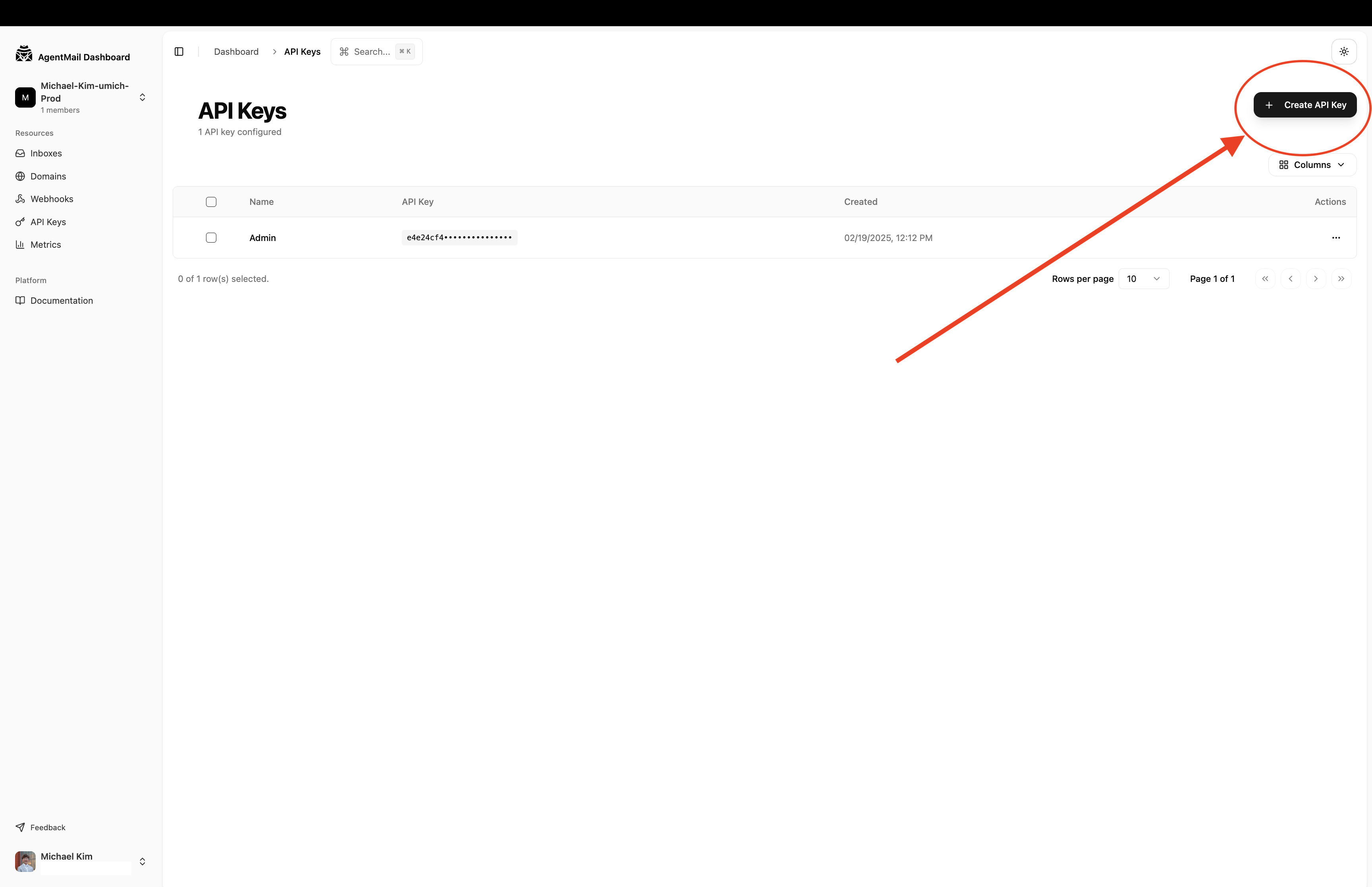
|
|
266
|
+
</Step>
|
|
335
267
|
|
|
336
|
-
|
|
268
|
+
<Step title="Store your API key">
|
|
269
|
+
Create a `.env` file in your project root and add your key:
|
|
337
270
|
|
|
338
|
-
|
|
339
|
-
|
|
271
|
+
```bash
|
|
272
|
+
AGENTMAIL_API_KEY=am_...
|
|
273
|
+
```
|
|
340
274
|
|
|
341
|
-
|
|
342
|
-
Now that you're in the console, you'll need to create an API key to
|
|
343
|
-
authenticate your requests. Navigate to the API Keys section in your console
|
|
344
|
-
dashboard.  Click
|
|
345
|
-
"Create New API Key" and give it a descriptive name. Once created, copy the
|
|
346
|
-
API key and store it securely. Create a `.env` file in your project's root
|
|
347
|
-
directory and add your key to it. We recommend using environment variables to
|
|
348
|
-
keep your keys secure.
|
|
275
|
+
We recommend using environment variables to keep your keys secure.
|
|
349
276
|
</Step>
|
|
350
277
|
|
|
351
278
|
<Step title="Install the SDK">
|
|
@@ -368,10 +295,9 @@ This guide will walk you through installing the AgentMail SDK, authenticating wi
|
|
|
368
295
|
</Step>
|
|
369
296
|
|
|
370
297
|
<Step title="Create an inbox and send an email">
|
|
371
|
-
|
|
372
|
-
|
|
373
|
-
|
|
374
|
-
test email.
|
|
298
|
+
Create a new file (e.g., `quickstart.py` or `quickstart.ts`) and add the
|
|
299
|
+
following code. This script initializes the AgentMail client, creates a new
|
|
300
|
+
inbox, and sends a test email.
|
|
375
301
|
|
|
376
302
|
<CodeBlocks>
|
|
377
303
|
```python title="Python"
|
|
@@ -379,28 +305,26 @@ This guide will walk you through installing the AgentMail SDK, authenticating wi
|
|
|
379
305
|
from dotenv import load_dotenv
|
|
380
306
|
from agentmail import AgentMail
|
|
381
307
|
|
|
382
|
-
#
|
|
308
|
+
# load the API key from the .env file
|
|
383
309
|
load_dotenv()
|
|
384
310
|
api_key = os.getenv("AGENTMAIL_API_KEY")
|
|
385
311
|
|
|
386
|
-
#
|
|
312
|
+
# initialize the client
|
|
387
313
|
client = AgentMail(api_key=api_key)
|
|
388
314
|
|
|
389
|
-
#
|
|
315
|
+
# create an inbox
|
|
390
316
|
print("Creating inbox...")
|
|
391
317
|
inbox = client.inboxes.create() # domain is optional
|
|
392
318
|
print("Inbox created successfully!")
|
|
393
319
|
print(inbox)
|
|
394
320
|
|
|
395
|
-
#
|
|
396
|
-
|
|
321
|
+
# send an email from the new inbox
|
|
397
322
|
client.inboxes.messages.send(
|
|
398
323
|
inbox.inbox_id,
|
|
399
324
|
to="your-email@example.com",
|
|
400
325
|
subject="Hello from AgentMail!",
|
|
401
326
|
text="This is my first email sent with the AgentMail API.",
|
|
402
327
|
)
|
|
403
|
-
|
|
404
328
|
```
|
|
405
329
|
|
|
406
330
|
```typescript title="TypeScript"
|
|
@@ -408,18 +332,18 @@ This guide will walk you through installing the AgentMail SDK, authenticating wi
|
|
|
408
332
|
import "dotenv/config"; // loads .env file
|
|
409
333
|
|
|
410
334
|
async function main() {
|
|
411
|
-
//
|
|
335
|
+
// initialize the client
|
|
412
336
|
const client = new AgentMailClient({
|
|
413
337
|
apiKey: process.env.AGENTMAIL_API_KEY,
|
|
414
338
|
});
|
|
415
339
|
|
|
416
|
-
//
|
|
340
|
+
// create an inbox
|
|
417
341
|
console.log("Creating inbox...");
|
|
418
342
|
const inbox = await client.inboxes.create(); // domain is optional
|
|
419
343
|
console.log("Inbox created successfully!");
|
|
420
344
|
console.log(inbox);
|
|
421
345
|
|
|
422
|
-
//
|
|
346
|
+
// send an email from the new inbox
|
|
423
347
|
console.log("Sending email...");
|
|
424
348
|
await client.inboxes.messages.send(inbox.inboxId, {
|
|
425
349
|
to: "your-email@example.com",
|
|
@@ -473,25 +397,150 @@ This guide will walk you through installing the AgentMail SDK, authenticating wi
|
|
|
473
397
|
</Step>
|
|
474
398
|
</Steps>
|
|
475
399
|
|
|
400
|
+
## Copy for Cursor / Claude
|
|
401
|
+
|
|
402
|
+
Copy one of the blocks below into Cursor or Claude for a complete, working AgentMail integration. Each block includes setup, API reference, error handling, rate limiting, and idempotency guidance.
|
|
403
|
+
|
|
404
|
+
<CodeBlocks>
|
|
405
|
+
```python title="Python"
|
|
406
|
+
"""
|
|
407
|
+
AgentMail Python Quickstart — copy into Cursor/Claude for instant setup.
|
|
408
|
+
|
|
409
|
+
Setup: pip install agentmail python-dotenv. Set AGENTMAIL_API_KEY in .env.
|
|
410
|
+
|
|
411
|
+
Agent sign-up (no API key needed):
|
|
412
|
+
- agent.sign_up(human_email, username) — returns api_key, inbox_id, organization_id
|
|
413
|
+
- agent.verify(otp_code) — verify with OTP sent to human_email
|
|
414
|
+
|
|
415
|
+
API reference:
|
|
416
|
+
- inboxes.create(username?, domain?, display_name?, client_id?) — client_id for idempotent retries
|
|
417
|
+
- messages.send(inbox_id, to, subject, text, html?, cc?, bcc?, reply_to?, attachments?)
|
|
418
|
+
- messages.list(inbox_id, limit?, page_token?, labels?) — receive emails; use extracted_text/extracted_html for reply content
|
|
419
|
+
|
|
420
|
+
Errors: SDK raises on 4xx/5xx. Inspect error.body.message or str(e).
|
|
421
|
+
Rate limit: 429 with Retry-After header. Implement exponential backoff for retries.
|
|
422
|
+
Idempotency: Pass client_id to inboxes.create() to safely retry without duplicates.
|
|
423
|
+
"""
|
|
424
|
+
import os
|
|
425
|
+
from dotenv import load_dotenv
|
|
426
|
+
from agentmail import AgentMail
|
|
427
|
+
|
|
428
|
+
load_dotenv()
|
|
429
|
+
client = AgentMail(api_key=os.getenv("AGENTMAIL_API_KEY"))
|
|
430
|
+
|
|
431
|
+
# create inbox (client_id enables safe retries)
|
|
432
|
+
inbox = client.inboxes.create(client_id="my-agent-inbox-v1")
|
|
433
|
+
|
|
434
|
+
# send email
|
|
435
|
+
try:
|
|
436
|
+
client.inboxes.messages.send(
|
|
437
|
+
inbox.inbox_id,
|
|
438
|
+
to="recipient@example.com",
|
|
439
|
+
subject="Hello from AgentMail",
|
|
440
|
+
text="Plain text body",
|
|
441
|
+
html="<p>HTML body</p>",
|
|
442
|
+
)
|
|
443
|
+
except Exception as e:
|
|
444
|
+
# handle validation, not found, rate limit (429), etc.
|
|
445
|
+
print(f"Send failed: {e}")
|
|
446
|
+
raise
|
|
447
|
+
|
|
448
|
+
# receive messages
|
|
449
|
+
for msg in client.inboxes.messages.list(inbox.inbox_id, limit=10).messages:
|
|
450
|
+
print(msg.subject, msg.extracted_text or msg.text)
|
|
451
|
+
```
|
|
452
|
+
|
|
453
|
+
```typescript title="TypeScript"
|
|
454
|
+
/**
|
|
455
|
+
* AgentMail TypeScript Quickstart — copy into Cursor/Claude for instant setup.
|
|
456
|
+
*
|
|
457
|
+
* Setup: npm install agentmail dotenv. Set AGENTMAIL_API_KEY in .env.
|
|
458
|
+
*
|
|
459
|
+
* Agent sign-up (no API key needed):
|
|
460
|
+
* - agent.signUp({ humanEmail, username }) — returns apiKey, inboxId, organizationId
|
|
461
|
+
* - agent.verify({ otpCode }) — verify with OTP sent to humanEmail
|
|
462
|
+
*
|
|
463
|
+
* API reference:
|
|
464
|
+
* - inboxes.create({ username?, domain?, displayName?, clientId? }) — clientId for idempotent retries
|
|
465
|
+
* - messages.send(inboxId, { to, subject, text, html?, cc?, bcc?, replyTo?, attachments? })
|
|
466
|
+
* - messages.list(inboxId, { limit?, pageToken?, labels? }) — receive; use extractedText/extractedHtml for reply content
|
|
467
|
+
*
|
|
468
|
+
* Errors: SDK throws on 4xx/5xx. Check error.body?.message.
|
|
469
|
+
* Rate limit: 429 with Retry-After header. Use exponential backoff for retries.
|
|
470
|
+
* Idempotency: Pass clientId to inboxes.create() to safely retry without duplicates.
|
|
471
|
+
*/
|
|
472
|
+
import { AgentMailClient } from "agentmail";
|
|
473
|
+
import "dotenv/config";
|
|
474
|
+
|
|
475
|
+
const client = new AgentMailClient({
|
|
476
|
+
apiKey: process.env.AGENTMAIL_API_KEY!,
|
|
477
|
+
});
|
|
478
|
+
|
|
479
|
+
async function main() {
|
|
480
|
+
// create inbox (clientId enables safe retries)
|
|
481
|
+
const inbox = await client.inboxes.create({
|
|
482
|
+
clientId: "my-agent-inbox-v1",
|
|
483
|
+
});
|
|
484
|
+
|
|
485
|
+
try {
|
|
486
|
+
await client.inboxes.messages.send(inbox.inboxId, {
|
|
487
|
+
to: "recipient@example.com",
|
|
488
|
+
subject: "Hello from AgentMail",
|
|
489
|
+
text: "Plain text body",
|
|
490
|
+
html: "<p>HTML body</p>",
|
|
491
|
+
});
|
|
492
|
+
} catch (error: unknown) {
|
|
493
|
+
// handle validation, not found, rate limit (429), etc.
|
|
494
|
+
const msg = (error as { body?: { message?: string } })?.body?.message ?? String(error);
|
|
495
|
+
throw new Error(`Send failed: ${msg}`);
|
|
496
|
+
}
|
|
497
|
+
|
|
498
|
+
// receive messages
|
|
499
|
+
const res = await client.inboxes.messages.list(inbox.inboxId, { limit: 10 });
|
|
500
|
+
for (const msg of res.messages) {
|
|
501
|
+
console.log(msg.subject, msg.extractedText ?? msg.text);
|
|
502
|
+
}
|
|
503
|
+
}
|
|
504
|
+
|
|
505
|
+
main();
|
|
506
|
+
```
|
|
507
|
+
</CodeBlocks>
|
|
508
|
+
|
|
509
|
+
<Tip>
|
|
510
|
+
When receiving emails, messages include `extracted_text` and `extracted_html`
|
|
511
|
+
for reply content without quoted history.
|
|
512
|
+
</Tip>
|
|
513
|
+
|
|
476
514
|
## Next Steps
|
|
477
515
|
|
|
478
|
-
|
|
516
|
+
You've created an inbox and sent your first email. Now set up your agent to receive and respond to incoming messages:
|
|
517
|
+
|
|
518
|
+
<CardGroup>
|
|
519
|
+
<Card title="Receive emails with WebSockets" icon="fa-solid fa-plug" href="/websockets">
|
|
520
|
+
The fastest way to receive emails. No public URL or ngrok needed.
|
|
521
|
+
</Card>
|
|
522
|
+
|
|
523
|
+
<Card title="Receive emails with webhooks" icon="fa-solid fa-bell" href="/webhooks-overview">
|
|
524
|
+
Get real-time HTTP notifications when emails arrive.
|
|
525
|
+
</Card>
|
|
526
|
+
|
|
527
|
+
<Card title="Sending & receiving guide" icon="fa-solid fa-right-left" href="/sending-receiving-email">
|
|
528
|
+
Build a complete conversational agent workflow.
|
|
529
|
+
</Card>
|
|
530
|
+
|
|
531
|
+
<Card title="API Reference" icon="fa-solid fa-code" href="/api-reference">
|
|
532
|
+
Explore the full API with interactive examples.
|
|
533
|
+
</Card>
|
|
534
|
+
</CardGroup>
|
|
479
535
|
|
|
480
536
|
<Note>
|
|
481
537
|
Looking for a different language? Email us at
|
|
482
538
|
[support@agentmail.cc](mailto:support@agentmail.cc) and we'll get you set up.
|
|
483
539
|
</Note>
|
|
484
540
|
|
|
541
|
+
# Inboxes
|
|
485
542
|
|
|
486
|
-
|
|
487
|
-
|
|
488
|
-
title: Inboxes
|
|
489
|
-
subtitle: The foundation of your agent's identity and communication.
|
|
490
|
-
slug: inboxes
|
|
491
|
-
description: >-
|
|
492
|
-
Learn how AgentMail Inboxes act as scalable, API-first email accounts for your
|
|
493
|
-
agents.
|
|
494
|
-
-------
|
|
543
|
+
> Learn how AgentMail Inboxes act as scalable, API-first email accounts for your agents.
|
|
495
544
|
|
|
496
545
|
## What is an Inbox?
|
|
497
546
|
|
|
@@ -612,8 +661,8 @@ Here at AgentMail we've now made an `Inbox` an API resource, meaning you can per
|
|
|
612
661
|
--domain domain.com \
|
|
613
662
|
--display-name "Docs Tester"
|
|
614
663
|
|
|
615
|
-
#
|
|
616
|
-
agentmail inboxes
|
|
664
|
+
# get an inbox
|
|
665
|
+
agentmail inboxes get --inbox-id my_name@domain.com
|
|
617
666
|
|
|
618
667
|
# list all inboxes
|
|
619
668
|
agentmail inboxes list
|
|
@@ -727,16 +776,9 @@ Copy one of the blocks below into Cursor or Claude for complete Inboxes API know
|
|
|
727
776
|
```
|
|
728
777
|
</CodeBlocks>
|
|
729
778
|
|
|
779
|
+
# Messages
|
|
730
780
|
|
|
731
|
-
|
|
732
|
-
|
|
733
|
-
title: Messages
|
|
734
|
-
subtitle: The fundamental unit of communication for your agents.
|
|
735
|
-
slug: messages
|
|
736
|
-
description: >-
|
|
737
|
-
Learn how to send, receive, and manage emails as Message objects with the
|
|
738
|
-
AgentMail API.
|
|
739
|
-
--------------
|
|
781
|
+
> Learn how to send, receive, and manage emails as Message objects with the AgentMail API.
|
|
740
782
|
|
|
741
783
|
## What is a Message?
|
|
742
784
|
|
|
@@ -938,8 +980,8 @@ You can retrieve the details of any specific `Message` by providing its ID along
|
|
|
938
980
|
```
|
|
939
981
|
|
|
940
982
|
```bash title="CLI"
|
|
941
|
-
#
|
|
942
|
-
agentmail inboxes:messages
|
|
983
|
+
# get a specific message
|
|
984
|
+
agentmail inboxes:messages get \
|
|
943
985
|
--inbox-id my_inbox@agentmail.to \
|
|
944
986
|
--message-id "<abc123@agentmail.to>"
|
|
945
987
|
```
|
|
@@ -1199,10 +1241,14 @@ When processing incoming messages, always treat `html` as the primary content so
|
|
|
1199
1241
|
|
|
1200
1242
|
## Receiving `Messages`
|
|
1201
1243
|
|
|
1244
|
+
<Warning>
|
|
1245
|
+
**Inbound emails require the sender's domain to have SPF or DKIM configured.** To reduce spoofing and phishing, AgentMail drops inbound emails when the sender's domain has neither SPF nor DKIM set up. If a sender reports that their email never arrived, this is the most likely cause. Once they configure SPF/DKIM on their domain, their emails will start landing in your inbox again. See [Why are my emails not showing up?](/knowledge-base/inbound-emails-missing) for details.
|
|
1246
|
+
</Warning>
|
|
1247
|
+
|
|
1202
1248
|
While you can periodically list `Messages` to check for new emails, the most efficient way to handle incoming `Messages` for your agents is with `Webhooks`. By configuring a `Webhook` endpoint, AgentMail can notify your application/agent in real-time as soon as a new `Message` arrives, so you can take action on them.
|
|
1203
1249
|
|
|
1204
1250
|
<CardGroup>
|
|
1205
|
-
<Card title="Guide: Webhooks" icon="fa-solid fa-bolt" href="/overview">
|
|
1251
|
+
<Card title="Guide: Webhooks" icon="fa-solid fa-bolt" href="/webhooks-overview">
|
|
1206
1252
|
Learn how to set up webhooks for real-time message processing.
|
|
1207
1253
|
</Card>
|
|
1208
1254
|
</CardGroup>
|
|
@@ -1268,16 +1314,9 @@ AgentMail doesn't have a dedicated "mark as read" endpoint — instead, you use
|
|
|
1268
1314
|
```
|
|
1269
1315
|
```
|
|
1270
1316
|
|
|
1317
|
+
# Threads
|
|
1271
1318
|
|
|
1272
|
-
|
|
1273
|
-
|
|
1274
|
-
title: Threads
|
|
1275
|
-
subtitle: Organizing conversations across your Inboxes.
|
|
1276
|
-
slug: threads
|
|
1277
|
-
description: >-
|
|
1278
|
-
Learn how AgentMail Threads group messages into conversations and how to query
|
|
1279
|
-
them across your entire organization.
|
|
1280
|
-
-------------------------------------
|
|
1319
|
+
> Learn how AgentMail Threads group messages into conversations and how to query them across your entire organization.
|
|
1281
1320
|
|
|
1282
1321
|
## What is a Thread?
|
|
1283
1322
|
|
|
@@ -1298,7 +1337,7 @@ This is the standard way to retrieve all the conversations associated with a sin
|
|
|
1298
1337
|
# You'll need an inbox ID to list threads from.
|
|
1299
1338
|
inbox_id = "inbound-agent@agentmail.to"
|
|
1300
1339
|
|
|
1301
|
-
# This
|
|
1340
|
+
# This loads all threads within the specified Inbox
|
|
1302
1341
|
|
|
1303
1342
|
inbox_threads = client.inboxes.threads.list(inbox_id=inbox_id)
|
|
1304
1343
|
|
|
@@ -1308,7 +1347,7 @@ This is the standard way to retrieve all the conversations associated with a sin
|
|
|
1308
1347
|
// You'll need an inbox ID to list threads from.
|
|
1309
1348
|
const inboxId = "inbound-agent@agentmail.to";
|
|
1310
1349
|
|
|
1311
|
-
// This
|
|
1350
|
+
// This loads all threads within the specified Inbox
|
|
1312
1351
|
const inboxThreads = await client.inboxes.threads.list("inbound-agent@agentmail.to");
|
|
1313
1352
|
|
|
1314
1353
|
console.log(`Found ${inboxThreads.count} threads in Inbox ${inboxId}.`);
|
|
@@ -1365,7 +1404,7 @@ You can also retrieve a single `Thread` by its ID. This will return the `Thread`
|
|
|
1365
1404
|
```python
|
|
1366
1405
|
thread_id = "thread_456def"
|
|
1367
1406
|
|
|
1368
|
-
# This
|
|
1407
|
+
# This loads a single thread and its messages
|
|
1369
1408
|
|
|
1370
1409
|
thread = client.threads.get(
|
|
1371
1410
|
thread_id="thread_id"
|
|
@@ -1378,7 +1417,7 @@ You can also retrieve a single `Thread` by its ID. This will return the `Thread`
|
|
|
1378
1417
|
```typescript title="TypeScript"
|
|
1379
1418
|
const threadId = "thread_456def";
|
|
1380
1419
|
|
|
1381
|
-
// This
|
|
1420
|
+
// This loads a single thread and its messages
|
|
1382
1421
|
const thread = await client.threads.get(
|
|
1383
1422
|
"thread_id"
|
|
1384
1423
|
)
|
|
@@ -1387,8 +1426,8 @@ You can also retrieve a single `Thread` by its ID. This will return the `Thread`
|
|
|
1387
1426
|
```
|
|
1388
1427
|
|
|
1389
1428
|
```bash title="CLI"
|
|
1390
|
-
#
|
|
1391
|
-
agentmail threads
|
|
1429
|
+
# get a single thread by id
|
|
1430
|
+
agentmail threads get \
|
|
1392
1431
|
--thread-id thread_456def
|
|
1393
1432
|
```
|
|
1394
1433
|
</CodeBlocks>
|
|
@@ -1476,16 +1515,9 @@ Copy one of the blocks below into Cursor or Claude for complete Threads API know
|
|
|
1476
1515
|
```
|
|
1477
1516
|
</CodeBlocks>
|
|
1478
1517
|
|
|
1518
|
+
# Drafts
|
|
1479
1519
|
|
|
1480
|
-
|
|
1481
|
-
|
|
1482
|
-
title: Drafts
|
|
1483
|
-
subtitle: Preparing and scheduling Messages for your agents.
|
|
1484
|
-
slug: drafts
|
|
1485
|
-
description: >-
|
|
1486
|
-
Learn how to create, manage, and send Drafts to enable advanced agent
|
|
1487
|
-
workflows like human-in-the-loop review and scheduled sending.
|
|
1488
|
-
--------------------------------------------------------------
|
|
1520
|
+
> Learn how to create, manage, and send Drafts to enable advanced agent workflows like human-in-the-loop review and scheduled sending.
|
|
1489
1521
|
|
|
1490
1522
|
## What is a Draft?
|
|
1491
1523
|
|
|
@@ -1568,8 +1600,8 @@ Once a `Draft` is created, you can retrieve it by its ID
|
|
|
1568
1600
|
```
|
|
1569
1601
|
|
|
1570
1602
|
```bash title="CLI"
|
|
1571
|
-
#
|
|
1572
|
-
agentmail inboxes:drafts
|
|
1603
|
+
# get a draft by id
|
|
1604
|
+
agentmail inboxes:drafts get \
|
|
1573
1605
|
--inbox-id my_inbox@domain.com \
|
|
1574
1606
|
--draft-id draft_id_123
|
|
1575
1607
|
```
|
|
@@ -2033,16 +2065,9 @@ Copy one of the blocks below into Cursor or Claude for complete Drafts API knowl
|
|
|
2033
2065
|
```
|
|
2034
2066
|
</CodeBlocks>
|
|
2035
2067
|
|
|
2068
|
+
# Labels
|
|
2036
2069
|
|
|
2037
|
-
|
|
2038
|
-
|
|
2039
|
-
title: Labels
|
|
2040
|
-
subtitle: Organizing and categorizing your agent's conversations at scale.
|
|
2041
|
-
slug: labels
|
|
2042
|
-
description: >-
|
|
2043
|
-
Learn how to use Labels to manage state, track campaigns, and filter messages
|
|
2044
|
-
for powerful agentic workflows.
|
|
2045
|
-
-------------------------------
|
|
2070
|
+
> Learn how to use Labels to manage state, track campaigns, and filter messages for powerful agentic workflows.
|
|
2046
2071
|
|
|
2047
2072
|
## What are `Labels`?
|
|
2048
2073
|
|
|
@@ -2292,16 +2317,9 @@ Copy one of the blocks below into Cursor or Claude for complete Labels usage in
|
|
|
2292
2317
|
based on their content.
|
|
2293
2318
|
</Callout>
|
|
2294
2319
|
|
|
2320
|
+
# Lists
|
|
2295
2321
|
|
|
2296
|
-
|
|
2297
|
-
|
|
2298
|
-
title: Lists
|
|
2299
|
-
subtitle: Filter emails by allowing or blocking specific addresses and domains.
|
|
2300
|
-
slug: lists
|
|
2301
|
-
description: >-
|
|
2302
|
-
Learn how to use Lists to control which email addresses and domains your
|
|
2303
|
-
agents can send to or receive from.
|
|
2304
|
-
-----------------------------------
|
|
2322
|
+
> Learn how to use Lists to control which email addresses and domains your agents can send to or receive from.
|
|
2305
2323
|
|
|
2306
2324
|
## What are Lists?
|
|
2307
2325
|
|
|
@@ -2415,8 +2433,8 @@ Retrieve a specific entry from a list by its email address or domain.
|
|
|
2415
2433
|
```
|
|
2416
2434
|
|
|
2417
2435
|
```bash title="CLI"
|
|
2418
|
-
#
|
|
2419
|
-
agentmail lists
|
|
2436
|
+
# get a specific entry
|
|
2437
|
+
agentmail lists get \
|
|
2420
2438
|
--direction receive \
|
|
2421
2439
|
--type allow \
|
|
2422
2440
|
--entry partner@example.com
|
|
@@ -2601,16 +2619,9 @@ Copy one of the blocks below into Cursor or Claude for complete Lists API knowle
|
|
|
2601
2619
|
```
|
|
2602
2620
|
</CodeBlocks>
|
|
2603
2621
|
|
|
2622
|
+
# Attachments
|
|
2604
2623
|
|
|
2605
|
-
|
|
2606
|
-
|
|
2607
|
-
title: Attachments
|
|
2608
|
-
subtitle: Sending and receiving files with your agents.
|
|
2609
|
-
slug: attachments
|
|
2610
|
-
description: >-
|
|
2611
|
-
Learn how to send files as attachments, and download incoming attachments from
|
|
2612
|
-
both messages and threads.
|
|
2613
|
-
--------------------------
|
|
2624
|
+
> Learn how to send files as attachments, and download incoming attachments from both messages and threads.
|
|
2614
2625
|
|
|
2615
2626
|
## What are `Attachments`?
|
|
2616
2627
|
|
|
@@ -2835,12 +2846,9 @@ Copy one of the blocks below into Cursor or Claude for complete Attachments usag
|
|
|
2835
2846
|
```
|
|
2836
2847
|
</CodeBlocks>
|
|
2837
2848
|
|
|
2849
|
+
# Pods
|
|
2838
2850
|
|
|
2839
|
-
|
|
2840
|
-
|
|
2841
|
-
title: Pods
|
|
2842
|
-
description: Learn how to use pods for multi-tenant email management
|
|
2843
|
-
--------------------------------------------------------------------
|
|
2851
|
+
> Learn how to use pods for multi-tenant email management
|
|
2844
2852
|
|
|
2845
2853
|
## What are Pods?
|
|
2846
2854
|
|
|
@@ -3131,16 +3139,9 @@ Pod: "Marketing-Agent"
|
|
|
3131
3139
|
* Learn about [Inboxes](/inboxes) and how to create email accounts within pods
|
|
3132
3140
|
* Explore [Domains](/custom-domains) to set up custom email domains for your pods
|
|
3133
3141
|
|
|
3142
|
+
# Permissions
|
|
3134
3143
|
|
|
3135
|
-
|
|
3136
|
-
|
|
3137
|
-
title: Permissions
|
|
3138
|
-
subtitle: Control what your API keys can access with granular permissions.
|
|
3139
|
-
slug: permissions
|
|
3140
|
-
description: >-
|
|
3141
|
-
Learn how to configure fine-grained permissions on API keys to restrict access
|
|
3142
|
-
to specific resources and operations.
|
|
3143
|
-
-------------------------------------
|
|
3144
|
+
> Learn how to configure fine-grained permissions on API keys to restrict access to specific resources and operations.
|
|
3144
3145
|
|
|
3145
3146
|
## What are Permissions?
|
|
3146
3147
|
|
|
@@ -3572,24 +3573,65 @@ Copy one of the blocks below into Cursor or Claude for complete Permissions API
|
|
|
3572
3573
|
* **Combine with scopes for defense in depth.** Pair permissions with [pod-scoped](/multi-tenancy#pod-scoped-keys) or [inbox-scoped](/multi-tenancy#inbox-scoped-keys) keys. Scopes limit *which* resources a key can see, while permissions limit *what* it can do.
|
|
3573
3574
|
* **Filter unwanted content from agents.** Set `label_spam_read`, `label_blocked_read`, and `label_trash_read` to `false` on agent-facing keys. This prevents agents from seeing or processing unwanted email, keeping their context clean.
|
|
3574
3575
|
|
|
3576
|
+
# Agent Onboarding
|
|
3575
3577
|
|
|
3576
|
-
|
|
3577
|
-
|
|
3578
|
-
title: Agent Onboarding
|
|
3579
|
-
subtitle: Everything you need to onboard your AI agent to AgentMail
|
|
3580
|
-
slug: agent-onboarding
|
|
3581
|
-
description: >-
|
|
3582
|
-
Resources for AI coding assistants, MCP servers, skills, and agent-friendly
|
|
3583
|
-
documentation.
|
|
3584
|
-
--------------
|
|
3578
|
+
> Resources for AI coding assistants, MCP servers, skills, and agent-friendly documentation.
|
|
3585
3579
|
|
|
3586
3580
|
> Everything you need to onboard your AI agent to AgentMail — the email platform built for AI agents.
|
|
3587
3581
|
|
|
3588
3582
|
If you're developing with AI, AgentMail offers several resources to improve your experience.
|
|
3589
3583
|
|
|
3590
|
-
##
|
|
3584
|
+
## Get an API key
|
|
3585
|
+
|
|
3586
|
+
Your agent can sign up programmatically using the Agent API. No console access needed.
|
|
3587
|
+
|
|
3588
|
+
<CodeBlocks>
|
|
3589
|
+
```python title="Python"
|
|
3590
|
+
from agentmail import AgentMail
|
|
3591
|
+
|
|
3592
|
+
client = AgentMail()
|
|
3593
|
+
response = client.agent.sign_up(human_email="you@example.com", username="my-agent")
|
|
3594
|
+
# response.api_key -> store this securely
|
|
3595
|
+
# response.inbox_id -> my-agent@agentmail.to
|
|
3596
|
+
```
|
|
3597
|
+
|
|
3598
|
+
```typescript title="TypeScript"
|
|
3599
|
+
import { AgentMailClient } from "agentmail";
|
|
3591
3600
|
|
|
3592
|
-
|
|
3601
|
+
const client = new AgentMailClient();
|
|
3602
|
+
const response = await client.agent.signUp({ humanEmail: "you@example.com", username: "my-agent" });
|
|
3603
|
+
// response.apiKey -> store this securely
|
|
3604
|
+
// response.inboxId -> my-agent@agentmail.to
|
|
3605
|
+
```
|
|
3606
|
+
|
|
3607
|
+
```bash title="CLI"
|
|
3608
|
+
agentmail agent sign-up --human-email you@example.com --username my-agent
|
|
3609
|
+
```
|
|
3610
|
+
</CodeBlocks>
|
|
3611
|
+
|
|
3612
|
+
A 6-digit OTP is sent to the provided email. Verify to unlock full permissions:
|
|
3613
|
+
|
|
3614
|
+
<CodeBlocks>
|
|
3615
|
+
```python title="Python"
|
|
3616
|
+
client = AgentMail(api_key=response.api_key)
|
|
3617
|
+
client.agent.verify(otp_code="123456")
|
|
3618
|
+
```
|
|
3619
|
+
|
|
3620
|
+
```typescript title="TypeScript"
|
|
3621
|
+
const authedClient = new AgentMailClient({ apiKey: response.apiKey });
|
|
3622
|
+
await authedClient.agent.verify({ otpCode: "123456" });
|
|
3623
|
+
```
|
|
3624
|
+
|
|
3625
|
+
```bash title="CLI"
|
|
3626
|
+
agentmail agent verify --otp-code 123456
|
|
3627
|
+
```
|
|
3628
|
+
</CodeBlocks>
|
|
3629
|
+
|
|
3630
|
+
<Info>
|
|
3631
|
+
The sign-up endpoint is idempotent. Calling it again with the same email rotates the API key and resends the OTP if expired.
|
|
3632
|
+
</Info>
|
|
3633
|
+
|
|
3634
|
+
Alternatively, a human can create an account at [console.agentmail.to](https://console.agentmail.to) and generate an API key from the dashboard.
|
|
3593
3635
|
|
|
3594
3636
|
<Info>
|
|
3595
3637
|
AgentMail's free tier includes 3 inboxes and 3,000 emails/month. Your agent can start building immediately.
|
|
@@ -3635,19 +3677,25 @@ You can selectively enable specific tools using the `--tools` argument:
|
|
|
3635
3677
|
|
|
3636
3678
|
### Available MCP Tools
|
|
3637
3679
|
|
|
3638
|
-
| Tool | Description
|
|
3639
|
-
| ------------------ |
|
|
3640
|
-
| `create_inbox` | Create a new email inbox for an agent
|
|
3641
|
-
| `list_inboxes` | List all inboxes in your account
|
|
3642
|
-
| `get_inbox` | Get details of a specific inbox
|
|
3643
|
-
| `delete_inbox` | Delete an inbox
|
|
3644
|
-
| `send_message` | Send an email from an agent inbox
|
|
3645
|
-
| `reply_to_message` | Reply to an email in a thread
|
|
3646
|
-
| `forward_message` | Forward an email
|
|
3647
|
-
| `update_message` | Update message labels or status
|
|
3648
|
-
| `
|
|
3649
|
-
| `
|
|
3650
|
-
| `
|
|
3680
|
+
| Tool | Description |
|
|
3681
|
+
| ------------------ | --------------------------------------------------------------- |
|
|
3682
|
+
| `create_inbox` | Create a new email inbox for an agent |
|
|
3683
|
+
| `list_inboxes` | List all inboxes in your account |
|
|
3684
|
+
| `get_inbox` | Get details of a specific inbox |
|
|
3685
|
+
| `delete_inbox` | Delete an inbox |
|
|
3686
|
+
| `send_message` | Send an email from an agent inbox |
|
|
3687
|
+
| `reply_to_message` | Reply to an email in a thread |
|
|
3688
|
+
| `forward_message` | Forward an email |
|
|
3689
|
+
| `update_message` | Update message labels or status |
|
|
3690
|
+
| `create_draft` | Create a draft email (optionally scheduled via `send_at`) |
|
|
3691
|
+
| `list_drafts` | List drafts in an inbox (filter by labels like `scheduled`) |
|
|
3692
|
+
| `get_draft` | Get a draft by ID with content and scheduled send time |
|
|
3693
|
+
| `update_draft` | Update a draft; use `send_at` to reschedule |
|
|
3694
|
+
| `send_draft` | Send a draft immediately (draft is converted to a sent message) |
|
|
3695
|
+
| `delete_draft` | Delete a draft; also cancels a scheduled send |
|
|
3696
|
+
| `list_threads` | List email threads in an inbox |
|
|
3697
|
+
| `get_thread` | Get a full email thread with messages |
|
|
3698
|
+
| `get_attachment` | Download an email attachment |
|
|
3651
3699
|
|
|
3652
3700
|
<Card title="MCP Server on GitHub" icon="fa-brands fa-github" href="https://github.com/agentmail-to/agentmail-smithery-mcp">
|
|
3653
3701
|
View the source code, contribute, or report issues.
|
|
@@ -3717,19 +3765,26 @@ export AGENTMAIL_API_KEY="your-api-key-here"
|
|
|
3717
3765
|
View the skill source and full documentation.
|
|
3718
3766
|
</Card>
|
|
3719
3767
|
|
|
3720
|
-
## Quick
|
|
3768
|
+
## Quick start for agents
|
|
3721
3769
|
|
|
3722
|
-
|
|
3770
|
+
Sign up, create an inbox, and send your first email:
|
|
3723
3771
|
|
|
3724
3772
|
<CodeBlocks>
|
|
3725
3773
|
```python title="Python"
|
|
3726
3774
|
from agentmail import AgentMail
|
|
3727
3775
|
|
|
3728
|
-
|
|
3776
|
+
# sign up (no API key needed)
|
|
3777
|
+
client = AgentMail()
|
|
3778
|
+
response = client.agent.sign_up(human_email="you@example.com", username="my-agent")
|
|
3779
|
+
|
|
3780
|
+
# after verifying with the OTP sent to your email:
|
|
3781
|
+
client = AgentMail(api_key=response.api_key)
|
|
3782
|
+
client.agent.verify(otp_code="123456")
|
|
3783
|
+
|
|
3784
|
+
# create an inbox and send an email
|
|
3729
3785
|
inbox = client.inboxes.create(display_name="My AI Agent")
|
|
3730
3786
|
print(f"Agent email: {inbox.inbox_id}")
|
|
3731
3787
|
|
|
3732
|
-
# Send an email
|
|
3733
3788
|
client.inboxes.messages.send(
|
|
3734
3789
|
inbox.inbox_id,
|
|
3735
3790
|
to="user@example.com",
|
|
@@ -3741,12 +3796,19 @@ Create an inbox and send your first email in a few lines:
|
|
|
3741
3796
|
```typescript title="TypeScript"
|
|
3742
3797
|
import { AgentMailClient } from "agentmail";
|
|
3743
3798
|
|
|
3744
|
-
|
|
3745
|
-
const
|
|
3799
|
+
// sign up (no API key needed)
|
|
3800
|
+
const client = new AgentMailClient();
|
|
3801
|
+
const response = await client.agent.signUp({ humanEmail: "you@example.com", username: "my-agent" });
|
|
3802
|
+
|
|
3803
|
+
// after verifying with the OTP sent to your email:
|
|
3804
|
+
const authedClient = new AgentMailClient({ apiKey: response.apiKey });
|
|
3805
|
+
await authedClient.agent.verify({ otpCode: "123456" });
|
|
3806
|
+
|
|
3807
|
+
// create an inbox and send an email
|
|
3808
|
+
const inbox = await authedClient.inboxes.create({ displayName: "My AI Agent" });
|
|
3746
3809
|
console.log(`Agent email: ${inbox.inboxId}`);
|
|
3747
3810
|
|
|
3748
|
-
|
|
3749
|
-
await client.inboxes.messages.send(inbox.inboxId, {
|
|
3811
|
+
await authedClient.inboxes.messages.send(inbox.inboxId, {
|
|
3750
3812
|
to: "user@example.com",
|
|
3751
3813
|
subject: "Hello from my AI agent",
|
|
3752
3814
|
text: "Hi! I'm an AI agent with my own email address."
|
|
@@ -3754,6 +3816,10 @@ Create an inbox and send your first email in a few lines:
|
|
|
3754
3816
|
```
|
|
3755
3817
|
|
|
3756
3818
|
```bash title="CLI"
|
|
3819
|
+
# sign up and verify
|
|
3820
|
+
agentmail agent sign-up --human-email you@example.com --username my-agent
|
|
3821
|
+
agentmail agent verify --otp-code 123456
|
|
3822
|
+
|
|
3757
3823
|
# create an inbox
|
|
3758
3824
|
agentmail inboxes create --display-name "My AI Agent"
|
|
3759
3825
|
|
|
@@ -3766,6 +3832,10 @@ Create an inbox and send your first email in a few lines:
|
|
|
3766
3832
|
```
|
|
3767
3833
|
</CodeBlocks>
|
|
3768
3834
|
|
|
3835
|
+
<Note>
|
|
3836
|
+
Already have an API key? Skip the sign-up step and initialize the client directly with your key.
|
|
3837
|
+
</Note>
|
|
3838
|
+
|
|
3769
3839
|
### Receive and reply to emails
|
|
3770
3840
|
|
|
3771
3841
|
<CodeBlocks>
|
|
@@ -3791,17 +3861,17 @@ Create an inbox and send your first email in a few lines:
|
|
|
3791
3861
|
|
|
3792
3862
|
```typescript title="TypeScript"
|
|
3793
3863
|
// List threads in the inbox
|
|
3794
|
-
const threads = await
|
|
3864
|
+
const threads = await authedClient.inboxes.threads.list(inbox.inboxId);
|
|
3795
3865
|
|
|
3796
3866
|
// Get the latest thread
|
|
3797
|
-
const thread = await
|
|
3867
|
+
const thread = await authedClient.inboxes.threads.get(
|
|
3798
3868
|
inbox.inboxId,
|
|
3799
3869
|
threads.threads[0].threadId
|
|
3800
3870
|
);
|
|
3801
3871
|
|
|
3802
3872
|
// Reply to the latest message
|
|
3803
3873
|
const latestMessage = thread.messages[thread.messages.length - 1];
|
|
3804
|
-
await
|
|
3874
|
+
await authedClient.inboxes.messages.reply(
|
|
3805
3875
|
inbox.inboxId,
|
|
3806
3876
|
latestMessage.messageId,
|
|
3807
3877
|
{ to: [latestMessage.from], text: "Thanks for your email! I'll look into this." }
|
|
@@ -3866,16 +3936,9 @@ Unlike traditional email APIs that are built for one-way transactional email, Ag
|
|
|
3866
3936
|
</Card>
|
|
3867
3937
|
</CardGroup>
|
|
3868
3938
|
|
|
3939
|
+
# Skills
|
|
3869
3940
|
|
|
3870
|
-
|
|
3871
|
-
|
|
3872
|
-
title: Skills
|
|
3873
|
-
subtitle: Add AgentMail to AI coding assistants with the official skill
|
|
3874
|
-
slug: integrations/skills
|
|
3875
|
-
description: >-
|
|
3876
|
-
AgentMail's official skill for OpenClaw, Claude Code, Cursor, and other AI
|
|
3877
|
-
assistants
|
|
3878
|
-
----------
|
|
3941
|
+
> AgentMail's official skill for OpenClaw, Claude Code, Cursor, and other AI assistants
|
|
3879
3942
|
|
|
3880
3943
|
## Getting started
|
|
3881
3944
|
|
|
@@ -3999,14 +4062,9 @@ Once installed, you can ask your AI assistant to perform email tasks:
|
|
|
3999
4062
|
* [AgentMail API Reference](/api-reference)
|
|
4000
4063
|
* [AgentMail Console](https://console.agentmail.to)
|
|
4001
4064
|
|
|
4065
|
+
# MCP
|
|
4002
4066
|
|
|
4003
|
-
|
|
4004
|
-
|
|
4005
|
-
title: MCP
|
|
4006
|
-
subtitle: Connect AgentMail to any MCP-compatible AI client
|
|
4007
|
-
slug: integrations/mcp
|
|
4008
|
-
description: AgentMail's Model Context Protocol (MCP) integration
|
|
4009
|
-
-----------------------------------------------------------------
|
|
4067
|
+
> AgentMail's Model Context Protocol (MCP) integration
|
|
4010
4068
|
|
|
4011
4069
|
## Getting started
|
|
4012
4070
|
|
|
@@ -4017,10 +4075,10 @@ The Model Context Protocol (MCP) is an open standard that enables AI application
|
|
|
4017
4075
|
Install with:
|
|
4018
4076
|
|
|
4019
4077
|
```bash
|
|
4020
|
-
npx add-mcp https://mcp.agentmail.to
|
|
4078
|
+
npx add-mcp https://mcp.agentmail.to/mcp
|
|
4021
4079
|
```
|
|
4022
4080
|
|
|
4023
|
-
Configure your API key when prompted. Get your key from the [AgentMail Console](https://console.agentmail.to). For more details, visit [mcp.agentmail.to](https://mcp.agentmail.to).
|
|
4081
|
+
Configure your API key when prompted. Get your key from the [AgentMail Console](https://console.agentmail.to). For more details, visit [mcp.agentmail.to/mcp](https://mcp.agentmail.to/mcp).
|
|
4024
4082
|
|
|
4025
4083
|
## Features
|
|
4026
4084
|
|
|
@@ -4028,6 +4086,7 @@ The AgentMail MCP server provides tools for:
|
|
|
4028
4086
|
|
|
4029
4087
|
* **Inbox management:** Create, list, and delete inboxes
|
|
4030
4088
|
* **Message operations:** Send, receive, and reply to emails
|
|
4089
|
+
* **Drafts:** Create, schedule, update, and send draft emails
|
|
4031
4090
|
* **Thread management:** Access and manage email threads
|
|
4032
4091
|
* **Attachments:** Handle email attachments
|
|
4033
4092
|
|
|
@@ -4040,16 +4099,11 @@ The AgentMail MCP server works with any MCP-compatible client, including:
|
|
|
4040
4099
|
* Windsurf
|
|
4041
4100
|
* Other MCP-enabled AI applications
|
|
4042
4101
|
|
|
4043
|
-
For detailed setup instructions and available tools, visit [mcp.agentmail.to](https://mcp.agentmail.to).
|
|
4102
|
+
For detailed setup instructions and available tools, visit [mcp.agentmail.to/mcp](https://mcp.agentmail.to/mcp).
|
|
4044
4103
|
|
|
4104
|
+
# CLI
|
|
4045
4105
|
|
|
4046
|
-
|
|
4047
|
-
|
|
4048
|
-
title: CLI
|
|
4049
|
-
subtitle: Manage AgentMail resources from the command line
|
|
4050
|
-
slug: integrations/cli
|
|
4051
|
-
description: AgentMail's official command-line interface
|
|
4052
|
-
--------------------------------------------------------
|
|
4106
|
+
> AgentMail's official command-line interface
|
|
4053
4107
|
|
|
4054
4108
|
## Getting started
|
|
4055
4109
|
|
|
@@ -4119,7 +4173,7 @@ agentmail webhooks create \
|
|
|
4119
4173
|
The CLI provides commands for:
|
|
4120
4174
|
|
|
4121
4175
|
* **Inbox management:** Create, list, update, and delete inboxes
|
|
4122
|
-
* **Message operations:** Send, reply, forward, and
|
|
4176
|
+
* **Message operations:** Send, reply, forward, and read emails
|
|
4123
4177
|
* **Thread management:** List and manage email threads
|
|
4124
4178
|
* **Drafts:** Create, update, send, and delete drafts
|
|
4125
4179
|
* **Webhooks:** Create and manage webhook endpoints
|
|
@@ -4159,14 +4213,9 @@ openclaw skills install agentmail-to/agentmail-skills/agentmail-cli
|
|
|
4159
4213
|
|
|
4160
4214
|
This works with any compatible tool, including OpenClaw, Claude Code, Cursor, and Codex. See the [Skills](/integrations/skills) page for more details.
|
|
4161
4215
|
|
|
4216
|
+
# Google ADK
|
|
4162
4217
|
|
|
4163
|
-
|
|
4164
|
-
|
|
4165
|
-
title: Google ADK
|
|
4166
|
-
subtitle: Give your Google ADK agent its own email inbox
|
|
4167
|
-
slug: integrations/google-adk
|
|
4168
|
-
description: AgentMail's Google Agent Development Kit (ADK) integration
|
|
4169
|
-
-----------------------------------------------------------------------
|
|
4218
|
+
> AgentMail's Google Agent Development Kit (ADK) integration
|
|
4170
4219
|
|
|
4171
4220
|
## Getting started
|
|
4172
4221
|
|
|
@@ -4277,14 +4326,20 @@ Once connected, your ADK agent has access to the following AgentMail tools:
|
|
|
4277
4326
|
| `forward_message` | Forward a message to another recipient |
|
|
4278
4327
|
| `update_message` | Update message properties such as read status |
|
|
4279
4328
|
|
|
4329
|
+
### Draft management
|
|
4280
4330
|
|
|
4281
|
-
|
|
4331
|
+
| Tool | Description |
|
|
4332
|
+
| -------------- | --------------------------------------------------------- |
|
|
4333
|
+
| `create_draft` | Create a draft email (optionally scheduled via `send_at`) |
|
|
4334
|
+
| `list_drafts` | List drafts in an inbox |
|
|
4335
|
+
| `get_draft` | Get a specific draft by ID |
|
|
4336
|
+
| `update_draft` | Update a draft or reschedule a scheduled send |
|
|
4337
|
+
| `send_draft` | Send a draft immediately |
|
|
4338
|
+
| `delete_draft` | Delete a draft or cancel a scheduled send |
|
|
4339
|
+
|
|
4340
|
+
# OpenClaw
|
|
4282
4341
|
|
|
4283
|
-
|
|
4284
|
-
subtitle: Give your OpenClaw agent its own email inbox
|
|
4285
|
-
slug: integrations/openclaw
|
|
4286
|
-
description: AgentMail's OpenClaw integration
|
|
4287
|
-
---------------------------------------------
|
|
4342
|
+
> AgentMail's OpenClaw integration
|
|
4288
4343
|
|
|
4289
4344
|
## Getting started
|
|
4290
4345
|
|
|
@@ -4505,14 +4560,9 @@ Now OpenClaw will be notified whenever a new email arrives, allowing it to proac
|
|
|
4505
4560
|
* [OpenClaw Documentation](https://docs.openclaw.ai)
|
|
4506
4561
|
* [OpenClaw Skills Guide](https://docs.openclaw.ai/tools/skills)
|
|
4507
4562
|
|
|
4563
|
+
# Replit
|
|
4508
4564
|
|
|
4509
|
-
|
|
4510
|
-
|
|
4511
|
-
title: Replit
|
|
4512
|
-
subtitle: Integrate AgentMail with your Replit apps and agents
|
|
4513
|
-
slug: integrations/replit
|
|
4514
|
-
description: AgentMail's Replit integration
|
|
4515
|
-
-------------------------------------------
|
|
4565
|
+
> AgentMail's Replit integration
|
|
4516
4566
|
|
|
4517
4567
|
## Getting started
|
|
4518
4568
|
|
|
@@ -4721,14 +4771,9 @@ Email is critical to identity and communication on the internet. Much of the con
|
|
|
4721
4771
|
|
|
4722
4772
|
These are just a few select verticals, but we have seen AgentMail be effective in automating any email task across every function. If a human does it with email, it can be automated with AgentMail.
|
|
4723
4773
|
|
|
4774
|
+
# x402
|
|
4724
4775
|
|
|
4725
|
-
|
|
4726
|
-
|
|
4727
|
-
title: x402
|
|
4728
|
-
subtitle: Pay-per-use AgentMail with the x402 payment protocol
|
|
4729
|
-
slug: integrations/x402
|
|
4730
|
-
description: AgentMail's x402 integration for HTTP-native payments
|
|
4731
|
-
------------------------------------------------------------------
|
|
4776
|
+
> AgentMail's x402 integration for HTTP-native payments
|
|
4732
4777
|
|
|
4733
4778
|
## Getting started
|
|
4734
4779
|
|
|
@@ -4883,14 +4928,9 @@ This means your agent can use the full AgentMail API (inboxes, messages, threads
|
|
|
4883
4928
|
* [AgentMail API reference](/api-reference)
|
|
4884
4929
|
* [WebSockets overview](/websockets)
|
|
4885
4930
|
|
|
4931
|
+
# MPP
|
|
4886
4932
|
|
|
4887
|
-
|
|
4888
|
-
|
|
4889
|
-
title: MPP
|
|
4890
|
-
subtitle: Pay-per-use AgentMail with Stripe's Machine Payments Protocol
|
|
4891
|
-
slug: integrations/mpp
|
|
4892
|
-
description: AgentMail's MPP integration for machine-to-machine payments via Stripe
|
|
4893
|
-
-----------------------------------------------------------------------------------
|
|
4933
|
+
> AgentMail's MPP integration for machine-to-machine payments via Stripe
|
|
4894
4934
|
|
|
4895
4935
|
## Getting started
|
|
4896
4936
|
|
|
@@ -4978,14 +5018,9 @@ This means your agent can use the full AgentMail API (inboxes, messages, threads
|
|
|
4978
5018
|
* [AgentMail API reference](/api-reference)
|
|
4979
5019
|
* [WebSockets overview](/websockets)
|
|
4980
5020
|
|
|
5021
|
+
# Integrate LiveKit Agents
|
|
4981
5022
|
|
|
4982
|
-
|
|
4983
|
-
|
|
4984
|
-
title: Integrate LiveKit Agents
|
|
4985
|
-
subtitle: Build a voice assistant with real time email capabilities.
|
|
4986
|
-
slug: integrate-livekit-agents
|
|
4987
|
-
description: A step-by-step guide to integrate with the LiveKit Agents SDK.
|
|
4988
|
-
---------------------------------------------------------------------------
|
|
5023
|
+
> A step-by-step guide to integrate with the LiveKit Agents SDK.
|
|
4989
5024
|
|
|
4990
5025
|
## Overview
|
|
4991
5026
|
|
|
@@ -5112,14 +5147,9 @@ Run your agent inside the terminal and send it an email
|
|
|
5112
5147
|
python agent.py console
|
|
5113
5148
|
```
|
|
5114
5149
|
|
|
5150
|
+
# Sim.ai
|
|
5115
5151
|
|
|
5116
|
-
|
|
5117
|
-
|
|
5118
|
-
title: Sim.ai
|
|
5119
|
-
subtitle: Connect AgentMail to your Sim.ai workflows
|
|
5120
|
-
slug: integrations/sim
|
|
5121
|
-
description: AgentMail's Sim.ai integration
|
|
5122
|
-
-------------------------------------------
|
|
5152
|
+
> AgentMail's Sim.ai integration
|
|
5123
5153
|
|
|
5124
5154
|
## Getting started
|
|
5125
5155
|
|
|
@@ -5188,16 +5218,9 @@ Once connected, Sim provides access to the following AgentMail operations:
|
|
|
5188
5218
|
* [AgentMail API reference](/api-reference)
|
|
5189
5219
|
* [Webhooks overview](/webhooks/webhooks-overview)
|
|
5190
5220
|
|
|
5221
|
+
# Guide: Sending & Receiving Email
|
|
5191
5222
|
|
|
5192
|
-
|
|
5193
|
-
|
|
5194
|
-
title: 'Guide: Sending & Receiving Email'
|
|
5195
|
-
subtitle: Building your first conversational agent workflow.
|
|
5196
|
-
slug: sending-receiving-email
|
|
5197
|
-
description: >-
|
|
5198
|
-
A step-by-step guide to the practical workflow of sending initial emails and
|
|
5199
|
-
handling replies to have a full conversation.
|
|
5200
|
-
---------------------------------------------
|
|
5223
|
+
> A step-by-step guide to the practical workflow of sending initial emails and handling replies to have a full conversation.
|
|
5201
5224
|
|
|
5202
5225
|
This guide walks you through the complete, practical workflow of an agent having a conversation. While the `Core Concepts` pages detail the individual API calls, this guide shows you how to stitch them together to create a functional conversational loop.
|
|
5203
5226
|
|
|
@@ -5344,7 +5367,7 @@ Here's the step-by-step logic for a polling-based conversational agent.
|
|
|
5344
5367
|
<Callout intent="success" title="Real-Time Processing with Webhooks">
|
|
5345
5368
|
For production applications, polling is inefficient. The best way to handle incoming replies is to use `Webhooks`. This allows AgentMail to notify your agent instantly when a new `Message` arrives, so you can reply in real-time.
|
|
5346
5369
|
|
|
5347
|
-
[**Learn how to set up `Webhooks` →**](/overview)
|
|
5370
|
+
[**Learn how to set up `Webhooks` →**](/webhooks-overview)
|
|
5348
5371
|
</Callout>
|
|
5349
5372
|
|
|
5350
5373
|
## Scheduling Emails
|
|
@@ -5393,16 +5416,9 @@ Create a `Draft` with the `send_at` field and AgentMail handles the rest. The em
|
|
|
5393
5416
|
For more details on scheduled sending—including how to cancel, reschedule, list scheduled drafts, and build conditional follow-up workflows—see the [**Drafts**](/drafts) page.
|
|
5394
5417
|
</Callout>
|
|
5395
5418
|
|
|
5419
|
+
# IMAP & SMTP
|
|
5396
5420
|
|
|
5397
|
-
|
|
5398
|
-
|
|
5399
|
-
title: IMAP & SMTP
|
|
5400
|
-
subtitle: Connect to AgentMail with standard email protocols
|
|
5401
|
-
slug: imap-smtp
|
|
5402
|
-
description: >-
|
|
5403
|
-
Configure IMAP and SMTP to access your AgentMail inboxes using email clients
|
|
5404
|
-
or programmatic access.
|
|
5405
|
-
-----------------------
|
|
5421
|
+
> Configure IMAP and SMTP to access your AgentMail inboxes using email clients or programmatic access.
|
|
5406
5422
|
|
|
5407
5423
|
<Callout intent="warn" title="IMAP is Under Development">
|
|
5408
5424
|
IMAP support is currently under development and will be available in the coming weeks. The documentation below describes the planned functionality. SMTP is fully available today.
|
|
@@ -5641,16 +5657,9 @@ sendEmail().catch(console.error);
|
|
|
5641
5657
|
| Access to all folders | API |
|
|
5642
5658
|
| Bulk operations | API |
|
|
5643
5659
|
|
|
5660
|
+
# Guide: Multi-Tenancy
|
|
5644
5661
|
|
|
5645
|
-
|
|
5646
|
-
|
|
5647
|
-
title: 'Guide: Multi-Tenancy'
|
|
5648
|
-
subtitle: 'Pods, scoped keys, and event routing for your customers.'
|
|
5649
|
-
slug: multi-tenancy
|
|
5650
|
-
description: >-
|
|
5651
|
-
How to use pods, scoped API keys, and webhook filtering to build multi-tenant
|
|
5652
|
-
email on AgentMail.
|
|
5653
|
-
-------------------
|
|
5662
|
+
> How to use pods, scoped API keys, and webhook filtering to build multi-tenant email on AgentMail.
|
|
5654
5663
|
|
|
5655
5664
|
If you're building a platform where each of your customers needs their own email infrastructure, this is how you set it up. The basic idea: create a `Pod` per customer, give them a scoped API key, and route webhook events to the right place.
|
|
5656
5665
|
|
|
@@ -5936,18 +5945,9 @@ Here's what onboarding a new tenant looks like end to end:
|
|
|
5936
5945
|
```
|
|
5937
5946
|
</CodeBlocks>
|
|
5938
5947
|
|
|
5948
|
+
# Using Custom Domains
|
|
5939
5949
|
|
|
5940
|
-
|
|
5941
|
-
|
|
5942
|
-
title: Using Custom Domains
|
|
5943
|
-
subtitle: >-
|
|
5944
|
-
Strengthen your agent's identity and improve deliverability with your own
|
|
5945
|
-
domain.
|
|
5946
|
-
slug: custom-domains
|
|
5947
|
-
description: >-
|
|
5948
|
-
A step-by-step guide to configuring your custom domain with AgentMail for
|
|
5949
|
-
enhanced branding and trust.
|
|
5950
|
-
----------------------------
|
|
5950
|
+
> A step-by-step guide to configuring your custom domain with AgentMail for enhanced branding and trust.
|
|
5951
5951
|
|
|
5952
5952
|
## Why Use a Custom Domain?
|
|
5953
5953
|
|
|
@@ -6346,18 +6346,9 @@ DNS can be tricky. Here are some common issues and how to resolve them.
|
|
|
6346
6346
|
|
|
6347
6347
|
Check out our guide on [Email Deliverability](/email-deliverability) for tips on warming up your new domain and maintaining a healthy sender reputation.
|
|
6348
6348
|
|
|
6349
|
+
# Managing Your Domains
|
|
6349
6350
|
|
|
6350
|
-
|
|
6351
|
-
|
|
6352
|
-
title: Managing Your Domains
|
|
6353
|
-
subtitle: >-
|
|
6354
|
-
Best practices for monitoring, scaling, and optimizing your domain strategy
|
|
6355
|
-
for agent fleets.
|
|
6356
|
-
slug: managing-domains
|
|
6357
|
-
description: >-
|
|
6358
|
-
Learn how to manage your custom domains effectively using AgentMail's API for
|
|
6359
|
-
enhanced deliverability and reputation management.
|
|
6360
|
-
--------------------------------------------------
|
|
6351
|
+
> Learn how to manage your custom domains effectively using AgentMail's API for enhanced deliverability and reputation management.
|
|
6361
6352
|
|
|
6362
6353
|
## From Setup to Strategy
|
|
6363
6354
|
|
|
@@ -6425,16 +6416,9 @@ By default, AgentMail configures your domain with a strict DMARC policy (`p=reje
|
|
|
6425
6416
|
|
|
6426
6417
|
However, this is obviously up to your discretion if you want to impose a more relaxed DMARC policy, whether its `p=none` where it doesn't do anything if both SPF and DMARC fail, or its `p=quarantine`, where it puts the mail in spam/junk. Feel free to do more research at your own discretion. You can do this by changing the value in the TXT record in your DNS configuration where the name starts with `_dmarc`.
|
|
6427
6418
|
|
|
6419
|
+
# Webhooks Overview
|
|
6428
6420
|
|
|
6429
|
-
|
|
6430
|
-
|
|
6431
|
-
title: Webhooks Overview
|
|
6432
|
-
subtitle: Get real-time notifications for email events.
|
|
6433
|
-
slug: overview
|
|
6434
|
-
description: >-
|
|
6435
|
-
Learn how to use Webhooks to build responsive, event-driven email agents with
|
|
6436
|
-
AgentMail.
|
|
6437
|
-
----------
|
|
6421
|
+
> Learn how to use Webhooks to build responsive, event-driven email agents with AgentMail.
|
|
6438
6422
|
|
|
6439
6423
|
Webhooks are the best way to get real-time information about what's happening with your emails. Instead of constantly asking the AgentMail API if there's a new email (a process called polling), you can register a URL, and we will send you a `POST` request with the details as soon as an event happens.
|
|
6440
6424
|
|
|
@@ -6445,6 +6429,10 @@ This event-driven approach is more efficient and allows you to build fast, respo
|
|
|
6445
6429
|
* **Real-Time Speed:** Build conversational agents that can reply to incoming emails in seconds.
|
|
6446
6430
|
* **Efficiency:** Eliminates the need for constant polling, which saves you computational resources and simplifies your application logic.
|
|
6447
6431
|
|
|
6432
|
+
<Callout intent="info" title="Prefer a simpler setup?">
|
|
6433
|
+
If you don't want to expose a public URL or set up ngrok, [WebSockets](/websockets) let you receive the same events over a persistent connection with no external tooling required.
|
|
6434
|
+
</Callout>
|
|
6435
|
+
|
|
6448
6436
|
## Available Events
|
|
6449
6437
|
|
|
6450
6438
|
AgentMail supports nine webhook event types. When creating a webhook, you can subscribe to specific events or receive all of them. See [Webhook Events](/events) for full payload details.
|
|
@@ -6545,7 +6533,7 @@ Omitted content is always available through the API. After receiving a webhook,
|
|
|
6545
6533
|
|
|
6546
6534
|
```bash title="CLI"
|
|
6547
6535
|
# fetch the full message after receiving a webhook
|
|
6548
|
-
agentmail inboxes:messages
|
|
6536
|
+
agentmail inboxes:messages get \
|
|
6549
6537
|
--inbox-id <inbox_id> \
|
|
6550
6538
|
--message-id <message_id>
|
|
6551
6539
|
```
|
|
@@ -6687,18 +6675,17 @@ Copy one of the blocks below into Cursor or Claude for complete Webhooks API kno
|
|
|
6687
6675
|
Learn how to verify webhook signatures to secure your endpoints.
|
|
6688
6676
|
</Card>
|
|
6689
6677
|
|
|
6678
|
+
<Card title="WebSockets" href="/websockets">
|
|
6679
|
+
Receive events over a persistent connection with no public URL required.
|
|
6680
|
+
</Card>
|
|
6681
|
+
|
|
6690
6682
|
<Card title="Example: Event-Driven Agent" href="/github-star-agent">
|
|
6691
6683
|
Build a fully deployable, event-driven agent that can respond to emails in
|
|
6692
6684
|
real time.
|
|
6693
6685
|
</Card>
|
|
6694
6686
|
</CardGroup>
|
|
6695
6687
|
|
|
6696
|
-
|
|
6697
|
-
***
|
|
6698
|
-
|
|
6699
|
-
title: Webhook Events
|
|
6700
|
-
slug: events
|
|
6701
|
-
------------
|
|
6688
|
+
# Webhook Events
|
|
6702
6689
|
|
|
6703
6690
|
As mentioned in the overview, webhooks allow us to create event-driven applications.
|
|
6704
6691
|
|
|
@@ -7241,16 +7228,9 @@ For example, if you only need to trigger workflows on incoming messages, you can
|
|
|
7241
7228
|
|
|
7242
7229
|
If you have any specific webhook notifications you would like, please ping us in the `#feature-requests` channel in the [Discord](https://discord.gg/hTYatWYWBc)
|
|
7243
7230
|
|
|
7231
|
+
# Webhook Setup Guide
|
|
7244
7232
|
|
|
7245
|
-
|
|
7246
|
-
|
|
7247
|
-
title: Webhook Setup Guide
|
|
7248
|
-
subtitle: Step-by-step guide to configure webhooks.
|
|
7249
|
-
slug: webhook-setup
|
|
7250
|
-
description: >-
|
|
7251
|
-
A comprehensive guide to setting up webhooks with ngrok and AgentMail,
|
|
7252
|
-
including account creation, inbox setup, and code examples.
|
|
7253
|
-
-----------------------------------------------------------
|
|
7233
|
+
> A comprehensive guide to setting up webhooks with ngrok and AgentMail, including account creation, inbox setup, and code examples.
|
|
7254
7234
|
|
|
7255
7235
|
This guide walks you through the complete process of setting up webhooks to receive real-time notifications from AgentMail. You'll learn how to create an ngrok account, set up an inbox, configure webhooks, and write a simple webhook receiver.
|
|
7256
7236
|
|
|
@@ -7263,6 +7243,10 @@ Before you start, make sure you have:
|
|
|
7263
7243
|
* `pip` package manager
|
|
7264
7244
|
* Basic familiarity with Python and terminal commands
|
|
7265
7245
|
|
|
7246
|
+
<Callout intent="info" title="Want something simpler?">
|
|
7247
|
+
Webhooks require a public URL and tools like ngrok. If you'd rather skip that setup, [WebSockets](/websockets) give you real-time events over a persistent connection with no external tooling. See the [WebSockets quickstart](/websockets/quickstart).
|
|
7248
|
+
</Callout>
|
|
7249
|
+
|
|
7266
7250
|
## Installation
|
|
7267
7251
|
|
|
7268
7252
|
First, install the required Python packages:
|
|
@@ -7545,7 +7529,7 @@ For production deployments:
|
|
|
7545
7529
|
Learn how to verify webhook signatures for secure endpoints.
|
|
7546
7530
|
</Card>
|
|
7547
7531
|
|
|
7548
|
-
<Card title="Webhooks Overview" href="/overview">
|
|
7532
|
+
<Card title="Webhooks Overview" href="/webhooks-overview">
|
|
7549
7533
|
Learn more about how webhooks work and their payload structure.
|
|
7550
7534
|
</Card>
|
|
7551
7535
|
|
|
@@ -7554,16 +7538,9 @@ For production deployments:
|
|
|
7554
7538
|
</Card>
|
|
7555
7539
|
</CardGroup>
|
|
7556
7540
|
|
|
7541
|
+
# Verifying Webhooks
|
|
7557
7542
|
|
|
7558
|
-
|
|
7559
|
-
|
|
7560
|
-
title: Verifying Webhooks
|
|
7561
|
-
subtitle: Ensure webhook requests are authentically from AgentMail.
|
|
7562
|
-
slug: webhook-verification
|
|
7563
|
-
description: >-
|
|
7564
|
-
Learn how to verify webhook signatures to secure your webhook endpoints and
|
|
7565
|
-
prevent spoofed requests.
|
|
7566
|
-
-------------------------
|
|
7543
|
+
> Learn how to verify webhook signatures to secure your webhook endpoints and prevent spoofed requests.
|
|
7567
7544
|
|
|
7568
7545
|
When building webhook receivers, it's critical to verify that incoming requests actually originate from AgentMail and haven't been tampered with. AgentMail uses [Svix](https://www.svix.com/) to deliver webhooks, which provides cryptographic signature verification.
|
|
7569
7546
|
|
|
@@ -7610,7 +7587,7 @@ Each webhook endpoint has a unique signing secret that you'll use to verify requ
|
|
|
7610
7587
|
|
|
7611
7588
|
```bash title="CLI"
|
|
7612
7589
|
# get webhook details including the signing secret
|
|
7613
|
-
agentmail webhooks
|
|
7590
|
+
agentmail webhooks get --webhook-id ep_xxx
|
|
7614
7591
|
```
|
|
7615
7592
|
</CodeBlocks>
|
|
7616
7593
|
|
|
@@ -8006,16 +7983,9 @@ For production, you'll need to deploy your webhook server to a hosting provider
|
|
|
8006
7983
|
</Card>
|
|
8007
7984
|
</CardGroup>
|
|
8008
7985
|
|
|
7986
|
+
# WebSockets
|
|
8009
7987
|
|
|
8010
|
-
|
|
8011
|
-
|
|
8012
|
-
title: WebSockets
|
|
8013
|
-
subtitle: 'Real-time, low-latency email event streaming'
|
|
8014
|
-
slug: websockets
|
|
8015
|
-
description: >-
|
|
8016
|
-
Learn how to use WebSockets for instant email notifications without webhooks
|
|
8017
|
-
or polling.
|
|
8018
|
-
-----------
|
|
7988
|
+
> Learn how to use WebSockets for instant email notifications without webhooks or polling.
|
|
8019
7989
|
|
|
8020
7990
|
WebSockets provide a persistent, bidirectional connection to AgentMail for receiving email events in real-time. Unlike webhooks, WebSockets don't require a public URL or external tools like ngrok.
|
|
8021
7991
|
|
|
@@ -8458,13 +8428,7 @@ Copy one of the blocks below into Cursor or Claude for WebSockets in one shot.
|
|
|
8458
8428
|
|
|
8459
8429
|
***
|
|
8460
8430
|
|
|
8461
|
-
|
|
8462
|
-
***
|
|
8463
|
-
|
|
8464
|
-
title: WebSockets Quickstart
|
|
8465
|
-
subtitle: Get started with real-time email event streaming
|
|
8466
|
-
slug: websockets/quickstart
|
|
8467
|
-
---------------------------
|
|
8431
|
+
# WebSockets Quickstart
|
|
8468
8432
|
|
|
8469
8433
|
## Copy for Cursor / Claude
|
|
8470
8434
|
|
|
@@ -8552,16 +8516,9 @@ with client.websockets.connect() as socket:
|
|
|
8552
8516
|
print(f"Received message from: {msg.from_}")
|
|
8553
8517
|
```
|
|
8554
8518
|
|
|
8519
|
+
# Email Deliverability
|
|
8555
8520
|
|
|
8556
|
-
|
|
8557
|
-
|
|
8558
|
-
title: Email Deliverability
|
|
8559
|
-
subtitle: 'Best practices for landing your emails in the inbox, not the spam folder.'
|
|
8560
|
-
slug: email-deliverability
|
|
8561
|
-
description: >-
|
|
8562
|
-
Learn the strategies and best practices for maximizing your email
|
|
8563
|
-
deliverability with AgentMail.
|
|
8564
|
-
------------------------------
|
|
8521
|
+
> Learn the strategies and best practices for maximizing your email deliverability with AgentMail.
|
|
8565
8522
|
|
|
8566
8523
|
## What is Email Deliverability?
|
|
8567
8524
|
|
|
@@ -8667,16 +8624,9 @@ The content of your email plays a huge role in whether it's seen as a valuable m
|
|
|
8667
8624
|
</Step>
|
|
8668
8625
|
</Steps>
|
|
8669
8626
|
|
|
8627
|
+
# Idempotent Requests
|
|
8670
8628
|
|
|
8671
|
-
|
|
8672
|
-
|
|
8673
|
-
title: Idempotent Requests
|
|
8674
|
-
subtitle: Learn how to use idempotency keys to build safe and reliable API integrations.
|
|
8675
|
-
slug: idempotency
|
|
8676
|
-
description: >-
|
|
8677
|
-
A guide to using the client\_id parameter in AgentMail to prevent duplicate
|
|
8678
|
-
resources and safely retry API requests.
|
|
8679
|
-
----------------------------------------
|
|
8629
|
+
> A guide to using the client_id parameter in AgentMail to prevent duplicate resources and safely retry API requests.
|
|
8680
8630
|
|
|
8681
8631
|
## What is Idempotency?
|
|
8682
8632
|
|
|
@@ -8722,18 +8672,9 @@ To use idempotency effectively, the `client_id` you generate must be unique and
|
|
|
8722
8672
|
|
|
8723
8673
|
A common and highly effective pattern is to generate a UUID (like a `UUID v4`) on your client side for a resource you are about to create, save that UUID in your own database, and then use it as the `client_id` in the API call. This gives you a reliable key to use for any retries.
|
|
8724
8674
|
|
|
8675
|
+
# Example: Event-Driven Agent
|
|
8725
8676
|
|
|
8726
|
-
|
|
8727
|
-
|
|
8728
|
-
title: 'Example: Event-Driven Agent'
|
|
8729
|
-
subtitle: >-
|
|
8730
|
-
Build a proactive, event-driven GitHub agent that uses Webhooks to handle
|
|
8731
|
-
replies in real time.
|
|
8732
|
-
slug: webhook-agent
|
|
8733
|
-
description: >-
|
|
8734
|
-
A step-by-step guide to building a sophisticated agent that performs proactive
|
|
8735
|
-
outreach and uses webhooks for inbound message processing.
|
|
8736
|
-
----------------------------------------------------------
|
|
8677
|
+
> A step-by-step guide to building a sophisticated agent that performs proactive outreach and uses webhooks for inbound message processing.
|
|
8737
8678
|
|
|
8738
8679
|
This tutorial walks you through building a sophisticated, dual-mode agent. It will:
|
|
8739
8680
|
|
|
@@ -9141,14 +9082,9 @@ You now have a fully event-driven agent that can both initiate conversations and
|
|
|
9141
9082
|
```
|
|
9142
9083
|
```
|
|
9143
9084
|
|
|
9085
|
+
# Auto-Reply Email Agent
|
|
9144
9086
|
|
|
9145
|
-
|
|
9146
|
-
|
|
9147
|
-
title: Auto-Reply Email Agent
|
|
9148
|
-
description: >-
|
|
9149
|
-
Build a simple agent that automatically responds to incoming emails with
|
|
9150
|
-
personalized messages
|
|
9151
|
-
---------------------
|
|
9087
|
+
> Build a simple agent that automatically responds to incoming emails with personalized messages
|
|
9152
9088
|
|
|
9153
9089
|
## Overview
|
|
9154
9090
|
|
|
@@ -10013,14 +9949,9 @@ Your agent now has conversation memory. When replying to follow-up emails, the A
|
|
|
10013
9949
|
|
|
10014
9950
|
If you build something cool with AgentMail, we'd love to hear about it. Share in our [Discord community](https://discord.gg/hTYatWYWBc)!
|
|
10015
9951
|
|
|
9952
|
+
# Smart Email Labeling Agent
|
|
10016
9953
|
|
|
10017
|
-
|
|
10018
|
-
|
|
10019
|
-
title: Smart Email Labeling Agent
|
|
10020
|
-
description: >-
|
|
10021
|
-
Build an AI-powered agent that automatically classifies and labels incoming
|
|
10022
|
-
emails across multiple dimensions
|
|
10023
|
-
---------------------------------
|
|
9954
|
+
> Build an AI-powered agent that automatically classifies and labels incoming emails across multiple dimensions
|
|
10024
9955
|
|
|
10025
9956
|
## Overview
|
|
10026
9957
|
|
|
@@ -10729,15 +10660,9 @@ Use this data to identify bottlenecks, improve processes, and make data-driven d
|
|
|
10729
10660
|
|
|
10730
10661
|
Congratulations! You've built an AI-powered email classification system. This agent showcases how AgentMail's labeling feature can power sophisticated inbox automation and analytics.
|
|
10731
10662
|
|
|
10663
|
+
# Sales Agent with WebSocket
|
|
10732
10664
|
|
|
10733
|
-
|
|
10734
|
-
|
|
10735
|
-
title: Sales Agent with WebSocket
|
|
10736
|
-
slug: sales-agent-websocket
|
|
10737
|
-
description: >-
|
|
10738
|
-
A step-by-step guide to building an AI-powered sales agent that uses WebSocket
|
|
10739
|
-
for real-time email processing without polling or webhooks.
|
|
10740
|
-
-----------------------------------------------------------
|
|
10665
|
+
> A step-by-step guide to building an AI-powered sales agent that uses WebSocket for real-time email processing without polling or webhooks.
|
|
10741
10666
|
|
|
10742
10667
|
## Overview
|
|
10743
10668
|
|
|
@@ -11455,7 +11380,6 @@ await socket.send_subscribe(Subscribe(inbox_ids=[
|
|
|
11455
11380
|
|
|
11456
11381
|
If you build something cool with AgentMail, we'd love to hear about it. Share in our [Discord community](https://discord.gg/hTYatWYWBc)!
|
|
11457
11382
|
|
|
11458
|
-
|
|
11459
11383
|
# Live Email Agents
|
|
11460
11384
|
|
|
11461
11385
|
We have several deployed agents running in production that demonstrate the power of AgentMail. These agents showcase different use cases and capabilities of our platform.
|
|
@@ -11497,15 +11421,9 @@ Ready to build your own intelligent email agent? Check out our [quickstart guide
|
|
|
11497
11421
|
demo.
|
|
11498
11422
|
</Note>
|
|
11499
11423
|
|
|
11424
|
+
# Frequently Asked Questions (FAQ)
|
|
11500
11425
|
|
|
11501
|
-
|
|
11502
|
-
|
|
11503
|
-
title: Frequently Asked Questions (FAQ)
|
|
11504
|
-
slug: faq
|
|
11505
|
-
description: >-
|
|
11506
|
-
Find answers to common questions about AgentMail, from core concepts to best
|
|
11507
|
-
practices and security.
|
|
11508
|
-
-----------------------
|
|
11426
|
+
> Find answers to common questions about AgentMail, from core concepts to best practices and security.
|
|
11509
11427
|
|
|
11510
11428
|
<AccordionGroup>
|
|
11511
11429
|
<Accordion title="What is AgentMail?">
|
|
@@ -11537,7 +11455,7 @@ practices and security.
|
|
|
11537
11455
|
For production applications, **Webhooks are the recommended method**. They
|
|
11538
11456
|
provide real-time notifications and are far more efficient than constantly
|
|
11539
11457
|
polling the API for new messages. You can learn how to set them up in our
|
|
11540
|
-
[Webhooks Overview](/overview).
|
|
11458
|
+
[Webhooks Overview](/webhooks-overview).
|
|
11541
11459
|
</Accordion>
|
|
11542
11460
|
|
|
11543
11461
|
<Accordion title="How do I get just the new content from a reply?">
|
|
@@ -11557,16 +11475,9 @@ practices and security.
|
|
|
11557
11475
|
</Accordion>
|
|
11558
11476
|
</AccordionGroup>
|
|
11559
11477
|
|
|
11478
|
+
# Email Reply Extraction with Talon
|
|
11560
11479
|
|
|
11561
|
-
|
|
11562
|
-
|
|
11563
|
-
title: Email Reply Extraction with Talon
|
|
11564
|
-
subtitle: Extract clean reply content from email threads using Talon library
|
|
11565
|
-
slug: talon-reply-extraction
|
|
11566
|
-
description: >-
|
|
11567
|
-
Learn how to use Talon to extract new content from email replies, removing
|
|
11568
|
-
quoted text with 93.8% accuracy.
|
|
11569
|
-
--------------------------------
|
|
11480
|
+
> Learn how to use Talon to extract new content from email replies, removing quoted text with 93.8% accuracy.
|
|
11570
11481
|
|
|
11571
11482
|
## Why Talon?
|
|
11572
11483
|
|
|
@@ -12096,15 +12007,9 @@ TalonJS provides 90.6% accuracy with slightly faster performance (1.88ms), makin
|
|
|
12096
12007
|
* The 3.2% accuracy difference is acceptable for most use cases
|
|
12097
12008
|
</Tip>
|
|
12098
12009
|
|
|
12010
|
+
# Join the AgentMail Community
|
|
12099
12011
|
|
|
12100
|
-
|
|
12101
|
-
|
|
12102
|
-
title: Join the AgentMail Community
|
|
12103
|
-
slug: community
|
|
12104
|
-
description: >-
|
|
12105
|
-
Connect with the AgentMail team and developers, share what you're building,
|
|
12106
|
-
and get support.
|
|
12107
|
-
----------------
|
|
12012
|
+
> Connect with the AgentMail team and developers, share what you're building, and get support.
|
|
12108
12013
|
|
|
12109
12014
|
<CardGroup>
|
|
12110
12015
|
<Card title="Join our Discord Server" href="https://discord.com/invite/hTYatWYWBc" icon="fa-brands fa-discord">
|
|
@@ -12129,13 +12034,9 @@ and get support.
|
|
|
12129
12034
|
To learn more about our premium plans and dedicated support options, please visit our website [here](https://agentmail.to/pricing).
|
|
12130
12035
|
</Callout>
|
|
12131
12036
|
|
|
12037
|
+
# Support
|
|
12132
12038
|
|
|
12133
|
-
|
|
12134
|
-
|
|
12135
|
-
title: Support
|
|
12136
|
-
slug: support
|
|
12137
|
-
description: Get help with AgentMail through our support channels.
|
|
12138
|
-
------------------------------------------------------------------
|
|
12039
|
+
> Get help with AgentMail through our support channels.
|
|
12139
12040
|
|
|
12140
12041
|
## Need Help?
|
|
12141
12042
|
|
|
@@ -12147,13 +12048,9 @@ description: Get help with AgentMail through our support channels.
|
|
|
12147
12048
|
<Card title="Email Support" icon="fa-solid fa-envelope" href="mailto:support@agentmail.cc" />
|
|
12148
12049
|
</Cards>
|
|
12149
12050
|
|
|
12051
|
+
# Understanding Email Authentication (SPF, DKIM, DMARC)
|
|
12150
12052
|
|
|
12151
|
-
|
|
12152
|
-
|
|
12153
|
-
title: 'Understanding Email Authentication (SPF, DKIM, DMARC)'
|
|
12154
|
-
slug: email-protocols
|
|
12155
|
-
description: 'Learn why we ask for DNS records and what SPF, DKIM, and DMARC are.'
|
|
12156
|
-
----------------------------------------------------------------------------------
|
|
12053
|
+
> Learn why we ask for DNS records and what SPF, DKIM, and DMARC are.
|
|
12157
12054
|
|
|
12158
12055
|
When you add a custom domain to AgentMail, we ask you to add several records to your DNS settings. We understand that this can seem daunting, and we want to be completely transparent about what these records are and why they are necessary.
|
|
12159
12056
|
|
|
@@ -12226,14 +12123,9 @@ This is some records that we might give you:
|
|
|
12226
12123
|
|
|
12227
12124
|
We hope this provides a clear and transparent look into why these DNS records are required. By setting them up, you enable AgentMail to provide a secure and reliable email experience for your AI agents.
|
|
12228
12125
|
|
|
12126
|
+
# SOC 2 Compliance
|
|
12229
12127
|
|
|
12230
|
-
|
|
12231
|
-
|
|
12232
|
-
title: SOC 2 Compliance
|
|
12233
|
-
description: AgentMail's SOC 2 Type I and Type II compliance.
|
|
12234
|
-
sidebar\_position: 40
|
|
12235
|
-
lastUpdated: '2026-03-17'
|
|
12236
|
-
-------------------------
|
|
12128
|
+
> AgentMail's SOC 2 Type I and Type II compliance.
|
|
12237
12129
|
|
|
12238
12130
|
> AgentMail has achieved **SOC 2 Type I** (July 2025) and **Type II** (Q1 2026) compliance.
|
|
12239
12131
|
|
|
@@ -12361,13 +12253,9 @@ Organizations evaluating AgentMail can [request SOC 2 documentation](mailto:secu
|
|
|
12361
12253
|
|
|
12362
12254
|
***
|
|
12363
12255
|
|
|
12256
|
+
# Spam & Virus Detection
|
|
12364
12257
|
|
|
12365
|
-
|
|
12366
|
-
|
|
12367
|
-
title: Spam & Virus Detection
|
|
12368
|
-
slug: spam-virus-detection
|
|
12369
|
-
description: How AgentMail automatically scans incoming emails for spam and viruses.
|
|
12370
|
-
------------------------------------------------------------------------------------
|
|
12258
|
+
> How AgentMail automatically scans incoming emails for spam and viruses.
|
|
12371
12259
|
|
|
12372
12260
|
AgentMail automatically scans every inbound message for spam and viruses before it reaches your inbox. This happens transparently — there is nothing you need to configure.
|
|
12373
12261
|
|
|
@@ -12418,14 +12306,9 @@ Each thread object includes a `spam` label indicating whether it was flagged as
|
|
|
12418
12306
|
}
|
|
12419
12307
|
```
|
|
12420
12308
|
|
|
12309
|
+
# API Welcome
|
|
12421
12310
|
|
|
12422
|
-
|
|
12423
|
-
|
|
12424
|
-
title: API Welcome
|
|
12425
|
-
subtitle: Getting Started with AgentMail
|
|
12426
|
-
slug: api-reference
|
|
12427
|
-
description: Quick overview of the AgentMail SDK
|
|
12428
|
-
------------------------------------------------
|
|
12311
|
+
> Quick overview of the AgentMail SDK
|
|
12429
12312
|
|
|
12430
12313
|
## Introduction
|
|
12431
12314
|
|
|
@@ -12463,7 +12346,6 @@ If you have any other languages you would like us to support, please [reach out
|
|
|
12463
12346
|
|
|
12464
12347
|
All of our SDKs are open source and available under the MIT license.
|
|
12465
12348
|
|
|
12466
|
-
|
|
12467
12349
|
# Sign Up
|
|
12468
12350
|
|
|
12469
12351
|
POST https://api.agentmail.to/v0/agent/sign-up
|
|
@@ -13295,7 +13177,7 @@ GET https://api.agentmail.to/v0/inboxes/{inbox_id}
|
|
|
13295
13177
|
|
|
13296
13178
|
**CLI:**
|
|
13297
13179
|
```bash
|
|
13298
|
-
agentmail inboxes
|
|
13180
|
+
agentmail inboxes get --inbox-id <inbox_id>
|
|
13299
13181
|
```
|
|
13300
13182
|
|
|
13301
13183
|
Reference: https://docs.agentmail.to/api-reference/inboxes/get
|
|
@@ -13315,7 +13197,7 @@ paths:
|
|
|
13315
13197
|
description: |-
|
|
13316
13198
|
**CLI:**
|
|
13317
13199
|
```bash
|
|
13318
|
-
agentmail inboxes
|
|
13200
|
+
agentmail inboxes get --inbox-id <inbox_id>
|
|
13319
13201
|
```
|
|
13320
13202
|
tags:
|
|
13321
13203
|
- subpackage_inboxes
|
|
@@ -14871,7 +14753,7 @@ GET https://api.agentmail.to/v0/inboxes/{inbox_id}/threads/{thread_id}
|
|
|
14871
14753
|
|
|
14872
14754
|
**CLI:**
|
|
14873
14755
|
```bash
|
|
14874
|
-
agentmail inboxes:threads
|
|
14756
|
+
agentmail inboxes:threads get --inbox-id <inbox_id> --thread-id <thread_id>
|
|
14875
14757
|
```
|
|
14876
14758
|
|
|
14877
14759
|
Reference: https://docs.agentmail.to/api-reference/inboxes/threads/get
|
|
@@ -14893,7 +14775,7 @@ paths:
|
|
|
14893
14775
|
|
|
14894
14776
|
```bash
|
|
14895
14777
|
|
|
14896
|
-
agentmail inboxes:threads
|
|
14778
|
+
agentmail inboxes:threads get --inbox-id <inbox_id> --thread-id
|
|
14897
14779
|
<thread_id>
|
|
14898
14780
|
|
|
14899
14781
|
```
|
|
@@ -16811,7 +16693,7 @@ GET https://api.agentmail.to/v0/inboxes/{inbox_id}/messages/{message_id}
|
|
|
16811
16693
|
|
|
16812
16694
|
**CLI:**
|
|
16813
16695
|
```bash
|
|
16814
|
-
agentmail inboxes:messages
|
|
16696
|
+
agentmail inboxes:messages get --inbox-id <inbox_id> --message-id <message_id>
|
|
16815
16697
|
```
|
|
16816
16698
|
|
|
16817
16699
|
Reference: https://docs.agentmail.to/api-reference/inboxes/messages/get
|
|
@@ -16833,7 +16715,7 @@ paths:
|
|
|
16833
16715
|
|
|
16834
16716
|
```bash
|
|
16835
16717
|
|
|
16836
|
-
agentmail inboxes:messages
|
|
16718
|
+
agentmail inboxes:messages get --inbox-id <inbox_id> --message-id
|
|
16837
16719
|
<message_id>
|
|
16838
16720
|
|
|
16839
16721
|
```
|
|
@@ -20433,7 +20315,7 @@ GET https://api.agentmail.to/v0/inboxes/{inbox_id}/drafts/{draft_id}
|
|
|
20433
20315
|
|
|
20434
20316
|
**CLI:**
|
|
20435
20317
|
```bash
|
|
20436
|
-
agentmail inboxes:drafts
|
|
20318
|
+
agentmail inboxes:drafts get --inbox-id <inbox_id> --draft-id <draft_id>
|
|
20437
20319
|
```
|
|
20438
20320
|
|
|
20439
20321
|
Reference: https://docs.agentmail.to/api-reference/inboxes/drafts/get
|
|
@@ -20450,14 +20332,10 @@ paths:
|
|
|
20450
20332
|
get:
|
|
20451
20333
|
operationId: get
|
|
20452
20334
|
summary: Get Draft
|
|
20453
|
-
description:
|
|
20335
|
+
description: |-
|
|
20454
20336
|
**CLI:**
|
|
20455
|
-
|
|
20456
20337
|
```bash
|
|
20457
|
-
|
|
20458
|
-
agentmail inboxes:drafts retrieve --inbox-id <inbox_id> --draft-id
|
|
20459
|
-
<draft_id>
|
|
20460
|
-
|
|
20338
|
+
agentmail inboxes:drafts get --inbox-id <inbox_id> --draft-id <draft_id>
|
|
20461
20339
|
```
|
|
20462
20340
|
tags:
|
|
20463
20341
|
- subpackage_inboxes.subpackage_inboxes/drafts
|
|
@@ -22967,7 +22845,7 @@ GET https://api.agentmail.to/v0/inboxes/{inbox_id}/lists/{direction}/{type}/{ent
|
|
|
22967
22845
|
|
|
22968
22846
|
**CLI:**
|
|
22969
22847
|
```bash
|
|
22970
|
-
agentmail inboxes:lists
|
|
22848
|
+
agentmail inboxes:lists get --inbox-id <inbox_id> --direction <direction> --type <type> --entry <entry>
|
|
22971
22849
|
```
|
|
22972
22850
|
|
|
22973
22851
|
Reference: https://docs.agentmail.to/api-reference/inboxes/lists/get
|
|
@@ -22989,7 +22867,7 @@ paths:
|
|
|
22989
22867
|
|
|
22990
22868
|
```bash
|
|
22991
22869
|
|
|
22992
|
-
agentmail inboxes:lists
|
|
22870
|
+
agentmail inboxes:lists get --inbox-id <inbox_id> --direction
|
|
22993
22871
|
<direction> --type <type> --entry <entry>
|
|
22994
22872
|
|
|
22995
22873
|
```
|
|
@@ -24168,6 +24046,340 @@ let dataTask = session.dataTask(with: request as URLRequest, completionHandler:
|
|
|
24168
24046
|
dataTask.resume()
|
|
24169
24047
|
```
|
|
24170
24048
|
|
|
24049
|
+
# List Inbox Events
|
|
24050
|
+
|
|
24051
|
+
GET https://api.agentmail.to/v0/inboxes/{inbox_id}/events
|
|
24052
|
+
|
|
24053
|
+
List label change events for an inbox. Returns events in reverse chronological order by default. Use for IMAP UID projection or audit logging.
|
|
24054
|
+
|
|
24055
|
+
**CLI:**
|
|
24056
|
+
```bash
|
|
24057
|
+
agentmail inboxes:events list --inbox-id <inbox_id>
|
|
24058
|
+
```
|
|
24059
|
+
|
|
24060
|
+
Reference: https://docs.agentmail.to/api-reference/inboxes/events/list
|
|
24061
|
+
|
|
24062
|
+
## OpenAPI Specification
|
|
24063
|
+
|
|
24064
|
+
```yaml
|
|
24065
|
+
openapi: 3.1.0
|
|
24066
|
+
info:
|
|
24067
|
+
title: api
|
|
24068
|
+
version: 1.0.0
|
|
24069
|
+
paths:
|
|
24070
|
+
/v0/inboxes/{inbox_id}/events:
|
|
24071
|
+
get:
|
|
24072
|
+
operationId: list
|
|
24073
|
+
summary: List Inbox Events
|
|
24074
|
+
description: >-
|
|
24075
|
+
List label change events for an inbox. Returns events in reverse
|
|
24076
|
+
chronological order by default. Use for IMAP UID projection or audit
|
|
24077
|
+
logging.
|
|
24078
|
+
|
|
24079
|
+
|
|
24080
|
+
**CLI:**
|
|
24081
|
+
|
|
24082
|
+
```bash
|
|
24083
|
+
|
|
24084
|
+
agentmail inboxes:events list --inbox-id <inbox_id>
|
|
24085
|
+
|
|
24086
|
+
```
|
|
24087
|
+
tags:
|
|
24088
|
+
- subpackage_inboxes.subpackage_inboxes/events
|
|
24089
|
+
parameters:
|
|
24090
|
+
- name: inbox_id
|
|
24091
|
+
in: path
|
|
24092
|
+
required: true
|
|
24093
|
+
schema:
|
|
24094
|
+
$ref: '#/components/schemas/type_inboxes:InboxId'
|
|
24095
|
+
- name: limit
|
|
24096
|
+
in: query
|
|
24097
|
+
required: false
|
|
24098
|
+
schema:
|
|
24099
|
+
$ref: '#/components/schemas/type_:Limit'
|
|
24100
|
+
- name: page_token
|
|
24101
|
+
in: query
|
|
24102
|
+
required: false
|
|
24103
|
+
schema:
|
|
24104
|
+
$ref: '#/components/schemas/type_:PageToken'
|
|
24105
|
+
- name: ascending
|
|
24106
|
+
in: query
|
|
24107
|
+
required: false
|
|
24108
|
+
schema:
|
|
24109
|
+
$ref: '#/components/schemas/type_:Ascending'
|
|
24110
|
+
- name: Authorization
|
|
24111
|
+
in: header
|
|
24112
|
+
description: Bearer authentication
|
|
24113
|
+
required: true
|
|
24114
|
+
schema:
|
|
24115
|
+
type: string
|
|
24116
|
+
responses:
|
|
24117
|
+
'200':
|
|
24118
|
+
description: Response with status 200
|
|
24119
|
+
content:
|
|
24120
|
+
application/json:
|
|
24121
|
+
schema:
|
|
24122
|
+
$ref: '#/components/schemas/type_inbox-events:ListInboxEventsResponse'
|
|
24123
|
+
'404':
|
|
24124
|
+
description: Error response with status 404
|
|
24125
|
+
content:
|
|
24126
|
+
application/json:
|
|
24127
|
+
schema:
|
|
24128
|
+
$ref: '#/components/schemas/type_:ErrorResponse'
|
|
24129
|
+
servers:
|
|
24130
|
+
- url: https://api.agentmail.to
|
|
24131
|
+
- url: https://x402.api.agentmail.to
|
|
24132
|
+
- url: https://mpp.api.agentmail.to
|
|
24133
|
+
- url: https://api.agentmail.eu
|
|
24134
|
+
components:
|
|
24135
|
+
schemas:
|
|
24136
|
+
type_inboxes:InboxId:
|
|
24137
|
+
type: string
|
|
24138
|
+
description: The ID of the inbox.
|
|
24139
|
+
title: InboxId
|
|
24140
|
+
type_:Limit:
|
|
24141
|
+
type: integer
|
|
24142
|
+
description: Limit of number of items returned.
|
|
24143
|
+
title: Limit
|
|
24144
|
+
type_:PageToken:
|
|
24145
|
+
type: string
|
|
24146
|
+
description: Page token for pagination.
|
|
24147
|
+
title: PageToken
|
|
24148
|
+
type_:Ascending:
|
|
24149
|
+
type: boolean
|
|
24150
|
+
description: Sort in ascending temporal order.
|
|
24151
|
+
title: Ascending
|
|
24152
|
+
type_:Count:
|
|
24153
|
+
type: integer
|
|
24154
|
+
description: Number of items returned.
|
|
24155
|
+
title: Count
|
|
24156
|
+
type_:OrganizationId:
|
|
24157
|
+
type: string
|
|
24158
|
+
description: ID of organization.
|
|
24159
|
+
title: OrganizationId
|
|
24160
|
+
type_inbox-events:InboxEventId:
|
|
24161
|
+
type: string
|
|
24162
|
+
description: ID of event.
|
|
24163
|
+
title: InboxEventId
|
|
24164
|
+
type_inbox-events:InboxEventType:
|
|
24165
|
+
type: string
|
|
24166
|
+
enum:
|
|
24167
|
+
- label_added
|
|
24168
|
+
- label_removed
|
|
24169
|
+
description: Type of inbox event.
|
|
24170
|
+
title: InboxEventType
|
|
24171
|
+
type_inbox-events:InboxEvent:
|
|
24172
|
+
type: object
|
|
24173
|
+
properties:
|
|
24174
|
+
organization_id:
|
|
24175
|
+
$ref: '#/components/schemas/type_:OrganizationId'
|
|
24176
|
+
pod_id:
|
|
24177
|
+
type: string
|
|
24178
|
+
description: ID of pod.
|
|
24179
|
+
inbox_id:
|
|
24180
|
+
$ref: '#/components/schemas/type_inboxes:InboxId'
|
|
24181
|
+
event_id:
|
|
24182
|
+
$ref: '#/components/schemas/type_inbox-events:InboxEventId'
|
|
24183
|
+
event_type:
|
|
24184
|
+
$ref: '#/components/schemas/type_inbox-events:InboxEventType'
|
|
24185
|
+
message_id:
|
|
24186
|
+
type: string
|
|
24187
|
+
description: ID of message.
|
|
24188
|
+
label:
|
|
24189
|
+
type: string
|
|
24190
|
+
description: Label added or removed.
|
|
24191
|
+
event_at:
|
|
24192
|
+
type: string
|
|
24193
|
+
format: date-time
|
|
24194
|
+
description: Time at which the event occurred.
|
|
24195
|
+
created_at:
|
|
24196
|
+
type: string
|
|
24197
|
+
format: date-time
|
|
24198
|
+
description: Time at which the event was recorded.
|
|
24199
|
+
required:
|
|
24200
|
+
- organization_id
|
|
24201
|
+
- pod_id
|
|
24202
|
+
- inbox_id
|
|
24203
|
+
- event_id
|
|
24204
|
+
- event_type
|
|
24205
|
+
- message_id
|
|
24206
|
+
- label
|
|
24207
|
+
- event_at
|
|
24208
|
+
- created_at
|
|
24209
|
+
title: InboxEvent
|
|
24210
|
+
type_inbox-events:ListInboxEventsResponse:
|
|
24211
|
+
type: object
|
|
24212
|
+
properties:
|
|
24213
|
+
count:
|
|
24214
|
+
$ref: '#/components/schemas/type_:Count'
|
|
24215
|
+
limit:
|
|
24216
|
+
$ref: '#/components/schemas/type_:Limit'
|
|
24217
|
+
next_page_token:
|
|
24218
|
+
$ref: '#/components/schemas/type_:PageToken'
|
|
24219
|
+
events:
|
|
24220
|
+
type: array
|
|
24221
|
+
items:
|
|
24222
|
+
$ref: '#/components/schemas/type_inbox-events:InboxEvent'
|
|
24223
|
+
description: Ordered by `event_id` descending.
|
|
24224
|
+
required:
|
|
24225
|
+
- count
|
|
24226
|
+
- events
|
|
24227
|
+
title: ListInboxEventsResponse
|
|
24228
|
+
type_:ErrorName:
|
|
24229
|
+
type: string
|
|
24230
|
+
description: Name of error.
|
|
24231
|
+
title: ErrorName
|
|
24232
|
+
type_:ErrorMessage:
|
|
24233
|
+
type: string
|
|
24234
|
+
description: Error message.
|
|
24235
|
+
title: ErrorMessage
|
|
24236
|
+
type_:ErrorResponse:
|
|
24237
|
+
type: object
|
|
24238
|
+
properties:
|
|
24239
|
+
name:
|
|
24240
|
+
$ref: '#/components/schemas/type_:ErrorName'
|
|
24241
|
+
message:
|
|
24242
|
+
$ref: '#/components/schemas/type_:ErrorMessage'
|
|
24243
|
+
required:
|
|
24244
|
+
- name
|
|
24245
|
+
- message
|
|
24246
|
+
title: ErrorResponse
|
|
24247
|
+
securitySchemes:
|
|
24248
|
+
Bearer:
|
|
24249
|
+
type: http
|
|
24250
|
+
scheme: bearer
|
|
24251
|
+
|
|
24252
|
+
```
|
|
24253
|
+
|
|
24254
|
+
## SDK Code Examples
|
|
24255
|
+
|
|
24256
|
+
```typescript
|
|
24257
|
+
import { AgentMailClient } from "agentmail";
|
|
24258
|
+
|
|
24259
|
+
async function main() {
|
|
24260
|
+
const client = new AgentMailClient({
|
|
24261
|
+
apiKey: "YOUR_TOKEN_HERE",
|
|
24262
|
+
});
|
|
24263
|
+
await client.inboxes.events.list("inbox_id", {});
|
|
24264
|
+
}
|
|
24265
|
+
main();
|
|
24266
|
+
|
|
24267
|
+
```
|
|
24268
|
+
|
|
24269
|
+
```python
|
|
24270
|
+
from agentmail import AgentMail
|
|
24271
|
+
|
|
24272
|
+
client = AgentMail(
|
|
24273
|
+
api_key="YOUR_TOKEN_HERE",
|
|
24274
|
+
)
|
|
24275
|
+
|
|
24276
|
+
client.inboxes.events.list(
|
|
24277
|
+
inbox_id="inbox_id",
|
|
24278
|
+
)
|
|
24279
|
+
|
|
24280
|
+
```
|
|
24281
|
+
|
|
24282
|
+
```go
|
|
24283
|
+
package main
|
|
24284
|
+
|
|
24285
|
+
import (
|
|
24286
|
+
"fmt"
|
|
24287
|
+
"net/http"
|
|
24288
|
+
"io"
|
|
24289
|
+
)
|
|
24290
|
+
|
|
24291
|
+
func main() {
|
|
24292
|
+
|
|
24293
|
+
url := "https://api.agentmail.to/v0/inboxes/inbox_id/events"
|
|
24294
|
+
|
|
24295
|
+
req, _ := http.NewRequest("GET", url, nil)
|
|
24296
|
+
|
|
24297
|
+
req.Header.Add("Authorization", "Bearer <api_key>")
|
|
24298
|
+
|
|
24299
|
+
res, _ := http.DefaultClient.Do(req)
|
|
24300
|
+
|
|
24301
|
+
defer res.Body.Close()
|
|
24302
|
+
body, _ := io.ReadAll(res.Body)
|
|
24303
|
+
|
|
24304
|
+
fmt.Println(res)
|
|
24305
|
+
fmt.Println(string(body))
|
|
24306
|
+
|
|
24307
|
+
}
|
|
24308
|
+
```
|
|
24309
|
+
|
|
24310
|
+
```ruby
|
|
24311
|
+
require 'uri'
|
|
24312
|
+
require 'net/http'
|
|
24313
|
+
|
|
24314
|
+
url = URI("https://api.agentmail.to/v0/inboxes/inbox_id/events")
|
|
24315
|
+
|
|
24316
|
+
http = Net::HTTP.new(url.host, url.port)
|
|
24317
|
+
http.use_ssl = true
|
|
24318
|
+
|
|
24319
|
+
request = Net::HTTP::Get.new(url)
|
|
24320
|
+
request["Authorization"] = 'Bearer <api_key>'
|
|
24321
|
+
|
|
24322
|
+
response = http.request(request)
|
|
24323
|
+
puts response.read_body
|
|
24324
|
+
```
|
|
24325
|
+
|
|
24326
|
+
```java
|
|
24327
|
+
import com.mashape.unirest.http.HttpResponse;
|
|
24328
|
+
import com.mashape.unirest.http.Unirest;
|
|
24329
|
+
|
|
24330
|
+
HttpResponse<String> response = Unirest.get("https://api.agentmail.to/v0/inboxes/inbox_id/events")
|
|
24331
|
+
.header("Authorization", "Bearer <api_key>")
|
|
24332
|
+
.asString();
|
|
24333
|
+
```
|
|
24334
|
+
|
|
24335
|
+
```php
|
|
24336
|
+
<?php
|
|
24337
|
+
require_once('vendor/autoload.php');
|
|
24338
|
+
|
|
24339
|
+
$client = new \GuzzleHttp\Client();
|
|
24340
|
+
|
|
24341
|
+
$response = $client->request('GET', 'https://api.agentmail.to/v0/inboxes/inbox_id/events', [
|
|
24342
|
+
'headers' => [
|
|
24343
|
+
'Authorization' => 'Bearer <api_key>',
|
|
24344
|
+
],
|
|
24345
|
+
]);
|
|
24346
|
+
|
|
24347
|
+
echo $response->getBody();
|
|
24348
|
+
```
|
|
24349
|
+
|
|
24350
|
+
```csharp
|
|
24351
|
+
using RestSharp;
|
|
24352
|
+
|
|
24353
|
+
var client = new RestClient("https://api.agentmail.to/v0/inboxes/inbox_id/events");
|
|
24354
|
+
var request = new RestRequest(Method.GET);
|
|
24355
|
+
request.AddHeader("Authorization", "Bearer <api_key>");
|
|
24356
|
+
IRestResponse response = client.Execute(request);
|
|
24357
|
+
```
|
|
24358
|
+
|
|
24359
|
+
```swift
|
|
24360
|
+
import Foundation
|
|
24361
|
+
|
|
24362
|
+
let headers = ["Authorization": "Bearer <api_key>"]
|
|
24363
|
+
|
|
24364
|
+
let request = NSMutableURLRequest(url: NSURL(string: "https://api.agentmail.to/v0/inboxes/inbox_id/events")! as URL,
|
|
24365
|
+
cachePolicy: .useProtocolCachePolicy,
|
|
24366
|
+
timeoutInterval: 10.0)
|
|
24367
|
+
request.httpMethod = "GET"
|
|
24368
|
+
request.allHTTPHeaderFields = headers
|
|
24369
|
+
|
|
24370
|
+
let session = URLSession.shared
|
|
24371
|
+
let dataTask = session.dataTask(with: request as URLRequest, completionHandler: { (data, response, error) -> Void in
|
|
24372
|
+
if (error != nil) {
|
|
24373
|
+
print(error as Any)
|
|
24374
|
+
} else {
|
|
24375
|
+
let httpResponse = response as? HTTPURLResponse
|
|
24376
|
+
print(httpResponse)
|
|
24377
|
+
}
|
|
24378
|
+
})
|
|
24379
|
+
|
|
24380
|
+
dataTask.resume()
|
|
24381
|
+
```
|
|
24382
|
+
|
|
24171
24383
|
# List API Keys
|
|
24172
24384
|
|
|
24173
24385
|
GET https://api.agentmail.to/v0/inboxes/{inbox_id}/api-keys
|
|
@@ -25747,7 +25959,7 @@ GET https://api.agentmail.to/v0/threads/{thread_id}
|
|
|
25747
25959
|
|
|
25748
25960
|
**CLI:**
|
|
25749
25961
|
```bash
|
|
25750
|
-
agentmail threads
|
|
25962
|
+
agentmail threads get --thread-id <thread_id>
|
|
25751
25963
|
```
|
|
25752
25964
|
|
|
25753
25965
|
Reference: https://docs.agentmail.to/api-reference/threads/get
|
|
@@ -25767,7 +25979,7 @@ paths:
|
|
|
25767
25979
|
description: |-
|
|
25768
25980
|
**CLI:**
|
|
25769
25981
|
```bash
|
|
25770
|
-
agentmail threads
|
|
25982
|
+
agentmail threads get --thread-id <thread_id>
|
|
25771
25983
|
```
|
|
25772
25984
|
tags:
|
|
25773
25985
|
- subpackage_threads
|
|
@@ -26310,7 +26522,7 @@ GET https://api.agentmail.to/v0/threads/{thread_id}/attachments/{attachment_id}
|
|
|
26310
26522
|
|
|
26311
26523
|
**CLI:**
|
|
26312
26524
|
```bash
|
|
26313
|
-
agentmail threads
|
|
26525
|
+
agentmail threads get-attachment --thread-id <thread_id> --attachment-id <attachment_id>
|
|
26314
26526
|
```
|
|
26315
26527
|
|
|
26316
26528
|
Reference: https://docs.agentmail.to/api-reference/threads/get-attachment
|
|
@@ -26332,8 +26544,8 @@ paths:
|
|
|
26332
26544
|
|
|
26333
26545
|
```bash
|
|
26334
26546
|
|
|
26335
|
-
agentmail threads
|
|
26336
|
-
|
|
26547
|
+
agentmail threads get-attachment --thread-id <thread_id> --attachment-id
|
|
26548
|
+
<attachment_id>
|
|
26337
26549
|
|
|
26338
26550
|
```
|
|
26339
26551
|
tags:
|
|
@@ -27573,7 +27785,7 @@ GET https://api.agentmail.to/v0/drafts/{draft_id}
|
|
|
27573
27785
|
|
|
27574
27786
|
**CLI:**
|
|
27575
27787
|
```bash
|
|
27576
|
-
agentmail drafts
|
|
27788
|
+
agentmail drafts get --draft-id <draft_id>
|
|
27577
27789
|
```
|
|
27578
27790
|
|
|
27579
27791
|
Reference: https://docs.agentmail.to/api-reference/drafts/get
|
|
@@ -27593,7 +27805,7 @@ paths:
|
|
|
27593
27805
|
description: |-
|
|
27594
27806
|
**CLI:**
|
|
27595
27807
|
```bash
|
|
27596
|
-
agentmail drafts
|
|
27808
|
+
agentmail drafts get --draft-id <draft_id>
|
|
27597
27809
|
```
|
|
27598
27810
|
tags:
|
|
27599
27811
|
- subpackage_drafts
|
|
@@ -28583,7 +28795,7 @@ GET https://api.agentmail.to/v0/webhooks/{webhook_id}
|
|
|
28583
28795
|
|
|
28584
28796
|
**CLI:**
|
|
28585
28797
|
```bash
|
|
28586
|
-
agentmail webhooks
|
|
28798
|
+
agentmail webhooks get --webhook-id <webhook_id>
|
|
28587
28799
|
```
|
|
28588
28800
|
|
|
28589
28801
|
Reference: https://docs.agentmail.to/api-reference/webhooks/get
|
|
@@ -28603,7 +28815,7 @@ paths:
|
|
|
28603
28815
|
description: |-
|
|
28604
28816
|
**CLI:**
|
|
28605
28817
|
```bash
|
|
28606
|
-
agentmail webhooks
|
|
28818
|
+
agentmail webhooks get --webhook-id <webhook_id>
|
|
28607
28819
|
```
|
|
28608
28820
|
tags:
|
|
28609
28821
|
- subpackage_webhooks
|
|
@@ -32383,7 +32595,7 @@ GET https://api.agentmail.to/v0/domains/{domain_id}
|
|
|
32383
32595
|
|
|
32384
32596
|
**CLI:**
|
|
32385
32597
|
```bash
|
|
32386
|
-
agentmail domains
|
|
32598
|
+
agentmail domains get --domain-id <domain_id>
|
|
32387
32599
|
```
|
|
32388
32600
|
|
|
32389
32601
|
Reference: https://docs.agentmail.to/api-reference/domains/get
|
|
@@ -32403,7 +32615,7 @@ paths:
|
|
|
32403
32615
|
description: |-
|
|
32404
32616
|
**CLI:**
|
|
32405
32617
|
```bash
|
|
32406
|
-
agentmail domains
|
|
32618
|
+
agentmail domains get --domain-id <domain_id>
|
|
32407
32619
|
```
|
|
32408
32620
|
tags:
|
|
32409
32621
|
- subpackage_domains
|
|
@@ -34378,7 +34590,7 @@ GET https://api.agentmail.to/v0/lists/{direction}/{type}/{entry}
|
|
|
34378
34590
|
|
|
34379
34591
|
**CLI:**
|
|
34380
34592
|
```bash
|
|
34381
|
-
agentmail lists
|
|
34593
|
+
agentmail lists get --direction <direction> --type <type> --entry <entry>
|
|
34382
34594
|
```
|
|
34383
34595
|
|
|
34384
34596
|
Reference: https://docs.agentmail.to/api-reference/lists/get
|
|
@@ -34400,7 +34612,7 @@ paths:
|
|
|
34400
34612
|
|
|
34401
34613
|
```bash
|
|
34402
34614
|
|
|
34403
|
-
agentmail lists
|
|
34615
|
+
agentmail lists get --direction <direction> --type <type> --entry
|
|
34404
34616
|
<entry>
|
|
34405
34617
|
|
|
34406
34618
|
```
|
|
@@ -36807,7 +37019,7 @@ GET https://api.agentmail.to/v0/pods/{pod_id}
|
|
|
36807
37019
|
|
|
36808
37020
|
**CLI:**
|
|
36809
37021
|
```bash
|
|
36810
|
-
agentmail pods
|
|
37022
|
+
agentmail pods get --pod-id <pod_id>
|
|
36811
37023
|
```
|
|
36812
37024
|
|
|
36813
37025
|
Reference: https://docs.agentmail.to/api-reference/pods/get
|
|
@@ -36827,7 +37039,7 @@ paths:
|
|
|
36827
37039
|
description: |-
|
|
36828
37040
|
**CLI:**
|
|
36829
37041
|
```bash
|
|
36830
|
-
agentmail pods
|
|
37042
|
+
agentmail pods get --pod-id <pod_id>
|
|
36831
37043
|
```
|
|
36832
37044
|
tags:
|
|
36833
37045
|
- subpackage_pods
|
|
@@ -37864,7 +38076,7 @@ GET https://api.agentmail.to/v0/pods/{pod_id}/inboxes/{inbox_id}
|
|
|
37864
38076
|
|
|
37865
38077
|
**CLI:**
|
|
37866
38078
|
```bash
|
|
37867
|
-
agentmail pods:inboxes
|
|
38079
|
+
agentmail pods:inboxes get --pod-id <pod_id> --inbox-id <inbox_id>
|
|
37868
38080
|
```
|
|
37869
38081
|
|
|
37870
38082
|
Reference: https://docs.agentmail.to/api-reference/pods/inboxes/get
|
|
@@ -37884,7 +38096,7 @@ paths:
|
|
|
37884
38096
|
description: |-
|
|
37885
38097
|
**CLI:**
|
|
37886
38098
|
```bash
|
|
37887
|
-
agentmail pods:inboxes
|
|
38099
|
+
agentmail pods:inboxes get --pod-id <pod_id> --inbox-id <inbox_id>
|
|
37888
38100
|
```
|
|
37889
38101
|
tags:
|
|
37890
38102
|
- subpackage_pods.subpackage_pods/inboxes
|
|
@@ -39480,7 +39692,7 @@ GET https://api.agentmail.to/v0/pods/{pod_id}/threads/{thread_id}
|
|
|
39480
39692
|
|
|
39481
39693
|
**CLI:**
|
|
39482
39694
|
```bash
|
|
39483
|
-
agentmail pods:threads
|
|
39695
|
+
agentmail pods:threads get --pod-id <pod_id> --thread-id <thread_id>
|
|
39484
39696
|
```
|
|
39485
39697
|
|
|
39486
39698
|
Reference: https://docs.agentmail.to/api-reference/pods/threads/get
|
|
@@ -39497,14 +39709,10 @@ paths:
|
|
|
39497
39709
|
get:
|
|
39498
39710
|
operationId: get
|
|
39499
39711
|
summary: Get Thread
|
|
39500
|
-
description:
|
|
39712
|
+
description: |-
|
|
39501
39713
|
**CLI:**
|
|
39502
|
-
|
|
39503
39714
|
```bash
|
|
39504
|
-
|
|
39505
|
-
agentmail pods:threads retrieve --pod-id <pod_id> --thread-id
|
|
39506
|
-
<thread_id>
|
|
39507
|
-
|
|
39715
|
+
agentmail pods:threads get --pod-id <pod_id> --thread-id <thread_id>
|
|
39508
39716
|
```
|
|
39509
39717
|
tags:
|
|
39510
39718
|
- subpackage_pods.subpackage_pods/threads
|
|
@@ -41361,7 +41569,7 @@ GET https://api.agentmail.to/v0/pods/{pod_id}/drafts/{draft_id}
|
|
|
41361
41569
|
|
|
41362
41570
|
**CLI:**
|
|
41363
41571
|
```bash
|
|
41364
|
-
agentmail pods:drafts
|
|
41572
|
+
agentmail pods:drafts get --pod-id <pod_id> --draft-id <draft_id>
|
|
41365
41573
|
```
|
|
41366
41574
|
|
|
41367
41575
|
Reference: https://docs.agentmail.to/api-reference/pods/drafts/get
|
|
@@ -41381,7 +41589,7 @@ paths:
|
|
|
41381
41589
|
description: |-
|
|
41382
41590
|
**CLI:**
|
|
41383
41591
|
```bash
|
|
41384
|
-
agentmail pods:drafts
|
|
41592
|
+
agentmail pods:drafts get --pod-id <pod_id> --draft-id <draft_id>
|
|
41385
41593
|
```
|
|
41386
41594
|
tags:
|
|
41387
41595
|
- subpackage_pods.subpackage_pods/drafts
|
|
@@ -42391,7 +42599,7 @@ GET https://api.agentmail.to/v0/pods/{pod_id}/domains/{domain_id}
|
|
|
42391
42599
|
|
|
42392
42600
|
**CLI:**
|
|
42393
42601
|
```bash
|
|
42394
|
-
agentmail pods:domains
|
|
42602
|
+
agentmail pods:domains get --pod-id <pod_id> --domain-id <domain_id>
|
|
42395
42603
|
```
|
|
42396
42604
|
|
|
42397
42605
|
Reference: https://docs.agentmail.to/api-reference/pods/domains/get
|
|
@@ -42408,14 +42616,10 @@ paths:
|
|
|
42408
42616
|
get:
|
|
42409
42617
|
operationId: get
|
|
42410
42618
|
summary: Get Domain
|
|
42411
|
-
description:
|
|
42619
|
+
description: |-
|
|
42412
42620
|
**CLI:**
|
|
42413
|
-
|
|
42414
42621
|
```bash
|
|
42415
|
-
|
|
42416
|
-
agentmail pods:domains retrieve --pod-id <pod_id> --domain-id
|
|
42417
|
-
<domain_id>
|
|
42418
|
-
|
|
42622
|
+
agentmail pods:domains get --pod-id <pod_id> --domain-id <domain_id>
|
|
42419
42623
|
```
|
|
42420
42624
|
tags:
|
|
42421
42625
|
- subpackage_pods.subpackage_pods/domains
|
|
@@ -44463,7 +44667,7 @@ GET https://api.agentmail.to/v0/pods/{pod_id}/lists/{direction}/{type}/{entry}
|
|
|
44463
44667
|
|
|
44464
44668
|
**CLI:**
|
|
44465
44669
|
```bash
|
|
44466
|
-
agentmail pods:lists
|
|
44670
|
+
agentmail pods:lists get --pod-id <pod_id> --direction <direction> --type <type> --entry <entry>
|
|
44467
44671
|
```
|
|
44468
44672
|
|
|
44469
44673
|
Reference: https://docs.agentmail.to/api-reference/pods/lists/get
|
|
@@ -44485,7 +44689,7 @@ paths:
|
|
|
44485
44689
|
|
|
44486
44690
|
```bash
|
|
44487
44691
|
|
|
44488
|
-
agentmail pods:lists
|
|
44692
|
+
agentmail pods:lists get --pod-id <pod_id> --direction <direction>
|
|
44489
44693
|
--type <type> --entry <entry>
|
|
44490
44694
|
|
|
44491
44695
|
```
|
|
@@ -46749,7 +46953,12 @@ dataTask.resume()
|
|
|
46749
46953
|
|
|
46750
46954
|
GET https://api.agentmail.to/v0/organizations
|
|
46751
46955
|
|
|
46752
|
-
|
|
46956
|
+
Returns the organization for the authenticated API key (usage limits, counts, and billing metadata).
|
|
46957
|
+
|
|
46958
|
+
**CLI:**
|
|
46959
|
+
```bash
|
|
46960
|
+
agentmail organizations get
|
|
46961
|
+
```
|
|
46753
46962
|
|
|
46754
46963
|
Reference: https://docs.agentmail.to/api-reference/organizations/get
|
|
46755
46964
|
|
|
@@ -46765,7 +46974,18 @@ paths:
|
|
|
46765
46974
|
get:
|
|
46766
46975
|
operationId: get
|
|
46767
46976
|
summary: Get Organization
|
|
46768
|
-
description:
|
|
46977
|
+
description: >-
|
|
46978
|
+
Returns the organization for the authenticated API key (usage limits,
|
|
46979
|
+
counts, and billing metadata).
|
|
46980
|
+
|
|
46981
|
+
|
|
46982
|
+
**CLI:**
|
|
46983
|
+
|
|
46984
|
+
```bash
|
|
46985
|
+
|
|
46986
|
+
agentmail organizations get
|
|
46987
|
+
|
|
46988
|
+
```
|
|
46769
46989
|
tags:
|
|
46770
46990
|
- subpackage_organizations
|
|
46771
46991
|
parameters:
|
|
@@ -46975,12 +47195,7 @@ let dataTask = session.dataTask(with: request as URLRequest, completionHandler:
|
|
|
46975
47195
|
dataTask.resume()
|
|
46976
47196
|
```
|
|
46977
47197
|
|
|
46978
|
-
|
|
46979
|
-
|
|
46980
|
-
title: Knowledge Base
|
|
46981
|
-
subtitle: A collection of answers to frequently asked questions.
|
|
46982
|
-
slug: knowledge-base
|
|
46983
|
-
--------------------
|
|
47198
|
+
# Knowledge Base
|
|
46984
47199
|
|
|
46985
47200
|
## Getting Started
|
|
46986
47201
|
|
|
@@ -47072,6 +47287,10 @@ slug: knowledge-base
|
|
|
47072
47287
|
<Card title="Emails bouncing" icon="fa-solid fa-rotate-left" href="/knowledge-base/emails-bouncing">
|
|
47073
47288
|
Diagnose and resolve email bounce issues.
|
|
47074
47289
|
</Card>
|
|
47290
|
+
|
|
47291
|
+
<Card title="Email spoofing protection" icon="fa-solid fa-shield-halved" href="/knowledge-base/inbound-emails-missing">
|
|
47292
|
+
How AgentMail protects your inboxes from unauthenticated senders.
|
|
47293
|
+
</Card>
|
|
47075
47294
|
</Cards>
|
|
47076
47295
|
|
|
47077
47296
|
## DNS Guides
|
|
@@ -47096,13 +47315,7 @@ Step-by-step instructions for verifying your domain with popular DNS providers.
|
|
|
47096
47315
|
</Card>
|
|
47097
47316
|
</Cards>
|
|
47098
47317
|
|
|
47099
|
-
|
|
47100
|
-
***
|
|
47101
|
-
|
|
47102
|
-
title: What is AgentMail and how is it different?
|
|
47103
|
-
subtitle: Understand how AgentMail compares to traditional email providers.
|
|
47104
|
-
slug: knowledge-base/what-is-agentmail
|
|
47105
|
-
--------------------------------------
|
|
47318
|
+
# What is AgentMail and how is it different?
|
|
47106
47319
|
|
|
47107
47320
|
AgentMail is email infrastructure built specifically for AI agents. Unlike transactional email APIs that focus on one-way sending, AgentMail is built for two-way agent communication: dedicated inboxes, native threading, and full receiving support with no shared sending domains.
|
|
47108
47321
|
|
|
@@ -47135,13 +47348,7 @@ AgentMail is the right choice when:
|
|
|
47135
47348
|
|
|
47136
47349
|
Yes. AgentMail's send API works similarly. Replace your existing send call with `client.inboxes.messages.send()` and you get the same sending capability plus full receiving, threading, and agent identity features on top. See the [Quickstart](/quickstart) to get started in minutes.
|
|
47137
47350
|
|
|
47138
|
-
|
|
47139
|
-
***
|
|
47140
|
-
|
|
47141
|
-
title: What can I do with an AgentMail inbox?
|
|
47142
|
-
subtitle: A complete overview of inbox capabilities for AI agents.
|
|
47143
|
-
slug: knowledge-base/inbox-capabilities
|
|
47144
|
-
---------------------------------------
|
|
47351
|
+
# What can I do with an AgentMail inbox?
|
|
47145
47352
|
|
|
47146
47353
|
An AgentMail inbox is a full email account for your AI agent. Each inbox gets a unique email address and can send, receive, reply, forward, and manage emails entirely through the API.
|
|
47147
47354
|
|
|
@@ -47233,13 +47440,7 @@ if threads.threads:
|
|
|
47233
47440
|
)
|
|
47234
47441
|
```
|
|
47235
47442
|
|
|
47236
|
-
|
|
47237
|
-
***
|
|
47238
|
-
|
|
47239
|
-
title: How do I create my first inbox?
|
|
47240
|
-
subtitle: Get up and running with your first AgentMail inbox.
|
|
47241
|
-
slug: knowledge-base/creating-first-inbox
|
|
47242
|
-
-----------------------------------------
|
|
47443
|
+
# How do I create my first inbox?
|
|
47243
47444
|
|
|
47244
47445
|
Creating an inbox gives your AI agent its own email address. You can create inboxes on the default `@agentmail.to` domain or on your own custom domain.
|
|
47245
47446
|
|
|
@@ -47332,13 +47533,7 @@ Now that you have an inbox, explore what you can do with it:
|
|
|
47332
47533
|
* [Set up webhooks](/webhook-setup) to get notified when emails arrive
|
|
47333
47534
|
* [Use labels](/labels) to track message state in your agent workflows
|
|
47334
47535
|
|
|
47335
|
-
|
|
47336
|
-
***
|
|
47337
|
-
|
|
47338
|
-
title: How do I get my API key?
|
|
47339
|
-
subtitle: Create and manage your AgentMail API keys.
|
|
47340
|
-
slug: knowledge-base/getting-api-key
|
|
47341
|
-
------------------------------------
|
|
47536
|
+
# How do I get my API key?
|
|
47342
47537
|
|
|
47343
47538
|
You need an API key to authenticate requests to the AgentMail API. API keys start with `am_` and are created in the AgentMail Console.
|
|
47344
47539
|
|
|
@@ -47402,13 +47597,7 @@ No credit card required to get started. The free tier includes:
|
|
|
47402
47597
|
|
|
47403
47598
|
To create more inboxes or send higher volumes, see the [pricing page](https://agentmail.to/pricing).
|
|
47404
47599
|
|
|
47405
|
-
|
|
47406
|
-
***
|
|
47407
|
-
|
|
47408
|
-
title: How do I handle inbound emails with my agent?
|
|
47409
|
-
subtitle: Compare Webhooks and WebSockets for processing incoming emails.
|
|
47410
|
-
slug: knowledge-base/handling-inbound-emails
|
|
47411
|
-
--------------------------------------------
|
|
47600
|
+
# How do I handle inbound emails with my agent?
|
|
47412
47601
|
|
|
47413
47602
|
AgentMail offers two ways to process incoming emails, each suited to different use cases.
|
|
47414
47603
|
|
|
@@ -47512,13 +47701,7 @@ See the [WebSocket Overview](/websockets) for more details.
|
|
|
47512
47701
|
|
|
47513
47702
|
For most production use cases, **webhooks** are recommended. They are reliable, event-driven, and integrate well with serverless platforms. If you need real-time events without exposing a public URL, **WebSockets** are the best option.
|
|
47514
47703
|
|
|
47515
|
-
|
|
47516
|
-
***
|
|
47517
|
-
|
|
47518
|
-
title: How do I set up allowlists and blocklists?
|
|
47519
|
-
subtitle: Control who your AI agent can send to and receive from.
|
|
47520
|
-
slug: knowledge-base/allowlists-blocklists
|
|
47521
|
-
------------------------------------------
|
|
47704
|
+
# How do I set up allowlists and blocklists?
|
|
47522
47705
|
|
|
47523
47706
|
Allowlists and blocklists let you control who your AI agent can communicate with. This is a critical safety feature for autonomous agents running in production with minimal human oversight.
|
|
47524
47707
|
|
|
@@ -47659,13 +47842,7 @@ Without guardrails, an autonomous agent could email the wrong people, respond to
|
|
|
47659
47842
|
|
|
47660
47843
|
For more details on the Lists API, see the [Lists core concept](/lists) documentation.
|
|
47661
47844
|
|
|
47662
|
-
|
|
47663
|
-
***
|
|
47664
|
-
|
|
47665
|
-
title: How do I manage threaded conversations?
|
|
47666
|
-
subtitle: Maintain context across multi-turn email conversations with your agent.
|
|
47667
|
-
slug: knowledge-base/threaded-conversations
|
|
47668
|
-
-------------------------------------------
|
|
47845
|
+
# How do I manage threaded conversations?
|
|
47669
47846
|
|
|
47670
47847
|
Threads are how AgentMail organizes conversations. Every time your agent sends a new email, a thread is created. Replies are automatically grouped into the same thread, giving your agent full conversation context.
|
|
47671
47848
|
|
|
@@ -47789,13 +47966,7 @@ for thread in unreplied.threads:
|
|
|
47789
47966
|
* Use labels like `unreplied`, `replied`, `escalated`, and `resolved` to track conversation state
|
|
47790
47967
|
* Always reply to the **last message** in a thread to keep email headers correct
|
|
47791
47968
|
|
|
47792
|
-
|
|
47793
|
-
***
|
|
47794
|
-
|
|
47795
|
-
title: How do I build a human-in-the-loop workflow?
|
|
47796
|
-
subtitle: Keep humans in control of your agent's email communications.
|
|
47797
|
-
slug: knowledge-base/human-in-the-loop
|
|
47798
|
-
--------------------------------------
|
|
47969
|
+
# How do I build a human-in-the-loop workflow?
|
|
47799
47970
|
|
|
47800
47971
|
AgentMail provides several mechanisms for keeping humans involved when agents send emails. You can combine these approaches to match the level of oversight your workflow requires.
|
|
47801
47972
|
|
|
@@ -47895,13 +48066,7 @@ This acts as a hard safety boundary. Your agent can only email recipients you ha
|
|
|
47895
48066
|
* **Use labels consistently** across your agents so dashboards and alerting work reliably
|
|
47896
48067
|
* **Combine approaches:** for example, use allowlists for autonomous sending to known recipients, drafts for unknown recipients, and CC a human on everything during the first week
|
|
47897
48068
|
|
|
47898
|
-
|
|
47899
|
-
***
|
|
47900
|
-
|
|
47901
|
-
title: How do I use Pods for multi-tenant email?
|
|
47902
|
-
subtitle: 'Isolate inboxes, domains, and data across tenants with Pods.'
|
|
47903
|
-
slug: knowledge-base/pods-multi-tenant
|
|
47904
|
-
--------------------------------------
|
|
48069
|
+
# How do I use Pods for multi-tenant email?
|
|
47905
48070
|
|
|
47906
48071
|
Pods provide tenant isolation for multi-tenant applications. Each Pod is an isolated workspace containing its own inboxes, domains, threads, and drafts, completely separated from other Pods.
|
|
47907
48072
|
|
|
@@ -48015,13 +48180,7 @@ client.pods.delete(pod_id=pod.pod_id)
|
|
|
48015
48180
|
|
|
48016
48181
|
For more details, see the [Pods core concept](/pods) documentation.
|
|
48017
48182
|
|
|
48018
|
-
|
|
48019
|
-
***
|
|
48020
|
-
|
|
48021
|
-
title: How do I use labels to track email state?
|
|
48022
|
-
subtitle: Use labels to manage agent workflow state on emails and threads.
|
|
48023
|
-
slug: knowledge-base/labels-track-state
|
|
48024
|
-
---------------------------------------
|
|
48183
|
+
# How do I use labels to track email state?
|
|
48025
48184
|
|
|
48026
48185
|
Labels are string-based tags you attach to messages and threads. They are the primary way agents track state, classify emails, and filter conversations in AgentMail.
|
|
48027
48186
|
|
|
@@ -48149,13 +48308,7 @@ for thread_item in unreplied.threads:
|
|
|
48149
48308
|
|
|
48150
48309
|
For more details, see the [Labels core concept](/labels) documentation.
|
|
48151
48310
|
|
|
48152
|
-
|
|
48153
|
-
***
|
|
48154
|
-
|
|
48155
|
-
title: How do I set up a custom domain?
|
|
48156
|
-
subtitle: Send emails from your own domain instead of @agentmail.to.
|
|
48157
|
-
slug: knowledge-base/custom-domain-setup
|
|
48158
|
-
----------------------------------------
|
|
48311
|
+
# How do I set up a custom domain?
|
|
48159
48312
|
|
|
48160
48313
|
Custom domains let your agent send emails from your brand (e.g., `agent@yourcompany.com`) instead of the default `@agentmail.to`. This improves deliverability and builds trust with recipients.
|
|
48161
48314
|
|
|
@@ -48247,13 +48400,7 @@ console.log(`Created: ${inbox.inboxId}`);
|
|
|
48247
48400
|
* **One SPF record per domain:** if you already have an SPF record, merge AgentMail's `include:` into the existing record rather than creating a second one
|
|
48248
48401
|
For a detailed walkthrough, see the [Creating Custom Domains](/custom-domains) guide.
|
|
48249
48402
|
|
|
48250
|
-
|
|
48251
|
-
***
|
|
48252
|
-
|
|
48253
|
-
title: 'How do I set up SPF, DKIM, and DMARC?'
|
|
48254
|
-
subtitle: Authenticate your domain for reliable email deliverability.
|
|
48255
|
-
slug: knowledge-base/spf-dkim-dmarc
|
|
48256
|
-
-----------------------------------
|
|
48403
|
+
# How do I set up SPF, DKIM, and DMARC?
|
|
48257
48404
|
|
|
48258
48405
|
SPF, DKIM, and DMARC are three email authentication protocols that prove your emails are legitimate. They are essential for deliverability: Gmail, Outlook, and other major providers now require all three for reliable inbox placement.
|
|
48259
48406
|
|
|
@@ -48344,13 +48491,7 @@ For step-by-step DNS instructions, see our provider guides: [Cloudflare](/knowle
|
|
|
48344
48491
|
|
|
48345
48492
|
For a deeper explanation of how these protocols work, see the [SPF, DKIM, DMARC](/email-protocols) documentation.
|
|
48346
48493
|
|
|
48347
|
-
|
|
48348
|
-
***
|
|
48349
|
-
|
|
48350
|
-
title: Why are my emails going to spam?
|
|
48351
|
-
subtitle: Troubleshoot and fix spam folder placement issues.
|
|
48352
|
-
slug: knowledge-base/emails-going-to-spam
|
|
48353
|
-
-----------------------------------------
|
|
48494
|
+
# Why are my emails going to spam?
|
|
48354
48495
|
|
|
48355
48496
|
If your agent's emails are landing in spam instead of the inbox, work through these common causes in order. The most frequent issues are at the top.
|
|
48356
48497
|
|
|
@@ -48415,13 +48556,7 @@ If you have checked all of the above and emails are still going to spam, reach o
|
|
|
48415
48556
|
|
|
48416
48557
|
For a comprehensive guide to maximizing deliverability, see the [Email Deliverability](/email-deliverability) best practices.
|
|
48417
48558
|
|
|
48418
|
-
|
|
48419
|
-
***
|
|
48420
|
-
|
|
48421
|
-
title: Warming Up
|
|
48422
|
-
subtitle: Gradually build sending reputation on a new domain or inbox.
|
|
48423
|
-
slug: knowledge-base/domain-warming
|
|
48424
|
-
-----------------------------------
|
|
48559
|
+
# Warming Up
|
|
48425
48560
|
|
|
48426
48561
|
Warming up is the process of gradually increasing your email volume on a new domain to build sender reputation with mailbox providers like Gmail, Outlook, and Yahoo.
|
|
48427
48562
|
You can connect AgentMail inboxes to Instantly and Smartlead for programmatic warm up using [SMTP credentials](https://docs.agentmail.to/imap-smtp#finding-your-credentials).
|
|
@@ -48496,13 +48631,7 @@ You can track bounces and complaints by using [Query Metrics](https://docs.agent
|
|
|
48496
48631
|
|
|
48497
48632
|
For more deliverability best practices, see the [Email Deliverability](/email-deliverability) guide.
|
|
48498
48633
|
|
|
48499
|
-
|
|
48500
|
-
***
|
|
48501
|
-
|
|
48502
|
-
title: How do I avoid MX record conflicts?
|
|
48503
|
-
subtitle: Add AgentMail DNS records without breaking existing email.
|
|
48504
|
-
slug: knowledge-base/mx-record-conflicts
|
|
48505
|
-
----------------------------------------
|
|
48634
|
+
# How do I avoid MX record conflicts?
|
|
48506
48635
|
|
|
48507
48636
|
If you already use Gmail, Outlook, or another email provider for your domain, adding AgentMail's MX records could conflict with your existing setup. Here is how to avoid that.
|
|
48508
48637
|
|
|
@@ -48579,13 +48708,7 @@ Your team's email continues to flow through Gmail. Agent emails go through Agent
|
|
|
48579
48708
|
|
|
48580
48709
|
Pick whatever makes sense for your brand. The important thing is that it is a separate subdomain from your root domain's email.
|
|
48581
48710
|
|
|
48582
|
-
|
|
48583
|
-
***
|
|
48584
|
-
|
|
48585
|
-
title: What does a 403 error mean?
|
|
48586
|
-
subtitle: Common causes of API 403 Forbidden errors and how to fix them.
|
|
48587
|
-
slug: knowledge-base/api-403-error
|
|
48588
|
-
----------------------------------
|
|
48711
|
+
# What does a 403 error mean?
|
|
48589
48712
|
|
|
48590
48713
|
A `403 Forbidden` response from the AgentMail API means your request was rejected. This can happen for several reasons, and the fix depends on the cause.
|
|
48591
48714
|
|
|
@@ -48647,13 +48770,7 @@ If you get a `200` response, your key is valid and working. You can then copy th
|
|
|
48647
48770
|
|
|
48648
48771
|
If none of the above resolves your issue, reach out in our [Discord](https://discord.com/invite/hTYatWYWBc) support channel or email [support@agentmail.cc](mailto:support@agentmail.cc) with the full error response and the endpoint you are calling.
|
|
48649
48772
|
|
|
48650
|
-
|
|
48651
|
-
***
|
|
48652
|
-
|
|
48653
|
-
title: What are the rate limits?
|
|
48654
|
-
subtitle: Understand AgentMail's rate limits and how to work within them.
|
|
48655
|
-
slug: knowledge-base/rate-limits
|
|
48656
|
-
--------------------------------
|
|
48773
|
+
# What are the rate limits?
|
|
48657
48774
|
|
|
48658
48775
|
AgentMail is built for high-volume agent workflows. Limits vary by plan.
|
|
48659
48776
|
|
|
@@ -48707,13 +48824,7 @@ async function sendWithRetry(inboxId: string, params: any, maxRetries = 3) {
|
|
|
48707
48824
|
|
|
48708
48825
|
If you need higher sending volumes or more inboxes than your current plan allows, contact [support@agentmail.cc](mailto:support@agentmail.cc) or visit the [pricing page](https://agentmail.to/pricing) for enterprise options.
|
|
48709
48826
|
|
|
48710
|
-
|
|
48711
|
-
***
|
|
48712
|
-
|
|
48713
|
-
title: How do I prevent duplicate sends?
|
|
48714
|
-
subtitle: Use idempotency to avoid sending the same email twice.
|
|
48715
|
-
slug: knowledge-base/preventing-duplicate-sends
|
|
48716
|
-
-----------------------------------------------
|
|
48827
|
+
# How do I prevent duplicate sends?
|
|
48717
48828
|
|
|
48718
48829
|
AI agents can sometimes retry requests due to network errors, timeouts, or logic bugs. Without safeguards, this can cause the same email to be sent multiple times. Here is how to prevent that.
|
|
48719
48830
|
|
|
@@ -48802,13 +48913,7 @@ Since drafts support `clientId`, creating the same draft multiple times is safe.
|
|
|
48802
48913
|
|
|
48803
48914
|
For more details, see the [Idempotent Requests](/idempotency) guide.
|
|
48804
48915
|
|
|
48805
|
-
|
|
48806
|
-
***
|
|
48807
|
-
|
|
48808
|
-
title: Why is my domain not verifying?
|
|
48809
|
-
subtitle: What to do when your domain verification is stuck.
|
|
48810
|
-
slug: knowledge-base/domain-not-verifying
|
|
48811
|
-
-----------------------------------------
|
|
48916
|
+
# Why is my domain not verifying?
|
|
48812
48917
|
|
|
48813
48918
|
If your domain is stuck in a pending or failed verification state, work through these common causes.
|
|
48814
48919
|
|
|
@@ -48880,13 +48985,7 @@ You can check your domain's status in the [AgentMail Console](https://console.ag
|
|
|
48880
48985
|
|
|
48881
48986
|
If you have checked all of the above and your domain is still not verifying, email [support@agentmail.cc](mailto:support@agentmail.cc) with your domain name and a screenshot of your DNS records. We can help diagnose the issue.
|
|
48882
48987
|
|
|
48883
|
-
|
|
48884
|
-
***
|
|
48885
|
-
|
|
48886
|
-
title: Why are my emails bouncing?
|
|
48887
|
-
subtitle: Diagnose and resolve email bounce issues.
|
|
48888
|
-
slug: knowledge-base/emails-bouncing
|
|
48889
|
-
------------------------------------
|
|
48988
|
+
# Why are my emails bouncing?
|
|
48890
48989
|
|
|
48891
48990
|
A bounced email means the recipient's mail server rejected your message. Understanding the bounce type helps you take the right action.
|
|
48892
48991
|
|
|
@@ -48971,13 +49070,93 @@ await client.webhooks.create({
|
|
|
48971
49070
|
|
|
48972
49071
|
For more on maintaining healthy sending metrics, see the [Email Deliverability](/email-deliverability) best practices.
|
|
48973
49072
|
|
|
49073
|
+
# Why are my emails not showing up?
|
|
48974
49074
|
|
|
48975
|
-
|
|
49075
|
+
<Warning>
|
|
49076
|
+
**The sender's domain must have SPF or DKIM configured.** To reduce spoofing and phishing, AgentMail now drops inbound emails when the sender's domain has neither SPF nor DKIM set up. If a sender reports that their email never arrived, this is the most likely cause — once they configure SPF/DKIM on their domain, their emails will start landing in your inbox again.
|
|
49077
|
+
</Warning>
|
|
49078
|
+
|
|
49079
|
+
AgentMail verifies every inbound email using SPF, DKIM, and DMARC authentication before delivering it to your inbox. Emails that fail any of these checks are dropped to prevent spoofing, phishing, and spam from reaching your agents.
|
|
49080
|
+
|
|
49081
|
+
This is the same standard enforced by Gmail, Outlook, Yahoo, and other major email providers.
|
|
49082
|
+
|
|
49083
|
+
## How inbound authentication works
|
|
49084
|
+
|
|
49085
|
+
When an email arrives, AgentMail inspects the SPF, DKIM, and DMARC verdicts provided by the receiving mail server. To be delivered, an email must meet **all** of the following conditions:
|
|
49086
|
+
|
|
49087
|
+
* Neither SPF nor DKIM returns a `FAIL` verdict
|
|
49088
|
+
* At least one of SPF or DKIM is configured (not both `GRAY`)
|
|
49089
|
+
* DMARC does not return `FAIL` (unless the sender's DMARC policy is `none`)
|
|
49090
|
+
* The message passes virus scanning
|
|
49091
|
+
|
|
49092
|
+
If any check fails, the email is dropped.
|
|
49093
|
+
|
|
49094
|
+
| Scenario | SPF | DKIM | Result |
|
|
49095
|
+
| ------------------------------ | ---- | ---- | --------- |
|
|
49096
|
+
| Both pass | PASS | PASS | Delivered |
|
|
49097
|
+
| One passes, other unconfigured | PASS | GRAY | Delivered |
|
|
49098
|
+
| One passes, other unconfigured | GRAY | PASS | Delivered |
|
|
49099
|
+
| Neither configured | GRAY | GRAY | Dropped |
|
|
49100
|
+
| Either explicitly fails | FAIL | any | Dropped |
|
|
49101
|
+
| Either explicitly fails | any | FAIL | Dropped |
|
|
49102
|
+
|
|
49103
|
+
<Warning>
|
|
49104
|
+
Emails dropped due to failed authentication are **silently rejected**. The sender's mail server may still report successful delivery because AgentMail's servers did receive the message, but it was rejected during authentication verification. The sender gets no bounce-back or error notification.
|
|
49105
|
+
</Warning>
|
|
49106
|
+
|
|
49107
|
+
## Why this matters
|
|
49108
|
+
|
|
49109
|
+
Without these checks, anyone could send emails claiming to be from any domain. SPF and DKIM authentication proves that the sending server is authorized to send on behalf of the domain in the `From` address, while DMARC ties those results to the domain's published policy. Dropping unauthenticated emails protects your agents from:
|
|
49110
|
+
|
|
49111
|
+
* **Spoofing:** forged sender addresses impersonating trusted contacts
|
|
49112
|
+
* **Phishing:** malicious emails designed to trick your agent into taking harmful actions
|
|
49113
|
+
* **Spam:** bulk unsolicited email from unverified sources
|
|
48976
49114
|
|
|
48977
|
-
|
|
48978
|
-
|
|
48979
|
-
|
|
48980
|
-
|
|
49115
|
+
## Diagnosing missing emails
|
|
49116
|
+
|
|
49117
|
+
If a sender reports that their email never arrived, check whether their domain has SPF and DKIM records configured:
|
|
49118
|
+
|
|
49119
|
+
```bash
|
|
49120
|
+
# check for SPF record
|
|
49121
|
+
dig TXT example.com +short
|
|
49122
|
+
# look for a record starting with "v=spf1"
|
|
49123
|
+
```
|
|
49124
|
+
|
|
49125
|
+
For DKIM, use [MXToolbox DKIM Lookup](https://mxtoolbox.com/dkim.aspx) or a similar tool. DKIM records are stored under a selector-specific subdomain (e.g., `google._domainkey.example.com`), and the selector name varies by email provider, so there is no single DNS query that covers all cases.
|
|
49126
|
+
|
|
49127
|
+
You can also use [MXToolbox SPF Lookup](https://mxtoolbox.com/spf.aspx) to verify SPF records online.
|
|
49128
|
+
|
|
49129
|
+
If the domain has neither an SPF record nor a DKIM record, that is the cause. Emails from that domain will be dropped by AgentMail and likely by other providers as well.
|
|
49130
|
+
|
|
49131
|
+
## What to tell the sender
|
|
49132
|
+
|
|
49133
|
+
The sender needs to configure SPF and/or DKIM on their domain's DNS. This is not something you can fix on the AgentMail side, as the records must be set up by the domain owner.
|
|
49134
|
+
|
|
49135
|
+
* Add an SPF record to authorize their mail server (e.g., `v=spf1 include:_spf.google.com ~all` for Google Workspace)
|
|
49136
|
+
* Enable DKIM signing through their email provider's admin console
|
|
49137
|
+
* Consider adding a DMARC record for full authentication coverage
|
|
49138
|
+
|
|
49139
|
+
Most email providers have setup guides: [Google Workspace](https://support.google.com/a/answer/33786), [Microsoft 365](https://learn.microsoft.com/en-us/microsoft-365/security/office-365-security/email-authentication-spf-configure), [Amazon SES](https://docs.aws.amazon.com/ses/latest/dg/send-email-authentication-spf.html).
|
|
49140
|
+
|
|
49141
|
+
## Google Workspace and internal routing
|
|
49142
|
+
|
|
49143
|
+
If the sender uses Google Workspace and the AgentMail inbox is on a subdomain of a Google Workspace domain, Google may route the email internally instead of sending it through external MX records. In this case, the email never reaches AgentMail's servers at all.
|
|
49144
|
+
|
|
49145
|
+
For example, if the Google Workspace domain is `yourcompany.com` and the AgentMail inbox is on `agents.yourcompany.com`, Google Workspace may intercept emails to `agents.yourcompany.com` and deliver them internally.
|
|
49146
|
+
|
|
49147
|
+
**How to fix:** In Google Admin Console, go to **Apps > Google Workspace > Gmail > Routing** and add a routing rule that sends mail for the AgentMail subdomain to the external MX records instead of handling it internally.
|
|
49148
|
+
|
|
49149
|
+
## Still not receiving emails?
|
|
49150
|
+
|
|
49151
|
+
If the sender's domain does have SPF/DKIM configured and emails are still not arriving:
|
|
49152
|
+
|
|
49153
|
+
* Verify your domain's MX records are correctly pointing to AgentMail (see [MX record conflicts](/knowledge-base/mx-record-conflicts))
|
|
49154
|
+
* Check that your domain is fully verified in the [AgentMail Console](https://console.agentmail.to)
|
|
49155
|
+
* Make sure you are listening for incoming emails via [webhooks or WebSockets](/knowledge-base/handling-inbound-emails)
|
|
49156
|
+
|
|
49157
|
+
If none of the above resolves the issue, reach out in our [Discord](https://discord.com/invite/hTYatWYWBc) support channel or email [support@agentmail.cc](mailto:support@agentmail.cc).
|
|
49158
|
+
|
|
49159
|
+
# DNS Guide: Cloudflare
|
|
48981
49160
|
|
|
48982
49161
|
## Steps
|
|
48983
49162
|
|
|
@@ -49045,13 +49224,7 @@ Cloudflare DNS typically propagates within **1 to 5 minutes**, making it one of
|
|
|
49045
49224
|
|
|
49046
49225
|
* **Name field auto-strips domain:** Cloudflare removes the domain portion from the Name field automatically. If your DKIM selector is `agentmail._domainkey`, enter just that. Do not enter `agentmail._domainkey.yourdomain.com`, or the record will be created incorrectly.
|
|
49047
49226
|
|
|
49048
|
-
|
|
49049
|
-
***
|
|
49050
|
-
|
|
49051
|
-
title: 'DNS Guide: GoDaddy'
|
|
49052
|
-
subtitle: Step-by-step instructions for adding AgentMail DNS records in GoDaddy.
|
|
49053
|
-
slug: knowledge-base/dns-godaddy
|
|
49054
|
-
--------------------------------
|
|
49227
|
+
# DNS Guide: GoDaddy
|
|
49055
49228
|
|
|
49056
49229
|
## Steps
|
|
49057
49230
|
|
|
@@ -49116,13 +49289,7 @@ GoDaddy DNS typically propagates within **15 to 30 minutes**, but it can occasio
|
|
|
49116
49289
|
|
|
49117
49290
|
* **Parked domain or forwarding:** If your domain is parked or has forwarding enabled, GoDaddy may override your MX records. Disable parking and forwarding before setting up email receiving.
|
|
49118
49291
|
|
|
49119
|
-
|
|
49120
|
-
***
|
|
49121
|
-
|
|
49122
|
-
title: 'DNS Guide: Route 53 (AWS)'
|
|
49123
|
-
subtitle: Step-by-step instructions for adding AgentMail DNS records in AWS Route 53.
|
|
49124
|
-
slug: knowledge-base/dns-route53
|
|
49125
|
-
--------------------------------
|
|
49292
|
+
# DNS Guide: Route 53 (AWS)
|
|
49126
49293
|
|
|
49127
49294
|
## Steps
|
|
49128
49295
|
|
|
@@ -49190,13 +49357,25 @@ Route 53 name servers typically pick up changes within **60 seconds**, but full
|
|
|
49190
49357
|
|
|
49191
49358
|
* **Multiple values in one record:** Route 53 lets you add multiple values to a single record. If you need to add a second MX entry, add it as a new line in the same MX record rather than creating a separate record.
|
|
49192
49359
|
|
|
49360
|
+
* **DKIM TXT record too long (CharacterStringTooLong error):** If your DKIM record is provided as a TXT value (rather than a CNAME), the DKIM public key is often longer than the 255-character limit that Route 53 enforces per string segment. You will see an error like `CharacterStringTooLong (Value is too long)`. To fix this, split the value into two quoted strings within a single record. The split point should be near the middle of the `p=` value. The two quoted strings must have **no space and no line break** between the closing and opening quotes. For example:
|
|
49193
49361
|
|
|
49194
|
-
|
|
49362
|
+
```
|
|
49363
|
+
"v=DKIM1; k=rsa; p=MIIBIjANBgkqhki...firsthalf""secondhalf...wIDAQAB"
|
|
49364
|
+
```
|
|
49365
|
+
|
|
49366
|
+
In Route 53, paste the entire value (both quoted strings) into the **Value** field as a single entry. If Route 53 shows two separate copy-pastable values instead of one, there is likely a space or line break between the two strings. Remove it so the closing `"` and opening `"` are directly adjacent (`""`).
|
|
49367
|
+
|
|
49368
|
+
**Incorrect:** A space or line break between the two quoted strings causes Route 53 to treat them as separate values.
|
|
49369
|
+
|
|
49370
|
+
<img src="https://files.buildwithfern.com/https://agentmail-production.docs.buildwithfern.com/5145d22514b03251934e96ef49b78f8ca79e6b20bfa7ec5065a343ac547338e9/assets/route53-dkim-incorrect.png" alt="Incorrect Route 53 DKIM configuration with space between quoted strings" />
|
|
49195
49371
|
|
|
49196
|
-
|
|
49197
|
-
|
|
49198
|
-
|
|
49199
|
-
|
|
49372
|
+
**Correct:** The two quoted strings are directly adjacent with no space, producing a single value in Route 53.
|
|
49373
|
+
|
|
49374
|
+
<img src="https://files.buildwithfern.com/https://agentmail-production.docs.buildwithfern.com/d67b72b3e23c286ef81bb101c57098bab684785fca4bf3791fd7f0fffe864740/assets/route53-dkim-correct.png" alt="Correct Route 53 DKIM configuration with no space between quoted strings" />
|
|
49375
|
+
|
|
49376
|
+
You can also use the AWS CLI to add the record, which handles multi-string TXT values more reliably.
|
|
49377
|
+
|
|
49378
|
+
# DNS Guide: Namecheap
|
|
49200
49379
|
|
|
49201
49380
|
## Steps
|
|
49202
49381
|
|
|
@@ -49263,4 +49442,3 @@ Namecheap DNS typically propagates within **15 to 30 minutes**, but in some case
|
|
|
49263
49442
|
|
|
49264
49443
|
* **Propagation delays:** Unlike some providers, Namecheap propagation can take 15 to 30 minutes. If verification fails, wait and retry before troubleshooting further.
|
|
49265
49444
|
|
|
49266
|
-
|