agent-workbench 0.5.3 → 0.6.0
This diff represents the content of publicly available package versions that have been released to one of the supported registries. The information contained in this diff is provided for informational purposes only and reflects changes between package versions as they appear in their respective public registries.
- package/README.md +426 -394
- package/dist/server.js +2721 -551
- package/dist/web/assets/de-B1W5R6hb.js +1 -0
- package/dist/web/assets/es-7g4wzPIf.js +1 -0
- package/dist/web/assets/fr-DaY5ttUk.js +1 -0
- package/dist/web/assets/{highlight-CVfWpF4K.js → highlight-BXBl9DQv.js} +1 -1
- package/dist/web/assets/index-Bk0CUikM.css +32 -0
- package/dist/web/assets/index-D8_sieMX.js +139 -0
- package/dist/web/assets/ja-C1rp47bG.js +1 -0
- package/dist/web/assets/ko-D0Bwy-Ri.js +1 -0
- package/dist/web/assets/pt-BR-BVIxhwAC.js +1 -0
- package/dist/web/assets/ru-CCRfyRi5.js +1 -0
- package/dist/web/assets/zh-CN-CaghDQ5n.js +1 -0
- package/dist/web/index.html +2 -2
- package/package.json +3 -2
- package/dist/web/assets/de-Dn90shDf.js +0 -1
- package/dist/web/assets/es-ssi17uPF.js +0 -1
- package/dist/web/assets/fr-CqnouzuH.js +0 -1
- package/dist/web/assets/index-CdIu6CiS.js +0 -139
- package/dist/web/assets/index-zo2-uEwR.css +0 -32
- package/dist/web/assets/ja-1U-Ks_ON.js +0 -1
- package/dist/web/assets/ko-Ce2gOy44.js +0 -1
- package/dist/web/assets/pt-BR-BC8Km40N.js +0 -1
- package/dist/web/assets/ru-DFCLMfWY.js +0 -1
- package/dist/web/assets/zh-CN-VwZ7SeiK.js +0 -1
package/README.md
CHANGED
|
@@ -3,10 +3,14 @@
|
|
|
3
3
|
[](https://www.npmjs.com/package/agent-workbench)
|
|
4
4
|
[](https://github.com/cvelasquez/agent-workbench/actions/workflows/ci.yml)
|
|
5
5
|
[](LICENSE)
|
|
6
|
+
[](https://github.com/hesreallyhim/awesome-claude-code)
|
|
6
7
|
|
|
7
|
-
**
|
|
8
|
-
|
|
9
|
-
|
|
8
|
+
**English** · [Español](https://github.com/cvelasquez/agent-workbench/blob/main/README.es.md) · [简体中文](https://github.com/cvelasquez/agent-workbench/blob/main/README.zh-CN.md) · [日本語](https://github.com/cvelasquez/agent-workbench/blob/main/README.ja.md) · [Português (Brasil)](https://github.com/cvelasquez/agent-workbench/blob/main/README.pt-BR.md) · [Русский](https://github.com/cvelasquez/agent-workbench/blob/main/README.ru.md) · [한국어](https://github.com/cvelasquez/agent-workbench/blob/main/README.ko.md) · [Français](https://github.com/cvelasquez/agent-workbench/blob/main/README.fr.md) · [Deutsch](https://github.com/cvelasquez/agent-workbench/blob/main/README.de.md)
|
|
9
|
+
|
|
10
|
+
**A visual workbench for the coding agents you already use: the Claude Code,
|
|
11
|
+
Codex, OpenCode, Antigravity and Pi CLIs.** It runs on your computer and opens
|
|
12
|
+
in your browser. It uses the CLIs you already have installed and logged in, never
|
|
13
|
+
touches your credentials, and makes no network calls of its own.
|
|
10
14
|
|
|
11
15
|
```bash
|
|
12
16
|
npx agent-workbench
|
|
@@ -14,89 +18,112 @@ npx agent-workbench
|
|
|
14
18
|
|
|
15
19
|
|
|
16
20
|
|
|
17
|
-
|
|
18
|
-
|
|
19
|
-
|
|
20
|
-
|
|
21
|
+
## How it works
|
|
22
|
+
|
|
23
|
+
Agent Workbench doesn't talk to any AI service. It starts the CLI you already
|
|
24
|
+
have —`claude`, `codex`, `opencode`, `agy` or `pi`— inside a real terminal, and
|
|
25
|
+
adds around it what a terminal alone doesn't give you: tabs, your past
|
|
26
|
+
conversations, the conversation as easy-to-read cards, a context meter, the
|
|
27
|
+
files that changed and a file tree.
|
|
21
28
|
|
|
22
|
-
The terminal is still the terminal
|
|
23
|
-
|
|
29
|
+
The terminal is still the terminal: everything you type goes straight to the
|
|
30
|
+
CLI.
|
|
24
31
|
|
|
25
32
|
---
|
|
26
33
|
|
|
27
|
-
## What
|
|
34
|
+
## What you get
|
|
28
35
|
|
|
29
36
|
| | |
|
|
30
37
|
|---|---|
|
|
31
|
-
| **Tabs** | Several
|
|
32
|
-
| **
|
|
33
|
-
| **History** | Your projects and past conversations in the sidebar,
|
|
34
|
-
| **Conversation** | The
|
|
35
|
-
| **
|
|
36
|
-
| **
|
|
37
|
-
| **
|
|
38
|
-
| **
|
|
39
|
-
| **
|
|
40
|
-
| **
|
|
41
|
-
| **
|
|
42
|
-
| **
|
|
43
|
-
| **
|
|
44
|
-
| **
|
|
38
|
+
| **Tabs** | Several agents at once, from any CLI, each in its own folder. A dot on each tab tells you whether the agent is working, idle or waiting for you. Reloading the page doesn't stop anything: the CLIs run on the server, not in the browser. |
|
|
39
|
+
| **Fast start** | When you open the app, your tabs come back **asleep**: you can read them in full, and no CLI starts until you click **Open CLI**. |
|
|
40
|
+
| **History** | Your projects and past conversations in the sidebar, from every CLI, with a filter. Click one to pick it up where you left it, with its CLI. Archive old sessions or a whole project to tidy up: nothing is deleted, and it can be undone. |
|
|
41
|
+
| **Conversation** | The messages as cards, live, with tool calls folded. Older messages load as you scroll up. Search, copy any message or code block, and jump back to your previous message (↑) or to the end (↓). A row at the bottom says when your message reached the CLI and whether the agent is still working. Depending on the CLI, you can answer the agent's questions right there. A file of the project that the agent names opens in the Files tab with one click. |
|
|
42
|
+
| **Message box** | Room to write, paste images, attach files, and long pasted text kept as a tidy chip. What you're typing survives closing the app, and shows up live in every open window. |
|
|
43
|
+
| **Context meter** | How much of the model's context window the conversation is using. Tokens, never money. |
|
|
44
|
+
| **Changes** | The branch, the changed files and their diff. **Read-only**: no commit or push buttons. |
|
|
45
|
+
| **Files** | The project's file tree, with search and a preview with syntax highlighting. Open several files at once, each in its own tab; Markdown files open formatted. One click puts a file's path in your message. |
|
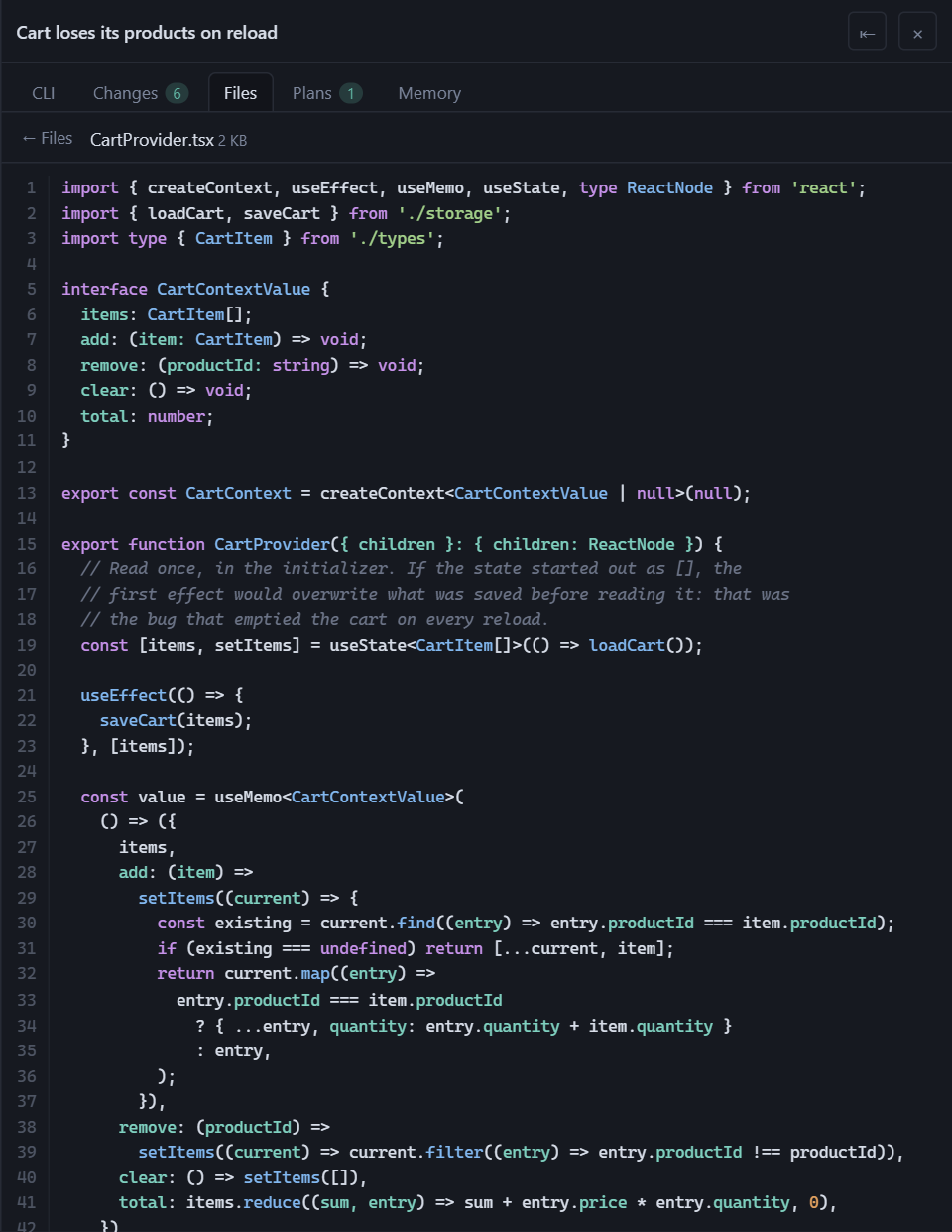
|
46
|
+
| **Plans** | The plans and `.md` documents the conversation wrote, rendered. One click puts a document's path in your message. |
|
|
47
|
+
| **Notes** | A scratchpad next to the conversation, images included. With Claude Code, one click sends a note to a new conversation. |
|
|
48
|
+
| **Console** | Your system's terminal at the bottom, in the project's folder: PowerShell, cmd or Git Bash on Windows; bash or zsh on macOS and Linux. |
|
|
49
|
+
| **Continue with…** | With more than one CLI, continue a conversation with another one in the same folder. The new agent starts from a transcript of the last turns. |
|
|
50
|
+
| **Notifications** | A sound, and optional system notifications, when an agent finishes or is waiting for you. |
|
|
51
|
+
| **Settings** | ⚙ in the header: the language, the terminal's theme, which panels show, which console opens and which CLIs the app uses. |
|
|
52
|
+
| **Nine languages** | English, Español, 简体中文, 日本語, Português (Brasil), Русский, 한국어, Français and Deutsch. It follows your browser's language. |
|
|
53
|
+
| **Theme** | Light, dark or the system's. The terminal stays dark by default, so the CLIs' colors stay readable. |
|
|
54
|
+
|
|
55
|
+
Optional, and off by default: [shared memory](#shared-memory-between-clis)
|
|
56
|
+
between CLIs, a [backup](#backup-of-your-history) of your history,
|
|
57
|
+
[remote access](#remote-access-over-ssh) from another computer or a phone, and
|
|
58
|
+
an [Android app](#the-android-app).
|
|
45
59
|
|
|
46
60
|
<p>
|
|
47
61
|
<img src="https://raw.githubusercontent.com/cvelasquez/agent-workbench/main/assets/captura-cambios.png" width="49%" alt="The Changes panel: branch and changed files, by group">
|
|
48
62
|
<img src="https://raw.githubusercontent.com/cvelasquez/agent-workbench/main/assets/captura-diff.png" width="49%" alt="The diff of one of those files, in the same panel">
|
|
49
63
|
</p>
|
|
50
64
|
|
|
51
|
-
###
|
|
65
|
+
### With more than one CLI
|
|
66
|
+
|
|
67
|
+
Each session and each tab shows a small badge with its CLI, and the `+` for a
|
|
68
|
+
new tab lets you pick which one to open. With a single CLI you see none of
|
|
69
|
+
this.
|
|
70
|
+
|
|
71
|
+
<img src="https://raw.githubusercontent.com/cvelasquez/agent-workbench/main/assets/captura-clis.png" width="45%" alt="The projects sidebar with sessions from several CLIs, each with its badge, and the + menu with the five CLIs and their versions">
|
|
72
|
+
|
|
73
|
+
**Not every CLI shares the same information**, so a few features depend on the
|
|
74
|
+
CLI:
|
|
52
75
|
|
|
53
|
-
|
|
54
|
-
|
|
55
|
-
|
|
76
|
+
| | Claude Code | Codex | OpenCode | Antigravity CLI | Pi |
|
|
77
|
+
|---|:---:|:---:|:---:|:---:|:---:|
|
|
78
|
+
| Tab dot: working, idle, waiting for you | ✓ | — | ✓ ¹ | ✓ ² | ✓ |
|
|
79
|
+
| Answer the agent's questions from the conversation | ✓ | — | ✓ ¹ | — | — |
|
|
80
|
+
| Context meter | ✓ | ✓ | ✓ | ✓ ² | ✓ |
|
|
81
|
+
| Mode and model pickers | ✓ | — | — | ✓ | ✓ ³ |
|
|
82
|
+
| Paste images | ✓ | ✓ | ✓ | — | ✓ ³ |
|
|
83
|
+
| Plans tab | ✓ | — | — | — | — |
|
|
84
|
+
| Send a note to a new conversation | ✓ | — | — | — | — |
|
|
56
85
|
|
|
57
|
-
|
|
86
|
+
The CLI's own terminal is always there for the rest: where there's a "—",
|
|
87
|
+
questions, for example, are answered in it.
|
|
58
88
|
|
|
59
|
-
|
|
60
|
-
|
|
61
|
-
|
|
62
|
-
status
|
|
63
|
-
|
|
64
|
-
|
|
65
|
-
|
|
66
|
-
its status and tokens only if you configure its status line
|
|
67
|
-
([below](#antigravity-cli-status-and-meter-optional)).
|
|
89
|
+
¹ With OpenCode, the app starts a local OpenCode server to get this
|
|
90
|
+
([details](#your-data-and-security)).
|
|
91
|
+
² Only if you set up its status line
|
|
92
|
+
([how](#antigravity-cli-status-and-context-meter)).
|
|
93
|
+
³ Pi has no permission modes: its pickers are the model and the thinking level.
|
|
94
|
+
And it doesn't attach what you paste: an image travels as a file path that the
|
|
95
|
+
model opens itself.
|
|
68
96
|
|
|
69
97
|
---
|
|
70
98
|
|
|
71
99
|
## Requirements
|
|
72
100
|
|
|
73
|
-
|
|
74
|
-
|
|
75
|
-
|
|
76
|
-
|
|
77
|
-
|
|
101
|
+
- **Node.js 20 or later.** To see OpenCode's history and Antigravity CLI's
|
|
102
|
+
conversation titles, **22.13 or later**: they're read with the SQLite built
|
|
103
|
+
into Node since that version. With an older one, everything else works.
|
|
104
|
+
- **git**, for the Changes panel. Everything else works without it.
|
|
105
|
+
- **At least one CLI**, installed and logged in:
|
|
78
106
|
|
|
79
|
-
| CLI | Command |
|
|
107
|
+
| CLI | Command | How to install |
|
|
80
108
|
|---|---|---|
|
|
81
109
|
| Claude Code | `claude` | [installation guide](https://docs.claude.com/en/docs/claude-code/setup) |
|
|
82
110
|
| Codex | `codex` | [guide](https://learn.chatgpt.com/docs/codex/cli) |
|
|
83
111
|
| OpenCode | `opencode` | [documentation](https://opencode.ai/docs/) |
|
|
84
|
-
| Antigravity CLI | `agy` | [guide](https://antigravity.google/docs/cli/getting-started)
|
|
112
|
+
| Antigravity CLI | `agy` | [guide](https://antigravity.google/docs/cli/getting-started) |
|
|
113
|
+
| Pi | `pi` | [pi.dev](https://pi.dev) |
|
|
85
114
|
|
|
86
|
-
Agent Workbench
|
|
87
|
-
|
|
88
|
-
open sessions.
|
|
115
|
+
Agent Workbench doesn't include or download any CLI: it finds the ones in your
|
|
116
|
+
`PATH`. If there are none, it tells you so and doesn't open sessions.
|
|
89
117
|
|
|
90
|
-
|
|
91
|
-
|
|
92
|
-
|
|
93
|
-
|
|
94
|
-
|
|
95
|
-
(`build-essential` on Debian and Ubuntu).
|
|
118
|
+
**Platforms.** Built and used every day on Windows 11 with PowerShell. On macOS
|
|
119
|
+
and Linux, every change is installed and started automatically, but they get
|
|
120
|
+
less daily use: reports are welcome. On Linux, installing compiles the terminal
|
|
121
|
+
module, so you need `python3`, `make` and a C++ compiler (`build-essential` on
|
|
122
|
+
Debian and Ubuntu).
|
|
96
123
|
|
|
97
124
|
---
|
|
98
125
|
|
|
99
|
-
## Install
|
|
126
|
+
## Install and start
|
|
100
127
|
|
|
101
128
|
```bash
|
|
102
129
|
npm install -g agent-workbench
|
|
@@ -108,110 +135,143 @@ Then, from the folder of the project you want to work on:
|
|
|
108
135
|
agent-workbench
|
|
109
136
|
```
|
|
110
137
|
|
|
111
|
-
|
|
112
|
-
60 MB whenever the npm cache is cold, mostly the terminal's native binary. For
|
|
113
|
-
daily use, the global install is the better choice.
|
|
114
|
-
|
|
115
|
-
The server prints a URL with a token and opens it in the browser:
|
|
138
|
+
It opens your browser at an address like this one:
|
|
116
139
|
|
|
117
140
|
```
|
|
118
141
|
URL http://127.0.0.1:52341/?token=…
|
|
119
142
|
```
|
|
120
143
|
|
|
121
|
-
That
|
|
122
|
-
|
|
144
|
+
That address is the only way in: the token changes on every start, and the app
|
|
145
|
+
only listens on your own computer (`127.0.0.1`).
|
|
146
|
+
|
|
147
|
+
To try it once without installing: `npx agent-workbench`. It downloads about
|
|
148
|
+
60 MB the first time, mostly the terminal's native module. For everyday use,
|
|
149
|
+
the global install is better.
|
|
150
|
+
|
|
151
|
+
---
|
|
123
152
|
|
|
124
|
-
|
|
153
|
+
## Keyboard shortcuts
|
|
125
154
|
|
|
126
|
-
|
|
127
|
-
|
|
128
|
-
|
|
129
|
-
|
|
155
|
+
| Keys | Action |
|
|
156
|
+
|---|---|
|
|
157
|
+
| `Alt+T` | New tab |
|
|
158
|
+
| `Alt+W` | Close the tab |
|
|
159
|
+
| `Alt+←` / `Alt+→` (or `Alt+PgUp` / `Alt+PgDn`) | Previous / next tab |
|
|
160
|
+
| `Alt+P` | Show or hide the right panel |
|
|
161
|
+
| `Shift+Tab`, outside the terminal | Back to the previous tab |
|
|
130
162
|
|
|
131
|
-
|
|
132
|
-
|
|
133
|
-
for
|
|
134
|
-
the snippet to paste yourself.
|
|
163
|
+
The `?` button in the header lists them all, along with the active CLI's own
|
|
164
|
+
shortcuts. They use `Alt` because the browser keeps `Ctrl+T`, `Ctrl+W` and
|
|
165
|
+
`Ctrl+Tab` for its own tabs and never passes them to the page.
|
|
135
166
|
|
|
136
|
-
|
|
167
|
+
Every other key —`Esc`, `Ctrl+C`, `Ctrl+R`, `Ctrl+O`, the arrows, `Alt+V` to
|
|
168
|
+
paste images— reaches the CLI untouched. `Ctrl+V` too: what it does there is up
|
|
169
|
+
to the CLI. Only in the console at the bottom, on Windows, `Ctrl+V` pastes text,
|
|
170
|
+
as in Windows Terminal.
|
|
137
171
|
|
|
138
|
-
|
|
172
|
+
---
|
|
139
173
|
|
|
140
|
-
|
|
141
|
-
to authorize a tool or idle, nor how many tokens it has used: it only publishes
|
|
142
|
-
that through its *status line*. Without it configured, its tabs work the same
|
|
143
|
-
—history, conversation, mode, model— but the tab's dot says the status is
|
|
144
|
-
unknown and the meter stays empty. To turn it on:
|
|
174
|
+
## Optional extras
|
|
145
175
|
|
|
146
|
-
|
|
147
|
-
|
|
148
|
-
|
|
149
|
-
|
|
150
|
-
|
|
151
|
-
|
|
152
|
-
|
|
153
|
-
|
|
154
|
-
|
|
155
|
-
|
|
156
|
-
|
|
157
|
-
|
|
158
|
-
|
|
159
|
-
|
|
160
|
-
|
|
161
|
-
|
|
162
|
-
|
|
163
|
-
|
|
164
|
-
|
|
165
|
-
|
|
166
|
-
|
|
167
|
-
|
|
168
|
-
default.**
|
|
169
|
-
|
|
170
|
-
without writing anything, and
|
|
171
|
-
everything the sidebar
|
|
172
|
-
|
|
173
|
-
archiving doesn't delete what was already copied: the app never deletes anything
|
|
176
|
+
### Shared memory between CLIs
|
|
177
|
+
|
|
178
|
+
Each CLI keeps what it learns about a project in its own place, and the others
|
|
179
|
+
can't see it. The **Memory** tab sets up one memory for all of them: notes in the
|
|
180
|
+
project's `.agents/memory/` folder, which every CLI reads and writes —from here
|
|
181
|
+
or from its own terminal— through `AGENTS.md` and `CLAUDE.md`. The tab is hidden
|
|
182
|
+
at first: show it from ⚙ Settings.
|
|
183
|
+
|
|
184
|
+
**Preview changes** shows, file by file, what would be written, and nothing is
|
|
185
|
+
touched until you confirm. Setting it up imports the memory Claude Code already
|
|
186
|
+
had for that project. The app doesn't edit each CLI's global settings: it gives
|
|
187
|
+
you the snippet to paste yourself.
|
|
188
|
+
|
|
189
|
+
<img src="https://raw.githubusercontent.com/cvelasquez/agent-workbench/main/assets/captura-memoria.png" width="70%" alt="The Memory tab with the bridge installed for the five CLIs and the imported notes">
|
|
190
|
+
|
|
191
|
+
### Backup of your history
|
|
192
|
+
|
|
193
|
+
Each CLI owns its history, and it can change its format, prune it, or be
|
|
194
|
+
uninstalled. The backup keeps a copy of your conversations —messages, tool
|
|
195
|
+
calls and results, images, and each project's memory— in a folder of yours, in
|
|
196
|
+
files you can read without the app.
|
|
197
|
+
|
|
198
|
+
**It's off by default.** Open it with the backup button at the top of the
|
|
199
|
+
projects sidebar, or from ⚙ Settings. **Measure** tells you how much space it
|
|
200
|
+
would take per CLI, without writing anything, and **Turn on** starts it. From
|
|
201
|
+
then on it copies everything in the sidebar that isn't archived, and copies a
|
|
202
|
+
conversation again a minute after it stops changing. It never deletes anything
|
|
174
203
|
from that folder.
|
|
175
204
|
|
|
176
|
-
|
|
177
|
-
|
|
178
|
-
|
|
179
|
-
|
|
205
|
+
With the backup on:
|
|
206
|
+
|
|
207
|
+
- Conversations a CLI no longer has stay in the sidebar, marked as backup, and
|
|
208
|
+
open as Markdown.
|
|
209
|
+
- Any project can be exported to Markdown.
|
|
210
|
+
- With more than one CLI, the sidebar filter can search **In conversations**:
|
|
211
|
+
the text of everything copied, from every CLI.
|
|
180
212
|
|
|
181
213
|
<img src="https://raw.githubusercontent.com/cvelasquez/agent-workbench/main/assets/captura-buscador.png" width="40%" alt="Search in conversations: a match in one session of each CLI, with its snippet">
|
|
182
214
|
|
|
183
|
-
By default it lives
|
|
184
|
-
(`%APPDATA%\agent-workbench\vault` on Windows). **Change folder…** copies
|
|
185
|
-
|
|
186
|
-
|
|
187
|
-
|
|
215
|
+
By default it lives in the app's configuration folder
|
|
216
|
+
(`%APPDATA%\agent-workbench\vault` on Windows). **Change folder…** copies it to
|
|
217
|
+
another one —a synced folder, another drive— without overwriting anything, and
|
|
218
|
+
leaves the old one as it was. If you put it in a synced folder or a repository,
|
|
219
|
+
your conversations go with it.
|
|
220
|
+
|
|
221
|
+
<details>
|
|
222
|
+
<summary>Importing history from Gemini CLI and the Antigravity IDE</summary>
|
|
188
223
|
|
|
189
|
-
Two one-
|
|
190
|
-
from source ([below](#from-source)) and **write nothing without
|
|
191
|
-
without it, they tell you what they would import.
|
|
224
|
+
Two one-time importers bring in history from tools the app doesn't read. They
|
|
225
|
+
run from the source code ([below](#from-source)) and **write nothing without
|
|
226
|
+
`--write`**: without it, they only tell you what they would import.
|
|
192
227
|
|
|
193
228
|
- `pnpm vault:import gemini-cli [--cwd <folder>]` — the chats left over from
|
|
194
|
-
Gemini CLI
|
|
229
|
+
Gemini CLI. `--cwd` is the folder where you used it, to file them under that
|
|
195
230
|
project.
|
|
196
|
-
- `pnpm vault:import antigravity-ide --workspace <folder>` —
|
|
197
|
-
|
|
198
|
-
|
|
199
|
-
|
|
231
|
+
- `pnpm vault:import antigravity-ide --workspace <folder>` — what can be read
|
|
232
|
+
from the Antigravity IDE conversations in that folder: each one's summary and
|
|
233
|
+
its `.md` documents. The conversation itself is encrypted, so it's marked as
|
|
234
|
+
partial history.
|
|
200
235
|
|
|
201
|
-
|
|
236
|
+
</details>
|
|
202
237
|
|
|
203
|
-
|
|
204
|
-
one on the same network, in its browser — with no CLI installed there.
|
|
205
|
-
**The app is never opened to the network**: it keeps listening only on
|
|
206
|
-
`127.0.0.1`, and the other computer reaches it through an SSH tunnel. That's
|
|
207
|
-
also what makes it work: through the tunnel the other browser sees the app as
|
|
208
|
-
`localhost`, and outside `localhost` browsers switch off things the app needs
|
|
209
|
-
(the clipboard, notifications, `crypto.randomUUID`). **It's off by default.**
|
|
238
|
+
### Antigravity CLI: status and context meter
|
|
210
239
|
|
|
211
|
-
|
|
212
|
-
|
|
240
|
+
Antigravity CLI only tells whether it's working or waiting for you, and how
|
|
241
|
+
many tokens it has used, through its *status line*. Without it, its tabs work
|
|
242
|
+
normally, but the tab's dot says the status is unknown and the meter stays
|
|
243
|
+
empty. To turn it on:
|
|
213
244
|
|
|
214
|
-
|
|
245
|
+
1. Open an Antigravity tab and click **Configure**, next to the meter.
|
|
246
|
+
2. Copy the line it shows and add it to what
|
|
247
|
+
`~/.gemini/antigravity-cli/settings.json` already has. The app doesn't edit
|
|
248
|
+
that file: you do.
|
|
249
|
+
3. Within a couple of seconds, or with **Check**, the dialog says
|
|
250
|
+
**Configured**.
|
|
251
|
+
|
|
252
|
+
The line runs a small script kept in the app's own folder. It saves only each
|
|
253
|
+
conversation's status, mode, model and tokens —not your email, quota, plan or
|
|
254
|
+
cost, which the CLI also passes to it— and prints nothing, so the CLI's own
|
|
255
|
+
status line stays as it was. Once set, it runs on **every** `agy` session,
|
|
256
|
+
including the ones you open outside the app, and it needs `node` in the
|
|
257
|
+
`PATH`.
|
|
258
|
+
|
|
259
|
+
### Remote access over SSH
|
|
260
|
+
|
|
261
|
+
Leave Agent Workbench running on one computer and use it from another one on
|
|
262
|
+
your network, in its browser, with no CLI installed there. **The app is never
|
|
263
|
+
opened to the network**: it still listens only on `127.0.0.1`, and the other
|
|
264
|
+
computer reaches it through an SSH tunnel. The tunnel is also what makes it
|
|
265
|
+
work: through it the other browser sees the app as `localhost`, which browsers
|
|
266
|
+
require for the clipboard and notifications. **It's off by default.**
|
|
267
|
+
|
|
268
|
+
**1. On the computer that runs the app, once: turn on its SSH server.** It's a
|
|
269
|
+
system change that needs administrator rights, so the app doesn't do it for
|
|
270
|
+
you.
|
|
271
|
+
|
|
272
|
+
- **Windows 10/11** — in PowerShell *as administrator*. The first line downloads
|
|
273
|
+
and installs the server and takes a few minutes: wait until the prompt comes
|
|
274
|
+
back.
|
|
215
275
|
|
|
216
276
|
```powershell
|
|
217
277
|
Add-WindowsCapability -Online -Name OpenSSH.Server~~~~0.0.1.0
|
|
@@ -219,93 +279,87 @@ doesn't do this for you — it's a system change that needs administrator rights
|
|
|
219
279
|
Set-Service -Name sshd -StartupType Automatic
|
|
220
280
|
```
|
|
221
281
|
|
|
222
|
-
The first line downloads and installs the server: it takes a few minutes and
|
|
223
|
-
shows "Running" meanwhile. Wait until the prompt comes back.
|
|
224
|
-
|
|
225
282
|
- **macOS** — System Settings → General → Sharing → **Remote Login**.
|
|
226
|
-
- **Linux** — install and
|
|
227
|
-
|
|
283
|
+
- **Linux** — install and turn on your distribution's OpenSSH server. On Debian
|
|
284
|
+
or Ubuntu:
|
|
228
285
|
|
|
229
|
-
|
|
230
|
-
|
|
231
|
-
|
|
232
|
-
|
|
233
|
-
|
|
234
|
-
|
|
286
|
+
```bash
|
|
287
|
+
sudo apt install openssh-server
|
|
288
|
+
sudo systemctl enable --now ssh
|
|
289
|
+
```
|
|
290
|
+
|
|
291
|
+
**2. In the app: ⇄ in the header → Turn on remote access, then restart Agent
|
|
292
|
+
Workbench.** The tunnel needs a port that doesn't change, so the app uses a
|
|
293
|
+
fixed one (24837 by default; you can change it), and the port is chosen at
|
|
294
|
+
startup. Restarting closes the open CLIs; your tabs come back asleep. Turning
|
|
295
|
+
it *off* works right away.
|
|
235
296
|
|
|
236
|
-
**3. On the other computer,
|
|
297
|
+
**3. On the other computer, each time: open the tunnel.** The dialog shows the
|
|
237
298
|
command ready to copy:
|
|
238
299
|
|
|
239
300
|
```
|
|
240
301
|
ssh -N -L 24837:127.0.0.1:24837 you@your-computer
|
|
241
302
|
```
|
|
242
303
|
|
|
243
|
-
Leave it running
|
|
244
|
-
|
|
304
|
+
Leave it running, and **use the same port on both ends**: with a different
|
|
305
|
+
local port the app answers 403. Adding
|
|
245
306
|
`-o ServerAliveInterval=30 -o ExitOnForwardFailure=yes` makes the tunnel notice
|
|
246
|
-
a dropped Wi‑Fi instead of hanging. On Windows you can save the
|
|
307
|
+
a dropped Wi‑Fi instead of hanging. On Windows you can save the command in a
|
|
247
308
|
`.cmd` file and double-click it.
|
|
248
309
|
|
|
249
|
-
**4. Pair that computer, once.** In the dialog, **Pair a device**
|
|
250
|
-
address with a one-time code,
|
|
251
|
-
|
|
252
|
-
browser
|
|
253
|
-
|
|
254
|
-
|
|
255
|
-
|
|
256
|
-
|
|
257
|
-
|
|
258
|
-
|
|
259
|
-
|
|
260
|
-
|
|
261
|
-
|
|
262
|
-
|
|
263
|
-
|
|
264
|
-
|
|
265
|
-
|
|
266
|
-
|
|
267
|
-
|
|
268
|
-
|
|
269
|
-
|
|
270
|
-
|
|
310
|
+
**4. Pair that computer, once.** In the dialog, **Pair a device** gives you an
|
|
311
|
+
address with a one-time code, like `http://localhost:24837/?pair=K7QM-X2RD`.
|
|
312
|
+
Open it in the other computer's browser within five minutes. From then on, that
|
|
313
|
+
browser just opens `http://localhost:24837`, even after the app restarts. The
|
|
314
|
+
dialog lists the paired devices, and **Revoke** cuts one off at once.
|
|
315
|
+
|
|
316
|
+
A paired device can use the whole app, except managing remote access and the
|
|
317
|
+
few things that would open a window on the host computer, like *Open with the
|
|
318
|
+
default app*. A **Remote** badge in the header shows it. Keep in mind that the
|
|
319
|
+
app includes a console and launches agents, so a paired device can run commands
|
|
320
|
+
on your computer, just as you can. **Pair only devices that are yours.**
|
|
321
|
+
|
|
322
|
+
**On a phone or tablet.** Through the same tunnel, a phone's browser gets a
|
|
323
|
+
one-column layout: the projects sidebar slides in from the side, the tabs sit
|
|
324
|
+
in the header, and a strip switches between the conversation, the CLI, changes,
|
|
325
|
+
files and the rest. It appears on any window narrower than 768 px. On a touch
|
|
326
|
+
screen, Enter in the message box starts a new line (the send button sends), and
|
|
327
|
+
dragging a finger over a terminal scrolls it.
|
|
328
|
+
|
|
329
|
+
<details>
|
|
330
|
+
<summary>A safer SSH key, only good for the tunnel (recommended)</summary>
|
|
331
|
+
|
|
332
|
+
The SSH login is your user's on that computer, so a password or key that opens
|
|
333
|
+
the tunnel also opens a full terminal there. You can create a key that is only
|
|
334
|
+
good for the tunnel: generate one on the other computer
|
|
335
|
+
(`ssh-keygen -t ed25519`) and add its public half to `authorized_keys` on the
|
|
336
|
+
computer that runs the app, with these options in front:
|
|
271
337
|
|
|
272
338
|
```
|
|
273
339
|
restrict,port-forwarding,permitopen="127.0.0.1:24837",command="exit" ssh-ed25519 AAAA… other-computer
|
|
274
340
|
```
|
|
275
341
|
|
|
276
|
-
`restrict`
|
|
277
|
-
|
|
278
|
-
|
|
279
|
-
|
|
280
|
-
`C:\ProgramData\ssh\administrators_authorized_keys` and it must be writable
|
|
342
|
+
`restrict` alone still lets the key run commands; `command="exit"` is what
|
|
343
|
+
closes that door, and the tunnel never asks for a command. On Windows, if your
|
|
344
|
+
user is an administrator, that file is
|
|
345
|
+
`C:\ProgramData\ssh\administrators_authorized_keys`, and it must be writable
|
|
281
346
|
only by Administrators and SYSTEM; otherwise it's
|
|
282
|
-
`%USERPROFILE%\.ssh\authorized_keys`. To check
|
|
347
|
+
`%USERPROFILE%\.ssh\authorized_keys`. To check it, try
|
|
283
348
|
`ssh you@your-computer whoami` with that key: it should print nothing and end
|
|
284
349
|
at once, while the `-N -L` tunnel keeps working.
|
|
285
350
|
|
|
286
|
-
|
|
287
|
-
single-column layout: the projects sidebar as a drawer, the tabs in the header,
|
|
288
|
-
and a strip that switches between the conversation, the CLI, changes, files and
|
|
289
|
-
the rest. It appears on any window narrower than 768 px (a tablet held upright, too).
|
|
290
|
-
On a touch screen, Enter in the message box starts a new line (the send button
|
|
291
|
-
sends), and dragging a finger over a terminal scrolls it like a mouse wheel.
|
|
292
|
-
|
|
293
|
-
**Notifications.** The bell button in the header turns on system notifications:
|
|
294
|
-
"finished" and "is waiting for you", with the tab's name, only when the window
|
|
295
|
-
isn't in view. They follow the same rule as the notification sound, so they
|
|
296
|
-
come from the CLIs that publish their status. Each browser remembers its own
|
|
297
|
-
choice, and the sound plays on every screen that has the app open.
|
|
351
|
+
</details>
|
|
298
352
|
|
|
299
|
-
### The Android app
|
|
353
|
+
### The Android app
|
|
300
354
|
|
|
301
355
|
An app for Android 10 and later opens the tunnel for you and shows the same
|
|
302
|
-
interface, served by your computer, in the phone
|
|
303
|
-
|
|
304
|
-
|
|
305
|
-
|
|
356
|
+
interface, served by your computer, in the phone layout. It stays connected in
|
|
357
|
+
the background and notifies you when an agent finishes or is waiting for you,
|
|
358
|
+
even with the screen off; tapping a notification opens that tab. When the Wi‑Fi
|
|
359
|
+
comes back, it reconnects on its own.
|
|
306
360
|
|
|
307
361
|
It needs remote access on and the computer's SSH server running (steps 1 and 2
|
|
308
|
-
above).
|
|
362
|
+
above). Get it on
|
|
309
363
|
[Google Play](https://play.google.com/store/apps/details?id=io.github.cvelasquez.agentworkbench),
|
|
310
364
|
or build it yourself from [`android/`](android/) as
|
|
311
365
|
[`CONTRIBUTING.md`](CONTRIBUTING.md#the-android-app) explains.
|
|
@@ -315,18 +369,17 @@ or build it yourself from [`android/`](android/) as
|
|
|
315
369
|
1. In the ⇄ dialog, choose **Pair a phone**. It shows a line to paste in a
|
|
316
370
|
terminal on this computer, and a QR code. On Windows, if your user is an
|
|
317
371
|
administrator, the line goes in PowerShell *as administrator*; the dialog
|
|
318
|
-
|
|
319
|
-
2. Paste the line. It
|
|
320
|
-
|
|
321
|
-
|
|
322
|
-
|
|
323
|
-
|
|
324
|
-
|
|
325
|
-
|
|
326
|
-
|
|
327
|
-
|
|
328
|
-
|
|
329
|
-
tells you.
|
|
372
|
+
tells you.
|
|
373
|
+
2. Paste the line. It authorizes the phone's key for the tunnel only: with it,
|
|
374
|
+
the phone reaches the app and nothing else — no terminal, no commands.
|
|
375
|
+
3. Scan the QR code with the app. The code works once and for five minutes, and
|
|
376
|
+
the dialog has to stay open until the phone connects.
|
|
377
|
+
|
|
378
|
+
The QR code carries the phone's private SSH key. Your computer keeps it only in
|
|
379
|
+
memory until the phone uses it and never writes it to disk: **don't share a
|
|
380
|
+
picture of that QR code**. The phone remembers your computer's SSH fingerprint
|
|
381
|
+
on the first connection, and if it ever changes, it refuses to connect and tells
|
|
382
|
+
you.
|
|
330
383
|
|
|
331
384
|
**To remove a phone**, **Revoke** it in the dialog and delete its line from
|
|
332
385
|
`authorized_keys` (it ends in `agent-workbench-phone`). On the phone,
|
|
@@ -339,132 +392,93 @@ app keeps on the phone and the permissions it asks for are in
|
|
|
339
392
|
|
|
340
393
|
---
|
|
341
394
|
|
|
342
|
-
##
|
|
343
|
-
|
|
344
|
-
|
|
345
|
-
|
|
346
|
-
|
|
347
|
-
|
|
348
|
-
|
|
349
|
-
|
|
350
|
-
|
|
351
|
-
|
|
352
|
-
|
|
353
|
-
|
|
354
|
-
|
|
355
|
-
|
|
356
|
-
|
|
357
|
-
|
|
358
|
-
|
|
359
|
-
|
|
360
|
-
|
|
361
|
-
|
|
362
|
-
|
|
363
|
-
|
|
364
|
-
|
|
365
|
-
|
|
366
|
-
it
|
|
367
|
-
|
|
368
|
-
|
|
369
|
-
|
|
370
|
-
|
|
371
|
-
|
|
372
|
-
`
|
|
373
|
-
`Alt+P` show or hide the right panel · `Shift+Tab`, outside the terminal, go
|
|
374
|
-
back to the previous tab.
|
|
375
|
-
|
|
376
|
-
The `?` button in the top bar lists them all, along with the shortcuts of the
|
|
377
|
-
tab's CLI.
|
|
378
|
-
|
|
379
|
-
**Why `Alt` and not `Ctrl`:** the browser keeps `Ctrl+T`, `Ctrl+W` and
|
|
380
|
-
`Ctrl+Tab` for its own tabs and the event never reaches the page. It's not
|
|
381
|
-
something `preventDefault` can fix: there's no event to prevent.
|
|
382
|
-
|
|
383
|
-
The app captures exactly those combinations and no others. `Shift+Tab` only
|
|
384
|
-
when focus isn't on the terminal, because inside it's the key the CLI uses to
|
|
385
|
-
switch modes. Everything else —`Esc`, `Esc Esc`, `Ctrl+C`, `Ctrl+R`, `Ctrl+O`,
|
|
386
|
-
the arrow keys and above all `Alt+V`, which pastes images— reaches the CLI
|
|
387
|
-
untouched. `Ctrl+V` too: what it does there is up to the CLI. Only in the
|
|
388
|
-
console at the bottom, on Windows, `Ctrl+V` pastes text, as in Windows
|
|
389
|
-
Terminal.
|
|
390
|
-
|
|
391
|
-
---
|
|
392
|
-
|
|
393
|
-
## What the app does with your data
|
|
394
|
-
|
|
395
|
-
Nothing leaves your machine. No telemetry, no analytics, no outgoing network
|
|
396
|
-
calls at all. The exception is the CLI itself at work: the one you open in a
|
|
397
|
-
tab, and the OpenCode server described below, talk to the model provider just
|
|
398
|
-
as they would if you opened them by hand. The Android app talks only to your
|
|
399
|
-
computer; [`PRIVACY.md`](PRIVACY.md) lists what it keeps on the phone.
|
|
400
|
-
|
|
401
|
-
**It never touches your credentials.** There's no login in the interface: if
|
|
402
|
-
you aren't logged in, you log in inside the CLI's terminal and the app doesn't
|
|
403
|
-
even notice.
|
|
395
|
+
## Your data and security
|
|
396
|
+
|
|
397
|
+
- **Agent Workbench sends nothing anywhere.** No telemetry, no analytics, no
|
|
398
|
+
network calls of its own. The Android app talks only to your computer.
|
|
399
|
+
- **Each CLI still does on its own what it would do if you opened it by hand:**
|
|
400
|
+
it talks to its AI provider, and it may check for updates or send its own
|
|
401
|
+
usage data. Agent Workbench doesn't add anything to that, and it doesn't turn
|
|
402
|
+
it off either: it doesn't change any CLI's settings. What each CLI sends is
|
|
403
|
+
in its own documentation.
|
|
404
|
+
- **It never touches your credentials.** There's no login screen: if a CLI asks
|
|
405
|
+
you to log in, you do it in its own terminal, and the app doesn't even notice.
|
|
406
|
+
- **It reads the CLIs' history and writes nothing in their folders.** The table
|
|
407
|
+
below lists what it reads and what it never opens.
|
|
408
|
+
- **It writes only in its own folders**, plus one thing in your projects, and
|
|
409
|
+
only if you confirm it: the shared memory.
|
|
410
|
+
- **The server listens only on your computer** (`127.0.0.1`), on a random port,
|
|
411
|
+
with a new random token on every start, and it rejects requests coming from
|
|
412
|
+
other web pages. Remote access doesn't change that: the port becomes a fixed
|
|
413
|
+
one, still on `127.0.0.1`, and SSH —which you turn on and control— does the
|
|
414
|
+
rest.
|
|
415
|
+
- **The Changes panel is read-only.** No commit, stage or push: with an agent
|
|
416
|
+
editing files, a button that writes history is exactly the kind of thing
|
|
417
|
+
where, later, nobody knows who pressed it.
|
|
418
|
+
|
|
419
|
+
| CLI | What it reads | What it never opens |
|
|
420
|
+
|---|---|---|
|
|
421
|
+
| Claude Code | From `~/.claude/`: `projects/` (the history, and each project's memory, to import it), `sessions/` (whether the CLI is waiting for you) and `plans/`. For the Plans tab, also the `.md` files the conversation wrote in the project or in that session's temp folder — **only the ones named by the conversation you're viewing**, without browsing any folder | `.credentials.json` or any token |
|
|
422
|
+
| Codex | From `~/.codex/` (or `CODEX_HOME`): `sessions/` and `archived_sessions/` | `auth.json`, `config.toml` or its `*.sqlite` databases |
|
|
423
|
+
| OpenCode | Its `opencode.db` database, opened read-only, and from it only the sessions, messages and parts; and its model catalog, for the context window size | `auth.json`, `opencode.json`, or the accounts, credentials, permissions and shared-sessions tables |
|
|
424
|
+
| Antigravity CLI | From `~/.gemini/antigravity-cli/`: each conversation's transcripts, `history.jsonl`, the last conversation of each folder, the model and status line from `settings.json`, and a temporary **copy** of its conversation index; from `~/.gemini/config/projects/`, each project's folder | Its MCP configuration, its entry in the system keychain, the contents of `conversations/`, and `~/.gemini/antigravity/`, which is its IDE |
|
|
425
|
+
| Pi | From `~/.pi/agent/` (or `PI_CODING_AGENT_DIR`): the sessions in `sessions/`, and `models-store.json`, its model catalog, for the context window size and the model picker. From the installed Pi package: its `package.json`, to know the version without running Pi, and its built-in model list | `auth.json`, `models.json`, `settings.json` or its MCP configuration |
|
|
404
426
|
|
|
405
|
-
|
|
406
|
-
|
|
407
|
-
[
|
|
427
|
+
The [backup importers](#backup-of-your-history), when you run them, also read
|
|
428
|
+
what their section says. The full list, file by file, is in
|
|
429
|
+
[`ARCHITECTURE.md`](ARCHITECTURE.md#4-what-is-read-from-each-cli).
|
|
408
430
|
|
|
409
|
-
|
|
410
|
-
|
|
411
|
-
| Claude Code | from `~/.claude/`: `projects/` (the history, and each project's memory, to import it), `sessions/` (whether the CLI is waiting for an answer) and `plans/`. And for the Plans tab, the `.md` files the conversation wrote inside the project or in that session's temp folder: **only those named by the conversation you're viewing**, without walking any folder | `.credentials.json` or any token |
|
|
412
|
-
| Codex | from `~/.codex/` (or `CODEX_HOME`): `sessions/` and `archived_sessions/` | `auth.json`, `config.toml` or its `*.sqlite` databases |
|
|
413
|
-
| OpenCode | its `opencode.db` database, opened read-only, and from it only the sessions, messages and parts tables; and its model catalog, for the context window size | `auth.json`, `opencode.json`, or the accounts, credentials, permissions and shared-sessions tables |
|
|
414
|
-
| Antigravity CLI | from `~/.gemini/antigravity-cli/`: each conversation's transcripts, `history.jsonl`, the last conversation of each folder, from `settings.json` only the model and the status line, and its conversation index, from a temporary **copy**; from `~/.gemini/config/projects/`, each project's folder | the MCP configuration, its entry in the system keychain, the contents of `conversations/`, or `~/.gemini/antigravity/`, which is its IDE |
|
|
431
|
+
<details>
|
|
432
|
+
<summary>The fine print: footprints, environment variables and what the app writes</summary>
|
|
415
433
|
|
|
416
|
-
Three footprints worth knowing about
|
|
434
|
+
**Three footprints worth knowing about:**
|
|
417
435
|
|
|
418
436
|
- **Reading the OpenCode database** does what SQLite does with any reader: it
|
|
419
|
-
creates its `-wal` and `-shm` files if they're missing and updates the
|
|
420
|
-
|
|
421
|
-
- **If an Antigravity tab's own log doesn't show up**,
|
|
437
|
+
creates its `-wal` and `-shm` files if they're missing and updates the date of
|
|
438
|
+
`-shm`. The app never runs an OpenCode command to read it.
|
|
439
|
+
- **If an Antigravity tab's own log doesn't show up**, the app reads the CLI's
|
|
422
440
|
`log/cli-*.log` files, which contain your messages and the account's email,
|
|
423
|
-
only to find the conversation id, and without keeping any line.
|
|
424
|
-
- **With OpenCode, the app runs
|
|
425
|
-
from when you open the first OpenCode tab until five minutes after
|
|
426
|
-
the last one, or until you close the app. It listens on
|
|
427
|
-
|
|
428
|
-
configuration says otherwise. The app only asks it for the
|
|
429
|
-
pending permissions and questions, to create a session, to
|
|
430
|
-
and to
|
|
431
|
-
|
|
432
|
-
|
|
433
|
-
|
|
434
|
-
|
|
435
|
-
|
|
436
|
-
|
|
437
|
-
|
|
438
|
-
OpenCode tab gets
|
|
439
|
-
other
|
|
440
|
-
and stops
|
|
441
|
+
only to find the conversation's id, and without keeping any line.
|
|
442
|
+
- **With OpenCode, the app runs a local OpenCode server** (`opencode serve`):
|
|
443
|
+
just one, from when you open the first OpenCode tab until five minutes after
|
|
444
|
+
you close the last one, or until you close the app. It listens on
|
|
445
|
+
`127.0.0.1`, on a random port, with a different password on every start, even
|
|
446
|
+
if your OpenCode configuration says otherwise. The app only asks it for the
|
|
447
|
+
sessions' status, pending permissions and questions, to create a session, to
|
|
448
|
+
answer a question and to stop a session: nothing about your configuration or
|
|
449
|
+
your accounts.
|
|
450
|
+
|
|
451
|
+
**Environment variables.** The CLIs inherit your environment as it is, with no
|
|
452
|
+
login variables added. Two exceptions: the app **removes**
|
|
453
|
+
`CLAUDE_CODE_CHILD_SESSION` —which turns off history saving— and tells you with
|
|
454
|
+
a banner when it does; and it **adds** one variable to the OpenCode server,
|
|
455
|
+
`OPENCODE_SERVER_PASSWORD`, with that per-start password. It isn't any account's
|
|
456
|
+
password, and it doesn't reach any tab: each OpenCode tab gets it on its command
|
|
457
|
+
line (`attach --password`), where other programs running as your user can see
|
|
458
|
+
it. It only works for that server and stops working when you close the app.
|
|
459
|
+
|
|
460
|
+
**What Pi sends on its own.** When it starts, Pi checks pi.dev for its latest
|
|
461
|
+
version and its model catalog, and it reports each install and update there.
|
|
462
|
+
You turn that report off in Pi, not here: `enableInstallTelemetry: false` in
|
|
463
|
+
Pi's settings, or the `PI_TELEMETRY=0` environment variable.
|
|
441
464
|
|
|
442
465
|
**What the app writes:**
|
|
443
466
|
|
|
444
|
-
- **In its own configuration
|
|
445
|
-
notes, the archived sessions, the Antigravity status line
|
|
446
|
-
turn it on, the backup (or in the folder you choose). With
|
|
447
|
-
on, also the list of paired devices: a name, two dates and a
|
|
448
|
-
one's credential — never the credential itself.
|
|
449
|
-
- **In the temp folder:** the images you paste; each
|
|
450
|
-
which contains your messages, readable only by you and
|
|
451
|
-
start
|
|
452
|
-
you continue
|
|
453
|
-
hours.
|
|
467
|
+
- **In its own configuration folder:** the open tabs, the index cache, the
|
|
468
|
+
notes, the archived sessions, unsent messages, the Antigravity status line
|
|
469
|
+
script and, if you turn it on, the backup (or in the folder you choose). With
|
|
470
|
+
remote access on, also the list of paired devices: a name, two dates and a
|
|
471
|
+
hash of each one's credential — never the credential itself.
|
|
472
|
+
- **In the temp folder:** the images and files you paste or attach; each
|
|
473
|
+
Antigravity tab's log, which contains your messages, readable only by you and
|
|
474
|
+
deleted on the first start after it's 24 hours old; and the transcript of a
|
|
475
|
+
conversation you continue with another CLI, deleted when you close that tab
|
|
476
|
+
or after 24 hours.
|
|
454
477
|
- **In your projects, one thing only, and only if you confirm:** the shared
|
|
455
478
|
memory. It's limited to `.agents/memory/`, to what's between its markers in
|
|
456
479
|
`AGENTS.md` and `CLAUDE.md`, and to a few lines at the end of `.gitignore`.
|
|
457
480
|
|
|
458
|
-
|
|
459
|
-
per-start token that the WebSocket and every HTTP route require, and it rejects
|
|
460
|
-
requests whose `Origin` isn't its own. [Remote access](#remote-access-over-ssh-optional)
|
|
461
|
-
doesn't change any of that: the port becomes a fixed one, still on `127.0.0.1`,
|
|
462
|
-
and a paired device presents its own credential instead of the token. Reaching
|
|
463
|
-
the port is left to SSH, which you turn on and control.
|
|
464
|
-
|
|
465
|
-
**The git panel is read-only.** No commit, stage or push. With an agent editing
|
|
466
|
-
files, a button that writes history is exactly the kind of thing where, later,
|
|
467
|
-
nobody knows who pressed it.
|
|
481
|
+
</details>
|
|
468
482
|
|
|
469
483
|
|
|
470
484
|
|
|
@@ -472,79 +486,105 @@ nobody knows who pressed it.
|
|
|
472
486
|
|
|
473
487
|
## Troubleshooting
|
|
474
488
|
|
|
475
|
-
**The "claude" command wasn't found in the PATH
|
|
476
|
-
with: …" — the app didn't find any of the
|
|
477
|
-
|
|
478
|
-
`
|
|
479
|
-
|
|
489
|
+
**"The "claude" command wasn't found in the PATH", followed by "Also works
|
|
490
|
+
with: …"** — the app didn't find any of the CLIs. Check with
|
|
491
|
+
`where claude` on Windows (`which claude` elsewhere), and the same with `codex`,
|
|
492
|
+
`opencode`, `agy` or `pi`. CLIs are looked up at startup: if you installed one
|
|
493
|
+
while the app was open, restart it.
|
|
494
|
+
|
|
495
|
+
**Pi is installed, but the app doesn't see it.** The app doesn't run `pi` to
|
|
496
|
+
find it: it reads the version from Pi's package, next to the command. That
|
|
497
|
+
works when Pi was installed with npm or with the pi.dev installer; a standalone
|
|
498
|
+
`pi` binary isn't recognized. And if another program called `pi` comes first
|
|
499
|
+
in your `PATH`, the app ignores it and says so in its console.
|
|
500
|
+
|
|
501
|
+
**In a Pi tab, the message box says the CLI is waiting for an answer.** Pi is
|
|
502
|
+
asking whether to trust the project folder. Answer it in the **CLI** tab: the
|
|
503
|
+
app never answers that for you.
|
|
480
504
|
|
|
481
|
-
**
|
|
482
|
-
|
|
483
|
-
|
|
484
|
-
|
|
485
|
-
`
|
|
505
|
+
**OpenCode's history doesn't show up.** Look at the `History` line when the app
|
|
506
|
+
starts. If it says that Node version doesn't include `node:sqlite`, update Node
|
|
507
|
+
to 22.13 or later. If there's no such line, it didn't find the database: it's at
|
|
508
|
+
`~/.local/share/opencode/opencode.db`, or wherever `OPENCODE_DB` or
|
|
509
|
+
`XDG_DATA_HOME` points.
|
|
486
510
|
|
|
487
|
-
**An OpenCode tab won't open
|
|
488
|
-
|
|
489
|
-
|
|
490
|
-
doesn't start there either, the problem is with that OpenCode installation.
|
|
511
|
+
**An OpenCode tab won't open: "Couldn't start the OpenCode server".** The reason
|
|
512
|
+
comes after the colon. If it isn't clear, open `opencode` in a regular terminal:
|
|
513
|
+
if it doesn't start there either, the problem is that OpenCode installation.
|
|
491
514
|
|
|
492
|
-
**An OpenCode tab says the server closed.**
|
|
493
|
-
|
|
494
|
-
bar, starts another server and reattaches the tab to the same session.
|
|
515
|
+
**An OpenCode tab says the server closed.** **Relaunch**, in the same bar,
|
|
516
|
+
starts another server and reconnects the tab to the same session.
|
|
495
517
|
|
|
496
518
|
**An Antigravity tab doesn't show its status or the meter.** Look at the
|
|
497
|
-
`Status line` entry
|
|
498
|
-
configured, or that there's another one, follow
|
|
499
|
-
[
|
|
500
|
-
the CLI's terminal shows `Statusline Error`, `node` is most likely not in
|
|
501
|
-
session's `PATH`.
|
|
502
|
-
you hadn't configured it.
|
|
519
|
+
`Status line` entry when the app starts, under the CLI. If it says it isn't
|
|
520
|
+
configured, or that there's another one, follow
|
|
521
|
+
[these steps](#antigravity-cli-status-and-context-meter). If you configured it
|
|
522
|
+
and the CLI's terminal shows `Statusline Error`, `node` is most likely not in
|
|
523
|
+
that session's `PATH`.
|
|
503
524
|
|
|
504
|
-
**`node-pty` doesn't compile on install.** It's
|
|
505
|
-
downloads a
|
|
506
|
-
|
|
525
|
+
**`node-pty` doesn't compile on install.** It's the terminal's native module. It
|
|
526
|
+
usually downloads a ready-made binary; if your Node and platform don't have one,
|
|
527
|
+
it has to be compiled:
|
|
507
528
|
|
|
508
529
|
- **Windows:** Visual Studio Build Tools with the *Desktop development with C++*
|
|
509
|
-
workload, and Python 3.
|
|
510
|
-
|
|
511
|
-
the Build Tools from the Visual Studio installer.
|
|
530
|
+
workload, and Python 3. (`windows-build-tools` from npm is no longer
|
|
531
|
+
maintained.)
|
|
512
532
|
- **macOS:** `xcode-select --install`.
|
|
513
533
|
- **Linux:** `build-essential` and `python3`.
|
|
514
534
|
|
|
515
535
|
**The terminal stays blank.** The default renderer is canvas on purpose: with
|
|
516
|
-
|
|
517
|
-
|
|
536
|
+
WebGL the tab freezes on Windows 11 + Chrome. To try WebGL anyway, add
|
|
537
|
+
`?renderer=webgl` to the address.
|
|
518
538
|
|
|
519
|
-
**A banner says `CLAUDE_CODE_CHILD_SESSION` was removed.**
|
|
520
|
-
|
|
521
|
-
|
|
522
|
-
|
|
523
|
-
up.
|
|
539
|
+
**A banner says `CLAUDE_CODE_CHILD_SESSION` was removed.** You started the app
|
|
540
|
+
from inside a Claude Code session. That variable turns off history saving, so
|
|
541
|
+
the app removes it and lets you know. From a regular terminal you'll never see
|
|
542
|
+
this.
|
|
524
543
|
|
|
525
544
|
**From the other computer, `ssh` can't connect** (it times out or is refused).
|
|
526
|
-
The SSH server isn't running on the computer
|
|
527
|
-
|
|
528
|
-
*Private
|
|
529
|
-
|
|
530
|
-
|
|
531
|
-
user
|
|
532
|
-
(`C:\Users\<name>`) and the account's password, not the PIN.
|
|
545
|
+
The SSH server isn't running on the computer with the app, or something between
|
|
546
|
+
the two blocks it. On Windows, check that the Wi‑Fi network is set to
|
|
547
|
+
*Private*: the SSH server's firewall rule may not cover *Public* networks. A
|
|
548
|
+
work VPN that blocks the local network also cuts it while it's connected. If
|
|
549
|
+
`ssh` rejects your user, a Microsoft or work account may need the name of your
|
|
550
|
+
user folder (`C:\Users\<name>`) and the account's password, not the PIN.
|
|
533
551
|
|
|
534
552
|
**From the other computer, the page says "Origin not allowed"** (403). It was
|
|
535
|
-
opened by the computer's name or IP. Open `http://localhost:<port>`,
|
|
536
|
-
tunnel using the same port on both ends.
|
|
553
|
+
opened by the computer's name or IP address. Open `http://localhost:<port>`,
|
|
554
|
+
with the tunnel using the same port on both ends.
|
|
537
555
|
|
|
538
556
|
**From the other computer, the page says the session token is missing** (401).
|
|
539
|
-
That browser isn't paired,
|
|
540
|
-
|
|
557
|
+
That browser isn't paired, it was revoked, or remote access is off. Pair it
|
|
558
|
+
again from the ⇄ dialog.
|
|
541
559
|
|
|
542
560
|
**The ⇄ dialog says the port is busy.** Another program —often a second Agent
|
|
543
|
-
Workbench—
|
|
561
|
+
Workbench— is using it. Close it and restart, or choose another port.
|
|
562
|
+
|
|
563
|
+
**The Changes panel says the folder isn't a git repository**, and it is one.
|
|
564
|
+
Make sure `git` is in the `PATH`. If the message is a different one, it's git's
|
|
565
|
+
own error, word for word.
|
|
566
|
+
|
|
567
|
+
---
|
|
568
|
+
|
|
569
|
+
## From source
|
|
570
|
+
|
|
571
|
+
To work on the app, or if you'd rather not install anything globally:
|
|
572
|
+
|
|
573
|
+
```bash
|
|
574
|
+
corepack enable pnpm
|
|
575
|
+
pnpm install
|
|
576
|
+
pnpm dev # with hot reload
|
|
577
|
+
```
|
|
578
|
+
|
|
579
|
+
```bash
|
|
580
|
+
pnpm build # builds the interface once
|
|
581
|
+
pnpm start # serves the built interface
|
|
582
|
+
```
|
|
544
583
|
|
|
545
|
-
**
|
|
546
|
-
|
|
547
|
-
|
|
584
|
+
**One-click start on Windows:** `pnpm package` builds the interface and leaves
|
|
585
|
+
an **`Agent Workbench.cmd`** in the root. Double-click it: it installs whatever
|
|
586
|
+
is missing, builds if needed and opens the browser. It's a twenty-line text
|
|
587
|
+
file you can read before running it.
|
|
548
588
|
|
|
549
589
|
---
|
|
550
590
|
|
|
@@ -554,32 +594,24 @@ A pnpm monorepo, TypeScript throughout.
|
|
|
554
594
|
|
|
555
595
|
```
|
|
556
596
|
packages/
|
|
557
|
-
server/ Node, Express, ws, node-pty, chokidar — serves the interface and
|
|
597
|
+
server/ Node, Express, ws, node-pty, chokidar — serves the interface and runs the terminals
|
|
558
598
|
src/agents/ one adapter per CLI: the only part of the server that knows each one
|
|
559
599
|
web/ Vite, React, xterm.js, highlight.js
|
|
560
600
|
shared/ the protocol types, with no `any` at the edges
|
|
561
|
-
android/ the Android app, in Kotlin: the SSH tunnel,
|
|
601
|
+
android/ the Android app, in Kotlin: the SSH tunnel, the interface, the notifications
|
|
562
602
|
```
|
|
563
603
|
|
|
564
|
-
|
|
565
|
-
|
|
566
|
-
|
|
567
|
-
|
|
568
|
-
|
|
569
|
-
|
|
570
|
-
|
|
571
|
-
|
|
572
|
-
|
|
573
|
-
|
|
574
|
-
|
|
575
|
-
each one —where it stores things, how it's launched, what is read and what is
|
|
576
|
-
never opened— lives in its adapter, and the interface draws each control based
|
|
577
|
-
on what that CLI declares.
|
|
578
|
-
|
|
579
|
-
[`ARCHITECTURE.md`](ARCHITECTURE.md) has the hard rules, the code map, what is
|
|
580
|
-
read from each CLI and what is never opened. [`CONTRIBUTING.md`](CONTRIBUTING.md)
|
|
581
|
-
covers how to work on the repository, [`SECURITY.md`](SECURITY.md) how to report
|
|
582
|
-
a vulnerability, [`PRIVACY.md`](PRIVACY.md) what is collected (nothing), and
|
|
604
|
+
Two decisions shape the rest. **The terminals live on the server and the
|
|
605
|
+
browser is just a window onto them**: closing or reloading the page doesn't
|
|
606
|
+
kill a working session. And **the generic server doesn't name any CLI**: what it
|
|
607
|
+
knows about each one —where it keeps things, how it's launched, what is read
|
|
608
|
+
and what is never opened— lives in that CLI's adapter, and the interface shows
|
|
609
|
+
each control based on what that CLI declares.
|
|
610
|
+
|
|
611
|
+
[`ARCHITECTURE.md`](ARCHITECTURE.md) has the hard rules and the code map,
|
|
612
|
+
[`CONTRIBUTING.md`](CONTRIBUTING.md) how to work on the repository,
|
|
613
|
+
[`SECURITY.md`](SECURITY.md) how to report a vulnerability,
|
|
614
|
+
[`PRIVACY.md`](PRIVACY.md) what is collected (nothing), and
|
|
583
615
|
[`CHANGELOG.md`](CHANGELOG.md) what changed in each version. Code comments are
|
|
584
616
|
in Spanish. The screenshots in this README come from `pnpm demo:shots`, on
|
|
585
617
|
made-up data.
|
|
@@ -599,5 +631,5 @@ once per version, in a strip you can close, and never again until the next one.
|
|
|
599
631
|
MIT. See [`LICENSE`](LICENSE).
|
|
600
632
|
|
|
601
633
|
Agent Workbench is an independent project. It works with the Claude Code,
|
|
602
|
-
Codex, OpenCode and
|
|
603
|
-
by Anthropic, OpenAI, the OpenCode authors or
|
|
634
|
+
Codex, OpenCode, Antigravity and Pi CLIs, but it is not affiliated with or
|
|
635
|
+
endorsed by Anthropic, OpenAI, the OpenCode authors, Google or Earendil.
|