agent-workbench 0.3.0 → 0.4.0
This diff represents the content of publicly available package versions that have been released to one of the supported registries. The information contained in this diff is provided for informational purposes only and reflects changes between package versions as they appear in their respective public registries.
- package/README.md +188 -12
- package/dist/server.js +1952 -599
- package/dist/web/assets/de-fq_F8zRo.js +1 -0
- package/dist/web/assets/es-BCB5Npb3.js +1 -0
- package/dist/web/assets/fr-ClL0BO43.js +1 -0
- package/dist/web/assets/{highlight-BdawNAzW.js → highlight-2xGvJy1W.js} +1 -1
- package/dist/web/assets/index-BoXw3kE_.css +32 -0
- package/dist/web/assets/index-Bu0LGhCK.js +139 -0
- package/dist/web/assets/ja-C7KI4Gtm.js +1 -0
- package/dist/web/assets/ko-C8der8AK.js +1 -0
- package/dist/web/assets/pt-BR-rXhfKNdD.js +1 -0
- package/dist/web/assets/ru-BjrRxMeM.js +1 -0
- package/dist/web/assets/zh-CN-DDY7nBK5.js +1 -0
- package/dist/web/index.html +7 -3
- package/package.json +5 -1
- package/dist/web/assets/de-PtmfVEFc.js +0 -1
- package/dist/web/assets/es-BWOH-zRt.js +0 -1
- package/dist/web/assets/fr-tY7LZ7vh.js +0 -1
- package/dist/web/assets/index-CmLNpznn.css +0 -32
- package/dist/web/assets/index-Crbjtl9a.js +0 -135
- package/dist/web/assets/ja-CebmU1Hk.js +0 -1
- package/dist/web/assets/ko-BuKbKnfu.js +0 -1
- package/dist/web/assets/pt-BR-CxtiCd-u.js +0 -1
- package/dist/web/assets/ru-C3EXpruH.js +0 -1
- package/dist/web/assets/zh-CN-DugN9tNb.js +0 -1
package/README.md
CHANGED
|
@@ -12,6 +12,8 @@ credentials, and makes no network calls of its own.
|
|
|
12
12
|
npx agent-workbench
|
|
13
13
|
```
|
|
14
14
|
|
|
15
|
+
|
|
16
|
+
|
|
15
17
|
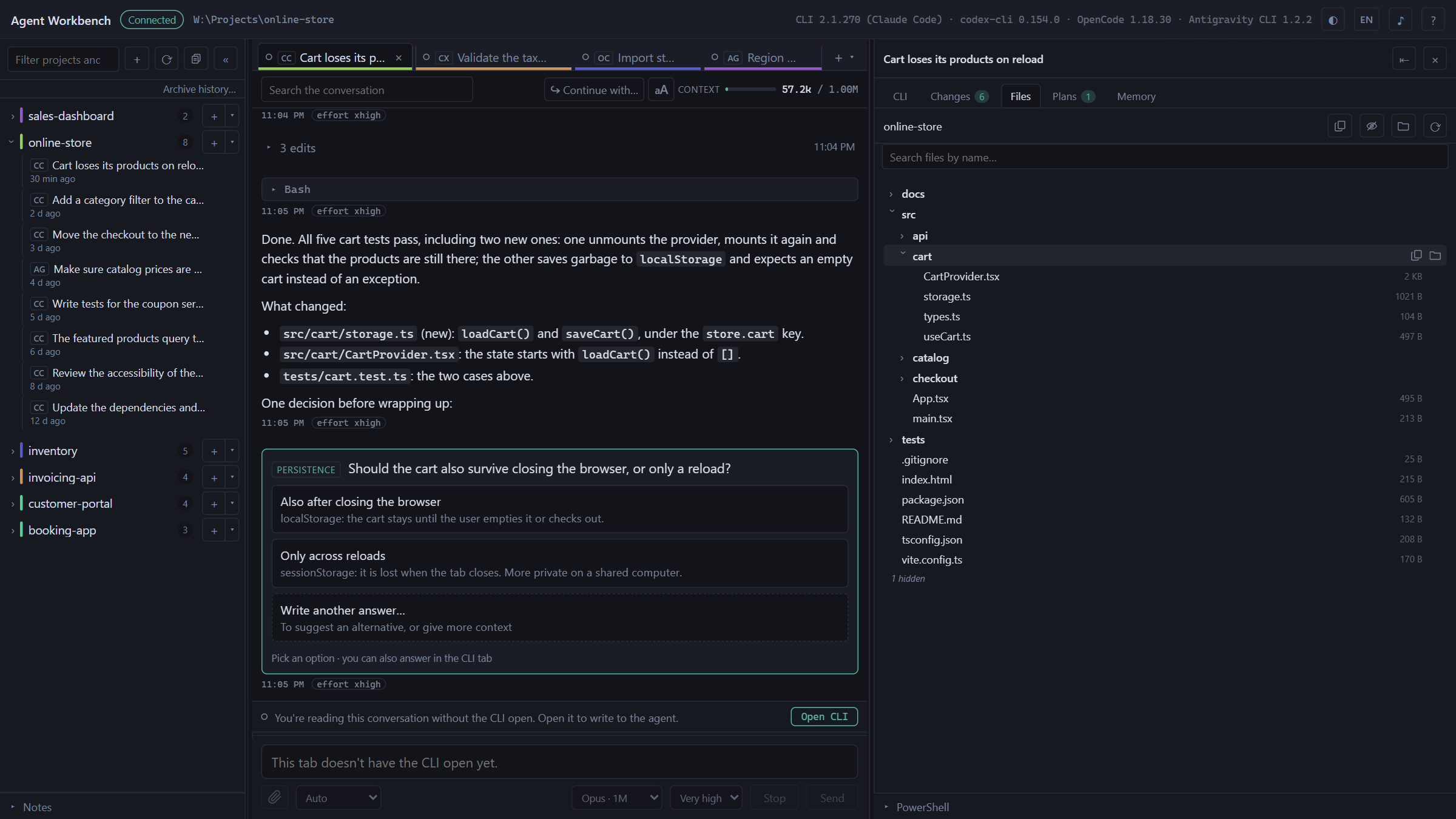
It doesn't talk to any API. It launches the CLI you already have installed and
|
|
16
18
|
logged in —`claude`, `codex`, `opencode` or `agy`— inside a pseudo-terminal, and
|
|
17
19
|
adds around it what a terminal alone doesn't give you: tabs, browsable history,
|
|
@@ -20,8 +22,6 @@ the conversation as cards, a context meter, git status and a file tree.
|
|
|
20
22
|
The terminal is still the terminal. Everything you type reaches the CLI without
|
|
21
23
|
the app touching it.
|
|
22
24
|
|
|
23
|
-
|
|
24
|
-
|
|
25
25
|
---
|
|
26
26
|
|
|
27
27
|
## What it does
|
|
@@ -31,12 +31,12 @@ the app touching it.
|
|
|
31
31
|
| **Tabs** | Several live sessions at once, from any of the CLIs, each in its own directory. They survive an `F5`: the processes live on the server, not in the browser tab. Each tab's dot tells you whether the agent is working, idle or waiting for an answer, on the CLIs that publish their status ([below](#multiple-clis)). |
|
|
32
32
|
| **Zero-cost startup** | When you open the app, tabs come back as **sleeping tabs**: you can read them in full, and they don't launch any CLI. You open the CLI with a button when you want to write to the agent. |
|
|
33
33
|
| **History** | Your projects and past conversations in the sidebar, with a filter, and those of all four CLIs together under each project, each with its badge. Opening one resumes it with its CLI, in the same session. **Archive history…** hides a CLI's sessions from before today in one go, and each project can be archived whole with one button: nothing is deleted, and both can be undone. |
|
|
34
|
-
| **Conversation** | The active session's messages, live, with tool calls collapsed and their results inside. Search, jump between matches, copy any message and, depending on the CLI, answer the agent's questions from the chat. |
|
|
34
|
+
| **Conversation** | The active session's messages, live, with tool calls collapsed and their results inside. Search, jump between matches, copy any message or code block and, depending on the CLI, answer the agent's questions from the chat. |
|
|
35
35
|
| **Continue with…** | With more than one CLI installed, a conversation can be continued with another CLI in the same folder. The new agent starts from a transcript of the last turns, not from the context the previous one had. |
|
|
36
36
|
| **Search everything** | With more than one CLI and something saved in the local copy, the sidebar filter also searches the text of every saved conversation, not just their titles. |
|
|
37
37
|
| **Context meter** | Tokens from the last request against the model's context window. Tokens, never money. |
|
|
38
38
|
| **Changes** | Branch, ahead and behind against the upstream branch, worktrees, and the changed files with their diff. **Read-only.** |
|
|
39
|
-
| **Files** | The tree of the tab's directory, with search by name and a preview with syntax highlighting. A context menu to copy paths, insert them as `@path` or open the file with the system's default app. |
|
|
39
|
+
| **Files** | The tree of the tab's directory, with search by name and a preview with syntax highlighting. A button on each row puts its path in your message, without touching the clipboard. A context menu to copy paths, insert them as `@path` or open the file with the system's default app. |
|
|
40
40
|
| **Plans** | The documents written by that conversation, rendered: the plans from plan mode, and also the `.md` files the agent created inside the project or in the session's temp folder. Only those named by the conversation you're viewing. |
|
|
41
41
|
| **Shared memory** | What agents learn about a project, in `.agents/memory/`, read and written by all four CLIs ([below](#shared-memory)). |
|
|
42
42
|
| **Local copy** | Optional. The history of all four CLIs in a folder of yours, in the app's own format, so you don't lose it if a CLI changes its format, deletes it, or you uninstall the CLI ([below](#local-copy-optional)). |
|
|
@@ -87,8 +87,10 @@ Agent Workbench does **not** bundle or download any CLI: it uses the ones you
|
|
|
87
87
|
already have in your `PATH`. If it doesn't find any, it tells you so and doesn't
|
|
88
88
|
open sessions.
|
|
89
89
|
|
|
90
|
-
|
|
91
|
-
|
|
90
|
+
Developed and used daily on Windows 11 with PowerShell, which is the main
|
|
91
|
+
platform. On macOS and Linux, CI installs the package and starts it on every
|
|
92
|
+
push —server up, a pseudo-terminal spawning a process—, but it sees less daily
|
|
93
|
+
use there: reports are welcome. On Linux, the `node-pty` dependency doesn't ship a prebuilt
|
|
92
94
|
binary and is compiled on install: you need `python3`, `make` and a C++ compiler
|
|
93
95
|
(`build-essential` on Debian and Ubuntu).
|
|
94
96
|
|
|
@@ -196,6 +198,144 @@ without it, they tell you what they would import.
|
|
|
196
198
|
summary and its `.md` documents. The conversation content is encrypted, so it
|
|
197
199
|
is marked as partial history.
|
|
198
200
|
|
|
201
|
+
### Remote access over SSH (optional)
|
|
202
|
+
|
|
203
|
+
You can leave Agent Workbench running on one computer and use it from another
|
|
204
|
+
one on the same network, in its browser — with no CLI installed there.
|
|
205
|
+
**The app is never opened to the network**: it keeps listening only on
|
|
206
|
+
`127.0.0.1`, and the other computer reaches it through an SSH tunnel. That's
|
|
207
|
+
also what makes it work: through the tunnel the other browser sees the app as
|
|
208
|
+
`localhost`, and outside `localhost` browsers switch off things the app needs
|
|
209
|
+
(the clipboard, notifications, `crypto.randomUUID`). **It's off by default.**
|
|
210
|
+
|
|
211
|
+
**1. On the computer that runs the app, once: turn on its SSH server.** The app
|
|
212
|
+
doesn't do this for you — it's a system change that needs administrator rights.
|
|
213
|
+
|
|
214
|
+
- **Windows 10/11** — in PowerShell *as administrator*:
|
|
215
|
+
|
|
216
|
+
```powershell
|
|
217
|
+
Add-WindowsCapability -Online -Name OpenSSH.Server~~~~0.0.1.0
|
|
218
|
+
Start-Service sshd
|
|
219
|
+
Set-Service -Name sshd -StartupType Automatic
|
|
220
|
+
```
|
|
221
|
+
|
|
222
|
+
The first line downloads and installs the server: it takes a few minutes and
|
|
223
|
+
shows "Running" meanwhile. Wait until the prompt comes back.
|
|
224
|
+
|
|
225
|
+
- **macOS** — System Settings → General → Sharing → **Remote Login**.
|
|
226
|
+
- **Linux** — install and enable your distribution's OpenSSH server
|
|
227
|
+
(`sudo apt install openssh-server`, then `sudo systemctl enable --now ssh`).
|
|
228
|
+
|
|
229
|
+
**2. In the app: the ⇄ button in the header → Turn on remote access**, and
|
|
230
|
+
restart Agent Workbench. A tunnel needs a port that doesn't change on every
|
|
231
|
+
start, so the app uses a fixed one (24837 by default, you can change it) — and
|
|
232
|
+
the port is chosen at startup, which is why it takes a restart. Restarting
|
|
233
|
+
closes the open CLIs; the tabs come back asleep. Turning it *off* takes effect
|
|
234
|
+
right away.
|
|
235
|
+
|
|
236
|
+
**3. On the other computer, every time: open the tunnel.** The dialog shows the
|
|
237
|
+
command ready to copy:
|
|
238
|
+
|
|
239
|
+
```
|
|
240
|
+
ssh -N -L 24837:127.0.0.1:24837 you@your-computer
|
|
241
|
+
```
|
|
242
|
+
|
|
243
|
+
Leave it running. **Use the same port on both ends**: the server checks it, and
|
|
244
|
+
with a different local port it answers 403. Adding
|
|
245
|
+
`-o ServerAliveInterval=30 -o ExitOnForwardFailure=yes` makes the tunnel notice
|
|
246
|
+
a dropped Wi‑Fi instead of hanging. On Windows you can save the line in a
|
|
247
|
+
`.cmd` file and double-click it.
|
|
248
|
+
|
|
249
|
+
**4. Pair that computer, once.** In the dialog, **Pair a device** shows an
|
|
250
|
+
address with a one-time code, such as
|
|
251
|
+
`http://localhost:24837/?pair=K7QM-X2RD`. Open it in the other computer's
|
|
252
|
+
browser within five minutes. From then on that browser just opens
|
|
253
|
+
`http://localhost:24837`, even after the app restarts. The dialog lists the
|
|
254
|
+
paired devices, and **Revoke** cuts one off on the spot.
|
|
255
|
+
|
|
256
|
+
A paired device can use the whole app, with two limits: it can't manage remote
|
|
257
|
+
access (turn it on, pair or revoke), and it isn't offered what opens a window on
|
|
258
|
+
the computer that runs the app — *Open with the default app*, opening the local
|
|
259
|
+
copy's folder or exporting to Markdown. A small **Remote** badge in the header
|
|
260
|
+
says so. Those limits are about what lands on the host's screen, not about
|
|
261
|
+
trust: the app includes a console and launches agents, so a paired device can
|
|
262
|
+
run commands on that computer, just as you can. Pair only devices that are
|
|
263
|
+
yours.
|
|
264
|
+
|
|
265
|
+
**A safer key (recommended).** The SSH login is the one of your user on that
|
|
266
|
+
computer, so a password or key that opens the tunnel also opens a full terminal
|
|
267
|
+
there. You can create a key that is only good for the tunnel: generate one on
|
|
268
|
+
the other computer (`ssh-keygen -t ed25519`) and add its public half to
|
|
269
|
+
`authorized_keys` on the computer that runs the app, with these options in
|
|
270
|
+
front:
|
|
271
|
+
|
|
272
|
+
```
|
|
273
|
+
restrict,port-forwarding,permitopen="127.0.0.1:24837",command="exit" ssh-ed25519 AAAA… other-computer
|
|
274
|
+
```
|
|
275
|
+
|
|
276
|
+
`restrict` on its own still lets the key run commands (it only refuses a
|
|
277
|
+
terminal, agent forwarding and other ports); `command="exit"` is what closes
|
|
278
|
+
that door, and the tunnel never asks for a command. On Windows, if your user is
|
|
279
|
+
an administrator, that file is
|
|
280
|
+
`C:\ProgramData\ssh\administrators_authorized_keys` and it must be writable
|
|
281
|
+
only by Administrators and SYSTEM; otherwise it's
|
|
282
|
+
`%USERPROFILE%\.ssh\authorized_keys`. To check that the restriction holds, try
|
|
283
|
+
`ssh you@your-computer whoami` with that key: it should print nothing and end
|
|
284
|
+
at once, while the `-N -L` tunnel keeps working.
|
|
285
|
+
|
|
286
|
+
**From a phone.** Through the same tunnel, a phone browser gets a
|
|
287
|
+
single-column layout: the projects sidebar as a drawer, the tabs in the header,
|
|
288
|
+
and a strip that switches between the conversation, the CLI, changes, files and
|
|
289
|
+
the rest. It appears on any window narrower than 768 px (a tablet held upright, too).
|
|
290
|
+
On a touch screen, Enter in the message box starts a new line (the send button
|
|
291
|
+
sends), and dragging a finger over a terminal scrolls it like a mouse wheel.
|
|
292
|
+
|
|
293
|
+
**Notifications.** The bell button in the header turns on system notifications:
|
|
294
|
+
"finished" and "is waiting for you", with the tab's name, only when the window
|
|
295
|
+
isn't in view. They follow the same rule as the notification sound, so they
|
|
296
|
+
come from the CLIs that publish their status. Each browser remembers its own
|
|
297
|
+
choice, and the sound plays on every screen that has the app open.
|
|
298
|
+
|
|
299
|
+
### The Android app (optional)
|
|
300
|
+
|
|
301
|
+
An app for Android 10 and later opens the tunnel for you and shows the same
|
|
302
|
+
interface, served by your computer, in the phone-sized layout. It keeps the
|
|
303
|
+
connection open in the background and notifies you when an agent finishes or is
|
|
304
|
+
waiting for you, with the screen off too; tapping a notification opens that
|
|
305
|
+
tab. When the Wi‑Fi comes back, it reconnects on its own.
|
|
306
|
+
|
|
307
|
+
It needs remote access on and the computer's SSH server running (steps 1 and 2
|
|
308
|
+
above). It isn't on Google Play yet: to install it now, build it from
|
|
309
|
+
[`android/`](android/) as [`CONTRIBUTING.md`](CONTRIBUTING.md#the-android-app)
|
|
310
|
+
explains.
|
|
311
|
+
|
|
312
|
+
**Pairing, once:**
|
|
313
|
+
|
|
314
|
+
1. In the ⇄ dialog, choose **Pair a phone**. It shows a line to paste in a
|
|
315
|
+
terminal on this computer, and a QR code. On Windows, if your user is an
|
|
316
|
+
administrator, the line goes in PowerShell *as administrator*; the dialog
|
|
317
|
+
says so.
|
|
318
|
+
2. Paste the line. It adds the phone's key to `authorized_keys`, already
|
|
319
|
+
restricted to the tunnel: with that key the phone reaches the app's port and
|
|
320
|
+
nothing else — no terminal and no commands.
|
|
321
|
+
3. Scan the QR with the app. The code works once and for five minutes, and the
|
|
322
|
+
dialog has to stay open until the phone connects.
|
|
323
|
+
|
|
324
|
+
The QR carries the phone's private SSH key. This computer generates it, keeps
|
|
325
|
+
it only in memory until the phone uses it and never writes it to disk: don't
|
|
326
|
+
share a picture of that QR. The phone saves your computer's SSH fingerprint on
|
|
327
|
+
the first connection, and if it ever changes, the app refuses to connect and
|
|
328
|
+
tells you.
|
|
329
|
+
|
|
330
|
+
**To remove a phone**, **Revoke** it in the dialog and delete its line from
|
|
331
|
+
`authorized_keys` (it ends in `agent-workbench-phone`). On the phone,
|
|
332
|
+
**Settings → Forget this computer** deletes its key and its credential.
|
|
333
|
+
|
|
334
|
+
If notifications arrive late while the phone sits idle, let the app run without
|
|
335
|
+
battery restrictions: **Settings → Open the app's battery settings**. What the
|
|
336
|
+
app keeps on the phone and the permissions it asks for are in
|
|
337
|
+
[`PRIVACY.md`](PRIVACY.md).
|
|
338
|
+
|
|
199
339
|
---
|
|
200
340
|
|
|
201
341
|
## From source
|
|
@@ -252,7 +392,8 @@ untouched.
|
|
|
252
392
|
Nothing leaves your machine. No telemetry, no analytics, no outgoing network
|
|
253
393
|
calls at all. The exception is the CLI itself at work: the one you open in a
|
|
254
394
|
tab, and the OpenCode server described below, talk to the model provider just
|
|
255
|
-
as they would if you opened them by hand.
|
|
395
|
+
as they would if you opened them by hand. The Android app talks only to your
|
|
396
|
+
computer; [`PRIVACY.md`](PRIVACY.md) lists what it keeps on the phone.
|
|
256
397
|
|
|
257
398
|
**It never touches your credentials.** There's no login in the interface: if
|
|
258
399
|
you aren't logged in, you log in inside the CLI's terminal and the app doesn't
|
|
@@ -299,7 +440,9 @@ and stops being valid when you close the app.
|
|
|
299
440
|
|
|
300
441
|
- **In its own configuration directory:** the open tabs, the index cache, the
|
|
301
442
|
notes, the archived sessions, the Antigravity status line script and, if you
|
|
302
|
-
turn it on, the local copy (or in the folder you choose).
|
|
443
|
+
turn it on, the local copy (or in the folder you choose). With remote access
|
|
444
|
+
on, also the list of paired devices: a name, two dates and a hash of each
|
|
445
|
+
one's credential — never the credential itself.
|
|
303
446
|
- **In the temp folder:** the images you paste; each Antigravity tab's log,
|
|
304
447
|
which contains your messages, readable only by you and deleted on the first
|
|
305
448
|
start once it's more than 24 hours old; and the transcript of a conversation
|
|
@@ -311,7 +454,10 @@ and stops being valid when you close the app.
|
|
|
311
454
|
|
|
312
455
|
**The server listens only on `127.0.0.1`**, on an ephemeral port, with a random
|
|
313
456
|
per-start token that the WebSocket and every HTTP route require, and it rejects
|
|
314
|
-
requests whose `Origin` isn't its own.
|
|
457
|
+
requests whose `Origin` isn't its own. [Remote access](#remote-access-over-ssh-optional)
|
|
458
|
+
doesn't change any of that: the port becomes a fixed one, still on `127.0.0.1`,
|
|
459
|
+
and a paired device presents its own credential instead of the token. Reaching
|
|
460
|
+
the port is left to SSH, which you turn on and control.
|
|
315
461
|
|
|
316
462
|
**The git panel is read-only.** No commit, stage or push. With an agent editing
|
|
317
463
|
files, a button that writes history is exactly the kind of thing where, later,
|
|
@@ -373,6 +519,26 @@ history saving, and without history there's no conversation or meter. The app
|
|
|
373
519
|
removes it and lets you know. In normal use —a regular terminal— it never shows
|
|
374
520
|
up.
|
|
375
521
|
|
|
522
|
+
**From the other computer, `ssh` can't connect** (it times out or is refused).
|
|
523
|
+
The SSH server isn't running on the computer that has the app, or something
|
|
524
|
+
between the two blocks it. On Windows, check that the Wi‑Fi network is set to
|
|
525
|
+
*Private* — the firewall rule the SSH server installs may not cover *Public*
|
|
526
|
+
networks. And a work VPN that blocks the local network cuts this too while it's
|
|
527
|
+
connected: there's nothing the app can do about that. If `ssh` rejects your
|
|
528
|
+
user, a Microsoft or work account may need the name of your profile folder
|
|
529
|
+
(`C:\Users\<name>`) and the account's password, not the PIN.
|
|
530
|
+
|
|
531
|
+
**From the other computer, the page says "Origin not allowed"** (403). It was
|
|
532
|
+
opened by the computer's name or IP. Open `http://localhost:<port>`, with the
|
|
533
|
+
tunnel using the same port on both ends.
|
|
534
|
+
|
|
535
|
+
**From the other computer, the page says the session token is missing** (401).
|
|
536
|
+
That browser isn't paired, its access was revoked, or remote access is off.
|
|
537
|
+
Pair it again from the ⇄ dialog.
|
|
538
|
+
|
|
539
|
+
**The ⇄ dialog says the port is busy.** Another program —often a second Agent
|
|
540
|
+
Workbench— already has it. Close it and restart, or choose another port.
|
|
541
|
+
|
|
376
542
|
**The Changes panel says the folder isn't a git repository** and it is one.
|
|
377
543
|
Make sure `git` is in the `PATH`. If the message is a different one, it's the
|
|
378
544
|
error git returned, verbatim.
|
|
@@ -389,6 +555,7 @@ packages/
|
|
|
389
555
|
src/agents/ one adapter per CLI: the only part of the server that knows each one
|
|
390
556
|
web/ Vite, React, xterm.js, highlight.js
|
|
391
557
|
shared/ the protocol types, with no `any` at the edges
|
|
558
|
+
android/ the Android app, in Kotlin: the SSH tunnel, a viewer for the interface, the notifications
|
|
392
559
|
```
|
|
393
560
|
|
|
394
561
|
A single process serves the interface and the WebSocket on the same port: with
|
|
@@ -409,9 +576,18 @@ on what that CLI declares.
|
|
|
409
576
|
[`ARCHITECTURE.md`](ARCHITECTURE.md) has the hard rules, the code map, what is
|
|
410
577
|
read from each CLI and what is never opened. [`CONTRIBUTING.md`](CONTRIBUTING.md)
|
|
411
578
|
covers how to work on the repository, [`SECURITY.md`](SECURITY.md) how to report
|
|
412
|
-
a vulnerability,
|
|
413
|
-
|
|
414
|
-
`pnpm demo:shots`, on
|
|
579
|
+
a vulnerability, [`PRIVACY.md`](PRIVACY.md) what is collected (nothing), and
|
|
580
|
+
[`CHANGELOG.md`](CHANGELOG.md) what changed in each version. Code comments are
|
|
581
|
+
in Spanish. The screenshots in this README come from `pnpm demo:shots`, on
|
|
582
|
+
made-up data.
|
|
583
|
+
|
|
584
|
+
---
|
|
585
|
+
|
|
586
|
+
## Support the project
|
|
587
|
+
|
|
588
|
+
If Agent Workbench is useful to you, consider supporting it:
|
|
589
|
+
[Buy Me a Coffee](https://buymeacoffee.com/cvelasquez). The app suggests it
|
|
590
|
+
once per version, in a strip you can close, and never again until the next one.
|
|
415
591
|
|
|
416
592
|
---
|
|
417
593
|
|