agent-workbench 0.1.0 → 0.3.0
This diff represents the content of publicly available package versions that have been released to one of the supported registries. The information contained in this diff is provided for informational purposes only and reflects changes between package versions as they appear in their respective public registries.
- package/LICENSE +21 -21
- package/README.md +333 -128
- package/dist/server.js +18039 -3754
- package/dist/web/assets/de-PtmfVEFc.js +1 -0
- package/dist/web/assets/es-BWOH-zRt.js +1 -0
- package/dist/web/assets/fr-tY7LZ7vh.js +1 -0
- package/dist/web/assets/{highlight-B0RyEt-U.js → highlight-BdawNAzW.js} +2 -2
- package/dist/web/assets/index-CmLNpznn.css +32 -0
- package/dist/web/assets/index-Crbjtl9a.js +135 -0
- package/dist/web/assets/ja-CebmU1Hk.js +1 -0
- package/dist/web/assets/ko-BuKbKnfu.js +1 -0
- package/dist/web/assets/pt-BR-CxtiCd-u.js +1 -0
- package/dist/web/assets/ru-C3EXpruH.js +1 -0
- package/dist/web/assets/zh-CN-DugN9tNb.js +1 -0
- package/dist/web/favicon.svg +32 -32
- package/dist/web/index.html +19 -19
- package/package.json +6 -2
- package/dist/web/assets/index-HOJufhVy.css +0 -32
- package/dist/web/assets/index-pspQSiEP.js +0 -286
package/LICENSE
CHANGED
|
@@ -1,21 +1,21 @@
|
|
|
1
|
-
MIT License
|
|
2
|
-
|
|
3
|
-
Copyright (c) 2026 Christian Velasquez
|
|
4
|
-
|
|
5
|
-
Permission is hereby granted, free of charge, to any person obtaining a copy
|
|
6
|
-
of this software and associated documentation files (the "Software"), to deal
|
|
7
|
-
in the Software without restriction, including without limitation the rights
|
|
8
|
-
to use, copy, modify, merge, publish, distribute, sublicense, and/or sell
|
|
9
|
-
copies of the Software, and to permit persons to whom the Software is
|
|
10
|
-
furnished to do so, subject to the following conditions:
|
|
11
|
-
|
|
12
|
-
The above copyright notice and this permission notice shall be included in all
|
|
13
|
-
copies or substantial portions of the Software.
|
|
14
|
-
|
|
15
|
-
THE SOFTWARE IS PROVIDED "AS IS", WITHOUT WARRANTY OF ANY KIND, EXPRESS OR
|
|
16
|
-
IMPLIED, INCLUDING BUT NOT LIMITED TO THE WARRANTIES OF MERCHANTABILITY,
|
|
17
|
-
FITNESS FOR A PARTICULAR PURPOSE AND NONINFRINGEMENT. IN NO EVENT SHALL THE
|
|
18
|
-
AUTHORS OR COPYRIGHT HOLDERS BE LIABLE FOR ANY CLAIM, DAMAGES OR OTHER
|
|
19
|
-
LIABILITY, WHETHER IN AN ACTION OF CONTRACT, TORT OR OTHERWISE, ARISING FROM,
|
|
20
|
-
OUT OF OR IN CONNECTION WITH THE SOFTWARE OR THE USE OR OTHER DEALINGS IN THE
|
|
21
|
-
SOFTWARE.
|
|
1
|
+
MIT License
|
|
2
|
+
|
|
3
|
+
Copyright (c) 2026 Christian Velasquez
|
|
4
|
+
|
|
5
|
+
Permission is hereby granted, free of charge, to any person obtaining a copy
|
|
6
|
+
of this software and associated documentation files (the "Software"), to deal
|
|
7
|
+
in the Software without restriction, including without limitation the rights
|
|
8
|
+
to use, copy, modify, merge, publish, distribute, sublicense, and/or sell
|
|
9
|
+
copies of the Software, and to permit persons to whom the Software is
|
|
10
|
+
furnished to do so, subject to the following conditions:
|
|
11
|
+
|
|
12
|
+
The above copyright notice and this permission notice shall be included in all
|
|
13
|
+
copies or substantial portions of the Software.
|
|
14
|
+
|
|
15
|
+
THE SOFTWARE IS PROVIDED "AS IS", WITHOUT WARRANTY OF ANY KIND, EXPRESS OR
|
|
16
|
+
IMPLIED, INCLUDING BUT NOT LIMITED TO THE WARRANTIES OF MERCHANTABILITY,
|
|
17
|
+
FITNESS FOR A PARTICULAR PURPOSE AND NONINFRINGEMENT. IN NO EVENT SHALL THE
|
|
18
|
+
AUTHORS OR COPYRIGHT HOLDERS BE LIABLE FOR ANY CLAIM, DAMAGES OR OTHER
|
|
19
|
+
LIABILITY, WHETHER IN AN ACTION OF CONTRACT, TORT OR OTHERWISE, ARISING FROM,
|
|
20
|
+
OUT OF OR IN CONNECTION WITH THE SOFTWARE OR THE USE OR OTHER DEALINGS IN THE
|
|
21
|
+
SOFTWARE.
|
package/README.md
CHANGED
|
@@ -1,219 +1,424 @@
|
|
|
1
1
|
# Agent Workbench
|
|
2
2
|
|
|
3
|
-
|
|
3
|
+
[](https://www.npmjs.com/package/agent-workbench)
|
|
4
|
+
[](https://github.com/cvelasquez/agent-workbench/actions/workflows/ci.yml)
|
|
5
|
+
[](LICENSE)
|
|
4
6
|
|
|
5
|
-
|
|
6
|
-
|
|
7
|
-
|
|
8
|
-
tarjetas, un medidor de contexto, el estado de git y un árbol de archivos.
|
|
7
|
+
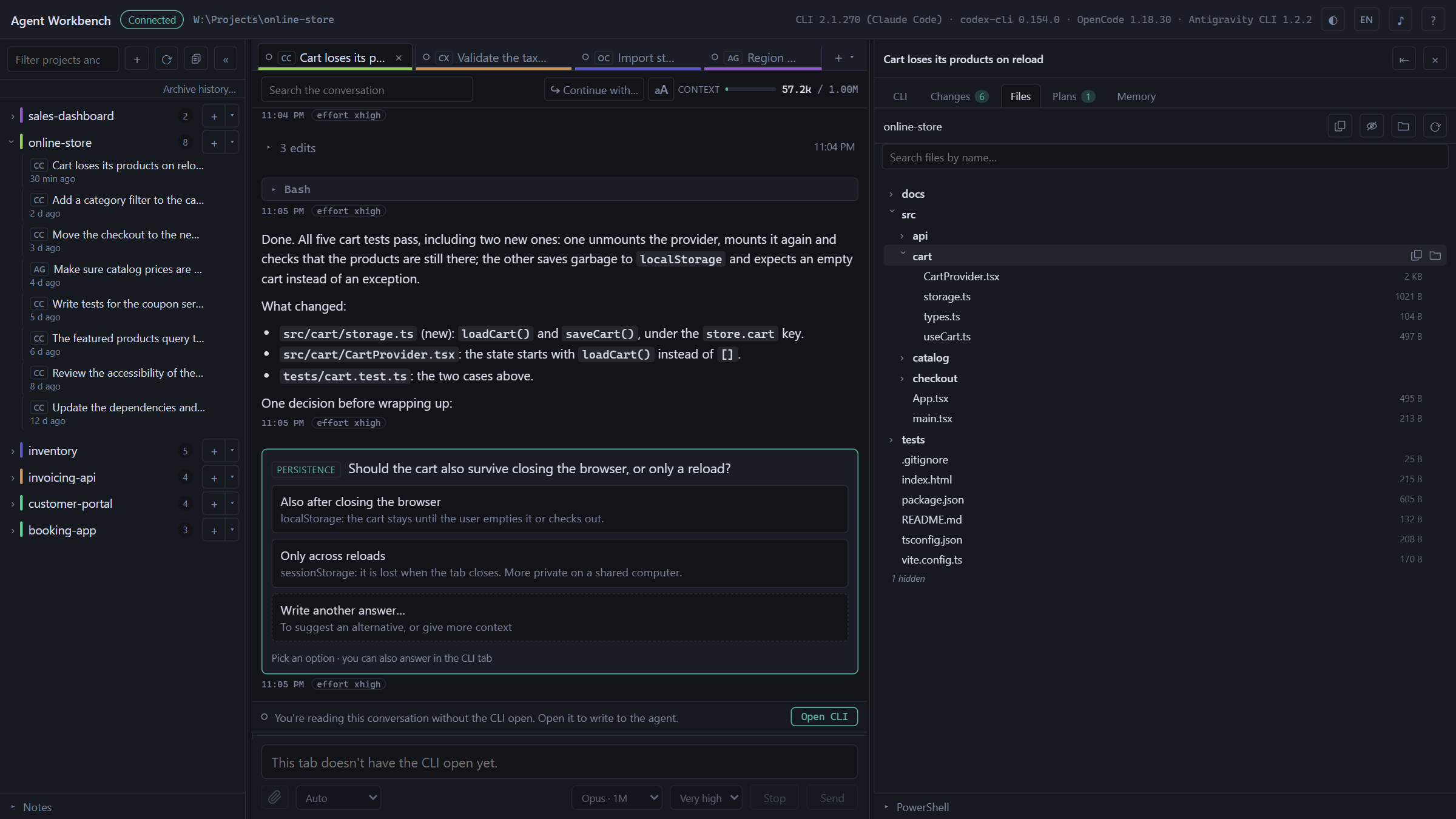
**One local interface for the Claude Code, Codex, OpenCode and Antigravity
|
|
8
|
+
CLIs.** It uses the CLIs you already have logged in, never touches your
|
|
9
|
+
credentials, and makes no network calls of its own.
|
|
9
10
|
|
|
10
|
-
|
|
11
|
-
|
|
11
|
+
```bash
|
|
12
|
+
npx agent-workbench
|
|
13
|
+
```
|
|
14
|
+
|
|
15
|
+
It doesn't talk to any API. It launches the CLI you already have installed and
|
|
16
|
+
logged in —`claude`, `codex`, `opencode` or `agy`— inside a pseudo-terminal, and
|
|
17
|
+
adds around it what a terminal alone doesn't give you: tabs, browsable history,
|
|
18
|
+
the conversation as cards, a context meter, git status and a file tree.
|
|
19
|
+
|
|
20
|
+
The terminal is still the terminal. Everything you type reaches the CLI without
|
|
21
|
+
the app touching it.
|
|
12
22
|
|
|
13
|
-
|
|
14
24
|
|
|
15
25
|
---
|
|
16
26
|
|
|
17
|
-
##
|
|
27
|
+
## What it does
|
|
18
28
|
|
|
19
29
|
| | |
|
|
20
30
|
|---|---|
|
|
21
|
-
| **
|
|
22
|
-
| **
|
|
23
|
-
| **
|
|
24
|
-
| **
|
|
25
|
-
| **
|
|
26
|
-
| **
|
|
27
|
-
| **
|
|
31
|
+
| **Tabs** | Several live sessions at once, from any of the CLIs, each in its own directory. They survive an `F5`: the processes live on the server, not in the browser tab. Each tab's dot tells you whether the agent is working, idle or waiting for an answer, on the CLIs that publish their status ([below](#multiple-clis)). |
|
|
32
|
+
| **Zero-cost startup** | When you open the app, tabs come back as **sleeping tabs**: you can read them in full, and they don't launch any CLI. You open the CLI with a button when you want to write to the agent. |
|
|
33
|
+
| **History** | Your projects and past conversations in the sidebar, with a filter, and those of all four CLIs together under each project, each with its badge. Opening one resumes it with its CLI, in the same session. **Archive history…** hides a CLI's sessions from before today in one go, and each project can be archived whole with one button: nothing is deleted, and both can be undone. |
|
|
34
|
+
| **Conversation** | The active session's messages, live, with tool calls collapsed and their results inside. Search, jump between matches, copy any message and, depending on the CLI, answer the agent's questions from the chat. |
|
|
35
|
+
| **Continue with…** | With more than one CLI installed, a conversation can be continued with another CLI in the same folder. The new agent starts from a transcript of the last turns, not from the context the previous one had. |
|
|
36
|
+
| **Search everything** | With more than one CLI and something saved in the local copy, the sidebar filter also searches the text of every saved conversation, not just their titles. |
|
|
37
|
+
| **Context meter** | Tokens from the last request against the model's context window. Tokens, never money. |
|
|
38
|
+
| **Changes** | Branch, ahead and behind against the upstream branch, worktrees, and the changed files with their diff. **Read-only.** |
|
|
39
|
+
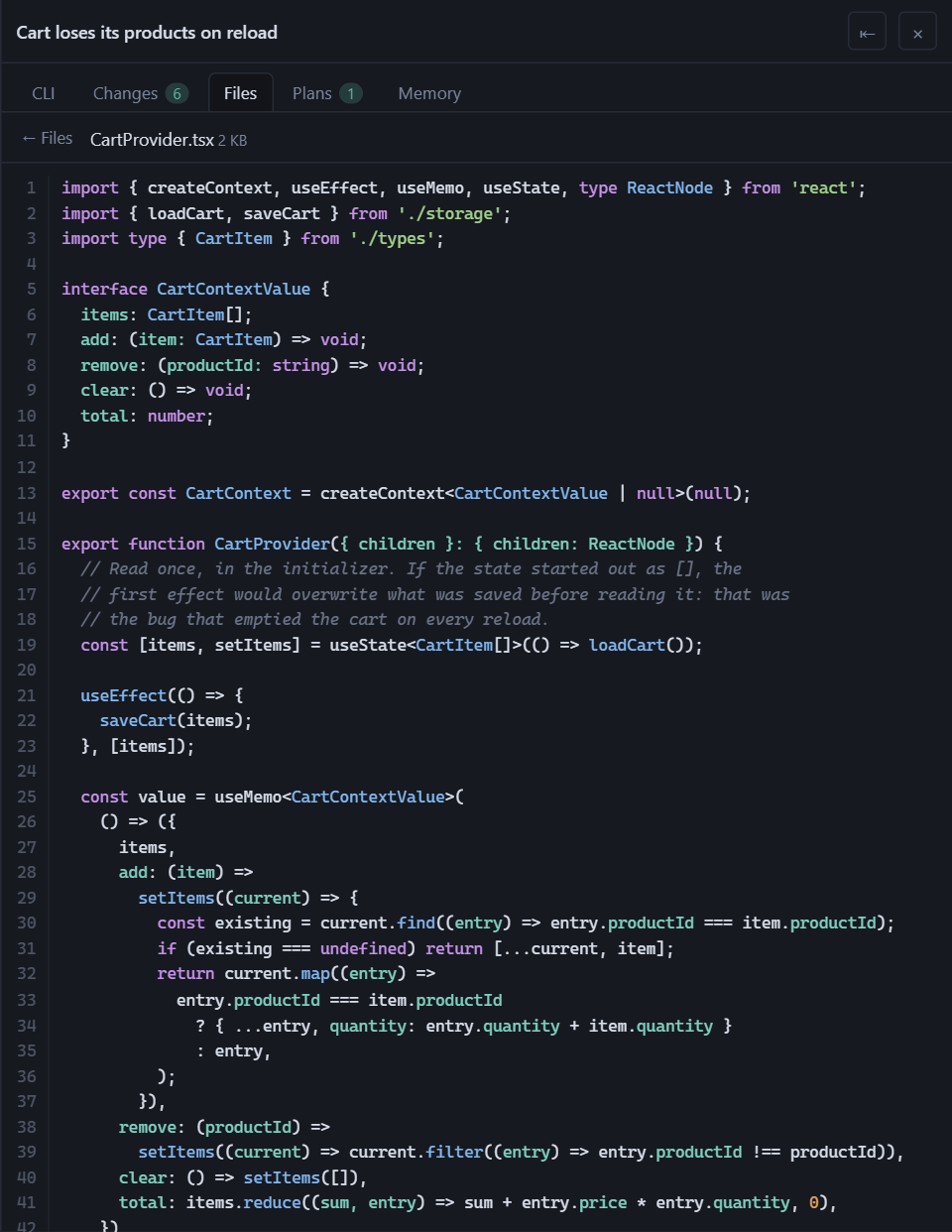
| **Files** | The tree of the tab's directory, with search by name and a preview with syntax highlighting. A context menu to copy paths, insert them as `@path` or open the file with the system's default app. |
|
|
40
|
+
| **Plans** | The documents written by that conversation, rendered: the plans from plan mode, and also the `.md` files the agent created inside the project or in the session's temp folder. Only those named by the conversation you're viewing. |
|
|
41
|
+
| **Shared memory** | What agents learn about a project, in `.agents/memory/`, read and written by all four CLIs ([below](#shared-memory)). |
|
|
42
|
+
| **Local copy** | Optional. The history of all four CLIs in a folder of yours, in the app's own format, so you don't lose it if a CLI changes its format, deletes it, or you uninstall the CLI ([below](#local-copy-optional)). |
|
|
43
|
+
| **Nine languages** | The interface in English, Español, 简体中文, 日本語, Português (Brasil), Русский, 한국어, Français and Deutsch. It follows the browser's language and can be changed from the header, without reloading. |
|
|
44
|
+
| **Theme** | Light, dark, or the system's. |
|
|
28
45
|
|
|
29
46
|
<p>
|
|
30
|
-
<img src="https://raw.githubusercontent.com/cvelasquez/agent-workbench/main/
|
|
31
|
-
<img src="https://raw.githubusercontent.com/cvelasquez/agent-workbench/main/
|
|
47
|
+
<img src="https://raw.githubusercontent.com/cvelasquez/agent-workbench/main/assets/captura-cambios.png" width="49%" alt="The Changes panel: branch and changed files, by group">
|
|
48
|
+
<img src="https://raw.githubusercontent.com/cvelasquez/agent-workbench/main/assets/captura-diff.png" width="49%" alt="The diff of one of those files, in the same panel">
|
|
32
49
|
</p>
|
|
33
50
|
|
|
51
|
+
### Multiple CLIs
|
|
52
|
+
|
|
53
|
+
With more than one CLI installed, every session in the sidebar and every tab
|
|
54
|
+
carries its CLI's badge, and the new-tab `+` opens with the one you used in that
|
|
55
|
+
project; its arrow lets you pick another. With just one, you see none of this.
|
|
56
|
+
|
|
57
|
+
<img src="https://raw.githubusercontent.com/cvelasquez/agent-workbench/main/assets/captura-clis.png" width="45%" alt="The projects sidebar with sessions from several CLIs, each with its badge, and the + menu with the four CLIs and their versions">
|
|
58
|
+
|
|
59
|
+
**Not every CLI exposes the same things.** Claude Code leaves everything the app
|
|
60
|
+
needs in its files. Codex leaves the history and the meter's tokens, but not its
|
|
61
|
+
status, its pending permissions, its questions or the model: its dot says the
|
|
62
|
+
status is unknown, there's no "waiting" notice and questions are answered in its
|
|
63
|
+
terminal. With OpenCode, the app starts a local OpenCode server when you open a
|
|
64
|
+
tab, and that's where its status, the notice that it's waiting for a permission
|
|
65
|
+
and the questions you answer from the chat come from. Antigravity CLI publishes
|
|
66
|
+
its status and tokens only if you configure its status line
|
|
67
|
+
([below](#antigravity-cli-status-and-meter-optional)).
|
|
68
|
+
|
|
34
69
|
---
|
|
35
70
|
|
|
36
|
-
##
|
|
71
|
+
## Requirements
|
|
37
72
|
|
|
38
73
|
| | |
|
|
39
74
|
|---|---|
|
|
40
|
-
| **Node.js** | 20
|
|
41
|
-
| **git** |
|
|
42
|
-
| **
|
|
43
|
-
|
|
44
|
-
|
|
45
|
-
|
|
46
|
-
|
|
47
|
-
|
|
48
|
-
|
|
49
|
-
|
|
50
|
-
|
|
75
|
+
| **Node.js** | 20 or later. **To see the OpenCode history and the Antigravity CLI titles, 22.13 or later**: they're read with the SQLite that Node ships since that version. With an older one everything else works the same; the startup output warns about OpenCode, and Antigravity CLI lists its conversations without the titles or folders from its index |
|
|
76
|
+
| **git** | for the Changes panel; everything else works without it |
|
|
77
|
+
| **At least one CLI** | installed and logged in (table below) |
|
|
78
|
+
|
|
79
|
+
| CLI | Command | Installation |
|
|
80
|
+
|---|---|---|
|
|
81
|
+
| Claude Code | `claude` | [installation guide](https://docs.claude.com/en/docs/claude-code/setup) |
|
|
82
|
+
| Codex | `codex` | [guide](https://learn.chatgpt.com/docs/codex/cli) |
|
|
83
|
+
| OpenCode | `opencode` | [documentation](https://opencode.ai/docs/) |
|
|
84
|
+
| Antigravity CLI | `agy` | [guide](https://antigravity.google/docs/cli/getting-started). For its status and meter, also `node` in the CLI's `PATH` |
|
|
85
|
+
|
|
86
|
+
Agent Workbench does **not** bundle or download any CLI: it uses the ones you
|
|
87
|
+
already have in your `PATH`. If it doesn't find any, it tells you so and doesn't
|
|
88
|
+
open sessions.
|
|
89
|
+
|
|
90
|
+
Tested on Windows 11 with PowerShell, which is the main platform. macOS and
|
|
91
|
+
Linux work the same. On Linux, the `node-pty` dependency doesn't ship a prebuilt
|
|
92
|
+
binary and is compiled on install: you need `python3`, `make` and a C++ compiler
|
|
93
|
+
(`build-essential` on Debian and Ubuntu).
|
|
51
94
|
|
|
52
95
|
---
|
|
53
96
|
|
|
54
|
-
##
|
|
97
|
+
## Install
|
|
55
98
|
|
|
56
99
|
```bash
|
|
57
100
|
npm install -g agent-workbench
|
|
58
101
|
```
|
|
59
102
|
|
|
60
|
-
|
|
103
|
+
Then, from the folder of the project you want to work on:
|
|
61
104
|
|
|
62
105
|
```bash
|
|
63
106
|
agent-workbench
|
|
64
107
|
```
|
|
65
108
|
|
|
66
|
-
|
|
67
|
-
|
|
68
|
-
|
|
109
|
+
To try it once without installing it, `npx agent-workbench` — it downloads about
|
|
110
|
+
60 MB whenever the npm cache is cold, mostly the terminal's native binary. For
|
|
111
|
+
daily use, the global install is the better choice.
|
|
69
112
|
|
|
70
|
-
|
|
113
|
+
The server prints a URL with a token and opens it in the browser:
|
|
71
114
|
|
|
72
115
|
```
|
|
73
116
|
URL http://127.0.0.1:52341/?token=…
|
|
74
117
|
```
|
|
75
118
|
|
|
76
|
-
|
|
77
|
-
|
|
119
|
+
That URL is the only way in. The token is different on every start, and the
|
|
120
|
+
server listens only on `127.0.0.1`.
|
|
121
|
+
|
|
122
|
+
### Shared memory
|
|
123
|
+
|
|
124
|
+
Each CLI keeps what it learns about a project in its own folder, and the others
|
|
125
|
+
can't see it. The **Memory** tab installs a bridge so all four use the same one:
|
|
126
|
+
notes in the project's `.agents/memory/`, which each CLI reads and writes —from
|
|
127
|
+
here or from its own terminal— through `AGENTS.md` and `CLAUDE.md`.
|
|
128
|
+
|
|
129
|
+
**Preview changes** shows, file by file, what will be written, and nothing is
|
|
130
|
+
touched until you confirm. Installing imports the memory Claude Code already had
|
|
131
|
+
for that project. The app doesn't write each CLI's global memory: it gives you
|
|
132
|
+
the snippet to paste yourself.
|
|
133
|
+
|
|
134
|
+
<img src="https://raw.githubusercontent.com/cvelasquez/agent-workbench/main/assets/captura-memoria.png" width="70%" alt="The Memory tab with the bridge installed for the four CLIs and the imported notes">
|
|
135
|
+
|
|
136
|
+
### Antigravity CLI: status and meter (optional)
|
|
137
|
+
|
|
138
|
+
Antigravity CLI doesn't record in any file whether it's working, waiting for you
|
|
139
|
+
to authorize a tool or idle, nor how many tokens it has used: it only publishes
|
|
140
|
+
that through its *status line*. Without it configured, its tabs work the same
|
|
141
|
+
—history, conversation, mode, model— but the tab's dot says the status is
|
|
142
|
+
unknown and the meter stays empty. To turn it on:
|
|
143
|
+
|
|
144
|
+
1. Open an Antigravity tab and click **Configure**, next to the meter.
|
|
145
|
+
2. Copy the line the dialog shows and merge it into whatever
|
|
146
|
+
`~/.gemini/antigravity-cli/settings.json` already has. The app doesn't touch
|
|
147
|
+
that file: you edit it.
|
|
148
|
+
3. The dialog switches to **Configured** on its own within a couple of seconds,
|
|
149
|
+
or with **Check**.
|
|
150
|
+
|
|
151
|
+
The line runs a script the app keeps in its own folder. It saves only each
|
|
152
|
+
conversation's status, mode, model and tokens, in that same folder; it doesn't
|
|
153
|
+
save your email, quota, plan or cost, which the CLI also passes to it, and it
|
|
154
|
+
prints nothing, so the CLI's own status line stays as it is. Once set, **every**
|
|
155
|
+
`agy` session runs it, including those you open outside the app, and it needs
|
|
156
|
+
`node` in the `PATH`. On Windows the line changes into the script's folder
|
|
157
|
+
instead of naming the script in quotes: the CLI runs it with `cmd /c`, and no
|
|
158
|
+
quote reaches `node` intact.
|
|
159
|
+
|
|
160
|
+
### Local copy (optional)
|
|
161
|
+
|
|
162
|
+
Each conversation's history belongs to its CLI, in its format, and a CLI can
|
|
163
|
+
change it, prune it or cease to exist. The local copy keeps the same as that
|
|
164
|
+
history —messages, tool inputs and results, images and each project's memory—
|
|
165
|
+
in a folder of yours, in files you can read without the app. **It's off by
|
|
166
|
+
default.** The local copy button, in the header of the projects sidebar, opens a
|
|
167
|
+
dialog: first **Measure** tells you how much space it would take per CLI,
|
|
168
|
+
without writing anything, and then **Turn on** enables it. Once on, it copies
|
|
169
|
+
everything the sidebar lists that isn't archived, and copies each session that
|
|
170
|
+
changes again a minute after it goes quiet. Archived sessions aren't copied, and
|
|
171
|
+
archiving doesn't delete what was already copied: the app never deletes anything
|
|
172
|
+
from that folder.
|
|
173
|
+
|
|
174
|
+
Whatever the CLI no longer has stays in the sidebar, marked as a copy, and opens
|
|
175
|
+
in Markdown; each project can be exported to Markdown. And with the copy on and
|
|
176
|
+
more than one CLI, the sidebar filter offers **In conversations**: it searches
|
|
177
|
+
the text of everything copied, from every CLI.
|
|
178
|
+
|
|
179
|
+
<img src="https://raw.githubusercontent.com/cvelasquez/agent-workbench/main/assets/captura-buscador.png" width="40%" alt="Search in conversations: a match in one session of each CLI, with its snippet">
|
|
180
|
+
|
|
181
|
+
By default it lives inside the app's configuration folder
|
|
182
|
+
(`%APPDATA%\agent-workbench\vault` on Windows). **Change folder…** copies all of
|
|
183
|
+
it to another one —a synced folder, another drive— without overwriting anything,
|
|
184
|
+
and the previous one stays as it was. If you put it in a synced folder or in a
|
|
185
|
+
repository, what it keeps travels with it.
|
|
186
|
+
|
|
187
|
+
Two one-off importers bring in history from tools the app doesn't read. They run
|
|
188
|
+
from source ([below](#from-source)) and **write nothing without `--write`**:
|
|
189
|
+
without it, they tell you what they would import.
|
|
190
|
+
|
|
191
|
+
- `pnpm vault:import gemini-cli [--cwd <folder>]` — the chats left over from
|
|
192
|
+
Gemini CLI; `--cwd` names the folder where you used it, to place them in their
|
|
193
|
+
project.
|
|
194
|
+
- `pnpm vault:import antigravity-ide --workspace <folder>` — whatever is
|
|
195
|
+
readable from the Antigravity IDE conversations in that folder: each one's
|
|
196
|
+
summary and its `.md` documents. The conversation content is encrypted, so it
|
|
197
|
+
is marked as partial history.
|
|
78
198
|
|
|
79
199
|
---
|
|
80
200
|
|
|
81
|
-
##
|
|
201
|
+
## From source
|
|
82
202
|
|
|
83
|
-
|
|
203
|
+
To work on the app, or if you'd rather not install anything globally:
|
|
84
204
|
|
|
85
205
|
```bash
|
|
86
206
|
corepack enable pnpm
|
|
87
207
|
pnpm install
|
|
88
|
-
pnpm dev # Vite
|
|
208
|
+
pnpm dev # Vite with hot reload
|
|
89
209
|
```
|
|
90
210
|
|
|
91
211
|
```bash
|
|
92
|
-
pnpm build #
|
|
93
|
-
pnpm start #
|
|
212
|
+
pnpm build # builds the interface once
|
|
213
|
+
pnpm start # serves the built interface, without Vite
|
|
94
214
|
```
|
|
95
215
|
|
|
96
|
-
###
|
|
216
|
+
### One-click start on Windows
|
|
97
217
|
|
|
98
218
|
```bash
|
|
99
219
|
pnpm package
|
|
100
220
|
```
|
|
101
221
|
|
|
102
|
-
|
|
103
|
-
|
|
104
|
-
|
|
222
|
+
It builds the interface and leaves an **`Agent Workbench.cmd`** in the root.
|
|
223
|
+
Double-click it and you're done: it installs whatever is missing, builds if
|
|
224
|
+
needed and opens the browser. It's a twenty-line text file; you can read all of
|
|
225
|
+
it before running it.
|
|
105
226
|
|
|
106
227
|
---
|
|
107
228
|
|
|
108
|
-
##
|
|
229
|
+
## Keyboard shortcuts
|
|
109
230
|
|
|
110
|
-
`Alt+T`
|
|
111
|
-
`Alt+
|
|
231
|
+
`Alt+T` new tab · `Alt+W` close · `Alt+←/→` (or `Alt+PgUp/PgDn`) switch tabs ·
|
|
232
|
+
`Alt+P` show or hide the right panel · `Shift+Tab`, outside the terminal, go
|
|
233
|
+
back to the previous tab.
|
|
112
234
|
|
|
113
|
-
|
|
235
|
+
The `?` button in the top bar lists them all, along with the shortcuts of the
|
|
236
|
+
tab's CLI.
|
|
114
237
|
|
|
115
|
-
**
|
|
116
|
-
`Ctrl+Tab`
|
|
117
|
-
|
|
238
|
+
**Why `Alt` and not `Ctrl`:** the browser keeps `Ctrl+T`, `Ctrl+W` and
|
|
239
|
+
`Ctrl+Tab` for its own tabs and the event never reaches the page. It's not
|
|
240
|
+
something `preventDefault` can fix: there's no event to prevent.
|
|
118
241
|
|
|
119
|
-
|
|
120
|
-
|
|
121
|
-
|
|
122
|
-
|
|
242
|
+
The app captures exactly those combinations and no others. `Shift+Tab` only
|
|
243
|
+
when focus isn't on the terminal, because inside it's the key the CLI uses to
|
|
244
|
+
switch modes. Everything else —`Esc`, `Esc Esc`, `Ctrl+C`, `Ctrl+R`, `Ctrl+O`,
|
|
245
|
+
the arrow keys and above all `Alt+V`, which pastes images— reaches the CLI
|
|
246
|
+
untouched.
|
|
123
247
|
|
|
124
248
|
---
|
|
125
249
|
|
|
126
|
-
##
|
|
127
|
-
|
|
128
|
-
|
|
129
|
-
|
|
130
|
-
|
|
131
|
-
|
|
132
|
-
|
|
133
|
-
|
|
134
|
-
|
|
135
|
-
|
|
136
|
-
|
|
137
|
-
|
|
138
|
-
|
|
139
|
-
-
|
|
140
|
-
|
|
141
|
-
|
|
142
|
-
|
|
143
|
-
|
|
144
|
-
|
|
145
|
-
|
|
146
|
-
- **
|
|
147
|
-
|
|
148
|
-
|
|
149
|
-
|
|
150
|
-
|
|
250
|
+
## What the app does with your data
|
|
251
|
+
|
|
252
|
+
Nothing leaves your machine. No telemetry, no analytics, no outgoing network
|
|
253
|
+
calls at all. The exception is the CLI itself at work: the one you open in a
|
|
254
|
+
tab, and the OpenCode server described below, talk to the model provider just
|
|
255
|
+
as they would if you opened them by hand.
|
|
256
|
+
|
|
257
|
+
**It never touches your credentials.** There's no login in the interface: if
|
|
258
|
+
you aren't logged in, you log in inside the CLI's terminal and the app doesn't
|
|
259
|
+
even notice.
|
|
260
|
+
|
|
261
|
+
**From each CLI it reads only this, and it writes nothing in the CLI's
|
|
262
|
+
folder.** The local copy importers, when you run them, also read what
|
|
263
|
+
[their section](#local-copy-optional) says.
|
|
264
|
+
|
|
265
|
+
| CLI | Reads | Never opens |
|
|
266
|
+
|---|---|---|
|
|
267
|
+
| Claude Code | from `~/.claude/`: `projects/` (the history, and each project's memory, to import it), `sessions/` (whether the CLI is waiting for an answer) and `plans/`. And for the Plans tab, the `.md` files the conversation wrote inside the project or in that session's temp folder: **only those named by the conversation you're viewing**, without walking any folder | `.credentials.json` or any token |
|
|
268
|
+
| Codex | from `~/.codex/` (or `CODEX_HOME`): `sessions/` and `archived_sessions/` | `auth.json`, `config.toml` or its `*.sqlite` databases |
|
|
269
|
+
| OpenCode | its `opencode.db` database, opened read-only, and from it only the sessions, messages and parts tables; and its model catalog, for the context window size | `auth.json`, `opencode.json`, or the accounts, credentials, permissions and shared-sessions tables |
|
|
270
|
+
| Antigravity CLI | from `~/.gemini/antigravity-cli/`: each conversation's transcripts, `history.jsonl`, the last conversation of each folder, from `settings.json` only the model and the status line, and its conversation index, from a temporary **copy**; from `~/.gemini/config/projects/`, each project's folder | the MCP configuration, its entry in the system keychain, the contents of `conversations/`, or `~/.gemini/antigravity/`, which is its IDE |
|
|
271
|
+
|
|
272
|
+
Three footprints worth knowing about:
|
|
273
|
+
|
|
274
|
+
- **Reading the OpenCode database** does what SQLite does with any reader: it
|
|
275
|
+
creates its `-wal` and `-shm` files if they're missing and updates the
|
|
276
|
+
timestamp of `-shm`. It never runs an OpenCode command to read it.
|
|
277
|
+
- **If an Antigravity tab's own log doesn't show up**, it reads the CLI's
|
|
278
|
+
`log/cli-*.log` files, which contain your messages and the account's email,
|
|
279
|
+
only to find the conversation id, and without keeping any line.
|
|
280
|
+
- **With OpenCode, the app runs its local server**, `opencode serve`: just one,
|
|
281
|
+
from when you open the first OpenCode tab until five minutes after you close
|
|
282
|
+
the last one, or until you close the app. It listens on `127.0.0.1`, with an
|
|
283
|
+
ephemeral port and a different password on every start, even if your OpenCode
|
|
284
|
+
configuration says otherwise. The app only asks it for the sessions' status,
|
|
285
|
+
pending permissions and questions, to create a session, to answer a question
|
|
286
|
+
and to abort a session: nothing about your configuration or your accounts.
|
|
287
|
+
|
|
288
|
+
**It adds no authentication variables** to the environment of the CLIs it
|
|
289
|
+
launches. The environment is inherited as is, with two exceptions: it
|
|
290
|
+
**removes** `CLAUDE_CODE_CHILD_SESSION` —which turns off history saving— and
|
|
291
|
+
tells you with a banner when it does; and it **adds** a single variable to the
|
|
292
|
+
OpenCode server, `OPENCODE_SERVER_PASSWORD`, holding that per-start password. It
|
|
293
|
+
isn't any account's password, and the variable doesn't reach any tab: each
|
|
294
|
+
OpenCode tab gets the password on its command line (`attach --password`), where
|
|
295
|
+
other processes running as your user can see it. It only works for that server
|
|
296
|
+
and stops being valid when you close the app.
|
|
297
|
+
|
|
298
|
+
**What the app writes:**
|
|
299
|
+
|
|
300
|
+
- **In its own configuration directory:** the open tabs, the index cache, the
|
|
301
|
+
notes, the archived sessions, the Antigravity status line script and, if you
|
|
302
|
+
turn it on, the local copy (or in the folder you choose).
|
|
303
|
+
- **In the temp folder:** the images you paste; each Antigravity tab's log,
|
|
304
|
+
which contains your messages, readable only by you and deleted on the first
|
|
305
|
+
start once it's more than 24 hours old; and the transcript of a conversation
|
|
306
|
+
you continue in another CLI, deleted when you close that tab or after 24
|
|
307
|
+
hours.
|
|
308
|
+
- **In your projects, one thing only, and only if you confirm:** the shared
|
|
309
|
+
memory. It's limited to `.agents/memory/`, to what's between its markers in
|
|
310
|
+
`AGENTS.md` and `CLAUDE.md`, and to a few lines at the end of `.gitignore`.
|
|
311
|
+
|
|
312
|
+
**The server listens only on `127.0.0.1`**, on an ephemeral port, with a random
|
|
313
|
+
per-start token that the WebSocket and every HTTP route require, and it rejects
|
|
314
|
+
requests whose `Origin` isn't its own.
|
|
315
|
+
|
|
316
|
+
**The git panel is read-only.** No commit, stage or push. With an agent editing
|
|
317
|
+
files, a button that writes history is exactly the kind of thing where, later,
|
|
318
|
+
nobody knows who pressed it.
|
|
319
|
+
|
|
320
|
+
|
|
151
321
|
|
|
152
322
|
---
|
|
153
323
|
|
|
154
|
-
##
|
|
155
|
-
|
|
156
|
-
**"
|
|
157
|
-
|
|
158
|
-
`where claude` (
|
|
159
|
-
|
|
160
|
-
|
|
161
|
-
|
|
162
|
-
|
|
163
|
-
|
|
164
|
-
|
|
165
|
-
|
|
166
|
-
|
|
167
|
-
|
|
324
|
+
## Troubleshooting
|
|
325
|
+
|
|
326
|
+
**The "claude" command wasn't found in the PATH**, followed by "Also works
|
|
327
|
+
with: …" — the app didn't find any of the four CLIs in the `PATH` of the process
|
|
328
|
+
running it. Check with `where claude` (or `which claude`), and the same with
|
|
329
|
+
`codex`, `opencode` or `agy`. CLIs are looked up at startup: if you installed
|
|
330
|
+
one while the app was open, restart it.
|
|
331
|
+
|
|
332
|
+
**The OpenCode history doesn't show up.** Look at the `History` line in the
|
|
333
|
+
startup output. If it says that Node version doesn't include `node:sqlite`,
|
|
334
|
+
update Node to 22.13 or later. If there's no such line, it didn't find the
|
|
335
|
+
database: it's at `~/.local/share/opencode/opencode.db`, or wherever
|
|
336
|
+
`OPENCODE_DB` or `XDG_DATA_HOME` points.
|
|
337
|
+
|
|
338
|
+
**An OpenCode tab won't open and says "Couldn't start the OpenCode server".**
|
|
339
|
+
The tab attaches to an `opencode serve` the app launches, and the reason comes
|
|
340
|
+
after the colon. If it isn't clear, open `opencode` in a regular terminal: if it
|
|
341
|
+
doesn't start there either, the problem is with that OpenCode installation.
|
|
342
|
+
|
|
343
|
+
**An OpenCode tab says the server closed.** The `opencode serve` process ended
|
|
344
|
+
and the tab's terminal was left without a connection. **Relaunch**, in the same
|
|
345
|
+
bar, starts another server and reattaches the tab to the same session.
|
|
346
|
+
|
|
347
|
+
**An Antigravity tab doesn't show its status or the meter.** Look at the
|
|
348
|
+
`Status line` entry in the startup output, under the CLI: if it says it isn't
|
|
349
|
+
configured, or that there's another one, follow the steps
|
|
350
|
+
[above](#antigravity-cli-status-and-meter-optional). If you configured it and
|
|
351
|
+
the CLI's terminal shows `Statusline Error`, `node` is most likely not in that
|
|
352
|
+
session's `PATH`. Until the line publishes anything, the tab is treated as if
|
|
353
|
+
you hadn't configured it.
|
|
354
|
+
|
|
355
|
+
**`node-pty` doesn't compile on install.** It's a native module. It usually
|
|
356
|
+
downloads a prebuilt binary and nothing else is needed; if your combination of
|
|
357
|
+
Node and platform doesn't have one, it has to be compiled:
|
|
358
|
+
|
|
359
|
+
- **Windows:** Visual Studio Build Tools with the *Desktop development with C++*
|
|
360
|
+
workload, and Python 3.
|
|
361
|
+
`npm install --global windows-build-tools` is no longer maintained: install
|
|
362
|
+
the Build Tools from the Visual Studio installer.
|
|
168
363
|
- **macOS:** `xcode-select --install`.
|
|
169
|
-
- **Linux:** `build-essential`
|
|
364
|
+
- **Linux:** `build-essential` and `python3`.
|
|
170
365
|
|
|
171
|
-
**
|
|
172
|
-
|
|
173
|
-
|
|
174
|
-
la URL.
|
|
366
|
+
**The terminal stays blank.** The default renderer is canvas on purpose: with
|
|
367
|
+
the WebGL addon the tab freezes on Windows 11 + Chrome even though the data
|
|
368
|
+
arrives. If you want to try it anyway, add `?renderer=webgl` to the URL.
|
|
175
369
|
|
|
176
|
-
**
|
|
177
|
-
|
|
178
|
-
|
|
179
|
-
|
|
370
|
+
**A banner says `CLAUDE_CODE_CHILD_SESSION` was removed.** It happens when you
|
|
371
|
+
start the app from inside a Claude Code CLI session. That variable turns off
|
|
372
|
+
history saving, and without history there's no conversation or meter. The app
|
|
373
|
+
removes it and lets you know. In normal use —a regular terminal— it never shows
|
|
374
|
+
up.
|
|
180
375
|
|
|
181
|
-
**
|
|
182
|
-
|
|
183
|
-
|
|
376
|
+
**The Changes panel says the folder isn't a git repository** and it is one.
|
|
377
|
+
Make sure `git` is in the `PATH`. If the message is a different one, it's the
|
|
378
|
+
error git returned, verbatim.
|
|
184
379
|
|
|
185
380
|
---
|
|
186
381
|
|
|
187
|
-
##
|
|
382
|
+
## How it's built
|
|
188
383
|
|
|
189
|
-
|
|
384
|
+
A pnpm monorepo, TypeScript throughout.
|
|
190
385
|
|
|
191
386
|
```
|
|
192
387
|
packages/
|
|
193
|
-
server/ Node, Express, ws, node-pty, chokidar —
|
|
388
|
+
server/ Node, Express, ws, node-pty, chokidar — serves the interface and hosts the ptys
|
|
389
|
+
src/agents/ one adapter per CLI: the only part of the server that knows each one
|
|
194
390
|
web/ Vite, React, xterm.js, highlight.js
|
|
195
|
-
shared/
|
|
391
|
+
shared/ the protocol types, with no `any` at the edges
|
|
196
392
|
```
|
|
197
393
|
|
|
198
|
-
|
|
199
|
-
|
|
200
|
-
|
|
394
|
+
A single process serves the interface and the WebSocket on the same port: with
|
|
395
|
+
a single origin, the `Origin` check and the token work the same in development
|
|
396
|
+
and in production, with no exceptions that nobody remembers to remove later.
|
|
397
|
+
|
|
398
|
+
The architectural decision that shapes the rest: **the ptys live in a server
|
|
399
|
+
registry and the WebSocket is just transport.** If the process died with the
|
|
400
|
+
socket, an accidental `Ctrl+R` would wipe out the working session. Each terminal
|
|
401
|
+
keeps a buffer of its recent output to repaint the screen when the client comes
|
|
402
|
+
back.
|
|
201
403
|
|
|
202
|
-
|
|
203
|
-
|
|
204
|
-
|
|
205
|
-
|
|
206
|
-
cliente vuelve.
|
|
404
|
+
The other one: **the generic server doesn't name any CLI.** What it knows about
|
|
405
|
+
each one —where it stores things, how it's launched, what is read and what is
|
|
406
|
+
never opened— lives in its adapter, and the interface draws each control based
|
|
407
|
+
on what that CLI declares.
|
|
207
408
|
|
|
208
|
-
[`
|
|
209
|
-
|
|
210
|
-
[`
|
|
409
|
+
[`ARCHITECTURE.md`](ARCHITECTURE.md) has the hard rules, the code map, what is
|
|
410
|
+
read from each CLI and what is never opened. [`CONTRIBUTING.md`](CONTRIBUTING.md)
|
|
411
|
+
covers how to work on the repository, [`SECURITY.md`](SECURITY.md) how to report
|
|
412
|
+
a vulnerability, and [`CHANGELOG.md`](CHANGELOG.md) what changed in each
|
|
413
|
+
version. Code comments are in Spanish. The screenshots in this README come from
|
|
414
|
+
`pnpm demo:shots`, on made-up data.
|
|
211
415
|
|
|
212
416
|
---
|
|
213
417
|
|
|
214
|
-
##
|
|
418
|
+
## License
|
|
215
419
|
|
|
216
|
-
MIT.
|
|
420
|
+
MIT. See [`LICENSE`](LICENSE).
|
|
217
421
|
|
|
218
|
-
Agent Workbench
|
|
219
|
-
|
|
422
|
+
Agent Workbench is an independent project. It works with the Claude Code,
|
|
423
|
+
Codex, OpenCode and Antigravity CLIs, but it is not affiliated with or endorsed
|
|
424
|
+
by Anthropic, OpenAI, the OpenCode authors or Google.
|