agent-tracker-vscode 0.1.1 → 0.1.2
This diff represents the content of publicly available package versions that have been released to one of the supported registries. The information contained in this diff is provided for informational purposes only and reflects changes between package versions as they appear in their respective public registries.
- package/README.md +91 -24
- package/extension.json +2 -2
- package/extension.vsix +0 -0
- package/package.json +1 -1
package/README.md
CHANGED
|
@@ -1,39 +1,106 @@
|
|
|
1
|
-
|
|
1
|
+
<p align="center">
|
|
2
|
+
<strong><a href="https://github.com/lsc892/Agent-Tracker/blob/main/README.md">English</a></strong> |
|
|
3
|
+
<a href="https://github.com/lsc892/Agent-Tracker/blob/main/README.ko.md">한국어</a> |
|
|
4
|
+
<a href="https://github.com/lsc892/Agent-Tracker/blob/main/README.zh.md">简体中文</a> |
|
|
5
|
+
<a href="https://github.com/lsc892/Agent-Tracker/blob/main/README.ja.md">日本語</a> |
|
|
6
|
+
<a href="https://github.com/lsc892/Agent-Tracker/blob/main/README.es.md">Español</a> |
|
|
7
|
+
<a href="https://github.com/lsc892/Agent-Tracker/blob/main/README.fr.md">Français</a>
|
|
8
|
+
</p>
|
|
2
9
|
|
|
3
|
-
|
|
4
|
-
and local conversation usage in VS Code.
|
|
10
|
+
# Agent Tracker
|
|
5
11
|
|
|
6
|
-
|
|
12
|
+
A VS Code extension that shows current Claude and Codex usage and time until reset, and tracks token usage and task duration from conversation logs.
|
|
13
|
+
|
|
14
|
+
## Features
|
|
15
|
+
|
|
16
|
+
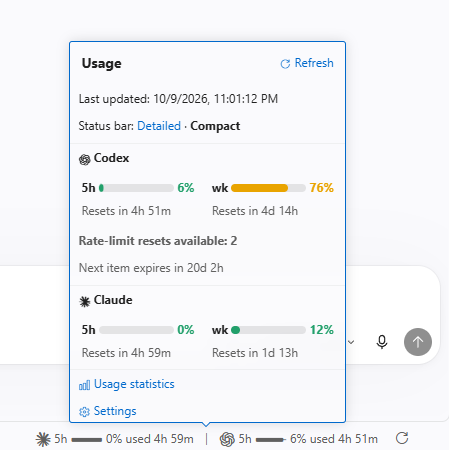
### Check usage from the status bar
|
|
17
|
+
|
|
18
|
+
- **Current usage** — See Claude and Codex subscription usage and time until reset in the VS Code status bar.
|
|
19
|
+
- **Details card** — Click to open a card with 5-hour and weekly usage, reset times, and available Codex usage resets.
|
|
20
|
+
- **Automatic and manual refresh** — Usage refreshes every 15 minutes by default. Use the refresh button for an immediate update.
|
|
21
|
+
|
|
22
|
+
|
|
23
|
+
|
|
24
|
+
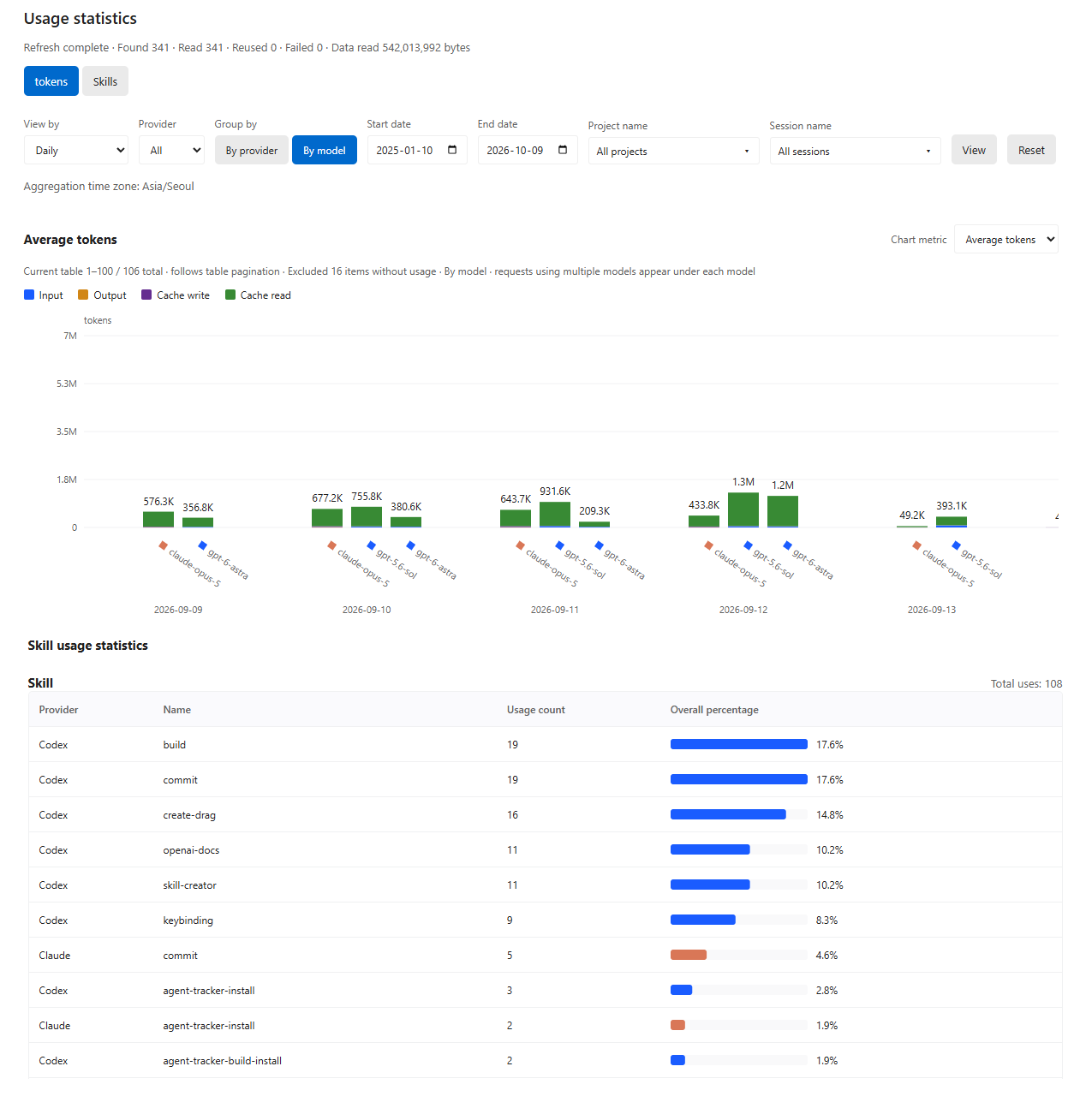
### Compare tokens and time by conversation, period, and model
|
|
25
|
+
|
|
26
|
+
- **Token and time statistics** — View total tokens, average tokens per request, and average duration in tables and charts by conversation, day, month, project, or model.
|
|
27
|
+
- **Usage history** — See usage counts and proportions for skills, plugins, subagents, and models.
|
|
28
|
+
- **Improve your workflow** — Compare average tokens and time per request before and after changing models or adopting skills and plugins to refine how you use agents.
|
|
29
|
+
|
|
30
|
+
|
|
31
|
+
|
|
32
|
+
Open **Usage statistics** from the card or run **Agent Tracker: Open Usage Statistics** from the Command Palette. Statistics are calculated from local conversation logs when you open the view.
|
|
33
|
+
|
|
34
|
+
## Installation and removal
|
|
35
|
+
|
|
36
|
+
### Install
|
|
37
|
+
|
|
38
|
+
Requires Node.js **22.15+**, VS Code **1.101+**, and the `code` command available in your terminal. Sign in through Claude Code or the Codex CLI first.
|
|
7
39
|
|
|
8
40
|
```sh
|
|
9
41
|
npx agent-tracker-vscode@latest
|
|
10
42
|
```
|
|
11
43
|
|
|
12
|
-
|
|
13
|
-
|
|
14
|
-
|
|
44
|
+
To install the installer command globally with npm:
|
|
45
|
+
|
|
46
|
+
```sh
|
|
47
|
+
npm install -g agent-tracker-vscode@latest
|
|
48
|
+
agent-tracker-vscode
|
|
49
|
+
```
|
|
15
50
|
|
|
16
|
-
|
|
17
|
-
|
|
51
|
+
After installation, run **Developer: Reload Window** from the VS Code Command Palette. Use the same installation commands to update. On macOS, if `code` is unavailable, first run **Shell Command: Install 'code' command in PATH**.
|
|
52
|
+
|
|
53
|
+
To install into a specific profile, provide the name of a profile you have already created:
|
|
54
|
+
|
|
55
|
+
```sh
|
|
56
|
+
npx agent-tracker-vscode@latest --profile "Work"
|
|
57
|
+
```
|
|
58
|
+
|
|
59
|
+
Clicking the card's status bar item again to close it requires the optional [local VS Code patch (Korean)](https://github.com/lsc892/Agent-Tracker/blob/main/docs/research/StatusBarPopup.md).
|
|
60
|
+
|
|
61
|
+
### Uninstall
|
|
62
|
+
|
|
63
|
+
Select **Agent Tracker → Uninstall** in the VS Code Extensions view, or run:
|
|
18
64
|
|
|
19
65
|
```sh
|
|
20
|
-
|
|
21
|
-
npx agent-tracker-vscode --profile "Work"
|
|
22
|
-
npx agent-tracker-vscode --code code-insiders
|
|
23
|
-
npx agent-tracker-vscode --code "/path/to/code"
|
|
66
|
+
code --uninstall-extension agent-tracker.agent-tracker
|
|
24
67
|
```
|
|
25
68
|
|
|
26
|
-
|
|
27
|
-
|
|
28
|
-
|
|
29
|
-
|
|
69
|
+
If you installed into a specific profile, add `--profile "Work"` to the uninstall command. To also remove the globally installed npm package:
|
|
70
|
+
|
|
71
|
+
```sh
|
|
72
|
+
npm uninstall -g agent-tracker-vscode
|
|
73
|
+
```
|
|
74
|
+
|
|
75
|
+
The npm package and the VS Code extension are uninstalled separately.
|
|
76
|
+
|
|
77
|
+
## VS Code extension settings
|
|
78
|
+
|
|
79
|
+
Click **Settings** in the card or search for `@ext:agent-tracker.agent-tracker` in VS Code Settings.
|
|
80
|
+
All setting keys below use the `agentTracker.` prefix.
|
|
30
81
|
|
|
31
|
-
|
|
32
|
-
|
|
33
|
-
|
|
82
|
+
| Setting | Default | Description |
|
|
83
|
+
| --- | --- | --- |
|
|
84
|
+
| `language` | `auto` | Follow the VS Code language. Choose Korean, English, Simplified Chinese, Japanese, Spanish, or French |
|
|
85
|
+
| `claude.enabled` / `codex.enabled` | `true` | Track subscription usage and log statistics for each provider |
|
|
86
|
+
| `quota.refreshPolicy` | `automatic` | Refresh automatically. `manual` fetches usage only when you click refresh |
|
|
87
|
+
| `quota.pollingIntervalSeconds` | `900` | Automatic refresh interval in seconds. Minimum 30; pauses in inactive windows |
|
|
88
|
+
| `codex.showStatusBar` | `true` | Show Codex in the status bar. Usage queries continue when hidden |
|
|
89
|
+
| `display.percentage` | `used` | Show the used percentage. `remaining` shows the remaining percentage |
|
|
90
|
+
| `display.detail` | `detailed` | Show 7-day and 5-hour usage. `compact` shows only 5-hour usage |
|
|
91
|
+
| `display.colorMode` | `automatic` | Use the theme color. Also supports `white`, `black`, and `custom` |
|
|
92
|
+
| `display.customColor` | `#ffffff` | HEX color for `custom` mode |
|
|
93
|
+
| `codex.showReserve` | `false` | Show GPT Reserve usage when available for your account |
|
|
94
|
+
| `codex.showResetCredits` | `true` | Show available usage resets and their next expiry when provided by your account |
|
|
95
|
+
| `usage.enabled` | `true` | Enable token and time statistics from local conversation logs |
|
|
96
|
+
| `usage.skillsEnabled` | `true` | Count skill, plugin, subagent, and model usage |
|
|
97
|
+
| `usage.showApiCosts` | `false` | Show estimated API costs in USD. Subscription usage is shown as zero |
|
|
98
|
+
| `usage.excludeEmptyUsage` | `true` | Exclude requests with neither model nor token information from charts and averages; keep them in tables |
|
|
99
|
+
| `usage.timezone` | System time zone | Time zone for daily and monthly statistics. Example: `Asia/Seoul` |
|
|
100
|
+
| `dataHome` | `~` | Shared parent folder containing `.claude` and `.codex`. Set in user settings |
|
|
101
|
+
| `claude.cleanupPeriodDays` | `null` | Claude log retention in days. Values of 1 or more update Claude settings; `null` preserves the existing value |
|
|
102
|
+
| `codex.executable` | `codex` | Codex CLI command or executable path |
|
|
34
103
|
|
|
35
|
-
|
|
36
|
-
not log in to either provider. The optional workbench click-toggle patch is a
|
|
37
|
-
separate local setup step documented in the repository.
|
|
104
|
+
Use **Agent Tracker: Delete Statistics Data** to clear aggregated statistics. Original conversation logs are preserved, and statistics are recalculated when you reopen the view.
|
|
38
105
|
|
|
39
|
-
|
|
106
|
+
[Usage and development reference](https://github.com/lsc892/Agent-Tracker/blob/main/docs/Development.md)
|
package/extension.json
CHANGED
|
@@ -1,6 +1,6 @@
|
|
|
1
1
|
{
|
|
2
2
|
"id": "agent-tracker.agent-tracker",
|
|
3
|
-
"version": "0.1.
|
|
3
|
+
"version": "0.1.2",
|
|
4
4
|
"vscode": "^1.101.0",
|
|
5
|
-
"sha256": "
|
|
5
|
+
"sha256": "6b17cf2895e8323553131ae8e2b061cc93f2ee3f23375d14336a453e028bfecf"
|
|
6
6
|
}
|
package/extension.vsix
CHANGED
|
Binary file
|