agent-tank 0.9.3 → 0.9.4
This diff represents the content of publicly available package versions that have been released to one of the supported registries. The information contained in this diff is provided for informational purposes only and reflects changes between package versions as they appear in their respective public registries.
- package/README.md +313 -443
- package/bin/agent-tank.js +13 -1
- package/package.json +1 -1
- package/src/agents/claude.js +10 -28
- package/src/client-auto-refresh.js +2 -2
- package/src/index.js +91 -6
- package/src/server.js +6 -3
- package/src/usage-formatters.js +3 -3
package/README.md
CHANGED
|
@@ -2,286 +2,251 @@
|
|
|
2
2
|
|
|
3
3
|
|
|
4
4
|
|
|
5
|
-
|
|
5
|
+
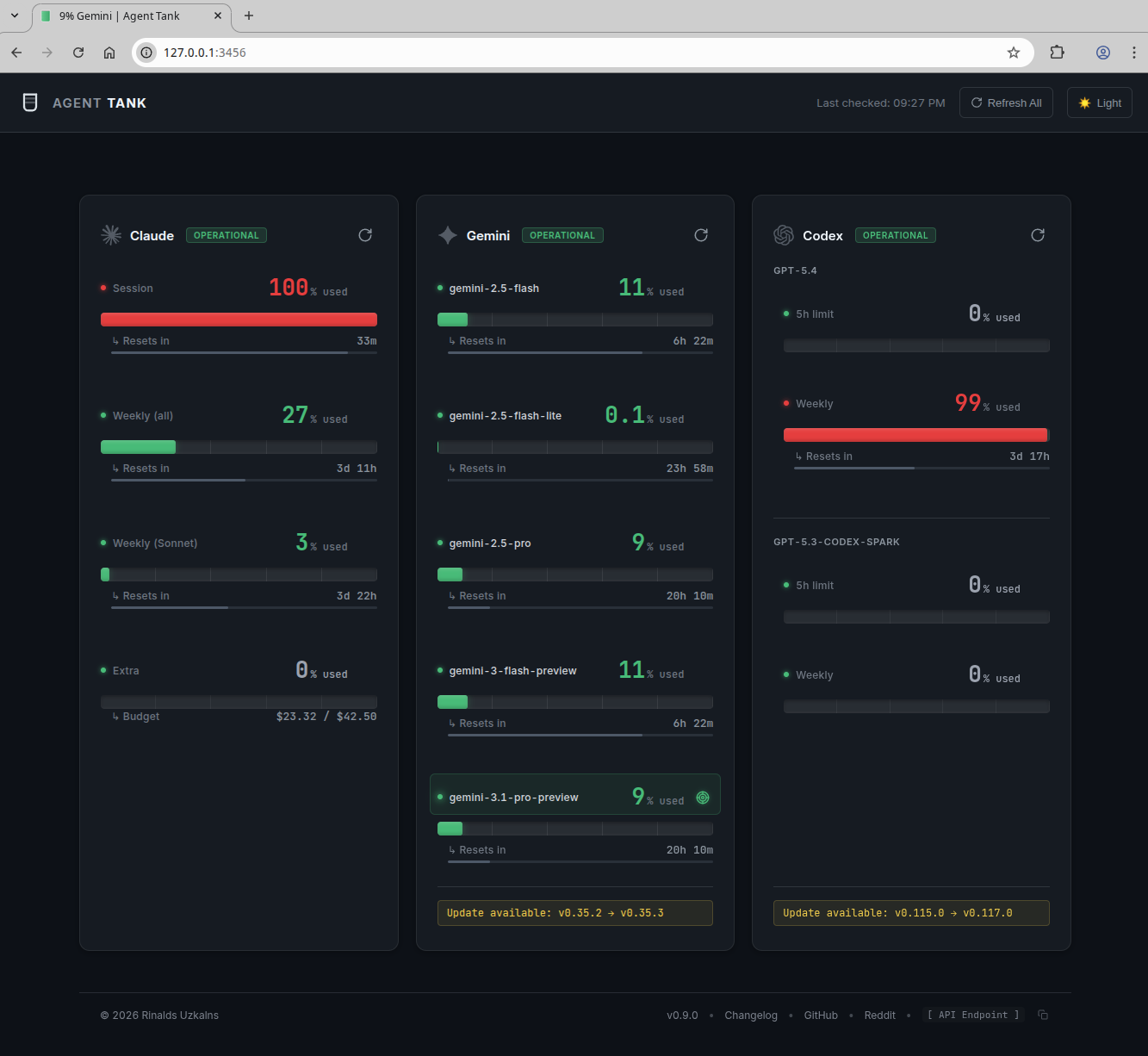
Agent Tank is a local dashboard and HTTP API for monitoring usage limits in AI coding agent CLIs.
|
|
6
6
|
|
|
7
|
-
|
|
7
|
+
It supports:
|
|
8
8
|
|
|
9
|
-
|
|
9
|
+
- Claude Code
|
|
10
|
+
- Gemini CLI
|
|
11
|
+
- OpenAI Codex
|
|
10
12
|
|
|
11
|
-
|
|
12
|
-
- **Auto-discovery** - Automatically detects installed LLM CLI tools
|
|
13
|
-
- **HTTP API** - Query usage limits via REST endpoints
|
|
14
|
-
- **Unified Web UI** - All-in-one dashboard showing Claude, Gemini, and Codex usage at a glance
|
|
15
|
-
- **Instant Tab Tracking** - Pin the dashboard to your browser tab and see live usage updates via favicon and title changes
|
|
16
|
-
- **Lightweight** - Single dependency (node-pty)
|
|
17
|
-
- **Multi-agent** - Monitor Claude, Gemini, and Codex simultaneously
|
|
18
|
-
- **Secure by design** - No browser cookies, web scraping, or credential access
|
|
13
|
+
## How It Gets the Data
|
|
19
14
|
|
|
20
|
-
|
|
15
|
+
This is the part that matters.
|
|
21
16
|
|
|
22
|
-
|
|
17
|
+
Agent Tank reads usage directly from the local CLI tools you already use. It launches the installed CLIs locally, runs their built-in usage commands, and parses the output into a unified web UI and JSON API.
|
|
23
18
|
|
|
24
|
-
|
|
25
|
-
|
|
26
|
-
|
|
19
|
+
- Claude: runs `/usage`
|
|
20
|
+
- Gemini: runs `/stats`
|
|
21
|
+
- Codex: prefers JSON-RPC `account/rateLimits/read`, falls back to `/status`
|
|
27
22
|
|
|
28
|
-
|
|
29
|
-
agent-tank --claude --gemini
|
|
23
|
+
What it does not do:
|
|
30
24
|
|
|
31
|
-
|
|
32
|
-
|
|
25
|
+
- It does not scrape provider websites
|
|
26
|
+
- It does not read browser cookies
|
|
27
|
+
- It does not depend on a logged-in browser session
|
|
28
|
+
- It does not MITM or inspect your network traffic
|
|
29
|
+
- It does not send your usage data to a remote service
|
|
33
30
|
|
|
34
|
-
|
|
35
|
-
agent-tank --once
|
|
31
|
+
If you have seen other tools built around log-file heuristics or browser-session scraping, Agent Tank is deliberately not that.
|
|
36
32
|
|
|
37
|
-
|
|
38
|
-
agent-tank --once --json
|
|
39
|
-
```
|
|
33
|
+
## Who It Is For
|
|
40
34
|
|
|
41
|
-
|
|
35
|
+
Agent Tank is meant for subscription-based coding agent products where the CLI itself exposes session or limit information.
|
|
42
36
|
|
|
43
|
-
|
|
44
|
-
Options:
|
|
45
|
-
--claude Enable Claude monitoring
|
|
46
|
-
--gemini Enable Gemini monitoring
|
|
47
|
-
--codex Enable Codex monitoring
|
|
48
|
-
--port <port> HTTP server port (default: 3456)
|
|
49
|
-
--host <host> Bind address (default: 127.0.0.1)
|
|
50
|
-
--auth-user <user> HTTP Basic Auth username
|
|
51
|
-
--auth-pass <pass> HTTP Basic Auth password
|
|
52
|
-
--auth-token <token> API key for Bearer token auth
|
|
53
|
-
--fresh-process Spawn a new process per refresh (default: false)
|
|
54
|
-
--claude-api Use direct Anthropic API for Claude usage (faster, 60s refresh)
|
|
55
|
-
--config, -c Path to config file (JSON)
|
|
56
|
-
--auto-discover Auto-discover available agents (default: true)
|
|
57
|
-
--auto-refresh Enable/disable background auto-refresh (default: true)
|
|
58
|
-
--auto-refresh-mode <mode> Refresh mode: none, interval, activity (default: activity)
|
|
59
|
-
--auto-refresh-interval <seconds> Auto-refresh interval in seconds (default: 60)
|
|
60
|
-
--activity-debounce <ms> Activity debounce interval in milliseconds (default: 5000)
|
|
61
|
-
--keepalive Enable/disable session keepalive (default: true)
|
|
62
|
-
--keepalive-interval <seconds> Session keepalive interval in seconds (default: 300)
|
|
63
|
-
--history-retention-days <days> Days to retain usage history (default: 14)
|
|
64
|
-
--once Fetch usage once and exit (no HTTP server)
|
|
65
|
-
--json Output pure JSON (suppress logging, use with --once)
|
|
66
|
-
--help, -h Show this help message
|
|
67
|
-
```
|
|
37
|
+
Examples:
|
|
68
38
|
|
|
69
|
-
|
|
39
|
+
- Claude Code Pro / Max
|
|
40
|
+
- Gemini CLI with supported subscription plans
|
|
41
|
+
- ChatGPT Codex with supported plans
|
|
70
42
|
|
|
71
|
-
|
|
43
|
+
It is not for:
|
|
72
44
|
|
|
73
|
-
|
|
74
|
-
|
|
75
|
-
|
|
76
|
-
| `AGENT_TANK_PASS` | Basic auth password (overrides `--auth-pass`) |
|
|
77
|
-
| `AGENT_TANK_TOKEN` | API key (overrides `--auth-token`) |
|
|
78
|
-
| `AGENT_TANK_HOST` | Bind address (overrides `--host`) |
|
|
79
|
-
| `AGENT_TANK_FRESH_PROCESS` | Use fresh process per refresh (`1` or `true`) |
|
|
80
|
-
| `AGENT_TANK_CLAUDE_API` | Use direct Anthropic API for Claude usage (`1` or `true`) |
|
|
81
|
-
| `AGENT_TANK_AUTO_REFRESH` | Enable/disable background auto-refresh (`1`/`true` or `0`/`false`) |
|
|
82
|
-
| `AGENT_TANK_AUTO_REFRESH_MODE` | Refresh mode: `none`, `interval`, or `activity` (default: `activity`) |
|
|
83
|
-
| `AGENT_TANK_AUTO_REFRESH_INTERVAL` | Auto-refresh interval in seconds |
|
|
84
|
-
| `AGENT_TANK_ACTIVITY_DEBOUNCE` | Activity debounce interval in milliseconds (default: 5000) |
|
|
85
|
-
| `AGENT_TANK_KEEPALIVE` | Enable/disable session keepalive (`1`/`true` or `0`/`false`) |
|
|
86
|
-
| `AGENT_TANK_KEEPALIVE_INTERVAL` | Session keepalive interval in seconds (default: 300) |
|
|
87
|
-
| `AGENT_TANK_HISTORY_RETENTION_DAYS` | Days to retain usage history (default: 14) |
|
|
45
|
+
- pay-as-you-go API key billing
|
|
46
|
+
- cost tracking for API requests
|
|
47
|
+
- provider billing dashboards
|
|
88
48
|
|
|
89
|
-
|
|
49
|
+
If you need API spend tracking, use the provider’s billing tools instead.
|
|
90
50
|
|
|
91
|
-
|
|
51
|
+
## Quick Start
|
|
92
52
|
|
|
93
|
-
|
|
94
|
-
{
|
|
95
|
-
"claude": true,
|
|
96
|
-
"gemini": true,
|
|
97
|
-
"codex": false,
|
|
98
|
-
"port": 8080,
|
|
99
|
-
"history": {
|
|
100
|
-
"retentionDays": 7
|
|
101
|
-
}
|
|
102
|
-
}
|
|
103
|
-
```
|
|
53
|
+
### Install
|
|
104
54
|
|
|
105
55
|
```bash
|
|
106
|
-
agent-tank
|
|
56
|
+
npm install -g agent-tank
|
|
107
57
|
```
|
|
108
58
|
|
|
109
|
-
|
|
110
|
-
|
|
111
|
-
By default, Claude usage data is fetched by spawning a PTY session and running the `/usage` command. With `--claude-api`, Agent Tank fetches usage directly from the Anthropic OAuth API instead, which is faster and allows a 60-second refresh interval (vs 10 minutes for PTY).
|
|
59
|
+
Or run it directly:
|
|
112
60
|
|
|
113
61
|
```bash
|
|
114
|
-
agent-tank
|
|
115
|
-
```
|
|
116
|
-
|
|
117
|
-
### How It Works
|
|
118
|
-
|
|
119
|
-
- Uses the OAuth token from `~/.claude/.credentials.json` (the same credentials Claude Code uses)
|
|
120
|
-
- Calls the `api.anthropic.com/api/oauth/usage` endpoint with the `anthropic-beta: oauth-2025-04-20` header
|
|
121
|
-
- Automatically refreshes expired tokens using the OAuth refresh token flow
|
|
122
|
-
- Falls back to PTY mode if the API call fails
|
|
123
|
-
|
|
124
|
-
### Configuration
|
|
125
|
-
|
|
126
|
-
```json
|
|
127
|
-
{
|
|
128
|
-
"claude": true,
|
|
129
|
-
"claudeApi": true
|
|
130
|
-
}
|
|
62
|
+
npx agent-tank
|
|
131
63
|
```
|
|
132
64
|
|
|
133
|
-
|
|
65
|
+
### First Run
|
|
134
66
|
|
|
135
67
|
```bash
|
|
136
|
-
|
|
68
|
+
# Auto-discover installed agents and start the web UI + API
|
|
69
|
+
agent-tank
|
|
137
70
|
```
|
|
138
71
|
|
|
139
|
-
|
|
140
|
-
|
|
141
|
-
Agent Tank supports intelligent activity-based polling that monitors local log directories for LLM CLI activity. Instead of polling on a fixed interval (which can waste resources during idle periods), activity mode only triggers usage refreshes when you're actively using the CLI tools.
|
|
142
|
-
|
|
143
|
-
### How It Works
|
|
144
|
-
|
|
145
|
-
1. **Log Directory Monitoring**: Agent Tank watches the following directories for file changes:
|
|
146
|
-
- Claude: `~/.config/claude/projects/`, `~/.claude/`
|
|
147
|
-
- Codex: `~/.codex/sessions/`, `~/.codex/`
|
|
148
|
-
- Gemini: `~/.config/gemini/`, `~/.gemini/`
|
|
72
|
+
By default it starts on:
|
|
149
73
|
|
|
150
|
-
|
|
151
|
-
|
|
152
|
-
|
|
153
|
-
|
|
154
|
-
4. **Idle State**: When no more activity is detected, polling stops to conserve resources.
|
|
74
|
+
```text
|
|
75
|
+
http://127.0.0.1:3456
|
|
76
|
+
```
|
|
155
77
|
|
|
156
|
-
|
|
78
|
+
If Docker is running with a detectable local bridge interface, Agent Tank also binds that bridge address by default so containers on the same host can reach it without exposing it on the public interface.
|
|
157
79
|
|
|
158
|
-
|
|
80
|
+
Use this if you want localhost only:
|
|
159
81
|
|
|
160
|
-
|
|
161
|
-
|
|
162
|
-
|
|
163
|
-
| `interval` | Traditional interval-based polling at fixed intervals |
|
|
164
|
-
| `none` | No automatic refresh; manual refresh only via `POST /refresh` |
|
|
82
|
+
```bash
|
|
83
|
+
agent-tank --no-docker
|
|
84
|
+
```
|
|
165
85
|
|
|
166
|
-
###
|
|
86
|
+
### Most Common Commands
|
|
167
87
|
|
|
168
88
|
```bash
|
|
169
|
-
#
|
|
170
|
-
agent-tank
|
|
171
|
-
|
|
172
|
-
# Use activity mode with custom debounce (wait 10 seconds after activity)
|
|
173
|
-
agent-tank --activity-debounce 10000
|
|
89
|
+
# Monitor only specific agents
|
|
90
|
+
agent-tank --claude --gemini
|
|
174
91
|
|
|
175
|
-
# Use
|
|
176
|
-
agent-tank --
|
|
92
|
+
# Use a custom port
|
|
93
|
+
agent-tank --port 8080
|
|
177
94
|
|
|
178
|
-
#
|
|
179
|
-
agent-tank --
|
|
95
|
+
# Fetch once and print JSON
|
|
96
|
+
agent-tank --once --json
|
|
180
97
|
|
|
181
|
-
#
|
|
182
|
-
|
|
183
|
-
AGENT_TANK_ACTIVITY_DEBOUNCE=10000 agent-tank
|
|
98
|
+
# Show the installed Agent Tank version
|
|
99
|
+
agent-tank --version
|
|
184
100
|
```
|
|
185
101
|
|
|
186
|
-
|
|
102
|
+
## What You Get
|
|
187
103
|
|
|
188
|
-
|
|
189
|
-
- The debounce interval is specified in milliseconds (default: 5000ms = 5 seconds)
|
|
190
|
-
- During active usage, refreshes occur at the `--auto-refresh-interval` rate (default: 60 seconds)
|
|
191
|
-
- Activity mode is disabled in one-shot mode (`--once`)
|
|
104
|
+
### Web UI
|
|
192
105
|
|
|
193
|
-
|
|
106
|
+
- Single-page dashboard for all supported agents
|
|
107
|
+
- Live refresh
|
|
108
|
+
- Reset countdowns
|
|
109
|
+
- Pace indicators
|
|
110
|
+
- Browser-tab tracking via title and favicon updates
|
|
111
|
+
|
|
112
|
+
### HTTP API
|
|
194
113
|
|
|
195
|
-
|
|
114
|
+
- `GET /status`
|
|
115
|
+
- `GET /status/:agent`
|
|
116
|
+
- `POST /refresh`
|
|
117
|
+
- `POST /refresh/:agent`
|
|
118
|
+
- `GET /config`
|
|
119
|
+
- `GET /history`
|
|
120
|
+
- `GET /history/:agent`
|
|
196
121
|
|
|
197
|
-
###
|
|
122
|
+
### Supported Metrics
|
|
198
123
|
|
|
199
|
-
|
|
124
|
+
| Agent | Method | Metrics |
|
|
125
|
+
|---|---|---|
|
|
126
|
+
| Claude | PTY `/usage` or Anthropic OAuth API | Current session, weekly all-models, weekly Sonnet-only |
|
|
127
|
+
| Gemini | PTY `/stats` | Per-model usage and reset windows |
|
|
128
|
+
| Codex | JSON-RPC preferred, PTY fallback | 5-hour limits, weekly limits, model/account info |
|
|
200
129
|
|
|
201
|
-
|
|
130
|
+
## Basic Usage
|
|
131
|
+
|
|
132
|
+
### Auto-Discover Everything
|
|
202
133
|
|
|
203
134
|
```bash
|
|
204
|
-
# Use default keepalive (every 5 minutes)
|
|
205
135
|
agent-tank
|
|
136
|
+
```
|
|
206
137
|
|
|
207
|
-
|
|
208
|
-
agent-tank --keepalive-interval 600
|
|
209
|
-
|
|
210
|
-
# Disable keepalive
|
|
211
|
-
agent-tank --no-keepalive
|
|
138
|
+
### Monitor Specific Agents
|
|
212
139
|
|
|
213
|
-
|
|
214
|
-
|
|
140
|
+
```bash
|
|
141
|
+
agent-tank --claude --codex
|
|
215
142
|
```
|
|
216
143
|
|
|
217
|
-
###
|
|
144
|
+
### One-Shot Scripting Mode
|
|
218
145
|
|
|
219
|
-
|
|
220
|
-
-
|
|
221
|
-
|
|
146
|
+
```bash
|
|
147
|
+
agent-tank --once --json
|
|
148
|
+
```
|
|
222
149
|
|
|
223
|
-
|
|
150
|
+
### Bind to a Different Host or Port
|
|
224
151
|
|
|
225
|
-
|
|
152
|
+
```bash
|
|
153
|
+
agent-tank --host 0.0.0.0 --port 8080
|
|
154
|
+
```
|
|
226
155
|
|
|
227
|
-
###
|
|
156
|
+
### Disable Docker Bridge Binding
|
|
228
157
|
|
|
229
|
-
|
|
230
|
-
-
|
|
231
|
-
|
|
232
|
-
- `expectedPercent`: What your usage should be based on linear pace
|
|
233
|
-
- `isBurningFast`: Whether you're using faster than the 1.2x threshold
|
|
234
|
-
- `etaSeconds`: Estimated seconds until you hit 100% (if burning fast)
|
|
235
|
-
- `deltaPercent`: Difference between actual and expected usage
|
|
158
|
+
```bash
|
|
159
|
+
agent-tank --no-docker
|
|
160
|
+
```
|
|
236
161
|
|
|
237
|
-
###
|
|
162
|
+
### Disable Background Refresh
|
|
238
163
|
|
|
239
164
|
```bash
|
|
240
|
-
|
|
241
|
-
|
|
165
|
+
agent-tank --auto-refresh-mode none
|
|
166
|
+
```
|
|
242
167
|
|
|
243
|
-
|
|
244
|
-
|
|
168
|
+
## Command Line Options
|
|
169
|
+
|
|
170
|
+
```text
|
|
171
|
+
Options:
|
|
172
|
+
--claude Enable Claude monitoring
|
|
173
|
+
--gemini Enable Gemini monitoring
|
|
174
|
+
--codex Enable Codex monitoring
|
|
175
|
+
--port <port> HTTP server port (default: 3456)
|
|
176
|
+
--host <host> Bind address (default: 127.0.0.1 + Docker bridge when available)
|
|
177
|
+
--docker Enable Docker bridge bind when --host is omitted (default: true)
|
|
178
|
+
--auth-user <user> HTTP Basic Auth username
|
|
179
|
+
--auth-pass <pass> HTTP Basic Auth password
|
|
180
|
+
--auth-token <token> API key for Bearer token auth
|
|
181
|
+
--fresh-process Spawn a new process per refresh (default: false)
|
|
182
|
+
--claude-api Use direct Anthropic API for Claude usage (faster, 60s refresh)
|
|
183
|
+
--config, -c Path to config file (JSON)
|
|
184
|
+
--version, -v Show version
|
|
185
|
+
--auto-discover Auto-discover available agents (default: true)
|
|
186
|
+
--auto-refresh Enable/disable background auto-refresh (default: true)
|
|
187
|
+
--auto-refresh-mode <mode> Refresh mode: none, interval, activity (default: activity)
|
|
188
|
+
--auto-refresh-interval <seconds> Auto-refresh interval in seconds (default: 60)
|
|
189
|
+
--activity-debounce <ms> Activity debounce interval in milliseconds (default: 5000)
|
|
190
|
+
--keepalive Enable/disable session keepalive (default: true)
|
|
191
|
+
--keepalive-interval <seconds> Session keepalive interval in seconds (default: 300)
|
|
192
|
+
--history-retention-days <days> Days to retain usage history (default: 14)
|
|
193
|
+
--once Fetch usage once and exit (no HTTP server)
|
|
194
|
+
--json Output pure JSON (suppress logging, use with --once)
|
|
195
|
+
--help, -h Show this help message
|
|
245
196
|
```
|
|
246
197
|
|
|
247
|
-
|
|
198
|
+
## Configuration
|
|
248
199
|
|
|
249
|
-
|
|
250
|
-
- `GET /history/:agent` - Get full history for a specific agent
|
|
200
|
+
### Environment Variables
|
|
251
201
|
|
|
252
|
-
|
|
202
|
+
Environment variables override CLI flags and config file values.
|
|
253
203
|
|
|
254
|
-
|
|
204
|
+
| Variable | Description |
|
|
205
|
+
|---|---|
|
|
206
|
+
| `AGENT_TANK_USER` | Basic auth username |
|
|
207
|
+
| `AGENT_TANK_PASS` | Basic auth password |
|
|
208
|
+
| `AGENT_TANK_TOKEN` | Bearer token auth |
|
|
209
|
+
| `AGENT_TANK_HOST` | Bind address |
|
|
210
|
+
| `AGENT_TANK_DOCKER` | Enable/disable Docker bridge bind when `--host` is omitted |
|
|
211
|
+
| `AGENT_TANK_FRESH_PROCESS` | Use fresh process per refresh (`1`/`true`) |
|
|
212
|
+
| `AGENT_TANK_CLAUDE_API` | Use Claude API mode (`1`/`true`) |
|
|
213
|
+
| `AGENT_TANK_AUTO_REFRESH` | Enable/disable auto-refresh |
|
|
214
|
+
| `AGENT_TANK_AUTO_REFRESH_MODE` | `none`, `interval`, or `activity` |
|
|
215
|
+
| `AGENT_TANK_AUTO_REFRESH_INTERVAL` | Auto-refresh interval in seconds |
|
|
216
|
+
| `AGENT_TANK_ACTIVITY_DEBOUNCE` | Activity debounce interval in milliseconds |
|
|
217
|
+
| `AGENT_TANK_KEEPALIVE` | Enable/disable keepalive |
|
|
218
|
+
| `AGENT_TANK_KEEPALIVE_INTERVAL` | Keepalive interval in seconds |
|
|
219
|
+
| `AGENT_TANK_HISTORY_RETENTION_DAYS` | History retention window |
|
|
220
|
+
|
|
221
|
+
### Config File
|
|
255
222
|
|
|
256
223
|
```json
|
|
257
224
|
{
|
|
258
|
-
"
|
|
259
|
-
|
|
260
|
-
|
|
261
|
-
|
|
262
|
-
|
|
263
|
-
|
|
264
|
-
|
|
265
|
-
|
|
266
|
-
|
|
267
|
-
|
|
268
|
-
|
|
225
|
+
"claude": true,
|
|
226
|
+
"gemini": true,
|
|
227
|
+
"codex": false,
|
|
228
|
+
"port": 8080,
|
|
229
|
+
"dockerAccess": true,
|
|
230
|
+
"claudeApi": false,
|
|
231
|
+
"autoRefresh": {
|
|
232
|
+
"mode": "activity",
|
|
233
|
+
"interval": 60,
|
|
234
|
+
"activityDebounce": 5000
|
|
235
|
+
},
|
|
236
|
+
"keepalive": {
|
|
237
|
+
"enabled": true,
|
|
238
|
+
"interval": 300
|
|
239
|
+
},
|
|
240
|
+
"history": {
|
|
241
|
+
"retentionDays": 14
|
|
269
242
|
}
|
|
270
243
|
}
|
|
271
244
|
```
|
|
272
245
|
|
|
273
|
-
|
|
274
|
-
|
|
275
|
-
## Installation
|
|
276
|
-
|
|
277
|
-
```bash
|
|
278
|
-
npm install -g agent-tank
|
|
279
|
-
```
|
|
280
|
-
|
|
281
|
-
Or run directly with npx:
|
|
246
|
+
Run with:
|
|
282
247
|
|
|
283
248
|
```bash
|
|
284
|
-
|
|
249
|
+
agent-tank -c config.json
|
|
285
250
|
```
|
|
286
251
|
|
|
287
252
|
## HTTP API
|
|
@@ -289,19 +254,17 @@ npx agent-tank
|
|
|
289
254
|
### Endpoints
|
|
290
255
|
|
|
291
256
|
| Method | Endpoint | Description |
|
|
292
|
-
|
|
257
|
+
|---|---|---|
|
|
293
258
|
| GET | `/` | HTML status page |
|
|
294
259
|
| GET | `/status` | JSON status for all agents |
|
|
295
|
-
| GET | `/status/:agent` | JSON status for
|
|
296
|
-
| GET | `/config` | Auto-refresh and history
|
|
297
|
-
| GET | `/history` |
|
|
298
|
-
| GET | `/history/:agent` |
|
|
260
|
+
| GET | `/status/:agent` | JSON status for one agent |
|
|
261
|
+
| GET | `/config` | Auto-refresh and history config |
|
|
262
|
+
| GET | `/history` | History summary |
|
|
263
|
+
| GET | `/history/:agent` | History for one agent |
|
|
299
264
|
| POST | `/refresh` | Refresh all agents |
|
|
300
|
-
| POST | `/refresh/:agent` | Refresh
|
|
301
|
-
|
|
302
|
-
### Example Responses
|
|
265
|
+
| POST | `/refresh/:agent` | Refresh one agent |
|
|
303
266
|
|
|
304
|
-
|
|
267
|
+
### Example `GET /status`
|
|
305
268
|
|
|
306
269
|
```json
|
|
307
270
|
{
|
|
@@ -321,19 +284,9 @@ npx agent-tank
|
|
|
321
284
|
"resetsAt": "Mar 13, 3am (Europe/London)",
|
|
322
285
|
"resetsIn": "4d 5h",
|
|
323
286
|
"resetsInSeconds": 364364
|
|
324
|
-
},
|
|
325
|
-
"weeklySonnet": {
|
|
326
|
-
"label": "Current week (Sonnet only)",
|
|
327
|
-
"percent": 5,
|
|
328
|
-
"resetsAt": "Mar 13, 10am (Europe/London)",
|
|
329
|
-
"resetsIn": "4d 12h",
|
|
330
|
-
"resetsInSeconds": 389564
|
|
331
287
|
}
|
|
332
288
|
},
|
|
333
289
|
"metadata": {
|
|
334
|
-
"sessionId": "0b34aa59-...",
|
|
335
|
-
"cwd": "/tmp",
|
|
336
|
-
"organization": "Your Organization",
|
|
337
290
|
"email": "user@example.com",
|
|
338
291
|
"version": "2.1.71"
|
|
339
292
|
},
|
|
@@ -341,94 +294,25 @@ npx agent-tank
|
|
|
341
294
|
"error": null,
|
|
342
295
|
"isRefreshing": false
|
|
343
296
|
},
|
|
344
|
-
"gemini": {
|
|
345
|
-
"name": "gemini",
|
|
346
|
-
"usage": {
|
|
347
|
-
"models": [
|
|
348
|
-
{
|
|
349
|
-
"model": "gemini-2.5-flash",
|
|
350
|
-
"usageLeft": 100,
|
|
351
|
-
"resetsIn": "24h",
|
|
352
|
-
"percentUsed": 0,
|
|
353
|
-
"resetsInSeconds": 86400
|
|
354
|
-
},
|
|
355
|
-
{
|
|
356
|
-
"model": "gemini-2.5-pro",
|
|
357
|
-
"usageLeft": 99.5,
|
|
358
|
-
"resetsIn": "12h 16m",
|
|
359
|
-
"percentUsed": 0.5,
|
|
360
|
-
"resetsInSeconds": 44160
|
|
361
|
-
}
|
|
362
|
-
]
|
|
363
|
-
},
|
|
364
|
-
"metadata": {
|
|
365
|
-
"version": "0.24.5",
|
|
366
|
-
"email": "user@example.com",
|
|
367
|
-
"authMethod": "OAuth",
|
|
368
|
-
"model": "auto-gemini-2.5",
|
|
369
|
-
"os": "linux",
|
|
370
|
-
"updateAvailable": {
|
|
371
|
-
"current": "0.24.5",
|
|
372
|
-
"latest": "0.32.1"
|
|
373
|
-
}
|
|
374
|
-
},
|
|
375
|
-
"lastUpdated": "2026-03-08T21:47:14.138Z",
|
|
376
|
-
"error": null,
|
|
377
|
-
"isRefreshing": false
|
|
378
|
-
},
|
|
379
297
|
"codex": {
|
|
380
298
|
"name": "codex",
|
|
381
299
|
"usage": {
|
|
382
300
|
"fiveHour": {
|
|
383
|
-
"percentLeft": 100,
|
|
384
|
-
"resetsAt": "02:44 on 9 Mar",
|
|
385
|
-
"label": "5h limit",
|
|
386
301
|
"percentUsed": 0,
|
|
302
|
+
"resetsAt": "02:44 on 9 Mar",
|
|
387
303
|
"resetsIn": "4h 56m",
|
|
388
304
|
"resetsInSeconds": 17807
|
|
389
305
|
},
|
|
390
306
|
"weekly": {
|
|
391
|
-
"percentLeft": 100,
|
|
392
|
-
"resetsAt": "21:44 on 15 Mar",
|
|
393
|
-
"label": "Weekly limit",
|
|
394
307
|
"percentUsed": 0,
|
|
308
|
+
"resetsAt": "21:44 on 15 Mar",
|
|
395
309
|
"resetsIn": "6d 23h",
|
|
396
310
|
"resetsInSeconds": 604607
|
|
397
|
-
}
|
|
398
|
-
"version": {
|
|
399
|
-
"current": "0.107.0",
|
|
400
|
-
"latest": "0.111.0"
|
|
401
|
-
},
|
|
402
|
-
"modelLimits": [
|
|
403
|
-
{
|
|
404
|
-
"name": "GPT-5.3-Codex-Spark",
|
|
405
|
-
"fiveHour": {
|
|
406
|
-
"percentLeft": 100,
|
|
407
|
-
"resetsAt": "02:46 on 9 Mar",
|
|
408
|
-
"label": "5h limit",
|
|
409
|
-
"percentUsed": 0,
|
|
410
|
-
"resetsIn": "4h 58m",
|
|
411
|
-
"resetsInSeconds": 17927
|
|
412
|
-
},
|
|
413
|
-
"weekly": {
|
|
414
|
-
"percentLeft": 100,
|
|
415
|
-
"resetsAt": "21:46 on 15 Mar",
|
|
416
|
-
"label": "Weekly limit",
|
|
417
|
-
"percentUsed": 0,
|
|
418
|
-
"resetsIn": "6d 23h",
|
|
419
|
-
"resetsInSeconds": 604727
|
|
420
|
-
}
|
|
421
|
-
}
|
|
422
|
-
],
|
|
423
|
-
"model": "gpt-5.3-codex",
|
|
424
|
-
"account": "user@example.com"
|
|
311
|
+
}
|
|
425
312
|
},
|
|
426
313
|
"metadata": {
|
|
427
|
-
"
|
|
428
|
-
"
|
|
429
|
-
"collaborationMode": "Default",
|
|
430
|
-
"model": "gpt-5.3-codex",
|
|
431
|
-
"email": "user@example.com"
|
|
314
|
+
"email": "user@example.com",
|
|
315
|
+
"model": "gpt-5.3-codex"
|
|
432
316
|
},
|
|
433
317
|
"lastUpdated": "2026-03-08T21:47:12.648Z",
|
|
434
318
|
"error": null,
|
|
@@ -437,220 +321,206 @@ npx agent-tank
|
|
|
437
321
|
}
|
|
438
322
|
```
|
|
439
323
|
|
|
440
|
-
|
|
324
|
+
## Claude API Mode
|
|
441
325
|
|
|
442
|
-
|
|
443
|
-
{
|
|
444
|
-
"name": "claude",
|
|
445
|
-
"usage": {
|
|
446
|
-
"session": {
|
|
447
|
-
"label": "Current session",
|
|
448
|
-
"percent": 42,
|
|
449
|
-
"resetsAt": "10pm (Europe/London)",
|
|
450
|
-
"resetsIn": "12m",
|
|
451
|
-
"resetsInSeconds": 764
|
|
452
|
-
},
|
|
453
|
-
"weeklyAll": {
|
|
454
|
-
"label": "Current week (all models)",
|
|
455
|
-
"percent": 31,
|
|
456
|
-
"resetsAt": "Mar 13, 3am (Europe/London)",
|
|
457
|
-
"resetsIn": "4d 5h",
|
|
458
|
-
"resetsInSeconds": 364364
|
|
459
|
-
},
|
|
460
|
-
"weeklySonnet": {
|
|
461
|
-
"label": "Current week (Sonnet only)",
|
|
462
|
-
"percent": 5,
|
|
463
|
-
"resetsAt": "Mar 13, 10am (Europe/London)",
|
|
464
|
-
"resetsIn": "4d 12h",
|
|
465
|
-
"resetsInSeconds": 389564
|
|
466
|
-
}
|
|
467
|
-
},
|
|
468
|
-
"metadata": {
|
|
469
|
-
"sessionId": "0b34aa59-...",
|
|
470
|
-
"cwd": "/tmp",
|
|
471
|
-
"organization": "Your Organization",
|
|
472
|
-
"email": "user@example.com",
|
|
473
|
-
"version": "2.1.71"
|
|
474
|
-
},
|
|
475
|
-
"lastUpdated": "2026-03-08T21:47:15.090Z",
|
|
476
|
-
"error": null,
|
|
477
|
-
"isRefreshing": false
|
|
478
|
-
}
|
|
479
|
-
```
|
|
326
|
+
By default, Claude usage is collected via PTY by running `/usage`.
|
|
480
327
|
|
|
481
|
-
|
|
328
|
+
With `--claude-api`, Agent Tank uses the Anthropic OAuth usage API instead. This is usually faster and supports a shorter refresh interval.
|
|
482
329
|
|
|
483
|
-
|
|
330
|
+
```bash
|
|
331
|
+
agent-tank --claude --claude-api
|
|
332
|
+
```
|
|
484
333
|
|
|
485
|
-
|
|
334
|
+
How it works:
|
|
486
335
|
|
|
487
|
-
|
|
336
|
+
- reads the same Claude OAuth credentials the CLI already uses
|
|
337
|
+
- calls `https://api.anthropic.com/api/oauth/usage`
|
|
338
|
+
- refreshes expired OAuth tokens when needed
|
|
339
|
+
- falls back to PTY mode if the API path fails
|
|
488
340
|
|
|
489
|
-
|
|
490
|
-
- **C++ build tools** (gcc, g++, make)
|
|
491
|
-
- **Node.js development headers**
|
|
341
|
+
You can also enable it with:
|
|
492
342
|
|
|
493
|
-
##### Linux (Ubuntu/Debian)
|
|
494
343
|
```bash
|
|
495
|
-
|
|
344
|
+
AGENT_TANK_CLAUDE_API=1 agent-tank --claude
|
|
496
345
|
```
|
|
497
346
|
|
|
498
|
-
|
|
499
|
-
```bash
|
|
500
|
-
sudo dnf install python3.11 python3.11-devel gcc gcc-c++ make nodejs-devel
|
|
501
|
-
```
|
|
347
|
+
## Auto-Refresh Modes
|
|
502
348
|
|
|
503
|
-
|
|
504
|
-
|
|
505
|
-
|
|
506
|
-
|
|
349
|
+
Agent Tank supports three refresh strategies:
|
|
350
|
+
|
|
351
|
+
| Mode | Description |
|
|
352
|
+
|---|---|
|
|
353
|
+
| `activity` | Default. Watches known local agent directories and refreshes when activity is detected |
|
|
354
|
+
| `interval` | Refreshes on a fixed timer |
|
|
355
|
+
| `none` | No background refresh. Use manual refresh only |
|
|
356
|
+
|
|
357
|
+
Examples:
|
|
507
358
|
|
|
508
|
-
##### macOS
|
|
509
359
|
```bash
|
|
510
|
-
#
|
|
511
|
-
|
|
360
|
+
# Default mode
|
|
361
|
+
agent-tank
|
|
512
362
|
|
|
513
|
-
#
|
|
514
|
-
|
|
363
|
+
# Interval polling
|
|
364
|
+
agent-tank --auto-refresh-mode interval
|
|
365
|
+
|
|
366
|
+
# Manual-only mode
|
|
367
|
+
agent-tank --auto-refresh-mode none
|
|
368
|
+
|
|
369
|
+
# Longer activity debounce
|
|
370
|
+
agent-tank --activity-debounce 10000
|
|
515
371
|
```
|
|
516
372
|
|
|
517
|
-
|
|
518
|
-
|
|
519
|
-
|
|
373
|
+
### Activity-Based Polling
|
|
374
|
+
|
|
375
|
+
In activity mode, Agent Tank watches common local directories:
|
|
520
376
|
|
|
521
|
-
|
|
377
|
+
- Claude: `~/.config/claude/projects/`, `~/.claude/`
|
|
378
|
+
- Codex: `~/.codex/sessions/`, `~/.codex/`
|
|
379
|
+
- Gemini: `~/.config/gemini/`, `~/.gemini/`
|
|
522
380
|
|
|
523
|
-
|
|
381
|
+
If no suitable directories are found, it falls back to interval mode.
|
|
524
382
|
|
|
525
|
-
|
|
526
|
-
- [Gemini CLI](https://github.com/anthropics/gemini-cli) (`gemini`) - **Version 0.24.5+ required** for `/stats` command support
|
|
527
|
-
- [OpenAI Codex](https://platform.openai.com/docs/codex) (`codex`)
|
|
383
|
+
## Session Keepalive
|
|
528
384
|
|
|
529
|
-
|
|
385
|
+
Keepalive helps persistent PTY-backed sessions stay warm.
|
|
530
386
|
|
|
531
|
-
**Claude Code:** Version 1.x does not support the `/usage` command.
|
|
532
387
|
```bash
|
|
533
|
-
#
|
|
534
|
-
|
|
388
|
+
# Default keepalive
|
|
389
|
+
agent-tank
|
|
390
|
+
|
|
391
|
+
# Every 10 minutes
|
|
392
|
+
agent-tank --keepalive-interval 600
|
|
535
393
|
|
|
536
|
-
#
|
|
537
|
-
|
|
394
|
+
# Disable keepalive
|
|
395
|
+
agent-tank --no-keepalive
|
|
538
396
|
```
|
|
539
397
|
|
|
540
|
-
|
|
541
|
-
|
|
542
|
-
|
|
543
|
-
|
|
398
|
+
Notes:
|
|
399
|
+
|
|
400
|
+
- disabled automatically in `--fresh-process`
|
|
401
|
+
- disabled automatically in `--once`
|
|
402
|
+
- not needed for Codex JSON-RPC mode
|
|
403
|
+
|
|
404
|
+
## Usage History and Pace
|
|
405
|
+
|
|
406
|
+
Agent Tank stores usage snapshots and calculates whether a metric is being consumed faster than the time window would suggest.
|
|
544
407
|
|
|
545
|
-
|
|
546
|
-
|
|
408
|
+
You can configure retention:
|
|
409
|
+
|
|
410
|
+
```bash
|
|
411
|
+
agent-tank --history-retention-days 7
|
|
547
412
|
```
|
|
548
413
|
|
|
549
|
-
|
|
414
|
+
History endpoints:
|
|
550
415
|
|
|
551
|
-
|
|
552
|
-
|
|
416
|
+
- `GET /history`
|
|
417
|
+
- `GET /history/:agent`
|
|
553
418
|
|
|
554
|
-
|
|
555
|
-
agents: ['claude', 'gemini'], // or null for auto-discover
|
|
556
|
-
port: 3456,
|
|
557
|
-
autoDiscover: true
|
|
558
|
-
});
|
|
419
|
+
## Installation Notes
|
|
559
420
|
|
|
560
|
-
|
|
421
|
+
### Build Requirements
|
|
561
422
|
|
|
562
|
-
|
|
563
|
-
const status = watcher.getStatus();
|
|
564
|
-
console.log(status.claude.usage);
|
|
423
|
+
`node-pty` requires native compilation support.
|
|
565
424
|
|
|
566
|
-
|
|
567
|
-
await watcher.refreshAgent('claude');
|
|
425
|
+
You need:
|
|
568
426
|
|
|
569
|
-
|
|
570
|
-
|
|
427
|
+
- Python 3.8+
|
|
428
|
+
- C/C++ build tools
|
|
429
|
+
- Node.js development headers
|
|
430
|
+
|
|
431
|
+
#### Ubuntu / Debian
|
|
432
|
+
|
|
433
|
+
```bash
|
|
434
|
+
sudo apt-get install python3.11 python3.11-dev build-essential nodejs-dev
|
|
571
435
|
```
|
|
572
436
|
|
|
573
|
-
|
|
437
|
+
#### Fedora / RHEL / CentOS
|
|
574
438
|
|
|
575
|
-
|
|
439
|
+
```bash
|
|
440
|
+
sudo dnf install python3.11 python3.11-devel gcc gcc-c++ make nodejs-devel
|
|
441
|
+
```
|
|
576
442
|
|
|
577
|
-
####
|
|
443
|
+
#### openSUSE
|
|
578
444
|
|
|
579
|
-
|
|
445
|
+
```bash
|
|
446
|
+
sudo zypper install python311 python311-devel gcc gcc-c++ make nodejs20-devel
|
|
447
|
+
```
|
|
580
448
|
|
|
581
|
-
|
|
449
|
+
#### macOS
|
|
582
450
|
|
|
583
|
-
|
|
451
|
+
```bash
|
|
452
|
+
xcode-select --install
|
|
453
|
+
brew install python@3.11
|
|
454
|
+
```
|
|
584
455
|
|
|
585
|
-
|
|
586
|
-
2. **Sends JSON-RPC requests** - Calls `account/rateLimits/read` via stdin
|
|
587
|
-
3. **Receives structured data** - Parses JSON responses with precise rate limit information
|
|
588
|
-
4. **Falls back to PTY** - Automatically uses PTY mode if JSON-RPC is unavailable (older CLI versions)
|
|
456
|
+
#### Windows
|
|
589
457
|
|
|
590
|
-
|
|
458
|
+
- Install [Python 3.11+](https://www.python.org/downloads/)
|
|
459
|
+
- Install [Visual Studio Build Tools](https://visualstudio.microsoft.com/downloads/#build-tools-for-visual-studio-2022)
|
|
591
460
|
|
|
592
|
-
|
|
461
|
+
## CLI Requirements
|
|
593
462
|
|
|
594
|
-
|
|
463
|
+
You need at least one supported CLI installed and authenticated.
|
|
595
464
|
|
|
596
|
-
|
|
597
|
-
|
|
598
|
-
|
|
599
|
-
|
|
600
|
-
|
|
465
|
+
- [Claude Code](https://claude.ai/download) as `claude`
|
|
466
|
+
- Version 2.0+ required for `/usage`
|
|
467
|
+
- Gemini CLI as `gemini`
|
|
468
|
+
- Version 0.24.5+ required for `/stats`
|
|
469
|
+
- OpenAI Codex as `codex`
|
|
601
470
|
|
|
602
|
-
|
|
471
|
+
Useful checks:
|
|
603
472
|
|
|
604
|
-
|
|
473
|
+
```bash
|
|
474
|
+
claude --version
|
|
475
|
+
gemini --version
|
|
476
|
+
codex --version
|
|
477
|
+
```
|
|
605
478
|
|
|
606
|
-
|
|
607
|
-
- **No web scraping** - The tool does not access web interfaces or scrape HTML pages
|
|
608
|
-
- **No credential extraction** - Your API keys, tokens, or passwords are never accessed or stored
|
|
609
|
-
- **No network interception** - There is no proxy, MITM, or traffic inspection involved
|
|
610
|
-
- **No external data transmission** - Usage data stays on your machine; nothing is sent to external servers
|
|
479
|
+
## Programmatic Usage
|
|
611
480
|
|
|
612
|
-
|
|
481
|
+
```javascript
|
|
482
|
+
const { AgentTank } = require('agent-tank');
|
|
613
483
|
|
|
614
|
-
|
|
484
|
+
const watcher = new AgentTank({
|
|
485
|
+
agents: ['claude', 'gemini'],
|
|
486
|
+
port: 3456,
|
|
487
|
+
autoDiscover: true
|
|
488
|
+
});
|
|
615
489
|
|
|
616
|
-
|
|
490
|
+
await watcher.start();
|
|
617
491
|
|
|
618
|
-
|
|
619
|
-
|
|
620
|
-
| Claude | PTY | `/usage` | Session %, Weekly % |
|
|
621
|
-
| Gemini | PTY | `/stats` | Model-specific usage % |
|
|
622
|
-
| Codex | JSON-RPC | `account/rateLimits/read` | 5h limit %, Weekly % |
|
|
623
|
-
| Codex | PTY (fallback) | `/status` | 5h limit %, Weekly % |
|
|
492
|
+
const status = watcher.getStatus();
|
|
493
|
+
console.log(status);
|
|
624
494
|
|
|
625
|
-
|
|
495
|
+
await watcher.refreshAgent('claude');
|
|
626
496
|
|
|
627
|
-
|
|
497
|
+
watcher.stop();
|
|
498
|
+
```
|
|
628
499
|
|
|
629
|
-
|
|
500
|
+
## Troubleshooting
|
|
630
501
|
|
|
631
|
-
|
|
632
|
-
```bash
|
|
633
|
-
PYTHON=/usr/bin/python3.11 npm install
|
|
634
|
-
```
|
|
502
|
+
### `gyp ERR!` during install
|
|
635
503
|
|
|
636
|
-
|
|
504
|
+
This usually means your system is missing Python, compiler tools, or Node headers.
|
|
637
505
|
|
|
638
|
-
|
|
506
|
+
Try:
|
|
639
507
|
|
|
640
|
-
If you still have issues, try rebuilding:
|
|
641
508
|
```bash
|
|
509
|
+
PYTHON=/usr/bin/python3.11 npm install
|
|
642
510
|
npm run rebuild
|
|
643
511
|
```
|
|
644
512
|
|
|
645
|
-
###
|
|
513
|
+
### `Timeout waiting for usage data`
|
|
646
514
|
|
|
647
|
-
-
|
|
648
|
-
-
|
|
649
|
-
-
|
|
515
|
+
- make sure the CLI works on its own
|
|
516
|
+
- make sure the CLI is authenticated
|
|
517
|
+
- check for trust prompts, auth prompts, or update prompts
|
|
518
|
+
- try `--fresh-process`
|
|
519
|
+
- try disabling keepalive or background refresh while debugging
|
|
650
520
|
|
|
651
|
-
###
|
|
521
|
+
### No agents found
|
|
652
522
|
|
|
653
|
-
|
|
523
|
+
Make sure at least one supported CLI is installed and on your `PATH`.
|
|
654
524
|
|
|
655
525
|
### Port already in use
|
|
656
526
|
|
|
@@ -672,4 +542,4 @@ MIT
|
|
|
672
542
|
|
|
673
543
|
## Contributing
|
|
674
544
|
|
|
675
|
-
|
|
545
|
+
Pull requests are welcome.
|
package/bin/agent-tank.js
CHANGED
|
@@ -13,6 +13,7 @@ const options = {
|
|
|
13
13
|
'claude-api': { type: 'boolean', default: false },
|
|
14
14
|
port: { type: 'string', default: '3456' },
|
|
15
15
|
host: { type: 'string' },
|
|
16
|
+
docker: { type: 'boolean', default: true },
|
|
16
17
|
'auth-user': { type: 'string' },
|
|
17
18
|
'auth-pass': { type: 'string' },
|
|
18
19
|
'auth-token': { type: 'string' },
|
|
@@ -53,7 +54,8 @@ Options:
|
|
|
53
54
|
--codex Enable Codex monitoring
|
|
54
55
|
--claude-api Use direct Anthropic API for Claude usage (faster, 60s refresh)
|
|
55
56
|
--port <port> HTTP server port (default: 3456)
|
|
56
|
-
--host <host> Bind address (default: 127.0.0.1)
|
|
57
|
+
--host <host> Bind address (default: 127.0.0.1 + Docker bridge when available)
|
|
58
|
+
--docker Enable Docker bridge bind when --host is omitted (default: true)
|
|
57
59
|
--auth-user <user> HTTP Basic Auth username
|
|
58
60
|
--auth-pass <pass> HTTP Basic Auth password
|
|
59
61
|
--auth-token <token> API key for Bearer token auth
|
|
@@ -83,6 +85,7 @@ Environment variables:
|
|
|
83
85
|
AGENT_TANK_PASS Basic auth password (overrides --auth-pass)
|
|
84
86
|
AGENT_TANK_TOKEN API key (overrides --auth-token)
|
|
85
87
|
AGENT_TANK_HOST Bind address (overrides --host)
|
|
88
|
+
AGENT_TANK_DOCKER Enable/disable Docker bridge bind ("1"/"true" or "0"/"false")
|
|
86
89
|
AGENT_TANK_FRESH_PROCESS Use fresh process per refresh ("1" or "true")
|
|
87
90
|
AGENT_TANK_CLAUDE_API Use direct Anthropic API for Claude usage ("1" or "true")
|
|
88
91
|
AGENT_TANK_AUTO_REFRESH Enable/disable background auto-refresh ("1" or "true" / "0" or "false")
|
|
@@ -98,6 +101,7 @@ Examples:
|
|
|
98
101
|
agent-tank --claude --gemini # Monitor specific agents
|
|
99
102
|
agent-tank --port 8080 # Use custom port
|
|
100
103
|
agent-tank --host 0.0.0.0 # Expose on all interfaces
|
|
104
|
+
agent-tank --no-docker # Bind localhost only when host is omitted
|
|
101
105
|
agent-tank --auth-user admin --auth-pass secret # Enable basic auth
|
|
102
106
|
agent-tank --auth-token mykey # Enable API key auth
|
|
103
107
|
agent-tank -c ./config.json # Use config file
|
|
@@ -161,6 +165,13 @@ async function main() {
|
|
|
161
165
|
};
|
|
162
166
|
|
|
163
167
|
const host = process.env.AGENT_TANK_HOST || values.host || config.host;
|
|
168
|
+
const dockerEnv = process.env.AGENT_TANK_DOCKER;
|
|
169
|
+
let dockerAccess = values.docker;
|
|
170
|
+
if (dockerEnv !== undefined) {
|
|
171
|
+
dockerAccess = dockerEnv === '1' || dockerEnv === 'true';
|
|
172
|
+
} else if (config.dockerAccess !== undefined) {
|
|
173
|
+
dockerAccess = config.dockerAccess;
|
|
174
|
+
}
|
|
164
175
|
|
|
165
176
|
const freshProcessEnv = process.env.AGENT_TANK_FRESH_PROCESS;
|
|
166
177
|
const freshProcess = values['fresh-process'] ||
|
|
@@ -251,6 +262,7 @@ async function main() {
|
|
|
251
262
|
autoDiscover: values['auto-discover'] && agents.length === 0,
|
|
252
263
|
port: parseInt(values.port || config.port || '3456', 10),
|
|
253
264
|
host,
|
|
265
|
+
dockerAccess,
|
|
254
266
|
auth,
|
|
255
267
|
freshProcess,
|
|
256
268
|
claudeApi,
|
package/package.json
CHANGED
package/src/agents/claude.js
CHANGED
|
@@ -204,43 +204,25 @@ class ClaudeAgent extends BaseAgent {
|
|
|
204
204
|
const clean = this.stripAnsi(output);
|
|
205
205
|
// Detect error responses (rate limiting, session errors) — treat as complete
|
|
206
206
|
if (/rate.?limited|rate_limit_error|Failed to load usage|session.?expired|session.?error|invalid.?session|authentication.?error|auth.?failed|Unable to (?:load|fetch)|Error loading|could not (?:load|fetch)|not authenticated|login required|sign.?in required/i.test(clean)) return true;
|
|
207
|
-
|
|
208
|
-
const hasSession = clean.includes('Current session');
|
|
209
|
-
const hasWeekly = clean.includes('Current week');
|
|
210
|
-
const hasPercentUsed = clean.includes('% used');
|
|
211
|
-
if (!hasSession || !hasWeekly || !hasPercentUsed) return false;
|
|
212
|
-
|
|
213
|
-
// If "all models" section exists, wait for "Sonnet only" section to render
|
|
214
|
-
const hasAllModels = /Current\s+week\s*\(?\s*all\s+models/i.test(clean);
|
|
215
|
-
if (hasAllModels) {
|
|
216
|
-
const hasSonnetOnly = /Current\s+week\s*\(?\s*Sonnet\s+only/i.test(clean);
|
|
217
|
-
if (!hasSonnetOnly) {
|
|
218
|
-
return false;
|
|
219
|
-
}
|
|
220
|
-
// Both sections exist, check we have at least one timezone per section
|
|
221
|
-
const allModelsIdx = clean.search(/Current\s+week\s*\(?\s*all\s+models/i);
|
|
222
|
-
const sonnetOnlyIdx = clean.search(/Current\s+week\s*\(?\s*Sonnet\s+only/i);
|
|
223
|
-
const allModelsSection = clean.substring(allModelsIdx, sonnetOnlyIdx);
|
|
224
|
-
const sonnetSection = clean.substring(sonnetOnlyIdx);
|
|
225
|
-
|
|
226
|
-
const allModelsHasTimezone = /\([A-Za-z]+\/[A-Za-z_]+\)/.test(allModelsSection);
|
|
227
|
-
const sonnetHasTimezone = /\([A-Za-z]+\/[A-Za-z_]+\)/.test(sonnetSection);
|
|
207
|
+
const parsed = parsePtyOutput(clean);
|
|
228
208
|
|
|
229
|
-
|
|
230
|
-
|
|
209
|
+
const hasSessionData = parsed.session && typeof parsed.session.percent === 'number';
|
|
210
|
+
const hasLegacyWeekly = parsed.weekly && typeof parsed.weekly.percent === 'number';
|
|
211
|
+
const hasAllModelsWeekly = parsed.weeklyAll && typeof parsed.weeklyAll.percent === 'number';
|
|
231
212
|
|
|
232
|
-
//
|
|
233
|
-
//
|
|
234
|
-
|
|
235
|
-
return hasTimezone;
|
|
213
|
+
// Newer Claude builds often emit usable session/weekly data before the UI fully settles.
|
|
214
|
+
// If we can already parse session data plus either weekly format, treat the response as complete.
|
|
215
|
+
return hasSessionData && (hasLegacyWeekly || hasAllModelsWeekly);
|
|
236
216
|
}
|
|
237
217
|
|
|
238
218
|
sendCommands(shell, _output) {
|
|
239
219
|
logger.agent(this.name, 'Sending /usage command...');
|
|
240
|
-
//
|
|
220
|
+
// Claude keeps slash-command suggestions open for /usage on newer builds.
|
|
221
|
+
// Confirm the command selection, then submit the actual command execution.
|
|
241
222
|
setTimeout(() => shell.write('\x1b'), 50);
|
|
242
223
|
setTimeout(() => shell.write('/usage'), 600);
|
|
243
224
|
setTimeout(() => shell.write('\r'), 1000);
|
|
225
|
+
setTimeout(() => shell.write('\r'), 1400);
|
|
244
226
|
}
|
|
245
227
|
|
|
246
228
|
// After getting /usage output, dismiss dialog so next refresh starts with clean prompt
|
|
@@ -87,8 +87,8 @@ ${metricExtractors}
|
|
|
87
87
|
if (modelContainer) {
|
|
88
88
|
const resetWrapper = modelContainer.querySelector('.reset-info-wrapper');
|
|
89
89
|
if (resetWrapper) {
|
|
90
|
-
if (
|
|
91
|
-
// Hide
|
|
90
|
+
if (!resetsIn) {
|
|
91
|
+
// Hide reset info only when the backend provides no reset time
|
|
92
92
|
resetWrapper.style.display = 'none';
|
|
93
93
|
} else {
|
|
94
94
|
resetWrapper.style.display = '';
|
package/src/index.js
CHANGED
|
@@ -1,4 +1,5 @@
|
|
|
1
1
|
const path = require('node:path');
|
|
2
|
+
const os = require('node:os');
|
|
2
3
|
const { ClaudeAgent } = require('./agents/claude.js');
|
|
3
4
|
const { GeminiAgent } = require('./agents/gemini.js');
|
|
4
5
|
const { CodexAgent } = require('./agents/codex.js');
|
|
@@ -22,6 +23,7 @@ const pkg = require(path.join(__dirname, '..', 'package.json'));
|
|
|
22
23
|
* - 'activity': Activity-based polling (refreshes when log activity is detected)
|
|
23
24
|
*/
|
|
24
25
|
const AUTO_REFRESH_MODES = ['none', 'interval', 'activity'];
|
|
26
|
+
const DOCKER_INTERFACE_PATTERNS = [/^docker\d*$/i, /^br-/i, /^podman\d*$/i];
|
|
25
27
|
|
|
26
28
|
function describeAgentShutdown(agent) {
|
|
27
29
|
const parts = [];
|
|
@@ -41,10 +43,34 @@ function describeAgentShutdown(agent) {
|
|
|
41
43
|
return parts.join(', ');
|
|
42
44
|
}
|
|
43
45
|
|
|
46
|
+
function isPrivateIpv4(address) {
|
|
47
|
+
return /^10\./.test(address) ||
|
|
48
|
+
/^192\.168\./.test(address) ||
|
|
49
|
+
/^172\.(1[6-9]|2\d|3[0-1])\./.test(address);
|
|
50
|
+
}
|
|
51
|
+
|
|
52
|
+
function detectDockerHost(networkInterfaces = os.networkInterfaces()) {
|
|
53
|
+
for (const [name, addresses] of Object.entries(networkInterfaces)) {
|
|
54
|
+
if (!DOCKER_INTERFACE_PATTERNS.some(pattern => pattern.test(name))) {
|
|
55
|
+
continue;
|
|
56
|
+
}
|
|
57
|
+
|
|
58
|
+
for (const info of addresses || []) {
|
|
59
|
+
if (info && info.family === 'IPv4' && !info.internal && isPrivateIpv4(info.address)) {
|
|
60
|
+
return info.address;
|
|
61
|
+
}
|
|
62
|
+
}
|
|
63
|
+
}
|
|
64
|
+
|
|
65
|
+
return null;
|
|
66
|
+
}
|
|
67
|
+
|
|
44
68
|
class AgentTank {
|
|
45
69
|
constructor(options = {}) {
|
|
46
70
|
this.port = options.port || 3456;
|
|
47
71
|
this.host = options.host || '127.0.0.1';
|
|
72
|
+
this.explicitHost = !!options.host;
|
|
73
|
+
this.dockerAccess = options.dockerAccess !== false;
|
|
48
74
|
this.autoDiscover = options.autoDiscover !== false;
|
|
49
75
|
this.requestedAgents = options.agents || null;
|
|
50
76
|
this.freshProcess = options.freshProcess || false;
|
|
@@ -52,6 +78,8 @@ class AgentTank {
|
|
|
52
78
|
this.auth = options.auth || {};
|
|
53
79
|
this.agents = new Map();
|
|
54
80
|
this.server = null;
|
|
81
|
+
this.servers = [];
|
|
82
|
+
this.listenHosts = [];
|
|
55
83
|
this.publicStatus = {}; // Public API status from upstream providers
|
|
56
84
|
this.skipServer = options.skipServer || false; // Skip HTTP server in one-shot mode
|
|
57
85
|
this.lastRefreshedAt = null;
|
|
@@ -183,7 +211,7 @@ class AgentTank {
|
|
|
183
211
|
|
|
184
212
|
// Start HTTP server immediately so it's available during agent loading (unless skipped)
|
|
185
213
|
if (!this.skipServer) {
|
|
186
|
-
this.startServer();
|
|
214
|
+
await this.startServer();
|
|
187
215
|
}
|
|
188
216
|
|
|
189
217
|
// Pre-spawn persistent processes in parallel before sending commands
|
|
@@ -377,12 +405,64 @@ class AgentTank {
|
|
|
377
405
|
}
|
|
378
406
|
|
|
379
407
|
startServer() {
|
|
380
|
-
|
|
381
|
-
|
|
408
|
+
const hosts = this._resolveListenHosts();
|
|
409
|
+
|
|
410
|
+
return Promise.all(hosts.map(async (host, index) => {
|
|
411
|
+
const server = createServer(this);
|
|
412
|
+
try {
|
|
413
|
+
await new Promise((resolve, reject) => {
|
|
414
|
+
const onError = (err) => {
|
|
415
|
+
server.off('listening', onListening);
|
|
416
|
+
reject(err);
|
|
417
|
+
};
|
|
418
|
+
const onListening = () => {
|
|
419
|
+
server.off('error', onError);
|
|
420
|
+
resolve();
|
|
421
|
+
};
|
|
422
|
+
server.once('error', onError);
|
|
423
|
+
server.once('listening', onListening);
|
|
424
|
+
server.listen(this.port, host);
|
|
425
|
+
});
|
|
426
|
+
this.servers.push(server);
|
|
427
|
+
this.listenHosts.push(host);
|
|
428
|
+
} catch (err) {
|
|
429
|
+
try {
|
|
430
|
+
server.close();
|
|
431
|
+
} catch (_closeErr) {
|
|
432
|
+
// Ignore cleanup errors for failed listeners
|
|
433
|
+
}
|
|
434
|
+
|
|
435
|
+
if (index === 0) {
|
|
436
|
+
throw err;
|
|
437
|
+
}
|
|
438
|
+
|
|
439
|
+
logger.warn(`Could not bind optional host ${host}:${this.port} (${err.message})`);
|
|
440
|
+
}
|
|
441
|
+
})).then(() => {
|
|
442
|
+
this.server = this.servers[0] || null;
|
|
443
|
+
if (this.listenHosts.length > 0) {
|
|
444
|
+
this.host = this.listenHosts[0];
|
|
445
|
+
}
|
|
382
446
|
displayServerBanner(this);
|
|
383
447
|
});
|
|
384
448
|
}
|
|
385
449
|
|
|
450
|
+
_resolveListenHosts(detectHost = detectDockerHost) {
|
|
451
|
+
if (this.explicitHost) {
|
|
452
|
+
return [this.host];
|
|
453
|
+
}
|
|
454
|
+
|
|
455
|
+
const hosts = ['127.0.0.1'];
|
|
456
|
+
if (this.dockerAccess) {
|
|
457
|
+
const dockerHost = detectHost();
|
|
458
|
+
if (dockerHost && dockerHost !== '127.0.0.1') {
|
|
459
|
+
hosts.push(dockerHost);
|
|
460
|
+
}
|
|
461
|
+
}
|
|
462
|
+
|
|
463
|
+
return hosts;
|
|
464
|
+
}
|
|
465
|
+
|
|
386
466
|
stop() {
|
|
387
467
|
this.stopping = true;
|
|
388
468
|
console.log('[Shutdown] Stopping Agent Tank...');
|
|
@@ -395,10 +475,15 @@ class AgentTank {
|
|
|
395
475
|
}
|
|
396
476
|
agent.killProcess();
|
|
397
477
|
}
|
|
398
|
-
if (this.
|
|
478
|
+
if (this.servers.length > 0) {
|
|
399
479
|
console.log('[Shutdown] Closing HTTP server');
|
|
400
|
-
this.
|
|
480
|
+
for (const server of this.servers) {
|
|
481
|
+
server.close();
|
|
482
|
+
}
|
|
401
483
|
}
|
|
484
|
+
this.server = null;
|
|
485
|
+
this.servers = [];
|
|
486
|
+
this.listenHosts = [];
|
|
402
487
|
}
|
|
403
488
|
|
|
404
489
|
/** Get keepalive status. @returns {Object|null} Keepalive manager status or null if not initialized */
|
|
@@ -419,4 +504,4 @@ class AgentTank {
|
|
|
419
504
|
}
|
|
420
505
|
}
|
|
421
506
|
|
|
422
|
-
module.exports = { AgentTank, AUTO_REFRESH_MODES };
|
|
507
|
+
module.exports = { AgentTank, AUTO_REFRESH_MODES, detectDockerHost };
|
package/src/server.js
CHANGED
|
@@ -135,9 +135,12 @@ function displayServerBanner(tank) {
|
|
|
135
135
|
if (tank.auth.token) {
|
|
136
136
|
logger.info('🔑 Authentication: API key');
|
|
137
137
|
}
|
|
138
|
-
|
|
139
|
-
logger.server(
|
|
140
|
-
|
|
138
|
+
const listenHosts = tank.listenHosts && tank.listenHosts.length > 0 ? tank.listenHosts : [tank.host];
|
|
139
|
+
logger.server(`Listening on: ${listenHosts.map(host => `${host}:${tank.port}`).join(', ')}`);
|
|
140
|
+
for (const host of listenHosts) {
|
|
141
|
+
logger.server(`📄 Status page: http://${host}:${tank.port}`);
|
|
142
|
+
logger.server(`📡 JSON API: http://${host}:${tank.port}/status`);
|
|
143
|
+
}
|
|
141
144
|
console.log('');
|
|
142
145
|
}
|
|
143
146
|
|
package/src/usage-formatters.js
CHANGED
|
@@ -49,10 +49,10 @@ function getStatusDotClass(value) {
|
|
|
49
49
|
}
|
|
50
50
|
|
|
51
51
|
function resetInfoItem(resetsIn, originalValue, cycleType, options = {}) {
|
|
52
|
-
const {
|
|
52
|
+
const { paceData = null } = options;
|
|
53
53
|
// Always render the wrapper so XHR updates can show/hide it dynamically.
|
|
54
|
-
// Hidden when
|
|
55
|
-
const hidden =
|
|
54
|
+
// Hidden only when there is no reset information to show.
|
|
55
|
+
const hidden = resetsIn ? '' : ' style="display:none"';
|
|
56
56
|
const tooltip = originalValue ? ` title="${originalValue}"` : '';
|
|
57
57
|
|
|
58
58
|
// Calculate elapsed time progress bar
|