agent-swarm-kit 1.0.159 → 1.0.161
This diff represents the content of publicly available package versions that have been released to one of the supported registries. The information contained in this diff is provided for informational purposes only and reflects changes between package versions as they appear in their respective public registries.
- package/README.md +180 -134
- package/build/index.cjs +13934 -15093
- package/build/index.mjs +13932 -15093
- package/package.json +5 -5
- package/types.d.ts +6865 -2701
package/README.md
CHANGED
|
@@ -1,123 +1,40 @@
|
|
|
1
|
-
# 🐝
|
|
1
|
+
# 🐝 Agent Swarm Kit
|
|
2
2
|
|
|
3
|
-
> A TypeScript library for building orchestrated framework-agnostic multi-agent AI systems
|
|
3
|
+
> **A lightweight TypeScript library for building orchestrated, framework-agnostic multi-agent AI systems.**
|
|
4
4
|
|
|
5
|
-
|
|
5
|
+
Unleash the power of collaborative AI with `agent-swarm-kit`! This library empowers you to create intelligent, modular agent networks that work together seamlessly—perfect for automating workflows, solving complex problems, or designing next-gen AI systems. With a simple API, robust validation, and flexible architecture, it’s your toolkit for building smarter solutions, faster.
|
|
6
6
|
|
|
7
|
-
|
|
7
|
+
📚 **[Full Documentation](https://github.com/tripolskypetr/agent-swarm-kit/tree/master/docs)** | 🌟 **[Try It Now](#getting-started)**
|
|
8
8
|
|
|
9
|
-
|
|
9
|
+
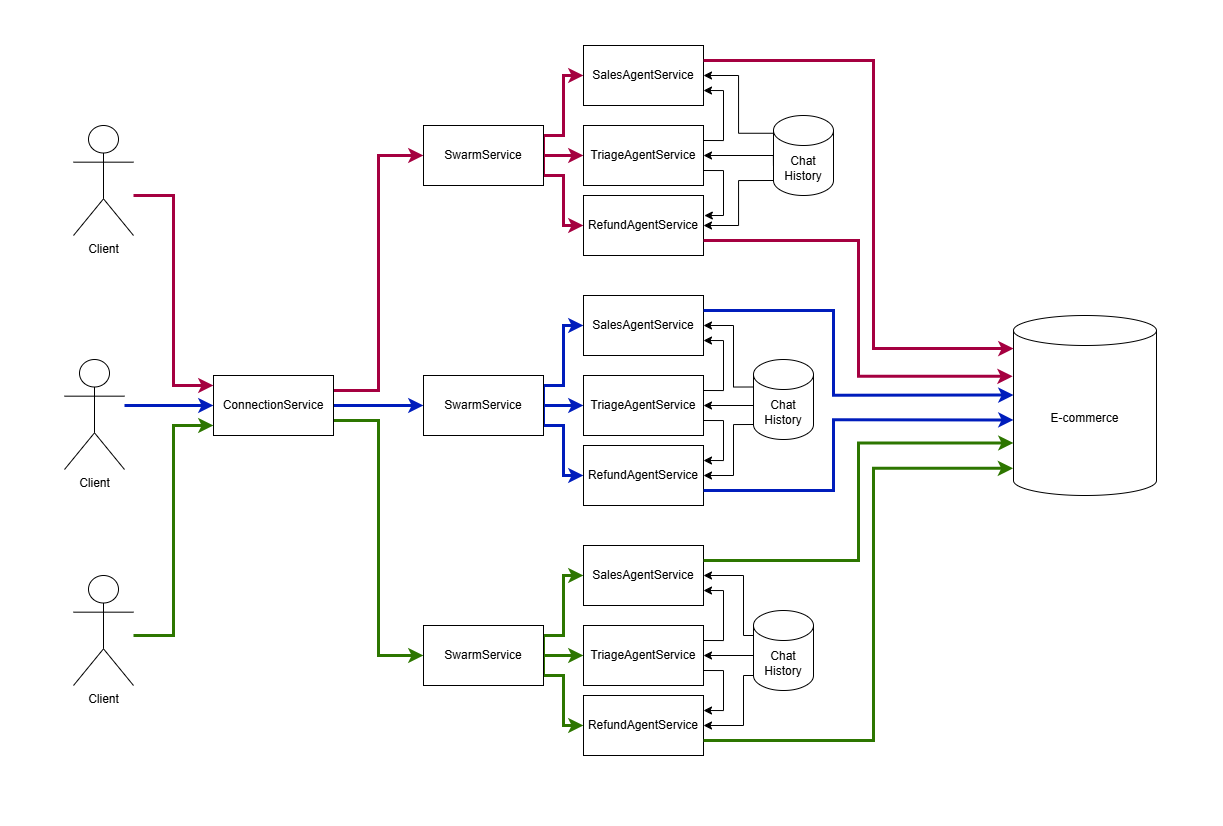
|
|
10
10
|
|
|
11
|
-
|
|
12
|
-
npm install agent-swarm-kit
|
|
13
|
-
```
|
|
14
|
-
|
|
15
|
-
## The Idea
|
|
16
|
-
|
|
17
|
-
1. Several chatgpt sessions (agents) [execute tool calls](https://ollama.com/blog/tool-support). Each agent can use different model, for example, [mistral 7b](https://ollama.com/library/mistral) for small talk, [nemotron](https://ollama.com/library/nemotron) for business conversation
|
|
18
|
-
|
|
19
|
-
2. The agent swarm navigate messages to the active chatgpt session (agent) for each `WebSocket` channel [by using `clientId` url parameter](src/routes/session.ts#L5)
|
|
20
|
-
|
|
21
|
-
3. The active chatgpt session (agent) in the swarm could be changed [by executing function tool](https://platform.openai.com/docs/assistants/tools/function-calling)
|
|
22
|
-
|
|
23
|
-
4. Each client sessions [share the same chat message history](https://platform.openai.com/docs/api-reference/messages/getMessage) for all agents. Each client chat history keep the last 25 messages with rotation. Only `assistant` and `user` messages are shared between chatgpt sessions (agents), the `system` and `tool` messages are agent-scoped so each agent knows only those tools related to It. As a result, each chatgpt session (agent) has it's [unique system prompt](https://platform.openai.com/docs/api-reference/messages/createMessage#messages-createmessage-role)
|
|
24
|
-
|
|
25
|
-
5. If the agent output do not pass the validation (not existing tool call, tool call with invalid arguments, empty output, XML tags in output or JSON in output by default), the resque algorithm will try to fix the model. At first it will hide the previos messeges from a model, if this will not help, it return a placeholder like `Sorry, I missed that. Could you say it again?`
|
|
26
|
-
|
|
27
|
-
## Test Cases
|
|
28
|
-
|
|
29
|
-
### Validation Test Cases
|
|
30
|
-
|
|
31
|
-
1. **Passes validation when all dependencies are provided**
|
|
32
|
-
- Tests if validation passes when all dependencies are present.
|
|
33
|
-
|
|
34
|
-
2. **Fails validation when swarm is missing**
|
|
35
|
-
- Tests if validation fails when the swarm is missing.
|
|
36
|
-
|
|
37
|
-
3. **Fails validation when completion is missing**
|
|
38
|
-
- Tests if validation fails when the completion is missing.
|
|
39
|
-
|
|
40
|
-
4. **Fails validation when agent is missing**
|
|
41
|
-
- Tests if validation fails when the agent is missing.
|
|
42
|
-
|
|
43
|
-
5. **Fails validation when tool is missing**
|
|
44
|
-
- Tests if validation fails when the tool is missing.
|
|
45
|
-
|
|
46
|
-
6. **Fails validation when swarm's default agent is not in the list**
|
|
47
|
-
- Tests if validation fails when the swarm's default agent is not included in the list.
|
|
48
|
-
|
|
49
|
-
### Model Recovery Test Cases
|
|
50
|
-
|
|
51
|
-
7. **Rescues model on non-existing tool call**
|
|
52
|
-
- Tests if the model can recover when a non-existing tool is called.
|
|
11
|
+
---
|
|
53
12
|
|
|
54
|
-
|
|
55
|
-
- Tests if the model can recover when the output is empty.
|
|
13
|
+
## ✨ Why Choose Agent Swarm Kit?
|
|
56
14
|
|
|
57
|
-
|
|
58
|
-
|
|
15
|
+
- **Multi-Agent Collaboration**: Orchestrate multiple AI agents, each with unique roles—like triage, sales, or refunds—working as a team.
|
|
16
|
+
- **Lightweight & Flexible**: Unlike bulky frameworks, our API is simple and delegates prompt engineering to your team.
|
|
17
|
+
- **Framework-Agnostic**: Works with any AI model—OpenAI, Ollama, Mistral, Nemotron, you name it!
|
|
18
|
+
- **Robust Validation**: Built-in checks ensure tools, agents, and outputs are always on point.
|
|
19
|
+
- **Real-Time Interaction**: Supports message scheduling and WebSocket channels for dynamic user input.
|
|
59
20
|
|
|
60
|
-
|
|
61
|
-
- Tests if a placeholder is returned when the rescue algorithm fails.
|
|
21
|
+
---
|
|
62
22
|
|
|
63
|
-
|
|
23
|
+
## 🚀 Getting Started
|
|
64
24
|
|
|
65
|
-
|
|
66
|
-
- Tests if the system navigates to the sales agent upon request.
|
|
25
|
+
### Installation
|
|
67
26
|
|
|
68
|
-
|
|
69
|
-
- Tests if the system navigates to the refund agent upon request.
|
|
27
|
+
Get up and running in seconds:
|
|
70
28
|
|
|
71
|
-
|
|
72
|
-
|
|
73
|
-
|
|
74
|
-
- Tests if the system avoids deadlock when commitToolOutput is not executed before navigation.
|
|
75
|
-
|
|
76
|
-
14. **Avoids deadlock when commitToolOutput is executed in parallel with next completion**
|
|
77
|
-
- Tests if the system avoids deadlock when commitToolOutput is executed in parallel with the next completion.
|
|
78
|
-
|
|
79
|
-
### Agent Execution Test Cases
|
|
80
|
-
|
|
81
|
-
15. **Ignores execution due to obsolete agent**
|
|
82
|
-
- Tests if the system ignores execution due to an obsolete agent.
|
|
83
|
-
|
|
84
|
-
16. **Ignores commitToolOutput due to obsolete agent**
|
|
85
|
-
- Tests if the system ignores commitToolOutput due to an obsolete agent.
|
|
86
|
-
|
|
87
|
-
17. **Ignores commitSystemMessage due to obsolete agent**
|
|
88
|
-
- Tests if the system ignores commitSystemMessage due to an obsolete agent.
|
|
89
|
-
|
|
90
|
-
### Connection Disposal Test Cases
|
|
91
|
-
|
|
92
|
-
18. **Disposes connections for session function**
|
|
93
|
-
- Tests if the system disposes of connections for the session function.
|
|
94
|
-
|
|
95
|
-
19. **Disposes connections for makeConnection function**
|
|
96
|
-
- Tests if the system disposes of connections for the makeConnection function.
|
|
97
|
-
|
|
98
|
-
20. **Disposes connections for complete function**
|
|
99
|
-
- Tests if the system disposes of connections for the complete function.
|
|
100
|
-
|
|
101
|
-
### Additional System Behavior Test Cases
|
|
102
|
-
|
|
103
|
-
21. **Uses different completions on multiple agents**
|
|
104
|
-
- Tests if the system uses different completions for multiple agents.
|
|
105
|
-
|
|
106
|
-
22. **Clears history for similar clientId after each parallel complete call**
|
|
107
|
-
- Tests if the system clears history for similar clientId after each parallel complete call.
|
|
108
|
-
|
|
109
|
-
23. **Orchestrates swarms for each connection**
|
|
110
|
-
- Tests if the system orchestrates swarms for each connection.
|
|
111
|
-
|
|
112
|
-
24. **Queues user messages in connection**
|
|
113
|
-
- Tests if the system queues user messages in connection.
|
|
29
|
+
```bash
|
|
30
|
+
npm install agent-swarm-kit
|
|
31
|
+
```
|
|
114
32
|
|
|
115
|
-
|
|
116
|
-
- Tests if the system allows server-side emit for makeConnection.
|
|
33
|
+
### Quick Example
|
|
117
34
|
|
|
118
|
-
|
|
35
|
+
Here’s a taste of what `agent-swarm-kit` can do—create a swarm with a triage agent that navigates to specialized agents:
|
|
119
36
|
|
|
120
|
-
```
|
|
37
|
+
```typescript
|
|
121
38
|
import {
|
|
122
39
|
addAgent,
|
|
123
40
|
addCompletion,
|
|
@@ -163,7 +80,7 @@ const MOCK_COMPLETION = addCompletion({
|
|
|
163
80
|
* @see https://github.com/tripolskypetr/agent-swarm-kit/tree/master/test
|
|
164
81
|
*/
|
|
165
82
|
getCompletion: async ({ messages, tools }) => {
|
|
166
|
-
return ollama.chat({
|
|
83
|
+
return await ollama.chat({
|
|
167
84
|
model: CC_OLLAMA_CHAT_MODEL,
|
|
168
85
|
keep_alive: "1h",
|
|
169
86
|
messages,
|
|
@@ -201,7 +118,6 @@ const TEST_SWARM = addSwarm({
|
|
|
201
118
|
|
|
202
119
|
...
|
|
203
120
|
|
|
204
|
-
|
|
205
121
|
app.get("/api/v1/session/:clientId", upgradeWebSocket((ctx) => {
|
|
206
122
|
const clientId = ctx.req.param("clientId");
|
|
207
123
|
|
|
@@ -222,48 +138,178 @@ app.get("/api/v1/session/:clientId", upgradeWebSocket((ctx) => {
|
|
|
222
138
|
|
|
223
139
|
The feature of this library is dependency inversion for agents injection. The agents are being lazy loaded during runtime, so you can declare them in separate modules and connect them to swarm with a string constant
|
|
224
140
|
|
|
225
|
-
```
|
|
141
|
+
```typescript
|
|
142
|
+
export enum ToolName {
|
|
143
|
+
TestTool = "test-tool",
|
|
144
|
+
}
|
|
145
|
+
|
|
146
|
+
export enum AgentName {
|
|
147
|
+
TestAgent = "test-agent",
|
|
148
|
+
}
|
|
149
|
+
|
|
150
|
+
export enum CompletionName {
|
|
151
|
+
TestCompletion = "test-completion"
|
|
152
|
+
}
|
|
153
|
+
|
|
154
|
+
export enum SwarmName {
|
|
155
|
+
TestSwarm = "test-swarm"
|
|
156
|
+
}
|
|
157
|
+
|
|
158
|
+
...
|
|
226
159
|
|
|
227
160
|
addTool({
|
|
228
|
-
toolName:
|
|
161
|
+
toolName: ToolName.TestTool
|
|
229
162
|
...
|
|
230
163
|
})
|
|
231
164
|
|
|
232
165
|
addAgent({
|
|
233
|
-
agentName:
|
|
234
|
-
completion:
|
|
166
|
+
agentName: AgentName.TestAgent,
|
|
167
|
+
completion: CompletionName.TestCompletion,
|
|
235
168
|
prompt: "...",
|
|
236
|
-
tools: [
|
|
169
|
+
tools: [ToolName.TestTool],
|
|
237
170
|
});
|
|
238
171
|
|
|
239
172
|
addSwarm({
|
|
240
|
-
agentList: [
|
|
241
|
-
defaultAgent:
|
|
242
|
-
swarmName:
|
|
173
|
+
agentList: [AgentName.TestAgent],
|
|
174
|
+
defaultAgent: AgentName.TestAgent,
|
|
175
|
+
swarmName: SwarmName.TestSwarm,
|
|
243
176
|
});
|
|
244
177
|
|
|
245
|
-
const { complete, dispose } = session(clientId,
|
|
178
|
+
const { complete, dispose } = session(clientId, SwarmName.TestSwarm)
|
|
246
179
|
```
|
|
247
180
|
|
|
248
|
-
|
|
181
|
+
---
|
|
182
|
+
|
|
183
|
+
## 🌟 Key Features
|
|
184
|
+
|
|
185
|
+
- **Agent Orchestration**: Seamlessly switch between agents (e.g., triage → sales) with a single tool call.
|
|
186
|
+
- **Shared History**: Agents share a rotating 25-message history, scoped to `assistant` and `user` roles.
|
|
187
|
+
- **Custom Tools**: Define tools with validation and execution logic tailored to your needs.
|
|
188
|
+
- **Model Recovery**: Automatically rescues invalid outputs with smart fallbacks like "Sorry, I missed that."
|
|
189
|
+
- **Dependency Inversion**: Lazy-load agents at runtime for modular, scalable designs.
|
|
190
|
+
|
|
191
|
+
---
|
|
192
|
+
|
|
193
|
+
## 🎯 Use Cases
|
|
194
|
+
|
|
195
|
+
- **Workflow Automation**: Automate customer support with triage, sales, and refund agents.
|
|
196
|
+
- **Collaborative AI**: Build systems where agents solve problems together.
|
|
197
|
+
- **Task Distribution**: Assign specialized tasks to dedicated agents.
|
|
198
|
+
- **Chatbots & Beyond**: Create dynamic, multi-role conversational systems.
|
|
199
|
+
|
|
200
|
+
---
|
|
201
|
+
|
|
202
|
+
## 📖 API Highlights
|
|
203
|
+
|
|
204
|
+
- **`addAgent`**: Define agents with custom prompts, tools, and completions.
|
|
205
|
+
- **`addSwarm`**: Group agents into a coordinated network.
|
|
206
|
+
- **`session`**: Start a client session with real-time message handling.
|
|
207
|
+
- **`addTool`**: Create reusable tools with validation and execution logic.
|
|
208
|
+
- **`Storage.take`**: Search and retrieve data using embeddings (e.g., vector search).
|
|
209
|
+
|
|
210
|
+
Check out the **[API Reference](https://github.com/tripolskypetr/agent-swarm-kit/blob/master/docs/api-reference.md)** for more!
|
|
211
|
+
|
|
212
|
+
---
|
|
213
|
+
|
|
214
|
+
## 🛠 Advanced Example: Vector Search with Embeddings
|
|
215
|
+
|
|
216
|
+
Integrate vector search with embeddings for smarter agents:
|
|
217
|
+
|
|
218
|
+
```typescript
|
|
219
|
+
import { addAgent, addSwarm, addStorage, addEmbedding, session, Storage } from "agent-swarm-kit";
|
|
220
|
+
import { Ollama } from "ollama";
|
|
221
|
+
|
|
222
|
+
const ollama = new Ollama();
|
|
223
|
+
|
|
224
|
+
// Define an embedding with similarity calculation
|
|
225
|
+
const NOMIC_EMBEDDING = addEmbedding({
|
|
226
|
+
embeddingName: "nomic_embedding",
|
|
227
|
+
calculateSimilarity: (a, b) => {
|
|
228
|
+
return tidy(() => {
|
|
229
|
+
const tensorA = tensor1d(a);
|
|
230
|
+
const tensorB = tensor1d(b);
|
|
231
|
+
const dotProduct = sum(mul(tensorA, tensorB));
|
|
232
|
+
const normA = norm(tensorA);
|
|
233
|
+
const normB = norm(tensorB);
|
|
234
|
+
const cosineData = div(dotProduct, mul(normA, normB)).dataSync();
|
|
235
|
+
const cosineSimilarity = cosineData[0];
|
|
236
|
+
return cosineSimilarity;
|
|
237
|
+
});
|
|
238
|
+
},
|
|
239
|
+
createEmbedding: async (text) => {
|
|
240
|
+
const { embedding } = await ollama.embeddings({
|
|
241
|
+
model: "nomic-embed-text",
|
|
242
|
+
prompt: text,
|
|
243
|
+
});
|
|
244
|
+
return embedding;
|
|
245
|
+
},
|
|
246
|
+
});
|
|
247
|
+
|
|
248
|
+
// Set up storage with sample data
|
|
249
|
+
const TEST_STORAGE = addStorage({
|
|
250
|
+
storageName: "test_storage",
|
|
251
|
+
embedding: NOMIC_EMBEDDING,
|
|
252
|
+
createIndex: ({ description }) => description,
|
|
253
|
+
getData: () => JSON.parse(readFileSync("./data.json", "utf8")).slice(0, 100),
|
|
254
|
+
});
|
|
255
|
+
|
|
256
|
+
// Create an agent with storage
|
|
257
|
+
const TEST_AGENT = addAgent({
|
|
258
|
+
agentName: "test_agent",
|
|
259
|
+
completion: {/* completion config */},
|
|
260
|
+
prompt: "Search and assist.",
|
|
261
|
+
storages: [TEST_STORAGE],
|
|
262
|
+
});
|
|
263
|
+
|
|
264
|
+
// Build the swarm
|
|
265
|
+
const TEST_SWARM = addSwarm({
|
|
266
|
+
swarmName: "test_swarm",
|
|
267
|
+
agentList: [TEST_AGENT],
|
|
268
|
+
defaultAgent: TEST_AGENT,
|
|
269
|
+
});
|
|
270
|
+
|
|
271
|
+
// Search with a client session
|
|
272
|
+
const { complete } = session("client-123", TEST_SWARM);
|
|
273
|
+
complete("I need a refund!").then(console.log);
|
|
274
|
+
|
|
275
|
+
// Use vector search in a tool call
|
|
276
|
+
Storage.take("reduce pain, fever", 1, "client-xyz", TEST_AGENT, TEST_STORAGE)
|
|
277
|
+
.then(result => console.log("Found:", result));
|
|
278
|
+
```
|
|
279
|
+
|
|
280
|
+
## ❓ Orchestration Principles
|
|
281
|
+
|
|
282
|
+
1. Several chatgpt sessions (agents) [execute tool calls](https://ollama.com/blog/tool-support). Each agent can use different model, for example, [mistral 7b](https://ollama.com/library/mistral) for small talk, [nemotron](https://ollama.com/library/nemotron) for business conversation
|
|
283
|
+
|
|
284
|
+
2. The agent swarm navigate messages to the active chatgpt session (agent) for each `WebSocket` channel [by using `clientId` url parameter](src/routes/session.ts#L5)
|
|
285
|
+
|
|
286
|
+
3. The active chatgpt session (agent) in the swarm could be changed [by executing function tool](https://platform.openai.com/docs/assistants/tools/function-calling)
|
|
287
|
+
|
|
288
|
+
4. Each client sessions [share the same chat message history](https://platform.openai.com/docs/api-reference/messages/getMessage) for all agents. Each client chat history keep the last 25 messages with rotation. Only `assistant` and `user` messages are shared between chatgpt sessions (agents), the `system` and `tool` messages are agent-scoped so each agent knows only those tools related to It. As a result, each chatgpt session (agent) has it's [unique system prompt](https://platform.openai.com/docs/api-reference/messages/createMessage#messages-createmessage-role)
|
|
289
|
+
|
|
290
|
+
5. If the agent output do not pass the validation (not existing tool call, tool call with invalid arguments, empty output, XML tags in output or JSON in output by default), the resque algorithm will try to fix the model. At first it will hide the previos messeges from a model, if this will not help, it return a placeholder like `Sorry, I missed that. Could you say it again?`
|
|
291
|
+
|
|
292
|
+
|
|
293
|
+
---
|
|
294
|
+
|
|
295
|
+
## ✅ Tested & Reliable
|
|
296
|
+
|
|
297
|
+
`agent-swarm-kit` comes with a robust test suite covering:
|
|
298
|
+
- **Validation**: Ensures all components (agents, tools, swarms) are properly configured.
|
|
299
|
+
- **Recovery**: Handles edge cases like invalid tool calls or empty outputs.
|
|
300
|
+
- **Navigation**: Smoothly switches between agents without deadlocks.
|
|
301
|
+
- **Performance**: Efficient connection disposal and history management.
|
|
302
|
+
|
|
303
|
+
See the **[Test Cases](#test-cases)** section in the docs for details.
|
|
304
|
+
|
|
305
|
+
---
|
|
306
|
+
|
|
307
|
+
## 🤝 Contribute
|
|
249
308
|
|
|
250
|
-
|
|
309
|
+
We’d love your input! Fork the repo, submit a PR, or open an issue on **[GitHub](https://github.com/tripolskypetr/agent-swarm-kit)**.
|
|
251
310
|
|
|
252
|
-
|
|
253
|
-
- Create and manage complex agent networks
|
|
254
|
-
- Enable agents to execute tasks, communicate, and collaborate
|
|
255
|
-
- Provide robust validation for tools, agents, and sessions
|
|
256
|
-
- Track agent interactions and maintain comprehensive history
|
|
257
|
-
- Support seamless message passing and output tracking
|
|
311
|
+
---
|
|
258
312
|
|
|
259
|
-
|
|
260
|
-
- Agent Management: Create, validate, and connect agents
|
|
261
|
-
- Session Handling: Execute commands across agent networks
|
|
262
|
-
- Tool Validation: Ensure agent tools calls meet argument requirements
|
|
263
|
-
- History Tracking: Log and retrieve agent interactions
|
|
313
|
+
## 📜 License
|
|
264
314
|
|
|
265
|
-
|
|
266
|
-
- AI-powered workflow automation
|
|
267
|
-
- Collaborative problem-solving systems
|
|
268
|
-
- Complex task distribution across specialized agents
|
|
269
|
-
- Intelligent system design with modular agent architecture
|
|
315
|
+
MIT © [tripolskypetr](https://github.com/tripolskypetr)
|