admob-mcp-server 0.1.0
This diff represents the content of publicly available package versions that have been released to one of the supported registries. The information contained in this diff is provided for informational purposes only and reflects changes between package versions as they appear in their respective public registries.
- package/LICENSE +21 -0
- package/README.ko.md +410 -0
- package/README.md +409 -0
- package/dist/admob/client.js +21 -0
- package/dist/admob/constants.js +86 -0
- package/dist/admob/reports.js +81 -0
- package/dist/auth/index.js +70 -0
- package/dist/auth/oauth-flow.js +123 -0
- package/dist/config.js +115 -0
- package/dist/index.js +30 -0
- package/dist/prompts.js +46 -0
- package/dist/resources.js +60 -0
- package/dist/server.js +33 -0
- package/dist/toolsets/accounts.js +33 -0
- package/dist/toolsets/adunits.js +62 -0
- package/dist/toolsets/apps.js +52 -0
- package/dist/toolsets/common.js +49 -0
- package/dist/toolsets/index.js +17 -0
- package/dist/toolsets/mediation.js +259 -0
- package/dist/toolsets/reports.js +108 -0
- package/dist/version.js +4 -0
- package/package.json +66 -0
package/README.md
ADDED
|
@@ -0,0 +1,409 @@
|
|
|
1
|
+
# AdMob MCP Server
|
|
2
|
+
|
|
3
|
+
[](https://www.npmjs.com/package/admob-mcp-server)
|
|
4
|
+
[](https://github.com/ParkSangGwon/admob-mcp-server/actions/workflows/ci.yml)
|
|
5
|
+
[](LICENSE)
|
|
6
|
+
|
|
7
|
+
**English** | [한국어](README.ko.md)
|
|
8
|
+
|
|
9
|
+
Ask your AI assistant about your AdMob apps and earnings — in plain language:
|
|
10
|
+
|
|
11
|
+
> - "How much did my apps earn in the last 7 days, broken down by country?"
|
|
12
|
+
> - "Which mediation ad source had the best eCPM this month?"
|
|
13
|
+
> - "Compare the RPM of my banner vs. rewarded ad units."
|
|
14
|
+
> - "Create a rewarded ad unit for my new game."
|
|
15
|
+
|
|
16
|
+
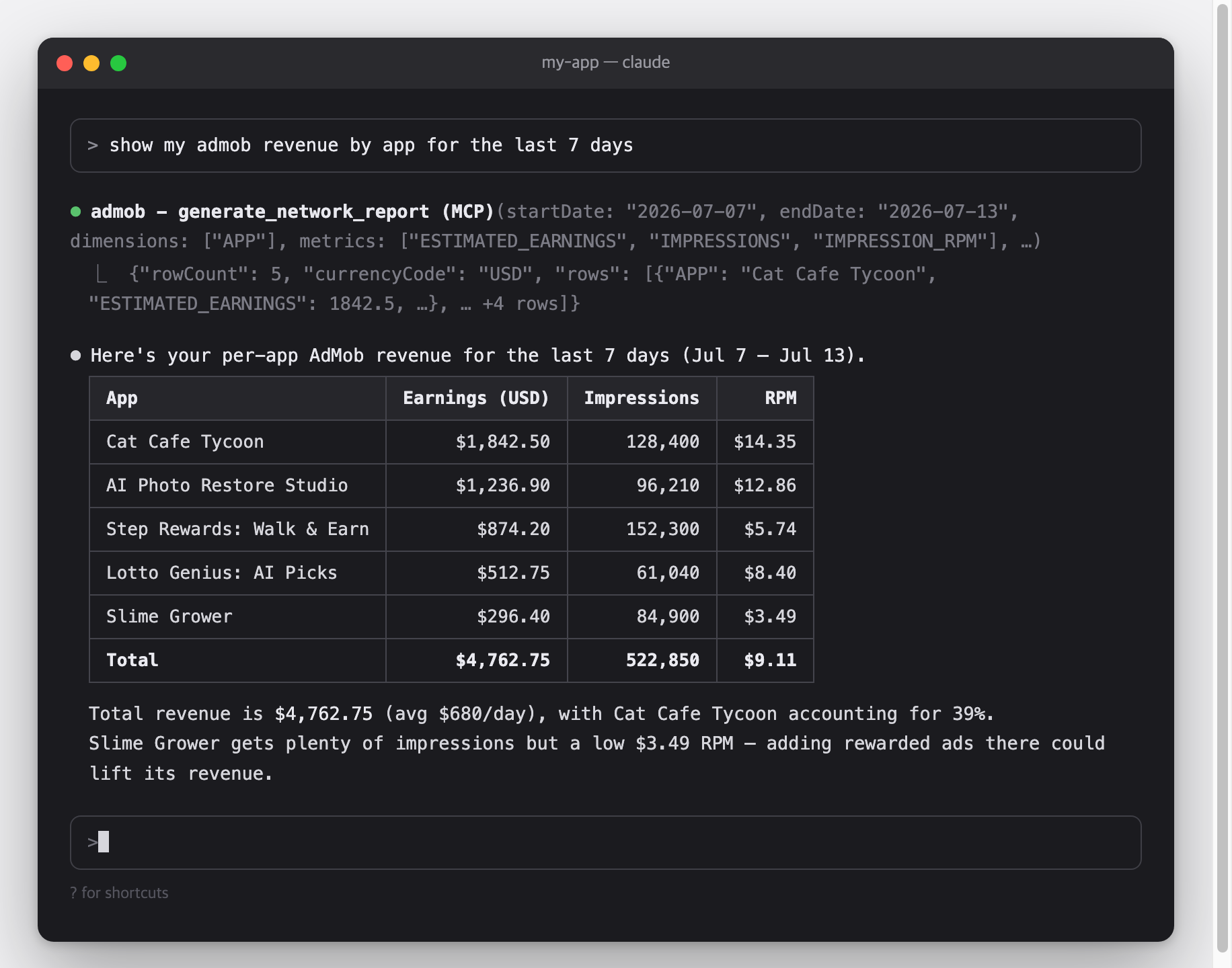
|
|
17
|
+
|
|
18
|
+
This is a [Model Context Protocol (MCP)](https://modelcontextprotocol.io) server for the [Google AdMob API](https://developers.google.com/admob/api).\
|
|
19
|
+
It works with Claude Code, Claude Desktop, Cursor, Gemini CLI, and any other MCP-capable AI client.
|
|
20
|
+
|
|
21
|
+
## Architecture
|
|
22
|
+
|
|
23
|
+
```mermaid
|
|
24
|
+
flowchart LR
|
|
25
|
+
C["MCP client<br/>Claude Code · Claude Desktop · Cursor · Gemini CLI"]
|
|
26
|
+
|
|
27
|
+
subgraph S["admob-mcp-server — runs on your machine"]
|
|
28
|
+
direction TB
|
|
29
|
+
T["18 tools in 5 toolsets<br/>accounts · apps · adunits · reports · mediation<br/>(filtered by --toolsets / --read-only)"]
|
|
30
|
+
A["Credential resolver<br/>env vars → token.json → gcloud ADC"]
|
|
31
|
+
R["Report flattener<br/>chunk stream → rows · micros → currency"]
|
|
32
|
+
end
|
|
33
|
+
|
|
34
|
+
G["Google AdMob API<br/>v1beta"]
|
|
35
|
+
|
|
36
|
+
C <-->|"MCP over stdio"| T
|
|
37
|
+
T --> A
|
|
38
|
+
A <-->|"OAuth 2.0 / HTTPS"| G
|
|
39
|
+
G -.->|"report chunks"| R
|
|
40
|
+
R -.-> T
|
|
41
|
+
```
|
|
42
|
+
|
|
43
|
+
Credentials and revenue data travel only between your machine and Google — there is no third-party server in between.
|
|
44
|
+
|
|
45
|
+
## Features
|
|
46
|
+
|
|
47
|
+
- **Full AdMob API v1beta coverage** — 18 tools across accounts, apps, ad units, reports, and mediation, including write operations the v1 API doesn't have
|
|
48
|
+
- **Reports made readable** — streaming report responses are flattened into simple row tables, and monetary values (micros) are converted to real currency units
|
|
49
|
+
- **Read-only mode when you want it** — pass `--read-only` to hide all write tools (create/update) and issue tokens that can't modify anything
|
|
50
|
+
- **Toolsets** — enable only the tool groups you need, e.g. `--toolsets reports,accounts`
|
|
51
|
+
- **Three authentication options** — one-command browser sign-in (`npx admob-mcp-server auth`), environment-variable refresh token, or gcloud Application Default Credentials
|
|
52
|
+
- **Built-in analysis prompts** and report-spec reference resources
|
|
53
|
+
|
|
54
|
+
## Setup at a glance
|
|
55
|
+
|
|
56
|
+
One-time setup, roughly 10 minutes:
|
|
57
|
+
|
|
58
|
+
| Step | What you do | Where |
|
|
59
|
+
| ------------------------------------------------------------ | ----------------------------------------------------------------- | -------- |
|
|
60
|
+
| [1. Google Cloud setup](#part-1--google-cloud-setup) | Register a personal "app" so Google lets you access your own data | browser |
|
|
61
|
+
| [2. Sign in](#part-2--sign-in) | Run one command and log in with Google | terminal |
|
|
62
|
+
| [3. Connect your AI client](#part-3--connect-your-ai-client) | Add one config entry and restart the client | terminal |
|
|
63
|
+
|
|
64
|
+
### Requirements
|
|
65
|
+
|
|
66
|
+
- **Node.js 18 or newer** — check with `node --version`; if missing, install from [nodejs.org](https://nodejs.org)
|
|
67
|
+
- An [AdMob](https://admob.google.com) account and the Google account that owns it
|
|
68
|
+
|
|
69
|
+
## Setup
|
|
70
|
+
|
|
71
|
+
### Part 1 — Google Cloud setup
|
|
72
|
+
|
|
73
|
+
Why is this needed?\
|
|
74
|
+
The AdMob API has no simple API keys — Google requires every program that accesses your data to be registered as an "OAuth app".\
|
|
75
|
+
Here you register a personal one that only you will use.\
|
|
76
|
+
It's free and needs no billing setup.
|
|
77
|
+
|
|
78
|
+
1. **Create (or select) a Google Cloud project**: [console.cloud.google.com/projectcreate](https://console.cloud.google.com/projectcreate) — any name works; reusing an existing project is fine too.
|
|
79
|
+
2. **Enable the AdMob API**: [console.cloud.google.com/apis/library/admob.googleapis.com](https://console.cloud.google.com/apis/library/admob.googleapis.com) → check that your project is selected in the top bar → **Enable**.
|
|
80
|
+
3. **Configure the OAuth consent screen**: [console.cloud.google.com/auth/overview](https://console.cloud.google.com/auth/overview) — the first visit opens a short wizard:
|
|
81
|
+
- App name: anything (e.g. `admob-mcp`), and your email as the support/contact email
|
|
82
|
+
- Audience: **External**
|
|
83
|
+
- Finish the wizard — you do **not** need to submit the app for Google's verification
|
|
84
|
+
- Then go to **Audience → Test users → Add users** and add **the Google account that owns your AdMob account**
|
|
85
|
+
4. **Create an OAuth client**: [console.cloud.google.com/apis/credentials](https://console.cloud.google.com/apis/credentials) → **Create credentials → OAuth client ID**
|
|
86
|
+
- Application type: **Desktop app**
|
|
87
|
+
- After creating it, click **Download JSON** — you'll use this file in Part 2
|
|
88
|
+
|
|
89
|
+
> [!WARNING]
|
|
90
|
+
> While the consent screen is in **Testing** mode, Google expires sign-ins after **7 days**, so you'll need to re-run the sign-in weekly.\
|
|
91
|
+
> To stop that, publish the app (**Audience → Publish app**).\
|
|
92
|
+
> Publishing for your own use doesn't require Google's verification — you'll just see an "unverified app" warning during sign-in, which is expected.
|
|
93
|
+
|
|
94
|
+
### Part 2 — Sign in
|
|
95
|
+
|
|
96
|
+
Move the JSON file you downloaded to where the server looks for it, then run the sign-in command:
|
|
97
|
+
|
|
98
|
+
```bash
|
|
99
|
+
mkdir -p ~/.admob-mcp
|
|
100
|
+
mv ~/Downloads/client_secret_*.json ~/.admob-mcp/oauth_client.json
|
|
101
|
+
|
|
102
|
+
npx admob-mcp-server auth
|
|
103
|
+
```
|
|
104
|
+
|
|
105
|
+
(On Windows, move the file to `C:\Users\<you>\.admob-mcp\oauth_client.json` in Explorer, then run the `npx` command.)
|
|
106
|
+
|
|
107
|
+
Your browser opens.\
|
|
108
|
+
Pick **the Google account that owns your AdMob account** and allow access.\
|
|
109
|
+
If you see a **"Google hasn't verified this app"** warning, that's your own app from Part 1 — click "Continue".\
|
|
110
|
+
When the terminal prints `Setup complete`, your sign-in is saved to `~/.admob-mcp/token.json` and reused from then on.
|
|
111
|
+
|
|
112
|
+
By default the sign-in covers every tool, including write tools.\
|
|
113
|
+
If you only want reporting access, run `npx admob-mcp-server auth --read-only` instead.
|
|
114
|
+
|
|
115
|
+
What the `auth` command does:
|
|
116
|
+
|
|
117
|
+
```mermaid
|
|
118
|
+
sequenceDiagram
|
|
119
|
+
autonumber
|
|
120
|
+
participant T as Terminal
|
|
121
|
+
participant S as admob-mcp-server
|
|
122
|
+
participant B as Browser
|
|
123
|
+
participant G as Google
|
|
124
|
+
|
|
125
|
+
T->>S: npx admob-mcp-server auth
|
|
126
|
+
S->>S: read ~/.admob-mcp/oauth_client.json
|
|
127
|
+
S->>B: open consent URL (loopback redirect, random port)
|
|
128
|
+
B->>G: sign in & allow scopes
|
|
129
|
+
G-->>S: authorization code → refresh token
|
|
130
|
+
S->>S: save ~/.admob-mcp/token.json (reused for every later call)
|
|
131
|
+
```
|
|
132
|
+
|
|
133
|
+
<details>
|
|
134
|
+
<summary><b>Advanced: environment variables (headless / CI)</b></summary>
|
|
135
|
+
|
|
136
|
+
If you already have a refresh token, no files are needed (write tools additionally need the token to cover the `admob.monetization` scope):
|
|
137
|
+
|
|
138
|
+
```bash
|
|
139
|
+
export GOOGLE_CLIENT_ID="....apps.googleusercontent.com"
|
|
140
|
+
export GOOGLE_CLIENT_SECRET="..."
|
|
141
|
+
export GOOGLE_REFRESH_TOKEN="..."
|
|
142
|
+
```
|
|
143
|
+
|
|
144
|
+
</details>
|
|
145
|
+
|
|
146
|
+
<details>
|
|
147
|
+
<summary><b>Advanced: gcloud Application Default Credentials</b></summary>
|
|
148
|
+
|
|
149
|
+
The same pattern Google's official Analytics/Ads MCP servers use:
|
|
150
|
+
|
|
151
|
+
```bash
|
|
152
|
+
gcloud auth application-default login \
|
|
153
|
+
--scopes=https://www.googleapis.com/auth/admob.readonly,https://www.googleapis.com/auth/admob.report,https://www.googleapis.com/auth/admob.monetization,https://www.googleapis.com/auth/cloud-platform \
|
|
154
|
+
--client-id-file=path/to/oauth_client.json
|
|
155
|
+
```
|
|
156
|
+
|
|
157
|
+
Drop the `admob.monetization` scope if you only want reporting access.
|
|
158
|
+
|
|
159
|
+
</details>
|
|
160
|
+
|
|
161
|
+
Credential resolution order: **environment variables → `token.json` (from `auth`) → ADC**.
|
|
162
|
+
|
|
163
|
+
### Part 3 — Connect your AI client
|
|
164
|
+
|
|
165
|
+
Pick your client below.\
|
|
166
|
+
MCP servers are loaded when the client starts, so **restart the client** after adding the config.
|
|
167
|
+
|
|
168
|
+
**Claude Code**
|
|
169
|
+
|
|
170
|
+
```bash
|
|
171
|
+
claude mcp add admob -- npx -y admob-mcp-server
|
|
172
|
+
```
|
|
173
|
+
|
|
174
|
+
Verify with `claude mcp list` — you should see `admob: ... - ✔ Connected`.
|
|
175
|
+
|
|
176
|
+
**Claude Desktop** — open **Settings → Developer → Edit Config**, which opens `claude_desktop_config.json` (macOS: `~/Library/Application Support/Claude/`, Windows: `%APPDATA%\Claude\`), and add:
|
|
177
|
+
|
|
178
|
+
```json
|
|
179
|
+
{
|
|
180
|
+
"mcpServers": {
|
|
181
|
+
"admob": {
|
|
182
|
+
"command": "npx",
|
|
183
|
+
"args": ["-y", "admob-mcp-server"]
|
|
184
|
+
}
|
|
185
|
+
}
|
|
186
|
+
}
|
|
187
|
+
```
|
|
188
|
+
|
|
189
|
+
Restart the app; the admob tools appear in the tools menu of the chat input.
|
|
190
|
+
|
|
191
|
+
**Cursor** — add the same `mcpServers` block to `~/.cursor/mcp.json`, then check **Settings → MCP** shows admob as enabled.
|
|
192
|
+
|
|
193
|
+
**Gemini CLI** — add the same `mcpServers` block to `~/.gemini/settings.json`, then check with `/mcp` inside the CLI.
|
|
194
|
+
|
|
195
|
+
> [!TIP]
|
|
196
|
+
> If you used the environment-variable sign-in, pass the variables through your client's `env` block (Claude Code: repeat `--env KEY=value` before `--`; JSON configs: add an `"env": { ... }` object next to `"args"`).
|
|
197
|
+
|
|
198
|
+
## Try it
|
|
199
|
+
|
|
200
|
+
You don't call tools yourself — just ask in plain language and the assistant picks the right tools.\
|
|
201
|
+
Some starters:
|
|
202
|
+
|
|
203
|
+
- _"What did my apps earn last week?"_
|
|
204
|
+
- _"Break down this month's revenue by country and app."_
|
|
205
|
+
- _"Which ad format had the highest RPM in the last 30 days?"_
|
|
206
|
+
- _"How is my mediation doing? Compare ad sources by observed eCPM."_
|
|
207
|
+
- _"List my apps and their ad units."_
|
|
208
|
+
- _"Create a rewarded ad unit named 'shop_reward' for my game app."_
|
|
209
|
+
|
|
210
|
+
Most clients ask for your permission before each tool call, so nothing (especially write operations) runs without your approval.
|
|
211
|
+
|
|
212
|
+
## Configuration
|
|
213
|
+
|
|
214
|
+
All configuration is optional — the defaults work for a single AdMob account.
|
|
215
|
+
|
|
216
|
+
### Environment variables
|
|
217
|
+
|
|
218
|
+
| Variable | Description | Default |
|
|
219
|
+
| ------------------------- | ----------------------------------------------------------------------------------------------- | ------------------------------------- |
|
|
220
|
+
| `ADMOB_ACCOUNT` | Publisher ID (`pub-XXXXXXXXXXXXXXXX`). Only needed when your login can access multiple accounts | auto-discovered |
|
|
221
|
+
| `ADMOB_TOOLSETS` | Comma-separated toolsets to enable | all |
|
|
222
|
+
| `ADMOB_READ_ONLY` | `true` to skip write tools | `false` |
|
|
223
|
+
| `ADMOB_CREDENTIALS_DIR` | Directory for `oauth_client.json` / `token.json` | `~/.admob-mcp` |
|
|
224
|
+
| `ADMOB_OAUTH_CLIENT_FILE` | Path to the OAuth client JSON used by `auth` | `<credentials dir>/oauth_client.json` |
|
|
225
|
+
| `GOOGLE_CLIENT_ID` | OAuth client ID (env sign-in; also used by `auth` instead of the JSON file) | — |
|
|
226
|
+
| `GOOGLE_CLIENT_SECRET` | OAuth client secret (env sign-in) | — |
|
|
227
|
+
| `GOOGLE_REFRESH_TOKEN` | OAuth refresh token (env sign-in) | — |
|
|
228
|
+
|
|
229
|
+
### CLI flags
|
|
230
|
+
|
|
231
|
+
| Flag | Description |
|
|
232
|
+
| ---------------------- | -------------------------------------------------------- |
|
|
233
|
+
| `--toolsets <names>` | Same as `ADMOB_TOOLSETS`, e.g. `--toolsets reports,apps` |
|
|
234
|
+
| `--read-only` | Same as `ADMOB_READ_ONLY=true` |
|
|
235
|
+
| `--account <pub-id>` | Same as `ADMOB_ACCOUNT` |
|
|
236
|
+
| `--client-file <path>` | Same as `ADMOB_OAUTH_CLIENT_FILE` (for `auth`) |
|
|
237
|
+
|
|
238
|
+
CLI flags take precedence over environment variables.\
|
|
239
|
+
Flags go after the command in your client config, e.g. `npx -y admob-mcp-server --read-only`.
|
|
240
|
+
|
|
241
|
+
## Tools
|
|
242
|
+
|
|
243
|
+
A "tool" is a function the AI assistant can call on your behalf.\
|
|
244
|
+
Tools are grouped into five toolsets; all are enabled by default, and `--read-only` skips the write tools:
|
|
245
|
+
|
|
246
|
+
| Toolset | Read tools | Write tools (skipped with `--read-only`) |
|
|
247
|
+
| ----------- | ------------------------------------------------------------------------------------ | ---------------------------------------------------------------------------------------------------------------------------------------------- |
|
|
248
|
+
| `accounts` | `list_accounts`, `get_account` | — |
|
|
249
|
+
| `apps` | `list_apps` | `create_app` |
|
|
250
|
+
| `adunits` | `list_ad_units` | `create_ad_unit` |
|
|
251
|
+
| `reports` | `generate_network_report`, `generate_mediation_report`, `generate_campaign_report` | — |
|
|
252
|
+
| `mediation` | `list_ad_sources`, `list_adapters`, `list_mediation_groups`, `list_ad_unit_mappings` | `create_mediation_group`, `update_mediation_group`, `create_ad_unit_mapping`, `create_mediation_ab_experiment`, `stop_mediation_ab_experiment` |
|
|
253
|
+
|
|
254
|
+
Read tools require the `admob.readonly` / `admob.report` scopes; write tools require `admob.monetization` (requested by default during `auth`).
|
|
255
|
+
|
|
256
|
+
### accounts
|
|
257
|
+
|
|
258
|
+
| Tool | Description |
|
|
259
|
+
| --------------- | -------------------------------------------------------------------------- |
|
|
260
|
+
| `list_accounts` | List accessible publisher accounts — use to find your `pub-...` ID |
|
|
261
|
+
| `get_account` | Get account details: publisher ID, reporting currency, reporting time zone |
|
|
262
|
+
|
|
263
|
+
### apps
|
|
264
|
+
|
|
265
|
+
| Tool | Description |
|
|
266
|
+
| ------------ | --------------------------------------------------------------------------------------------- |
|
|
267
|
+
| `list_apps` | List registered apps with app ID, platform, store link, and approval state |
|
|
268
|
+
| `create_app` | Create an app — link a store listing via `appStoreId`, or register manually via `displayName` |
|
|
269
|
+
|
|
270
|
+
### adunits
|
|
271
|
+
|
|
272
|
+
| Tool | Description |
|
|
273
|
+
| ---------------- | --------------------------------------------------------------------------------------------- |
|
|
274
|
+
| `list_ad_units` | List ad units with their IDs, formats, and owning apps |
|
|
275
|
+
| `create_ad_unit` | Create an ad unit (`appId`, `displayName`, `adFormat`, optional `adTypes` / `rewardSettings`) |
|
|
276
|
+
|
|
277
|
+
### reports
|
|
278
|
+
|
|
279
|
+
All report tools take `startDate` / `endDate` (`YYYY-MM-DD`), `metrics`, and optional `dimensions`, `dimensionFilters`, `sortConditions`, `maxReportRows` (default 1000), `currencyCode`.\
|
|
280
|
+
Responses are flat tables; monetary metrics are converted from micros to currency units.
|
|
281
|
+
|
|
282
|
+
| Tool | Description |
|
|
283
|
+
| --------------------------- | ---------------------------------------------------------------------------------------------------- |
|
|
284
|
+
| `generate_network_report` | AdMob Network performance: earnings, impressions, clicks, match rate, RPM, ... |
|
|
285
|
+
| `generate_mediation_report` | Mediation performance across ad sources: earnings, observed eCPM per `AD_SOURCE` / `MEDIATION_GROUP` |
|
|
286
|
+
| `generate_campaign_report` | Cross-promotion campaign stats (last 30 days only): impressions, clicks, installs, cost |
|
|
287
|
+
|
|
288
|
+
Valid dimensions/metrics per report are exposed as MCP resources (reference documents the assistant can read): `admob://reference/network-report-spec`, `mediation-report-spec`, `campaign-report-spec`.
|
|
289
|
+
|
|
290
|
+
### mediation
|
|
291
|
+
|
|
292
|
+
| Tool | Description |
|
|
293
|
+
| -------------------------------- | ------------------------------------------------------------------ |
|
|
294
|
+
| `list_ad_sources` | List available mediation ad sources (ad networks) and their IDs |
|
|
295
|
+
| `list_adapters` | List adapters of an ad source, incl. required configuration keys |
|
|
296
|
+
| `list_mediation_groups` | List mediation groups with targeting and lines (supports `filter`) |
|
|
297
|
+
| `list_ad_unit_mappings` | List third-party placements mapped to an ad unit |
|
|
298
|
+
| `create_ad_unit_mapping` | Map an ad unit to a third-party placement via an adapter |
|
|
299
|
+
| `create_mediation_group` | Create a mediation group (targeting + mediation lines) |
|
|
300
|
+
| `update_mediation_group` | Patch a mediation group using an `updateMask` |
|
|
301
|
+
| `create_mediation_ab_experiment` | Start an A/B experiment on a mediation group |
|
|
302
|
+
| `stop_mediation_ab_experiment` | Stop the experiment, choosing the winning variant |
|
|
303
|
+
|
|
304
|
+
## Prompts
|
|
305
|
+
|
|
306
|
+
Prompts are ready-made analysis requests.\
|
|
307
|
+
Your client surfaces them as slash commands or a prompt picker (e.g. `/top_performing_apps` in Claude Code).\
|
|
308
|
+
All take an optional `days` argument:
|
|
309
|
+
|
|
310
|
+
| Prompt | What it does |
|
|
311
|
+
| --------------------- | ---------------------------------------------------------- |
|
|
312
|
+
| `top_performing_apps` | Ranks your apps by revenue with RPM and match-rate context |
|
|
313
|
+
| `revenue_summary` | Daily revenue trend with anomaly call-outs |
|
|
314
|
+
| `compare_ad_formats` | Compares earnings and efficiency across ad formats |
|
|
315
|
+
|
|
316
|
+
## Security & privacy
|
|
317
|
+
|
|
318
|
+
- The server runs entirely on your computer.\
|
|
319
|
+
Your data flows only between your machine and Google's API — never through any third-party server.
|
|
320
|
+
- Two files are stored locally, both readable only by your user account: `~/.admob-mcp/oauth_client.json` (your OAuth app) and `~/.admob-mcp/token.json` (your sign-in).
|
|
321
|
+
- **To sign out**: delete `~/.admob-mcp/token.json`, and optionally revoke the app's access at [myaccount.google.com/permissions](https://myaccount.google.com/permissions).
|
|
322
|
+
- Worried about accidental changes?\
|
|
323
|
+
Run with `--read-only` — write tools disappear entirely and the sign-in only requests read scopes.
|
|
324
|
+
|
|
325
|
+
## Troubleshooting
|
|
326
|
+
|
|
327
|
+
### Install & connection
|
|
328
|
+
|
|
329
|
+
#### `command not found: npx` / `spawn npx ENOENT`
|
|
330
|
+
|
|
331
|
+
- **Cause**: Node.js is not installed, or your client can't find it.
|
|
332
|
+
- **Fix**: install Node 18+ from [nodejs.org](https://nodejs.org), then restart the client.
|
|
333
|
+
|
|
334
|
+
#### The server doesn't appear in the client
|
|
335
|
+
|
|
336
|
+
- **Cause**: MCP servers load at client startup, or the server fails to start.
|
|
337
|
+
- **Fix**: restart the client first.\
|
|
338
|
+
Then check its MCP status (Claude Code: `claude mcp list`, Gemini CLI: `/mcp`), and make sure `npx -y admob-mcp-server` runs in a terminal without errors.
|
|
339
|
+
|
|
340
|
+
### Sign-in & auth
|
|
341
|
+
|
|
342
|
+
#### "No usable Google credentials found"
|
|
343
|
+
|
|
344
|
+
- **Cause**: sign-in hasn't been set up yet.
|
|
345
|
+
- **Fix**: follow [Part 2 — Sign in](#part-2--sign-in).
|
|
346
|
+
|
|
347
|
+
#### `invalid_grant` / "token has been expired or revoked"
|
|
348
|
+
|
|
349
|
+
- **Cause**: your sign-in expired.\
|
|
350
|
+
With a consent screen in **Testing** mode this happens every 7 days.
|
|
351
|
+
- **Fix**: re-run `npx admob-mcp-server auth`.\
|
|
352
|
+
To stop it recurring, publish the app (**Audience → Publish app**).
|
|
353
|
+
|
|
354
|
+
#### `access_denied` during browser sign-in
|
|
355
|
+
|
|
356
|
+
- **Cause**: the Google account you picked is not a test user of the consent screen.
|
|
357
|
+
- **Fix**: add it under **Audience → Test users**, or publish the app.
|
|
358
|
+
|
|
359
|
+
#### "The publisher could not be authenticated"
|
|
360
|
+
|
|
361
|
+
- **Cause**: the Google account you signed in with has no active AdMob account.
|
|
362
|
+
- **Fix**: re-run `npx admob-mcp-server auth` and pick the account that owns your AdMob account in the account chooser.
|
|
363
|
+
|
|
364
|
+
### API errors
|
|
365
|
+
|
|
366
|
+
#### 403 `PERMISSION_DENIED`
|
|
367
|
+
|
|
368
|
+
- **Cause**: the AdMob API isn't enabled, the wrong Google account is signed in, or the write scope is missing.
|
|
369
|
+
- **Fix**: check the following:
|
|
370
|
+
1. The [AdMob API is enabled](https://console.cloud.google.com/apis/library/admob.googleapis.com) in the same project as your OAuth client
|
|
371
|
+
2. You signed in with the account that owns the AdMob account
|
|
372
|
+
3. For write tools, your token covers `admob.monetization` — tokens from `auth --read-only` can't write; re-run `npx admob-mcp-server auth`
|
|
373
|
+
|
|
374
|
+
#### 429 `RESOURCE_EXHAUSTED`
|
|
375
|
+
|
|
376
|
+
- **Cause**: AdMob API quota hit ([usage limits](https://developers.google.com/admob/api/limits)).
|
|
377
|
+
- **Fix**: retry later, or reduce the request — narrower date range, fewer dimensions.
|
|
378
|
+
|
|
379
|
+
#### "Multiple AdMob accounts found"
|
|
380
|
+
|
|
381
|
+
- **Cause**: your Google login can access several publisher accounts.
|
|
382
|
+
- **Fix**: set `ADMOB_ACCOUNT=pub-...` (find IDs with `list_accounts`).
|
|
383
|
+
|
|
384
|
+
## Development
|
|
385
|
+
|
|
386
|
+
```bash
|
|
387
|
+
git clone https://github.com/ParkSangGwon/admob-mcp-server.git
|
|
388
|
+
cd admob-mcp-server
|
|
389
|
+
npm install
|
|
390
|
+
npm test
|
|
391
|
+
npm run build
|
|
392
|
+
|
|
393
|
+
# debug with the MCP Inspector
|
|
394
|
+
npm run inspect
|
|
395
|
+
```
|
|
396
|
+
|
|
397
|
+
To run a local build in a client, point it at the built entry instead of npx: `node /path/to/admob-mcp-server/dist/index.js`.
|
|
398
|
+
|
|
399
|
+
Releases: pushing a `v*` tag runs CI and publishes to npm with provenance (see `.github/workflows/release.yml`).
|
|
400
|
+
|
|
401
|
+
## Contributing
|
|
402
|
+
|
|
403
|
+
Issues and pull requests are welcome.\
|
|
404
|
+
For larger changes, please open an issue first to discuss the direction.\
|
|
405
|
+
Make sure `npm run lint`, `npm run format:check`, and `npm test` pass.
|
|
406
|
+
|
|
407
|
+
## License
|
|
408
|
+
|
|
409
|
+
[MIT](LICENSE)
|
|
@@ -0,0 +1,21 @@
|
|
|
1
|
+
import { admob } from '@googleapis/admob';
|
|
2
|
+
import { resolveAuth } from '../auth/index.js';
|
|
3
|
+
export async function createAdmobClient(config) {
|
|
4
|
+
const auth = await resolveAuth(config);
|
|
5
|
+
return admob({ version: 'v1beta', auth });
|
|
6
|
+
}
|
|
7
|
+
export async function discoverAccountName(client, configuredId) {
|
|
8
|
+
if (configuredId)
|
|
9
|
+
return `accounts/${configuredId}`;
|
|
10
|
+
const res = await client.accounts.list({ pageSize: 20 });
|
|
11
|
+
const accounts = res.data.account ?? [];
|
|
12
|
+
const first = accounts[0];
|
|
13
|
+
if (!first?.name) {
|
|
14
|
+
throw new Error('No AdMob publisher account is accessible with these credentials. Sign in with the Google account that owns your AdMob account.');
|
|
15
|
+
}
|
|
16
|
+
if (accounts.length > 1) {
|
|
17
|
+
const ids = accounts.map((a) => a.publisherId ?? a.name).join(', ');
|
|
18
|
+
throw new Error(`Multiple AdMob accounts found (${ids}). Set ADMOB_ACCOUNT (or --account) to the publisher ID to use.`);
|
|
19
|
+
}
|
|
20
|
+
return first.name;
|
|
21
|
+
}
|
|
@@ -0,0 +1,86 @@
|
|
|
1
|
+
export const NETWORK_REPORT_DIMENSIONS = [
|
|
2
|
+
'DATE',
|
|
3
|
+
'MONTH',
|
|
4
|
+
'WEEK',
|
|
5
|
+
'AD_UNIT',
|
|
6
|
+
'APP',
|
|
7
|
+
'AD_TYPE',
|
|
8
|
+
'COUNTRY',
|
|
9
|
+
'FORMAT',
|
|
10
|
+
'PLATFORM',
|
|
11
|
+
'MOBILE_OS_VERSION',
|
|
12
|
+
'GMA_SDK_VERSION',
|
|
13
|
+
'APP_VERSION_NAME',
|
|
14
|
+
'SERVING_RESTRICTION',
|
|
15
|
+
];
|
|
16
|
+
export const NETWORK_REPORT_METRICS = [
|
|
17
|
+
'AD_REQUESTS',
|
|
18
|
+
'CLICKS',
|
|
19
|
+
'ESTIMATED_EARNINGS',
|
|
20
|
+
'IMPRESSIONS',
|
|
21
|
+
'IMPRESSION_CTR',
|
|
22
|
+
'IMPRESSION_RPM',
|
|
23
|
+
'MATCHED_REQUESTS',
|
|
24
|
+
'MATCH_RATE',
|
|
25
|
+
'SHOW_RATE',
|
|
26
|
+
];
|
|
27
|
+
export const MEDIATION_REPORT_DIMENSIONS = [
|
|
28
|
+
'DATE',
|
|
29
|
+
'MONTH',
|
|
30
|
+
'WEEK',
|
|
31
|
+
'AD_SOURCE',
|
|
32
|
+
'AD_SOURCE_INSTANCE',
|
|
33
|
+
'AD_UNIT',
|
|
34
|
+
'APP',
|
|
35
|
+
'MEDIATION_GROUP',
|
|
36
|
+
'COUNTRY',
|
|
37
|
+
'FORMAT',
|
|
38
|
+
'PLATFORM',
|
|
39
|
+
'MOBILE_OS_VERSION',
|
|
40
|
+
'GMA_SDK_VERSION',
|
|
41
|
+
'APP_VERSION_NAME',
|
|
42
|
+
'SERVING_RESTRICTION',
|
|
43
|
+
];
|
|
44
|
+
export const MEDIATION_REPORT_METRICS = [
|
|
45
|
+
'AD_REQUESTS',
|
|
46
|
+
'CLICKS',
|
|
47
|
+
'ESTIMATED_EARNINGS',
|
|
48
|
+
'IMPRESSIONS',
|
|
49
|
+
'IMPRESSION_CTR',
|
|
50
|
+
'MATCHED_REQUESTS',
|
|
51
|
+
'MATCH_RATE',
|
|
52
|
+
'OBSERVED_ECPM',
|
|
53
|
+
];
|
|
54
|
+
export const CAMPAIGN_REPORT_DIMENSIONS = [
|
|
55
|
+
'DATE',
|
|
56
|
+
'CAMPAIGN_ID',
|
|
57
|
+
'CAMPAIGN_NAME',
|
|
58
|
+
'AD_ID',
|
|
59
|
+
'AD_NAME',
|
|
60
|
+
'PLACEMENT_ID',
|
|
61
|
+
'PLACEMENT_NAME',
|
|
62
|
+
'PLACEMENT_PLATFORM',
|
|
63
|
+
'COUNTRY',
|
|
64
|
+
'FORMAT',
|
|
65
|
+
];
|
|
66
|
+
export const CAMPAIGN_REPORT_METRICS = [
|
|
67
|
+
'IMPRESSIONS',
|
|
68
|
+
'CLICKS',
|
|
69
|
+
'CLICK_THROUGH_RATE',
|
|
70
|
+
'INSTALLS',
|
|
71
|
+
'ESTIMATED_COST',
|
|
72
|
+
'AVERAGE_CPI',
|
|
73
|
+
'INTERACTIONS',
|
|
74
|
+
];
|
|
75
|
+
export const AD_FORMATS = [
|
|
76
|
+
'APP_OPEN',
|
|
77
|
+
'BANNER',
|
|
78
|
+
'INTERSTITIAL',
|
|
79
|
+
'NATIVE',
|
|
80
|
+
'REWARDED',
|
|
81
|
+
'REWARDED_INTERSTITIAL',
|
|
82
|
+
];
|
|
83
|
+
export const PLATFORMS = ['ANDROID', 'IOS'];
|
|
84
|
+
export const SORT_ORDERS = ['ASCENDING', 'DESCENDING'];
|
|
85
|
+
export const DEFAULT_MAX_REPORT_ROWS = 1000;
|
|
86
|
+
export const MAX_REPORT_ROWS_LIMIT = 100000;
|
|
@@ -0,0 +1,81 @@
|
|
|
1
|
+
import { DEFAULT_MAX_REPORT_ROWS } from './constants.js';
|
|
2
|
+
/**
|
|
3
|
+
* Micros-based metrics (ESTIMATED_EARNINGS, OBSERVED_ECPM, ESTIMATED_COST, ...)
|
|
4
|
+
* are converted to whole currency units so the values read naturally.
|
|
5
|
+
*/
|
|
6
|
+
export function flattenRow(row) {
|
|
7
|
+
const out = {};
|
|
8
|
+
for (const [dimension, dv] of Object.entries(row.dimensionValues ?? {})) {
|
|
9
|
+
if (dv.displayLabel != null && dv.displayLabel !== '') {
|
|
10
|
+
out[dimension] = dv.displayLabel;
|
|
11
|
+
if (dv.value != null)
|
|
12
|
+
out[`${dimension}_ID`] = dv.value;
|
|
13
|
+
}
|
|
14
|
+
else {
|
|
15
|
+
out[dimension] = dv.value ?? '';
|
|
16
|
+
}
|
|
17
|
+
}
|
|
18
|
+
for (const [metric, mv] of Object.entries(row.metricValues ?? {})) {
|
|
19
|
+
if (mv.microsValue != null) {
|
|
20
|
+
out[metric] = Number(mv.microsValue) / 1_000_000;
|
|
21
|
+
}
|
|
22
|
+
else if (mv.integerValue != null) {
|
|
23
|
+
out[metric] = Number(mv.integerValue);
|
|
24
|
+
}
|
|
25
|
+
else if (mv.doubleValue != null) {
|
|
26
|
+
out[metric] = mv.doubleValue;
|
|
27
|
+
}
|
|
28
|
+
}
|
|
29
|
+
return out;
|
|
30
|
+
}
|
|
31
|
+
/**
|
|
32
|
+
* networkReport/mediationReport responses are a stream of header/row/footer
|
|
33
|
+
* chunks; collapse them into a single flat table.
|
|
34
|
+
*/
|
|
35
|
+
export function flattenReport(response) {
|
|
36
|
+
const chunks = (Array.isArray(response) ? response : [response]);
|
|
37
|
+
const report = { rowCount: 0, rows: [] };
|
|
38
|
+
for (const chunk of chunks) {
|
|
39
|
+
if (chunk?.row) {
|
|
40
|
+
report.rows.push(flattenRow(chunk.row));
|
|
41
|
+
}
|
|
42
|
+
if (chunk?.header) {
|
|
43
|
+
report.currencyCode = chunk.header.localizationSettings?.currencyCode ?? undefined;
|
|
44
|
+
report.reportingTimeZone = chunk.header.reportingTimeZone ?? undefined;
|
|
45
|
+
}
|
|
46
|
+
if (chunk?.footer) {
|
|
47
|
+
if (chunk.footer.matchingRowCount != null) {
|
|
48
|
+
report.matchingRowCount = Number(chunk.footer.matchingRowCount);
|
|
49
|
+
}
|
|
50
|
+
const warnings = (chunk.footer.warnings ?? []).map((w) => w.description ?? w.type ?? 'unknown warning');
|
|
51
|
+
if (warnings.length > 0)
|
|
52
|
+
report.warnings = warnings;
|
|
53
|
+
}
|
|
54
|
+
}
|
|
55
|
+
report.rowCount = report.rows.length;
|
|
56
|
+
return report;
|
|
57
|
+
}
|
|
58
|
+
export function parseDate(input) {
|
|
59
|
+
const match = /^(\d{4})-(\d{2})-(\d{2})$/.exec(input);
|
|
60
|
+
if (!match) {
|
|
61
|
+
throw new Error(`Invalid date "${input}" — expected YYYY-MM-DD`);
|
|
62
|
+
}
|
|
63
|
+
return { year: Number(match[1]), month: Number(match[2]), day: Number(match[3]) };
|
|
64
|
+
}
|
|
65
|
+
export function buildReportSpec(input) {
|
|
66
|
+
return {
|
|
67
|
+
dateRange: {
|
|
68
|
+
startDate: parseDate(input.startDate),
|
|
69
|
+
endDate: parseDate(input.endDate),
|
|
70
|
+
},
|
|
71
|
+
metrics: input.metrics,
|
|
72
|
+
dimensions: input.dimensions,
|
|
73
|
+
dimensionFilters: input.dimensionFilters?.map((f) => ({
|
|
74
|
+
dimension: f.dimension,
|
|
75
|
+
matchesAny: { values: f.values },
|
|
76
|
+
})),
|
|
77
|
+
sortConditions: input.sortConditions,
|
|
78
|
+
maxReportRows: input.maxReportRows ?? DEFAULT_MAX_REPORT_ROWS,
|
|
79
|
+
localizationSettings: input.currencyCode ? { currencyCode: input.currencyCode } : undefined,
|
|
80
|
+
};
|
|
81
|
+
}
|
|
@@ -0,0 +1,70 @@
|
|
|
1
|
+
import { promises as fs } from 'node:fs';
|
|
2
|
+
import { join } from 'node:path';
|
|
3
|
+
import { GoogleAuth, OAuth2Client } from 'googleapis-common';
|
|
4
|
+
export const READ_SCOPES = [
|
|
5
|
+
'https://www.googleapis.com/auth/admob.readonly',
|
|
6
|
+
'https://www.googleapis.com/auth/admob.report',
|
|
7
|
+
];
|
|
8
|
+
export const WRITE_SCOPE = 'https://www.googleapis.com/auth/admob.monetization';
|
|
9
|
+
export function requiredScopes(readOnly) {
|
|
10
|
+
return readOnly ? [...READ_SCOPES] : [...READ_SCOPES, WRITE_SCOPE];
|
|
11
|
+
}
|
|
12
|
+
export function tokenPath(config) {
|
|
13
|
+
return join(config.credentialsDir, 'token.json');
|
|
14
|
+
}
|
|
15
|
+
export const AUTH_OPTIONS_HELP = `No usable Google credentials found. Set up one of:
|
|
16
|
+
1. Run "npx admob-mcp-server auth" once to sign in with your browser (recommended)
|
|
17
|
+
2. Set GOOGLE_CLIENT_ID + GOOGLE_CLIENT_SECRET + GOOGLE_REFRESH_TOKEN environment variables
|
|
18
|
+
3. Use gcloud Application Default Credentials:
|
|
19
|
+
gcloud auth application-default login \\
|
|
20
|
+
--scopes=${[...READ_SCOPES, WRITE_SCOPE].join(',')} \\
|
|
21
|
+
--client-id-file=YOUR_OAUTH_CLIENT.json
|
|
22
|
+
See the README for the full setup guide.`;
|
|
23
|
+
async function loadSavedToken(config) {
|
|
24
|
+
const file = tokenPath(config);
|
|
25
|
+
let raw;
|
|
26
|
+
try {
|
|
27
|
+
raw = await fs.readFile(file, 'utf8');
|
|
28
|
+
}
|
|
29
|
+
catch {
|
|
30
|
+
return undefined;
|
|
31
|
+
}
|
|
32
|
+
try {
|
|
33
|
+
const parsed = JSON.parse(raw);
|
|
34
|
+
if (typeof parsed.client_id === 'string' &&
|
|
35
|
+
typeof parsed.client_secret === 'string' &&
|
|
36
|
+
typeof parsed.refresh_token === 'string') {
|
|
37
|
+
return { ...parsed };
|
|
38
|
+
}
|
|
39
|
+
}
|
|
40
|
+
catch {
|
|
41
|
+
// fall through to the error below
|
|
42
|
+
}
|
|
43
|
+
throw new Error(`Invalid token file at ${file}. Re-run "npx admob-mcp-server auth" to sign in again.`);
|
|
44
|
+
}
|
|
45
|
+
/**
|
|
46
|
+
* Credential resolution order:
|
|
47
|
+
* 1. GOOGLE_CLIENT_ID + GOOGLE_CLIENT_SECRET + GOOGLE_REFRESH_TOKEN environment variables
|
|
48
|
+
* 2. token.json saved by the "auth" command
|
|
49
|
+
* 3. Application Default Credentials (GOOGLE_APPLICATION_CREDENTIALS or gcloud ADC)
|
|
50
|
+
*/
|
|
51
|
+
export async function resolveAuth(config) {
|
|
52
|
+
if (config.googleClientId && config.googleClientSecret && config.googleRefreshToken) {
|
|
53
|
+
const client = new OAuth2Client({
|
|
54
|
+
clientId: config.googleClientId,
|
|
55
|
+
clientSecret: config.googleClientSecret,
|
|
56
|
+
});
|
|
57
|
+
client.setCredentials({ refresh_token: config.googleRefreshToken });
|
|
58
|
+
return client;
|
|
59
|
+
}
|
|
60
|
+
const saved = await loadSavedToken(config);
|
|
61
|
+
if (saved) {
|
|
62
|
+
const client = new OAuth2Client({
|
|
63
|
+
clientId: saved.client_id,
|
|
64
|
+
clientSecret: saved.client_secret,
|
|
65
|
+
});
|
|
66
|
+
client.setCredentials({ refresh_token: saved.refresh_token });
|
|
67
|
+
return client;
|
|
68
|
+
}
|
|
69
|
+
return new GoogleAuth({ scopes: requiredScopes(config.readOnly) });
|
|
70
|
+
}
|