@zz1996/dbhub-dameng 0.1.0
This diff represents the content of publicly available package versions that have been released to one of the supported registries. The information contained in this diff is provided for informational purposes only and reflects changes between package versions as they appear in their respective public registries.
- package/LICENSE +21 -0
- package/README.md +143 -0
- package/dbhub.dameng.toml.example +19 -0
- package/dist/chunk-2A2QF3CS.js +2463 -0
- package/dist/chunk-IPK7BYBL.js +35 -0
- package/dist/chunk-RTB262PR.js +60 -0
- package/dist/chunk-SQA2ISDE.js +503 -0
- package/dist/chunk-WVVMH6FJ.js +49 -0
- package/dist/chunk-ZNQTMARG.js +127 -0
- package/dist/dameng-DC7OP4VV.js +504 -0
- package/dist/demo/employee-sqlite/employee.sql +117 -0
- package/dist/demo/employee-sqlite/load_department.sql +10 -0
- package/dist/demo/employee-sqlite/load_dept_emp.sql +1103 -0
- package/dist/demo/employee-sqlite/load_dept_manager.sql +17 -0
- package/dist/demo/employee-sqlite/load_employee.sql +1000 -0
- package/dist/demo/employee-sqlite/load_salary1.sql +9488 -0
- package/dist/demo/employee-sqlite/load_title.sql +1470 -0
- package/dist/demo-loader-PSMTLZ2T.js +46 -0
- package/dist/index.d.ts +1 -0
- package/dist/index.js +1841 -0
- package/dist/mariadb-7F72IRB4.js +520 -0
- package/dist/mysql-A43SL7UM.js +527 -0
- package/dist/postgres-VFNLBWMF.js +564 -0
- package/dist/registry-XSX2VZTD.js +12 -0
- package/dist/sqlite-IOUAYHGE.js +412 -0
- package/dist/sqlserver-OE4SFH4B.js +587 -0
- package/docs/README.md +14 -0
- package/docs/dameng-connector-plan.md +143 -0
- package/package.json +110 -0
package/LICENSE
ADDED
|
@@ -0,0 +1,21 @@
|
|
|
1
|
+
MIT License
|
|
2
|
+
|
|
3
|
+
Copyright (c) 2025 Bytebase
|
|
4
|
+
|
|
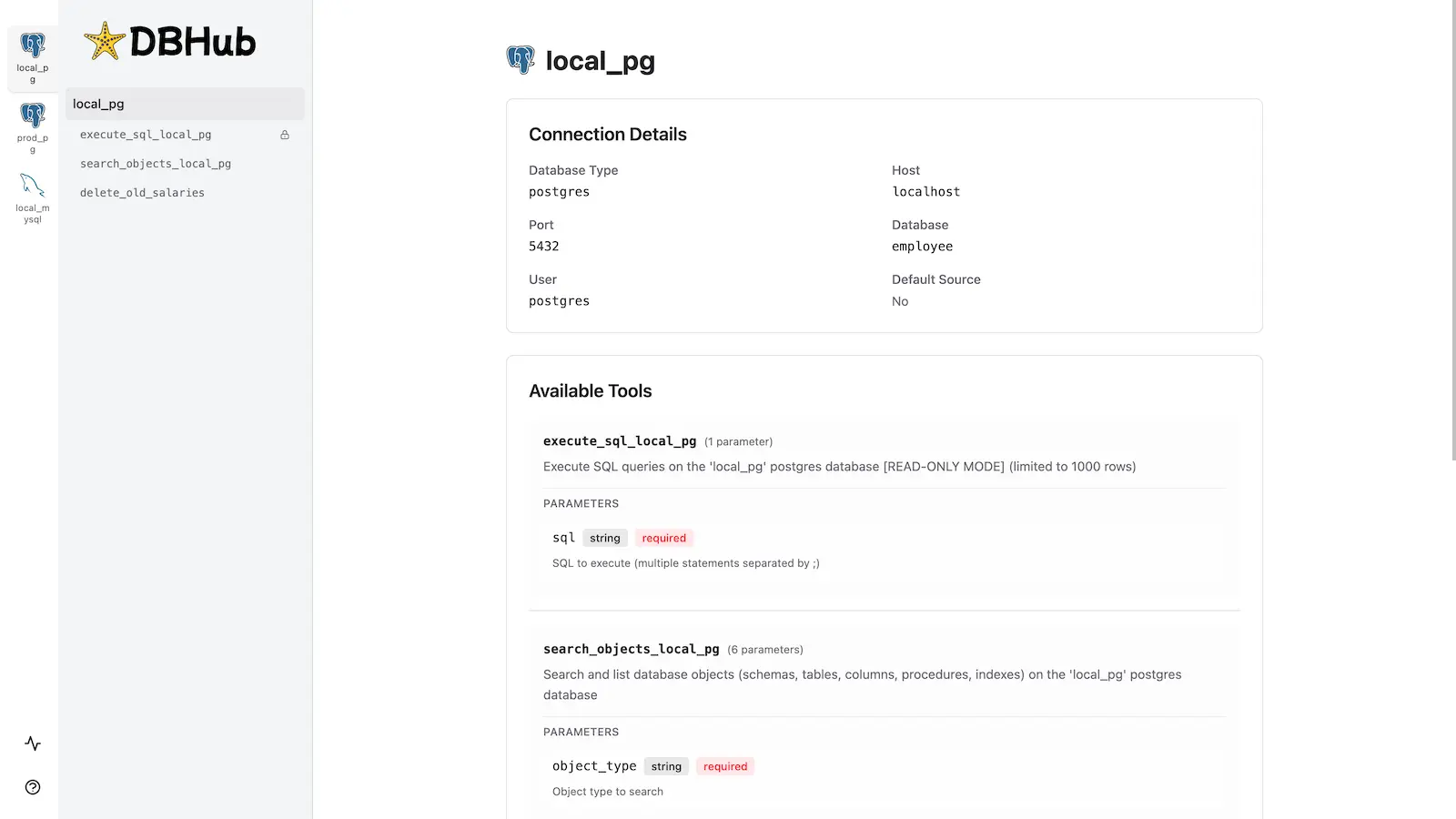
5
|
+
Permission is hereby granted, free of charge, to any person obtaining a copy
|
|
6
|
+
of this software and associated documentation files (the "Software"), to deal
|
|
7
|
+
in the Software without restriction, including without limitation the rights
|
|
8
|
+
to use, copy, modify, merge, publish, distribute, sublicense, and/or sell
|
|
9
|
+
copies of the Software, and to permit persons to whom the Software is
|
|
10
|
+
furnished to do so, subject to the following conditions:
|
|
11
|
+
|
|
12
|
+
The above copyright notice and this permission notice shall be included in all
|
|
13
|
+
copies or substantial portions of the Software.
|
|
14
|
+
|
|
15
|
+
THE SOFTWARE IS PROVIDED "AS IS", WITHOUT WARRANTY OF ANY KIND, EXPRESS OR
|
|
16
|
+
IMPLIED, INCLUDING BUT NOT LIMITED TO THE WARRANTIES OF MERCHANTABILITY,
|
|
17
|
+
FITNESS FOR A PARTICULAR PURPOSE AND NONINFRINGEMENT. IN NO EVENT SHALL THE
|
|
18
|
+
AUTHORS OR COPYRIGHT HOLDERS BE LIABLE FOR ANY CLAIM, DAMAGES OR OTHER
|
|
19
|
+
LIABILITY, WHETHER IN AN ACTION OF CONTRACT, TORT OR OTHERWISE, ARISING FROM,
|
|
20
|
+
OUT OF OR IN CONNECTION WITH THE SOFTWARE OR THE USE OR OTHER DEALINGS IN THE
|
|
21
|
+
SOFTWARE.
|
package/README.md
ADDED
|
@@ -0,0 +1,143 @@
|
|
|
1
|
+
> [!NOTE]
|
|
2
|
+
> Brought to you by [Bytebase](https://www.bytebase.com/), open-source database DevSecOps platform.
|
|
3
|
+
|
|
4
|
+
> [!NOTE]
|
|
5
|
+
> This package is a local Dameng/DM8 connector fork of Bytebase DBHub. Use
|
|
6
|
+
> `npx -y @zz1996/dbhub-dameng --transport stdio --config ./dbhub.dameng.toml`
|
|
7
|
+
> for Dameng MCP usage.
|
|
8
|
+
|
|
9
|
+
<p align="center">
|
|
10
|
+
<a href="https://dbhub.ai/" target="_blank">
|
|
11
|
+
<picture>
|
|
12
|
+
<source media="(prefers-color-scheme: dark)" srcset="https://raw.githubusercontent.com/bytebase/dbhub/main/docs/images/logo/full-dark.svg" width="75%">
|
|
13
|
+
<source media="(prefers-color-scheme: light)" srcset="https://raw.githubusercontent.com/bytebase/dbhub/main/docs/images/logo/full-light.svg" width="75%">
|
|
14
|
+
<img src="https://raw.githubusercontent.com/bytebase/dbhub/main/docs/images/logo/full-light.svg" width="75%" alt="DBHub Logo">
|
|
15
|
+
</picture>
|
|
16
|
+
</a>
|
|
17
|
+
</p>
|
|
18
|
+
|
|
19
|
+
```bash
|
|
20
|
+
+------------------+ +--------------+ +------------------+
|
|
21
|
+
| | | | | |
|
|
22
|
+
| | | | | |
|
|
23
|
+
| Claude Desktop +--->+ +--->+ PostgreSQL |
|
|
24
|
+
| | | | | |
|
|
25
|
+
| Claude Code +--->+ +--->+ SQL Server |
|
|
26
|
+
| | | | | |
|
|
27
|
+
| Cursor +--->+ DBHub +--->+ SQLite |
|
|
28
|
+
| | | | | |
|
|
29
|
+
| VS Code +--->+ +--->+ MySQL |
|
|
30
|
+
| | | | | |
|
|
31
|
+
| Copilot CLI +--->+ +--->+ MariaDB |
|
|
32
|
+
| | | | | |
|
|
33
|
+
| | | | | |
|
|
34
|
+
+------------------+ +--------------+ +------------------+
|
|
35
|
+
MCP Clients MCP Server Databases
|
|
36
|
+
```
|
|
37
|
+
|
|
38
|
+
DBHub is a zero-dependency, token efficient MCP server implementing the Model Context Protocol (MCP) server interface. This lightweight gateway allows MCP-compatible clients to connect to and explore different databases:
|
|
39
|
+
|
|
40
|
+
- **Local Development First**: Zero dependency, token efficient with just two MCP tools to maximize context window
|
|
41
|
+
- **Multi-Database**: PostgreSQL, MySQL, MariaDB, SQL Server, and SQLite through a single interface
|
|
42
|
+
- **Multi-Connection**: Connect to multiple databases simultaneously with TOML configuration
|
|
43
|
+
- **Guardrails**: Read-only mode, row limiting, and query timeout to prevent runaway operations
|
|
44
|
+
- **Secure Access**: SSH tunneling and SSL/TLS encryption
|
|
45
|
+
|
|
46
|
+
## Supported Databases
|
|
47
|
+
|
|
48
|
+
PostgreSQL, MySQL, SQL Server, MariaDB, and SQLite.
|
|
49
|
+
|
|
50
|
+
## MCP Tools
|
|
51
|
+
|
|
52
|
+
DBHub implements MCP tools for database operations:
|
|
53
|
+
|
|
54
|
+
- **[execute_sql](https://dbhub.ai/tools/execute-sql)**: Execute SQL queries with transaction support and safety controls
|
|
55
|
+
- **[search_objects](https://dbhub.ai/tools/search-objects)**: Search and explore database schemas, tables, columns, indexes, and procedures with progressive disclosure
|
|
56
|
+
- **[Custom Tools](https://dbhub.ai/tools/custom-tools)**: Define reusable, parameterized SQL operations in your `dbhub.toml` configuration file
|
|
57
|
+
|
|
58
|
+
## Workbench
|
|
59
|
+
|
|
60
|
+
DBHub includes a [built-in web interface](https://dbhub.ai/workbench/overview) for interacting with your database tools. It provides a visual way to execute queries, run custom tools, and view request traces without requiring an MCP client.
|
|
61
|
+
|
|
62
|
+
|
|
63
|
+
|
|
64
|
+
## Installation
|
|
65
|
+
|
|
66
|
+
See the full [Installation Guide](https://dbhub.ai/installation) for detailed instructions.
|
|
67
|
+
|
|
68
|
+
### Quick Start
|
|
69
|
+
|
|
70
|
+
**Docker:**
|
|
71
|
+
|
|
72
|
+
```bash
|
|
73
|
+
docker run --rm --init \
|
|
74
|
+
--name dbhub \
|
|
75
|
+
--publish 8080:8080 \
|
|
76
|
+
bytebase/dbhub \
|
|
77
|
+
--transport http \
|
|
78
|
+
--port 8080 \
|
|
79
|
+
--dsn "postgres://user:password@localhost:5432/dbname?sslmode=disable"
|
|
80
|
+
```
|
|
81
|
+
|
|
82
|
+
**NPM:** (requires Node.js >= 22.5.0)
|
|
83
|
+
|
|
84
|
+
```bash
|
|
85
|
+
npx @bytebase/dbhub@latest --transport http --port 8080 --dsn "postgres://user:password@localhost:5432/dbname?sslmode=disable"
|
|
86
|
+
```
|
|
87
|
+
|
|
88
|
+
**Demo Mode:**
|
|
89
|
+
|
|
90
|
+
```bash
|
|
91
|
+
npx @bytebase/dbhub@latest --transport http --port 8080 --demo
|
|
92
|
+
```
|
|
93
|
+
|
|
94
|
+
**Restrict to loopback (recommended for production):**
|
|
95
|
+
|
|
96
|
+
```bash
|
|
97
|
+
npx @bytebase/dbhub@latest --transport http --host 127.0.0.1 --port 8080 --demo
|
|
98
|
+
```
|
|
99
|
+
|
|
100
|
+
> The HTTP transport defaults to `--host 0.0.0.0`, exposing DBHub on every network interface. For production, bind to `127.0.0.1` and front DBHub with a reverse proxy (nginx/Caddy) or firewall — DBHub does not authenticate HTTP clients.
|
|
101
|
+
>
|
|
102
|
+
> The HTTP transport also has built-in DNS-rebinding protection: it only accepts requests whose `Host` is loopback, this machine's own hostname/IPs, or a name you allow via [`--allowed-hosts`](https://dbhub.ai/config/command-line#allowed-hosts). If a client behind a reverse proxy or custom DNS name gets a `403`, add that hostname with `--allowed-hosts`.
|
|
103
|
+
|
|
104
|
+
See [Command-Line Options](https://dbhub.ai/config/command-line) for all available parameters.
|
|
105
|
+
|
|
106
|
+
### Multi-Database Setup
|
|
107
|
+
|
|
108
|
+
Connect to multiple databases simultaneously using TOML configuration files. Perfect for managing production, staging, and development databases from a single DBHub instance.
|
|
109
|
+
|
|
110
|
+
See [Multi-Database Configuration](https://dbhub.ai/config/toml) for complete setup instructions.
|
|
111
|
+
|
|
112
|
+
## Development
|
|
113
|
+
|
|
114
|
+
Requires Node.js >= 22.5.0 (DBHub uses the built-in `node:sqlite` module).
|
|
115
|
+
|
|
116
|
+
```bash
|
|
117
|
+
# Install dependencies
|
|
118
|
+
pnpm install
|
|
119
|
+
|
|
120
|
+
# Run in development mode
|
|
121
|
+
pnpm dev
|
|
122
|
+
|
|
123
|
+
# Build and run for production
|
|
124
|
+
pnpm build && pnpm start --transport stdio --dsn "postgres://user:password@localhost:5432/dbname"
|
|
125
|
+
```
|
|
126
|
+
|
|
127
|
+
See [Testing](.claude/skills/testing/SKILL.md) and [Debug](https://dbhub.ai/config/debug).
|
|
128
|
+
|
|
129
|
+
## Contributors
|
|
130
|
+
|
|
131
|
+
<a href="https://github.com/bytebase/dbhub/graphs/contributors">
|
|
132
|
+
<img src="https://contrib.rocks/image?repo=bytebase/dbhub" />
|
|
133
|
+
</a>
|
|
134
|
+
|
|
135
|
+
## Star History
|
|
136
|
+
|
|
137
|
+
<a href="https://www.star-history.com/?repos=bytebase%2Fdbhub&type=date&legend=top-left">
|
|
138
|
+
<picture>
|
|
139
|
+
<source media="(prefers-color-scheme: dark)" srcset="https://api.star-history.com/chart?repos=bytebase/dbhub&type=date&theme=dark&legend=top-left" />
|
|
140
|
+
<source media="(prefers-color-scheme: light)" srcset="https://api.star-history.com/chart?repos=bytebase/dbhub&type=date&legend=top-left" />
|
|
141
|
+
<img alt="Star History Chart" src="https://api.star-history.com/chart?repos=bytebase/dbhub&type=date&legend=top-left" />
|
|
142
|
+
</picture>
|
|
143
|
+
</a>
|
|
@@ -0,0 +1,19 @@
|
|
|
1
|
+
# Example DBHub configuration for the local Dameng/DM8 fork.
|
|
2
|
+
# Do not commit real credentials. Prefer environment variables.
|
|
3
|
+
|
|
4
|
+
[[sources]]
|
|
5
|
+
id = "dm8_dev"
|
|
6
|
+
description = "Dameng DM8 development database. Read-only access for agent schema discovery and SQL queries."
|
|
7
|
+
dsn = "dameng://${DM8_USER}:${DM8_PASSWORD}@${DM8_HOST}:5236/${DM8_SCHEMA}"
|
|
8
|
+
query_timeout = 30
|
|
9
|
+
lazy = true
|
|
10
|
+
|
|
11
|
+
[[tools]]
|
|
12
|
+
name = "execute_sql"
|
|
13
|
+
source = "dm8_dev"
|
|
14
|
+
readonly = true
|
|
15
|
+
max_rows = 100
|
|
16
|
+
|
|
17
|
+
[[tools]]
|
|
18
|
+
name = "search_objects"
|
|
19
|
+
source = "dm8_dev"
|