@zumer/orbit 0.6.0 → 1.1.0
This diff represents the content of publicly available package versions that have been released to one of the supported registries. The information contained in this diff is provided for informational purposes only and reflects changes between package versions as they appear in their respective public registries.
- package/LICENSE +1 -1
- package/README.md +73 -194
- package/dist/orbit.css +770 -1203
- package/dist/orbit.js +281 -426
- package/dist/orbit.min.css +1 -1
- package/dist/orbit.min.js +71 -78
- package/package.json +1 -1
- package/dist/orbit.css.map +0 -1
- package/dist/orbit.min.css.map +0 -1
package/LICENSE
CHANGED
|
@@ -1,6 +1,6 @@
|
|
|
1
1
|
MIT License
|
|
2
2
|
|
|
3
|
-
Copyright (c)
|
|
3
|
+
Copyright (c) 2025 Juan Martín Muda - ZumerLab
|
|
4
4
|
|
|
5
5
|
Permission is hereby granted, free of charge, to any person obtaining a copy
|
|
6
6
|
of this software and associated documentation files (the "Software"), to deal
|
package/README.md
CHANGED
|
@@ -5,12 +5,9 @@
|
|
|
5
5
|
</a>
|
|
6
6
|
</p>
|
|
7
7
|
<p align="center">
|
|
8
|
-
<a href="#installation"><b>⚙️ Install</b></a> •
|
|
9
|
-
<a href="#features"><b>🤖 Features</b></a> •
|
|
10
|
-
<a href="#examples"><b>🎮 Examples</b></a> •
|
|
11
8
|
<a href="https://zumerlab.github.io/orbit-docs" target="_blank"><b>📚 Docs</b></a> •
|
|
12
|
-
<a href="https://github.com/zumerlab/orbit/discussions" target="_blank"><b>💬 Github
|
|
13
|
-
<a href="https://t.me/ZumlyCommunity" target="_blank"><b>🧑💻 Telegram
|
|
9
|
+
<a href="https://github.com/zumerlab/orbit/discussions" target="_blank"><b>💬 Github discussions</b></a> •
|
|
10
|
+
<a href="https://t.me/ZumlyCommunity" target="_blank"><b>🧑💻 Telegram group</b></a>
|
|
14
11
|
</p>
|
|
15
12
|
<p align="center">
|
|
16
13
|
<b>Use Orbit to create amazing radial UIs using CSS only!</b>
|
|
@@ -21,109 +18,93 @@
|
|
|
21
18
|
</p>
|
|
22
19
|
|
|
23
20
|
<p align="center">
|
|
24
|
-
<a href="#stay-in-orbit"><b>Get involved</b></a>,
|
|
21
|
+
<a href="#stay-in-orbit"><b>Get involved</b></a>,
|
|
22
|
+
place your ⭐ in Orbit! <a href="https://github.com/zumerlab/orbit/stargazers"> <img src="https://img.shields.io/github/stars/zumerlab/orbit.svg?label=%E2%98%85%20Stars&logo=-&style=social"></a>
|
|
25
23
|
</p>
|
|
26
24
|
|
|
25
|
+
## Orbit CSS overview
|
|
27
26
|
|
|
28
|
-
|
|
29
|
-
|
|
30
|
-
**Orbit** is the first general-purpose CSS framework designed specifically for radial user interfaces. We've used the latest CSS features to make building radial layouts a breeze. It provides intuitive CSS classes and Custom Elements for building radial menus, dashboards, creative portfolios, or a cutting-edge applications.
|
|
27
|
+
**Orbit** is a CSS framework designed for creating radial layouts. It offers simplicity, effectiveness, ease of use, and tremendous versatility for crafting compelling designs. It offers extensive customization options and supports nesting for building intricate designs tailored to your requirements.
|
|
31
28
|
|
|
32
29
|
## Why Orbit?
|
|
33
30
|
|
|
34
|
-
|
|
31
|
+
Creating radial UIs generally involves using JavaScript or other programming languages to calculate angles, radii, distances, and more. **Orbit** saves you time and effort by enabling you to build these UIs with just CSS.
|
|
32
|
+
|
|
33
|
+
## Documentation
|
|
35
34
|
|
|
36
|
-
|
|
37
|
-
> We’re in the early stages of development, things are still evolving. You’re welcome to explore and experiment, but keep in mind that names, features, and functionalities may change as we refine our project. We appreciate your understanding and flexibility during this exciting phase!
|
|
35
|
+
Learn all about **Orbit** in our [doc site](https://zumerlab.github.io/orbit-docs)!
|
|
38
36
|
|
|
39
37
|
## What is radial UI?
|
|
40
38
|
|
|
41
|
-
Radial UI refers to a design paradigm where elements are organized
|
|
39
|
+
Radial UI refers to a design paradigm where elements are organized in a circular or radial pattern, diverging from traditional grid-based or linear layouts. This design approach is particularly effective for applications that involve:
|
|
42
40
|
|
|
43
|
-
- Circular data visualization
|
|
44
|
-
- Navigation menus
|
|
45
|
-
- Dashboards
|
|
46
|
-
-
|
|
41
|
+
- **Circular data visualization:** progress bars, pie charts, multi-level pies, gauges, knobs
|
|
42
|
+
- **Navigation menus and controls:** radial or pie menus, circular scrolling
|
|
43
|
+
- **Dashboards:** smart-home interfaces, car dashboards, infotainment systems
|
|
44
|
+
- **Calendars:** circular layouts for scheduling and event tracking
|
|
45
|
+
- **Creative art and structures:** mandalas, sci-fi-inspired art, chemical structures
|
|
46
|
+
- **Interactive interfaces:** watch faces, dynamic controls for games or tools
|
|
47
47
|
|
|
48
|
-
**Characteristics of
|
|
48
|
+
**Characteristics of radial UI:**
|
|
49
49
|
|
|
50
|
-
- Circular layout
|
|
51
|
-
- Center-focused
|
|
52
|
-
- Symmetry
|
|
53
|
-
- Angular relationships
|
|
50
|
+
- **Circular layout:** elements are arranged in a circular or curved pattern.
|
|
51
|
+
- **Center-focused:** the center often serves as a focal point.
|
|
52
|
+
- **Symmetry:** radial UIs frequently exhibit symmetry, fostering a sense of balance.
|
|
53
|
+
- **Angular relationships:** elements are positioned at specific angles relative to one another.
|
|
54
54
|
|
|
55
|
-
**Benefits of
|
|
55
|
+
**Benefits of radial UI:**
|
|
56
56
|
|
|
57
|
-
- Aesthetics
|
|
58
|
-
- Intuitive navigation
|
|
59
|
-
- Space efficiency
|
|
57
|
+
- **Aesthetics:** radial designs are visually striking and engaging.
|
|
58
|
+
- **Intuitive navigation:** circular layouts simplify navigation and reduce cognitive load.
|
|
59
|
+
- **Space efficiency:** radial UIs make efficient use of available screen, ideal for both compact and expansive interfaces.
|
|
60
60
|
|
|
61
61
|
## Features
|
|
62
62
|
|
|
63
|
-
With Orbit
|
|
64
|
-
|
|
65
|
-
- Build any kind of radial UI using our predefined CSS classes that do the heavy lifting.
|
|
66
|
-
- Easily compose simple or complex radial designs by combining Orbit elements.
|
|
67
|
-
- Use Orbit alongside other traditional CSS frameworks.
|
|
68
|
-
- Get started quickly with our detailed documentation, examples, and guides that walk you through using Orbit's features effectively.
|
|
63
|
+
With **Orbit**, you can:
|
|
69
64
|
|
|
70
|
-
|
|
71
|
-
|
|
72
|
-
|
|
65
|
+
- Build any kind of radial UI using predefined CSS classes that do the heavy lifting.
|
|
66
|
+
- Easily compose simple or complex radial designs by combining **Orbit** elements.
|
|
67
|
+
- Use **Orbit** alongside other traditional CSS frameworks.
|
|
68
|
+
- Get started quickly with our detailed documentation, examples, and guides.
|
|
73
69
|
|
|
74
70
|
## Installation
|
|
75
71
|
|
|
76
|
-
Orbit comes with just two files: `orbit.css` (or `orbit.min.css`)
|
|
77
|
-
|
|
78
|
-
### Getting the Orbit files:
|
|
79
|
-
|
|
80
|
-
You have three ways to get **Orbit** files:
|
|
81
|
-
|
|
82
|
-
#### 1. Download the Orbit files
|
|
83
|
-
|
|
84
|
-
- Get the **Orbit CSS file**: [orbit.css](https://unpkg.com/@zumer/orbit@latest/dist/orbit.css) or [orbit.min.css (minified)](https://unpkg.com/@zumer/orbit@latest/dist/orbit.min.css)
|
|
85
|
-
|
|
86
|
-
- Get the **Orbit JS file**: [orbit.js](https://unpkg.com/@zumer/orbit@latest/dist/orbit.js) or [orbit.min.js (minified)](https://unpkg.com/@zumer/orbit@latest/dist/orbit.min.js)
|
|
72
|
+
**Orbit** comes with just two files: `orbit.css` (or `orbit.min.css`) and `orbit.js` (or `orbit.min.js`).
|
|
87
73
|
|
|
74
|
+
### Obtaining the Orbit files
|
|
88
75
|
|
|
89
|
-
|
|
76
|
+
You can get **Orbit** files in three ways:
|
|
90
77
|
|
|
91
|
-
|
|
78
|
+
#### 1. Download the files
|
|
92
79
|
|
|
93
|
-
|
|
80
|
+
- Download the **CSS file:** [orbit.css](https://unpkg.com/@zumer/orbit@latest/dist/orbit.css) or [orbit.min.css](https://unpkg.com/@zumer/orbit@latest/dist/orbit.min.css).
|
|
81
|
+
- Download the **JS file:** [orbit.js](https://unpkg.com/@zumer/orbit@latest/dist/orbit.js) or [orbit.min.js](https://unpkg.com/@zumer/orbit@latest/dist/orbit.min.js).
|
|
94
82
|
|
|
95
|
-
|
|
83
|
+
#### 2. Use a CDN
|
|
96
84
|
|
|
97
|
-
-
|
|
85
|
+
- **CSS:**
|
|
86
|
+
Uncompressed: [orbit.css](https://unpkg.com/@zumer/orbit@latest/dist/orbit.css)
|
|
87
|
+
Minified: [orbit.min.css](https://unpkg.com/@zumer/orbit@latest/dist/orbit.min.css)
|
|
98
88
|
|
|
99
|
-
|
|
89
|
+
- **JS:**
|
|
90
|
+
Uncompressed: [orbit.js](https://unpkg.com/@zumer/orbit@latest/dist/orbit.js)
|
|
91
|
+
Minified: [orbit.min.js](https://unpkg.com/@zumer/orbit@latest/dist/orbit.min.js)
|
|
100
92
|
|
|
101
|
-
|
|
93
|
+
#### 3. Install via npm or yarn
|
|
102
94
|
|
|
95
|
+
```sh
|
|
96
|
+
npm install @zumer/orbit
|
|
97
|
+
```
|
|
103
98
|
|
|
104
|
-
|
|
105
|
-
|
|
106
|
-
You can also install Orbit using **npm** or **yarn**:
|
|
107
|
-
|
|
108
|
-
```sh
|
|
109
|
-
npm install @zumer/orbit
|
|
110
|
-
```
|
|
111
|
-
|
|
112
|
-
Or
|
|
113
|
-
|
|
114
|
-
```sh
|
|
115
|
-
yarn add @zumer/orbit
|
|
116
|
-
```
|
|
117
|
-
|
|
118
|
-
### Setting up Orbit in your project:
|
|
119
|
-
|
|
120
|
-
After install Orbit, follow this simple steps to get Orbit working.
|
|
99
|
+
or
|
|
121
100
|
|
|
122
|
-
|
|
101
|
+
```sh
|
|
102
|
+
yarn add @zumer/orbit
|
|
103
|
+
```
|
|
123
104
|
|
|
124
|
-
|
|
105
|
+
### Adding Orbit to your project
|
|
125
106
|
|
|
126
|
-
|
|
107
|
+
Include the files in your project as follows:
|
|
127
108
|
|
|
128
109
|
```html
|
|
129
110
|
<head>
|
|
@@ -132,7 +113,7 @@ In case you have downloaded the files:
|
|
|
132
113
|
</head>
|
|
133
114
|
```
|
|
134
115
|
|
|
135
|
-
|
|
116
|
+
Or via CDN:
|
|
136
117
|
|
|
137
118
|
```html
|
|
138
119
|
<head>
|
|
@@ -141,134 +122,31 @@ In case you are using CDN:
|
|
|
141
122
|
</head>
|
|
142
123
|
```
|
|
143
124
|
|
|
144
|
-
> **Tip for CSS file**: You can use `@import` CSS rule in your `<style> tag` to import the **CSS file**:
|
|
145
|
-
>
|
|
146
|
-
> Downloaded file:
|
|
147
|
-
> ```css
|
|
148
|
-
> @import url('path/to/orbit.css');
|
|
149
|
-
> ```
|
|
150
|
-
> Or via CDN:
|
|
151
|
-
>```css
|
|
152
|
-
> @import url('https://unpkg.com/@zumer/orbit@latest/dist/orbit.css');
|
|
153
|
-
> ```
|
|
154
|
-
|
|
155
125
|
## 🏁 Quick start
|
|
156
126
|
|
|
157
|
-
### Basic Orbit layout
|
|
158
|
-
|
|
159
|
-
Just add `.bigbang` CSS class in a HTML element like `<div>`. Then use `.gravity-spot` class, and within it, add another element with `.orbit` class. Finally, inside `.orbit` element, add radial elements, such us: `.satellite`, `.vector`, `.side`, or `<o-text>`, `<o-arc>`, `<o-progress>` web components . Here’s a minimal working example:
|
|
160
|
-
|
|
161
127
|
```html
|
|
162
|
-
|
|
163
|
-
<
|
|
164
|
-
|
|
165
|
-
|
|
166
|
-
|
|
167
|
-
|
|
168
|
-
<title>Orbit Quick Start</title>
|
|
169
|
-
</head>
|
|
170
|
-
<body>
|
|
171
|
-
<div class="bigbang">
|
|
172
|
-
<div class="gravity-spot">
|
|
173
|
-
<div class="orbit">
|
|
174
|
-
<div class="satellite">1</div>
|
|
175
|
-
<div class="satellite">2</div>
|
|
176
|
-
<div class="satellite">3</div>
|
|
177
|
-
</div>
|
|
178
|
-
<div class="orbit">
|
|
179
|
-
<o-text>Curved text</o-text>
|
|
180
|
-
</div>
|
|
181
|
-
</div>
|
|
128
|
+
<div class="bigbang">
|
|
129
|
+
<div class="gravity-spot">
|
|
130
|
+
<div class="orbit">
|
|
131
|
+
<div class="satellite">1</div>
|
|
132
|
+
<div class="satellite">2</div>
|
|
133
|
+
<div class="satellite">3</div>
|
|
182
134
|
</div>
|
|
183
|
-
</
|
|
184
|
-
</
|
|
135
|
+
</div>
|
|
136
|
+
</div>
|
|
185
137
|
```
|
|
186
138
|
|
|
187
|
-
## Radial elements
|
|
188
|
-
|
|
189
|
-
### Bigbang
|
|
190
|
-
|
|
191
|
-
The foundation of every Orbit project, serving as a container for your application.
|
|
192
|
-
|
|
193
|
-
### Gravity-spot
|
|
194
|
-
|
|
195
|
-
The parent container for organizing Orbit elements within a radial layout.
|
|
196
|
-
|
|
197
|
-
### Orbit
|
|
198
|
-
|
|
199
|
-
Defines a circular path around a .gravity-spot, with variations from .orbit-0 to .orbit-24. Within .orbit element, various Orbit elements such as `satellites`, `o-arcs`, `o-progress`, `vectors`, `sides`, and `o-texts` can be positioned.
|
|
200
|
-
|
|
201
|
-
### Satellite
|
|
202
|
-
|
|
203
|
-
Places elements along an .orbit or .orbit-* path, serving as content containers or nesting points for other orbits.
|
|
204
|
-
|
|
205
|
-
### Vector
|
|
206
|
-
|
|
207
|
-
Renders perpendicular lines across orbits, perfect for creating connector lines or minute marks.
|
|
208
|
-
|
|
209
|
-
### Side
|
|
210
|
-
|
|
211
|
-
Generates a regular polygon figure when used with other sides.
|
|
212
|
-
|
|
213
|
-
### O-Text
|
|
214
|
-
|
|
215
|
-
A web-component for rendering curved text.
|
|
216
|
-
|
|
217
|
-
### o-arc
|
|
218
|
-
|
|
219
|
-
A web-component for rendering radial slices, arcs, or pies.
|
|
220
|
-
|
|
221
|
-
### O-Progress
|
|
222
|
-
|
|
223
|
-
A web-component for rendering a radial progress bar.
|
|
224
|
-
|
|
225
|
-
|
|
226
139
|
## Examples
|
|
227
140
|
|
|
228
|
-
|
|
229
|
-
|
|
230
|
-
<p align="center">
|
|
231
|
-
<a href="https://zumerlab.github.io/orbit-docs/examples/#a-dashboard" target="_blank">
|
|
232
|
-
<img src="https://raw.githubusercontent.com/zumerlab/orbit-docs/main/public/images/demo1.png" width="60%">
|
|
233
|
-
</a>
|
|
234
|
-
</p>
|
|
235
|
-
|
|
236
|
-
|
|
237
|
-
### An orbital map
|
|
238
|
-
|
|
239
|
-
<p align="center">
|
|
240
|
-
<a href="https://zumerlab.github.io/orbit-docs/examples/#an-abstract-orbital-map" target="_blank">
|
|
241
|
-
<img src="https://raw.githubusercontent.com/zumerlab/orbit-docs/main/public/images/demo2.png" width="60%">
|
|
242
|
-
</a>
|
|
243
|
-
</p>
|
|
244
|
-
|
|
245
|
-
### A watch
|
|
246
|
-
|
|
247
|
-
<p align="center">
|
|
248
|
-
<a href="https://zumerlab.github.io/orbit-docs/examples/#a-watch" target="_blank">
|
|
249
|
-
<img src="https://raw.githubusercontent.com/zumerlab/orbit-docs/main/public/images/demo3.png" width="60%">
|
|
250
|
-
</a>
|
|
251
|
-
</p>
|
|
252
|
-
|
|
253
|
-
### The solar system
|
|
254
|
-
|
|
255
|
-
<p align="center">
|
|
256
|
-
<a href="https://zumerlab.github.io/orbit-docs/examples/#the-solar-system" target="_blank">
|
|
257
|
-
<img src="https://raw.githubusercontent.com/zumerlab/orbit-docs/main/public/images/demo4.png" width="60%">
|
|
258
|
-
</a>
|
|
259
|
-
</p>
|
|
260
|
-
|
|
261
|
-
|
|
262
|
-
> **Show & Tell**:
|
|
263
|
-
>
|
|
264
|
-
> Join to [Discussion section](https://github.com/zumerlab/orbit/discussions/15) and show off what have you done with Orbit.
|
|
141
|
+
- **A dashboard**
|
|
142
|
+
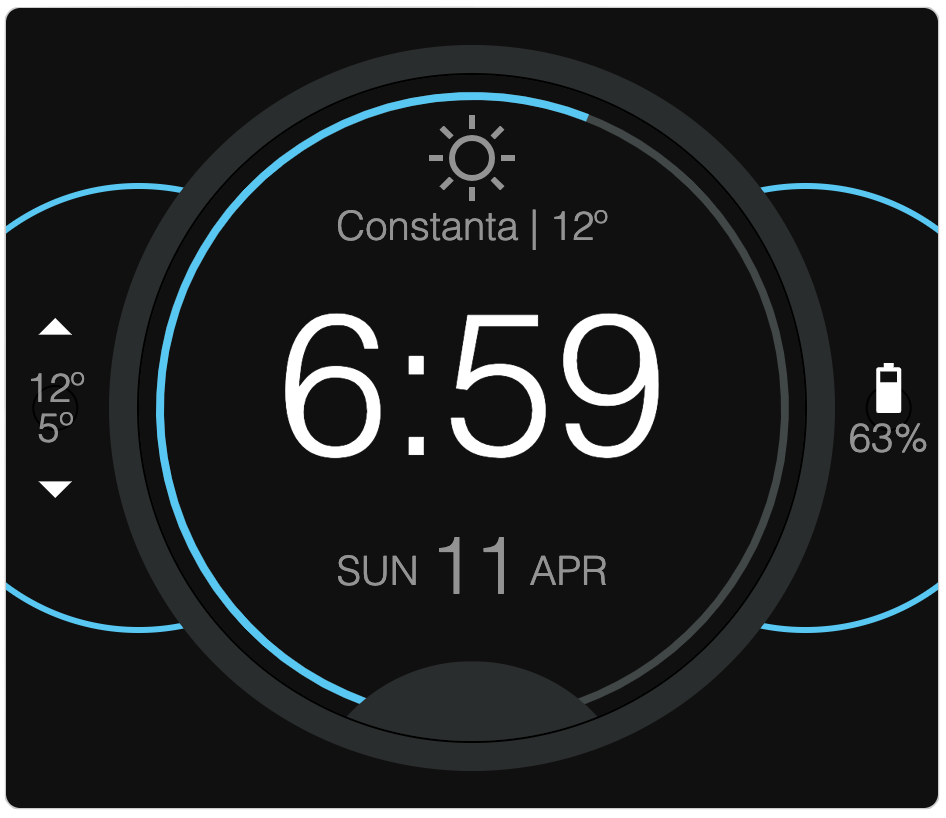
|
|
265
143
|
|
|
144
|
+
- **A watch**
|
|
145
|
+
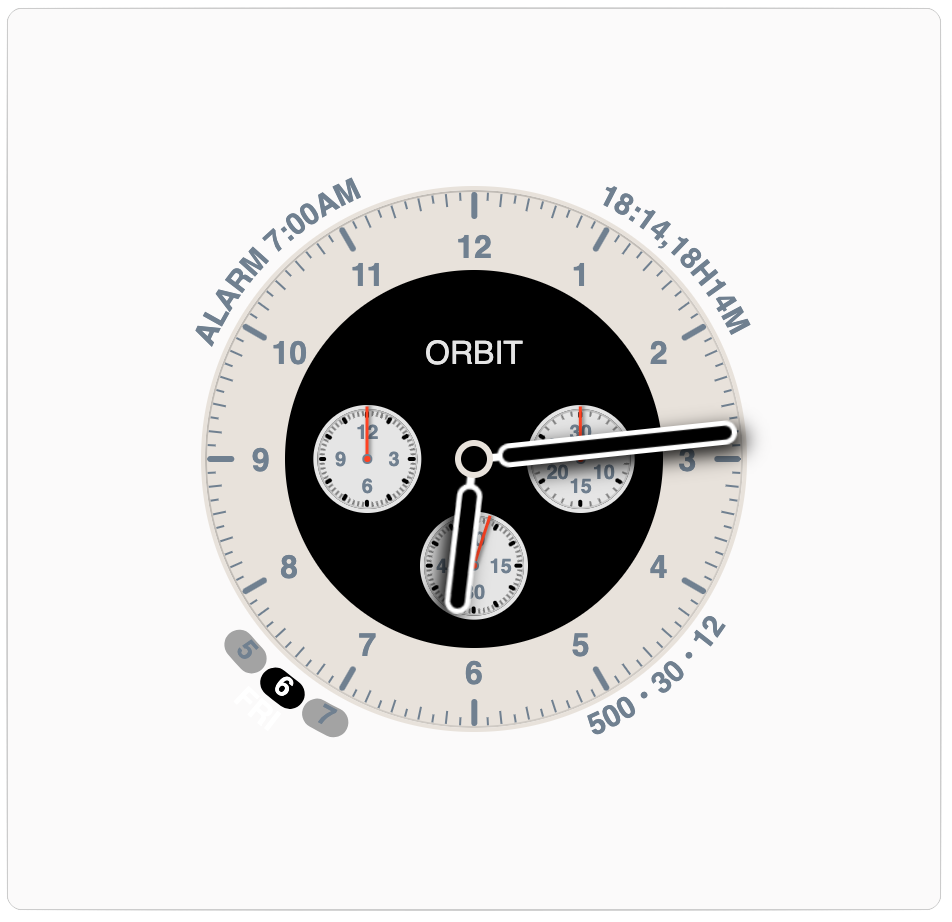
|
|
266
146
|
|
|
267
|
-
|
|
147
|
+
Explore more examples in our [doc site](https://zumerlab.github.io/orbit-docs/examples/progress).
|
|
268
148
|
|
|
269
|
-
|
|
270
|
-
|
|
271
|
-
## Stay in orbit
|
|
149
|
+
## Stay in Orbit
|
|
272
150
|
|
|
273
151
|
There are many ways to **contribute** to **Orbit** development:
|
|
274
152
|
|
|
@@ -276,11 +154,12 @@ There are many ways to **contribute** to **Orbit** development:
|
|
|
276
154
|
- [**GitHub discussions**](https://github.com/zumerlab/orbit/discussions): Engage with other contributors, ask questions, and share your experiences.
|
|
277
155
|
- [**Telegram group**](https://t.me/ZumlyCommunity): Join our Telegram group for real-time discussions and updates.
|
|
278
156
|
|
|
157
|
+
## Special thanks to Doc Contributors
|
|
279
158
|
|
|
159
|
+
<a href="https://github.com/zumerlab/orbit-docs/graphs/contributors">
|
|
160
|
+
<img src="https://contrib.rocks/image?repo=zumerlab/orbit-docs" />
|
|
161
|
+
</a>
|
|
280
162
|
|
|
281
163
|
## License
|
|
282
164
|
|
|
283
165
|
[MIT](https://github.com/zumerlab/orbit/blob/main/LICENSE)
|
|
284
|
-
|
|
285
|
-
|
|
286
|
-
|