@zereight/mcp-gitlab 2.1.5 → 2.1.7
This diff represents the content of publicly available package versions that have been released to one of the supported registries. The information contained in this diff is provided for informational purposes only and reflects changes between package versions as they appear in their respective public registries.
- package/README.ko.md +442 -0
- package/README.md +43 -26
- package/README.zh-CN.md +442 -0
- package/build/config.js +65 -2
- package/build/index.js +477 -6
- package/build/oauth-proxy.js +182 -47
- package/build/schemas.js +78 -0
- package/build/stateless/client-id.js +68 -0
- package/build/stateless/codec.js +205 -0
- package/build/stateless/errors.js +24 -0
- package/build/stateless/index.js +14 -0
- package/build/stateless/pending-auth.js +65 -0
- package/build/stateless/secret.js +98 -0
- package/build/stateless/session-id.js +68 -0
- package/build/stateless/stored-tokens.js +66 -0
- package/build/stateless/types.js +18 -0
- package/build/test/stateless/callback-proxy.test.js +393 -0
- package/build/test/stateless/client-id.test.js +176 -0
- package/build/test/stateless/codec.test.js +328 -0
- package/build/test/stateless/config-ttl.test.js +149 -0
- package/build/test/stateless/session-id-integration.test.js +675 -0
- package/build/test/stateless/session-id.test.js +131 -0
- package/build/test/test-tags.js +206 -0
- package/build/test/test-toolset-filtering.js +12 -1
- package/build/tools/registry.js +41 -1
- package/package.json +3 -2
package/README.ko.md
ADDED
|
@@ -0,0 +1,442 @@
|
|
|
1
|
+
# GitLab MCP Server
|
|
2
|
+
|
|
3
|
+
[English](./README.md) | [한국어](./README.ko.md) | [简体中文](./README.zh-CN.md)
|
|
4
|
+
|
|
5
|
+
> **새 기능**: 커넥션 풀링을 포함한 동적 GitLab API URL을 지원합니다. 자세한 내용은 [Dynamic API URL 문서](docs/dynamic-api-url.md)를 참고하세요.
|
|
6
|
+
|
|
7
|
+
[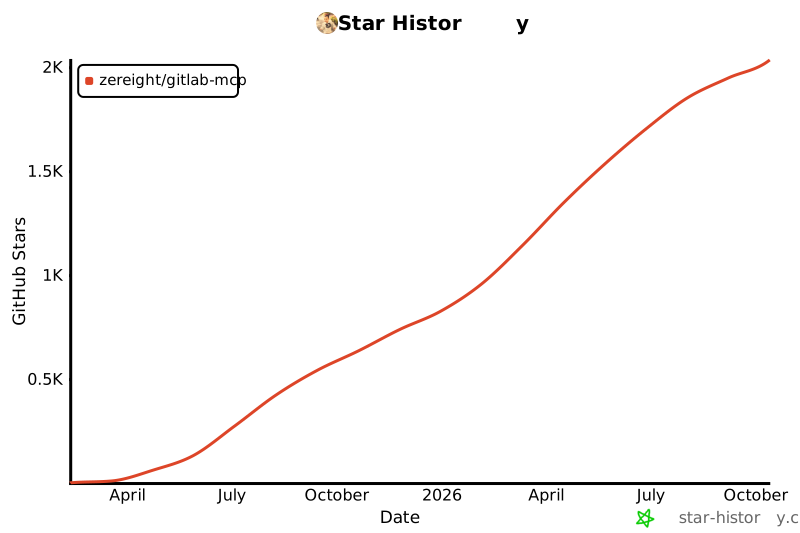](https://www.star-history.com/#zereight/gitlab-mcp&Date)
|
|
8
|
+
|
|
9
|
+
## @zereight/mcp-gitlab
|
|
10
|
+
|
|
11
|
+
AI 클라이언트를 위한 포괄적인 GitLab MCP 서버입니다. stdio, SSE, Streamable HTTP를 통해 프로젝트, 머지 리퀘스트, 이슈, 파이프라인, 위키, 릴리스, 마일스톤 등을 관리할 수 있습니다.
|
|
12
|
+
|
|
13
|
+
PAT, OAuth, 읽기 전용 모드, 동적 API URL, 원격 인증을 지원하며 VS Code, Claude, Cursor, Copilot 및 기타 MCP 클라이언트에서 사용할 수 있습니다.
|
|
14
|
+
|
|
15
|
+
### 왜 이 GitLab MCP를 사용하나요?
|
|
16
|
+
|
|
17
|
+
- 넓은 GitLab 지원 범위: 프로젝트, 저장소 탐색, 머지 리퀘스트, 이슈, 파이프라인, 위키, 릴리스, 라벨, 마일스톤 등
|
|
18
|
+
- 유연한 인증: Personal Access Token, 로컬 OAuth2 브라우저 플로우, MCP OAuth 프록시, 요청별 원격 인증
|
|
19
|
+
- 여러 전송 방식: 로컬 클라이언트용 stdio, 레거시 클라이언트용 SSE, 최신 원격 배포용 Streamable HTTP
|
|
20
|
+
- 클라이언트 친화적 설정: Claude Code, Codex, Antigravity, OpenCode, Copilot, Cline, Roo Code, Cursor, Kilo Code, Amp Code 예시 제공
|
|
21
|
+
- 셀프 호스팅 대응: 커스텀 GitLab 인스턴스, 프록시 설정, 동적 API URL 라우팅 지원
|
|
22
|
+
|
|
23
|
+
빠른 시작: 아래에서 Personal Access Token 또는 OAuth2 설정 중 하나를 선택하고 MCP 클라이언트 설정에서 `@zereight/mcp-gitlab`을 사용하세요.
|
|
24
|
+
|
|
25
|
+
### 클라이언트 설정 가이드
|
|
26
|
+
|
|
27
|
+
- [Claude Code 설정 가이드](./docs/claude-code-setup.md)
|
|
28
|
+
- [VS Code 설정 가이드](./docs/vscode-setup.md)
|
|
29
|
+
- [GitHub Copilot 설정 가이드](./docs/copilot-setup.md)
|
|
30
|
+
- [Codex 설정 가이드](./docs/codex-setup.md)
|
|
31
|
+
- [Cursor 설정 가이드](./docs/cursor-setup.md)
|
|
32
|
+
- [JSON 기반 MCP 클라이언트 설정 가이드](./docs/json-mcp-clients-setup.md) - Factory AI Droid, OpenClaw, OpenCode 스타일 클라이언트용
|
|
33
|
+
- [OAuth2 인증 설정 가이드](./docs/oauth-setup.md)
|
|
34
|
+
- [환경 변수 레퍼런스](./docs/environment-variables.md)
|
|
35
|
+
|
|
36
|
+
## 사용법
|
|
37
|
+
|
|
38
|
+
### 설정 개요
|
|
39
|
+
|
|
40
|
+
#### 인증 방식
|
|
41
|
+
|
|
42
|
+
이 서버는 네 가지 인증 방식을 지원합니다.
|
|
43
|
+
|
|
44
|
+
**로컬/데스크톱 사용**(가장 일반적):
|
|
45
|
+
|
|
46
|
+
1. **Personal Access Token** (`GITLAB_PERSONAL_ACCESS_TOKEN`) — 가장 단순한 설정
|
|
47
|
+
2. **OAuth2 — 로컬 브라우저** (`GITLAB_USE_OAUTH`) — 더 나은 보안을 위해 권장
|
|
48
|
+
|
|
49
|
+
**서버/원격 배포**:
|
|
50
|
+
|
|
51
|
+
3. **OAuth2 — MCP 프록시** (`GITLAB_MCP_OAUTH`) — Claude.ai 같은 원격 MCP 클라이언트용
|
|
52
|
+
4. **원격 인증** (`REMOTE_AUTHORIZATION`) — 각 호출자가 자신의 토큰을 제공하는 멀티 유저 배포용
|
|
53
|
+
|
|
54
|
+
#### 빠른 설정 경로
|
|
55
|
+
|
|
56
|
+
- **Claude Code**: [Claude Code 설정 가이드](./docs/claude-code-setup.md)
|
|
57
|
+
- **VS Code**: [VS Code 설정 가이드](./docs/vscode-setup.md)
|
|
58
|
+
- **GitHub Copilot**: [GitHub Copilot 설정 가이드](./docs/copilot-setup.md)
|
|
59
|
+
- **Codex**: [Codex 설정 가이드](./docs/codex-setup.md)
|
|
60
|
+
- **Cursor**: [Cursor 설정 가이드](./docs/cursor-setup.md)
|
|
61
|
+
- **Factory AI Droid / OpenClaw / OpenCode 스타일 클라이언트**: [JSON 기반 MCP 클라이언트 설정 가이드](./docs/json-mcp-clients-setup.md)
|
|
62
|
+
- **OAuth 브라우저 플로우 상세**: [OAuth2 인증 설정 가이드](./docs/oauth-setup.md)
|
|
63
|
+
|
|
64
|
+
가장 단순한 로컬 설정은 Personal Access Token으로 시작하세요. 브라우저 기반 로컬 인증은 OAuth2를 사용하세요. 원격 또는 멀티 유저 배포는 아래 MCP OAuth 및 원격 인증 섹션을 참고하세요.
|
|
65
|
+
|
|
66
|
+
#### CLI 인자 사용하기(환경 변수 문제가 있는 클라이언트용)
|
|
67
|
+
|
|
68
|
+
일부 MCP 클라이언트(예: GitHub Copilot CLI)는 환경 변수 처리에 문제가 있을 수 있습니다. 이 경우 CLI 인자를 사용하세요.
|
|
69
|
+
|
|
70
|
+
```json
|
|
71
|
+
{
|
|
72
|
+
"mcpServers": {
|
|
73
|
+
"gitlab": {
|
|
74
|
+
"command": "npx",
|
|
75
|
+
"args": [
|
|
76
|
+
"-y",
|
|
77
|
+
"@zereight/mcp-gitlab",
|
|
78
|
+
"--token=YOUR_GITLAB_TOKEN",
|
|
79
|
+
"--api-url=https://gitlab.com/api/v4"
|
|
80
|
+
],
|
|
81
|
+
"tools": ["*"]
|
|
82
|
+
}
|
|
83
|
+
}
|
|
84
|
+
}
|
|
85
|
+
```
|
|
86
|
+
|
|
87
|
+
**사용 가능한 CLI 인자:**
|
|
88
|
+
|
|
89
|
+
- `--token` - GitLab Personal Access Token (`GITLAB_PERSONAL_ACCESS_TOKEN` 대체)
|
|
90
|
+
- `--api-url` - GitLab API URL (`GITLAB_API_URL` 대체)
|
|
91
|
+
- `--read-only=true` - 읽기 전용 모드 활성화 (`GITLAB_READ_ONLY_MODE` 대체)
|
|
92
|
+
- `--use-wiki=true` - 위키 API 활성화 (`USE_GITLAB_WIKI` 대체)
|
|
93
|
+
- `--use-milestone=true` - 마일스톤 API 활성화 (`USE_MILESTONE` 대체)
|
|
94
|
+
- `--use-pipeline=true` - 파이프라인 API 활성화 (`USE_PIPELINE` 대체)
|
|
95
|
+
|
|
96
|
+
CLI 인자는 환경 변수보다 우선합니다.
|
|
97
|
+
|
|
98
|
+
#### SSE
|
|
99
|
+
|
|
100
|
+
```shell
|
|
101
|
+
docker run -i --rm \
|
|
102
|
+
-e HOST=0.0.0.0 \
|
|
103
|
+
-e GITLAB_PERSONAL_ACCESS_TOKEN=your_gitlab_token \
|
|
104
|
+
-e GITLAB_API_URL="https://gitlab.com/api/v4" \
|
|
105
|
+
-e GITLAB_READ_ONLY_MODE=true \
|
|
106
|
+
-e USE_GITLAB_WIKI=true \
|
|
107
|
+
-e USE_MILESTONE=true \
|
|
108
|
+
-e USE_PIPELINE=true \
|
|
109
|
+
-e SSE=true \
|
|
110
|
+
-p 3333:3002 \
|
|
111
|
+
zereight050/gitlab-mcp
|
|
112
|
+
```
|
|
113
|
+
|
|
114
|
+
```json
|
|
115
|
+
{
|
|
116
|
+
"mcpServers": {
|
|
117
|
+
"gitlab": {
|
|
118
|
+
"type": "sse",
|
|
119
|
+
"url": "http://localhost:3333/sse"
|
|
120
|
+
}
|
|
121
|
+
}
|
|
122
|
+
}
|
|
123
|
+
```
|
|
124
|
+
|
|
125
|
+
#### Streamable HTTP
|
|
126
|
+
|
|
127
|
+
```shell
|
|
128
|
+
docker run -i --rm \
|
|
129
|
+
-e HOST=0.0.0.0 \
|
|
130
|
+
-e GITLAB_PERSONAL_ACCESS_TOKEN=your_gitlab_token \
|
|
131
|
+
-e GITLAB_API_URL="https://gitlab.com/api/v4" \
|
|
132
|
+
-e GITLAB_READ_ONLY_MODE=true \
|
|
133
|
+
-e USE_GITLAB_WIKI=true \
|
|
134
|
+
-e USE_MILESTONE=true \
|
|
135
|
+
-e USE_PIPELINE=true \
|
|
136
|
+
-e STREAMABLE_HTTP=true \
|
|
137
|
+
-p 3333:3002 \
|
|
138
|
+
zereight050/gitlab-mcp
|
|
139
|
+
```
|
|
140
|
+
|
|
141
|
+
```json
|
|
142
|
+
{
|
|
143
|
+
"mcpServers": {
|
|
144
|
+
"gitlab": {
|
|
145
|
+
"type": "streamable-http",
|
|
146
|
+
"url": "http://localhost:3333/mcp"
|
|
147
|
+
}
|
|
148
|
+
}
|
|
149
|
+
}
|
|
150
|
+
```
|
|
151
|
+
|
|
152
|
+
#### MCP OAuth 프록시 사용하기(`GITLAB_MCP_OAUTH`)
|
|
153
|
+
|
|
154
|
+
> **서버/원격 배포 전용입니다.** 이 모드는 공개 접근 가능한 HTTPS URL로 MCP 서버를 배포해야 합니다. 로컬/데스크톱 사용은 `GITLAB_USE_OAUTH`를 사용하세요.
|
|
155
|
+
|
|
156
|
+
MCP OAuth 사양을 지원하는 원격 MCP 클라이언트(예: Claude.ai)용입니다. 서버는 완전한 OAuth 2.0 인증 서버로 동작합니다. 인증되지 않은 요청은 `401 + WWW-Authenticate` 응답을 받고, 클라이언트 측 OAuth 브라우저 플로우가 자동으로 시작됩니다.
|
|
157
|
+
|
|
158
|
+
**동작 방식**: 공개 HTTPS URL을 가진 위치에 이 MCP 서버를 배포합니다. MCP 클라이언트는 `{MCP_SERVER_URL}/mcp`로 연결합니다. 서버는 OAuth 2.0 플로우를 처리하고 GitLab과 자격 증명을 교환합니다.
|
|
159
|
+
|
|
160
|
+
**사전 준비:**
|
|
161
|
+
|
|
162
|
+
1. 공개 접근 가능한 HTTPS 서버 URL (`MCP_SERVER_URL`) — 로컬 테스트에는 [ngrok](https://ngrok.com)을 사용할 수 있습니다.
|
|
163
|
+
2. `api` 또는 `read_api` scope가 있는 사전 등록 GitLab OAuth 애플리케이션
|
|
164
|
+
— `Admin area` → `Applications`에서 Redirect URI를 `{MCP_SERVER_URL}/callback`으로 설정하세요.
|
|
165
|
+
|
|
166
|
+
| 환경 변수 | 필수 | 설명 |
|
|
167
|
+
| --- | --- | --- |
|
|
168
|
+
| `GITLAB_MCP_OAUTH` | 예 | 활성화하려면 `true` |
|
|
169
|
+
| `GITLAB_API_URL` | 예 | GitLab API base URL |
|
|
170
|
+
| `GITLAB_OAUTH_APP_ID` | 예 | GitLab OAuth Application ID |
|
|
171
|
+
| `MCP_SERVER_URL` | 예 | 이 MCP 서버의 공개 HTTPS URL |
|
|
172
|
+
| `STREAMABLE_HTTP` | 예 | 반드시 `true` |
|
|
173
|
+
| `GITLAB_OAUTH_CALLBACK_PROXY` | 선택 | MCP 서버의 고정 `/callback` URL을 사용하려면 `true` |
|
|
174
|
+
| `GITLAB_OAUTH_SCOPES` | 선택 | 쉼표로 구분된 scope 목록(기본값: `api,read_api,read_user`) |
|
|
175
|
+
|
|
176
|
+
```shell
|
|
177
|
+
docker run -i --rm \
|
|
178
|
+
-e HOST=0.0.0.0 \
|
|
179
|
+
-e GITLAB_MCP_OAUTH=true \
|
|
180
|
+
-e GITLAB_OAUTH_CALLBACK_PROXY=true \
|
|
181
|
+
-e STREAMABLE_HTTP=true \
|
|
182
|
+
-e MCP_SERVER_URL=https://your-server.example.com \
|
|
183
|
+
-e GITLAB_API_URL="https://gitlab.com/api/v4" \
|
|
184
|
+
-e GITLAB_OAUTH_APP_ID=your_app_id \
|
|
185
|
+
-p 3000:3002 \
|
|
186
|
+
zereight050/gitlab-mcp
|
|
187
|
+
```
|
|
188
|
+
|
|
189
|
+
MCP 클라이언트 설정:
|
|
190
|
+
|
|
191
|
+
```json
|
|
192
|
+
{
|
|
193
|
+
"mcpServers": {
|
|
194
|
+
"gitlab": {
|
|
195
|
+
"type": "http",
|
|
196
|
+
"url": "https://your-server.example.com/mcp"
|
|
197
|
+
}
|
|
198
|
+
}
|
|
199
|
+
}
|
|
200
|
+
```
|
|
201
|
+
|
|
202
|
+
#### 원격 인증 사용하기(`REMOTE_AUTHORIZATION`)
|
|
203
|
+
|
|
204
|
+
> **서버/원격 배포 전용입니다.** 각 HTTP 호출자가 요청 헤더에 자신의 GitLab 토큰을 직접 제공합니다. OAuth 플로우는 사용하지 않습니다.
|
|
205
|
+
|
|
206
|
+
각 호출자가 HTTP 요청 헤더에 자신의 GitLab 토큰을 제공하는 멀티 유저 또는 멀티 테넌트 배포용입니다. MCP 서버는 호출자를 대신해 토큰을 GitLab으로 전달합니다.
|
|
207
|
+
|
|
208
|
+
**헤더 우선순위**: `Private-Token` > `JOB-TOKEN` > `Authorization: Bearer`
|
|
209
|
+
|
|
210
|
+
| 환경 변수 | 필수 | 설명 |
|
|
211
|
+
| --- | --- | --- |
|
|
212
|
+
| `REMOTE_AUTHORIZATION` | 예 | 활성화하려면 `true` |
|
|
213
|
+
| `STREAMABLE_HTTP` | 예 | 반드시 `true` |
|
|
214
|
+
| `ENABLE_DYNAMIC_API_URL` | 선택 | 요청별 `X-GitLab-API-URL` 헤더 허용 |
|
|
215
|
+
|
|
216
|
+
**예시 요청 헤더:**
|
|
217
|
+
|
|
218
|
+
```http
|
|
219
|
+
Private-Token: glpat-xxxxxxxxxxxxxxxxxxxx
|
|
220
|
+
```
|
|
221
|
+
|
|
222
|
+
또는 Bearer 토큰 사용:
|
|
223
|
+
|
|
224
|
+
```http
|
|
225
|
+
Authorization: Bearer glpat-xxxxxxxxxxxxxxxxxxxx
|
|
226
|
+
```
|
|
227
|
+
|
|
228
|
+
> ⚠️ `REMOTE_AUTHORIZATION`은 SSE 전송과 호환되지 않습니다. `STREAMABLE_HTTP=true`가 필요합니다.
|
|
229
|
+
|
|
230
|
+
### 환경 변수
|
|
231
|
+
|
|
232
|
+
전체 환경 변수 목록은 전용 문서를 참고하세요.
|
|
233
|
+
|
|
234
|
+
- [환경 변수 레퍼런스](./docs/environment-variables.md)
|
|
235
|
+
|
|
236
|
+
대부분의 사용자는 아래 시작 조합 중 하나만 필요합니다.
|
|
237
|
+
|
|
238
|
+
- **로컬 PAT**: `GITLAB_PERSONAL_ACCESS_TOKEN`, `GITLAB_API_URL`
|
|
239
|
+
- **로컬 OAuth**: `GITLAB_USE_OAUTH=true`, `GITLAB_OAUTH_CLIENT_ID`, `GITLAB_OAUTH_REDIRECT_URI`, `GITLAB_API_URL`
|
|
240
|
+
- **원격 멀티 유저 HTTP**: `STREAMABLE_HTTP=true`, `REMOTE_AUTHORIZATION=true`, `HOST`, `PORT`
|
|
241
|
+
|
|
242
|
+
자주 참조하는 변수:
|
|
243
|
+
|
|
244
|
+
- `GITLAB_API_URL`
|
|
245
|
+
- `GITLAB_PERSONAL_ACCESS_TOKEN`
|
|
246
|
+
- `GITLAB_USE_OAUTH`
|
|
247
|
+
- `REMOTE_AUTHORIZATION`
|
|
248
|
+
- `GITLAB_MCP_OAUTH`
|
|
249
|
+
- `GITLAB_OAUTH_CALLBACK_PROXY`
|
|
250
|
+
|
|
251
|
+
레퍼런스 문서는 다음 내용도 다룹니다.
|
|
252
|
+
|
|
253
|
+
- 인증 및 OAuth 변수
|
|
254
|
+
- MCP OAuth 프록시 변수
|
|
255
|
+
- 프로젝트 및 도구 필터링 변수
|
|
256
|
+
- `discover_tools`를 통한 동적 도구 탐색(온디맨드 도구셋 활성화)
|
|
257
|
+
- 전송 및 세션 변수
|
|
258
|
+
- 프록시 및 TLS 변수
|
|
259
|
+
|
|
260
|
+
콜백 프록시 모드 상세는 [GitLab MCP OAuth Callback Proxy](./docs/oauth-callback-proxy.md)를 참고하세요.
|
|
261
|
+
|
|
262
|
+
### 원격 인증 설정(멀티 유저 지원)
|
|
263
|
+
|
|
264
|
+
`REMOTE_AUTHORIZATION=true`를 사용하면 MCP 서버는 여러 사용자를 지원할 수 있습니다. 각 사용자는 HTTP 헤더로 자신의 GitLab 토큰을 전달합니다. 다음 경우 유용합니다.
|
|
265
|
+
|
|
266
|
+
- 각 사용자에게 자신의 GitLab 접근 권한이 필요한 공유 MCP 서버 인스턴스
|
|
267
|
+
- 사용자별 토큰을 MCP 요청에 주입할 수 있는 IDE 통합
|
|
268
|
+
|
|
269
|
+
**설정 예시:**
|
|
270
|
+
|
|
271
|
+
```bash
|
|
272
|
+
docker run -d \
|
|
273
|
+
-e HOST=0.0.0.0 \
|
|
274
|
+
-e STREAMABLE_HTTP=true \
|
|
275
|
+
-e REMOTE_AUTHORIZATION=true \
|
|
276
|
+
-e GITLAB_API_URL="https://gitlab.com/api/v4" \
|
|
277
|
+
-e GITLAB_READ_ONLY_MODE=true \
|
|
278
|
+
-e SESSION_TIMEOUT_SECONDS=3600 \
|
|
279
|
+
-p 3333:3002 \
|
|
280
|
+
zereight050/gitlab-mcp
|
|
281
|
+
```
|
|
282
|
+
|
|
283
|
+
**클라이언트 설정:**
|
|
284
|
+
|
|
285
|
+
IDE 또는 MCP 클라이언트는 각 요청에 아래 헤더 중 하나를 보내야 합니다.
|
|
286
|
+
|
|
287
|
+
```http
|
|
288
|
+
Authorization: Bearer glpat-xxxxxxxxxxxxxxxxxxxx
|
|
289
|
+
```
|
|
290
|
+
|
|
291
|
+
또는
|
|
292
|
+
|
|
293
|
+
```http
|
|
294
|
+
Private-Token: glpat-xxxxxxxxxxxxxxxxxxxx
|
|
295
|
+
```
|
|
296
|
+
|
|
297
|
+
토큰은 세션별로 저장됩니다(`mcp-session-id` 헤더로 식별). 같은 세션의 후속 요청에서 재사용됩니다.
|
|
298
|
+
|
|
299
|
+
#### Cursor 원격 인증 클라이언트 설정 예시
|
|
300
|
+
|
|
301
|
+
```json
|
|
302
|
+
{
|
|
303
|
+
"mcpServers": {
|
|
304
|
+
"GitLab": {
|
|
305
|
+
"url": "http(s)://<your_mcp_gitlab_server>/mcp",
|
|
306
|
+
"headers": {
|
|
307
|
+
"Authorization": "Bearer glpat-..."
|
|
308
|
+
}
|
|
309
|
+
}
|
|
310
|
+
}
|
|
311
|
+
}
|
|
312
|
+
```
|
|
313
|
+
|
|
314
|
+
**중요 사항:**
|
|
315
|
+
|
|
316
|
+
- 원격 인증은 **Streamable HTTP 전송에서만** 동작합니다.
|
|
317
|
+
- 각 세션은 격리됩니다. 한 세션의 토큰은 다른 세션 데이터에 접근할 수 없습니다. 세션이 종료되면 토큰은 자동으로 정리됩니다.
|
|
318
|
+
- **세션 타임아웃:** 인증 토큰은 `SESSION_TIMEOUT_SECONDS`(기본 1시간) 동안 비활성 상태가 지속되면 만료됩니다. 만료 후 클라이언트는 인증 헤더를 다시 보내야 합니다. 전송 세션은 유지됩니다.
|
|
319
|
+
- 각 요청은 해당 세션의 타임아웃 타이머를 초기화합니다.
|
|
320
|
+
- **Rate limiting:** 각 세션은 분당 `MAX_REQUESTS_PER_MINUTE` 요청으로 제한됩니다(기본 60).
|
|
321
|
+
- **Capacity limit:** 서버는 최대 `MAX_SESSIONS` 동시 세션을 허용합니다(기본 1000).
|
|
322
|
+
|
|
323
|
+
### MCP OAuth 설정(Claude.ai Native OAuth)
|
|
324
|
+
|
|
325
|
+
`GITLAB_MCP_OAUTH=true`를 사용하면 서버가 GitLab 인스턴스의 OAuth 프록시로 동작합니다. Claude.ai 및 MCP 사양을 준수하는 클라이언트는 브라우저 인증 플로우를 자동으로 처리합니다. 수동 Personal Access Token 관리가 필요 없습니다.
|
|
326
|
+
|
|
327
|
+
**사전 준비:**
|
|
328
|
+
|
|
329
|
+
**사전 등록된 GitLab OAuth 애플리케이션**이 필요합니다. GitLab은 동적으로 등록된 미검증 애플리케이션을 `mcp` scope로 제한하며, 이 scope만으로는 API 호출에 충분하지 않습니다(`api` 또는 `read_api` 필요).
|
|
330
|
+
|
|
331
|
+
1. GitLab 인스턴스 → **Admin Area > Applications**(인스턴스 전체) 또는 **User Settings > Applications**(개인)로 이동합니다.
|
|
332
|
+
2. 새 애플리케이션을 생성합니다.
|
|
333
|
+
- **Confidential**: 체크 해제
|
|
334
|
+
- **Scopes**: `api`, `read_api`, `read_user` 또는 `GITLAB_OAUTH_SCOPES`로 요청할 scope
|
|
335
|
+
3. 저장 후 **Application ID**를 복사합니다. 이 값이 `GITLAB_OAUTH_APP_ID`입니다.
|
|
336
|
+
|
|
337
|
+
**동작 방식:**
|
|
338
|
+
|
|
339
|
+
1. 사용자가 Claude.ai에 MCP 서버 URL을 추가합니다.
|
|
340
|
+
2. Claude.ai가 `/.well-known/oauth-authorization-server`로 OAuth 엔드포인트를 발견합니다.
|
|
341
|
+
3. Claude.ai가 Dynamic Client Registration(`POST /register`)을 수행합니다. MCP 서버가 로컬에서 처리하며 각 클라이언트에 가상 client ID를 부여합니다.
|
|
342
|
+
4. Claude.ai가 사전 등록 OAuth 애플리케이션을 사용해 사용자의 브라우저를 GitLab 로그인 페이지로 리다이렉트합니다.
|
|
343
|
+
5. 사용자가 인증하면 GitLab이 `https://claude.ai/api/mcp/auth_callback`으로 리다이렉트합니다.
|
|
344
|
+
6. Claude.ai가 모든 MCP 요청에 `Authorization: Bearer <token>`을 보냅니다.
|
|
345
|
+
7. 서버가 GitLab으로 토큰을 검증하고 세션별로 저장합니다.
|
|
346
|
+
|
|
347
|
+
**서버 설정:**
|
|
348
|
+
|
|
349
|
+
```bash
|
|
350
|
+
docker run -d \
|
|
351
|
+
-e STREAMABLE_HTTP=true \
|
|
352
|
+
-e GITLAB_MCP_OAUTH=true \
|
|
353
|
+
-e GITLAB_OAUTH_APP_ID="your-gitlab-oauth-app-client-id" \
|
|
354
|
+
-e GITLAB_API_URL="https://gitlab.example.com/api/v4" \
|
|
355
|
+
-e MCP_SERVER_URL="https://your-mcp-server.example.com" \
|
|
356
|
+
-p 3002:3002 \
|
|
357
|
+
zereight050/gitlab-mcp
|
|
358
|
+
```
|
|
359
|
+
|
|
360
|
+
로컬 개발(HTTP 허용):
|
|
361
|
+
|
|
362
|
+
```bash
|
|
363
|
+
MCP_DANGEROUSLY_ALLOW_INSECURE_ISSUER_URL=true \
|
|
364
|
+
STREAMABLE_HTTP=true \
|
|
365
|
+
GITLAB_MCP_OAUTH=true \
|
|
366
|
+
GITLAB_OAUTH_APP_ID=your-gitlab-oauth-app-client-id \
|
|
367
|
+
MCP_SERVER_URL=http://localhost:3002 \
|
|
368
|
+
GITLAB_API_URL=https://gitlab.com/api/v4 \
|
|
369
|
+
node build/index.js
|
|
370
|
+
```
|
|
371
|
+
|
|
372
|
+
**Claude.ai 설정:**
|
|
373
|
+
|
|
374
|
+
```json
|
|
375
|
+
{
|
|
376
|
+
"mcpServers": {
|
|
377
|
+
"GitLab": {
|
|
378
|
+
"url": "https://your-mcp-server.example.com/mcp"
|
|
379
|
+
}
|
|
380
|
+
}
|
|
381
|
+
}
|
|
382
|
+
```
|
|
383
|
+
|
|
384
|
+
`headers` 필드는 필요 없습니다. Claude.ai가 OAuth로 토큰을 가져옵니다.
|
|
385
|
+
|
|
386
|
+
**환경 변수:**
|
|
387
|
+
|
|
388
|
+
| 변수 | 필수 | 설명 |
|
|
389
|
+
| --- | --- | --- |
|
|
390
|
+
| `GITLAB_MCP_OAUTH` | 예 | 활성화하려면 `true` |
|
|
391
|
+
| `GITLAB_OAUTH_APP_ID` | 예 | 사전 등록 GitLab OAuth 애플리케이션의 client ID |
|
|
392
|
+
| `MCP_SERVER_URL` | 예 | MCP 서버의 공개 HTTPS URL |
|
|
393
|
+
| `GITLAB_API_URL` | 예 | GitLab 인스턴스 API URL(예: `https://gitlab.com/api/v4`) |
|
|
394
|
+
| `STREAMABLE_HTTP` | 예 | 반드시 `true`(SSE 미지원) |
|
|
395
|
+
| `GITLAB_OAUTH_SCOPES` | 아니오 | 요청할 GitLab scope 목록(쉼표 구분). 기본값은 `api` 또는 `GITLAB_READ_ONLY_MODE=true`일 때 `read_api`입니다. 사전 등록 애플리케이션에 해당 scope가 설정되어 있어야 합니다. |
|
|
396
|
+
| `MCP_DANGEROUSLY_ALLOW_INSECURE_ISSUER_URL` | 아니오 | 로컬 HTTP 개발에서만 `true` |
|
|
397
|
+
|
|
398
|
+
**중요 사항:**
|
|
399
|
+
|
|
400
|
+
- MCP OAuth는 **Streamable HTTP 전송에서만** 동작합니다(`SSE=true`와 호환되지 않음).
|
|
401
|
+
- 각 사용자 세션은 자체 OAuth 토큰을 저장하며 완전히 격리됩니다.
|
|
402
|
+
- 세션 타임아웃, rate limiting, capacity limit은 `REMOTE_AUTHORIZATION` 모드와 동일하게 적용됩니다(`SESSION_TIMEOUT_SECONDS`, `MAX_REQUESTS_PER_MINUTE`, `MAX_SESSIONS`).
|
|
403
|
+
- **헤더 인증 fallback:** `Private-Token` 또는 `JOB-TOKEN` 요청 헤더가 있으면 OAuth 검증을 건너뛰고 raw token을 해당 세션에 직접 사용합니다. 같은 서버 인스턴스에서 OAuth 플로우와 함께 PAT 및 CI job token을 사용할 수 있습니다. `Authorization: Bearer`는 항상 OAuth token으로 처리됩니다. PAT 기반 헤더 인증에는 `Private-Token`을 사용하세요.
|
|
404
|
+
|
|
405
|
+
## Agent Skill Files
|
|
406
|
+
|
|
407
|
+
AI 에이전트가 skill/instruction 로딩을 지원하는 경우(Claude Code, GitHub Copilot, Cursor 등), [`skills/gitlab-mcp/`](./skills/gitlab-mcp/)에 미리 작성된 skill 파일을 사용할 수 있습니다.
|
|
408
|
+
|
|
409
|
+
- **[SKILL.md](./skills/gitlab-mcp/SKILL.md)** — 도구셋 개요, 핵심 워크플로우, 파라미터 힌트를 담은 핵심 가이드
|
|
410
|
+
- **[reference/](./skills/gitlab-mcp/reference/)** — 코드 리뷰, 머지 리퀘스트, 이슈, 파이프라인용 상세 워크플로우 문서
|
|
411
|
+
|
|
412
|
+
`skills` CLI로 설치:
|
|
413
|
+
|
|
414
|
+
```bash
|
|
415
|
+
npx skills add zereight/gitlab-mcp --skill gitlab-mcp-skill
|
|
416
|
+
```
|
|
417
|
+
|
|
418
|
+
AI 클라이언트에 skill 디렉터리를 등록하면 전체 ListTools 응답에만 의존하지 않고 더 좋은 도구 사용 지침을 얻을 수 있습니다.
|
|
419
|
+
|
|
420
|
+
## 도구 🛠️
|
|
421
|
+
|
|
422
|
+
전체 도구 목록은 영어 README의 [Tools 섹션](./README.md#tools-%EF%B8%8F)을 참고하세요. 현재 서버는 머지 리퀘스트, 이슈, 파이프라인, 배포, 환경, 아티팩트, 마일스톤, 위키, 저장소, 릴리스, 사용자, 이벤트, work item, 웹훅, 코드 검색, GraphQL 실행 도구를 제공합니다.
|
|
423
|
+
|
|
424
|
+
## 테스트 🧪
|
|
425
|
+
|
|
426
|
+
프로젝트에는 원격 인증을 포함한 포괄적인 테스트가 포함되어 있습니다.
|
|
427
|
+
|
|
428
|
+
```bash
|
|
429
|
+
# 전체 테스트 실행(API 검증 + 원격 인증)
|
|
430
|
+
npm test
|
|
431
|
+
|
|
432
|
+
# 원격 인증 테스트만 실행
|
|
433
|
+
npm run test:remote-auth
|
|
434
|
+
|
|
435
|
+
# readonly MCP 테스트를 포함한 전체 테스트 실행
|
|
436
|
+
npm run test:all
|
|
437
|
+
|
|
438
|
+
# API 검증만 실행
|
|
439
|
+
npm run test:integration
|
|
440
|
+
```
|
|
441
|
+
|
|
442
|
+
모든 원격 인증 테스트는 mock GitLab 서버를 사용하므로 실제 GitLab 자격 증명이 필요하지 않습니다.
|
package/README.md
CHANGED
|
@@ -1,18 +1,20 @@
|
|
|
1
1
|
# GitLab MCP Server
|
|
2
2
|
|
|
3
|
+
[English](./README.md) | [한국어](./README.ko.md) | [简体中文](./README.zh-CN.md)
|
|
4
|
+
|
|
3
5
|
> **New Feature**: Dynamic GitLab API URL support with connection pooling! See [Dynamic API URL Documentation](docs/dynamic-api-url.md) for details.
|
|
4
6
|
|
|
5
7
|
[](https://www.star-history.com/#zereight/gitlab-mcp&Date)
|
|
6
8
|
|
|
7
9
|
## @zereight/mcp-gitlab
|
|
8
10
|
|
|
9
|
-
A comprehensive GitLab MCP server for AI clients. Manage projects, merge requests, issues, pipelines, wiki, releases, milestones, and more through stdio, SSE, and Streamable HTTP.
|
|
11
|
+
A comprehensive GitLab MCP server for AI clients. Manage projects, merge requests, issues, pipelines, wiki, releases, tags, milestones, and more through stdio, SSE, and Streamable HTTP.
|
|
10
12
|
|
|
11
13
|
Supports PAT, OAuth, read-only mode, dynamic API URLs, and remote authorization for VS Code, Claude, Cursor, Copilot, and other MCP clients.
|
|
12
14
|
|
|
13
15
|
### Why use this GitLab MCP?
|
|
14
16
|
|
|
15
|
-
- Broad GitLab coverage — projects, repository browsing, merge requests, issues, pipelines, wiki, releases, labels, milestones, and more
|
|
17
|
+
- Broad GitLab coverage — projects, repository browsing, merge requests, issues, pipelines, wiki, releases, tags, labels, milestones, and more
|
|
16
18
|
- Flexible auth — Personal Access Token, local OAuth2 browser flow, MCP OAuth proxy, and per-request remote authorization
|
|
17
19
|
- Multiple transports — stdio for local clients, SSE for legacy clients, and Streamable HTTP for modern remote deployments
|
|
18
20
|
- Client-friendly setup — examples for Claude Code, Codex, Antigravity, OpenCode, Copilot, Cline, Roo Code, Cursor, Kilo Code, and Amp Code
|
|
@@ -30,6 +32,7 @@ Quick start: choose either Personal Access Token or OAuth2 setup below and use `
|
|
|
30
32
|
- [JSON-Based MCP Clients Setup Guide](./docs/json-mcp-clients-setup.md) - for Factory AI Droid, OpenClaw, and OpenCode style clients
|
|
31
33
|
- [OAuth2 Authentication Setup Guide](./docs/oauth-setup.md)
|
|
32
34
|
- [Environment Variables Reference](./docs/environment-variables.md)
|
|
35
|
+
- [Stateless Mode — Multi-Pod HPA](./docs/stateless-mode.md)
|
|
33
36
|
|
|
34
37
|
## Usage
|
|
35
38
|
|
|
@@ -243,6 +246,7 @@ Most users only need one of these starting sets:
|
|
|
243
246
|
- **Local PAT**: `GITLAB_PERSONAL_ACCESS_TOKEN`, `GITLAB_API_URL`
|
|
244
247
|
- **Local OAuth**: `GITLAB_USE_OAUTH=true`, `GITLAB_OAUTH_CLIENT_ID`, `GITLAB_OAUTH_REDIRECT_URI`, `GITLAB_API_URL`
|
|
245
248
|
- **Remote multi-user HTTP**: `STREAMABLE_HTTP=true`, `REMOTE_AUTHORIZATION=true`, `HOST`, `PORT`
|
|
249
|
+
- **Multi-pod HPA (stateless)**: above + `OAUTH_STATELESS_MODE=true`, `OAUTH_STATELESS_SECRET` (same across all pods). See [Stateless Mode](./docs/stateless-mode.md).
|
|
246
250
|
|
|
247
251
|
Commonly referenced variables:
|
|
248
252
|
|
|
@@ -252,6 +256,8 @@ Commonly referenced variables:
|
|
|
252
256
|
- `REMOTE_AUTHORIZATION`
|
|
253
257
|
- `GITLAB_MCP_OAUTH`
|
|
254
258
|
- `GITLAB_OAUTH_CALLBACK_PROXY`
|
|
259
|
+
- `OAUTH_STATELESS_MODE`
|
|
260
|
+
- `OAUTH_STATELESS_SECRET`
|
|
255
261
|
|
|
256
262
|
The reference document also covers:
|
|
257
263
|
|
|
@@ -426,6 +432,12 @@ Pre-built skill files are available in [`skills/gitlab-mcp/`](./skills/gitlab-mc
|
|
|
426
432
|
- **[SKILL.md](./skills/gitlab-mcp/SKILL.md)** — Core guide (~800 tokens) with toolset overview, key workflows, and parameter hints
|
|
427
433
|
- **[reference/](./skills/gitlab-mcp/reference/)** — Detailed workflow docs for code review, merge requests, issues, and pipelines
|
|
428
434
|
|
|
435
|
+
Install with the `skills` CLI:
|
|
436
|
+
|
|
437
|
+
```bash
|
|
438
|
+
npx skills add zereight/gitlab-mcp --skill gitlab-mcp-skill
|
|
439
|
+
```
|
|
440
|
+
|
|
429
441
|
Register the skill directory in your AI client to get optimal tool usage guidance without relying solely on the full ListTools response.
|
|
430
442
|
|
|
431
443
|
## Tools 🛠️
|
|
@@ -552,30 +564,35 @@ Register the skill directory in your AI client to get optimal tool usage guidanc
|
|
|
552
564
|
115. `delete_release` - Delete a release from a GitLab project (does not delete the associated tag)
|
|
553
565
|
116. `create_release_evidence` - Create release evidence for an existing release (GitLab Premium/Ultimate only)
|
|
554
566
|
117. `download_release_asset` - Download a release asset file by direct asset path
|
|
555
|
-
118. `
|
|
556
|
-
119. `
|
|
557
|
-
120. `
|
|
558
|
-
121. `
|
|
559
|
-
122. `
|
|
560
|
-
123. `
|
|
561
|
-
124. `
|
|
562
|
-
125. `
|
|
563
|
-
126. `
|
|
564
|
-
127. `
|
|
565
|
-
128. `
|
|
566
|
-
129. `
|
|
567
|
-
130. `
|
|
568
|
-
131. `
|
|
569
|
-
132. `
|
|
570
|
-
133. `
|
|
571
|
-
134. `
|
|
572
|
-
135. `
|
|
573
|
-
136. `
|
|
574
|
-
137. `
|
|
575
|
-
138. `
|
|
576
|
-
139. `
|
|
577
|
-
140. `
|
|
578
|
-
141. `
|
|
567
|
+
118. `list_tags` - List repository tags with filtering and pagination support
|
|
568
|
+
119. `get_tag` - Get details of a specific repository tag
|
|
569
|
+
120. `create_tag` - Create a new tag in the repository
|
|
570
|
+
121. `delete_tag` - Delete a tag from the repository
|
|
571
|
+
122. `get_tag_signature` - Get the signature of a signed tag
|
|
572
|
+
123. `get_users` - Get GitLab user details by usernames
|
|
573
|
+
124. `list_events` - List all events for the currently authenticated user
|
|
574
|
+
125. `get_project_events` - List all visible events for a specified project
|
|
575
|
+
126. `upload_markdown` - Upload a file to a GitLab project for use in markdown content
|
|
576
|
+
127. `download_attachment` - Download an uploaded file from a GitLab project by secret and filename
|
|
577
|
+
128. `get_work_item` - Get a single work item with full details including status, hierarchy (parent/children), type, labels, assignees, and all widgets
|
|
578
|
+
129. `list_work_items` - List work items in a project with filters (type, state, search, assignees, labels). Returns items with status and hierarchy info
|
|
579
|
+
130. `create_work_item` - Create a new work item (issue, task, incident, test_case, epic, key_result, objective, requirement, ticket). Supports setting title, description, labels, assignees, weight, parent, health status, start/due dates, milestone, and confidentiality
|
|
580
|
+
131. `update_work_item` - Update a work item. Can modify title, description, labels, assignees, weight, state, status, parent hierarchy, children, health status, start/due dates, milestone, confidentiality, linked items, and custom fields
|
|
581
|
+
132. `convert_work_item_type` - Convert a work item to a different type (e.g. issue to task, task to incident)
|
|
582
|
+
133. `list_work_item_statuses` - List available statuses for a work item type in a project. Requires GitLab Premium/Ultimate with configurable statuses
|
|
583
|
+
134. `list_custom_field_definitions` - List available custom field definitions for a work item type in a project. Returns field names, types, and IDs needed for setting custom fields via update_work_item
|
|
584
|
+
135. `move_work_item` - Move a work item (issue, task, etc.) to a different project. Uses GitLab GraphQL issueMove mutation
|
|
585
|
+
136. `list_work_item_notes` - List notes and discussions on a work item. Returns threaded discussions with author, body, timestamps, and system/internal flags
|
|
586
|
+
137. `create_work_item_note` - Add a note/comment to a work item. Supports Markdown, internal notes, and threaded replies
|
|
587
|
+
138. `get_timeline_events` - List timeline events for an incident. Returns chronological events with notes, timestamps, and tags
|
|
588
|
+
139. `create_timeline_event` - Create a timeline event on an incident. Supports tags: 'Start time', 'End time', 'Impact detected', 'Response initiated', 'Impact mitigated', 'Cause identified'
|
|
589
|
+
140. `list_webhooks` - List all configured webhooks for a GitLab project or group. Provide either project_id or group_id
|
|
590
|
+
141. `list_webhook_events` - List recent webhook events (past 7 days) for a project or group webhook. Use summary mode for overview, then get_webhook_event for full details
|
|
591
|
+
142. `get_webhook_event` - Get full details of a specific webhook event by ID, including request/response payloads
|
|
592
|
+
143. `search_code` - Search for code across all projects on the GitLab instance (requires advanced search or exact code search to be enabled)
|
|
593
|
+
144. `search_project_code` - Search for code within a specific GitLab project (requires advanced search or exact code search to be enabled)
|
|
594
|
+
145. `search_group_code` - Search for code within a specific GitLab group (requires advanced search or exact code search to be enabled)
|
|
595
|
+
146. `execute_graphql` - Execute a GitLab GraphQL query
|
|
579
596
|
<!-- TOOLS-END -->
|
|
580
597
|
|
|
581
598
|
</details>
|