@zereight/mcp-gitlab 2.1.4 → 2.1.6
This diff represents the content of publicly available package versions that have been released to one of the supported registries. The information contained in this diff is provided for informational purposes only and reflects changes between package versions as they appear in their respective public registries.
- package/README.ko.md +442 -0
- package/README.md +12 -0
- package/README.zh-CN.md +442 -0
- package/build/config.js +65 -2
- package/build/index.js +348 -5
- package/build/oauth-proxy.js +182 -47
- package/build/stateless/client-id.js +68 -0
- package/build/stateless/codec.js +205 -0
- package/build/stateless/errors.js +24 -0
- package/build/stateless/index.js +14 -0
- package/build/stateless/pending-auth.js +65 -0
- package/build/stateless/secret.js +98 -0
- package/build/stateless/session-id.js +68 -0
- package/build/stateless/stored-tokens.js +66 -0
- package/build/stateless/types.js +18 -0
- package/build/test/schema-tests.js +81 -3
- package/build/test/stateless/callback-proxy.test.js +393 -0
- package/build/test/stateless/client-id.test.js +176 -0
- package/build/test/stateless/codec.test.js +328 -0
- package/build/test/stateless/config-ttl.test.js +149 -0
- package/build/test/stateless/session-id-integration.test.js +675 -0
- package/build/test/stateless/session-id.test.js +131 -0
- package/build/test/test-json-schema.js +148 -0
- package/build/utils/schema.js +40 -6
- package/package.json +4 -3
package/README.zh-CN.md
ADDED
|
@@ -0,0 +1,442 @@
|
|
|
1
|
+
# GitLab MCP Server
|
|
2
|
+
|
|
3
|
+
[English](./README.md) | [한국어](./README.ko.md) | [简体中文](./README.zh-CN.md)
|
|
4
|
+
|
|
5
|
+
> **新功能**:支持带连接池的动态 GitLab API URL。详情请参阅 [Dynamic API URL 文档](docs/dynamic-api-url.md)。
|
|
6
|
+
|
|
7
|
+
[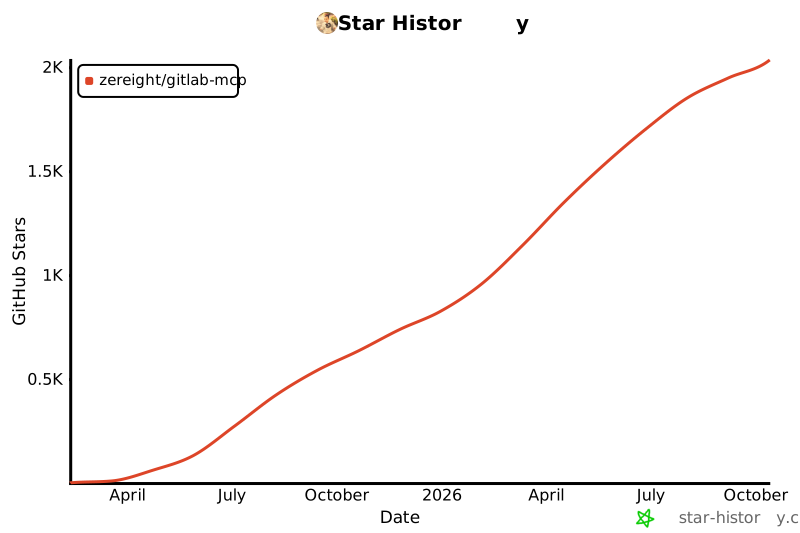](https://www.star-history.com/#zereight/gitlab-mcp&Date)
|
|
8
|
+
|
|
9
|
+
## @zereight/mcp-gitlab
|
|
10
|
+
|
|
11
|
+
这是面向 AI 客户端的完整 GitLab MCP 服务器。可通过 stdio、SSE 和 Streamable HTTP 管理项目、合并请求、议题、流水线、Wiki、发布、里程碑等。
|
|
12
|
+
|
|
13
|
+
支持 PAT、OAuth、只读模式、动态 API URL 和远程授权,可用于 VS Code、Claude、Cursor、Copilot 以及其他 MCP 客户端。
|
|
14
|
+
|
|
15
|
+
### 为什么使用这个 GitLab MCP?
|
|
16
|
+
|
|
17
|
+
- 覆盖范围广:项目、仓库浏览、合并请求、议题、流水线、Wiki、发布、标签、里程碑等
|
|
18
|
+
- 认证灵活:Personal Access Token、本地 OAuth2 浏览器流程、MCP OAuth 代理、按请求远程授权
|
|
19
|
+
- 多种传输方式:本地客户端使用 stdio,旧客户端使用 SSE,现代远程部署使用 Streamable HTTP
|
|
20
|
+
- 客户端设置友好:提供 Claude Code、Codex、Antigravity、OpenCode、Copilot、Cline、Roo Code、Cursor、Kilo Code 和 Amp Code 示例
|
|
21
|
+
- 适合自托管:支持自定义 GitLab 实例、代理设置和动态 API URL 路由
|
|
22
|
+
|
|
23
|
+
快速开始:在下面选择 Personal Access Token 或 OAuth2 设置,并在 MCP 客户端配置中使用 `@zereight/mcp-gitlab`。
|
|
24
|
+
|
|
25
|
+
### 客户端设置指南
|
|
26
|
+
|
|
27
|
+
- [Claude Code 设置指南](./docs/claude-code-setup.md)
|
|
28
|
+
- [VS Code 设置指南](./docs/vscode-setup.md)
|
|
29
|
+
- [GitHub Copilot 设置指南](./docs/copilot-setup.md)
|
|
30
|
+
- [Codex 设置指南](./docs/codex-setup.md)
|
|
31
|
+
- [Cursor 设置指南](./docs/cursor-setup.md)
|
|
32
|
+
- [基于 JSON 的 MCP 客户端设置指南](./docs/json-mcp-clients-setup.md) - 适用于 Factory AI Droid、OpenClaw 和 OpenCode 风格客户端
|
|
33
|
+
- [OAuth2 认证设置指南](./docs/oauth-setup.md)
|
|
34
|
+
- [环境变量参考](./docs/environment-variables.md)
|
|
35
|
+
|
|
36
|
+
## 使用方法
|
|
37
|
+
|
|
38
|
+
### 设置概览
|
|
39
|
+
|
|
40
|
+
#### 认证方式
|
|
41
|
+
|
|
42
|
+
服务器支持四种认证方式。
|
|
43
|
+
|
|
44
|
+
**本地/桌面使用**(最常见):
|
|
45
|
+
|
|
46
|
+
1. **Personal Access Token** (`GITLAB_PERSONAL_ACCESS_TOKEN`) — 最简单的设置
|
|
47
|
+
2. **OAuth2 — 本地浏览器** (`GITLAB_USE_OAUTH`) — 推荐用于更好的安全性
|
|
48
|
+
|
|
49
|
+
**服务器/远程部署**:
|
|
50
|
+
|
|
51
|
+
3. **OAuth2 — MCP 代理** (`GITLAB_MCP_OAUTH`) — 适用于 Claude.ai 等远程 MCP 客户端
|
|
52
|
+
4. **远程授权** (`REMOTE_AUTHORIZATION`) — 适用于每个调用方提供自己 token 的多用户部署
|
|
53
|
+
|
|
54
|
+
#### 快速设置路径
|
|
55
|
+
|
|
56
|
+
- **Claude Code**:[Claude Code 设置指南](./docs/claude-code-setup.md)
|
|
57
|
+
- **VS Code**:[VS Code 设置指南](./docs/vscode-setup.md)
|
|
58
|
+
- **GitHub Copilot**:[GitHub Copilot 设置指南](./docs/copilot-setup.md)
|
|
59
|
+
- **Codex**:[Codex 设置指南](./docs/codex-setup.md)
|
|
60
|
+
- **Cursor**:[Cursor 设置指南](./docs/cursor-setup.md)
|
|
61
|
+
- **Factory AI Droid / OpenClaw / OpenCode 风格客户端**:[基于 JSON 的 MCP 客户端设置指南](./docs/json-mcp-clients-setup.md)
|
|
62
|
+
- **OAuth 浏览器流程详情**:[OAuth2 认证设置指南](./docs/oauth-setup.md)
|
|
63
|
+
|
|
64
|
+
最简单的本地设置可以从 Personal Access Token 开始。基于浏览器的本地认证使用 OAuth2。远程或多用户部署请继续查看下面的 MCP OAuth 和远程授权部分。
|
|
65
|
+
|
|
66
|
+
#### 使用 CLI 参数(适用于环境变量有问题的客户端)
|
|
67
|
+
|
|
68
|
+
部分 MCP 客户端(例如 GitHub Copilot CLI)可能难以处理环境变量。可以改用 CLI 参数。
|
|
69
|
+
|
|
70
|
+
```json
|
|
71
|
+
{
|
|
72
|
+
"mcpServers": {
|
|
73
|
+
"gitlab": {
|
|
74
|
+
"command": "npx",
|
|
75
|
+
"args": [
|
|
76
|
+
"-y",
|
|
77
|
+
"@zereight/mcp-gitlab",
|
|
78
|
+
"--token=YOUR_GITLAB_TOKEN",
|
|
79
|
+
"--api-url=https://gitlab.com/api/v4"
|
|
80
|
+
],
|
|
81
|
+
"tools": ["*"]
|
|
82
|
+
}
|
|
83
|
+
}
|
|
84
|
+
}
|
|
85
|
+
```
|
|
86
|
+
|
|
87
|
+
**可用 CLI 参数:**
|
|
88
|
+
|
|
89
|
+
- `--token` - GitLab Personal Access Token(替代 `GITLAB_PERSONAL_ACCESS_TOKEN`)
|
|
90
|
+
- `--api-url` - GitLab API URL(替代 `GITLAB_API_URL`)
|
|
91
|
+
- `--read-only=true` - 启用只读模式(替代 `GITLAB_READ_ONLY_MODE`)
|
|
92
|
+
- `--use-wiki=true` - 启用 Wiki API(替代 `USE_GITLAB_WIKI`)
|
|
93
|
+
- `--use-milestone=true` - 启用里程碑 API(替代 `USE_MILESTONE`)
|
|
94
|
+
- `--use-pipeline=true` - 启用流水线 API(替代 `USE_PIPELINE`)
|
|
95
|
+
|
|
96
|
+
CLI 参数优先于环境变量。
|
|
97
|
+
|
|
98
|
+
#### SSE
|
|
99
|
+
|
|
100
|
+
```shell
|
|
101
|
+
docker run -i --rm \
|
|
102
|
+
-e HOST=0.0.0.0 \
|
|
103
|
+
-e GITLAB_PERSONAL_ACCESS_TOKEN=your_gitlab_token \
|
|
104
|
+
-e GITLAB_API_URL="https://gitlab.com/api/v4" \
|
|
105
|
+
-e GITLAB_READ_ONLY_MODE=true \
|
|
106
|
+
-e USE_GITLAB_WIKI=true \
|
|
107
|
+
-e USE_MILESTONE=true \
|
|
108
|
+
-e USE_PIPELINE=true \
|
|
109
|
+
-e SSE=true \
|
|
110
|
+
-p 3333:3002 \
|
|
111
|
+
zereight050/gitlab-mcp
|
|
112
|
+
```
|
|
113
|
+
|
|
114
|
+
```json
|
|
115
|
+
{
|
|
116
|
+
"mcpServers": {
|
|
117
|
+
"gitlab": {
|
|
118
|
+
"type": "sse",
|
|
119
|
+
"url": "http://localhost:3333/sse"
|
|
120
|
+
}
|
|
121
|
+
}
|
|
122
|
+
}
|
|
123
|
+
```
|
|
124
|
+
|
|
125
|
+
#### Streamable HTTP
|
|
126
|
+
|
|
127
|
+
```shell
|
|
128
|
+
docker run -i --rm \
|
|
129
|
+
-e HOST=0.0.0.0 \
|
|
130
|
+
-e GITLAB_PERSONAL_ACCESS_TOKEN=your_gitlab_token \
|
|
131
|
+
-e GITLAB_API_URL="https://gitlab.com/api/v4" \
|
|
132
|
+
-e GITLAB_READ_ONLY_MODE=true \
|
|
133
|
+
-e USE_GITLAB_WIKI=true \
|
|
134
|
+
-e USE_MILESTONE=true \
|
|
135
|
+
-e USE_PIPELINE=true \
|
|
136
|
+
-e STREAMABLE_HTTP=true \
|
|
137
|
+
-p 3333:3002 \
|
|
138
|
+
zereight050/gitlab-mcp
|
|
139
|
+
```
|
|
140
|
+
|
|
141
|
+
```json
|
|
142
|
+
{
|
|
143
|
+
"mcpServers": {
|
|
144
|
+
"gitlab": {
|
|
145
|
+
"type": "streamable-http",
|
|
146
|
+
"url": "http://localhost:3333/mcp"
|
|
147
|
+
}
|
|
148
|
+
}
|
|
149
|
+
}
|
|
150
|
+
```
|
|
151
|
+
|
|
152
|
+
#### 使用 MCP OAuth 代理(`GITLAB_MCP_OAUTH`)
|
|
153
|
+
|
|
154
|
+
> **仅适用于服务器/远程部署。** 此模式要求 MCP 服务器部署在可公开访问的 HTTPS URL 上。本地/桌面使用请使用 `GITLAB_USE_OAUTH`。
|
|
155
|
+
|
|
156
|
+
适用于支持 MCP OAuth 规范的远程 MCP 客户端(例如 Claude.ai)。服务器会作为完整 OAuth 2.0 授权服务器运行。未认证请求会收到 `401 + WWW-Authenticate` 响应,从而触发客户端侧 OAuth 浏览器流程。
|
|
157
|
+
|
|
158
|
+
**工作方式**:将此 MCP 服务器部署到拥有公开 HTTPS URL 的位置。MCP 客户端连接到 `{MCP_SERVER_URL}/mcp`。服务器处理 OAuth 2.0 流程,并代表客户端与 GitLab 交换凭据。
|
|
159
|
+
|
|
160
|
+
**前置条件:**
|
|
161
|
+
|
|
162
|
+
1. 可公开访问的 HTTPS 服务器 URL(`MCP_SERVER_URL`)— 本地测试可使用 [ngrok](https://ngrok.com)
|
|
163
|
+
2. 预先注册的 GitLab OAuth 应用,包含 `api` 或 `read_api` scopes
|
|
164
|
+
— 前往 `Admin area` → `Applications`,将 Redirect URI 设置为 `{MCP_SERVER_URL}/callback`
|
|
165
|
+
|
|
166
|
+
| 环境变量 | 必需 | 说明 |
|
|
167
|
+
| --- | --- | --- |
|
|
168
|
+
| `GITLAB_MCP_OAUTH` | 是 | 设置为 `true` 以启用 |
|
|
169
|
+
| `GITLAB_API_URL` | 是 | GitLab API base URL |
|
|
170
|
+
| `GITLAB_OAUTH_APP_ID` | 是 | GitLab OAuth Application ID |
|
|
171
|
+
| `MCP_SERVER_URL` | 是 | 此 MCP 服务器的公开 HTTPS URL |
|
|
172
|
+
| `STREAMABLE_HTTP` | 是 | 必须为 `true` |
|
|
173
|
+
| `GITLAB_OAUTH_CALLBACK_PROXY` | 可选 | 设置为 `true` 时使用 MCP 服务器固定的 `/callback` URL |
|
|
174
|
+
| `GITLAB_OAUTH_SCOPES` | 可选 | 逗号分隔的 scope(默认:`api,read_api,read_user`) |
|
|
175
|
+
|
|
176
|
+
```shell
|
|
177
|
+
docker run -i --rm \
|
|
178
|
+
-e HOST=0.0.0.0 \
|
|
179
|
+
-e GITLAB_MCP_OAUTH=true \
|
|
180
|
+
-e GITLAB_OAUTH_CALLBACK_PROXY=true \
|
|
181
|
+
-e STREAMABLE_HTTP=true \
|
|
182
|
+
-e MCP_SERVER_URL=https://your-server.example.com \
|
|
183
|
+
-e GITLAB_API_URL="https://gitlab.com/api/v4" \
|
|
184
|
+
-e GITLAB_OAUTH_APP_ID=your_app_id \
|
|
185
|
+
-p 3000:3002 \
|
|
186
|
+
zereight050/gitlab-mcp
|
|
187
|
+
```
|
|
188
|
+
|
|
189
|
+
MCP 客户端配置:
|
|
190
|
+
|
|
191
|
+
```json
|
|
192
|
+
{
|
|
193
|
+
"mcpServers": {
|
|
194
|
+
"gitlab": {
|
|
195
|
+
"type": "http",
|
|
196
|
+
"url": "https://your-server.example.com/mcp"
|
|
197
|
+
}
|
|
198
|
+
}
|
|
199
|
+
}
|
|
200
|
+
```
|
|
201
|
+
|
|
202
|
+
#### 使用远程授权(`REMOTE_AUTHORIZATION`)
|
|
203
|
+
|
|
204
|
+
> **仅适用于服务器/远程部署。** 每个 HTTP 调用方都在请求头中直接提供自己的 GitLab token,不使用 OAuth 流程。
|
|
205
|
+
|
|
206
|
+
适用于多用户或多租户部署,每个调用方在 HTTP 请求头中提供自己的 GitLab token。MCP 服务器会代表调用方将 token 转发给 GitLab。
|
|
207
|
+
|
|
208
|
+
**请求头优先级**:`Private-Token` > `JOB-TOKEN` > `Authorization: Bearer`
|
|
209
|
+
|
|
210
|
+
| 环境变量 | 必需 | 说明 |
|
|
211
|
+
| --- | --- | --- |
|
|
212
|
+
| `REMOTE_AUTHORIZATION` | 是 | 设置为 `true` 以启用 |
|
|
213
|
+
| `STREAMABLE_HTTP` | 是 | 必须为 `true` |
|
|
214
|
+
| `ENABLE_DYNAMIC_API_URL` | 可选 | 允许按请求通过 `X-GitLab-API-URL` 请求头指定 GitLab URL |
|
|
215
|
+
|
|
216
|
+
**示例请求头:**
|
|
217
|
+
|
|
218
|
+
```http
|
|
219
|
+
Private-Token: glpat-xxxxxxxxxxxxxxxxxxxx
|
|
220
|
+
```
|
|
221
|
+
|
|
222
|
+
或使用 Bearer token:
|
|
223
|
+
|
|
224
|
+
```http
|
|
225
|
+
Authorization: Bearer glpat-xxxxxxxxxxxxxxxxxxxx
|
|
226
|
+
```
|
|
227
|
+
|
|
228
|
+
> ⚠️ `REMOTE_AUTHORIZATION` 与 SSE 传输不兼容。必须使用 `STREAMABLE_HTTP=true`。
|
|
229
|
+
|
|
230
|
+
### 环境变量
|
|
231
|
+
|
|
232
|
+
完整环境变量列表请查看专门的参考文档:
|
|
233
|
+
|
|
234
|
+
- [环境变量参考](./docs/environment-variables.md)
|
|
235
|
+
|
|
236
|
+
大多数用户只需要以下起始组合之一:
|
|
237
|
+
|
|
238
|
+
- **本地 PAT**:`GITLAB_PERSONAL_ACCESS_TOKEN`, `GITLAB_API_URL`
|
|
239
|
+
- **本地 OAuth**:`GITLAB_USE_OAUTH=true`, `GITLAB_OAUTH_CLIENT_ID`, `GITLAB_OAUTH_REDIRECT_URI`, `GITLAB_API_URL`
|
|
240
|
+
- **远程多用户 HTTP**:`STREAMABLE_HTTP=true`, `REMOTE_AUTHORIZATION=true`, `HOST`, `PORT`
|
|
241
|
+
|
|
242
|
+
常用变量:
|
|
243
|
+
|
|
244
|
+
- `GITLAB_API_URL`
|
|
245
|
+
- `GITLAB_PERSONAL_ACCESS_TOKEN`
|
|
246
|
+
- `GITLAB_USE_OAUTH`
|
|
247
|
+
- `REMOTE_AUTHORIZATION`
|
|
248
|
+
- `GITLAB_MCP_OAUTH`
|
|
249
|
+
- `GITLAB_OAUTH_CALLBACK_PROXY`
|
|
250
|
+
|
|
251
|
+
参考文档还包含:
|
|
252
|
+
|
|
253
|
+
- auth 和 OAuth 变量
|
|
254
|
+
- MCP OAuth 代理变量
|
|
255
|
+
- 项目与工具过滤变量
|
|
256
|
+
- 通过 `discover_tools` 进行动态工具发现(按需启用工具集)
|
|
257
|
+
- 传输和会话变量
|
|
258
|
+
- 代理和 TLS 变量
|
|
259
|
+
|
|
260
|
+
回调代理模式详情请参阅 [GitLab MCP OAuth Callback Proxy](./docs/oauth-callback-proxy.md)。
|
|
261
|
+
|
|
262
|
+
### 远程授权设置(多用户支持)
|
|
263
|
+
|
|
264
|
+
使用 `REMOTE_AUTHORIZATION=true` 时,MCP 服务器可以支持多个用户,每个用户通过 HTTP 请求头传入自己的 GitLab token。适用于:
|
|
265
|
+
|
|
266
|
+
- 每个用户都需要自己 GitLab 访问权限的共享 MCP 服务器实例
|
|
267
|
+
- 可以将用户专属 token 注入 MCP 请求的 IDE 集成
|
|
268
|
+
|
|
269
|
+
**设置示例:**
|
|
270
|
+
|
|
271
|
+
```bash
|
|
272
|
+
docker run -d \
|
|
273
|
+
-e HOST=0.0.0.0 \
|
|
274
|
+
-e STREAMABLE_HTTP=true \
|
|
275
|
+
-e REMOTE_AUTHORIZATION=true \
|
|
276
|
+
-e GITLAB_API_URL="https://gitlab.com/api/v4" \
|
|
277
|
+
-e GITLAB_READ_ONLY_MODE=true \
|
|
278
|
+
-e SESSION_TIMEOUT_SECONDS=3600 \
|
|
279
|
+
-p 3333:3002 \
|
|
280
|
+
zereight050/gitlab-mcp
|
|
281
|
+
```
|
|
282
|
+
|
|
283
|
+
**客户端配置:**
|
|
284
|
+
|
|
285
|
+
IDE 或 MCP 客户端必须在每个请求中发送以下请求头之一:
|
|
286
|
+
|
|
287
|
+
```http
|
|
288
|
+
Authorization: Bearer glpat-xxxxxxxxxxxxxxxxxxxx
|
|
289
|
+
```
|
|
290
|
+
|
|
291
|
+
或
|
|
292
|
+
|
|
293
|
+
```http
|
|
294
|
+
Private-Token: glpat-xxxxxxxxxxxxxxxxxxxx
|
|
295
|
+
```
|
|
296
|
+
|
|
297
|
+
token 按会话存储(由 `mcp-session-id` 请求头标识),并在同一会话的后续请求中复用。
|
|
298
|
+
|
|
299
|
+
#### Cursor 远程授权客户端配置示例
|
|
300
|
+
|
|
301
|
+
```json
|
|
302
|
+
{
|
|
303
|
+
"mcpServers": {
|
|
304
|
+
"GitLab": {
|
|
305
|
+
"url": "http(s)://<your_mcp_gitlab_server>/mcp",
|
|
306
|
+
"headers": {
|
|
307
|
+
"Authorization": "Bearer glpat-..."
|
|
308
|
+
}
|
|
309
|
+
}
|
|
310
|
+
}
|
|
311
|
+
}
|
|
312
|
+
```
|
|
313
|
+
|
|
314
|
+
**重要说明:**
|
|
315
|
+
|
|
316
|
+
- 远程授权**仅适用于 Streamable HTTP 传输**
|
|
317
|
+
- 每个会话相互隔离。一个会话的 token 不能访问另一个会话的数据。会话关闭后 token 会自动清理。
|
|
318
|
+
- **会话超时:** 认证 token 在 `SESSION_TIMEOUT_SECONDS`(默认 1 小时)无活动后过期。超时后,客户端必须再次发送认证请求头。传输会话仍保持活动。
|
|
319
|
+
- 每个请求都会重置该会话的超时计时器。
|
|
320
|
+
- **Rate limiting:** 每个会话限制为每分钟 `MAX_REQUESTS_PER_MINUTE` 次请求(默认 60)。
|
|
321
|
+
- **Capacity limit:** 服务器最多接受 `MAX_SESSIONS` 个并发会话(默认 1000)。
|
|
322
|
+
|
|
323
|
+
### MCP OAuth 设置(Claude.ai Native OAuth)
|
|
324
|
+
|
|
325
|
+
使用 `GITLAB_MCP_OAUTH=true` 时,服务器会作为 GitLab 实例的 OAuth 代理。Claude.ai 以及任何符合 MCP 规范的客户端会自动处理完整浏览器认证流程,无需手动管理 Personal Access Token。
|
|
326
|
+
|
|
327
|
+
**前置条件:**
|
|
328
|
+
|
|
329
|
+
需要**预先注册的 GitLab OAuth 应用**。GitLab 会将动态注册的未验证应用限制为 `mcp` scope,该 scope 不足以调用 API(需要 `api` 或 `read_api`)。
|
|
330
|
+
|
|
331
|
+
1. 前往 GitLab 实例 → **Admin Area > Applications**(实例级)或 **User Settings > Applications**(个人)
|
|
332
|
+
2. 创建新应用:
|
|
333
|
+
- **Confidential**:取消勾选
|
|
334
|
+
- **Scopes**:`api`, `read_api`, `read_user`,或你计划通过 `GITLAB_OAUTH_SCOPES` 请求的 scopes
|
|
335
|
+
3. 保存并复制 **Application ID**。它就是 `GITLAB_OAUTH_APP_ID`。
|
|
336
|
+
|
|
337
|
+
**工作方式:**
|
|
338
|
+
|
|
339
|
+
1. 用户在 Claude.ai 中添加 MCP 服务器 URL。
|
|
340
|
+
2. Claude.ai 通过 `/.well-known/oauth-authorization-server` 发现 OAuth 端点。
|
|
341
|
+
3. Claude.ai 通过 Dynamic Client Registration(`POST /register`)注册自身。MCP 服务器在本地处理,并为每个客户端分配虚拟 client ID。
|
|
342
|
+
4. Claude.ai 使用预先注册的 OAuth 应用,将用户浏览器重定向到 GitLab 登录页。
|
|
343
|
+
5. 用户完成认证后,GitLab 重定向回 `https://claude.ai/api/mcp/auth_callback`。
|
|
344
|
+
6. Claude.ai 在每个 MCP 请求中发送 `Authorization: Bearer <token>`。
|
|
345
|
+
7. 服务器通过 GitLab 验证 token,并按会话存储。
|
|
346
|
+
|
|
347
|
+
**服务器设置:**
|
|
348
|
+
|
|
349
|
+
```bash
|
|
350
|
+
docker run -d \
|
|
351
|
+
-e STREAMABLE_HTTP=true \
|
|
352
|
+
-e GITLAB_MCP_OAUTH=true \
|
|
353
|
+
-e GITLAB_OAUTH_APP_ID="your-gitlab-oauth-app-client-id" \
|
|
354
|
+
-e GITLAB_API_URL="https://gitlab.example.com/api/v4" \
|
|
355
|
+
-e MCP_SERVER_URL="https://your-mcp-server.example.com" \
|
|
356
|
+
-p 3002:3002 \
|
|
357
|
+
zereight050/gitlab-mcp
|
|
358
|
+
```
|
|
359
|
+
|
|
360
|
+
本地开发(允许 HTTP):
|
|
361
|
+
|
|
362
|
+
```bash
|
|
363
|
+
MCP_DANGEROUSLY_ALLOW_INSECURE_ISSUER_URL=true \
|
|
364
|
+
STREAMABLE_HTTP=true \
|
|
365
|
+
GITLAB_MCP_OAUTH=true \
|
|
366
|
+
GITLAB_OAUTH_APP_ID=your-gitlab-oauth-app-client-id \
|
|
367
|
+
MCP_SERVER_URL=http://localhost:3002 \
|
|
368
|
+
GITLAB_API_URL=https://gitlab.com/api/v4 \
|
|
369
|
+
node build/index.js
|
|
370
|
+
```
|
|
371
|
+
|
|
372
|
+
**Claude.ai 配置:**
|
|
373
|
+
|
|
374
|
+
```json
|
|
375
|
+
{
|
|
376
|
+
"mcpServers": {
|
|
377
|
+
"GitLab": {
|
|
378
|
+
"url": "https://your-mcp-server.example.com/mcp"
|
|
379
|
+
}
|
|
380
|
+
}
|
|
381
|
+
}
|
|
382
|
+
```
|
|
383
|
+
|
|
384
|
+
无需 `headers` 字段。Claude.ai 会通过 OAuth 获取 token。
|
|
385
|
+
|
|
386
|
+
**环境变量:**
|
|
387
|
+
|
|
388
|
+
| 变量 | 必需 | 说明 |
|
|
389
|
+
| --- | --- | --- |
|
|
390
|
+
| `GITLAB_MCP_OAUTH` | 是 | 设置为 `true` 以启用 |
|
|
391
|
+
| `GITLAB_OAUTH_APP_ID` | 是 | 预先注册的 GitLab OAuth 应用 client ID |
|
|
392
|
+
| `MCP_SERVER_URL` | 是 | MCP 服务器的公开 HTTPS URL |
|
|
393
|
+
| `GITLAB_API_URL` | 是 | GitLab 实例 API URL(例如 `https://gitlab.com/api/v4`) |
|
|
394
|
+
| `STREAMABLE_HTTP` | 是 | 必须为 `true`(不支持 SSE) |
|
|
395
|
+
| `GITLAB_OAUTH_SCOPES` | 否 | 要请求的 GitLab scopes,以逗号分隔。默认值为 `api`,当 `GITLAB_READ_ONLY_MODE=true` 时为 `read_api`。预注册应用必须配置至少这些 scopes。 |
|
|
396
|
+
| `MCP_DANGEROUSLY_ALLOW_INSECURE_ISSUER_URL` | 否 | 仅用于本地 HTTP 开发 |
|
|
397
|
+
|
|
398
|
+
**重要说明:**
|
|
399
|
+
|
|
400
|
+
- MCP OAuth **仅适用于 Streamable HTTP 传输**(与 `SSE=true` 不兼容)。
|
|
401
|
+
- 每个用户会话保存自己的 OAuth token,会话完全隔离。
|
|
402
|
+
- 会话超时、rate limiting 和 capacity limit 与 `REMOTE_AUTHORIZATION` 模式相同(`SESSION_TIMEOUT_SECONDS`, `MAX_REQUESTS_PER_MINUTE`, `MAX_SESSIONS`)。
|
|
403
|
+
- **请求头认证 fallback:** 当请求头中存在 `Private-Token` 或 `JOB-TOKEN` 时,会跳过 OAuth 验证,并直接将原始 token 用于该会话。这样可以在同一服务器实例中同时使用 OAuth 流程、PAT 和 CI job token。`Authorization: Bearer` 始终被视为 OAuth token。PAT 请求头认证请使用 `Private-Token`。
|
|
404
|
+
|
|
405
|
+
## Agent Skill Files
|
|
406
|
+
|
|
407
|
+
对于支持 skill/instruction 加载的 AI 代理(Claude Code、GitHub Copilot、Cursor 等),[`skills/gitlab-mcp/`](./skills/gitlab-mcp/) 中提供了预构建 skill 文件。
|
|
408
|
+
|
|
409
|
+
- **[SKILL.md](./skills/gitlab-mcp/SKILL.md)** — 核心指南,包含工具集概览、关键工作流和参数提示
|
|
410
|
+
- **[reference/](./skills/gitlab-mcp/reference/)** — 代码审查、合并请求、议题和流水线的详细工作流文档
|
|
411
|
+
|
|
412
|
+
使用 `skills` CLI 安装:
|
|
413
|
+
|
|
414
|
+
```bash
|
|
415
|
+
npx skills add zereight/gitlab-mcp --skill gitlab-mcp-skill
|
|
416
|
+
```
|
|
417
|
+
|
|
418
|
+
在 AI 客户端中注册 skill 目录,可以在不完全依赖完整 ListTools 响应的情况下获得更好的工具使用指导。
|
|
419
|
+
|
|
420
|
+
## 工具 🛠️
|
|
421
|
+
|
|
422
|
+
完整工具列表请参考英文 README 的 [Tools 部分](./README.md#tools-%EF%B8%8F)。当前服务器提供合并请求、议题、流水线、部署、环境、制品、里程碑、Wiki、仓库、发布、用户、事件、work item、webhook、代码搜索和 GraphQL 执行相关工具。
|
|
423
|
+
|
|
424
|
+
## 测试 🧪
|
|
425
|
+
|
|
426
|
+
项目包含完整测试覆盖,包括远程授权:
|
|
427
|
+
|
|
428
|
+
```bash
|
|
429
|
+
# 运行所有测试(API 验证 + 远程授权)
|
|
430
|
+
npm test
|
|
431
|
+
|
|
432
|
+
# 只运行远程授权测试
|
|
433
|
+
npm run test:remote-auth
|
|
434
|
+
|
|
435
|
+
# 运行所有测试,包括 readonly MCP 测试
|
|
436
|
+
npm run test:all
|
|
437
|
+
|
|
438
|
+
# 只运行 API 验证
|
|
439
|
+
npm run test:integration
|
|
440
|
+
```
|
|
441
|
+
|
|
442
|
+
所有远程授权测试都使用 mock GitLab 服务器,不需要真实 GitLab 凭据。
|
package/build/config.js
CHANGED
|
@@ -59,11 +59,74 @@ export const GITLAB_OAUTH_SCOPES = GITLAB_OAUTH_SCOPES_RAW
|
|
|
59
59
|
export const GITLAB_OAUTH_CALLBACK_PROXY = getConfig("oauth-callback-proxy", "GITLAB_OAUTH_CALLBACK_PROXY") === "true";
|
|
60
60
|
export const ENABLE_DYNAMIC_API_URL = getConfig("enable-dynamic-api-url", "ENABLE_DYNAMIC_API_URL") === "true";
|
|
61
61
|
// ---------------------------------------------------------------------------
|
|
62
|
+
// Stateless mode (multi-pod safe OAuth / session encoding)
|
|
63
|
+
// ---------------------------------------------------------------------------
|
|
64
|
+
/** Master switch — when true, opaque OAuth values carry the state instead of
|
|
65
|
+
* an in-memory per-pod cache. Requires OAUTH_STATELESS_SECRET. */
|
|
66
|
+
export const OAUTH_STATELESS_MODE = getConfig("oauth-stateless-mode", "OAUTH_STATELESS_MODE") === "true";
|
|
67
|
+
/**
|
|
68
|
+
* Per-surface TTLs (seconds). Defaults apply when the env var is unset.
|
|
69
|
+
*
|
|
70
|
+
* Both the parsed raw value AND the fallback are validated as finite
|
|
71
|
+
* positive integers. Without the fallback guard, a caller that computes
|
|
72
|
+
* its fallback from another (unvalidated) env var could smuggle `NaN`
|
|
73
|
+
* through here — e.g. `parseInt(SESSION_TIMEOUT_SECONDS, 10)` returns
|
|
74
|
+
* NaN when the operator sets `SESSION_TIMEOUT_SECONDS=not-a-number`.
|
|
75
|
+
* That NaN would silently disable TTL checks downstream (see `checkIat`
|
|
76
|
+
* in stateless/codec.ts: `ttlSec > 0` is false for NaN), breaking the
|
|
77
|
+
* documented inactivity timeout for sealed sids and OAuth proxy values.
|
|
78
|
+
*
|
|
79
|
+
* `safeFallback` picks the supplied fallback only when it is itself a
|
|
80
|
+
* valid positive integer; otherwise it falls back to `safeFallback`,
|
|
81
|
+
* which must itself be a valid positive integer. In dev/test a bad
|
|
82
|
+
* `safeFallback` throws eagerly rather than returning NaN, so bugs
|
|
83
|
+
* introduced by a future caller show up at module-load time with a
|
|
84
|
+
* clear stack trace instead of silent TTL suppression at runtime.
|
|
85
|
+
*/
|
|
86
|
+
function _intEnv(name, cliKey, fallback, safeFallback = fallback) {
|
|
87
|
+
// Guard the guard: if *both* fallback and safeFallback are invalid, we
|
|
88
|
+
// have no last-resort positive value — refuse at load time rather than
|
|
89
|
+
// return NaN and silently disable TTL checks downstream.
|
|
90
|
+
if (!(Number.isFinite(safeFallback) && safeFallback > 0)) {
|
|
91
|
+
throw new Error(`_intEnv(${name}): safeFallback must be a finite positive integer ` +
|
|
92
|
+
`(got ${safeFallback}). Fix the caller in config.ts.`);
|
|
93
|
+
}
|
|
94
|
+
const safe = Number.isFinite(fallback) && fallback > 0 ? fallback : safeFallback;
|
|
95
|
+
const raw = getConfig(cliKey, name);
|
|
96
|
+
if (!raw)
|
|
97
|
+
return safe;
|
|
98
|
+
const n = Number.parseInt(raw, 10);
|
|
99
|
+
return Number.isFinite(n) && n > 0 ? n : safe;
|
|
100
|
+
}
|
|
101
|
+
export const OAUTH_STATELESS_CLIENT_TTL_SECONDS = _intEnv("OAUTH_STATELESS_CLIENT_TTL_SECONDS", "oauth-stateless-client-ttl", 86_400);
|
|
102
|
+
export const OAUTH_STATELESS_PENDING_TTL_SECONDS = _intEnv("OAUTH_STATELESS_PENDING_TTL_SECONDS", "oauth-stateless-pending-ttl", 600);
|
|
103
|
+
export const OAUTH_STATELESS_STORED_TTL_SECONDS = _intEnv("OAUTH_STATELESS_STORED_TTL_SECONDS", "oauth-stateless-stored-ttl", 600);
|
|
104
|
+
// ---------------------------------------------------------------------------
|
|
62
105
|
// Session / server settings
|
|
63
106
|
// ---------------------------------------------------------------------------
|
|
64
|
-
|
|
107
|
+
/** Default inactivity window for in-memory session state (seconds). */
|
|
108
|
+
const _SESSION_TIMEOUT_DEFAULT = 3600;
|
|
109
|
+
/**
|
|
110
|
+
* Sanitized session timeout. Invalid values (non-numeric, zero, negative,
|
|
111
|
+
* NaN) fall back to _SESSION_TIMEOUT_DEFAULT so downstream consumers —
|
|
112
|
+
* notably the stateless codec's TTL check — always see a finite positive
|
|
113
|
+
* number. A silent NaN here would disable the inactivity timeout for
|
|
114
|
+
* sealed Mcp-Session-Id values.
|
|
115
|
+
*/
|
|
116
|
+
export const SESSION_TIMEOUT_SECONDS = _intEnv("SESSION_TIMEOUT_SECONDS", "session-timeout", _SESSION_TIMEOUT_DEFAULT);
|
|
117
|
+
/**
|
|
118
|
+
* Defaults to SESSION_TIMEOUT_SECONDS when unset. Both the direct env/CLI
|
|
119
|
+
* value and the fallback are validated inside _intEnv, so a broken
|
|
120
|
+
* SESSION_TIMEOUT_SECONDS cannot poison this value. Declared in the
|
|
121
|
+
* session-settings section so the SESSION_TIMEOUT_SECONDS reference is
|
|
122
|
+
* guaranteed to be initialized; logically it belongs to the stateless
|
|
123
|
+
* mode above.
|
|
124
|
+
*/
|
|
125
|
+
export const OAUTH_STATELESS_SESSION_TTL_SECONDS = _intEnv("OAUTH_STATELESS_SESSION_TTL_SECONDS", "oauth-stateless-session-ttl", SESSION_TIMEOUT_SECONDS, _SESSION_TIMEOUT_DEFAULT);
|
|
65
126
|
export const HOST = getConfig("host", "HOST") || "127.0.0.1";
|
|
66
|
-
|
|
127
|
+
/** Default HTTP port for the MCP server. */
|
|
128
|
+
const _PORT_DEFAULT = 3002;
|
|
129
|
+
export const PORT = _intEnv("PORT", "port", _PORT_DEFAULT);
|
|
67
130
|
// ---------------------------------------------------------------------------
|
|
68
131
|
// Proxy configuration
|
|
69
132
|
// ---------------------------------------------------------------------------
|