@zereight/mcp-gitlab 2.1.21 → 2.1.23
This diff represents the content of publicly available package versions that have been released to one of the supported registries. The information contained in this diff is provided for informational purposes only and reflects changes between package versions as they appear in their respective public registries.
- package/README.ko.md +45 -45
- package/README.md +36 -22
- package/README.zh-CN.md +44 -44
- package/build/config.js +8 -2
- package/build/index.js +127 -32
- package/build/oauth.js +9 -9
- package/build/schemas.js +6 -3
- package/build/scripts/generate-tool-docs.js +404 -0
- package/build/test/config-allowed-groups.test.js +97 -0
- package/build/test/test-oauth-proxy-rate-limit.js +133 -0
- package/build/test/test-remote-downloads.js +162 -1
- package/build/test/utils/proxy-client-ip.test.js +28 -0
- package/build/utils/proxy-client-ip.js +11 -0
- package/package.json +2 -2
package/README.ko.md
CHANGED
|
@@ -2,7 +2,7 @@
|
|
|
2
2
|
|
|
3
3
|
[English](./README.md) | [한국어](./README.ko.md) | [简体中文](./README.zh-CN.md)
|
|
4
4
|
|
|
5
|
-
> **새 기능**: 커넥션 풀링을 포함한 동적 GitLab API URL을 지원합니다. 자세한 내용은 [Dynamic API URL 문서](docs/dynamic-api-url.md)를 참고하세요.
|
|
5
|
+
> **새 기능**: 커넥션 풀링을 포함한 동적 GitLab API URL을 지원합니다. 자세한 내용은 [Dynamic API URL 문서](docs/configuration/dynamic-api-url.md)를 참고하세요.
|
|
6
6
|
|
|
7
7
|
[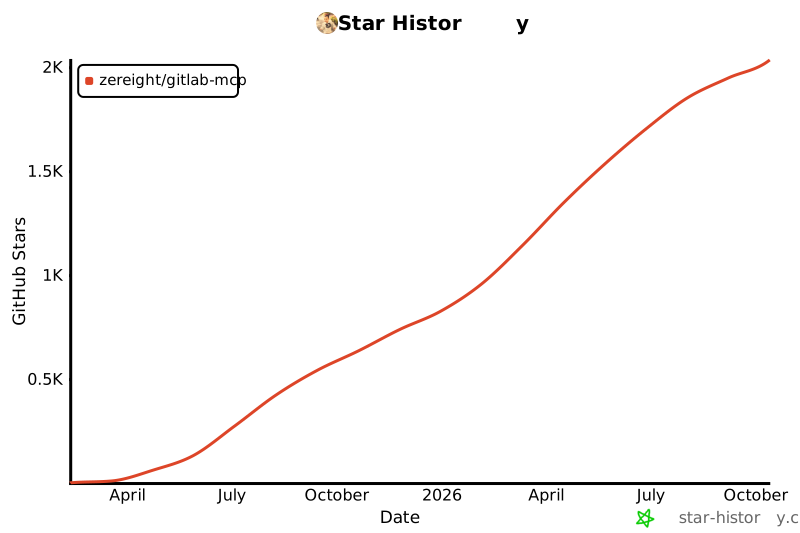](https://www.star-history.com/#zereight/gitlab-mcp&Date)
|
|
8
8
|
|
|
@@ -24,14 +24,14 @@ PAT, OAuth, 읽기 전용 모드, 동적 API URL, 원격 인증을 지원하며
|
|
|
24
24
|
|
|
25
25
|
### 클라이언트 설정 가이드
|
|
26
26
|
|
|
27
|
-
- [Claude Code 설정 가이드](./docs/claude-code
|
|
28
|
-
- [VS Code 설정 가이드](./docs/vscode
|
|
29
|
-
- [GitHub Copilot 설정 가이드](./docs/copilot
|
|
30
|
-
- [Codex 설정 가이드](./docs/codex
|
|
31
|
-
- [Cursor 설정 가이드](./docs/cursor
|
|
32
|
-
- [JSON 기반 MCP 클라이언트 설정 가이드](./docs/json-
|
|
33
|
-
- [OAuth2 인증 설정 가이드](./docs/oauth-setup.md)
|
|
34
|
-
- [환경 변수 레퍼런스](./docs/environment-variables.md)
|
|
27
|
+
- [Claude Code 설정 가이드](./docs/clients/claude-code.md)
|
|
28
|
+
- [VS Code 설정 가이드](./docs/clients/vscode.md)
|
|
29
|
+
- [GitHub Copilot 설정 가이드](./docs/clients/copilot.md)
|
|
30
|
+
- [Codex 설정 가이드](./docs/clients/codex.md)
|
|
31
|
+
- [Cursor 설정 가이드](./docs/clients/cursor.md)
|
|
32
|
+
- [JSON 기반 MCP 클라이언트 설정 가이드](./docs/clients/json-clients.md) - Factory AI Droid, OpenClaw, OpenCode 스타일 클라이언트용
|
|
33
|
+
- [OAuth2 인증 설정 가이드](./docs/auth/oauth-setup.md)
|
|
34
|
+
- [환경 변수 레퍼런스](./docs/configuration/environment-variables.md)
|
|
35
35
|
|
|
36
36
|
## 사용법
|
|
37
37
|
|
|
@@ -53,13 +53,13 @@ PAT, OAuth, 읽기 전용 모드, 동적 API URL, 원격 인증을 지원하며
|
|
|
53
53
|
|
|
54
54
|
#### 빠른 설정 경로
|
|
55
55
|
|
|
56
|
-
- **Claude Code**: [Claude Code 설정 가이드](./docs/claude-code
|
|
57
|
-
- **VS Code**: [VS Code 설정 가이드](./docs/vscode
|
|
58
|
-
- **GitHub Copilot**: [GitHub Copilot 설정 가이드](./docs/copilot
|
|
59
|
-
- **Codex**: [Codex 설정 가이드](./docs/codex
|
|
60
|
-
- **Cursor**: [Cursor 설정 가이드](./docs/cursor
|
|
61
|
-
- **Factory AI Droid / OpenClaw / OpenCode 스타일 클라이언트**: [JSON 기반 MCP 클라이언트 설정 가이드](./docs/json-
|
|
62
|
-
- **OAuth 브라우저 플로우 상세**: [OAuth2 인증 설정 가이드](./docs/oauth-setup.md)
|
|
56
|
+
- **Claude Code**: [Claude Code 설정 가이드](./docs/clients/claude-code.md)
|
|
57
|
+
- **VS Code**: [VS Code 설정 가이드](./docs/clients/vscode.md)
|
|
58
|
+
- **GitHub Copilot**: [GitHub Copilot 설정 가이드](./docs/clients/copilot.md)
|
|
59
|
+
- **Codex**: [Codex 설정 가이드](./docs/clients/codex.md)
|
|
60
|
+
- **Cursor**: [Cursor 설정 가이드](./docs/clients/cursor.md)
|
|
61
|
+
- **Factory AI Droid / OpenClaw / OpenCode 스타일 클라이언트**: [JSON 기반 MCP 클라이언트 설정 가이드](./docs/clients/json-clients.md)
|
|
62
|
+
- **OAuth 브라우저 플로우 상세**: [OAuth2 인증 설정 가이드](./docs/auth/oauth-setup.md)
|
|
63
63
|
|
|
64
64
|
가장 단순한 로컬 설정은 Personal Access Token으로 시작하세요. 브라우저 기반 로컬 인증은 OAuth2를 사용하세요. 원격 또는 멀티 유저 배포는 아래 MCP OAuth 및 원격 인증 섹션을 참고하세요.
|
|
65
65
|
|
|
@@ -163,10 +163,10 @@ OpenCode, MCPJam, Claude.ai 같은 원격 MCP 클라이언트는 인증 중에
|
|
|
163
163
|
|
|
164
164
|
원격 MCP OAuth는 다릅니다. `GITLAB_MCP_OAUTH=true` 모드에서는 MCP 클라이언트가 `/authorize` 요청 중에 자체 callback URL을 제공합니다. `GITLAB_OAUTH_REDIRECT_URI`는 그 클라이언트 제공 URL을 대체하지 않습니다.
|
|
165
165
|
|
|
166
|
-
| 모드
|
|
167
|
-
|
|
|
168
|
-
| 로컬 OAuth
|
|
169
|
-
| 원격 MCP OAuth | `GITLAB_MCP_OAUTH=true` | `GITLAB_OAUTH_CALLBACK_PROXY=true` | `{MCP_SERVER_URL}/callback`
|
|
166
|
+
| 모드 | 활성화 변수 | Callback 변수 | GitLab Redirect URI |
|
|
167
|
+
| -------------- | ----------------------- | ---------------------------------- | --------------------------------------------------- |
|
|
168
|
+
| 로컬 OAuth | `GITLAB_USE_OAUTH=true` | `GITLAB_OAUTH_REDIRECT_URI` | `http://127.0.0.1:8888/callback` 또는 로컬 callback |
|
|
169
|
+
| 원격 MCP OAuth | `GITLAB_MCP_OAUTH=true` | `GITLAB_OAUTH_CALLBACK_PROXY=true` | `{MCP_SERVER_URL}/callback` |
|
|
170
170
|
|
|
171
171
|
MCP 서버가 직접 로컬 브라우저 callback을 받을 때만 `GITLAB_OAUTH_REDIRECT_URI`를 사용하세요. 원격 MCP 클라이언트가 callback URL을 소유하는 경우에는 `GITLAB_OAUTH_CALLBACK_PROXY=true`를 사용하세요.
|
|
172
172
|
|
|
@@ -178,16 +178,16 @@ MCP 서버가 직접 로컬 브라우저 callback을 받을 때만 `GITLAB_OAUTH
|
|
|
178
178
|
2. `api` 또는 `read_api` scope가 있는 사전 등록 GitLab OAuth 애플리케이션
|
|
179
179
|
— `Admin area` → `Applications`에서 Redirect URI를 `{MCP_SERVER_URL}/callback`으로 설정하세요.
|
|
180
180
|
|
|
181
|
-
| 환경 변수
|
|
182
|
-
|
|
|
183
|
-
| `GITLAB_MCP_OAUTH`
|
|
184
|
-
| `GITLAB_API_URL`
|
|
185
|
-
| `GITLAB_OAUTH_APP_ID`
|
|
186
|
-
| `MCP_SERVER_URL`
|
|
187
|
-
| `STREAMABLE_HTTP`
|
|
188
|
-
| `GITLAB_OAUTH_CALLBACK_PROXY` | 선택 | MCP 서버의 고정 `/callback` URL을 사용하려면 `true`
|
|
189
|
-
| `GITLAB_OAUTH_SCOPES`
|
|
190
|
-
| `
|
|
181
|
+
| 환경 변수 | 필수 | 설명 |
|
|
182
|
+
| ----------------------------- | ---- | ---------------------------------------------------------- |
|
|
183
|
+
| `GITLAB_MCP_OAUTH` | 예 | 활성화하려면 `true` |
|
|
184
|
+
| `GITLAB_API_URL` | 예 | GitLab API base URL |
|
|
185
|
+
| `GITLAB_OAUTH_APP_ID` | 예 | GitLab OAuth Application ID |
|
|
186
|
+
| `MCP_SERVER_URL` | 예 | 이 MCP 서버의 공개 HTTPS URL |
|
|
187
|
+
| `STREAMABLE_HTTP` | 예 | 반드시 `true` |
|
|
188
|
+
| `GITLAB_OAUTH_CALLBACK_PROXY` | 선택 | MCP 서버의 고정 `/callback` URL을 사용하려면 `true` |
|
|
189
|
+
| `GITLAB_OAUTH_SCOPES` | 선택 | 쉼표로 구분된 scope 목록(기본값: `api,read_api,read_user`) |
|
|
190
|
+
| `GITLAB_OAUTH_ALLOWED_GROUPS` | 선택 | 쉼표로 구분된 GitLab 그룹 전체 경로 — 해당 그룹 및 하위 그룹 멤버만 토큰을 발급받을 수 있음 (기존 `GITLAB_ALLOWED_GROUPS` 대체) |
|
|
191
191
|
|
|
192
192
|
> **`Unregistered redirect_uri` 문제 해결**
|
|
193
193
|
>
|
|
@@ -233,10 +233,10 @@ MCP 클라이언트 설정:
|
|
|
233
233
|
|
|
234
234
|
**헤더 우선순위**: `Private-Token` > `JOB-TOKEN` > `Authorization: Bearer`
|
|
235
235
|
|
|
236
|
-
| 환경 변수
|
|
237
|
-
|
|
|
238
|
-
| `REMOTE_AUTHORIZATION`
|
|
239
|
-
| `STREAMABLE_HTTP`
|
|
236
|
+
| 환경 변수 | 필수 | 설명 |
|
|
237
|
+
| ------------------------ | ---- | ----------------------------------- |
|
|
238
|
+
| `REMOTE_AUTHORIZATION` | 예 | 활성화하려면 `true` |
|
|
239
|
+
| `STREAMABLE_HTTP` | 예 | 반드시 `true` |
|
|
240
240
|
| `ENABLE_DYNAMIC_API_URL` | 선택 | 요청별 `X-GitLab-API-URL` 헤더 허용 |
|
|
241
241
|
|
|
242
242
|
**예시 요청 헤더:**
|
|
@@ -257,7 +257,7 @@ Authorization: Bearer glpat-xxxxxxxxxxxxxxxxxxxx
|
|
|
257
257
|
|
|
258
258
|
전체 환경 변수 목록은 전용 문서를 참고하세요.
|
|
259
259
|
|
|
260
|
-
- [환경 변수 레퍼런스](./docs/environment-variables.md)
|
|
260
|
+
- [환경 변수 레퍼런스](./docs/configuration/environment-variables.md)
|
|
261
261
|
|
|
262
262
|
대부분의 사용자는 아래 시작 조합 중 하나만 필요합니다.
|
|
263
263
|
|
|
@@ -283,7 +283,7 @@ Authorization: Bearer glpat-xxxxxxxxxxxxxxxxxxxx
|
|
|
283
283
|
- 전송 및 세션 변수
|
|
284
284
|
- 프록시 및 TLS 변수
|
|
285
285
|
|
|
286
|
-
콜백 프록시 모드 상세는 [GitLab MCP OAuth Callback Proxy](./docs/oauth-callback-proxy.md)를 참고하세요.
|
|
286
|
+
콜백 프록시 모드 상세는 [GitLab MCP OAuth Callback Proxy](./docs/auth/oauth-callback-proxy.md)를 참고하세요.
|
|
287
287
|
|
|
288
288
|
### 원격 인증 설정(멀티 유저 지원)
|
|
289
289
|
|
|
@@ -411,15 +411,15 @@ node build/index.js
|
|
|
411
411
|
|
|
412
412
|
**환경 변수:**
|
|
413
413
|
|
|
414
|
-
| 변수
|
|
415
|
-
|
|
|
416
|
-
| `GITLAB_MCP_OAUTH`
|
|
417
|
-
| `GITLAB_OAUTH_APP_ID`
|
|
418
|
-
| `MCP_SERVER_URL`
|
|
419
|
-
| `GITLAB_API_URL`
|
|
420
|
-
| `STREAMABLE_HTTP`
|
|
421
|
-
| `GITLAB_OAUTH_SCOPES`
|
|
422
|
-
| `MCP_DANGEROUSLY_ALLOW_INSECURE_ISSUER_URL` | 아니오 | 로컬 HTTP 개발에서만 `true`
|
|
414
|
+
| 변수 | 필수 | 설명 |
|
|
415
|
+
| ------------------------------------------- | ------ | -------------------------------------------------------------------------------------------------------------------------------------------------------------------------- |
|
|
416
|
+
| `GITLAB_MCP_OAUTH` | 예 | 활성화하려면 `true` |
|
|
417
|
+
| `GITLAB_OAUTH_APP_ID` | 예 | 사전 등록 GitLab OAuth 애플리케이션의 client ID |
|
|
418
|
+
| `MCP_SERVER_URL` | 예 | MCP 서버의 공개 HTTPS URL |
|
|
419
|
+
| `GITLAB_API_URL` | 예 | GitLab 인스턴스 API URL(예: `https://gitlab.com/api/v4`) |
|
|
420
|
+
| `STREAMABLE_HTTP` | 예 | 반드시 `true`(SSE 미지원) |
|
|
421
|
+
| `GITLAB_OAUTH_SCOPES` | 아니오 | 요청할 GitLab scope 목록(쉼표 구분). 기본값은 `api` 또는 `GITLAB_READ_ONLY_MODE=true`일 때 `read_api`입니다. 사전 등록 애플리케이션에 해당 scope가 설정되어 있어야 합니다. |
|
|
422
|
+
| `MCP_DANGEROUSLY_ALLOW_INSECURE_ISSUER_URL` | 아니오 | 로컬 HTTP 개발에서만 `true` |
|
|
423
423
|
|
|
424
424
|
**중요 사항:**
|
|
425
425
|
|
package/README.md
CHANGED
|
@@ -2,7 +2,9 @@
|
|
|
2
2
|
|
|
3
3
|
[English](./README.md) | [한국어](./README.ko.md) | [简体中文](./README.zh-CN.md)
|
|
4
4
|
|
|
5
|
-
|
|
5
|
+
📖 **[Read the full documentation →](https://zereight.github.io/gitlab-mcp/)**
|
|
6
|
+
|
|
7
|
+
> **New Feature**: Dynamic GitLab API URL support with connection pooling! See [Dynamic API URL Documentation](docs/configuration/dynamic-api-url.md) for details.
|
|
6
8
|
|
|
7
9
|
[](https://www.star-history.com/#zereight/gitlab-mcp&Date)
|
|
8
10
|
|
|
@@ -24,16 +26,16 @@ Quick start: choose either Personal Access Token or OAuth2 setup below and use `
|
|
|
24
26
|
|
|
25
27
|
### Client Setup Guides
|
|
26
28
|
|
|
27
|
-
- [Claude Code Setup Guide](./docs/claude-code
|
|
28
|
-
- [VS Code Setup Guide](./docs/vscode
|
|
29
|
-
- [GitHub Copilot Setup Guide](./docs/copilot
|
|
30
|
-
- [Codex Setup Guide](./docs/codex
|
|
31
|
-
- [Cursor Setup Guide](./docs/cursor
|
|
32
|
-
- [JSON-Based MCP Clients Setup Guide](./docs/json-
|
|
33
|
-
- [OAuth2 Authentication Setup Guide](./docs/oauth-setup.md)
|
|
34
|
-
- [Environment Variables Reference](./docs/environment-variables.md)
|
|
35
|
-
- [Stateless Mode — Multi-Pod HPA](./docs/stateless-mode.md)
|
|
36
|
-
- [Custom Agents and Multiple PAT Setup](./docs/custom-agent-multiple-pat.md)
|
|
29
|
+
- [Claude Code Setup Guide](./docs/clients/claude-code.md)
|
|
30
|
+
- [VS Code Setup Guide](./docs/clients/vscode.md)
|
|
31
|
+
- [GitHub Copilot Setup Guide](./docs/clients/copilot.md)
|
|
32
|
+
- [Codex Setup Guide](./docs/clients/codex.md)
|
|
33
|
+
- [Cursor Setup Guide](./docs/clients/cursor.md)
|
|
34
|
+
- [JSON-Based MCP Clients Setup Guide](./docs/clients/json-clients.md) - for Factory AI Droid, OpenClaw, and OpenCode style clients
|
|
35
|
+
- [OAuth2 Authentication Setup Guide](./docs/auth/oauth-setup.md)
|
|
36
|
+
- [Environment Variables Reference](./docs/configuration/environment-variables.md)
|
|
37
|
+
- [Stateless Mode — Multi-Pod HPA](./docs/configuration/stateless-mode.md)
|
|
38
|
+
- [Custom Agents and Multiple PAT Setup](./docs/auth/custom-agent-multiple-pat.md)
|
|
37
39
|
|
|
38
40
|
## Usage
|
|
39
41
|
|
|
@@ -55,13 +57,13 @@ The server supports four authentication methods:
|
|
|
55
57
|
|
|
56
58
|
#### Quick setup paths
|
|
57
59
|
|
|
58
|
-
- **Claude Code**: see [Claude Code Setup Guide](./docs/claude-code
|
|
59
|
-
- **VS Code**: see [VS Code Setup Guide](./docs/vscode
|
|
60
|
-
- **GitHub Copilot**: see [GitHub Copilot Setup Guide](./docs/copilot
|
|
61
|
-
- **Codex**: see [Codex Setup Guide](./docs/codex
|
|
62
|
-
- **Cursor**: see [Cursor Setup Guide](./docs/cursor
|
|
63
|
-
- **Factory AI Droid / OpenClaw / OpenCode style clients**: see [JSON-Based MCP Clients Setup Guide](./docs/json-
|
|
64
|
-
- **OAuth browser flow details**: see [OAuth2 Authentication Setup Guide](./docs/oauth-setup.md)
|
|
60
|
+
- **Claude Code**: see [Claude Code Setup Guide](./docs/clients/claude-code.md)
|
|
61
|
+
- **VS Code**: see [VS Code Setup Guide](./docs/clients/vscode.md)
|
|
62
|
+
- **GitHub Copilot**: see [GitHub Copilot Setup Guide](./docs/clients/copilot.md)
|
|
63
|
+
- **Codex**: see [Codex Setup Guide](./docs/clients/codex.md)
|
|
64
|
+
- **Cursor**: see [Cursor Setup Guide](./docs/clients/cursor.md)
|
|
65
|
+
- **Factory AI Droid / OpenClaw / OpenCode style clients**: see [JSON-Based MCP Clients Setup Guide](./docs/clients/json-clients.md)
|
|
66
|
+
- **OAuth browser flow details**: see [OAuth2 Authentication Setup Guide](./docs/auth/oauth-setup.md)
|
|
65
67
|
|
|
66
68
|
For the simplest local setup, start with a Personal Access Token. For browser-based local auth, use OAuth2. For remote or multi-user deployments, continue to the MCP OAuth and Remote Authorization sections later in this README.
|
|
67
69
|
|
|
@@ -208,7 +210,7 @@ exchanging credentials with GitLab on behalf of the client.
|
|
|
208
210
|
| `STREAMABLE_HTTP` | ✅ | Must be `true` |
|
|
209
211
|
| `GITLAB_OAUTH_CALLBACK_PROXY` | optional | Set to `true` to use the MCP server's fixed `/callback` URL |
|
|
210
212
|
| `GITLAB_OAUTH_SCOPES` | optional | Comma-separated scopes (default: `api,read_api,read_user`) |
|
|
211
|
-
| `
|
|
213
|
+
| `GITLAB_OAUTH_ALLOWED_GROUPS` | optional | Comma-separated group full paths — only members (and subgroup members) may obtain a token (replaces deprecated `GITLAB_ALLOWED_GROUPS`) |
|
|
212
214
|
|
|
213
215
|
When `STREAMABLE_HTTP=true`, server-side `GITLAB_PERSONAL_ACCESS_TOKEN` or `GITLAB_JOB_TOKEN` require `REMOTE_AUTHORIZATION=true` or `GITLAB_MCP_OAUTH=true`.
|
|
214
216
|
|
|
@@ -265,6 +267,17 @@ the token to GitLab on behalf of the caller.
|
|
|
265
267
|
| `REMOTE_AUTHORIZATION` | ✅ | Set to `true` to enable |
|
|
266
268
|
| `STREAMABLE_HTTP` | ✅ | Must be `true` |
|
|
267
269
|
| `ENABLE_DYNAMIC_API_URL` | optional | Allow per-request GitLab URL via `X-GitLab-API-URL` header |
|
|
270
|
+
| `MCP_TRUST_PROXY` | optional | Trust `Forwarded` / `X-Forwarded-*` headers behind a reverse proxy (download URLs, Express `req.ip`, OAuth rate limits) |
|
|
271
|
+
|
|
272
|
+
When `MCP_SERVER_URL` is not set, remote download URLs fall back to the local
|
|
273
|
+
server address. Set `MCP_TRUST_PROXY=true` only if the server is reachable through a
|
|
274
|
+
trusted reverse proxy and direct client access to the MCP server is blocked.
|
|
275
|
+
This enables Express `trust proxy` for Streamable HTTP and SSE, derives public
|
|
276
|
+
download URLs from `Forwarded` / `X-Forwarded-Proto` / `X-Forwarded-Host` /
|
|
277
|
+
`X-Forwarded-Prefix`, and keeps OAuth endpoint rate limiting working when
|
|
278
|
+
proxies send `X-Forwarded-For` with a client port (for example `1.2.3.4:5678`).
|
|
279
|
+
Existing OAuth+proxy deployments must set this explicitly after the flag was
|
|
280
|
+
introduced.
|
|
268
281
|
|
|
269
282
|
**Example request headers**:
|
|
270
283
|
|
|
@@ -284,14 +297,14 @@ Authorization: Bearer glpat-xxxxxxxxxxxxxxxxxxxx
|
|
|
284
297
|
|
|
285
298
|
Use the dedicated reference for the full environment variable list:
|
|
286
299
|
|
|
287
|
-
- [Environment Variables Reference](./docs/environment-variables.md)
|
|
300
|
+
- [Environment Variables Reference](./docs/configuration/environment-variables.md)
|
|
288
301
|
|
|
289
302
|
Most users only need one of these starting sets:
|
|
290
303
|
|
|
291
304
|
- **Local PAT**: `GITLAB_PERSONAL_ACCESS_TOKEN`, `GITLAB_API_URL`
|
|
292
305
|
- **Local OAuth**: `GITLAB_USE_OAUTH=true`, `GITLAB_OAUTH_CLIENT_ID`, `GITLAB_OAUTH_REDIRECT_URI`, `GITLAB_API_URL`
|
|
293
306
|
- **Remote multi-user HTTP**: `STREAMABLE_HTTP=true`, `REMOTE_AUTHORIZATION=true`, `HOST`, `PORT`
|
|
294
|
-
- **Multi-pod HPA (stateless)**: above + `OAUTH_STATELESS_MODE=true`, `OAUTH_STATELESS_SECRET` (same across all pods). See [Stateless Mode](./docs/stateless-mode.md).
|
|
307
|
+
- **Multi-pod HPA (stateless)**: above + `OAUTH_STATELESS_MODE=true`, `OAUTH_STATELESS_SECRET` (same across all pods). See [Stateless Mode](./docs/configuration/stateless-mode.md).
|
|
295
308
|
|
|
296
309
|
Commonly referenced variables:
|
|
297
310
|
|
|
@@ -299,6 +312,7 @@ Commonly referenced variables:
|
|
|
299
312
|
- `GITLAB_PERSONAL_ACCESS_TOKEN`
|
|
300
313
|
- `GITLAB_USE_OAUTH`
|
|
301
314
|
- `REMOTE_AUTHORIZATION`
|
|
315
|
+
- `MCP_TRUST_PROXY`
|
|
302
316
|
- `GITLAB_MCP_OAUTH`
|
|
303
317
|
- `GITLAB_OAUTH_CALLBACK_PROXY`
|
|
304
318
|
- `OAUTH_STATELESS_MODE`
|
|
@@ -313,7 +327,7 @@ The reference document also covers:
|
|
|
313
327
|
- transport and session variables
|
|
314
328
|
- proxy and TLS variables
|
|
315
329
|
|
|
316
|
-
For callback proxy mode details, see [GitLab MCP OAuth Callback Proxy](./docs/oauth-callback-proxy.md).
|
|
330
|
+
For callback proxy mode details, see [GitLab MCP OAuth Callback Proxy](./docs/auth/oauth-callback-proxy.md).
|
|
317
331
|
|
|
318
332
|
### Remote Authorization Setup (Multi-User Support)
|
|
319
333
|
|
package/README.zh-CN.md
CHANGED
|
@@ -2,7 +2,7 @@
|
|
|
2
2
|
|
|
3
3
|
[English](./README.md) | [한국어](./README.ko.md) | [简体中文](./README.zh-CN.md)
|
|
4
4
|
|
|
5
|
-
> **新功能**:支持带连接池的动态 GitLab API URL。详情请参阅 [Dynamic API URL 文档](docs/dynamic-api-url.md)。
|
|
5
|
+
> **新功能**:支持带连接池的动态 GitLab API URL。详情请参阅 [Dynamic API URL 文档](docs/configuration/dynamic-api-url.md)。
|
|
6
6
|
|
|
7
7
|
[](https://www.star-history.com/#zereight/gitlab-mcp&Date)
|
|
8
8
|
|
|
@@ -24,14 +24,14 @@
|
|
|
24
24
|
|
|
25
25
|
### 客户端设置指南
|
|
26
26
|
|
|
27
|
-
- [Claude Code 设置指南](./docs/claude-code
|
|
28
|
-
- [VS Code 设置指南](./docs/vscode
|
|
29
|
-
- [GitHub Copilot 设置指南](./docs/copilot
|
|
30
|
-
- [Codex 设置指南](./docs/codex
|
|
31
|
-
- [Cursor 设置指南](./docs/cursor
|
|
32
|
-
- [基于 JSON 的 MCP 客户端设置指南](./docs/json-
|
|
33
|
-
- [OAuth2 认证设置指南](./docs/oauth-setup.md)
|
|
34
|
-
- [环境变量参考](./docs/environment-variables.md)
|
|
27
|
+
- [Claude Code 设置指南](./docs/clients/claude-code.md)
|
|
28
|
+
- [VS Code 设置指南](./docs/clients/vscode.md)
|
|
29
|
+
- [GitHub Copilot 设置指南](./docs/clients/copilot.md)
|
|
30
|
+
- [Codex 设置指南](./docs/clients/codex.md)
|
|
31
|
+
- [Cursor 设置指南](./docs/clients/cursor.md)
|
|
32
|
+
- [基于 JSON 的 MCP 客户端设置指南](./docs/clients/json-clients.md) - 适用于 Factory AI Droid、OpenClaw 和 OpenCode 风格客户端
|
|
33
|
+
- [OAuth2 认证设置指南](./docs/auth/oauth-setup.md)
|
|
34
|
+
- [环境变量参考](./docs/configuration/environment-variables.md)
|
|
35
35
|
|
|
36
36
|
## 使用方法
|
|
37
37
|
|
|
@@ -53,13 +53,13 @@
|
|
|
53
53
|
|
|
54
54
|
#### 快速设置路径
|
|
55
55
|
|
|
56
|
-
- **Claude Code**:[Claude Code 设置指南](./docs/claude-code
|
|
57
|
-
- **VS Code**:[VS Code 设置指南](./docs/vscode
|
|
58
|
-
- **GitHub Copilot**:[GitHub Copilot 设置指南](./docs/copilot
|
|
59
|
-
- **Codex**:[Codex 设置指南](./docs/codex
|
|
60
|
-
- **Cursor**:[Cursor 设置指南](./docs/cursor
|
|
61
|
-
- **Factory AI Droid / OpenClaw / OpenCode 风格客户端**:[基于 JSON 的 MCP 客户端设置指南](./docs/json-
|
|
62
|
-
- **OAuth 浏览器流程详情**:[OAuth2 认证设置指南](./docs/oauth-setup.md)
|
|
56
|
+
- **Claude Code**:[Claude Code 设置指南](./docs/clients/claude-code.md)
|
|
57
|
+
- **VS Code**:[VS Code 设置指南](./docs/clients/vscode.md)
|
|
58
|
+
- **GitHub Copilot**:[GitHub Copilot 设置指南](./docs/clients/copilot.md)
|
|
59
|
+
- **Codex**:[Codex 设置指南](./docs/clients/codex.md)
|
|
60
|
+
- **Cursor**:[Cursor 设置指南](./docs/clients/cursor.md)
|
|
61
|
+
- **Factory AI Droid / OpenClaw / OpenCode 风格客户端**:[基于 JSON 的 MCP 客户端设置指南](./docs/clients/json-clients.md)
|
|
62
|
+
- **OAuth 浏览器流程详情**:[OAuth2 认证设置指南](./docs/auth/oauth-setup.md)
|
|
63
63
|
|
|
64
64
|
最简单的本地设置可以从 Personal Access Token 开始。基于浏览器的本地认证使用 OAuth2。远程或多用户部署请继续查看下面的 MCP OAuth 和远程授权部分。
|
|
65
65
|
|
|
@@ -163,10 +163,10 @@ OpenCode、MCPJam、Claude.ai 等远程 MCP 客户端可能会在授权时发送
|
|
|
163
163
|
|
|
164
164
|
远程 MCP OAuth 不同。在 `GITLAB_MCP_OAUTH=true` 模式下,MCP 客户端会在 `/authorize` 请求中提供自己的 callback URL。`GITLAB_OAUTH_REDIRECT_URI` 不会替换这个客户端提供的 URL。
|
|
165
165
|
|
|
166
|
-
| 模式
|
|
167
|
-
|
|
|
168
|
-
| 本地 OAuth
|
|
169
|
-
| 远程 MCP OAuth | `GITLAB_MCP_OAUTH=true` | `GITLAB_OAUTH_CALLBACK_PROXY=true` | `{MCP_SERVER_URL}/callback`
|
|
166
|
+
| 模式 | 启用方式 | Callback 变量 | GitLab Redirect URI |
|
|
167
|
+
| -------------- | ----------------------- | ---------------------------------- | ---------------------------------------------------- |
|
|
168
|
+
| 本地 OAuth | `GITLAB_USE_OAUTH=true` | `GITLAB_OAUTH_REDIRECT_URI` | `http://127.0.0.1:8888/callback` 或你的本地 callback |
|
|
169
|
+
| 远程 MCP OAuth | `GITLAB_MCP_OAUTH=true` | `GITLAB_OAUTH_CALLBACK_PROXY=true` | `{MCP_SERVER_URL}/callback` |
|
|
170
170
|
|
|
171
171
|
只有当 MCP 服务器自己接收本地浏览器 callback 时,才使用 `GITLAB_OAUTH_REDIRECT_URI`。当远程 MCP 客户端拥有 callback URL 时,请使用 `GITLAB_OAUTH_CALLBACK_PROXY=true`。
|
|
172
172
|
|
|
@@ -178,16 +178,16 @@ OpenCode、MCPJam、Claude.ai 等远程 MCP 客户端可能会在授权时发送
|
|
|
178
178
|
2. 预先注册的 GitLab OAuth 应用,包含 `api` 或 `read_api` scopes
|
|
179
179
|
— 前往 `Admin area` → `Applications`,将 Redirect URI 设置为 `{MCP_SERVER_URL}/callback`
|
|
180
180
|
|
|
181
|
-
| 环境变量
|
|
182
|
-
|
|
|
183
|
-
| `GITLAB_MCP_OAUTH`
|
|
184
|
-
| `GITLAB_API_URL`
|
|
185
|
-
| `GITLAB_OAUTH_APP_ID`
|
|
186
|
-
| `MCP_SERVER_URL`
|
|
187
|
-
| `STREAMABLE_HTTP`
|
|
181
|
+
| 环境变量 | 必需 | 说明 |
|
|
182
|
+
| ----------------------------- | ---- | ----------------------------------------------------- |
|
|
183
|
+
| `GITLAB_MCP_OAUTH` | 是 | 设置为 `true` 以启用 |
|
|
184
|
+
| `GITLAB_API_URL` | 是 | GitLab API base URL |
|
|
185
|
+
| `GITLAB_OAUTH_APP_ID` | 是 | GitLab OAuth Application ID |
|
|
186
|
+
| `MCP_SERVER_URL` | 是 | 此 MCP 服务器的公开 HTTPS URL |
|
|
187
|
+
| `STREAMABLE_HTTP` | 是 | 必须为 `true` |
|
|
188
188
|
| `GITLAB_OAUTH_CALLBACK_PROXY` | 可选 | 设置为 `true` 时使用 MCP 服务器固定的 `/callback` URL |
|
|
189
|
-
| `GITLAB_OAUTH_SCOPES`
|
|
190
|
-
| `
|
|
189
|
+
| `GITLAB_OAUTH_SCOPES` | 可选 | 逗号分隔的 scope(默认:`api,read_api,read_user`) |
|
|
190
|
+
| `GITLAB_OAUTH_ALLOWED_GROUPS` | 可选 | 逗号分隔的 GitLab 群组完整路径 — 仅该群组及其子群组的成员可获取令牌(替代已废弃的 `GITLAB_ALLOWED_GROUPS`)|
|
|
191
191
|
|
|
192
192
|
> **排查 `Unregistered redirect_uri`**
|
|
193
193
|
>
|
|
@@ -233,10 +233,10 @@ MCP 客户端配置:
|
|
|
233
233
|
|
|
234
234
|
**请求头优先级**:`Private-Token` > `JOB-TOKEN` > `Authorization: Bearer`
|
|
235
235
|
|
|
236
|
-
| 环境变量
|
|
237
|
-
|
|
|
238
|
-
| `REMOTE_AUTHORIZATION`
|
|
239
|
-
| `STREAMABLE_HTTP`
|
|
236
|
+
| 环境变量 | 必需 | 说明 |
|
|
237
|
+
| ------------------------ | ---- | ------------------------------------------------------- |
|
|
238
|
+
| `REMOTE_AUTHORIZATION` | 是 | 设置为 `true` 以启用 |
|
|
239
|
+
| `STREAMABLE_HTTP` | 是 | 必须为 `true` |
|
|
240
240
|
| `ENABLE_DYNAMIC_API_URL` | 可选 | 允许按请求通过 `X-GitLab-API-URL` 请求头指定 GitLab URL |
|
|
241
241
|
|
|
242
242
|
**示例请求头:**
|
|
@@ -257,7 +257,7 @@ Authorization: Bearer glpat-xxxxxxxxxxxxxxxxxxxx
|
|
|
257
257
|
|
|
258
258
|
完整环境变量列表请查看专门的参考文档:
|
|
259
259
|
|
|
260
|
-
- [环境变量参考](./docs/environment-variables.md)
|
|
260
|
+
- [环境变量参考](./docs/configuration/environment-variables.md)
|
|
261
261
|
|
|
262
262
|
大多数用户只需要以下起始组合之一:
|
|
263
263
|
|
|
@@ -283,7 +283,7 @@ Authorization: Bearer glpat-xxxxxxxxxxxxxxxxxxxx
|
|
|
283
283
|
- 传输和会话变量
|
|
284
284
|
- 代理和 TLS 变量
|
|
285
285
|
|
|
286
|
-
回调代理模式详情请参阅 [GitLab MCP OAuth Callback Proxy](./docs/oauth-callback-proxy.md)。
|
|
286
|
+
回调代理模式详情请参阅 [GitLab MCP OAuth Callback Proxy](./docs/auth/oauth-callback-proxy.md)。
|
|
287
287
|
|
|
288
288
|
### 远程授权设置(多用户支持)
|
|
289
289
|
|
|
@@ -411,15 +411,15 @@ node build/index.js
|
|
|
411
411
|
|
|
412
412
|
**环境变量:**
|
|
413
413
|
|
|
414
|
-
| 变量
|
|
415
|
-
|
|
|
416
|
-
| `GITLAB_MCP_OAUTH`
|
|
417
|
-
| `GITLAB_OAUTH_APP_ID`
|
|
418
|
-
| `MCP_SERVER_URL`
|
|
419
|
-
| `GITLAB_API_URL`
|
|
420
|
-
| `STREAMABLE_HTTP`
|
|
421
|
-
| `GITLAB_OAUTH_SCOPES`
|
|
422
|
-
| `MCP_DANGEROUSLY_ALLOW_INSECURE_ISSUER_URL` | 否
|
|
414
|
+
| 变量 | 必需 | 说明 |
|
|
415
|
+
| ------------------------------------------- | ---- | ---------------------------------------------------------------------------------------------------------------------------------------- |
|
|
416
|
+
| `GITLAB_MCP_OAUTH` | 是 | 设置为 `true` 以启用 |
|
|
417
|
+
| `GITLAB_OAUTH_APP_ID` | 是 | 预先注册的 GitLab OAuth 应用 client ID |
|
|
418
|
+
| `MCP_SERVER_URL` | 是 | MCP 服务器的公开 HTTPS URL |
|
|
419
|
+
| `GITLAB_API_URL` | 是 | GitLab 实例 API URL(例如 `https://gitlab.com/api/v4`) |
|
|
420
|
+
| `STREAMABLE_HTTP` | 是 | 必须为 `true`(不支持 SSE) |
|
|
421
|
+
| `GITLAB_OAUTH_SCOPES` | 否 | 要请求的 GitLab scopes,以逗号分隔。默认值为 `api`,当 `GITLAB_READ_ONLY_MODE=true` 时为 `read_api`。预注册应用必须配置至少这些 scopes。 |
|
|
422
|
+
| `MCP_DANGEROUSLY_ALLOW_INSECURE_ISSUER_URL` | 否 | 仅用于本地 HTTP 开发 |
|
|
423
423
|
|
|
424
424
|
**重要说明:**
|
|
425
425
|
|
package/build/config.js
CHANGED
|
@@ -47,6 +47,7 @@ export const SSE = getConfig("sse", "SSE") === "true";
|
|
|
47
47
|
export const STREAMABLE_HTTP = getConfig("streamable-http", "STREAMABLE_HTTP") === "true";
|
|
48
48
|
export const REMOTE_AUTHORIZATION = getConfig("remote-auth", "REMOTE_AUTHORIZATION") === "true";
|
|
49
49
|
export const GITLAB_MCP_OAUTH = getConfig("mcp-oauth", "GITLAB_MCP_OAUTH") === "true";
|
|
50
|
+
export const MCP_TRUST_PROXY = getConfig("mcp-trust-proxy", "MCP_TRUST_PROXY") === "true";
|
|
50
51
|
// ---------------------------------------------------------------------------
|
|
51
52
|
// OAuth / MCP OAuth
|
|
52
53
|
// ---------------------------------------------------------------------------
|
|
@@ -57,8 +58,13 @@ export const GITLAB_OAUTH_SCOPES = GITLAB_OAUTH_SCOPES_RAW
|
|
|
57
58
|
? GITLAB_OAUTH_SCOPES_RAW.split(",").map((s) => s.trim()).filter(Boolean)
|
|
58
59
|
: undefined;
|
|
59
60
|
export const GITLAB_OAUTH_CALLBACK_PROXY = getConfig("oauth-callback-proxy", "GITLAB_OAUTH_CALLBACK_PROXY") === "true";
|
|
60
|
-
|
|
61
|
-
|
|
61
|
+
/** @deprecated Use GITLAB_OAUTH_ALLOWED_GROUPS_RAW instead. Will be removed in the next major version. */
|
|
62
|
+
export const GITLAB_ALLOWED_GROUPS_RAW = getConfig("allowed-groups", "GITLAB_ALLOWED_GROUPS");
|
|
63
|
+
export const GITLAB_OAUTH_ALLOWED_GROUPS_RAW = getConfig("oauth-allowed-groups", "GITLAB_OAUTH_ALLOWED_GROUPS");
|
|
64
|
+
export const GITLAB_OAUTH_ALLOWED_GROUPS = (() => {
|
|
65
|
+
const newVar = GITLAB_OAUTH_ALLOWED_GROUPS_RAW;
|
|
66
|
+
const oldVar = GITLAB_ALLOWED_GROUPS_RAW;
|
|
67
|
+
const raw = newVar ?? oldVar;
|
|
62
68
|
if (!raw)
|
|
63
69
|
return undefined;
|
|
64
70
|
const groups = raw.split(",").map((g) => g.trim()).filter(Boolean);
|