@zereight/mcp-gitlab 2.0.13 → 2.0.19
This diff represents the content of publicly available package versions that have been released to one of the supported registries. The information contained in this diff is provided for informational purposes only and reflects changes between package versions as they appear in their respective public registries.
- package/README.md +75 -9
- package/build/gitlab-client-pool.js +113 -0
- package/build/index.js +450 -356
- package/build/oauth.js +20 -11
- package/build/test/client-pool-test.js +109 -0
- package/build/test/dynamic-api-url-test.js +304 -0
- package/build/test/dynamic-routing-tests.js +442 -0
- package/build/test/multi-server-test.js +182 -0
- package/build/test/remote-auth-simple-test.js +2 -0
- package/build/test/utils/mock-gitlab-server.js +73 -4
- package/build/test/utils/server-launcher.js +25 -9
- package/package.json +8 -4
package/README.md
CHANGED
|
@@ -1,5 +1,7 @@
|
|
|
1
1
|
# GitLab MCP Server
|
|
2
2
|
|
|
3
|
+
> **New Feature**: Dynamic GitLab API URL support with connection pooling! See [Dynamic API URL Documentation](docs/dynamic-api-url.md) for details.
|
|
4
|
+
|
|
3
5
|
[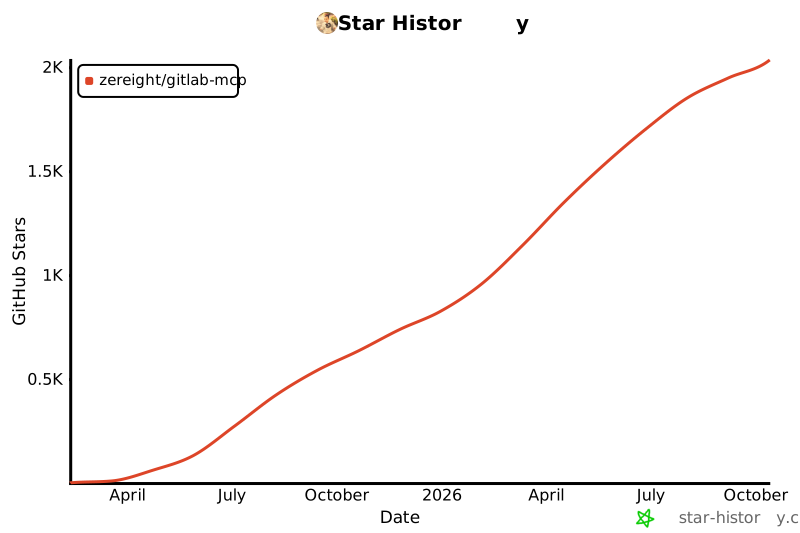](https://www.star-history.com/#zereight/gitlab-mcp&Date)
|
|
4
6
|
|
|
5
7
|
## @zereight/mcp-gitlab
|
|
@@ -26,6 +28,7 @@ The server supports two authentication methods:
|
|
|
26
28
|
#### Using OAuth2 Authentication
|
|
27
29
|
|
|
28
30
|
OAuth2 provides a more secure authentication flow using browser-based authentication. When enabled, the server will:
|
|
31
|
+
|
|
29
32
|
1. Open your browser to GitLab's authorization page
|
|
30
33
|
2. Wait for you to approve the access
|
|
31
34
|
3. Store the token securely for future use
|
|
@@ -53,6 +56,7 @@ Then configure the MCP server with OAuth:
|
|
|
53
56
|
"env": {
|
|
54
57
|
"GITLAB_USE_OAUTH": "true",
|
|
55
58
|
"GITLAB_OAUTH_CLIENT_ID": "your_oauth_client_id",
|
|
59
|
+
"GITLAB_OAUTH_CLIENT_SECRET": "your_oauth_client_secret", // Required for Confidential apps only
|
|
56
60
|
"GITLAB_OAUTH_REDIRECT_URI": "http://127.0.0.1:8888/callback",
|
|
57
61
|
"GITLAB_API_URL": "your_gitlab_api_url",
|
|
58
62
|
"GITLAB_PROJECT_ID": "your_project_id", // Optional: default project
|
|
@@ -92,13 +96,69 @@ Then configure the MCP server with OAuth:
|
|
|
92
96
|
|
|
93
97
|
#### vscode .vscode/mcp.json
|
|
94
98
|
|
|
99
|
+
**Using OAuth2 (Non-Confidential - Recommended):**
|
|
100
|
+
|
|
101
|
+
```json
|
|
102
|
+
{
|
|
103
|
+
"servers": {
|
|
104
|
+
"GitLab-MCP": {
|
|
105
|
+
"type": "stdio",
|
|
106
|
+
"command": "npx",
|
|
107
|
+
"args": ["-y", "@zereight/mcp-gitlab"],
|
|
108
|
+
"env": {
|
|
109
|
+
"GITLAB_USE_OAUTH": "true",
|
|
110
|
+
"GITLAB_OAUTH_CLIENT_ID": "your_oauth_client_id",
|
|
111
|
+
"GITLAB_OAUTH_REDIRECT_URI": "http://127.0.0.1:8888/callback",
|
|
112
|
+
"GITLAB_API_URL": "https://gitlab.com/api/v4",
|
|
113
|
+
"GITLAB_READ_ONLY_MODE": "false",
|
|
114
|
+
"USE_GITLAB_WIKI": "false",
|
|
115
|
+
"USE_MILESTONE": "false",
|
|
116
|
+
"USE_PIPELINE": "false"
|
|
117
|
+
}
|
|
118
|
+
}
|
|
119
|
+
}
|
|
120
|
+
}
|
|
121
|
+
```
|
|
122
|
+
|
|
123
|
+
**Using OAuth2 (Confidential):**
|
|
124
|
+
|
|
125
|
+
```json
|
|
126
|
+
{
|
|
127
|
+
"inputs": [
|
|
128
|
+
{
|
|
129
|
+
"type": "promptString",
|
|
130
|
+
"id": "gitlab-oauth-secret",
|
|
131
|
+
"description": "GitLab OAuth Client Secret",
|
|
132
|
+
"password": true
|
|
133
|
+
}
|
|
134
|
+
],
|
|
135
|
+
"servers": {
|
|
136
|
+
"GitLab-MCP": {
|
|
137
|
+
"type": "stdio",
|
|
138
|
+
"command": "npx",
|
|
139
|
+
"args": ["-y", "@zereight/mcp-gitlab"],
|
|
140
|
+
"env": {
|
|
141
|
+
"GITLAB_USE_OAUTH": "true",
|
|
142
|
+
"GITLAB_OAUTH_CLIENT_ID": "your_oauth_client_id",
|
|
143
|
+
"GITLAB_OAUTH_CLIENT_SECRET": "${input:gitlab-oauth-secret}",
|
|
144
|
+
"GITLAB_OAUTH_REDIRECT_URI": "http://127.0.0.1:8888/callback",
|
|
145
|
+
"GITLAB_API_URL": "https://gitlab.com/api/v4",
|
|
146
|
+
"GITLAB_READ_ONLY_MODE": "false"
|
|
147
|
+
}
|
|
148
|
+
}
|
|
149
|
+
}
|
|
150
|
+
}
|
|
151
|
+
```
|
|
152
|
+
|
|
153
|
+
**Using Personal Access Token:**
|
|
154
|
+
|
|
95
155
|
```json
|
|
96
156
|
{
|
|
97
157
|
"inputs": [
|
|
98
158
|
{
|
|
99
159
|
"type": "promptString",
|
|
100
160
|
"id": "gitlab-token",
|
|
101
|
-
"description": "
|
|
161
|
+
"description": "GitLab Personal Access Token",
|
|
102
162
|
"password": true
|
|
103
163
|
}
|
|
104
164
|
],
|
|
@@ -109,9 +169,11 @@ Then configure the MCP server with OAuth:
|
|
|
109
169
|
"args": ["-y", "@zereight/mcp-gitlab"],
|
|
110
170
|
"env": {
|
|
111
171
|
"GITLAB_PERSONAL_ACCESS_TOKEN": "${input:gitlab-token}",
|
|
112
|
-
"GITLAB_API_URL": "
|
|
113
|
-
"GITLAB_READ_ONLY_MODE": "
|
|
114
|
-
|
|
172
|
+
"GITLAB_API_URL": "https://gitlab.com/api/v4",
|
|
173
|
+
"GITLAB_READ_ONLY_MODE": "false",
|
|
174
|
+
"USE_GITLAB_WIKI": "false",
|
|
175
|
+
"USE_MILESTONE": "false",
|
|
176
|
+
"USE_PIPELINE": "false"
|
|
115
177
|
}
|
|
116
178
|
}
|
|
117
179
|
}
|
|
@@ -125,7 +187,7 @@ env_vars = {
|
|
|
125
187
|
"GITLAB_PERSONAL_ACCESS_TOKEN": gitlab_access_token,
|
|
126
188
|
"GITLAB_API_URL": gitlab_api_url,
|
|
127
189
|
"USE_GITLAB_WIKI": use_gitlab_wiki
|
|
128
|
-
# ......the rest of the optional parameters
|
|
190
|
+
# ......the rest of the optional parameters
|
|
129
191
|
}
|
|
130
192
|
|
|
131
193
|
stdio_gitlab_mcp_client = MCPClient(
|
|
@@ -139,10 +201,11 @@ stdio_gitlab_mcp_client = MCPClient(
|
|
|
139
201
|
)
|
|
140
202
|
```
|
|
141
203
|
|
|
142
|
-
|
|
143
204
|
#### Docker
|
|
144
205
|
|
|
145
|
-
-
|
|
206
|
+
> **Note**: For Docker deployments, **Personal Access Token is recommended**. OAuth requires browser-based authentication and a local callback server, which does not work properly in containerized environments.
|
|
207
|
+
|
|
208
|
+
**Using Personal Access Token (stdio) - Recommended:**
|
|
146
209
|
|
|
147
210
|
```json
|
|
148
211
|
{
|
|
@@ -169,7 +232,7 @@ stdio_gitlab_mcp_client = MCPClient(
|
|
|
169
232
|
],
|
|
170
233
|
"env": {
|
|
171
234
|
"GITLAB_PERSONAL_ACCESS_TOKEN": "your_gitlab_token",
|
|
172
|
-
"GITLAB_API_URL": "https://gitlab.com/api/v4",
|
|
235
|
+
"GITLAB_API_URL": "https://gitlab.com/api/v4",
|
|
173
236
|
"GITLAB_READ_ONLY_MODE": "false",
|
|
174
237
|
"USE_GITLAB_WIKI": "true",
|
|
175
238
|
"USE_MILESTONE": "true",
|
|
@@ -239,6 +302,7 @@ docker run -i --rm \
|
|
|
239
302
|
- `GITLAB_PERSONAL_ACCESS_TOKEN`: Your GitLab personal access token. **Required in standard mode**; not used when `REMOTE_AUTHORIZATION=true` or when using OAuth.
|
|
240
303
|
- `GITLAB_USE_OAUTH`: Set to `true` to enable OAuth2 authentication instead of personal access token.
|
|
241
304
|
- `GITLAB_OAUTH_CLIENT_ID`: The Client ID from your GitLab OAuth application. Required when using OAuth.
|
|
305
|
+
- `GITLAB_OAUTH_CLIENT_SECRET`: The Client Secret from your GitLab OAuth application. Required only for Confidential applications.
|
|
242
306
|
- `GITLAB_OAUTH_REDIRECT_URI`: The OAuth callback URL. Default: `http://127.0.0.1:8888/callback`
|
|
243
307
|
- `GITLAB_OAUTH_TOKEN_PATH`: Custom path to store the OAuth token. Default: `~/.gitlab-mcp-token.json`
|
|
244
308
|
- `REMOTE_AUTHORIZATION`: When set to 'true', enables remote per-session authorization via HTTP headers. In this mode:
|
|
@@ -288,6 +352,7 @@ When using Streamable HTTP transport, the following endpoints are available:
|
|
|
288
352
|
### Remote Authorization Setup (Multi-User Support)
|
|
289
353
|
|
|
290
354
|
When using `REMOTE_AUTHORIZATION=true`, the MCP server can support multiple users, each with their own GitLab token passed via HTTP headers. This is useful for:
|
|
355
|
+
|
|
291
356
|
- Shared MCP server instances where each user needs their own GitLab access
|
|
292
357
|
- IDE integrations that can inject user-specific tokens into MCP requests
|
|
293
358
|
|
|
@@ -337,9 +402,10 @@ The token is stored per session (identified by `mcp-session-id` header) and reus
|
|
|
337
402
|
```
|
|
338
403
|
|
|
339
404
|
**Important Notes:**
|
|
405
|
+
|
|
340
406
|
- Remote authorization **only works with Streamable HTTP transport**
|
|
341
407
|
- Each session is isolated - tokens from one session cannot access another session's data
|
|
342
|
-
|
|
408
|
+
Tokens are automatically cleaned up when sessions close
|
|
343
409
|
- **Session timeout:** Auth tokens expire after `SESSION_TIMEOUT_SECONDS` (default 1 hour) of inactivity. After timeout, the client must send auth headers again. The transport session remains active.
|
|
344
410
|
- Each request resets the timeout timer for that session
|
|
345
411
|
- **Rate limiting:** Each session is limited to `MAX_REQUESTS_PER_MINUTE` requests per minute (default 60)
|
|
@@ -0,0 +1,113 @@
|
|
|
1
|
+
import { Agent } from "http";
|
|
2
|
+
import { Agent as HttpsAgent } from "https";
|
|
3
|
+
import { HttpProxyAgent } from "http-proxy-agent";
|
|
4
|
+
import { HttpsProxyAgent } from "https-proxy-agent";
|
|
5
|
+
import { SocksProxyAgent } from "socks-proxy-agent";
|
|
6
|
+
import fs from "fs";
|
|
7
|
+
/**
|
|
8
|
+
* Manages a pool of HTTP/HTTPS agents for different GitLab API URLs.
|
|
9
|
+
* This allows the server to efficiently handle requests to multiple GitLab instances
|
|
10
|
+
* by reusing agents and their underlying TCP connections.
|
|
11
|
+
*/
|
|
12
|
+
export class GitLabClientPool {
|
|
13
|
+
clients = new Map();
|
|
14
|
+
options;
|
|
15
|
+
constructor(options) {
|
|
16
|
+
this.options = options;
|
|
17
|
+
// Initialization is now done on-demand
|
|
18
|
+
}
|
|
19
|
+
/**
|
|
20
|
+
* Creates a pair of HTTP and HTTPS agents for a specific API URL,
|
|
21
|
+
* considering proxy and SSL/TLS settings.
|
|
22
|
+
* @param apiUrl The base URL for which to create the agents.
|
|
23
|
+
* @returns A `ClientAgents` object containing the configured agents.
|
|
24
|
+
*/
|
|
25
|
+
createAgentsForUrl(apiUrl) {
|
|
26
|
+
const { httpProxy, httpsProxy, rejectUnauthorized, caCertPath } = this.options;
|
|
27
|
+
const url = new URL(apiUrl);
|
|
28
|
+
let sslOptions = {};
|
|
29
|
+
if (rejectUnauthorized === false) {
|
|
30
|
+
sslOptions.rejectUnauthorized = false;
|
|
31
|
+
}
|
|
32
|
+
else if (caCertPath) {
|
|
33
|
+
try {
|
|
34
|
+
sslOptions.ca = fs.readFileSync(caCertPath);
|
|
35
|
+
}
|
|
36
|
+
catch (error) {
|
|
37
|
+
console.error(`Failed to read CA certificate from ${caCertPath}:`, error);
|
|
38
|
+
throw new Error(`Failed to read CA certificate: ${caCertPath}`);
|
|
39
|
+
}
|
|
40
|
+
}
|
|
41
|
+
let httpAgent;
|
|
42
|
+
let httpsAgent;
|
|
43
|
+
// Configure HTTP agent with proxy if specified
|
|
44
|
+
if (httpProxy) {
|
|
45
|
+
httpAgent = httpProxy.startsWith("socks")
|
|
46
|
+
? new SocksProxyAgent(httpProxy)
|
|
47
|
+
: new HttpProxyAgent(httpProxy);
|
|
48
|
+
}
|
|
49
|
+
else {
|
|
50
|
+
httpAgent = new Agent({ keepAlive: true });
|
|
51
|
+
}
|
|
52
|
+
// Configure HTTPS agent with proxy and SSL options if specified
|
|
53
|
+
if (httpsProxy) {
|
|
54
|
+
httpsAgent = httpsProxy.startsWith("socks")
|
|
55
|
+
// The `as any` cast is used here to bypass a TypeScript type mismatch error.
|
|
56
|
+
// The `socks-proxy-agent` documentation indicates that TLS options like
|
|
57
|
+
// `rejectUnauthorized` and `ca` are valid in the constructor's options
|
|
58
|
+
// object, but the type definitions in this environment seem to disagree.
|
|
59
|
+
// This cast ensures the options are passed through at runtime.
|
|
60
|
+
? new SocksProxyAgent(httpsProxy, sslOptions)
|
|
61
|
+
: new HttpsProxyAgent(httpsProxy, { ...sslOptions });
|
|
62
|
+
}
|
|
63
|
+
else {
|
|
64
|
+
httpsAgent = new HttpsAgent({ ...sslOptions, keepAlive: true });
|
|
65
|
+
}
|
|
66
|
+
return { httpAgent, httpsAgent };
|
|
67
|
+
}
|
|
68
|
+
/**
|
|
69
|
+
* Retrieves the appropriate agent (HTTP or HTTPS) for a given API URL.
|
|
70
|
+
* If an agent for the URL does not exist, it creates and caches one.
|
|
71
|
+
* @param apiUrl The full URL of the request.
|
|
72
|
+
* @returns The corresponding `Agent` for the URL's protocol.
|
|
73
|
+
*/
|
|
74
|
+
getOrCreateAgentForUrl(apiUrl) {
|
|
75
|
+
const url = new URL(apiUrl);
|
|
76
|
+
const baseUrl = `${url.protocol}//${url.host}${url.pathname.substring(0, url.pathname.lastIndexOf('/api/v4') + '/api/v4'.length)}`;
|
|
77
|
+
if (!this.clients.has(baseUrl)) {
|
|
78
|
+
// Check pool size limit
|
|
79
|
+
if (this.options.poolMaxSize !== undefined && this.clients.size >= this.options.poolMaxSize) {
|
|
80
|
+
throw new Error(`Server capacity reached: Connection pool is full (max ${this.options.poolMaxSize} instances). Please try again later.`);
|
|
81
|
+
}
|
|
82
|
+
this.clients.set(baseUrl, this.createAgentsForUrl(baseUrl));
|
|
83
|
+
}
|
|
84
|
+
const agents = this.clients.get(baseUrl);
|
|
85
|
+
if (!agents) {
|
|
86
|
+
// This should not happen given the logic above, but it satisfies TypeScript
|
|
87
|
+
throw new Error(`Failed to create or get client for URL: ${baseUrl}`);
|
|
88
|
+
}
|
|
89
|
+
return url.protocol === "https:" ? agents.httpsAgent : agents.httpAgent;
|
|
90
|
+
}
|
|
91
|
+
/**
|
|
92
|
+
* Retrieves the client agents for a specific base API URL.
|
|
93
|
+
* @param apiUrl The base API URL (e.g., "https://gitlab.com/api/v4").
|
|
94
|
+
* @returns The `ClientAgents` object or undefined if not found.
|
|
95
|
+
*/
|
|
96
|
+
getClient(apiUrl) {
|
|
97
|
+
return this.clients.get(apiUrl);
|
|
98
|
+
}
|
|
99
|
+
/**
|
|
100
|
+
* Returns the default client agents, which corresponds to the first URL in the list.
|
|
101
|
+
* @returns The default `ClientAgents`.
|
|
102
|
+
*/
|
|
103
|
+
getDefaultClient() {
|
|
104
|
+
const defaultUrl = this.options.apiUrls?.[0];
|
|
105
|
+
if (!defaultUrl) {
|
|
106
|
+
throw new Error("No default API URL configured.");
|
|
107
|
+
}
|
|
108
|
+
if (!this.clients.has(defaultUrl)) {
|
|
109
|
+
this.clients.set(defaultUrl, this.createAgentsForUrl(defaultUrl));
|
|
110
|
+
}
|
|
111
|
+
return this.clients.get(defaultUrl);
|
|
112
|
+
}
|
|
113
|
+
}
|