@zenera/cli 1.1.32 → 1.1.34
This diff represents the content of publicly available package versions that have been released to one of the supported registries. The information contained in this diff is provided for informational purposes only and reflects changes between package versions as they appear in their respective public registries.
- package/README.md +586 -734
- package/dist/catalog.d.ts +8 -3
- package/dist/catalog.js +49 -9
- package/dist/commands/meta.js +18 -7
- package/dist/commands/models.js +82 -21
- package/dist/meta/host.d.ts +3 -1
- package/dist/meta/host.js +3 -1
- package/dist/meta/model.d.ts +8 -0
- package/dist/meta/model.js +19 -1
- package/dist/meta/wire.d.ts +2 -0
- package/dist/meta/wire.js +4 -0
- package/dist/rank.d.ts +24 -0
- package/dist/rank.js +153 -0
- package/package.json +3 -3
- package/templates/editor/.github/skills/zen-cli/references/models.md +7 -0
package/README.md
CHANGED
|
@@ -16,20 +16,57 @@
|
|
|
16
16
|
[](https://nodejs.org)
|
|
17
17
|
[](https://github.com/andreyryabov/ZeneraNeo/actions/workflows/ci.yml)
|
|
18
18
|
|
|
19
|
-
[Install](#install) · [Quickstart](#quickstart) · [
|
|
19
|
+
[Install](#install) · [Quickstart](#quickstart) · [How it works](#how-it-works) · [Self-improving loop](#the-self-improving-loop) · [Fine-tuning](#evaluate-and-fine-tune) · [Reference](#reference) · [Docs](#documentation)
|
|
20
20
|
|
|
21
21
|
</div>
|
|
22
22
|
|
|
23
23
|
# @zenera/cli
|
|
24
24
|
|
|
25
|
-
**`zen
|
|
25
|
+
**`zen`: build specialist agents, share them, and run them from the command line.**
|
|
26
26
|
|
|
27
|
-
`@zenera/cli` is the command-line package
|
|
28
|
-
[ZeneraNeo](https://github.com/andreyryabov/ZeneraNeo) toolkit.
|
|
29
|
-
|
|
27
|
+
`@zenera/cli` is the command-line package of the
|
|
28
|
+
[ZeneraNeo](https://github.com/andreyryabov/ZeneraNeo) toolkit. You describe the
|
|
29
|
+
work in a specification; a **meta-agent** designs the multi-agent system that
|
|
30
|
+
does it; a **self-improving loop** of runs, traces, evals and fine-tuning makes
|
|
31
|
+
that system better over time.
|
|
30
32
|
|
|
31
|
-
|
|
32
|
-
|
|
33
|
+
> Part of [ZeneraNeo](https://github.com/andreyryabov/ZeneraNeo). This is an
|
|
34
|
+
> open-source side project for experimentation and chore work - **not** the
|
|
35
|
+
> official Zenera AI Platform. It carries no support or stability promises.
|
|
36
|
+
|
|
37
|
+
<details>
|
|
38
|
+
<summary><strong>Contents</strong></summary>
|
|
39
|
+
|
|
40
|
+
- [What it is](#what-it-is)
|
|
41
|
+
- [What you build](#what-you-build)
|
|
42
|
+
- [Why it is different](#why-it-is-different)
|
|
43
|
+
- [Install](#install)
|
|
44
|
+
- [Quickstart](#quickstart)
|
|
45
|
+
- [Concepts](#concepts)
|
|
46
|
+
- [How it works](#how-it-works)
|
|
47
|
+
- [The specification and the meta agent](#the-specification-and-the-meta-agent)
|
|
48
|
+
- [A worked example](#a-worked-example)
|
|
49
|
+
- [Anatomy of a project](#anatomy-of-a-project)
|
|
50
|
+
- [The self-improving loop](#the-self-improving-loop)
|
|
51
|
+
- [Evaluate and fine-tune](#evaluate-and-fine-tune)
|
|
52
|
+
- [Share a project](#share-a-project)
|
|
53
|
+
- [Reference](#reference)
|
|
54
|
+
- [Commands](#commands)
|
|
55
|
+
- [Conventions and exit codes](#conventions-and-exit-codes)
|
|
56
|
+
- [The meta agent](#the-meta-agent)
|
|
57
|
+
- [Models and credentials](#models-and-credentials)
|
|
58
|
+
- [Sandbox](#sandbox)
|
|
59
|
+
- [Cache](#cache)
|
|
60
|
+
- [Ecosystem](#ecosystem)
|
|
61
|
+
- [Documentation](#documentation)
|
|
62
|
+
- [License](#license)
|
|
63
|
+
|
|
64
|
+
</details>
|
|
65
|
+
|
|
66
|
+
## What it is
|
|
67
|
+
|
|
68
|
+
Not one general assistant that is passable at everything, but a team built for
|
|
69
|
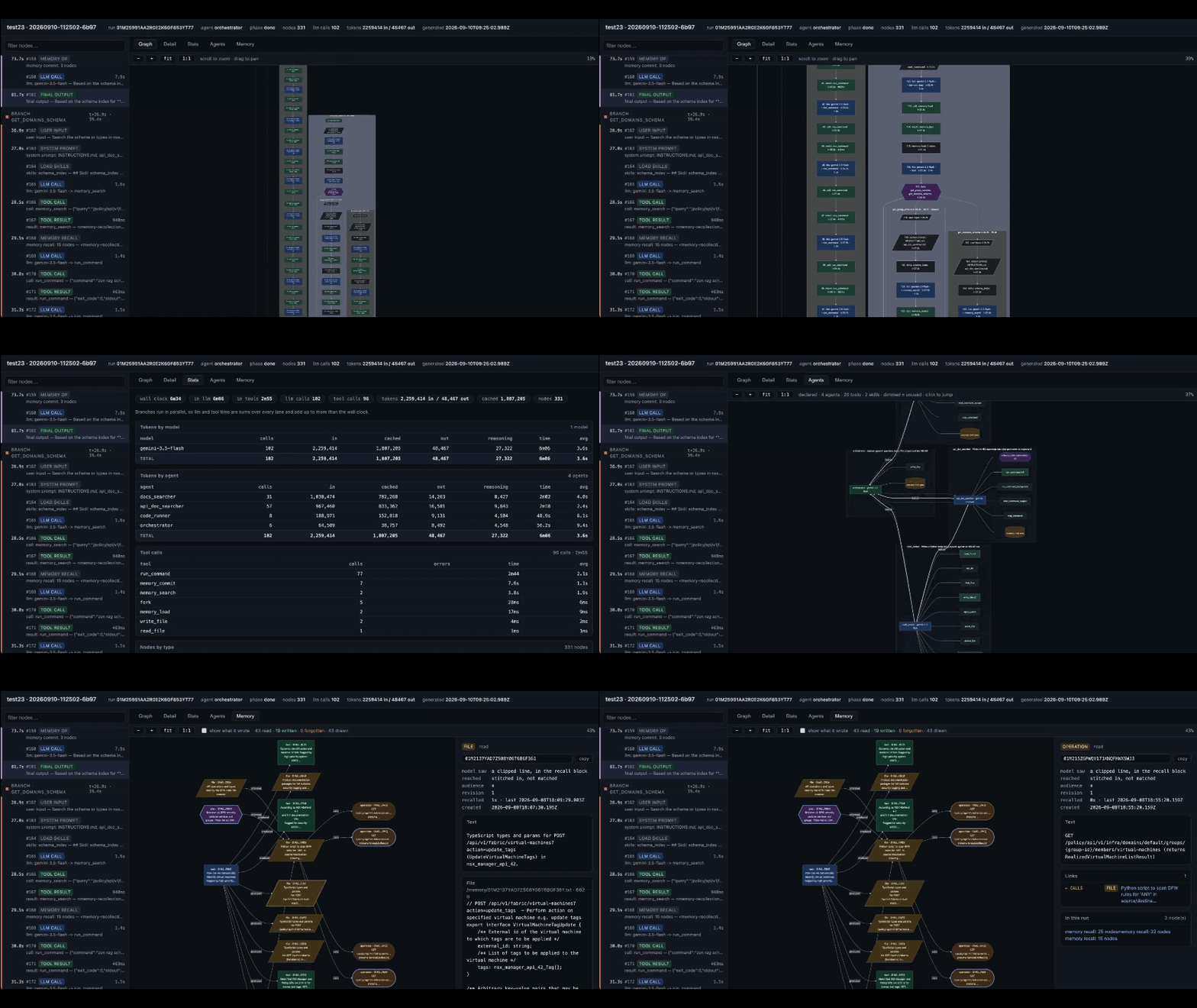
+
the work you keep doing, under a name you can type:
|
|
33
70
|
|
|
34
71
|
```sh
|
|
35
72
|
zen run accountant "Q3 - match the receipts drawer to the ledger, then update the return"
|
|
@@ -40,180 +77,184 @@ zen run devops "this week's advisories - which of them actually reach our co
|
|
|
40
77
|
zen run devops "the 03:12 outage - timeline, contributing factors, owners"
|
|
41
78
|
```
|
|
42
79
|
|
|
43
|
-
Three agents
|
|
44
|
-
|
|
45
|
-
|
|
46
|
-
work nobody has shipped you a product for.
|
|
80
|
+
Three agents, six requests. An agent you have built is not a one-job script; it
|
|
81
|
+
is a specialist you keep coming back to, for work that returns every quarter,
|
|
82
|
+
every sprint, every deal.
|
|
47
83
|
|
|
48
|
-
Once the agent
|
|
49
|
-
|
|
50
|
-
records every token it
|
|
84
|
+
Once built, the agent is a command. It works on the files in your current
|
|
85
|
+
directory, runs real commands in a container, searches the web when it needs
|
|
86
|
+
to, and records every token it spends.
|
|
51
87
|
|
|
52
|
-
Getting there
|
|
88
|
+
Getting there takes three steps:
|
|
53
89
|
|
|
54
|
-
1. **Describe it.**
|
|
55
|
-
|
|
56
|
-
|
|
57
|
-
|
|
58
|
-
|
|
59
|
-
|
|
60
|
-
|
|
61
|
-
|
|
62
|
-
it. One `zen init <dir>` on a project that arrived by clone registers it
|
|
63
|
-
without touching a thing, and it is their command now too.
|
|
64
|
-
|
|
65
|
-
> Part of [ZeneraNeo](https://github.com/andreyryabov/ZeneraNeo). This is an
|
|
66
|
-
> open-source side project for experimentation and chore work - **not** the
|
|
67
|
-
> official Zenera AI Platform. It carries no support or stability promises.
|
|
90
|
+
1. **Describe it.** Write `SPECIFICATION.md`: what the system is for, which
|
|
91
|
+
specialists it needs, what each may use, and what _done_ means.
|
|
92
|
+
2. **Test it.** `zen check` validates the project, `zen run` exercises it,
|
|
93
|
+
`zen inspect` shows what it actually did. When the result is wrong, fix the
|
|
94
|
+
specification, not the prompts, and go round again.
|
|
95
|
+
3. **Share it.** A project is a folder: commit it, review it in a pull request,
|
|
96
|
+
send it. On the other end, one `zen init <dir>` registers it and it becomes
|
|
97
|
+
their command too.
|
|
68
98
|
|
|
69
99
|
## What you build
|
|
70
100
|
|
|
71
|
-
Half a page of specification
|
|
72
|
-
|
|
101
|
+
Half a page of specification becomes a system like one of these. None of them
|
|
102
|
+
ship with the CLI; each is a folder someone wrote and could send you.
|
|
73
103
|
|
|
74
|
-
| Project | The team inside it
|
|
75
|
-
|
|
|
76
|
-
| **accountant** | A bookkeeper
|
|
77
|
-
| **analyst** | A planner
|
|
78
|
-
| **devops** | A gatherer
|
|
104
|
+
| Project | The team inside it |
|
|
105
|
+
| :------------- | :-------------------------------------------------------------------------------------------------------------------------------------------------------------------------------------------------------------------------------------------------------------------------------------------------------------------------- |
|
|
106
|
+
| **accountant** | A **bookkeeper** reads and classifies every receipt, statement, invoice and agreement in the folder. A **reconciler** matches each against a ledger line or playbook position and lists what has no pair. A **preparer** fills the return or drafts the redlines. A **checker** rejects anything no document substantiates. |
|
|
107
|
+
| **analyst** | A **planner** splits the question into branches. **Researchers** work in parallel over your files and the web. A **statistician** writes and runs Python in the sandbox. An **editor** joins it into one answer where every claim carries its source. |
|
|
108
|
+
| **devops** | A **gatherer** pulls advisories, logs, alerts and deploys into one picture. A **tracer** works out whether a vulnerable path is reachable, or which change broke production. An **engineer** plans the fix, applies it step by step, and stops the moment a check fails. |
|
|
79
109
|
|
|
80
|
-
|
|
81
|
-
|
|
110
|
+
A committed project runs the same on anyone's machine, on whichever models they
|
|
111
|
+
prefer, without carrying your keys.
|
|
82
112
|
|
|
83
|
-
##
|
|
113
|
+
## Why it is different
|
|
84
114
|
|
|
85
|
-
Most tools give you one agent, or a framework and an empty file.
|
|
115
|
+
Most tools give you one agent, or a framework and an empty file. `zen` is a
|
|
86
116
|
factory: it designs the system for you, then keeps it honest.
|
|
87
117
|
|
|
88
|
-
- **You state the problem;
|
|
89
|
-
prompts, tool grants, hand-offs
|
|
90
|
-
|
|
91
|
-
- **
|
|
92
|
-
|
|
93
|
-
|
|
94
|
-
|
|
95
|
-
|
|
96
|
-
|
|
118
|
+
- **A meta-agent designs the system.** You state the problem; it derives the
|
|
119
|
+
specialists, prompts, tool grants, hand-offs and fan-out from what you wrote,
|
|
120
|
+
and validates them before anything runs.
|
|
121
|
+
- **Self-improvement, not a one-off build.** Build, run, read the record, fix
|
|
122
|
+
what was wrong, run again, and the meta-agent can drive that loop itself.
|
|
123
|
+
Failures come back as findings with a cause and a fix.
|
|
124
|
+
- **Agent fine-tuning on datasets and rubrics.** Cases built from your
|
|
125
|
+
specification are run, scored, analyzed and re-run until the system is both
|
|
126
|
+
correct and lean. It tunes prompts, skills and memory, not model weights.
|
|
127
|
+
- **Built-in observability.** Every run is recorded against the architecture it
|
|
128
|
+
declared: the agent nobody called, the skill that never fired, where the
|
|
97
129
|
tokens went. Nothing to instrument, nothing to sign up for.
|
|
98
|
-
- **
|
|
99
|
-
|
|
100
|
-
|
|
101
|
-
- **Your documents, searchable.** Hybrid retrieval over your files and your API
|
|
102
|
-
descriptions, plus a memory that is a graph rather than a bucket of rows - so
|
|
103
|
-
what an agent learned in March is still there in September.
|
|
130
|
+
- **Your knowledge, searchable.** Hybrid retrieval over your documents and API
|
|
131
|
+
descriptions, plus a graph memory, so what an agent learned in March is still
|
|
132
|
+
there in September.
|
|
104
133
|
- **Integrations it writes itself.** No MCP server to find, no connector to wait
|
|
105
|
-
for.
|
|
106
|
-
|
|
134
|
+
for. To reach your ERP, your database or a twenty-year-old SOAP endpoint, it
|
|
135
|
+
writes the call and runs it in a sandbox.
|
|
136
|
+
- **Customisable all the way down.** Stay in the specification, tune a single
|
|
137
|
+
agent's model, tools and memory, or drive the kernel turn by turn. No layer is
|
|
138
|
+
sealed.
|
|
107
139
|
|
|
108
140
|
## Install
|
|
109
141
|
|
|
110
|
-
Node.js 24+.
|
|
111
|
-
|
|
142
|
+
Requires Node.js 24+. The OpenAI, Anthropic, Google and OpenRouter SDKs ship
|
|
143
|
+
with the CLI, so any of those providers works out of the box.
|
|
112
144
|
|
|
113
145
|
```sh
|
|
114
146
|
npm i -g @zenera/cli
|
|
115
147
|
```
|
|
116
148
|
|
|
117
|
-
Or without installing
|
|
149
|
+
Or try it without installing:
|
|
118
150
|
|
|
119
151
|
```sh
|
|
120
152
|
npx @zenera/cli --help
|
|
121
153
|
```
|
|
122
154
|
|
|
123
|
-
|
|
124
|
-
|
|
125
|
-
|
|
126
|
-
|
|
155
|
+
The binary is installed under three names: `zen`, `zn` and `zenera`.
|
|
156
|
+
|
|
157
|
+
<details>
|
|
158
|
+
<summary><strong>Tab completion</strong> (zsh, bash, fish)</summary>
|
|
159
|
+
|
|
160
|
+
A global npm install sets up completion for commands, projects and stored
|
|
161
|
+
prompts automatically. It appends a guarded loader to your current shell's
|
|
162
|
+
startup file, once. **Open a new terminal** to activate it; the installer
|
|
163
|
+
cannot update the terminal where you ran npm.
|
|
127
164
|
|
|
128
165
|
Setup respects `ZDOTDIR` for zsh and `XDG_CONFIG_HOME` for fish. For Bash on
|
|
129
166
|
macOS it covers both login shells (the active `.bash_profile`, `.bash_login` or
|
|
130
|
-
`.profile`) and non-login shells (`.bashrc`). The loader does nothing
|
|
131
|
-
is
|
|
167
|
+
`.profile`) and non-login shells (`.bashrc`). The loader does nothing once `zen`
|
|
168
|
+
is uninstalled.
|
|
132
169
|
|
|
133
|
-
|
|
134
|
-
|
|
135
|
-
|
|
136
|
-
If automatic setup is skipped or fails, or to enable another shell, run:
|
|
170
|
+
Automatic setup is skipped for local installs and `npx`, under root/sudo, in
|
|
171
|
+
CI, on Windows, when `$SHELL` is missing or unsupported, and with
|
|
172
|
+
`--ignore-scripts`. To set it up by hand, or for another shell:
|
|
137
173
|
|
|
138
174
|
```sh
|
|
139
175
|
zen completion --install # the shell you are in; --yes to skip the question
|
|
140
176
|
zen completion fish --install # or name one
|
|
141
177
|
```
|
|
142
178
|
|
|
143
|
-
Or add
|
|
179
|
+
Or add `eval "$(zen completion zsh)"` to `~/.zshrc` yourself.
|
|
180
|
+
|
|
181
|
+
</details>
|
|
144
182
|
|
|
145
183
|
## Quickstart
|
|
146
184
|
|
|
147
|
-
From nothing to a
|
|
185
|
+
From nothing to a working agent system:
|
|
148
186
|
|
|
149
187
|
```sh
|
|
150
188
|
npm i -g @zenera/cli # every vendor SDK comes with it
|
|
151
|
-
zen key add openai #
|
|
189
|
+
zen key add openai # prompts for the key without echoing it; stored in ~/.zenera
|
|
152
190
|
zen init my-project # scaffolds a project and registers it
|
|
153
|
-
zen open my-project #
|
|
191
|
+
zen open my-project # opens it in your editor
|
|
154
192
|
```
|
|
155
193
|
|
|
156
|
-
|
|
157
|
-
|
|
194
|
+
Describe the job in `SPECIFICATION.md`, then let the meta agent build the
|
|
195
|
+
system from it:
|
|
158
196
|
|
|
159
197
|
```sh
|
|
160
198
|
zen meta run my-project /spec-sync-project
|
|
161
199
|
```
|
|
162
200
|
|
|
163
|
-
|
|
164
|
-
needs. Validate the generated system and run it against a real workspace:
|
|
201
|
+
Validate the result and run it against a real directory:
|
|
165
202
|
|
|
166
203
|
```sh
|
|
167
204
|
zen check my-project
|
|
168
205
|
cd ~/code/some-repo
|
|
169
206
|
zen run my-project "summarise this repo and write NOTES.md"
|
|
207
|
+
zen inspect # open the run's report.html
|
|
170
208
|
```
|
|
171
209
|
|
|
172
|
-
|
|
210
|
+
Day to day:
|
|
173
211
|
|
|
174
212
|
```sh
|
|
175
|
-
zen run my-project # no prompt
|
|
176
|
-
zen check my-project # validate the project and every file it names
|
|
177
|
-
zen inspect # open the last run's report.html
|
|
178
|
-
zen inspect graph # the same run as a graph a model can read
|
|
213
|
+
zen run my-project # no prompt: opens a full-screen terminal app (TUI)
|
|
179
214
|
zen list --sessions # every project, its sessions and last run
|
|
180
|
-
zen list --runs # the most recent runs
|
|
215
|
+
zen list --runs # the most recent runs across every project
|
|
181
216
|
echo "triage this" | zen run my-project --json | jq
|
|
182
|
-
zen run batch --input cases.json # a file full of questions, 16 at a time
|
|
183
217
|
```
|
|
184
218
|
|
|
185
|
-
|
|
186
|
-
|
|
219
|
+
Inside a project folder the name is optional: a bare `zen run`, `zen check` or
|
|
220
|
+
`zen inspect` means the project you are in.
|
|
187
221
|
|
|
188
|
-
|
|
189
|
-
|
|
222
|
+
A prompt on the command line skips every question: it starts a fresh session
|
|
223
|
+
and uses the current directory as the workspace, with write access.
|
|
190
224
|
`--session`, `--workspace` and `--read-only` override that.
|
|
191
225
|
|
|
192
|
-
|
|
193
|
-
|
|
194
|
-
|
|
195
|
-
|
|
196
|
-
|
|
197
|
-
|
|
198
|
-
|
|
199
|
-
|
|
200
|
-
|
|
201
|
-
|
|
202
|
-
|
|
226
|
+
## Concepts
|
|
227
|
+
|
|
228
|
+
- **Project**: a named directory holding a complete agent definition and the
|
|
229
|
+
sessions run against it. `agents.yaml` is what makes a directory a project,
|
|
230
|
+
so moving or cloning it loses nothing.
|
|
231
|
+
- **Specification**: `SPECIFICATION.md`, the description of what the project is
|
|
232
|
+
for. Every other file implements it, and where they disagree it wins.
|
|
233
|
+
- **Meta agent**: a coding agent that works _on_ the project, keeping its files
|
|
234
|
+
in line with the specification and improving them from evidence.
|
|
235
|
+
- **Session**: a context that persists across runs: one workspace, one memory,
|
|
236
|
+
one store for large files, and a full record of what happened. Resumable.
|
|
237
|
+
- **Run**: one prompt in, one answer out, inside a session. Recorded in full,
|
|
238
|
+
whether or not you were watching.
|
|
239
|
+
- **Workspace**: the directory the agents may read and write. A command-line
|
|
240
|
+
prompt uses the current directory; the TUI offers the session's own empty
|
|
241
|
+
folder and asks before using anything outside it.
|
|
242
|
+
- **Keyring**: `~/.zenera/neo`, readable only by you. See
|
|
243
|
+
[Models and credentials](#models-and-credentials).
|
|
244
|
+
- **Cache**: `~/.zenera/neo/cache`, shared by every project on the machine and
|
|
245
|
+
never emptied by anything but you. See [Cache](#cache).
|
|
203
246
|
|
|
204
|
-
|
|
205
|
-
`zen meta run /spec-sync-project` again. The next section explains that workflow
|
|
206
|
-
in detail.
|
|
247
|
+
## How it works
|
|
207
248
|
|
|
208
|
-
|
|
249
|
+
### The specification and the meta agent
|
|
209
250
|
|
|
210
251
|
`zen init` writes `SPECIFICATION.md` first, and everything else in the folder
|
|
211
|
-
implements it.
|
|
212
|
-
|
|
252
|
+
implements it. A change to what the system does therefore starts in the
|
|
253
|
+
specification, not in `agents.yaml`.
|
|
213
254
|
|
|
214
|
-
The
|
|
215
|
-
the project just
|
|
216
|
-
|
|
255
|
+
The scaffolded specification is not a list of headings. It accurately describes
|
|
256
|
+
the project just created, so you can read it alongside the files before
|
|
257
|
+
changing a word:
|
|
217
258
|
|
|
218
259
|
```markdown
|
|
219
260
|
## Agents
|
|
@@ -231,325 +272,223 @@ nobody to hand work to, because there is no second job to hand on.
|
|
|
231
272
|
not do.
|
|
232
273
|
```
|
|
233
274
|
|
|
234
|
-
|
|
275
|
+
The editing cycle is four steps, each a single command:
|
|
235
276
|
|
|
236
|
-
`SPECIFICATION.md`
|
|
237
|
-
|
|
238
|
-
|
|
277
|
+
1. **Edit `SPECIFICATION.md`** (`zen open` launches your editor): what the
|
|
278
|
+
system is for, which agents exist, what each may use, what _done_ means.
|
|
279
|
+
2. **Run `zen meta run /spec-sync-project`.** It compares the specification
|
|
280
|
+
with every file that implements it, in both directions, and makes the
|
|
281
|
+
smallest change that closes each gap.
|
|
282
|
+
3. **Answer `SPECIFICATION-FEEDBACK.md`.** For anything it could not do
|
|
283
|
+
without guessing, it asks a question with two to four written-out answers.
|
|
284
|
+
Tick one, delete the rest, or write your own.
|
|
285
|
+
4. **Run `zen meta run /spec-apply-feedback`.** It folds your answers into
|
|
286
|
+
`SPECIFICATION.md` (never into a prompt), then syncs again.
|
|
239
287
|
|
|
240
|
-
|
|
241
|
-
|
|
242
|
-
```
|
|
243
|
-
|
|
244
|
-
That launches the editor you already use: the one this terminal belongs to, or
|
|
245
|
-
`$ZENERA_EDITOR`, or the first of VS Code, Cursor, Windsurf, Zed, Sublime Text
|
|
246
|
-
or IntelliJ it can find. `--editor <cmd>` names one outright.
|
|
247
|
-
|
|
248
|
-
1. **Edit `SPECIFICATION.md`** - what the system is for, which agents exist,
|
|
249
|
-
what each may reach for, and what _done_ means.
|
|
250
|
-
2. **Run `zen meta run /spec-sync-project`.** It reads the specification and
|
|
251
|
-
every file implementing it, works out the difference in both directions, and
|
|
252
|
-
changes the smallest thing that closes each gap.
|
|
253
|
-
3. **Answer `SPECIFICATION-FEEDBACK.md`**, which it writes for anything it could
|
|
254
|
-
not do without guessing. Every question carries two to four written-out
|
|
255
|
-
answers, each with a `[ ]` box: tick one, delete the ones you do not want, or
|
|
256
|
-
write your own in their place.
|
|
257
|
-
4. **Run `zen meta run /spec-apply-feedback`.** It folds the answers you chose
|
|
258
|
-
into `SPECIFICATION.md` - never into a prompt - and then
|
|
259
|
-
`/spec-sync-project` again.
|
|
260
|
-
|
|
261
|
-
Then: `zen check`, then `zen run`.
|
|
288
|
+
Then `zen check`, then `zen run`. Full guide:
|
|
289
|
+
[docs/specification.md](https://github.com/andreyryabov/ZeneraNeo/blob/main/docs/specification.md).
|
|
262
290
|
|
|
263
291
|
<details>
|
|
264
292
|
<summary>The prompts <code>zen init</code> installs</summary>
|
|
265
293
|
|
|
266
|
-
|
|
267
|
-
|
|
268
|
-
|
|
294
|
+
Prompt files live under `.github/prompts/`; `zen meta run /<name>` runs one and
|
|
295
|
+
`zen meta prompts` lists them. `zen init` and `zen open` rewrite them each time,
|
|
296
|
+
so they never go stale, and local edits to them do not survive.
|
|
269
297
|
|
|
270
298
|
| Prompt | Does |
|
|
271
|
-
|
|
|
299
|
+
| :--------------------- | :--------------------------------------------------------------- |
|
|
272
300
|
| `/spec-sync-project` | Makes every file match `SPECIFICATION.md`, both directions. |
|
|
273
301
|
| `/spec-apply-feedback` | Folds your answers in `SPECIFICATION-FEEDBACK.md` into the spec. |
|
|
274
|
-
| `/project-review` |
|
|
302
|
+
| `/project-review` | Reviews the project as a human reviewer would, and reports. |
|
|
275
303
|
| `/analyze [run]` | Analyzes one run and says which instruction to change. |
|
|
276
|
-
| `/
|
|
304
|
+
| `/dataset` | Builds or refreshes the evaluation dataset from the spec. |
|
|
305
|
+
| `/new-agent` | Adds an agent: prompt, wiring and hand-offs. |
|
|
277
306
|
| `/new-skill` | Adds a skill under `agents/skills/`. |
|
|
278
307
|
|
|
279
|
-
Alongside them, `.github/copilot-instructions.md`
|
|
280
|
-
|
|
281
|
-
|
|
308
|
+
Alongside them, `.github/copilot-instructions.md` explains this runtime to
|
|
309
|
+
whatever coding agent opens the folder, and `.github/skills/zen-cli/` is the
|
|
310
|
+
CLI's own reference for it.
|
|
282
311
|
|
|
283
312
|
</details>
|
|
284
313
|
|
|
285
|
-
###
|
|
314
|
+
### A worked example
|
|
286
315
|
|
|
287
|
-
|
|
288
|
-
|
|
289
|
-
↑ ↓
|
|
290
|
-
└─────────── refine the spec <-──── zen inspect <-─────────────┘
|
|
291
|
-
```
|
|
316
|
+
A few sentences of `SPECIFICATION.md` become a working two-agent system, with no
|
|
317
|
+
hand-written wiring:
|
|
292
318
|
|
|
293
|
-
|
|
294
|
-
|
|
319
|
+
```sh
|
|
320
|
+
zen init repo-notes && cd repo-notes
|
|
321
|
+
zen open # describe a `reader` and a `writer` agent
|
|
322
|
+
zen meta run /spec-sync-project # writes agents.yaml and both prompts
|
|
323
|
+
zen check
|
|
324
|
+
zen run repo-notes "summarise this repo" # now a command, usable from any directory
|
|
325
|
+
```
|
|
326
|
+
|
|
327
|
+
The full walkthrough, with the specification, the generated `agents.yaml` and
|
|
328
|
+
prompts, is in
|
|
329
|
+
[docs/specification.md](https://github.com/andreyryabov/ZeneraNeo/blob/main/docs/specification.md#a-worked-example).
|
|
330
|
+
For complete projects, see
|
|
331
|
+
[examples/projects](https://github.com/andreyryabov/ZeneraNeo/tree/main/examples/projects);
|
|
332
|
+
for what each `agents.yaml` key means, see
|
|
333
|
+
[docs/agents-yaml.md](https://github.com/andreyryabov/ZeneraNeo/blob/main/docs/agents-yaml.md).
|
|
295
334
|
|
|
296
|
-
|
|
335
|
+
### Anatomy of a project
|
|
297
336
|
|
|
298
|
-
|
|
299
|
-
|
|
300
|
-
|
|
301
|
-
whole. Having spotted the loop or the branch that failed, it opens the two or
|
|
302
|
-
three nodes that explain it:
|
|
337
|
+
Prompts, agent wiring, skills and tool selections are files (Markdown and YAML),
|
|
338
|
+
not code buried in an application. Model credentials live in `$HOME`, never in
|
|
339
|
+
the project, so there is no secret to strip before sharing.
|
|
303
340
|
|
|
304
|
-
```
|
|
305
|
-
|
|
306
|
-
|
|
307
|
-
|
|
308
|
-
|
|
341
|
+
```
|
|
342
|
+
my-project/
|
|
343
|
+
SPECIFICATION.md what this is for - the intent
|
|
344
|
+
agents.yaml who exists, what they may use
|
|
345
|
+
agents/ house rules, one prompt per agent, skills
|
|
346
|
+
assets/ dataset/ finetune/ sandbox/ scripts/
|
|
347
|
+
sessions/ what happened when it ran
|
|
309
348
|
```
|
|
310
349
|
|
|
311
|
-
|
|
312
|
-
|
|
313
|
-
|
|
314
|
-
prompt that reads correctly and behaves wrongly explains itself.
|
|
315
|
-
|
|
316
|
-
`ask` has two modes, decided by whether the question is given:
|
|
317
|
-
|
|
318
|
-
- **One-shot** - a question on the line, in `--question-file`, or `--json`.
|
|
319
|
-
For a script or the meta agent: no banner, no prompt, no picker.
|
|
320
|
-
stdout is the answer and nothing else, and the command exits.
|
|
321
|
-
- **Interactive** - no question. For you, at a terminal: `zen inspect ask`
|
|
322
|
-
walks through the session, run and recorded LLM call (whichever are not
|
|
323
|
-
named), frames each question and Markdown answer separately, and keeps
|
|
324
|
-
accepting follow-ups until you submit an empty question. Without a terminal
|
|
325
|
-
it is an error, never a wait.
|
|
326
|
-
|
|
327
|
-
Every step is a command, and everything each one reads or writes is a plain
|
|
328
|
-
file: the specification, the findings `zen check` prints with a code, a location
|
|
329
|
-
and a fix, the record `zen inspect` renders of what the run actually did. So the
|
|
330
|
-
loop does not need you standing in it. Hand the whole cycle to the meta agent
|
|
331
|
-
and it runs on the system it just built - test it, read the failure,
|
|
332
|
-
change the sentence in the specification that caused it, rebuild, run again.
|
|
333
|
-
"Fix my project" is one instruction. (The first time round, `scripts/_setup.sh`
|
|
334
|
-
prepares the container the tools run in.)
|
|
335
|
-
|
|
336
|
-
The last turn is the one that matters. When a run comes out wrong the fix is the
|
|
337
|
-
sentence that was missing from the specification, and the prompt edit follows
|
|
338
|
-
from that. Prompts patched directly drift away from the document meant to
|
|
339
|
-
describe them, and a project whose specification is no longer true is a project
|
|
340
|
-
with no specification.
|
|
341
|
-
|
|
342
|
-
Full guide:
|
|
343
|
-
[docs/specification.md](https://github.com/andreyryabov/ZeneraNeo/blob/main/docs/specification.md).
|
|
350
|
+
Everything above `sessions/` is the system; everything below it is what happened
|
|
351
|
+
when it ran. Nothing is tied to the machine it was written on: agentic systems
|
|
352
|
+
become shareable the way repositories are.
|
|
344
353
|
|
|
345
|
-
|
|
354
|
+
The full file-by-file layout, including `.github/`, `.spec-sync/` and `.env`, is
|
|
355
|
+
in
|
|
356
|
+
[docs/projects.md](https://github.com/andreyryabov/ZeneraNeo/blob/main/docs/projects.md#layout).
|
|
346
357
|
|
|
347
|
-
|
|
358
|
+
## The self-improving loop
|
|
348
359
|
|
|
349
|
-
```
|
|
350
|
-
|
|
351
|
-
|
|
360
|
+
```mermaid
|
|
361
|
+
flowchart LR
|
|
362
|
+
A[Edit SPECIFICATION.md] --> B["zen meta run /spec-sync-project"]
|
|
363
|
+
B --> C[zen check]
|
|
364
|
+
C --> D[zen run]
|
|
365
|
+
D --> E[zen inspect]
|
|
366
|
+
E -->|refine the spec| A
|
|
352
367
|
```
|
|
353
368
|
|
|
354
|
-
|
|
355
|
-
|
|
356
|
-
|
|
357
|
-
```markdown
|
|
358
|
-
# Specification
|
|
369
|
+
Every step is a command, and everything each step reads or writes is a plain
|
|
370
|
+
file. That means the loop does not need you in it: the meta agent can run the
|
|
371
|
+
whole cycle on the system it just built.
|
|
359
372
|
|
|
360
|
-
|
|
373
|
+
### Inspect a run
|
|
361
374
|
|
|
362
|
-
|
|
375
|
+
`zen inspect` opens a run's `report.html`: the trace, timing and token
|
|
376
|
+
statistics, agent architecture, and memory used.
|
|
363
377
|
|
|
364
|
-
|
|
365
|
-
|
|
366
|
-
- `reader` - explores the workspace and forms a picture of it. May read files
|
|
367
|
-
and list directories, and nothing else. Hands off to `writer`.
|
|
368
|
-
- `writer` - turns that picture into `NOTES.md`. May write to the workspace.
|
|
369
|
-
|
|
370
|
-
## Done means
|
|
378
|
+
|
|
371
379
|
|
|
372
|
-
|
|
373
|
-
|
|
374
|
-
|
|
380
|
+
For a model rather than a person, `zen inspect graph` writes the whole run as
|
|
381
|
+
one compact Mermaid flowchart: one line per node, short sequential ids, tool
|
|
382
|
+
counts in a header. It is small enough to read whole, so the meta agent can
|
|
383
|
+
find the failing loop or branch and then open just the nodes that explain it:
|
|
375
384
|
|
|
376
|
-
|
|
377
|
-
|
|
378
|
-
|
|
379
|
-
|
|
380
|
-
|
|
381
|
-
model: openai:gpt-5.4-mini
|
|
382
|
-
|
|
383
|
-
agents:
|
|
384
|
-
- name: reader
|
|
385
|
-
description: Reads the workspace and summarises what is in it.
|
|
386
|
-
system: agents/prompts/reader.md
|
|
387
|
-
tools: [files:read_file, files:list_dir, files:find_files]
|
|
388
|
-
handoffs: [writer]
|
|
389
|
-
|
|
390
|
-
- name: writer
|
|
391
|
-
description: Turns a summary into a file on disk.
|
|
392
|
-
system: agents/prompts/writer.md
|
|
393
|
-
tools: [files:*]
|
|
394
|
-
handoffs: [reader] # a hand-off does not return by itself; give it a way back
|
|
385
|
+
```sh
|
|
386
|
+
DIR=$(zen run my-project "fix the tests" --json | jq -r .run.dir)
|
|
387
|
+
zen inspect graph --dir "$DIR" # the shape of the run
|
|
388
|
+
zen inspect node n14..n20 --dir "$DIR" # those nodes in full
|
|
389
|
+
zen inspect ask n17 "why python -c here?" --dir "$DIR" # ask the model itself
|
|
395
390
|
```
|
|
396
391
|
|
|
397
|
-
|
|
392
|
+
### Ask the model why
|
|
398
393
|
|
|
399
|
-
|
|
400
|
-
|
|
394
|
+
`zen inspect ask` replays one recorded call (its system prompt, messages and
|
|
395
|
+
tool schemas) with your question appended and tool calling off. The model is
|
|
396
|
+
told the run is over and that its instructions may be quoted. This is how a
|
|
397
|
+
prompt that reads correctly but behaves wrongly explains itself.
|
|
401
398
|
|
|
402
|
-
|
|
399
|
+
- **One-shot:** pass the question on the command line, via `--question-file`,
|
|
400
|
+
or with `--json`. Meant for scripts and the meta agent: stdout carries only
|
|
401
|
+
the answer, then the command exits.
|
|
402
|
+
- **Interactive:** omit the question. At a terminal, it walks you through the
|
|
403
|
+
session, run and call, then keeps taking follow-ups until you submit an empty
|
|
404
|
+
one. Without a terminal it errors rather than waiting.
|
|
403
405
|
|
|
404
|
-
|
|
405
|
-
You explore a codebase and describe it plainly: what it is, how it is laid out,
|
|
406
|
-
how it is built and tested. Read before you conclude. When you have a picture,
|
|
407
|
-
hand off to `writer`.
|
|
408
|
-
```
|
|
406
|
+
### Let the meta agent close the loop
|
|
409
407
|
|
|
410
|
-
`
|
|
408
|
+
Because the specification, the `zen check` findings (each with a code, location
|
|
409
|
+
and fix) and the run records are all files, you can hand the whole cycle to the
|
|
410
|
+
meta agent: test, read the failure, change the sentence in the specification
|
|
411
|
+
that caused it, rebuild, run again. "Fix my project" is one instruction. (On
|
|
412
|
+
first use, `scripts/_setup.sh` prepares the tool container.)
|
|
411
413
|
|
|
412
|
-
|
|
413
|
-
|
|
414
|
-
|
|
415
|
-
|
|
414
|
+
The rule that keeps this working: **when a run comes out wrong, fix the
|
|
415
|
+
specification first, and let the prompt change follow.** Prompts patched
|
|
416
|
+
directly drift away from the document that describes them, and a project whose
|
|
417
|
+
specification is no longer true has no specification.
|
|
416
418
|
|
|
417
|
-
|
|
419
|
+
## Evaluate and fine-tune
|
|
418
420
|
|
|
419
|
-
|
|
420
|
-
|
|
421
|
-
|
|
422
|
-
|
|
423
|
-
| ------------- | --------------------------------------------------------------------- |
|
|
424
|
-
| `name` | how everything else refers to this agent |
|
|
425
|
-
| `description` | what it is for - read by the _other_ agents when deciding to hand off |
|
|
426
|
-
| `system` | its own brief, in prose, at `agents/prompts/<name>.md` |
|
|
427
|
-
| `model` | this agent's model; the top-level one otherwise |
|
|
428
|
-
| `tools` | what it may reach for - `files:*` (or `workspace:*`), `sandbox:*` |
|
|
429
|
-
| `handoffs` | who it may pass the work to |
|
|
430
|
-
| `skills` | knowledge pulled in mid-run instead of carried in every prompt |
|
|
431
|
-
|
|
432
|
-
The file is validated strictly at load: an unknown tool, a handoff to nobody, a
|
|
433
|
-
missing prompt file - each fails immediately, naming the offending key, rather
|
|
434
|
-
than surfacing three turns into a run as a confused model. Full reference:
|
|
435
|
-
[docs/agents-yaml.md](https://github.com/andreyryabov/ZeneraNeo/blob/main/docs/agents-yaml.md).
|
|
421
|
+
Inspecting single runs finds individual mistakes. To improve a system
|
|
422
|
+
systematically, `zen` evaluates it against a dataset and tunes it on the
|
|
423
|
+
results. This is **agent fine-tuning**: it optimizes the harness around the
|
|
424
|
+
model (prompts, instructions, skills and memory policies), not model weights.
|
|
436
425
|
|
|
437
|
-
|
|
438
|
-
|
|
439
|
-
Check it, then point it at a real directory:
|
|
426
|
+
### 1. Build a dataset
|
|
440
427
|
|
|
441
428
|
```sh
|
|
442
|
-
zen
|
|
443
|
-
|
|
444
|
-
zen
|
|
445
|
-
zen
|
|
429
|
+
zen meta run /dataset # build or refresh dataset/ from its sources
|
|
430
|
+
zen meta dataset # revision, counts, what drifted
|
|
431
|
+
zen meta dataset drift # cases whose source sections changed
|
|
432
|
+
zen meta dataset sample --rubric yes -n 12 --format batch -o cases.json
|
|
433
|
+
zen meta dataset log planning-organize-day # every change and verdict for one case
|
|
446
434
|
```
|
|
447
435
|
|
|
448
|
-
|
|
449
|
-
|
|
450
|
-
|
|
451
|
-
|
|
452
|
-
|
|
453
|
-
|
|
454
|
-
When a newer `zen` is installed, `zen check --fix` brings a project's copies of
|
|
455
|
-
_our_ files up to date: the memory and tool house rules under `agents/`, and the
|
|
456
|
-
`.vscode/` and `.github/` trees. They restate how the version in hand behaves,
|
|
457
|
-
so a copy left behind by an upgrade is worse than none. Nothing that describes
|
|
458
|
-
_your_ project is touched.
|
|
436
|
+
`dataset/` holds every case with its **rubric**, an anchor to the section it was
|
|
437
|
+
derived from, and a journal of changes and findings. Only `zen meta dataset`
|
|
438
|
+
writes it. `/dataset` re-reads just the sections that changed, and a case whose
|
|
439
|
+
question or rubric changed is marked as restarted. See the `zen-dataset` skill
|
|
440
|
+
under `.github/skills/`.
|
|
459
441
|
|
|
460
|
-
|
|
442
|
+
### 2. Run it in batch
|
|
461
443
|
|
|
462
|
-
|
|
463
|
-
|
|
464
|
-
committed, copied to another machine, reviewed in a pull request, and handed to
|
|
465
|
-
someone else who runs it with one command. Model credentials live in `$HOME`,
|
|
466
|
-
never in the project, and anything the project itself needs goes in a
|
|
467
|
-
git-ignored `.env` - so there is no secret to strip before sharing it.
|
|
468
|
-
|
|
469
|
-
```
|
|
470
|
-
my-project/
|
|
471
|
-
SPECIFICATION.md what this is for - the intent
|
|
472
|
-
agents.yaml who exists, what they may reach for
|
|
473
|
-
agents/
|
|
474
|
-
instructions.md house rules, prepended to every agent
|
|
475
|
-
<topic>-instructions.md more of them, one subject at a time
|
|
476
|
-
prompts/<name>.md each agent's own brief
|
|
477
|
-
skills/<name>/ knowledge loaded on demand, not always-on
|
|
478
|
-
assets/ reference material, read-only at /assets
|
|
479
|
-
sandbox/Dockerfile the container commands run in
|
|
480
|
-
scripts/_setup.sh the one command that initialises the project
|
|
481
|
-
.spec-sync/ what the last sync with the spec applied
|
|
482
|
-
.env this project's environment - git-ignored
|
|
483
|
-
sessions/ one workspace, memory and trajectory each
|
|
484
|
-
<id>/
|
|
485
|
-
workspace/ what the agents can read and write
|
|
486
|
-
runs/<id>/ input, output, state, report.html, graph.mmd, meta
|
|
444
|
+
```sh
|
|
445
|
+
zen run batch --input cases.json # a file of questions, 16 at a time
|
|
487
446
|
```
|
|
488
447
|
|
|
489
|
-
|
|
490
|
-
|
|
491
|
-
|
|
492
|
-
|
|
448
|
+
One project, many questions, each in its own session, workspace and memory
|
|
449
|
+
under a batch directory. Answers are written as they arrive, and a failure is
|
|
450
|
+
recorded as data rather than stopping the batch. While it runs,
|
|
451
|
+
`<batch-dir>/README.md` is a live dashboard, rewritten every second: what each
|
|
452
|
+
item is doing, what finished items cost (per model, since agents may use
|
|
453
|
+
different ones), and what is still queued.
|
|
493
454
|
|
|
494
|
-
|
|
495
|
-
|
|
496
|
-
|
|
455
|
+
Memory is isolated by default: each item gets a copy, and
|
|
456
|
+
`zen memory merge <batch-dir>/*/memory` folds what they learned back in.
|
|
457
|
+
`--memory-read-only` instead lets every item recall from one shared graph,
|
|
458
|
+
which is safe because nothing is written.
|
|
497
459
|
|
|
498
|
-
|
|
499
|
-
|
|
500
|
-
- **Project** - a named directory holding a complete agent definition and the
|
|
501
|
-
sessions that have run against it. It is self-describing: `agents.yaml` is
|
|
502
|
-
what makes a directory a project, so moving or cloning it loses nothing.
|
|
503
|
-
- **Session** - a context that persists across runs: one workspace, one memory,
|
|
504
|
-
one store for large files, and a record of everything that happened, added to
|
|
505
|
-
as it goes. Resumable.
|
|
506
|
-
- **Run** - one prompt in, one answer out, inside a session. Recorded in full,
|
|
507
|
-
whether or not you were watching.
|
|
508
|
-
- **Workspace** - the directory the agents may read and write. A prompt given on
|
|
509
|
-
the command line uses the current directory; the TUI offers the session's own
|
|
510
|
-
empty folder instead, and asks before using anything outside it.
|
|
511
|
-
- **Keyring** - `~/.zenera/neo`, readable only by you. See
|
|
512
|
-
[Credentials](#credentials).
|
|
513
|
-
- **Cache** - `~/.zenera/neo/cache`, one place for work already done: vectors,
|
|
514
|
-
parses, model listings, generated mocks. Shared by every project on the
|
|
515
|
-
machine, and never emptied by anything but you. See [Cache](#cache--work-you-have-already-paid-for).
|
|
516
|
-
|
|
517
|
-
## Sandbox commands
|
|
518
|
-
|
|
519
|
-
Agents use an isolated container when a project grants them command-line tools.
|
|
520
|
-
`zen run` prepares it automatically before the first command, but these commands
|
|
521
|
-
make setup, diagnostics and cleanup explicit - useful on a new machine or when
|
|
522
|
-
you want to validate a project's execution environment before a run.
|
|
460
|
+
### 3. Fine-tune on it
|
|
523
461
|
|
|
524
462
|
```sh
|
|
525
|
-
zen
|
|
526
|
-
zen
|
|
527
|
-
zen
|
|
528
|
-
zen
|
|
529
|
-
zen
|
|
530
|
-
zen sandbox status --project my-app # inspect a named project from anywhere
|
|
531
|
-
zen sandbox disk # storage used by the engine and known projects
|
|
532
|
-
zen sandbox clean # remove containers created by zen
|
|
533
|
-
zen sandbox clean --idle # only what no live run is using
|
|
463
|
+
zen meta finetune start -N 4 # 4 cases at a time; resumes if stopped
|
|
464
|
+
zen meta finetune # current status
|
|
465
|
+
zen meta finetune stop # finish steps in flight, then stop
|
|
466
|
+
zen meta finetune serve # browse the status pages while stopped
|
|
467
|
+
zen meta finetune session plan-day # resume one case's analysis session
|
|
534
468
|
```
|
|
535
469
|
|
|
536
|
-
|
|
537
|
-
`--project <name|dir>`. `--image <ref>` selects an image explicitly. `clean` and
|
|
538
|
-
`disk` are machine-wide operations, so use them when you mean to inspect or
|
|
539
|
-
remove resources beyond the current project.
|
|
470
|
+
For each case, the tuner:
|
|
540
471
|
|
|
541
|
-
|
|
542
|
-
|
|
543
|
-
|
|
544
|
-
|
|
545
|
-
|
|
546
|
-
|
|
472
|
+
1. runs it **without memory** and analyzes the trace until the answer is
|
|
473
|
+
correct and lean;
|
|
474
|
+
2. runs it **with the memory it wrote** until that run is cheaper (a memory
|
|
475
|
+
ablation that checks stored knowledge actually helps);
|
|
476
|
+
3. collects improvement requests and applies them **in batches** between runs,
|
|
477
|
+
each apply producing a new, diffable version of the prose.
|
|
478
|
+
|
|
479
|
+
Progress is in `finetune/STATUS.md`, whose summary shows whether the fixes and
|
|
480
|
+
the memory are making runs cheaper. Each case has its own
|
|
481
|
+
`finetune/cases/<id>/FEEDBACK.md` with the latest analysis and the metrics of
|
|
482
|
+
every attempt. `start` prints a local address that shows these pages in a
|
|
483
|
+
browser, with diagrams rendered and updated live.
|
|
547
484
|
|
|
548
|
-
|
|
485
|
+
The full method, including how to write rubrics that tune the right thing:
|
|
486
|
+
[docs/finetuning.md](https://github.com/andreyryabov/ZeneraNeo/blob/main/docs/finetuning.md).
|
|
487
|
+
|
|
488
|
+
## Share a project
|
|
549
489
|
|
|
550
|
-
A project is a directory,
|
|
551
|
-
|
|
552
|
-
`zen export` writes the other half.
|
|
490
|
+
A project is a directory, but part of that directory belongs to your machine.
|
|
491
|
+
`zen export` packs only the part that belongs to the project.
|
|
553
492
|
|
|
554
493
|
```sh
|
|
555
494
|
zen export # ./<project>-<stamp>.zip, from inside the project
|
|
@@ -560,80 +499,79 @@ zen import a.zip # unpacks into ./<project> and registers i
|
|
|
560
499
|
zen import a.zip ~/code/theirs --name theirs
|
|
561
500
|
```
|
|
562
501
|
|
|
563
|
-
|
|
564
|
-
|
|
565
|
-
|
|
566
|
-
`*.zip
|
|
567
|
-
|
|
568
|
-
|
|
569
|
-
|
|
570
|
-
|
|
571
|
-
|
|
572
|
-
|
|
573
|
-
|
|
574
|
-
|
|
502
|
+
**Included:** `agents.yaml`, `agents/`, the specification and its feedback,
|
|
503
|
+
`assets/`, `memory/`, `sandbox/`, `scripts/` and editor files.
|
|
504
|
+
**Left out:** `sessions/`, `.tmp/`, `.git/`, `node_modules/`, lock files, any
|
|
505
|
+
top-level `*.zip`, and `.env`.
|
|
506
|
+
|
|
507
|
+
`.env` **values** never travel, and no flag changes that. The names do, as a
|
|
508
|
+
`.env.example` with blank values, because which credentials a project needs is
|
|
509
|
+
the first thing the recipient wants to know.
|
|
510
|
+
|
|
511
|
+
Vectors travel by default. A RAG index without its `lance/` tree looks built but
|
|
512
|
+
cannot search, and memory without vectors falls back to term overlap.
|
|
513
|
+
`--no-vectors` produces a much smaller archive; the import then tells you to run
|
|
575
514
|
`zen rag <subject> restore`.
|
|
576
515
|
|
|
577
|
-
|
|
578
|
-
checked against escaping the target directory, symbolic
|
|
579
|
-
|
|
580
|
-
|
|
581
|
-
|
|
582
|
-
|
|
583
|
-
##
|
|
584
|
-
|
|
585
|
-
|
|
586
|
-
|
|
587
|
-
|
|
|
588
|
-
|
|
|
589
|
-
| `
|
|
590
|
-
| `
|
|
591
|
-
| `
|
|
592
|
-
| `
|
|
593
|
-
| `
|
|
594
|
-
| `
|
|
595
|
-
| `
|
|
596
|
-
| `
|
|
597
|
-
| `
|
|
598
|
-
| `
|
|
599
|
-
| `
|
|
600
|
-
| `
|
|
601
|
-
| `
|
|
602
|
-
| `
|
|
603
|
-
| `
|
|
604
|
-
|
|
605
|
-
|
|
606
|
-
|
|
607
|
-
|
|
608
|
-
|
|
609
|
-
|
|
610
|
-
|
|
611
|
-
|
|
612
|
-
|
|
613
|
-
|
|
614
|
-
| Command | Package | Does
|
|
615
|
-
|
|
|
616
|
-
| `faker` | `@zenera/faker` | A mock API from an
|
|
617
|
-
| `rag` | `@zenera/rag` |
|
|
618
|
-
|
|
619
|
-
**`zen faker`** turns an OpenAPI or Swagger description into a
|
|
620
|
-
|
|
621
|
-
|
|
516
|
+
**Import is safe by design.** The archive is treated as untrusted: every path is
|
|
517
|
+
checked against escaping the target directory, symbolic links are refused, and
|
|
518
|
+
the unpacked size is bounded. **Nothing inside is executed**, not
|
|
519
|
+
`scripts/_setup.sh`, not the Dockerfile, not the `.github/` tree. The next
|
|
520
|
+
commands are printed for you to read and run yourself.
|
|
521
|
+
|
|
522
|
+
## Reference
|
|
523
|
+
|
|
524
|
+
### Commands
|
|
525
|
+
|
|
526
|
+
| Stage | Command | Does |
|
|
527
|
+
| :----------- | :----------- | :----------------------------------------------------------------------- |
|
|
528
|
+
| **Set up** | `key` | The credential keyring: add, check, switch, remove. |
|
|
529
|
+
| | `models` | What this machine can use: list, search, test, pick. |
|
|
530
|
+
| | `completion` | Tab completion for zsh, bash and fish. |
|
|
531
|
+
| **Build** | `init` | Creates a project here or in `<dir>`, and registers it. |
|
|
532
|
+
| | `open` | Opens a project in your editor. |
|
|
533
|
+
| | `meta` | Runs the meta agent over the project; includes `dataset` and `finetune`. |
|
|
534
|
+
| | `check` | Validates the project and every file it names, and pings the models. |
|
|
535
|
+
| **Run** | `run` | Runs the project: the TUI at a terminal, a single answer otherwise. |
|
|
536
|
+
| | `sandbox` | Checks and prepares the container command-line tools run in. |
|
|
537
|
+
| **Inspect** | `inspect` | Opens or rebuilds a run's report, graph and nodes; `ask` queries a call. |
|
|
538
|
+
| | `memory` | What the agents remember: size, listing, one node, or a whole page. |
|
|
539
|
+
| | `view` | Shows a folder in the browser, redrawn live as files change. |
|
|
540
|
+
| **Share** | `export` | Writes the project to a shareable zip archive. |
|
|
541
|
+
| | `import` | Unpacks one and registers it, executing nothing. |
|
|
542
|
+
| **Maintain** | `list` | Every known project: sessions, last run, whether one is live. |
|
|
543
|
+
| | `cache` | What work has been kept, and removing it. |
|
|
544
|
+
| | `version` | CLI, library and Node versions. |
|
|
545
|
+
|
|
546
|
+
#### Commands from other packages
|
|
547
|
+
|
|
548
|
+
Some commands come from packages installed alongside the CLI, so new
|
|
549
|
+
capabilities arrive as subcommands rather than separate binaries: one tool on
|
|
550
|
+
your path, one keyring. `zen --help` lists them whether or not they are
|
|
551
|
+
installed, and says what to install. Nothing is loaded until you use it.
|
|
552
|
+
|
|
553
|
+
| Command | Package | Does |
|
|
554
|
+
| :------ | :-------------- | :--------------------------------------------------- |
|
|
555
|
+
| `faker` | `@zenera/faker` | A working mock API from an OpenAPI/Swagger document. |
|
|
556
|
+
| `rag` | `@zenera/rag` | Indexing and search for documents and API schemas. |
|
|
557
|
+
|
|
558
|
+
**`zen faker`** turns an OpenAPI or Swagger description into a mock server. It
|
|
559
|
+
generates each route's behavior, checks responses against the contract, and
|
|
560
|
+
reuses the generated implementation on later requests.
|
|
622
561
|
|
|
623
562
|
```sh
|
|
624
563
|
npm i -g @zenera/faker
|
|
625
|
-
zen faker serve api/openapi.yaml --port 8787 #
|
|
564
|
+
zen faker serve api/openapi.yaml --port 8787 # response bodies written by a model
|
|
626
565
|
|
|
627
566
|
curl -s localhost:8787/users/12324
|
|
628
567
|
# { "user_id": 12324, "email": "brooke.hoffman@example.org", … }
|
|
629
568
|
```
|
|
630
569
|
|
|
631
|
-
**`zen rag`** adds
|
|
632
|
-
|
|
633
|
-
|
|
634
|
-
|
|
635
|
-
|
|
636
|
-
rather than an isolated match.
|
|
570
|
+
**`zen rag`** adds retrieval over the knowledge agents work from. Document
|
|
571
|
+
indexes support semantic, full-text and hybrid search, returning passages with
|
|
572
|
+
their source lines. Schema indexes add graph-aware retrieval across operations,
|
|
573
|
+
types, fields, requests and responses, so results carry connected API context
|
|
574
|
+
rather than isolated matches.
|
|
637
575
|
|
|
638
576
|
```sh
|
|
639
577
|
npm i -g @zenera/rag
|
|
@@ -644,24 +582,17 @@ zen rag docs index ./handbook --embedding openai:text-embedding-3-small
|
|
|
644
582
|
zen rag docs search "how does failover work when the primary is unreachable"
|
|
645
583
|
```
|
|
646
584
|
|
|
647
|
-
|
|
648
|
-
|
|
649
|
-
[@zenera/faker](https://github.com/andreyryabov/ZeneraNeo/blob/main/packages/faker/README.md)
|
|
650
|
-
·
|
|
651
|
-
[@zenera/rag](https://github.com/andreyryabov/ZeneraNeo/blob/main/packages/rag/README.md).
|
|
585
|
+
Details: [@zenera/faker](https://github.com/andreyryabov/ZeneraNeo/blob/main/packages/faker/README.md)
|
|
586
|
+
· [@zenera/rag](https://github.com/andreyryabov/ZeneraNeo/blob/main/packages/rag/README.md).
|
|
652
587
|
|
|
653
|
-
### Conventions
|
|
588
|
+
### Conventions and exit codes
|
|
654
589
|
|
|
655
|
-
|
|
656
|
-
|
|
657
|
-
|
|
658
|
-
|
|
659
|
-
`stdout` carries the answer and `stderr` carries the narration, and `--json`
|
|
660
|
-
works on every command - so `zen run … | jq` is a supported way to use this, not
|
|
661
|
-
an accident.
|
|
590
|
+
- Global flags: `-h/--help`, `-v/--version`, `--json`, `-C <dir>`.
|
|
591
|
+
- `stdout` carries the answer and `stderr` the narration. `--json` works on
|
|
592
|
+
every command, so `zen run … | jq` is a supported use, not an accident.
|
|
662
593
|
|
|
663
594
|
| Exit code | Meaning |
|
|
664
|
-
|
|
|
595
|
+
| :-------- | :------------------- |
|
|
665
596
|
| `0` | ok |
|
|
666
597
|
| `1` | the run failed |
|
|
667
598
|
| `2` | bad invocation |
|
|
@@ -669,60 +600,46 @@ an accident.
|
|
|
669
600
|
| `4` | no usable credential |
|
|
670
601
|
| `5` | sandbox unavailable |
|
|
671
602
|
|
|
672
|
-
|
|
603
|
+
### The meta agent
|
|
673
604
|
|
|
674
|
-
`zen run` runs the agents your project describes. `zen meta` runs an agent
|
|
675
|
-
the project: a coding agent rooted at the project directory
|
|
676
|
-
`SPECIFICATION.md`,
|
|
677
|
-
|
|
678
|
-
|
|
679
|
-
command you can put in a script.
|
|
605
|
+
`zen run` runs the agents your project describes. `zen meta` runs an agent
|
|
606
|
+
_over_ the project: a coding agent rooted at the project directory that reads
|
|
607
|
+
`SPECIFICATION.md`, edits `agents.yaml`, prompts and skills, and runs whatever
|
|
608
|
+
commands it needs to check its work. It uses the keys in your keyring, not
|
|
609
|
+
anyone's subscription, which makes the spec-to-system loop scriptable.
|
|
680
610
|
|
|
681
611
|
```sh
|
|
682
612
|
zen meta run "what does this project do?"
|
|
683
613
|
zen meta run acme "review the last commit"
|
|
684
614
|
zen meta prompts # which /<name> prompts this project has
|
|
685
|
-
zen meta run /project-review # .github/prompts/project-review.prompt.md
|
|
615
|
+
zen meta run /project-review # runs .github/prompts/project-review.prompt.md
|
|
686
616
|
zen meta run acme /spec-sync-project agents/triage.md
|
|
687
617
|
zen meta run /analyze 20260825-143012-a7f3 # analyze one run
|
|
688
618
|
git diff | zen meta run "what broke?" --allow-tool read
|
|
689
619
|
zen meta run --dry-run "hello" # what would run, secrets masked
|
|
690
620
|
```
|
|
691
621
|
|
|
692
|
-
Every prompt goes through `run`,
|
|
693
|
-
|
|
694
|
-
|
|
695
|
-
|
|
696
|
-
|
|
697
|
-
|
|
698
|
-
|
|
699
|
-
|
|
700
|
-
|
|
701
|
-
`--
|
|
702
|
-
|
|
703
|
-
|
|
704
|
-
|
|
705
|
-
The answer goes to stdout and
|
|
706
|
-
|
|
707
|
-
|
|
708
|
-
|
|
709
|
-
|
|
710
|
-
|
|
711
|
-
|
|
712
|
-
|
|
713
|
-
kept beside it as `.tmp/logs/meta.<when>.md`, named again once it has printed -
|
|
714
|
-
a terminal turns that into something you click.
|
|
715
|
-
|
|
716
|
-
`zen meta run /<name>` runs a prompt file. The prompts under
|
|
717
|
-
`.github/prompts/` - `/spec-sync-project`, `/project-review` - are plain
|
|
718
|
-
Markdown with frontmatter. zen reads one, drops the frontmatter and sends the
|
|
719
|
-
body - so the same prompt runs from a terminal, a script and CI.
|
|
720
|
-
|
|
721
|
-
A terminal has no menu dropping down as you type a slash, so
|
|
722
|
-
`zen meta prompts` lists what this project holds, each with its description.
|
|
723
|
-
`zen meta run` with nothing to say asks the same question interactively.
|
|
724
|
-
|
|
725
|
-
### Which model it runs on
|
|
622
|
+
Every prompt, typed or from a file, goes through `run`, so a bare word after
|
|
623
|
+
`zen meta` is never ambiguous between a subcommand and a question. Prompt files
|
|
624
|
+
are plain Markdown with frontmatter; `zen` strips the frontmatter and sends the
|
|
625
|
+
body, so the same prompt works from a terminal, a script and CI. With no
|
|
626
|
+
argument, `zen meta run` asks which prompt to run.
|
|
627
|
+
|
|
628
|
+
**Permissions.** By default it uses every tool without asking: its prompts need
|
|
629
|
+
to read, write and run commands, and a non-interactive run has nobody to answer
|
|
630
|
+
a question, so asking would only stall it. Narrow it with
|
|
631
|
+
`--allow-tool read` or `--allow-tool 'shell(git:*)'`, or restore prompting with
|
|
632
|
+
`--ask`. Treat it like `git push`: fine on a project you own, worth narrowing on
|
|
633
|
+
one you don't.
|
|
634
|
+
|
|
635
|
+
**Output.** The answer goes to stdout and progress to stderr, so
|
|
636
|
+
`zen meta run "…" > out.md` captures only the answer. Progress is a small
|
|
637
|
+
self-rewriting window. The full log (prompt, every tool call, the answer) is
|
|
638
|
+
written live to `.tmp/logs/meta.<when>.log`, whose path is printed at start, so
|
|
639
|
+
`tail -f` can follow a running session. The answer alone is saved as
|
|
640
|
+
`.tmp/logs/meta.<when>.md`.
|
|
641
|
+
|
|
642
|
+
#### Which model it runs on
|
|
726
643
|
|
|
727
644
|
```sh
|
|
728
645
|
zen meta model # the whole chain, with the winner marked
|
|
@@ -731,113 +648,70 @@ zen meta model --local openai/gpt-5.6-sol # for this project only, via its .env
|
|
|
731
648
|
zen meta model --pick # choose from providers you hold a key for
|
|
732
649
|
```
|
|
733
650
|
|
|
734
|
-
|
|
735
|
-
the project's `.env
|
|
736
|
-
`model:`.
|
|
737
|
-
for the first provider you hold
|
|
738
|
-
|
|
739
|
-
The store is separate from `agents.yaml` on purpose - the model a coding agent
|
|
740
|
-
runs on is a personal choice about a tool, like a key, where `agents.yaml` is a
|
|
741
|
-
committed decision about the project's own agents.
|
|
742
|
-
|
|
743
|
-
Not every model works. The meta agent declares its tools in a form only the
|
|
744
|
-
reasoning APIs accept, so use a reasoning model - `gpt-5.6-sol`,
|
|
745
|
-
`claude-opus-5`, `gemini-3.8-flash`. Those three are also what it falls back
|
|
746
|
-
to, and what `zen meta model --pick` offers.
|
|
747
|
-
|
|
748
|
-
Setting one asks it a one-word question before storing it, so a model that will
|
|
749
|
-
not answer is refused with the provider's own words rather than at the start of
|
|
750
|
-
the next run. A typed prefix that names no provider - `vertes/...` - is caught
|
|
751
|
-
before that, because it would otherwise be sent whole to a vendor you never
|
|
752
|
-
named. `--force` stores a ref without asking.
|
|
753
|
-
|
|
754
|
-
### The dataset it evaluates against
|
|
755
|
-
|
|
756
|
-
```sh
|
|
757
|
-
zen meta run /dataset # build or refresh dataset/ from its sources
|
|
758
|
-
zen meta dataset # revision, counts, what drifted
|
|
759
|
-
zen meta dataset drift # which cases their source sections moved under
|
|
760
|
-
zen meta dataset sample --rubric yes -n 12 --format batch -o cases.json
|
|
761
|
-
zen meta dataset log planning-organize-day # every change and verdict, and the sessions
|
|
762
|
-
```
|
|
763
|
-
|
|
764
|
-
`dataset/` holds every case with its rubric, an anchor to the section it was
|
|
765
|
-
read from, and a journal of what changed and what was found. Only
|
|
766
|
-
`zen meta dataset` writes it; `/dataset` re-reads just the sections that
|
|
767
|
-
changed, and a case whose question or rubric changed is listed as restarted.
|
|
768
|
-
See the `zen-dataset` skill a project carries in `.github/skills/`.
|
|
651
|
+
Precedence, highest first: `--model`; `ZENERA_META_MODEL` in the shell; the
|
|
652
|
+
same variable in the project's `.env`; `zen meta model`; the project's
|
|
653
|
+
`agents.yaml` `model:`. If none applies, `zen` picks the best model it knows
|
|
654
|
+
for the first provider you hold a key for, and says so on stderr. A fresh
|
|
655
|
+
machine needs only a key.
|
|
769
656
|
|
|
770
|
-
|
|
771
|
-
|
|
772
|
-
|
|
773
|
-
zen meta finetune start -N 4 # 4 cases at a time; resumes if stopped
|
|
774
|
-
zen meta finetune # where it stands
|
|
775
|
-
zen meta finetune stop # finish the steps in flight, then stop
|
|
776
|
-
zen meta finetune serve # the pages live in a browser, while it is stopped
|
|
777
|
-
zen meta finetune session plan-day # resume that case's analyze session
|
|
778
|
-
```
|
|
779
|
-
|
|
780
|
-
Each case is run without memory and analyzed until it is right and lean, then
|
|
781
|
-
run with the memory it wrote until that is cheaper. Improvement requests are
|
|
782
|
-
applied in batches between runs, and every apply is a new, diffable version of
|
|
783
|
-
the prose. Follow it in `finetune/STATUS.md`, whose summary shows whether the
|
|
784
|
-
fixes and the memory are making runs cheaper; each case has its own
|
|
785
|
-
`finetune/cases/<id>/FEEDBACK.md` with its latest analysis and the metrics of
|
|
786
|
-
every try. `start` prints a local address that shows those pages in a browser,
|
|
787
|
-
with their diagrams drawn, updated in place as the tuning writes them.
|
|
657
|
+
This setting is kept apart from `agents.yaml` on purpose: the model a coding
|
|
658
|
+
agent runs on is a personal tool choice, like a key, while `agents.yaml` is a
|
|
659
|
+
committed decision about the project's own agents.
|
|
788
660
|
|
|
789
|
-
|
|
790
|
-
|
|
661
|
+
Use a **reasoning model** (`gpt-5.6-sol`, `claude-opus-5`, `gemini-3.8-flash`):
|
|
662
|
+
the meta agent declares its tools in a form only reasoning APIs accept. These
|
|
663
|
+
three are also the fallbacks and what `--pick` offers. Setting a model sends it
|
|
664
|
+
a one-word test question first, so a model that won't answer is rejected now,
|
|
665
|
+
with the provider's own error. A prefix that names no provider (`vertes/...`)
|
|
666
|
+
is caught before anything is sent. `--force` skips the check.
|
|
791
667
|
|
|
792
|
-
|
|
668
|
+
### Models and credentials
|
|
793
669
|
|
|
794
|
-
One keyring serves every provider, and
|
|
795
|
-
is for:
|
|
670
|
+
One keyring serves every provider, and every key goes in the same way:
|
|
796
671
|
|
|
797
672
|
```sh
|
|
798
|
-
zen key add <provider> #
|
|
673
|
+
zen key add <provider> # prompts for the key without echoing it
|
|
799
674
|
zen key add <provider> < key.txt # or pipe it in
|
|
800
675
|
```
|
|
801
676
|
|
|
802
|
-
The value is never
|
|
803
|
-
|
|
804
|
-
logs - so the hidden prompt and piping it in are the only two ways.
|
|
677
|
+
The value is never accepted as an argument: command lines are visible in the
|
|
678
|
+
process list, saved in shell history and captured in CI logs.
|
|
805
679
|
|
|
806
|
-
|
|
807
|
-
|
|
808
|
-
|
|
809
|
-
|
|
680
|
+
Keys live in `~/.zenera/neo/keys.json`, readable only by you, and are copied
|
|
681
|
+
into the environment just before a run. So an environment variable you set
|
|
682
|
+
yourself always wins, and a project checked out on a machine without `zen`
|
|
683
|
+
still runs.
|
|
810
684
|
|
|
811
|
-
| Provider | The value is
|
|
812
|
-
|
|
|
813
|
-
| `openai` | a secret
|
|
814
|
-
| `anthropic` | a secret
|
|
815
|
-
| `google` | a secret
|
|
816
|
-
| `vertex` | a
|
|
817
|
-
| `openrouter` | a secret
|
|
818
|
-
| `exa` | a secret
|
|
685
|
+
| Provider | The value is | Exported as |
|
|
686
|
+
| :----------- | :--------------------------------------------- | :-------------------------------------------------- |
|
|
687
|
+
| `openai` | a secret | `OPENAI_API_KEY` |
|
|
688
|
+
| `anthropic` | a secret | `ANTHROPIC_API_KEY` |
|
|
689
|
+
| `google` | a secret (AI Studio) | `GEMINI_API_KEY` |
|
|
690
|
+
| `vertex` | a service-account JSON path, or an express key | `GOOGLE_APPLICATION_CREDENTIALS` / `VERTEX_API_KEY` |
|
|
691
|
+
| `openrouter` | a secret | `OPENROUTER_API_KEY` |
|
|
692
|
+
| `exa` | a secret, for the web search tool | `EXA_API_KEY` |
|
|
819
693
|
|
|
820
|
-
`zen key add` verifies the credential
|
|
821
|
-
|
|
822
|
-
|
|
694
|
+
`zen key add` verifies the credential with the provider but stores it either
|
|
695
|
+
way: a key that can't be checked right now (offline, behind a proxy) is not
|
|
696
|
+
necessarily wrong. `--no-check` skips the call.
|
|
823
697
|
|
|
824
|
-
|
|
698
|
+
#### Model references
|
|
825
699
|
|
|
826
700
|
A model reference is `[provider[/api]:]model`, and the first segment names a
|
|
827
|
-
**provider, not a vendor**.
|
|
828
|
-
`google:gemini-3.5-flash` are the same model
|
|
829
|
-
|
|
830
|
-
|
|
701
|
+
**provider, not a vendor**. `vertex:gemini-3.5-flash` and
|
|
702
|
+
`google:gemini-3.5-flash` are the same model through two services with two
|
|
703
|
+
different credentials. A bare `gpt-5.4-mini` goes to the default provider,
|
|
704
|
+
`openai`.
|
|
831
705
|
|
|
832
|
-
`zen check` resolves every reference in a project
|
|
833
|
-
|
|
834
|
-
|
|
835
|
-
|
|
706
|
+
`zen check` resolves every reference in a project, says which credential each
|
|
707
|
+
needs, and spends a few tokens asking each model to answer, which is the only
|
|
708
|
+
way to catch a model id your account isn't served. `--no-models` stops before
|
|
709
|
+
that.
|
|
836
710
|
|
|
837
|
-
|
|
711
|
+
#### Finding models
|
|
838
712
|
|
|
839
713
|
`zen check` answers _does my project work_. `zen models` answers _what can I
|
|
840
|
-
use_, needs no project, and asks the providers
|
|
714
|
+
use_, needs no project, and asks the providers directly:
|
|
841
715
|
|
|
842
716
|
```sh
|
|
843
717
|
zen models # who has a credential, and what is cached
|
|
@@ -845,23 +719,19 @@ zen models openai # everything OpenAI serves this acco
|
|
|
845
719
|
zen models search haiku --tools --free # narrow it
|
|
846
720
|
zen models show openrouter:anthropic/claude-haiku-4.5
|
|
847
721
|
zen models test vertex:gemini-embedding-001 # one real call, one verdict
|
|
848
|
-
zen models browse #
|
|
722
|
+
zen models browse # interactive: arrows, / to filter, p to pick
|
|
849
723
|
```
|
|
850
724
|
|
|
851
|
-
Listings are cached for a day
|
|
852
|
-
|
|
853
|
-
|
|
725
|
+
Listings are cached for a day. If a provider is unreachable, the last listing is
|
|
726
|
+
used and marked stale. `zen models browse` prints the picked ref on stdout, so
|
|
727
|
+
`ref="$(zen models browse)"` works.
|
|
854
728
|
|
|
855
|
-
`zen models test`
|
|
856
|
-
different action:
|
|
729
|
+
`zen models test` distinguishes three failures, each needing a different fix:
|
|
857
730
|
|
|
858
|
-
- **refused
|
|
859
|
-
- **blocked
|
|
860
|
-
|
|
861
|
-
|
|
862
|
-
with the error.
|
|
863
|
-
- **unknown** - the question never arrived (offline, proxy, timeout). Nothing is
|
|
864
|
-
wrong with the key; try again.
|
|
731
|
+
- **refused**: the provider rejected the credential. Fix or replace the key.
|
|
732
|
+
- **blocked**: the key was accepted but the account said no (API disabled,
|
|
733
|
+
empty balance, model not granted). The fix command is printed with the error.
|
|
734
|
+
- **unknown**: the request never arrived (offline, proxy, timeout). Try again.
|
|
865
735
|
|
|
866
736
|
```
|
|
867
737
|
$ zen models test vertex:gemini-embedding-001
|
|
@@ -871,38 +741,22 @@ error 1 of 1 did not answer
|
|
|
871
741
|
see what else there is: zen models ls --embeddings
|
|
872
742
|
```
|
|
873
743
|
|
|
874
|
-
|
|
875
|
-
its ref in `agents.yaml` or the flag that needs it:
|
|
876
|
-
|
|
877
|
-
```sh
|
|
878
|
-
zen models ls --embeddings
|
|
879
|
-
zen models test openai:text-embedding-3-small
|
|
880
|
-
```
|
|
881
|
-
|
|
882
|
-
`zen models browse [provider]` is the interactive way in: arrow keys through
|
|
883
|
-
the providers and their models, `/` to filter, `tab` to cycle roles, `enter`
|
|
884
|
-
for one model in full, `t` to ask it one question, `p` to pick it. The picked
|
|
885
|
-
ref is printed on stdout, so `ref="$(zen models browse)"` works too.
|
|
886
|
-
|
|
887
|
-
### Setting up each provider
|
|
888
|
-
|
|
889
|
-
The shape is the same everywhere - `zen key add <provider>`, then answer the
|
|
890
|
-
prompt. Open the one you need for its specifics.
|
|
744
|
+
#### Provider setup
|
|
891
745
|
|
|
892
746
|
<details>
|
|
893
|
-
<summary><strong>OpenAI</strong
|
|
747
|
+
<summary><strong>OpenAI</strong></summary>
|
|
894
748
|
|
|
895
749
|
```sh
|
|
896
750
|
zen key add openai
|
|
897
751
|
```
|
|
898
752
|
|
|
899
|
-
`openai` is the default provider
|
|
900
|
-
|
|
753
|
+
`openai` is the default provider: `gpt-5.4-mini` and `openai:gpt-5.4-mini` are
|
|
754
|
+
the same model.
|
|
901
755
|
|
|
902
756
|
</details>
|
|
903
757
|
|
|
904
758
|
<details>
|
|
905
|
-
<summary><strong>Anthropic</strong
|
|
759
|
+
<summary><strong>Anthropic</strong></summary>
|
|
906
760
|
|
|
907
761
|
```sh
|
|
908
762
|
zen key add anthropic
|
|
@@ -912,10 +766,10 @@ zen run --model anthropic:claude-sonnet-4-5 "summarise this repo"
|
|
|
912
766
|
</details>
|
|
913
767
|
|
|
914
768
|
<details>
|
|
915
|
-
<summary><strong>OpenRouter</strong
|
|
769
|
+
<summary><strong>OpenRouter</strong></summary>
|
|
916
770
|
|
|
917
|
-
One credential for many vendors' models. The model id keeps its
|
|
918
|
-
|
|
771
|
+
One credential for many vendors' models. The model id keeps its vendor prefix
|
|
772
|
+
after `openrouter:`:
|
|
919
773
|
|
|
920
774
|
```sh
|
|
921
775
|
zen key add openrouter
|
|
@@ -926,19 +780,17 @@ zen run --model openrouter:anthropic/claude-haiku-4.5 "summarise this repo"
|
|
|
926
780
|
</details>
|
|
927
781
|
|
|
928
782
|
<details>
|
|
929
|
-
<summary><strong>Google AI Studio</strong
|
|
783
|
+
<summary><strong>Google AI Studio</strong></summary>
|
|
930
784
|
|
|
931
|
-
One key
|
|
932
|
-
model.
|
|
785
|
+
One key, nothing else to configure: the shortest path to Gemini.
|
|
933
786
|
|
|
934
787
|
```sh
|
|
935
788
|
zen key add google
|
|
936
789
|
zen check # google:gemini-3.5-flash now resolves
|
|
937
790
|
```
|
|
938
791
|
|
|
939
|
-
The same
|
|
940
|
-
|
|
941
|
-
separate services, and the prefix on the model reference decides which is used:
|
|
792
|
+
The same models are also served by Vertex AI under a different credential. Both
|
|
793
|
+
can be configured at once; the prefix decides which is used:
|
|
942
794
|
|
|
943
795
|
```sh
|
|
944
796
|
zen run --model google:gemini-3.5-flash "summarise this repo"
|
|
@@ -948,75 +800,66 @@ zen run --model vertex:gemini-3.5-flash "summarise this repo"
|
|
|
948
800
|
</details>
|
|
949
801
|
|
|
950
802
|
<details>
|
|
951
|
-
<summary><strong>Vertex AI</strong
|
|
803
|
+
<summary><strong>Vertex AI</strong></summary>
|
|
952
804
|
|
|
953
|
-
Vertex accepts two kinds of credential,
|
|
954
|
-
|
|
955
|
-
|
|
956
|
-
|
|
957
|
-
`vertex/prod` is one called `prod`, and either name can hold either kind.
|
|
805
|
+
Vertex accepts two kinds of credential, detected automatically: a path to an
|
|
806
|
+
existing file is treated as a service-account key, anything else as an API key.
|
|
807
|
+
Entry names (`vertex/prod`, `vertex/express`) are just labels and can hold
|
|
808
|
+
either kind.
|
|
958
809
|
|
|
959
|
-
**
|
|
960
|
-
|
|
961
|
-
it asks:
|
|
810
|
+
**Service-account JSON** (the usual choice for production). Give the path, not
|
|
811
|
+
the contents:
|
|
962
812
|
|
|
963
813
|
```sh
|
|
964
814
|
zen key add vertex --gcp-location us-central1
|
|
965
815
|
# Paste the key, or a path to the file: /Users/you/keys/vertex-sa.json
|
|
966
|
-
```
|
|
967
|
-
|
|
968
|
-
The prompt is read by `zen`, not by your shell, so give a full path there - `~`
|
|
969
|
-
is not expanded. In a script, pipe the path in instead:
|
|
970
816
|
|
|
971
|
-
|
|
817
|
+
# in a script:
|
|
972
818
|
echo ~/keys/vertex-sa.json | zen key add vertex --gcp-location us-central1
|
|
973
819
|
```
|
|
974
820
|
|
|
975
|
-
The
|
|
976
|
-
|
|
977
|
-
|
|
978
|
-
|
|
979
|
-
|
|
980
|
-
|
|
981
|
-
while keeping processing
|
|
982
|
-
free
|
|
983
|
-
on
|
|
984
|
-
-
|
|
985
|
-
project
|
|
986
|
-
while `gemini-2.5-flash` did the opposite. New models often
|
|
987
|
-
`us` and `eu` first. `zen models test vertex:<model>`
|
|
988
|
-
|
|
989
|
-
-
|
|
990
|
-
|
|
821
|
+
The prompt is read by `zen`, not your shell, so `~` is not expanded there; give
|
|
822
|
+
a full path. The file is copied into `~/.zenera/neo/keys/`, so moving the
|
|
823
|
+
original later breaks nothing.
|
|
824
|
+
|
|
825
|
+
- **`--gcp-location`** is worth setting: the file names the project but not the
|
|
826
|
+
region. Use a concrete region, or a multi-region endpoint: `us` and `eu` pool
|
|
827
|
+
capacity while keeping processing in that territory; `global` uses whatever
|
|
828
|
+
is free, with no residency guarantee, and costs about ten seconds of cold
|
|
829
|
+
start on each process's first request (a named region answers in about two).
|
|
830
|
+
- **Model availability varies by location** and can't be guessed. In one
|
|
831
|
+
project `gemini-embedding-2` worked at `us` but returned 404 at
|
|
832
|
+
`us-central1`, while `gemini-2.5-flash` did the opposite. New models often
|
|
833
|
+
reach `global`, `us` and `eu` first. `zen models test vertex:<model>` settles
|
|
834
|
+
it.
|
|
835
|
+
- **`--gcp-project`** is needed only to bill a project other than the file's
|
|
836
|
+
`project_id`:
|
|
991
837
|
|
|
992
838
|
```sh
|
|
993
839
|
echo ~/keys/vertex-sa.json \
|
|
994
840
|
| zen key add vertex --gcp-project other-project --gcp-location europe-west4
|
|
995
841
|
```
|
|
996
842
|
|
|
997
|
-
**
|
|
998
|
-
|
|
999
|
-
service account, and it needs neither a project nor a region, so `--gcp-project`
|
|
1000
|
-
and `--gcp-location` mean nothing there and are not stored.
|
|
843
|
+
**Express-mode API key**: a single secret stored as `VERTEX_API_KEY`. It needs
|
|
844
|
+
no project or region, so those flags don't apply:
|
|
1001
845
|
|
|
1002
846
|
```sh
|
|
1003
|
-
zen key add vertex
|
|
847
|
+
zen key add vertex
|
|
1004
848
|
```
|
|
1005
849
|
|
|
1006
|
-
**An existing `gcloud` login
|
|
1007
|
-
`gcloud auth application-default login`, Vertex works with nothing stored
|
|
1008
|
-
|
|
1009
|
-
|
|
1010
|
-
|
|
1011
|
-
keyring, so it is always visible which credential a run will actually use.
|
|
850
|
+
**An existing `gcloud` login also works.** After
|
|
851
|
+
`gcloud auth application-default login`, Vertex works with nothing stored:
|
|
852
|
+
`zen key ls` shows it as `adc`, marked `~` because it comes from outside the
|
|
853
|
+
keyring. Anything already in `GOOGLE_APPLICATION_CREDENTIALS`, `VERTEX_API_KEY`
|
|
854
|
+
or `GEMINI_API_KEY` is listed the same way and takes precedence.
|
|
1012
855
|
|
|
1013
856
|
</details>
|
|
1014
857
|
|
|
1015
858
|
<details>
|
|
1016
|
-
<summary><strong>Exa</strong>
|
|
859
|
+
<summary><strong>Exa</strong> (web search)</summary>
|
|
1017
860
|
|
|
1018
|
-
Not a model provider:
|
|
1019
|
-
|
|
861
|
+
Not a model provider: Exa backs the search tool agents use to look things up on
|
|
862
|
+
the web.
|
|
1020
863
|
|
|
1021
864
|
```sh
|
|
1022
865
|
zen key add exa
|
|
@@ -1025,120 +868,129 @@ zen key add exa
|
|
|
1025
868
|
</details>
|
|
1026
869
|
|
|
1027
870
|
<details>
|
|
1028
|
-
<summary><strong>
|
|
871
|
+
<summary><strong>Several keys for one provider</strong></summary>
|
|
1029
872
|
|
|
1030
|
-
Entries are named
|
|
873
|
+
Entries are named; one per provider is active:
|
|
1031
874
|
|
|
1032
875
|
```sh
|
|
1033
876
|
zen key add openai/work # a second entry
|
|
1034
|
-
zen key use openai/work #
|
|
877
|
+
zen key use openai/work # make it active
|
|
1035
878
|
zen key ls --check # everything stored, and whether it still works
|
|
1036
|
-
zen key show vertex/default # masked
|
|
879
|
+
zen key show vertex/default # masked; --reveal prints the secret
|
|
1037
880
|
zen key env openai # shell exports, for other tools
|
|
1038
881
|
zen key rm openai/work
|
|
1039
882
|
```
|
|
1040
883
|
|
|
1041
|
-
|
|
884
|
+
Common with Vertex:
|
|
1042
885
|
|
|
1043
886
|
```sh
|
|
1044
887
|
echo ~/keys/prod-sa.json | zen key add vertex/prod --gcp-location us-central1
|
|
1045
888
|
echo ~/keys/dev-sa.json | zen key add vertex/dev --gcp-location global
|
|
1046
|
-
zen key add vertex/express
|
|
1047
|
-
|
|
1048
|
-
zen key use vertex/dev # which one the next run uses
|
|
889
|
+
zen key add vertex/express
|
|
890
|
+
zen key use vertex/dev
|
|
1049
891
|
```
|
|
1050
892
|
|
|
1051
|
-
`zen key ls` marks the active entry with
|
|
1052
|
-
keyring
|
|
1053
|
-
clear where a working provider actually comes from.
|
|
893
|
+
`zen key ls` marks the active entry with `*` and anything found outside the
|
|
894
|
+
keyring with `~`.
|
|
1054
895
|
|
|
1055
896
|
</details>
|
|
1056
897
|
|
|
1057
898
|
<details>
|
|
1058
|
-
<summary><strong>
|
|
899
|
+
<summary><strong>All models through a Bifrost gateway</strong></summary>
|
|
1059
900
|
|
|
1060
|
-
|
|
901
|
+
One virtual key instead of every vendor key:
|
|
1061
902
|
|
|
1062
903
|
```sh
|
|
1063
904
|
zen key add bifrost --url https://bifrost.example.com
|
|
1064
905
|
zen key mode bifrost # every run goes through the gateway
|
|
1065
|
-
zen key mode direct # back to
|
|
906
|
+
zen key mode direct # back to vendor keys
|
|
1066
907
|
```
|
|
1067
908
|
|
|
1068
|
-
`agents.yaml`
|
|
1069
|
-
|
|
1070
|
-
|
|
1071
|
-
|
|
1072
|
-
limits - is in
|
|
1073
|
-
[docs/gateway.md](https://github.com/andreyryabov/ZeneraNeo/blob/main/docs/gateway.md).
|
|
909
|
+
`agents.yaml` doesn't change. Each model keeps its vendor's protocol and is sent
|
|
910
|
+
to the gateway's matching endpoint (`vertex:gemini-3.5-flash` reaches `/genai`
|
|
911
|
+
as `vertex/gemini-3.5-flash`), so thinking and cache accounting survive. Full
|
|
912
|
+
details: [docs/gateway.md](https://github.com/andreyryabov/ZeneraNeo/blob/main/docs/gateway.md).
|
|
1074
913
|
|
|
1075
914
|
</details>
|
|
1076
915
|
|
|
1077
|
-
|
|
916
|
+
### Sandbox
|
|
1078
917
|
|
|
1079
|
-
|
|
1080
|
-
|
|
1081
|
-
|
|
1082
|
-
every input that produced them. Change any input and the key changes, so you get
|
|
1083
|
-
a fresh answer rather than a stale one. That is why entries are never
|
|
1084
|
-
invalidated: one that no longer matches anything is simply never read again.
|
|
918
|
+
When a project grants command-line tools, agents run them in an isolated
|
|
919
|
+
container. `zen run` prepares it automatically; these commands make setup,
|
|
920
|
+
diagnostics and cleanup explicit.
|
|
1085
921
|
|
|
922
|
+
```sh
|
|
923
|
+
zen sandbox status # engine, project image and active containers
|
|
924
|
+
zen sandbox up # prepare the environment for this project
|
|
925
|
+
zen sandbox pull # pull or build this project's image only
|
|
926
|
+
zen sandbox status --project my-app # inspect a named project from anywhere
|
|
927
|
+
zen sandbox top # live memory and CPU: host, VM, each container
|
|
928
|
+
zen sandbox top --once # printed once (also with --json or when piped)
|
|
929
|
+
zen sandbox disk # storage used by the engine and known projects
|
|
930
|
+
zen sandbox clean # remove containers created by zen
|
|
931
|
+
zen sandbox clean --idle # only those no live run is using
|
|
1086
932
|
```
|
|
933
|
+
|
|
934
|
+
`status`, `up` and `pull` act on the current project or `--project <name|dir>`;
|
|
935
|
+
`--image <ref>` picks an image explicitly. `top`, `disk` and `clean` are
|
|
936
|
+
machine-wide.
|
|
937
|
+
|
|
938
|
+
`top` annotates each figure with a short explanation (`--brief` hides them;
|
|
939
|
+
`--interval <seconds>` sets the refresh rate). On macOS it also explains why
|
|
940
|
+
Activity Monitor shows "Virtual Machine Service for vfkit" holding many
|
|
941
|
+
gigabytes: it compares what macOS attributes to the VM with what is in use
|
|
942
|
+
inside it, and names the command that reclaims the difference.
|
|
943
|
+
|
|
944
|
+
### Cache
|
|
945
|
+
|
|
946
|
+
Embedding text, parsing documents, listing a provider's models: these are slow
|
|
947
|
+
or costly and always give the same answer. So results are kept in
|
|
948
|
+
`~/.zenera/neo/cache/<kind>/`, keyed on every input that produced them. Change
|
|
949
|
+
an input and the key changes, so entries never need invalidating; stale ones
|
|
950
|
+
are simply never read again.
|
|
951
|
+
|
|
952
|
+
```sh
|
|
1087
953
|
zen cache ls # what is kept, by kind
|
|
1088
|
-
zen cache ls --kind vectors #
|
|
1089
|
-
zen cache prune --older-than 30d # drop
|
|
954
|
+
zen cache ls --kind vectors # contents of one kind
|
|
955
|
+
zen cache prune --older-than 30d # drop entries unread for a month
|
|
1090
956
|
zen cache prune --max-size 2GB # or keep it under a ceiling
|
|
1091
|
-
zen cache clear --kind docs-parse #
|
|
957
|
+
zen cache clear --kind docs-parse # discard one kind
|
|
1092
958
|
```
|
|
1093
959
|
|
|
1094
|
-
Age
|
|
1095
|
-
|
|
960
|
+
Age is measured from the last _read_, so an entry a weekly rebuild keeps using
|
|
961
|
+
never counts as old. Nothing is evicted automatically: every removal is one you
|
|
962
|
+
ask for. Nothing in the cache is precious either; deleting an entry only means
|
|
963
|
+
paying for that work again.
|
|
1096
964
|
|
|
1097
|
-
|
|
1098
|
-
only noticed once it has deleted the wrong one, so every removal is something
|
|
1099
|
-
you ask for. Nothing in the cache is precious either: every entry is work that
|
|
1100
|
-
can be done again, and the only cost of deleting one is paying for it a second
|
|
1101
|
-
time.
|
|
965
|
+
## Ecosystem
|
|
1102
966
|
|
|
1103
|
-
|
|
1104
|
-
|
|
1105
|
-
|
|
1106
|
-
[`@zenera/neo`](https://www.npmjs.com/package/@zenera/neo) - agents, models,
|
|
1107
|
-
tools, skills, memory and a running record of everything that happened. Use it
|
|
1108
|
-
directly when you want the runtime inside your own application rather than on a
|
|
1109
|
-
terminal:
|
|
967
|
+
The CLI is a shell over [`@zenera/neo`](https://www.npmjs.com/package/@zenera/neo),
|
|
968
|
+
the runtime for agents, models, tools, skills, memory and run records. Use it
|
|
969
|
+
directly to embed the runtime in your own application:
|
|
1110
970
|
[its README](https://github.com/andreyryabov/ZeneraNeo/blob/main/packages/neo/README.md).
|
|
1111
971
|
|
|
972
|
+
| Package | What it is |
|
|
973
|
+
| :---------------------------------------------------------------------------------------------- | :----------------------------------------------------------- |
|
|
974
|
+
| **`@zenera/cli`** | `zen`: agent projects on the command line |
|
|
975
|
+
| [`@zenera/neo`](https://github.com/andreyryabov/ZeneraNeo/blob/main/packages/neo/README.md) | the runtime: agents, models, tools, skills, memory |
|
|
976
|
+
| [`@zenera/faker`](https://github.com/andreyryabov/ZeneraNeo/blob/main/packages/faker/README.md) | `zen faker`: a mock API from an OpenAPI/Swagger document |
|
|
977
|
+
| [`@zenera/rag`](https://github.com/andreyryabov/ZeneraNeo/blob/main/packages/rag/README.md) | `zen rag`: indexing and search for documents and API schemas |
|
|
978
|
+
| [`@zenera/view`](https://github.com/andreyryabov/ZeneraNeo/blob/main/packages/view/README.md) | `zen view`: a live local viewer for a folder |
|
|
979
|
+
|
|
1112
980
|
## Documentation
|
|
1113
981
|
|
|
1114
|
-
|
|
1115
|
-
|
|
1116
|
-
|
|
1117
|
-
|
|
1118
|
-
|
|
1119
|
-
|
|
1120
|
-
|
|
1121
|
-
|
|
1122
|
-
|
|
1123
|
-
|
|
1124
|
-
- [docs/memory.md](https://github.com/andreyryabov/ZeneraNeo/blob/main/docs/memory.md)
|
|
1125
|
-
- what agents keep between sessions.
|
|
1126
|
-
- [docs/finetuning.md](https://github.com/andreyryabov/ZeneraNeo/blob/main/docs/finetuning.md)
|
|
1127
|
-
- building a dataset, writing rubrics, and tuning the project on them.
|
|
1128
|
-
- [docs/gateway.md](https://github.com/andreyryabov/ZeneraNeo/blob/main/docs/gateway.md)
|
|
1129
|
-
- every model through a Bifrost gateway, with one virtual key.
|
|
1130
|
-
|
|
1131
|
-
## The rest of the family
|
|
1132
|
-
|
|
1133
|
-
| Package | What it is |
|
|
1134
|
-
| ----------------------------------------------------------------------------------------------- | ------------------------------------------------------------- |
|
|
1135
|
-
| **`@zenera/cli`** | `zen` - agent projects on the command line |
|
|
1136
|
-
| [`@zenera/neo`](https://github.com/andreyryabov/ZeneraNeo/blob/main/packages/neo/README.md) | the runtime - agents, models, tools, skills, memory |
|
|
1137
|
-
| [`@zenera/faker`](https://github.com/andreyryabov/ZeneraNeo/blob/main/packages/faker/README.md) | `zen faker` - a mock API from an openapi/swagger document |
|
|
1138
|
-
| [`@zenera/rag`](https://github.com/andreyryabov/ZeneraNeo/blob/main/packages/rag/README.md) | `zen rag` - indexing and search for documents and API schemas |
|
|
1139
|
-
| [`@zenera/view`](https://github.com/andreyryabov/ZeneraNeo/blob/main/packages/view/README.md) | `zen view` - a live local viewer for a folder |
|
|
982
|
+
| Guide | Covers |
|
|
983
|
+
| :-------------------------------------------------------------------------------------------- | :----------------------------------------------------------- |
|
|
984
|
+
| [specification.md](https://github.com/andreyryabov/ZeneraNeo/blob/main/docs/specification.md) | Writing the specification the project implements. |
|
|
985
|
+
| [projects.md](https://github.com/andreyryabov/ZeneraNeo/blob/main/docs/projects.md) | The project folder, file by file. |
|
|
986
|
+
| [agents-yaml.md](https://github.com/andreyryabov/ZeneraNeo/blob/main/docs/agents-yaml.md) | Every key in the configuration file. |
|
|
987
|
+
| [knowledge.md](https://github.com/andreyryabov/ZeneraNeo/blob/main/docs/knowledge.md) | Building a searchable document index. |
|
|
988
|
+
| [integrations.md](https://github.com/andreyryabov/ZeneraNeo/blob/main/docs/integrations.md) | Making an API description searchable and mockable. |
|
|
989
|
+
| [memory.md](https://github.com/andreyryabov/ZeneraNeo/blob/main/docs/memory.md) | What agents keep between sessions. |
|
|
990
|
+
| [finetuning.md](https://github.com/andreyryabov/ZeneraNeo/blob/main/docs/finetuning.md) | Datasets, rubrics, and tuning the project on them. |
|
|
991
|
+
| [gateway.md](https://github.com/andreyryabov/ZeneraNeo/blob/main/docs/gateway.md) | Every model through a Bifrost gateway, with one virtual key. |
|
|
1140
992
|
|
|
1141
993
|
## License
|
|
1142
994
|
|
|
1143
|
-
Early days and moving fast
|
|
995
|
+
Early days and moving fast: issues, questions and pull requests are welcome.
|
|
1144
996
|
[MIT](LICENSE).
|