@zenera/cli 1.1.14 → 1.1.16
This diff represents the content of publicly available package versions that have been released to one of the supported registries. The information contained in this diff is provided for informational purposes only and reflects changes between package versions as they appear in their respective public registries.
- package/README.md +563 -206
- package/dist/banner.d.ts +5 -1
- package/dist/banner.js +2 -2
- package/dist/command.d.ts +5 -0
- package/dist/commands/init.js +46 -2
- package/dist/main.js +10 -6
- package/dist/validate.js +1 -1
- package/package.json +2 -2
- package/templates/editor/.github/copilot-instructions.md +253 -218
- package/templates/editor/.github/prompts/new-agent.prompt.md +6 -6
- package/templates/editor/.github/prompts/new-skill.prompt.md +7 -7
- package/templates/editor/.github/prompts/review-project.prompt.md +1 -1
- package/templates/editor/.github/prompts/sync-with-spec.prompt.md +26 -26
- package/templates/editor/.github/skills/zen-cli/SKILL.md +62 -6
- package/templates/editor/.github/skills/zen-cli/references/check.md +3 -3
- package/templates/editor/.github/skills/zen-cli/references/faker.md +14 -14
- package/templates/editor/.github/skills/zen-cli/references/frame.md +6 -6
- package/templates/editor/.github/skills/zen-cli/references/inspect.md +3 -3
- package/templates/editor/.github/skills/zen-cli/references/keys.md +9 -9
- package/templates/editor/.github/skills/zen-cli/references/memory.md +11 -11
- package/templates/editor/.github/skills/zen-cli/references/models.md +8 -8
- package/templates/editor/.github/skills/zen-cli/references/projects.md +3 -3
- package/templates/editor/.github/skills/zen-cli/references/rag.md +191 -56
- package/templates/editor/.github/skills/zen-cli/references/run.md +3 -3
- package/templates/editor/.github/skills/zen-cli/references/sandbox.md +8 -8
- package/templates/editor/.github/skills/zen-memory/SKILL.md +50 -50
- package/templates/editor/.github/skills/zen-rag-docs/SKILL.md +71 -48
- package/templates/editor/.github/skills/zen-rag-schema/SKILL.md +67 -67
- package/templates/editor/.vscode/settings.json +5 -2
- package/templates/project/INSTRUCTIONS.md +1 -1
- package/templates/project/assets/README.md +1 -1
- package/templates/project/sandbox/Dockerfile.tmpl +3 -0
package/README.md
CHANGED
|
@@ -1,28 +1,103 @@
|
|
|
1
|
+
<div align="center">
|
|
2
|
+
<picture>
|
|
3
|
+
<source media="(prefers-color-scheme: dark)" srcset="https://raw.githubusercontent.com/andreyryabov/ZeneraNeo/main/docs/imgs/banner-cli-dark.svg">
|
|
4
|
+
<img src="https://raw.githubusercontent.com/andreyryabov/ZeneraNeo/main/docs/imgs/banner-cli-light.svg" alt="ZENERA CLI" width="720">
|
|
5
|
+
</picture>
|
|
6
|
+
|
|
7
|
+
[](https://www.npmjs.com/package/@zenera/cli)
|
|
8
|
+
[](https://github.com/andreyryabov/ZeneraNeo/blob/main/LICENSE)
|
|
9
|
+
[](https://nodejs.org)
|
|
10
|
+
|
|
11
|
+
</div>
|
|
12
|
+
|
|
1
13
|
# @zenera/cli
|
|
2
14
|
|
|
3
|
-
**`zen`
|
|
15
|
+
**`zen` - build specialist agents. Share them. Run them from the command line.**
|
|
4
16
|
|
|
5
|
-
|
|
6
|
-
|
|
7
|
-
|
|
8
|
-
No framework to learn, no application to build, no glue code to maintain.
|
|
17
|
+
`@zenera/cli` is the command-line package in the
|
|
18
|
+
[ZeneraNeo](https://github.com/andreyryabov/ZeneraNeo) toolkit. It creates,
|
|
19
|
+
runs, tests and improves the specialized agent systems defined by a project.
|
|
9
20
|
|
|
10
|
-
|
|
11
|
-
|
|
12
|
-
own. It runs the same everywhere, on whichever models you prefer, and it never
|
|
13
|
-
carries your keys with it.
|
|
21
|
+
Not one general assistant that is passable at everything - a team built for the
|
|
22
|
+
work you actually keep doing, under a name you can type:
|
|
14
23
|
|
|
15
|
-
|
|
16
|
-
|
|
17
|
-
|
|
24
|
+
```sh
|
|
25
|
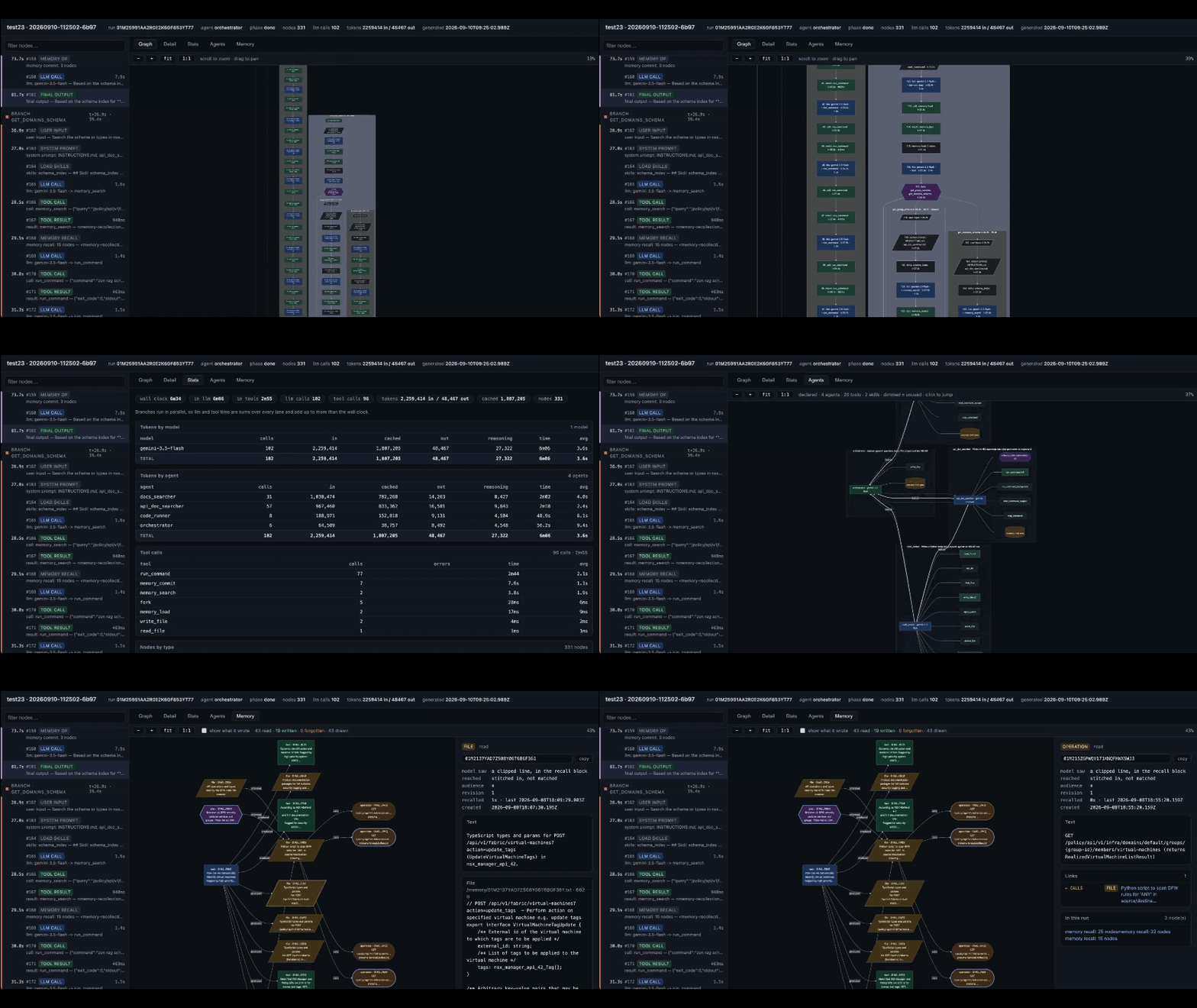
+
zen run accountant "Q3 - match the receipts drawer to the ledger, then update the return"
|
|
26
|
+
zen run accountant "this MSA against our playbook - redlines, and what I must not sign"
|
|
27
|
+
zen run analyst "why churn doubled in the EU accounts - the exports are in this folder"
|
|
28
|
+
zen run analyst "what changed in EU battery regulation this year, with sources"
|
|
29
|
+
zen run devops "this week's advisories - which of them actually reach our code"
|
|
30
|
+
zen run devops "the 03:12 outage - timeline, contributing factors, owners"
|
|
31
|
+
```
|
|
32
|
+
|
|
33
|
+
Three agents there, six things asked of them: an agent you have built is not a
|
|
34
|
+
script with one job, it is a specialist you keep going back to. And it is work
|
|
35
|
+
that comes back - every quarter, every sprint, every deal - which is exactly the
|
|
36
|
+
work nobody has shipped you a product for.
|
|
37
|
+
|
|
38
|
+
Once the agent exists it is a command: it works on the files you are standing
|
|
39
|
+
in, runs real commands in a container, searches the web when it has to, and
|
|
40
|
+
records every token it spent doing it.
|
|
41
|
+
|
|
42
|
+
Getting there is three beats:
|
|
43
|
+
|
|
44
|
+
1. **Describe it.** You write `SPECIFICATION.md` - what the system is for,
|
|
45
|
+
which specialists it needs, what each may reach for, what _done_ means. The
|
|
46
|
+
rest of the folder is built to implement it.
|
|
47
|
+
2. **Test it.** `zen check` validates the project and every file it names,
|
|
48
|
+
`zen run` exercises it for real, `zen inspect` opens the record of what it
|
|
49
|
+
actually did. When it comes out wrong you fix the specification, not the
|
|
50
|
+
prompts, and go round again.
|
|
51
|
+
3. **Share it.** It is a folder - commit it, review it in a pull request, send
|
|
52
|
+
it. One `zen init <dir>` on a project that arrived by clone registers it
|
|
53
|
+
without touching a thing, and it is their command now too.
|
|
18
54
|
|
|
19
55
|
> Part of [ZeneraNeo](https://github.com/andreyryabov/ZeneraNeo). This is an
|
|
20
|
-
> open-source side project for experimentation and chore work
|
|
56
|
+
> open-source side project for experimentation and chore work - **not** the
|
|
21
57
|
> official Zenera AI Platform. It carries no support or stability promises.
|
|
22
58
|
|
|
59
|
+
## What you build
|
|
60
|
+
|
|
61
|
+
Half a page of specification turns into a system like one of these. Nothing here
|
|
62
|
+
ships with the CLI - each is a folder somebody wrote, and could send you.
|
|
63
|
+
|
|
64
|
+
| Project | The team inside it |
|
|
65
|
+
| -------------- | ------------------------------------------------------------------------------------------------------------------------------------------------------------------------------------------------------------------------------------------------------------------------------------------------------------------------------- |
|
|
66
|
+
| **accountant** | A bookkeeper that reads and classifies every receipt, statement, invoice and agreement in the folder; a reconciler that holds each against a ledger line or a playbook position and lists what has no pair; a preparer that fills the return or drafts the redlines; a checker that refuses anything no document substantiates. |
|
|
67
|
+
| **analyst** | A planner that splits the question into branches; researchers that run in parallel over your files and the web; a statistician that writes and runs Python in the sandbox; an editor that joins it into one answer where every claim carries its source. |
|
|
68
|
+
| **devops** | A gatherer that pulls advisories, logs, alerts and deploys into one picture; a tracer that works out whether a vulnerable path is reachable at all, or which change actually broke it; an engineer that plans the fix, applies it a step at a time, and stops the moment a check fails. |
|
|
69
|
+
|
|
70
|
+
Build one, commit it, and it runs the same on anyone else's machine - on
|
|
71
|
+
whichever models they prefer, and without carrying your keys.
|
|
72
|
+
|
|
73
|
+
## What makes it different
|
|
74
|
+
|
|
75
|
+
Most tools give you one agent, or a framework and an empty file. This is a
|
|
76
|
+
factory: it designs the system for you, then keeps it honest.
|
|
77
|
+
|
|
78
|
+
- **You state the problem; a meta-agent designs the system.** Specialists,
|
|
79
|
+
prompts, tool grants, hand-offs, where it fans out - all of it drawn from what
|
|
80
|
+
you wrote, and checked before it ever runs.
|
|
81
|
+
- **A self-improving loop, not a one-off build.** Build, run, read the record,
|
|
82
|
+
change what was wrong, run again - and the system can drive that loop on
|
|
83
|
+
itself. Failures come back as findings with a cause and a fix, so the next
|
|
84
|
+
version is written rather than debugged.
|
|
85
|
+
- **It watches itself work.** Every run is recorded against the architecture it
|
|
86
|
+
declared - the agent nobody called, the skill that never fired, where the
|
|
87
|
+
tokens went. Nothing to instrument, nothing to sign up for.
|
|
88
|
+
- **Customisable all the way down.** Live in the specification and never look
|
|
89
|
+
lower. Or set the model, tools and memory of a single agent. Or take the
|
|
90
|
+
kernel itself and manage the trajectory turn by turn. No layer is sealed.
|
|
91
|
+
- **Your documents, searchable.** Hybrid retrieval over your files and your API
|
|
92
|
+
descriptions, plus a memory that is a graph rather than a bucket of rows - so
|
|
93
|
+
what an agent learned in March is still there in September.
|
|
94
|
+
- **Integrations it writes itself.** No MCP server to find, no connector to wait
|
|
95
|
+
for. If it has to reach your ERP, your database or a twenty-year-old SOAP
|
|
96
|
+
endpoint, it writes the call and runs it in a sandbox.
|
|
97
|
+
|
|
23
98
|
## Install
|
|
24
99
|
|
|
25
|
-
Node.js 24+. One command
|
|
100
|
+
Node.js 24+. One command - the OpenAI, Anthropic, Google and OpenRouter SDKs
|
|
26
101
|
all ship with the CLI, so any provider works out of the box.
|
|
27
102
|
|
|
28
103
|
```sh
|
|
@@ -37,50 +112,191 @@ npx @zenera/cli --help
|
|
|
37
112
|
|
|
38
113
|
## Quickstart
|
|
39
114
|
|
|
40
|
-
|
|
115
|
+
From nothing to a specialized agent system:
|
|
41
116
|
|
|
42
117
|
```sh
|
|
43
118
|
npm i -g @zenera/cli # every vendor SDK comes with it
|
|
44
119
|
zen key add openai # asks for the key without showing it; stored in ~/.zenera
|
|
45
120
|
zen init my-project # scaffolds a project and registers it
|
|
46
|
-
|
|
121
|
+
zen open my-project # open the specification and project in your editor
|
|
122
|
+
```
|
|
123
|
+
|
|
124
|
+
In the editor, describe the job in `SPECIFICATION.md`, then send this in the
|
|
125
|
+
agent chat:
|
|
126
|
+
|
|
127
|
+
```
|
|
128
|
+
/sync-with-spec
|
|
47
129
|
```
|
|
48
130
|
|
|
49
|
-
|
|
131
|
+
It creates the specialists, responsibilities, tool access and handoffs the job
|
|
132
|
+
needs. Back in the terminal, validate the generated system and run it against a
|
|
133
|
+
real workspace:
|
|
50
134
|
|
|
51
135
|
```sh
|
|
52
|
-
zen
|
|
53
|
-
|
|
136
|
+
zen check my-project
|
|
137
|
+
cd ~/code/some-repo
|
|
138
|
+
zen run my-project "summarise this repo and write NOTES.md"
|
|
139
|
+
```
|
|
140
|
+
|
|
141
|
+
Then, day to day:
|
|
142
|
+
|
|
143
|
+
```sh
|
|
144
|
+
zen run my-project # no prompt given: opens a full-screen terminal app (a TUI)
|
|
145
|
+
zen check my-project # validate the project and every file it names
|
|
54
146
|
zen inspect # open the last run's report.html
|
|
55
147
|
zen list --sessions # every project, its sessions and last run
|
|
56
|
-
echo "triage this" | zen run --quiet | jq
|
|
148
|
+
echo "triage this" | zen run my-project --quiet | jq
|
|
149
|
+
```
|
|
150
|
+
|
|
151
|
+
Standing inside the project, the name is optional: a bare `zen run`, `zen check`
|
|
152
|
+
or `zen inspect` means the one you are in.
|
|
153
|
+
|
|
154
|
+
Giving a prompt on the command line skips every question: it starts a fresh
|
|
155
|
+
session and uses the current directory as the workspace, with write access.
|
|
156
|
+
`--session`, `--workspace` and `--read-only` override that.
|
|
157
|
+
|
|
158
|
+
To change what the system does, update `SPECIFICATION.md` and send
|
|
159
|
+
`/sync-with-spec` again. The next section explains that workflow in detail.
|
|
160
|
+
|
|
161
|
+
## You write the specification; a coding agent writes the system
|
|
162
|
+
|
|
163
|
+
`zen init` writes `SPECIFICATION.md` first, and everything else in the folder
|
|
164
|
+
implements it. Where the two disagree the specification wins, so a change to
|
|
165
|
+
what the system does starts there and not in `agents.yaml`.
|
|
166
|
+
|
|
167
|
+
The one `zen init` writes is not a heading list - it is a true specification of
|
|
168
|
+
the project just scaffolded, so you can read it against the files beside it
|
|
169
|
+
before changing a word:
|
|
170
|
+
|
|
171
|
+
```markdown
|
|
172
|
+
## Agents
|
|
173
|
+
|
|
174
|
+
One agent, `default`, which is the entry point and the whole system. It has
|
|
175
|
+
nobody to hand work to, because there is no second job to hand on.
|
|
176
|
+
|
|
177
|
+
## Done means
|
|
178
|
+
|
|
179
|
+
- The change asked for is in the workspace, or the question is answered from
|
|
180
|
+
what is actually in it.
|
|
181
|
+
- Everything the agent claims a command did, that command actually did - it was
|
|
182
|
+
run, and its output was read.
|
|
183
|
+
- The reply names what changed, file by file, and says what it deliberately did
|
|
184
|
+
not do.
|
|
57
185
|
```
|
|
58
186
|
|
|
59
|
-
|
|
187
|
+
### How you actually edit it
|
|
188
|
+
|
|
189
|
+
`SPECIFICATION.md` is ordinary Markdown, so any editor will do - but the loop is
|
|
190
|
+
meant to be driven from a coding agent's chat, and `zen init` installs the
|
|
191
|
+
prompts that make each step a single command:
|
|
60
192
|
|
|
61
193
|
```sh
|
|
62
|
-
|
|
63
|
-
zen run my-project "summarise this repo and write NOTES.md"
|
|
194
|
+
zen open my-project # or, standing in the folder: zen open
|
|
64
195
|
```
|
|
65
196
|
|
|
66
|
-
|
|
67
|
-
|
|
68
|
-
`--
|
|
197
|
+
That launches the editor you already use: the one this terminal belongs to, or
|
|
198
|
+
`$ZENERA_EDITOR`, or the first of VS Code, Cursor, Windsurf, Zed, Sublime Text
|
|
199
|
+
or IntelliJ it can find. `--editor <cmd>` names one outright.
|
|
200
|
+
|
|
201
|
+
In the window that opens:
|
|
202
|
+
|
|
203
|
+
1. **Edit `SPECIFICATION.md`** - what the system is for, which agents exist,
|
|
204
|
+
what each may reach for, and what _done_ means.
|
|
205
|
+
2. **Open the chat panel and send `/sync-with-spec`.** It reads the
|
|
206
|
+
specification and every file implementing it, works out the difference in
|
|
207
|
+
both directions, and changes the smallest thing that closes each gap.
|
|
208
|
+
3. **Read `SPECIFICATION-FEEDBACK.md`**, which it writes for anything it could
|
|
209
|
+
not do without guessing. Answer its questions by editing `SPECIFICATION.md`
|
|
210
|
+
- not by editing prompts - and send `/sync-with-spec` again.
|
|
69
211
|
|
|
70
|
-
|
|
71
|
-
|
|
72
|
-
|
|
212
|
+
Back in the terminal: `zen check`, then `zen run`.
|
|
213
|
+
|
|
214
|
+
<details>
|
|
215
|
+
<summary>The chat commands <code>zen init</code> installs</summary>
|
|
216
|
+
|
|
217
|
+
They are prompt files under `.github/prompts/`, which VS Code and its forks
|
|
218
|
+
offer as chat slash-commands. Both `zen init` and `zen open` write them fresh,
|
|
219
|
+
so they never go stale - and edits to them do not survive.
|
|
220
|
+
|
|
221
|
+
| In chat | Does |
|
|
222
|
+
| ----------------- | ----------------------------------------------------------- |
|
|
223
|
+
| `/sync-with-spec` | Makes every file match `SPECIFICATION.md`, both directions. |
|
|
224
|
+
| `/review-project` | Reads the project as a reviewer would, and reports. |
|
|
225
|
+
| `/new-agent` | Adds an agent - prompt, wiring and hand-offs. |
|
|
226
|
+
| `/new-skill` | Adds a skill under `agents/skills/`. |
|
|
227
|
+
|
|
228
|
+
In an editor that does not support prompt files, paste the contents of
|
|
229
|
+
`.github/prompts/sync-with-spec.prompt.md` into its chat instead - it is only a
|
|
230
|
+
prompt. Alongside them, `.github/copilot-instructions.md` is the standing brief
|
|
231
|
+
that explains this runtime to whatever agent is reading, and
|
|
232
|
+
`.github/skills/zen-cli/` is the CLI's own reference for it.
|
|
233
|
+
|
|
234
|
+
</details>
|
|
235
|
+
|
|
236
|
+
### The self-improving loop
|
|
237
|
+
|
|
238
|
+
```
|
|
239
|
+
edit SPECIFICATION.md → /sync-with-spec → zen check → zen run
|
|
240
|
+
↑ ↓
|
|
241
|
+
└───── refine the spec <-──── zen inspect <-───────┘
|
|
242
|
+
```
|
|
243
|
+
|
|
244
|
+
`zen inspect` makes the record visible: the run trace, timing and token
|
|
245
|
+
statistics, agent architecture, and memory used during the run.
|
|
246
|
+
|
|
247
|
+
|
|
248
|
+
|
|
249
|
+
Every step is a command, and everything each one reads or writes is a plain
|
|
250
|
+
file: the specification, the findings `zen check` prints with a code, a location
|
|
251
|
+
and a fix, the record `zen inspect` renders of what the run actually did. So the
|
|
252
|
+
loop does not need you standing in it. Hand the whole cycle to the agent in your
|
|
253
|
+
editor and it runs on the system it just built - test it, read the failure,
|
|
254
|
+
change the sentence in the specification that caused it, rebuild, run again.
|
|
255
|
+
"Fix my project" is one instruction. (The first time round, `scripts/_setup.sh`
|
|
256
|
+
prepares the container the tools run in.)
|
|
257
|
+
|
|
258
|
+
The last turn is the one that matters. When a run comes out wrong the fix is the
|
|
259
|
+
sentence that was missing from the specification, and the prompt edit follows
|
|
260
|
+
from that. Prompts patched directly drift away from the document meant to
|
|
261
|
+
describe them, and a project whose specification is no longer true is a project
|
|
262
|
+
with no specification.
|
|
263
|
+
|
|
264
|
+
Full guide:
|
|
265
|
+
[docs/specification.md](https://github.com/andreyryabov/ZeneraNeo/blob/main/docs/specification.md).
|
|
73
266
|
|
|
74
267
|
## A worked example
|
|
75
268
|
|
|
76
|
-
|
|
77
|
-
whole thing, in three files.
|
|
269
|
+
From a sentence to a working two-agent system, without hand-writing any wiring.
|
|
78
270
|
|
|
79
271
|
```sh
|
|
80
272
|
zen init repo-notes && cd repo-notes
|
|
273
|
+
zen open # opens this folder in your editor
|
|
274
|
+
```
|
|
275
|
+
|
|
276
|
+
Replace `SPECIFICATION.md` with what you want. This is the whole input - no
|
|
277
|
+
YAML, no prompt files:
|
|
278
|
+
|
|
279
|
+
```markdown
|
|
280
|
+
# Specification
|
|
281
|
+
|
|
282
|
+
## Purpose
|
|
283
|
+
|
|
284
|
+
Read a codebase and leave a short written note about it in the workspace.
|
|
285
|
+
|
|
286
|
+
## Agents
|
|
287
|
+
|
|
288
|
+
- `reader` - explores the workspace and forms a picture of it. May read files
|
|
289
|
+
and list directories, and nothing else. Hands off to `writer`.
|
|
290
|
+
- `writer` - turns that picture into `NOTES.md`. May write to the workspace.
|
|
291
|
+
|
|
292
|
+
## Done means
|
|
293
|
+
|
|
294
|
+
- `NOTES.md` exists, is Markdown, and is under 40 lines.
|
|
295
|
+
- Every claim in it comes from a file that was actually read.
|
|
81
296
|
```
|
|
82
297
|
|
|
83
|
-
`
|
|
298
|
+
Send `/sync-with-spec` in the editor's chat. It writes `agents.yaml` - who
|
|
299
|
+
exists, and what each may reach for:
|
|
84
300
|
|
|
85
301
|
```yaml
|
|
86
302
|
default: reader
|
|
@@ -100,6 +316,11 @@ agents:
|
|
|
100
316
|
handoffs: [reader] # a hand-off does not return by itself; give it a way back
|
|
101
317
|
```
|
|
102
318
|
|
|
319
|
+
- and one prompt file per agent.
|
|
320
|
+
|
|
321
|
+
<details>
|
|
322
|
+
<summary>The prompt files it writes</summary>
|
|
323
|
+
|
|
103
324
|
`agents/prompts/reader.md`:
|
|
104
325
|
|
|
105
326
|
```markdown
|
|
@@ -115,6 +336,28 @@ You write the summary you were handed to `NOTES.md`, in Markdown, under 40
|
|
|
115
336
|
lines. Then say where you put it and stop.
|
|
116
337
|
```
|
|
117
338
|
|
|
339
|
+
</details>
|
|
340
|
+
|
|
341
|
+
<details>
|
|
342
|
+
<summary>What each <code>agents.yaml</code> key means</summary>
|
|
343
|
+
|
|
344
|
+
| Key | Is |
|
|
345
|
+
| ------------- | --------------------------------------------------------------------- |
|
|
346
|
+
| `name` | how everything else refers to this agent |
|
|
347
|
+
| `description` | what it is for - read by the _other_ agents when deciding to hand off |
|
|
348
|
+
| `system` | its own brief, in prose, at `agents/prompts/<name>.md` |
|
|
349
|
+
| `model` | this agent's model; the top-level one otherwise |
|
|
350
|
+
| `tools` | what it may reach for - `workspace:*`, `sandbox:*`, a named tool |
|
|
351
|
+
| `handoffs` | who it may pass the work to |
|
|
352
|
+
| `skills` | knowledge pulled in mid-run instead of carried in every prompt |
|
|
353
|
+
|
|
354
|
+
The file is validated strictly at load: an unknown tool, a handoff to nobody, a
|
|
355
|
+
missing prompt file - each fails immediately, naming the offending key, rather
|
|
356
|
+
than surfacing three turns into a run as a confused model. Full reference:
|
|
357
|
+
[docs/agents-yaml.md](https://github.com/andreyryabov/ZeneraNeo/blob/main/docs/agents-yaml.md).
|
|
358
|
+
|
|
359
|
+
</details>
|
|
360
|
+
|
|
118
361
|
Check it, then point it at a real directory:
|
|
119
362
|
|
|
120
363
|
```sh
|
|
@@ -124,17 +367,23 @@ zen run repo-notes "summarise this repo" # this directory is the workspace
|
|
|
124
367
|
zen inspect --project repo-notes --open # what it actually did
|
|
125
368
|
```
|
|
126
369
|
|
|
127
|
-
|
|
370
|
+
That is the end of it: `repo-notes` is now a command like any other, in any
|
|
371
|
+
directory, for as long as the folder exists. Commit the folder and whoever
|
|
372
|
+
clones it types `zen init repo-notes` once - a directory that is already a
|
|
373
|
+
project is registered, not rebuilt, and nothing in it is touched - and the name
|
|
374
|
+
is a command on their machine too.
|
|
375
|
+
|
|
376
|
+
## A project is a folder
|
|
128
377
|
|
|
129
|
-
|
|
130
|
-
|
|
131
|
-
|
|
132
|
-
|
|
133
|
-
|
|
378
|
+
Prompts, agent wiring, skills and tool selections are all files - Markdown and
|
|
379
|
+
YAML - rather than code buried inside an application. So the folder can be
|
|
380
|
+
committed, copied to another machine, reviewed in a pull request, and handed to
|
|
381
|
+
someone else who runs it with one command. Credentials live in `$HOME`, never in
|
|
382
|
+
the project, so there is no secret to strip before sharing it.
|
|
134
383
|
|
|
135
384
|
```
|
|
136
385
|
my-project/
|
|
137
|
-
SPECIFICATION.md what this is for
|
|
386
|
+
SPECIFICATION.md what this is for - the intent
|
|
138
387
|
INSTRUCTIONS.md house rules, prepended to every agent
|
|
139
388
|
agents.yaml who exists, what they may reach for
|
|
140
389
|
agents/
|
|
@@ -149,15 +398,54 @@ my-project/
|
|
|
149
398
|
runs/<id>/ input, output, state, report.html, meta
|
|
150
399
|
```
|
|
151
400
|
|
|
152
|
-
`
|
|
153
|
-
|
|
154
|
-
|
|
155
|
-
|
|
156
|
-
|
|
401
|
+
Everything above the `sessions/` line is the system; everything below it is what
|
|
402
|
+
happened when it ran. Nothing here is tied to the machine it was written on,
|
|
403
|
+
which is the point of the CLI: it makes agentic systems shareable the way
|
|
404
|
+
repositories are shareable.
|
|
405
|
+
|
|
406
|
+
`zen init` also writes `.vscode/` and a `.github/` tree - a standing brief that
|
|
407
|
+
explains this runtime to whatever coding agent you open the folder with, plus
|
|
408
|
+
the prompts and skills it needs to keep the project matching its specification.
|
|
157
409
|
|
|
158
|
-
|
|
159
|
-
|
|
160
|
-
|
|
410
|
+
## Concepts
|
|
411
|
+
|
|
412
|
+
- **Project** - a named directory holding a complete agent definition and the
|
|
413
|
+
sessions that have run against it. It is self-describing: `agents.yaml` is
|
|
414
|
+
what makes a directory a project, so moving or cloning it loses nothing.
|
|
415
|
+
- **Session** - a context that persists across runs: one workspace, one memory,
|
|
416
|
+
one store for large files, and a record of everything that happened, added to
|
|
417
|
+
as it goes. Resumable.
|
|
418
|
+
- **Run** - one prompt in, one answer out, inside a session. Recorded in full,
|
|
419
|
+
whether or not you were watching.
|
|
420
|
+
- **Workspace** - the directory the agents may read and write. A prompt given on
|
|
421
|
+
the command line uses the current directory; the TUI offers the session's own
|
|
422
|
+
empty folder instead, and asks before using anything outside it.
|
|
423
|
+
- **Keyring** - `~/.zenera/neo`, readable only by you. See
|
|
424
|
+
[Credentials](#credentials).
|
|
425
|
+
- **Cache** - `~/.zenera/neo/cache`, one place for work already done: vectors,
|
|
426
|
+
parses, model listings, generated mocks. Shared by every project on the
|
|
427
|
+
machine, and never emptied by anything but you. See [Cache](#cache--work-you-have-already-paid-for).
|
|
428
|
+
|
|
429
|
+
## Sandbox commands
|
|
430
|
+
|
|
431
|
+
Agents use an isolated container when a project grants them command-line tools.
|
|
432
|
+
`zen run` prepares it automatically before the first command, but these commands
|
|
433
|
+
make setup, diagnostics and cleanup explicit - useful on a new machine or when
|
|
434
|
+
you want to validate a project's execution environment before a run.
|
|
435
|
+
|
|
436
|
+
```sh
|
|
437
|
+
zen sandbox status # engine, project image and active containers
|
|
438
|
+
zen sandbox up # prepare the execution environment for this project
|
|
439
|
+
zen sandbox pull # pull or build this project's image only
|
|
440
|
+
zen sandbox status --project my-app # inspect a named project from anywhere
|
|
441
|
+
zen sandbox disk # storage used by the engine and known projects
|
|
442
|
+
zen sandbox clean # remove containers created by zen
|
|
443
|
+
```
|
|
444
|
+
|
|
445
|
+
`status`, `up` and `pull` use the project in the current directory, or accept
|
|
446
|
+
`--project <name|dir>`. `--image <ref>` selects an image explicitly. `clean` and
|
|
447
|
+
`disk` are machine-wide operations, so use them when you mean to inspect or
|
|
448
|
+
remove resources beyond the current project.
|
|
161
449
|
|
|
162
450
|
## Commands
|
|
163
451
|
|
|
@@ -166,52 +454,83 @@ you are not expected to hand-author `agents.yaml`.
|
|
|
166
454
|
| `init` | Creates a project here, or in `<dir>`, and registers it. |
|
|
167
455
|
| `list` | Every known project: sessions, last run, whether one is live. |
|
|
168
456
|
| `open` | Opens a project in your editor. |
|
|
169
|
-
| `key` | The credential keyring
|
|
170
|
-
| `models` | What this machine can use
|
|
171
|
-
| `run` | Runs the project
|
|
457
|
+
| `key` | The credential keyring - add, check, switch, remove. |
|
|
458
|
+
| `models` | What this machine can use - list, search, test, pick. |
|
|
459
|
+
| `run` | Runs the project - the TUI on a terminal, a single answer otherwise. |
|
|
172
460
|
| `inspect` | Opens or rebuilds a run's `report.html`. |
|
|
173
|
-
| `memory` | What the agents remember
|
|
461
|
+
| `memory` | What the agents remember - size, listing, one node, or a whole page. |
|
|
174
462
|
| `check` | Validates the project and every file it names, and asks the models. |
|
|
175
463
|
| `sandbox` | Checks and prepares the container that command-line tools run in. |
|
|
176
464
|
| `cache` | What work has been kept, and getting rid of it. |
|
|
177
465
|
| `version` | CLI, library and Node versions. |
|
|
178
466
|
|
|
179
|
-
Commands
|
|
180
|
-
|
|
181
|
-
|
|
182
|
-
|
|
183
|
-
|
|
184
|
-
|
|
467
|
+
### Commands from other packages
|
|
468
|
+
|
|
469
|
+
A command can also come from a package installed alongside this one, so a new
|
|
470
|
+
capability arrives as a subcommand instead of another binary to remember: one
|
|
471
|
+
thing on your path, one keyring, one name. `zen --help` lists these whether or
|
|
472
|
+
not they are installed, and tells you what to install if not. Nothing is
|
|
473
|
+
imported until you type the command, so an uninstalled one costs you nothing and
|
|
474
|
+
an installed one costs nothing until it is used.
|
|
185
475
|
|
|
186
476
|
| Command | Package | Does |
|
|
187
477
|
| ------- | --------------- | ---------------------------------------------- |
|
|
188
478
|
| `faker` | `@zenera/faker` | A mock API from an openapi/swagger document. |
|
|
189
479
|
| `rag` | `@zenera/rag` | Search an openapi/swagger document as a graph. |
|
|
190
480
|
|
|
481
|
+
**`zen faker`** turns an OpenAPI or Swagger description into a working mock
|
|
482
|
+
server. It generates behavior for each route, checks the result against the
|
|
483
|
+
response contract, and reuses the generated implementation on later requests.
|
|
484
|
+
|
|
191
485
|
```sh
|
|
192
486
|
npm i -g @zenera/faker
|
|
193
487
|
zen faker serve api/openapi.yaml --port 8787 # a working mock, bodies written by a model
|
|
194
488
|
|
|
489
|
+
curl -s localhost:8787/users/12324
|
|
490
|
+
# { "user_id": 12324, "email": "brooke.hoffman@example.org", … }
|
|
491
|
+
```
|
|
492
|
+
|
|
493
|
+
**`zen rag`** adds advanced retrieval for the knowledge an agent needs to work
|
|
494
|
+
from: documentation and API schemas. Document indexes support semantic,
|
|
495
|
+
full-text and hybrid search with passages returned alongside their source lines.
|
|
496
|
+
Schema indexes add graph-aware retrieval across operations, types, fields,
|
|
497
|
+
requests and responses, so an answer can include the connected API context
|
|
498
|
+
rather than an isolated match.
|
|
499
|
+
|
|
500
|
+
```sh
|
|
195
501
|
npm i -g @zenera/rag
|
|
196
502
|
zen rag schema index --embedding openai:text-embedding-3-small ./specs/*.yaml
|
|
197
503
|
zen rag schema search --output-property "user billing history" --format ts
|
|
504
|
+
|
|
505
|
+
zen rag docs index ./handbook --embedding openai:text-embedding-3-small
|
|
506
|
+
zen rag docs search "how does failover work when the primary is unreachable"
|
|
198
507
|
```
|
|
199
508
|
|
|
200
|
-
|
|
201
|
-
|
|
509
|
+
Use [@zenera/rag](https://github.com/andreyryabov/ZeneraNeo/blob/main/packages/rag/README.md)
|
|
510
|
+
for its complete retrieval capabilities and examples. Details:
|
|
202
511
|
[@zenera/faker](https://github.com/andreyryabov/ZeneraNeo/blob/main/packages/faker/README.md)
|
|
203
512
|
·
|
|
204
513
|
[@zenera/rag](https://github.com/andreyryabov/ZeneraNeo/blob/main/packages/rag/README.md).
|
|
205
514
|
|
|
206
|
-
|
|
207
|
-
ok, `1` the run failed, `2` bad invocation, `3` invalid project, `4` no usable
|
|
208
|
-
credential, `5` sandbox unavailable.
|
|
209
|
-
|
|
210
|
-
`stdout` is the answer, `stderr` is the narration, and `--json` is on every
|
|
211
|
-
command — so `zen run … | jq` is a supported way to use it, not an accident.
|
|
515
|
+
### Conventions
|
|
212
516
|
|
|
213
517
|
The binary is installed under three names: `zen`, `zn` and `zenera`.
|
|
214
518
|
|
|
519
|
+
Global flags: `-h/--help`, `-v/--version`, `--json`, `-C <dir>`.
|
|
520
|
+
|
|
521
|
+
`stdout` carries the answer and `stderr` carries the narration, and `--json`
|
|
522
|
+
works on every command - so `zen run … | jq` is a supported way to use this, not
|
|
523
|
+
an accident.
|
|
524
|
+
|
|
525
|
+
| Exit code | Meaning |
|
|
526
|
+
| --------- | -------------------- |
|
|
527
|
+
| `0` | ok |
|
|
528
|
+
| `1` | the run failed |
|
|
529
|
+
| `2` | bad invocation |
|
|
530
|
+
| `3` | invalid project |
|
|
531
|
+
| `4` | no usable credential |
|
|
532
|
+
| `5` | sandbox unavailable |
|
|
533
|
+
|
|
215
534
|
## Credentials
|
|
216
535
|
|
|
217
536
|
One keyring serves every provider, and a key goes in the same way whatever it
|
|
@@ -222,36 +541,40 @@ zen key add <provider> # asks for the key without showing it
|
|
|
222
541
|
zen key add <provider> < key.txt # or pipe it in
|
|
223
542
|
```
|
|
224
543
|
|
|
225
|
-
The value is never
|
|
544
|
+
The value is never passed as an argument. A command line is visible to anyone
|
|
226
545
|
listing running processes, is saved in your shell history and is captured in CI
|
|
227
|
-
logs
|
|
228
|
-
|
|
229
|
-
|
|
230
|
-
|
|
546
|
+
logs - so the hidden prompt and piping it in are the only two ways.
|
|
547
|
+
|
|
548
|
+
Entries live in `~/.zenera/neo/keys.json`, in a file only you can read. They are
|
|
549
|
+
copied into the environment just before a run, which has two consequences worth
|
|
550
|
+
knowing: an environment variable you set yourself always wins, and a project
|
|
551
|
+
checked out on a machine without `zen` still runs.
|
|
231
552
|
|
|
232
553
|
| Provider | The value is | Exported as |
|
|
233
554
|
| ------------ | ------------------------------------- | -------------------------------- |
|
|
234
555
|
| `openai` | a secret | `OPENAI_API_KEY` |
|
|
235
556
|
| `anthropic` | a secret | `ANTHROPIC_API_KEY` |
|
|
236
|
-
| `google` | a secret
|
|
557
|
+
| `google` | a secret - AI Studio | `GEMINI_API_KEY` |
|
|
237
558
|
| `vertex` | a path to a service-account JSON file | `GOOGLE_APPLICATION_CREDENTIALS` |
|
|
238
559
|
| `openrouter` | a secret | `OPENROUTER_API_KEY` |
|
|
239
|
-
| `exa` | a secret
|
|
560
|
+
| `exa` | a secret - for the search tool | `EXA_API_KEY` |
|
|
240
561
|
|
|
241
562
|
`zen key add` verifies the credential against the provider before it finishes,
|
|
242
|
-
but stores it either way: a key that cannot be checked right now
|
|
243
|
-
behind a proxy
|
|
563
|
+
but stores it either way: a key that cannot be checked right now - offline,
|
|
564
|
+
behind a proxy - is not a key that is wrong. `--no-check` skips the call.
|
|
244
565
|
|
|
245
566
|
### Which key a model uses
|
|
246
567
|
|
|
247
568
|
A model reference is `[provider[/api]:]model`, and the first segment names a
|
|
248
569
|
**provider, not a vendor**. So `vertex:gemini-3.5-flash` and
|
|
249
570
|
`google:gemini-3.5-flash` are the same model reached through two different
|
|
250
|
-
services, needing two different credentials
|
|
251
|
-
|
|
252
|
-
|
|
253
|
-
|
|
254
|
-
|
|
571
|
+
services, needing two different credentials; a bare `gpt-5.4-mini` goes to the
|
|
572
|
+
default provider, `openai`.
|
|
573
|
+
|
|
574
|
+
`zen check` resolves every reference in a project against what is stored and
|
|
575
|
+
says which credential each one needs. It then spends a few tokens asking each
|
|
576
|
+
model to answer, which is the only way to catch a model id this account is not
|
|
577
|
+
served. `--no-models` stops before that.
|
|
255
578
|
|
|
256
579
|
### Which models you can use
|
|
257
580
|
|
|
@@ -267,15 +590,20 @@ zen models test vertex:gemini-embedding-001 # one real call, one verdict
|
|
|
267
590
|
zen models pick --embedding # the first ref that answers, on stdout
|
|
268
591
|
```
|
|
269
592
|
|
|
270
|
-
Listings are cached for a day in `~/.zenera/neo/cache`.
|
|
271
|
-
|
|
272
|
-
one does a short built-in list stand in.
|
|
593
|
+
Listings are cached for a day in `~/.zenera/neo/cache`. If a provider cannot be
|
|
594
|
+
reached, the last listing is used and marked stale; only when there has never
|
|
595
|
+
been one does a short built-in list stand in.
|
|
596
|
+
|
|
597
|
+
`zen models test` separates three kinds of failure, because each calls for a
|
|
598
|
+
different action:
|
|
273
599
|
|
|
274
|
-
|
|
275
|
-
|
|
276
|
-
|
|
277
|
-
|
|
278
|
-
|
|
600
|
+
- **refused** - the provider rejected the credential. Fix or replace the key.
|
|
601
|
+
- **blocked** - the credential was accepted and the account then said no: an API
|
|
602
|
+
switched off, an empty balance, a model this key was never granted. The key is
|
|
603
|
+
fine; the account needs changing, and the command that changes it is printed
|
|
604
|
+
with the error.
|
|
605
|
+
- **unknown** - the question never arrived (offline, proxy, timeout). Nothing is
|
|
606
|
+
wrong with the key; try again.
|
|
279
607
|
|
|
280
608
|
```
|
|
281
609
|
$ zen models test vertex:gemini-embedding-001
|
|
@@ -285,164 +613,192 @@ error 1 of 1 did not answer
|
|
|
285
613
|
find one that does: zen models pick --embedding
|
|
286
614
|
```
|
|
287
615
|
|
|
288
|
-
`pick` tries a short list of candidates one at a time
|
|
289
|
-
that works,
|
|
290
|
-
|
|
616
|
+
`zen models pick` tries a short list of candidates one at a time, stops at the
|
|
617
|
+
first that works, and prints the bare reference on stdout. So recovering from
|
|
618
|
+
the above is a single substitution, whether a person or an agent is doing it:
|
|
291
619
|
|
|
292
620
|
```sh
|
|
293
621
|
zen rag schema index --embedding "$(zen models pick --embedding)" ./specs/*.yaml
|
|
294
622
|
```
|
|
295
623
|
|
|
296
|
-
###
|
|
624
|
+
### Setting up each provider
|
|
297
625
|
|
|
298
|
-
|
|
299
|
-
|
|
300
|
-
otherwise it is treated as an API key. The name you choose for the entry has no
|
|
301
|
-
say in it — `vertex/express` is simply an entry called `express`, exactly as
|
|
302
|
-
`vertex/prod` is one called `prod`, and either name can hold either kind.
|
|
626
|
+
The shape is the same everywhere - `zen key add <provider>`, then answer the
|
|
627
|
+
prompt. Open the one you need for its specifics.
|
|
303
628
|
|
|
304
|
-
|
|
305
|
-
|
|
629
|
+
<details>
|
|
630
|
+
<summary><strong>OpenAI</strong> - one secret, exported as <code>OPENAI_API_KEY</code></summary>
|
|
306
631
|
|
|
307
632
|
```sh
|
|
308
|
-
zen key add
|
|
309
|
-
# Paste the key, or a path to the file: /Users/you/keys/vertex-sa.json
|
|
633
|
+
zen key add openai
|
|
310
634
|
```
|
|
311
635
|
|
|
312
|
-
|
|
313
|
-
|
|
636
|
+
`openai` is the default provider, so a reference with no prefix comes here:
|
|
637
|
+
`gpt-5.4-mini` and `openai:gpt-5.4-mini` are the same model.
|
|
638
|
+
|
|
639
|
+
</details>
|
|
640
|
+
|
|
641
|
+
<details>
|
|
642
|
+
<summary><strong>Anthropic</strong> - one secret, exported as <code>ANTHROPIC_API_KEY</code></summary>
|
|
314
643
|
|
|
315
644
|
```sh
|
|
316
|
-
|
|
645
|
+
zen key add anthropic
|
|
646
|
+
zen run --model anthropic:claude-sonnet-4-5 "summarise this repo"
|
|
317
647
|
```
|
|
318
648
|
|
|
319
|
-
|
|
320
|
-
moving or cleaning up the original later cannot break it.
|
|
649
|
+
</details>
|
|
321
650
|
|
|
322
|
-
|
|
323
|
-
|
|
324
|
-
keeping processing inside that territory, `global` takes whatever is free and
|
|
325
|
-
promises no residency. `global` pays about ten seconds of cold start on the
|
|
326
|
-
first request each process makes — a region answers in about two.
|
|
327
|
-
- Which models a location serves is per model, and not guessable. In one
|
|
328
|
-
project, `gemini-embedding-2` answered at `us` but 404'd at `us-central1`,
|
|
329
|
-
while `gemini-2.5-flash` did the opposite. New models often reach `global`,
|
|
330
|
-
`us` and `eu` first. `zen models test vertex:<model>` is what settles it —
|
|
331
|
-
`zen key add` only establishes that the credential itself works.
|
|
332
|
-
- `--gcp-project <id>` is only needed when the `project_id` inside the file is not
|
|
333
|
-
the project you want.
|
|
651
|
+
<details>
|
|
652
|
+
<summary><strong>OpenRouter</strong> - one secret, exported as <code>OPENROUTER_API_KEY</code></summary>
|
|
334
653
|
|
|
335
|
-
|
|
336
|
-
|
|
337
|
-
|
|
338
|
-
|
|
654
|
+
One credential for many vendors' models. The model id keeps its own vendor
|
|
655
|
+
prefix, after the `openrouter:` one:
|
|
656
|
+
|
|
657
|
+
```sh
|
|
658
|
+
zen key add openrouter
|
|
659
|
+
zen models search haiku --tools --free
|
|
660
|
+
zen run --model openrouter:anthropic/claude-haiku-4.5 "summarise this repo"
|
|
661
|
+
```
|
|
339
662
|
|
|
340
|
-
|
|
663
|
+
</details>
|
|
341
664
|
|
|
342
|
-
|
|
343
|
-
|
|
665
|
+
<details>
|
|
666
|
+
<summary><strong>Google AI Studio</strong> - one secret, exported as <code>GEMINI_API_KEY</code></summary>
|
|
344
667
|
|
|
345
|
-
|
|
346
|
-
|
|
668
|
+
One key and nothing else to configure: the shortest way to a working Gemini
|
|
669
|
+
model.
|
|
347
670
|
|
|
348
671
|
```sh
|
|
349
|
-
zen key add google
|
|
672
|
+
zen key add google
|
|
350
673
|
zen check # google:gemini-3.5-flash now resolves
|
|
351
674
|
```
|
|
352
675
|
|
|
353
|
-
|
|
354
|
-
|
|
355
|
-
|
|
676
|
+
The same Gemini models are also served by Vertex AI, under a different
|
|
677
|
+
credential. Both can be configured at once - they are separate entries for
|
|
678
|
+
separate services, and the prefix on the model reference decides which is used:
|
|
356
679
|
|
|
357
680
|
```sh
|
|
358
|
-
|
|
681
|
+
zen run --model google:gemini-3.5-flash "summarise this repo"
|
|
682
|
+
zen run --model vertex:gemini-3.5-flash "summarise this repo"
|
|
359
683
|
```
|
|
360
684
|
|
|
361
|
-
|
|
362
|
-
|
|
685
|
+
</details>
|
|
686
|
+
|
|
687
|
+
<details>
|
|
688
|
+
<summary><strong>Vertex AI</strong> - a service-account file, or an express-mode key</summary>
|
|
689
|
+
|
|
690
|
+
Vertex accepts two kinds of credential, and you never declare which one you are
|
|
691
|
+
giving: if the value is a path to a file that exists it is treated as a
|
|
692
|
+
service-account key, otherwise as an API key. The name you give the entry has no
|
|
693
|
+
bearing on this - `vertex/express` is just an entry called `express`, exactly as
|
|
694
|
+
`vertex/prod` is one called `prod`, and either name can hold either kind.
|
|
695
|
+
|
|
696
|
+
**A service-account JSON file** is the usual one, and what production normally
|
|
697
|
+
runs on. Give its path, not its contents. Run the command with nothing piped and
|
|
698
|
+
it asks:
|
|
363
699
|
|
|
364
700
|
```sh
|
|
365
|
-
|
|
366
|
-
|
|
701
|
+
zen key add vertex --gcp-location us-central1
|
|
702
|
+
# Paste the key, or a path to the file: /Users/you/keys/vertex-sa.json
|
|
367
703
|
```
|
|
368
704
|
|
|
369
|
-
|
|
705
|
+
The prompt is read by `zen`, not by your shell, so give a full path there - `~`
|
|
706
|
+
is not expanded. In a script, pipe the path in instead:
|
|
370
707
|
|
|
371
708
|
```sh
|
|
372
|
-
zen key add vertex
|
|
709
|
+
echo ~/keys/vertex-sa.json | zen key add vertex --gcp-location us-central1
|
|
373
710
|
```
|
|
374
711
|
|
|
375
|
-
|
|
712
|
+
The file is copied into `~/.zenera/neo/keys/`, where only you can read it, so
|
|
713
|
+
moving or cleaning up the original later cannot break it.
|
|
714
|
+
|
|
715
|
+
- `--gcp-location <region>` is worth setting, because the file says which project
|
|
716
|
+
it belongs to but never which region to call. It takes a concrete region, or
|
|
717
|
+
one of the endpoints that route across regions: `us` and `eu` pool capacity
|
|
718
|
+
while keeping processing inside that territory, and `global` takes whatever is
|
|
719
|
+
free and promises no residency. `global` costs about ten seconds of cold start
|
|
720
|
+
on the first request each process makes; a named region answers in about two.
|
|
721
|
+
- Which models a location serves varies per model and is not guessable. In one
|
|
722
|
+
project, `gemini-embedding-2` answered at `us` but 404'd at `us-central1`,
|
|
723
|
+
while `gemini-2.5-flash` did the opposite. New models often reach `global`,
|
|
724
|
+
`us` and `eu` first. `zen models test vertex:<model>` is what settles it -
|
|
725
|
+
`zen key add` only establishes that the credential itself works.
|
|
726
|
+
- `--gcp-project <id>` is only needed when the `project_id` inside the file is
|
|
727
|
+
not the project you want to bill:
|
|
376
728
|
|
|
377
|
-
```sh
|
|
378
|
-
echo ~/keys/
|
|
379
|
-
|
|
380
|
-
|
|
729
|
+
```sh
|
|
730
|
+
echo ~/keys/vertex-sa.json \
|
|
731
|
+
| zen key add vertex --gcp-project other-project --gcp-location europe-west4
|
|
732
|
+
```
|
|
733
|
+
|
|
734
|
+
**An express-mode API key** is the alternative: a single secret, stored under
|
|
735
|
+
`VERTEX_API_KEY`. It is the Vertex console's way of granting access without a
|
|
736
|
+
service account, and it needs neither a project nor a region, so `--gcp-project`
|
|
737
|
+
and `--gcp-location` mean nothing there and are not stored.
|
|
381
738
|
|
|
382
|
-
|
|
383
|
-
zen key
|
|
384
|
-
zen key show vertex/prod # masked; --reveal prints the path
|
|
739
|
+
```sh
|
|
740
|
+
zen key add vertex # paste the key at the prompt; no flags apply
|
|
385
741
|
```
|
|
386
742
|
|
|
387
|
-
|
|
388
|
-
|
|
743
|
+
**An existing `gcloud` login counts too.** If you have run
|
|
744
|
+
`gcloud auth application-default login`, Vertex works with nothing stored at
|
|
745
|
+
all: `zen key ls` shows that login as `adc`, marked `~` because it came from
|
|
746
|
+
outside the keyring. Anything already set in `GOOGLE_APPLICATION_CREDENTIALS`,
|
|
747
|
+
`VERTEX_API_KEY` or `GEMINI_API_KEY` is listed the same way and wins over the
|
|
748
|
+
keyring, so it is always visible which credential a run will actually use.
|
|
749
|
+
|
|
750
|
+
</details>
|
|
751
|
+
|
|
752
|
+
<details>
|
|
753
|
+
<summary><strong>Exa</strong> - one secret, exported as <code>EXA_API_KEY</code></summary>
|
|
754
|
+
|
|
755
|
+
Not a model provider: this is what backs the search tool an agent reaches for
|
|
756
|
+
when it has to look something up on the web.
|
|
389
757
|
|
|
390
758
|
```sh
|
|
391
|
-
zen
|
|
392
|
-
zen run --model vertex:gemini-3.5-flash "summarise this repo"
|
|
759
|
+
zen key add exa
|
|
393
760
|
```
|
|
394
761
|
|
|
395
|
-
|
|
396
|
-
itself a usable credential: `zen key ls` shows it as `adc`, marked `~` because
|
|
397
|
-
it came from outside the keyring, and Vertex works with nothing stored at all.
|
|
398
|
-
Anything already set in `GOOGLE_APPLICATION_CREDENTIALS`, `VERTEX_API_KEY` or
|
|
399
|
-
`GEMINI_API_KEY` is listed the same way and wins over the keyring, so it is
|
|
400
|
-
always visible which credential a run will actually use.
|
|
762
|
+
</details>
|
|
401
763
|
|
|
402
|
-
|
|
764
|
+
<details>
|
|
765
|
+
<summary><strong>More than one key for the same provider</strong></summary>
|
|
403
766
|
|
|
404
|
-
Entries are named, so a provider can hold several
|
|
767
|
+
Entries are named, so a provider can hold several, one of which is active:
|
|
405
768
|
|
|
406
769
|
```sh
|
|
407
770
|
zen key add openai/work # a second entry
|
|
408
|
-
zen key use openai/work #
|
|
771
|
+
zen key use openai/work # the one that runs will use
|
|
409
772
|
zen key ls --check # everything stored, and whether it still works
|
|
410
|
-
zen key show vertex/default # masked
|
|
773
|
+
zen key show vertex/default # masked - --reveal prints the secret
|
|
411
774
|
zen key env openai # shell exports, for other tools
|
|
412
775
|
zen key rm openai/work
|
|
413
776
|
```
|
|
414
777
|
|
|
778
|
+
It is the same for Vertex, where holding several at once is the ordinary case:
|
|
779
|
+
|
|
780
|
+
```sh
|
|
781
|
+
echo ~/keys/prod-sa.json | zen key add vertex/prod --gcp-location us-central1
|
|
782
|
+
echo ~/keys/dev-sa.json | zen key add vertex/dev --gcp-location global
|
|
783
|
+
zen key add vertex/express # the express key, same provider
|
|
784
|
+
|
|
785
|
+
zen key use vertex/dev # which one the next run uses
|
|
786
|
+
```
|
|
787
|
+
|
|
415
788
|
`zen key ls` marks the active entry with `*`, and anything it found outside the
|
|
416
|
-
keyring
|
|
789
|
+
keyring - in your environment, or in a `gcloud` login - with `~`, so it is always
|
|
417
790
|
clear where a working provider actually comes from.
|
|
418
791
|
|
|
419
|
-
|
|
420
|
-
|
|
421
|
-
- **Project** — a named directory holding a complete agent definition and the
|
|
422
|
-
sessions that ran against it. Self-describing: `agents.yaml` is what makes it
|
|
423
|
-
one, so moving or cloning the directory loses nothing.
|
|
424
|
-
- **Session** — a context that persists: one workspace, one memory, one store
|
|
425
|
-
for large files, and a record of everything that happened, added to as it
|
|
426
|
-
goes. Resumable.
|
|
427
|
-
- **Run** — one prompt in, one answer out, inside a session. Recorded in full,
|
|
428
|
-
whether or not you were watching.
|
|
429
|
-
- **Workspace** — the directory the agents may read and write. A prompt given on
|
|
430
|
-
the command line uses the current directory; the TUI offers the session's own
|
|
431
|
-
empty folder and confirms anything outside it.
|
|
432
|
-
- **Keyring** — `~/.zenera/neo`, readable only by you. Keys are copied into the
|
|
433
|
-
environment just before a run, so an environment variable you set yourself
|
|
434
|
-
always wins and a project checked out on a machine without `zen` still runs.
|
|
435
|
-
- **Cache** — `~/.zenera/neo/cache`, one place for work already done: vectors,
|
|
436
|
-
parses, model listings, generated mocks. Shared by every project on the
|
|
437
|
-
machine, and never evicted by anything but you.
|
|
792
|
+
</details>
|
|
438
793
|
|
|
439
|
-
##
|
|
794
|
+
## Cache - work you have already paid for
|
|
440
795
|
|
|
441
|
-
Embedding a paragraph, parsing a document, asking a provider what it serves
|
|
442
|
-
|
|
443
|
-
`~/.zenera/neo/cache/<kind>/`,
|
|
444
|
-
|
|
445
|
-
|
|
796
|
+
Embedding a paragraph, parsing a document, asking a provider what it serves: all
|
|
797
|
+
of these are slow or costly, and all of them give the same answer every time. So
|
|
798
|
+
the answers are kept in `~/.zenera/neo/cache/<kind>/`, under a key built from
|
|
799
|
+
every input that produced them. Change any input and the key changes, so you get
|
|
800
|
+
a fresh answer rather than a stale one. That is why entries are never
|
|
801
|
+
invalidated: one that no longer matches anything is simply never read again.
|
|
446
802
|
|
|
447
803
|
```
|
|
448
804
|
zen cache ls # what is kept, by kind
|
|
@@ -452,17 +808,19 @@ zen cache prune --max-size 2GB # or keep it under a ceiling
|
|
|
452
808
|
zen cache clear --kind docs-parse # throw one kind away
|
|
453
809
|
```
|
|
454
810
|
|
|
455
|
-
Age
|
|
456
|
-
weekly rebuild
|
|
457
|
-
|
|
458
|
-
|
|
459
|
-
|
|
460
|
-
|
|
811
|
+
Age means when an entry was last _read_, not when it was written, so a vector
|
|
812
|
+
that a weekly rebuild keeps using never counts as old.
|
|
813
|
+
|
|
814
|
+
Nothing is ever evicted automatically. A store that quietly deletes things is
|
|
815
|
+
only noticed once it has deleted the wrong one, so every removal is something
|
|
816
|
+
you ask for. Nothing in the cache is precious either: every entry is work that
|
|
817
|
+
can be done again, and the only cost of deleting one is paying for it a second
|
|
818
|
+
time.
|
|
461
819
|
|
|
462
820
|
## The library underneath
|
|
463
821
|
|
|
464
822
|
This is a shell over
|
|
465
|
-
[`@zenera/neo`](https://www.npmjs.com/package/@zenera/neo)
|
|
823
|
+
[`@zenera/neo`](https://www.npmjs.com/package/@zenera/neo) - agents, models,
|
|
466
824
|
tools, skills, memory and a running record of everything that happened. Use it
|
|
467
825
|
directly when you want the runtime inside your own application rather than on a
|
|
468
826
|
terminal:
|
|
@@ -470,21 +828,20 @@ terminal:
|
|
|
470
828
|
|
|
471
829
|
## Documentation
|
|
472
830
|
|
|
473
|
-
[docs/specification.md](https://github.com/andreyryabov/ZeneraNeo/blob/main/docs/specification.md)
|
|
474
|
-
|
|
475
|
-
[docs/projects.md](https://github.com/andreyryabov/ZeneraNeo/blob/main/docs/projects.md)
|
|
476
|
-
|
|
477
|
-
[docs/agents-yaml.md](https://github.com/andreyryabov/ZeneraNeo/blob/main/docs/agents-yaml.md)
|
|
478
|
-
|
|
479
|
-
|
|
480
|
-
|
|
481
|
-
|
|
482
|
-
|
|
483
|
-
|
|
484
|
-
|
|
485
|
-
— what agents keep between sessions.
|
|
831
|
+
- [docs/specification.md](https://github.com/andreyryabov/ZeneraNeo/blob/main/docs/specification.md)
|
|
832
|
+
- writing the specification the project implements.
|
|
833
|
+
- [docs/projects.md](https://github.com/andreyryabov/ZeneraNeo/blob/main/docs/projects.md)
|
|
834
|
+
- what the project folder contains, file by file.
|
|
835
|
+
- [docs/agents-yaml.md](https://github.com/andreyryabov/ZeneraNeo/blob/main/docs/agents-yaml.md)
|
|
836
|
+
- every key in the configuration file.
|
|
837
|
+
- [docs/knowledge.md](https://github.com/andreyryabov/ZeneraNeo/blob/main/docs/knowledge.md)
|
|
838
|
+
- building a searchable document index.
|
|
839
|
+
- [docs/integrations.md](https://github.com/andreyryabov/ZeneraNeo/blob/main/docs/integrations.md)
|
|
840
|
+
- making an API description searchable and mockable.
|
|
841
|
+
- [docs/memory.md](https://github.com/andreyryabov/ZeneraNeo/blob/main/docs/memory.md)
|
|
842
|
+
- what agents keep between sessions.
|
|
486
843
|
|
|
487
844
|
## License
|
|
488
845
|
|
|
489
|
-
Early days and moving fast
|
|
846
|
+
Early days and moving fast - issues, questions and pull requests are welcome.
|
|
490
847
|
[MIT](LICENSE).
|