@yosle/tropipayjs 0.2.3 → 0.3.0
This diff represents the content of publicly available package versions that have been released to one of the supported registries. The information contained in this diff is provided for informational purposes only and reflects changes between package versions as they appear in their respective public registries.
- package/README.md +69 -9
- package/index.d.ts +358 -76
- package/index.js +421 -342
- package/index.js.map +1 -0
- package/package.json +10 -2
- package/.nvmrc +0 -1
- package/.vscode/launch.json +0 -18
- package/SECURITY.md +0 -43
- package/api/TropipayAPI.d.ts +0 -133
- package/config/TropipayConfig.d.ts +0 -2
- package/constants/TropipayConstants.d.ts +0 -2
- package/depositAccount/depositAccounts.d.ts +0 -36
- package/docs/readme.md +0 -3
- package/globals.d.ts +0 -75
- package/hooks/TropipayHooks.d.ts +0 -38
- package/interfaces/countries/index.d.ts +0 -1
- package/interfaces/depositaccounts/index.d.ts +0 -68
- package/interfaces/index.d.ts +0 -176
- package/interfaces/mediation/index.d.ts +0 -22
- package/interfaces/paymentlink/index.d.ts +0 -87
- package/jest.config.js +0 -5
- package/mediationPaymentCard/MediationPaymentCard.d.ts +0 -17
- package/paymentcard/PaymentCard.d.ts +0 -37
- package/paymentcard/paymentcard.spec.d.ts +0 -1
- package/rollup.config.js +0 -23
- package/src/api/TropipayAPI.ts +0 -459
- package/src/config/TropipayConfig.ts +0 -2
- package/src/constants/TropipayConstants.ts +0 -2
- package/src/depositAccount/depositAccounts.ts +0 -139
- package/src/hooks/TropipayHooks.ts +0 -154
- package/src/index.ts +0 -29
- package/src/interfaces/depositaccounts/index.ts +0 -70
- package/src/interfaces/index.js +0 -2
- package/src/interfaces/index.ts +0 -212
- package/src/interfaces/mediation/index.ts +0 -23
- package/src/interfaces/paymentlink/index.d.ts +0 -36
- package/src/interfaces/paymentlink/index.js +0 -3
- package/src/interfaces/paymentlink/index.ts +0 -91
- package/src/mediationPaymentCard/MediationPaymentCard.ts +0 -42
- package/src/mocks/tropipay.ts +0 -0
- package/src/paymentcard/PaymentCard.ts +0 -123
- package/src/paymentcard/paymentcard.spec.ts +0 -79
- package/src/utils/TropipayUtils.ts +0 -126
- package/src/utils/errors.ts +0 -92
- package/tsconfig.json +0 -96
- package/utils/TropipayUtils.d.ts +0 -45
- package/utils/errors.d.ts +0 -16
package/README.md
CHANGED
|
@@ -29,7 +29,11 @@ TropiPay is an electronic wallet that allows you to execute the most common fina
|
|
|
29
29
|
|
|
30
30
|
## About the project
|
|
31
31
|
|
|
32
|
-
|
|
32
|
+
> **Version 0.3.0**: the SDK now targets Tropipay **API v3** (API v2 is
|
|
33
|
+
> deprecated). All endpoints were migrated; see the
|
|
34
|
+
> [CHANGELOG](CHANGELOG.md) for the full route mapping and breaking changes.
|
|
35
|
+
|
|
36
|
+
This library is a community effort. Tropipay may make some changes on the API specification. Use the [test environment](https://sandbox.tropipay.me) to make sure everything is working as expected.
|
|
33
37
|
|
|
34
38
|
**Note:** This library is provided as-is and serves as a client for the Tropipay API. While every effort has been made to ensure the accuracy and reliability of the library, Tropipay is solely responsible for maintaining and updating the API documentation.
|
|
35
39
|
|
|
@@ -50,7 +54,7 @@ or
|
|
|
50
54
|
|
|
51
55
|
|
|
52
56
|
|
|
53
|
-
In order to use the Tropipay API you'll need a client ID and a client secret. Sign up with your [Tropipay](www.tropipay.com) account, go to the App Menu->Applications and credentials. You'll be asked to enter a confirmation code (use 123456 in the test enviroment). _Make sure you test everything in the [test environment](https://tropipay
|
|
57
|
+
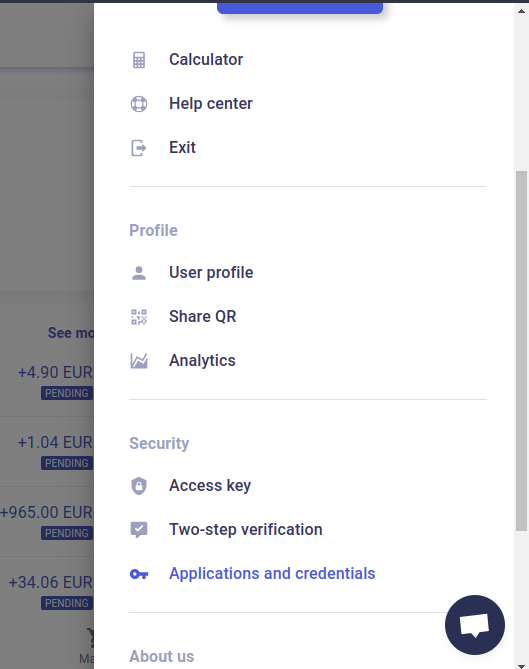
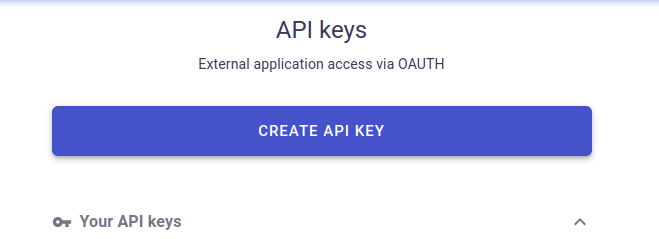
In order to use the Tropipay API you'll need a client ID and a client secret. Sign up with your [Tropipay](www.tropipay.com) account, go to the App Menu->Applications and credentials. You'll be asked to enter a confirmation code (use 123456 in the test enviroment). _Make sure you test everything in the [test environment](https://sandbox.tropipay.me) first before using your real account._ Create an app and configure the client id an client secret for the app.
|
|
54
58
|
|
|
55
59
|
## Usage
|
|
56
60
|
|
|
@@ -70,10 +74,10 @@ import { Tropipay } from "@yosle/tropipayjs";
|
|
|
70
74
|
|
|
71
75
|
### Initialize the Tropipay class
|
|
72
76
|
|
|
73
|
-
You can instantiate the Tropipay class passing the client Id ,client secret and optionally the serverMode parameter, if no serverMode is provided, `Development` will be used as default. Make sure you use the [test environment](https://tropipay
|
|
77
|
+
You can instantiate the Tropipay class passing the client Id ,client secret and optionally the serverMode parameter, if no serverMode is provided, `Development` will be used as default. Make sure you use the [test environment](https://sandbox.tropipay.me) credentials when serverMode is on `Development`.
|
|
74
78
|
|
|
75
79
|
```javascript
|
|
76
|
-
// test environment server tropipay
|
|
80
|
+
// test environment server sandbox.tropipay.me
|
|
77
81
|
const config = {
|
|
78
82
|
clientId: process.env.TROPIPAY_CLIENT_ID,
|
|
79
83
|
clientSecret: process.env.TROPIPAY_CLIENT_SECRET
|
|
@@ -103,11 +107,11 @@ const tpp = new Tropipay(config);
|
|
|
103
107
|
const payload = {
|
|
104
108
|
reference: "my-paylink-1",
|
|
105
109
|
concept: "Bicycle",
|
|
106
|
-
favorite:
|
|
110
|
+
favorite: true,
|
|
107
111
|
amount: 3000,
|
|
108
|
-
currency: "EUR",
|
|
112
|
+
currency: "EUR", // USD, EUR, USDC or USDT
|
|
109
113
|
description: "Two wheels",
|
|
110
|
-
singleUse:
|
|
114
|
+
singleUse: true,
|
|
111
115
|
reasonId: 4,
|
|
112
116
|
expirationDays: 1,
|
|
113
117
|
lang: "es",
|
|
@@ -122,15 +126,71 @@ const payload = {
|
|
|
122
126
|
phone: "+34645553333",
|
|
123
127
|
email: "client@email.com",
|
|
124
128
|
countryId: 1,
|
|
125
|
-
|
|
129
|
+
city: "Barcelona",
|
|
130
|
+
postCode: "08013",
|
|
131
|
+
termsAndConditions: true,
|
|
126
132
|
},
|
|
127
|
-
directPayment:
|
|
133
|
+
directPayment: true,
|
|
134
|
+
// Optional: payment methods offered on the payment page.
|
|
135
|
+
// "TPP" (Tropipay balance), "EXT" (external card), "CRYPTO",
|
|
136
|
+
// "WIRE_TRANSFER", "APPLE_PAY", "GOOGLE_PAY", "TPP_GIFTCARD", "TROPICARD".
|
|
137
|
+
// If omitted the server defaults to ["EXT", "TPP", "WIRE_TRANSFER"].
|
|
138
|
+
// APPLE_PAY/GOOGLE_PAY are added automatically when EXT is present.
|
|
139
|
+
// The list is intersected with the methods enabled on your account.
|
|
140
|
+
paymentMethods: ["EXT", "TPP", "CRYPTO"],
|
|
141
|
+
// Optional: account that receives the payment (multi-account).
|
|
142
|
+
// Get valid ids from tpp.accounts.list(). Defaults to your default account.
|
|
143
|
+
accountId: 12345,
|
|
128
144
|
};
|
|
129
145
|
// Use inside an async function
|
|
130
146
|
const paylink = await tpp.paymentCards.create(payload);
|
|
131
147
|
console.log(paylink.shortUrl);
|
|
132
148
|
```
|
|
133
149
|
|
|
150
|
+
### Multi-account support
|
|
151
|
+
|
|
152
|
+
A Tropipay user can hold several accounts (one per currency). Use the
|
|
153
|
+
`accounts` module to discover them and pass the `id` as `accountId`
|
|
154
|
+
when creating payment links or transfers:
|
|
155
|
+
|
|
156
|
+
```javascript
|
|
157
|
+
const accounts = await tpp.accounts.list();
|
|
158
|
+
// [{ id: 12345, accountNumber: "...", currency: "EUR", balance: 1000, ... }]
|
|
159
|
+
|
|
160
|
+
const balances = await tpp.accounts.allBalances();
|
|
161
|
+
const movements = await tpp.accounts.movements(12345, { limit: 20 });
|
|
162
|
+
```
|
|
163
|
+
|
|
164
|
+
### Transfers (payouts)
|
|
165
|
+
|
|
166
|
+
Send money to a beneficiary (requires 2FA and the `ALLOW_EXTERNAL_TRANSFER`
|
|
167
|
+
permission):
|
|
168
|
+
|
|
169
|
+
```javascript
|
|
170
|
+
// 1. simulate to preview fees and amounts
|
|
171
|
+
const preview = await tpp.transfers.simulate({
|
|
172
|
+
amount: 5000,
|
|
173
|
+
currency: "EUR",
|
|
174
|
+
destinationCurrency: "EUR",
|
|
175
|
+
depositaccountId: 678,
|
|
176
|
+
reasonId: 3,
|
|
177
|
+
});
|
|
178
|
+
|
|
179
|
+
// 2. request the 2FA code (SMS/email). In Development use "123456".
|
|
180
|
+
await tpp.transfers.requestSecurityCode();
|
|
181
|
+
|
|
182
|
+
// 3. execute
|
|
183
|
+
const transfer = await tpp.transfers.payout({
|
|
184
|
+
amount: 5000,
|
|
185
|
+
currency: "EUR",
|
|
186
|
+
destinationCurrency: "EUR",
|
|
187
|
+
depositaccountId: 678,
|
|
188
|
+
reasonId: 3,
|
|
189
|
+
securityCode: "123456",
|
|
190
|
+
accountId: 12345, // optional, multi-account
|
|
191
|
+
});
|
|
192
|
+
```
|
|
193
|
+
|
|
134
194
|
For more examples, please refer to the [Documentation](https://github.com/yosle/tropipayjs/blob/master/docs/)
|
|
135
195
|
|
|
136
196
|
### Refunding a Transaction
|