@yiliang114/dsh-session-deck 0.1.1 → 0.1.3
This diff represents the content of publicly available package versions that have been released to one of the supported registries. The information contained in this diff is provided for informational purposes only and reflects changes between package versions as they appear in their respective public registries.
- package/README.md +25 -26
- package/README.zh-CN.md +25 -26
- package/package.json +2 -2
package/README.md
CHANGED
|
@@ -1,6 +1,6 @@
|
|
|
1
1
|
# DSH Session Deck
|
|
2
2
|
|
|
3
|
-
[简体中文](https://github.com/yiliang114/dsh-session-deck/blob/main/README.zh-CN.md)
|
|
3
|
+
[简体中文](https://github.com/yiliang114/dsh-session-deck/blob/main/README.zh-CN.md) · [npm](https://www.npmjs.com/package/@yiliang114/dsh-session-deck) · [Latest release](https://github.com/yiliang114/dsh-session-deck/releases/latest) · [Release CI](https://github.com/yiliang114/dsh-session-deck/actions/workflows/publish.yml)
|
|
4
4
|
|
|
5
5
|
**Keep track of work across DSH workspaces without leaving your conversation.** Session Deck adds Activity and Favorites views to the native DeepSeek Harness sidebar, so you can spot running agents, reply to waiting sessions, and return to completed results.
|
|
6
6
|
|
|
@@ -21,13 +21,13 @@ Switching views keeps your current conversation open. Session rows show the titl
|
|
|
21
21
|
| Activity | Favorites | Workspaces |
|
|
22
22
|
| --- | --- | --- |
|
|
23
23
|
| Follow active work and unread results. | Return to native pinned sessions. | Keep the complete workspace controls. |
|
|
24
|
-
|  |  |  |
|
|
24
|
+
| 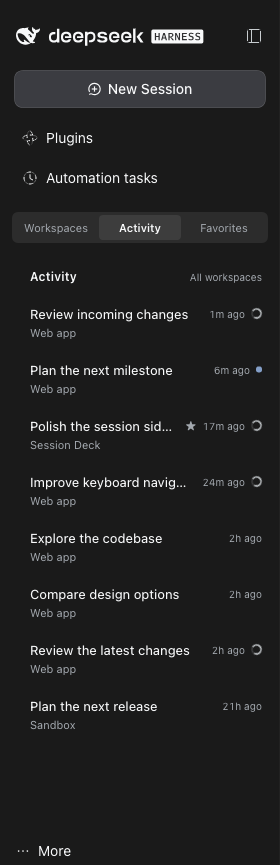 | 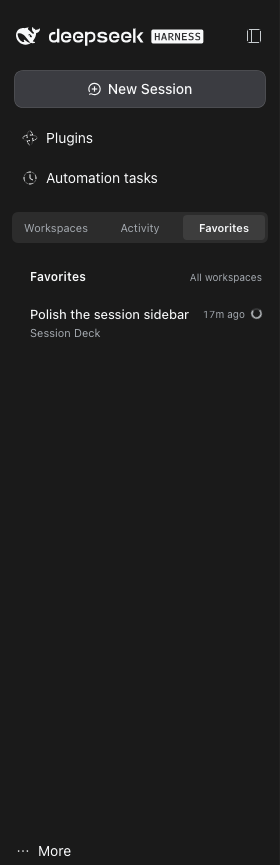 | 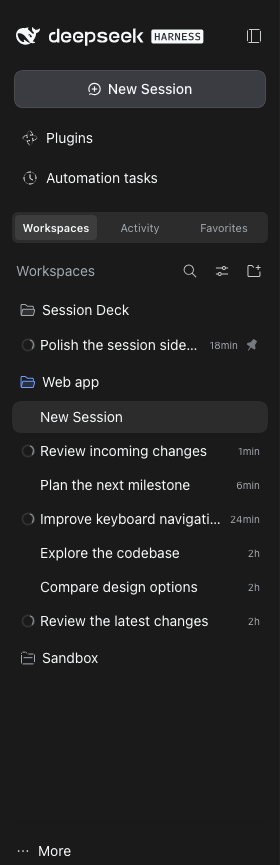 |
|
|
25
25
|
|
|
26
26
|
Screenshots show the switcher above the workspace region without host patches, below global panels. The interface and anonymized session titles are English; browser menus, tabs, and the address bar are excluded.
|
|
27
27
|
|
|
28
|
-
## Install
|
|
28
|
+
## Install from npm
|
|
29
29
|
|
|
30
|
-
|
|
30
|
+
Install the latest release from [npm](https://www.npmjs.com/package/@yiliang114/dsh-session-deck). As historical validation, the initial 0.1.2 release tarball was installed in isolation, its SHA512 integrity verified, and its host, client, and patch files checked against the source; this does not establish verification of later releases.
|
|
31
31
|
|
|
32
32
|
Requirements:
|
|
33
33
|
|
|
@@ -35,6 +35,18 @@ Requirements:
|
|
|
35
35
|
- DSH Web GUI **0.2.1-rc.2**. This is the exact supported host version; other versions are unverified.
|
|
36
36
|
- DSH's native sidebar, session, and workspace plugins enabled.
|
|
37
37
|
|
|
38
|
+
**Migrating from an earlier installation:** disable and remove the old plugin instance in DSH's plugin manager **before installing from npm**, to avoid two instances controlling the sidebar. You can keep its browser storage.
|
|
39
|
+
|
|
40
|
+
```sh
|
|
41
|
+
dsh plugin --profile web add @yiliang114/dsh-session-deck@latest --ignore-scripts
|
|
42
|
+
```
|
|
43
|
+
|
|
44
|
+
Replace `web` if you use another profile. Refresh your existing DSH GUI, then choose **Workspaces / Activity / Favorites** above the workspace region, below global panels. On the supported DSH 0.2.1-rc.2 layout, the plugin places the switcher there automatically without patching installed DSH files. The native workspace browser remains available in Workspaces. Refresh after client changes too; hot reload is not assumed.
|
|
45
|
+
|
|
46
|
+
The plugin's own labels are English. To make the rest of DSH English too, use **More → Settings → General → Language → English**. Session titles remain in the language you wrote them.
|
|
47
|
+
|
|
48
|
+
### Alternative: link a local checkout
|
|
49
|
+
|
|
38
50
|
```sh
|
|
39
51
|
git clone https://github.com/yiliang114/dsh-session-deck.git
|
|
40
52
|
cd dsh-session-deck
|
|
@@ -42,17 +54,11 @@ npm run verify
|
|
|
42
54
|
dsh plugin --profile web add "link:$PWD" --offline --ignore-scripts
|
|
43
55
|
```
|
|
44
56
|
|
|
45
|
-
There are no dependencies to install. The repository includes the client bundle; `build` checks JavaScript syntax rather than generating it.
|
|
57
|
+
There are no dependencies to install. The repository includes the client bundle; `build` checks JavaScript syntax rather than generating it. Keep the checkout in place while using a linked installation.
|
|
46
58
|
|
|
47
59
|
You can also install through **Plugins → Add plugin → Install a third-party plugin**: enter `link:/absolute/path/to/dsh-session-deck`, choose **Install**, then **Enable now**, and refresh the page.
|
|
48
60
|
|
|
49
|
-
|
|
50
|
-
|
|
51
|
-
Refresh your existing DSH GUI, then choose **Workspaces / Activity / Favorites** above the workspace region, below global panels. On the supported DSH 0.2.1-rc.2 layout, the plugin places the switcher there automatically without patching installed DSH files. The native workspace browser remains available in Workspaces. Refresh after client changes too; hot reload is not assumed.
|
|
52
|
-
|
|
53
|
-
If you installed an earlier local version of this plugin, disable and remove it in DSH's plugin manager first to avoid two instances controlling the sidebar. You can keep its browser storage.
|
|
54
|
-
|
|
55
|
-
### Install from a tarball
|
|
61
|
+
### Alternative: install from a tarball
|
|
56
62
|
|
|
57
63
|
To distribute the plugin without npm, run from the checkout:
|
|
58
64
|
|
|
@@ -61,32 +67,25 @@ npm run verify
|
|
|
61
67
|
npm pack --ignore-scripts
|
|
62
68
|
```
|
|
63
69
|
|
|
64
|
-
Copy the generated archive to the target machine, then install using its absolute path
|
|
70
|
+
Copy the generated archive to the target machine, then install using its absolute path. Replace `VERSION` with the version in the filename produced by `npm pack`:
|
|
65
71
|
|
|
66
72
|
```sh
|
|
67
|
-
dsh plugin --profile web add /absolute/path/yiliang114-dsh-session-deck-
|
|
73
|
+
dsh plugin --profile web add /absolute/path/yiliang114-dsh-session-deck-VERSION.tgz --ignore-scripts
|
|
68
74
|
```
|
|
69
75
|
|
|
70
76
|
Refresh the GUI. A tarball installation does not depend on the original checkout. Both linked and tarball installations place the switcher above the workspace region automatically on the supported rc.2 layout; neither needs a host patch.
|
|
71
77
|
|
|
72
|
-
###
|
|
78
|
+
### Custom plugin market
|
|
73
79
|
|
|
74
|
-
|
|
75
|
-
|
|
76
|
-
```sh
|
|
77
|
-
npm view @yiliang114/dsh-session-deck@0.1.1 version --registry=https://registry.npmjs.org
|
|
78
|
-
dsh plugin --profile web add @yiliang114/dsh-session-deck@0.1.1 --ignore-scripts
|
|
79
|
-
```
|
|
80
|
-
|
|
81
|
-
The [market index](market-index.json) lists only verified npm releases. An empty `plugins: []` means there are **no released entries** to display. DSH's custom plugin market uses user-added index sources; npm publication does not automatically collect or list a plugin in an official DSH market.
|
|
82
|
-
|
|
83
|
-
After a confirmed release is added to the index, its direct URL can be added through DSH's custom plugin market:
|
|
80
|
+
The [market index](https://raw.githubusercontent.com/yiliang114/dsh-session-deck/main/market-index.json) lists registry-verified npm releases. Add the following raw JSON URL as a source in DSH's custom plugin market:
|
|
84
81
|
|
|
85
82
|
```text
|
|
86
83
|
https://raw.githubusercontent.com/yiliang114/dsh-session-deck/main/market-index.json
|
|
87
84
|
```
|
|
88
85
|
|
|
89
|
-
|
|
86
|
+
This is a **user-added custom market source**, not an official DSH listing. Publishing to npm does not automatically add the plugin to an official DSH market.
|
|
87
|
+
|
|
88
|
+
Maintainers: the intended automatic release process queues pushes to `main`, tests the latest `main` after acquiring the release queue, and increments the patch version (for example, `0.1.2` → `0.1.3`). To choose a minor version, run `npm version minor --no-git-tag-version`, then commit and push to `main` normally: an explicit greater stable version such as `0.2.0` is preserved, and the following release becomes `0.2.1`. The workflow owns tags, publication with provenance, registry verification, market updates, and GitHub Releases. See the [release guide](https://github.com/yiliang114/dsh-session-deck/blob/main/docs/releasing.md) for authentication prerequisites and recovery; this description is not evidence that the new automation has been verified.
|
|
90
89
|
|
|
91
90
|
## How session status works
|
|
92
91
|
|
package/README.zh-CN.md
CHANGED
|
@@ -1,6 +1,6 @@
|
|
|
1
1
|
# DSH Session Deck
|
|
2
2
|
|
|
3
|
-
[English](https://github.com/yiliang114/dsh-session-deck/blob/main/README.md)
|
|
3
|
+
[English](https://github.com/yiliang114/dsh-session-deck/blob/main/README.md) · [npm](https://www.npmjs.com/package/@yiliang114/dsh-session-deck) · [最新发布](https://github.com/yiliang114/dsh-session-deck/releases/latest) · [发布 CI](https://github.com/yiliang114/dsh-session-deck/actions/workflows/publish.yml)
|
|
4
4
|
|
|
5
5
|
**不用离开当前对话,就能掌握所有 DSH 工作区中的会话进展。** Session Deck 在 DeepSeek Harness 原生侧栏中加入 Activity 和 Favorites 视图,让你快速找到运行中的代理、等待回复的会话,以及尚未查看的完成结果。
|
|
6
6
|
|
|
@@ -21,13 +21,13 @@
|
|
|
21
21
|
| Activity | Favorites | Workspaces |
|
|
22
22
|
| --- | --- | --- |
|
|
23
23
|
| 掌握运行状态和未读结果。 | 回到原生置顶的重要会话。 | 保留完整的工作区操作。 |
|
|
24
|
-
|  |  |  |
|
|
24
|
+
|  |  |  |
|
|
25
25
|
|
|
26
26
|
截图展示无需宿主补丁、自动位于全局面板下方和工作区区域上方的切换条。界面及匿名化后的会话标题使用英文;不包含浏览器顶部菜单、标签栏和地址栏。
|
|
27
27
|
|
|
28
|
-
##
|
|
28
|
+
## 从 npm 安装
|
|
29
29
|
|
|
30
|
-
|
|
30
|
+
从 [npm](https://www.npmjs.com/package/@yiliang114/dsh-session-deck) 安装最新发布版本。作为历史验证记录,首次发布的 0.1.2 tarball 已在隔离环境中安装,SHA512 完整性校验通过,宿主入口、客户端和补丁文件均已与源码核对;这不代表后续版本已经完成相同验证。
|
|
31
31
|
|
|
32
32
|
环境要求:
|
|
33
33
|
|
|
@@ -35,6 +35,18 @@
|
|
|
35
35
|
- DSH Web GUI **0.2.1-rc.2**,这是当前精确适配的宿主版本,其他版本未经验证。
|
|
36
36
|
- 已启用 DSH 原生侧栏、会话和工作区插件。
|
|
37
37
|
|
|
38
|
+
**从旧安装迁移:**在通过 npm 安装前,请先在 DSH 插件管理中停用并移除旧插件实例,避免两个实例同时接管侧栏;浏览器存储可以保留。
|
|
39
|
+
|
|
40
|
+
```sh
|
|
41
|
+
dsh plugin --profile web add @yiliang114/dsh-session-deck@latest --ignore-scripts
|
|
42
|
+
```
|
|
43
|
+
|
|
44
|
+
使用其他 profile 时替换 `web`。刷新现有 DSH GUI,然后在全局面板下方、工作区区域上方选择 **Workspaces / Activity / Favorites**。在支持的 DSH 0.2.1-rc.2 布局中,插件会自动将切换条放到该位置,无需修改已安装的 DSH 文件。Workspaces 保留原生工作区浏览器。修改客户端后也需要刷新,不应假定热更新已启用。
|
|
45
|
+
|
|
46
|
+
插件自身文案使用英文。要让 DSH 其他界面也显示英文,在 **更多 → 设置 → 通用设置 → 语言** 中选择 **English**。会话标题仍保留用户原来使用的语言。
|
|
47
|
+
|
|
48
|
+
### 备选:链接本地仓库
|
|
49
|
+
|
|
38
50
|
```sh
|
|
39
51
|
git clone https://github.com/yiliang114/dsh-session-deck.git
|
|
40
52
|
cd dsh-session-deck
|
|
@@ -42,17 +54,11 @@ npm run verify
|
|
|
42
54
|
dsh plugin --profile web add "link:$PWD" --offline --ignore-scripts
|
|
43
55
|
```
|
|
44
56
|
|
|
45
|
-
项目没有需要安装的依赖,仓库已包含客户端文件;`build` 仅检查 JavaScript
|
|
57
|
+
项目没有需要安装的依赖,仓库已包含客户端文件;`build` 仅检查 JavaScript 语法,不生成客户端。链接安装期间请保留仓库目录。
|
|
46
58
|
|
|
47
59
|
也可以通过 **Plugins → Add plugin → Install a third-party plugin** 安装:输入 `link:/absolute/path/to/dsh-session-deck`,点击 **Install**,然后 **Enable now**,最后刷新页面。
|
|
48
60
|
|
|
49
|
-
|
|
50
|
-
|
|
51
|
-
刷新现有 DSH GUI,然后在全局面板下方、工作区区域上方选择 **Workspaces / Activity / Favorites**。在支持的 DSH 0.2.1-rc.2 布局中,插件会自动将切换条放到该位置,无需修改已安装的 DSH 文件。Workspaces 保留原生工作区浏览器。修改客户端后也需要刷新,不应假定热更新已启用。
|
|
52
|
-
|
|
53
|
-
如果已安装本插件的早期本地版本,请先在 DSH 插件管理中停用并移除旧实例,避免同时接管侧栏;浏览器存储可以保留。
|
|
54
|
-
|
|
55
|
-
### 使用 tarball 安装
|
|
61
|
+
### 备选:使用 tarball 安装
|
|
56
62
|
|
|
57
63
|
不经过 npm 注册表分发时,在仓库根目录执行:
|
|
58
64
|
|
|
@@ -61,32 +67,25 @@ npm run verify
|
|
|
61
67
|
npm pack --ignore-scripts
|
|
62
68
|
```
|
|
63
69
|
|
|
64
|
-
|
|
70
|
+
将生成的归档文件复制到目标机器,再用绝对路径安装。将 `VERSION` 替换为 `npm pack` 输出文件名中的版本号:
|
|
65
71
|
|
|
66
72
|
```sh
|
|
67
|
-
dsh plugin --profile web add /absolute/path/yiliang114-dsh-session-deck-
|
|
73
|
+
dsh plugin --profile web add /absolute/path/yiliang114-dsh-session-deck-VERSION.tgz --ignore-scripts
|
|
68
74
|
```
|
|
69
75
|
|
|
70
76
|
安装后刷新 GUI。tarball 安装不依赖原仓库目录持续存在。链接和 tarball 两种安装方式都会在支持的 rc.2 布局中自动将切换条放到工作区区域上方,无需宿主补丁。
|
|
71
77
|
|
|
72
|
-
###
|
|
78
|
+
### 自定义插件市场
|
|
73
79
|
|
|
74
|
-
|
|
75
|
-
|
|
76
|
-
```sh
|
|
77
|
-
npm view @yiliang114/dsh-session-deck@0.1.1 version --registry=https://registry.npmjs.org
|
|
78
|
-
dsh plugin --profile web add @yiliang114/dsh-session-deck@0.1.1 --ignore-scripts
|
|
79
|
-
```
|
|
80
|
-
|
|
81
|
-
[市场索引](market-index.json)只列出经 npm 验证的发布版本。若内容为 `plugins: []`,表示**没有可显示的已发布条目**。DSH 自定义插件市场读取用户添加的索引源;发布 npm 不会触发官方 DSH 市场的自动收录。
|
|
82
|
-
|
|
83
|
-
确认发布且更新索引后,可以在 DSH 自定义插件市场中添加以下直接 JSON 地址:
|
|
80
|
+
[市场索引](https://raw.githubusercontent.com/yiliang114/dsh-session-deck/main/market-index.json)列出已通过注册表验证的 npm 发布版本。在 DSH 自定义插件市场中添加以下原始 JSON 地址作为索引源:
|
|
84
81
|
|
|
85
82
|
```text
|
|
86
83
|
https://raw.githubusercontent.com/yiliang114/dsh-session-deck/main/market-index.json
|
|
87
84
|
```
|
|
88
85
|
|
|
89
|
-
|
|
86
|
+
这是**用户自行添加的自定义市场源**,并非 DSH 官方收录。发布 npm 不会自动将插件加入官方 DSH 市场。
|
|
87
|
+
|
|
88
|
+
维护者:预期的自动发布流程会将 `main` 推送加入发布队列,取得队列执行权后测试最新的 `main`,并递增补丁版本(例如 `0.1.2` → `0.1.3`)。需要手动选择次版本时,执行 `npm version minor --no-git-tag-version`,再正常提交并推送到 `main`:显式指定的更高稳定版本(例如 `0.2.0`)会保留,下一次发布则为 `0.2.1`。工作流负责标签、带 provenance 的发布、注册表验证、市场索引更新和 GitHub Release。认证前提与失败恢复请参阅[发布指南(英文)](https://github.com/yiliang114/dsh-session-deck/blob/main/docs/releasing.md);此流程说明不代表新自动化已经验证完成。
|
|
90
89
|
|
|
91
90
|
## 会话状态与边界
|
|
92
91
|
|
package/package.json
CHANGED
|
@@ -1,6 +1,6 @@
|
|
|
1
1
|
{
|
|
2
2
|
"name": "@yiliang114/dsh-session-deck",
|
|
3
|
-
"version": "0.1.
|
|
3
|
+
"version": "0.1.3",
|
|
4
4
|
"license": "MIT",
|
|
5
5
|
"author": "yiliang114",
|
|
6
6
|
"publishConfig": {
|
|
@@ -30,7 +30,7 @@
|
|
|
30
30
|
},
|
|
31
31
|
"files": ["src", "lib", "scripts/patch-sidebar-before.mjs", "cordis.patch.yml", "README.md"],
|
|
32
32
|
"scripts": {
|
|
33
|
-
"build": "node --check src/host.mjs && node --check lib/client.js && node --check scripts/patch-sidebar-before.mjs && node --check scripts/check-package.mjs && node --check scripts/update-market-index.mjs",
|
|
33
|
+
"build": "node --check src/host.mjs && node --check lib/client.js && node --check scripts/patch-sidebar-before.mjs && node --check scripts/check-package.mjs && node --check scripts/update-market-index.mjs && node --check scripts/verify-published.mjs && node --check scripts/auto-release.mjs",
|
|
34
34
|
"market:update": "node scripts/update-market-index.mjs",
|
|
35
35
|
"test": "node --test test/*.test.mjs",
|
|
36
36
|
"check:package": "node scripts/check-package.mjs",
|