@yidun/antd-super-table 0.0.6 → 0.0.8
This diff represents the content of publicly available package versions that have been released to one of the supported registries. The information contained in this diff is provided for informational purposes only and reflects changes between package versions as they appear in their respective public registries.
- package/README.md +264 -159
- package/dist/example/formItems.d.ts +325 -0
- package/dist/example/main.d.ts +1 -0
- package/dist/example/tableColumns.d.ts +1116 -0
- package/dist/index.js +1996 -1784
- package/dist/{config.d.ts → src/config.d.ts} +0 -7
- package/dist/{index.d.ts → src/index.d.ts} +4 -0
- package/dist/src/typings.d.ts +358 -0
- package/dist/{utils → src/utils}/index.d.ts +8 -5
- package/dist/{utils → src/utils}/service.d.ts +1 -24
- package/dist/typings.ts +193 -80
- package/package.json +3 -2
- package/dist/typings.d.ts +0 -233
- /package/dist/{components → src/components}/VNodes.d.ts +0 -0
- /package/dist/{utils → src/utils}/dialogManager.d.ts +0 -0
- /package/dist/{utils → src/utils}/useDialog.d.ts +0 -0
package/README.md
CHANGED
|
@@ -1,30 +1,25 @@
|
|
|
1
1
|
# Antd Super Table 组件
|
|
2
|
-
|
|
3
2
|
## 介绍
|
|
4
|
-
|
|
5
3
|
Antd Super Table 是一个基于 Ant Design Vue 的高级表格组件,提供了丰富的功能特性:
|
|
6
4
|
|
|
7
|
-
|
|
8
|
-
|
|
9
|
-
|
|
10
|
-
|
|
11
|
-
|
|
12
|
-
|
|
13
|
-
|
|
14
|
-
|
|
5
|
+
+ 🔍 灵活的查询条件配置
|
|
6
|
+
+ 📊 强大的表格列配置
|
|
7
|
+
+ 🎯 场景管理功能
|
|
8
|
+
+ ⚡️ 高性能渲染
|
|
9
|
+
+ 🛠 可定制的表格配置
|
|
10
|
+
+ 🔄 表格拖拽排序
|
|
11
|
+
+ 📱 响应式设计
|
|
12
|
+
+ 🎨 主题定制
|
|
15
13
|
|
|
16
14
|
## 示例
|
|
17
|
-
|
|
18
|
-

|
|
15
|
+
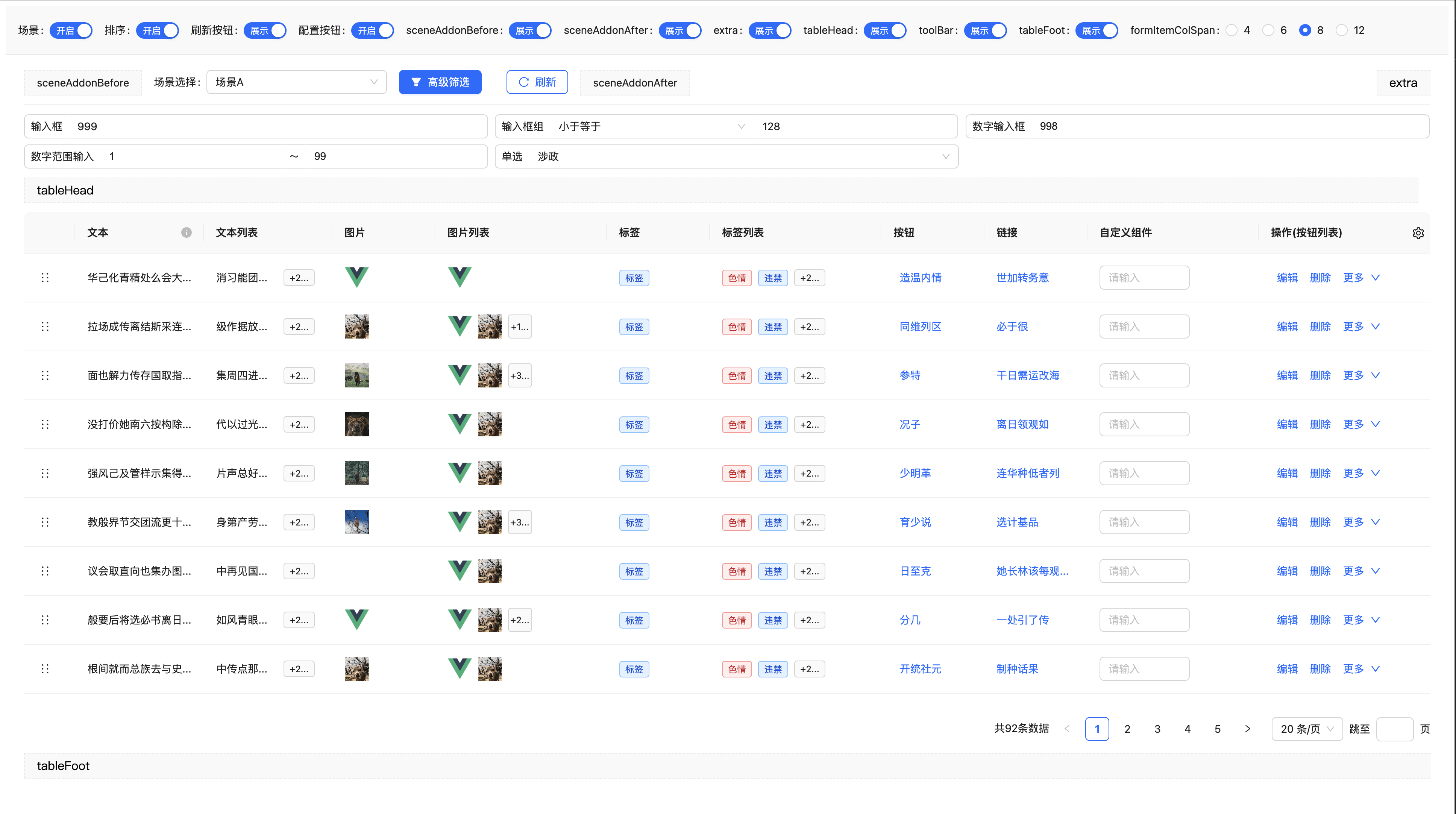
|
|
19
16
|
|
|
20
17
|
## 安装
|
|
21
|
-
|
|
22
18
|
```bash
|
|
23
19
|
npm install @yidun/antd-super-table
|
|
24
20
|
```
|
|
25
21
|
|
|
26
22
|
## 基础用法
|
|
27
|
-
|
|
28
23
|
```vue
|
|
29
24
|
<template>
|
|
30
25
|
<SuperTable :form-items="formItems" :columns="columns" :request="onRequest" scene-type="user-list" />
|
|
@@ -93,68 +88,131 @@ const onRequest = async (options: { params: Record<string, any>; pageSize: numbe
|
|
|
93
88
|
}
|
|
94
89
|
}
|
|
95
90
|
</script>
|
|
91
|
+
|
|
96
92
|
```
|
|
97
93
|
|
|
98
94
|
## 查询场景配置
|
|
99
|
-
|
|
100
95
|
默认启用场景,场景相关的配置存储在localStorage中
|
|
101
96
|
|
|
102
|
-
| 属性名
|
|
103
|
-
|
|
|
104
|
-
| sceneType
|
|
105
|
-
| enableScene
|
|
106
|
-
| sceneStorageType | string
|
|
107
|
-
|
|
|
108
|
-
| defaultScene
|
|
109
|
-
| maxSceneCount
|
|
97
|
+
| 属性名 | 类型 | 默认值 | 说明 |
|
|
98
|
+
| --- | --- | --- | --- |
|
|
99
|
+
| sceneType | string | '' | 场景对应的标识 |
|
|
100
|
+
| enableScene | boolean | `true` | 是否启用场景管理 |
|
|
101
|
+
| sceneStorageType | string | `local` | 场景存储位置,可选 `local` 或 `api` |
|
|
102
|
+
| sceneRequest | object | - | 场景请求函数配置(API模式时必填) |
|
|
103
|
+
| defaultScene | object/array | | 默认场景配置 |
|
|
104
|
+
| maxSceneCount | number | `100` | 最大场景数量 |
|
|
105
|
+
|
|
110
106
|
|
|
111
107
|
### 场景存储配置
|
|
108
|
+
#### 本地存储模式(默认)
|
|
109
|
+
```vue
|
|
110
|
+
<template>
|
|
111
|
+
<SuperTable :form-items="formItems" :columns="columns" :request="onRequest" scene-storage-type="local" enable-scene />
|
|
112
|
+
</template>
|
|
112
113
|
|
|
113
|
-
```
|
|
114
|
-
|
|
115
|
-
|
|
116
|
-
|
|
117
|
-
|
|
118
|
-
|
|
119
|
-
|
|
114
|
+
```
|
|
115
|
+
|
|
116
|
+
#### API存储模式
|
|
117
|
+
```vue
|
|
118
|
+
<template>
|
|
119
|
+
<SuperTable
|
|
120
|
+
:form-items="formItems"
|
|
121
|
+
:columns="columns"
|
|
122
|
+
:request="onRequest"
|
|
123
|
+
scene-storage-type="api"
|
|
124
|
+
:scene-request="sceneRequest"
|
|
125
|
+
enable-scene
|
|
126
|
+
/>
|
|
127
|
+
</template>
|
|
128
|
+
|
|
129
|
+
<script setup>
|
|
130
|
+
// 场景请求函数配置
|
|
131
|
+
const sceneRequest = {
|
|
132
|
+
// 查询场景列表
|
|
133
|
+
querySceneList: async (params: { type: string }) => {
|
|
134
|
+
const response = await fetch('/api/scene/query', {
|
|
135
|
+
method: 'POST',
|
|
136
|
+
headers: { 'Content-Type': 'application/json' },
|
|
137
|
+
body: JSON.stringify(params)
|
|
138
|
+
})
|
|
139
|
+
return response.json()
|
|
140
|
+
},
|
|
141
|
+
|
|
142
|
+
// 创建场景
|
|
143
|
+
createScene: async (params: any) => {
|
|
144
|
+
const response = await fetch('/api/scene/create', {
|
|
145
|
+
method: 'POST',
|
|
146
|
+
headers: { 'Content-Type': 'application/json' },
|
|
147
|
+
body: JSON.stringify(params)
|
|
148
|
+
})
|
|
149
|
+
return response.json()
|
|
150
|
+
},
|
|
151
|
+
|
|
152
|
+
// 更新场景
|
|
153
|
+
updateScene: async (params: any) => {
|
|
154
|
+
const response = await fetch('/api/scene/update', {
|
|
155
|
+
method: 'POST',
|
|
156
|
+
headers: { 'Content-Type': 'application/json' },
|
|
157
|
+
body: JSON.stringify(params)
|
|
158
|
+
})
|
|
159
|
+
return response.json()
|
|
160
|
+
},
|
|
161
|
+
|
|
162
|
+
// 删除场景
|
|
163
|
+
deleteScene: async (params: string[]) => {
|
|
164
|
+
const response = await fetch('/api/scene/delete', {
|
|
165
|
+
method: 'POST',
|
|
166
|
+
headers: { 'Content-Type': 'application/json' },
|
|
167
|
+
body: JSON.stringify(params)
|
|
168
|
+
})
|
|
169
|
+
return response.json()
|
|
170
|
+
}
|
|
120
171
|
}
|
|
172
|
+
</script>
|
|
173
|
+
|
|
121
174
|
```
|
|
122
175
|
|
|
123
|
-
|
|
176
|
+
#### 错误处理
|
|
177
|
+
当 `sceneStorageType` 为 `'api'` 但没有提供 `sceneRequest` 时,组件会在控制台输出错误信息并禁用场景功能:
|
|
124
178
|
|
|
125
|
-
|
|
179
|
+
```javascript
|
|
180
|
+
// 控制台错误信息
|
|
181
|
+
SuperTable: sceneStorageType 为 "api" 时,必须提供 sceneRequest 配置
|
|
182
|
+
```
|
|
126
183
|
|
|
127
|
-
|
|
128
|
-
|
|
129
|
-
|
|
130
|
-
|
|
131
|
-
|
|
132
|
-
|
|
133
|
-
|
|
134
|
-
|
|
135
|
-
|
|
136
|
-
|
|
184
|
+
## 查询条件配置
|
|
185
|
+
### 支持的输入类型
|
|
186
|
+
+ 文本输入框 (input)
|
|
187
|
+
+ 组合输入框 (inputGroup)
|
|
188
|
+
+ 数字输入框 (inputNumber)
|
|
189
|
+
+ 数字范围输入框 (inputNumberRange)
|
|
190
|
+
+ 选择器 (select)
|
|
191
|
+
+ 日期选择器 (datePicker)
|
|
192
|
+
+ 日期范围选择器 (rangePicker)
|
|
193
|
+
+ 级联选择 (cascader)
|
|
194
|
+
+ 树形选择 (treeSelect)
|
|
195
|
+
+ 自定义组件 (component)
|
|
137
196
|
|
|
138
197
|
### 查询条件属性
|
|
198
|
+
| 属性名 | 类型 | 默认值 | 说明 |
|
|
199
|
+
| --- | --- | --- | --- |
|
|
200
|
+
| type | string | - | 查询条件类型 |
|
|
201
|
+
| name | string | - | 字段名称 |
|
|
202
|
+
| label | string | - | 显示标签 |
|
|
203
|
+
| value | any | - | 默认值 |
|
|
204
|
+
| props | object | {} | 传递给组件的属性 |
|
|
205
|
+
| component | Component | - | 自定义组件(type为component时必填) |
|
|
206
|
+
| modelPropName | string | 'value' | 自定义组件的v-model属性名 |
|
|
207
|
+
| span | number | 1 | 列宽系数 |
|
|
208
|
+
| visible | boolean | true | 是否显示 |
|
|
209
|
+
| fixed | boolean | false | 是否固定(不可删除) |
|
|
210
|
+
| selected | boolean | false | 是否默认选中 |
|
|
211
|
+
| quiet | boolean | false | 是否静默更新(不触发搜索) |
|
|
212
|
+
| showLabel | boolean | true | 是否显示标签 |
|
|
139
213
|
|
|
140
|
-
| 属性名 | 类型 | 默认值 | 说明 |
|
|
141
|
-
| ------------- | --------- | ------- | ----------------------------------- |
|
|
142
|
-
| type | string | - | 查询条件类型 |
|
|
143
|
-
| name | string | - | 字段名称 |
|
|
144
|
-
| label | string | - | 显示标签 |
|
|
145
|
-
| value | any | - | 默认值 |
|
|
146
|
-
| props | object | {} | 传递给组件的属性 |
|
|
147
|
-
| component | Component | - | 自定义组件(type为component时必填) |
|
|
148
|
-
| modelPropName | string | 'value' | 自定义组件的v-model属性名 |
|
|
149
|
-
| span | number | 1 | 列宽系数 |
|
|
150
|
-
| visible | boolean | true | 是否显示 |
|
|
151
|
-
| fixed | boolean | false | 是否固定(不可删除) |
|
|
152
|
-
| selected | boolean | false | 是否默认选中 |
|
|
153
|
-
| quiet | boolean | false | 是否静默更新(不触发搜索) |
|
|
154
|
-
| showLabel | boolean | true | 是否显示标签 |
|
|
155
214
|
|
|
156
215
|
### 完整示例
|
|
157
|
-
|
|
158
216
|
```typescript
|
|
159
217
|
import dayjs from 'dayjs'
|
|
160
218
|
import { Switch } from 'ant-design-vue'
|
|
@@ -332,39 +390,36 @@ export const createFormItems = () => {
|
|
|
332
390
|
```
|
|
333
391
|
|
|
334
392
|
## 表格列配置
|
|
335
|
-
|
|
336
393
|
### 支持的列类型
|
|
337
|
-
|
|
338
|
-
|
|
339
|
-
|
|
340
|
-
|
|
341
|
-
|
|
342
|
-
|
|
343
|
-
|
|
344
|
-
- 排序 (sort)
|
|
394
|
+
+ 文本 (text)
|
|
395
|
+
+ 图片 (image)
|
|
396
|
+
+ 标签 (tag)
|
|
397
|
+
+ 按钮 (button)
|
|
398
|
+
+ 链接 (link)
|
|
399
|
+
+ 自定义 (component)
|
|
400
|
+
+ 排序 (sort)
|
|
345
401
|
|
|
346
402
|
内置解析类型,均支持在一个单元格内展示多个节点,超出最大个数后会展示更多按钮,点击更多按钮可展开查看所有数据,所以可以扩展出文本列表、图片列表、按钮列表、标签列表等展示形式
|
|
347
403
|
|
|
348
404
|
### 表格列属性
|
|
405
|
+
| 属性名 | 类型 | 默认值 | 说明 |
|
|
406
|
+
| --- | --- | --- | --- |
|
|
407
|
+
| key | string | - | 列的唯一标识 |
|
|
408
|
+
| title | string | - | 列标题 |
|
|
409
|
+
| type | string/function | 'text' | 列类型 |
|
|
410
|
+
| content | string/function | - | 列内容 |
|
|
411
|
+
| titleTooltip | string/function | - | 标题提示信息 |
|
|
412
|
+
| tooltip | string/boolean/function | - | 内容提示信息 |
|
|
413
|
+
| component | Component | - | 自定义组件(type为component时必填) |
|
|
414
|
+
| props | object/function | {} | 传递给组件的属性 |
|
|
415
|
+
| width | number | 120 | 列宽度 |
|
|
416
|
+
| visible | boolean | true | 是否可见 |
|
|
417
|
+
| fixed | string | - | 固定列位置,可选 'left' 或 'right' |
|
|
418
|
+
| copyable | boolean | false | 是否可复制 |
|
|
419
|
+
| ellipsis | boolean | true | 是否超出显示省略号 |
|
|
349
420
|
|
|
350
|
-
| 属性名 | 类型 | 默认值 | 说明 |
|
|
351
|
-
| ------------ | ----------------------- | ------ | ----------------------------------- |
|
|
352
|
-
| key | string | - | 列的唯一标识 |
|
|
353
|
-
| title | string | - | 列标题 |
|
|
354
|
-
| type | string/function | 'text' | 列类型 |
|
|
355
|
-
| content | string/function | - | 列内容 |
|
|
356
|
-
| titleTooltip | string/function | - | 标题提示信息 |
|
|
357
|
-
| tooltip | string/boolean/function | - | 内容提示信息 |
|
|
358
|
-
| component | Component | - | 自定义组件(type为component时必填) |
|
|
359
|
-
| props | object/function | {} | 传递给组件的属性 |
|
|
360
|
-
| width | number | 120 | 列宽度 |
|
|
361
|
-
| visible | boolean | true | 是否可见 |
|
|
362
|
-
| fixed | string | - | 固定列位置,可选 'left' 或 'right' |
|
|
363
|
-
| copyable | boolean | false | 是否可复制 |
|
|
364
|
-
| ellipsis | boolean | true | 是否超出显示省略号 |
|
|
365
421
|
|
|
366
422
|
### 完整示例
|
|
367
|
-
|
|
368
423
|
```typescript
|
|
369
424
|
import { Input } from 'ant-design-vue'
|
|
370
425
|
|
|
@@ -508,9 +563,7 @@ export const createTableColumns = (options: { onDelete: (record: Record<string,
|
|
|
508
563
|
```
|
|
509
564
|
|
|
510
565
|
## 高级功能
|
|
511
|
-
|
|
512
566
|
### 表格拖拽排序
|
|
513
|
-
|
|
514
567
|
```vue
|
|
515
568
|
<template>
|
|
516
569
|
<SuperTable
|
|
@@ -528,18 +581,18 @@ const onRowSortEnd = newData => {
|
|
|
528
581
|
// 处理排序后的数据
|
|
529
582
|
}
|
|
530
583
|
</script>
|
|
584
|
+
|
|
531
585
|
```
|
|
532
586
|
|
|
533
587
|
### 表格配置
|
|
534
|
-
|
|
535
588
|
```vue
|
|
536
589
|
<template>
|
|
537
590
|
<SuperTable :form-items="formItems" :columns="columns" :request="onRequest" :enable-table-config="true" />
|
|
538
591
|
</template>
|
|
592
|
+
|
|
539
593
|
```
|
|
540
594
|
|
|
541
595
|
### 自定义查询参数
|
|
542
|
-
|
|
543
596
|
```vue
|
|
544
597
|
<template>
|
|
545
598
|
<SuperTable
|
|
@@ -549,100 +602,104 @@ const onRowSortEnd = newData => {
|
|
|
549
602
|
:custom-query-params="{ status: 1, type: 'active' }"
|
|
550
603
|
/>
|
|
551
604
|
</template>
|
|
605
|
+
|
|
552
606
|
```
|
|
553
607
|
|
|
554
608
|
### 插槽使用
|
|
555
|
-
|
|
556
609
|
```vue
|
|
557
610
|
<template>
|
|
558
611
|
<SuperTable :form-items="formItems" :columns="columns" :request="onRequest">
|
|
559
612
|
<!-- 场景选择器前的内容 -->
|
|
560
613
|
<template #sceneAddonBefore>
|
|
561
614
|
<a-button type="primary">自定义按钮</a-button>
|
|
615
|
+
|
|
562
616
|
</template>
|
|
563
617
|
|
|
564
618
|
<!-- 场景选择器后的内容 -->
|
|
565
619
|
<template #sceneAddonAfter>
|
|
566
620
|
<a-button>导出</a-button>
|
|
621
|
+
|
|
567
622
|
</template>
|
|
568
623
|
|
|
569
624
|
<!-- 表格头部 -->
|
|
570
625
|
<template #tableHead>
|
|
571
626
|
<h3>用户列表</h3>
|
|
627
|
+
|
|
572
628
|
</template>
|
|
573
629
|
|
|
574
630
|
<!-- 工具栏 -->
|
|
575
631
|
<template #toolBar>
|
|
576
632
|
<a-button type="primary">新增用户</a-button>
|
|
633
|
+
|
|
577
634
|
</template>
|
|
578
635
|
|
|
579
636
|
<!-- 表格底部 -->
|
|
580
637
|
<template #tableFoot>
|
|
581
638
|
<div>总计: {{ total }} 条数据</div>
|
|
639
|
+
|
|
582
640
|
</template>
|
|
583
641
|
|
|
584
642
|
<!-- 展开行 -->
|
|
585
643
|
<template #expandedRowRender="{ record }">
|
|
586
644
|
<p>详细信息: {{ record.description }}</p>
|
|
645
|
+
|
|
587
646
|
</template>
|
|
647
|
+
|
|
588
648
|
</SuperTable>
|
|
649
|
+
|
|
589
650
|
</template>
|
|
651
|
+
|
|
590
652
|
```
|
|
591
653
|
|
|
592
654
|
## API
|
|
593
|
-
|
|
594
655
|
### Props
|
|
595
|
-
|
|
596
|
-
|
|
|
597
|
-
|
|
|
598
|
-
|
|
|
599
|
-
|
|
|
600
|
-
|
|
|
601
|
-
|
|
|
602
|
-
|
|
|
603
|
-
|
|
|
604
|
-
|
|
|
605
|
-
|
|
|
606
|
-
|
|
|
607
|
-
|
|
|
608
|
-
|
|
|
609
|
-
|
|
|
610
|
-
|
|
|
611
|
-
|
|
|
612
|
-
|
|
|
613
|
-
|
|
|
614
|
-
|
|
|
615
|
-
|
|
|
616
|
-
| enableTableConfig | 开启表格设置 | `boolean` | `true` |
|
|
656
|
+
| 参数 | 说明 | 类型 | 默认值 |
|
|
657
|
+
| ----------------- | ---------------- | ----------------------------- | ------------------------------- | --------- |
|
|
658
|
+
| formItems | 查询条件配置 | `SuperTableFormItem[]` | `[]` |
|
|
659
|
+
| columns | 表格列配置 | `SuperTableColumn[]` | `[]` |
|
|
660
|
+
| request | 数据请求函数 | `SuperTableRequestFunction` | - |
|
|
661
|
+
| sceneType | 场景类型 | `string` | `''` |
|
|
662
|
+
| enableScene | 是否启用场景管理 | `boolean` | `true` |
|
|
663
|
+
| sceneStorageType | 场景存储位置 | `'local' | 'api'` | `'local'` |
|
|
664
|
+
| sceneRequest | 场景请求函数配置 | `SceneRequestConfig` | - |
|
|
665
|
+
| defaultScene | 默认场景配置 | `SuperTableDefaultSceneConfig | SuperTableDefaultSceneConfig[]` | - |
|
|
666
|
+
| maxSceneCount | 最大场景数量 | `number` | `100` |
|
|
667
|
+
| formItemColSpan | 查询条件列数 | `number` | `6` |
|
|
668
|
+
| debounceWait | 查询防抖时间(ms) | `number` | `100` |
|
|
669
|
+
| refreshDeps | 依赖刷新选项 | `any[]` | `[]` |
|
|
670
|
+
| tableProps | 表格属性 | `TableProps` | `{}` |
|
|
671
|
+
| formatDataSource | 转换表格数据 | `(data: any[]) => any[]` | `(data) => data` |
|
|
672
|
+
| sortable | 是否可排序 | `boolean` | `false` |
|
|
673
|
+
| wrapperStyle | 容器样式 | `object` | `{}` |
|
|
674
|
+
| customQueryParams | 默认查询条件 | `object` | `{}` |
|
|
675
|
+
| showRefreshButton | 展示刷新按钮 | `boolean` | `false` |
|
|
676
|
+
| enableTableConfig | 开启表格设置 | `boolean` | `true` |
|
|
617
677
|
|
|
618
678
|
### Events
|
|
619
|
-
|
|
620
|
-
|
|
|
621
|
-
| ---------------- | ------------ | ------------------------------------------------------------------ |
|
|
679
|
+
| 事件名 | 说明 | 回调参数 |
|
|
680
|
+
| --- | --- | --- |
|
|
622
681
|
| form-item-change | 表单项值变更 | `(name: string, value: any, formItem: SuperTableFormItem) => void` |
|
|
623
|
-
| scene-change
|
|
624
|
-
| sort-change
|
|
625
|
-
| row-sort-end
|
|
682
|
+
| scene-change | 场景切换 | `(scene: SuperTableQueryScene) => void` |
|
|
683
|
+
| sort-change | 排序变化 | `(sorter: any) => void` |
|
|
684
|
+
| row-sort-end | 行排序结束 | `(newData: any[]) => void` |
|
|
626
685
|
|
|
627
|
-
### Methods
|
|
628
686
|
|
|
629
|
-
|
|
630
|
-
|
|
|
631
|
-
|
|
|
632
|
-
|
|
|
633
|
-
|
|
|
634
|
-
|
|
|
635
|
-
|
|
|
636
|
-
|
|
|
637
|
-
|
|
|
638
|
-
|
|
|
639
|
-
|
|
|
687
|
+
### Methods
|
|
688
|
+
| 方法名 | 说明 | 参数 |
|
|
689
|
+
| ---------------- | ---------------- | --------------------------------------------------------- | --------------------------------- |
|
|
690
|
+
| getFormItem | 获取表单项配置 | `(name: string) => SuperTableFormItem | undefined` |
|
|
691
|
+
| setFormItem | 设置表单项配置 | `(name: string, keyPath: string, newConfig: any) => void` |
|
|
692
|
+
| getFormValue | 获取表单项值 | `(name: string) => any` |
|
|
693
|
+
| setFormValue | 设置表单项值 | `(name: string, value: any) => void` |
|
|
694
|
+
| getFormValues | 获取所有表单项值 | `(name?: string | string[]) => Record<string, any>` |
|
|
695
|
+
| setFormValues | 批量设置表单项值 | `(values: Record<string, any>) => void` |
|
|
696
|
+
| getTableData | 获取表格数据 | `() => any[]` |
|
|
697
|
+
| setTableData | 设置表格数据 | `(data: any[]) => void` |
|
|
698
|
+
| setTableDataItem | 修改单条数据 | `(index: number, data: Record<string, any>) => void` |
|
|
640
699
|
| onRefresh | 刷新表格数据 | `() => void` |
|
|
641
700
|
|
|
642
701
|
## TypeScript 类型定义
|
|
643
|
-
|
|
644
702
|
### 基础类型
|
|
645
|
-
|
|
646
703
|
```typescript
|
|
647
704
|
/** 表格列对应的type类型 */
|
|
648
705
|
export type SuperTableColumnType = 'text' | 'link' | 'button' | 'tag' | 'image' | 'component' | 'sort'
|
|
@@ -661,17 +718,16 @@ export type SuperTableFormItemType =
|
|
|
661
718
|
| 'component'
|
|
662
719
|
|
|
663
720
|
/** 表格单条数据 */
|
|
664
|
-
export type
|
|
721
|
+
export type SuperTableDataItem = Record<string, any>
|
|
665
722
|
|
|
666
723
|
/** 表格列吸附方式 */
|
|
667
|
-
export type
|
|
724
|
+
export type SuperTableColumnFixedType = 'left' | 'right'
|
|
668
725
|
|
|
669
726
|
/** 排序方式 */
|
|
670
|
-
export type
|
|
727
|
+
export type SuperTableSortOrders = 'ascend' | 'descend' | null
|
|
671
728
|
```
|
|
672
729
|
|
|
673
730
|
### 表格列配置
|
|
674
|
-
|
|
675
731
|
```typescript
|
|
676
732
|
/** 表格列配置 */
|
|
677
733
|
export interface SuperTableColumn {
|
|
@@ -679,25 +735,25 @@ export interface SuperTableColumn {
|
|
|
679
735
|
key: string
|
|
680
736
|
|
|
681
737
|
/** 展示类型 */
|
|
682
|
-
type?: SuperTableColumnType | ((row:
|
|
738
|
+
type?: SuperTableColumnType | ((row: SuperTableDataItem, index: number) => SuperTableColumnType)
|
|
683
739
|
|
|
684
740
|
/** 标题 */
|
|
685
741
|
title: string
|
|
686
742
|
|
|
687
743
|
/** 标题对应的提示信息 */
|
|
688
|
-
titleTooltip?: string | ((row:
|
|
744
|
+
titleTooltip?: string | ((row: SuperTableDataItem, index: number) => string)
|
|
689
745
|
|
|
690
746
|
/** 表格内容 */
|
|
691
|
-
content?: string | ((row:
|
|
747
|
+
content?: string | ((row: SuperTableDataItem, index: number) => any)
|
|
692
748
|
|
|
693
749
|
/** 表格内容对应的提示信息 */
|
|
694
|
-
tooltip?: string | boolean | ((row:
|
|
750
|
+
tooltip?: string | boolean | ((row: SuperTableDataItem, index: number) => string)
|
|
695
751
|
|
|
696
752
|
/** 表格内容解析自定义组件 */
|
|
697
753
|
component?: Component
|
|
698
754
|
|
|
699
755
|
/** 表格内容解析用到的组件组件对应的props */
|
|
700
|
-
props?: Record<string, any> | ((row:
|
|
756
|
+
props?: Record<string, any> | ((row: SuperTableDataItem, index: number) => Record<string, any>)
|
|
701
757
|
|
|
702
758
|
/** 是否可复制 */
|
|
703
759
|
copyable?: boolean
|
|
@@ -712,14 +768,13 @@ export interface SuperTableColumn {
|
|
|
712
768
|
width?: number
|
|
713
769
|
|
|
714
770
|
/** 固定列位置 */
|
|
715
|
-
fixed?:
|
|
771
|
+
fixed?: SuperTableColumnFixedType
|
|
716
772
|
|
|
717
773
|
[key: string]: any
|
|
718
774
|
}
|
|
719
775
|
```
|
|
720
776
|
|
|
721
777
|
### 查询条件配置
|
|
722
|
-
|
|
723
778
|
```typescript
|
|
724
779
|
/** 查询条件配置 */
|
|
725
780
|
export interface SuperTableFormItem {
|
|
@@ -785,8 +840,34 @@ export interface SuperTableFormItem {
|
|
|
785
840
|
```
|
|
786
841
|
|
|
787
842
|
### 场景管理类型
|
|
788
|
-
|
|
789
843
|
```typescript
|
|
844
|
+
/** 场景请求函数配置 */
|
|
845
|
+
export interface SceneRequestConfig {
|
|
846
|
+
/** 查询场景列表 */
|
|
847
|
+
querySceneList: (params: { type: string }) => Promise<IResponse>
|
|
848
|
+
|
|
849
|
+
/** 创建场景 */
|
|
850
|
+
createScene: (params: any) => Promise<IResponse>
|
|
851
|
+
|
|
852
|
+
/** 更新场景 */
|
|
853
|
+
updateScene: (params: any) => Promise<IResponse>
|
|
854
|
+
|
|
855
|
+
/** 删除场景 */
|
|
856
|
+
deleteScene: (params: string[]) => Promise<IResponse>
|
|
857
|
+
}
|
|
858
|
+
|
|
859
|
+
/** 接口响应数据结构 */
|
|
860
|
+
export interface IResponse {
|
|
861
|
+
/** 状态码 */
|
|
862
|
+
code: number
|
|
863
|
+
|
|
864
|
+
/** 响应数据 */
|
|
865
|
+
data: any
|
|
866
|
+
|
|
867
|
+
/** 响应消息 */
|
|
868
|
+
msg: string
|
|
869
|
+
}
|
|
870
|
+
|
|
790
871
|
/** 查询场景 */
|
|
791
872
|
export interface SuperTableQueryScene {
|
|
792
873
|
/** 场景唯一标识 */
|
|
@@ -824,7 +905,7 @@ export interface SuperTableQuerySceneItem {
|
|
|
824
905
|
}
|
|
825
906
|
|
|
826
907
|
/** 默认场景配置 */
|
|
827
|
-
export interface
|
|
908
|
+
export interface SuperTableDefaultSceneConfig {
|
|
828
909
|
/** 场景名称 */
|
|
829
910
|
name?: string
|
|
830
911
|
|
|
@@ -857,10 +938,9 @@ export interface SuperTableSceneState {
|
|
|
857
938
|
```
|
|
858
939
|
|
|
859
940
|
### 数据请求类型
|
|
860
|
-
|
|
861
941
|
```typescript
|
|
862
942
|
/** 数据请求方法 */
|
|
863
|
-
export type
|
|
943
|
+
export type SuperTableRequestFunction = (options: {
|
|
864
944
|
/** 查询参数 */
|
|
865
945
|
params: Record<string, any>
|
|
866
946
|
|
|
@@ -874,7 +954,7 @@ export type PropTableRequestFunction = (options: {
|
|
|
874
954
|
}) => Promise<{ total: number; data: Record<string, any>[] }>
|
|
875
955
|
|
|
876
956
|
/** 表格属性扩展 */
|
|
877
|
-
export interface
|
|
957
|
+
export interface SuperTableAntdProps extends TableProps {
|
|
878
958
|
pagination: PaginationProps
|
|
879
959
|
columns: SuperTableColumn[]
|
|
880
960
|
dataSource: Record<string, any>[]
|
|
@@ -882,26 +962,51 @@ export interface AntdTableProps extends TableProps {
|
|
|
882
962
|
```
|
|
883
963
|
|
|
884
964
|
## 注意事项
|
|
885
|
-
|
|
886
965
|
1. **依赖要求**:组件依赖于 Ant Design Vue,请确保项目中已安装相关依赖
|
|
887
966
|
2. **TypeScript 支持**:TypeScript 项目需要在 `tsconfig.json` 中配置类型声明文件路径
|
|
888
967
|
3. **自定义组件**:自定义组件需要通过 `component` 属性传入,并确保组件已全局注册或局部引入
|
|
889
|
-
4.
|
|
968
|
+
4. **场景管理**:
|
|
969
|
+
- 场景管理功能需要配置 `sceneType` 属性
|
|
970
|
+
- 使用 `local` 存储模式时,场景数据保存在浏览器的 localStorage 中
|
|
971
|
+
- 使用 `api` 存储模式时,必须提供 `sceneRequest` 配置,否则会禁用场景功能并在控制台输出错误信息
|
|
890
972
|
5. **性能优化**:组件内置了防抖、虚拟滚动等性能优化,大数据量场景下表现良好
|
|
891
973
|
6. **响应式设计**:组件支持响应式布局,可根据屏幕尺寸自动调整
|
|
892
974
|
7. **主题定制**:支持通过 CSS 变量或 Ant Design 主题系统进行样式定制
|
|
893
975
|
|
|
894
976
|
## 更新日志
|
|
977
|
+
### v0.0.7
|
|
978
|
+
+ 🔄 **重构场景管理API**:
|
|
979
|
+
- 将 `sceneRequestUrls` 重构为 `sceneRequest`
|
|
980
|
+
- 从传递URL字符串改为传递请求函数,提供更大的灵活性
|
|
981
|
+
- 支持自定义请求逻辑、错误处理和认证机制
|
|
982
|
+
+ 🔧 **优化错误处理**:
|
|
983
|
+
- 当 `sceneStorageType` 为 `'api'` 但未提供 `sceneRequest` 时,提供清晰的错误提示
|
|
984
|
+
- 实现优雅降级,避免应用崩溃
|
|
985
|
+
+ 🗑️ **移除冗余代码**:
|
|
986
|
+
- 删除 `apiSceneService` 中间层,直接使用 `sceneRequest`
|
|
987
|
+
- 简化架构,提高代码可维护性
|
|
988
|
+
+ 📚 **完善文档**:
|
|
989
|
+
- 更新API文档和类型定义
|
|
990
|
+
- 添加详细的配置示例和错误处理说明
|
|
991
|
+
- 提供本地存储和API存储两种模式的完整示例
|
|
992
|
+
+ 🖼️ **修复文档图片**:
|
|
993
|
+
- 修复 npm 包中示例图片无法显示的问题
|
|
994
|
+
- 使用 CDN 方式确保图片在不同平台都能正确显示
|
|
995
|
+
|
|
996
|
+
### v0.0.6
|
|
997
|
+
+ 🐛 修复场景管理相关问题
|
|
998
|
+
+ 🐛 修复表格列配置缓存问题
|
|
999
|
+
+ 💄 优化UI样式和交互体验
|
|
895
1000
|
|
|
896
1001
|
### v0.0.2
|
|
1002
|
+
+ ✨ 新增表格拖拽排序功能
|
|
1003
|
+
+ ✨ 新增表格配置功能
|
|
1004
|
+
+ ✨ 新增自定义查询参数支持
|
|
1005
|
+
+ ✨ 新增多种插槽支持
|
|
1006
|
+
+ ✨ 新增级联选择和树形选择组件
|
|
1007
|
+
+ 🐛 修复场景管理相关问题
|
|
1008
|
+
+ 🐛 修复表格列配置缓存问题
|
|
1009
|
+
+ 💄 优化UI样式和交互体验
|
|
1010
|
+
+ 📚 完善TypeScript类型定义
|
|
1011
|
+
+ 📚 更新文档和示例代码
|
|
897
1012
|
|
|
898
|
-
- ✨ 新增表格拖拽排序功能
|
|
899
|
-
- ✨ 新增表格配置功能
|
|
900
|
-
- ✨ 新增自定义查询参数支持
|
|
901
|
-
- ✨ 新增多种插槽支持
|
|
902
|
-
- ✨ 新增级联选择和树形选择组件
|
|
903
|
-
- 🐛 修复场景管理相关问题
|
|
904
|
-
- 🐛 修复表格列配置缓存问题
|
|
905
|
-
- 💄 优化UI样式和交互体验
|
|
906
|
-
- 📚 完善TypeScript类型定义
|
|
907
|
-
- 📚 更新文档和示例代码
|