@yanhaidao/wecom 2.0.1 → 2.2.3
This diff represents the content of publicly available package versions that have been released to one of the supported registries. The information contained in this diff is provided for informational purposes only and reflects changes between package versions as they appear in their respective public registries.
- package/README.md +197 -71
- package/assets/02.image.jpg +0 -0
- package/package.json +2 -1
- package/src/agent/api-client.ts +225 -0
- package/src/agent/handler.ts +307 -0
- package/src/agent/index.ts +12 -0
- package/src/channel.ts +94 -64
- package/src/config/accounts.ts +97 -0
- package/src/config/index.ts +10 -0
- package/src/config/schema.ts +59 -0
- package/src/crypto/aes.ts +108 -0
- package/src/crypto/index.ts +24 -0
- package/src/crypto/signature.ts +43 -0
- package/src/crypto/xml.ts +49 -0
- package/src/monitor.active.test.ts +20 -1
- package/src/monitor.integration.test.ts +7 -0
- package/src/monitor.ts +147 -20
- package/src/onboarding.ts +463 -0
- package/src/outbound.test.ts +78 -0
- package/src/outbound.ts +145 -0
- package/src/shared/index.ts +5 -0
- package/src/shared/xml-parser.ts +77 -0
- package/src/types/account.ts +72 -0
- package/src/types/config.ts +81 -0
- package/src/types/constants.ts +42 -0
- package/src/types/index.ts +38 -0
- package/src/types/message.ts +142 -0
package/README.md
CHANGED
|
@@ -1,121 +1,247 @@
|
|
|
1
1
|
# OpenClaw 企业微信(WeCom)Channel 插件
|
|
2
2
|
|
|
3
|
-
|
|
3
|
+
<p align="center">
|
|
4
|
+
<strong>🚀 企业级双模式 AI 助手接入方案</strong>
|
|
5
|
+
</p>
|
|
4
6
|
|
|
5
|
-
|
|
7
|
+
<p align="center">
|
|
8
|
+
<a href="#功能亮点">功能亮点</a> •
|
|
9
|
+
<a href="#模式对比">模式对比</a> •
|
|
10
|
+
<a href="#快速开始">快速开始</a> •
|
|
11
|
+
<a href="#配置说明">配置说明</a> •
|
|
12
|
+
<a href="#联系我">联系我</a>
|
|
13
|
+
</p>
|
|
6
14
|
|
|
7
|
-
|
|
15
|
+
---
|
|
8
16
|
|
|
9
|
-
|
|
17
|
+
## 🚀 全网首发 · 功能全面 —— 功能亮点
|
|
10
18
|
|
|
11
|
-
|
|
19
|
+
本插件提供**完整支持企业微信双模式(Bot + Agent)**的深度集成方案。相比目前其他的开源方案,我们提供企业级生产环境所需的全部特性:
|
|
20
|
+
|
|
21
|
+
| 核心特性 | 本插件 | 其他开源方案 | 优势说明 |
|
|
22
|
+
|:---|:---:|:---:|:---|
|
|
23
|
+
| 🔥 **双模式并行** | ✅ **完美支持** | ❌ 仅支持单模式 | 同时使用 Bot 的便捷与 Agent 的强大能力 |
|
|
24
|
+
| ⚡ **原生流式回复** | ✅ **Bot/Agent 全支持** | ❌ 伪流式/不支持 | 真实打字机效果,告别长时间转圈等待 |
|
|
25
|
+
| 📡 **主动消息推送** | ✅ **支持** | ❌ 仅被动回复 | 可随时通过 API 发送消息,脱离回调限制 |
|
|
26
|
+
| 🔐 **双协议加密** | ✅ **JSON + XML** | ⚠️ 部分支持 | 完整兼容企微新旧两种加密标准,安全无忧 |
|
|
27
|
+
| 📎 **全媒体处理** | ✅ **图片/语音/文件/视频** | ⚠️ 仅文本/图片 | 自动解密下载媒体文件,语音自动转文字 |
|
|
28
|
+
| 🎴 **交互式卡片** | ✅ **Template Card** | ❌ 不支持 | 支持按钮交互回调,打造复杂业务流 |
|
|
29
|
+
| 🔄 **Token 自运维** | ✅ **自动缓存刷新** | ❌ 需手工处理 | 内置 AccessToken 管理器,故障自动重试 |
|
|
12
30
|
|
|
13
|
-
## 文件与图片入模(说明)
|
|
14
31
|
|
|
15
|
-
图片/文件 URL 下载内容为加密数据,需使用 `EncodingAESKey` 解密后再解析并入模。
|
|
16
32
|
|
|
17
|
-
|
|
33
|
+
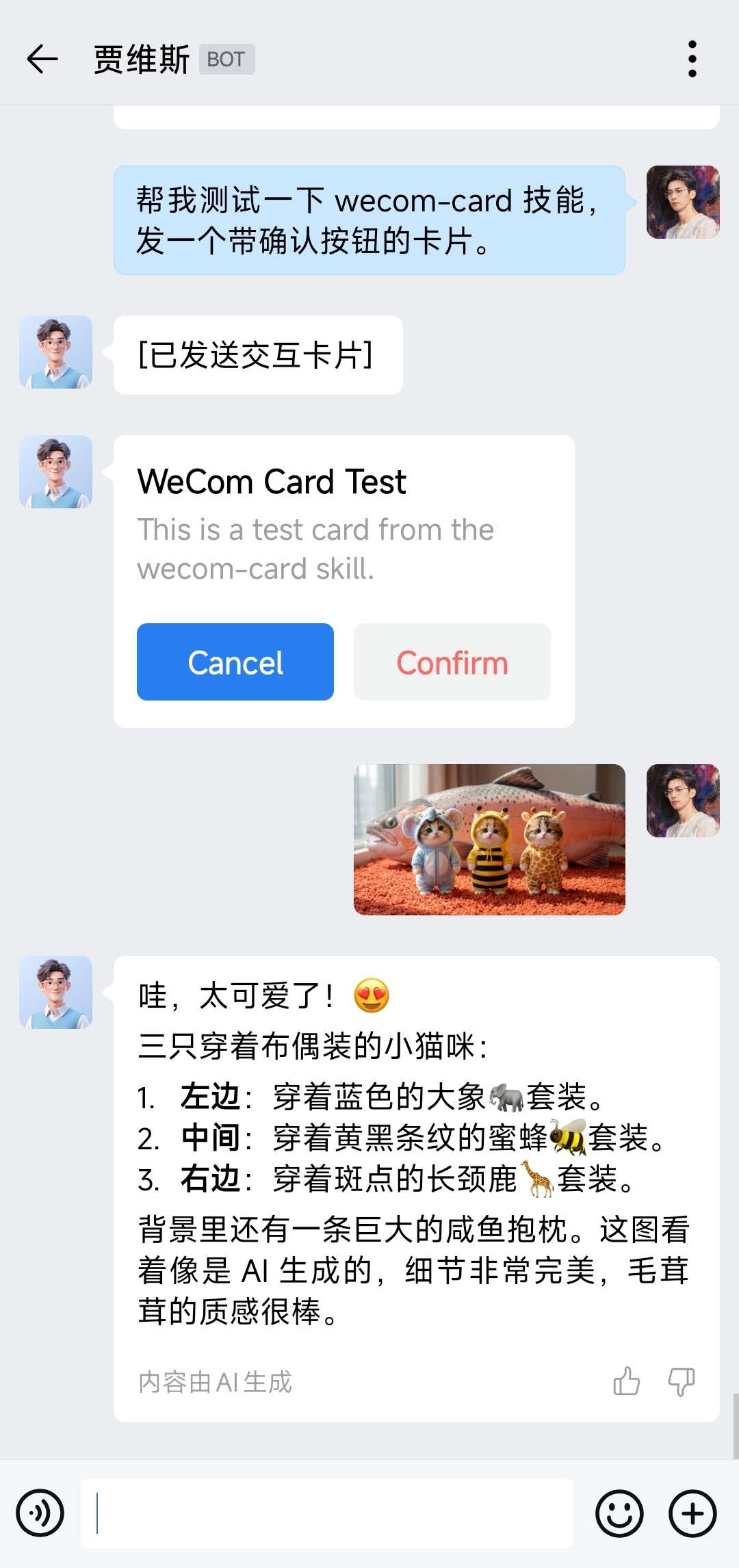
<div align="center">
|
|
34
|
+
<img src="https://cdn.jsdelivr.net/npm/@yanhaidao/wecom@latest/assets/01.image.jpg" width="45%" />
|
|
35
|
+
<img src="https://cdn.jsdelivr.net/npm/@yanhaidao/wecom@latest/assets/02.image.jpg" width="45%" />
|
|
36
|
+
</div>
|
|
18
37
|
|
|
19
|
-
> 图片过大可替换为压缩版(保持文件名不变即可)。
|
|
20
38
|
|
|
21
|
-
|
|
22
39
|
|
|
23
|
-
|
|
40
|
+
---
|
|
24
41
|
|
|
25
|
-
|
|
26
|
-
- 收到 `template_card_event` 时:会转换为伪文本消息触发 Agent,并基于 `msgid` 去重避免重复处理。
|
|
27
|
-
- 卡片相关的示例/skill:加群获取(见上方交流群二维码)。
|
|
42
|
+
## 模式对比
|
|
28
43
|
|
|
29
|
-
|
|
44
|
+
### Bot vs Agent 你该选哪个?
|
|
45
|
+
|
|
46
|
+
| 维度 | Bot 模式(智能体) | Agent 模式(自建应用) |
|
|
47
|
+
|:---|:---|:---|
|
|
48
|
+
| **接入方式** | 企微后台「智能机器人」 | 企微后台「自建应用」 |
|
|
49
|
+
| **回调格式** | JSON 加密 | XML 加密 |
|
|
50
|
+
| **回复机制** | response_url 被动回复 | API 主动发送 |
|
|
51
|
+
| **流式支持** | ✅ 原生 stream 刷新 | ❌ 模拟分段 |
|
|
52
|
+
| **主动推送** | ❌ 无法脱离回调 | ✅ 任意时机发送 |
|
|
53
|
+
| **媒体能力** | 受限(URL 方式) | 完整(media_id) |
|
|
54
|
+
| **被动回复图片** | ✅ 已实现 | ✅ 已实现 |
|
|
55
|
+
| **Outbound 发图片** | ❌ API 不支持 | ✅ 已实现 |
|
|
56
|
+
| **Outbound 发文本** | ❌ API 不支持 | ✅ 已实现 |
|
|
57
|
+
| **适用场景** | 快速体验、轻量对话 | 企业级部署、业务集成 |
|
|
58
|
+
|
|
59
|
+
> 💡 **推荐配置**:两种模式可同时启用!Bot 用于日常快速对话,Agent 用于主动通知和媒体发送。
|
|
60
|
+
|
|
61
|
+
---
|
|
62
|
+
|
|
63
|
+
## 快速开始
|
|
64
|
+
|
|
65
|
+
### 1. 安装插件
|
|
30
66
|
|
|
31
|
-
### 从 npm 安装
|
|
32
67
|
```bash
|
|
33
68
|
openclaw plugins install @yanhaidao/wecom
|
|
34
69
|
openclaw plugins enable wecom
|
|
70
|
+
```
|
|
71
|
+
|
|
72
|
+
也可以通过命令行向导快速配置:
|
|
73
|
+
|
|
74
|
+
```bash
|
|
75
|
+
openclaw config --section channels
|
|
76
|
+
```
|
|
77
|
+
|
|
78
|
+
### 2. 配置 Bot 模式(智能体)
|
|
79
|
+
|
|
80
|
+
```bash
|
|
81
|
+
openclaw config set channels.wecom.enabled true
|
|
82
|
+
openclaw config set channels.wecom.bot.token "YOUR_BOT_TOKEN"
|
|
83
|
+
openclaw config set channels.wecom.bot.encodingAESKey "YOUR_BOT_AES_KEY"
|
|
84
|
+
openclaw config set channels.wecom.bot.receiveId ""
|
|
85
|
+
openclaw config set channels.wecom.bot.streamPlaceholderContent "正在思考..."
|
|
86
|
+
openclaw config set channels.wecom.bot.welcomeText "你好!我是 AI 助手"
|
|
87
|
+
# 不配置表示所有人可用,配置则进入白名单模式
|
|
88
|
+
openclaw config set channels.wecom.bot.dm.allowFrom '["user1", "user2"]'
|
|
89
|
+
```
|
|
90
|
+
|
|
91
|
+
### 3. 配置 Agent 模式(自建应用,可选)
|
|
92
|
+
|
|
93
|
+
```bash
|
|
94
|
+
openclaw config set channels.wecom.enabled true
|
|
95
|
+
openclaw config set channels.wecom.agent.corpId "YOUR_CORP_ID"
|
|
96
|
+
openclaw config set channels.wecom.agent.corpSecret "YOUR_CORP_SECRET"
|
|
97
|
+
openclaw config set channels.wecom.agent.agentId 1000001
|
|
98
|
+
openclaw config set channels.wecom.agent.token "YOUR_CALLBACK_TOKEN"
|
|
99
|
+
openclaw config set channels.wecom.agent.encodingAESKey "YOUR_CALLBACK_AES_KEY"
|
|
100
|
+
openclaw config set channels.wecom.agent.welcomeText "欢迎使用智能助手"
|
|
101
|
+
openclaw config set channels.wecom.agent.dm.allowFrom '["user1", "user2"]'
|
|
102
|
+
```
|
|
103
|
+
|
|
104
|
+
### 4. 验证
|
|
105
|
+
|
|
106
|
+
```bash
|
|
35
107
|
openclaw gateway restart
|
|
108
|
+
openclaw channels status
|
|
36
109
|
```
|
|
37
110
|
|
|
38
|
-
|
|
111
|
+
---
|
|
112
|
+
|
|
113
|
+
## 配置说明
|
|
39
114
|
|
|
40
|
-
|
|
115
|
+
### 完整配置结构
|
|
116
|
+
|
|
117
|
+
```jsonc
|
|
41
118
|
{
|
|
42
119
|
"channels": {
|
|
43
120
|
"wecom": {
|
|
44
121
|
"enabled": true,
|
|
45
|
-
|
|
46
|
-
|
|
47
|
-
"
|
|
48
|
-
|
|
49
|
-
|
|
50
|
-
|
|
122
|
+
|
|
123
|
+
// Bot 模式配置(智能体)
|
|
124
|
+
"bot": {
|
|
125
|
+
"token": "YOUR_BOT_TOKEN",
|
|
126
|
+
"encodingAESKey": "YOUR_BOT_AES_KEY",
|
|
127
|
+
"receiveId": "", // 可选,用于解密校验
|
|
128
|
+
"streamPlaceholderContent": "正在思考...",
|
|
129
|
+
"welcomeText": "你好!我是 AI 助手",
|
|
130
|
+
"dm": { "allowFrom": [] } // 私聊限制
|
|
131
|
+
},
|
|
132
|
+
|
|
133
|
+
// Agent 模式配置(自建应用)
|
|
134
|
+
"agent": {
|
|
135
|
+
"corpId": "YOUR_CORP_ID",
|
|
136
|
+
"corpSecret": "YOUR_CORP_SECRET",
|
|
137
|
+
"agentId": 1000001,
|
|
138
|
+
"token": "YOUR_CALLBACK_TOKEN", // 企微后台「设置API接收」
|
|
139
|
+
"encodingAESKey": "YOUR_CALLBACK_AES_KEY",
|
|
140
|
+
"welcomeText": "欢迎使用智能助手",
|
|
141
|
+
"dm": { "allowFrom": [] }
|
|
142
|
+
}
|
|
51
143
|
}
|
|
52
144
|
}
|
|
53
145
|
}
|
|
54
146
|
```
|
|
55
147
|
|
|
56
|
-
|
|
148
|
+
### Webhook 路径(固定)
|
|
57
149
|
|
|
58
|
-
|
|
150
|
+
| 模式 | 路径 | 说明 |
|
|
151
|
+
|:---|:---|:---|
|
|
152
|
+
| Bot | `/wecom/bot` | 智能体回调 |
|
|
153
|
+
| Agent | `/wecom/agent` | 自建应用回调 |
|
|
59
154
|
|
|
60
|
-
|
|
61
|
-
进入「安全与管理」→「管理工具」→「智能机器人」:`https://work.weixin.qq.com/wework_admin/frame#/manageTools`
|
|
155
|
+
### DM 策略
|
|
62
156
|
|
|
63
|
-
|
|
64
|
-
|
|
157
|
+
- **不配置 `dm.allowFrom`** → 所有人可用(默认)
|
|
158
|
+
- **配置 `dm.allowFrom: ["user1", "user2"]`** → 白名单模式,仅列表内用户可私聊
|
|
65
159
|
|
|
66
|
-
|
|
67
|
-
在机器人详情里找到并保存以下信息,后续会写入 OpenClaw 配置:
|
|
68
|
-
- Token
|
|
69
|
-
- EncodingAESKey
|
|
70
|
-
- ReceiveId(如果你的机器人/回调配置需要校验的话)
|
|
160
|
+
### 常用指令
|
|
71
161
|
|
|
72
|
-
|
|
162
|
+
| 指令 | 说明 | 示例 |
|
|
163
|
+
|:---|:---|:---|
|
|
164
|
+
| `/new` | 🆕 开启新会话 (重置上下文) | `/new` 或 `/new GPT-4` |
|
|
165
|
+
| `/reset` | 🔄 重置会话 (同 /new) | `/reset` |
|
|
73
166
|
|
|
74
|
-
|
|
75
|
-
```bash
|
|
76
|
-
openclaw plugins enable wecom
|
|
77
|
-
```
|
|
167
|
+
---
|
|
78
168
|
|
|
79
|
-
|
|
80
|
-
```bash
|
|
81
|
-
openclaw config set channels.wecom.enabled true
|
|
82
|
-
openclaw config set channels.wecom.webhookPath "/wecom"
|
|
83
|
-
openclaw config set channels.wecom.token "YOUR_TOKEN"
|
|
84
|
-
openclaw config set channels.wecom.encodingAESKey "YOUR_ENCODING_AES_KEY"
|
|
85
|
-
openclaw config set channels.wecom.receiveId ""
|
|
86
|
-
```
|
|
169
|
+
## 企业微信接入指南
|
|
87
170
|
|
|
88
|
-
|
|
89
|
-
```bash
|
|
90
|
-
openclaw config set gateway.mode "local"
|
|
91
|
-
openclaw config set gateway.bind "0.0.0.0"
|
|
92
|
-
openclaw config set gateway.port 18789
|
|
93
|
-
```
|
|
171
|
+
### Bot 模式(智能机器人)
|
|
94
172
|
|
|
95
|
-
|
|
96
|
-
|
|
97
|
-
|
|
98
|
-
|
|
173
|
+
1. 登录 [企业微信管理后台](https://work.weixin.qq.com/wework_admin/frame#/manageTools)
|
|
174
|
+
2. 进入「安全与管理」→「管理工具」→「智能机器人」
|
|
175
|
+
3. 创建机器人,选择 **API 模式**
|
|
176
|
+
4. 填写回调 URL:`https://your-domain.com/wecom/bot`
|
|
177
|
+
5. 记录 Token 和 EncodingAESKey
|
|
99
178
|
|
|
100
|
-
|
|
101
|
-
|
|
102
|
-
|
|
103
|
-
|
|
179
|
+
### Agent 模式(自建应用)
|
|
180
|
+
|
|
181
|
+
1. 登录 [企业微信管理后台](https://work.weixin.qq.com/wework_admin/frame#/apps)
|
|
182
|
+
2. 进入「应用管理」→「自建」→ 创建应用
|
|
183
|
+
3. 获取 AgentId、CorpId、Secret
|
|
184
|
+
4. **重要:** 进入「企业可信IP」→「配置」→ 添加你服务器的 IP 地址
|
|
185
|
+
5. 在应用详情中设置「接收消息 - 设置API接收」
|
|
186
|
+
6. 填写回调 URL:`https://your-domain.com/wecom/agent`
|
|
187
|
+
7. 记录回调 Token 和 EncodingAESKey
|
|
188
|
+
|
|
189
|
+
---
|
|
104
190
|
|
|
105
|
-
##
|
|
191
|
+
## 高级功能
|
|
192
|
+
|
|
193
|
+
### A2UI 交互卡片
|
|
194
|
+
|
|
195
|
+
Agent 输出 `{"template_card": ...}` 时自动渲染为交互卡片:
|
|
196
|
+
|
|
197
|
+
- ✅ 单聊场景:发送真实交互卡片
|
|
198
|
+
- ✅ 按钮点击:触发 `template_card_event` 回调
|
|
199
|
+
- ✅ 自动去重:基于 `msgid` 避免重复处理
|
|
200
|
+
- ⚠️ 群聊降级:自动转为文本描述
|
|
201
|
+
|
|
202
|
+
### 富媒体处理
|
|
203
|
+
|
|
204
|
+
| 类型 | Bot 模式 | Agent 模式 |
|
|
205
|
+
|:---|:---|:---|
|
|
206
|
+
| 图片 | ✅ URL 解密入模 | ✅ media_id 下载 |
|
|
207
|
+
| 文件 | ✅ URL 解密入模 | ✅ media_id 下载 |
|
|
208
|
+
| 语音 | ✅ 转文字入模 | ✅ 识别结果 + 原始音频 |
|
|
209
|
+
| 视频 | ❌ | ✅ media_id 下载 |
|
|
210
|
+
|
|
211
|
+
### DM 策略
|
|
212
|
+
|
|
213
|
+
- **不配置 `dm.allowFrom`** → 所有人可用(默认)
|
|
214
|
+
- **配置 `dm.allowFrom: ["user1", "user2"]`** → 白名单模式,仅列表内用户可私聊
|
|
215
|
+
|
|
216
|
+
---
|
|
217
|
+
|
|
218
|
+
## 联系我
|
|
219
|
+
|
|
220
|
+
微信交流群(扫码入群):
|
|
221
|
+
|
|
222
|
+
|
|
223
|
+
|
|
224
|
+
维护者:YanHaidao(VX:YanHaidao)
|
|
106
225
|
|
|
107
|
-
|
|
108
|
-
- stream 模式:第一次回包可能是占位符;随后 WeCom 会以 `msgtype=stream` 回调刷新拉取完整内容。
|
|
109
|
-
- 限制:仅支持被动回复,不支持脱离回调的主动发送。
|
|
226
|
+
---
|
|
110
227
|
|
|
228
|
+
## 更新日志
|
|
111
229
|
|
|
230
|
+
### 2026.2.3
|
|
112
231
|
|
|
113
|
-
|
|
232
|
+
- 🎉 **重大更新**:新增 Agent 模式(自建应用)支持
|
|
233
|
+
- ✨ 双模式并行:Bot + Agent 可同时运行
|
|
234
|
+
- ✨ AccessToken 自动管理:缓存 + 智能刷新
|
|
235
|
+
- ✨ Agent 主动推送:脱离回调限制
|
|
236
|
+
- ✨ XML 加解密:完整 Agent 回调支持
|
|
237
|
+
- 📁 代码重构:模块化解耦设计
|
|
114
238
|
|
|
115
|
-
|
|
239
|
+
### 2026.1.31
|
|
116
240
|
|
|
117
|
-
-
|
|
241
|
+
- 文档:补充入模与测试截图说明
|
|
242
|
+
- 新增文件支持
|
|
243
|
+
- 新增卡片支持
|
|
118
244
|
|
|
119
|
-
|
|
245
|
+
### 2026.1.30
|
|
120
246
|
|
|
121
|
-
- 项目更名:Clawdbot → OpenClaw
|
|
247
|
+
- 项目更名:Clawdbot → OpenClaw
|
|
Binary file
|
package/package.json
CHANGED
|
@@ -1,6 +1,6 @@
|
|
|
1
1
|
{
|
|
2
2
|
"name": "@yanhaidao/wecom",
|
|
3
|
-
"version": "2.
|
|
3
|
+
"version": "2.2.3",
|
|
4
4
|
"type": "module",
|
|
5
5
|
"description": "OpenClaw WeCom (WeChat Work) intelligent bot channel plugin",
|
|
6
6
|
"author": "YanHaidao (VX: YanHaidao)",
|
|
@@ -33,6 +33,7 @@
|
|
|
33
33
|
},
|
|
34
34
|
"dependencies": {
|
|
35
35
|
"axios": "^1.13.4",
|
|
36
|
+
"fast-xml-parser": "5.3.4",
|
|
36
37
|
"zod": "^4.3.6"
|
|
37
38
|
},
|
|
38
39
|
"peerDependencies": {
|
|
@@ -0,0 +1,225 @@
|
|
|
1
|
+
/**
|
|
2
|
+
* WeCom Agent API 客户端
|
|
3
|
+
* 管理 AccessToken 缓存和 API 调用
|
|
4
|
+
*/
|
|
5
|
+
|
|
6
|
+
import crypto from "node:crypto";
|
|
7
|
+
import { API_ENDPOINTS, LIMITS } from "../types/constants.js";
|
|
8
|
+
import type { ResolvedAgentAccount } from "../types/index.js";
|
|
9
|
+
|
|
10
|
+
type TokenCache = {
|
|
11
|
+
token: string;
|
|
12
|
+
expiresAt: number;
|
|
13
|
+
refreshPromise: Promise<string> | null;
|
|
14
|
+
};
|
|
15
|
+
|
|
16
|
+
const tokenCaches = new Map<string, TokenCache>();
|
|
17
|
+
|
|
18
|
+
/**
|
|
19
|
+
* 获取 AccessToken (带缓存)
|
|
20
|
+
*/
|
|
21
|
+
export async function getAccessToken(agent: ResolvedAgentAccount): Promise<string> {
|
|
22
|
+
const cacheKey = `${agent.corpId}:${agent.agentId}`;
|
|
23
|
+
let cache = tokenCaches.get(cacheKey);
|
|
24
|
+
|
|
25
|
+
if (!cache) {
|
|
26
|
+
cache = { token: "", expiresAt: 0, refreshPromise: null };
|
|
27
|
+
tokenCaches.set(cacheKey, cache);
|
|
28
|
+
}
|
|
29
|
+
|
|
30
|
+
const now = Date.now();
|
|
31
|
+
if (cache.token && cache.expiresAt > now + LIMITS.TOKEN_REFRESH_BUFFER_MS) {
|
|
32
|
+
return cache.token;
|
|
33
|
+
}
|
|
34
|
+
|
|
35
|
+
// 防止并发刷新
|
|
36
|
+
if (cache.refreshPromise) {
|
|
37
|
+
return cache.refreshPromise;
|
|
38
|
+
}
|
|
39
|
+
|
|
40
|
+
cache.refreshPromise = (async () => {
|
|
41
|
+
try {
|
|
42
|
+
const url = `${API_ENDPOINTS.GET_TOKEN}?corpid=${encodeURIComponent(agent.corpId)}&corpsecret=${encodeURIComponent(agent.corpSecret)}`;
|
|
43
|
+
const res = await fetch(url, { signal: AbortSignal.timeout(LIMITS.REQUEST_TIMEOUT_MS) });
|
|
44
|
+
const json = await res.json() as { access_token?: string; expires_in?: number; errcode?: number; errmsg?: string };
|
|
45
|
+
|
|
46
|
+
if (!json?.access_token) {
|
|
47
|
+
throw new Error(`gettoken failed: ${json?.errcode} ${json?.errmsg}`);
|
|
48
|
+
}
|
|
49
|
+
|
|
50
|
+
cache!.token = json.access_token;
|
|
51
|
+
cache!.expiresAt = Date.now() + (json.expires_in ?? 7200) * 1000;
|
|
52
|
+
return cache!.token;
|
|
53
|
+
} finally {
|
|
54
|
+
cache!.refreshPromise = null;
|
|
55
|
+
}
|
|
56
|
+
})();
|
|
57
|
+
|
|
58
|
+
return cache.refreshPromise;
|
|
59
|
+
}
|
|
60
|
+
|
|
61
|
+
/**
|
|
62
|
+
* 发送文本消息
|
|
63
|
+
*/
|
|
64
|
+
export async function sendText(params: {
|
|
65
|
+
agent: ResolvedAgentAccount;
|
|
66
|
+
toUser?: string;
|
|
67
|
+
chatId?: string;
|
|
68
|
+
text: string;
|
|
69
|
+
}): Promise<void> {
|
|
70
|
+
const { agent, toUser, chatId, text } = params;
|
|
71
|
+
const token = await getAccessToken(agent);
|
|
72
|
+
|
|
73
|
+
const useChat = Boolean(chatId);
|
|
74
|
+
const url = useChat
|
|
75
|
+
? `${API_ENDPOINTS.SEND_APPCHAT}?access_token=${encodeURIComponent(token)}`
|
|
76
|
+
: `${API_ENDPOINTS.SEND_MESSAGE}?access_token=${encodeURIComponent(token)}`;
|
|
77
|
+
|
|
78
|
+
const body = useChat
|
|
79
|
+
? { chatid: chatId, msgtype: "text", text: { content: text } }
|
|
80
|
+
: { touser: toUser, msgtype: "text", agentid: agent.agentId, text: { content: text } };
|
|
81
|
+
|
|
82
|
+
const res = await fetch(url, {
|
|
83
|
+
method: "POST",
|
|
84
|
+
headers: { "Content-Type": "application/json" },
|
|
85
|
+
body: JSON.stringify(body),
|
|
86
|
+
signal: AbortSignal.timeout(LIMITS.REQUEST_TIMEOUT_MS),
|
|
87
|
+
});
|
|
88
|
+
const json = await res.json() as { errcode?: number; errmsg?: string };
|
|
89
|
+
|
|
90
|
+
if (json?.errcode !== 0) {
|
|
91
|
+
throw new Error(`send failed: ${json?.errcode} ${json?.errmsg}`);
|
|
92
|
+
}
|
|
93
|
+
}
|
|
94
|
+
|
|
95
|
+
/**
|
|
96
|
+
* 上传媒体文件
|
|
97
|
+
*/
|
|
98
|
+
export async function uploadMedia(params: {
|
|
99
|
+
agent: ResolvedAgentAccount;
|
|
100
|
+
type: "image" | "voice" | "video" | "file";
|
|
101
|
+
buffer: Buffer;
|
|
102
|
+
filename: string;
|
|
103
|
+
}): Promise<string> {
|
|
104
|
+
const { agent, type, buffer, filename } = params;
|
|
105
|
+
const token = await getAccessToken(agent);
|
|
106
|
+
// 添加 debug=1 参数获取更多错误信息
|
|
107
|
+
const url = `${API_ENDPOINTS.UPLOAD_MEDIA}?access_token=${encodeURIComponent(token)}&type=${encodeURIComponent(type)}&debug=1`;
|
|
108
|
+
|
|
109
|
+
// DEBUG: 输出上传信息
|
|
110
|
+
console.log(`[wecom-upload] Uploading media: type=${type}, filename=${filename}, size=${buffer.length} bytes`);
|
|
111
|
+
|
|
112
|
+
// 手动构造 multipart/form-data 请求体
|
|
113
|
+
// 企业微信要求包含 filename 和 filelength
|
|
114
|
+
const boundary = `----WebKitFormBoundary${crypto.randomBytes(16).toString("hex")}`;
|
|
115
|
+
|
|
116
|
+
// 根据文件类型设置 Content-Type
|
|
117
|
+
const contentTypeMap: Record<string, string> = {
|
|
118
|
+
jpg: "image/jpg", jpeg: "image/jpeg", png: "image/png", gif: "image/gif",
|
|
119
|
+
bmp: "image/bmp", amr: "voice/amr", mp4: "video/mp4",
|
|
120
|
+
};
|
|
121
|
+
const ext = filename.split(".").pop()?.toLowerCase() || "";
|
|
122
|
+
const fileContentType = contentTypeMap[ext] || "application/octet-stream";
|
|
123
|
+
|
|
124
|
+
// 构造 multipart body
|
|
125
|
+
const header = Buffer.from(
|
|
126
|
+
`--${boundary}\r\n` +
|
|
127
|
+
`Content-Disposition: form-data; name="media"; filename="${filename}"; filelength=${buffer.length}\r\n` +
|
|
128
|
+
`Content-Type: ${fileContentType}\r\n\r\n`
|
|
129
|
+
);
|
|
130
|
+
const footer = Buffer.from(`\r\n--${boundary}--\r\n`);
|
|
131
|
+
const body = Buffer.concat([header, buffer, footer]);
|
|
132
|
+
|
|
133
|
+
console.log(`[wecom-upload] Multipart body size=${body.length}, boundary=${boundary}, fileContentType=${fileContentType}`);
|
|
134
|
+
|
|
135
|
+
const res = await fetch(url, {
|
|
136
|
+
method: "POST",
|
|
137
|
+
headers: {
|
|
138
|
+
"Content-Type": `multipart/form-data; boundary=${boundary}`,
|
|
139
|
+
"Content-Length": String(body.length),
|
|
140
|
+
},
|
|
141
|
+
body: body,
|
|
142
|
+
signal: AbortSignal.timeout(LIMITS.REQUEST_TIMEOUT_MS),
|
|
143
|
+
});
|
|
144
|
+
const json = await res.json() as { media_id?: string; errcode?: number; errmsg?: string };
|
|
145
|
+
|
|
146
|
+
// DEBUG: 输出完整响应
|
|
147
|
+
console.log(`[wecom-upload] Response:`, JSON.stringify(json));
|
|
148
|
+
|
|
149
|
+
if (!json?.media_id) {
|
|
150
|
+
throw new Error(`upload failed: ${json?.errcode} ${json?.errmsg}`);
|
|
151
|
+
}
|
|
152
|
+
return json.media_id;
|
|
153
|
+
}
|
|
154
|
+
|
|
155
|
+
/**
|
|
156
|
+
* 发送媒体消息
|
|
157
|
+
*/
|
|
158
|
+
export async function sendMedia(params: {
|
|
159
|
+
agent: ResolvedAgentAccount;
|
|
160
|
+
toUser?: string;
|
|
161
|
+
chatId?: string;
|
|
162
|
+
mediaId: string;
|
|
163
|
+
mediaType: "image" | "voice" | "video" | "file";
|
|
164
|
+
title?: string;
|
|
165
|
+
description?: string;
|
|
166
|
+
}): Promise<void> {
|
|
167
|
+
const { agent, toUser, chatId, mediaId, mediaType, title, description } = params;
|
|
168
|
+
const token = await getAccessToken(agent);
|
|
169
|
+
|
|
170
|
+
const useChat = Boolean(chatId);
|
|
171
|
+
const url = useChat
|
|
172
|
+
? `${API_ENDPOINTS.SEND_APPCHAT}?access_token=${encodeURIComponent(token)}`
|
|
173
|
+
: `${API_ENDPOINTS.SEND_MESSAGE}?access_token=${encodeURIComponent(token)}`;
|
|
174
|
+
|
|
175
|
+
const mediaPayload = mediaType === "video"
|
|
176
|
+
? { media_id: mediaId, title: title ?? "Video", description: description ?? "" }
|
|
177
|
+
: { media_id: mediaId };
|
|
178
|
+
|
|
179
|
+
const body = useChat
|
|
180
|
+
? { chatid: chatId, msgtype: mediaType, [mediaType]: mediaPayload }
|
|
181
|
+
: { touser: toUser, msgtype: mediaType, agentid: agent.agentId, [mediaType]: mediaPayload };
|
|
182
|
+
|
|
183
|
+
const res = await fetch(url, {
|
|
184
|
+
method: "POST",
|
|
185
|
+
headers: { "Content-Type": "application/json" },
|
|
186
|
+
body: JSON.stringify(body),
|
|
187
|
+
signal: AbortSignal.timeout(LIMITS.REQUEST_TIMEOUT_MS),
|
|
188
|
+
});
|
|
189
|
+
const json = await res.json() as { errcode?: number; errmsg?: string };
|
|
190
|
+
|
|
191
|
+
if (json?.errcode !== 0) {
|
|
192
|
+
throw new Error(`send ${mediaType} failed: ${json?.errcode} ${json?.errmsg}`);
|
|
193
|
+
}
|
|
194
|
+
}
|
|
195
|
+
|
|
196
|
+
/**
|
|
197
|
+
* 下载媒体文件
|
|
198
|
+
*/
|
|
199
|
+
export async function downloadMedia(params: {
|
|
200
|
+
agent: ResolvedAgentAccount;
|
|
201
|
+
mediaId: string;
|
|
202
|
+
}): Promise<{ buffer: Buffer; contentType: string }> {
|
|
203
|
+
const { agent, mediaId } = params;
|
|
204
|
+
const token = await getAccessToken(agent);
|
|
205
|
+
const url = `${API_ENDPOINTS.DOWNLOAD_MEDIA}?access_token=${encodeURIComponent(token)}&media_id=${encodeURIComponent(mediaId)}`;
|
|
206
|
+
|
|
207
|
+
const res = await fetch(url, {
|
|
208
|
+
signal: AbortSignal.timeout(LIMITS.REQUEST_TIMEOUT_MS),
|
|
209
|
+
});
|
|
210
|
+
|
|
211
|
+
if (!res.ok) {
|
|
212
|
+
throw new Error(`download failed: ${res.status}`);
|
|
213
|
+
}
|
|
214
|
+
|
|
215
|
+
const contentType = res.headers.get("content-type") || "application/octet-stream";
|
|
216
|
+
|
|
217
|
+
// 检查是否返回了错误 JSON
|
|
218
|
+
if (contentType.includes("application/json")) {
|
|
219
|
+
const json = await res.json() as { errcode?: number; errmsg?: string };
|
|
220
|
+
throw new Error(`download failed: ${json?.errcode} ${json?.errmsg}`);
|
|
221
|
+
}
|
|
222
|
+
|
|
223
|
+
const buffer = Buffer.from(await res.arrayBuffer());
|
|
224
|
+
return { buffer, contentType };
|
|
225
|
+
}
|