@xtdev/xt-miniprogram-ui 1.2.57 → 1.2.60
This diff represents the content of publicly available package versions that have been released to one of the supported registries. The information contained in this diff is provided for informational purposes only and reflects changes between package versions as they appear in their respective public registries.
- package/package.json +1 -1
- package/libs/package.json +0 -1
- package/libs/xt-button/README.md +0 -60
- package/libs/xt-button/index.js +0 -116
- package/libs/xt-button/index.json +0 -7
- package/libs/xt-button/index.wxml +0 -31
- package/libs/xt-button/index.wxss +0 -70
- package/libs/xt-card-cell/README.md +0 -67
- package/libs/xt-card-cell/index.js +0 -43
- package/libs/xt-card-cell/index.json +0 -6
- package/libs/xt-card-cell/index.wxml +0 -34
- package/libs/xt-card-cell/index.wxss +0 -89
- package/libs/xt-cell/README.md +0 -41
- package/libs/xt-cell/index.js +0 -42
- package/libs/xt-cell/index.json +0 -7
- package/libs/xt-cell/index.wxml +0 -12
- package/libs/xt-cell/index.wxss +0 -50
- package/libs/xt-date-picker/README.md +0 -77
- package/libs/xt-date-picker/index.js +0 -443
- package/libs/xt-date-picker/index.json +0 -7
- package/libs/xt-date-picker/index.wxml +0 -58
- package/libs/xt-date-picker/index.wxss +0 -118
- package/libs/xt-date-picker-loop/README.md +0 -77
- package/libs/xt-date-picker-loop/index.js +0 -684
- package/libs/xt-date-picker-loop/index.json +0 -8
- package/libs/xt-date-picker-loop/index.wxml +0 -61
- package/libs/xt-date-picker-loop/index.wxss +0 -117
- package/libs/xt-dialog/README.md +0 -157
- package/libs/xt-dialog/index.js +0 -142
- package/libs/xt-dialog/index.json +0 -5
- package/libs/xt-dialog/index.wxml +0 -64
- package/libs/xt-dialog/index.wxss +0 -129
- package/libs/xt-form/index.js +0 -83
- package/libs/xt-form/index.json +0 -5
- package/libs/xt-form/index.wxml +0 -67
- package/libs/xt-form/index.wxss +0 -141
- package/libs/xt-icon/README.md +0 -39
- package/libs/xt-icon/index.js +0 -25
- package/libs/xt-icon/index.json +0 -5
- package/libs/xt-icon/index.wxml +0 -2
- package/libs/xt-icon/index.wxss +0 -159
- package/libs/xt-popover/README.md +0 -71
- package/libs/xt-popover/index.js +0 -209
- package/libs/xt-popover/index.json +0 -7
- package/libs/xt-popover/index.wxml +0 -42
- package/libs/xt-popover/index.wxss +0 -135
- package/libs/xt-search/README.md +0 -55
- package/libs/xt-search/index.js +0 -88
- package/libs/xt-search/index.json +0 -7
- package/libs/xt-search/index.wxml +0 -17
- package/libs/xt-search/index.wxss +0 -82
- package/libs/xt-stepper/README.md +0 -52
- package/libs/xt-stepper/index.js +0 -158
- package/libs/xt-stepper/index.json +0 -5
- package/libs/xt-stepper/index.wxml +0 -11
- package/libs/xt-stepper/index.wxss +0 -77
- package/libs/xt-steps/README.md +0 -79
- package/libs/xt-steps/index.js +0 -37
- package/libs/xt-steps/index.json +0 -7
- package/libs/xt-steps/index.wxml +0 -34
- package/libs/xt-steps/index.wxss +0 -186
- package/libs/xt-tabs/README.md +0 -98
- package/libs/xt-tabs/index.js +0 -35
- package/libs/xt-tabs/index.json +0 -6
- package/libs/xt-tabs/index.wxml +0 -10
- package/libs/xt-tabs/index.wxss +0 -76
- package/libs/xt-tag/README.md +0 -65
- package/libs/xt-tag/index.js +0 -38
- package/libs/xt-tag/index.json +0 -7
- package/libs/xt-tag/index.wxml +0 -5
- package/libs/xt-tag/index.wxss +0 -36
- package/libs/xt-toast/README.md +0 -65
- package/libs/xt-toast/index.js +0 -85
- package/libs/xt-toast/index.json +0 -7
- package/libs/xt-toast/index.wxml +0 -6
- package/libs/xt-toast/index.wxss +0 -27
- package/libs/xt-uploader/README.md +0 -46
- package/libs/xt-uploader/index.js +0 -233
- package/libs/xt-uploader/index.json +0 -7
- package/libs/xt-uploader/index.wxml +0 -15
- package/libs/xt-uploader/index.wxss +0 -68
- package/libs/xt-uploader/utils.js +0 -69
package/package.json
CHANGED
package/libs/package.json
DELETED
|
@@ -1 +0,0 @@
|
|
|
1
|
-
{"dependencies":{}}
|
package/libs/xt-button/README.md
DELETED
|
@@ -1,60 +0,0 @@
|
|
|
1
|
-
# Icon图标
|
|
2
|
-
|
|
3
|
-
### 介绍
|
|
4
|
-
按钮用于触发一个操作
|
|
5
|
-
|
|
6
|
-
###效果图
|
|
7
|
-

|
|
8
|
-
|
|
9
|
-
### 引入
|
|
10
|
-
在app.json或页面配置json中引入
|
|
11
|
-
```
|
|
12
|
-
"usingComponents": {
|
|
13
|
-
"xt-button": "@xtdev/xt-miniprogram-ui/xt-button",
|
|
14
|
-
}
|
|
15
|
-
```
|
|
16
|
-
|
|
17
|
-
## 代码演示
|
|
18
|
-
|
|
19
|
-
### 基础用法
|
|
20
|
-
|
|
21
|
-
```
|
|
22
|
-
<xt-button type="main">默认状态</xt-button>
|
|
23
|
-
```
|
|
24
|
-
|
|
25
|
-
##API
|
|
26
|
-
|
|
27
|
-
####xt-button props
|
|
28
|
-
|
|
29
|
-
| 参数 | 说明 | 类型 | 默认值 |
|
|
30
|
-
| ----------- | ----------- | ---------- | ------------ |
|
|
31
|
-
| type | 按钮类型,可选值为 `main` `secondary` | string | `secondary`
|
|
32
|
-
| size | 按钮尺寸,可选值为 `normal` `large` `small` | string | `normal`
|
|
33
|
-
| icon | 左侧图标名称 | string |
|
|
34
|
-
| disabled | 是否禁用按钮 | boolean | `false`
|
|
35
|
-
| open-type | 微信开放能力,具体支持可参考[微信官方文档](https://developers.weixin.qq.com/miniprogram/dev/component/button.html) | string |
|
|
36
|
-
| app-parameter | 打开 APP 时,向 APP 传递的参数 | string |
|
|
37
|
-
| lang | 指定返回用户信息的语言,zh_CN 简体中文,zh_TW 繁体中文,en 英文 | string | `en`
|
|
38
|
-
| session-from | 会话来源 | string |
|
|
39
|
-
| business-id | 客服消息子商户 id | number |
|
|
40
|
-
| send-message-title | 会话内消息卡片标题 | string | 当前标题
|
|
41
|
-
| send-message-path | 会话内消息卡片点击跳转小程序路径 | string | 当前分享路径
|
|
42
|
-
| send-message-img | sendMessageImg | string | 截图
|
|
43
|
-
| show-message-card | 显示会话内消息卡片 | string | `false`
|
|
44
|
-
| dataset | 按钮 dataset,open-type 为 share 时,可在 onShareAppMessage 事件的 `event.target.dataset.detail` 中看到传入的值 | any |
|
|
45
|
-
|
|
46
|
-
|
|
47
|
-
|
|
48
|
-
####Events
|
|
49
|
-
|
|
50
|
-
| 事件名 | 说明 | 回调参数 |
|
|
51
|
-
| ---------------- | ------------- | ---------------------- |
|
|
52
|
-
| bind:click | 点击按钮,且按钮状态不为加载或禁用时触发 |
|
|
53
|
-
| bind:getuserinfo | 用户点击该按钮时,会返回获取到的用户信息,
|
|
54
|
-
从返回参数的 detail 中获取到的值同 wx.getUserInfo |
|
|
55
|
-
| bind:contact | 客服消息回调 |
|
|
56
|
-
| bind:getphonenumber | 获取用户手机号回调 |
|
|
57
|
-
| bind:getrealtimephonenumber | 获取手机号实时验证回调,open-type=getRealtimePhoneNumber 时有效 |
|
|
58
|
-
| bind:error | 当使用开放能力时,发生错误的回调 |
|
|
59
|
-
| bind:opensetting | 在打开授权设置页后回调 |
|
|
60
|
-
| bind:chooseavatar | 当 open-type 的值为 chooseAvatar 时,选择头像之后的回调 |
|
package/libs/xt-button/index.js
DELETED
|
@@ -1,116 +0,0 @@
|
|
|
1
|
-
// src/xt-button/index.js
|
|
2
|
-
Component({
|
|
3
|
-
/**
|
|
4
|
-
* 组件的属性列表
|
|
5
|
-
*/
|
|
6
|
-
properties: {
|
|
7
|
-
// 左侧图标名称
|
|
8
|
-
icon: {
|
|
9
|
-
type: String,
|
|
10
|
-
},
|
|
11
|
-
// 按钮尺寸,可选值为 normal large small
|
|
12
|
-
size: {
|
|
13
|
-
type: String,
|
|
14
|
-
value: "normal",
|
|
15
|
-
},
|
|
16
|
-
// 按钮类型,可选值为 main secondary
|
|
17
|
-
type: {
|
|
18
|
-
type: String,
|
|
19
|
-
value: "secondary",
|
|
20
|
-
},
|
|
21
|
-
disabled: {
|
|
22
|
-
type: Boolean,
|
|
23
|
-
value: false,
|
|
24
|
-
},
|
|
25
|
-
dataset: null,
|
|
26
|
-
openType: {
|
|
27
|
-
type: String,
|
|
28
|
-
value: "",
|
|
29
|
-
},
|
|
30
|
-
appParameter: {
|
|
31
|
-
type: String,
|
|
32
|
-
value: "",
|
|
33
|
-
},
|
|
34
|
-
showMessageCard: {
|
|
35
|
-
type: String,
|
|
36
|
-
value: "",
|
|
37
|
-
},
|
|
38
|
-
sendMessagePath: {
|
|
39
|
-
type: String,
|
|
40
|
-
value: "",
|
|
41
|
-
},
|
|
42
|
-
sendMessageTitle: {
|
|
43
|
-
type: String,
|
|
44
|
-
value: "",
|
|
45
|
-
},
|
|
46
|
-
lang: {
|
|
47
|
-
type: String,
|
|
48
|
-
value: "en",
|
|
49
|
-
},
|
|
50
|
-
appParameter: {
|
|
51
|
-
type: String,
|
|
52
|
-
value: "",
|
|
53
|
-
},
|
|
54
|
-
appParameter: {
|
|
55
|
-
type: String,
|
|
56
|
-
value: "",
|
|
57
|
-
},
|
|
58
|
-
appParameter: {
|
|
59
|
-
type: String,
|
|
60
|
-
value: "",
|
|
61
|
-
},
|
|
62
|
-
},
|
|
63
|
-
|
|
64
|
-
/**
|
|
65
|
-
* 组件的初始数据
|
|
66
|
-
*/
|
|
67
|
-
data: {
|
|
68
|
-
iconSizeObj: {
|
|
69
|
-
small: 32,
|
|
70
|
-
normal: 40,
|
|
71
|
-
large: 48,
|
|
72
|
-
},
|
|
73
|
-
iconRightObj: {
|
|
74
|
-
small: 4,
|
|
75
|
-
normal: 8,
|
|
76
|
-
large: 16,
|
|
77
|
-
},
|
|
78
|
-
},
|
|
79
|
-
|
|
80
|
-
/**
|
|
81
|
-
* 组件的方法列表
|
|
82
|
-
*/
|
|
83
|
-
methods: {
|
|
84
|
-
onClick(event) {
|
|
85
|
-
const { disabled } = this.properties;
|
|
86
|
-
if (disabled) {
|
|
87
|
-
return;
|
|
88
|
-
}
|
|
89
|
-
this.triggerEvent("click", event);
|
|
90
|
-
},
|
|
91
|
-
onGetUserInfo(event) {
|
|
92
|
-
this.triggerEvent("getuserinfo", event.detail);
|
|
93
|
-
},
|
|
94
|
-
onContact(event) {
|
|
95
|
-
this.triggerEvent("contract", event.detail);
|
|
96
|
-
},
|
|
97
|
-
onGetPhoneNumber(event) {
|
|
98
|
-
this.triggerEvent("getphonenumber", event.detail);
|
|
99
|
-
},
|
|
100
|
-
onGetrealtimephonenumber(event) {
|
|
101
|
-
this.triggerEvent("getphonenumber", event.detail);
|
|
102
|
-
},
|
|
103
|
-
onError(event) {
|
|
104
|
-
this.triggerEvent("error", event.detail);
|
|
105
|
-
},
|
|
106
|
-
onLaunchApp(event) {
|
|
107
|
-
this.triggerEvent("launchapp", event.detail);
|
|
108
|
-
},
|
|
109
|
-
onOpenSetting(event) {
|
|
110
|
-
this.triggerEvent("opensetting", event.detail);
|
|
111
|
-
},
|
|
112
|
-
onChooseAvatar(event) {
|
|
113
|
-
this.triggerEvent("chooseavatar", event.detail);
|
|
114
|
-
},
|
|
115
|
-
},
|
|
116
|
-
});
|
|
@@ -1,31 +0,0 @@
|
|
|
1
|
-
<!-- src/xt-button/index.wxml -->
|
|
2
|
-
<view class="xt-button">
|
|
3
|
-
<button
|
|
4
|
-
disabled="{{ disabled }}"
|
|
5
|
-
bindtap="onClick"
|
|
6
|
-
class="xt-button-{{size}} xt-button-{{type}} {{disabled ? 'xt-button-disabled-'+type : ''}}"
|
|
7
|
-
hover-class="xt-button-{{type}}-clicked"
|
|
8
|
-
open-type="{{ openType }}"
|
|
9
|
-
business-id="{{ businessId }}"
|
|
10
|
-
session-from="{{ sessionFrom }}"
|
|
11
|
-
send-message-title="{{ sendMessageTitle }}"
|
|
12
|
-
send-message-path="{{ sendMessagePath }}"
|
|
13
|
-
send-message-img="{{ sendMessageImg }}"
|
|
14
|
-
show-message-card="{{ showMessageCard }}"
|
|
15
|
-
app-parameter="{{ appParameter }}"
|
|
16
|
-
data-detail="{{ dataset }}"
|
|
17
|
-
bindgetuserinfo="onGetUserInfo"
|
|
18
|
-
bindcontact="onContact"
|
|
19
|
-
bindgetphonenumber="onGetPhoneNumber"
|
|
20
|
-
bindgetrealtimephonenumber="getrealtimephonenumber"
|
|
21
|
-
binderror="onError"
|
|
22
|
-
bindlaunchapp="onLaunchApp"
|
|
23
|
-
bindopensetting="onOpenSetting"
|
|
24
|
-
bindchooseavatar="onChooseAvatar"
|
|
25
|
-
>
|
|
26
|
-
<xt-icon wx:if="{{icon}}" icon="{{icon}}" size="{{iconSizeObj[size]}}" style="margin-right: {{iconRightObj[size]}}rpx"></xt-icon>
|
|
27
|
-
<view>
|
|
28
|
-
<slot />
|
|
29
|
-
</view>
|
|
30
|
-
</button>
|
|
31
|
-
</view>
|
|
@@ -1,70 +0,0 @@
|
|
|
1
|
-
/* src/xt-button/index.wxss */
|
|
2
|
-
.xt-button button {
|
|
3
|
-
display : flex;
|
|
4
|
-
align-items : center;
|
|
5
|
-
justify-content: center;
|
|
6
|
-
text-align: center;
|
|
7
|
-
border-radius : 120rpx;
|
|
8
|
-
box-sizing : border-box !important;
|
|
9
|
-
font-family : PingFang SC-Semibold,
|
|
10
|
-
PingFang SC;
|
|
11
|
-
font-weight: 800;
|
|
12
|
-
margin : 0 !important;
|
|
13
|
-
width : auto !important;
|
|
14
|
-
}
|
|
15
|
-
|
|
16
|
-
.xt-button-small {
|
|
17
|
-
padding : 0 32rpx;
|
|
18
|
-
font-size : 34rpx;
|
|
19
|
-
line-height: 48rpx;
|
|
20
|
-
height: 80rpx;
|
|
21
|
-
}
|
|
22
|
-
|
|
23
|
-
.xt-button-normal {
|
|
24
|
-
/* padding : 20rpx 48rpx; */
|
|
25
|
-
padding : 0 48rpx;
|
|
26
|
-
font-size : 40rpx;
|
|
27
|
-
line-height: 56rpx;
|
|
28
|
-
height: 96rpx;
|
|
29
|
-
}
|
|
30
|
-
|
|
31
|
-
.xt-button-large {
|
|
32
|
-
/* padding : 24rpx 64rpx; */
|
|
33
|
-
padding : 0 64rpx;
|
|
34
|
-
font-size : 48rpx;
|
|
35
|
-
line-height: 68rpx;
|
|
36
|
-
height: 116rpx;
|
|
37
|
-
}
|
|
38
|
-
|
|
39
|
-
.xt-button-main {
|
|
40
|
-
background-color: #6722AB;
|
|
41
|
-
color : #FFFFFF;
|
|
42
|
-
}
|
|
43
|
-
|
|
44
|
-
.xt-button-disabled-main {
|
|
45
|
-
background-color: #DDDDDD !important;
|
|
46
|
-
color : #fff !important
|
|
47
|
-
}
|
|
48
|
-
|
|
49
|
-
/* hover-class需要放在class之后,否则background会被本身class的css覆盖 */
|
|
50
|
-
.xt-button-main-clicked {
|
|
51
|
-
background-color: #3D1466;
|
|
52
|
-
}
|
|
53
|
-
|
|
54
|
-
.xt-button-secondary {
|
|
55
|
-
background-color: #fff;
|
|
56
|
-
border : 2rpx #959595 solid;
|
|
57
|
-
color : #222222
|
|
58
|
-
}
|
|
59
|
-
|
|
60
|
-
.xt-button-disabled-secondary {
|
|
61
|
-
background-color: #F5F5F5 !important;
|
|
62
|
-
border : 2rpx #DDDDDD solid;
|
|
63
|
-
color : #DDDDDD !important;
|
|
64
|
-
}
|
|
65
|
-
|
|
66
|
-
/* hover-class需要放在class之后,否则background会被本身class的css覆盖 */
|
|
67
|
-
.xt-button-secondary-clicked {
|
|
68
|
-
background-color: #DDDDDD;
|
|
69
|
-
border : 2rpx #DDDDDD solid;
|
|
70
|
-
}
|
|
@@ -1,67 +0,0 @@
|
|
|
1
|
-
# 列表卡片
|
|
2
|
-
|
|
3
|
-
### 介绍
|
|
4
|
-
列表中的单个展示项
|
|
5
|
-
|
|
6
|
-
###效果图
|
|
7
|
-

|
|
8
|
-
|
|
9
|
-
### 引入
|
|
10
|
-
在app.json或页面配置json中引入
|
|
11
|
-
```
|
|
12
|
-
"usingComponents": {
|
|
13
|
-
"xt-card-cell": "@xtdev/xt-miniprogram-ui/xt-card-cell",
|
|
14
|
-
}
|
|
15
|
-
```
|
|
16
|
-
|
|
17
|
-
## 代码演示
|
|
18
|
-
|
|
19
|
-
### 基础用法
|
|
20
|
-
|
|
21
|
-
```
|
|
22
|
-
<xt-card-cell item="{{item}}">
|
|
23
|
-
</xt-card-cell>
|
|
24
|
-
```
|
|
25
|
-
|
|
26
|
-
### 使用插槽
|
|
27
|
-
使用插槽替换卡片底部内容
|
|
28
|
-
```
|
|
29
|
-
<xt-card-cell item="{{item}}">
|
|
30
|
-
<view slot="card-footer">
|
|
31
|
-
<!-- 列表按钮 -->
|
|
32
|
-
<view class="footer">
|
|
33
|
-
<view class="default-btn">
|
|
34
|
-
查看详情
|
|
35
|
-
</view>
|
|
36
|
-
</view>
|
|
37
|
-
</view>
|
|
38
|
-
</xt-card-cell>
|
|
39
|
-
```
|
|
40
|
-
|
|
41
|
-
##API
|
|
42
|
-
|
|
43
|
-
#### xt-card-cell props
|
|
44
|
-
|
|
45
|
-
| 参数 | 说明 | 类型 |
|
|
46
|
-
| ----------- | ----------- | ---------- |
|
|
47
|
-
| item | 卡片内容 | `ItemProps` |
|
|
48
|
-
| headerSlot | 卡片顶部插槽 | `slot` |
|
|
49
|
-
| contentSlot | 卡片底部插槽 | `slot` |
|
|
50
|
-
|
|
51
|
-
#### ItemProps
|
|
52
|
-
|
|
53
|
-
| 参数 | 说明 | 类型 |
|
|
54
|
-
| ----------- | ----------- | ----------- |
|
|
55
|
-
| title | 卡片标题 | `String` |
|
|
56
|
-
| subTitle | 卡片副标题 | `String` |
|
|
57
|
-
| subTitleColor | 卡片副标题颜色 | `String` |
|
|
58
|
-
| titleTags | 标题标签 | `String[]` |
|
|
59
|
-
| dataList | 卡片内容 | `datalistItem[]` |
|
|
60
|
-
|
|
61
|
-
#### datalistItem
|
|
62
|
-
|
|
63
|
-
| 参数 | 说明 | 类型 |
|
|
64
|
-
| ----------- | ----------- | ----------- |
|
|
65
|
-
| value | 值 | `String` \| `Number` |
|
|
66
|
-
| valueType | 值类型,可选值为 `text` `tel` | `String` |
|
|
67
|
-
| label | 字段描述 | `String` |
|
|
@@ -1,43 +0,0 @@
|
|
|
1
|
-
Component({
|
|
2
|
-
options: {
|
|
3
|
-
multipleSlots: true,
|
|
4
|
-
},
|
|
5
|
-
properties: {
|
|
6
|
-
contentSlot: {
|
|
7
|
-
type: Boolean,
|
|
8
|
-
value: false,
|
|
9
|
-
},
|
|
10
|
-
headerSlot: {
|
|
11
|
-
type: Boolean,
|
|
12
|
-
value: false,
|
|
13
|
-
},
|
|
14
|
-
item: {
|
|
15
|
-
type: Object,
|
|
16
|
-
value: false,
|
|
17
|
-
},
|
|
18
|
-
},
|
|
19
|
-
|
|
20
|
-
/**
|
|
21
|
-
* 组件的初始数据
|
|
22
|
-
*/
|
|
23
|
-
data: {},
|
|
24
|
-
attached: function () {},
|
|
25
|
-
|
|
26
|
-
/**
|
|
27
|
-
* 组件的方法列表
|
|
28
|
-
*/
|
|
29
|
-
methods: {
|
|
30
|
-
call(e) {
|
|
31
|
-
const tel = e.currentTarget.dataset.tel;
|
|
32
|
-
wx.makePhoneCall({
|
|
33
|
-
phoneNumber: tel, // 这里是电话号码[假的]可以调用自己的数据this.data.xxx
|
|
34
|
-
success: function () {
|
|
35
|
-
console.log("拨打电话成功!");
|
|
36
|
-
},
|
|
37
|
-
fail: function () {
|
|
38
|
-
console.log("拨打电话失败!");
|
|
39
|
-
},
|
|
40
|
-
});
|
|
41
|
-
},
|
|
42
|
-
},
|
|
43
|
-
});
|
|
@@ -1,34 +0,0 @@
|
|
|
1
|
-
<view class="list-item">
|
|
2
|
-
<slot wx:if="{{headerSlot}}" name="header"></slot>
|
|
3
|
-
<view wx:else class="xt-card-cell-head">
|
|
4
|
-
<view class="flex-between align-center">
|
|
5
|
-
<view class="xt-card-cell-title">
|
|
6
|
-
{{item.title}}
|
|
7
|
-
<image wx:for="{{item.titleTags}}" wx:for-item="tagItem" wx:key="index" src="{{tagItem}}" wx:for-index="index" mode="heightFix" class="title_tag" />
|
|
8
|
-
</view>
|
|
9
|
-
<view wx:if="{{item.subTitle}}" class="xt-card-cell-sub-title" style="color: {{item.subTitleColor}};">
|
|
10
|
-
{{item.subTitle}}
|
|
11
|
-
</view>
|
|
12
|
-
</view>
|
|
13
|
-
</view>
|
|
14
|
-
<slot wx:if="{{contentSlot}}" name="content"></slot>
|
|
15
|
-
<view wx:else class="card-cell-content">
|
|
16
|
-
<view class="flex-between card-cell-item" wx:for="{{item.dataList}}" wx:for-item="_item" wx:key="index">
|
|
17
|
-
<view class="card-cell-item-left">{{_item.label}}</view>
|
|
18
|
-
<view wx:if="{{_item.valueType === 'text' || !_item.valueType}}" class="card-cell-item-right">
|
|
19
|
-
{{_item.value}}
|
|
20
|
-
</view>
|
|
21
|
-
<view bindtap="call" data-tel="{{_item.value}}" wx:elif="{{_item.valueType === 'tel'}}" class="card-cell-item-right">
|
|
22
|
-
{{_item.value}}
|
|
23
|
-
<view class="call-box">
|
|
24
|
-
<image src="https://img.tanjiu.cn/home/4Cp4kKzMK77cNfhDhnFnTzBJKyNd6iEX.png"></image>
|
|
25
|
-
拨打电话
|
|
26
|
-
</view>
|
|
27
|
-
</view>
|
|
28
|
-
</view>
|
|
29
|
-
</view>
|
|
30
|
-
<!-- 卡片底部 -->
|
|
31
|
-
<view class="card-cell-footer">
|
|
32
|
-
<slot name="card-footer"></slot>
|
|
33
|
-
</view>
|
|
34
|
-
</view>
|
|
@@ -1,89 +0,0 @@
|
|
|
1
|
-
.align-center {
|
|
2
|
-
align-items: center;
|
|
3
|
-
}
|
|
4
|
-
|
|
5
|
-
/* 中间列表 */
|
|
6
|
-
.list-item {
|
|
7
|
-
/* padding: 0 24rpx 32rpx; */
|
|
8
|
-
padding: 0 32rpx 32rpx;
|
|
9
|
-
background-color: white;
|
|
10
|
-
border-radius: 16rpx;
|
|
11
|
-
margin: 0 auto 24rpx;
|
|
12
|
-
box-sizing: border-box;
|
|
13
|
-
}
|
|
14
|
-
|
|
15
|
-
.xt-card-cell-head {
|
|
16
|
-
padding: 32rpx 0;
|
|
17
|
-
width: 100%;
|
|
18
|
-
border-bottom: 2rpx solid #ededed;
|
|
19
|
-
margin-bottom: 32rpx;
|
|
20
|
-
word-break: break-all;
|
|
21
|
-
}
|
|
22
|
-
|
|
23
|
-
.xt-card-cell-title {
|
|
24
|
-
max-width: 500rpx;
|
|
25
|
-
font-weight: 800;
|
|
26
|
-
font-size: 40rpx;
|
|
27
|
-
}
|
|
28
|
-
|
|
29
|
-
.xt-card-cell-sub-title {
|
|
30
|
-
font-size: 34rpx;
|
|
31
|
-
font-family: PingFang SC-Semibold, PingFang SC;
|
|
32
|
-
font-weight: 600;
|
|
33
|
-
line-height: 48rpx;
|
|
34
|
-
}
|
|
35
|
-
.flex-between {
|
|
36
|
-
display: flex;
|
|
37
|
-
justify-content: space-between;
|
|
38
|
-
}
|
|
39
|
-
|
|
40
|
-
.card-cell-item {
|
|
41
|
-
margin-top: 16rpx;
|
|
42
|
-
font-size: 28rpx;
|
|
43
|
-
}
|
|
44
|
-
.card-cell-item-left {
|
|
45
|
-
width: 188rpx;
|
|
46
|
-
margin-right: 20rpx;
|
|
47
|
-
color: #666666;
|
|
48
|
-
display: flex;
|
|
49
|
-
height: 48rpx;
|
|
50
|
-
font-size: 34rpx;
|
|
51
|
-
line-height: 48rpx;
|
|
52
|
-
white-space: nowrap;
|
|
53
|
-
}
|
|
54
|
-
.card-cell-item-right {
|
|
55
|
-
text-align: right;
|
|
56
|
-
color: #000000;
|
|
57
|
-
font-size: 34rpx;
|
|
58
|
-
line-height: 48rpx;
|
|
59
|
-
font-weight: 800;
|
|
60
|
-
display: flex;
|
|
61
|
-
align-items: center;
|
|
62
|
-
}
|
|
63
|
-
.call-box {
|
|
64
|
-
padding: 6rpx 12rpx;
|
|
65
|
-
font-size: 24rpx;
|
|
66
|
-
line-height: 34rpx;
|
|
67
|
-
font-size: 24rpx;
|
|
68
|
-
font-family: PingFang SC-Semibold, PingFang SC;
|
|
69
|
-
font-weight: 600;
|
|
70
|
-
color: #6722ab;
|
|
71
|
-
border-radius: 8rpx;
|
|
72
|
-
display: flex;
|
|
73
|
-
align-items: center;
|
|
74
|
-
background-color: rgba(103, 34, 171, 0.05);
|
|
75
|
-
margin-left: 14rpx;
|
|
76
|
-
white-space: nowrap;
|
|
77
|
-
}
|
|
78
|
-
.call-box image {
|
|
79
|
-
width: 24rpx;
|
|
80
|
-
height: 24rpx;
|
|
81
|
-
margin-right: 6rpx;
|
|
82
|
-
}
|
|
83
|
-
|
|
84
|
-
.xt-card-cell-title .title_tag {
|
|
85
|
-
height: 40rpx;
|
|
86
|
-
position: relative;
|
|
87
|
-
top: 6rpx;
|
|
88
|
-
margin-right: 6rpx;
|
|
89
|
-
}
|
package/libs/xt-cell/README.md
DELETED
|
@@ -1,41 +0,0 @@
|
|
|
1
|
-
# cell
|
|
2
|
-
|
|
3
|
-
### 介绍
|
|
4
|
-
常用于数据展示
|
|
5
|
-
|
|
6
|
-
### 效果图
|
|
7
|
-
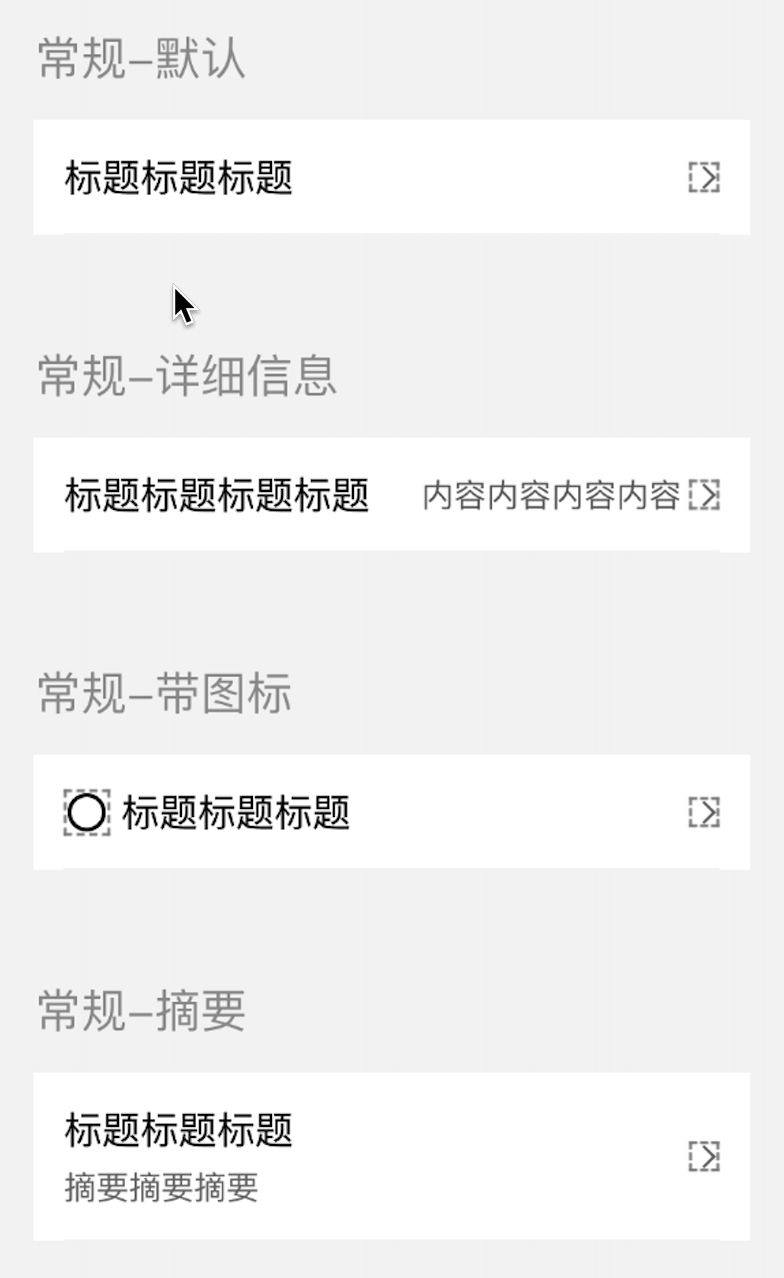
|
|
8
|
-
|
|
9
|
-
### 引入
|
|
10
|
-
在app.json或页面配置json中引入
|
|
11
|
-
```
|
|
12
|
-
"usingComponents": {
|
|
13
|
-
"xt-cell": "@xtdev/xt-miniprogram-ui/xt-cell",
|
|
14
|
-
}
|
|
15
|
-
```
|
|
16
|
-
|
|
17
|
-
## 代码演示
|
|
18
|
-
|
|
19
|
-
### 默认模式,
|
|
20
|
-
```
|
|
21
|
-
<xt-cell></xt-cell>
|
|
22
|
-
```
|
|
23
|
-
|
|
24
|
-
|
|
25
|
-
## API
|
|
26
|
-
|
|
27
|
-
#### xt-cell props
|
|
28
|
-
|
|
29
|
-
| 参数 | 说明 | 类型 | 默认值 |
|
|
30
|
-
| ----------- | ----------- | ---------- | ---------- |
|
|
31
|
-
| title | 标题 | `string` ||
|
|
32
|
-
| detailsMessage | 详细信息 | `string` ||
|
|
33
|
-
| abstract | 摘要 | `string` ||
|
|
34
|
-
| leftIcon | icon | `string` ||
|
|
35
|
-
| leftIconSize | icond大小 | `string` |40|
|
|
36
|
-
| | | ||
|
|
37
|
-
| | | ||
|
|
38
|
-
|
|
39
|
-
#### 事件
|
|
40
|
-
|
|
41
|
-
无
|
package/libs/xt-cell/index.js
DELETED
|
@@ -1,42 +0,0 @@
|
|
|
1
|
-
Component({
|
|
2
|
-
options: {
|
|
3
|
-
multipleSlots: true
|
|
4
|
-
},
|
|
5
|
-
properties: {
|
|
6
|
-
title: {
|
|
7
|
-
type: String,
|
|
8
|
-
value: ""
|
|
9
|
-
},
|
|
10
|
-
detailsMessage: {
|
|
11
|
-
type: String,
|
|
12
|
-
value: ""
|
|
13
|
-
},
|
|
14
|
-
abstract: {
|
|
15
|
-
type: String,
|
|
16
|
-
value: ""
|
|
17
|
-
},
|
|
18
|
-
leftIcon: {
|
|
19
|
-
type: String,
|
|
20
|
-
value: ""
|
|
21
|
-
},
|
|
22
|
-
leftIconSize:{
|
|
23
|
-
type: String,
|
|
24
|
-
value: "40"
|
|
25
|
-
}
|
|
26
|
-
},
|
|
27
|
-
|
|
28
|
-
/**
|
|
29
|
-
* 组件的初始数据
|
|
30
|
-
*/
|
|
31
|
-
data: {
|
|
32
|
-
},
|
|
33
|
-
attached: function () {
|
|
34
|
-
},
|
|
35
|
-
|
|
36
|
-
/**
|
|
37
|
-
* 组件的方法列表
|
|
38
|
-
*/
|
|
39
|
-
methods: {
|
|
40
|
-
|
|
41
|
-
}
|
|
42
|
-
});
|
package/libs/xt-cell/index.json
DELETED
package/libs/xt-cell/index.wxml
DELETED
|
@@ -1,12 +0,0 @@
|
|
|
1
|
-
<!--src/xt-cell/index.wxml-->
|
|
2
|
-
<view class="xt-cell">
|
|
3
|
-
<xt-icon wx:if="{{leftIcon}}" class="xt-cell-left-icon" slot="left-icon" icon="{{leftIcon}}" size="{{leftIconSize}}"></xt-icon>
|
|
4
|
-
<view class="xt-cell-main">
|
|
5
|
-
<view class="xt-cell-main-top">
|
|
6
|
-
<view class="xt-cell-title">{{title}}</view>
|
|
7
|
-
<view class="xt-cell-subhead">{{detailsMessage}}</view>
|
|
8
|
-
</view>
|
|
9
|
-
<view wx:if="{{abstract}}" class="xt-cell-main-bottom">{{abstract}}</view>
|
|
10
|
-
</view>
|
|
11
|
-
<xt-icon class="xt-cell-right-icon" slot="right-icon" icon="youjiantou" size="32"></xt-icon>
|
|
12
|
-
</view>
|
package/libs/xt-cell/index.wxss
DELETED
|
@@ -1,50 +0,0 @@
|
|
|
1
|
-
/* src/xt-cell/index.wxss */
|
|
2
|
-
.xt-cell {
|
|
3
|
-
background-color: #fff;
|
|
4
|
-
padding: 32rpx;
|
|
5
|
-
display: flex;
|
|
6
|
-
justify-content: space-between;
|
|
7
|
-
align-items: center;
|
|
8
|
-
font-family: PingFang SC-Regular, PingFang SC;
|
|
9
|
-
}
|
|
10
|
-
|
|
11
|
-
.xt-cell-title {
|
|
12
|
-
line-height: 56rpx;
|
|
13
|
-
font-size: 40rpx;
|
|
14
|
-
font-weight: 400;
|
|
15
|
-
flex-grow: 1;
|
|
16
|
-
}
|
|
17
|
-
|
|
18
|
-
.xt-cell-subhead {
|
|
19
|
-
line-height: 48rpx;
|
|
20
|
-
font-size: 34rpx;
|
|
21
|
-
font-weight: 400;
|
|
22
|
-
color: #666666;
|
|
23
|
-
flex-grow: 1;
|
|
24
|
-
text-align: right;
|
|
25
|
-
}
|
|
26
|
-
|
|
27
|
-
.xt-cell-left-icon {
|
|
28
|
-
margin-right: 24rpx;
|
|
29
|
-
}
|
|
30
|
-
|
|
31
|
-
.xt-cell-right-icon {
|
|
32
|
-
margin-left: 8rpx;
|
|
33
|
-
}
|
|
34
|
-
|
|
35
|
-
.xt-cell-main {
|
|
36
|
-
flex-grow: 1;
|
|
37
|
-
}
|
|
38
|
-
|
|
39
|
-
.xt-cell-main-top {
|
|
40
|
-
display: flex;
|
|
41
|
-
align-items: center;
|
|
42
|
-
}
|
|
43
|
-
|
|
44
|
-
.xt-cell-main-bottom {
|
|
45
|
-
line-height: 48rpx;
|
|
46
|
-
font-size: 34rpx;
|
|
47
|
-
font-weight: 400;
|
|
48
|
-
color: #666666;
|
|
49
|
-
margin-top: 8rpx;
|
|
50
|
-
}
|