@xtdev/xt-miniprogram-ui 1.0.15 → 1.0.18
This diff represents the content of publicly available package versions that have been released to one of the supported registries. The information contained in this diff is provided for informational purposes only and reflects changes between package versions as they appear in their respective public registries.
- package/README.md +14 -1
- package/libs/xt-cell/README.md +41 -0
- package/libs/xt-cell/index.js +42 -0
- package/libs/xt-cell/index.json +7 -0
- package/libs/xt-cell/index.wxml +12 -0
- package/libs/xt-cell/index.wxss +50 -0
- package/libs/xt-dialog/README.md +7 -2
- package/libs/xt-dialog/index.js +2 -2
- package/libs/xt-popover/README.md +71 -0
- package/libs/xt-popover/index.js +209 -0
- package/libs/xt-popover/index.json +6 -0
- package/libs/xt-popover/index.wxml +42 -0
- package/libs/xt-popover/index.wxss +135 -0
- package/libs/xt-tabs/README.md +98 -0
- package/libs/xt-tabs/index.js +35 -0
- package/libs/xt-tabs/index.json +5 -0
- package/libs/xt-tabs/index.wxml +10 -0
- package/libs/xt-tabs/index.wxss +76 -0
- package/libs/xt-uploader/README.md +8 -8
- package/libs/xt-uploader/index.js +66 -38
- package/libs/xt-uploader/index.wxss +3 -2
- package/package.json +1 -1
package/README.md
CHANGED
|
@@ -65,4 +65,17 @@ import组件:
|
|
|
65
65
|
| suffix | node | | 后缀图标节点 |
|
|
66
66
|
| onChange| (event) => {} | | 输入框值改变时的回调函数 | -->
|
|
67
67
|
|
|
68
|
-
# 开发
|
|
68
|
+
# 开发
|
|
69
|
+
## 安装
|
|
70
|
+
|
|
71
|
+
```
|
|
72
|
+
npm install
|
|
73
|
+
```
|
|
74
|
+
## 构建
|
|
75
|
+
|
|
76
|
+
```
|
|
77
|
+
npm run dev
|
|
78
|
+
```
|
|
79
|
+
## 预览
|
|
80
|
+
打开小程序开发工具,导入项目。
|
|
81
|
+
更改src中源文件,实时更新预览。
|
|
@@ -0,0 +1,41 @@
|
|
|
1
|
+
# cell
|
|
2
|
+
|
|
3
|
+
### 介绍
|
|
4
|
+
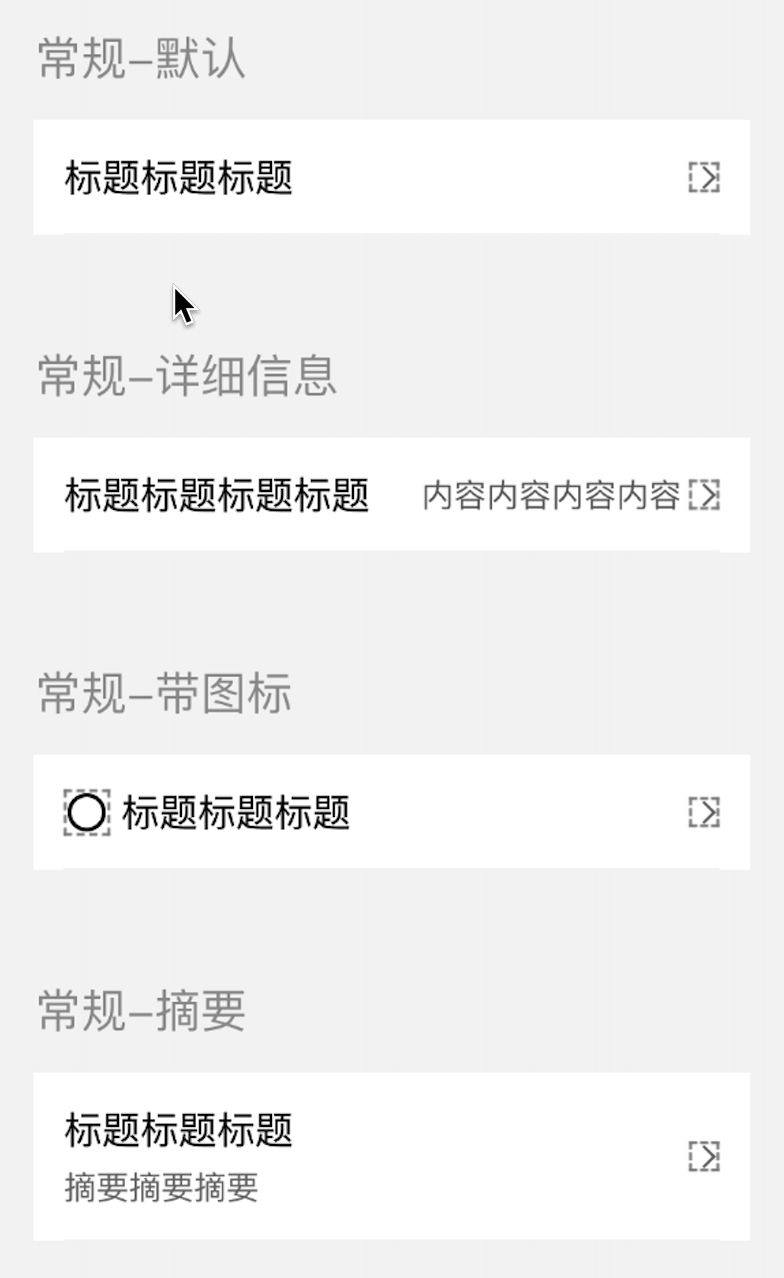
常用于数据展示
|
|
5
|
+
|
|
6
|
+
### 效果图
|
|
7
|
+
|
|
8
|
+
|
|
9
|
+
### 引入
|
|
10
|
+
在app.json或页面配置json中引入
|
|
11
|
+
```
|
|
12
|
+
"usingComponents": {
|
|
13
|
+
"xt-cell": "@xtdev/xt-miniprogram-ui/xt-cell",
|
|
14
|
+
}
|
|
15
|
+
```
|
|
16
|
+
|
|
17
|
+
## 代码演示
|
|
18
|
+
|
|
19
|
+
### 默认模式,
|
|
20
|
+
```
|
|
21
|
+
<xt-cell></xt-cell>
|
|
22
|
+
```
|
|
23
|
+
|
|
24
|
+
|
|
25
|
+
## API
|
|
26
|
+
|
|
27
|
+
#### xt-cell props
|
|
28
|
+
|
|
29
|
+
| 参数 | 说明 | 类型 | 默认值 |
|
|
30
|
+
| ----------- | ----------- | ---------- | ---------- |
|
|
31
|
+
| title | 标题 | `string` ||
|
|
32
|
+
| detailsMessage | 详细信息 | `string` ||
|
|
33
|
+
| abstract | 摘要 | `string` ||
|
|
34
|
+
| leftIcon | icon | `string` ||
|
|
35
|
+
| leftIconSize | icond大小 | `string` |40|
|
|
36
|
+
| | | ||
|
|
37
|
+
| | | ||
|
|
38
|
+
|
|
39
|
+
#### 事件
|
|
40
|
+
|
|
41
|
+
无
|
|
@@ -0,0 +1,42 @@
|
|
|
1
|
+
Component({
|
|
2
|
+
options: {
|
|
3
|
+
multipleSlots: true
|
|
4
|
+
},
|
|
5
|
+
properties: {
|
|
6
|
+
title: {
|
|
7
|
+
type: String,
|
|
8
|
+
value: ""
|
|
9
|
+
},
|
|
10
|
+
detailsMessage: {
|
|
11
|
+
type: String,
|
|
12
|
+
value: ""
|
|
13
|
+
},
|
|
14
|
+
abstract: {
|
|
15
|
+
type: String,
|
|
16
|
+
value: ""
|
|
17
|
+
},
|
|
18
|
+
leftIcon: {
|
|
19
|
+
type: String,
|
|
20
|
+
value: ""
|
|
21
|
+
},
|
|
22
|
+
leftIconSize:{
|
|
23
|
+
type: String,
|
|
24
|
+
value: "40"
|
|
25
|
+
}
|
|
26
|
+
},
|
|
27
|
+
|
|
28
|
+
/**
|
|
29
|
+
* 组件的初始数据
|
|
30
|
+
*/
|
|
31
|
+
data: {
|
|
32
|
+
},
|
|
33
|
+
attached: function () {
|
|
34
|
+
},
|
|
35
|
+
|
|
36
|
+
/**
|
|
37
|
+
* 组件的方法列表
|
|
38
|
+
*/
|
|
39
|
+
methods: {
|
|
40
|
+
|
|
41
|
+
}
|
|
42
|
+
});
|
|
@@ -0,0 +1,12 @@
|
|
|
1
|
+
<!--src/xt-cell/index.wxml-->
|
|
2
|
+
<view class="xt-cell">
|
|
3
|
+
<xt-icon wx:if="{{leftIcon}}" class="xt-cell-left-icon" slot="left-icon" icon="{{leftIcon}}" size="{{leftIconSize}}"></xt-icon>
|
|
4
|
+
<view class="xt-cell-main">
|
|
5
|
+
<view class="xt-cell-main-top">
|
|
6
|
+
<view class="xt-cell-title">{{title}}</view>
|
|
7
|
+
<view class="xt-cell-subhead">{{detailsMessage}}</view>
|
|
8
|
+
</view>
|
|
9
|
+
<view wx:if="{{abstract}}" class="xt-cell-main-bottom">{{abstract}}</view>
|
|
10
|
+
</view>
|
|
11
|
+
<xt-icon class="xt-cell-right-icon" slot="right-icon" icon="youjiantou" size="32"></xt-icon>
|
|
12
|
+
</view>
|
|
@@ -0,0 +1,50 @@
|
|
|
1
|
+
/* src/xt-cell/index.wxss */
|
|
2
|
+
.xt-cell {
|
|
3
|
+
background-color: #fff;
|
|
4
|
+
padding: 32rpx;
|
|
5
|
+
display: flex;
|
|
6
|
+
justify-content: space-between;
|
|
7
|
+
align-items: center;
|
|
8
|
+
font-family: PingFang SC-Regular, PingFang SC;
|
|
9
|
+
}
|
|
10
|
+
|
|
11
|
+
.xt-cell-title {
|
|
12
|
+
line-height: 56rpx;
|
|
13
|
+
font-size: 40rpx;
|
|
14
|
+
font-weight: 400;
|
|
15
|
+
flex-grow: 1;
|
|
16
|
+
}
|
|
17
|
+
|
|
18
|
+
.xt-cell-subhead {
|
|
19
|
+
line-height: 48rpx;
|
|
20
|
+
font-size: 34rpx;
|
|
21
|
+
font-weight: 400;
|
|
22
|
+
color: #666666;
|
|
23
|
+
flex-grow: 1;
|
|
24
|
+
text-align: right;
|
|
25
|
+
}
|
|
26
|
+
|
|
27
|
+
.xt-cell-left-icon {
|
|
28
|
+
margin-right: 24rpx;
|
|
29
|
+
}
|
|
30
|
+
|
|
31
|
+
.xt-cell-right-icon {
|
|
32
|
+
margin-left: 8rpx;
|
|
33
|
+
}
|
|
34
|
+
|
|
35
|
+
.xt-cell-main {
|
|
36
|
+
flex-grow: 1;
|
|
37
|
+
}
|
|
38
|
+
|
|
39
|
+
.xt-cell-main-top {
|
|
40
|
+
display: flex;
|
|
41
|
+
align-items: center;
|
|
42
|
+
}
|
|
43
|
+
|
|
44
|
+
.xt-cell-main-bottom {
|
|
45
|
+
line-height: 48rpx;
|
|
46
|
+
font-size: 34rpx;
|
|
47
|
+
font-weight: 400;
|
|
48
|
+
color: #666666;
|
|
49
|
+
margin-top: 8rpx;
|
|
50
|
+
}
|
package/libs/xt-dialog/README.md
CHANGED
|
@@ -73,7 +73,7 @@
|
|
|
73
73
|
<img src="https://img.tanjiu.cn/home/X2bAjz2FQc6mNewfhbNBQfHm6zTmfYzd.png" alt="输入样式" style="zoom:50%;" />
|
|
74
74
|
|
|
75
75
|
```html
|
|
76
|
-
<xt-dialog type="inputText" show="{{showInputDialog}}" title="标题标题标题" message="" placeholder="请输入内容" confirmButtonText="确定" showCancelButton="{{true}}" cancelButtonText="取消" bind:
|
|
76
|
+
<xt-dialog type="inputText" show="{{showInputDialog}}" title="标题标题标题" message="" placeholder="请输入内容" confirmButtonText="确定" showCancelButton="{{true}}" cancelButtonText="取消" bind:confirm="onInputConfirm" bind:cancel="onInputCancel"></xt-dialog>
|
|
77
77
|
```
|
|
78
78
|
|
|
79
79
|
### 5 选择器样式
|
|
@@ -81,7 +81,7 @@
|
|
|
81
81
|
<img src="https://img.tanjiu.cn/home/yKrCY5MnGFS3FcjJ6pJRz5fXmJEHrSay.png" alt="选择器样式" style="zoom:50%;" />
|
|
82
82
|
|
|
83
83
|
```html
|
|
84
|
-
<xt-dialog type="choose" show="{{true}}" title="标题标题标题" chooiceItems="{{chooiceItems}}" confirmButtonText="确定" showCancelButton="{{true}}" cancelButtonText="取消" bind:
|
|
84
|
+
<xt-dialog type="choose" show="{{true}}" title="标题标题标题" chooiceItems="{{chooiceItems}}" confirmButtonText="确定" showCancelButton="{{true}}" cancelButtonText="取消" bind:confirm="onChooseConfirm" bind:cancel="onChooseCancel"></xt-dialog>
|
|
85
85
|
```
|
|
86
86
|
|
|
87
87
|
#### 1)常规情况下的 chooiceItems 参数
|
|
@@ -142,7 +142,12 @@ chooiceItems:[
|
|
|
142
142
|
| label | 选项的文本描述 | String |
|
|
143
143
|
| remark | 选项的辅助信息 | String |
|
|
144
144
|
|
|
145
|
+
### Events
|
|
145
146
|
|
|
147
|
+
| 事件 | 说明 | 回调参数 |
|
|
148
|
+
| ------------ | ------------------ | ------------ |
|
|
149
|
+
| bind:confirm | 点击确认按钮时触发 | event.detail |
|
|
150
|
+
| bind:ccancel | 点击取消按钮时触发 | - |
|
|
146
151
|
|
|
147
152
|
|
|
148
153
|
|
package/libs/xt-dialog/index.js
CHANGED
|
@@ -103,7 +103,7 @@ Component({
|
|
|
103
103
|
}
|
|
104
104
|
// 输入样式
|
|
105
105
|
if(confirmtype == 'inputDialog'){
|
|
106
|
-
this.triggerEvent('
|
|
106
|
+
this.triggerEvent('confirm', this.data.inpVal)
|
|
107
107
|
}
|
|
108
108
|
// 选择样式
|
|
109
109
|
if(confirmtype == 'chooseDialog'){
|
|
@@ -115,7 +115,7 @@ Component({
|
|
|
115
115
|
})
|
|
116
116
|
return
|
|
117
117
|
}
|
|
118
|
-
this.triggerEvent('
|
|
118
|
+
this.triggerEvent('confirm', this.data.curChoosedItemVal)
|
|
119
119
|
}
|
|
120
120
|
},
|
|
121
121
|
// 点击取消按钮
|
|
@@ -0,0 +1,71 @@
|
|
|
1
|
+
# Popover 底部弹窗
|
|
2
|
+
|
|
3
|
+
### 介绍
|
|
4
|
+
底部操作弹窗
|
|
5
|
+
|
|
6
|
+
###效果图
|
|
7
|
+

|
|
8
|
+
|
|
9
|
+
### 引入
|
|
10
|
+
在app.json或页面配置json中引入
|
|
11
|
+
```
|
|
12
|
+
"usingComponents": {
|
|
13
|
+
"xt-popover": "@xtdev/xt-miniprogram-ui/xt-popover",
|
|
14
|
+
}
|
|
15
|
+
```
|
|
16
|
+
|
|
17
|
+
## 代码演示
|
|
18
|
+
|
|
19
|
+
### 基础用法
|
|
20
|
+
|
|
21
|
+
#### 操作样式
|
|
22
|
+
|
|
23
|
+
```
|
|
24
|
+
<xt-popover show="{{isShow1}}" itemTextKey="name" operates="{{operates}}" type="{{type}}" bind:onChooseItemClick="chooseItemClick" bind:onClose="closePopover"></xt-popover>
|
|
25
|
+
```
|
|
26
|
+
|
|
27
|
+
#### 文本样式
|
|
28
|
+
|
|
29
|
+
```
|
|
30
|
+
<xt-popover title="Popover 弹出框-文本样式" show="{{isShow2}}" type="{{type}}" textContent="{{textContent}}" bind:onClose="closePopover" bind:onConfirm="confirm"></xt-popover>
|
|
31
|
+
```
|
|
32
|
+
|
|
33
|
+
#### 选择样式-单选
|
|
34
|
+
|
|
35
|
+
```
|
|
36
|
+
<xt-popover title="Popover 弹出框-选择样式-单选" show="{{isShow3}}" type="{{type}}" itemTextKey="areaName" contrastId="areaId" bind:onConfirm="confirm" sourceData="{{sourceData}}" selectData="{{selectData}}" bind:onChooseItemClick="chooseItemClick" bind:onClose="closePopover"></xt-popover>
|
|
37
|
+
```
|
|
38
|
+
|
|
39
|
+
#### 选择样式-多选
|
|
40
|
+
|
|
41
|
+
```
|
|
42
|
+
<xt-popover title=" Popover 弹出框-选择样式-多选" show="{{isShow4}}" type="{{type}}" itemTextKey="areaName" contrastId="areaId" bind:onConfirm="confirm" sourceData="{{sourceData}}" selectData="{{selectData}}" bind:onChooseItemClick="chooseItemClick" bind:onClose="closePopover"></xt-popover>
|
|
43
|
+
```
|
|
44
|
+
|
|
45
|
+
## API
|
|
46
|
+
|
|
47
|
+
#### xt-popover props
|
|
48
|
+
|
|
49
|
+
| 参数 | 说明 | 类型 | 默认值 |
|
|
50
|
+
| ----------- | ----------- | ---------- | ------------ |
|
|
51
|
+
| type | 弹窗类型,可选值为 `operate` `text` `single` `multiple` | string | `operate`
|
|
52
|
+
| zIndx | z-index 层级 | number | `999`
|
|
53
|
+
| title | 弹窗标题 | string | `无`
|
|
54
|
+
| show | 是否展示弹窗 | boolean | `false`
|
|
55
|
+
| showCloseIcon | 是否展示弹窗关闭图标 | boolean | `true`
|
|
56
|
+
| textContent | 弹窗类型为 `text` 的文本内容 | string | `无`
|
|
57
|
+
| itemTextKey | 弹窗类型为 `operate` `single` `multiple` 的文本内容的 key | string | `无`
|
|
58
|
+
| operates | 弹窗类型为 `operate` 时的操作数组 | array | `无`
|
|
59
|
+
| sourceData | 总的数据 | array | `[]`
|
|
60
|
+
| selectData | 选中的数据 | array | `[]`
|
|
61
|
+
| contrastId | 用于是否选中数据对比的依据 | string | `无`
|
|
62
|
+
|
|
63
|
+
|
|
64
|
+
|
|
65
|
+
####Events
|
|
66
|
+
|
|
67
|
+
| 事件名 | 说明 | 回调参数 |
|
|
68
|
+
| ---------------- | ------------- | ---------------------- |
|
|
69
|
+
| bind:onChooseItemClick | 弹窗类型为 `operate` `single` `multiple` 点击没有项触发的事件 | event.detail.chooseItem 为选择的数据
|
|
70
|
+
| bind:onClose | 点击关闭icon触发的事件
|
|
71
|
+
bind:onConfirm | 弹窗类型为 `text` `multiple` 时点击确定触发的事件 | event.detail.chooseData
|
|
@@ -0,0 +1,209 @@
|
|
|
1
|
+
Component({
|
|
2
|
+
behaviors: [],
|
|
3
|
+
observers: {},
|
|
4
|
+
properties: {
|
|
5
|
+
zIndx: {
|
|
6
|
+
type: Number,
|
|
7
|
+
value: 999,
|
|
8
|
+
observer: function () {},
|
|
9
|
+
},
|
|
10
|
+
// 弹窗标题
|
|
11
|
+
title: {
|
|
12
|
+
type: String,
|
|
13
|
+
value: "",
|
|
14
|
+
observer: function () {},
|
|
15
|
+
},
|
|
16
|
+
// 弹窗类型
|
|
17
|
+
type: {
|
|
18
|
+
type: String,
|
|
19
|
+
value: "operate",
|
|
20
|
+
observer: function () {},
|
|
21
|
+
},
|
|
22
|
+
show: {
|
|
23
|
+
type: Boolean,
|
|
24
|
+
value: false,
|
|
25
|
+
observer: async function (val) {
|
|
26
|
+
if (val) {
|
|
27
|
+
const res = await this.findIntersection();
|
|
28
|
+
this.setData({
|
|
29
|
+
sourceData: res,
|
|
30
|
+
});
|
|
31
|
+
}
|
|
32
|
+
},
|
|
33
|
+
},
|
|
34
|
+
showCloseIcon: {
|
|
35
|
+
type: Boolean,
|
|
36
|
+
value: true,
|
|
37
|
+
observer: function (val) {},
|
|
38
|
+
},
|
|
39
|
+
|
|
40
|
+
// 文本内容
|
|
41
|
+
textContent: {
|
|
42
|
+
type: String,
|
|
43
|
+
value: "",
|
|
44
|
+
observer: function () {},
|
|
45
|
+
},
|
|
46
|
+
// 列表每一项标题内容
|
|
47
|
+
itemTextKey: {
|
|
48
|
+
type: String,
|
|
49
|
+
value: "",
|
|
50
|
+
observer: function () {},
|
|
51
|
+
},
|
|
52
|
+
// 操作
|
|
53
|
+
operates: {
|
|
54
|
+
type: Array,
|
|
55
|
+
value: [],
|
|
56
|
+
observer: function () {},
|
|
57
|
+
},
|
|
58
|
+
// 源数据
|
|
59
|
+
sourceData: {
|
|
60
|
+
type: Array,
|
|
61
|
+
value: [],
|
|
62
|
+
observer: function (val) {},
|
|
63
|
+
},
|
|
64
|
+
// 选中数据
|
|
65
|
+
selectData: {
|
|
66
|
+
type: Array,
|
|
67
|
+
value: [],
|
|
68
|
+
observer: async function () {},
|
|
69
|
+
},
|
|
70
|
+
// 数据对比字段,用于找出选中的数据
|
|
71
|
+
contrastId: {
|
|
72
|
+
type: String,
|
|
73
|
+
value: "",
|
|
74
|
+
observer: function () {},
|
|
75
|
+
},
|
|
76
|
+
},
|
|
77
|
+
data: {
|
|
78
|
+
sourceData: [],
|
|
79
|
+
multipleChooseData: [],
|
|
80
|
+
},
|
|
81
|
+
methods: {
|
|
82
|
+
closePopover() {
|
|
83
|
+
this.triggerEvent("onClose");
|
|
84
|
+
this.resetSourceData();
|
|
85
|
+
},
|
|
86
|
+
|
|
87
|
+
async findIntersection() {
|
|
88
|
+
const { sourceData, selectData, contrastId, type } = this.data;
|
|
89
|
+
|
|
90
|
+
for (const selectItem of selectData) {
|
|
91
|
+
for (const sourceItem of sourceData) {
|
|
92
|
+
if (type === "multiple") {
|
|
93
|
+
if (selectItem[contrastId] == sourceItem[contrastId]) {
|
|
94
|
+
sourceItem.selected = true;
|
|
95
|
+
}
|
|
96
|
+
} else {
|
|
97
|
+
if (selectItem[contrastId] == sourceItem[contrastId]) {
|
|
98
|
+
sourceItem.selected = true;
|
|
99
|
+
} else {
|
|
100
|
+
sourceItem.selected = false;
|
|
101
|
+
}
|
|
102
|
+
}
|
|
103
|
+
}
|
|
104
|
+
}
|
|
105
|
+
return this.deepClone(sourceData);
|
|
106
|
+
},
|
|
107
|
+
// 重置数据
|
|
108
|
+
async resetSourceData() {
|
|
109
|
+
const { sourceData } = this.data;
|
|
110
|
+
for (const sourceItem of sourceData) {
|
|
111
|
+
delete sourceItem.selected;
|
|
112
|
+
}
|
|
113
|
+
|
|
114
|
+
this.setData({
|
|
115
|
+
sourceData: this.deepClone(sourceData),
|
|
116
|
+
});
|
|
117
|
+
},
|
|
118
|
+
|
|
119
|
+
async formatSourceData(chooseItem) {
|
|
120
|
+
const { sourceData, contrastId } = this.data;
|
|
121
|
+
for (const sourceItem of sourceData) {
|
|
122
|
+
if (
|
|
123
|
+
chooseItem[contrastId] == sourceItem[contrastId] &&
|
|
124
|
+
sourceItem.selected
|
|
125
|
+
) {
|
|
126
|
+
sourceItem.selected = false;
|
|
127
|
+
} else if (
|
|
128
|
+
chooseItem[contrastId] == sourceItem[contrastId] &&
|
|
129
|
+
!sourceItem.selected
|
|
130
|
+
) {
|
|
131
|
+
sourceItem.selected = true;
|
|
132
|
+
}
|
|
133
|
+
}
|
|
134
|
+
return sourceData;
|
|
135
|
+
},
|
|
136
|
+
|
|
137
|
+
confirm() {
|
|
138
|
+
const { sourceData } = this.data;
|
|
139
|
+
const chooseData = sourceData.filter((item) => item.selected);
|
|
140
|
+
|
|
141
|
+
const deleteSelected = chooseData.map((item) => {
|
|
142
|
+
delete item.selected;
|
|
143
|
+
return item;
|
|
144
|
+
});
|
|
145
|
+
this.triggerEvent("onConfirm", { chooseData: deleteSelected });
|
|
146
|
+
},
|
|
147
|
+
|
|
148
|
+
async chooseItemClick(event) {
|
|
149
|
+
const chooseItem = event.currentTarget.dataset.item;
|
|
150
|
+
const { type } = this.data;
|
|
151
|
+
|
|
152
|
+
if (type == "single") {
|
|
153
|
+
delete chooseItem.selected;
|
|
154
|
+
this.triggerEvent("onChooseItemClick", { chooseItem });
|
|
155
|
+
} else if (type == "multiple") {
|
|
156
|
+
const res = await this.formatSourceData(chooseItem);
|
|
157
|
+
|
|
158
|
+
this.setData({
|
|
159
|
+
sourceData: this.deepClone(res),
|
|
160
|
+
});
|
|
161
|
+
} else {
|
|
162
|
+
this.triggerEvent("onChooseItemClick", { chooseItem });
|
|
163
|
+
}
|
|
164
|
+
},
|
|
165
|
+
|
|
166
|
+
deepClone(target, map = new Map()) {
|
|
167
|
+
if (typeof target === "object") {
|
|
168
|
+
const isArray = Array.isArray(target);
|
|
169
|
+
let cloneTarget = isArray ? [] : {};
|
|
170
|
+
|
|
171
|
+
if (map.get(target)) {
|
|
172
|
+
return map.get(target);
|
|
173
|
+
}
|
|
174
|
+
map.set(target, cloneTarget);
|
|
175
|
+
|
|
176
|
+
const keys = isArray ? undefined : Object.keys(target);
|
|
177
|
+
this.forEach(keys || target, (value, key) => {
|
|
178
|
+
if (keys) {
|
|
179
|
+
key = value;
|
|
180
|
+
}
|
|
181
|
+
cloneTarget[key] = this.deepClone(target[key], map);
|
|
182
|
+
});
|
|
183
|
+
|
|
184
|
+
return cloneTarget;
|
|
185
|
+
} else {
|
|
186
|
+
return target;
|
|
187
|
+
}
|
|
188
|
+
},
|
|
189
|
+
forEach(array, iteratee) {
|
|
190
|
+
let index = -1;
|
|
191
|
+
const length = array.length;
|
|
192
|
+
while (++index < length) {
|
|
193
|
+
iteratee(array[index], index);
|
|
194
|
+
}
|
|
195
|
+
return array;
|
|
196
|
+
},
|
|
197
|
+
},
|
|
198
|
+
pageLifetimes: {
|
|
199
|
+
// 组件所在页面的生命周期函数
|
|
200
|
+
show: function () {},
|
|
201
|
+
hide: function () {},
|
|
202
|
+
resize: function () {},
|
|
203
|
+
},
|
|
204
|
+
created: function () {},
|
|
205
|
+
attached: function () {},
|
|
206
|
+
ready: function () {},
|
|
207
|
+
moved: function () {},
|
|
208
|
+
detached: function () {},
|
|
209
|
+
});
|
|
@@ -0,0 +1,42 @@
|
|
|
1
|
+
<view wx:if="{{show}}" class="xt-popover-popup" style="z-index:{{zIndx}}">
|
|
2
|
+
<view class="xt-popover">
|
|
3
|
+
<view wx:if="{{ type == 'operate'}}" class="operate-wrapper">
|
|
4
|
+
<view class="operate-content font40rpx">
|
|
5
|
+
<block wx:for="{{operates}}" wx:for-item="operate" wx:for-index="idx" wx:key="idx">
|
|
6
|
+
<view bindtap="chooseItemClick" data-item="{{operate}}" class="flex-center operate">
|
|
7
|
+
{{operate[itemTextKey]}}
|
|
8
|
+
</view>
|
|
9
|
+
</block>
|
|
10
|
+
</view>
|
|
11
|
+
<view bindtap="closePopover" class="font40rpx flex-center cancel">取消</view>
|
|
12
|
+
</view>
|
|
13
|
+
<view wx:else class="content-wrapper">
|
|
14
|
+
<view class="header">
|
|
15
|
+
<view class="header-title">{{title}}</view>
|
|
16
|
+
<image wx:if="{{showCloseIcon}}" bindtap="closePopover" class="close-icon" src="https://img.tanjiu.cn/home/zGMfEx8iJBb6JewsFrYXNWs8R8KRwjzD.png" mode="widthFix"></image>
|
|
17
|
+
</view>
|
|
18
|
+
<scroll-view scroll-y="true" class="content font40rpx {{ type == 'single' ? 'spec-content':''}}">
|
|
19
|
+
<view class="content-info">
|
|
20
|
+
<block wx:if="{{type == 'text'}}">{{textContent}}</block>
|
|
21
|
+
<view wx:else class="list">
|
|
22
|
+
<block wx:for="{{sourceData}}" wx:for-item="listItem" wx:for-index="idx" wx:key="idx">
|
|
23
|
+
<view class="list-item" bindtap="chooseItemClick" data-item="{{listItem}}">
|
|
24
|
+
<view class="list-item-label">{{listItem[itemTextKey]}}</view>
|
|
25
|
+
<block wx:if="{{type == 'multiple'}}">
|
|
26
|
+
<xt-icon wx:if="{{listItem.selected}}" icon="tongguo" size="44" style="color:#30BF67"></xt-icon>
|
|
27
|
+
<xt-icon wx:else icon="weixuanzhong1" size="44" style="color:#999999"></xt-icon>
|
|
28
|
+
</block>
|
|
29
|
+
<block wx:if="{{type == 'single'}}">
|
|
30
|
+
<xt-icon wx:if="{{listItem.selected}}" icon="zhengque" size="44" style="color:#30BF67"></xt-icon>
|
|
31
|
+
</block>
|
|
32
|
+
</view>
|
|
33
|
+
</block>
|
|
34
|
+
</view>
|
|
35
|
+
</view>
|
|
36
|
+
</scroll-view>
|
|
37
|
+
<view wx:if="{{type == 'text' || type == 'multiple'}}" class="btn-wrapper">
|
|
38
|
+
<view bindtap="confirm" class="confirm flex-center">确定</view>
|
|
39
|
+
</view>
|
|
40
|
+
</view>
|
|
41
|
+
</view>
|
|
42
|
+
</view>
|
|
@@ -0,0 +1,135 @@
|
|
|
1
|
+
.xt-popover-popup {
|
|
2
|
+
position: fixed;
|
|
3
|
+
top: 0;
|
|
4
|
+
left: 0;
|
|
5
|
+
width: 100vw;
|
|
6
|
+
height: 100vh;
|
|
7
|
+
background: rgba(0, 0, 0, 0.7);
|
|
8
|
+
|
|
9
|
+
transition-property: opacity;
|
|
10
|
+
transition-timing-function: ease;
|
|
11
|
+
}
|
|
12
|
+
.xt-popover-popup .xt-popover {
|
|
13
|
+
position: absolute;
|
|
14
|
+
bottom: 0;
|
|
15
|
+
width: 100%;
|
|
16
|
+
background-color: #ffffff;
|
|
17
|
+
border-radius: 20rpx 20rpx 0 0;
|
|
18
|
+
overflow: hidden;
|
|
19
|
+
box-sizing: border-box;
|
|
20
|
+
|
|
21
|
+
padding-bottom: calc(constant(safe-area-inset-bottom) + 0rpx);
|
|
22
|
+
padding-bottom: calc(env(safe-area-inset-bottom) + 0rpx);
|
|
23
|
+
|
|
24
|
+
transition: all 0.5s ease-in;
|
|
25
|
+
}
|
|
26
|
+
|
|
27
|
+
.xt-popover .operate-wrapper {
|
|
28
|
+
overflow: hidden;
|
|
29
|
+
background: #ededed;
|
|
30
|
+
}
|
|
31
|
+
|
|
32
|
+
.xt-popover .operate-content {
|
|
33
|
+
background-color: #ffffff;
|
|
34
|
+
margin-bottom: 16rpx;
|
|
35
|
+
box-sizing: border-box;
|
|
36
|
+
}
|
|
37
|
+
|
|
38
|
+
.xt-popover .operate {
|
|
39
|
+
box-sizing: border-box;
|
|
40
|
+
width: 100%;
|
|
41
|
+
height: 120rpx;
|
|
42
|
+
box-shadow: inset 0px -2rpx 0rpx 0rpx #ededed;
|
|
43
|
+
}
|
|
44
|
+
|
|
45
|
+
.xt-popover .cancel {
|
|
46
|
+
width: 100%;
|
|
47
|
+
min-height: 120rpx;
|
|
48
|
+
background-color: #ffffff;
|
|
49
|
+
}
|
|
50
|
+
|
|
51
|
+
.xt-popover .flex-center {
|
|
52
|
+
display: flex;
|
|
53
|
+
align-items: center;
|
|
54
|
+
justify-content: center;
|
|
55
|
+
}
|
|
56
|
+
|
|
57
|
+
.xt-popover .font40rpx {
|
|
58
|
+
font-size: 40rpx;
|
|
59
|
+
font-weight: 400;
|
|
60
|
+
color: #000000;
|
|
61
|
+
}
|
|
62
|
+
|
|
63
|
+
.content-wrapper {
|
|
64
|
+
box-sizing: border-box;
|
|
65
|
+
background-color: #ffffff;
|
|
66
|
+
}
|
|
67
|
+
|
|
68
|
+
.xt-popover-popup .header {
|
|
69
|
+
display: flex;
|
|
70
|
+
flex-direction: row;
|
|
71
|
+
align-items: center;
|
|
72
|
+
justify-content: space-between;
|
|
73
|
+
box-sizing: border-box;
|
|
74
|
+
padding: 0 32rpx;
|
|
75
|
+
|
|
76
|
+
width: 100%;
|
|
77
|
+
height: 120rpx;
|
|
78
|
+
background: #ffffff;
|
|
79
|
+
box-shadow: inset 0px -2rpx 0rpx 0rpx #f5f5f5;
|
|
80
|
+
font-size: 40rpx;
|
|
81
|
+
font-weight: 600;
|
|
82
|
+
color: #222222;
|
|
83
|
+
}
|
|
84
|
+
|
|
85
|
+
.xt-popover-popup .content {
|
|
86
|
+
box-sizing: border-box;
|
|
87
|
+
height: 924rpx;
|
|
88
|
+
}
|
|
89
|
+
|
|
90
|
+
.xt-popover-popup .spec-content {
|
|
91
|
+
height: 1084rpx;
|
|
92
|
+
}
|
|
93
|
+
|
|
94
|
+
.xt-popover-popup .content-info {
|
|
95
|
+
box-sizing: border-box;
|
|
96
|
+
padding: 32rpx;
|
|
97
|
+
text-align: justify;
|
|
98
|
+
}
|
|
99
|
+
|
|
100
|
+
.xt-popover-popup .close-icon {
|
|
101
|
+
width: 48rpx;
|
|
102
|
+
height: 48rpx;
|
|
103
|
+
}
|
|
104
|
+
|
|
105
|
+
.xt-popover-popup .btn-wrapper {
|
|
106
|
+
box-sizing: border-box;
|
|
107
|
+
width: 100%;
|
|
108
|
+
padding: 32rpx;
|
|
109
|
+
height: 160rpx;
|
|
110
|
+
background: #ffffff;
|
|
111
|
+
box-shadow: inset 0px 2rpx 0rpx 0rpx #ededed;
|
|
112
|
+
}
|
|
113
|
+
|
|
114
|
+
.xt-popover-popup .confirm {
|
|
115
|
+
width: 100%;
|
|
116
|
+
height: 100%;
|
|
117
|
+
background: #6722ab;
|
|
118
|
+
border-radius: 120rpx;
|
|
119
|
+
|
|
120
|
+
font-size: 40rpx;
|
|
121
|
+
font-weight: 600;
|
|
122
|
+
color: #ffffff;
|
|
123
|
+
}
|
|
124
|
+
|
|
125
|
+
.xt-popover-popup .list-item {
|
|
126
|
+
display: flex;
|
|
127
|
+
flex-direction: row;
|
|
128
|
+
justify-content: space-between;
|
|
129
|
+
padding: 32rpx 0;
|
|
130
|
+
}
|
|
131
|
+
|
|
132
|
+
.xt-popover-popup .list-item-label {
|
|
133
|
+
flex: 1;
|
|
134
|
+
margin-right: 20rpx;
|
|
135
|
+
}
|
|
@@ -0,0 +1,98 @@
|
|
|
1
|
+
# Icon图标
|
|
2
|
+
|
|
3
|
+
### 介绍
|
|
4
|
+
选项卡组件,用于在不同的内容区域之间进行切换
|
|
5
|
+
|
|
6
|
+
###效果图
|
|
7
|
+

|
|
8
|
+
|
|
9
|
+
### 引入
|
|
10
|
+
在app.json或页面配置json中引入
|
|
11
|
+
```
|
|
12
|
+
"usingComponents": {
|
|
13
|
+
"xt-tabs": "@xtdev/xt-miniprogram-ui/xt-tabs",
|
|
14
|
+
}
|
|
15
|
+
```
|
|
16
|
+
|
|
17
|
+
## 代码演示
|
|
18
|
+
|
|
19
|
+
### 基础用法
|
|
20
|
+
|
|
21
|
+
```
|
|
22
|
+
<xt-tabs list="{{list}}"></xt-tabs>
|
|
23
|
+
```
|
|
24
|
+
```
|
|
25
|
+
data: {
|
|
26
|
+
list: [
|
|
27
|
+
{
|
|
28
|
+
title: '标签一'
|
|
29
|
+
},
|
|
30
|
+
{
|
|
31
|
+
title: '标签二'
|
|
32
|
+
},
|
|
33
|
+
],
|
|
34
|
+
}
|
|
35
|
+
```
|
|
36
|
+
|
|
37
|
+
### 带副标题
|
|
38
|
+
```
|
|
39
|
+
<xt-tabs list="{{subTitlelist}}"></xt-tabs>
|
|
40
|
+
```
|
|
41
|
+
```
|
|
42
|
+
data: {
|
|
43
|
+
subTitlelist: [
|
|
44
|
+
{
|
|
45
|
+
title: '标签一',
|
|
46
|
+
subTitle: '副标题'
|
|
47
|
+
},
|
|
48
|
+
{
|
|
49
|
+
title: '标签二',
|
|
50
|
+
subTitle: '副标题'
|
|
51
|
+
},
|
|
52
|
+
],
|
|
53
|
+
}
|
|
54
|
+
```
|
|
55
|
+
|
|
56
|
+
### 卡片模式
|
|
57
|
+
支持两种样式风格:line和card,默认为line样式,可以通过type属性修改样式风格
|
|
58
|
+
```
|
|
59
|
+
<xt-tabs type="card" list="{{list}}"></xt-tabs>
|
|
60
|
+
```
|
|
61
|
+
```
|
|
62
|
+
data: {
|
|
63
|
+
list: [
|
|
64
|
+
{
|
|
65
|
+
title: '标签一'
|
|
66
|
+
},
|
|
67
|
+
{
|
|
68
|
+
title: '标签二'
|
|
69
|
+
},
|
|
70
|
+
],
|
|
71
|
+
}
|
|
72
|
+
```
|
|
73
|
+
|
|
74
|
+
##API
|
|
75
|
+
|
|
76
|
+
####xt-tabs props
|
|
77
|
+
|
|
78
|
+
| 参数 | 说明 | 类型 |
|
|
79
|
+
| ----------- | ----------- | ---------- |
|
|
80
|
+
| type | 样式风格,可选值`card`、`line`,默认值为`line` | `String` |
|
|
81
|
+
| active | 当前选中标签的标识符,默认值0 | `Number` |
|
|
82
|
+
| list | 数据源数组 | `ItemProps` |
|
|
83
|
+
| cardBgColor | tab背景色 | `String` |
|
|
84
|
+
| borderColor | tab边框颜色 | `String` |
|
|
85
|
+
|
|
86
|
+
#### ItemProps
|
|
87
|
+
|
|
88
|
+
| 参数 | 说明 | 类型 |
|
|
89
|
+
| ----------- | ----------- | ----------- |
|
|
90
|
+
| title | 卡片标题 | `String` |
|
|
91
|
+
| subTitle | 卡片副标题 | `String` |
|
|
92
|
+
| titleColor | 标题颜色 | `String` |
|
|
93
|
+
|
|
94
|
+
#### Tabs Event
|
|
95
|
+
|
|
96
|
+
| 事件名 | 说明 | 参数 |
|
|
97
|
+
| ----------- | ----------- | ----------- |
|
|
98
|
+
| bind:change | tab点击事件 | 当前激活项数据以及索引 |
|
|
@@ -0,0 +1,35 @@
|
|
|
1
|
+
// path/to/custom-ul.js
|
|
2
|
+
Component({
|
|
3
|
+
properties: {
|
|
4
|
+
type: {
|
|
5
|
+
type: String,
|
|
6
|
+
value: 'line'
|
|
7
|
+
},
|
|
8
|
+
active: {
|
|
9
|
+
type: Number,
|
|
10
|
+
value: 0
|
|
11
|
+
},
|
|
12
|
+
list: {
|
|
13
|
+
type: Array,
|
|
14
|
+
},
|
|
15
|
+
cardBgColor: {
|
|
16
|
+
type: String,
|
|
17
|
+
},
|
|
18
|
+
borderColor: {
|
|
19
|
+
type: String,
|
|
20
|
+
},
|
|
21
|
+
},
|
|
22
|
+
methods: {
|
|
23
|
+
tabClick(e) {
|
|
24
|
+
const _index = e.currentTarget.dataset.index;
|
|
25
|
+
const _item = e.currentTarget.dataset.item;
|
|
26
|
+
this.setData({
|
|
27
|
+
active: _index
|
|
28
|
+
})
|
|
29
|
+
this.triggerEvent('change', {
|
|
30
|
+
..._item,
|
|
31
|
+
index: _index
|
|
32
|
+
});
|
|
33
|
+
}
|
|
34
|
+
},
|
|
35
|
+
})
|
|
@@ -0,0 +1,10 @@
|
|
|
1
|
+
<view style="background-color: {{cardBgColor}};border-color:{{type === 'card' ? borderColor : ''}}" class="{{type === 'card' ? 'xt-tabs xt-tabs-card' : 'xt-tabs'}}">
|
|
2
|
+
<view bind:tap="tabClick" data-index="{{index}}" data-item="{{item}}" wx:for="{{list}}" wx:if="{{type === 'line'}}" class="{{active === index ? 'xt-tab active' : 'xt-tab'}}">
|
|
3
|
+
<view class="title">{{item.title}}</view>
|
|
4
|
+
<view wx:if="{{item.subTitle}}" class="sub-title">{{item.subTitle}}</view>
|
|
5
|
+
<view wx:if="{{active === index}}" class="{{item.subTitle ? 'bottom-line sub-bottom-line' : 'bottom-line'}}"></view>
|
|
6
|
+
</view>
|
|
7
|
+
<view bind:tap="tabClick" data-index="{{index}}" wx:for="{{list}}" data-item="{{item}}" wx:if="{{type === 'card'}}" class="{{active === index ? 'xt-tab xt-tab-card active' : 'xt-tab xt-tab-card'}}">
|
|
8
|
+
<view style="color: {{active === index ? '' : item.titleColor}};" class="title">{{item.title}}</view>
|
|
9
|
+
</view>
|
|
10
|
+
</view>
|
|
@@ -0,0 +1,76 @@
|
|
|
1
|
+
.xt-tabs {
|
|
2
|
+
display: flex;
|
|
3
|
+
}
|
|
4
|
+
|
|
5
|
+
.xt-tabs.xt-tabs-card {
|
|
6
|
+
border-radius: 60rpx;
|
|
7
|
+
padding: 6rpx;
|
|
8
|
+
background-color: #f5f5f5;
|
|
9
|
+
border: 2rpx solid #DDDDDD;
|
|
10
|
+
}
|
|
11
|
+
|
|
12
|
+
.xt-tab {
|
|
13
|
+
display: flex;
|
|
14
|
+
flex-direction: column;
|
|
15
|
+
align-items: center;
|
|
16
|
+
font-size: 40rpx;
|
|
17
|
+
flex-grow: 1;
|
|
18
|
+
font-family: PingFang SC-Regular, PingFang SC;
|
|
19
|
+
font-weight: 400;
|
|
20
|
+
color: #000000;
|
|
21
|
+
/* width: 100%; */
|
|
22
|
+
}
|
|
23
|
+
|
|
24
|
+
.title {
|
|
25
|
+
height: 56rpx;
|
|
26
|
+
}
|
|
27
|
+
|
|
28
|
+
.sub-title {
|
|
29
|
+
height: 44rpx;
|
|
30
|
+
font-size: 32rpx;
|
|
31
|
+
font-family: PingFang SC-Regular, PingFang SC;
|
|
32
|
+
font-weight: 400;
|
|
33
|
+
color: #000000;
|
|
34
|
+
}
|
|
35
|
+
|
|
36
|
+
.active .sub-title {
|
|
37
|
+
height: 44rpx;
|
|
38
|
+
font-size: 32rpx;
|
|
39
|
+
font-family: PingFang SC-Semibold, PingFang SC;
|
|
40
|
+
font-weight: 600;
|
|
41
|
+
color: #6722AB;
|
|
42
|
+
}
|
|
43
|
+
|
|
44
|
+
.xt-tab.active {
|
|
45
|
+
font-weight: 600;
|
|
46
|
+
color: #6722AB;
|
|
47
|
+
}
|
|
48
|
+
|
|
49
|
+
.bottom-line {
|
|
50
|
+
width: 64rpx;
|
|
51
|
+
height: 8rpx;
|
|
52
|
+
background-color: #6722AB;
|
|
53
|
+
border-radius: 4rpx;
|
|
54
|
+
margin-top: 4rpx;
|
|
55
|
+
}
|
|
56
|
+
|
|
57
|
+
.bottom-line.sub-bottom-line {
|
|
58
|
+
width: 56rpx;
|
|
59
|
+
height: 6rpx;
|
|
60
|
+
}
|
|
61
|
+
|
|
62
|
+
.xt-tab-card.xt-tab {
|
|
63
|
+
height: 72rpx;
|
|
64
|
+
justify-content: center;
|
|
65
|
+
font-size: 34rpx;
|
|
66
|
+
}
|
|
67
|
+
|
|
68
|
+
.xt-tab-card.active {
|
|
69
|
+
background-color: #FFFFFF;
|
|
70
|
+
border-radius: 60rpx;
|
|
71
|
+
}
|
|
72
|
+
|
|
73
|
+
.xt-tab-card .title {
|
|
74
|
+
line-height: 72rpx;
|
|
75
|
+
height: 72rpx;
|
|
76
|
+
}
|
|
@@ -26,15 +26,15 @@
|
|
|
26
26
|
|
|
27
27
|
####xt-uploader props
|
|
28
28
|
|
|
29
|
-
| 参数
|
|
30
|
-
| ----------- | ----------- | ---------- |
|
|
31
|
-
| fileList | 图片列表,必传,受控组件 |
|
|
32
|
-
| title | 表单标题 |
|
|
33
|
-
| max |
|
|
29
|
+
| 参数 | 说明 | 类型 | 默认值
|
|
30
|
+
| ----------- | ----------- | ---------- | -------- |
|
|
31
|
+
| fileList | 图片列表,必传,受控组件 | Array<String> | `[]`
|
|
32
|
+
| title | 表单标题 | string |
|
|
33
|
+
| max | 上传最大值,每次可选照片数,默认为9 | number | 9
|
|
34
34
|
| upload-desc | 上传文案说明 | `String` |
|
|
35
|
-
| custom-upload | 是否自定义上传,true 点击盒子触发upload | `
|
|
36
|
-
| disabled | 是否禁用,禁用时不能删除和上传,可预览 | `
|
|
37
|
-
| sourceType | 照片来源 | ["album", "camera"]
|
|
35
|
+
| custom-upload | 是否自定义上传,true 点击盒子触发upload | boolean | `false`
|
|
36
|
+
| disabled | 是否禁用,禁用时不能删除和上传,可预览 | boolean | `false`
|
|
37
|
+
| sourceType | 照片来源 | `Array<String>` | ["album", "camera"]
|
|
38
38
|
| upload-api | 组件库放公网,上传接口api,必传 | {url: 'https://...',fileDir: 'microComponents'} |
|
|
39
39
|
|
|
40
40
|
####Events
|
|
@@ -24,7 +24,7 @@ Component({
|
|
|
24
24
|
// ["album", "camera"]
|
|
25
25
|
sourceType: {
|
|
26
26
|
type: Array,
|
|
27
|
-
value: ["camera"],
|
|
27
|
+
value: ["album", "camera"],
|
|
28
28
|
},
|
|
29
29
|
customUpload: {
|
|
30
30
|
type: Boolean,
|
|
@@ -70,8 +70,8 @@ Component({
|
|
|
70
70
|
});
|
|
71
71
|
},
|
|
72
72
|
// 上传成功
|
|
73
|
-
onUploadSuccess(url) {
|
|
74
|
-
this.triggerEvent("upload", { fileList:
|
|
73
|
+
onUploadSuccess(files, url) {
|
|
74
|
+
this.triggerEvent("upload", { fileList: files, url });
|
|
75
75
|
},
|
|
76
76
|
// 上传失败
|
|
77
77
|
onUploadError(errMsg) {
|
|
@@ -80,11 +80,12 @@ Component({
|
|
|
80
80
|
// 点击上传
|
|
81
81
|
startTakePhoto() {
|
|
82
82
|
const _this = this;
|
|
83
|
-
|
|
83
|
+
const { customUpload, uploadApi, max, sourceType, fileList } =
|
|
84
|
+
this.properties;
|
|
85
|
+
if (customUpload) {
|
|
84
86
|
this.triggerEvent("upload", {});
|
|
85
87
|
return;
|
|
86
88
|
}
|
|
87
|
-
const uploadApi = this.properties.uploadApi;
|
|
88
89
|
if (!uploadApi || !uploadApi.url) {
|
|
89
90
|
wx.showToast({
|
|
90
91
|
title: "请传入上传接口",
|
|
@@ -93,15 +94,39 @@ Component({
|
|
|
93
94
|
return;
|
|
94
95
|
}
|
|
95
96
|
wx.chooseMedia({
|
|
96
|
-
count:
|
|
97
|
+
count: max - fileList.length,
|
|
97
98
|
mediaType: ["image"],
|
|
98
99
|
sizeType: ["compressed"],
|
|
99
|
-
sourceType
|
|
100
|
+
sourceType,
|
|
100
101
|
success(res) {
|
|
101
102
|
console.log(res, "0000");
|
|
102
103
|
// tempFilePath可以作为img标签的src属性显示图片
|
|
103
|
-
const tempFilePaths = res.tempFiles
|
|
104
|
-
|
|
104
|
+
const tempFilePaths = res.tempFiles;
|
|
105
|
+
if (Array.isArray(tempFilePaths) && tempFilePaths.length) {
|
|
106
|
+
Promise.allSettled(
|
|
107
|
+
tempFilePaths.map((temp) =>
|
|
108
|
+
_this.uploadImage_v(temp.tempFilePath)
|
|
109
|
+
)
|
|
110
|
+
).then((uploadRes) => {
|
|
111
|
+
wx.hideLoading();
|
|
112
|
+
console.log("----uploadRes", uploadRes);
|
|
113
|
+
// 上传成功
|
|
114
|
+
const successUrls = uploadRes
|
|
115
|
+
.filter((result) => result.status == "fulfilled")
|
|
116
|
+
.map((result) => result.value);
|
|
117
|
+
if (successUrls.length) {
|
|
118
|
+
const files = fileList.concat(successUrls);
|
|
119
|
+
_this.onUploadSuccess(files, successUrls);
|
|
120
|
+
}
|
|
121
|
+
// 上传失败
|
|
122
|
+
const errorList = uploadRes.filter(
|
|
123
|
+
(result) => result.status == "rejected"
|
|
124
|
+
);
|
|
125
|
+
if (errorList.length) {
|
|
126
|
+
_this.onUploadError(errorList[0].value);
|
|
127
|
+
}
|
|
128
|
+
});
|
|
129
|
+
}
|
|
105
130
|
},
|
|
106
131
|
fail(error) {
|
|
107
132
|
_this.onUploadError(error && error.errMsg);
|
|
@@ -111,20 +136,19 @@ Component({
|
|
|
111
136
|
},
|
|
112
137
|
// 上传文件
|
|
113
138
|
uploadImage_v(filePaths) {
|
|
114
|
-
|
|
115
|
-
|
|
116
|
-
|
|
117
|
-
|
|
118
|
-
|
|
119
|
-
|
|
120
|
-
|
|
121
|
-
|
|
122
|
-
|
|
123
|
-
|
|
124
|
-
|
|
125
|
-
|
|
126
|
-
|
|
127
|
-
if (host) {
|
|
139
|
+
return new Promise((resolve, reject) => {
|
|
140
|
+
const { url, fileDir, ...header } = this.properties.uploadApi;
|
|
141
|
+
wx.showLoading("上传中");
|
|
142
|
+
utils.newHttp(
|
|
143
|
+
url,
|
|
144
|
+
"GET",
|
|
145
|
+
{
|
|
146
|
+
dir: fileDir || "microComponents",
|
|
147
|
+
},
|
|
148
|
+
header,
|
|
149
|
+
(res) => {
|
|
150
|
+
const { host, signature, accessKeyId, policy, dir } = res.data;
|
|
151
|
+
if (host) {
|
|
128
152
|
let path = filePaths;
|
|
129
153
|
let name = utils.random_string(32) + utils.get_suffix(path);
|
|
130
154
|
wx.uploadFile({
|
|
@@ -144,27 +168,31 @@ Component({
|
|
|
144
168
|
success: (res) => {
|
|
145
169
|
if (res.statusCode == 200) {
|
|
146
170
|
let url = host + dir + "/" + name;
|
|
147
|
-
|
|
148
|
-
|
|
149
|
-
|
|
150
|
-
|
|
151
|
-
|
|
152
|
-
|
|
171
|
+
resolve(url);
|
|
172
|
+
// fileList.push(url);
|
|
173
|
+
// _this.onUploadSuccess(url);
|
|
174
|
+
// wx.showToast({
|
|
175
|
+
// icon: "success",
|
|
176
|
+
// title: "上传成功",
|
|
177
|
+
// });
|
|
153
178
|
}
|
|
154
179
|
},
|
|
155
180
|
fail: (err) => {
|
|
156
|
-
|
|
157
|
-
|
|
158
|
-
|
|
159
|
-
|
|
160
|
-
|
|
181
|
+
reject(err.errMsg || "网络错误,请重试");
|
|
182
|
+
// _this.onUploadError(err.errMsg || "网络错误,请重试");
|
|
183
|
+
// wx.showToast({
|
|
184
|
+
// icon: "error",
|
|
185
|
+
// title: err.errMsg || "网络错误,请重试",
|
|
186
|
+
// });
|
|
161
187
|
},
|
|
162
188
|
});
|
|
163
|
-
|
|
164
|
-
|
|
189
|
+
} else {
|
|
190
|
+
reject(res.message);
|
|
191
|
+
// _this.onUploadError(res.message);
|
|
192
|
+
}
|
|
165
193
|
}
|
|
166
|
-
|
|
167
|
-
);
|
|
194
|
+
);
|
|
195
|
+
});
|
|
168
196
|
},
|
|
169
197
|
},
|
|
170
198
|
});
|
|
@@ -31,11 +31,12 @@
|
|
|
31
31
|
justify-content : center;
|
|
32
32
|
align-items : center;
|
|
33
33
|
background-color: #F5F5F5;
|
|
34
|
-
margin-bottom :
|
|
34
|
+
margin-bottom : 16rpx;
|
|
35
|
+
flex-shrink: 0;
|
|
35
36
|
}
|
|
36
37
|
|
|
37
38
|
.file_item:not(:last-child) {
|
|
38
|
-
margin-right:
|
|
39
|
+
margin-right: 16rpx;
|
|
39
40
|
}
|
|
40
41
|
|
|
41
42
|
.camera_icon {
|