@xtdev/xt-miniprogram-ui 1.0.12 → 1.0.15
This diff represents the content of publicly available package versions that have been released to one of the supported registries. The information contained in this diff is provided for informational purposes only and reflects changes between package versions as they appear in their respective public registries.
- package/libs/xt-button/README.md +60 -0
- package/libs/xt-button/index.js +72 -8
- package/libs/xt-button/index.wxml +24 -2
- package/libs/xt-button/index.wxss +10 -16
- package/libs/xt-icon/index.wxss +1 -0
- package/libs/xt-toast/README.md +10 -10
- package/libs/xt-toast/index.js +13 -5
- package/libs/xt-toast/index.wxml +1 -2
- package/libs/xt-toast/index.wxss +4 -3
- package/libs/xt-uploader/README.md +5 -3
- package/libs/xt-uploader/index.js +61 -41
- package/libs/xt-uploader/index.json +1 -0
- package/libs/xt-uploader/index.wxml +2 -3
- package/libs/xt-uploader/index.wxss +5 -4
- package/libs/xt-uploader/utils.js +4 -99
- package/package.json +1 -1
|
@@ -0,0 +1,60 @@
|
|
|
1
|
+
# Icon图标
|
|
2
|
+
|
|
3
|
+
### 介绍
|
|
4
|
+
按钮用于触发一个操作
|
|
5
|
+
|
|
6
|
+
###效果图
|
|
7
|
+

|
|
8
|
+
|
|
9
|
+
### 引入
|
|
10
|
+
在app.json或页面配置json中引入
|
|
11
|
+
```
|
|
12
|
+
"usingComponents": {
|
|
13
|
+
"xt-button": "@xtdev/xt-miniprogram-ui/xt-button",
|
|
14
|
+
}
|
|
15
|
+
```
|
|
16
|
+
|
|
17
|
+
## 代码演示
|
|
18
|
+
|
|
19
|
+
### 基础用法
|
|
20
|
+
|
|
21
|
+
```
|
|
22
|
+
<xt-button type="main">默认状态</xt-button>
|
|
23
|
+
```
|
|
24
|
+
|
|
25
|
+
##API
|
|
26
|
+
|
|
27
|
+
####xt-button props
|
|
28
|
+
|
|
29
|
+
| 参数 | 说明 | 类型 | 默认值 |
|
|
30
|
+
| ----------- | ----------- | ---------- | ------------ |
|
|
31
|
+
| type | 按钮类型,可选值为 `main` `secondary` | string | `secondary`
|
|
32
|
+
| size | 按钮尺寸,可选值为 `normal` `large` `small` | string | `normal`
|
|
33
|
+
| icon | 左侧图标名称 | string |
|
|
34
|
+
| disabled | 是否禁用按钮 | boolean | `false`
|
|
35
|
+
| open-type | 微信开放能力,具体支持可参考[微信官方文档](https://developers.weixin.qq.com/miniprogram/dev/component/button.html) | string |
|
|
36
|
+
| app-parameter | 打开 APP 时,向 APP 传递的参数 | string |
|
|
37
|
+
| lang | 指定返回用户信息的语言,zh_CN 简体中文,zh_TW 繁体中文,en 英文 | string | `en`
|
|
38
|
+
| session-from | 会话来源 | string |
|
|
39
|
+
| business-id | 客服消息子商户 id | number |
|
|
40
|
+
| send-message-title | 会话内消息卡片标题 | string | 当前标题
|
|
41
|
+
| send-message-path | 会话内消息卡片点击跳转小程序路径 | string | 当前分享路径
|
|
42
|
+
| send-message-img | sendMessageImg | string | 截图
|
|
43
|
+
| show-message-card | 显示会话内消息卡片 | string | `false`
|
|
44
|
+
| dataset | 按钮 dataset,open-type 为 share 时,可在 onShareAppMessage 事件的 `event.target.dataset.detail` 中看到传入的值 | any |
|
|
45
|
+
|
|
46
|
+
|
|
47
|
+
|
|
48
|
+
####Events
|
|
49
|
+
|
|
50
|
+
| 事件名 | 说明 | 回调参数 |
|
|
51
|
+
| ---------------- | ------------- | ---------------------- |
|
|
52
|
+
| bind:click | 点击按钮,且按钮状态不为加载或禁用时触发 |
|
|
53
|
+
| bind:getuserinfo | 用户点击该按钮时,会返回获取到的用户信息,
|
|
54
|
+
从返回参数的 detail 中获取到的值同 wx.getUserInfo |
|
|
55
|
+
| bind:contact | 客服消息回调 |
|
|
56
|
+
| bind:getphonenumber | 获取用户手机号回调 |
|
|
57
|
+
| bind:getrealtimephonenumber | 获取手机号实时验证回调,open-type=getRealtimePhoneNumber 时有效 |
|
|
58
|
+
| bind:error | 当使用开放能力时,发生错误的回调 |
|
|
59
|
+
| bind:opensetting | 在打开授权设置页后回调 |
|
|
60
|
+
| bind:chooseavatar | 当 open-type 的值为 chooseAvatar 时,选择头像之后的回调 |
|
package/libs/xt-button/index.js
CHANGED
|
@@ -18,15 +18,46 @@ Component({
|
|
|
18
18
|
type: String,
|
|
19
19
|
value: "secondary",
|
|
20
20
|
},
|
|
21
|
-
color: {
|
|
22
|
-
type: String,
|
|
23
|
-
},
|
|
24
21
|
disabled: {
|
|
25
22
|
type: Boolean,
|
|
26
23
|
value: false,
|
|
27
24
|
},
|
|
28
|
-
|
|
25
|
+
dataset: null,
|
|
26
|
+
openType: {
|
|
27
|
+
type: String,
|
|
28
|
+
value: "",
|
|
29
|
+
},
|
|
30
|
+
appParameter: {
|
|
31
|
+
type: String,
|
|
32
|
+
value: "",
|
|
33
|
+
},
|
|
34
|
+
showMessageCard: {
|
|
35
|
+
type: String,
|
|
36
|
+
value: "",
|
|
37
|
+
},
|
|
38
|
+
sendMessagePath: {
|
|
39
|
+
type: String,
|
|
40
|
+
value: "",
|
|
41
|
+
},
|
|
42
|
+
sendMessageTitle: {
|
|
43
|
+
type: String,
|
|
44
|
+
value: "",
|
|
45
|
+
},
|
|
46
|
+
lang: {
|
|
47
|
+
type: String,
|
|
48
|
+
value: "en",
|
|
49
|
+
},
|
|
50
|
+
appParameter: {
|
|
29
51
|
type: String,
|
|
52
|
+
value: "",
|
|
53
|
+
},
|
|
54
|
+
appParameter: {
|
|
55
|
+
type: String,
|
|
56
|
+
value: "",
|
|
57
|
+
},
|
|
58
|
+
appParameter: {
|
|
59
|
+
type: String,
|
|
60
|
+
value: "",
|
|
30
61
|
},
|
|
31
62
|
},
|
|
32
63
|
|
|
@@ -34,10 +65,15 @@ Component({
|
|
|
34
65
|
* 组件的初始数据
|
|
35
66
|
*/
|
|
36
67
|
data: {
|
|
37
|
-
|
|
38
|
-
small:
|
|
39
|
-
normal:
|
|
40
|
-
large:
|
|
68
|
+
iconSizeObj: {
|
|
69
|
+
small: 32,
|
|
70
|
+
normal: 40,
|
|
71
|
+
large: 48,
|
|
72
|
+
},
|
|
73
|
+
iconRightObj: {
|
|
74
|
+
small: 4,
|
|
75
|
+
normal: 8,
|
|
76
|
+
large: 16,
|
|
41
77
|
},
|
|
42
78
|
},
|
|
43
79
|
|
|
@@ -46,7 +82,35 @@ Component({
|
|
|
46
82
|
*/
|
|
47
83
|
methods: {
|
|
48
84
|
onClick(event) {
|
|
85
|
+
const { disabled } = this.properties;
|
|
86
|
+
if (disabled) {
|
|
87
|
+
return;
|
|
88
|
+
}
|
|
49
89
|
this.triggerEvent("click", event);
|
|
50
90
|
},
|
|
91
|
+
onGetUserInfo(event) {
|
|
92
|
+
this.triggerEvent("getuserinfo", event.detail);
|
|
93
|
+
},
|
|
94
|
+
onContact(event) {
|
|
95
|
+
this.triggerEvent("contract", event.detail);
|
|
96
|
+
},
|
|
97
|
+
onGetPhoneNumber(event) {
|
|
98
|
+
this.triggerEvent("getphonenumber", event.detail);
|
|
99
|
+
},
|
|
100
|
+
onGetrealtimephonenumber(event) {
|
|
101
|
+
this.triggerEvent("getphonenumber", event.detail);
|
|
102
|
+
},
|
|
103
|
+
onError(event) {
|
|
104
|
+
this.triggerEvent("error", event.detail);
|
|
105
|
+
},
|
|
106
|
+
onLaunchApp(event) {
|
|
107
|
+
this.triggerEvent("launchapp", event.detail);
|
|
108
|
+
},
|
|
109
|
+
onOpenSetting(event) {
|
|
110
|
+
this.triggerEvent("opensetting", event.detail);
|
|
111
|
+
},
|
|
112
|
+
onChooseAvatar(event) {
|
|
113
|
+
this.triggerEvent("chooseavatar", event.detail);
|
|
114
|
+
},
|
|
51
115
|
},
|
|
52
116
|
});
|
|
@@ -1,7 +1,29 @@
|
|
|
1
1
|
<!-- src/xt-button/index.wxml -->
|
|
2
2
|
<view class="xt-button">
|
|
3
|
-
<button
|
|
4
|
-
|
|
3
|
+
<button
|
|
4
|
+
disabled="{{ disabled }}"
|
|
5
|
+
bindtap="onClick"
|
|
6
|
+
class="xt-button-{{size}} xt-button-{{type}} {{disabled ? 'xt-button-disabled-'+type : ''}}"
|
|
7
|
+
hover-class="xt-button-{{type}}-clicked"
|
|
8
|
+
open-type="{{ openType }}"
|
|
9
|
+
business-id="{{ businessId }}"
|
|
10
|
+
session-from="{{ sessionFrom }}"
|
|
11
|
+
send-message-title="{{ sendMessageTitle }}"
|
|
12
|
+
send-message-path="{{ sendMessagePath }}"
|
|
13
|
+
send-message-img="{{ sendMessageImg }}"
|
|
14
|
+
show-message-card="{{ showMessageCard }}"
|
|
15
|
+
app-parameter="{{ appParameter }}"
|
|
16
|
+
data-detail="{{ dataset }}"
|
|
17
|
+
bindgetuserinfo="onGetUserInfo"
|
|
18
|
+
bindcontact="onContact"
|
|
19
|
+
bindgetphonenumber="onGetPhoneNumber"
|
|
20
|
+
bindgetrealtimephonenumber="getrealtimephonenumber"
|
|
21
|
+
binderror="onError"
|
|
22
|
+
bindlaunchapp="onLaunchApp"
|
|
23
|
+
bindopensetting="onOpenSetting"
|
|
24
|
+
bindchooseavatar="onChooseAvatar"
|
|
25
|
+
>
|
|
26
|
+
<xt-icon wx:if="{{icon}}" icon="{{icon}}" size="{{iconSizeObj[size]}}" style="margin-right: {{iconRightObj[size]}}rpx"></xt-icon>
|
|
5
27
|
<view>
|
|
6
28
|
<slot />
|
|
7
29
|
</view>
|
|
@@ -3,8 +3,9 @@
|
|
|
3
3
|
display : flex;
|
|
4
4
|
align-items : center;
|
|
5
5
|
justify-content: center;
|
|
6
|
+
text-align: center;
|
|
6
7
|
border-radius : 120rpx;
|
|
7
|
-
box-sizing : border-box;
|
|
8
|
+
box-sizing : border-box !important;
|
|
8
9
|
font-family : PingFang SC-Semibold,
|
|
9
10
|
PingFang SC;
|
|
10
11
|
font-weight: 800;
|
|
@@ -13,21 +14,26 @@
|
|
|
13
14
|
}
|
|
14
15
|
|
|
15
16
|
.xt-button-small {
|
|
16
|
-
padding :
|
|
17
|
+
padding : 0 32rpx;
|
|
17
18
|
font-size : 34rpx;
|
|
18
19
|
line-height: 48rpx;
|
|
20
|
+
height: 80rpx;
|
|
19
21
|
}
|
|
20
22
|
|
|
21
23
|
.xt-button-normal {
|
|
22
|
-
padding : 20rpx 48rpx;
|
|
24
|
+
/* padding : 20rpx 48rpx; */
|
|
25
|
+
padding : 0 48rpx;
|
|
23
26
|
font-size : 40rpx;
|
|
24
27
|
line-height: 56rpx;
|
|
28
|
+
height: 96rpx;
|
|
25
29
|
}
|
|
26
30
|
|
|
27
31
|
.xt-button-large {
|
|
28
|
-
padding : 24rpx 64rpx;
|
|
32
|
+
/* padding : 24rpx 64rpx; */
|
|
33
|
+
padding : 0 64rpx;
|
|
29
34
|
font-size : 48rpx;
|
|
30
35
|
line-height: 68rpx;
|
|
36
|
+
height: 116rpx;
|
|
31
37
|
}
|
|
32
38
|
|
|
33
39
|
.xt-button-main {
|
|
@@ -61,16 +67,4 @@
|
|
|
61
67
|
.xt-button-secondary-clicked {
|
|
62
68
|
background-color: #DDDDDD;
|
|
63
69
|
border : 2rpx #DDDDDD solid;
|
|
64
|
-
}
|
|
65
|
-
|
|
66
|
-
.xt-buttion-icon-small {
|
|
67
|
-
margin-right: 8rpx;
|
|
68
|
-
}
|
|
69
|
-
|
|
70
|
-
.xt-buttion-icon-normal {
|
|
71
|
-
margin-right: 16rpx;
|
|
72
|
-
}
|
|
73
|
-
|
|
74
|
-
.xt-buttion-icon-large {
|
|
75
|
-
margin-right: 16rpx;
|
|
76
70
|
}
|
package/libs/xt-icon/index.wxss
CHANGED
package/libs/xt-toast/README.md
CHANGED
|
@@ -25,7 +25,7 @@
|
|
|
25
25
|

|
|
26
26
|
|
|
27
27
|
```html
|
|
28
|
-
<xt-toast type="nomal" duration="{{5000}}" message="已确认合同"></xt-toast>
|
|
28
|
+
<xt-toast type="nomal" show="{{true}}" duration="{{5000}}" message="已确认合同"></xt-toast>
|
|
29
29
|
```
|
|
30
30
|
|
|
31
31
|
### 2)带跳转的提示
|
|
@@ -33,21 +33,21 @@
|
|
|
33
33
|
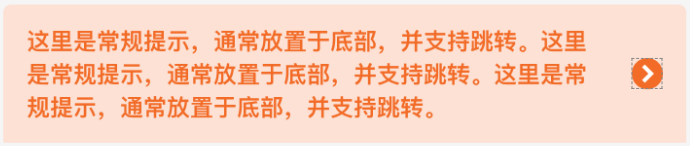
|
|
34
34
|
|
|
35
35
|
```html
|
|
36
|
-
<xt-toast type="navToast"
|
|
36
|
+
<xt-toast type="navToast" message="哈喽早上好!支持跳转指定页面。哈喽早上好!支持跳转指定页面" navUrl="/template/list/index"></xt-toast>
|
|
37
37
|
```
|
|
38
38
|
|
|
39
39
|
## API
|
|
40
40
|
|
|
41
41
|
### xt-toast props
|
|
42
42
|
|
|
43
|
-
| 参数 | 说明 | 类型
|
|
44
|
-
| ----------- | ------------------------------------------------------------ |
|
|
45
|
-
|
|
|
46
|
-
|
|
|
47
|
-
|
|
|
48
|
-
|
|
|
49
|
-
|
|
|
50
|
-
| navUrl | 指定跳转的页面路径(相对路径),仅当type为'navToast'时有用 | String
|
|
43
|
+
| 参数 | 说明 | 类型 | 默认值 |
|
|
44
|
+
| ----------- | ------------------------------------------------------------ | ------- | ------ |
|
|
45
|
+
| show | 用于触发组件显示,仅当type为'nomal'时有用 | Boolean | false |
|
|
46
|
+
| type | 指定组件的类型,可选值为`nomal` `navToast` | String | nomal |
|
|
47
|
+
| duration | 展示时长(ms),仅当type为'nomal'时有用 | Number | 5000 |
|
|
48
|
+
| message | 内容 | String | '' |
|
|
49
|
+
| navDuration | 展示时长(ms),仅当type为'navToast'时有用,(若不设置,则永远不会消失,直到用户点击跳转到指定页面) | Number | null |
|
|
50
|
+
| navUrl | 指定跳转的页面路径(相对路径),仅当type为'navToast'时有用 | String | null |
|
|
51
51
|
|
|
52
52
|
|
|
53
53
|
|
package/libs/xt-toast/index.js
CHANGED
|
@@ -4,6 +4,10 @@ Component({
|
|
|
4
4
|
* 组件的属性列表
|
|
5
5
|
*/
|
|
6
6
|
properties: {
|
|
7
|
+
show:{
|
|
8
|
+
type:Boolean,
|
|
9
|
+
value:false
|
|
10
|
+
},
|
|
7
11
|
type:{
|
|
8
12
|
type:String,
|
|
9
13
|
value:'nomal'
|
|
@@ -20,10 +24,6 @@ Component({
|
|
|
20
24
|
type:Number,
|
|
21
25
|
value:null
|
|
22
26
|
},
|
|
23
|
-
top:{
|
|
24
|
-
type:Number,
|
|
25
|
-
value:60
|
|
26
|
-
},
|
|
27
27
|
navUrl:{
|
|
28
28
|
type:String,
|
|
29
29
|
value:null
|
|
@@ -37,9 +37,16 @@ Component({
|
|
|
37
37
|
// 带跳转的toast是否允许自动消失
|
|
38
38
|
dispear: false
|
|
39
39
|
},
|
|
40
|
+
observers:{
|
|
41
|
+
show(val){
|
|
42
|
+
if(val){
|
|
43
|
+
this.showToast();
|
|
44
|
+
}
|
|
45
|
+
}
|
|
46
|
+
},
|
|
40
47
|
lifetimes:{
|
|
41
48
|
attached(){
|
|
42
|
-
if(this.properties.type == 'nomal') this.showToast();
|
|
49
|
+
// if(this.properties.type == 'nomal') this.showToast();
|
|
43
50
|
if(this.properties.type == 'navToast') this.showNavToast();
|
|
44
51
|
}
|
|
45
52
|
},
|
|
@@ -49,6 +56,7 @@ Component({
|
|
|
49
56
|
methods: {
|
|
50
57
|
// 常规toast
|
|
51
58
|
showToast(){
|
|
59
|
+
console.log('查看变量',this.properties.show);
|
|
52
60
|
wx.showToast({
|
|
53
61
|
title: this.properties.message,
|
|
54
62
|
duration: this.properties.duration,
|
package/libs/xt-toast/index.wxml
CHANGED
|
@@ -1,7 +1,6 @@
|
|
|
1
1
|
<!--src/xt-toast/index.wxml-->
|
|
2
2
|
<!-- 带跳转的提示 -->
|
|
3
|
-
<view class="nav_toast_box" wx:if="{{type === 'navToast'}}" style="
|
|
3
|
+
<view class="nav_toast_box" wx:if="{{type === 'navToast'}}" style="{{dispear?'opacity: 0;':''}}" catchtap="navTo">
|
|
4
4
|
<view class="nav_toast_text">{{message}}</view>
|
|
5
|
-
<!-- <image class="nav_icon" src="https://img.tanjiu.cn/home/5cQHhXZTCsjaXxtJR6SBi4zHHAFAw5ZN.png"></image> -->
|
|
6
5
|
<xt-icon class="nav_icon" slot="right-icon" icon="arrow" size="32"></xt-icon>
|
|
7
6
|
</view>
|
package/libs/xt-toast/index.wxss
CHANGED
|
@@ -1,8 +1,9 @@
|
|
|
1
1
|
/* src/xt-toast/index.wxss */
|
|
2
2
|
.nav_toast_box{
|
|
3
|
-
position: absolute;
|
|
4
|
-
left: 50%;
|
|
5
|
-
margin-left: -351rpx;
|
|
3
|
+
/* position: absolute; */
|
|
4
|
+
/* left: 50%; */
|
|
5
|
+
/* margin-left: -351rpx; */
|
|
6
|
+
width: 100%;
|
|
6
7
|
display: flex;
|
|
7
8
|
align-items: center;
|
|
8
9
|
justify-content: space-between;
|
|
@@ -24,17 +24,18 @@
|
|
|
24
24
|
|
|
25
25
|
##API
|
|
26
26
|
|
|
27
|
-
####xt-
|
|
27
|
+
####xt-uploader props
|
|
28
28
|
|
|
29
29
|
| 参数 | 说明 | 类型 |
|
|
30
30
|
| ----------- | ----------- | ---------- |
|
|
31
31
|
| fileList | 图片列表,必传,受控组件 | `Array<String>` |
|
|
32
32
|
| title | 表单标题 | `String` |
|
|
33
33
|
| max | 上传最大值,默认为9 | `Number` |
|
|
34
|
-
|
|
|
35
|
-
|
|
|
34
|
+
| upload-desc | 上传文案说明 | `String` |
|
|
35
|
+
| custom-upload | 是否自定义上传,true 点击盒子触发upload | `Boolean` |
|
|
36
36
|
| disabled | 是否禁用,禁用时不能删除和上传,可预览 | `Boolean` |
|
|
37
37
|
| sourceType | 照片来源 | ["album", "camera"] |
|
|
38
|
+
| upload-api | 组件库放公网,上传接口api,必传 | {url: 'https://...',fileDir: 'microComponents'} |
|
|
38
39
|
|
|
39
40
|
####Events
|
|
40
41
|
|
|
@@ -42,3 +43,4 @@
|
|
|
42
43
|
| ---------------- | ------------- | ---------------------- |
|
|
43
44
|
| bind:upload | 上传成功后触发,如果customUpload为true则点击上传及触发 | fileList:图片列表, url:当前上传图片地址 |
|
|
44
45
|
| bind:delete | 删除成功后触发 | fileList:图片列表, url:当前删除图片地址,index:当前删除图片索引 |
|
|
46
|
+
| bind:error | 上传失败后触发 | errMsg: 失败原因 |
|
|
@@ -1,5 +1,5 @@
|
|
|
1
1
|
// src/xt-uploader/index.js
|
|
2
|
-
|
|
2
|
+
const utils = require("./utils");
|
|
3
3
|
Component({
|
|
4
4
|
/**
|
|
5
5
|
* 组件的属性列表
|
|
@@ -34,6 +34,10 @@ Component({
|
|
|
34
34
|
type: Boolean,
|
|
35
35
|
value: false,
|
|
36
36
|
},
|
|
37
|
+
uploadApi: {
|
|
38
|
+
type: Object,
|
|
39
|
+
value: {},
|
|
40
|
+
},
|
|
37
41
|
},
|
|
38
42
|
|
|
39
43
|
/**
|
|
@@ -69,6 +73,10 @@ Component({
|
|
|
69
73
|
onUploadSuccess(url) {
|
|
70
74
|
this.triggerEvent("upload", { fileList: this.properties.fileList, url });
|
|
71
75
|
},
|
|
76
|
+
// 上传失败
|
|
77
|
+
onUploadError(errMsg) {
|
|
78
|
+
this.triggerEvent("error", { errMsg });
|
|
79
|
+
},
|
|
72
80
|
// 点击上传
|
|
73
81
|
startTakePhoto() {
|
|
74
82
|
const _this = this;
|
|
@@ -76,6 +84,14 @@ Component({
|
|
|
76
84
|
this.triggerEvent("upload", {});
|
|
77
85
|
return;
|
|
78
86
|
}
|
|
87
|
+
const uploadApi = this.properties.uploadApi;
|
|
88
|
+
if (!uploadApi || !uploadApi.url) {
|
|
89
|
+
wx.showToast({
|
|
90
|
+
title: "请传入上传接口",
|
|
91
|
+
icon: "error",
|
|
92
|
+
});
|
|
93
|
+
return;
|
|
94
|
+
}
|
|
79
95
|
wx.chooseMedia({
|
|
80
96
|
count: 1,
|
|
81
97
|
mediaType: ["image"],
|
|
@@ -88,61 +104,65 @@ Component({
|
|
|
88
104
|
_this.uploadImage_v(tempFilePaths);
|
|
89
105
|
},
|
|
90
106
|
fail(error) {
|
|
91
|
-
|
|
92
|
-
|
|
93
|
-
icon: "none",
|
|
94
|
-
});
|
|
107
|
+
_this.onUploadError(error && error.errMsg);
|
|
108
|
+
console.log("-----选取失败", error && error.errMsg);
|
|
95
109
|
},
|
|
96
110
|
});
|
|
97
111
|
},
|
|
98
112
|
// 上传文件
|
|
99
113
|
uploadImage_v(filePaths) {
|
|
114
|
+
const { url, fileDir, ...header } = this.properties.uploadApi;
|
|
100
115
|
let _this = this;
|
|
101
116
|
const { fileList } = _this.properties;
|
|
102
117
|
wx.showLoading("图片上传中");
|
|
103
118
|
utils.newHttp(
|
|
104
|
-
|
|
119
|
+
url,
|
|
105
120
|
"GET",
|
|
106
121
|
{
|
|
107
|
-
dir: "microComponents",
|
|
122
|
+
dir: fileDir || "microComponents",
|
|
108
123
|
},
|
|
124
|
+
header,
|
|
109
125
|
(res) => {
|
|
110
126
|
const { host, signature, accessKeyId, policy, dir } = res.data;
|
|
111
|
-
|
|
112
|
-
|
|
113
|
-
|
|
114
|
-
|
|
115
|
-
|
|
116
|
-
|
|
117
|
-
|
|
118
|
-
|
|
119
|
-
|
|
120
|
-
|
|
121
|
-
|
|
122
|
-
|
|
123
|
-
|
|
124
|
-
|
|
125
|
-
|
|
126
|
-
|
|
127
|
-
|
|
128
|
-
|
|
129
|
-
|
|
130
|
-
|
|
131
|
-
|
|
132
|
-
|
|
133
|
-
|
|
134
|
-
|
|
135
|
-
|
|
136
|
-
|
|
137
|
-
|
|
138
|
-
|
|
139
|
-
|
|
140
|
-
|
|
141
|
-
|
|
142
|
-
|
|
127
|
+
if (host) {
|
|
128
|
+
let path = filePaths;
|
|
129
|
+
let name = utils.random_string(32) + utils.get_suffix(path);
|
|
130
|
+
wx.uploadFile({
|
|
131
|
+
url: host,
|
|
132
|
+
filePath: filePaths,
|
|
133
|
+
name: "file",
|
|
134
|
+
formData: {
|
|
135
|
+
key: dir + "/" + name,
|
|
136
|
+
policy,
|
|
137
|
+
success_action_status: "200",
|
|
138
|
+
OSSAccessKeyId: accessKeyId,
|
|
139
|
+
signature,
|
|
140
|
+
},
|
|
141
|
+
header: {
|
|
142
|
+
"Content-Type": "multipart/form-data",
|
|
143
|
+
},
|
|
144
|
+
success: (res) => {
|
|
145
|
+
if (res.statusCode == 200) {
|
|
146
|
+
let url = host + dir + "/" + name;
|
|
147
|
+
fileList.push(url);
|
|
148
|
+
_this.onUploadSuccess(url);
|
|
149
|
+
wx.showToast({
|
|
150
|
+
icon: "success",
|
|
151
|
+
title: "上传成功",
|
|
152
|
+
});
|
|
153
|
+
}
|
|
154
|
+
},
|
|
155
|
+
fail: (err) => {
|
|
156
|
+
_this.onUploadError(err.errMsg || "网络错误,请重试");
|
|
157
|
+
wx.showToast({
|
|
158
|
+
icon: "error",
|
|
159
|
+
title: err.errMsg || "网络错误,请重试",
|
|
160
|
+
});
|
|
161
|
+
},
|
|
143
162
|
});
|
|
144
|
-
|
|
145
|
-
|
|
163
|
+
} else {
|
|
164
|
+
_this.onUploadError(res.message);
|
|
165
|
+
}
|
|
146
166
|
}
|
|
147
167
|
);
|
|
148
168
|
},
|
|
@@ -4,9 +4,8 @@
|
|
|
4
4
|
<view class="file_box">
|
|
5
5
|
<view wx:for="{{fileList}}" wx:key="index" class="file_item">
|
|
6
6
|
<image class="file_img" src="{{item}}" mode="aspectFit" bindtap="onPreviewImage" data-url="{{item}}" data-index="{{index}}" />
|
|
7
|
-
|
|
8
|
-
|
|
9
|
-
</view>
|
|
7
|
+
<!-- 删除 -->
|
|
8
|
+
<xt-icon icon="shanchu" size="48" class="close_box" bindtap="onDelete" data-url="{{item}}" data-index="{{index}}" wx:if="{{!disabled}}"></xt-icon>
|
|
10
9
|
</view>
|
|
11
10
|
<view class="file_item" wx:if="{{!disabled && fileList.length<max}}" bindtap="startTakePhoto">
|
|
12
11
|
<image src="https://img.tanjiu.cn/home/DDDsrH7PpNhneQsXGFmGGPcSM3QYXG8N.png" class="camera_icon" />
|
|
@@ -1,108 +1,13 @@
|
|
|
1
1
|
// import md5 from "md5";
|
|
2
2
|
|
|
3
|
-
function
|
|
4
|
-
var timestamp = Date.parse(new Date());
|
|
5
|
-
var date = new Date(timestamp);
|
|
6
|
-
//获取年份
|
|
7
|
-
var Y = date.getFullYear();
|
|
8
|
-
//获取月份
|
|
9
|
-
var M =
|
|
10
|
-
date.getMonth() + 1 < 10
|
|
11
|
-
? "0" + (date.getMonth() + 1)
|
|
12
|
-
: date.getMonth() + 1;
|
|
13
|
-
//获取当日日期
|
|
14
|
-
var D = date.getDate() < 10 ? "0" + date.getDate() : date.getDate();
|
|
15
|
-
var currentDate = Y + "-" + M + "-" + D;
|
|
16
|
-
|
|
17
|
-
//后端验证授权的字符串
|
|
18
|
-
var pass =
|
|
19
|
-
"MIIBOjANBgkqhkiG9w0BAQEFAAOCAScAMIIBIgKCARkA2a6BXaPViAbEvAPn3qtB" +
|
|
20
|
-
currentDate;
|
|
21
|
-
|
|
22
|
-
//change - gml 接口url拼接
|
|
23
|
-
var full_url = "https://gateway.tanjiu.cn" + url;
|
|
24
|
-
// 请求的唯一性
|
|
25
|
-
let onlySign = url + JSON.stringify(params);
|
|
26
|
-
if (getApp().hasQKey(onlySign)) {
|
|
27
|
-
return;
|
|
28
|
-
}
|
|
29
|
-
wx.request({
|
|
30
|
-
url: full_url,
|
|
31
|
-
method: method,
|
|
32
|
-
header: {
|
|
33
|
-
"content-type": "application/json",
|
|
34
|
-
// Authorization: md5(pass),
|
|
35
|
-
"ls-client-id": "TANJIUCLOUD_BUSINESS",
|
|
36
|
-
token: "openApi",
|
|
37
|
-
// xtoken: getApp().globalData?.xtoken,
|
|
38
|
-
"x-login-session": JSON.stringify({ userId: "2022199" }),
|
|
39
|
-
// xtoken: 'eyJ0eXAiOiJKV1QiLCJhbGciOiJIUzI1NiJ9.eyJsb2dpblR5cGUiOiJsb2dpbiIsImxvZ2luSWQiOjc0NDkwMjM1NjQ2MjMzODA0OCwicm5TdHIiOiJoT3ZoUVVxMjM3SUtDelpPN0dXb09jdnA2ZGdIV1g2byIsImF1dGhUb2tlbkJvIjp7Imd1aWQiOjc0NDkwMjM1NjQ2MjMzODA0OCwicGxhdGZvcm1Vc2VySWQiOjE1NTYwODA3ODE0Mjg1NzIxNiwiYXBwQ29kZSI6IlRBTl9TQUxFU01BTiIsInBsYXRmb3JtQ2xpZW50VHlwZSI6IldFQ0hBVF9BUFBMRVRTIiwicGxhdGZvcm1DbGllbnRDb2RlIjoiV0VDSEFUX0FQUExFVFNfVEFOX1NBTEVTTUFOIiwid2VhdmVyVXNlck5hbWUiOiJlbnRlcnByaXNlX3dlY2hhdF8zNl94dXp1byIsInRlbmFudElkIjoxLCJlbnYiOiJ0ZXN0In0sIm9wZW5pZCI6Im9mODFMNU9jVGduMHNnRDBKQlpTZFpRcnZ4ZlEiLCJ1bmlvbmlkIjoib3BVLUQwb1E4RjBQUTY0NnpSREpIRG1sMzJMQSIsImlhdCI6MTY3NjQ1MzQ1OTE3NiwiZXhwIjoxNjc3MDU4MjU5MTc2LCJ0b2tlbklkIjoiZmQ0M2U0MjIxYjJjNDVkN2EyYWJhNTdkZTNhNGY1NmEifQ.weXKWnX7sWmL7f1s2a2MuOKZd5Yw8elzrG824JY0R-4',
|
|
40
|
-
...header,
|
|
41
|
-
},
|
|
42
|
-
data: params,
|
|
43
|
-
success(res) {
|
|
44
|
-
if (res.data) {
|
|
45
|
-
var result = {
|
|
46
|
-
data: res.data.data,
|
|
47
|
-
message: res.data.message || res.data.errMsg,
|
|
48
|
-
code:
|
|
49
|
-
res.data.code ||
|
|
50
|
-
res.data.errCode ||
|
|
51
|
-
(res.data.code === 0 || res.data.errCode == 0 ? 0 : null),
|
|
52
|
-
};
|
|
53
|
-
callBack(result);
|
|
54
|
-
}
|
|
55
|
-
},
|
|
56
|
-
fail(err) {
|
|
57
|
-
var result = {
|
|
58
|
-
success: false,
|
|
59
|
-
data: {},
|
|
60
|
-
message: err.errMsg || err.msg || err.message,
|
|
61
|
-
};
|
|
62
|
-
wx.showToast({
|
|
63
|
-
title: esult.message || "请检查网络是否通畅,稍后重试!",
|
|
64
|
-
icon: "none",
|
|
65
|
-
});
|
|
66
|
-
console.log("err = ", err);
|
|
67
|
-
callBack(result);
|
|
68
|
-
},
|
|
69
|
-
complete() {
|
|
70
|
-
getApp().delQKey(onlySign);
|
|
71
|
-
},
|
|
72
|
-
});
|
|
73
|
-
getApp().createQKey(onlySign);
|
|
74
|
-
}
|
|
75
|
-
|
|
76
|
-
function newhttpRequest(url, method, params, callBack, header) {
|
|
77
|
-
var timestamp = Date.parse(new Date());
|
|
78
|
-
var date = new Date(timestamp);
|
|
79
|
-
//获取年份
|
|
80
|
-
var Y = date.getFullYear();
|
|
81
|
-
//获取月份
|
|
82
|
-
var M =
|
|
83
|
-
date.getMonth() + 1 < 10
|
|
84
|
-
? "0" + (date.getMonth() + 1)
|
|
85
|
-
: date.getMonth() + 1;
|
|
86
|
-
//获取当日日期
|
|
87
|
-
var D = date.getDate() < 10 ? "0" + date.getDate() : date.getDate();
|
|
88
|
-
var currentDate = Y + "-" + M + "-" + D;
|
|
89
|
-
|
|
90
|
-
//后端验证授权的字符串
|
|
91
|
-
var pass =
|
|
92
|
-
"MIIBOjANBgkqhkiG9w0BAQEFAAOCAScAMIIBIgKCARkA2a6BXaPViAbEvAPn3qtB" +
|
|
93
|
-
currentDate;
|
|
94
|
-
|
|
95
|
-
//change - gml 接口url拼接
|
|
96
|
-
var full_url = "https://gateway.tanjiu.cn" + url;
|
|
3
|
+
function newhttpRequest(url, method, params, header, callBack) {
|
|
97
4
|
wx.request({
|
|
98
|
-
url
|
|
5
|
+
url,
|
|
99
6
|
method: method,
|
|
100
7
|
header: {
|
|
101
8
|
"content-type": "application/json",
|
|
102
9
|
// Authorization: md5(pass),
|
|
103
|
-
"ls-client-id": "TANJIUCLOUD_BUSINESS",
|
|
104
10
|
token: "openApi",
|
|
105
|
-
"x-login-session": JSON.stringify({ userId: "2022199" }),
|
|
106
11
|
...header,
|
|
107
12
|
},
|
|
108
13
|
data: params,
|
|
@@ -126,7 +31,7 @@ function newhttpRequest(url, method, params, callBack, header) {
|
|
|
126
31
|
message: err.errMsg || err.msg,
|
|
127
32
|
};
|
|
128
33
|
wx.showToast({
|
|
129
|
-
title:
|
|
34
|
+
title: result.message || "请检查网络是否通畅,稍后重试!",
|
|
130
35
|
icon: "none",
|
|
131
36
|
});
|
|
132
37
|
console.log("err = ", err);
|
|
@@ -157,7 +62,7 @@ function get_suffix(filename) {
|
|
|
157
62
|
return suffix;
|
|
158
63
|
}
|
|
159
64
|
|
|
160
|
-
|
|
65
|
+
module.exports = {
|
|
161
66
|
newHttp: newhttpRequest,
|
|
162
67
|
random_string,
|
|
163
68
|
get_suffix,
|