@xtdev/xt-miniprogram-ui 1.0.12 → 1.0.14
This diff represents the content of publicly available package versions that have been released to one of the supported registries. The information contained in this diff is provided for informational purposes only and reflects changes between package versions as they appear in their respective public registries.
- package/libs/xt-button/README.md +60 -0
- package/libs/xt-button/index.js +72 -8
- package/libs/xt-button/index.wxml +24 -2
- package/libs/xt-button/index.wxss +10 -16
- package/libs/xt-dialog/README.md +7 -2
- package/libs/xt-dialog/index.js +2 -2
- package/libs/xt-icon/index.wxss +1 -0
- package/libs/xt-toast/README.md +10 -10
- package/libs/xt-toast/index.js +13 -5
- package/libs/xt-toast/index.wxml +1 -2
- package/libs/xt-toast/index.wxss +4 -3
- package/libs/xt-uploader/README.md +13 -11
- package/libs/xt-uploader/index.js +108 -60
- package/libs/xt-uploader/index.json +1 -0
- package/libs/xt-uploader/index.wxml +2 -3
- package/libs/xt-uploader/index.wxss +8 -6
- package/libs/xt-uploader/utils.js +4 -99
- package/package.json +1 -1
|
@@ -0,0 +1,60 @@
|
|
|
1
|
+
# Icon图标
|
|
2
|
+
|
|
3
|
+
### 介绍
|
|
4
|
+
按钮用于触发一个操作
|
|
5
|
+
|
|
6
|
+
###效果图
|
|
7
|
+

|
|
8
|
+
|
|
9
|
+
### 引入
|
|
10
|
+
在app.json或页面配置json中引入
|
|
11
|
+
```
|
|
12
|
+
"usingComponents": {
|
|
13
|
+
"xt-button": "@xtdev/xt-miniprogram-ui/xt-button",
|
|
14
|
+
}
|
|
15
|
+
```
|
|
16
|
+
|
|
17
|
+
## 代码演示
|
|
18
|
+
|
|
19
|
+
### 基础用法
|
|
20
|
+
|
|
21
|
+
```
|
|
22
|
+
<xt-button type="main">默认状态</xt-button>
|
|
23
|
+
```
|
|
24
|
+
|
|
25
|
+
##API
|
|
26
|
+
|
|
27
|
+
####xt-button props
|
|
28
|
+
|
|
29
|
+
| 参数 | 说明 | 类型 | 默认值 |
|
|
30
|
+
| ----------- | ----------- | ---------- | ------------ |
|
|
31
|
+
| type | 按钮类型,可选值为 `main` `secondary` | string | `secondary`
|
|
32
|
+
| size | 按钮尺寸,可选值为 `normal` `large` `small` | string | `normal`
|
|
33
|
+
| icon | 左侧图标名称 | string |
|
|
34
|
+
| disabled | 是否禁用按钮 | boolean | `false`
|
|
35
|
+
| open-type | 微信开放能力,具体支持可参考[微信官方文档](https://developers.weixin.qq.com/miniprogram/dev/component/button.html) | string |
|
|
36
|
+
| app-parameter | 打开 APP 时,向 APP 传递的参数 | string |
|
|
37
|
+
| lang | 指定返回用户信息的语言,zh_CN 简体中文,zh_TW 繁体中文,en 英文 | string | `en`
|
|
38
|
+
| session-from | 会话来源 | string |
|
|
39
|
+
| business-id | 客服消息子商户 id | number |
|
|
40
|
+
| send-message-title | 会话内消息卡片标题 | string | 当前标题
|
|
41
|
+
| send-message-path | 会话内消息卡片点击跳转小程序路径 | string | 当前分享路径
|
|
42
|
+
| send-message-img | sendMessageImg | string | 截图
|
|
43
|
+
| show-message-card | 显示会话内消息卡片 | string | `false`
|
|
44
|
+
| dataset | 按钮 dataset,open-type 为 share 时,可在 onShareAppMessage 事件的 `event.target.dataset.detail` 中看到传入的值 | any |
|
|
45
|
+
|
|
46
|
+
|
|
47
|
+
|
|
48
|
+
####Events
|
|
49
|
+
|
|
50
|
+
| 事件名 | 说明 | 回调参数 |
|
|
51
|
+
| ---------------- | ------------- | ---------------------- |
|
|
52
|
+
| bind:click | 点击按钮,且按钮状态不为加载或禁用时触发 |
|
|
53
|
+
| bind:getuserinfo | 用户点击该按钮时,会返回获取到的用户信息,
|
|
54
|
+
从返回参数的 detail 中获取到的值同 wx.getUserInfo |
|
|
55
|
+
| bind:contact | 客服消息回调 |
|
|
56
|
+
| bind:getphonenumber | 获取用户手机号回调 |
|
|
57
|
+
| bind:getrealtimephonenumber | 获取手机号实时验证回调,open-type=getRealtimePhoneNumber 时有效 |
|
|
58
|
+
| bind:error | 当使用开放能力时,发生错误的回调 |
|
|
59
|
+
| bind:opensetting | 在打开授权设置页后回调 |
|
|
60
|
+
| bind:chooseavatar | 当 open-type 的值为 chooseAvatar 时,选择头像之后的回调 |
|
package/libs/xt-button/index.js
CHANGED
|
@@ -18,15 +18,46 @@ Component({
|
|
|
18
18
|
type: String,
|
|
19
19
|
value: "secondary",
|
|
20
20
|
},
|
|
21
|
-
color: {
|
|
22
|
-
type: String,
|
|
23
|
-
},
|
|
24
21
|
disabled: {
|
|
25
22
|
type: Boolean,
|
|
26
23
|
value: false,
|
|
27
24
|
},
|
|
28
|
-
|
|
25
|
+
dataset: null,
|
|
26
|
+
openType: {
|
|
27
|
+
type: String,
|
|
28
|
+
value: "",
|
|
29
|
+
},
|
|
30
|
+
appParameter: {
|
|
31
|
+
type: String,
|
|
32
|
+
value: "",
|
|
33
|
+
},
|
|
34
|
+
showMessageCard: {
|
|
35
|
+
type: String,
|
|
36
|
+
value: "",
|
|
37
|
+
},
|
|
38
|
+
sendMessagePath: {
|
|
39
|
+
type: String,
|
|
40
|
+
value: "",
|
|
41
|
+
},
|
|
42
|
+
sendMessageTitle: {
|
|
43
|
+
type: String,
|
|
44
|
+
value: "",
|
|
45
|
+
},
|
|
46
|
+
lang: {
|
|
47
|
+
type: String,
|
|
48
|
+
value: "en",
|
|
49
|
+
},
|
|
50
|
+
appParameter: {
|
|
29
51
|
type: String,
|
|
52
|
+
value: "",
|
|
53
|
+
},
|
|
54
|
+
appParameter: {
|
|
55
|
+
type: String,
|
|
56
|
+
value: "",
|
|
57
|
+
},
|
|
58
|
+
appParameter: {
|
|
59
|
+
type: String,
|
|
60
|
+
value: "",
|
|
30
61
|
},
|
|
31
62
|
},
|
|
32
63
|
|
|
@@ -34,10 +65,15 @@ Component({
|
|
|
34
65
|
* 组件的初始数据
|
|
35
66
|
*/
|
|
36
67
|
data: {
|
|
37
|
-
|
|
38
|
-
small:
|
|
39
|
-
normal:
|
|
40
|
-
large:
|
|
68
|
+
iconSizeObj: {
|
|
69
|
+
small: 32,
|
|
70
|
+
normal: 40,
|
|
71
|
+
large: 48,
|
|
72
|
+
},
|
|
73
|
+
iconRightObj: {
|
|
74
|
+
small: 4,
|
|
75
|
+
normal: 8,
|
|
76
|
+
large: 16,
|
|
41
77
|
},
|
|
42
78
|
},
|
|
43
79
|
|
|
@@ -46,7 +82,35 @@ Component({
|
|
|
46
82
|
*/
|
|
47
83
|
methods: {
|
|
48
84
|
onClick(event) {
|
|
85
|
+
const { disabled } = this.properties;
|
|
86
|
+
if (disabled) {
|
|
87
|
+
return;
|
|
88
|
+
}
|
|
49
89
|
this.triggerEvent("click", event);
|
|
50
90
|
},
|
|
91
|
+
onGetUserInfo(event) {
|
|
92
|
+
this.triggerEvent("getuserinfo", event.detail);
|
|
93
|
+
},
|
|
94
|
+
onContact(event) {
|
|
95
|
+
this.triggerEvent("contract", event.detail);
|
|
96
|
+
},
|
|
97
|
+
onGetPhoneNumber(event) {
|
|
98
|
+
this.triggerEvent("getphonenumber", event.detail);
|
|
99
|
+
},
|
|
100
|
+
onGetrealtimephonenumber(event) {
|
|
101
|
+
this.triggerEvent("getphonenumber", event.detail);
|
|
102
|
+
},
|
|
103
|
+
onError(event) {
|
|
104
|
+
this.triggerEvent("error", event.detail);
|
|
105
|
+
},
|
|
106
|
+
onLaunchApp(event) {
|
|
107
|
+
this.triggerEvent("launchapp", event.detail);
|
|
108
|
+
},
|
|
109
|
+
onOpenSetting(event) {
|
|
110
|
+
this.triggerEvent("opensetting", event.detail);
|
|
111
|
+
},
|
|
112
|
+
onChooseAvatar(event) {
|
|
113
|
+
this.triggerEvent("chooseavatar", event.detail);
|
|
114
|
+
},
|
|
51
115
|
},
|
|
52
116
|
});
|
|
@@ -1,7 +1,29 @@
|
|
|
1
1
|
<!-- src/xt-button/index.wxml -->
|
|
2
2
|
<view class="xt-button">
|
|
3
|
-
<button
|
|
4
|
-
|
|
3
|
+
<button
|
|
4
|
+
disabled="{{ disabled }}"
|
|
5
|
+
bindtap="onClick"
|
|
6
|
+
class="xt-button-{{size}} xt-button-{{type}} {{disabled ? 'xt-button-disabled-'+type : ''}}"
|
|
7
|
+
hover-class="xt-button-{{type}}-clicked"
|
|
8
|
+
open-type="{{ openType }}"
|
|
9
|
+
business-id="{{ businessId }}"
|
|
10
|
+
session-from="{{ sessionFrom }}"
|
|
11
|
+
send-message-title="{{ sendMessageTitle }}"
|
|
12
|
+
send-message-path="{{ sendMessagePath }}"
|
|
13
|
+
send-message-img="{{ sendMessageImg }}"
|
|
14
|
+
show-message-card="{{ showMessageCard }}"
|
|
15
|
+
app-parameter="{{ appParameter }}"
|
|
16
|
+
data-detail="{{ dataset }}"
|
|
17
|
+
bindgetuserinfo="onGetUserInfo"
|
|
18
|
+
bindcontact="onContact"
|
|
19
|
+
bindgetphonenumber="onGetPhoneNumber"
|
|
20
|
+
bindgetrealtimephonenumber="getrealtimephonenumber"
|
|
21
|
+
binderror="onError"
|
|
22
|
+
bindlaunchapp="onLaunchApp"
|
|
23
|
+
bindopensetting="onOpenSetting"
|
|
24
|
+
bindchooseavatar="onChooseAvatar"
|
|
25
|
+
>
|
|
26
|
+
<xt-icon wx:if="{{icon}}" icon="{{icon}}" size="{{iconSizeObj[size]}}" style="margin-right: {{iconRightObj[size]}}rpx"></xt-icon>
|
|
5
27
|
<view>
|
|
6
28
|
<slot />
|
|
7
29
|
</view>
|
|
@@ -3,8 +3,9 @@
|
|
|
3
3
|
display : flex;
|
|
4
4
|
align-items : center;
|
|
5
5
|
justify-content: center;
|
|
6
|
+
text-align: center;
|
|
6
7
|
border-radius : 120rpx;
|
|
7
|
-
box-sizing : border-box;
|
|
8
|
+
box-sizing : border-box !important;
|
|
8
9
|
font-family : PingFang SC-Semibold,
|
|
9
10
|
PingFang SC;
|
|
10
11
|
font-weight: 800;
|
|
@@ -13,21 +14,26 @@
|
|
|
13
14
|
}
|
|
14
15
|
|
|
15
16
|
.xt-button-small {
|
|
16
|
-
padding :
|
|
17
|
+
padding : 0 32rpx;
|
|
17
18
|
font-size : 34rpx;
|
|
18
19
|
line-height: 48rpx;
|
|
20
|
+
height: 80rpx;
|
|
19
21
|
}
|
|
20
22
|
|
|
21
23
|
.xt-button-normal {
|
|
22
|
-
padding : 20rpx 48rpx;
|
|
24
|
+
/* padding : 20rpx 48rpx; */
|
|
25
|
+
padding : 0 48rpx;
|
|
23
26
|
font-size : 40rpx;
|
|
24
27
|
line-height: 56rpx;
|
|
28
|
+
height: 96rpx;
|
|
25
29
|
}
|
|
26
30
|
|
|
27
31
|
.xt-button-large {
|
|
28
|
-
padding : 24rpx 64rpx;
|
|
32
|
+
/* padding : 24rpx 64rpx; */
|
|
33
|
+
padding : 0 64rpx;
|
|
29
34
|
font-size : 48rpx;
|
|
30
35
|
line-height: 68rpx;
|
|
36
|
+
height: 116rpx;
|
|
31
37
|
}
|
|
32
38
|
|
|
33
39
|
.xt-button-main {
|
|
@@ -61,16 +67,4 @@
|
|
|
61
67
|
.xt-button-secondary-clicked {
|
|
62
68
|
background-color: #DDDDDD;
|
|
63
69
|
border : 2rpx #DDDDDD solid;
|
|
64
|
-
}
|
|
65
|
-
|
|
66
|
-
.xt-buttion-icon-small {
|
|
67
|
-
margin-right: 8rpx;
|
|
68
|
-
}
|
|
69
|
-
|
|
70
|
-
.xt-buttion-icon-normal {
|
|
71
|
-
margin-right: 16rpx;
|
|
72
|
-
}
|
|
73
|
-
|
|
74
|
-
.xt-buttion-icon-large {
|
|
75
|
-
margin-right: 16rpx;
|
|
76
70
|
}
|
package/libs/xt-dialog/README.md
CHANGED
|
@@ -73,7 +73,7 @@
|
|
|
73
73
|
<img src="https://img.tanjiu.cn/home/X2bAjz2FQc6mNewfhbNBQfHm6zTmfYzd.png" alt="输入样式" style="zoom:50%;" />
|
|
74
74
|
|
|
75
75
|
```html
|
|
76
|
-
<xt-dialog type="inputText" show="{{showInputDialog}}" title="标题标题标题" message="" placeholder="请输入内容" confirmButtonText="确定" showCancelButton="{{true}}" cancelButtonText="取消" bind:
|
|
76
|
+
<xt-dialog type="inputText" show="{{showInputDialog}}" title="标题标题标题" message="" placeholder="请输入内容" confirmButtonText="确定" showCancelButton="{{true}}" cancelButtonText="取消" bind:confirm="onInputConfirm" bind:cancel="onInputCancel"></xt-dialog>
|
|
77
77
|
```
|
|
78
78
|
|
|
79
79
|
### 5 选择器样式
|
|
@@ -81,7 +81,7 @@
|
|
|
81
81
|
<img src="https://img.tanjiu.cn/home/yKrCY5MnGFS3FcjJ6pJRz5fXmJEHrSay.png" alt="选择器样式" style="zoom:50%;" />
|
|
82
82
|
|
|
83
83
|
```html
|
|
84
|
-
<xt-dialog type="choose" show="{{true}}" title="标题标题标题" chooiceItems="{{chooiceItems}}" confirmButtonText="确定" showCancelButton="{{true}}" cancelButtonText="取消" bind:
|
|
84
|
+
<xt-dialog type="choose" show="{{true}}" title="标题标题标题" chooiceItems="{{chooiceItems}}" confirmButtonText="确定" showCancelButton="{{true}}" cancelButtonText="取消" bind:confirm="onChooseConfirm" bind:cancel="onChooseCancel"></xt-dialog>
|
|
85
85
|
```
|
|
86
86
|
|
|
87
87
|
#### 1)常规情况下的 chooiceItems 参数
|
|
@@ -142,7 +142,12 @@ chooiceItems:[
|
|
|
142
142
|
| label | 选项的文本描述 | String |
|
|
143
143
|
| remark | 选项的辅助信息 | String |
|
|
144
144
|
|
|
145
|
+
### Events
|
|
145
146
|
|
|
147
|
+
| 事件 | 说明 | 回调参数 |
|
|
148
|
+
| ------------ | ------------------ | ------------ |
|
|
149
|
+
| bind:confirm | 点击确认按钮时触发 | event.detail |
|
|
150
|
+
| bind:ccancel | 点击取消按钮时触发 | - |
|
|
146
151
|
|
|
147
152
|
|
|
148
153
|
|
package/libs/xt-dialog/index.js
CHANGED
|
@@ -103,7 +103,7 @@ Component({
|
|
|
103
103
|
}
|
|
104
104
|
// 输入样式
|
|
105
105
|
if(confirmtype == 'inputDialog'){
|
|
106
|
-
this.triggerEvent('
|
|
106
|
+
this.triggerEvent('confirm', this.data.inpVal)
|
|
107
107
|
}
|
|
108
108
|
// 选择样式
|
|
109
109
|
if(confirmtype == 'chooseDialog'){
|
|
@@ -115,7 +115,7 @@ Component({
|
|
|
115
115
|
})
|
|
116
116
|
return
|
|
117
117
|
}
|
|
118
|
-
this.triggerEvent('
|
|
118
|
+
this.triggerEvent('confirm', this.data.curChoosedItemVal)
|
|
119
119
|
}
|
|
120
120
|
},
|
|
121
121
|
// 点击取消按钮
|
package/libs/xt-icon/index.wxss
CHANGED
package/libs/xt-toast/README.md
CHANGED
|
@@ -25,7 +25,7 @@
|
|
|
25
25
|

|
|
26
26
|
|
|
27
27
|
```html
|
|
28
|
-
<xt-toast type="nomal" duration="{{5000}}" message="已确认合同"></xt-toast>
|
|
28
|
+
<xt-toast type="nomal" show="{{true}}" duration="{{5000}}" message="已确认合同"></xt-toast>
|
|
29
29
|
```
|
|
30
30
|
|
|
31
31
|
### 2)带跳转的提示
|
|
@@ -33,21 +33,21 @@
|
|
|
33
33
|
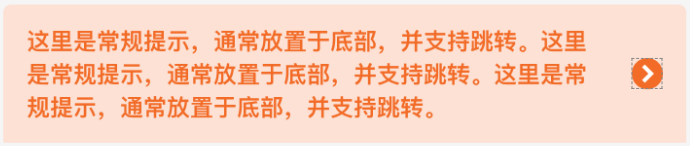
|
|
34
34
|
|
|
35
35
|
```html
|
|
36
|
-
<xt-toast type="navToast"
|
|
36
|
+
<xt-toast type="navToast" message="哈喽早上好!支持跳转指定页面。哈喽早上好!支持跳转指定页面" navUrl="/template/list/index"></xt-toast>
|
|
37
37
|
```
|
|
38
38
|
|
|
39
39
|
## API
|
|
40
40
|
|
|
41
41
|
### xt-toast props
|
|
42
42
|
|
|
43
|
-
| 参数 | 说明 | 类型
|
|
44
|
-
| ----------- | ------------------------------------------------------------ |
|
|
45
|
-
|
|
|
46
|
-
|
|
|
47
|
-
|
|
|
48
|
-
|
|
|
49
|
-
|
|
|
50
|
-
| navUrl | 指定跳转的页面路径(相对路径),仅当type为'navToast'时有用 | String
|
|
43
|
+
| 参数 | 说明 | 类型 | 默认值 |
|
|
44
|
+
| ----------- | ------------------------------------------------------------ | ------- | ------ |
|
|
45
|
+
| show | 用于触发组件显示,仅当type为'nomal'时有用 | Boolean | false |
|
|
46
|
+
| type | 指定组件的类型,可选值为`nomal` `navToast` | String | nomal |
|
|
47
|
+
| duration | 展示时长(ms),仅当type为'nomal'时有用 | Number | 5000 |
|
|
48
|
+
| message | 内容 | String | '' |
|
|
49
|
+
| navDuration | 展示时长(ms),仅当type为'navToast'时有用,(若不设置,则永远不会消失,直到用户点击跳转到指定页面) | Number | null |
|
|
50
|
+
| navUrl | 指定跳转的页面路径(相对路径),仅当type为'navToast'时有用 | String | null |
|
|
51
51
|
|
|
52
52
|
|
|
53
53
|
|
package/libs/xt-toast/index.js
CHANGED
|
@@ -4,6 +4,10 @@ Component({
|
|
|
4
4
|
* 组件的属性列表
|
|
5
5
|
*/
|
|
6
6
|
properties: {
|
|
7
|
+
show:{
|
|
8
|
+
type:Boolean,
|
|
9
|
+
value:false
|
|
10
|
+
},
|
|
7
11
|
type:{
|
|
8
12
|
type:String,
|
|
9
13
|
value:'nomal'
|
|
@@ -20,10 +24,6 @@ Component({
|
|
|
20
24
|
type:Number,
|
|
21
25
|
value:null
|
|
22
26
|
},
|
|
23
|
-
top:{
|
|
24
|
-
type:Number,
|
|
25
|
-
value:60
|
|
26
|
-
},
|
|
27
27
|
navUrl:{
|
|
28
28
|
type:String,
|
|
29
29
|
value:null
|
|
@@ -37,9 +37,16 @@ Component({
|
|
|
37
37
|
// 带跳转的toast是否允许自动消失
|
|
38
38
|
dispear: false
|
|
39
39
|
},
|
|
40
|
+
observers:{
|
|
41
|
+
show(val){
|
|
42
|
+
if(val){
|
|
43
|
+
this.showToast();
|
|
44
|
+
}
|
|
45
|
+
}
|
|
46
|
+
},
|
|
40
47
|
lifetimes:{
|
|
41
48
|
attached(){
|
|
42
|
-
if(this.properties.type == 'nomal') this.showToast();
|
|
49
|
+
// if(this.properties.type == 'nomal') this.showToast();
|
|
43
50
|
if(this.properties.type == 'navToast') this.showNavToast();
|
|
44
51
|
}
|
|
45
52
|
},
|
|
@@ -49,6 +56,7 @@ Component({
|
|
|
49
56
|
methods: {
|
|
50
57
|
// 常规toast
|
|
51
58
|
showToast(){
|
|
59
|
+
console.log('查看变量',this.properties.show);
|
|
52
60
|
wx.showToast({
|
|
53
61
|
title: this.properties.message,
|
|
54
62
|
duration: this.properties.duration,
|
package/libs/xt-toast/index.wxml
CHANGED
|
@@ -1,7 +1,6 @@
|
|
|
1
1
|
<!--src/xt-toast/index.wxml-->
|
|
2
2
|
<!-- 带跳转的提示 -->
|
|
3
|
-
<view class="nav_toast_box" wx:if="{{type === 'navToast'}}" style="
|
|
3
|
+
<view class="nav_toast_box" wx:if="{{type === 'navToast'}}" style="{{dispear?'opacity: 0;':''}}" catchtap="navTo">
|
|
4
4
|
<view class="nav_toast_text">{{message}}</view>
|
|
5
|
-
<!-- <image class="nav_icon" src="https://img.tanjiu.cn/home/5cQHhXZTCsjaXxtJR6SBi4zHHAFAw5ZN.png"></image> -->
|
|
6
5
|
<xt-icon class="nav_icon" slot="right-icon" icon="arrow" size="32"></xt-icon>
|
|
7
6
|
</view>
|
package/libs/xt-toast/index.wxss
CHANGED
|
@@ -1,8 +1,9 @@
|
|
|
1
1
|
/* src/xt-toast/index.wxss */
|
|
2
2
|
.nav_toast_box{
|
|
3
|
-
position: absolute;
|
|
4
|
-
left: 50%;
|
|
5
|
-
margin-left: -351rpx;
|
|
3
|
+
/* position: absolute; */
|
|
4
|
+
/* left: 50%; */
|
|
5
|
+
/* margin-left: -351rpx; */
|
|
6
|
+
width: 100%;
|
|
6
7
|
display: flex;
|
|
7
8
|
align-items: center;
|
|
8
9
|
justify-content: space-between;
|
|
@@ -24,17 +24,18 @@
|
|
|
24
24
|
|
|
25
25
|
##API
|
|
26
26
|
|
|
27
|
-
####xt-
|
|
28
|
-
|
|
29
|
-
| 参数
|
|
30
|
-
| ----------- | ----------- | ---------- |
|
|
31
|
-
| fileList | 图片列表,必传,受控组件 |
|
|
32
|
-
| title | 表单标题 |
|
|
33
|
-
| max |
|
|
34
|
-
|
|
|
35
|
-
|
|
|
36
|
-
| disabled | 是否禁用,禁用时不能删除和上传,可预览 | `
|
|
37
|
-
| sourceType | 照片来源 | ["album", "camera"]
|
|
27
|
+
####xt-uploader props
|
|
28
|
+
|
|
29
|
+
| 参数 | 说明 | 类型 | 默认值
|
|
30
|
+
| ----------- | ----------- | ---------- | -------- |
|
|
31
|
+
| fileList | 图片列表,必传,受控组件 | Array<String> | `[]`
|
|
32
|
+
| title | 表单标题 | string |
|
|
33
|
+
| max | 上传最大值,每次可选照片数,默认为9 | number | 9
|
|
34
|
+
| upload-desc | 上传文案说明 | `String` |
|
|
35
|
+
| custom-upload | 是否自定义上传,true 点击盒子触发upload | boolean | `false`
|
|
36
|
+
| disabled | 是否禁用,禁用时不能删除和上传,可预览 | boolean | `false`
|
|
37
|
+
| sourceType | 照片来源 | `Array<String>` | ["album", "camera"]
|
|
38
|
+
| upload-api | 组件库放公网,上传接口api,必传 | {url: 'https://...',fileDir: 'microComponents'} |
|
|
38
39
|
|
|
39
40
|
####Events
|
|
40
41
|
|
|
@@ -42,3 +43,4 @@
|
|
|
42
43
|
| ---------------- | ------------- | ---------------------- |
|
|
43
44
|
| bind:upload | 上传成功后触发,如果customUpload为true则点击上传及触发 | fileList:图片列表, url:当前上传图片地址 |
|
|
44
45
|
| bind:delete | 删除成功后触发 | fileList:图片列表, url:当前删除图片地址,index:当前删除图片索引 |
|
|
46
|
+
| bind:error | 上传失败后触发 | errMsg: 失败原因 |
|
|
@@ -1,5 +1,5 @@
|
|
|
1
1
|
// src/xt-uploader/index.js
|
|
2
|
-
|
|
2
|
+
const utils = require("./utils");
|
|
3
3
|
Component({
|
|
4
4
|
/**
|
|
5
5
|
* 组件的属性列表
|
|
@@ -24,7 +24,7 @@ Component({
|
|
|
24
24
|
// ["album", "camera"]
|
|
25
25
|
sourceType: {
|
|
26
26
|
type: Array,
|
|
27
|
-
value: ["camera"],
|
|
27
|
+
value: ["album", "camera"],
|
|
28
28
|
},
|
|
29
29
|
customUpload: {
|
|
30
30
|
type: Boolean,
|
|
@@ -34,6 +34,10 @@ Component({
|
|
|
34
34
|
type: Boolean,
|
|
35
35
|
value: false,
|
|
36
36
|
},
|
|
37
|
+
uploadApi: {
|
|
38
|
+
type: Object,
|
|
39
|
+
value: {},
|
|
40
|
+
},
|
|
37
41
|
},
|
|
38
42
|
|
|
39
43
|
/**
|
|
@@ -66,85 +70,129 @@ Component({
|
|
|
66
70
|
});
|
|
67
71
|
},
|
|
68
72
|
// 上传成功
|
|
69
|
-
onUploadSuccess(url) {
|
|
70
|
-
this.triggerEvent("upload", { fileList:
|
|
73
|
+
onUploadSuccess(files, url) {
|
|
74
|
+
this.triggerEvent("upload", { fileList: files, url });
|
|
75
|
+
},
|
|
76
|
+
// 上传失败
|
|
77
|
+
onUploadError(errMsg) {
|
|
78
|
+
this.triggerEvent("error", { errMsg });
|
|
71
79
|
},
|
|
72
80
|
// 点击上传
|
|
73
81
|
startTakePhoto() {
|
|
74
82
|
const _this = this;
|
|
75
|
-
|
|
83
|
+
const { customUpload, uploadApi, max, sourceType, fileList } =
|
|
84
|
+
this.properties;
|
|
85
|
+
if (customUpload) {
|
|
76
86
|
this.triggerEvent("upload", {});
|
|
77
87
|
return;
|
|
78
88
|
}
|
|
89
|
+
if (!uploadApi || !uploadApi.url) {
|
|
90
|
+
wx.showToast({
|
|
91
|
+
title: "请传入上传接口",
|
|
92
|
+
icon: "error",
|
|
93
|
+
});
|
|
94
|
+
return;
|
|
95
|
+
}
|
|
79
96
|
wx.chooseMedia({
|
|
80
|
-
count:
|
|
97
|
+
count: max - fileList.length,
|
|
81
98
|
mediaType: ["image"],
|
|
82
99
|
sizeType: ["compressed"],
|
|
83
|
-
sourceType
|
|
100
|
+
sourceType,
|
|
84
101
|
success(res) {
|
|
85
102
|
console.log(res, "0000");
|
|
86
103
|
// tempFilePath可以作为img标签的src属性显示图片
|
|
87
|
-
const tempFilePaths = res.tempFiles
|
|
88
|
-
|
|
104
|
+
const tempFilePaths = res.tempFiles;
|
|
105
|
+
if (Array.isArray(tempFilePaths) && tempFilePaths.length) {
|
|
106
|
+
Promise.allSettled(
|
|
107
|
+
tempFilePaths.map((temp) =>
|
|
108
|
+
_this.uploadImage_v(temp.tempFilePath)
|
|
109
|
+
)
|
|
110
|
+
).then((uploadRes) => {
|
|
111
|
+
wx.hideLoading();
|
|
112
|
+
console.log("----uploadRes", uploadRes);
|
|
113
|
+
// 上传成功
|
|
114
|
+
const successUrls = uploadRes
|
|
115
|
+
.filter((result) => result.status == "fulfilled")
|
|
116
|
+
.map((result) => result.value);
|
|
117
|
+
if (successUrls.length) {
|
|
118
|
+
const files = fileList.concat(successUrls);
|
|
119
|
+
_this.onUploadSuccess(files, successUrls);
|
|
120
|
+
}
|
|
121
|
+
// 上传失败
|
|
122
|
+
const errorList = uploadRes.filter(
|
|
123
|
+
(result) => result.status == "rejected"
|
|
124
|
+
);
|
|
125
|
+
if (errorList.length) {
|
|
126
|
+
_this.onUploadError(errorList[0].value);
|
|
127
|
+
}
|
|
128
|
+
});
|
|
129
|
+
}
|
|
89
130
|
},
|
|
90
131
|
fail(error) {
|
|
91
|
-
|
|
92
|
-
|
|
93
|
-
icon: "none",
|
|
94
|
-
});
|
|
132
|
+
_this.onUploadError(error && error.errMsg);
|
|
133
|
+
console.log("-----选取失败", error && error.errMsg);
|
|
95
134
|
},
|
|
96
135
|
});
|
|
97
136
|
},
|
|
98
137
|
// 上传文件
|
|
99
138
|
uploadImage_v(filePaths) {
|
|
100
|
-
|
|
101
|
-
|
|
102
|
-
|
|
103
|
-
|
|
104
|
-
|
|
105
|
-
|
|
106
|
-
|
|
107
|
-
|
|
108
|
-
|
|
109
|
-
|
|
110
|
-
|
|
111
|
-
|
|
112
|
-
|
|
113
|
-
|
|
114
|
-
|
|
115
|
-
|
|
116
|
-
|
|
117
|
-
|
|
118
|
-
|
|
119
|
-
|
|
120
|
-
|
|
121
|
-
|
|
122
|
-
|
|
123
|
-
|
|
124
|
-
|
|
125
|
-
|
|
126
|
-
|
|
127
|
-
|
|
128
|
-
|
|
129
|
-
|
|
130
|
-
|
|
131
|
-
|
|
132
|
-
|
|
133
|
-
|
|
134
|
-
|
|
135
|
-
|
|
136
|
-
|
|
137
|
-
|
|
138
|
-
|
|
139
|
-
|
|
140
|
-
|
|
141
|
-
|
|
142
|
-
|
|
139
|
+
return new Promise((resolve, reject) => {
|
|
140
|
+
const { url, fileDir, ...header } = this.properties.uploadApi;
|
|
141
|
+
wx.showLoading("上传中");
|
|
142
|
+
utils.newHttp(
|
|
143
|
+
url,
|
|
144
|
+
"GET",
|
|
145
|
+
{
|
|
146
|
+
dir: fileDir || "microComponents",
|
|
147
|
+
},
|
|
148
|
+
header,
|
|
149
|
+
(res) => {
|
|
150
|
+
const { host, signature, accessKeyId, policy, dir } = res.data;
|
|
151
|
+
if (host) {
|
|
152
|
+
let path = filePaths;
|
|
153
|
+
let name = utils.random_string(32) + utils.get_suffix(path);
|
|
154
|
+
wx.uploadFile({
|
|
155
|
+
url: host,
|
|
156
|
+
filePath: filePaths,
|
|
157
|
+
name: "file",
|
|
158
|
+
formData: {
|
|
159
|
+
key: dir + "/" + name,
|
|
160
|
+
policy,
|
|
161
|
+
success_action_status: "200",
|
|
162
|
+
OSSAccessKeyId: accessKeyId,
|
|
163
|
+
signature,
|
|
164
|
+
},
|
|
165
|
+
header: {
|
|
166
|
+
"Content-Type": "multipart/form-data",
|
|
167
|
+
},
|
|
168
|
+
success: (res) => {
|
|
169
|
+
if (res.statusCode == 200) {
|
|
170
|
+
let url = host + dir + "/" + name;
|
|
171
|
+
resolve(url);
|
|
172
|
+
// fileList.push(url);
|
|
173
|
+
// _this.onUploadSuccess(url);
|
|
174
|
+
// wx.showToast({
|
|
175
|
+
// icon: "success",
|
|
176
|
+
// title: "上传成功",
|
|
177
|
+
// });
|
|
178
|
+
}
|
|
179
|
+
},
|
|
180
|
+
fail: (err) => {
|
|
181
|
+
reject(err.errMsg || "网络错误,请重试");
|
|
182
|
+
// _this.onUploadError(err.errMsg || "网络错误,请重试");
|
|
183
|
+
// wx.showToast({
|
|
184
|
+
// icon: "error",
|
|
185
|
+
// title: err.errMsg || "网络错误,请重试",
|
|
186
|
+
// });
|
|
187
|
+
},
|
|
143
188
|
});
|
|
144
|
-
}
|
|
145
|
-
|
|
146
|
-
|
|
147
|
-
|
|
189
|
+
} else {
|
|
190
|
+
reject(res.message);
|
|
191
|
+
// _this.onUploadError(res.message);
|
|
192
|
+
}
|
|
193
|
+
}
|
|
194
|
+
);
|
|
195
|
+
});
|
|
148
196
|
},
|
|
149
197
|
},
|
|
150
198
|
});
|
|
@@ -4,9 +4,8 @@
|
|
|
4
4
|
<view class="file_box">
|
|
5
5
|
<view wx:for="{{fileList}}" wx:key="index" class="file_item">
|
|
6
6
|
<image class="file_img" src="{{item}}" mode="aspectFit" bindtap="onPreviewImage" data-url="{{item}}" data-index="{{index}}" />
|
|
7
|
-
|
|
8
|
-
|
|
9
|
-
</view>
|
|
7
|
+
<!-- 删除 -->
|
|
8
|
+
<xt-icon icon="shanchu" size="48" class="close_box" bindtap="onDelete" data-url="{{item}}" data-index="{{index}}" wx:if="{{!disabled}}"></xt-icon>
|
|
10
9
|
</view>
|
|
11
10
|
<view class="file_item" wx:if="{{!disabled && fileList.length<max}}" bindtap="startTakePhoto">
|
|
12
11
|
<image src="https://img.tanjiu.cn/home/DDDsrH7PpNhneQsXGFmGGPcSM3QYXG8N.png" class="camera_icon" />
|
|
@@ -31,11 +31,12 @@
|
|
|
31
31
|
justify-content : center;
|
|
32
32
|
align-items : center;
|
|
33
33
|
background-color: #F5F5F5;
|
|
34
|
-
margin-bottom :
|
|
34
|
+
margin-bottom : 16rpx;
|
|
35
|
+
flex-shrink: 0;
|
|
35
36
|
}
|
|
36
37
|
|
|
37
38
|
.file_item:not(:last-child) {
|
|
38
|
-
margin-right:
|
|
39
|
+
margin-right: 16rpx;
|
|
39
40
|
}
|
|
40
41
|
|
|
41
42
|
.camera_icon {
|
|
@@ -49,10 +50,11 @@
|
|
|
49
50
|
}
|
|
50
51
|
|
|
51
52
|
.close_box {
|
|
52
|
-
position: absolute;
|
|
53
|
-
|
|
54
|
-
|
|
55
|
-
|
|
53
|
+
position : absolute;
|
|
54
|
+
line-height: 48rpx;
|
|
55
|
+
top : 0;
|
|
56
|
+
right : 0;
|
|
57
|
+
color : rgba(0, 0, 0, 0.5);
|
|
56
58
|
}
|
|
57
59
|
|
|
58
60
|
.upload_desc {
|
|
@@ -1,108 +1,13 @@
|
|
|
1
1
|
// import md5 from "md5";
|
|
2
2
|
|
|
3
|
-
function
|
|
4
|
-
var timestamp = Date.parse(new Date());
|
|
5
|
-
var date = new Date(timestamp);
|
|
6
|
-
//获取年份
|
|
7
|
-
var Y = date.getFullYear();
|
|
8
|
-
//获取月份
|
|
9
|
-
var M =
|
|
10
|
-
date.getMonth() + 1 < 10
|
|
11
|
-
? "0" + (date.getMonth() + 1)
|
|
12
|
-
: date.getMonth() + 1;
|
|
13
|
-
//获取当日日期
|
|
14
|
-
var D = date.getDate() < 10 ? "0" + date.getDate() : date.getDate();
|
|
15
|
-
var currentDate = Y + "-" + M + "-" + D;
|
|
16
|
-
|
|
17
|
-
//后端验证授权的字符串
|
|
18
|
-
var pass =
|
|
19
|
-
"MIIBOjANBgkqhkiG9w0BAQEFAAOCAScAMIIBIgKCARkA2a6BXaPViAbEvAPn3qtB" +
|
|
20
|
-
currentDate;
|
|
21
|
-
|
|
22
|
-
//change - gml 接口url拼接
|
|
23
|
-
var full_url = "https://gateway.tanjiu.cn" + url;
|
|
24
|
-
// 请求的唯一性
|
|
25
|
-
let onlySign = url + JSON.stringify(params);
|
|
26
|
-
if (getApp().hasQKey(onlySign)) {
|
|
27
|
-
return;
|
|
28
|
-
}
|
|
29
|
-
wx.request({
|
|
30
|
-
url: full_url,
|
|
31
|
-
method: method,
|
|
32
|
-
header: {
|
|
33
|
-
"content-type": "application/json",
|
|
34
|
-
// Authorization: md5(pass),
|
|
35
|
-
"ls-client-id": "TANJIUCLOUD_BUSINESS",
|
|
36
|
-
token: "openApi",
|
|
37
|
-
// xtoken: getApp().globalData?.xtoken,
|
|
38
|
-
"x-login-session": JSON.stringify({ userId: "2022199" }),
|
|
39
|
-
// xtoken: 'eyJ0eXAiOiJKV1QiLCJhbGciOiJIUzI1NiJ9.eyJsb2dpblR5cGUiOiJsb2dpbiIsImxvZ2luSWQiOjc0NDkwMjM1NjQ2MjMzODA0OCwicm5TdHIiOiJoT3ZoUVVxMjM3SUtDelpPN0dXb09jdnA2ZGdIV1g2byIsImF1dGhUb2tlbkJvIjp7Imd1aWQiOjc0NDkwMjM1NjQ2MjMzODA0OCwicGxhdGZvcm1Vc2VySWQiOjE1NTYwODA3ODE0Mjg1NzIxNiwiYXBwQ29kZSI6IlRBTl9TQUxFU01BTiIsInBsYXRmb3JtQ2xpZW50VHlwZSI6IldFQ0hBVF9BUFBMRVRTIiwicGxhdGZvcm1DbGllbnRDb2RlIjoiV0VDSEFUX0FQUExFVFNfVEFOX1NBTEVTTUFOIiwid2VhdmVyVXNlck5hbWUiOiJlbnRlcnByaXNlX3dlY2hhdF8zNl94dXp1byIsInRlbmFudElkIjoxLCJlbnYiOiJ0ZXN0In0sIm9wZW5pZCI6Im9mODFMNU9jVGduMHNnRDBKQlpTZFpRcnZ4ZlEiLCJ1bmlvbmlkIjoib3BVLUQwb1E4RjBQUTY0NnpSREpIRG1sMzJMQSIsImlhdCI6MTY3NjQ1MzQ1OTE3NiwiZXhwIjoxNjc3MDU4MjU5MTc2LCJ0b2tlbklkIjoiZmQ0M2U0MjIxYjJjNDVkN2EyYWJhNTdkZTNhNGY1NmEifQ.weXKWnX7sWmL7f1s2a2MuOKZd5Yw8elzrG824JY0R-4',
|
|
40
|
-
...header,
|
|
41
|
-
},
|
|
42
|
-
data: params,
|
|
43
|
-
success(res) {
|
|
44
|
-
if (res.data) {
|
|
45
|
-
var result = {
|
|
46
|
-
data: res.data.data,
|
|
47
|
-
message: res.data.message || res.data.errMsg,
|
|
48
|
-
code:
|
|
49
|
-
res.data.code ||
|
|
50
|
-
res.data.errCode ||
|
|
51
|
-
(res.data.code === 0 || res.data.errCode == 0 ? 0 : null),
|
|
52
|
-
};
|
|
53
|
-
callBack(result);
|
|
54
|
-
}
|
|
55
|
-
},
|
|
56
|
-
fail(err) {
|
|
57
|
-
var result = {
|
|
58
|
-
success: false,
|
|
59
|
-
data: {},
|
|
60
|
-
message: err.errMsg || err.msg || err.message,
|
|
61
|
-
};
|
|
62
|
-
wx.showToast({
|
|
63
|
-
title: esult.message || "请检查网络是否通畅,稍后重试!",
|
|
64
|
-
icon: "none",
|
|
65
|
-
});
|
|
66
|
-
console.log("err = ", err);
|
|
67
|
-
callBack(result);
|
|
68
|
-
},
|
|
69
|
-
complete() {
|
|
70
|
-
getApp().delQKey(onlySign);
|
|
71
|
-
},
|
|
72
|
-
});
|
|
73
|
-
getApp().createQKey(onlySign);
|
|
74
|
-
}
|
|
75
|
-
|
|
76
|
-
function newhttpRequest(url, method, params, callBack, header) {
|
|
77
|
-
var timestamp = Date.parse(new Date());
|
|
78
|
-
var date = new Date(timestamp);
|
|
79
|
-
//获取年份
|
|
80
|
-
var Y = date.getFullYear();
|
|
81
|
-
//获取月份
|
|
82
|
-
var M =
|
|
83
|
-
date.getMonth() + 1 < 10
|
|
84
|
-
? "0" + (date.getMonth() + 1)
|
|
85
|
-
: date.getMonth() + 1;
|
|
86
|
-
//获取当日日期
|
|
87
|
-
var D = date.getDate() < 10 ? "0" + date.getDate() : date.getDate();
|
|
88
|
-
var currentDate = Y + "-" + M + "-" + D;
|
|
89
|
-
|
|
90
|
-
//后端验证授权的字符串
|
|
91
|
-
var pass =
|
|
92
|
-
"MIIBOjANBgkqhkiG9w0BAQEFAAOCAScAMIIBIgKCARkA2a6BXaPViAbEvAPn3qtB" +
|
|
93
|
-
currentDate;
|
|
94
|
-
|
|
95
|
-
//change - gml 接口url拼接
|
|
96
|
-
var full_url = "https://gateway.tanjiu.cn" + url;
|
|
3
|
+
function newhttpRequest(url, method, params, header, callBack) {
|
|
97
4
|
wx.request({
|
|
98
|
-
url
|
|
5
|
+
url,
|
|
99
6
|
method: method,
|
|
100
7
|
header: {
|
|
101
8
|
"content-type": "application/json",
|
|
102
9
|
// Authorization: md5(pass),
|
|
103
|
-
"ls-client-id": "TANJIUCLOUD_BUSINESS",
|
|
104
10
|
token: "openApi",
|
|
105
|
-
"x-login-session": JSON.stringify({ userId: "2022199" }),
|
|
106
11
|
...header,
|
|
107
12
|
},
|
|
108
13
|
data: params,
|
|
@@ -126,7 +31,7 @@ function newhttpRequest(url, method, params, callBack, header) {
|
|
|
126
31
|
message: err.errMsg || err.msg,
|
|
127
32
|
};
|
|
128
33
|
wx.showToast({
|
|
129
|
-
title:
|
|
34
|
+
title: result.message || "请检查网络是否通畅,稍后重试!",
|
|
130
35
|
icon: "none",
|
|
131
36
|
});
|
|
132
37
|
console.log("err = ", err);
|
|
@@ -157,7 +62,7 @@ function get_suffix(filename) {
|
|
|
157
62
|
return suffix;
|
|
158
63
|
}
|
|
159
64
|
|
|
160
|
-
|
|
65
|
+
module.exports = {
|
|
161
66
|
newHttp: newhttpRequest,
|
|
162
67
|
random_string,
|
|
163
68
|
get_suffix,
|