@xiaopuai/dsh-media 0.5.0 → 0.5.1
This diff represents the content of publicly available package versions that have been released to one of the supported registries. The information contained in this diff is provided for informational purposes only and reflects changes between package versions as they appear in their respective public registries.
- package/README.md +15 -12
- package/locale/en.json +1 -1
- package/locale/zh.json +1 -1
- package/package.json +1 -1
package/README.md
CHANGED
|
@@ -1,20 +1,23 @@
|
|
|
1
|
-
#
|
|
1
|
+
# 自媒体
|
|
2
2
|
|
|
3
|
-
|
|
3
|
+
**抖音、小红书、公众号、视频号的数据,一个页面看完。**
|
|
4
4
|
|
|
5
|
-
|
|
5
|
+
DeepSeek Harness 插件:扫码登录、每日 AI 简报、全网数据合计、会看数据的 AI 助手。账号和数据只存在你自己的电脑上。
|
|
6
6
|
|
|
7
|
-
|
|
7
|
+
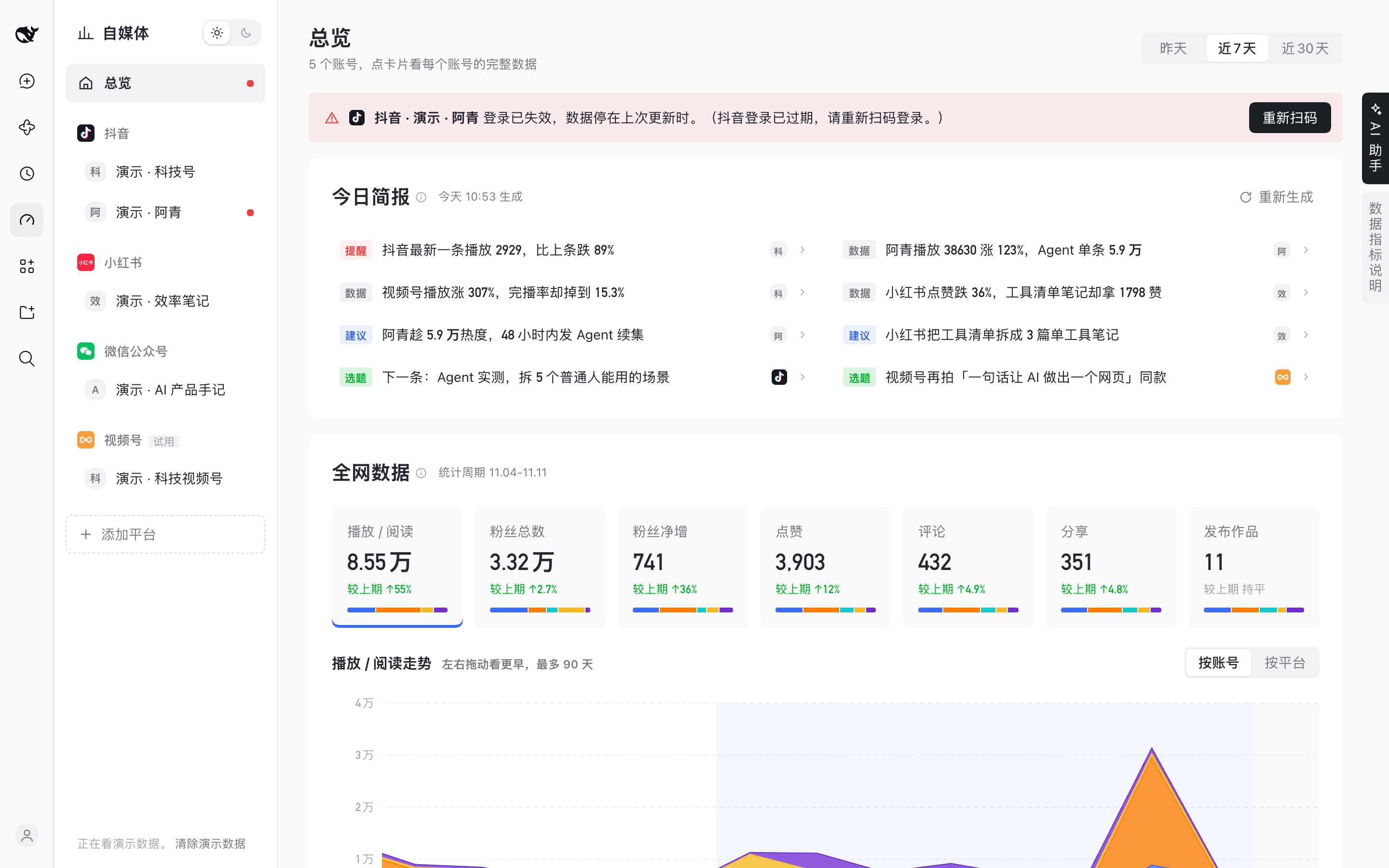
|
|
8
8
|
|
|
9
|
-
|
|
9
|
+
## 安装
|
|
10
10
|
|
|
11
|
-
-
|
|
12
|
-
- `client.js` —— 页面:左边一列(平台 logo + 账号)、看板(雷达图、作品数据、粉丝数据、作品列表,都带导出)、作品弹窗、右边的 AI 助手
|
|
13
|
-
- `ui.js` —— 替页面接住登录小浏览器的画面;给 AI 助手建工作区(默认 `~/Documents/自媒体`)
|
|
14
|
-
- `cordis.patch.yml` —— 装好后挂上的两行:`media-suite`(后台)、`media-ui`(画面转接和 AI 助手工作区)
|
|
11
|
+
在 DeepSeek Harness 0.2.x(0.2.2-rc.1 起)里:**插件 → 添加插件**,填 `@xiaopuai/dsh-media`,点 **安装**,再点 **立即启用**。电脑上要装好 Google Chrome。
|
|
15
12
|
|
|
16
|
-
|
|
13
|
+
## 装好以后
|
|
17
14
|
|
|
18
|
-
|
|
15
|
+
1. 点左边的 **自媒体**,选一个平台
|
|
16
|
+
2. 用手机上对应的 App 扫窗口里的二维码,再点 **添加为我的账号**
|
|
17
|
+
3. 在 **总览** 看今日简报和全网数据;右边缘的 **AI 助手** 可以直接问
|
|
19
18
|
|
|
20
|
-
|
|
19
|
+
**升级**:在 **插件 → 自媒体** 页面下方的 **版本** 一栏点 **更新**,账号和数据都会保留。
|
|
20
|
+
|
|
21
|
+
更多截图、常见问题和详细说明:https://github.com/xiaopu-ai/dsh-plugin-media
|
|
22
|
+
|
|
23
|
+
MIT © 2026 xiaopu-ai
|
package/locale/en.json
CHANGED
|
@@ -1,6 +1,6 @@
|
|
|
1
1
|
{
|
|
2
2
|
"meta": {
|
|
3
3
|
"title": "Media",
|
|
4
|
-
"description": "
|
|
4
|
+
"description": "One dashboard for your Douyin, Xiaohongshu, WeChat Official Account and WeChat Channels accounts: QR login, a daily AI brief, combined numbers and trends, and an AI assistant that can read them."
|
|
5
5
|
}
|
|
6
6
|
}
|
package/locale/zh.json
CHANGED