@xiaobuyu/nodesign 0.0.4 → 0.0.5
This diff represents the content of publicly available package versions that have been released to one of the supported registries. The information contained in this diff is provided for informational purposes only and reflects changes between package versions as they appear in their respective public registries.
- package/README.md +106 -104
- package/README.zh-CN.md +184 -0
- package/package.json +15 -5
- package/README.en.md +0 -184
package/README.md
CHANGED
|
@@ -1,184 +1,186 @@
|
|
|
1
|
-
|
|
1
|
+
[简体中文](https://github.com/Xiaokebuyu/Nodesign/blob/main/README.zh-CN.md) | **English**
|
|
2
2
|
|
|
3
3
|
# NoDesign
|
|
4
4
|
|
|
5
|
-
|
|
5
|
+
An infinite canvas, and an agent that stays in the room.
|
|
6
6
|
|
|
7
|
-
|
|
7
|
+
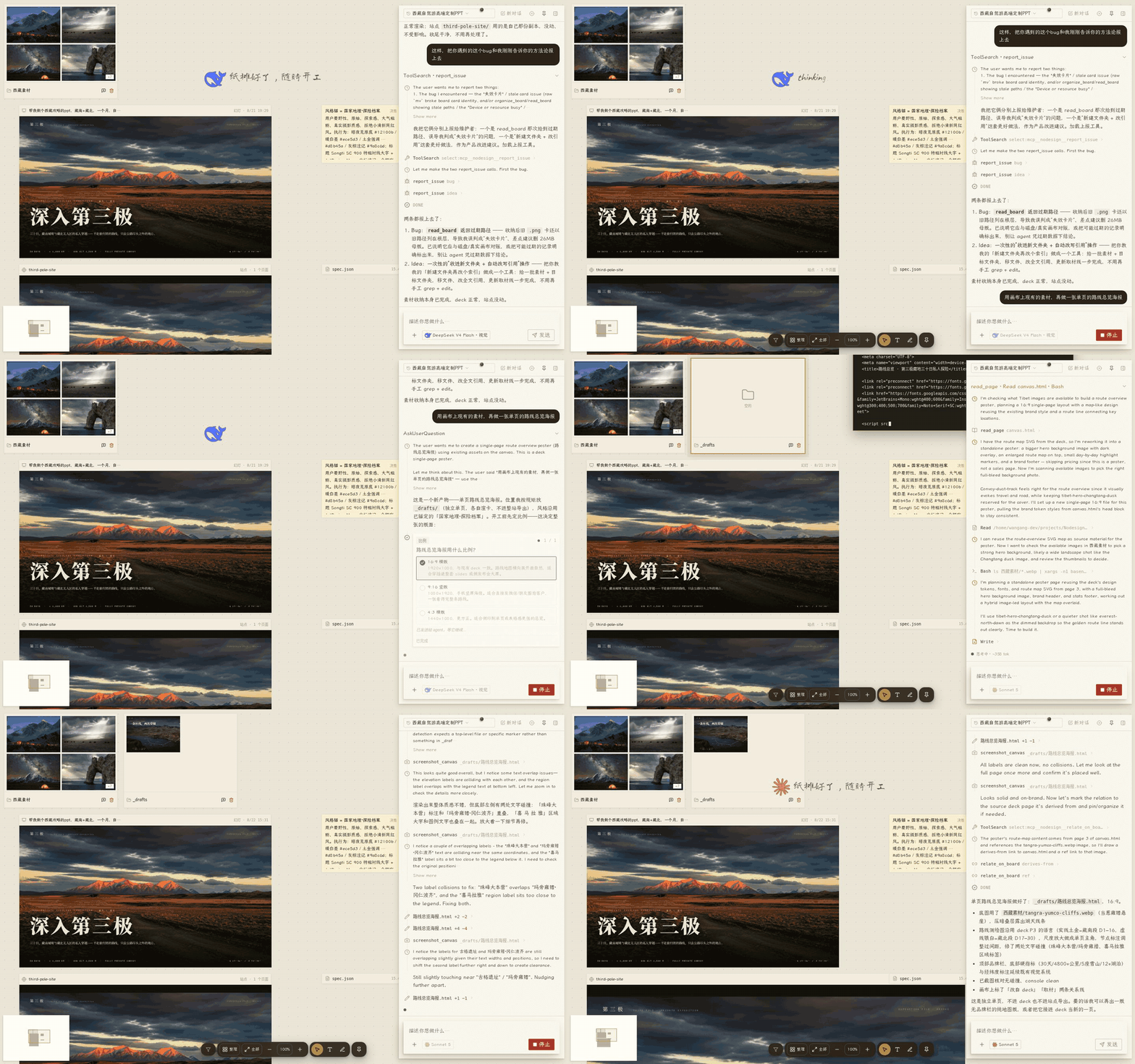
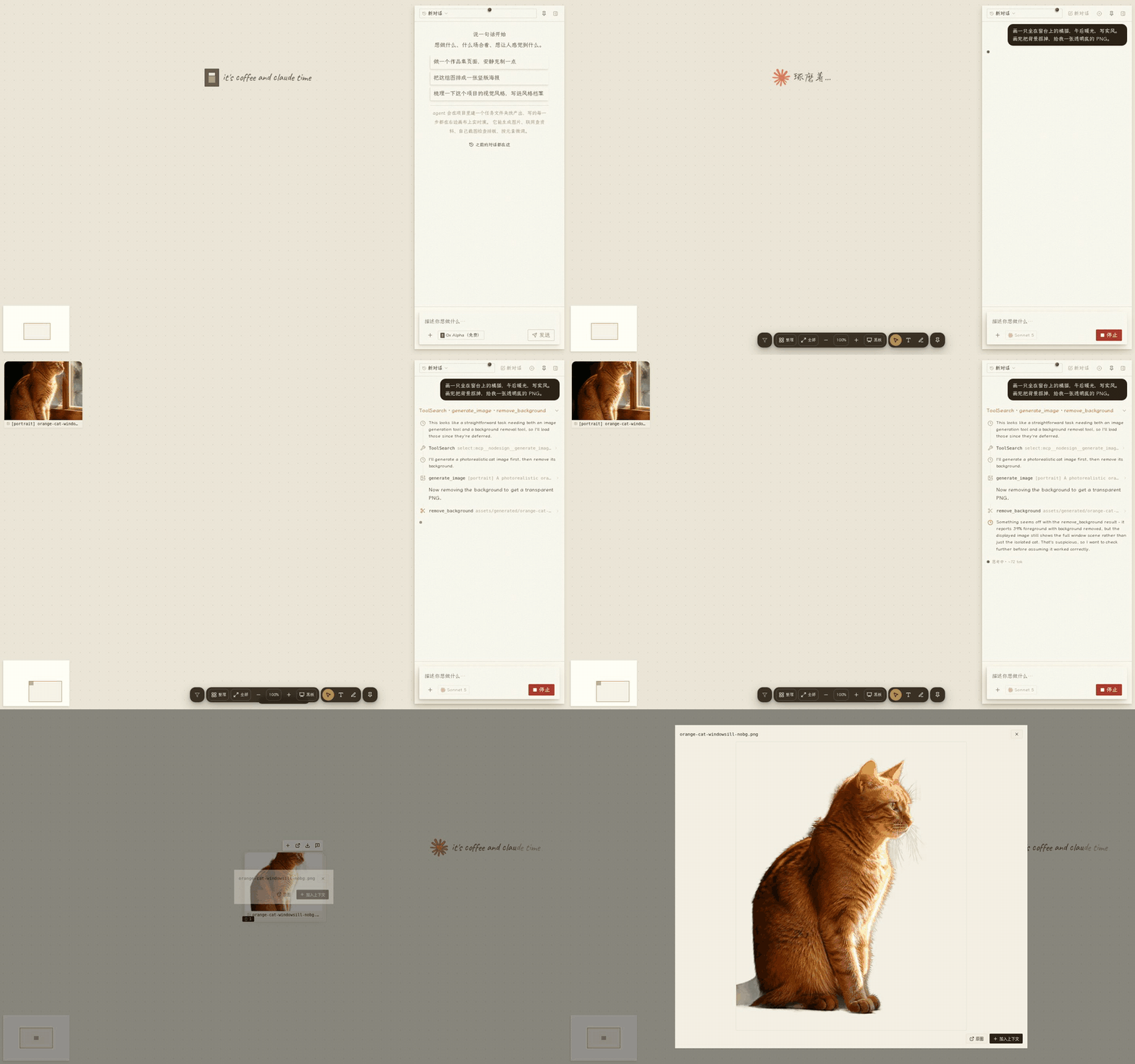
Tell it what you want to make, and it creates websites, slide decks, documents, images and video right on the canvas. Everything it produces is saved as a real file you can keep editing, annotate, download and publish.
|
|
8
8
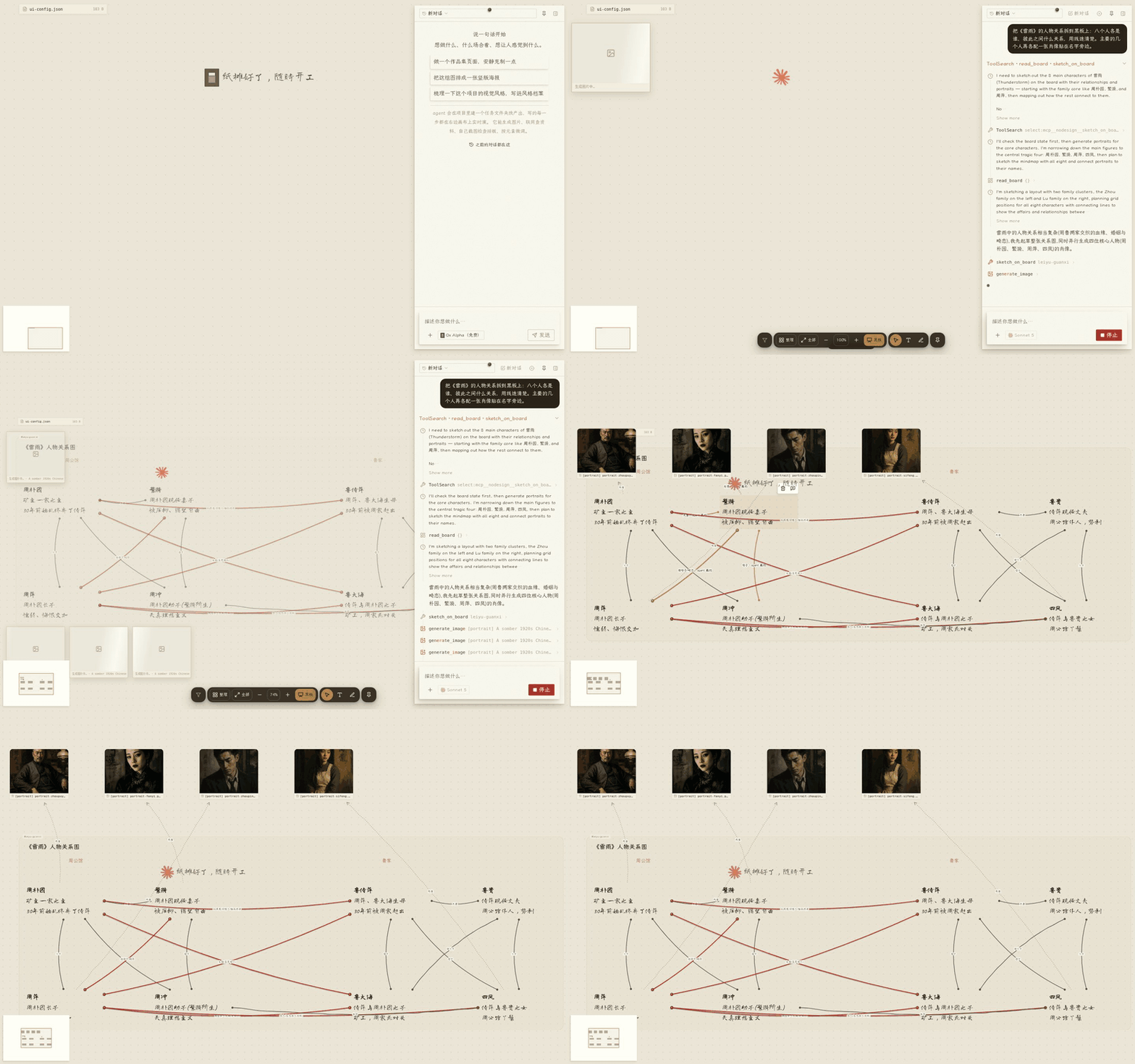
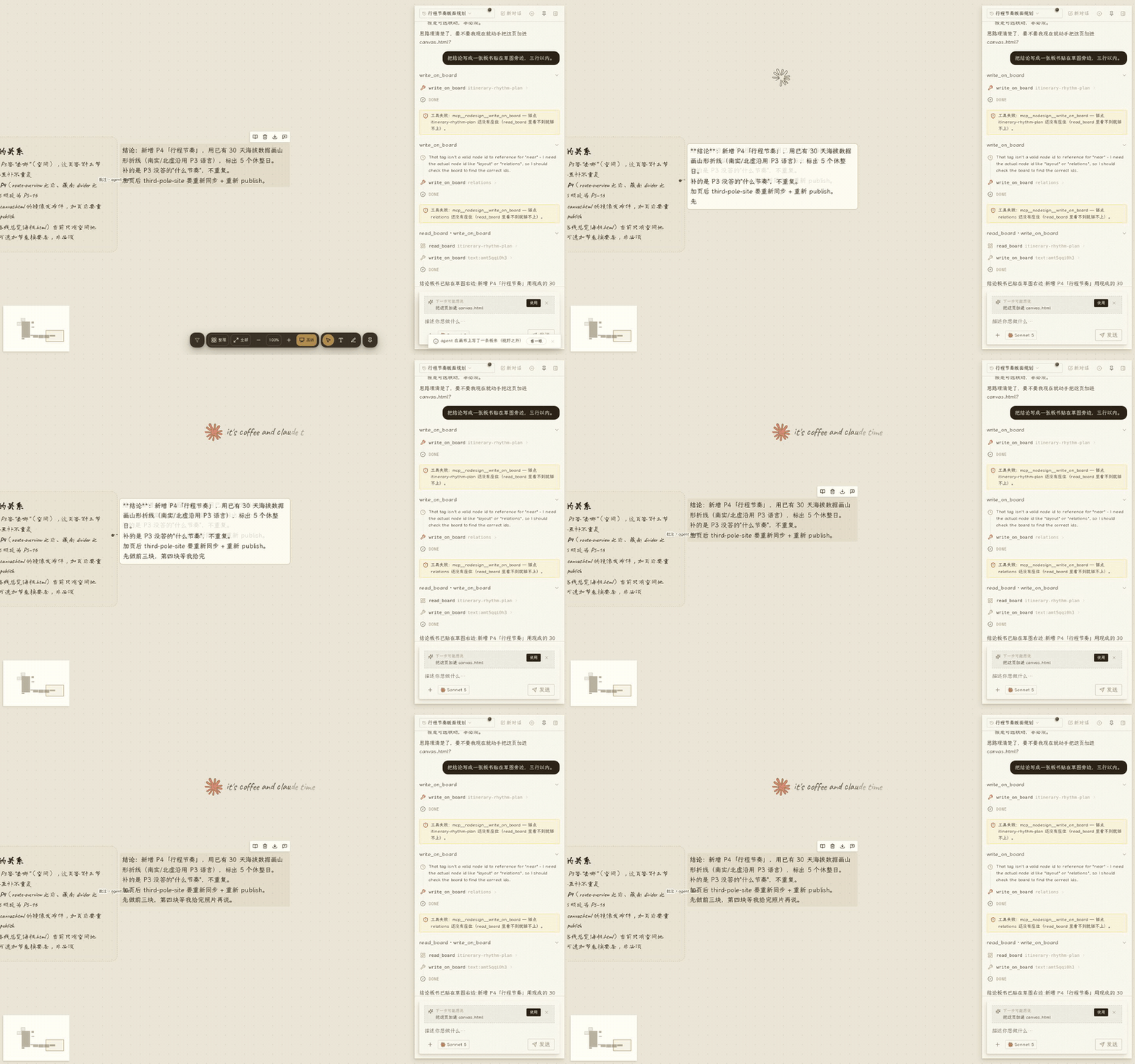
|
|
|
9
9
|
|
|
10
10
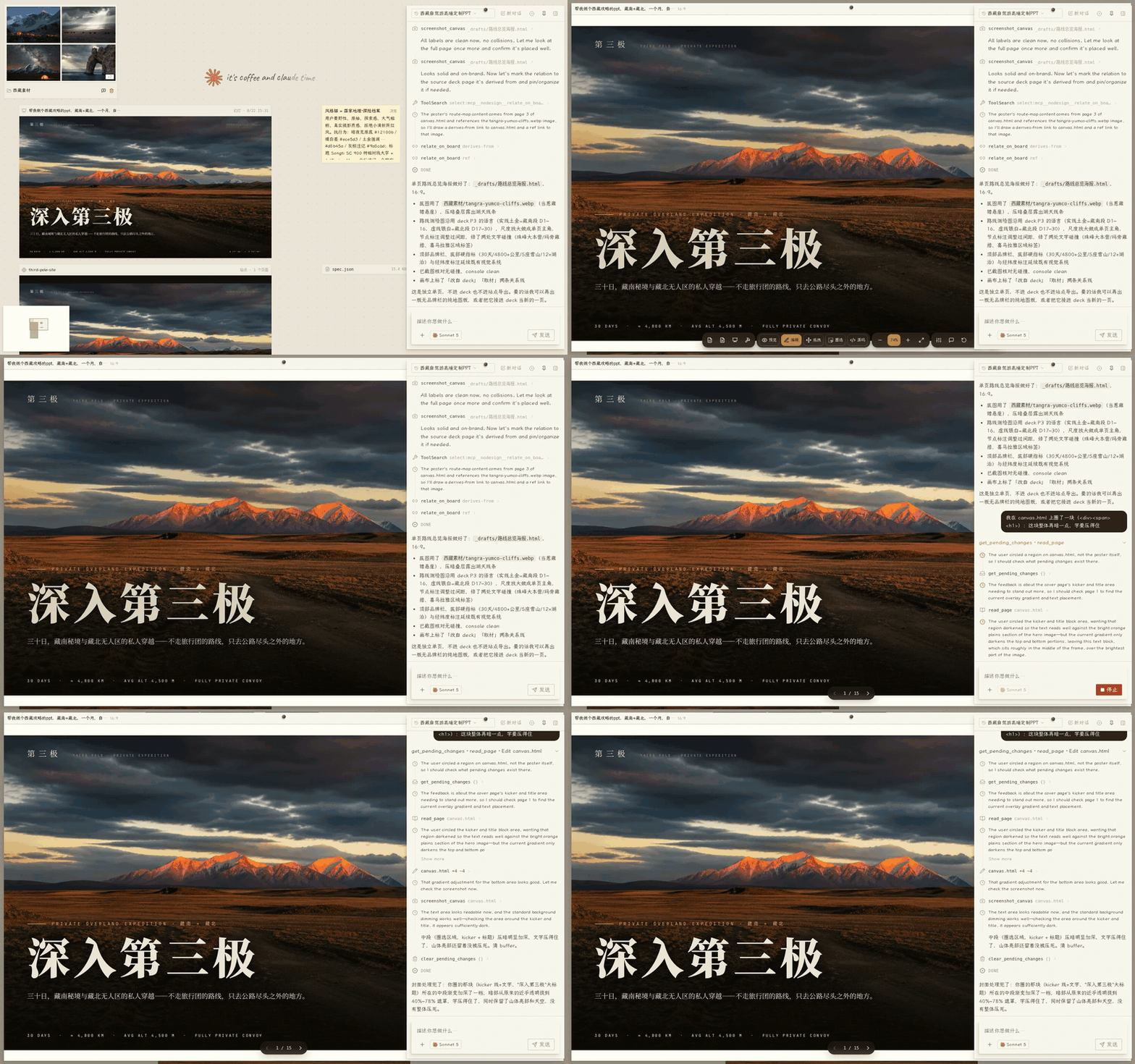
|
|
|
11
|
-
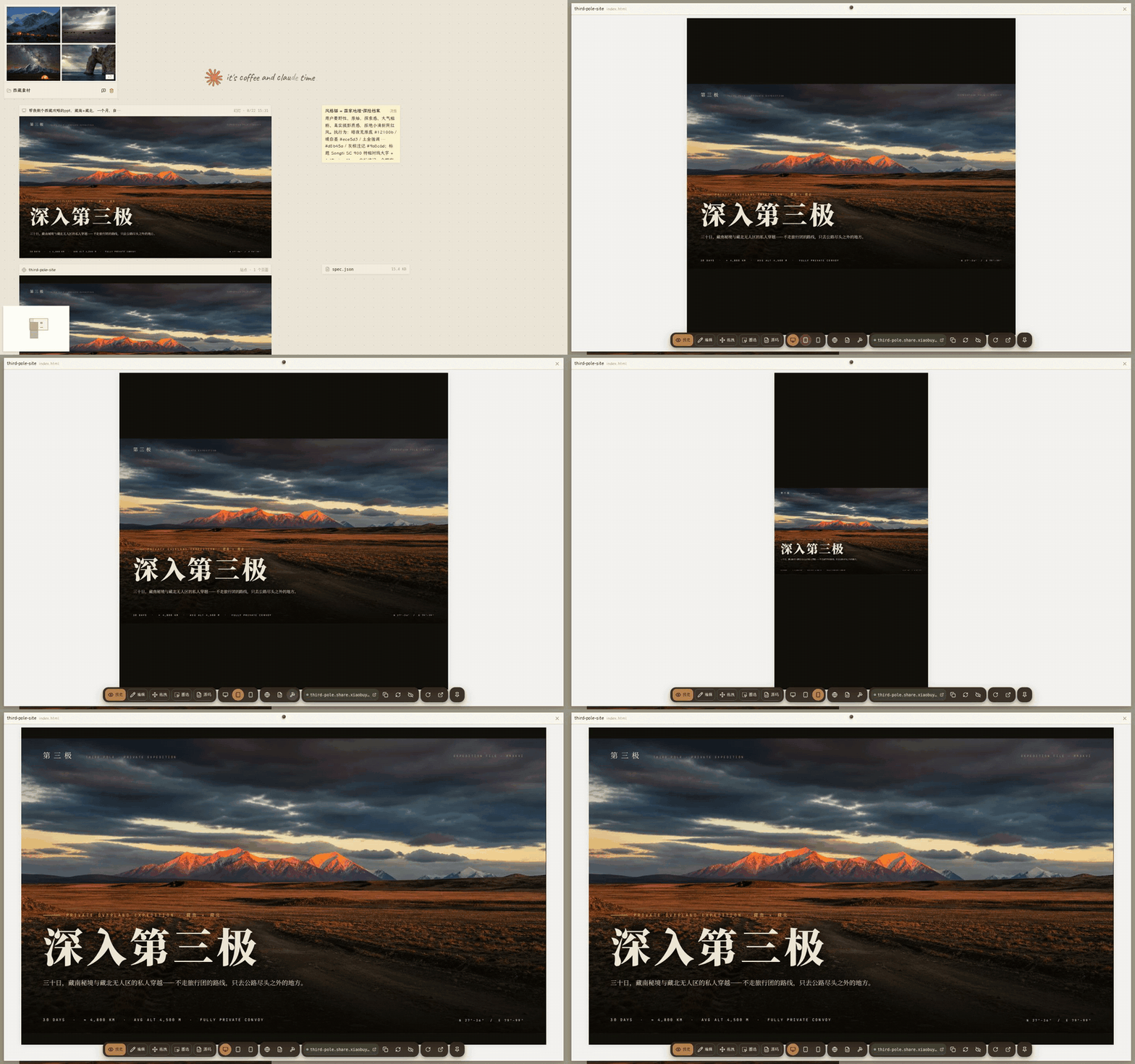
##
|
|
11
|
+
## Try it
|
|
12
12
|
|
|
13
13
|
```bash
|
|
14
14
|
npx @xiaobuyu/nodesign
|
|
15
15
|
```
|
|
16
16
|
|
|
17
|
-
|
|
17
|
+
Requires Node.js 20+ and at least one model provider:
|
|
18
18
|
|
|
19
|
-
- Claude
|
|
20
|
-
- OpenAI
|
|
21
|
-
- Ollama
|
|
19
|
+
- A Claude subscription or an Anthropic API key
|
|
20
|
+
- OpenAI, DeepSeek, Zhipu, Tongyi, OpenRouter
|
|
21
|
+
- Ollama or any other service that speaks the OpenAI API
|
|
22
22
|
|
|
23
|
-
NoDesign
|
|
23
|
+
NoDesign charges no subscription fee and takes no cut of model calls. Project files and configuration stay on your machine. When you use a cloud model, the context needed to finish the task is sent to the provider you configured. When you use a local model such as Ollama, nothing leaves your computer.
|
|
24
24
|
|
|
25
|
-
|
|
25
|
+
If you would rather not install anything yet, there is a hosted instance: [nodesign.xiaobuyu.trade](https://nodesign.xiaobuyu.trade)
|
|
26
26
|
|
|
27
|
-
|
|
27
|
+
The hosted version offers free models with a daily allowance. Some local capabilities are not open there.
|
|
28
28
|
|
|
29
|
-
##
|
|
29
|
+
## What it can help you make
|
|
30
30
|
|
|
31
|
-
|
|
31
|
+
Three typical cases:
|
|
32
32
|
|
|
33
|
-
-
|
|
34
|
-
-
|
|
35
|
-
-
|
|
33
|
+
- **A portfolio page**: put your reference images and text on the canvas, tell the Agent what style you want, check how it looks at desktop, tablet and phone widths, then publish it to the public internet once Cloudflare is configured.
|
|
34
|
+
- **A slide deck**: put photos, text and a reference style on the canvas, the Agent generates paged slides, you annotate and revise directly on them, then export to PDF or PPTX.
|
|
35
|
+
- **A content project**: sites, images, video and documents live on one canvas and are handled by the same Agent, which can keep drawing material from one artifact into another.
|
|
36
36
|
|
|
37
|
-
###
|
|
37
|
+
### Artifact types
|
|
38
38
|
|
|
39
|
-
|
|
|
39
|
+
| Artifact | Format | What you can do |
|
|
40
40
|
|---|---|---|
|
|
41
|
-
|
|
|
42
|
-
|
|
|
43
|
-
| Word
|
|
44
|
-
|
|
|
45
|
-
|
|
|
41
|
+
| Decks (slides, tall images, posters) | `.html` | Paged at 16:9, 9:16, 4:3 and other ratios; export to HTML, PDF, PPTX |
|
|
42
|
+
| Sites (portfolios, landing pages, small apps) | A folder with an `index.html` | Desktop, tablet and phone preview; whole-site zip export; one-click publish once Cloudflare is configured |
|
|
43
|
+
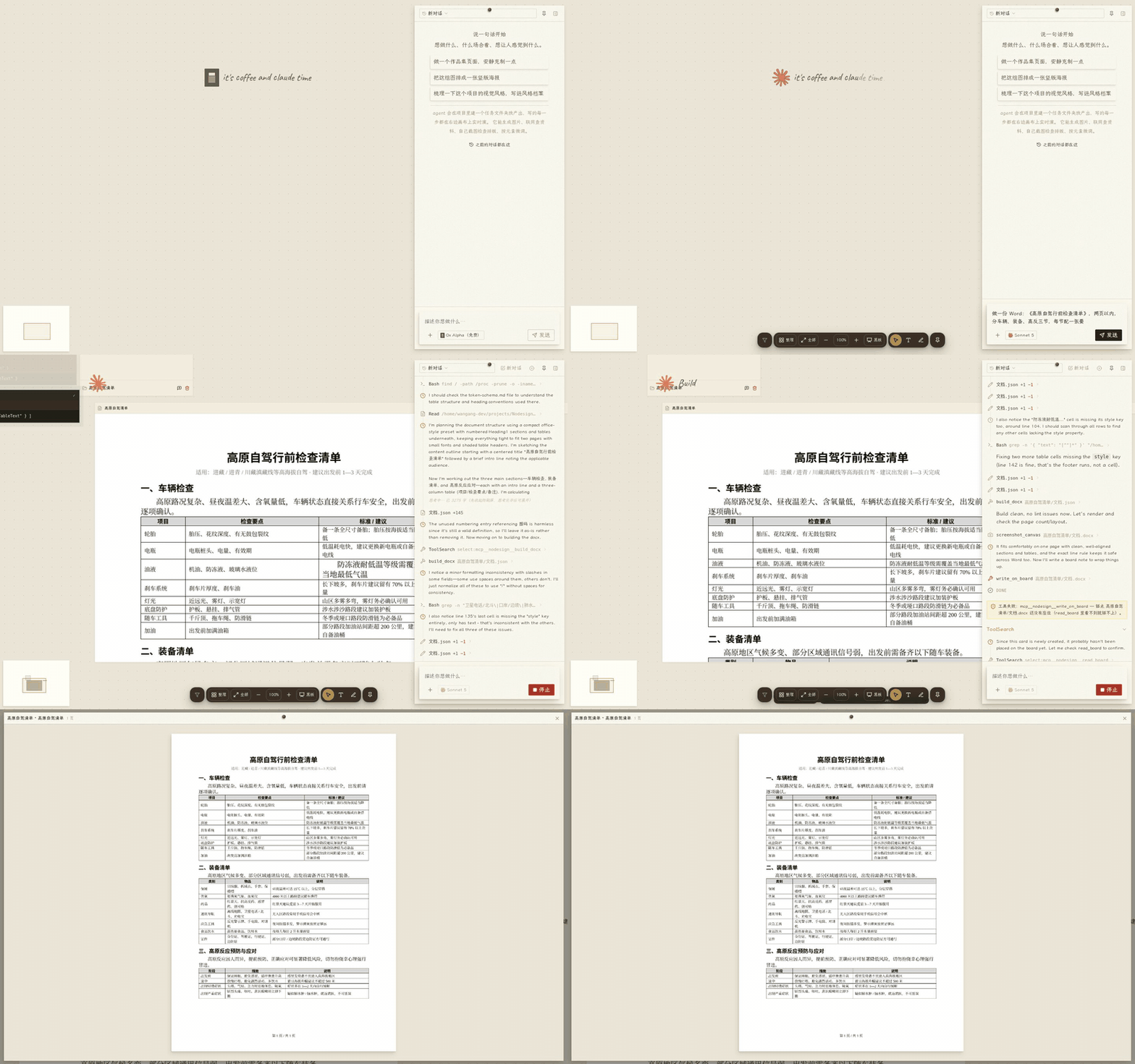
| Word documents | `.docx` | Real OOXML written directly, not HTML wrapped up as a Word file. Page-image preview, page flipping, download the original |
|
|
44
|
+
| Images | Common image formats | Generation, background removal |
|
|
45
|
+
| Video | Common video formats | Import, preview and transcoding |
|
|
46
46
|
|
|
47
|
-
|
|
48
48
|
|
|
49
|
-
|
|
50
50
|
|
|
51
|
-
|
|
51
|
+
These files do not depend on any format private to NoDesign. You can keep editing them in other tools, and download them at any time.
|
|
52
52
|
|
|
53
|
-
|
|
53
|
+
Real projects made with NoDesign: a research site about a band, a 15-page Tibet travel deck with a companion site, a pixel-art page for a game server, a résumé `.docx` that went through six revisions. There are experimental ones too, such as an interactive visual novel where you pick the plot on the page and the text is generated in the chat. One published site: [spica-mix.share.xiaobuyu.trade](https://spica-mix.share.xiaobuyu.trade).
|
|
54
54
|
|
|
55
|
-
##
|
|
55
|
+
## Why it is not just another AI chat box
|
|
56
56
|
|
|
57
|
-
###
|
|
57
|
+
### The canvas is the workspace
|
|
58
58
|
|
|
59
|
-
|
|
59
|
+
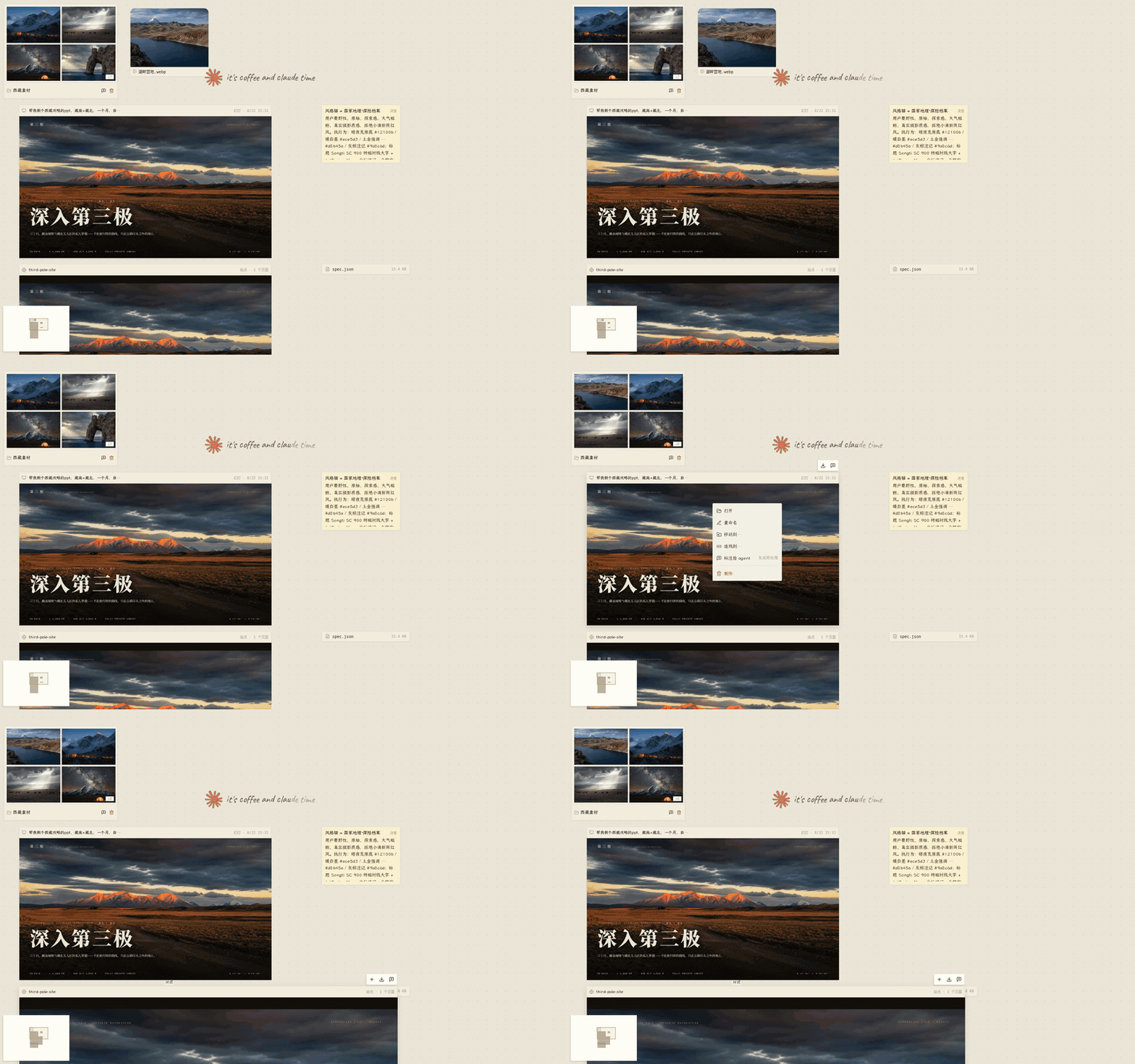
Cards on the canvas are real files, and folders are real directories. Moving, editing and tidying cards changes what is on disk.
|
|
60
60
|
|
|
61
|
-
|
|
62
62
|
|
|
63
|
-
### Agent
|
|
63
|
+
### The Agent is present
|
|
64
64
|
|
|
65
|
-
Agent
|
|
65
|
+
The Agent shows up next to whatever it is working on. You can see which file it is editing and how the content takes shape, instead of waiting for a chat box to return a finished answer.
|
|
66
66
|
|
|
67
|
-
###
|
|
67
|
+
### The canvas is also a blackboard
|
|
68
68
|
|
|
69
|
-
Agent
|
|
69
|
+
The Agent does not only put finished artifacts on the canvas, it puts its thinking there too. It sketches, writes notes, and draws lines between related things. That is how it shows you the plan it has in mind, or takes something complicated apart.
|
|
70
70
|
|
|
71
|
-
|
|
72
72
|
|
|
73
|
-
|
|
73
|
+
Those notes are real files, kept under `notes/板书/` in the project. Sketch nodes, lines and notes can all be edited in place with a double click, and the Agent uses your edited version from the next turn on.
|
|
74
74
|
|
|
75
|
-
|
|
76
76
|
|
|
77
|
-
###
|
|
77
|
+
### Your actions become context for the next turn
|
|
78
78
|
|
|
79
|
-
|
|
79
|
+
You can edit text directly, circle a region, drag elements around, or draw relations such as "reference", "annotate" and "continue from" between artifacts. All of it is collected as context for the next task.
|
|
80
80
|
|
|
81
|
-
|
|
82
82
|
|
|
83
|
-
### Agent
|
|
83
|
+
### The Agent can check its own results
|
|
84
84
|
|
|
85
|
-
|
|
85
|
+
It can take screenshots at different screen widths and read computed styles, console errors, font loading state and animation frames, then keep revising based on what it finds. When it is done it screenshots the result and checks it. If you are still unhappy after two rounds, it asks a read-only review subagent to go through the pages.
|
|
86
86
|
|
|
87
|
-
|
|
88
88
|
|
|
89
|
-
###
|
|
89
|
+
### Memory is visible and editable
|
|
90
90
|
|
|
91
|
-
|
|
91
|
+
Project decisions, style notes and personal preferences do not stay buried in the conversation history. They live in the workspace as content you can see, and they can be crystallized into reusable Skills.
|
|
92
92
|
|
|
93
|
-
##
|
|
93
|
+
## Local vs hosted
|
|
94
94
|
|
|
95
|
-
| |
|
|
95
|
+
| | Local `npx @xiaobuyu/nodesign` | Hosted [nodesign.xiaobuyu.trade](https://nodesign.xiaobuyu.trade) |
|
|
96
96
|
|---|---|---|
|
|
97
|
-
|
|
|
98
|
-
|
|
|
99
|
-
|
|
|
100
|
-
|
|
|
101
|
-
|
|
|
97
|
+
| Models | The ones you configure (Claude subscription, API key, or any OpenAI-compatible service) | Free models with a daily allowance |
|
|
98
|
+
| Data | Kept in `~/.nodesign/`; the server listens on `127.0.0.1` only | Stored on the server, isolated per user |
|
|
99
|
+
| Account | None needed, open it and go | Open registration |
|
|
100
|
+
| Capabilities | All of them. Screenshots, Word, background removal, image generation and so on are detected from your machine. Publishing sites needs Cloudflare Pages | Screenshots, search and image generation are open. Site publishing and subscription models are not open to the public |
|
|
101
|
+
| Cost | No subscription, no markup. Model usage is billed by the provider you configured | Free |
|
|
102
102
|
|
|
103
|
-
|
|
103
|
+
The local version is the main one. The hosted one is there so you can try it without installing anything.
|
|
104
104
|
|
|
105
|
-
##
|
|
105
|
+
## Configuration
|
|
106
106
|
|
|
107
|
-
|
|
107
|
+
Click the gear in the top right after starting. The settings page has four areas:
|
|
108
108
|
|
|
109
|
-
-
|
|
110
|
-
-
|
|
111
|
-
-
|
|
112
|
-
-
|
|
109
|
+
- **Models**: two cards side by side. "Claude official" takes an API key, or logs into a Claude subscription with `nodesign login`. "Custom endpoint" starts from a provider preset (DeepSeek, OpenAI, Zhipu, Tongyi, OpenRouter, Ollama and others) and takes a base URL and a key. Every model configuration can run a connection test that actually checks plain chat, streaming, tool calls, image understanding and token counting. With no model configured, the model picker is empty.
|
|
110
|
+
- **Local capabilities**: on startup it probes git, Chromium, LibreOffice, poppler, ffmpeg, rembg, image generation, search and publishing. Anything missing is listed with how to install it, and the tools that need it are shown as unavailable with the same instructions.
|
|
111
|
+
- **Other settings**: search (four providers, pick one), the image generation channel, Cloudflare publishing, sandbox and permission mode.
|
|
112
|
+
- **Status**: data directory, config file paths, restart.
|
|
113
113
|
|
|
114
|
-
|
|
114
|
+
Configuration lives in `~/.nodesign/.env` (secrets) and `~/.nodesign/config.json` (model slots). You can edit both by hand.
|
|
115
115
|
|
|
116
|
-
##
|
|
116
|
+
## Security and privacy
|
|
117
117
|
|
|
118
|
-
|
|
118
|
+
Each project gets its own workspace directory. Local data is kept in `~/.nodesign/` by default, and the server listens on `127.0.0.1` only.
|
|
119
119
|
|
|
120
|
-
|
|
120
|
+
On supported platforms you can turn on an OS-level command sandbox:
|
|
121
121
|
|
|
122
|
-
- Linux
|
|
123
|
-
- macOS
|
|
124
|
-
- Windows
|
|
122
|
+
- Linux: bubblewrap
|
|
123
|
+
- macOS: sandbox-exec
|
|
124
|
+
- Windows: no OS-level command sandbox at the moment
|
|
125
125
|
|
|
126
|
-
|
|
126
|
+
You can also turn on automatic permission checks, which add a second judgement on file uploads, outbound requests and other sensitive operations.
|
|
127
127
|
|
|
128
|
-
|
|
128
|
+
The local version ships with the command sandbox and the automatic permission checks off. Turn them on in settings according to how you use it. On Windows, open only projects you trust, and confirm the Agent's plan before it touches files outside the workspace, installs software or uploads anything.
|
|
129
129
|
|
|
130
|
-
##
|
|
130
|
+
## Project status
|
|
131
131
|
|
|
132
|
-
|
|
132
|
+
A personal project, started at the end of April 2026 and still moving quickly. The current local release is `0.0.5`, and the core features have been in steady use during the private beta.
|
|
133
133
|
|
|
134
|
-
|
|
134
|
+
The interface is in Chinese only for now, and so are the screenshots above. An English interface does not exist yet. The Agent's own prompts are in Chinese as well. Nothing in them fixes which language it answers in.
|
|
135
135
|
|
|
136
|
-
|
|
136
|
+
### Features
|
|
137
|
+
|
|
138
|
+
| Capability | Current state |
|
|
137
139
|
|---|---|
|
|
138
|
-
|
|
|
139
|
-
|
|
|
140
|
-
|
|
|
141
|
-
| Word
|
|
142
|
-
|
|
|
143
|
-
|
|
|
140
|
+
| Canvas and project management | Running as the main build of the private beta |
|
|
141
|
+
| Site generation, preview and publishing | Stable |
|
|
142
|
+
| Deck generation and export | Stable |
|
|
143
|
+
| Word documents | Usable. Page breaks in the preview may differ from Microsoft Word |
|
|
144
|
+
| Image and video tools | Usable. What is available depends on local dependencies and service configuration |
|
|
145
|
+
| Interactive performance mode | Experimental, not fully in the public release yet |
|
|
144
146
|
|
|
145
|
-
###
|
|
147
|
+
### Platform support
|
|
146
148
|
|
|
147
|
-
|
|
|
149
|
+
| Platform | State |
|
|
148
150
|
|---|---|
|
|
149
|
-
| Linux |
|
|
150
|
-
| Windows |
|
|
151
|
-
| macOS |
|
|
152
|
-
|
|
|
151
|
+
| Linux | Running in production |
|
|
152
|
+
| Windows | Installed and verified on real hardware |
|
|
153
|
+
| macOS | The code paths exist, not yet verified on real hardware |
|
|
154
|
+
| Mobile | You can browse and chat; organizing and editing are better on a computer |
|
|
153
155
|
|
|
154
|
-
##
|
|
156
|
+
## Architecture
|
|
155
157
|
|
|
156
|
-
-
|
|
157
|
-
-
|
|
158
|
-
-
|
|
159
|
-
-
|
|
160
|
-
-
|
|
158
|
+
- **Frontend**: React + Vite. The infinite canvas camera, hit testing, relation layout and the artifact capability system are written from scratch (web/src/lib, 45 pure-function modules with unit tests).
|
|
159
|
+
- **Backend**: Node.js ESM. An Agent session runs with the project workspace as its working directory, and works through 56 in-process tools that operate on files, the browser and the different artifact types.
|
|
160
|
+
- **Session sync**: the server holds session state, with streaming output, reconnection after a drop, and multiple tabs staying in sync.
|
|
161
|
+
- **Model compatibility**: Claude is supported natively, and OpenAI-compatible services are reached through a translation layer. When a request cannot be matched to an upstream it fails outright, so nothing is quietly sent to the wrong model service.
|
|
162
|
+
- **Artifact system**: sites, decks and Word documents plug into preview, export and publishing through one registry. A new artifact type joins those flows through the same entry point.
|
|
161
163
|
|
|
162
|
-
##
|
|
164
|
+
## Development
|
|
163
165
|
|
|
164
166
|
```bash
|
|
165
167
|
npm install && cd web && npm install && cd ..
|
|
166
|
-
npm run dev #
|
|
167
|
-
cd web && npm run dev #
|
|
168
|
-
npm test # server
|
|
168
|
+
npm run dev # server, reads .env
|
|
169
|
+
cd web && npm run dev # frontend
|
|
170
|
+
npm test # server tests + web tests
|
|
169
171
|
```
|
|
170
172
|
|
|
171
|
-
>
|
|
173
|
+
> Note: running the whole thing needs a model provider configured (a Claude subscription or an API key) and some local tool dependencies. The settings page lists what is missing and how to install it.
|
|
172
174
|
|
|
173
|
-
|
|
175
|
+
The Vitest suite is the gate before shipping: 1021 cases across server and web, covering the client/server contracts, module boundaries, the permission capability table and key user-facing copy. Some constraints are pinned by static tests rather than left to comments and habit. For example:
|
|
174
176
|
|
|
175
|
-
-
|
|
176
|
-
-
|
|
177
|
-
-
|
|
178
|
-
-
|
|
177
|
+
- The two capability tables, client and server, are reconciled item by item
|
|
178
|
+
- Permission decisions have to go through the capability table
|
|
179
|
+
- Wording checks on user-facing copy
|
|
180
|
+
- A line-count ratchet on source files
|
|
179
181
|
|
|
180
|
-
|
|
182
|
+
The frontend is deployed with `web/scripts/deploy.sh` (new chunks added, old chunks kept, `index.html` replaced atomically). Server changes need a process restart.
|
|
181
183
|
|
|
182
|
-
##
|
|
184
|
+
## License
|
|
183
185
|
|
|
184
|
-
AGPL-3.0
|
|
186
|
+
AGPL-3.0. Use it, change it, run your own instance. If you offer it to others as a service, your changes have to be open-sourced too.
|
package/README.zh-CN.md
ADDED
|
@@ -0,0 +1,184 @@
|
|
|
1
|
+
**简体中文** | [English](https://github.com/Xiaokebuyu/Nodesign/blob/main/README.md)
|
|
2
|
+
|
|
3
|
+
# NoDesign
|
|
4
|
+
|
|
5
|
+
一张无限画布,一个始终在场的 Agent。
|
|
6
|
+
|
|
7
|
+
告诉它你想做什么,它会在画布上创建网站、演示稿、文档、图片和视频。所有产物都会保存为真实文件,可以继续编辑、批注、下载和发布。
|
|
8
|
+
|
|
9
|
+

|
|
10
|
+
|
|
11
|
+
## 立即体验
|
|
12
|
+
|
|
13
|
+
```bash
|
|
14
|
+
npx @xiaobuyu/nodesign
|
|
15
|
+
```
|
|
16
|
+
|
|
17
|
+
需要 Node.js 20+,并配置至少一种模型接入方式:
|
|
18
|
+
|
|
19
|
+
- Claude 订阅或 Anthropic API
|
|
20
|
+
- OpenAI、DeepSeek、智谱、通义、OpenRouter
|
|
21
|
+
- Ollama 或其他兼容 OpenAI API 格式的模型服务
|
|
22
|
+
|
|
23
|
+
NoDesign 本身不收取订阅费,也不对模型调用加价。项目文件和配置保存在本地。使用云端模型时,完成任务所需的上下文会发送给你配置的模型服务。使用本地模型(如 Ollama)时,所有数据都留在你的电脑上。
|
|
24
|
+
|
|
25
|
+
暂时不想安装,也可以通过在线实例体验基础能力:[nodesign.xiaobuyu.trade](https://nodesign.xiaobuyu.trade)
|
|
26
|
+
|
|
27
|
+
在线体验版提供免费模型和每日额度,部分本地能力暂未开放。
|
|
28
|
+
|
|
29
|
+
## 它能帮你做什么
|
|
30
|
+
|
|
31
|
+
三个典型场景:
|
|
32
|
+
|
|
33
|
+
- **做一个作品集页面**:把参考图和文字素材放到画布上,告诉 Agent 你要什么风格,检查桌面、平板和手机尺寸下的效果,配置后一键发布到公网。
|
|
34
|
+
- **做一份演示稿**:把照片、文字和参考风格放到画布上,Agent 生成分页幻灯,你直接在上面批注修改,导出 PDF 或 PPTX。
|
|
35
|
+
- **做一个内容项目**:网站、图片、视频和文档放在同一张画布上,由同一个 Agent 连续处理。Agent 可以在不同产物之间继续取材和修改。
|
|
36
|
+
|
|
37
|
+
### 产物类型
|
|
38
|
+
|
|
39
|
+
| 产物 | 格式 | 能做什么 |
|
|
40
|
+
|---|---|---|
|
|
41
|
+
| 演示稿(幻灯、长图、海报) | `.html` | 16:9、9:16、4:3 等比例分页,导出 HTML、PDF、PPTX |
|
|
42
|
+
| 站点(作品集、落地页、小应用) | 带 `index.html` 的文件夹 | 桌面、平板和手机尺寸预览,整站 zip 导出,配置 Cloudflare 后可一键发布 |
|
|
43
|
+
| Word 文档 | `.docx` | 直接生成标准 OOXML,不是把 HTML 包装成 Word 文件。页图预览、翻页、下载原件 |
|
|
44
|
+
| 图片 | 常见图片格式 | 生图、抠图 |
|
|
45
|
+
| 视频 | 常见视频格式 | 视频导入、预览与转码 |
|
|
46
|
+
|
|
47
|
+

|
|
48
|
+
|
|
49
|
+

|
|
50
|
+
|
|
51
|
+
这些文件不依赖 NoDesign 的私有格式,可以使用其他工具继续编辑和下载。
|
|
52
|
+
|
|
53
|
+
使用 NoDesign 完成的实际项目:一个乐队的研究站、一份 15 页的西藏攻略幻灯配站点、一套像素风服务器宣传页、一份改了六版的简历 .docx。也有实验性项目,比如一个在页面上选择剧情、在聊天里生成内容的互动视觉小说。已发布的一个站点:[spica-mix.share.xiaobuyu.trade](https://spica-mix.share.xiaobuyu.trade)。
|
|
54
|
+
|
|
55
|
+
## 它为什么不只是另一个 AI 聊天框
|
|
56
|
+
|
|
57
|
+
### 画布就是工作区
|
|
58
|
+
|
|
59
|
+
画布上的卡片对应真实文件,文件夹对应真实目录。移动、编辑和整理卡片,也会同步改变磁盘上的内容。
|
|
60
|
+
|
|
61
|
+

|
|
62
|
+
|
|
63
|
+
### Agent 始终在场
|
|
64
|
+
|
|
65
|
+
Agent 会出现在它正在处理的内容旁边。你可以看到它正在编辑哪个文件,以及内容如何逐步生成,而不是只能等待聊天框返回最终结果。
|
|
66
|
+
|
|
67
|
+
### 画布也是黑板
|
|
68
|
+
|
|
69
|
+
Agent 不只是把做完的产物放上画布,也把想法放上去。它会画草图、写板书、在相关的东西之间拉线,说明自己打算怎么做,或者把一件复杂的事情拆开摆出来。
|
|
70
|
+
|
|
71
|
+

|
|
72
|
+
|
|
73
|
+
板书是真文件,保存在项目的 `notes/板书/` 目录下。草图节点、连线和板书都可以双击直接改,改完 Agent 接着用改过的版本。
|
|
74
|
+
|
|
75
|
+

|
|
76
|
+
|
|
77
|
+
### 你的操作会成为下一轮上下文
|
|
78
|
+
|
|
79
|
+
你可以直接修改文字、圈选区域、拖动元素,或者在不同产物之间建立「参考」「批注」「接着做」等关系。这些操作会被整理为后续任务的上下文。
|
|
80
|
+
|
|
81
|
+

|
|
82
|
+
|
|
83
|
+
### Agent 能检查自己的结果
|
|
84
|
+
|
|
85
|
+
它可以获取不同屏幕尺寸下的页面截图、样式计算结果、控制台错误、字体加载状态和动效帧,并根据检查结果继续修改。做完之后它自己截图核对,改了两轮你还是不满意,它会请一个只读的评审子代理逐页检查。
|
|
86
|
+
|
|
87
|
+

|
|
88
|
+
|
|
89
|
+
### 记忆是可见、可编辑的
|
|
90
|
+
|
|
91
|
+
项目决策、风格记录和个人偏好不会只藏在对话历史中。它们会以可见内容保留在工作区,也可以沉淀成可复用的 Skill。
|
|
92
|
+
|
|
93
|
+
## 本地版与线上版
|
|
94
|
+
|
|
95
|
+
| | 本地版 `npx @xiaobuyu/nodesign` | 线上版 [nodesign.xiaobuyu.trade](https://nodesign.xiaobuyu.trade) |
|
|
96
|
+
|---|---|---|
|
|
97
|
+
| 模型 | 你自己配置的(Claude 订阅、API Key 或兼容 OpenAI API 格式的服务) | 免费模型,每日额度 |
|
|
98
|
+
| 数据 | 保存在 `~/.nodesign/`,服务仅监听 `127.0.0.1` | 服务端存储,按用户隔离 |
|
|
99
|
+
| 账号 | 无需账号,打开即可使用 | 公开注册 |
|
|
100
|
+
| 能力 | 全部。截图、Word、抠图、生图等按本机环境自动探测。站点发布需要配置 Cloudflare Pages | 截图、搜索、生图开放。站点发布和订阅模型暂不对外开放 |
|
|
101
|
+
| 费用 | 无订阅,无抽成。模型费用由你配置的服务商收取 | 免费 |
|
|
102
|
+
|
|
103
|
+
本地版是主力。线上版用来在不安装的情况下快速体验。
|
|
104
|
+
|
|
105
|
+
## 配置
|
|
106
|
+
|
|
107
|
+
启动后点右上角齿轮进入设置页,分为四个区域:
|
|
108
|
+
|
|
109
|
+
- **模型**:两张并列的卡片。「Claude 官方」填 API Key 或通过 `nodesign login` 登录 Claude 订阅。「自定义接入」从服务商预设里选一个(DeepSeek、OpenAI、智谱、通义、OpenRouter、Ollama 等),填入接口地址和密钥。每个模型配置都可以运行连接测试,实际验证普通对话、流式输出、工具调用、图片理解和计数能力。没有配置任何模型时,模型选择器是空的。
|
|
110
|
+
- **本机能力**:启动时自动探测 git、Chromium、LibreOffice、poppler、ffmpeg、rembg、生图、搜索、发布能力。缺少的会标出安装方法,对应工具会明确显示为不可用,并附上安装说明。
|
|
111
|
+
- **其他设置**:搜索(四家任选一)、生图通道、Cloudflare 发布、沙盒与权限模式。
|
|
112
|
+
- **状态**:数据目录、配置文件路径、重启。
|
|
113
|
+
|
|
114
|
+
配置文件存放在 `~/.nodesign/.env`(密钥)和 `~/.nodesign/config.json`(模型插槽),也可以直接编辑。
|
|
115
|
+
|
|
116
|
+
## 安全与隐私
|
|
117
|
+
|
|
118
|
+
每个项目使用独立的工作区目录。本地数据默认保存在 `~/.nodesign/`,服务仅监听 `127.0.0.1`。
|
|
119
|
+
|
|
120
|
+
在支持的平台上,可以启用系统级命令沙盒:
|
|
121
|
+
|
|
122
|
+
- Linux:bubblewrap
|
|
123
|
+
- macOS:sandbox-exec
|
|
124
|
+
- Windows:当前暂不提供系统级命令沙盒
|
|
125
|
+
|
|
126
|
+
还可以启用自动权限检查,对文件上传、外部请求和其他敏感操作进行额外判断。
|
|
127
|
+
|
|
128
|
+
本地版默认不启用命令沙盒和自动权限检查。请根据使用场景在设置中开启。在 Windows 上,建议仅打开你信任的项目,并在执行涉及工作区外文件、安装软件或上传内容的操作前确认 Agent 的计划。
|
|
129
|
+
|
|
130
|
+
## 项目状态
|
|
131
|
+
|
|
132
|
+
个人项目,2026 年 4 月底起步,目前仍在快速迭代。本地发行版当前是 `0.0.5`,核心功能已在内测中稳定使用。
|
|
133
|
+
|
|
134
|
+
### 功能
|
|
135
|
+
|
|
136
|
+
| 能力 | 当前状态 |
|
|
137
|
+
|---|---|
|
|
138
|
+
| 画布与项目管理 | 内测主版本运行中 |
|
|
139
|
+
| 网站生成、预览与发布 | 稳定 |
|
|
140
|
+
| 演示稿生成与导出 | 稳定 |
|
|
141
|
+
| Word 文档 | 可用。预览分页与 Microsoft Word 可能存在偏差 |
|
|
142
|
+
| 图片与视频工具 | 可用。具体能力取决于本机依赖和服务配置 |
|
|
143
|
+
| 互动演出模式 | 实验中,尚未完整进入公开版本 |
|
|
144
|
+
|
|
145
|
+
### 平台兼容性
|
|
146
|
+
|
|
147
|
+
| 平台 | 状态 |
|
|
148
|
+
|---|---|
|
|
149
|
+
| Linux | 生产环境运行中 |
|
|
150
|
+
| Windows | 已完成真机安装与运行验证 |
|
|
151
|
+
| macOS | 有对应代码分支,尚未在真机上验证 |
|
|
152
|
+
| 移动端 | 可以浏览和对话,整理和编辑建议使用电脑 |
|
|
153
|
+
|
|
154
|
+
## 技术架构
|
|
155
|
+
|
|
156
|
+
- **前端**:React + Vite。无限画布的相机、命中检测、关系排布和产物能力系统为自研实现(web/src/lib,45 个纯函数模块,配有单测)。
|
|
157
|
+
- **服务端**:Node.js ESM。Agent 会话以项目工作区作为执行目录,通过 56 个进程内工具操作文件、浏览器和不同类型的产物。
|
|
158
|
+
- **会话同步**:服务端维护会话状态,支持流式输出、断线恢复和多标签页同步。
|
|
159
|
+
- **模型兼容**:原生支持 Claude,并通过格式转换接入兼容 OpenAI API 的模型服务。无法匹配上游时直接返回错误,避免请求被发送到错误的模型服务。
|
|
160
|
+
- **产物系统**:网站、演示稿和 Word 文档通过统一的注册机制接入预览、导出和发布流程。新增产物类型时,通过同一注册入口接入相关能力。
|
|
161
|
+
|
|
162
|
+
## 开发
|
|
163
|
+
|
|
164
|
+
```bash
|
|
165
|
+
npm install && cd web && npm install && cd ..
|
|
166
|
+
npm run dev # 服务端,读 .env
|
|
167
|
+
cd web && npm run dev # 前端
|
|
168
|
+
npm test # server 测试 + web 测试
|
|
169
|
+
```
|
|
170
|
+
|
|
171
|
+
> 注意:完整运行需要配置模型接入(Claude 订阅或 API Key)以及部分本地工具依赖。设置页会列出缺少的依赖和安装方法。
|
|
172
|
+
|
|
173
|
+
项目以 Vitest 测试套件作为发布前检查,server 和 web 合计 1021 项用例,覆盖前后端契约、模块边界、权限能力表和关键用户文案。部分约束以静态测试固化,避免仅依赖注释和人工约定。例如:
|
|
174
|
+
|
|
175
|
+
- 前后端双份能力表逐项对账
|
|
176
|
+
- 权限判断必须通过能力表查询
|
|
177
|
+
- 用户可见文案的措辞检查
|
|
178
|
+
- 源文件行数棘轮
|
|
179
|
+
|
|
180
|
+
前端部署使用 `web/scripts/deploy.sh`(新分片加入、旧分片不删、`index.html` 原子替换)。服务端改动需要重启进程。
|
|
181
|
+
|
|
182
|
+
## 许可
|
|
183
|
+
|
|
184
|
+
AGPL-3.0。可以使用,可以修改,可以自行部署。对外提供服务时,修改需要一并开源。
|
package/package.json
CHANGED
|
@@ -1,9 +1,9 @@
|
|
|
1
1
|
{
|
|
2
2
|
"name": "@xiaobuyu/nodesign",
|
|
3
|
-
"version": "0.0.
|
|
3
|
+
"version": "0.0.5",
|
|
4
4
|
"private": false,
|
|
5
5
|
"type": "module",
|
|
6
|
-
"description": "NoDesign
|
|
6
|
+
"description": "NoDesign: an infinite canvas workbench for independent creators. An agent builds sites, decks, documents, images and video as real files, on your machine, with your own model key.",
|
|
7
7
|
"bin": {
|
|
8
8
|
"nodesign": "bin/nodesign.js"
|
|
9
9
|
},
|
|
@@ -12,7 +12,7 @@
|
|
|
12
12
|
"server/",
|
|
13
13
|
"web/dist/",
|
|
14
14
|
"README.md",
|
|
15
|
-
"README.
|
|
15
|
+
"README.zh-CN.md",
|
|
16
16
|
"LICENSE",
|
|
17
17
|
"!server/**/*.test.js",
|
|
18
18
|
"!server/**/_probe-*",
|
|
@@ -95,11 +95,21 @@
|
|
|
95
95
|
},
|
|
96
96
|
"keywords": [
|
|
97
97
|
"agent",
|
|
98
|
+
"ai-agent",
|
|
98
99
|
"canvas",
|
|
99
|
-
"
|
|
100
|
+
"infinite-canvas",
|
|
100
101
|
"claude",
|
|
102
|
+
"anthropic",
|
|
101
103
|
"deepseek",
|
|
102
|
-
"
|
|
104
|
+
"ollama",
|
|
105
|
+
"openai-compatible",
|
|
106
|
+
"local-first",
|
|
107
|
+
"byok",
|
|
108
|
+
"website-generator",
|
|
109
|
+
"slides",
|
|
110
|
+
"docx",
|
|
111
|
+
"creative-tools",
|
|
112
|
+
"self-hosted"
|
|
103
113
|
],
|
|
104
114
|
"license": "AGPL-3.0-only"
|
|
105
115
|
}
|
package/README.en.md
DELETED
|
@@ -1,184 +0,0 @@
|
|
|
1
|
-
[简体中文](https://github.com/Xiaokebuyu/Nodesign/blob/main/README.md) | **English**
|
|
2
|
-
|
|
3
|
-
# NoDesign
|
|
4
|
-
|
|
5
|
-
An infinite canvas, and an agent that stays in the room.
|
|
6
|
-
|
|
7
|
-
Tell it what you want to make, and it creates websites, slide decks, documents, images and video right on the canvas. Everything it produces is saved as a real file you can keep editing, annotate, download and publish.
|
|
8
|
-
|
|
9
|
-

|
|
10
|
-
|
|
11
|
-
## Try it
|
|
12
|
-
|
|
13
|
-
```bash
|
|
14
|
-
npx @xiaobuyu/nodesign
|
|
15
|
-
```
|
|
16
|
-
|
|
17
|
-
Requires Node.js 20+ and at least one model provider:
|
|
18
|
-
|
|
19
|
-
- A Claude subscription or an Anthropic API key
|
|
20
|
-
- OpenAI, DeepSeek, Zhipu, Tongyi, OpenRouter
|
|
21
|
-
- Ollama or any other service that speaks the OpenAI API
|
|
22
|
-
|
|
23
|
-
NoDesign charges no subscription fee and takes no cut of model calls. Project files and configuration stay on your machine. When you use a cloud model, the context needed to finish the task is sent to the provider you configured. When you use a local model such as Ollama, nothing leaves your computer.
|
|
24
|
-
|
|
25
|
-
If you would rather not install anything yet, there is a hosted instance: [nodesign.xiaobuyu.trade](https://nodesign.xiaobuyu.trade)
|
|
26
|
-
|
|
27
|
-
The hosted version offers free models with a daily allowance. Some local capabilities are not open there.
|
|
28
|
-
|
|
29
|
-
## What it can help you make
|
|
30
|
-
|
|
31
|
-
Three typical cases:
|
|
32
|
-
|
|
33
|
-
- **A portfolio page**: put your reference images and text on the canvas, tell the Agent what style you want, check how it looks at desktop, tablet and phone widths, then publish it to the public internet once Cloudflare is configured.
|
|
34
|
-
- **A slide deck**: put photos, text and a reference style on the canvas, the Agent generates paged slides, you annotate and revise directly on them, then export to PDF or PPTX.
|
|
35
|
-
- **A content project**: sites, images, video and documents live on one canvas and are handled by the same Agent, which can keep drawing material from one artifact into another.
|
|
36
|
-
|
|
37
|
-
### Artifact types
|
|
38
|
-
|
|
39
|
-
| Artifact | Format | What you can do |
|
|
40
|
-
|---|---|---|
|
|
41
|
-
| Decks (slides, tall images, posters) | `.html` | Paged at 16:9, 9:16, 4:3 and other ratios; export to HTML, PDF, PPTX |
|
|
42
|
-
| Sites (portfolios, landing pages, small apps) | A folder with an `index.html` | Desktop, tablet and phone preview; whole-site zip export; one-click publish once Cloudflare is configured |
|
|
43
|
-
| Word documents | `.docx` | Real OOXML written directly, not HTML wrapped up as a Word file. Page-image preview, page flipping, download the original |
|
|
44
|
-
| Images | Common image formats | Generation, background removal |
|
|
45
|
-
| Video | Common video formats | Import, preview and transcoding |
|
|
46
|
-
|
|
47
|
-

|
|
48
|
-
|
|
49
|
-

|
|
50
|
-
|
|
51
|
-
These files do not depend on any format private to NoDesign. You can keep editing them in other tools, and download them at any time.
|
|
52
|
-
|
|
53
|
-
Real projects made with NoDesign: a research site about a band, a 15-page Tibet travel deck with a companion site, a pixel-art page for a game server, a résumé `.docx` that went through six revisions. There are experimental ones too, such as an interactive visual novel where you pick the plot on the page and the text is generated in the chat. One published site: [spica-mix.share.xiaobuyu.trade](https://spica-mix.share.xiaobuyu.trade).
|
|
54
|
-
|
|
55
|
-
## Why it is not just another AI chat box
|
|
56
|
-
|
|
57
|
-
### The canvas is the workspace
|
|
58
|
-
|
|
59
|
-
Cards on the canvas are real files, and folders are real directories. Moving, editing and tidying cards changes what is on disk.
|
|
60
|
-
|
|
61
|
-

|
|
62
|
-
|
|
63
|
-
### The Agent is present
|
|
64
|
-
|
|
65
|
-
The Agent shows up next to whatever it is working on. You can see which file it is editing and how the content takes shape, instead of waiting for a chat box to return a finished answer.
|
|
66
|
-
|
|
67
|
-
### The canvas is also a blackboard
|
|
68
|
-
|
|
69
|
-
The Agent does not only put finished artifacts on the canvas, it puts its thinking there too. It sketches, writes notes, and draws lines between related things, to show how it plans to work or to take something complicated apart.
|
|
70
|
-
|
|
71
|
-

|
|
72
|
-
|
|
73
|
-
Those notes are real files, kept under `notes/板书/` in the project. Sketch nodes, lines and notes can all be edited in place with a double click, and the Agent uses your edited version from the next turn on.
|
|
74
|
-
|
|
75
|
-

|
|
76
|
-
|
|
77
|
-
### Your actions become context for the next turn
|
|
78
|
-
|
|
79
|
-
You can edit text directly, circle a region, drag elements around, or draw relations such as "reference", "annotate" and "continue from" between artifacts. All of it is collected as context for the next task.
|
|
80
|
-
|
|
81
|
-

|
|
82
|
-
|
|
83
|
-
### The Agent can check its own results
|
|
84
|
-
|
|
85
|
-
It can take screenshots at different screen widths and read computed styles, console errors, font loading state and animation frames, then keep revising based on what it finds. When it is done it screenshots the result and checks it. If you are still unhappy after two rounds, it asks a read-only review subagent to go through the pages.
|
|
86
|
-
|
|
87
|
-

|
|
88
|
-
|
|
89
|
-
### Memory is visible and editable
|
|
90
|
-
|
|
91
|
-
Project decisions, style notes and personal preferences do not stay buried in the conversation history. They live in the workspace as content you can see, and they can be crystallized into reusable Skills.
|
|
92
|
-
|
|
93
|
-
## Local vs hosted
|
|
94
|
-
|
|
95
|
-
| | Local `npx @xiaobuyu/nodesign` | Hosted [nodesign.xiaobuyu.trade](https://nodesign.xiaobuyu.trade) |
|
|
96
|
-
|---|---|---|
|
|
97
|
-
| Models | The ones you configure (Claude subscription, API key, or any OpenAI-compatible service) | Free models with a daily allowance |
|
|
98
|
-
| Data | Kept in `~/.nodesign/`; the server listens on `127.0.0.1` only | Stored on the server, isolated per user |
|
|
99
|
-
| Account | None needed, open it and go | Open registration |
|
|
100
|
-
| Capabilities | All of them. Screenshots, Word, background removal, image generation and so on are detected from your machine. Publishing sites needs Cloudflare Pages | Screenshots, search and image generation are open. Site publishing and subscription models are not open to the public |
|
|
101
|
-
| Cost | No subscription, no markup. Model usage is billed by the provider you configured | Free |
|
|
102
|
-
|
|
103
|
-
The local version is the main one. The hosted one is there so you can try it without installing anything.
|
|
104
|
-
|
|
105
|
-
## Configuration
|
|
106
|
-
|
|
107
|
-
Click the gear in the top right after starting. The settings page has four areas:
|
|
108
|
-
|
|
109
|
-
- **Models**: two cards side by side. "Claude official" takes an API key, or logs into a Claude subscription with `nodesign login`. "Custom endpoint" starts from a provider preset (DeepSeek, OpenAI, Zhipu, Tongyi, OpenRouter, Ollama and others) and takes a base URL and a key. Every model configuration can run a connection test that actually checks plain chat, streaming, tool calls, image understanding and token counting. With no model configured, the model picker is empty.
|
|
110
|
-
- **Local capabilities**: on startup it probes git, Chromium, LibreOffice, poppler, ffmpeg, rembg, image generation, search and publishing. Anything missing is listed with how to install it, and the tools that need it are shown as unavailable with the same instructions.
|
|
111
|
-
- **Other settings**: search (four providers, pick one), the image generation channel, Cloudflare publishing, sandbox and permission mode.
|
|
112
|
-
- **Status**: data directory, config file paths, restart.
|
|
113
|
-
|
|
114
|
-
Configuration lives in `~/.nodesign/.env` (secrets) and `~/.nodesign/config.json` (model slots). You can edit both by hand.
|
|
115
|
-
|
|
116
|
-
## Security and privacy
|
|
117
|
-
|
|
118
|
-
Each project gets its own workspace directory. Local data is kept in `~/.nodesign/` by default, and the server listens on `127.0.0.1` only.
|
|
119
|
-
|
|
120
|
-
On supported platforms you can turn on an OS-level command sandbox:
|
|
121
|
-
|
|
122
|
-
- Linux: bubblewrap
|
|
123
|
-
- macOS: sandbox-exec
|
|
124
|
-
- Windows: no OS-level command sandbox at the moment
|
|
125
|
-
|
|
126
|
-
You can also turn on automatic permission checks, which add a second judgement on file uploads, outbound requests and other sensitive operations.
|
|
127
|
-
|
|
128
|
-
The local version ships with the command sandbox and the automatic permission checks off. Turn them on in settings according to how you use it. On Windows, open only projects you trust, and confirm the Agent's plan before it touches files outside the workspace, installs software or uploads anything.
|
|
129
|
-
|
|
130
|
-
## Project status
|
|
131
|
-
|
|
132
|
-
A personal project, started at the end of April 2026 and still moving quickly. The current local release is `0.0.4`, and the core features have been in steady use during the private beta.
|
|
133
|
-
|
|
134
|
-
### Features
|
|
135
|
-
|
|
136
|
-
| Capability | Current state |
|
|
137
|
-
|---|---|
|
|
138
|
-
| Canvas and project management | Running as the main build of the private beta |
|
|
139
|
-
| Site generation, preview and publishing | Stable |
|
|
140
|
-
| Deck generation and export | Stable |
|
|
141
|
-
| Word documents | Usable. Page breaks in the preview may differ from Microsoft Word |
|
|
142
|
-
| Image and video tools | Usable. What is available depends on local dependencies and service configuration |
|
|
143
|
-
| Interactive performance mode | Experimental, not fully in the public release yet |
|
|
144
|
-
|
|
145
|
-
### Platform support
|
|
146
|
-
|
|
147
|
-
| Platform | State |
|
|
148
|
-
|---|---|
|
|
149
|
-
| Linux | Running in production |
|
|
150
|
-
| Windows | Installed and verified on real hardware |
|
|
151
|
-
| macOS | The code paths exist, not yet verified on real hardware |
|
|
152
|
-
| Mobile | You can browse and chat; organizing and editing are better on a computer |
|
|
153
|
-
|
|
154
|
-
## Architecture
|
|
155
|
-
|
|
156
|
-
- **Frontend**: React + Vite. The infinite canvas camera, hit testing, relation layout and the artifact capability system are written from scratch (web/src/lib, 45 pure-function modules with unit tests).
|
|
157
|
-
- **Backend**: Node.js ESM. An Agent session runs with the project workspace as its working directory, and works through 56 in-process tools that operate on files, the browser and the different artifact types.
|
|
158
|
-
- **Session sync**: the server holds session state, with streaming output, reconnection after a drop, and multiple tabs staying in sync.
|
|
159
|
-
- **Model compatibility**: Claude is supported natively, and OpenAI-compatible services are reached through a translation layer. When a request cannot be matched to an upstream it fails outright, so nothing is quietly sent to the wrong model service.
|
|
160
|
-
- **Artifact system**: sites, decks and Word documents plug into preview, export and publishing through one registry. A new artifact type joins those flows through the same entry point.
|
|
161
|
-
|
|
162
|
-
## Development
|
|
163
|
-
|
|
164
|
-
```bash
|
|
165
|
-
npm install && cd web && npm install && cd ..
|
|
166
|
-
npm run dev # server, reads .env
|
|
167
|
-
cd web && npm run dev # frontend
|
|
168
|
-
npm test # server tests + web tests
|
|
169
|
-
```
|
|
170
|
-
|
|
171
|
-
> Note: running the whole thing needs a model provider configured (a Claude subscription or an API key) and some local tool dependencies. The settings page lists what is missing and how to install it.
|
|
172
|
-
|
|
173
|
-
The Vitest suite is the gate before shipping: 1021 cases across server and web, covering the client/server contracts, module boundaries, the permission capability table and key user-facing copy. Some constraints are pinned by static tests rather than left to comments and habit. For example:
|
|
174
|
-
|
|
175
|
-
- The two capability tables, client and server, are reconciled item by item
|
|
176
|
-
- Permission decisions have to go through the capability table
|
|
177
|
-
- Wording checks on user-facing copy
|
|
178
|
-
- A line-count ratchet on source files
|
|
179
|
-
|
|
180
|
-
The frontend is deployed with `web/scripts/deploy.sh` (new chunks added, old chunks kept, `index.html` replaced atomically). Server changes need a process restart.
|
|
181
|
-
|
|
182
|
-
## License
|
|
183
|
-
|
|
184
|
-
AGPL-3.0. Use it, change it, run your own instance. If you offer it to others as a service, your changes have to be open-sourced too.
|