@www.hyperlinks.space/program-kit 1.2.3 → 1.2.91881
This diff represents the content of publicly available package versions that have been released to one of the supported registries. The information contained in this diff is provided for informational purposes only and reflects changes between package versions as they appear in their respective public registries.
- package/README.md +5 -5
- package/app/_layout.tsx +5 -6
- package/app/index.tsx +1 -1
- package/assets/images/PreviewImage.png +0 -0
- package/database/start.ts +1 -3
- package/docs/build_and_install.md +6 -6
- package/docs/npm-release.md +46 -0
- package/docs/releases.md +5 -5
- package/docs/releases_github_actions.md +5 -5
- package/docs/security_plan_raw.md +4 -4
- package/docs/security_raw.md +2 -2
- package/docs/timing_raw.md +7 -7
- package/docs/update.md +11 -11
- package/docs/wallet_telegram_standalone_multichain_proposal.md +192 -0
- package/docs/wallets_hosting_architecture.md +1 -1
- package/fullREADME.md +101 -81
- package/npmReadMe.md +5 -5
- package/package.json +2 -2
- package/scripts/load-env.ts +1 -3
- package/scripts/test-api-base.ts +1 -1
- package/tsconfig.json +1 -1
- package/windows/build.cjs +1 -1
- package/windows/cleanup-legacy-appdata-installs.ps1 +1 -1
- package/windows/product-brand.cjs +1 -1
- package/app/components/GlobalBottomBar.tsx +0 -447
- package/app/components/GlobalBottomBarWeb.tsx +0 -362
- package/app/components/GlobalLogoBar.tsx +0 -108
- package/app/components/GlobalLogoBarFallback.tsx +0 -66
- package/app/components/GlobalLogoBarWithFallback.tsx +0 -24
- package/app/components/HyperlinksSpaceLogo.tsx +0 -29
- package/app/components/Telegram.tsx +0 -648
- package/app/components/telegramWebApp.ts +0 -359
- package/app/fonts.ts +0 -12
- package/app/theme.ts +0 -117
- package/docs/backlogs/medium_term_backlog.md +0 -26
- package/docs/backlogs/short_term_backlog.md +0 -39
- package/eslint.config.js +0 -10
|
@@ -254,4 +254,4 @@ Swap between implementations via a flag (`kUseMockWalletState` for dev, env-driv
|
|
|
254
254
|
|
|
255
255
|
---
|
|
256
256
|
|
|
257
|
-
*Last updated: April 2026. Maintained in repo at `
|
|
257
|
+
*Last updated: April 2026. Maintained in repo at `docs/wallets_hosting_architecture.md`.*
|
package/fullREADME.md
CHANGED
|
@@ -1,68 +1,100 @@
|
|
|
1
|
-
|
|
2
|
-
This is an [Expo](https://expo.dev) project created with [`create-expo-app`](https://www.npmjs.com/package/create-expo-app).
|
|
1
|
+
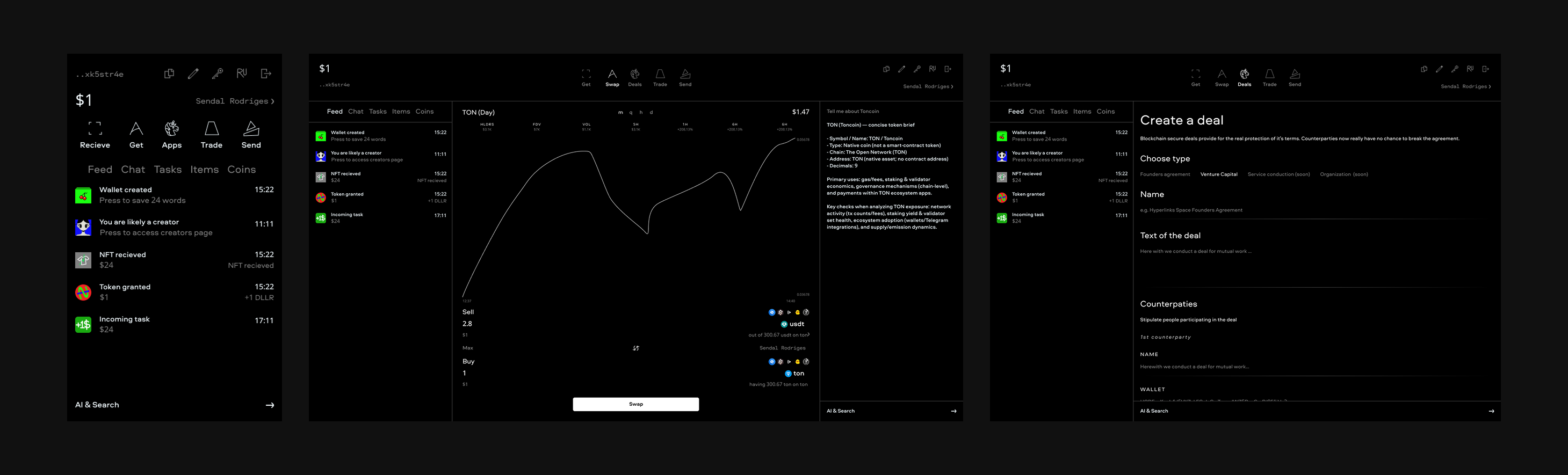
|
|
3
2
|
|
|
4
|
-
|
|
3
|
+
# Hyperlinks Space Program
|
|
5
4
|
|
|
6
|
-
|
|
5
|
+
<u>**In progress, contribute!**</u>
|
|
6
|
+
|
|
7
|
+
This program is built upon [React Native](https://reactnative.dev/) by Meta and [Expo](https://expo.dev) multiplatform technologies, Windows build and executable creation achieved with [Electron Builder](https://www.electron.build/) and [Electron Forge](https://www.electronforge.io/), working in Telegram with help of [Telegram Mini Apps React SDK](http://telegram-mini-apps.com/) and [Bot API](https://core.telegram.org/bots). AI is backed by [OpenAI API](https://openai.com/ru-RU/api/), blockchain data is processed from [Swap.Coffee API](https://docs.swap.coffee/eng/user-guides/welcome).
|
|
8
|
+
|
|
9
|
+
## Program Kit
|
|
10
|
+
|
|
11
|
+
To give value for other developers we decided to launch an npm package that provides a ready starter for creating a multiplatform program in one command.
|
|
7
12
|
|
|
8
13
|
```bash
|
|
9
|
-
|
|
14
|
+
npx @www.hyperlinks.space/program-kit ./your-project
|
|
10
15
|
```
|
|
11
16
|
|
|
12
|
-
|
|
17
|
+
Link to the package: https://www.npmjs.com/package/@www.hyperlinks.space/program-kit
|
|
13
18
|
|
|
14
|
-
##
|
|
19
|
+
## Program design
|
|
15
20
|
|
|
16
|
-
|
|
21
|
+
Access [Figma](https://www.figma.com/design/53lDKAD6pRv3e0uef1DP18/TECHSYMBAL-Inc.?node-id=754-71&t=v3tmAlywNgXkTWMd-1) in real time for contributing. Contact [Seva](t.me/sevaaignatyev) in Telegram to discuss and implement.
|
|
17
22
|
|
|
18
|
-
|
|
19
|
-
- **npmjs (public):** `@www.hyperlinks.space/program-kit` — manage org and tokens: [www.hyperlinks.space on npm](https://www.npmjs.com/settings/www.hyperlinks.space/packages)
|
|
20
|
-
- **GitHub Packages:** `@hyperlinksspace/program-kit` (same version; GitHub requires the package scope to match this repo’s owner)
|
|
23
|
+
Copying fully or partially, usage as an inspiration for other developments are unpleasant, participation in our projects is appreciated. All core materials are available publicly for instant access worldwide and our project availability for newcomers.
|
|
21
24
|
|
|
22
|
-
|
|
25
|
+
## How to fork and contribute?
|
|
23
26
|
|
|
24
|
-
|
|
27
|
+
1. Install GitHub CLI and authorize to GitHub from CLI for instant work
|
|
25
28
|
|
|
26
|
-
|
|
29
|
+
```
|
|
30
|
+
winget install --id GitHub.cli
|
|
31
|
+
gh auth login
|
|
32
|
+
```
|
|
27
33
|
|
|
28
|
-
|
|
29
|
-
|
|
30
|
-
|
|
31
|
-
|
|
32
|
-
git checkout
|
|
33
|
-
|
|
34
|
+
2. Fork the repo, clone it and create a new branch and switch to it
|
|
35
|
+
|
|
36
|
+
```
|
|
37
|
+
gh repo fork https://github.com/HyperlinksSpace/HyperlinksSpaceBot.git --clone
|
|
38
|
+
git checkout -b new-branch-for-an-update
|
|
39
|
+
git switch -c new-branch-for-an-update
|
|
34
40
|
```
|
|
35
41
|
|
|
36
|
-
|
|
42
|
+
3. Make a commit (address unassigned issue or think yourself)
|
|
37
43
|
|
|
38
|
-
```
|
|
39
|
-
|
|
44
|
+
```
|
|
45
|
+
git add . # Stage changes on this branch
|
|
46
|
+
git commit -m "Describe your change" # Commit on this branch
|
|
47
|
+
```
|
|
48
|
+
|
|
49
|
+
3. After making a commit, make a pull request, gh tool will already know the upstream remote
|
|
50
|
+
|
|
51
|
+
```
|
|
52
|
+
gh pr create --title "My new PR" --body "It is my best PR"
|
|
53
|
+
```
|
|
54
|
+
|
|
55
|
+
4. For subsequent commits (sync `main`, create a fresh branch, and commit there)
|
|
56
|
+
|
|
57
|
+
```
|
|
58
|
+
git checkout main # Return to main
|
|
59
|
+
git fetch upstream # Fully sync with upstream main
|
|
60
|
+
git reset --hard upstream/main # Reset local main to upstream/main
|
|
61
|
+
git push origin main # Keep your fork main in sync too
|
|
62
|
+
git switch -c new-branch-for-next-update # Create and switch to a new feature branch
|
|
40
63
|
```
|
|
41
64
|
|
|
42
|
-
|
|
65
|
+
**Move in loops starting from the step 3.**
|
|
66
|
+
|
|
67
|
+
## Pull requests and commits requirements
|
|
68
|
+
|
|
69
|
+
- Give pull requests and commits a proper name and description
|
|
70
|
+
- Dedicate each pull request to an understandable area or field, each commit to a focused logical change
|
|
71
|
+
- Check file changes in every commit pulled, no arbitrary files modifications should persist such as LF/CRLF line-ending conversion, broken/garbled text diffs, BOM added or removed, accidental "invisible" corruption from text filters
|
|
72
|
+
- Add dependecies and packages step by step for security
|
|
73
|
+
- An issue creation or following an existing before a pull request would be a good practice
|
|
74
|
+
|
|
75
|
+
## Local deploy
|
|
76
|
+
|
|
77
|
+
To start the full local stack, run:
|
|
43
78
|
|
|
44
79
|
```bash
|
|
45
|
-
|
|
46
|
-
npm install
|
|
80
|
+
npm run start
|
|
47
81
|
```
|
|
48
82
|
|
|
49
|
-
|
|
83
|
+
This runs Expo dev server, the Telegram bot (polling mode), and local Vercel API (`vercel dev`).
|
|
50
84
|
|
|
51
|
-
|
|
52
|
-
- `next`: rolling snapshots from manual workflow dispatch
|
|
85
|
+
Isolated/local run options:
|
|
53
86
|
|
|
54
|
-
|
|
87
|
+
- Expo only (no bot, no Vercel): `npm run start:expo`
|
|
88
|
+
- Bot only (polling mode): `npm run bot:local`
|
|
89
|
+
- Vercel API only: `npm run dev:vercel`
|
|
55
90
|
|
|
56
|
-
|
|
57
|
-
- [an Android emulator](https://docs.expo.dev/workflow/android-studio-emulator/)
|
|
58
|
-
- [an iOS simulator](https://docs.expo.dev/workflow/ios-simulator/)
|
|
59
|
-
- [Expo Go](https://expo.dev/go), a limited sandbox for trying out app development with Expo
|
|
91
|
+
## Milestone snapshot package (npm)
|
|
60
92
|
|
|
61
|
-
|
|
93
|
+
NPM release and snapshot details were moved to `docs/npm-release.md`.
|
|
62
94
|
|
|
63
95
|
### Local env setup
|
|
64
96
|
|
|
65
|
-
1. **Copy the example file** (from the
|
|
97
|
+
1. **Copy the example file** (from the repository root):
|
|
66
98
|
```bash
|
|
67
99
|
cp .env.example .env
|
|
68
100
|
```
|
|
@@ -77,9 +109,22 @@ You can start developing by editing the files inside the **app** directory. This
|
|
|
77
109
|
|
|
78
110
|
The `.env` file is gitignored; do not commit it.
|
|
79
111
|
|
|
80
|
-
##
|
|
112
|
+
## GitHub Actions
|
|
113
|
+
|
|
114
|
+
Current Actions workflows include:
|
|
115
|
+
|
|
116
|
+
- `Vercel Deploy Test` (`.github/workflows/vercel-deploy-test-envs.yml`) - manual web deploy to Vercel.
|
|
117
|
+
- `NPM Package Release` (`.github/workflows/npm-package-release.yml`) - npm/GitHub Packages release workflow.
|
|
118
|
+
- `Electron EXE Release` and `Electron Forge EXE Release` - manual Windows release pipelines.
|
|
119
|
+
- `EXPO Publish` (`.github/workflows/expo-publish.yml`) - manual OTA publish with EAS CLI.
|
|
120
|
+
- `Lint errors check` (`.github/workflows/lint-errors-check.yml`) - manual lint check.
|
|
121
|
+
|
|
122
|
+
## Expo Workflows
|
|
123
|
+
|
|
124
|
+
This project uses two automation layers:
|
|
81
125
|
|
|
82
|
-
|
|
126
|
+
- [EAS Workflows](https://docs.expo.dev/eas/workflows/get-started/) for Expo update/build/deploy flows (triggered via npm scripts from [`package.json`](./package.json)).
|
|
127
|
+
- GitHub Actions for CI/CD tasks stored in `.github/workflows` (manual release/deploy jobs and checks).
|
|
83
128
|
|
|
84
129
|
### Previews
|
|
85
130
|
|
|
@@ -99,61 +144,36 @@ Expo offers hosting for websites and API functions via EAS Hosting. See the [Get
|
|
|
99
144
|
|
|
100
145
|
### Deploy web build to Vercel
|
|
101
146
|
|
|
102
|
-
From
|
|
147
|
+
From the repository root, deploy the static web build to Vercel production:
|
|
103
148
|
|
|
104
149
|
```bash
|
|
105
150
|
vercel --prod
|
|
106
151
|
```
|
|
107
152
|
|
|
108
|
-
Deploying from
|
|
153
|
+
Deploying from repository root makes this folder the project root, so `api/bot` is deployed and no Root Directory setting is needed. The project is configured so Vercel runs `npx expo export -p web` and serves the `dist/` output. Link the project first with `vercel` if needed.
|
|
109
154
|
|
|
110
|
-
|
|
155
|
+
## Telegram bot (Grammy)
|
|
111
156
|
|
|
112
|
-
|
|
157
|
+
The bot is extended beyond a basic "Hello" and "Start program" responder and now supports AI streaming and threads.
|
|
113
158
|
|
|
114
159
|
**Vercel (webhook)**
|
|
115
|
-
- **
|
|
116
|
-
- **Webhook
|
|
117
|
-
-
|
|
160
|
+
- **Runtime path:** Telegram sends updates to `POST /api/bot`. This route proxies to the shared bot webhook handler in `bot/webhook`.
|
|
161
|
+
- **Webhook setup:** `scripts/set-webhook.ts` sets `https://<base>/api/bot` using `VERCEL_PROJECT_PRODUCTION_URL` (preferred) or `VERCEL_URL`.
|
|
162
|
+
- **Required env:** set `BOT_TOKEN` (or `TELEGRAM_BOT_TOKEN`) in Vercel project envs for production deploys.
|
|
163
|
+
- **Deploy flow:** webhook mode is intended for Vercel deploys (CLI `vercel --prod` or the manual GitHub Action `Vercel Deploy (Test Envs)`).
|
|
118
164
|
|
|
119
165
|
**Bot works locally but not on Vercel**
|
|
120
|
-
1.
|
|
121
|
-
|
|
122
|
-
|
|
123
|
-
|
|
124
|
-
- `webhook_set: true` → last setWebhook call succeeded.
|
|
125
|
-
2. **Root directory:** Only needed if you deploy via Git (auto-deploy from the repo). Then set **Root Directory** to **`app`** in Vercel → Project Settings → General. If you always run `vercel --prod` from inside `app/`, the CLI uses this folder as the project root and you don’t need to set it.
|
|
126
|
-
3. **Logs:** After sending /start, check **Logs** for `[webhook] POST update` and any `[bot]` errors (e.g. handler_error, timeout).
|
|
127
|
-
4. Don’t run the same bot in polling locally while testing the webhook (or Telegram may deliver updates to the wrong place).
|
|
166
|
+
1. Confirm Vercel env has `BOT_TOKEN` and redeploy.
|
|
167
|
+
2. Ensure the deployed URL is stable and matches the webhook target (`/api/bot`).
|
|
168
|
+
3. Check deploy/runtime logs for `[set-webhook]` and `[webhook]` errors.
|
|
169
|
+
4. Do not run local polling with the same token while validating webhook mode.
|
|
128
170
|
|
|
129
171
|
**Local (getUpdates, no webhook)**
|
|
130
|
-
- Only `BOT_TOKEN` is required (
|
|
131
|
-
- Run
|
|
132
|
-
|
|
133
|
-
|
|
134
|
-
```
|
|
135
|
-
- `npm run start` runs both Expo and the bot; or run the bot alone with `npm run bot:local`.
|
|
136
|
-
|
|
137
|
-
## Get a fresh project
|
|
138
|
-
|
|
139
|
-
When you're ready, run:
|
|
140
|
-
|
|
141
|
-
```bash
|
|
142
|
-
npm run reset-project
|
|
143
|
-
```
|
|
144
|
-
|
|
145
|
-
This command will move the starter code to the **app-example** directory and create a blank **app** directory where you can start developing.
|
|
146
|
-
|
|
147
|
-
## Learn more
|
|
148
|
-
|
|
149
|
-
To learn more about developing your project with Expo, look at the following resources:
|
|
150
|
-
|
|
151
|
-
- [Expo documentation](https://docs.expo.dev/): Learn fundamentals, or go into advanced topics with our [guides](https://docs.expo.dev/guides).
|
|
152
|
-
- [Learn Expo tutorial](https://docs.expo.dev/tutorial/introduction/): Follow a step-by-step tutorial where you'll create a project that runs on Android, iOS, and the web.
|
|
153
|
-
|
|
154
|
-
## Join the community
|
|
172
|
+
- Only `BOT_TOKEN` is required (env or `.env`).
|
|
173
|
+
- Run bot only: `npm run bot:local`
|
|
174
|
+
- Run full local stack (Expo + bot + Vercel): `npm run start`
|
|
175
|
+
- Keep production and local bot tokens separate when possible to avoid webhook/polling conflicts.
|
|
155
176
|
|
|
156
|
-
|
|
177
|
+
## Where to discuss the project?
|
|
157
178
|
|
|
158
|
-
|
|
159
|
-
- [Discord community](https://chat.expo.dev): Chat with Expo users and ask questions.
|
|
179
|
+
This repository has [GitHub Discussions](https://github.com/HyperlinksSpace/HyperlinksSpaceProgram/discussions) opened, as well you can join our [Telegram Chat](https://t.me/HyperlinksSpaceChat) and [Channel](https://t.me/HyperlinksSpace).
|
package/npmReadMe.md
CHANGED
|
@@ -1,17 +1,18 @@
|
|
|
1
1
|
# Program Kit
|
|
2
2
|
|
|
3
|
-
Program Kit is a production-ready cross-platform starter published from
|
|
3
|
+
Program Kit is a production-ready cross-platform starter published from repository root.
|
|
4
4
|
It is built around React Native + Expo and is designed to be quickly tested, scaled,
|
|
5
5
|
and deployed across popular platforms.
|
|
6
6
|
|
|
7
7
|
## What You Get
|
|
8
8
|
|
|
9
9
|
- Expo + React Native app foundation
|
|
10
|
-
- Telegram bot support (webhook + local bot scripts)
|
|
10
|
+
- Telegram bot support (webhook + local bot scripts) with AI functionality
|
|
11
11
|
- Telegram Mini App-ready client structure
|
|
12
|
-
- Android and iOS
|
|
12
|
+
- Android and iOS clients
|
|
13
13
|
- Windows desktop packaging (`.exe`) with Electron Builder
|
|
14
14
|
- CI-oriented release workflow and deployment helpers
|
|
15
|
+
- OpenAI functionality and Swap.Coffee for blockchain data retrievement
|
|
15
16
|
|
|
16
17
|
## Install
|
|
17
18
|
|
|
@@ -38,7 +39,7 @@ npm install
|
|
|
38
39
|
npm run start
|
|
39
40
|
```
|
|
40
41
|
|
|
41
|
-
Then open the project
|
|
42
|
+
Then open the project **`fullREADME.md`** for details (env vars, bot setup, build
|
|
42
43
|
and release commands).
|
|
43
44
|
|
|
44
45
|
## Release Channels
|
|
@@ -50,4 +51,3 @@ and release commands).
|
|
|
50
51
|
|
|
51
52
|
- Published directly from the `app/` folder.
|
|
52
53
|
- Package tarball is filtered to include only required project files.
|
|
53
|
-
- **`fullREADME.md`** in the package is the full in-repo developer guide (Expo setup, scripts, and the rest of the project readme).
|
package/package.json
CHANGED
|
@@ -40,7 +40,7 @@
|
|
|
40
40
|
"url": "https://github.com/HyperlinksSpace/HyperlinksSpaceBot.git"
|
|
41
41
|
},
|
|
42
42
|
"main": "expo-router/entry",
|
|
43
|
-
"version": "1.2.
|
|
43
|
+
"version": "1.2.91881",
|
|
44
44
|
"type": "module",
|
|
45
45
|
"engines": {
|
|
46
46
|
"node": ">=18 <=22"
|
|
@@ -200,7 +200,7 @@
|
|
|
200
200
|
"@vercel/functions": "^3.4.3",
|
|
201
201
|
"concurrently": "^9.1.0",
|
|
202
202
|
"cross-env": "^7.0.3",
|
|
203
|
-
"dotenv": "^16.
|
|
203
|
+
"dotenv": "^16.6.1",
|
|
204
204
|
"electron": "^41.0.4",
|
|
205
205
|
"electron-builder": "^26.8.1",
|
|
206
206
|
"electron-forge": "^5.2.4",
|
package/scripts/load-env.ts
CHANGED
|
@@ -4,14 +4,12 @@ import path from "path";
|
|
|
4
4
|
/**
|
|
5
5
|
* Unified env loader for local Node contexts.
|
|
6
6
|
*
|
|
7
|
-
* Loads .env and .env.local from repo root
|
|
7
|
+
* Loads .env and .env.local from repo root.
|
|
8
8
|
* On Vercel, these files normally aren't present, so this is effectively a no-op.
|
|
9
9
|
*/
|
|
10
10
|
export function loadEnv() {
|
|
11
11
|
const cwd = process.cwd();
|
|
12
12
|
dotenv.config({ path: path.join(cwd, ".env") });
|
|
13
|
-
dotenv.config({ path: path.join(cwd, "app", ".env") });
|
|
14
13
|
dotenv.config({ path: path.join(cwd, ".env.local") });
|
|
15
|
-
dotenv.config({ path: path.join(cwd, "app", ".env.local") });
|
|
16
14
|
}
|
|
17
15
|
|
package/scripts/test-api-base.ts
CHANGED
|
@@ -1,5 +1,5 @@
|
|
|
1
1
|
/**
|
|
2
|
-
* Quick check that
|
|
2
|
+
* Quick check that api/base.ts works. Run: npx tsx scripts/test-api-base.ts
|
|
3
3
|
* In Node (no window), getApiBaseUrl() uses Vercel env or falls back to http://localhost:3000.
|
|
4
4
|
*/
|
|
5
5
|
import { getApiBaseUrl, buildApiUrl } from "../api/base.js";
|
package/tsconfig.json
CHANGED
package/windows/build.cjs
CHANGED
|
@@ -2115,7 +2115,7 @@ async function createWindow() {
|
|
|
2115
2115
|
|
|
2116
2116
|
// NSIS close-app uses PRODUCT_NAME (package.json → build.productName). The window title must
|
|
2117
2117
|
// match that string, not a URL — otherwise the installer cannot find/close the running app.
|
|
2118
|
-
// Keep in sync with
|
|
2118
|
+
// Keep in sync with package.json "build.productName".
|
|
2119
2119
|
const windowTitle = isDev ? "http://www.hyperlinks.space/" : brand.productDisplayName;
|
|
2120
2120
|
|
|
2121
2121
|
const mainWindow = new BrowserWindow({
|
|
@@ -1,7 +1,7 @@
|
|
|
1
1
|
# Remove leftover per-user installs under %LOCALAPPDATA%\Programs\ and updater sidecars.
|
|
2
2
|
# Older builds often installed to AppData while current NSIS uses perMachine -> Program Files.
|
|
3
3
|
#
|
|
4
|
-
# Usage (from
|
|
4
|
+
# Usage (from repo root):
|
|
5
5
|
# powershell -ExecutionPolicy Bypass -File .\windows\cleanup-legacy-appdata-installs.ps1 # list only
|
|
6
6
|
# powershell -ExecutionPolicy Bypass -File .\windows\cleanup-legacy-appdata-installs.ps1 -Force # delete
|
|
7
7
|
# If removal fails with "in use", close the app or run with -KillAppProcesses (stops exes under those folders).
|
|
@@ -1,6 +1,6 @@
|
|
|
1
1
|
/**
|
|
2
2
|
* Single source of truth for Windows/Electron product naming.
|
|
3
|
-
* Display name and artifact slug come from
|
|
3
|
+
* Display name and artifact slug come from package.json → build.productName.
|
|
4
4
|
*/
|
|
5
5
|
const fs = require("fs");
|
|
6
6
|
const path = require("path");
|