@weppy/roblox-mcp 2.6.3 → 2.7.0
This diff represents the content of publicly available package versions that have been released to one of the supported registries. The information contained in this diff is provided for informational purposes only and reflects changes between package versions as they appear in their respective public registries.
- package/.claude-plugin/marketplace.json +4 -4
- package/CHANGELOG.md +34 -0
- package/README.md +22 -11
- package/install.ps1 +85 -19
- package/install.sh +64 -18
- package/llms-full.txt +1 -2
- package/llms.txt +4 -3
- package/package.json +1 -1
- package/plugins/weppy-roblox-mcp/.claude-plugin/plugin.json +1 -1
- package/plugins/weppy-roblox-mcp/dashboard/dist/assets/{ChangelogDetailPage-CCOyzW-z.js → ChangelogDetailPage-CIarzJIx.js} +1 -1
- package/plugins/weppy-roblox-mcp/dashboard/dist/assets/ChangelogPage-C1uCKyqh.js +1 -0
- package/plugins/weppy-roblox-mcp/dashboard/dist/assets/ChangelogPage-CNxAGfwG.css +1 -0
- package/plugins/weppy-roblox-mcp/dashboard/dist/assets/{ConfirmModal-jY5BGNY2.js → ConfirmModal-BDWSInRi.js} +1 -1
- package/plugins/weppy-roblox-mcp/dashboard/dist/assets/{ConnectionPage-CBcepiuB.js → ConnectionPage-CWDwVCKg.js} +1 -1
- package/plugins/weppy-roblox-mcp/dashboard/dist/assets/{GameChangeDetail-sMoIkbj9.js → GameChangeDetail-Bk8YUy4G.js} +1 -1
- package/plugins/weppy-roblox-mcp/dashboard/dist/assets/{InfoLabel-BbEJAGvG.js → InfoLabel-BJIFNYA5.js} +1 -1
- package/plugins/weppy-roblox-mcp/dashboard/dist/assets/{OverviewPage-B1QsVfNL.js → OverviewPage-Di0p7YY2.js} +1 -1
- package/plugins/weppy-roblox-mcp/dashboard/dist/assets/PlaytestPage-Dxgz0SKW.js +11 -0
- package/plugins/weppy-roblox-mcp/dashboard/dist/assets/SettingsPage-Cc9Wnj8M.css +1 -0
- package/plugins/weppy-roblox-mcp/dashboard/dist/assets/SettingsPage-DVgxRsfC.js +1 -0
- package/plugins/weppy-roblox-mcp/dashboard/dist/assets/{StatusBadge-DASntRhn.js → StatusBadge-ilvVufN2.js} +1 -1
- package/plugins/weppy-roblox-mcp/dashboard/dist/assets/{SyncPage-COJc3U-b.js → SyncPage-IICMnq8v.js} +1 -1
- package/plugins/weppy-roblox-mcp/dashboard/dist/assets/Tabs-876h0_zB.css +1 -0
- package/plugins/weppy-roblox-mcp/dashboard/dist/assets/Tabs-pDS5zzr9.js +1 -0
- package/plugins/weppy-roblox-mcp/dashboard/dist/assets/TierComparison-BXMCd1IB.js +2 -0
- package/plugins/weppy-roblox-mcp/dashboard/dist/assets/ToolsPage-B3fMk-22.css +1 -0
- package/plugins/weppy-roblox-mcp/dashboard/dist/assets/ToolsPage-DEhsoa36.js +1 -0
- package/plugins/weppy-roblox-mcp/dashboard/dist/assets/{TooltipText-Bt3XsRi-.js → TooltipText-bSKcc3-P.js} +1 -1
- package/plugins/weppy-roblox-mcp/dashboard/dist/assets/UiStudioPage-BHhd3zUv.js +16 -0
- package/plugins/weppy-roblox-mcp/dashboard/dist/assets/UiStudioPage-DQOd5VrU.css +1 -0
- package/plugins/weppy-roblox-mcp/dashboard/dist/assets/{WhatsNewPage-Dt7gQvv4.js → WhatsNewPage-ErpENbsZ.js} +1 -1
- package/plugins/weppy-roblox-mcp/dashboard/dist/assets/index-BPAvjNNu.js +343 -0
- package/plugins/weppy-roblox-mcp/dashboard/dist/assets/index-Gu7et1DX.css +1 -0
- package/plugins/weppy-roblox-mcp/dashboard/dist/assets/sample-requests-Bx1zpYdG.css +1 -0
- package/plugins/weppy-roblox-mcp/dashboard/dist/assets/sample-requests-DDQ3XchF.js +1 -0
- package/plugins/weppy-roblox-mcp/dashboard/dist/assets/ui-studio-sample-DrNTD6yi.png +0 -0
- package/plugins/weppy-roblox-mcp/dashboard/dist/assets/{useLiveUptime-ViehI-J9.js → useLiveUptime-HYmdQdHf.js} +1 -1
- package/plugins/weppy-roblox-mcp/dashboard/dist/index.html +2 -2
- package/plugins/weppy-roblox-mcp/dist/index.js +435 -78
- package/plugins/weppy-roblox-mcp/roblox-plugin/WeppyRobloxMCP.rbxm +0 -0
- package/.gitattributes +0 -1
- package/.github/ISSUE_TEMPLATE/bug_report.yml +0 -60
- package/.github/ISSUE_TEMPLATE/feature_request.yml +0 -30
- package/.github/ISSUE_TEMPLATE/install_help.yml +0 -48
- package/.github/PULL_REQUEST_TEMPLATE.md +0 -16
- package/.github/workflows/install-test.yml +0 -140
- package/Dockerfile +0 -13
- package/docs/assets/screenshots/antigravity/antigravity_mcp_raw.png +0 -0
- package/docs/assets/screenshots/antigravity/antigravity_mcp_services_menu.png +0 -0
- package/docs/assets/screenshots/antigravity/antigravity_raw_config_menu.png +0 -0
- package/docs/assets/screenshots/dashboard/dashboard_changelog1.png +0 -0
- package/docs/assets/screenshots/dashboard/dashboard_changelog2.png +0 -0
- package/docs/assets/screenshots/dashboard/dashboard_connection.png +0 -0
- package/docs/assets/screenshots/dashboard/dashboard_overview.png +0 -0
- package/docs/assets/screenshots/dashboard/dashboard_playtest.png +0 -0
- package/docs/assets/screenshots/dashboard/dashboard_sync.png +0 -0
- package/docs/assets/screenshots/dashboard/dashboard_tools.png +0 -0
- package/docs/assets/screenshots/plugin/connection/connection-guide.png +0 -0
- package/docs/assets/screenshots/plugin/installation/main-screen.png +0 -0
- package/docs/assets/screenshots/plugin/installation/plugins-menu.png +0 -0
- package/docs/assets/screenshots/plugin/installation/settings-screen.png +0 -0
- package/docs/assets/screenshots/plugin/installation/toolbar-button.png +0 -0
- package/docs/assets/screenshots/plugin/license/dashboard-license-screen.png +0 -0
- package/docs/assets/screenshots/plugin/license/plugin-license-screen.png +0 -0
- package/docs/assets/screenshots/plugin/sync/sync-conflict.png +0 -0
- package/docs/assets/screenshots/plugin/sync/sync-main.png +0 -0
- package/docs/assets/screenshots/plugin/sync/sync-overview.png +0 -0
- package/docs/assets/screenshots/roblox-explorer/roblox-explorer-property-window.png +0 -0
- package/docs/assets/screenshots/roblox-explorer/roblox-explorer-screen.png +0 -0
- package/plugins/weppy-roblox-mcp/dashboard/dist/assets/ChangelogPage-BH87M2hn.css +0 -1
- package/plugins/weppy-roblox-mcp/dashboard/dist/assets/ChangelogPage-CH7hNPlg.js +0 -1
- package/plugins/weppy-roblox-mcp/dashboard/dist/assets/PlaytestPage-LveG542g.js +0 -11
- package/plugins/weppy-roblox-mcp/dashboard/dist/assets/SettingsPage-BMllTvd1.js +0 -1
- package/plugins/weppy-roblox-mcp/dashboard/dist/assets/SettingsPage-DTv0NbEY.css +0 -1
- package/plugins/weppy-roblox-mcp/dashboard/dist/assets/TierComparison-B-d8Qied.js +0 -2
- package/plugins/weppy-roblox-mcp/dashboard/dist/assets/ToolsPage-54vIMfZg.css +0 -1
- package/plugins/weppy-roblox-mcp/dashboard/dist/assets/ToolsPage-Bi0PQXNP.js +0 -1
- package/plugins/weppy-roblox-mcp/dashboard/dist/assets/index-BJrsGJ5y.js +0 -380
- package/plugins/weppy-roblox-mcp/dashboard/dist/assets/index-COXUWuq2.css +0 -1
|
@@ -5,15 +5,15 @@
|
|
|
5
5
|
"email": "hope841026@gmail.com"
|
|
6
6
|
},
|
|
7
7
|
"metadata": {
|
|
8
|
-
"description": "Weppy Roblox MCP — MCP server that lets AI coding agents control a live Roblox Studio session with
|
|
9
|
-
"version": "2.
|
|
8
|
+
"description": "Weppy Roblox MCP — MCP server that lets AI coding agents control a live Roblox Studio session with 21 tools, 140+ actions, bidirectional sync, automated playtest, and multi-place support",
|
|
9
|
+
"version": "2.7.0"
|
|
10
10
|
},
|
|
11
11
|
"plugins": [
|
|
12
12
|
{
|
|
13
13
|
"name": "weppy-roblox-mcp",
|
|
14
14
|
"source": "./plugins/weppy-roblox-mcp",
|
|
15
|
-
"description": "Weppy Roblox MCP — MCP server that lets AI coding agents control a live Roblox Studio session with
|
|
16
|
-
"version": "2.
|
|
15
|
+
"description": "Weppy Roblox MCP — MCP server that lets AI coding agents control a live Roblox Studio session with 21 tools, 140+ actions, bidirectional sync, automated playtest, and multi-place support",
|
|
16
|
+
"version": "2.7.0",
|
|
17
17
|
"author": {
|
|
18
18
|
"name": "hope1026"
|
|
19
19
|
},
|
package/CHANGELOG.md
CHANGED
|
@@ -3,7 +3,41 @@
|
|
|
3
3
|
All notable changes to this project will be documented in this file.
|
|
4
4
|
|
|
5
5
|
|
|
6
|
+
## [2.7.0] - 2026-05-05
|
|
6
7
|
|
|
8
|
+
### Features
|
|
9
|
+
|
|
10
|
+
- **UI Studio (Pro) — major upgrade** — `manage_ui` now supports a full design loop: open the dashboard's UI Studio page to see a per-request **History tab** (with before/after snapshots and design suggestions side-by-side), an **Analysis tab** with comparison modal, and a **Design Check** action that replaces the old `lint` action and reports issues against the quality bar. AI agents can also fetch a **partial design brief** scoped to the part of the tree they're editing, get **asset recommendations** (icons, ornaments, imagery) wired into the brief, and generate previews that respect a new isolated `UIVisibilityScope` so agent-driven UI work doesn't leak into your Studio session. Note: the old `manage_ui` action `lint` has been renamed to `design_check` — update any explicit calls. Stored UI Studio history from previous versions remains readable.
|
|
11
|
+
|
|
12
|
+
- **UI Studio retention & storage controls** — A new **Storage** card on the dashboard lets you set a retention policy (max age + max size) for UI Studio request history. The retention runner cleans old runs in the background and supports dry-run preview before deletion. History entries can also be batch-selected and deleted from the Analysis tab.
|
|
13
|
+
|
|
14
|
+
- **UI Studio dashboard redesign** — The UI Studio page is now split into **History** and **Analysis** tabs with a redesigned snapshot drawer (persistent toolbar, focus trap, drawer/dialog comparison view), tooltip help across UI Studio + Settings, a new connection guide for first-time users, and localized analysis detail strings. Thumbnails now use `object-fit: contain` so layouts aren't cropped.
|
|
15
|
+
|
|
16
|
+
- **Reverse sync infers correct property types** — When you edit synced files locally and push them back to Studio, the server now resolves property types via class-aware metadata instead of guessing from value shape. This fixes cases where edits to enum, color, or vector properties on specific instance classes would silently land as the wrong type.
|
|
17
|
+
|
|
18
|
+
- **GA4 telemetry: per-user attribution + better error diagnostics** — Telemetry events now include a stable `user_id` so the dashboard funnels reflect real users (with a documented DebugView verification path), and command failures emit structured error classification so you can tell config issues from runtime crashes from network failures at a glance. Telemetry is opt-in and unchanged for users who haven't enabled it.
|
|
19
|
+
|
|
20
|
+
### Bug Fixes
|
|
21
|
+
|
|
22
|
+
- **Installer: legacy `@weppy/roblox-mcp` entries auto-upgrade to `@latest`** — If you previously installed the MCP via an older one-liner that pinned a bare package name, the installer now rewrites that entry to `@latest` instead of leaving it on a stale version. Combined with `npx --ignore-existing` the next launch picks up the new release without manual config edits.
|
|
23
|
+
|
|
24
|
+
- **Installer: Claude Code detection on Windows** — The installer mis-detected Claude Code on Windows and could fail with a confusing "already exists" error even on first install. Detection is now correct and an existing valid registration is treated as success.
|
|
25
|
+
|
|
26
|
+
- **Dashboard tooltips no longer clipped** — Tooltips inside scrollable cards (Settings, UI Studio history) were clipped by `overflow:hidden` ancestors. They now render via a portal and display fully regardless of container.
|
|
27
|
+
|
|
28
|
+
### Documentation
|
|
29
|
+
|
|
30
|
+
- **UI Studio guide rewritten as a 3-layer English resource** — The design-system guide now reads top-down (intent → families → tokens), expands the palette/imagery/ornamentation/composition family menus, documents the quality-bar gate and slab-look anti-pattern, and clarifies multiline text encoding and transparent root defaults. Available via the `weppy://ui-studio/guide` MCP resource.
|
|
31
|
+
|
|
32
|
+
- **Public docs: UI Studio added to README and llms files** — `deploy/publish/hope1026-roblox-mcp/README.md` and the `llms.txt` / `llms-full.txt` files now describe UI Studio capabilities so AI agents and human readers see it as a first-class feature.
|
|
33
|
+
|
|
34
|
+
|
|
35
|
+
|
|
36
|
+
## [2.6.4] - 2026-04-22
|
|
37
|
+
|
|
38
|
+
### Bug Fixes
|
|
39
|
+
|
|
40
|
+
- **Fix MCP server crashing on startup** — The MCP server could crash immediately on startup, preventing any tools from loading. The server now starts cleanly without any config change.
|
|
7
41
|
|
|
8
42
|
|
|
9
43
|
## [2.6.3] - 2026-04-21
|
package/README.md
CHANGED
|
@@ -2,7 +2,7 @@
|
|
|
2
2
|
|
|
3
3
|
> **WEPPY** is an MCP server that lets AI coding agents control a live Roblox Studio session - create and edit scripts, instances, terrain, lighting, assets, audio, and animations through natural language.
|
|
4
4
|
|
|
5
|
-
**Action-based tool surface · Bidirectional sync · Automated playtest · Multi-place support**
|
|
5
|
+
**Action-based tool surface · Bidirectional sync · Automated playtest · UI Studio · Multi-place support**
|
|
6
6
|
|
|
7
7
|
**English** | [한국어](https://weppyai.com/ko) | [日本語](https://weppyai.com/ja) | [Español](https://weppyai.com/es) | [Português](https://weppyai.com/pt-br) | [Bahasa Indonesia](https://weppyai.com/id) | [Deutsch](https://weppyai.com/de)
|
|
8
8
|
|
|
@@ -87,7 +87,7 @@ AI works from a synchronized local mirror, so multi-file updates stay consistent
|
|
|
87
87
|
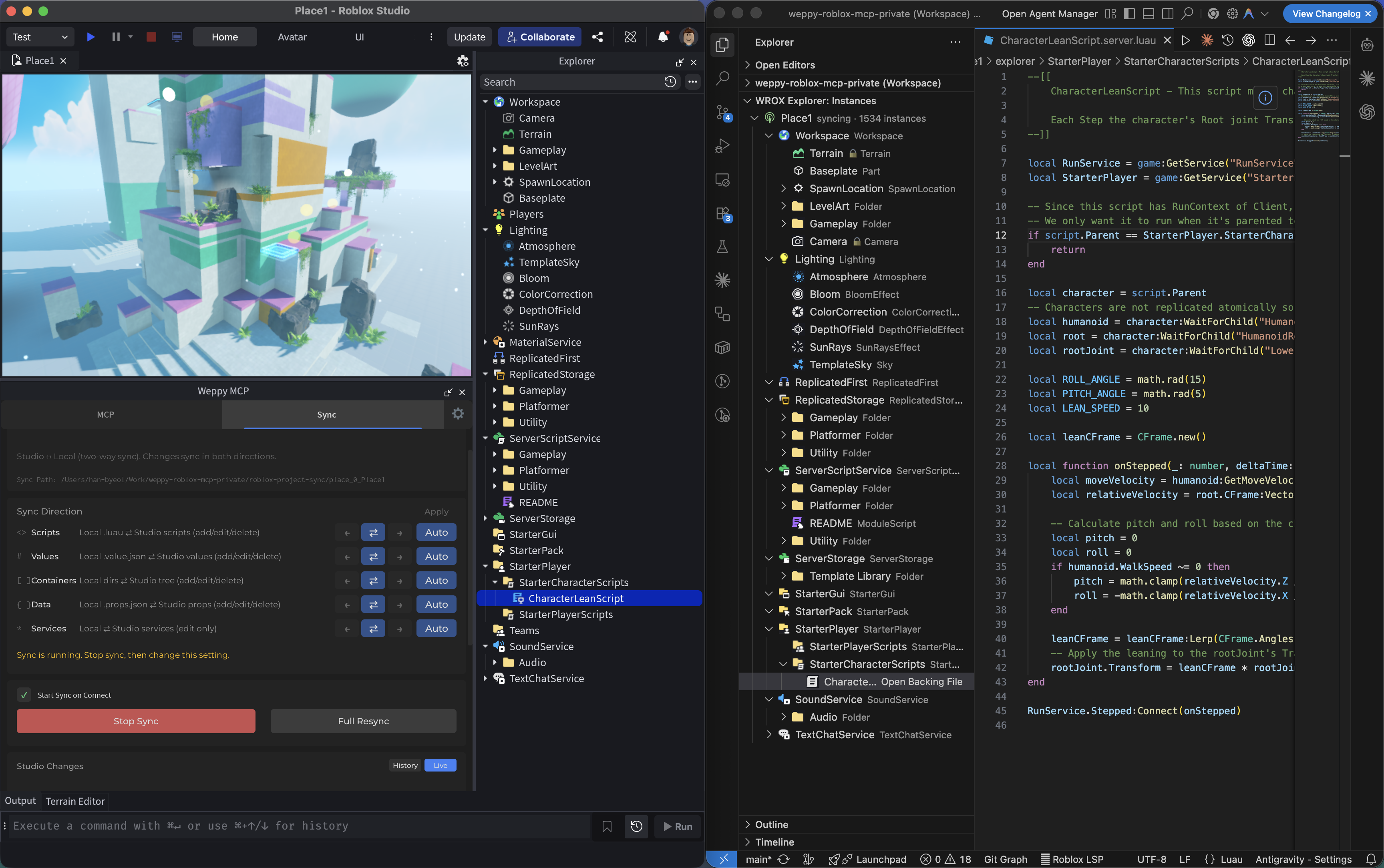
- Basic: one-way sync (Studio -> Local)
|
|
88
88
|
- Pro: bidirectional sync + per-type Direction/Apply Mode + history + multi-place
|
|
89
89
|
|
|
90
|
-

|
|
90
|
+
|
|
91
91
|
|
|
92
92
|
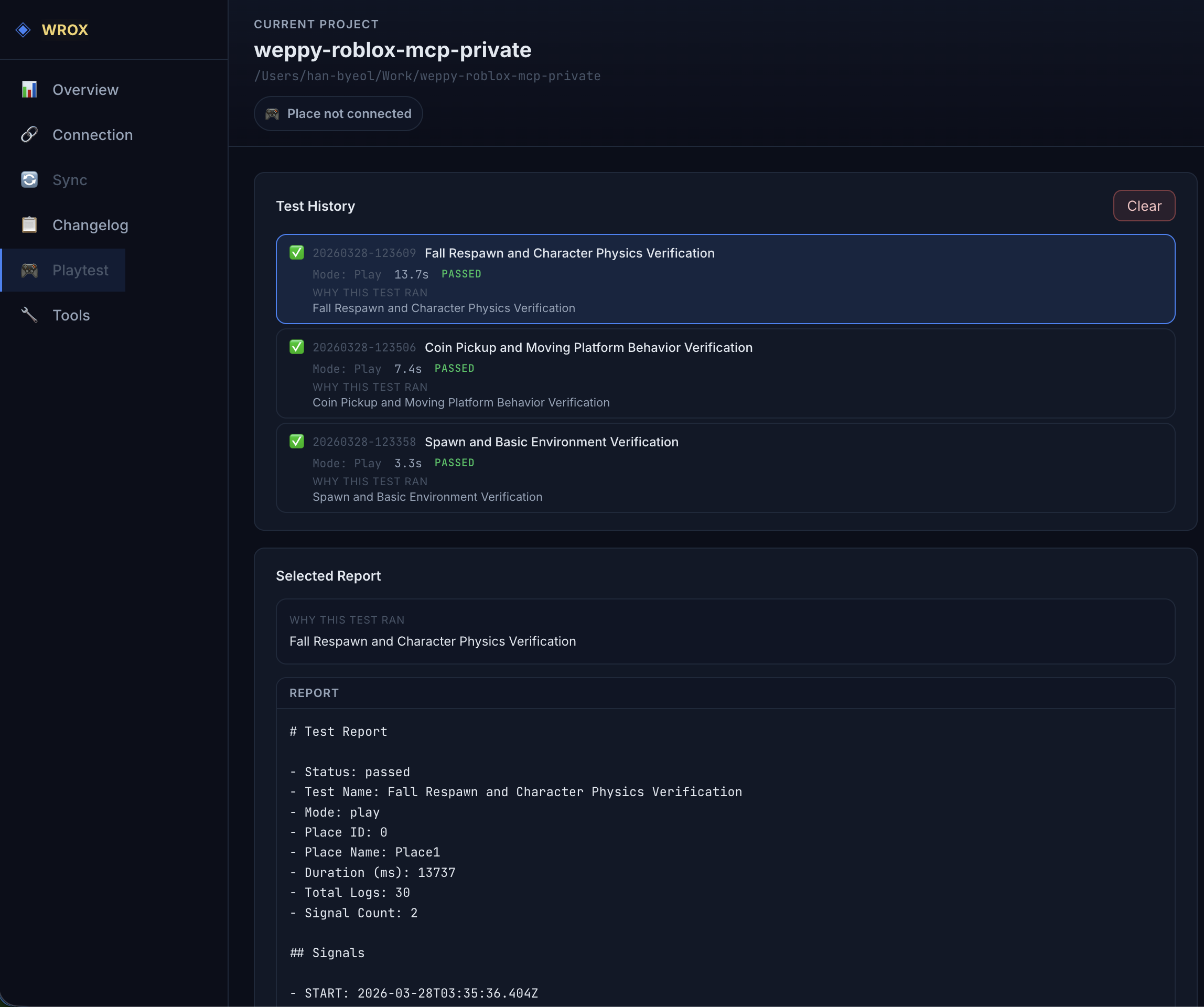
### 3) Playtest: Let AI run and verify tests automatically
|
|
93
93
|
|
|
@@ -97,19 +97,29 @@ AI can control Roblox Studio playtests directly. It can start and stop Play (F5)
|
|
|
97
97
|
- "Write a test that verifies the SpawnLocation is above the ground and run it."
|
|
98
98
|
- "Validate that the script I just changed runs without errors in playtest."
|
|
99
99
|
|
|
100
|
-

|
|
100
|
+
|
|
101
101
|
|
|
102
|
-
### 4)
|
|
102
|
+
### 4) UI Studio: Build and inspect in-game UI
|
|
103
103
|
|
|
104
|
-
|
|
104
|
+
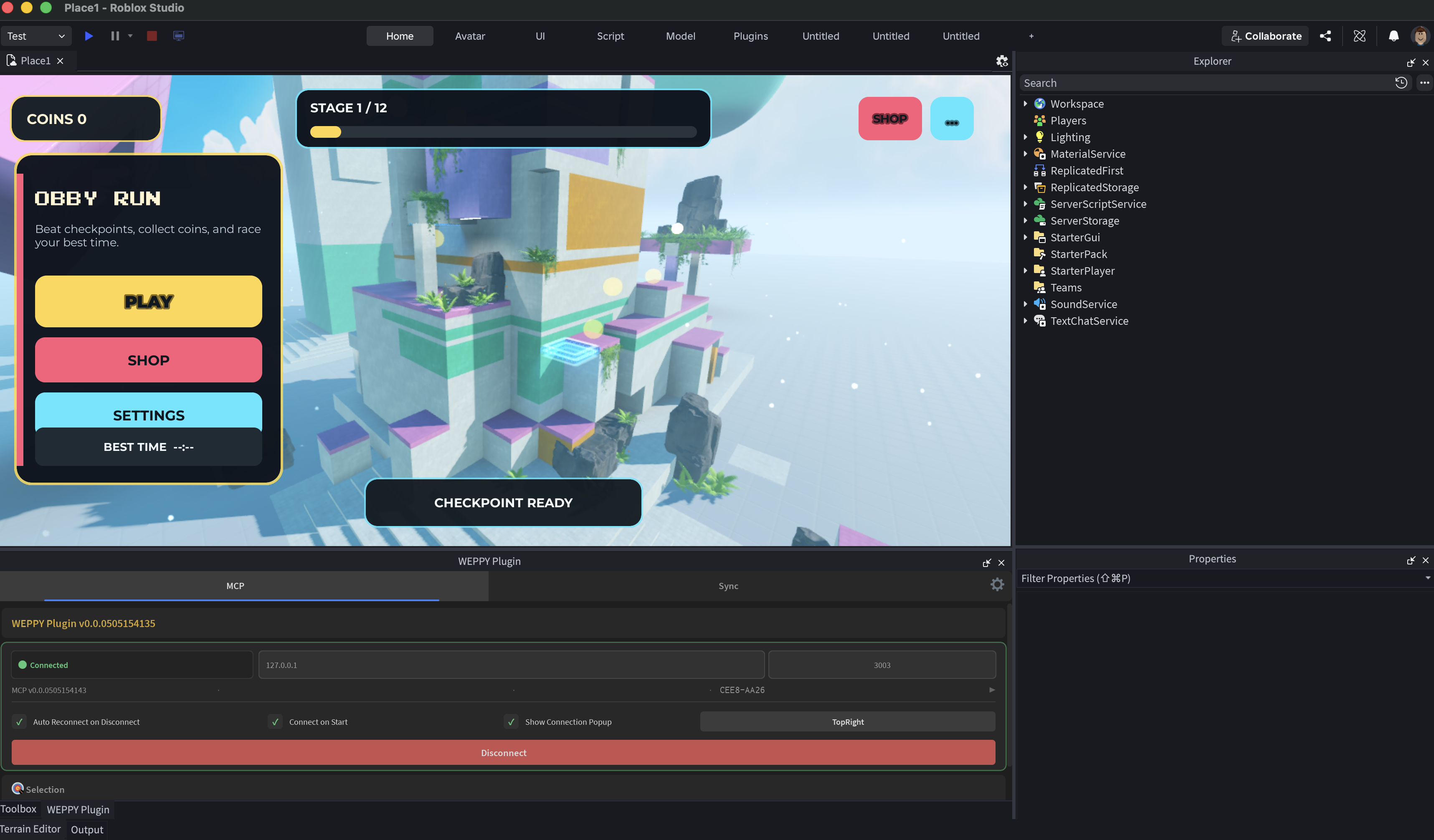
UI Studio lets AI agents create in-game UI that matches your game's style, or analyze the UI you already have and suggest improvements.
|
|
105
|
+
|
|
106
|
+
- Clarify the UI goal with guided questions about purpose, screen, target devices, and visual direction
|
|
107
|
+
- Create or refine game-style menus, HUDs, buttons, labels, image panels, and other Roblox UI elements directly in Studio
|
|
108
|
+
- Capture the result, compare before/after changes, and follow dashboard suggestions for layout, readability, touch targets, and safe areas
|
|
109
|
+
|
|
110
|
+
|
|
111
|
+
|
|
112
|
+
### 5) WEPPY Dashboard: Monitor AI work in real time
|
|
113
|
+
|
|
114
|
+
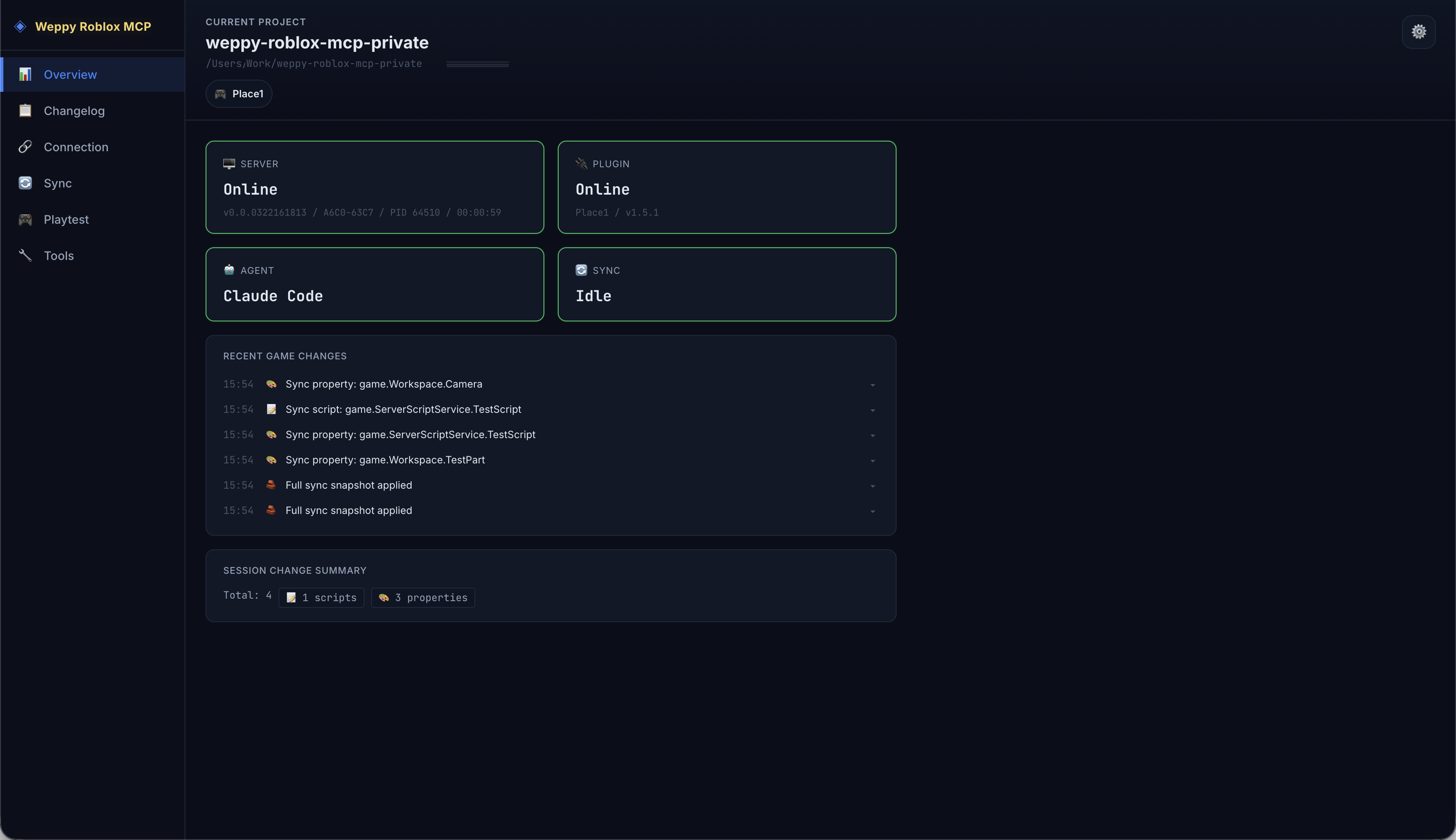
The MCP server provides a web dashboard where you can check connection status, tool execution history, sync state, UI Studio history, and game change logs in real time.
|
|
105
115
|
|
|
106
116
|
- Server/Plugin/Agent connection status at a glance
|
|
107
117
|
- Compare every change the AI made via Before & After in Changelog
|
|
108
|
-
- Analyze workflow with tool execution history and statistics
|
|
118
|
+
- Analyze workflow with tool execution history, UI Studio captures, and statistics
|
|
109
119
|
|
|
110
|
-

|
|
120
|
+
|
|
111
121
|
|
|
112
|
-
###
|
|
122
|
+
### 6) WEPPY Roblox Explorer: Browse Studio hierarchy in VSCode
|
|
113
123
|
|
|
114
124
|
View the full instance tree of your Roblox Studio place directly inside VSCode. Navigate services, open synced scripts and property files, and track sync status - all without switching to Studio.
|
|
115
125
|
WEPPY Roblox Explorer is a companion VSCode extension for sync data generated by WEPPY. Tree browsing works from synced files, and live sync state or direction indicators are enhanced when the local MCP server is running.
|
|
@@ -119,13 +129,14 @@ Install from [VS Code Marketplace](https://marketplace.visualstudio.com/items?it
|
|
|
119
129
|
- Click to open synced scripts and property files
|
|
120
130
|
- Multi-place support with sync status indicators
|
|
121
131
|
|
|
122
|
-

|
|
132
|
+
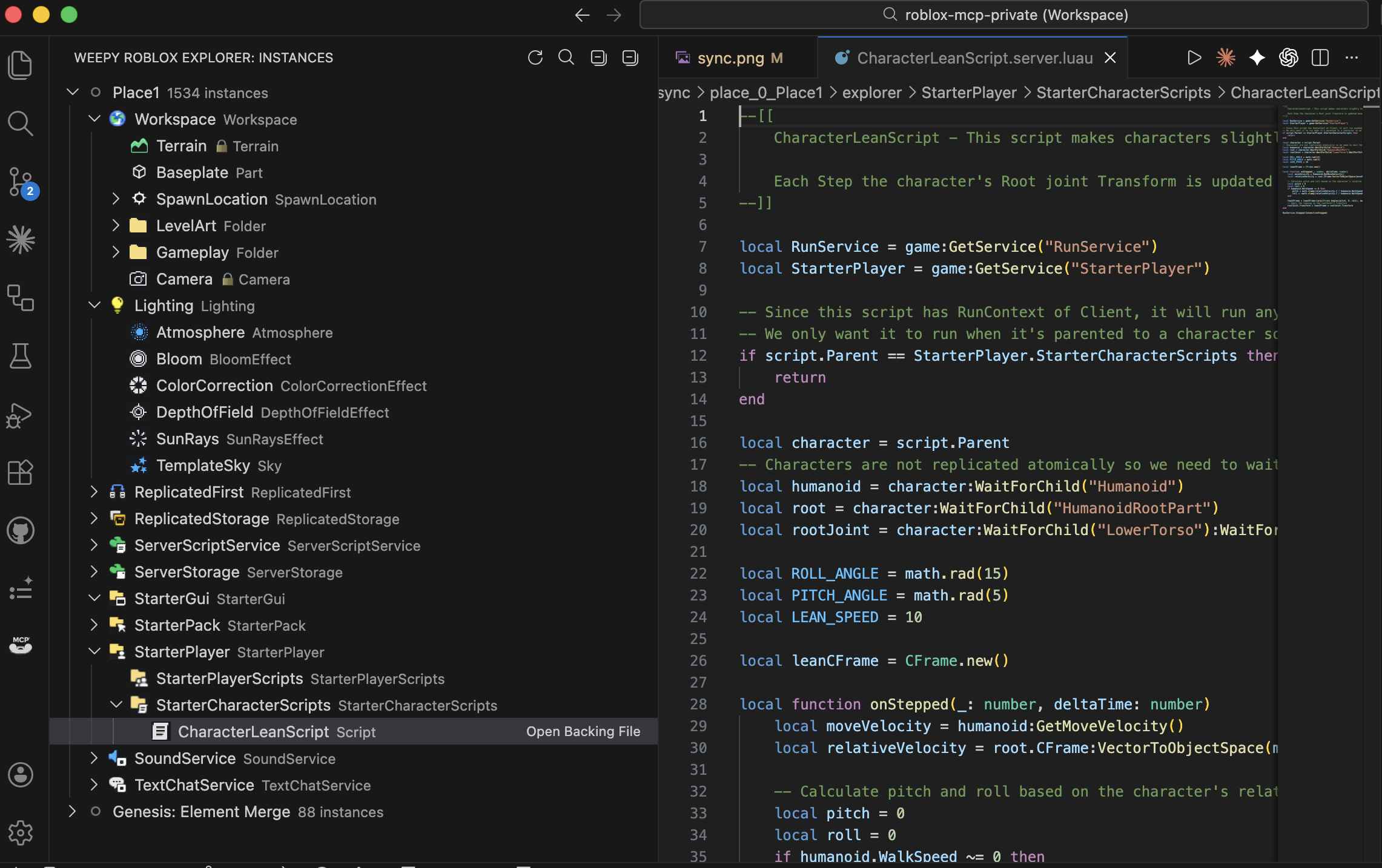
|
|
123
133
|
|
|
124
134
|
## Use Cases
|
|
125
135
|
|
|
126
136
|
- **Rapid prototyping**: Describe a game mechanic in natural language and watch AI build it in Studio
|
|
127
137
|
- **Bulk refactoring**: Rename a module interface and update every dependent script in one request
|
|
128
138
|
- **Terrain & environment**: Generate procedural terrain, set lighting/atmosphere, place assets - all from a single prompt
|
|
139
|
+
- **UI design**: Generate in-game UI, capture previews, and iterate on Design Check suggestions
|
|
129
140
|
- **Multi-file consistency**: AI reads the full project via Sync and applies changes across related scripts together
|
|
130
141
|
- **Asset integration**: Search the Creator Store, insert models, and configure properties without leaving your editor
|
|
131
142
|
|
|
@@ -161,7 +172,7 @@ Yes. Any MCP-compatible AI client works.
|
|
|
161
172
|
Yes. AI can create instances, write scripts, generate terrain, set up lighting, insert assets, configure physics, and more - all inside a live Roblox Studio session. It goes beyond code generation to executable actions.
|
|
162
173
|
|
|
163
174
|
### What is the difference between Basic and Pro?
|
|
164
|
-
Basic (Free) includes MCP tool execution and one-way sync (Studio -> Local). Pro adds bidirectional sync, bulk operations, terrain generation, spatial analysis, audio/animation control, and multi-place support. See the Pro upgrade page.
|
|
175
|
+
Basic (Free) includes MCP tool execution and one-way sync (Studio -> Local). Pro adds bidirectional sync, UI Studio, bulk operations, terrain generation, spatial analysis, audio/animation control, and multi-place support. See the Pro upgrade page.
|
|
165
176
|
|
|
166
177
|
### How is Weppy different from other Roblox MCP servers?
|
|
167
178
|
Weppy uses action-based dispatching instead of separate tools for each function. This reduces AI token consumption significantly. It also provides bidirectional project sync and multi-place support, which most alternatives lack.
|
|
@@ -171,7 +182,7 @@ The server runs on localhost only (127.0.0.1:3002). Forbidden paths (CoreGui, Co
|
|
|
171
182
|
|
|
172
183
|
## Pro Upgrade
|
|
173
184
|
|
|
174
|
-
Bidirectional Sync, advanced build capabilities, and AI token efficiency - all in one upgrade.
|
|
185
|
+
Bidirectional Sync, UI Studio, advanced build capabilities, and AI token efficiency - all in one upgrade.
|
|
175
186
|
|
|
176
187
|
[Pro Upgrade Guide](https://weppyai.com/en/plans)
|
|
177
188
|
|
package/install.ps1
CHANGED
|
@@ -112,7 +112,18 @@ function Test-McpJsonConfigured($configPath) {
|
|
|
112
112
|
}
|
|
113
113
|
}
|
|
114
114
|
|
|
115
|
-
#
|
|
115
|
+
# Require an explicit `@<tag>` so the installer can upgrade legacy bare
|
|
116
|
+
# entries (`@weppy/roblox-mcp`) — those reuse npx cache and trap users on
|
|
117
|
+
# outdated versions. Tagged entries (`@latest`, `@2.6.4`, …) are preserved.
|
|
118
|
+
function Test-WeppyPackageSpec($value) {
|
|
119
|
+
if ([string]::IsNullOrWhiteSpace($value)) {
|
|
120
|
+
return $false
|
|
121
|
+
}
|
|
122
|
+
return $value -match '^@weppy/roblox-mcp@.+$'
|
|
123
|
+
}
|
|
124
|
+
|
|
125
|
+
# Add the MCP server under the canonical `mcpServers` wrapper in the Antigravity
|
|
126
|
+
# config and strip any legacy flat key left over from earlier versions.
|
|
116
127
|
function Add-AntigravityMcpConfig($configPath) {
|
|
117
128
|
$parentDir = Split-Path $configPath -Parent
|
|
118
129
|
if (-not (Test-Path $parentDir)) { New-Item -ItemType Directory -Path $parentDir -Force | Out-Null }
|
|
@@ -134,7 +145,7 @@ const next = { ...config };
|
|
|
134
145
|
delete next['weppy-roblox-mcp'];
|
|
135
146
|
next.mcpServers = {
|
|
136
147
|
...(mcpServers || {}),
|
|
137
|
-
'weppy-roblox-mcp': { command: 'npx', args: ['-y', '@weppy/roblox-mcp'] }
|
|
148
|
+
'weppy-roblox-mcp': { command: 'npx', args: ['-y', '@weppy/roblox-mcp@latest'] }
|
|
138
149
|
};
|
|
139
150
|
config = next;
|
|
140
151
|
fs.writeFileSync(configPath, JSON.stringify(config, null, 2) + '\n');
|
|
@@ -153,7 +164,8 @@ function Test-AntigravityMcpConfigured($configPath) {
|
|
|
153
164
|
$config = Get-Content -Path $configPath -Raw | ConvertFrom-Json
|
|
154
165
|
$hasLegacyFlatKey = $config.PSObject.Properties.Name -contains 'weppy-roblox-mcp'
|
|
155
166
|
$server = $config.mcpServers.'weppy-roblox-mcp'
|
|
156
|
-
|
|
167
|
+
# Accept args[1] as the weppy package regardless of whether a version tag is appended.
|
|
168
|
+
$hasCanonicalArgs = ($server.args -is [System.Array]) -and ($server.args.Count -eq 2) -and ($server.args[0] -eq '-y') -and (Test-WeppyPackageSpec $server.args[1])
|
|
157
169
|
return ($server.command -eq 'npx') -and $hasCanonicalArgs -and (-not $hasLegacyFlatKey)
|
|
158
170
|
}
|
|
159
171
|
catch {
|
|
@@ -174,7 +186,8 @@ const fs = require('fs');
|
|
|
174
186
|
const configPath = process.env.MCP_CODEX_CONFIG_PATH;
|
|
175
187
|
const serverName = 'weppy-roblox-mcp';
|
|
176
188
|
const expectedCommand = 'npx';
|
|
177
|
-
|
|
189
|
+
// Require an explicit `@<tag>` so the installer can upgrade legacy bare entries.
|
|
190
|
+
const packageSpecPattern = /^@weppy\/roblox-mcp@.+$/;
|
|
178
191
|
const headerPattern = new RegExp(
|
|
179
192
|
'^\\s*\\[\\s*mcp_servers\\.' + serverName.replace(/[.*+?^${}()|[\]\\\\]/g, '\\$&') + '\\s*\\]\\s*(?:#.*)?$'
|
|
180
193
|
);
|
|
@@ -568,8 +581,10 @@ try {
|
|
|
568
581
|
!parsed.hasConflict &&
|
|
569
582
|
parsed.command === expectedCommand &&
|
|
570
583
|
Array.isArray(parsed.args) &&
|
|
571
|
-
parsed.args.length ===
|
|
572
|
-
parsed.args
|
|
584
|
+
parsed.args.length === 2 &&
|
|
585
|
+
parsed.args[0] === '-y' &&
|
|
586
|
+
typeof parsed.args[1] === 'string' &&
|
|
587
|
+
packageSpecPattern.test(parsed.args[1]);
|
|
573
588
|
|
|
574
589
|
process.exit(isConfigured ? 0 : 1);
|
|
575
590
|
} catch {
|
|
@@ -595,7 +610,7 @@ const configPath = process.env.MCP_CONFIG_PATH;
|
|
|
595
610
|
let config = {};
|
|
596
611
|
try { config = JSON.parse(fs.readFileSync(configPath, 'utf8')); } catch {}
|
|
597
612
|
if (!config.mcpServers) config.mcpServers = {};
|
|
598
|
-
config.mcpServers['weppy-roblox-mcp'] = { command: 'npx', args: ['-y', '@weppy/roblox-mcp'] };
|
|
613
|
+
config.mcpServers['weppy-roblox-mcp'] = { command: 'npx', args: ['-y', '@weppy/roblox-mcp@latest'] };
|
|
599
614
|
fs.writeFileSync(configPath, JSON.stringify(config, null, 2) + '\n');
|
|
600
615
|
"@
|
|
601
616
|
} finally {
|
|
@@ -627,7 +642,7 @@ catch {
|
|
|
627
642
|
# ═══════════════════════════════════
|
|
628
643
|
Write-Step "1/2" "Setup Roblox Studio Plugin"
|
|
629
644
|
|
|
630
|
-
if (Confirm-Action " Run npx -y @weppy/roblox-mcp --setup?") {
|
|
645
|
+
if (Confirm-Action " Run npx -y @weppy/roblox-mcp@latest --setup?") {
|
|
631
646
|
try {
|
|
632
647
|
$npmCommandPath = Resolve-NpmCommand
|
|
633
648
|
$npmDir = Split-Path $npmCommandPath -Parent
|
|
@@ -641,9 +656,11 @@ if (Confirm-Action " Run npx -y @weppy/roblox-mcp --setup?") {
|
|
|
641
656
|
try {
|
|
642
657
|
New-Item -ItemType Directory -Path $setupWorkingDir -Force | Out-Null
|
|
643
658
|
Set-Location $setupWorkingDir
|
|
644
|
-
# stdin
|
|
645
|
-
# pwsh
|
|
646
|
-
|
|
659
|
+
# Isolate stdin with an empty pipe so the stdio MCP server does not inherit
|
|
660
|
+
# the interactive pwsh terminal stdin (which would cause it to hang under irm|iex).
|
|
661
|
+
# The @latest tag forces npx to resolve from the registry instead of
|
|
662
|
+
# reusing an older version pinned in the npm cache.
|
|
663
|
+
$null | & $npxPath -y "@weppy/roblox-mcp@latest" --setup
|
|
647
664
|
if ($LASTEXITCODE -ne 0) {
|
|
648
665
|
Write-Warn "Setup encountered a warning (non-blocking)"
|
|
649
666
|
} else {
|
|
@@ -675,9 +692,30 @@ $notDetected = @()
|
|
|
675
692
|
|
|
676
693
|
$claudeProjectConfig = Join-Path (Get-Location).Path '.mcp.json'
|
|
677
694
|
$claudeGlobalConfig = Join-Path $env:USERPROFILE '.claude\mcp.json'
|
|
678
|
-
$claudeCodeConfigured = (Test-McpJsonConfigured $claudeProjectConfig) -or (Test-McpJsonConfigured $claudeGlobalConfig)
|
|
679
695
|
$claudeCodeCliCommand = Resolve-OptionalCliCommand 'claude'
|
|
680
696
|
|
|
697
|
+
# `claude mcp add` stores entries under ~/.claude.json or in local/user scope,
|
|
698
|
+
# so prefer `claude mcp list` as the source of truth when the CLI is available
|
|
699
|
+
# (the JSON path checks remain as a fallback). The entry counts as configured
|
|
700
|
+
# only when its args carry an explicit `@<tag>` — legacy bare entries fall
|
|
701
|
+
# through and get re-registered with the canonical `@latest` form.
|
|
702
|
+
function Test-ClaudeCliConfigured($cliCommand) {
|
|
703
|
+
if (-not $cliCommand) { return $false }
|
|
704
|
+
try {
|
|
705
|
+
$listOutput = & $cliCommand mcp list 2>$null
|
|
706
|
+
if ($LASTEXITCODE -ne 0) { return $false }
|
|
707
|
+
$line = $listOutput | Select-String -Pattern '^weppy-roblox-mcp:' | Select-Object -First 1
|
|
708
|
+
if (-not $line) { return $false }
|
|
709
|
+
return ($line.Line -match '@weppy/roblox-mcp@')
|
|
710
|
+
} catch {
|
|
711
|
+
return $false
|
|
712
|
+
}
|
|
713
|
+
}
|
|
714
|
+
|
|
715
|
+
$claudeCodeConfigured = (Test-ClaudeCliConfigured $claudeCodeCliCommand) `
|
|
716
|
+
-or (Test-McpJsonConfigured $claudeProjectConfig) `
|
|
717
|
+
-or (Test-McpJsonConfigured $claudeGlobalConfig)
|
|
718
|
+
|
|
681
719
|
if ($claudeCodeConfigured) {
|
|
682
720
|
$detectedNames += 'Claude Code (configured)'
|
|
683
721
|
$detectedTypes += 'claude-code'
|
|
@@ -762,7 +800,7 @@ else {
|
|
|
762
800
|
|
|
763
801
|
if ($detectedNames.Count -eq 0) {
|
|
764
802
|
Write-Warn "No AI apps detected"
|
|
765
|
-
Write-Info "Register MCP server manually: npx -y @weppy/roblox-mcp"
|
|
803
|
+
Write-Info "Register MCP server manually: npx -y @weppy/roblox-mcp@latest"
|
|
766
804
|
}
|
|
767
805
|
else {
|
|
768
806
|
Write-Host ""
|
|
@@ -816,12 +854,40 @@ else {
|
|
|
816
854
|
Write-Ok "Already configured: $appName"
|
|
817
855
|
}
|
|
818
856
|
elseif ($claudeCodeCliCommand) {
|
|
819
|
-
|
|
820
|
-
|
|
821
|
-
#
|
|
822
|
-
|
|
857
|
+
$claudeStderrFile = Join-Path ([System.IO.Path]::GetTempPath()) ("weppy-claude-{0}.err" -f ([System.Guid]::NewGuid().ToString("N")))
|
|
858
|
+
try {
|
|
859
|
+
# Best-effort remove any legacy bare entry so the subsequent add can
|
|
860
|
+
# install the canonical `@latest` form.
|
|
861
|
+
try { & $claudeCodeCliCommand mcp remove weppy-roblox-mcp *> $null } catch {}
|
|
862
|
+
& $claudeCodeCliCommand mcp add weppy-roblox-mcp -- npx -y "@weppy/roblox-mcp@latest" 2> $claudeStderrFile
|
|
863
|
+
$claudeExit = $LASTEXITCODE
|
|
864
|
+
if ($claudeExit -eq 0) {
|
|
865
|
+
Write-Ok "Registered: $appName"
|
|
866
|
+
}
|
|
867
|
+
else {
|
|
868
|
+
$stderrContent = if (Test-Path $claudeStderrFile) { Get-Content $claudeStderrFile -Raw } else { '' }
|
|
869
|
+
if ($stderrContent -match '(?i)already exists') {
|
|
870
|
+
# Already registered in another scope — not a failure
|
|
871
|
+
Write-Ok "Already configured: $appName"
|
|
872
|
+
}
|
|
873
|
+
else {
|
|
874
|
+
Write-Fail "Failed: $appName (exit=$claudeExit)"
|
|
875
|
+
Write-Host " CLI: $claudeCodeCliCommand" -ForegroundColor DarkGray
|
|
876
|
+
if ($stderrContent) {
|
|
877
|
+
Write-Host " stderr:" -ForegroundColor DarkGray
|
|
878
|
+
$stderrContent.TrimEnd("`r","`n").Split("`n") | ForEach-Object {
|
|
879
|
+
Write-Host " $($_.TrimEnd())" -ForegroundColor DarkGray
|
|
880
|
+
}
|
|
881
|
+
}
|
|
882
|
+
# Fall back to writing the JSON config directly when the CLI fails for other reasons
|
|
883
|
+
Add-McpToConfig $claudeGlobalConfig
|
|
884
|
+
Write-Ok "Registered via fallback JSON: $appName"
|
|
885
|
+
}
|
|
886
|
+
}
|
|
887
|
+
}
|
|
888
|
+
finally {
|
|
889
|
+
Remove-Item $claudeStderrFile -ErrorAction SilentlyContinue
|
|
823
890
|
}
|
|
824
|
-
Write-Ok "Registered: $appName"
|
|
825
891
|
}
|
|
826
892
|
else {
|
|
827
893
|
Write-Fail "Failed: $appName (CLI/config unavailable)"
|
|
@@ -842,7 +908,7 @@ else {
|
|
|
842
908
|
}
|
|
843
909
|
elseif ($codexCliCommand) {
|
|
844
910
|
try { & $codexCliCommand mcp remove weppy-roblox-mcp *> $null } catch {}
|
|
845
|
-
& $codexCliCommand mcp add weppy-roblox-mcp -- npx -y "@weppy/roblox-mcp"
|
|
911
|
+
& $codexCliCommand mcp add weppy-roblox-mcp -- npx -y "@weppy/roblox-mcp@latest"
|
|
846
912
|
if ($LASTEXITCODE -ne 0) {
|
|
847
913
|
throw 'codex mcp add failed'
|
|
848
914
|
}
|
package/install.sh
CHANGED
|
@@ -98,7 +98,7 @@ const configPath = process.env.MCP_CONFIG_PATH;
|
|
|
98
98
|
let config = {};
|
|
99
99
|
try { config = JSON.parse(fs.readFileSync(configPath, "utf8")); } catch {}
|
|
100
100
|
if (!config.mcpServers) config.mcpServers = {};
|
|
101
|
-
config.mcpServers["weppy-roblox-mcp"] = { command: "npx", args: ["-y", "@weppy/roblox-mcp"] };
|
|
101
|
+
config.mcpServers["weppy-roblox-mcp"] = { command: "npx", args: ["-y", "@weppy/roblox-mcp@latest"] };
|
|
102
102
|
fs.writeFileSync(configPath, JSON.stringify(config, null, 2) + "\n");
|
|
103
103
|
'
|
|
104
104
|
}
|
|
@@ -120,7 +120,8 @@ try {
|
|
|
120
120
|
' >/dev/null 2>&1
|
|
121
121
|
}
|
|
122
122
|
|
|
123
|
-
#
|
|
123
|
+
# Add the MCP server under the canonical `mcpServers` wrapper in the Antigravity
|
|
124
|
+
# config and strip any legacy flat key left over from earlier versions.
|
|
124
125
|
add_antigravity_mcp_config() {
|
|
125
126
|
local config_path="$1"
|
|
126
127
|
local parent_dir
|
|
@@ -142,7 +143,7 @@ const next = { ...config };
|
|
|
142
143
|
delete next["weppy-roblox-mcp"];
|
|
143
144
|
next.mcpServers = {
|
|
144
145
|
...(mcpServers || {}),
|
|
145
|
-
"weppy-roblox-mcp": { command: "npx", args: ["-y", "@weppy/roblox-mcp"] }
|
|
146
|
+
"weppy-roblox-mcp": { command: "npx", args: ["-y", "@weppy/roblox-mcp@latest"] }
|
|
146
147
|
};
|
|
147
148
|
config = next;
|
|
148
149
|
fs.writeFileSync(configPath, JSON.stringify(config, null, 2) + "\n");
|
|
@@ -161,13 +162,17 @@ function isJsonObject(value) {
|
|
|
161
162
|
return typeof value === "object" && value !== null && !Array.isArray(value);
|
|
162
163
|
}
|
|
163
164
|
function hasExpectedCommandShape(value) {
|
|
165
|
+
// Require an explicit `@<tag>` so the installer can upgrade legacy bare
|
|
166
|
+
// entries (`@weppy/roblox-mcp`) — those reuse npx cache and trap users on
|
|
167
|
+
// outdated versions. Tagged entries (`@latest`, `@2.6.4`, …) are preserved.
|
|
164
168
|
return (
|
|
165
169
|
isJsonObject(value) &&
|
|
166
170
|
value.command === "npx" &&
|
|
167
171
|
Array.isArray(value.args) &&
|
|
168
172
|
value.args.length === 2 &&
|
|
169
173
|
value.args[0] === "-y" &&
|
|
170
|
-
value.args[1] === "
|
|
174
|
+
typeof value.args[1] === "string" &&
|
|
175
|
+
/^@weppy\/roblox-mcp@.+$/.test(value.args[1])
|
|
171
176
|
);
|
|
172
177
|
}
|
|
173
178
|
try {
|
|
@@ -191,7 +196,8 @@ const fs = require("fs");
|
|
|
191
196
|
const configPath = process.env.MCP_CODEX_CONFIG_PATH;
|
|
192
197
|
const serverName = "weppy-roblox-mcp";
|
|
193
198
|
const expectedCommand = "npx";
|
|
194
|
-
|
|
199
|
+
// Require an explicit `@<tag>` so the installer can upgrade legacy bare entries.
|
|
200
|
+
const packageSpecPattern = /^@weppy\/roblox-mcp@.+$/;
|
|
195
201
|
const headerPattern = new RegExp(
|
|
196
202
|
"^\\s*\\[\\s*mcp_servers\\." + serverName.replace(/[.*+?^${}()|[\]\\]/g, "\\$&") + "\\s*\\]\\s*(?:#.*)?$",
|
|
197
203
|
);
|
|
@@ -585,8 +591,10 @@ try {
|
|
|
585
591
|
!parsed.hasConflict &&
|
|
586
592
|
parsed.command === expectedCommand &&
|
|
587
593
|
Array.isArray(parsed.args) &&
|
|
588
|
-
parsed.args.length ===
|
|
589
|
-
parsed.args
|
|
594
|
+
parsed.args.length === 2 &&
|
|
595
|
+
parsed.args[0] === "-y" &&
|
|
596
|
+
typeof parsed.args[1] === "string" &&
|
|
597
|
+
packageSpecPattern.test(parsed.args[1]);
|
|
590
598
|
|
|
591
599
|
process.exit(isConfigured ? 0 : 1);
|
|
592
600
|
} catch {
|
|
@@ -640,7 +648,7 @@ success "Node.js $(node -v) detected"
|
|
|
640
648
|
# ═══════════════════════════════════
|
|
641
649
|
step "1/2" "Setup Roblox Studio Plugin"
|
|
642
650
|
|
|
643
|
-
if confirm " Run npx -y @weppy/roblox-mcp --setup?"; then
|
|
651
|
+
if confirm " Run npx -y @weppy/roblox-mcp@latest --setup?"; then
|
|
644
652
|
setup_tmp_dir=""
|
|
645
653
|
if setup_tmp_dir=$(mktemp -d "${TMPDIR:-/tmp}/weppy-setup-XXXXXX" 2>/dev/null); then
|
|
646
654
|
:
|
|
@@ -649,9 +657,11 @@ if confirm " Run npx -y @weppy/roblox-mcp --setup?"; then
|
|
|
649
657
|
fi
|
|
650
658
|
|
|
651
659
|
if [ -n "${setup_tmp_dir:-}" ] && [ -d "$setup_tmp_dir" ]; then
|
|
652
|
-
# stdin
|
|
653
|
-
#
|
|
654
|
-
|
|
660
|
+
# Isolate stdin with /dev/null so the stdio MCP server does not swallow the
|
|
661
|
+
# remaining bytes of this script when installed via `curl | bash`.
|
|
662
|
+
# The @latest tag forces npx to resolve from the registry instead of
|
|
663
|
+
# reusing an older version pinned in the npm cache.
|
|
664
|
+
if (cd "$setup_tmp_dir" && npx -y "@weppy/roblox-mcp@latest" --setup </dev/null); then
|
|
655
665
|
success "Setup complete"
|
|
656
666
|
else
|
|
657
667
|
warn "Setup encountered a warning (non-blocking)"
|
|
@@ -671,7 +681,7 @@ fi
|
|
|
671
681
|
step "2/2" "Register MCP with AI apps"
|
|
672
682
|
printf " Automatic registration: Claude Code, Claude Desktop, Cursor, Codex CLI/App, Gemini CLI, Antigravity\n"
|
|
673
683
|
|
|
674
|
-
MCP_COMMAND='npx -y @weppy/roblox-mcp'
|
|
684
|
+
MCP_COMMAND='npx -y @weppy/roblox-mcp@latest'
|
|
675
685
|
|
|
676
686
|
# AI app detection
|
|
677
687
|
declare -a DETECTED_NAMES=()
|
|
@@ -679,11 +689,25 @@ declare -a DETECTED_TYPES=()
|
|
|
679
689
|
declare -a NOT_DETECTED=()
|
|
680
690
|
|
|
681
691
|
# Claude Code
|
|
692
|
+
# `claude mcp add` stores entries under ~/.claude.json or in local/user scope,
|
|
693
|
+
# so prefer `claude mcp list` as the source of truth when the CLI is available
|
|
694
|
+
# (the JSON path checks remain as a fallback).
|
|
682
695
|
CLAUDE_PROJECT_MCP_CONFIG="$PWD/.mcp.json"
|
|
683
696
|
CLAUDE_GLOBAL_MCP_CONFIG="$HOME/.claude/mcp.json"
|
|
684
697
|
CLAUDE_CLI_COMMAND="$(resolve_optional_cli_command claude 2>/dev/null || true)"
|
|
685
698
|
|
|
686
|
-
|
|
699
|
+
is_claude_cli_configured() {
|
|
700
|
+
[ -n "$CLAUDE_CLI_COMMAND" ] || return 1
|
|
701
|
+
# The entry counts as configured only when its args carry an explicit `@tag`
|
|
702
|
+
# (e.g. `@latest`). Legacy bare entries fall through and get re-registered.
|
|
703
|
+
"$CLAUDE_CLI_COMMAND" mcp list 2>/dev/null \
|
|
704
|
+
| grep "^weppy-roblox-mcp:" \
|
|
705
|
+
| grep -q "@weppy/roblox-mcp@"
|
|
706
|
+
}
|
|
707
|
+
|
|
708
|
+
if is_claude_cli_configured \
|
|
709
|
+
|| is_json_mcp_configured "$CLAUDE_PROJECT_MCP_CONFIG" \
|
|
710
|
+
|| is_json_mcp_configured "$CLAUDE_GLOBAL_MCP_CONFIG"; then
|
|
687
711
|
DETECTED_NAMES+=("Claude Code (configured)")
|
|
688
712
|
DETECTED_TYPES+=("claude-code")
|
|
689
713
|
elif [ -n "$CLAUDE_CLI_COMMAND" ]; then
|
|
@@ -816,12 +840,34 @@ else
|
|
|
816
840
|
|
|
817
841
|
case "$app_type" in
|
|
818
842
|
claude-code)
|
|
819
|
-
if
|
|
843
|
+
if is_claude_cli_configured \
|
|
844
|
+
|| is_json_mcp_configured "$CLAUDE_PROJECT_MCP_CONFIG" \
|
|
845
|
+
|| is_json_mcp_configured "$CLAUDE_GLOBAL_MCP_CONFIG"; then
|
|
820
846
|
success "Already configured: $app_name"
|
|
821
|
-
elif [ -n "$CLAUDE_CLI_COMMAND" ]
|
|
822
|
-
|
|
847
|
+
elif [ -n "$CLAUDE_CLI_COMMAND" ]; then
|
|
848
|
+
claude_stderr_file=$(mktemp "${TMPDIR:-/tmp}/weppy-claude-XXXXXX.err" 2>/dev/null || echo "${HOME}/weppy-claude.err")
|
|
849
|
+
# Best-effort remove any legacy bare entry so the subsequent add can
|
|
850
|
+
# install the canonical `@latest` form. Ignore errors when nothing
|
|
851
|
+
# exists.
|
|
852
|
+
"$CLAUDE_CLI_COMMAND" mcp remove weppy-roblox-mcp >/dev/null 2>&1 || true
|
|
853
|
+
# Capture the CLI exit code immediately so it isn't overwritten by the
|
|
854
|
+
# subsequent grep check (which would otherwise leak its own exit code).
|
|
855
|
+
claude_exit_code=0
|
|
856
|
+
"$CLAUDE_CLI_COMMAND" mcp add weppy-roblox-mcp -- npx -y "@weppy/roblox-mcp@latest" 2>"$claude_stderr_file" || claude_exit_code=$?
|
|
857
|
+
if [ "$claude_exit_code" -eq 0 ]; then
|
|
858
|
+
success "Registered: $app_name"
|
|
859
|
+
elif grep -qi "already exists" "$claude_stderr_file"; then
|
|
860
|
+
# Already registered in another scope — not a failure
|
|
861
|
+
success "Already configured: $app_name"
|
|
862
|
+
else
|
|
863
|
+
fail "Failed: $app_name (exit=$claude_exit_code)"
|
|
864
|
+
printf " CLI: %s\n" "$CLAUDE_CLI_COMMAND"
|
|
865
|
+
printf " stderr:\n"
|
|
866
|
+
sed 's/^/ /' "$claude_stderr_file" || true
|
|
867
|
+
fi
|
|
868
|
+
rm -f "$claude_stderr_file"
|
|
823
869
|
else
|
|
824
|
-
fail "Failed: $app_name"
|
|
870
|
+
fail "Failed: $app_name (claude CLI not found)"
|
|
825
871
|
fi
|
|
826
872
|
;;
|
|
827
873
|
claude-desktop)
|
|
@@ -846,7 +892,7 @@ else
|
|
|
846
892
|
fi
|
|
847
893
|
if is_codex_config_configured "$CODEX_CONFIG"; then
|
|
848
894
|
:
|
|
849
|
-
elif [ -n "$CODEX_CLI_COMMAND" ] && "$CODEX_CLI_COMMAND" mcp add weppy-roblox-mcp -- npx -y @weppy/roblox-mcp 2>/dev/null; then
|
|
895
|
+
elif [ -n "$CODEX_CLI_COMMAND" ] && "$CODEX_CLI_COMMAND" mcp add weppy-roblox-mcp -- npx -y "@weppy/roblox-mcp@latest" 2>/dev/null; then
|
|
850
896
|
success "Registered: $app_name"
|
|
851
897
|
elif is_codex_config_configured "$CODEX_CONFIG"; then
|
|
852
898
|
success "Already configured: $app_name"
|
package/llms-full.txt
CHANGED
|
@@ -1,6 +1,6 @@
|
|
|
1
1
|
# WEPPY — Canonical Web Docs
|
|
2
2
|
|
|
3
|
-
> WEPPY is an MCP server that lets AI coding agents control a live Roblox Studio session and interact with scripts, instances, terrain, lighting, assets, audio, and
|
|
3
|
+
> WEPPY is an MCP server that lets AI coding agents control a live Roblox Studio session and interact with scripts, instances, terrain, lighting, assets, audio, animations, and UI Studio workflows.
|
|
4
4
|
|
|
5
5
|
This package intentionally does not ship a standalone full documentation surface.
|
|
6
6
|
|
|
@@ -11,4 +11,3 @@ Canonical documentation lives on the web:
|
|
|
11
11
|
- Pro plans: https://weppyai.com/en/plans
|
|
12
12
|
|
|
13
13
|
For app-specific setup, open the web install page and choose the relevant AI client guide.
|
|
14
|
-
|
package/llms.txt
CHANGED
|
@@ -2,7 +2,7 @@
|
|
|
2
2
|
|
|
3
3
|
> WEPPY is an MCP server that lets AI coding agents (Claude, Codex,
|
|
4
4
|
> Cursor, Gemini) control a live Roblox Studio session — create and edit scripts,
|
|
5
|
-
> instances, terrain, lighting, assets, audio, and
|
|
5
|
+
> instances, terrain, lighting, assets, audio, animations, and UI Studio workflows via natural language.
|
|
6
6
|
|
|
7
7
|
## What it does
|
|
8
8
|
|
|
@@ -14,6 +14,7 @@ terrain, and more — inside a live Studio session.
|
|
|
14
14
|
- Action-based MCP tools covering the full Roblox Studio API surface
|
|
15
15
|
- Bidirectional project sync between Roblox Studio and local files (Pro)
|
|
16
16
|
- Automated playtest: AI starts/stops Play/Run, injects test scripts, collects logs
|
|
17
|
+
- UI Studio: AI creates in-game UI that matches your game's style or analyzes existing UI and suggests improvements
|
|
17
18
|
- Web dashboard: monitor AI actions, tool history, sync state, and changelog in real time at `http://localhost:3002`
|
|
18
19
|
- Multi-place support (up to 3 places simultaneously)
|
|
19
20
|
- Roblox Explorer VSCode extension for browsing Studio hierarchy
|
|
@@ -40,7 +41,7 @@ Safari / Firefox users should open the web install page and follow the browser-s
|
|
|
40
41
|
## Tiers
|
|
41
42
|
|
|
42
43
|
- Basic (Free): MCP tool execution + one-way Studio -> Local sync
|
|
43
|
-
- Pro: Bidirectional sync, bulk actions, terrain generation, spatial analysis, multi-place support, advanced tools
|
|
44
|
+
- Pro: Bidirectional sync, UI Studio, bulk actions, terrain generation, spatial analysis, multi-place support, advanced tools
|
|
44
45
|
|
|
45
46
|
## Detailed docs
|
|
46
47
|
|
|
@@ -56,7 +57,7 @@ Safari / Firefox users should open the web install page and follow the browser-s
|
|
|
56
57
|
## Optional
|
|
57
58
|
|
|
58
59
|
- Roblox Explorer VSCode extension (browse synced instance tree)
|
|
59
|
-
- Pro subscription for bidirectional sync and advanced tools
|
|
60
|
+
- Pro subscription for bidirectional sync, UI Studio, and advanced tools
|
|
60
61
|
|
|
61
62
|
## Links
|
|
62
63
|
|
package/package.json
CHANGED
|
@@ -1,6 +1,6 @@
|
|
|
1
1
|
{
|
|
2
2
|
"name": "@weppy/roblox-mcp",
|
|
3
|
-
"version": "2.
|
|
3
|
+
"version": "2.7.0",
|
|
4
4
|
"description": "MCP (Model Context Protocol) server for Roblox Studio integration - enables AI coding agents to interact with Roblox Studio in real-time",
|
|
5
5
|
"main": "plugins/weppy-roblox-mcp/dist/index.js",
|
|
6
6
|
"type": "module",
|