@weppy/roblox-mcp 2.17.12 → 2.17.14
This diff represents the content of publicly available package versions that have been released to one of the supported registries. The information contained in this diff is provided for informational purposes only and reflects changes between package versions as they appear in their respective public registries.
- package/CHANGELOG.md +22 -0
- package/README.md +5 -3
- package/dist/index.js +649 -315
- package/package.json +1 -1
- package/roblox-plugin/WeppyRobloxMCP.rbxm +0 -0
package/CHANGELOG.md
CHANGED
|
@@ -58,6 +58,28 @@ All notable changes to this project will be documented in this file.
|
|
|
58
58
|
|
|
59
59
|
|
|
60
60
|
|
|
61
|
+
|
|
62
|
+
|
|
63
|
+
|
|
64
|
+
## [2.17.14] - 2026-10-04
|
|
65
|
+
|
|
66
|
+
### Features
|
|
67
|
+
- **Game presentation guidance** — The AI agent plugin now offers contextual guidance for composing Roblox worlds, characters, and game interfaces. It covers icon alignment, HUD readability, item and button states, stat comparisons, and reusable image parts while preserving your chosen style and layout.
|
|
68
|
+
|
|
69
|
+
### Bug Fixes
|
|
70
|
+
- **Create and refine UI without a mandatory design brief** — AI agents can make scoped UI changes without completing a design questionnaire or repeating visual approval steps. Briefs and visual reviews remain optional aids, and invalid saved references are reported before changes are applied.
|
|
71
|
+
|
|
72
|
+
### Documentation
|
|
73
|
+
- **Optional design recommendations** — UI Studio and agent guides now distinguish design suggestions from execution requirements, reuse permissions you have already granted, and explain how to adapt or skip recommendations. Installer checks also recover the new guidance skill when it is missing.
|
|
74
|
+
|
|
75
|
+
## [2.17.13] - 2026-10-03
|
|
76
|
+
|
|
77
|
+
### Bug Fixes
|
|
78
|
+
- **Sync folder restoration** — Restoring local folders now keeps existing Studio objects at their original paths, preventing duplicate `~N` folders and repeated sync attempts that leave edits missing.
|
|
79
|
+
- **Missing and changed files** — Script, property, and Value files are restored correctly even when the Studio content has not changed. Folder attributes and tags are preserved during restoration.
|
|
80
|
+
- **Play transitions** — Pending restore requests respect Play pauses and use the correct objects when editing resumes.
|
|
81
|
+
- **Sync change detection** — Sync recognizes its own saved files during slow project scans, reducing repeated restore requests while keeping local edits detectable.
|
|
82
|
+
- **Folder names that resemble files** — Folders with names such as `Example.props.json` are restored as folders using their registered paths.
|
|
61
83
|
|
|
62
84
|
## [2.17.12] - 2026-10-01
|
|
63
85
|
|
package/README.md
CHANGED
|
@@ -187,15 +187,17 @@ Run mode is reserved for an explicitly requested server-only check. Raw Luau rem
|
|
|
187
187
|
|
|
188
188
|
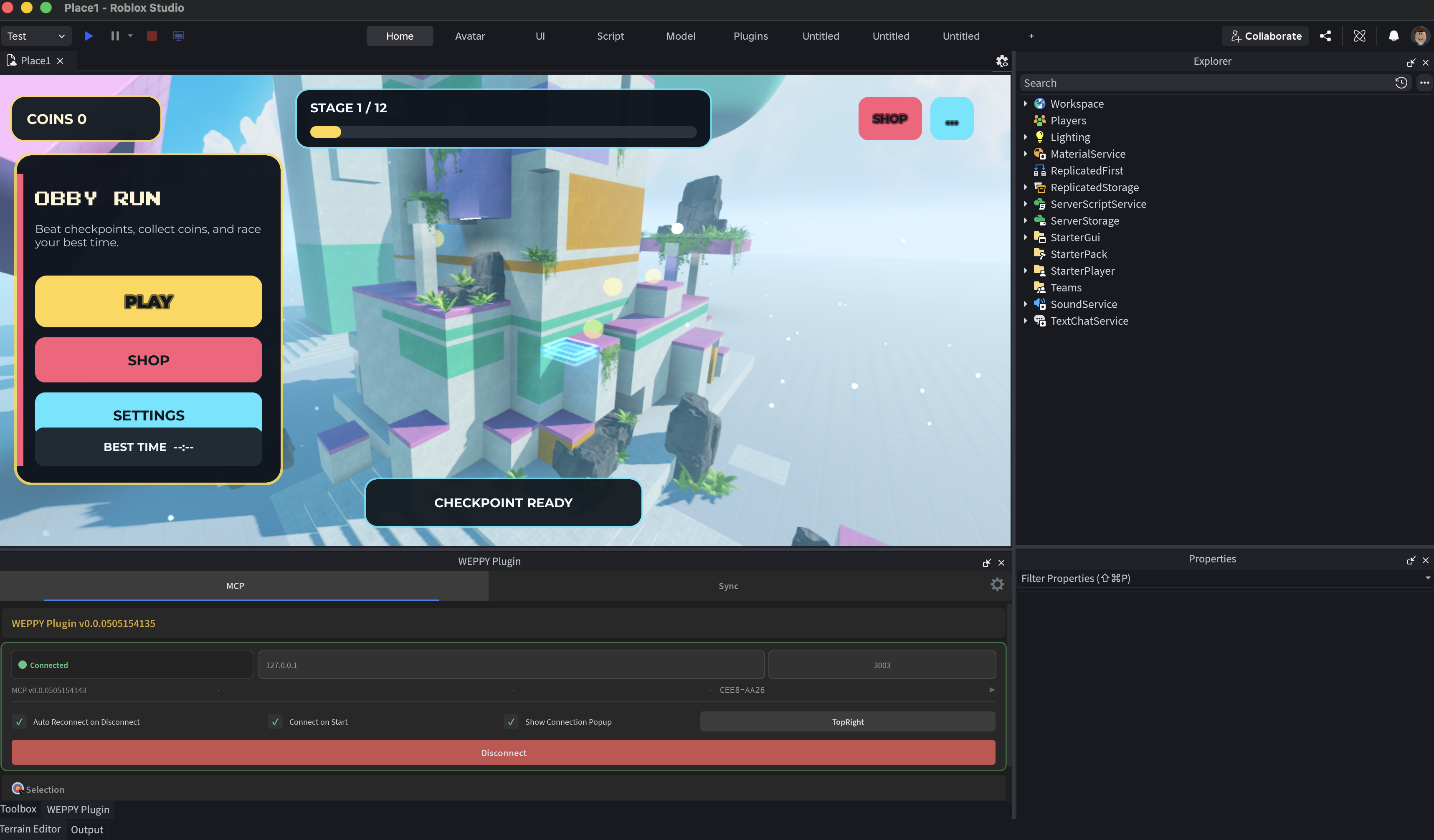
### 7) UI Studio: Build and inspect in-game UI
|
|
189
189
|
|
|
190
|
-
UI Studio lets AI agents create in-game UI that matches your game's style, or analyze the UI you already have and suggest improvements.
|
|
190
|
+
UI Studio lets AI agents create in-game UI that matches your game's style, or analyze the UI you already have and suggest improvements. Design briefs and visual reviews are optional; unreviewed results stay marked as unreviewed.
|
|
191
|
+
|
|
192
|
+
The WEPPY AI Agent Plugin also provides game presentation guidance for worlds, characters, and UI. It helps agents choose a direction from a short game request, with suggestions for icon alignment, HUD readability, item tiers, stat comparisons, button states, and image parts. These are adaptable choices, including image-free designs, rather than fixed layouts or mandatory styles.
|
|
191
193
|
|
|
192
194
|
UI reviews distinguish observed overlap, Roblox guidance, and AI suggestions. Unavailable control geometry stays unverified. Recommendations respect your chosen design; changes follow the scope you requested.
|
|
193
195
|
|
|
194
196
|
For UI created by LocalScripts, UI Studio distinguishes Edit `StarterGui` from a structured Play Client `PlayerGui` observation. If runtime UI has not been reviewed, it reports that missing evidence instead of assuming the game has no UI. Play-mode screenshots remain unsupported, so semantic runtime checks and visual screenshot review stay separate.
|
|
195
197
|
|
|
196
|
-
-
|
|
198
|
+
- Start from your request and existing game, with optional guidance for purpose, target devices, and visual direction
|
|
197
199
|
- Create or refine game-style menus, HUDs, buttons, labels, image panels, and other Roblox UI elements directly in Studio
|
|
198
|
-
-
|
|
200
|
+
- Optionally capture the result, compare changes, and use dashboard suggestions for layout, readability, touch targets, and safe areas
|
|
199
201
|
|
|
200
202
|
|
|
201
203
|
|