@webcoder49/code-input 2.5.1 → 2.6.0
This diff represents the content of publicly available package versions that have been released to one of the supported registries. The information contained in this diff is provided for informational purposes only and reflects changes between package versions as they appear in their respective public registries.
- package/LICENSE +1 -1
- package/README.md +9 -126
- package/code-input.css +70 -33
- package/code-input.d.ts +135 -59
- package/code-input.js +201 -110
- package/code-input.min.css +1 -1
- package/code-input.min.js +12 -1
- package/docs/LICENSE +3 -0
- package/docs/LICENSE.CC-BY-SA-4.0 +116 -0
- package/docs/LICENSE.CC0-1.0 +30 -0
- package/docs/README.md +5 -0
- package/docs/_index.md +308 -0
- package/docs/i18n/_index.md +52 -0
- package/docs/interface/_index.md +3 -0
- package/docs/interface/css/_index.md +12 -0
- package/docs/interface/forms/_index.md +17 -0
- package/docs/interface/js/_index.md +11 -0
- package/docs/modules-and-frameworks/_index.md +3 -0
- package/docs/modules-and-frameworks/custom/_index.md +9 -0
- package/docs/modules-and-frameworks/hljs/_index.md +13 -0
- package/docs/modules-and-frameworks/hljs/esm/_index.md +71 -0
- package/docs/modules-and-frameworks/hljs/nuxt/_index.md +250 -0
- package/docs/modules-and-frameworks/hljs/nuxt/nuxt-demo-screenshot.png +0 -0
- package/docs/modules-and-frameworks/hljs/vue/_index.md +233 -0
- package/docs/modules-and-frameworks/hljs/vue/vue-demo-screenshot.png +0 -0
- package/docs/modules-and-frameworks/prism/_index.md +14 -0
- package/docs/plugins/_index.md +676 -0
- package/docs/plugins/new/_index.md +52 -0
- package/docs/theory/_index.md +9 -0
- package/esm/.code-input.mjs.kate-swp +0 -0
- package/esm/README.md +23 -0
- package/esm/code-input.mjs +2 -0
- package/package.json +83 -7
- package/plugins/README.md +2 -0
- package/plugins/auto-close-brackets.js +2 -0
- package/plugins/auto-close-brackets.min.js +1 -1
- package/plugins/autocomplete.js +6 -6
- package/plugins/autocomplete.min.js +1 -1
- package/plugins/autodetect.js +4 -2
- package/plugins/autodetect.min.js +1 -1
- package/plugins/find-and-replace.css +0 -4
- package/plugins/find-and-replace.js +28 -8
- package/plugins/find-and-replace.min.css +1 -1
- package/plugins/find-and-replace.min.js +1 -1
- package/plugins/go-to-line.css +10 -5
- package/plugins/go-to-line.js +39 -6
- package/plugins/go-to-line.min.css +1 -1
- package/plugins/go-to-line.min.js +1 -1
- package/plugins/indent.js +4 -2
- package/plugins/indent.min.js +1 -1
- package/plugins/prism-line-numbers.css +14 -5
- package/plugins/prism-line-numbers.min.css +1 -1
- package/plugins/select-token-callbacks.js +3 -1
- package/plugins/select-token-callbacks.min.js +1 -1
- package/plugins/special-chars.css +13 -1
- package/plugins/special-chars.js +14 -4
- package/plugins/special-chars.min.css +1 -1
- package/plugins/special-chars.min.js +1 -1
- package/plugins/test.js +22 -7
- package/plugins/test.min.js +1 -1
- package/.github/workflows/minify.yml +0 -22
- package/.github/workflows/npm-publish.yml +0 -21
- package/CODE_OF_CONDUCT.md +0 -130
- package/CONTRIBUTING.md +0 -35
- package/tests/hljs.html +0 -55
- package/tests/i18n.html +0 -197
- package/tests/prism-match-braces-compatibility.js +0 -215
- package/tests/prism-match-braces-compatibility.min.js +0 -1
- package/tests/prism.html +0 -54
- package/tests/tester.js +0 -600
- package/tests/tester.min.js +0 -21
package/LICENSE
CHANGED
package/README.md
CHANGED
|
@@ -1,137 +1,20 @@
|
|
|
1
1
|
# code-input
|
|
2
2
|
|
|
3
|
-
[](https://github.com/WebCoder49/code-input)[](https://www.npmjs.com/package/@webcoder49/code-input)
|
|
3
|
+
[](https://code-input-js.org)[](https://github.com/WebCoder49/code-input)[](https://yarnpkg.com/package?name=@webcoder49/code-input)[](https://www.npmjs.com/package/@webcoder49/code-input)
|
|
4
4
|
|
|
5
|
-
[](LICENSE) [](https://github.com/WebCoder49/code-input/releases)
|
|
6
|
-
|
|
7
|
-
>
|
|
8
|
-
|
|
9
|
-
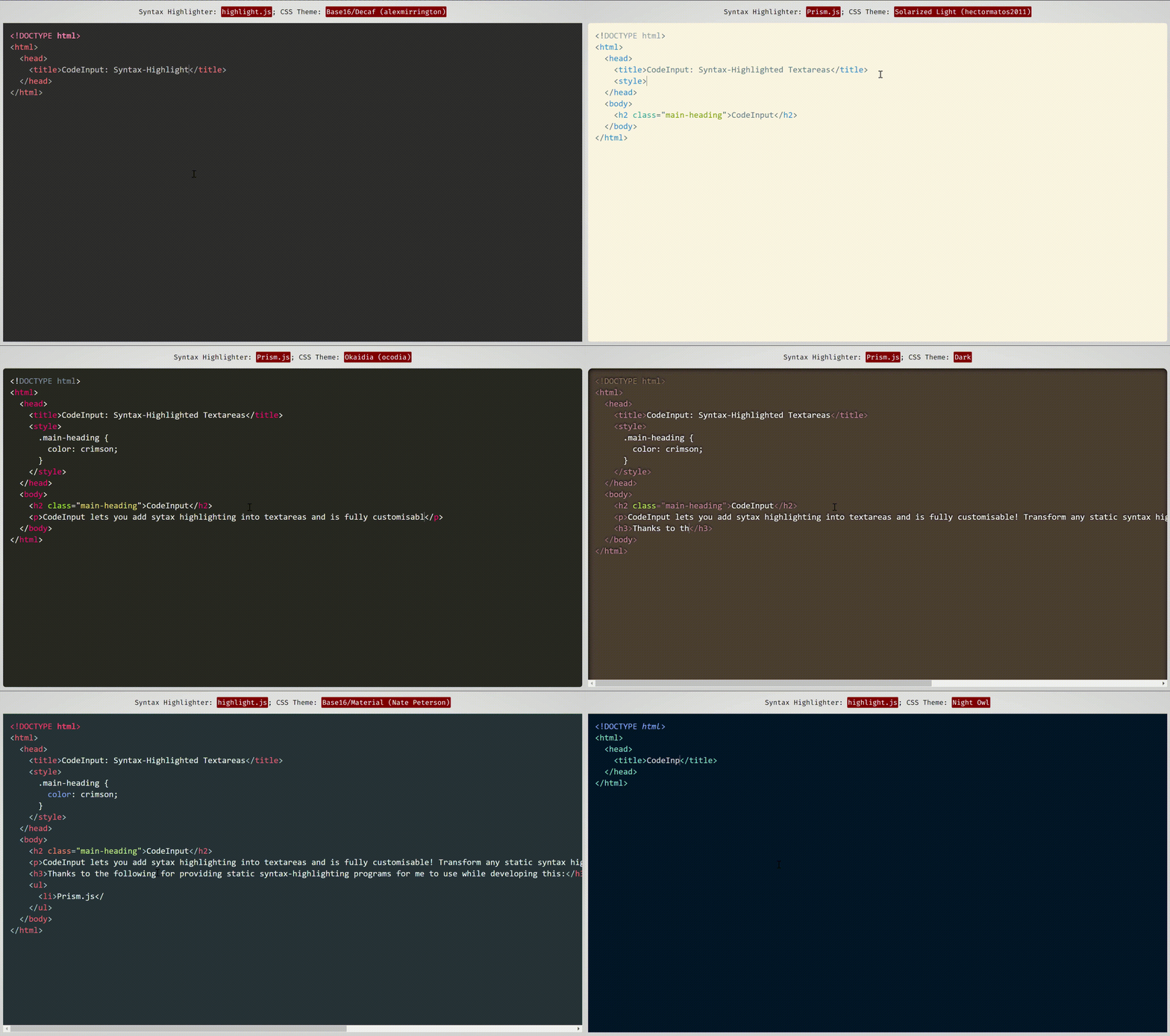
|
|
10
|
-
*This demonstration uses themes from [Prism.js](https://prismjs.com/) and [highlight.js](https://highlightjs.org/), two syntax-highlighting programs which work well with and have compatibility built-in with code-input.*
|
|
11
|
-
|
|
12
|
-
*A frontend JavaScript library, with:*<br/>
|
|
13
|
-
[](https://github.com/WebCoder49/code-input-for-typescript)
|
|
5
|
+
[](LICENSE) [](https://github.com/WebCoder49/code-input/releases)
|
|
6
|
+
> **An editable <textarea> that supports *any* syntax highlighting algorithm, for code or something else. Also, added plugins.**
|
|
7
|
+
>
|
|
8
|
+
> Aiming to be more flexible, lightweight, modular, progressively enhanced and standards-based than the alternatives, we support HTML forms, the `<textarea>` JavaScript interface, more languages and more use cases.
|
|
14
9
|
|
|
15
10
|
---
|
|
16
11
|
|
|
17
|
-
|
|
18
|
-
**`code-input`** lets you **turn any ordinary JavaScript syntax-highlighting theme and program into customisable syntax-highlighted textareas** using an HTML custom element. It uses vanilla CSS to superimpose a `textarea` on a `pre code` block, then handles indentations, scrolling and fixes any resulting bugs with JavaScript. To see how it works behind the scenes (not how to use this library), please see [this CSS-Tricks article](https://css-tricks.com/creating-an-editable-textarea-that-supports-syntax-highlighted-code/ "Creating an Editable Textarea That Supports Syntax-Highlighted Code") I wrote.
|
|
19
|
-
|
|
20
|
-
## What are the advantages of using code-input, and what can it be used for?
|
|
21
|
-
Unlike other front-end code-editor projects, the simplicity of how `code-input` works means it is **highly customisable**. As it is not a full-featured editor, you can **choose what features you want it to include, and use your favourite syntax-highlighting algorithms and themes**.
|
|
22
|
-
|
|
23
|
-
The `<code-input>` element works like a `<textarea>` and therefore **works in HTML5 forms and supports using the `name`, `value` and `placeholder` attributes, events like `onchange`, form resets, to name a few...** [(Demo)](https://codepen.io/WebCoder49/details/JjmqjZv)
|
|
24
|
-
|
|
25
|
-
`code-input` has also accumulated many **features in optional [plugins](./plugins/README.md)** from open-source contributions, allowing you to choose any features you want. If a feature you want is not present, [please open an issue / contribute it!](#contributing)
|
|
26
|
-
|
|
27
|
-
## 🚀 Getting Started With `code-input` (in 4 simple steps)
|
|
28
|
-
|
|
29
|
-
## [`code-input` also supports TypeScript (click)](https://github.com/WebCoder49/code-input-for-typescript)
|
|
30
|
-
|
|
31
|
-
**You can follow the instructions below, or use the starter code available [here for highlight.js](https://codepen.io/WebCoder49/pen/vYMpMoJ?editors=1100) and [here for Prism.js](https://codepen.io/WebCoder49/pen/ExzNRyb?editors=1100).**
|
|
32
|
-
|
|
33
|
-
`code-input` is designed to be **both easy to use and customisable**. Here's how to use it to create syntax-highlighted textareas:
|
|
34
|
-
|
|
35
|
-
### 1. Import `code-input`
|
|
36
|
-
- **First, import your favourite syntax-highlighter's JS and CSS theme files** to turn editable.
|
|
37
|
-
- Then, import the CSS and JS files of `code-input` from a downloaded release or a CDN. The non-minified files are useful for using during development.
|
|
38
|
-
|
|
39
|
-
<details>
|
|
40
|
-
<summary>
|
|
41
|
-
Locally downloaded (Click)
|
|
42
|
-
</summary>
|
|
43
|
-
|
|
44
|
-
```html
|
|
45
|
-
<!--In the <head>-->
|
|
46
|
-
<script src="path/to/code-input.min.js"></script>
|
|
47
|
-
<link rel="stylesheet" href="path/to/code-input.min.css">
|
|
48
|
-
```
|
|
49
|
-
</details>
|
|
50
|
-
<details>
|
|
51
|
-
<summary>
|
|
52
|
-
From JSDelivr CDN (click)
|
|
53
|
-
</summary>
|
|
12
|
+
Demos and usage instructions are available at <https://code-input-js.org> and [the `docs` directory](docs/), to let you get started quickly!
|
|
54
13
|
|
|
55
|
-
|
|
56
|
-
<!--In the <head>-->
|
|
57
|
-
<script src="https://cdn.jsdelivr.net/gh/WebCoder49/code-input@2.5/code-input.min.js"></script>
|
|
58
|
-
<link rel="stylesheet" href="https://cdn.jsdelivr.net/gh/WebCoder49/code-input@2.5/code-input.min.css">
|
|
59
|
-
```
|
|
60
|
-
</details>
|
|
61
|
-
|
|
62
|
-
### 2. Creating a template
|
|
63
|
-
The next step is to set up a `template` to link `code-input` to your syntax-highlighter. If you're using Prism.js or highlight.js, you can use the built-in template, or you can create your own otherwise. In these examples, I am registering the template as `"syntax-highlighted"`, but you can use any template name as long as you are consistent.
|
|
64
|
-
|
|
65
|
-
- *Highlight.js:*
|
|
66
|
-
```js
|
|
67
|
-
codeInput.registerTemplate("syntax-highlighted", codeInput.templates.hljs(hljs, [] /* Array of plugins (see below) */));
|
|
68
|
-
```
|
|
69
|
-
|
|
70
|
-
- *Prism.js:*
|
|
71
|
-
```js
|
|
72
|
-
codeInput.registerTemplate("syntax-highlighted", codeInput.templates.prism(Prism, [] /* Array of plugins (see below) */));
|
|
73
|
-
```
|
|
74
|
-
|
|
75
|
-
- *Custom:*
|
|
76
|
-
```js
|
|
77
|
-
codeInput.registerTemplate("syntax-highlighted", new codeInput.Template(
|
|
78
|
-
function(result_element) { /* Highlight function - with `pre code` code element */
|
|
79
|
-
/* Highlight code in result_element - code is already escaped so it doesn't become HTML */
|
|
80
|
-
},
|
|
81
|
-
|
|
82
|
-
true, /* Optional - Is the `pre` element styled as well as the `code` element?
|
|
83
|
-
* Changing this to false uses the code element as the scrollable one rather
|
|
84
|
-
* than the pre element */
|
|
85
|
-
|
|
86
|
-
true, /* Optional - This is used for editing code - setting this to true sets the `code`
|
|
87
|
-
* element's class to `language-<the code-input's lang attribute>` */
|
|
88
|
-
|
|
89
|
-
false /* Optional - Setting this to true passes the `<code-input>` element as a second
|
|
90
|
-
* argument to the highlight function to be used for getting data- attribute values
|
|
91
|
-
* and using the DOM for the code-input */,
|
|
92
|
-
|
|
93
|
-
[] // Array of plugins (see below)
|
|
94
|
-
));
|
|
95
|
-
```
|
|
96
|
-
|
|
97
|
-
### 3. Adding plugins
|
|
98
|
-
[Plugins](./plugins/) allow you to add extra features to a template, like [automatic indentation](plugins/indent.js) or [support for highlight.js's language autodetection](plugins/autodetect.js). To use them, just:
|
|
99
|
-
- Import the plugins' JS files after you have imported `code-input` and before registering the template.
|
|
100
|
-
- Place instances of the plugins in the array of plugins argument when registering, like this:
|
|
101
|
-
```html
|
|
102
|
-
<script src="code-input.js"></script>
|
|
103
|
-
<!--...-->
|
|
104
|
-
<script src="plugins/autodetect.js"></script>
|
|
105
|
-
<script src="plugins/indent.js"></script>
|
|
106
|
-
<!--...-->
|
|
107
|
-
<script>
|
|
108
|
-
codeInput.registerTemplate("syntax-highlighted",
|
|
109
|
-
codeInput.templates.hljs(
|
|
110
|
-
hljs,
|
|
111
|
-
[
|
|
112
|
-
new codeInput.plugins.Autodetect(),
|
|
113
|
-
new codeInput.plugins.Indent(true, 2) // 2 spaces indentation
|
|
114
|
-
]
|
|
115
|
-
)
|
|
116
|
-
);
|
|
117
|
-
</script>
|
|
118
|
-
```
|
|
119
|
-
|
|
120
|
-
> ⚠️ Unfortunately placing multiple plugins of the same type in a template can currently cause errors and undefined behaviour, even if such a configuration makes logical sense. [This is issue #118](https://github.com/WebCoder49/code-input/issues/118) and will be fixed as soon as possible - if you'd like to help and have the time you're welcome, but it's also at the top of the maintainer's To-Do list.
|
|
121
|
-
|
|
122
|
-
To see a full list of plugins and their functions, please see [plugins/README.md](./plugins/README.md).
|
|
123
|
-
|
|
124
|
-
### 4. Using the component
|
|
125
|
-
Now that you have registered a template, you can use the custom `<code-input>` element in HTML. If you have more than one template registered, you need to add the template name as the `template` attribute. With the element, using the `language` attribute will add a `language-{value}` class to the `pre code` block. You can now use HTML attributes and events, as well as CSS styles, to make your element as simple or interactive as you like, as if it were a `textarea` element!
|
|
126
|
-
```HTML
|
|
127
|
-
<code-input language="HTML"></code-input>
|
|
128
|
-
```
|
|
129
|
-
*or*
|
|
130
|
-
```HTML
|
|
131
|
-
<code-input language="HTML" placeholder="Type code here" template="syntax-highlighted" onchange="console.log('Your code is', this.value)">< href='https://github.com/WebCoder49/code-input'>code-input</a></code-input>
|
|
132
|
-
```
|
|
14
|
+
---
|
|
133
15
|
|
|
134
|
-
|
|
16
|
+

|
|
17
|
+
*This demonstration uses themes from [Prism.js](https://prismjs.com/) and [highlight.js](https://highlightjs.org/), two syntax-highlighting programs which work well with and have compatibility built-in with code-input.*
|
|
135
18
|
|
|
136
19
|
## Contributing
|
|
137
20
|
If you have any features you would like to add to `code-input` as plugins or core functionality, or have found any bugs, please [open an issue](https://github.com/WebCoder49/code-input/issues) or [fork and submit a pull request](https://github.com/WebCoder49/code-input/fork)! All contributions to this open-source project will be greatly appreciated. You can see [more info in our `CONTRIBUTING.md` file](CONTRIBUTING.md).
|
package/code-input.css
CHANGED
|
@@ -1,7 +1,15 @@
|
|
|
1
|
-
|
|
2
|
-
|
|
3
|
-
|
|
4
|
-
|
|
1
|
+
/**
|
|
2
|
+
* **code-input** is a library which lets you create custom HTML `<code-input>`
|
|
3
|
+
* elements that act like `<textarea>` elements but support syntax-highlighted
|
|
4
|
+
* code, implemented using any typical syntax highlighting library.
|
|
5
|
+
*
|
|
6
|
+
* License of whole library for bundlers:
|
|
7
|
+
*
|
|
8
|
+
* Copyright 2021-2025 Oliver Geer and contributors
|
|
9
|
+
* @license MIT
|
|
10
|
+
*
|
|
11
|
+
* **<https://code-input-js.org>**
|
|
12
|
+
*/
|
|
5
13
|
|
|
6
14
|
code-input {
|
|
7
15
|
/* Allow other elements to be inside */
|
|
@@ -12,6 +20,9 @@ code-input {
|
|
|
12
20
|
top: 0;
|
|
13
21
|
left: 0;
|
|
14
22
|
|
|
23
|
+
color: black;
|
|
24
|
+
background-color: white;
|
|
25
|
+
|
|
15
26
|
/* Normal inline styles */
|
|
16
27
|
margin: 8px;
|
|
17
28
|
--padding: 16px;
|
|
@@ -38,8 +49,8 @@ code-input textarea, code-input:not(.code-input_pre-element-styled) pre code, co
|
|
|
38
49
|
margin: 0px!important;
|
|
39
50
|
padding: var(--padding, 16px)!important;
|
|
40
51
|
border: 0;
|
|
41
|
-
min-width: calc(100% - var(--padding) * 2);
|
|
42
|
-
min-height: calc(100% - var(--padding) * 2);
|
|
52
|
+
min-width: calc(100% - var(--padding, 16px) * 2);
|
|
53
|
+
min-height: calc(100% - var(--padding, 16px) * 2);
|
|
43
54
|
box-sizing: content-box; /* Make height, width work consistently no matter the box-sizing of ancestors; dialogs can be styled as wanted so are excluded. */
|
|
44
55
|
overflow: hidden;
|
|
45
56
|
resize: none;
|
|
@@ -55,10 +66,9 @@ code-input:not(.code-input_pre-element-styled) pre code, code-input.code-input_p
|
|
|
55
66
|
|
|
56
67
|
code-input:not(.code-input_pre-element-styled) pre, code-input.code-input_pre-element-styled pre code {
|
|
57
68
|
/* Remove all margin and padding from others */
|
|
58
|
-
margin:
|
|
59
|
-
padding:
|
|
60
|
-
|
|
61
|
-
height: 100%;
|
|
69
|
+
margin: 0!important;
|
|
70
|
+
padding: 0!important;
|
|
71
|
+
border: 0!important;
|
|
62
72
|
}
|
|
63
73
|
|
|
64
74
|
code-input textarea, code-input pre, code-input pre * {
|
|
@@ -92,7 +102,7 @@ code-input textarea, code-input pre {
|
|
|
92
102
|
|
|
93
103
|
/* Move the textarea in front of the result */
|
|
94
104
|
|
|
95
|
-
code-input textarea {
|
|
105
|
+
code-input textarea:not([data-code-input-fallback]) {
|
|
96
106
|
z-index: 1;
|
|
97
107
|
}
|
|
98
108
|
code-input pre {
|
|
@@ -101,7 +111,7 @@ code-input pre {
|
|
|
101
111
|
|
|
102
112
|
/* Make textarea almost completely transparent, except for caret and placeholder */
|
|
103
113
|
|
|
104
|
-
code-input textarea {
|
|
114
|
+
code-input textarea:not([data-code-input-fallback]) {
|
|
105
115
|
color: transparent;
|
|
106
116
|
background: transparent;
|
|
107
117
|
caret-color: inherit!important; /* Or choose your favourite color */
|
|
@@ -124,7 +134,7 @@ code-input textarea {
|
|
|
124
134
|
outline: none!important;
|
|
125
135
|
}
|
|
126
136
|
code-input:has(textarea:focus):not(.code-input_mouse-focused) {
|
|
127
|
-
outline: 2px solid
|
|
137
|
+
outline: 2px solid currentColor;
|
|
128
138
|
}
|
|
129
139
|
|
|
130
140
|
/* Before registering give a hint about how to register. */
|
|
@@ -136,19 +146,30 @@ code-input:not(.code-input_registered) {
|
|
|
136
146
|
|
|
137
147
|
code-input:not(.code-input_registered)::after {
|
|
138
148
|
/* Display message to register */
|
|
139
|
-
content: "
|
|
149
|
+
content: "No highlighting. JavaScript support is disabled or insufficient, or codeInput.registerTemplate has not been called.";
|
|
140
150
|
display: block;
|
|
141
151
|
position: absolute;
|
|
142
|
-
bottom:
|
|
143
|
-
left: var(--padding);
|
|
144
|
-
width: calc(100% - 2 * var(--padding));
|
|
152
|
+
bottom: 0;
|
|
153
|
+
left: var(--padding, 16px);
|
|
154
|
+
width: calc(100% - 2 * var(--padding, 16px));
|
|
155
|
+
overflow-x: auto;
|
|
145
156
|
|
|
146
|
-
border-top: 1px solid
|
|
147
|
-
outline:
|
|
148
|
-
background-color:
|
|
157
|
+
border-top: 1px solid currentColor;
|
|
158
|
+
outline-top: 0;
|
|
159
|
+
background-color: inherit;
|
|
160
|
+
color: inherit;
|
|
161
|
+
|
|
162
|
+
margin: 0;
|
|
163
|
+
padding: 0;
|
|
164
|
+
height: 2em;
|
|
149
165
|
}
|
|
150
166
|
|
|
151
|
-
code-input:not(.code-
|
|
167
|
+
code-input:not(.code-input_registered) textarea {
|
|
168
|
+
/* Don't overlap with message */
|
|
169
|
+
min-height: calc(100% - var(--padding, 16px) * 2 - 2em);
|
|
170
|
+
}
|
|
171
|
+
|
|
172
|
+
code-input:not(.code-input_loaded) pre, code-input:not(.code-input_loaded) textarea:not([data-code-input-fallback]) {
|
|
152
173
|
opacity: 0;
|
|
153
174
|
}
|
|
154
175
|
|
|
@@ -167,12 +188,16 @@ code-input .code-input_dialog-container {
|
|
|
167
188
|
|
|
168
189
|
margin: 0;
|
|
169
190
|
padding: 0;
|
|
170
|
-
width: 100%;
|
|
171
191
|
height: 0;
|
|
192
|
+
width: 100%;
|
|
172
193
|
|
|
173
194
|
/* Dialog boxes' text is based on text-direction */
|
|
174
195
|
text-align: inherit;
|
|
175
196
|
}
|
|
197
|
+
code-input.code-input_pre-element-styled .code-input_dialog-container {
|
|
198
|
+
width: calc(100% + 2 * var(--padding, 16px));
|
|
199
|
+
}
|
|
200
|
+
|
|
176
201
|
[dir=rtl] code-input .code-input_dialog-container, code-input[dir=rtl] .code-input_dialog-container {
|
|
177
202
|
left: unset;
|
|
178
203
|
right: 0;
|
|
@@ -185,23 +210,23 @@ code-input .code-input_dialog-container .code-input_keyboard-navigation-instruct
|
|
|
185
210
|
|
|
186
211
|
display: block;
|
|
187
212
|
position: absolute;
|
|
213
|
+
top: 0;
|
|
214
|
+
left: 0;
|
|
215
|
+
|
|
188
216
|
background-color: black;
|
|
189
217
|
color: white;
|
|
190
218
|
padding: 2px;
|
|
191
|
-
padding-left: 10px;
|
|
192
219
|
margin: 0;
|
|
193
220
|
text-wrap: balance;
|
|
194
221
|
overflow: hidden;
|
|
195
222
|
text-overflow: ellipsis;
|
|
196
|
-
|
|
223
|
+
|
|
224
|
+
width: 100%;
|
|
225
|
+
box-sizing: border-box;
|
|
197
226
|
max-height: 3em;
|
|
198
227
|
}
|
|
199
|
-
code-input:has(pre[dir=rtl]) .code-input_dialog-container .code-input_keyboard-navigation-instructions {
|
|
200
|
-
left: unset;
|
|
201
|
-
right: 0;
|
|
202
|
-
}
|
|
203
228
|
|
|
204
|
-
code-input:not(:has(textarea:focus)) .code-input_dialog-container .code-input_keyboard-navigation-instructions,
|
|
229
|
+
code-input:not(:has(textarea:not([data-code-input-fallback]):focus)) .code-input_dialog-container .code-input_keyboard-navigation-instructions,
|
|
205
230
|
code-input.code-input_mouse-focused .code-input_dialog-container .code-input_keyboard-navigation-instructions,
|
|
206
231
|
code-input .code-input_dialog-container .code-input_keyboard-navigation-instructions:empty {
|
|
207
232
|
/* When not keyboard-focused / no instructions don't show instructions */
|
|
@@ -209,8 +234,20 @@ code-input .code-input_dialog-container .code-input_keyboard-navigation-instruct
|
|
|
209
234
|
}
|
|
210
235
|
|
|
211
236
|
/* Things with padding when instructions are present */
|
|
212
|
-
code-input:not(:has(.code-input_keyboard-navigation-instructions:empty)):has(textarea:focus):not(.code-input_mouse-focused) textarea,
|
|
213
|
-
code-input:not(:has(.code-input_keyboard-navigation-instructions:empty)):has(textarea:focus):not(.code-input_mouse-focused):not(.code-input_pre-element-styled) pre code,
|
|
214
|
-
code-input:not(:has(.code-input_keyboard-navigation-instructions:empty)):has(textarea:focus):not(.code-input_mouse-focused).code-input_pre-element-styled pre {
|
|
215
|
-
padding-top: calc(var(--padding) + 3em)!important;
|
|
237
|
+
code-input:not(:has(.code-input_keyboard-navigation-instructions:empty)):has(textarea:not([data-code-input-fallback]):focus):not(.code-input_mouse-focused) textarea,
|
|
238
|
+
code-input:not(:has(.code-input_keyboard-navigation-instructions:empty)):has(textarea:not([data-code-input-fallback]):focus):not(.code-input_mouse-focused):not(.code-input_pre-element-styled) pre code,
|
|
239
|
+
code-input:not(:has(.code-input_keyboard-navigation-instructions:empty)):has(textarea:not([data-code-input-fallback]):focus):not(.code-input_mouse-focused).code-input_pre-element-styled pre {
|
|
240
|
+
padding-top: calc(var(--padding, 16px) + 3em)!important;
|
|
241
|
+
}
|
|
242
|
+
code-input:not(:has(.code-input_keyboard-navigation-instructions:empty)):has(textarea:not([data-code-input-fallback]):focus):not(.code-input_mouse-focused) textarea, code-input:not(:has(.code-input_keyboard-navigation-instructions:empty)):has(textarea:not([data-code-input-fallback]):focus):not(.code-input_mouse-focused):not(.code-input_pre-element-styled) pre code, code-input:not(:has(.code-input_keyboard-navigation-instructions:empty)):has(textarea:not([data-code-input-fallback]):focus):not(.code-input_mouse-focused).code-input_pre-element-styled pre {
|
|
243
|
+
min-height: calc(100% - var(--padding, 16px) * 2 - 3em);
|
|
244
|
+
}
|
|
245
|
+
|
|
246
|
+
/* No JavaScript fallback - styles to override all previous */
|
|
247
|
+
|
|
248
|
+
code-input textarea[data-code-input-fallback] {
|
|
249
|
+
overflow: auto;
|
|
250
|
+
background-color: inherit;
|
|
251
|
+
color: inherit;
|
|
252
|
+
height: max-content;
|
|
216
253
|
}
|