@webcoder49/code-input 2.1.0 → 2.5.0
This diff represents the content of publicly available package versions that have been released to one of the supported registries. The information contained in this diff is provided for informational purposes only and reflects changes between package versions as they appear in their respective public registries.
- package/CONTRIBUTING.md +11 -1
- package/README.md +26 -11
- package/code-input.css +126 -29
- package/code-input.d.ts +153 -11
- package/code-input.js +218 -193
- package/code-input.min.css +1 -1
- package/code-input.min.js +1 -1
- package/package.json +1 -1
- package/plugins/README.md +28 -6
- package/plugins/auto-close-brackets.js +61 -0
- package/plugins/auto-close-brackets.min.js +1 -0
- package/plugins/autocomplete.js +21 -12
- package/plugins/autocomplete.min.js +1 -1
- package/plugins/autodetect.js +4 -4
- package/plugins/autodetect.min.js +1 -1
- package/plugins/find-and-replace.css +145 -0
- package/plugins/find-and-replace.js +746 -0
- package/plugins/find-and-replace.min.css +1 -0
- package/plugins/find-and-replace.min.js +1 -0
- package/plugins/go-to-line.css +77 -0
- package/plugins/go-to-line.js +175 -0
- package/plugins/go-to-line.min.css +1 -0
- package/plugins/go-to-line.min.js +1 -0
- package/plugins/indent.js +166 -15
- package/plugins/indent.min.js +1 -1
- package/plugins/prism-line-numbers.css +10 -9
- package/plugins/prism-line-numbers.min.css +1 -1
- package/plugins/select-token-callbacks.js +289 -0
- package/plugins/select-token-callbacks.min.js +1 -0
- package/plugins/special-chars.css +1 -5
- package/plugins/special-chars.js +65 -61
- package/plugins/special-chars.min.css +2 -2
- package/plugins/special-chars.min.js +1 -1
- package/plugins/test.js +1 -2
- package/plugins/test.min.js +1 -1
- package/tests/hljs.html +55 -0
- package/tests/i18n.html +197 -0
- package/tests/prism-match-braces-compatibility.js +215 -0
- package/tests/prism-match-braces-compatibility.min.js +1 -0
- package/tests/prism.html +54 -0
- package/tests/tester.js +593 -0
- package/tests/tester.min.js +21 -0
- package/plugins/debounce-update.js +0 -40
- package/plugins/debounce-update.min.js +0 -1
package/CONTRIBUTING.md
CHANGED
|
@@ -6,7 +6,15 @@
|
|
|
6
6
|
* The `code-input` element should be easy to use with all popular syntax-highlighting libraries.
|
|
7
7
|
* Any modifications of `code-input` that would be useful for the open-source community but are not core to this functionality should be available as optional plugins in the `plugins` folder. Here's where most feature contributions will go.
|
|
8
8
|
|
|
9
|
-
|
|
9
|
+
We will generally *not* consider the following contributions:
|
|
10
|
+
* Excess functionality and/or complexity in the main code-input files - these types of contributions should go in the plugin folder instead.
|
|
11
|
+
* Issues that have been closed as not planned in the past (you can search the issue list to check), unless you bring a change that overcomes the reason they were not planned.
|
|
12
|
+
|
|
13
|
+
This said, if you're not sure whether your change will be accepted, please ask in an issue.
|
|
14
|
+
|
|
15
|
+
---
|
|
16
|
+
|
|
17
|
+
To keep this community productive and enjoyable, please [don't break our code of conduct](https://github.com/WebCoder49/code-input/blob/main/CODE_OF_CONDUCT.md).
|
|
10
18
|
|
|
11
19
|
---
|
|
12
20
|
# Ways you could contribute:
|
|
@@ -22,4 +30,6 @@ Firstly, thank you for doing this! This is probably the most time consuming way
|
|
|
22
30
|
|
|
23
31
|
Please first open an issue if one doesn't already exist, and assign yourself to it. Then, [make a fork of the repo and submit a pull request](https://docs.github.com/en/get-started/quickstart/contributing-to-projects).
|
|
24
32
|
|
|
33
|
+
In the pull request, include the code updates for your feature / bug, and if you're adding a new feature make sure you comment your code so it's understandable to future contributors, and if you can, add unit tests for it in tests/tester.js. If you have any questions, just let me (@WebCoder49) know!
|
|
34
|
+
|
|
25
35
|
If an issue is open but already assigned to someone, it is probably already being worked on - you could still suggest a method of fixing it in the comments but shouldn't open a pull request as it would waste your time.
|
package/README.md
CHANGED
|
@@ -2,9 +2,9 @@
|
|
|
2
2
|
|
|
3
3
|
[](https://github.com/WebCoder49/code-input)[](https://www.npmjs.com/package/@webcoder49/code-input)
|
|
4
4
|
|
|
5
|
-
[](LICENSE) [](https://github.com/WebCoder49/code-input/releases) [](https://codepen.io/WebCoder49/
|
|
5
|
+
[](LICENSE) [](https://github.com/WebCoder49/code-input/releases) [](https://codepen.io/WebCoder49/full/jOypJOx)
|
|
6
6
|
|
|
7
|
-
> ___Fully customisable, editable syntax-highlighted textareas that can be placed in any HTML form.___ [[🚀 View the Demo](https://codepen.io/WebCoder49/
|
|
7
|
+
> ___Fully customisable, editable syntax-highlighted textareas that can be placed in any HTML form.___ [[🚀 View the Demo](https://codepen.io/WebCoder49/full/jOypJOx)]
|
|
8
8
|
|
|
9
9
|
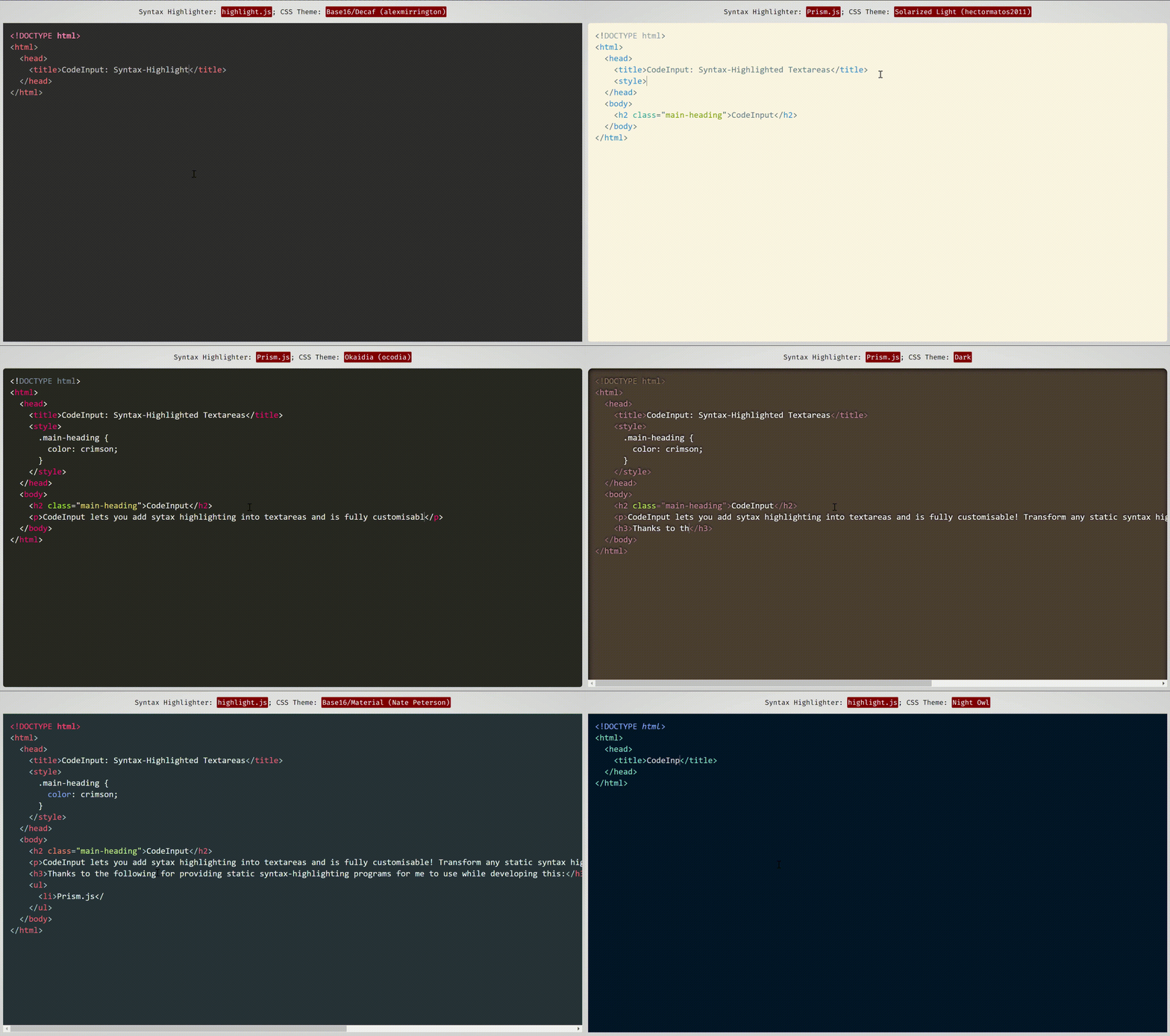
|
|
10
10
|
*This demonstration uses themes from [Prism.js](https://prismjs.com/) and [highlight.js](https://highlightjs.org/), two syntax-highlighting programs which work well with and have compatibility built-in with code-input.*
|
|
@@ -15,7 +15,7 @@
|
|
|
15
15
|
---
|
|
16
16
|
|
|
17
17
|
## What does it do?
|
|
18
|
-
**`code-input`** lets you **turn any ordinary JavaScript syntax-highlighting theme and program into customisable syntax-highlighted textareas** using an HTML custom element. It uses vanilla CSS to superimpose a `textarea` on a `pre code` block, then handles indentations, scrolling and fixes any resulting bugs with JavaScript. To see how it works
|
|
18
|
+
**`code-input`** lets you **turn any ordinary JavaScript syntax-highlighting theme and program into customisable syntax-highlighted textareas** using an HTML custom element. It uses vanilla CSS to superimpose a `textarea` on a `pre code` block, then handles indentations, scrolling and fixes any resulting bugs with JavaScript. To see how it works behind the scenes (not how to use this library), please see [this CSS-Tricks article](https://css-tricks.com/creating-an-editable-textarea-that-supports-syntax-highlighted-code/ "Creating an Editable Textarea That Supports Syntax-Highlighted Code") I wrote.
|
|
19
19
|
|
|
20
20
|
## What are the advantages of using code-input, and what can it be used for?
|
|
21
21
|
Unlike other front-end code-editor projects, the simplicity of how `code-input` works means it is **highly customisable**. As it is not a full-featured editor, you can **choose what features you want it to include, and use your favourite syntax-highlighting algorithms and themes**.
|
|
@@ -28,6 +28,8 @@ The `<code-input>` element works like a `<textarea>` and therefore **works in HT
|
|
|
28
28
|
|
|
29
29
|
## [`code-input` also supports TypeScript (click)](https://github.com/WebCoder49/code-input-for-typescript)
|
|
30
30
|
|
|
31
|
+
**You can follow the instructions below, or use the starter code available [here for highlight.js](https://codepen.io/WebCoder49/pen/vYMpMoJ?editors=1100) and [here for Prism.js](https://codepen.io/WebCoder49/pen/ExzNRyb?editors=1100).**
|
|
32
|
+
|
|
31
33
|
`code-input` is designed to be **both easy to use and customisable**. Here's how to use it to create syntax-highlighted textareas:
|
|
32
34
|
|
|
33
35
|
### 1. Import `code-input`
|
|
@@ -52,8 +54,8 @@ From JSDelivr CDN (click)
|
|
|
52
54
|
|
|
53
55
|
```html
|
|
54
56
|
<!--In the <head>-->
|
|
55
|
-
<script src="https://cdn.jsdelivr.net/gh/WebCoder49/code-input@2.
|
|
56
|
-
<link rel="stylesheet" href="https://cdn.jsdelivr.net/gh/WebCoder49/code-input@2.
|
|
57
|
+
<script src="https://cdn.jsdelivr.net/gh/WebCoder49/code-input@2.5/code-input.min.js"></script>
|
|
58
|
+
<link rel="stylesheet" href="https://cdn.jsdelivr.net/gh/WebCoder49/code-input@2.5/code-input.min.css">
|
|
57
59
|
```
|
|
58
60
|
</details>
|
|
59
61
|
|
|
@@ -76,9 +78,18 @@ The next step is to set up a `template` to link `code-input` to your syntax-high
|
|
|
76
78
|
function(result_element) { /* Highlight function - with `pre code` code element */
|
|
77
79
|
/* Highlight code in result_element - code is already escaped so it doesn't become HTML */
|
|
78
80
|
},
|
|
79
|
-
|
|
80
|
-
true, /* Optional -
|
|
81
|
-
|
|
81
|
+
|
|
82
|
+
true, /* Optional - Is the `pre` element styled as well as the `code` element?
|
|
83
|
+
* Changing this to false uses the code element as the scrollable one rather
|
|
84
|
+
* than the pre element */
|
|
85
|
+
|
|
86
|
+
true, /* Optional - This is used for editing code - setting this to true sets the `code`
|
|
87
|
+
* element's class to `language-<the code-input's lang attribute>` */
|
|
88
|
+
|
|
89
|
+
false /* Optional - Setting this to true passes the `<code-input>` element as a second
|
|
90
|
+
* argument to the highlight function to be used for getting data- attribute values
|
|
91
|
+
* and using the DOM for the code-input */,
|
|
92
|
+
|
|
82
93
|
[] // Array of plugins (see below)
|
|
83
94
|
));
|
|
84
95
|
```
|
|
@@ -106,18 +117,22 @@ The next step is to set up a `template` to link `code-input` to your syntax-high
|
|
|
106
117
|
</script>
|
|
107
118
|
```
|
|
108
119
|
|
|
120
|
+
> ⚠️ Unfortunately placing multiple plugins of the same type in a template can currently cause errors and undefined behaviour, even if such a configuration makes logical sense. [This is issue #118](https://github.com/WebCoder49/code-input/issues/118) and will be fixed as soon as possible - if you'd like to help and have the time you're welcome, but it's also at the top of the maintainer's To-Do list.
|
|
121
|
+
|
|
109
122
|
To see a full list of plugins and their functions, please see [plugins/README.md](./plugins/README.md).
|
|
110
123
|
|
|
111
124
|
### 4. Using the component
|
|
112
|
-
Now that you have registered a template, you can use the custom `<code-input>` element in HTML. If you have more than one template registered, you need to add the template name as the `template` attribute. With the element, using the `
|
|
125
|
+
Now that you have registered a template, you can use the custom `<code-input>` element in HTML. If you have more than one template registered, you need to add the template name as the `template` attribute. With the element, using the `language` attribute will add a `language-{value}` class to the `pre code` block. You can now use HTML attributes and events, as well as CSS styles, to make your element as simple or interactive as you like, as if it were a `textarea` element!
|
|
113
126
|
```HTML
|
|
114
|
-
<code-input
|
|
127
|
+
<code-input language="HTML"></code-input>
|
|
115
128
|
```
|
|
116
129
|
*or*
|
|
117
130
|
```HTML
|
|
118
|
-
<code-input
|
|
131
|
+
<code-input language="HTML" placeholder="Type code here" template="syntax-highlighted" onchange="console.log('Your code is', this.value)">< href='https://github.com/WebCoder49/code-input'>code-input</a></code-input>
|
|
119
132
|
```
|
|
120
133
|
|
|
134
|
+
> ⚠️ At the moment, you need to set the `--padding` property rather than `padding` for a `code-input` element's CSS. All other properties should work as normal.
|
|
135
|
+
|
|
121
136
|
## Contributing
|
|
122
137
|
If you have any features you would like to add to `code-input` as plugins or core functionality, or have found any bugs, please [open an issue](https://github.com/WebCoder49/code-input/issues) or [fork and submit a pull request](https://github.com/WebCoder49/code-input/fork)! All contributions to this open-source project will be greatly appreciated. You can see [more info in our `CONTRIBUTING.md` file](CONTRIBUTING.md).
|
|
123
138
|
|
package/code-input.css
CHANGED
|
@@ -4,26 +4,33 @@
|
|
|
4
4
|
|
|
5
5
|
|
|
6
6
|
code-input {
|
|
7
|
-
/* Allow other
|
|
7
|
+
/* Allow other elements to be inside */
|
|
8
|
+
display: block;
|
|
9
|
+
overflow-y: auto;
|
|
10
|
+
overflow-x: auto;
|
|
8
11
|
position: relative;
|
|
9
12
|
top: 0;
|
|
10
13
|
left: 0;
|
|
11
|
-
display: block;
|
|
12
|
-
/* Only scroll inside elems */
|
|
13
|
-
overflow: hidden;
|
|
14
14
|
|
|
15
15
|
/* Normal inline styles */
|
|
16
16
|
margin: 8px;
|
|
17
17
|
--padding: 16px;
|
|
18
18
|
height: 250px;
|
|
19
|
-
|
|
20
|
-
font-size: normal;
|
|
19
|
+
font-size: inherit;
|
|
21
20
|
font-family: monospace;
|
|
22
21
|
line-height: 1.5; /* Inherited to child elements */
|
|
23
22
|
tab-size: 2;
|
|
24
23
|
caret-color: darkgrey;
|
|
25
24
|
white-space: pre;
|
|
26
|
-
padding: 0!important; /* Use --padding */
|
|
25
|
+
padding: 0!important; /* Use --padding to set the code-input element's padding */
|
|
26
|
+
display: grid;
|
|
27
|
+
grid-template-columns: 100%;
|
|
28
|
+
grid-template-rows: 100%;
|
|
29
|
+
}
|
|
30
|
+
|
|
31
|
+
|
|
32
|
+
code-input:not(.code-input_loaded) {
|
|
33
|
+
padding: var(--padding, 16px)!important;
|
|
27
34
|
}
|
|
28
35
|
|
|
29
36
|
code-input textarea, code-input:not(.code-input_pre-element-styled) pre code, code-input.code-input_pre-element-styled pre {
|
|
@@ -31,15 +38,18 @@ code-input textarea, code-input:not(.code-input_pre-element-styled) pre code, co
|
|
|
31
38
|
margin: 0px!important;
|
|
32
39
|
padding: var(--padding, 16px)!important;
|
|
33
40
|
border: 0;
|
|
34
|
-
width: calc(100% - var(--padding
|
|
35
|
-
height: calc(100% - var(--padding
|
|
41
|
+
min-width: calc(100% - var(--padding) * 2);
|
|
42
|
+
min-height: calc(100% - var(--padding) * 2);
|
|
43
|
+
overflow: hidden;
|
|
44
|
+
resize: none;
|
|
45
|
+
grid-row: 1;
|
|
46
|
+
grid-column: 1;
|
|
47
|
+
display: block;
|
|
36
48
|
}
|
|
37
49
|
|
|
38
|
-
code-input:not(.code-
|
|
39
|
-
|
|
40
|
-
|
|
41
|
-
padding: var(--padding, 16px)!important;
|
|
42
|
-
border: 0;
|
|
50
|
+
code-input:not(.code-input_pre-element-styled) pre code, code-input.code-input_pre-element-styled pre {
|
|
51
|
+
height: max-content;
|
|
52
|
+
width: max-content;
|
|
43
53
|
}
|
|
44
54
|
|
|
45
55
|
code-input:not(.code-input_pre-element-styled) pre, code-input.code-input_pre-element-styled pre code {
|
|
@@ -56,17 +66,29 @@ code-input textarea, code-input pre, code-input pre * {
|
|
|
56
66
|
font-family: inherit!important;
|
|
57
67
|
line-height: inherit!important;
|
|
58
68
|
tab-size: inherit!important;
|
|
69
|
+
text-align: inherit!important;
|
|
70
|
+
}
|
|
71
|
+
|
|
72
|
+
/* Make changing the text direction propogate */
|
|
73
|
+
code-input textarea[dir=auto] + pre {
|
|
74
|
+
unicode-bidi: plaintext;
|
|
75
|
+
}
|
|
76
|
+
|
|
77
|
+
code-input textarea[dir=ltr] + pre {
|
|
78
|
+
direction: ltr;
|
|
79
|
+
}
|
|
80
|
+
|
|
81
|
+
code-input textarea[dir=rtl] + pre {
|
|
82
|
+
direction: rtl;
|
|
59
83
|
}
|
|
60
84
|
|
|
61
85
|
|
|
62
86
|
code-input textarea, code-input pre {
|
|
63
87
|
/* In the same place */
|
|
64
|
-
|
|
65
|
-
|
|
66
|
-
left: 0;
|
|
88
|
+
grid-column: 1;
|
|
89
|
+
grid-row: 1;
|
|
67
90
|
}
|
|
68
91
|
|
|
69
|
-
|
|
70
92
|
/* Move the textarea in front of the result */
|
|
71
93
|
|
|
72
94
|
code-input textarea {
|
|
@@ -76,13 +98,6 @@ code-input pre {
|
|
|
76
98
|
z-index: 0;
|
|
77
99
|
}
|
|
78
100
|
|
|
79
|
-
code-input:not(.code-input_loaded) pre, code-input:not(.code-input_loaded) textarea {
|
|
80
|
-
opacity: 0;
|
|
81
|
-
}
|
|
82
|
-
code-input:not(.code-input_loaded)::after {
|
|
83
|
-
color: #ccc;
|
|
84
|
-
}
|
|
85
|
-
|
|
86
101
|
/* Make textarea almost completely transparent, except for caret and placeholder */
|
|
87
102
|
|
|
88
103
|
code-input textarea {
|
|
@@ -96,23 +111,105 @@ code-input textarea::placeholder {
|
|
|
96
111
|
|
|
97
112
|
/* Can be scrolled */
|
|
98
113
|
code-input textarea, code-input pre {
|
|
99
|
-
overflow: auto!important;
|
|
100
|
-
|
|
101
114
|
white-space: inherit;
|
|
102
115
|
word-spacing: normal;
|
|
103
116
|
word-break: normal;
|
|
104
117
|
word-wrap: normal;
|
|
105
118
|
}
|
|
106
119
|
|
|
107
|
-
/* No resize on textarea;
|
|
120
|
+
/* No resize on textarea; transfer outline on focus to code-input element */
|
|
108
121
|
code-input textarea {
|
|
109
122
|
resize: none;
|
|
110
123
|
outline: none!important;
|
|
111
124
|
}
|
|
125
|
+
code-input:has(textarea:focus):not(.code-input_mouse-focused) {
|
|
126
|
+
outline: 2px solid black;
|
|
127
|
+
}
|
|
128
|
+
|
|
129
|
+
/* Before registering give a hint about how to register. */
|
|
130
|
+
code-input:not(.code-input_registered) {
|
|
131
|
+
overflow: hidden;
|
|
132
|
+
display: block;
|
|
133
|
+
box-sizing: border-box; /* Include padding in width/height */
|
|
134
|
+
}
|
|
112
135
|
|
|
113
136
|
code-input:not(.code-input_registered)::after {
|
|
114
137
|
/* Display message to register */
|
|
115
138
|
content: "Use codeInput.registerTemplate to set up.";
|
|
116
139
|
display: block;
|
|
117
|
-
|
|
140
|
+
position: absolute;
|
|
141
|
+
bottom: var(--padding);
|
|
142
|
+
left: var(--padding);
|
|
143
|
+
width: calc(100% - 2 * var(--padding));
|
|
144
|
+
|
|
145
|
+
border-top: 1px solid grey;
|
|
146
|
+
outline: var(--padding) solid white;
|
|
147
|
+
background-color: white;
|
|
148
|
+
}
|
|
149
|
+
|
|
150
|
+
code-input:not(.code-input_loaded) pre, code-input:not(.code-input_loaded) textarea {
|
|
151
|
+
opacity: 0;
|
|
152
|
+
}
|
|
153
|
+
|
|
154
|
+
/* Contains dialog boxes that might appear as the result of a plugin.
|
|
155
|
+
Sticks to the top of the code-input element */
|
|
156
|
+
|
|
157
|
+
code-input .code-input_dialog-container {
|
|
158
|
+
z-index: 2;
|
|
159
|
+
|
|
160
|
+
position: sticky;
|
|
161
|
+
grid-row: 1;
|
|
162
|
+
grid-column: 1;
|
|
163
|
+
|
|
164
|
+
top: 0;
|
|
165
|
+
left: 0;
|
|
166
|
+
|
|
167
|
+
margin: 0;
|
|
168
|
+
padding: 0;
|
|
169
|
+
width: 100%;
|
|
170
|
+
height: 0;
|
|
171
|
+
|
|
172
|
+
/* Dialog boxes' text is based on text-direction */
|
|
173
|
+
text-align: inherit;
|
|
174
|
+
}
|
|
175
|
+
[dir=rtl] code-input .code-input_dialog-container, code-input[dir=rtl] .code-input_dialog-container {
|
|
176
|
+
left: unset;
|
|
177
|
+
right: 0;
|
|
178
|
+
}
|
|
179
|
+
|
|
180
|
+
/* Instructions specific to keyboard navigation set by plugins that override Tab functionality. */
|
|
181
|
+
code-input .code-input_dialog-container .code-input_keyboard-navigation-instructions {
|
|
182
|
+
top: 0;
|
|
183
|
+
left: 0;
|
|
184
|
+
|
|
185
|
+
display: block;
|
|
186
|
+
position: absolute;
|
|
187
|
+
background-color: black;
|
|
188
|
+
color: white;
|
|
189
|
+
padding: 2px;
|
|
190
|
+
padding-left: 10px;
|
|
191
|
+
margin: 0;
|
|
192
|
+
text-wrap: balance;
|
|
193
|
+
overflow: hidden;
|
|
194
|
+
text-overflow: ellipsis;
|
|
195
|
+
width: calc(100% - 12px);
|
|
196
|
+
max-height: 3em;
|
|
197
|
+
}
|
|
198
|
+
code-input:has(pre[dir=rtl]) .code-input_dialog-container .code-input_keyboard-navigation-instructions {
|
|
199
|
+
left: unset;
|
|
200
|
+
right: 0;
|
|
201
|
+
}
|
|
202
|
+
|
|
203
|
+
code-input:not(:has(textarea:focus)) .code-input_dialog-container .code-input_keyboard-navigation-instructions,
|
|
204
|
+
code-input.code-input_mouse-focused .code-input_dialog-container .code-input_keyboard-navigation-instructions,
|
|
205
|
+
code-input .code-input_dialog-container .code-input_keyboard-navigation-instructions:empty {
|
|
206
|
+
/* When not keyboard-focused / no instructions don't show instructions */
|
|
207
|
+
display: none;
|
|
208
|
+
}
|
|
209
|
+
|
|
210
|
+
/* Things with padding when instructions are present */
|
|
211
|
+
code-input:not(:has(.code-input_keyboard-navigation-instructions:empty)):has(textarea:focus):not(.code-input_mouse-focused) textarea,
|
|
212
|
+
code-input:not(:has(.code-input_keyboard-navigation-instructions:empty)):has(textarea:focus):not(.code-input_mouse-focused):not(.code-input_pre-element-styled) pre code,
|
|
213
|
+
code-input:not(:has(.code-input_keyboard-navigation-instructions:empty)):has(textarea:focus):not(.code-input_mouse-focused).code-input_pre-element-styled pre {
|
|
214
|
+
padding-top: calc(var(--padding) + 3em)!important;
|
|
118
215
|
}
|
package/code-input.d.ts
CHANGED
|
@@ -76,14 +76,27 @@ export namespace plugins {
|
|
|
76
76
|
constructor();
|
|
77
77
|
}
|
|
78
78
|
|
|
79
|
+
/**
|
|
80
|
+
* Automatically closes pairs of brackets/quotes/other syntaxes in code, but also lets you choose the brackets this
|
|
81
|
+
* is activated for.
|
|
82
|
+
* Files: auto-close-brackets.js
|
|
83
|
+
*/
|
|
84
|
+
class AutoCloseBrackets extends Plugin {
|
|
85
|
+
/**
|
|
86
|
+
* Create an auto-close brackets plugin to pass into a template
|
|
87
|
+
* @param {Object} bracketPairs Opening brackets mapped to closing brackets, default and example {"(": ")", "[": "]", "{": "}", '"': '"'}. All brackets must only be one character.
|
|
88
|
+
*/
|
|
89
|
+
constructor(bracketPairs: Object);
|
|
90
|
+
}
|
|
91
|
+
|
|
79
92
|
/**
|
|
80
93
|
* Display a popup under the caret using the text in the code-input element. This works well with autocomplete suggestions.
|
|
81
94
|
* Files: autocomplete.js / autocomplete.css
|
|
82
95
|
*/
|
|
83
96
|
class Autocomplete extends Plugin {
|
|
84
97
|
/**
|
|
85
|
-
* Pass in a function to
|
|
86
|
-
* @param {
|
|
98
|
+
* Pass in a function to create a plugin that displays the popup that takes in (popup element, textarea, textarea.selectionEnd).
|
|
99
|
+
* @param {(popupElement: HTMLElement, textarea: HTMLTextAreaElement, selectionEnd: number) => void} updatePopupCallback a function to display the popup that takes in (popup element, textarea, textarea.selectionEnd).
|
|
87
100
|
*/
|
|
88
101
|
constructor(updatePopupCallback: (popupElem: HTMLElement, textarea: HTMLTextAreaElement, selectionEnd: number) => void);
|
|
89
102
|
}
|
|
@@ -110,6 +123,69 @@ export namespace plugins {
|
|
|
110
123
|
constructor(delayMs: number);
|
|
111
124
|
}
|
|
112
125
|
|
|
126
|
+
/**
|
|
127
|
+
* Add Find-and-Replace (Ctrl+F for find, Ctrl+H for replace by default) functionality to the code editor.
|
|
128
|
+
* Files: find-and-replace.js / find-and-replace.css
|
|
129
|
+
*/
|
|
130
|
+
class FindAndReplace extends Plugin {
|
|
131
|
+
/**
|
|
132
|
+
* Create a find-and-replace command plugin to pass into a template
|
|
133
|
+
* @param {boolean} useCtrlF Should Ctrl+F be overriden for find-and-replace find functionality? If not, you can trigger it yourself using (instance of this plugin)`.showPrompt(code-input element, false)`.
|
|
134
|
+
* @param {boolean} useCtrlH Should Ctrl+H be overriden for find-and-replace replace functionality? If not, you can trigger it yourself using (instance of this plugin)`.showPrompt(code-input element, true)`.
|
|
135
|
+
* @param {Object} instructionTranslations: user interface string keys mapped to translated versions for localisation. Look at the find-and-replace.js source code for the English text.
|
|
136
|
+
*/
|
|
137
|
+
constructor(useCtrlF?: boolean, useCtrlH?: boolean,
|
|
138
|
+
instructionTranslations?: {
|
|
139
|
+
start?: string;
|
|
140
|
+
none?: string;
|
|
141
|
+
oneFound?: string;
|
|
142
|
+
matchIndex?: (index: Number, count: Number) => string;
|
|
143
|
+
error?: (message: string) => string;
|
|
144
|
+
infiniteLoopError?: string;
|
|
145
|
+
closeDialog?: string;
|
|
146
|
+
findPlaceholder?: string;
|
|
147
|
+
findCaseSensitive?: string;
|
|
148
|
+
findRegExp?: string;
|
|
149
|
+
replaceTitle?: string;
|
|
150
|
+
replacePlaceholder?: string;
|
|
151
|
+
findNext?: string;
|
|
152
|
+
findPrevious?: string;
|
|
153
|
+
replaceActionShort?: string;
|
|
154
|
+
replaceAction?: string;
|
|
155
|
+
replaceAllActionShort?: string;
|
|
156
|
+
replaceAllAction?: string
|
|
157
|
+
}
|
|
158
|
+
);
|
|
159
|
+
/**
|
|
160
|
+
* Show a find-and-replace dialog.
|
|
161
|
+
* @param {codeInput.CodeInput} codeInputElement the `<code-input>` element.
|
|
162
|
+
* @param {boolean} replacePartExpanded whether the replace part of the find-and-replace dialog should be expanded
|
|
163
|
+
*/
|
|
164
|
+
showPrompt(codeInputElement: CodeInput, replacePartExpanded: boolean): void;
|
|
165
|
+
}
|
|
166
|
+
|
|
167
|
+
/**
|
|
168
|
+
* Add basic Go-To-Line (ctrl-G by default) functionality to the code editor.
|
|
169
|
+
* Files: go-to-line.js / go-to-line.css
|
|
170
|
+
*/
|
|
171
|
+
class GoToLine extends Plugin {
|
|
172
|
+
/**
|
|
173
|
+
* Create a go-to-line command plugin to pass into a template
|
|
174
|
+
* @param {boolean} useCtrlG Should Ctrl+G be overriden for go-to-line functionality? If not, you can trigger it yourself using (instance of this plugin)`.showPrompt(code-input element)`.
|
|
175
|
+
* @param {Object} instructionTranslations: user interface string keys mapped to translated versions for localisation. Look at the go-to-line.js source code for the English text.
|
|
176
|
+
*/
|
|
177
|
+
constructor(useCtrlG: boolean,
|
|
178
|
+
instructionTranslations?: {
|
|
179
|
+
closeDialog?: string;
|
|
180
|
+
input?: string;
|
|
181
|
+
});
|
|
182
|
+
/**
|
|
183
|
+
* Show a search-like dialog prompting line number.
|
|
184
|
+
* @param {codeInput.CodeInput} codeInput the `<code-input>` element.
|
|
185
|
+
*/
|
|
186
|
+
showPrompt(codeInput: CodeInput): void;
|
|
187
|
+
}
|
|
188
|
+
|
|
113
189
|
/**
|
|
114
190
|
* Adds indentation using the `Tab` key, and auto-indents after a newline, as well as making it
|
|
115
191
|
* possible to indent/unindent multiple lines using Tab/Shift+Tab
|
|
@@ -118,10 +194,65 @@ export namespace plugins {
|
|
|
118
194
|
class Indent extends Plugin {
|
|
119
195
|
/**
|
|
120
196
|
* Create an indentation plugin to pass into a template
|
|
121
|
-
* @param {
|
|
197
|
+
* @param {boolean} defaultSpaces Should the Tab key enter spaces rather than tabs? Defaults to false.
|
|
122
198
|
* @param {Number} numSpaces How many spaces is each tab character worth? Defaults to 4.
|
|
199
|
+
* @param {Object} bracketPairs Opening brackets mapped to closing brackets, default and example {"(": ")", "[": "]", "{": "}"}. All brackets must only be one character, and this can be left as null to remove bracket-based indentation behaviour.
|
|
200
|
+
* @param {boolean} escTabToChangeFocus Whether pressing the Escape key before (Shift+)Tab should make this keypress focus on a different element (Tab's default behaviour). You should always either enable this or use this plugin's disableTabIndentation and enableTabIndentation methods linked to other keyboard shortcuts, for accessibility.
|
|
201
|
+
* @param {Object} instructionTranslations: user interface string keys mapped to translated versions for localisation. Look at the go-to-line.js source code for the English text.
|
|
123
202
|
*/
|
|
124
|
-
constructor(defaultSpaces?: boolean, numSpaces?: Number
|
|
203
|
+
constructor(defaultSpaces?: boolean, numSpaces?: Number, bracketPairs?: Object, escTabToChangeFocus?: boolean, instructionTranslations?: {
|
|
204
|
+
tabForIndentation?: string;
|
|
205
|
+
tabForNavigation?: string;
|
|
206
|
+
});
|
|
207
|
+
}
|
|
208
|
+
|
|
209
|
+
/**
|
|
210
|
+
* Make tokens in the <pre><code> element that are included within the selected text of the <code-input>
|
|
211
|
+
* gain a CSS class while selected, or trigger JavaScript callbacks.
|
|
212
|
+
* Files: select-token-callbacks.js
|
|
213
|
+
*/
|
|
214
|
+
class SelectTokenCallbacks extends Plugin {
|
|
215
|
+
/**
|
|
216
|
+
* Set up the behaviour of tokens text-selected in the `<code-input>` element, and the exact definition of a token being text-selected.
|
|
217
|
+
*
|
|
218
|
+
* All parameters are optional. If you provide no arguments to the constructor, this will dynamically apply the "code-input_select-token-callbacks_selected" class to selected tokens only, for you to style via CSS.
|
|
219
|
+
*
|
|
220
|
+
* @param {codeInput.plugins.SelectTokenCallbacks.TokenSelectorCallbacks} tokenSelectorCallbacks What to do with text-selected tokens. See docstrings for the TokenSelectorCallbacks class.
|
|
221
|
+
* @param {boolean} onlyCaretNotSelection If true, tokens will only be marked as selected when no text is selected but rather the caret is inside them (start of selection == end of selection). Default false.
|
|
222
|
+
* @param {boolean} caretAtStartIsSelected Whether the caret or text selection's end being just before the first character of a token means said token is selected. Default true.
|
|
223
|
+
* @param {boolean} caretAtEndIsSelected Whether the caret or text selection's start being just after the last character of a token means said token is selected. Default true.
|
|
224
|
+
* @param {boolean} createSubTokens Whether temporary `<span>` elements should be created inside partially-selected tokens containing just the selected text and given the selected class. Default false.
|
|
225
|
+
* @param {boolean} partiallySelectedTokensAreSelected Whether tokens for which only some of their text is selected should be treated as selected. Default true.
|
|
226
|
+
* @param {boolean} parentTokensAreSelected Whether all parent tokens of selected tokens should be treated as selected. Default true.
|
|
227
|
+
*/
|
|
228
|
+
constructor(tokenSelectorCallbacks?: codeInput.plugins.SelectTokenCallbacks.TokenSelectorCallbacks, onlyCaretNotSelection?: boolean, caretAtStartIsSelected?: boolean, caretAtEndIsSelected?: boolean, createSubTokens?: boolean, partiallySelectedTokensAreSelected?: boolean, parentTokensAreSelected?: boolean);
|
|
229
|
+
}
|
|
230
|
+
|
|
231
|
+
namespace SelectTokenCallbacks {
|
|
232
|
+
/**
|
|
233
|
+
* A data structure specifying what should be done with tokens when they are selected, and also allows for previously selected
|
|
234
|
+
* tokens to be dealt with each time the selection changes. See the constructor and the createClassSynchronisation static method.
|
|
235
|
+
*/
|
|
236
|
+
class TokenSelectorCallbacks {
|
|
237
|
+
/**
|
|
238
|
+
* Pass any callbacks you want to customise the behaviour of selected tokens via JavaScript.
|
|
239
|
+
*
|
|
240
|
+
* (If the behaviour you want is just differently styling selected tokens _via CSS_, you should probably use the createClassSynchronisation static method.)
|
|
241
|
+
* @param {(token: HTMLElement) => void} tokenSelectedCallback Runs multiple times when the text selection inside the code-input changes, each time inputting a single (part of the highlighted `<pre><code>`) token element that is selected in the new text selection.
|
|
242
|
+
* @param {(tokenContainer: HTMLElement) => void} selectChangedCallback Each time the text selection inside the code-input changes, runs once before any tokenSelectedCallback calls, inputting the highlighted `<pre><code>`'s `<code>` element that contains all token elements.
|
|
243
|
+
*/
|
|
244
|
+
constructor(tokenSelectedCallback: (token: HTMLElement) => void, selectChangedCallback: (tokenContainer: HTMLElement) => void);
|
|
245
|
+
|
|
246
|
+
/**
|
|
247
|
+
* Use preset callbacks which ensure all tokens in the selected text range in the `<code-input>`, and only such tokens, are given a certain CSS class.
|
|
248
|
+
*
|
|
249
|
+
* (If the behaviour you want requires more complex behaviour or JavaScript, you should use TokenSelectorCallbacks' constructor.)
|
|
250
|
+
*
|
|
251
|
+
* @param {string} selectedClass The CSS class that will be present on tokens only when they are part of the selected text in the `<code-input>` element. Defaults to "code-input_select-token-callbacks_selected".
|
|
252
|
+
* @returns {TokenSelectorCallbacks} A new TokenSelectorCallbacks instance that encodes this behaviour.
|
|
253
|
+
*/
|
|
254
|
+
static createClassSynchronisation(selectedClass: string): codeInput.plugins.SelectTokenCallbacks.TokenSelectorCallbacks;
|
|
255
|
+
}
|
|
125
256
|
}
|
|
126
257
|
|
|
127
258
|
/**
|
|
@@ -133,7 +264,7 @@ export namespace plugins {
|
|
|
133
264
|
* Create a special characters plugin instance.
|
|
134
265
|
* Default = covers many non-renderable ASCII characters.
|
|
135
266
|
* @param {Boolean} colorInSpecialChars Whether or not to give special characters custom background colors based on their hex code
|
|
136
|
-
* @param {Boolean} inheritTextColor If `
|
|
267
|
+
* @param {Boolean} inheritTextColor If `inheritTextColor` is false, forces the color of the hex code to inherit from syntax highlighting. Otherwise, the base color of the `pre code` element is used to give contrast to the small characters.
|
|
137
268
|
* @param {RegExp} specialCharRegExp The regular expression which matches special characters
|
|
138
269
|
*/
|
|
139
270
|
constructor(colorInSpecialChars?: boolean, inheritTextColor?: boolean, specialCharRegExp?: RegExp);
|
|
@@ -160,32 +291,43 @@ export class Template {
|
|
|
160
291
|
*
|
|
161
292
|
* Constructor to create a custom template instance. Pass this into `codeInput.registerTemplate` to use it.
|
|
162
293
|
* I would strongly recommend using the built-in simpler template `codeInput.templates.prism` or `codeInput.templates.hljs`.
|
|
163
|
-
* @param {
|
|
294
|
+
* @param {(codeElement: HTMLElement) => void} highlight - a callback to highlight the code, that takes an HTML `<code>` element inside a `<pre>` element as a parameter
|
|
164
295
|
* @param {boolean} preElementStyled - is the `<pre>` element CSS-styled as well as the `<code>` element? If true, `<pre>` element's scrolling is synchronised; if false, `<code>` element's scrolling is synchronised.
|
|
165
296
|
* @param {boolean} isCode - is this for writing code? If true, the code-input's lang HTML attribute can be used, and the `<code>` element will be given the class name 'language-[lang attribute's value]'.
|
|
166
297
|
* @param {false} includeCodeInputInHighlightFunc - Setting this to true passes the `<code-input>` element as a second argument to the highlight function.
|
|
298
|
+
* @param {boolean} autoDisableDuplicateSearching - Leaving this as true uses code-input's default fix for preventing duplicate results in Ctrl+F searching from the input and result elements, and setting this to false indicates your highlighting function implements its own fix. The default fix works by moving text content from elements to CSS `::before` pseudo-elements after highlighting.
|
|
167
299
|
* @param {codeInput.Plugin[]} plugins - An array of plugin objects to add extra features - see `codeInput.Plugin`
|
|
168
300
|
* @returns template object
|
|
169
301
|
*/
|
|
170
|
-
constructor(highlight?: (
|
|
302
|
+
constructor(highlight?: (codeElement: HTMLElement) => void, preElementStyled?: boolean, isCode?: boolean, includeCodeInputInHighlightFunc?: false, autoDisableDuplicateSearching?: boolean, plugins?: Plugin[])
|
|
171
303
|
/**
|
|
172
304
|
* **When `includeCodeInputInHighlightFunc` is `true`, `highlight` takes two parameters: the `<pre><code>` element, and the `<code-input>` element.**
|
|
173
305
|
*
|
|
174
306
|
* Constructor to create a custom template instance. Pass this into `codeInput.registerTemplate` to use it.
|
|
175
307
|
* I would strongly recommend using the built-in simpler template `codeInput.templates.prism` or `codeInput.templates.hljs`.
|
|
176
|
-
* @param {
|
|
308
|
+
* @param {(codeElement: HTMLElement, codeInput: CodeInput) => void} highlight - a callback to highlight the code, that takes an HTML `<code>` element inside a `<pre>` element as a parameter
|
|
177
309
|
* @param {boolean} preElementStyled - is the `<pre>` element CSS-styled as well as the `<code>` element? If true, `<pre>` element's scrolling is synchronised; if false, `<code>` element's scrolling is synchronised.
|
|
178
310
|
* @param {boolean} isCode - is this for writing code? If true, the code-input's lang HTML attribute can be used, and the `<code>` element will be given the class name 'language-[lang attribute's value]'.
|
|
179
311
|
* @param {true} includeCodeInputInHighlightFunc - Setting this to true passes the `<code-input>` element as a second argument to the highlight function.
|
|
312
|
+
* @param {boolean} autoDisableDuplicateSearching - Leaving this as true uses code-input's default fix for preventing duplicate results in Ctrl+F searching from the input and result elements, and setting this to false indicates your highlighting function implements its own fix. The default fix works by moving text content from elements to CSS `::before` pseudo-elements after highlighting.
|
|
180
313
|
* @param {codeInput.Plugin[]} plugins - An array of plugin objects to add extra features - see `codeInput.Plugin`
|
|
181
314
|
* @returns template object
|
|
182
315
|
*/
|
|
183
|
-
constructor(highlight?: (
|
|
316
|
+
constructor(highlight?: (codeElement: HTMLElement, codeInput: CodeInput) => void, preElementStyled?: boolean, isCode?: boolean, includeCodeInputInHighlightFunc?: true, autoDisableDuplicateSearching?: boolean, plugins?: Plugin[])
|
|
184
317
|
highlight: Function
|
|
185
318
|
preElementStyled: boolean
|
|
186
319
|
isCode: boolean
|
|
187
320
|
includeCodeInputInHighlightFunc: boolean
|
|
321
|
+
autoDisableDuplicateSearching: boolean
|
|
188
322
|
plugins: Plugin[]
|
|
323
|
+
/**
|
|
324
|
+
* @deprecated Please give a value for the `autoDisableDuplicateSearching` parameter.
|
|
325
|
+
*/
|
|
326
|
+
constructor(highlight?: (code: HTMLElement) => void, preElementStyled?: boolean, isCode?: boolean, includeCodeInputInHighlightFunc?: false, plugins?: Plugin[])
|
|
327
|
+
/**
|
|
328
|
+
* @deprecated Please give a value for the `autoDisableDuplicateSearching` parameter.
|
|
329
|
+
*/
|
|
330
|
+
constructor(highlight?: (code: HTMLElement, codeInput: CodeInput) => void, preElementStyled?: boolean, isCode?: boolean, includeCodeInputInHighlightFunc?: true, plugins?: Plugin[])
|
|
189
331
|
}
|
|
190
332
|
|
|
191
333
|
/**
|
|
@@ -225,7 +367,7 @@ export namespace templates {
|
|
|
225
367
|
/**
|
|
226
368
|
* Constructor to create a proof-of-concept template that shows text in a repeating series of colors.
|
|
227
369
|
* @param {string[]} rainbowColors - An array of CSS colors, in the order each color will be shown
|
|
228
|
-
* @param {string} delimiter - The character used to split up parts of text where each part is a different
|
|
370
|
+
* @param {string} delimiter - The character used to split up parts of text where each part is a different color (e.g. "" = characters, " " = words)
|
|
229
371
|
* @param {codeInput.Plugin[]} plugins - An array of plugin objects to add extra features - see `codeInput.plugins`
|
|
230
372
|
* @returns template object
|
|
231
373
|
*/
|
|
@@ -244,4 +386,4 @@ export class CodeInput extends HTMLElement { }
|
|
|
244
386
|
* @param {string} templateName - the name to register the template under
|
|
245
387
|
* @param {Object} template - a Template object instance - see `codeInput.templates`
|
|
246
388
|
*/
|
|
247
|
-
export function registerTemplate(templateName: string, template: Template): void;
|
|
389
|
+
export function registerTemplate(templateName: string, template: Template): void;
|