@webcoder49/code-input 2.1.0 → 2.2.1
This diff represents the content of publicly available package versions that have been released to one of the supported registries. The information contained in this diff is provided for informational purposes only and reflects changes between package versions as they appear in their respective public registries.
- package/CONTRIBUTING.md +11 -1
- package/README.md +17 -8
- package/code-input.css +47 -22
- package/code-input.d.ts +65 -4
- package/code-input.js +127 -176
- package/code-input.min.css +1 -1
- package/code-input.min.js +1 -1
- package/package.json +1 -1
- package/plugins/README.md +21 -6
- package/plugins/auto-close-brackets.js +61 -0
- package/plugins/auto-close-brackets.min.js +1 -0
- package/plugins/autocomplete.js +18 -11
- package/plugins/autocomplete.min.js +1 -1
- package/plugins/autodetect.js +4 -4
- package/plugins/autodetect.min.js +1 -1
- package/plugins/find-and-replace.css +145 -0
- package/plugins/find-and-replace.js +652 -0
- package/plugins/find-and-replace.min.css +1 -0
- package/plugins/find-and-replace.min.js +1 -0
- package/plugins/go-to-line.css +77 -0
- package/plugins/go-to-line.js +157 -0
- package/plugins/go-to-line.min.css +1 -0
- package/plugins/go-to-line.min.js +1 -0
- package/plugins/indent.js +71 -11
- package/plugins/indent.min.js +1 -1
- package/plugins/special-chars.css +0 -4
- package/plugins/special-chars.js +60 -58
- package/plugins/special-chars.min.css +1 -1
- package/plugins/special-chars.min.js +1 -1
- package/plugins/test.js +1 -2
- package/plugins/test.min.js +1 -1
- package/tests/hljs.html +54 -0
- package/tests/prism.html +55 -0
- package/tests/tester.js +529 -0
- package/tests/tester.min.js +18 -0
- package/plugins/debounce-update.js +0 -40
- package/plugins/debounce-update.min.js +0 -1
package/CONTRIBUTING.md
CHANGED
|
@@ -6,7 +6,15 @@
|
|
|
6
6
|
* The `code-input` element should be easy to use with all popular syntax-highlighting libraries.
|
|
7
7
|
* Any modifications of `code-input` that would be useful for the open-source community but are not core to this functionality should be available as optional plugins in the `plugins` folder. Here's where most feature contributions will go.
|
|
8
8
|
|
|
9
|
-
|
|
9
|
+
We will generally *not* consider the following contributions:
|
|
10
|
+
* Excess functionality and/or complexity in the main code-input files - these types of contributions should go in the plugin folder instead.
|
|
11
|
+
* Issues that have been closed as not planned in the past (you can search the issue list to check), unless you bring a change that overcomes the reason they were not planned.
|
|
12
|
+
|
|
13
|
+
This said, if you're not sure whether your change will be accepted, please ask in an issue.
|
|
14
|
+
|
|
15
|
+
---
|
|
16
|
+
|
|
17
|
+
To keep this community productive and enjoyable, please [don't break our code of conduct](https://github.com/WebCoder49/code-input/blob/main/CODE_OF_CONDUCT.md).
|
|
10
18
|
|
|
11
19
|
---
|
|
12
20
|
# Ways you could contribute:
|
|
@@ -22,4 +30,6 @@ Firstly, thank you for doing this! This is probably the most time consuming way
|
|
|
22
30
|
|
|
23
31
|
Please first open an issue if one doesn't already exist, and assign yourself to it. Then, [make a fork of the repo and submit a pull request](https://docs.github.com/en/get-started/quickstart/contributing-to-projects).
|
|
24
32
|
|
|
33
|
+
In the pull request, include the code updates for your feature / bug, and if you're adding a new feature make sure you comment your code so it's understandable to future contributors, and if you can, add unit tests for it in tests/tester.js. If you have any questions, just let me (@WebCoder49) know!
|
|
34
|
+
|
|
25
35
|
If an issue is open but already assigned to someone, it is probably already being worked on - you could still suggest a method of fixing it in the comments but shouldn't open a pull request as it would waste your time.
|
package/README.md
CHANGED
|
@@ -2,9 +2,9 @@
|
|
|
2
2
|
|
|
3
3
|
[](https://github.com/WebCoder49/code-input)[](https://www.npmjs.com/package/@webcoder49/code-input)
|
|
4
4
|
|
|
5
|
-
[](LICENSE) [](https://github.com/WebCoder49/code-input/releases) [](https://codepen.io/WebCoder49/
|
|
5
|
+
[](LICENSE) [](https://github.com/WebCoder49/code-input/releases) [](https://codepen.io/WebCoder49/full/jOypJOx)
|
|
6
6
|
|
|
7
|
-
> ___Fully customisable, editable syntax-highlighted textareas that can be placed in any HTML form.___ [[🚀 View the Demo](https://codepen.io/WebCoder49/
|
|
7
|
+
> ___Fully customisable, editable syntax-highlighted textareas that can be placed in any HTML form.___ [[🚀 View the Demo](https://codepen.io/WebCoder49/full/jOypJOx)]
|
|
8
8
|
|
|
9
9
|
|
|
10
10
|
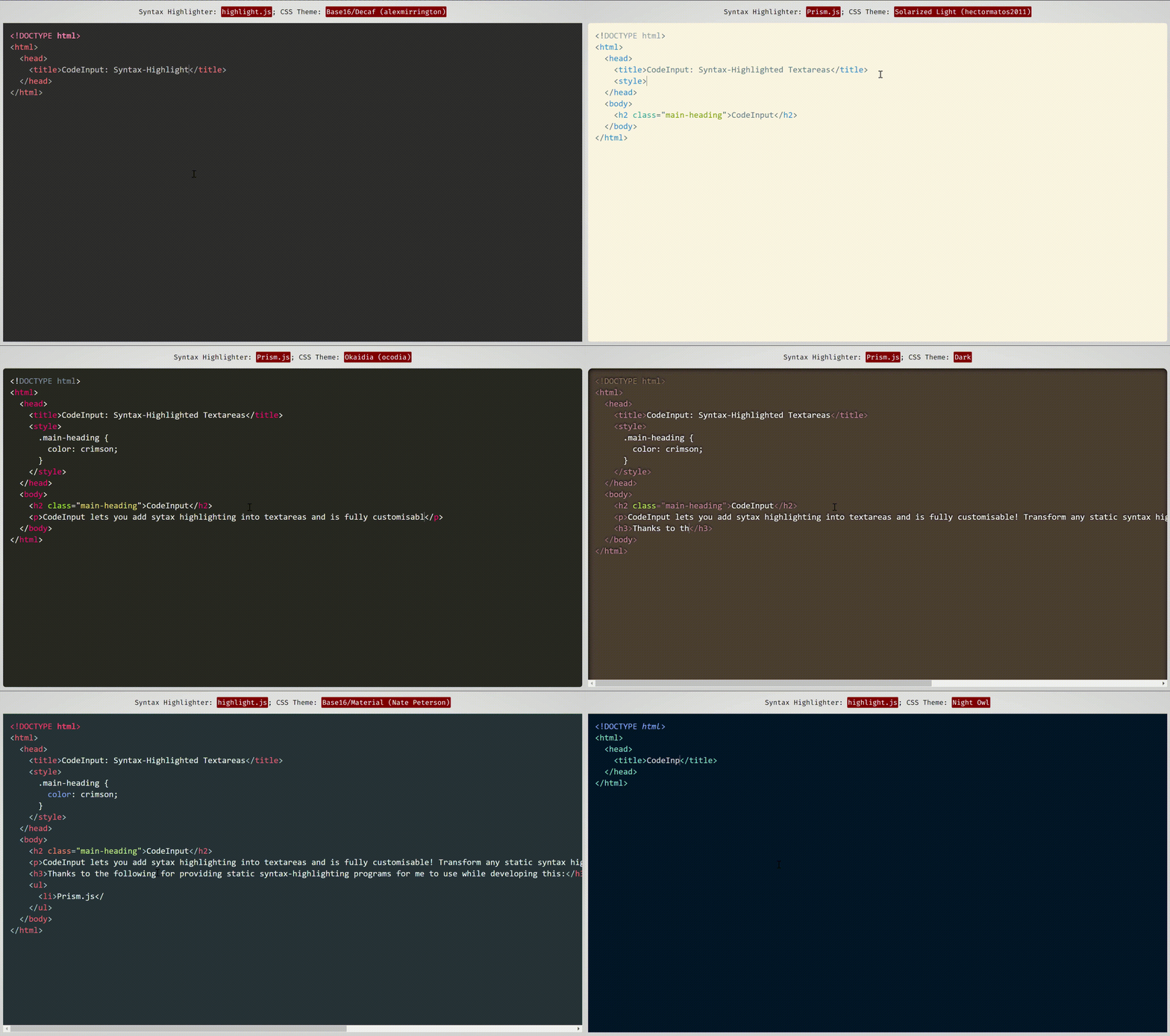
*This demonstration uses themes from [Prism.js](https://prismjs.com/) and [highlight.js](https://highlightjs.org/), two syntax-highlighting programs which work well with and have compatibility built-in with code-input.*
|
|
@@ -76,9 +76,18 @@ The next step is to set up a `template` to link `code-input` to your syntax-high
|
|
|
76
76
|
function(result_element) { /* Highlight function - with `pre code` code element */
|
|
77
77
|
/* Highlight code in result_element - code is already escaped so it doesn't become HTML */
|
|
78
78
|
},
|
|
79
|
-
|
|
80
|
-
true, /* Optional -
|
|
81
|
-
|
|
79
|
+
|
|
80
|
+
true, /* Optional - Is the `pre` element styled as well as the `code` element?
|
|
81
|
+
* Changing this to false uses the code element as the scrollable one rather
|
|
82
|
+
* than the pre element */
|
|
83
|
+
|
|
84
|
+
true, /* Optional - This is used for editing code - setting this to true sets the `code`
|
|
85
|
+
* element's class to `language-<the code-input's lang attribute>` */
|
|
86
|
+
|
|
87
|
+
false /* Optional - Setting this to true passes the `<code-input>` element as a second
|
|
88
|
+
* argument to the highlight function to be used for getting data- attribute values
|
|
89
|
+
* and using the DOM for the code-input */,
|
|
90
|
+
|
|
82
91
|
[] // Array of plugins (see below)
|
|
83
92
|
));
|
|
84
93
|
```
|
|
@@ -109,13 +118,13 @@ The next step is to set up a `template` to link `code-input` to your syntax-high
|
|
|
109
118
|
To see a full list of plugins and their functions, please see [plugins/README.md](./plugins/README.md).
|
|
110
119
|
|
|
111
120
|
### 4. Using the component
|
|
112
|
-
Now that you have registered a template, you can use the custom `<code-input>` element in HTML. If you have more than one template registered, you need to add the template name as the `template` attribute. With the element, using the `
|
|
121
|
+
Now that you have registered a template, you can use the custom `<code-input>` element in HTML. If you have more than one template registered, you need to add the template name as the `template` attribute. With the element, using the `language` attribute will add a `language-{value}` class to the `pre code` block. You can now use HTML attributes and events to make your element as simple or interactive as you like!
|
|
113
122
|
```HTML
|
|
114
|
-
<code-input
|
|
123
|
+
<code-input language="HTML"></code-input>
|
|
115
124
|
```
|
|
116
125
|
*or*
|
|
117
126
|
```HTML
|
|
118
|
-
<code-input
|
|
127
|
+
<code-input language="HTML" placeholder="Type code here" template="syntax-highlighted" onchange="console.log('Your code is', this.value)">< href='https://github.com/WebCoder49/code-input'>code-input</a></code-input>
|
|
119
128
|
```
|
|
120
129
|
|
|
121
130
|
## Contributing
|
package/code-input.css
CHANGED
|
@@ -4,42 +4,54 @@
|
|
|
4
4
|
|
|
5
5
|
|
|
6
6
|
code-input {
|
|
7
|
-
/* Allow other
|
|
7
|
+
/* Allow other elements to be inside */
|
|
8
|
+
display: block;
|
|
9
|
+
overflow-y: auto;
|
|
10
|
+
overflow-x: auto;
|
|
8
11
|
position: relative;
|
|
9
12
|
top: 0;
|
|
10
13
|
left: 0;
|
|
11
|
-
display: block;
|
|
12
|
-
/* Only scroll inside elems */
|
|
13
|
-
overflow: hidden;
|
|
14
14
|
|
|
15
15
|
/* Normal inline styles */
|
|
16
16
|
margin: 8px;
|
|
17
17
|
--padding: 16px;
|
|
18
18
|
height: 250px;
|
|
19
|
-
|
|
20
|
-
font-size: normal;
|
|
19
|
+
font-size: inherit;
|
|
21
20
|
font-family: monospace;
|
|
22
21
|
line-height: 1.5; /* Inherited to child elements */
|
|
23
22
|
tab-size: 2;
|
|
24
23
|
caret-color: darkgrey;
|
|
25
24
|
white-space: pre;
|
|
26
|
-
padding: 0!important; /* Use --padding */
|
|
25
|
+
padding: 0!important; /* Use --padding to set the code-input element's padding */
|
|
26
|
+
display: grid;
|
|
27
|
+
grid-template-columns: 100%;
|
|
28
|
+
grid-template-rows: 100%;
|
|
27
29
|
}
|
|
28
30
|
|
|
29
|
-
|
|
30
|
-
|
|
31
|
+
|
|
32
|
+
code-input:not(.code-input_loaded) {
|
|
31
33
|
margin: 0px!important;
|
|
34
|
+
margin-bottom: calc(-1 * var(--padding, 16px))!important;
|
|
32
35
|
padding: var(--padding, 16px)!important;
|
|
33
36
|
border: 0;
|
|
34
|
-
width: calc(100% - var(--padding, 16px) * 2);
|
|
35
|
-
height: calc(100% - var(--padding, 16px) * 2);
|
|
36
37
|
}
|
|
37
38
|
|
|
38
|
-
code-input:not(.code-
|
|
39
|
+
code-input textarea, code-input:not(.code-input_pre-element-styled) pre code, code-input.code-input_pre-element-styled pre {
|
|
40
|
+
/* Both elements need the same text and space styling so they are directly on top of each other */
|
|
39
41
|
margin: 0px!important;
|
|
40
|
-
margin-bottom: calc(-1 * var(--padding, 16px))!important;
|
|
41
42
|
padding: var(--padding, 16px)!important;
|
|
42
43
|
border: 0;
|
|
44
|
+
min-width: calc(100% - var(--padding, 16px) * 2);
|
|
45
|
+
min-height: calc(100% - var(--padding, 16px) * 2);
|
|
46
|
+
overflow: hidden;
|
|
47
|
+
resize: none;
|
|
48
|
+
grid-row: 1;
|
|
49
|
+
grid-column: 1;
|
|
50
|
+
display: block;
|
|
51
|
+
}
|
|
52
|
+
code-input:not(.code-input_pre-element-styled) pre code, code-input.code-input_pre-element-styled pre {
|
|
53
|
+
height: max-content;
|
|
54
|
+
width: max-content;
|
|
43
55
|
}
|
|
44
56
|
|
|
45
57
|
code-input:not(.code-input_pre-element-styled) pre, code-input.code-input_pre-element-styled pre code {
|
|
@@ -58,15 +70,12 @@ code-input textarea, code-input pre, code-input pre * {
|
|
|
58
70
|
tab-size: inherit!important;
|
|
59
71
|
}
|
|
60
72
|
|
|
61
|
-
|
|
62
73
|
code-input textarea, code-input pre {
|
|
63
74
|
/* In the same place */
|
|
64
|
-
|
|
65
|
-
|
|
66
|
-
left: 0;
|
|
75
|
+
grid-column: 1;
|
|
76
|
+
grid-row: 1;
|
|
67
77
|
}
|
|
68
78
|
|
|
69
|
-
|
|
70
79
|
/* Move the textarea in front of the result */
|
|
71
80
|
|
|
72
81
|
code-input textarea {
|
|
@@ -79,7 +88,7 @@ code-input pre {
|
|
|
79
88
|
code-input:not(.code-input_loaded) pre, code-input:not(.code-input_loaded) textarea {
|
|
80
89
|
opacity: 0;
|
|
81
90
|
}
|
|
82
|
-
code-input:not(.code-input_loaded)::
|
|
91
|
+
code-input:not(.code-input_loaded)::before {
|
|
83
92
|
color: #ccc;
|
|
84
93
|
}
|
|
85
94
|
|
|
@@ -96,8 +105,6 @@ code-input textarea::placeholder {
|
|
|
96
105
|
|
|
97
106
|
/* Can be scrolled */
|
|
98
107
|
code-input textarea, code-input pre {
|
|
99
|
-
overflow: auto!important;
|
|
100
|
-
|
|
101
108
|
white-space: inherit;
|
|
102
109
|
word-spacing: normal;
|
|
103
110
|
word-break: normal;
|
|
@@ -110,9 +117,27 @@ code-input textarea {
|
|
|
110
117
|
outline: none!important;
|
|
111
118
|
}
|
|
112
119
|
|
|
113
|
-
code-input:not(.code-input_registered)::
|
|
120
|
+
code-input:not(.code-input_registered)::before {
|
|
114
121
|
/* Display message to register */
|
|
115
122
|
content: "Use codeInput.registerTemplate to set up.";
|
|
116
123
|
display: block;
|
|
117
124
|
color: grey;
|
|
118
125
|
}
|
|
126
|
+
|
|
127
|
+
/* Contains dialog boxes that might appear as the result of a plugin.
|
|
128
|
+
Sticks to the top of the code-input element */
|
|
129
|
+
code-input .code-input_dialog-container {
|
|
130
|
+
z-index: 2;
|
|
131
|
+
|
|
132
|
+
position: sticky;
|
|
133
|
+
grid-row: 1;
|
|
134
|
+
grid-column: 1;
|
|
135
|
+
|
|
136
|
+
top: 0px;
|
|
137
|
+
left: 0;
|
|
138
|
+
width: 100%;
|
|
139
|
+
height: 0;
|
|
140
|
+
|
|
141
|
+
/* Dialog boxes' text is left-aligned */
|
|
142
|
+
text-align: left;
|
|
143
|
+
}
|
package/code-input.d.ts
CHANGED
|
@@ -76,13 +76,26 @@ export namespace plugins {
|
|
|
76
76
|
constructor();
|
|
77
77
|
}
|
|
78
78
|
|
|
79
|
+
/**
|
|
80
|
+
* Automatically closes pairs of brackets/quotes/other syntaxes in code, but also lets you choose the brackets this
|
|
81
|
+
* is activated for.
|
|
82
|
+
* Files: auto-close-brackets.js
|
|
83
|
+
*/
|
|
84
|
+
class AutoCloseBrackets extends Plugin {
|
|
85
|
+
/**
|
|
86
|
+
* Create an auto-close brackets plugin to pass into a template
|
|
87
|
+
* @param {Object} bracketPairs Opening brackets mapped to closing brackets, default and example {"(": ")", "[": "]", "{": "}", '"': '"'}. All brackets must only be one character.
|
|
88
|
+
*/
|
|
89
|
+
constructor(bracketPairs: Object);
|
|
90
|
+
}
|
|
91
|
+
|
|
79
92
|
/**
|
|
80
93
|
* Display a popup under the caret using the text in the code-input element. This works well with autocomplete suggestions.
|
|
81
94
|
* Files: autocomplete.js / autocomplete.css
|
|
82
95
|
*/
|
|
83
96
|
class Autocomplete extends Plugin {
|
|
84
97
|
/**
|
|
85
|
-
* Pass in a function to
|
|
98
|
+
* Pass in a function to create a plugin that displays the popup that takes in (popup element, textarea, textarea.selectionEnd).
|
|
86
99
|
* @param {function} updatePopupCallback a function to display the popup that takes in (popup element, textarea, textarea.selectionEnd).
|
|
87
100
|
*/
|
|
88
101
|
constructor(updatePopupCallback: (popupElem: HTMLElement, textarea: HTMLTextAreaElement, selectionEnd: number) => void);
|
|
@@ -110,6 +123,42 @@ export namespace plugins {
|
|
|
110
123
|
constructor(delayMs: number);
|
|
111
124
|
}
|
|
112
125
|
|
|
126
|
+
/**
|
|
127
|
+
* Add Find-and-Replace (Ctrl+F for find, Ctrl+H for replace by default) functionality to the code editor.
|
|
128
|
+
* Files: find-and-replace.js / find-and-replace.css
|
|
129
|
+
*/
|
|
130
|
+
class FindAndReplace extends Plugin {
|
|
131
|
+
/**
|
|
132
|
+
* Create a find-and-replace command plugin to pass into a template
|
|
133
|
+
* @param {boolean} useCtrlF Should Ctrl+F be overriden for find-and-replace find functionality? If not, you can trigger it yourself using (instance of this plugin)`.showPrompt(code-input element, false)`.
|
|
134
|
+
* @param {boolean} useCtrlH Should Ctrl+H be overriden for find-and-replace replace functionality? If not, you can trigger it yourself using (instance of this plugin)`.showPrompt(code-input element, true)`.
|
|
135
|
+
*/
|
|
136
|
+
constructor(useCtrlF?: boolean, useCtrlH?: boolean);
|
|
137
|
+
/**
|
|
138
|
+
* Show a find-and-replace dialog.
|
|
139
|
+
* @param {codeInput.CodeInput} codeInputElement the `<code-input>` element.
|
|
140
|
+
* @param {boolean} replacePartExpanded whether the replace part of the find-and-replace dialog should be expanded
|
|
141
|
+
*/
|
|
142
|
+
showPrompt(codeInput: CodeInput, replacePartExpanded: boolean): void;
|
|
143
|
+
}
|
|
144
|
+
|
|
145
|
+
/**
|
|
146
|
+
* Add basic Go-To-Line (ctrl-G by default) functionality to the code editor.
|
|
147
|
+
* Files: go-to-line.js / go-to-line.css
|
|
148
|
+
*/
|
|
149
|
+
class GoToLine extends Plugin {
|
|
150
|
+
/**
|
|
151
|
+
* Create a go-to-line command plugin to pass into a template
|
|
152
|
+
* @param {boolean} useCtrlG Should Ctrl+G be overriden for go-to-line functionality? If not, you can trigger it yourself using (instance of this plugin)`.showPrompt(code-input element)`.
|
|
153
|
+
*/
|
|
154
|
+
constructor(useCtrlG: boolean);
|
|
155
|
+
/**
|
|
156
|
+
* Show a search-like dialog prompting line number.
|
|
157
|
+
* @param {codeInput.CodeInput} codeInput the `<code-input>` element.
|
|
158
|
+
*/
|
|
159
|
+
showPrompt(codeInput: CodeInput): void;
|
|
160
|
+
}
|
|
161
|
+
|
|
113
162
|
/**
|
|
114
163
|
* Adds indentation using the `Tab` key, and auto-indents after a newline, as well as making it
|
|
115
164
|
* possible to indent/unindent multiple lines using Tab/Shift+Tab
|
|
@@ -120,8 +169,9 @@ export namespace plugins {
|
|
|
120
169
|
* Create an indentation plugin to pass into a template
|
|
121
170
|
* @param {Boolean} defaultSpaces Should the Tab key enter spaces rather than tabs? Defaults to false.
|
|
122
171
|
* @param {Number} numSpaces How many spaces is each tab character worth? Defaults to 4.
|
|
172
|
+
* @param {Object} bracketPairs Opening brackets mapped to closing brackets, default and example {"(": ")", "[": "]", "{": "}"}. All brackets must only be one character, and this can be left as null to remove bracket-based indentation behaviour.
|
|
123
173
|
*/
|
|
124
|
-
constructor(defaultSpaces?: boolean, numSpaces?: Number);
|
|
174
|
+
constructor(defaultSpaces?: boolean, numSpaces?: Number, bracketPairs?: Object);
|
|
125
175
|
}
|
|
126
176
|
|
|
127
177
|
/**
|
|
@@ -164,10 +214,11 @@ export class Template {
|
|
|
164
214
|
* @param {boolean} preElementStyled - is the `<pre>` element CSS-styled as well as the `<code>` element? If true, `<pre>` element's scrolling is synchronised; if false, `<code>` element's scrolling is synchronised.
|
|
165
215
|
* @param {boolean} isCode - is this for writing code? If true, the code-input's lang HTML attribute can be used, and the `<code>` element will be given the class name 'language-[lang attribute's value]'.
|
|
166
216
|
* @param {false} includeCodeInputInHighlightFunc - Setting this to true passes the `<code-input>` element as a second argument to the highlight function.
|
|
217
|
+
* @param {boolean} autoDisableDuplicateSearching - Leaving this as true uses code-input's default fix for preventing duplicate results in Ctrl+F searching from the input and result elements, and setting this to false indicates your highlighting function implements its own fix. The default fix works by moving text content from elements to CSS `::before` pseudo-elements after highlighting.
|
|
167
218
|
* @param {codeInput.Plugin[]} plugins - An array of plugin objects to add extra features - see `codeInput.Plugin`
|
|
168
219
|
* @returns template object
|
|
169
220
|
*/
|
|
170
|
-
constructor(highlight?: (code: HTMLElement) => void, preElementStyled?: boolean, isCode?: boolean, includeCodeInputInHighlightFunc?: false, plugins?: Plugin[])
|
|
221
|
+
constructor(highlight?: (code: HTMLElement) => void, preElementStyled?: boolean, isCode?: boolean, includeCodeInputInHighlightFunc?: false, autoDisableDuplicateSearching?: boolean, plugins?: Plugin[])
|
|
171
222
|
/**
|
|
172
223
|
* **When `includeCodeInputInHighlightFunc` is `true`, `highlight` takes two parameters: the `<pre><code>` element, and the `<code-input>` element.**
|
|
173
224
|
*
|
|
@@ -177,15 +228,25 @@ export class Template {
|
|
|
177
228
|
* @param {boolean} preElementStyled - is the `<pre>` element CSS-styled as well as the `<code>` element? If true, `<pre>` element's scrolling is synchronised; if false, `<code>` element's scrolling is synchronised.
|
|
178
229
|
* @param {boolean} isCode - is this for writing code? If true, the code-input's lang HTML attribute can be used, and the `<code>` element will be given the class name 'language-[lang attribute's value]'.
|
|
179
230
|
* @param {true} includeCodeInputInHighlightFunc - Setting this to true passes the `<code-input>` element as a second argument to the highlight function.
|
|
231
|
+
* @param {boolean} autoDisableDuplicateSearching - Leaving this as true uses code-input's default fix for preventing duplicate results in Ctrl+F searching from the input and result elements, and setting this to false indicates your highlighting function implements its own fix. The default fix works by moving text content from elements to CSS `::before` pseudo-elements after highlighting.
|
|
180
232
|
* @param {codeInput.Plugin[]} plugins - An array of plugin objects to add extra features - see `codeInput.Plugin`
|
|
181
233
|
* @returns template object
|
|
182
234
|
*/
|
|
183
|
-
constructor(highlight?: (code: HTMLElement, codeInput: CodeInput) => void, preElementStyled?: boolean, isCode?: boolean, includeCodeInputInHighlightFunc?: true, plugins?: Plugin[])
|
|
235
|
+
constructor(highlight?: (code: HTMLElement, codeInput: CodeInput) => void, preElementStyled?: boolean, isCode?: boolean, includeCodeInputInHighlightFunc?: true, autoDisableDuplicateSearching?: boolean, plugins?: Plugin[])
|
|
184
236
|
highlight: Function
|
|
185
237
|
preElementStyled: boolean
|
|
186
238
|
isCode: boolean
|
|
187
239
|
includeCodeInputInHighlightFunc: boolean
|
|
240
|
+
autoDisableDuplicateSearching: boolean
|
|
188
241
|
plugins: Plugin[]
|
|
242
|
+
/**
|
|
243
|
+
* @deprecated Please give a value for the `autoDisableDuplicateSearching` parameter.
|
|
244
|
+
*/
|
|
245
|
+
constructor(highlight?: (code: HTMLElement) => void, preElementStyled?: boolean, isCode?: boolean, includeCodeInputInHighlightFunc?: false, plugins?: Plugin[])
|
|
246
|
+
/**
|
|
247
|
+
* @deprecated Please give a value for the `autoDisableDuplicateSearching` parameter.
|
|
248
|
+
*/
|
|
249
|
+
constructor(highlight?: (code: HTMLElement, codeInput: CodeInput) => void, preElementStyled?: boolean, isCode?: boolean, includeCodeInputInHighlightFunc?: true, plugins?: Plugin[])
|
|
189
250
|
}
|
|
190
251
|
|
|
191
252
|
/**
|