@webcoder49/code-input 1.5.0 → 1.5.1
This diff represents the content of publicly available package versions that have been released to one of the supported registries. The information contained in this diff is provided for informational purposes only and reflects changes between package versions as they appear in their respective public registries.
- package/.github/workflows/minify.yml +21 -21
- package/.github/workflows/npm-publish.yml +21 -0
- package/LICENSE +21 -21
- package/README.md +112 -115
- package/code-input.css +100 -100
- package/code-input.js +759 -422
- package/code-input.min.js +1 -1
- package/package.json +1 -1
- package/plugins/README.md +68 -68
- package/plugins/autocomplete.css +14 -14
- package/plugins/autocomplete.js +79 -79
- package/plugins/autodetect.js +28 -28
- package/plugins/debounce-update.js +40 -40
- package/plugins/indent.js +153 -153
- package/plugins/indent.min.js +1 -1
- package/plugins/prism-line-numbers.css +19 -19
- package/plugins/special-chars.css +97 -97
- package/plugins/special-chars.js +218 -218
- package/plugins/special-chars.min.css +4 -4
- package/plugins/test.js +37 -37
|
@@ -1,22 +1,22 @@
|
|
|
1
|
-
name: Auto-minify
|
|
2
|
-
on:
|
|
3
|
-
push:
|
|
4
|
-
branches:
|
|
5
|
-
- main
|
|
6
|
-
jobs:
|
|
7
|
-
Minify:
|
|
8
|
-
runs-on: ubuntu-latest
|
|
9
|
-
steps:
|
|
10
|
-
# Checks-out your repository under $GITHUB_WORKSPACE, so auto-minify job can access it
|
|
11
|
-
- uses: actions/checkout@v2
|
|
12
|
-
|
|
13
|
-
- name: Auto Minify
|
|
14
|
-
uses: nizarmah/auto-minify@v2.1
|
|
15
|
-
|
|
16
|
-
# Auto commits minified files to the repository
|
|
17
|
-
# Ignore it if you don't want to commit the files to the repository
|
|
18
|
-
- name: Auto committing minified files
|
|
19
|
-
uses: stefanzweifel/git-auto-commit-action@v4
|
|
20
|
-
with:
|
|
21
|
-
commit_message: "Auto Minified JS and CSS files"
|
|
1
|
+
name: Auto-minify
|
|
2
|
+
on:
|
|
3
|
+
push:
|
|
4
|
+
branches:
|
|
5
|
+
- main
|
|
6
|
+
jobs:
|
|
7
|
+
Minify:
|
|
8
|
+
runs-on: ubuntu-latest
|
|
9
|
+
steps:
|
|
10
|
+
# Checks-out your repository under $GITHUB_WORKSPACE, so auto-minify job can access it
|
|
11
|
+
- uses: actions/checkout@v2
|
|
12
|
+
|
|
13
|
+
- name: Auto Minify
|
|
14
|
+
uses: nizarmah/auto-minify@v2.1
|
|
15
|
+
|
|
16
|
+
# Auto commits minified files to the repository
|
|
17
|
+
# Ignore it if you don't want to commit the files to the repository
|
|
18
|
+
- name: Auto committing minified files
|
|
19
|
+
uses: stefanzweifel/git-auto-commit-action@v4
|
|
20
|
+
with:
|
|
21
|
+
commit_message: "Auto Minified JS and CSS files"
|
|
22
22
|
branch: ${{ github.ref }}
|
|
@@ -0,0 +1,21 @@
|
|
|
1
|
+
# This workflow will publish a package to GitHub Packages when a release is created
|
|
2
|
+
# For more information see: https://docs.github.com/en/actions/publishing-packages/publishing-nodejs-packages
|
|
3
|
+
|
|
4
|
+
name: Node.js Package
|
|
5
|
+
|
|
6
|
+
on:
|
|
7
|
+
release:
|
|
8
|
+
types: [created]
|
|
9
|
+
|
|
10
|
+
jobs:
|
|
11
|
+
publish-npm:
|
|
12
|
+
runs-on: ubuntu-latest
|
|
13
|
+
steps:
|
|
14
|
+
- uses: actions/checkout@v3
|
|
15
|
+
- uses: actions/setup-node@v3
|
|
16
|
+
with:
|
|
17
|
+
node-version: 16
|
|
18
|
+
registry-url: https://registry.npmjs.org/
|
|
19
|
+
- run: npm publish
|
|
20
|
+
env:
|
|
21
|
+
NODE_AUTH_TOKEN: ${{secrets.npm_token}}
|
package/LICENSE
CHANGED
|
@@ -1,21 +1,21 @@
|
|
|
1
|
-
MIT License
|
|
2
|
-
|
|
3
|
-
Copyright (c) 2021 WebCoder49
|
|
4
|
-
|
|
5
|
-
Permission is hereby granted, free of charge, to any person obtaining a copy
|
|
6
|
-
of this software and associated documentation files (the "Software"), to deal
|
|
7
|
-
in the Software without restriction, including without limitation the rights
|
|
8
|
-
to use, copy, modify, merge, publish, distribute, sublicense, and/or sell
|
|
9
|
-
copies of the Software, and to permit persons to whom the Software is
|
|
10
|
-
furnished to do so, subject to the following conditions:
|
|
11
|
-
|
|
12
|
-
The above copyright notice and this permission notice shall be included in all
|
|
13
|
-
copies or substantial portions of the Software.
|
|
14
|
-
|
|
15
|
-
THE SOFTWARE IS PROVIDED "AS IS", WITHOUT WARRANTY OF ANY KIND, EXPRESS OR
|
|
16
|
-
IMPLIED, INCLUDING BUT NOT LIMITED TO THE WARRANTIES OF MERCHANTABILITY,
|
|
17
|
-
FITNESS FOR A PARTICULAR PURPOSE AND NONINFRINGEMENT. IN NO EVENT SHALL THE
|
|
18
|
-
AUTHORS OR COPYRIGHT HOLDERS BE LIABLE FOR ANY CLAIM, DAMAGES OR OTHER
|
|
19
|
-
LIABILITY, WHETHER IN AN ACTION OF CONTRACT, TORT OR OTHERWISE, ARISING FROM,
|
|
20
|
-
OUT OF OR IN CONNECTION WITH THE SOFTWARE OR THE USE OR OTHER DEALINGS IN THE
|
|
21
|
-
SOFTWARE.
|
|
1
|
+
MIT License
|
|
2
|
+
|
|
3
|
+
Copyright (c) 2021 WebCoder49
|
|
4
|
+
|
|
5
|
+
Permission is hereby granted, free of charge, to any person obtaining a copy
|
|
6
|
+
of this software and associated documentation files (the "Software"), to deal
|
|
7
|
+
in the Software without restriction, including without limitation the rights
|
|
8
|
+
to use, copy, modify, merge, publish, distribute, sublicense, and/or sell
|
|
9
|
+
copies of the Software, and to permit persons to whom the Software is
|
|
10
|
+
furnished to do so, subject to the following conditions:
|
|
11
|
+
|
|
12
|
+
The above copyright notice and this permission notice shall be included in all
|
|
13
|
+
copies or substantial portions of the Software.
|
|
14
|
+
|
|
15
|
+
THE SOFTWARE IS PROVIDED "AS IS", WITHOUT WARRANTY OF ANY KIND, EXPRESS OR
|
|
16
|
+
IMPLIED, INCLUDING BUT NOT LIMITED TO THE WARRANTIES OF MERCHANTABILITY,
|
|
17
|
+
FITNESS FOR A PARTICULAR PURPOSE AND NONINFRINGEMENT. IN NO EVENT SHALL THE
|
|
18
|
+
AUTHORS OR COPYRIGHT HOLDERS BE LIABLE FOR ANY CLAIM, DAMAGES OR OTHER
|
|
19
|
+
LIABILITY, WHETHER IN AN ACTION OF CONTRACT, TORT OR OTHERWISE, ARISING FROM,
|
|
20
|
+
OUT OF OR IN CONNECTION WITH THE SOFTWARE OR THE USE OR OTHER DEALINGS IN THE
|
|
21
|
+
SOFTWARE.
|
package/README.md
CHANGED
|
@@ -1,115 +1,112 @@
|
|
|
1
|
-
# code-input
|
|
2
|
-
|
|
3
|
-
|
|
4
|
-
|
|
5
|
-
|
|
6
|
-
|
|
7
|
-
|
|
8
|
-
|
|
9
|
-
|
|
10
|
-
|
|
11
|
-
|
|
12
|
-
|
|
13
|
-
|
|
14
|
-
|
|
15
|
-
|
|
16
|
-
|
|
17
|
-
|
|
18
|
-
|
|
19
|
-
|
|
20
|
-
|
|
21
|
-
|
|
22
|
-
|
|
23
|
-
`code-input`
|
|
24
|
-
|
|
25
|
-
|
|
26
|
-
|
|
27
|
-
|
|
28
|
-
|
|
29
|
-
|
|
30
|
-
|
|
31
|
-
|
|
32
|
-
|
|
33
|
-
|
|
34
|
-
|
|
35
|
-
|
|
36
|
-
|
|
37
|
-
|
|
38
|
-
|
|
39
|
-
|
|
40
|
-
|
|
41
|
-
|
|
42
|
-
|
|
43
|
-
|
|
44
|
-
|
|
45
|
-
|
|
46
|
-
|
|
47
|
-
|
|
48
|
-
|
|
49
|
-
|
|
50
|
-
|
|
51
|
-
|
|
52
|
-
|
|
53
|
-
|
|
54
|
-
|
|
55
|
-
-
|
|
56
|
-
```
|
|
57
|
-
|
|
58
|
-
|
|
59
|
-
|
|
60
|
-
-
|
|
61
|
-
```
|
|
62
|
-
|
|
63
|
-
|
|
64
|
-
|
|
65
|
-
-
|
|
66
|
-
|
|
67
|
-
|
|
68
|
-
|
|
69
|
-
|
|
70
|
-
|
|
71
|
-
|
|
72
|
-
|
|
73
|
-
|
|
74
|
-
|
|
75
|
-
|
|
76
|
-
|
|
77
|
-
|
|
78
|
-
|
|
79
|
-
|
|
80
|
-
|
|
81
|
-
-
|
|
82
|
-
|
|
83
|
-
<script src="
|
|
84
|
-
|
|
85
|
-
|
|
86
|
-
<script
|
|
87
|
-
|
|
88
|
-
|
|
89
|
-
|
|
90
|
-
|
|
91
|
-
|
|
92
|
-
|
|
93
|
-
|
|
94
|
-
|
|
95
|
-
|
|
96
|
-
|
|
97
|
-
|
|
98
|
-
|
|
99
|
-
|
|
100
|
-
|
|
101
|
-
|
|
102
|
-
|
|
103
|
-
|
|
104
|
-
|
|
105
|
-
```
|
|
106
|
-
|
|
107
|
-
```
|
|
108
|
-
|
|
109
|
-
```
|
|
110
|
-
|
|
111
|
-
|
|
112
|
-
|
|
113
|
-
|
|
114
|
-
## Contributing
|
|
115
|
-
If you have any features you would like to add to `code-input`, or have found any bugs, please [open an issue](https://github.com/WebCoder49/code-input/issues) or [fork and submit a pull request](https://github.com/WebCoder49/code-input/fork)! All contributions to this open-source project would be greatly appreciated.
|
|
1
|
+
# code-input
|
|
2
|
+
[](https://github.com/WebCoder49/code-input)[](https://www.npmjs.com/package/@webcoder49/code-input)
|
|
3
|
+
|
|
4
|
+
[](LICENSE) [](https://github.com/WebCoder49/code-input/releases) [](https://codepen.io/WebCoder49/details/jOypJOx)
|
|
5
|
+
|
|
6
|
+
> ___Fully customisable syntax-highlighted textareas.___ [[🚀 View the Demo](https://codepen.io/WebCoder49/details/jOypJOx)]
|
|
7
|
+
|
|
8
|
+
|
|
9
|
+
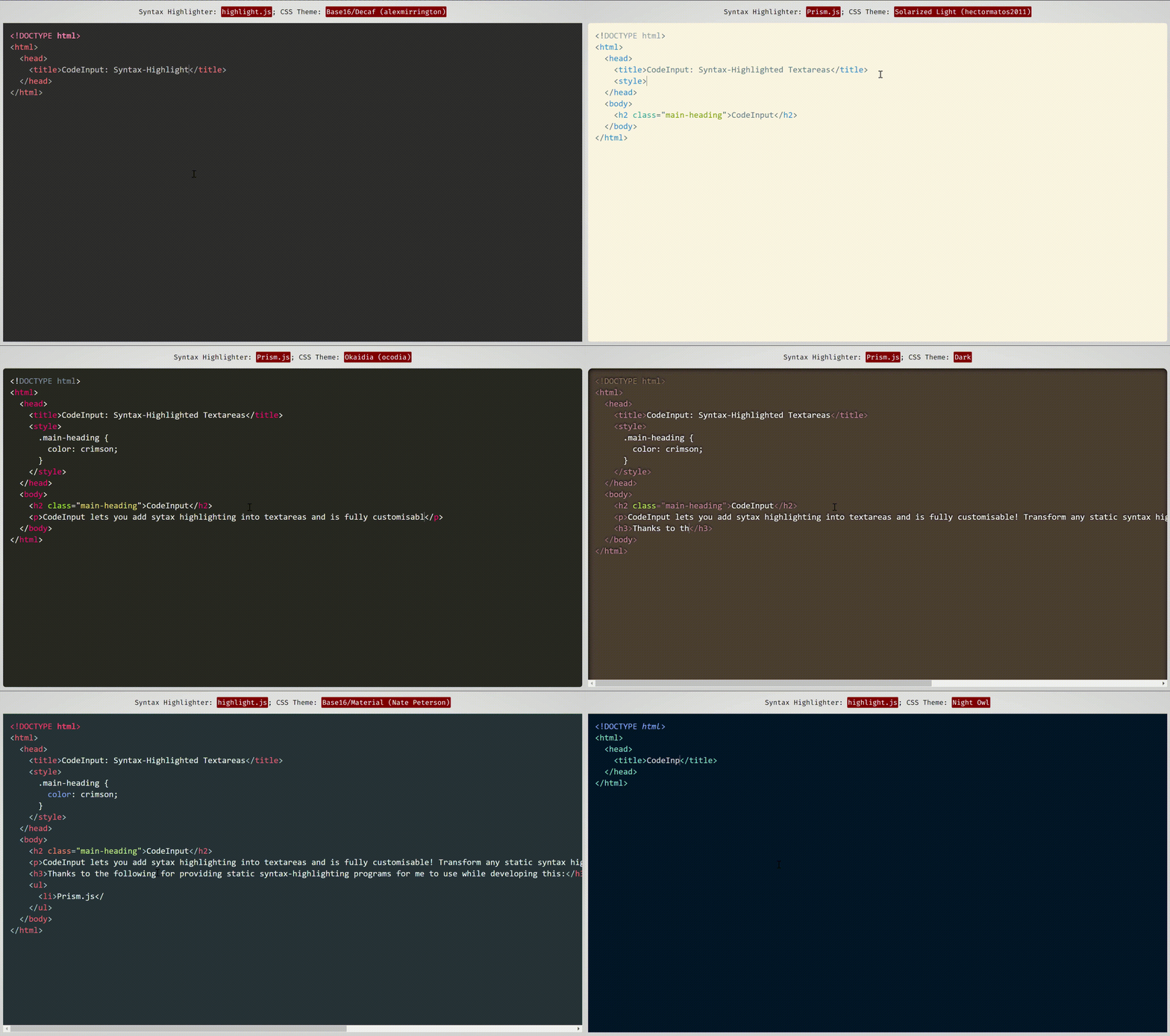
*This demonstration uses themes from [Prism.js](https://prismjs.com/) and [highlight.js](https://highlightjs.org/), two syntax-highlighting programs which work well and have compatibility built-in with code-input.*
|
|
10
|
+
|
|
11
|
+
## What does it do?
|
|
12
|
+
**`code-input`** lets you **turn any ordinary JavaScript syntax-highlighting theme and program into customisable syntax-highlighted textareas** using an HTML custom element. It uses vanilla CSS to superimpose a `textarea` on a `pre code` block, then handles indentations, scrolling and fixes any resulting bugs with JavaScript. To see how it works in more detail, please see [this CSS-Tricks article](https://css-tricks.com/creating-an-editable-textarea-that-supports-syntax-highlighted-code/ "Creating an Editable Textarea That Supports Syntax-Highlighted Code") I wrote.
|
|
13
|
+
|
|
14
|
+
## What are the advantages of using code-input, and what can it be used for?
|
|
15
|
+
Unlike other front-end code-editor projects, the simplicity of how `code-input` works means it is **highly customisable**. As it is not a full-featured editor, you can **choose what features you want it to include, and use your favourite syntax-highlighting algorithms and themes**.
|
|
16
|
+
|
|
17
|
+
The `<code-input>` element works like a `<textarea>` and therefore **works in HTML5 forms and supports using the `value` and `placeholder` attributes, as well as the `onchange` event.**
|
|
18
|
+
|
|
19
|
+
## 🚀 Getting Started With `code-input` (in 4 simple steps)
|
|
20
|
+
|
|
21
|
+
`code-input` is designed to be **both easy to use and customisable**. Here's how to use it to create syntax-highlighted textareas:
|
|
22
|
+
|
|
23
|
+
### 1. Import `code-input`
|
|
24
|
+
- **First, import your favourite syntax-highlighter's JS and CSS theme files** to turn editable.
|
|
25
|
+
- Then, import the CSS and JS files of `code-input` from a downloaded release or a CDN. The non-minified files are useful for using during development.
|
|
26
|
+
|
|
27
|
+
<details>
|
|
28
|
+
<summary>
|
|
29
|
+
Locally downloaded (Click)
|
|
30
|
+
</summary>
|
|
31
|
+
|
|
32
|
+
```html
|
|
33
|
+
<!--In the <head>-->
|
|
34
|
+
<script src="path/to/code-input.min.js"></script>
|
|
35
|
+
<link rel="stylesheet" href="path/to/code-input.min.css">
|
|
36
|
+
```
|
|
37
|
+
</details>
|
|
38
|
+
<details>
|
|
39
|
+
<summary>
|
|
40
|
+
From JSDelivr CDN (click)
|
|
41
|
+
</summary>
|
|
42
|
+
|
|
43
|
+
```html
|
|
44
|
+
<!--In the <head>-->
|
|
45
|
+
<script src="https://cdn.jsdelivr.net/gh/WebCoder49/code-input@1.3/code-input.min.js"></script>
|
|
46
|
+
<link rel="stylesheet" href="https://cdn.jsdelivr.net/gh/WebCoder49/code-input@1.3/code-input.min.css">
|
|
47
|
+
```
|
|
48
|
+
</details>
|
|
49
|
+
|
|
50
|
+
### 2. Creating a template
|
|
51
|
+
The next step is to set up a `template` to link `code-input` to your syntax-highlighter. If you're using Prism.js or highlight.js, you can use the built-in template, or you can create your own otherwise. In these examples, I am registering the template as `"syntax-highlighted"`, but you can use any template name as long as you are consistent.
|
|
52
|
+
|
|
53
|
+
- *Highlight.js:*
|
|
54
|
+
```js
|
|
55
|
+
codeInput.registerTemplate("syntax-highlighted", codeInput.templates.hljs(hljs, [] /* Array of plugins (see below) */));
|
|
56
|
+
```
|
|
57
|
+
|
|
58
|
+
- *Prism.js:*
|
|
59
|
+
```js
|
|
60
|
+
codeInput.registerTemplate("syntax-highlighted", codeInput.templates.prism(Prism, [] /* Array of plugins (see below) */));
|
|
61
|
+
```
|
|
62
|
+
|
|
63
|
+
- *Custom:*
|
|
64
|
+
```js
|
|
65
|
+
codeInput.registerTemplate("syntax-highlighted", codeInput.templates.custom(
|
|
66
|
+
function(result_element) { /* Highlight function - with `pre code` code element */
|
|
67
|
+
/* Highlight code in result_element - code is already escaped so it doesn't become HTML */
|
|
68
|
+
},
|
|
69
|
+
true, /* Optional - Is the `pre` element styled as well as the `code` element? Changing this to false uses the code element as the scrollable one rather than the pre element */
|
|
70
|
+
true, /* Optional - This is used for editing code - setting this to true sets the `code` element's class to `language-<the code-input's lang attribute>` */
|
|
71
|
+
false /* Optional - Setting this to true passes the `<code-input>` element as a second argument to the highlight function to be used for getting data- attribute values and using the DOM for the code-input */,
|
|
72
|
+
[] // Array of plugins (see below)
|
|
73
|
+
));
|
|
74
|
+
```
|
|
75
|
+
|
|
76
|
+
### 3. Adding plugins
|
|
77
|
+
[Plugins](./plugins/) allow you to add extra features to a template, like [automatic indentation](plugins/indent.js) or [support for highlight.js's language autodetection](plugins/autodetect.js). To use them, just:
|
|
78
|
+
- Import the plugins' JS files after you have imported `code-input` and before registering the template.
|
|
79
|
+
- Place instances of the plugins in the array of plugins argument when registering, like this:
|
|
80
|
+
```html
|
|
81
|
+
<script src="code-input.js"></script>
|
|
82
|
+
<!--...-->
|
|
83
|
+
<script src="plugins/autodetect.js"></script>
|
|
84
|
+
<script src="plugins/indent.js"></script>
|
|
85
|
+
<!--...-->
|
|
86
|
+
<script>
|
|
87
|
+
codeInput.registerTemplate("syntax-highlighted",
|
|
88
|
+
codeInput.templates.hljs(
|
|
89
|
+
hljs,
|
|
90
|
+
[
|
|
91
|
+
new codeInput.plugins.Autodetect(),
|
|
92
|
+
new codeInput.plugins.Indent()
|
|
93
|
+
]
|
|
94
|
+
)
|
|
95
|
+
);
|
|
96
|
+
</script>
|
|
97
|
+
```
|
|
98
|
+
|
|
99
|
+
To see a full list of plugins and their functions, please see [plugins/README.md](./plugins/README.md).
|
|
100
|
+
|
|
101
|
+
### 4. Using the component
|
|
102
|
+
Now that you have registered a template, you can use the custom `<code-input>` element in HTML. If you have more than one template registered, you need to add the template name as the `template` attribute. With the element, using the `lang` attribute will add a `language-{value}` class to the `pre code` block. You can now use HTML attributes and events to make your element as simple or interactive as you like!
|
|
103
|
+
```HTML
|
|
104
|
+
<code-input lang="HTML"></code-input>
|
|
105
|
+
```
|
|
106
|
+
*or*
|
|
107
|
+
```HTML
|
|
108
|
+
<code-input lang="HTML" placeholder="Type code here" value="<a href='https://github.com/WebCoder49/code-input'>code-input</a>" template="syntax-highlighted" onchange="console.log('Your code is', this.value)"></code-input>
|
|
109
|
+
```
|
|
110
|
+
|
|
111
|
+
## Contributing
|
|
112
|
+
If you have any features you would like to add to `code-input`, or have found any bugs, please [open an issue](https://github.com/WebCoder49/code-input/issues) or [fork and submit a pull request](https://github.com/WebCoder49/code-input/fork)! All contributions to this open-source project would be greatly appreciated.
|
package/code-input.css
CHANGED
|
@@ -1,100 +1,100 @@
|
|
|
1
|
-
/* Code-Input Compatibility */
|
|
2
|
-
/* By WebCoder49 */
|
|
3
|
-
/* First Published on CSS-Tricks.com */
|
|
4
|
-
|
|
5
|
-
|
|
6
|
-
code-input {
|
|
7
|
-
/* Allow other elems to be inside */
|
|
8
|
-
position: relative;
|
|
9
|
-
top: 0;
|
|
10
|
-
left: 0;
|
|
11
|
-
display: block;
|
|
12
|
-
/* Only scroll inside elems */
|
|
13
|
-
overflow: hidden;
|
|
14
|
-
|
|
15
|
-
/* Normal inline styles */
|
|
16
|
-
padding: 8px;
|
|
17
|
-
margin: 0!important;
|
|
18
|
-
width: calc(100% - 16px);
|
|
19
|
-
height: 250px;
|
|
20
|
-
font-size: normal;
|
|
21
|
-
font-family: monospace;
|
|
22
|
-
line-height: 1.5; /* Inherited to child elements */
|
|
23
|
-
tab-size: 2;
|
|
24
|
-
caret-color: darkgrey;
|
|
25
|
-
white-space: pre;
|
|
26
|
-
}
|
|
27
|
-
|
|
28
|
-
code-input textarea, code-input:not(.code-input_pre-element-styled) pre code, code-input.code-input_pre-element-styled pre {
|
|
29
|
-
/* Both elements need the same text and space styling so they are directly on top of each other */
|
|
30
|
-
margin: 0px!important;
|
|
31
|
-
padding: var(--padding, 16px)!important;
|
|
32
|
-
border: 0;
|
|
33
|
-
width: calc(100% - var(--padding, 16px) * 2);
|
|
34
|
-
height: calc(100% - var(--padding, 16px) * 2);
|
|
35
|
-
}
|
|
36
|
-
code-input:not(.code-input_pre-element-styled) pre, code-input.code-input_pre-element-styled pre code {
|
|
37
|
-
/* Remove all margin and padding from others */
|
|
38
|
-
margin: 0px!important;
|
|
39
|
-
padding: 0px!important;
|
|
40
|
-
width: 100%;
|
|
41
|
-
height: 100%;
|
|
42
|
-
}
|
|
43
|
-
|
|
44
|
-
code-input textarea, code-input pre, code-input pre * {
|
|
45
|
-
/* Also add text styles to highlighing tokens */
|
|
46
|
-
font-size: inherit!important;
|
|
47
|
-
font-family: inherit!important;
|
|
48
|
-
line-height: inherit!important;
|
|
49
|
-
tab-size: inherit!important;
|
|
50
|
-
}
|
|
51
|
-
|
|
52
|
-
|
|
53
|
-
code-input textarea, code-input pre {
|
|
54
|
-
/* In the same place */
|
|
55
|
-
position: absolute;
|
|
56
|
-
top: 0;
|
|
57
|
-
left: 0;
|
|
58
|
-
}
|
|
59
|
-
|
|
60
|
-
|
|
61
|
-
/* Move the textarea in front of the result */
|
|
62
|
-
|
|
63
|
-
code-input textarea {
|
|
64
|
-
z-index: 1;
|
|
65
|
-
}
|
|
66
|
-
code-input pre {
|
|
67
|
-
z-index: 0;
|
|
68
|
-
}
|
|
69
|
-
|
|
70
|
-
|
|
71
|
-
/* Make textarea almost completely transparent */
|
|
72
|
-
|
|
73
|
-
code-input textarea {
|
|
74
|
-
color: transparent;
|
|
75
|
-
background: transparent;
|
|
76
|
-
caret-color: inherit!important; /* Or choose your favourite color */
|
|
77
|
-
}
|
|
78
|
-
|
|
79
|
-
/* Can be scrolled */
|
|
80
|
-
code-input textarea, code-input pre {
|
|
81
|
-
overflow: auto!important;
|
|
82
|
-
|
|
83
|
-
white-space: inherit;
|
|
84
|
-
word-spacing: normal;
|
|
85
|
-
word-break: normal;
|
|
86
|
-
word-wrap: normal;
|
|
87
|
-
}
|
|
88
|
-
|
|
89
|
-
/* No resize on textarea; stop outline */
|
|
90
|
-
code-input textarea {
|
|
91
|
-
resize: none;
|
|
92
|
-
outline: none!important;
|
|
93
|
-
}
|
|
94
|
-
|
|
95
|
-
code-input:not(.code-input_registered)::before {
|
|
96
|
-
/* Display message to register */
|
|
97
|
-
content: "Use codeInput.registerTemplate to set up.";
|
|
98
|
-
display: block;
|
|
99
|
-
color: grey;
|
|
100
|
-
}
|
|
1
|
+
/* Code-Input Compatibility */
|
|
2
|
+
/* By WebCoder49 */
|
|
3
|
+
/* First Published on CSS-Tricks.com */
|
|
4
|
+
|
|
5
|
+
|
|
6
|
+
code-input {
|
|
7
|
+
/* Allow other elems to be inside */
|
|
8
|
+
position: relative;
|
|
9
|
+
top: 0;
|
|
10
|
+
left: 0;
|
|
11
|
+
display: block;
|
|
12
|
+
/* Only scroll inside elems */
|
|
13
|
+
overflow: hidden;
|
|
14
|
+
|
|
15
|
+
/* Normal inline styles */
|
|
16
|
+
padding: 8px;
|
|
17
|
+
margin: 0!important;
|
|
18
|
+
width: calc(100% - 16px);
|
|
19
|
+
height: 250px;
|
|
20
|
+
font-size: normal;
|
|
21
|
+
font-family: monospace;
|
|
22
|
+
line-height: 1.5; /* Inherited to child elements */
|
|
23
|
+
tab-size: 2;
|
|
24
|
+
caret-color: darkgrey;
|
|
25
|
+
white-space: pre;
|
|
26
|
+
}
|
|
27
|
+
|
|
28
|
+
code-input textarea, code-input:not(.code-input_pre-element-styled) pre code, code-input.code-input_pre-element-styled pre {
|
|
29
|
+
/* Both elements need the same text and space styling so they are directly on top of each other */
|
|
30
|
+
margin: 0px!important;
|
|
31
|
+
padding: var(--padding, 16px)!important;
|
|
32
|
+
border: 0;
|
|
33
|
+
width: calc(100% - var(--padding, 16px) * 2);
|
|
34
|
+
height: calc(100% - var(--padding, 16px) * 2);
|
|
35
|
+
}
|
|
36
|
+
code-input:not(.code-input_pre-element-styled) pre, code-input.code-input_pre-element-styled pre code {
|
|
37
|
+
/* Remove all margin and padding from others */
|
|
38
|
+
margin: 0px!important;
|
|
39
|
+
padding: 0px!important;
|
|
40
|
+
width: 100%;
|
|
41
|
+
height: 100%;
|
|
42
|
+
}
|
|
43
|
+
|
|
44
|
+
code-input textarea, code-input pre, code-input pre * {
|
|
45
|
+
/* Also add text styles to highlighing tokens */
|
|
46
|
+
font-size: inherit!important;
|
|
47
|
+
font-family: inherit!important;
|
|
48
|
+
line-height: inherit!important;
|
|
49
|
+
tab-size: inherit!important;
|
|
50
|
+
}
|
|
51
|
+
|
|
52
|
+
|
|
53
|
+
code-input textarea, code-input pre {
|
|
54
|
+
/* In the same place */
|
|
55
|
+
position: absolute;
|
|
56
|
+
top: 0;
|
|
57
|
+
left: 0;
|
|
58
|
+
}
|
|
59
|
+
|
|
60
|
+
|
|
61
|
+
/* Move the textarea in front of the result */
|
|
62
|
+
|
|
63
|
+
code-input textarea {
|
|
64
|
+
z-index: 1;
|
|
65
|
+
}
|
|
66
|
+
code-input pre {
|
|
67
|
+
z-index: 0;
|
|
68
|
+
}
|
|
69
|
+
|
|
70
|
+
|
|
71
|
+
/* Make textarea almost completely transparent */
|
|
72
|
+
|
|
73
|
+
code-input textarea {
|
|
74
|
+
color: transparent;
|
|
75
|
+
background: transparent;
|
|
76
|
+
caret-color: inherit!important; /* Or choose your favourite color */
|
|
77
|
+
}
|
|
78
|
+
|
|
79
|
+
/* Can be scrolled */
|
|
80
|
+
code-input textarea, code-input pre {
|
|
81
|
+
overflow: auto!important;
|
|
82
|
+
|
|
83
|
+
white-space: inherit;
|
|
84
|
+
word-spacing: normal;
|
|
85
|
+
word-break: normal;
|
|
86
|
+
word-wrap: normal;
|
|
87
|
+
}
|
|
88
|
+
|
|
89
|
+
/* No resize on textarea; stop outline */
|
|
90
|
+
code-input textarea {
|
|
91
|
+
resize: none;
|
|
92
|
+
outline: none!important;
|
|
93
|
+
}
|
|
94
|
+
|
|
95
|
+
code-input:not(.code-input_registered)::before {
|
|
96
|
+
/* Display message to register */
|
|
97
|
+
content: "Use codeInput.registerTemplate to set up.";
|
|
98
|
+
display: block;
|
|
99
|
+
color: grey;
|
|
100
|
+
}
|